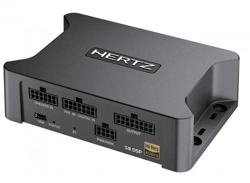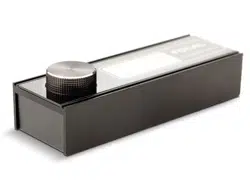
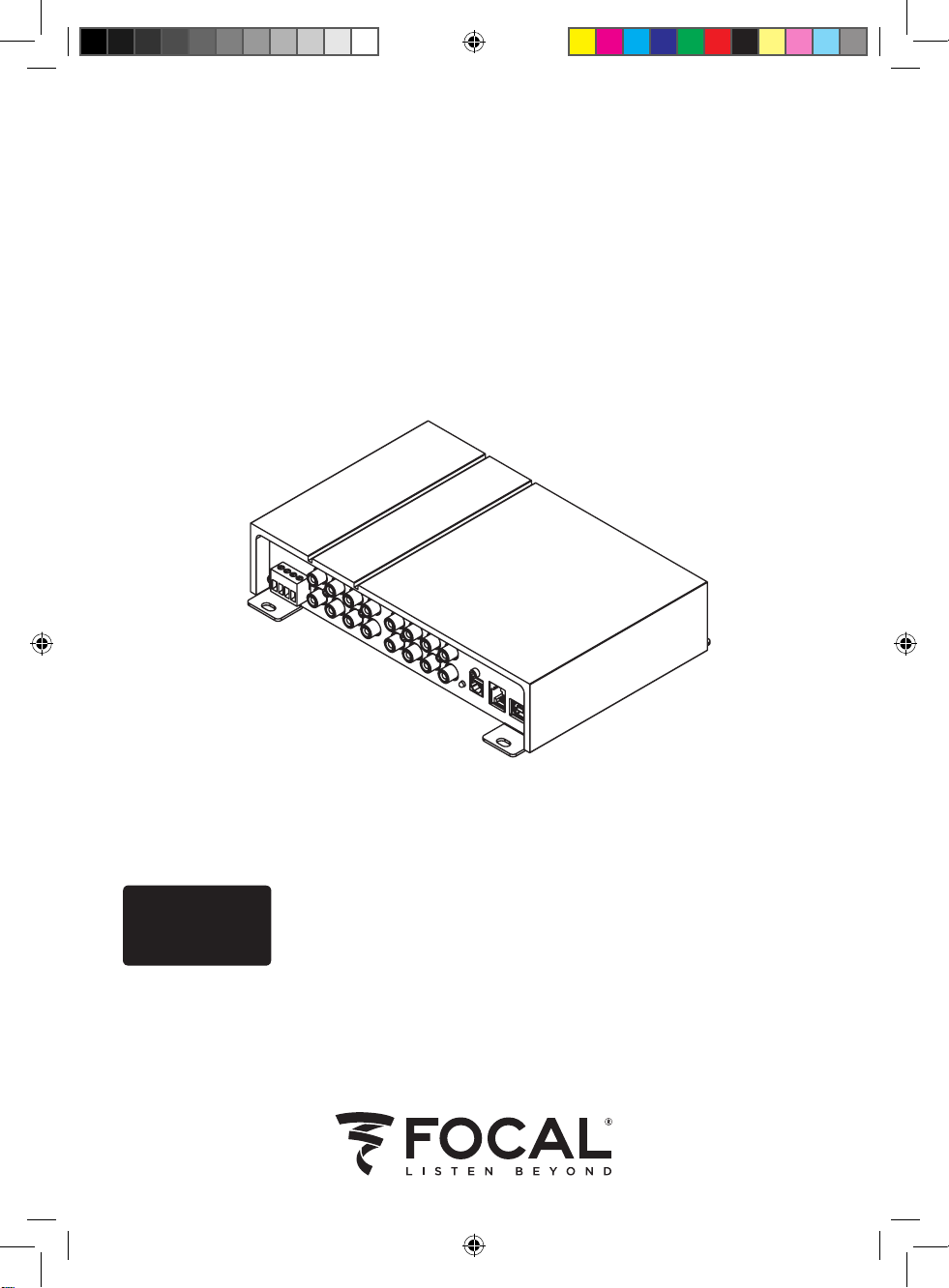
FSP-8
®
Processeur Audio 8 canaux
Manuel d’utilisation / User Manual / Gebrauchsanleitung / 使用手册
Français : page 6
English : page 15
Deutsch : seite 23
中文:第31
Notice_FSP-8.indd 1 20/01/17 12:24

Notice_FSP-8.indd 2 20/01/17 12:24
FSP-8
Processeur Audio 8 canaux / 8-Channel Digital signal processor
E
A B
C D
Notice_FSP-8.indd 3 20/01/17 12:24
4
Manuel d’utilisation / User manual
G
H
F
FSP-8
Processeur Audio 8 canaux / 8-Channel Digital signal processor
Notice_FSP-8.indd 4 20/01/17 12:24
5
Manuel d’utilisation / User manual
FSP-8
Processeur Audio 8 canaux / 8-Channel Digital signal processor
Manuel d’utilisation / User manual
Entrées
Sensibilité entrées bas-niveau (Analog et Aux) 1,2 V – 4,9 V
Sensibilité entrées haut-niveau (Analog et Aux) 4,8 V – 20,6 V
Formats supportés entrée numérique (optique) Jusqu’à 24 bits / 192 kHz
Sorties
Nombre de canaux 8
Niveau de sortie maximal (charge de 10 kΩ) 3,4 V
Réponse en fréquence
(filtre numérique o / -3dB)
5 Hz- 21 KHz
Rapport signal bruit
-90 dBA (analog input)
-99 dBA (Optical)
Distorsion - 10 kΩ - @1kHz
(avec filtre passe-bas 22 kHz)
0.02 %
Diaphonie - 4 Ω - @1kHz -78 dB
Plage de réglage de gain 64 dB
Equalizer
10 bandes
100 % paramétrables par canal
Filtre passe-haut réglable 16 Hz- 20 kHz
Filtre passe-bas réglable 16 Hz- 20 kHz
Filtre passe bande réglable 16 Hz- 20 kHz
Plage de réglage des délais 0-22 ms sur chaque canal
Pas de réglage des délais 0.1 ms
Inversion de phase
✓
Général
Easy Configuration
✓
Aide dynamique
✓
Courant de consommation à vide
(produit on, absence de signal, 14,4 Vin)
0,7 A (0,73 A avec remote)
Courant de consommation OFF
(14,4 V in, remote OFF)
< 50 µA
Télécommande déportée Vendue séparément
Protections Inversion de polarité
Poids 1,35 kg
Dimensions (L x l x H) 21,8 cm x 13,5 cm x 4,8 cm
Spécifications techniques
Notice_FSP-8.indd 5 20/01/17 12:24
6
Manuel d’utilisation / User manual
FSP-8
Processeur Audio 8 canaux / 8-Channel Digital signal processor
Technical specifications
Inputs
Low-level input sensitivity (analogue and aux) 1.2V – 4.9V
High-level input sensitivity (analogue and aux) 4.8V – 20.6V
Digital input formats supported (optical) Up to 24 bits/192kHz
Outputs
Number of channels 8
Max output (with 10kΩ) 3.4V
Frequency response
(digital crossovers off -3dB):
5Hz-21kHz
Signal/noise ratio
-90dBA (analogue input)
-99dBA (optical)
Distortion - 10kΩ - @ 1kHz
(with 22kHz low-pass crossover)
0.02 %
Crosstalk - 4Ω - @1kHz -78dB
Gain adjustment range 64dB
Equalizer
10 bands, each 100% customisable
for each channel
Adjustable high-pass crossover 16Hz-20kHz
Adjustable low-pass crossover 16Hz-20kHz
Adjustable bandpass crossover 16Hz-20kHz
Latency adjustment range 0-22ms per channel
Latency adjustment steps 0.1ms
Phase inverter
✓
General
Easy configuration
✓
Dynamic help
✓
Power consumption on standby
(product on, no signal, 14.4 Vin)
0.7A (0.73A with remote)
Power consumption OFF
(14.4 Vin, remote OFF)
< 50µA
Remote control sold separately
Protection Reverse polarity
Weight 2.8 lbs (1.35kg)
Dimensions (LxWxH)
8
9/16
"x5
5/16
"x17/8"
(21.8cmx13.5cmx4.8cm)
Notice_FSP-8.indd 6 20/01/17 12:24
Manuel d’utilisation
FSP-8
Processeur Audio 8 canaux
Nous vous remercions d’avoir choisi Focal au sein de votre système Car Audio et de partager avec
nous notre philosophie. Ce produit intègre le meilleur de la technologie Focal en matière de traitement
sonore par processeur (DSP).
Pour obtenir les meilleurs résultats, nous vous recommandons de faire installer votre FSP-8 par votre
revendeur Focal. Afin d’exploiter l’ensemble des fonctionnalités de votre FSP-8 et ainsi profiter
pleinement de ses performances, nous vous conseillons de lire attentivement les instructions de ce
livret, puis de le conserver pour vous y référer ultérieurement. Tout problème dû au non-respect des
règles d’utilisation peut entraîner une invalidation de la garantie.
AVERTISSEMENT
Ce symbole désigne les instructions importantes. Le non-respect de ces instructions peut entraîner de
graves blessures ou des dommages matériels.
Contenu de l’emballage :
- 1 processeur FSP-8
- 1 kit de fixation
- 1 câble USB
- 1 manuel d’utilisation
Télécommande vendue séparément.
AVERTISSEMENT
• N’activer aucune fonction susceptible de détourner votre attention lors de la conduite du véhicule.
Les fonctions requérant une attention prolongée, comme le réglage audio temps réel depuis l’interface
ordinateur, ne doivent être exploitées qu’à l’arrêt complet du véhicule. Veiller à toujours stopper le
véhicule dans un endroit sûr avant d’activer ces fonctions. Il y a risque de provoquer un accident.
• Garder le volume à faible niveau de façon à pouvoir entendre les bruits extérieurs durant la période
de conduite du véhicule. Il y a risque de provoquer un accident.
• Ne pas ouvrir FSP-8, ni opérer de modifications sur le produit. Il y a risque d’accident, d’incendie ou
de choc électrique.
• Utiliser FSP-8 sur des applications mobiles de 12 volts uniquement. Toute utilisation autre que
l’application désignée comporte un risque d’incendie, de choc électrique ou de blessure.
• Utiliser des fusibles d’ampérage approprié. Il y a risque d’incendie ou de décharge électrique.
Pour validation de la garantie Focal-JMlab,
il est maintenant possible d’enregistrer son produit en ligne : www.focal.com/garantie
Dans un but d'évolution, Focal-JMlab se réserve le droit de modifier les spécifications techniques de ses produits sans préavis. Images non contractuelles.
Français
Notice_FSP-8.indd 7 20/01/17 12:24
8
Manuel d’utilisation
FSP-8
Processeur Audio 8 canaux
• Effectuer correctement les connexions. Vérifier la section du câble et le type de câble. Il y a risque
d’incendie, de blessures et/ou d’endommagement du FSP-8.
• Ne pas utiliser d’écrous ni de boulons du circuit de direction ou de freinage pour la connexion de la
masse. Les boulons et écrous utilisés pour les circuits de freinage et de direction (ou tout autre système
de sécurité) ainsi que les différents réservoirs ne doivent jamais être utilisés pour l’installation ou la liaison
à la masse. L’utilisation de ces organes comme masse peut désactiver le système de contrôle du véhicule
et causer un incendie ou autre avarie.
• Garder les petits objets susceptibles d’être ingérés, comme les boulons ou les vis, hors de portée des
enfants. L’ingestion de tels objets peut entraîner de graves blessures. En cas d’ingestion, consulter un
médecin.
• Avant d’entamer l’installation, déconnecter la borne négative de la batterie pour éviter tout risque de
blessure, d’incendie ou d’endommagement du matériel. Avant de débuter toute phase de connexion,
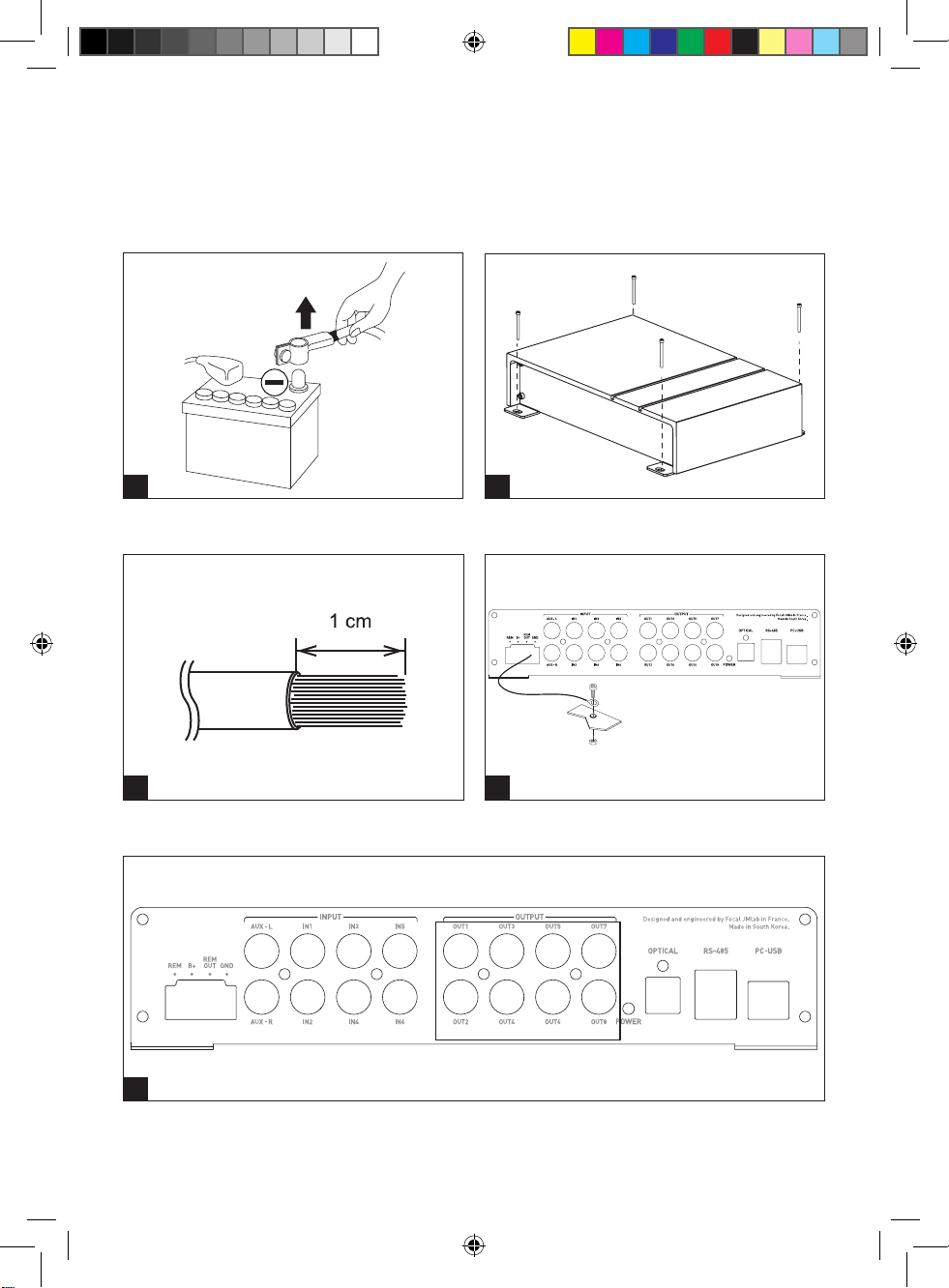
s’assurer de retirer la borne négative (-) de la batterie du véhicule. (fig.A)
• L’écoute prolongée à fort niveau, au-delà de 110 dB, peut détériorer durablement l’audition.
Des écoutes, même brèves, au-delà de 130 dB, peuvent provoquer des lésions auditives irrémédiables.
• Interrompre toute utilisation en cas de problème. Le non-respect de cette précaution peut entraîner
des blessures ou endommager FSP-8. Si un dysfonctionnement persiste, retourner FSP-8 auprès de votre
revendeur Focal en vue de sa réparation.
• Utiliser les accessoires spécifiés et les installer correctement. Utiliser uniquement les accessoires
spécifiés dans le manuel d’utilisation, ainsi que ceux qui sont fournis dans l’emballage. L’utilisation
d’autres composants peut causer des dommages internes au produit ou son installation risque de ne pas
être effectuée correctement. Les pièces utilisées risquent de se desserrer et de provoquer des dommages
ou une défaillance technique du produit. Il y a risque d’accident, d’incendie ou de choc électrique.
• Ne pas installer dans des zones fortement humides ou poussiéreuses. Éviter d’installer FSP-8 dans
des zones du véhicule soumises à une forte humidité ou à une présence excessive de poussière.
La pénétration d’humidité ou de poussière à l’intérieur du produit risque de provoquer une défaillance.
Notice_FSP-8.indd 8 20/01/17 12:24
9
FSP-8
Processeur Audio 8 canaux
Manuel d’utilisation
Installation de FSP-8
L’installation de ce produit requiert des compétences techniques et de l’expérience.
En cas d’incertitude sur l’aptitude à l’installer, confier cette tâche à un revendeur Focal afin de profiter
pleinement de l’ensemble des possibilités de FSP-8.
La section ci-dessous traite de points relatifs au véhicule dont il faut tenir compte pour l’installation de
FSP-8. Vous gagnerez du temps en planifiant à l’avance la disposition du système et du câblage.
Assurez-vous, durant cette étape préparatoire, que l’ensemble des réglages resteront accessibles une fois
l’installation terminée.
Avant de commencer l’installation, merci de suivre scrupuleusement les règles suivantes :
1 - Après lecture intégrale du manuel d’utilisation, s’assurer d’avoir compris l’ensemble des instructions
avant d’installer FSP-8.
2 - Débrancher le fil négatif de la batterie avant de commencer l’installation. (fig. A)
3 - Pour faciliter le montage, nous suggérons de dérouler tous les fils avant d’installer FSP-8.
4 - Acheminer l’ensemble des câbles RCA, haut-parleur, REM et télécommande (commande déportée) à
l’écart des câbles d’alimentation afin d’éviter tout parasitage du signal.
5 - Utiliser des connecteurs de qualité sur le bornier de FSP-8 afin d’assurer une fiabilité d’installation et
minimiser les pertes de signal ou de puissance.
6 – Vérifier avant de réaliser toute opération de ne pas couper ou percer le réservoir d’essence, les conduites
de carburant, de frein, hydrauliques ou de dépression, ainsi que le câblage électrique.
7 - Ne jamais faire passer de fil sous le véhicule. Il faut impérativement les installer à l’intérieur de celui-ci pour
une meilleure protection. Lors du passage des câbles, vérifier que ceux-ci ne gêneront pas la conduite
du véhicule. Les câbles qui obstruent ou dépassent à des endroits tels que le volant, les pédales (frein,
fonctionnement de l’airbag, accélérateur et embrayage…), peuvent s’avérer extrêmement dangereux.
8 - Éviter de faire passer des fils par-dessus ou à travers des bords tranchants. Tout fil acheminé à travers
du métal doit être protégé par des passe-fils. Faire cheminer les câbles à l’écart des pièces mobiles
(rails d’un siège…) et des arêtes acérées ou pointues. Cela évitera ainsi de coincer ou d’endommager
les câbles.
9 - Toujours protéger la batterie et le circuit électrique de dommages potentiels à l’aide de fusibles.
Installer un porte-fusible et un fusible appropriés sur le câble d’alimentation 12 V positif (+) à moins de
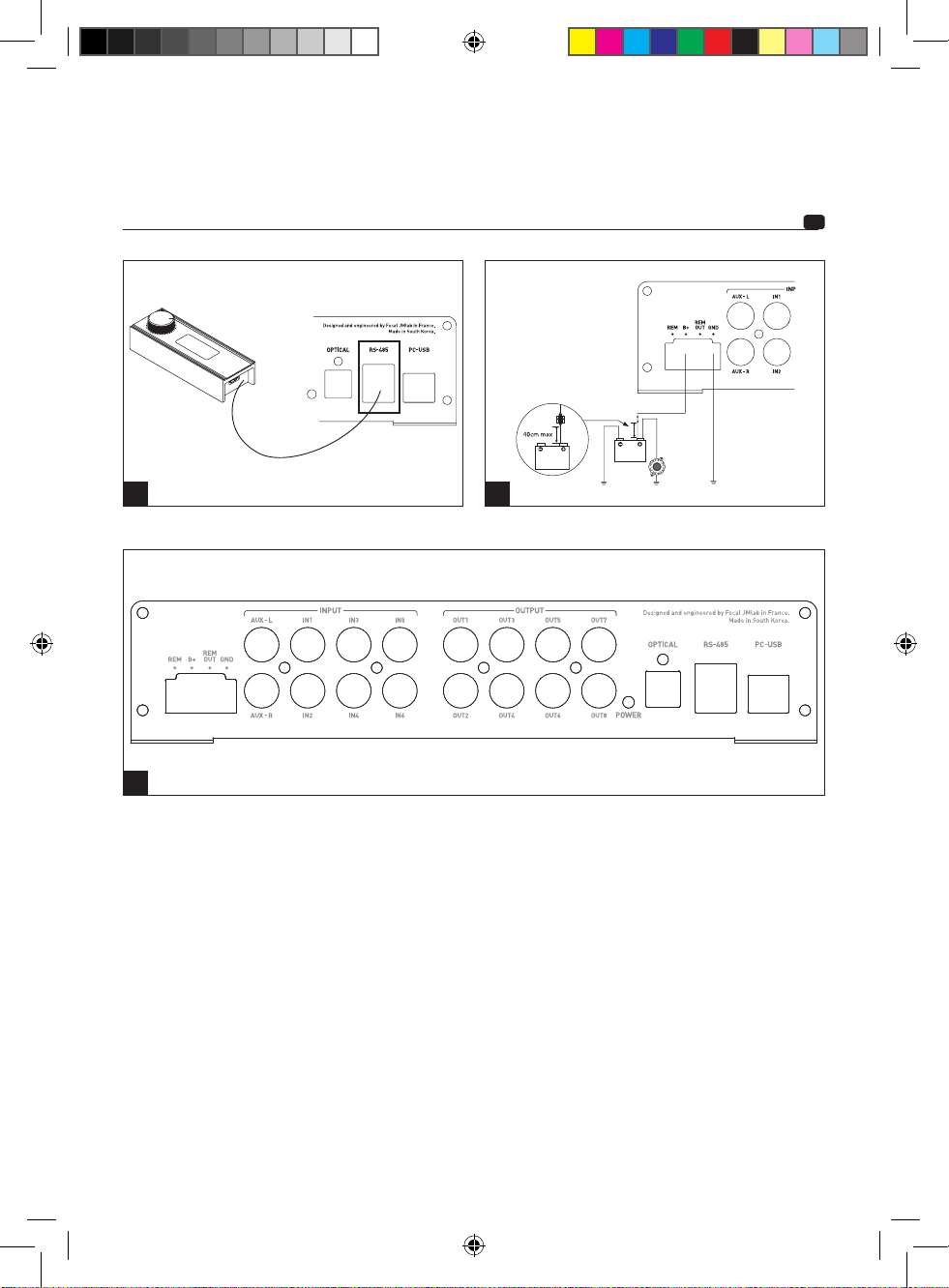
40 cm de la borne de la batterie. Idéalement, cette distance doit être la plus courte possible (fig. G).
10 - Préparer la masse du châssis en grattant toute trace de peinture sur la surface métallique, afin d’assurer
une bonne mise à la masse. Les connexions de masse doivent être aussi courtes que possible et
TOUJOURS connectées à du métal soudé à la carrosserie ou au châssis du véhicule (fig. D). Le point
de masse généralement retenu est celui assurant la liaison entre la borne négative de la batterie et le
châssis du véhicule.
1 - Mise en place du FSP-8
Où installer le FSP-8 ?
Une dissipation thermique est nécessaire au fonctionnement de FSP-8. Pour cette raison, FSP-8 doit être
monté dans un endroit permettant une ventilation. Il est impératif de ne pas couvrir FSP-8 afin de ne pas
créer de surchauffe.
NE JAMAIS monter ce produit dans le compartiment moteur du véhicule. Ceci entraînerait l’annulation de
la garantie.
2 - Fixation du FSP-8
Installer l’appareil sur un support qui permet un vissage sans dommages pour le véhicule.
Positionner FSP-8 à l’emplacement souhaité et le repérer.
Placer l’unité FSP-8 sur le support, puis fixer solidement l’appareil à l’aide des 4 vis fournies (fig. B).
Notice_FSP-8.indd 9 20/01/17 12:24
10
Manuel d’utilisation
FSP-8
Processeur Audio 8 canaux
3 – Câblage
Utiliser uniquement les câbles préconisés dans le manuel d’utilisation. La section des câbles d’alimentation
doit correspondre à celle mentionnée dans le tableau (paragraphe 3.1) et est fonction de la puissance de
consommation et de la longueur de câble nécessaire. Utiliser des câbles RCA à double ou triple blindage
pour éviter tout parasitage du signal bas niveau.
ATTENTION
Éviter de faire passer les câbles d’alimentation près des câbles d’entrée/sorties, de l’antenne, des
équipements et faisceaux sensibles. Les fils d’alimentation transportent un courant élevé pouvant produire
un parasitage du signal audio.
Réduire le plus possible la longueur des câbles afin d’optimiser la qualité de l’installation et ainsi limiter les
pertes de signal.
3.1 – Câblage de l’alimentation
Les sections des câbles d’alimentation à utiliser dépendent de la distance de câblage à la batterie et à la
masse, les préconisations minimum sont rassemblées dans le tableau suivant :
Produit
FSP-8 Section mm
2
> 0,5 mm²
Section AWG < 20 AWG
Le respect de ces règles de câblage est indispensable à l’aspect sécuritaire de votre installation électrique.
Il est également important pour maintenir les performances maximales de votre FSP-8.
Faire cheminer le câble d’alimentation positif (+).
Se munir du câble d’alimentation négatif (- ou masse). Ce câble doit être le plus court possible et ne doit
idéalement pas dépasser 1 mètre, afin d’assurer une parfaite liaison entre FSP-8 et le châssis du véhicule.
Le câble et sa section doivent être conformes au tableau ci-dessus. Trouver un point de masse adéquat,
puis le poncer pour enlever toute trace de peinture ou autre vernis et ainsi optimiser la qualité du contact.
Percer la tôle préalablement poncée au diamètre correspondant à la vis choisie en s’assurant qu’aucun
passage de câbles du réservoir ou d’un autre organe sensible du véhicule ne soit à proximité. Dénuder
1 cm de câble (fig. C). Souder et isoler le câble sur la borne GND de FSP-8. Étamer l’autre extrémité puis
sertir ou souder sur la cosse prévue à cet effet. Insérer la cosse dans la vis, puis mettre la vis et son écrou
en place et visser fermement. (fig. D)
3.2.1 – Câblage des signaux d’entrée sur FSP-8
Votre autoradio est équipé de sorties RCA bas niveaux ou optique.
Faire cheminer ensemble les câbles de modulation (RCA) ou optiques, le câble REM en provenance de
votre autoradio, ainsi que le câble REMOTE CONTROL (si la commande déportée accessoire est installée,
connecteur RJ-485) en les isolant des autres accessoires automobiles de forte puissance, particulièrement
les moteurs électriques (essuie-glace...).
Votre autoradio est uniquement équipé de sorties amplifiées (sorties haut-parleurs).
Faire cheminer ensemble les câbles de modulation en provenance des sorties de l’autoradio, ainsi que le
câble REMOTE CONTROL (si la commande déportée accessoire est installée, connecteur RJ-485) en les
isolant des autres accessoires automobiles de forte puissance, particulièrement les moteurs électriques
(essuie-glace...).
Le câblage de l’entrée REM n’est alors pas indispensable ; FSP-8 est muni d’un système de détection du
signal DC sur ses entrées haut niveau. Cette fonction n’est pas disponible sur l’entrée AUX et OPTICAL.
Notice_FSP-8.indd 10 20/01/17 12:24
11
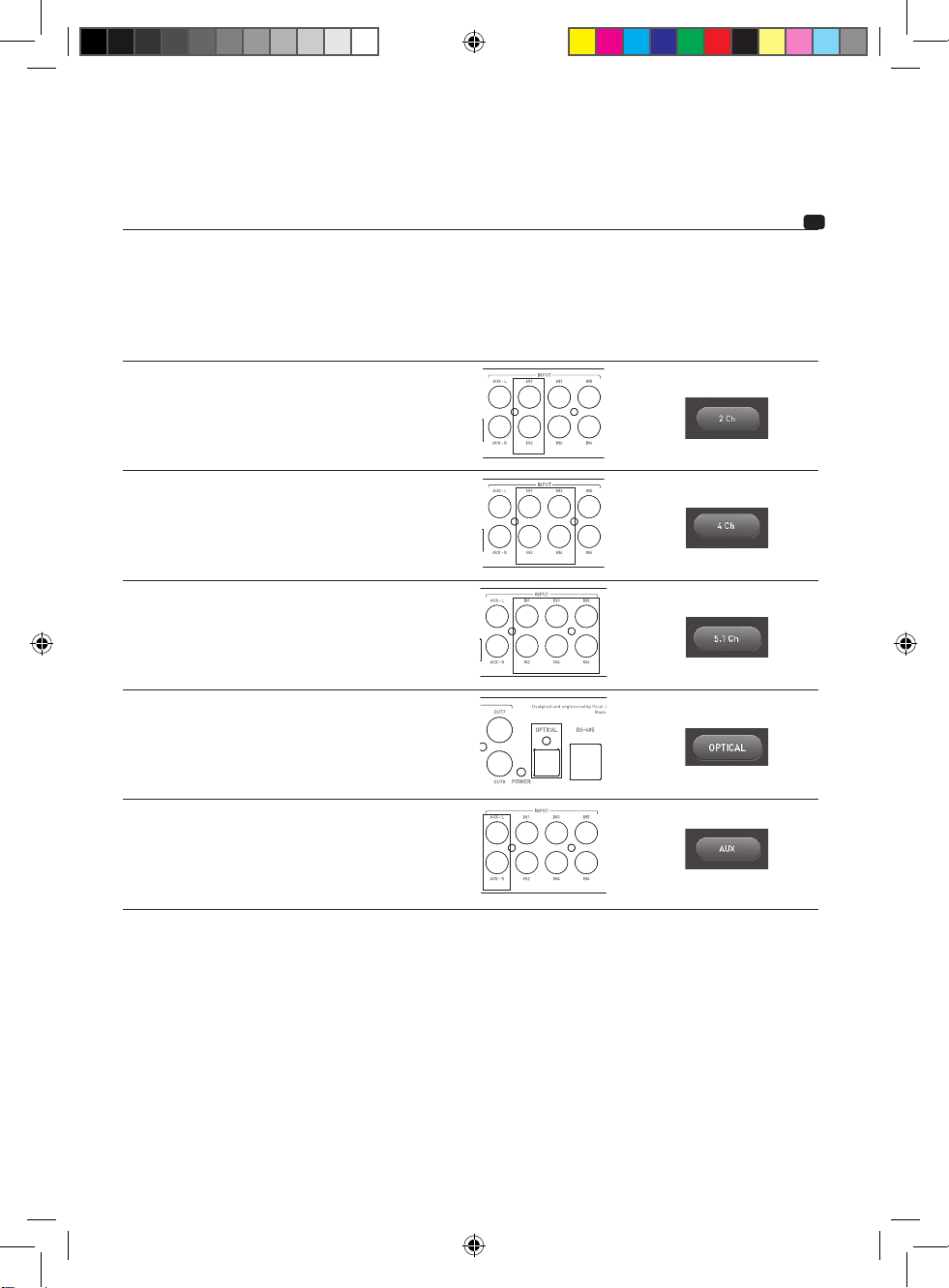
Câbler les entrées selon les cas d’utilisation répertoriés ci-dessous :
Mode de câblage
d’entrée
Cas d’utilisation Entrées à relier Sélectionner la fonction
dans le logiciel de contrôle
Stéréo Votre autoradio ne comporte
qu’une seule sortie RCA ou
une seule paire de sorties
haut-parleurs.
4 canaux Votre autoradio comporte
4 sorties RCA ou 4 sorties
haut-parleurs.
Et/ou
Vous souhaitez conserver la
fonction de fader depuis votre
autoradio.
5.1 Votre autoradio ou source
comporte une sortie 5.1
décodant le multicanal.
Optique Votre autoradio comporte une
sortie numérique optique.
AUX Vous souhaitez raccorder une
source supplémentaire au
FSP-8.
Information sur le câblage de l’entrée supplémentaire AUX
FSP-8 est équipé d’une entrée AUX bas niveau complémentaire. Elle permet par exemple de connecter une
seconde source sonore stéréo (smartphone, baladeur numérique par exemple). Elle est sélectionnable soit
depuis l’interface logicielle de commande du FSP-8, soit depuis la télécommande accessoire.
Cette entrée AUX est compatible des niveaux ligne asymétriques 2 V seulement. Ne jamais câbler de signal
haut-niveau en provenance d’un amplificateur ou d’un autoradio sur cette entrée.
Manuel d’utilisation
FSP-8
Processeur Audio 8 canaux
Notice_FSP-8.indd 11 20/01/17 12:24
12
3.2.2 – Connexion des signaux de sortie sur FSP-8
La phase de connexion des câbles de sortie peut débuter.
Connecter les RCA de sortie (section OUTPUT) au FSP-8 en respectant le lien aux amplificateurs qui vont
piloter votre architecture haut-parleurs (fig. E). L’architecture haut-parleurs devra être configurée via la section
"configuration" du logiciel de contrôle FSP-8 DSP Manager.
3.3 – Câblage et fonctionnement de la télécommande
Si vous avez choisi d’installer la commande déportée accessoire, connecter le câble de la télécommande
déportée fourni sur le connecteur RJ-485 afin de disposer des fonctions de réglage temps réel, du contrôle
du volume général, du caisson de basses et du rappel des presets. (fig. F)
Le clic sur le bouton de contrôle permet le défilement dans les menus.
La rotation du potentiomètre permet la sélection.
3.4 – Câblage de l’alimentation et de la REMOTE (fig. G)
Préparer le câble d’alimentation positif (+) pour le relier à FSP-8 souder et isoler la liaison.
ATTENTION
Le câble reliant la borne positive (+) de la batterie au bornier "+ BATT" de FSP-8 doit IMPÉRATIVEMENT
comporter un fusible (valeur de l’ampérage : 3 ampères) à 40 cm ou moins de la batterie du véhicule. Il doit
respecter les recommandations du paragraphe 3.1.
Les connexions du porte-fusible doivent être étanches.
Le porte-fusible doit être relié de part et d’autre du câble d’alimentation positif (+). Il doit être situé proche
de la batterie (10 à 40 cm). Démonter le porte-fusible en prenant soin d’ôter le fusible. Fixer le socle du
porte-fusible.
Couper le câble d’alimentation rouge entre 10 et 40 cm (maximum) de la batterie. Garder la chute de câble
qui servira pour relier l’autre extrémité du porte-fusible à la borne positive (+) de la batterie du véhicule.
Dénuder 1 cm (fig. C), puis étamer. Visser le câble dans le bornier du porte-fusible. Récupérer la chute de
câble restante. Dénuder 1 cm, puis étamer. Visser le câble dans l’autre bornier du porte-fusible.
Préparer le câble d’alimentation positif (+) pour le relier à FSP-8 sur le point B+.
Insérer le fusible dans le(s) porte-fusible(s), puis visser fermement.
Connecter ensuite le câble REMOTE à FSP-8 (borne REM). Connecter l’autre extrémité du câble REMOTE
à la borne REMOTE de l’autoradio.
Connecter ensuite le câble REMOTE OUT du FSP-8 (borne REM OUT) à l’entrée REMOTE de vos
amplificateurs. Ainsi c’est le démarrage de FSP-8 qui déclenchera ensuite le démarrage de vos amplificateurs.
3.5 – Démarrage et vérifications – connexion au logiciel de contrôle FSP-8 DSP Manager
La phase de connexion est maintenant terminée. Il reste à vérifier la bonne alimentation ainsi que le bon
fonctionnement d’ensemble (autoradio / FSP-8 / amplificateurs / haut-parleurs). Mettre le gain de la
source et de vos amplificateurs au minimum. Mettre sous tension les différents éléments.
Manuel d’utilisation
FSP-8
Processeur Audio 8 canaux
Notice_FSP-8.indd 12 20/01/17 12:24
13
Avant toute connexion USB, installer le logiciel FSP-8 DSP Manager, disponible sur le site FOCAL à cette
adresse :
http://www.focal.com/fsp-8/dsp-manager/fr
http://www.focal.com/fsp-8/dsp-manager/en
Une fois l’ensemble des éléments sous tension, lancer le logiciel FSP-8 DSP Manager, connecter le FSP-8 à
l’ordinateur via la prise USB puis effectuer vos réglages et essais à faible volume sonore.
Une fois la configuration haut-parleur correctement programmée, vous pouvez régler les gains d’amplificateurs
et augmenter progressivement le niveau sonore.
Se reporter à la notice dédiée au logiciel et disponible en ligne (site Internet FOCAL) ou via l’aide du logiciel
pour toute problématique liée à l’installation logicielle.
4 – Panneaux de contrôle et connexions
(fig. H)
REM : Ce connecteur REM assure la liaison entre la source (autoradio) et le FSP-8 via une sortie REM ou
REMOTE de l’autoradio. Cela permet la mise sous tension automatique de FSP-8 dès la mise sous tension
de la source (autoradio). Ce connecteur n’est pas nécessaire en cas d’utilisation des entrées IN en mode
haut niveau.
B+ : Le connecteur d’alimentation B+ est dédié à recevoir le câble d’alimentation assurant la liaison entre
FSP-8 et la borne positive (+) de la batterie.
REM OUT : Le connecteur REM OUT permet de piloter la mise sous tension des amplificateurs.
GND : Le connecteur d’alimentation GND (ground) est dédié à recevoir le câble d’alimentation négatif (-)
assurant la liaison entre FSP-8 et le châssis du véhicule.
INPUT : Ces fiches RCA sont dédiées au câblage du signal entrant, avant traitement par le FSP-8.
IN1 à IN6 : Ces fiches RCA sont dédiées au câblage du signal entrant, en haut ou bas niveau. L’adaptation
se fera via le logiciel FSP-8 DSP Manager.
AUX-L / AUX-R : Ces fiches RCA sont dédiées au câblage d’une éventuelle source auxiliaire stéréo
supplémentaire.
OPTICAL : Ce connecteur Toslink dédié au câblage d’un signal entrant sous forme numérique, avant
traitement par le FSP-8.
OUTPUT : Ces fiches RCA sont dédiées au câblage du signal sortant, après traitement par le FSP-8.
RS-485 : Ce connecteur est dédié au branchement de la commande accessoire si installée. Cet accessoire
permet un réglage à distance du gain de FSP-8.
PC-USB : Ce connecteur est dédié au branchement du FSP-8 à un ordinateur embarquant le logiciel de
contrôle FSP-8 DSP Manager.
Manuel d’utilisation
FSP-8
Processeur Audio 8 canaux
Notice_FSP-8.indd 13 20/01/17 12:24
14
5 - Durée de fonctionnement du FSP-8
Éviter de faire fonctionner FSP-8 durant une longue période sans démarrer le véhicule. Ceci peut entraîner
la décharge prématurée de la batterie.
6 - Dépannage
L’état du témoin lumineux signifie certains modes de défaillance ou origines de pannes.
Si malgré ces vérifications, le fonctionnement normal n’est pas récupéré, s’adresser à l’installateur ou
revendeur du FSP-8.
Etat LED Présence de son Origine possible Dépannage
Allumée NON Défaillance du reste
de la chaîne audio
et/ou câblage
Éteindre le système audio.
Vérifier la présence de signal à l’entrée du FSP-8,
vérifier les câbles RCA du FSP-8 vers vos amplificateurs.
Vérifier également le bon fonctionnement du reste de la
chaîne audio (autoradio-amplificateurs)
Éteinte NON ou altéré Absence de 12 V Éteindre le système audio.
Vérifier la présence du 12 V batterie.
Éteinte NON Fusible endommagé Éteindre le système audio.
Vérifier les câblages, changer le fusible.
Éteinte NON ou altéré Absence de signal
remote
Éteindre le système audio. Vérifier la présence et stabilité
du signal remote au moment du démarrage de l’auto-radio.
7 – Compatibilité logiciel.
PC Windows XP / Vista / Seven / 8 / 10
Conditions de garantie
En cas de problème, adressez-vous en premier lieu à votre revendeur Focal. La garantie pour la France sur
tout matériel Focal est de 2 ans. En cas de matériel défectueux, celui-ci doit être expédié à vos frais, dans
son emballage d’origine auprès du revendeur, lequel analysera le matériel et déterminera la nature de la
panne. Si celui-ci est sous garantie, le matériel vous sera rendu ou remplacé en « franco de port ». Dans le
cas contraire, un devis de réparation vous sera proposé. La garantie ne couvre pas les dommages résultant
d’une mauvaise utilisation ou d’un branchement incorrect.
En dehors de la France, le matériel Focal est couvert par une garantie dont les conditions sont fixées
localement par le distributeur officiel Focal de chaque pays, en accord avec les lois en vigueur sur le
territoire concerné.
Manuel d’utilisation
FSP-8
Processeur Audio 8 canaux
Notice_FSP-8.indd 14 20/01/17 12:24
Please validate your Focal-JMlab warranty,
it is now possible to register your product online: www.focal.com/warranty
Thank you for choosing Focal for your car audio system and for sharing our philosophy, ‘the Spirit of
Sound’. This product offers the best of Focal’s digital signal processing (DSP) technology.
In order to obtain the best results, we recommend you have your FSP-8 installed by your Focal dealer.
To get the most from your FSP-8’s functionalities, and to enjoy its full potential, we recommend you
read the instructions in this manual thoroughly, and that you keep them somewhere safe for future
reference. Any problems due to the non-compliance of these instructions may void the warranty
WARNING
This symbol indicates important instructions. Failure to comply with these instructions may result in serious
injury or material damage.
Package Contents:
- 1 FSP-8 processor
- 1 fixing kit
- 1 USB cable
- 1 user manual
Remote control sold separately
WARNING
• Do not use any function which may distract you while driving the vehicle. Functions requiring sustained
attention, such as the real-time audio control from the computer interface, must only be used when the
vehicle is at a complete standstill. Always make sure to stop your vehicle in a safe place before using such
functions. Failure to do so may cause an accident.
• Keep the volume at a low level to be able to hear outside noises while driving the vehicle. Failure to
do so may cause an accident.
• Do not open the FSP-8, or make any modifications to the product. Failure to do so may cause an
accident, a fire or an electric shock.
• Only use your FSP-8 with 12V mobile applications. Any use other than that intended may cause a fire,
an electric shock or injury.
• Use fuses with the adequate amperage. Failure to do so may cause a fire or an electric shock.
Our policy of continual product improvement means that Focal-JMlab reserves the right to modify the technical specifications
of its products without notice. Product may vary from images.
English
User Manual
FSP-8
8-Channel Digital signal processor
Notice_FSP-8.indd 15 20/01/17 12:24
16
• Wire the connections correctly. Make sure you use the appropriate wire gauge and type of cable.
Failure to do so may cause a fire, injury and/or material damage to your FSP-8.
• Do not use nuts or fasteners part of the steering or braking systems for ground connection. The
fasteners and nuts used for the brake and steering systems (or any other security system) as well as the
various storage tanks must never be used for grounding. Using such parts as a ground may deactivate
the vehicle’s control system and cause a fire or other technical problems.
• Keep all small objects which could be swallowed, such as nuts and screws, out of the reach of children.
Swallowing such objects may cause serious injuries. If swallowed, seek medical advice.
• Before beginning the installation, disconnect the negative battery terminal to avoid any risk of injury,
fire or material damage. Before beginning to wire up your product, remove the vehicle’s negative (-)
battery terminal. (fig.A)
• Prolonged listening at high volumes, over 110dB, can cause long-term damage to your hearing.
Listening at volumes over 130dB, even for short periods of time, can cause permanent damage to
your hearing.
• Stop operation in the event of a problem. Failure to comply with this precaution may cause injury or
material damage to your FSP-8. If a malfunction persists, return the FSP-8 to your Focal dealer for repair.
• Use the accessories specified and be sure to install them correctly. Only use the accessories specified
in the user manual, and those which are supplied in the packaging. The use of other components could
cause internal damage to the equipment, or it may not be correctly installed. The parts used may become
loose and cause damage or a technical malfunction of the equipment. Failure to do so may cause an
accident, a fire or an electric shock.
• Do not assemble in very humid or dusty places. Avoid installing the FSP-8 in places with high levels of
humidity or with an excessive presence of dust. Humidity or dust getting inside the product may cause
a technical malfunction.
User Manual
FSP-8
8-Channel Digital signal processor
Notice_FSP-8.indd 16 20/01/17 12:24
17
Installing the FSP-8
Installation of this product requires technical knowledge and experience.
If you are uncertain of your ability to install it, we strongly recommend having your Focal dealer install
it for you, so that you will be able to take full advantage of your FSP-8.
The following section deals with issues related to the vehicle which must be considered before installing your
FSP-8. You’ll save time by planning the system layout and wiring in advance.
During this preparatory phase, please ensure that all the settings remain accessible once the installation is
complete.
Before starting the installation, please follow these instructions carefully:
1 - After thoroughly reading the user manual, make sure you have understood all the instructions before
installing your FSP-8.
2 - Disconnect the battery’s negative wire before starting installation. (fig.A)
3 - To facilitate assembly, we recommend you unwind all the wires before installing your FSP-8.
4 - Route all RCA, speaker driver, REM and remote control cables away from the power cables in order to
avoid any signal interference.
5 - Use quality connectors for the FSP-8 terminals to ensure a reliable installation and to minimise any losses
of signal or power.
6 – Before carrying out any operations, be extremely careful not to cut or drill through the fuel tank, fuel,
brake, hydraulic or vacuum lines, any electrical wiring or safety devices.
7 - Never route a wire under the vehicle. Wiring must be installed inside the vehicle to ensure better
protection. When routing the cables, make sure they do not impede your driving. Cables obstructing or
routed through areas such as the steering wheel and pedals (brake, airbag, accelerator and clutch, etc.)
may be extremely dangerous.
8 - Avoid routing wires over or through sharp edges. Any wire routed through metal must be protected with
a grommet. Route the wires away from mobile parts (seat rails…) and from sharp or pointed edges. This
will avoid getting the cables caught or damaging the cables.
9 - Always protect the battery and electric circuit from potential damage using fuses. Install a fuse holder
and adequate fuse on the 12V positive (+) power cable less than 15" (40cm) away from the battery
terminal. Ideally, the above-mentioned distance should be as short as possible (fig.G).
10 - Prepare the chassis ground by scraping off any traces of paint on the metal surface in order to ensure
proper grounding. The grounding connections should also be as short as possible and ALWAYS be
connected to metal welded to the body or the chassis of the vehicle (fig.D). The ground point which is
generally chosen is the one connecting the negative terminal of the battery to the chassis of the vehicle.
1 – Positioning your FSP-8
Where to install your FSP-8
Due to the power of the FSP-8, heat dissipation is required for correct operation. This is why the FSP-8 must
be placed in a well-ventilated area. Do not cover your FSP-8 as this may cause overheating.
NEVER install this product in the engine compartment of the vehicle. This will void the warranty.
2 – Fastening the FSP-8 in place
Install the device on a support which will avoid damaging the vehicle.
Position your FSP-8 at the desired location and make match-marks.
Place the FSP-8 on the support, then fix the device securely in place using the 4 screws supplied.
User Manual
FSP-8
8-Channel Digital signal processor
Notice_FSP-8.indd 17 20/01/17 12:24
18
3 – Connections
Only use the cables recommended in the user manual. The wire gauge of power cables must correspond
with those indicated in the table (paragraph 3.1) and depends on the power of your equipment and the
length of cable required. Use double or triple shielded RCA cables to avoid any interference with the low-
level signal.
CAUTION
Avoid routing power supply cables close to input/output cables, close to your car’s aerial or close to
sensitive equipment and harnesses. High-current power supply cables can cause static/interference that
affects audio signals.
Keep the cables as short as possible to optimise the quality of the installation. This will also limit signal loss.
3.1 – Connecting the power supply
The required wire gauge of power cables depends on the length of cabling to the battery and to the
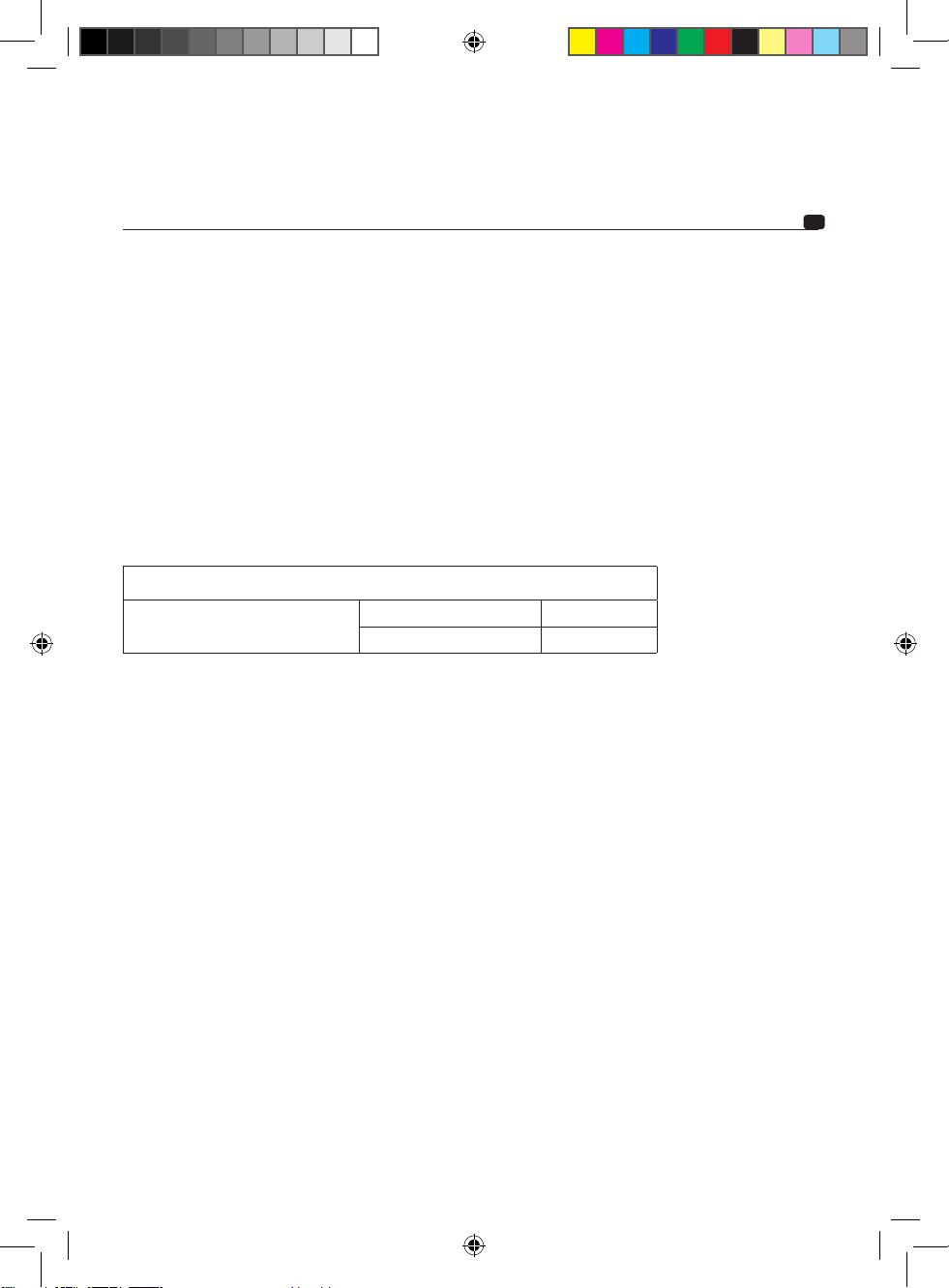
ground, the minimum recommendations are shown in the table below:
Product
FSP-8 Wire gauge in mm
2
> 0.5mm²
Wire gauge AWG < 20AWG
Compliance with these wiring rules is essential for the safety of your electrical installation. It is also
important for maintaining maximum performance of your FSP-8.
Route the positive (+) power cable.
Get hold of the negative (- or ground) power cable. This cable should be as short as possible and ideally
shouldn’t be any longer than 3ft (1m), to ensure a perfect connection between the FSP-8 and the chassis of
the vehicle. The cable and wire gauge must comply with the table above. Find a suitable grounding point,
then sand it to remove any traces of paint or other coating, in order to optimise the quality of the contact
point. Drill a hole in the metal that you have previously sanded, making the hole the same diameter as
the screw you are using, and making sure that there are no fuel lines, cables or any other sensitive vehicle
devices nearby. Strip 0
1/3
" (1cm) of cable (fig.C). Screw the cable securely to the FSP-8’s GND terminal. Tin
the other end of the cable and then crimp or weld it to the intended terminal lug. Pass the screw through
terminal lug, and fasten securely in place with the nut.
3.2.1 – Connecting the inputs to the FSP-8
Your head unit is equipped with low-level RCA or optical outputs.
Route together the modulator cables (RCA) or optical cables, the REM cable from the head unit, and the
REMOTE CONTROL cable (if the remote control is installed, RS-485 connector), ensuring you isolate them
from other powerful automobile accessories, particularly electric motors (windscreen wipers etc.).
Your head unit is only equipped with amplified outputs (speaker driver outputs).
Route together the modulator cables from the head unit and the REMOTE CONTROL cable (if the
remote control is installed, RS-485 connector), ensuring you isolate them from other powerful automobile
accessories, particularly electric motors (windscreen wipers etc.).
In this case, connecting the REM input is not essential as the FSP-8 is equipped with a DC detection system
on the high-level inputs. This function is not available on the AUX and OPTICAL inputs.
User Manual
FSP-8
8-Channel Digital signal processor
Notice_FSP-8.indd 18 20/01/17 12:24
19
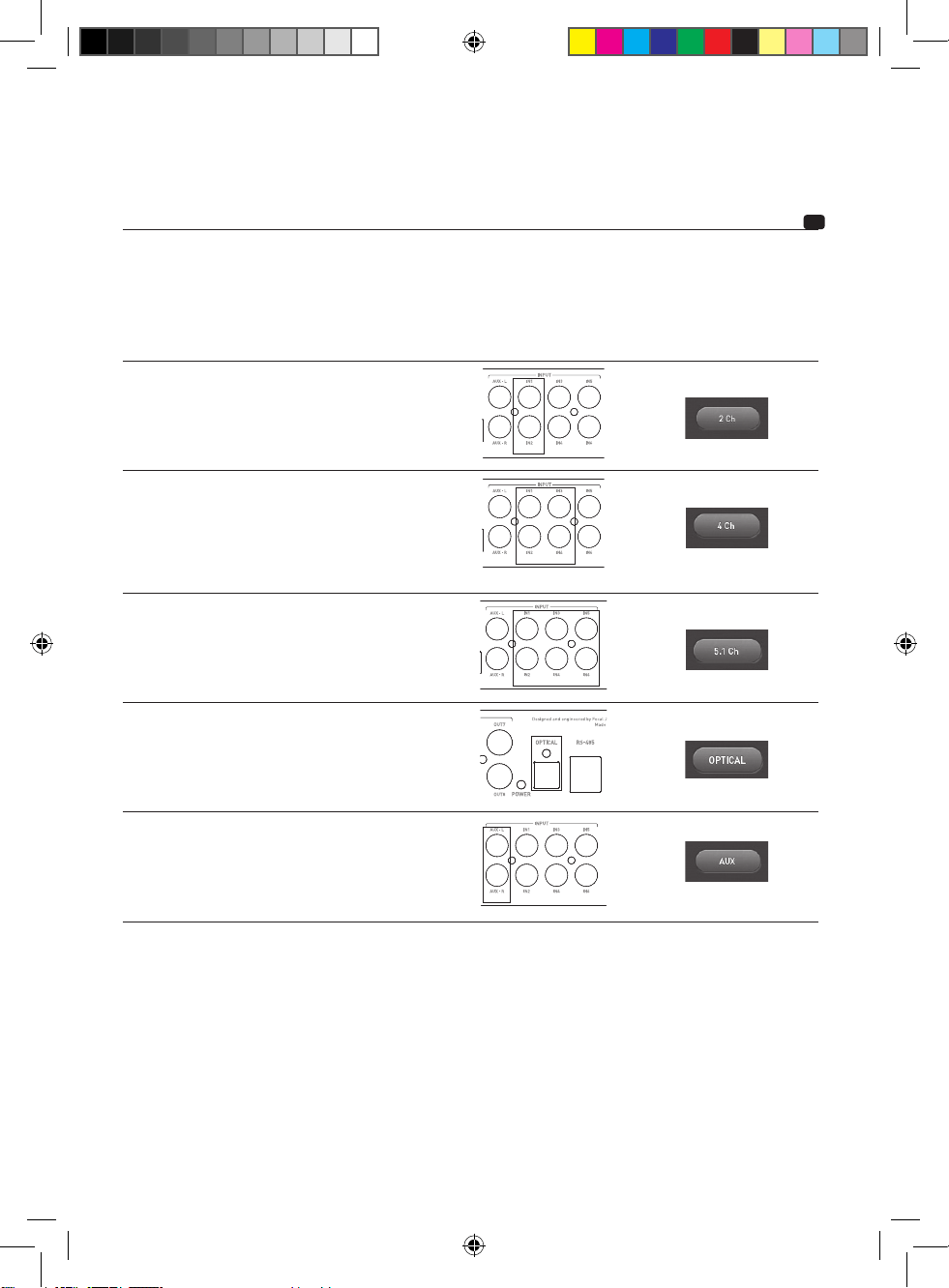
Connect the inputs according to the use cases shown in the table below:
Input mode Use case Inputs to connect Mode to select in the
manager software
Stereo Your head unit is only
equipped with one RCA
output or just one pair of
speaker driver outputs.
4-channel Your head unit is equipped
with 4 RCA outputs or 4
speaker driver outputs.
and/or
You wish to keep the head
unit’s fader function
5.1 Your head unit or source only
has a 5.1 output for decoding
multichannel audio.
Optical Your head unit has a digital
optical output.
AUX You wish to connect an
additional source to the
FSP-8.
Information on connecting the additional AUX input
The FSP-8 is equipped with an additional low-level AUX input. This enables the user to connect a second
stereo source (such as a smartphone or a digital audio player) for example. It can be selected using the
FSP-8 manager software or using the optional remote control.
The AUX input is only compatible with 2V unbalanced line-level signals. Never wire a high-level signal
from an amplifier or a head unit to this input.
User Manual
FSP-8
8-Channel Digital signal processor
Notice_FSP-8.indd 19 20/01/17 12:24
20
3.2.2 – Connecting the outputs from the FSP-8
You can now start connecting the output cables.
Connect the RCA outputs (OUTPUT section) from the FSP-8 making sure you respect the corresponding
amplifiers which will power your speaker driver architecture (fig.E). The speaker driver architecture should
be set up using the ‘Configuration’ section in the FSP-8’s DSP Manager software.
3.3 – Connecting and using the remote control
If you choose to install the optional remote control, connect the remote control cable supplied to the RS-
485 connector to benefit from real-time control, overall volume control, subwoofer settings and a reminder
of the pre-sets. (fig.F)
Click the control knob to navigate through the menus.
Turn the knob to make your selection.
3.4 – Connecting the power supply and REMOTE (fig.G)
Prepare the positive (+) power supply cable for the FSP-8 using an appropriate fork terminal and secure
in place by screwing tightly.
CAUTION
The cable connecting the positive (+) battery terminal to the ‘B+’ terminal on the FSP-8 MUST be fused
(ampere rating: 3 amperes) at less than 15" (40cm) away from the vehicle’s battery. It must comply with
the recommendations given in section 3.1.
The connections on the fuse-holder must be insulated.
Both ends of the fuse holder should be connected to the positive (+) power cable. It should be placed
close to the battery (4" to 15"/ 10 to 40cm). Open the fuse holder, removing the fuse with care. Fix the fuse
holder’s base in position.
Cut the red power cable to a length of 4" to 15" (maximum) from the battery. Keep the offcut of cable
which will be used to connect the other end of the fuse holder to the vehicle’s positive (+) battery terminal.
Strip 1/3" (1cm) (fig.G), then tin. Screw the cable to the fuse holder terminal. Get the remaining offcut of
cable.
Prepare the positive (+) power supply cable for connecting the B+ terminal on the FSP-8
Insert the fuse into the fuse-holder(s), and screw shut tightly.
Now connect the REMOTE cable to the FSP-8 (REM terminal). Connect the other end of the REMOTE cable
to the head unit’s REMOTE terminal.
Now connect the FSP-8’s REMOTE OUT cable (REM OUT terminal) to your amplifier’s REMOTE inputs.
Thus, when the FSP-8 is turned on, your amplifiers will be turned on.
3.5 – Start-up and checks – Connecting to the FSP-8 DSP Manager software
The connection phase is now complete. You must now check that the power supply is correct and that
everything is working correctly (head unit/FSP-8/amplifiers/speaker drivers). Set the source and amplifier
gain to their minimum. Turn on the different components.
User Manual
FSP-8
8-Channel Digital signal processor
Notice_FSP-8.indd 20 20/01/17 12:24
21
Before connecting a USB cable, install the FSP-8 DSP MANAGER, available on the FOCAL website at:
http://www.focal.com/fsp-8/dsp-manager/fr
http://www.focal.com/fsp-8/dsp-manager/en
Once the different components have been turned on, launch the FSP-8 DSP Manager, connect the FSP-8 to
the computer using the USB cable, then configure settings and carry out checks at low volume.
Once the speaker driver setup is correct, adjust the gain on the amplifiers and gradually increase the volume.
Refer to the specific software manual, available online (FOCAL website) or using the software help in case
of difficulty with the software.
4 – Control panel and connections
(fig. H)
REM: the REM connector connects the source (head unit) to the FSP-8 via a REM or REMOTE output on the
head unit. This enables the FSP-8’s automatic power on function when the source (head unit) is turned on.
This connector is not required when using IN inputs in high-level mode.
B+: the B+ power connector is for connecting the power cable of the FSP-8 to the positive (+) battery
terminal.
REM OUT: the REM OUT connector is for turning on the amplifiers.
GND: the GND (ground) power connector is for the negative (-) power cable connecting the FSP-8 and the
vehicle’s chassis.
INPUT: these RCA sockets are for connecting the incoming signal, before being processed by the FSP-8.
IN1 to IN6: these RCA sockets are for the incoming high- or low-level inputs. They are configured using the
FSP-8 DSP Manager software.
AUX-L/AUX-R: these RCA sockets are for connecting an additional auxiliary stereo source.
OPTICAL: this Toslink connector is for connecting a digital signal, before being processed by the FSP-8.
OUTPUT: these RCA sockets are used for connecting the output signal, after being processed by the FSP-8.
RS-485: this is used for connecting the optional remote control. This accessory allows you to adjust the gain
of the FSP-8.
PC-USB: this connector is for connecting the FSP-8 to a computer equipped with the FSP-8 DSP Manager
software.
User Manual
FSP-8
8-Channel Digital signal processor
Notice_FSP-8.indd 21 20/01/17 12:24
22
5 – Duration of use of the FSP-8
Avoid using the FSP-8 for extended periods of time without starting the vehicle. This may cause the
battery to go flat prematurely.
6 – Troubleshooting
The state of the LED indicates a malfunction or the source of a malfunction.
If despite these checks, the equipment is still not working correctly, contact your FSP-8 installer or dealer.
State of
the LED
Presence of
Sound
Possible Cause Action
Lit NO Malfunction with
the rest of the audio
system and/or
wiring
Turn off the audio system. Check the presence of an
input signal to the FSP-8, check the RCA cables from the
FSP-8 to your amplifiers.
Check the rest of the audio system (head unit-amplifiers)
Off NO or
intermittent
12V absent Turn off the audio system.
Check presence of 12V power from the battery.
Off NO Fuse damaged
Turn off the audio system.
Check wiring, change fuse
Off
NO or
intermittent
No remote signal
Turn off the audio system. Check the presence and
stability of the remote signal when turning
the head unit on.
7 – Software compatibility.
PC Windows XP/Vista/Seven/8/10
Conditions of warranty
Please contact your Focal dealer if you encounter any problems. The warranty of Focal equipment for
France is 2 years. In case of defective parts, they must be shipped in their original packaging to the original
retailer at your own expense. The retailer will then test the product in order to determine the nature of
the fault. If the product is still under warranty, the product will be returned to you or replaced, shipping
pre-paid. In case of the contrary, you will be given a repair estimate. The warranty does not cover damage
resulting from improper use or incorrect wiring.
Outside France, Focal products are covered by a warranty whose conditions are determined locally
by the official Focal retailer in each country, in compliance with the laws in force in the respective
geographical area.
User Manual
FSP-8
8-Channel Digital signal processor
Notice_FSP-8.indd 22 20/01/17 12:24
Im Interesse der beständigen Weiterentwicklung und Verbesserung seiner Produkte behält sich Focal-JMlab® das Recht vor, die technischen
Daten ohne Ankündigung zu ändern. Produkte können von der jeweiligen Abbildung abweichen.
Registrieren Sie Ihr Produkt online, um Ihre Focal-JMlab-Garantie zu bestätigen:
www.focal.com/warranty
Wir danken Ihnen, dass Sie Focal in Ihrem Car-Audio-System gewählt haben und unsere Philosophie
„The Spirit of Sound“ teilen. Dieses Produkt enthält das Beste aus der Focal-Technologie im Bereich
Klangverarbeitung per Prozessor (DSP). Um die besten Ergebnisse zu erzielen, empfehlen wir Ihnen,
Ihren FSP-8 von Ihrem Focal-Händler installieren zu lassen. Um alle Funktionen Ihres FSP-8 zu nutzen
und so seine Leistungen voll zu genießen, raten wir Ihnen, die Anweisungen dieses Hefts aufmerksam
zu lesen und es dann aufzubewahren, um es später zu Rate zu ziehen. Jedes Problem aufgrund der
Nichteinhaltung der Gebrauchsvorschriften kann zu einer Ungültigkeit der Garantie führen. Damit die
Garantie gültig ist, senden Sie sie bitte innerhalb von zehn Tagen nach dem Kauf ein.
WARNUNG
Dieses Symbol bezeichnet wichtige Anweisungen. Die Nichteinhaltung dieser Anweisungen kann zu
schweren Verletzungen oder Sachschäden führen.
Verpackungsinhalt:
- 1 Prozessor FSP-8
- 1 Einbausatz
- 1 USB-Kabel
- 1 Gebrauchsanleitung
Separat verkaufte Fernbedienung
WARNUNG
• Keine Funktion einschalten, die Ihre Aufmerksamkeit ablenken kann, während Sie das Fahrzeug
steuern. Die Funktionen, die eine längere Aufmerksamkeit erfordern, wie die Audioeinstellung in Echtzeit
von der Computerschnittstelle aus, dürfen nur bei vollständigem Stillstand des Fahrzeugs genutzt
werden. Es ist darauf zu achten, das Fahrzeug immer an einem sicheren Ort anzuhalten, bevor Sie diese
Funktionen einschalten. Es besteht das Risiko, einen Unfall zu verursachen.
• Die Lautstärke während dem Steuern des Fahrzeugs niedrig halten, um Außengeräusche hören zu
können. Es besteht das Risiko, einen Unfall zu verursachen.
• FSP-8 nicht öffnen und keine Veränderungen an dem Produkt vornehmen. Es besteht das Risiko eines
Unfalls, eines Brandes oder eines Stromschlags.
• FSP-8 ist ausschließlich an mobilen Geräten mit 12 Volt zu verwenden. Jede andere Verwendung als die
beabsichtigte Anwendung bringt ein Brand-, Stromschlags- oder Verletzungsrisiko mit sich.
• Sicherungen mit geeigneter Stromstärke verwenden. Es besteht das Risiko eines Brandes oder eines
Stromschlags.
Deutsch
Gebrauchsanleitung
FSP-8
Audio-Prozessor mit 8 Kanälen
Notice_FSP-8.indd 23 20/01/17 12:24
24
• Die Anschlüsse richtig herstellen. Den Kabelquerschnitt und den Kabeltyp überprüfen. Es besteht das
Risiko eines Brandes, von Verletzungen und/oder einer Beschädigung des FSP-8.
• Keine Muttern oder Schrauben des Steuer- oder Bremsschaltkreises für den Erdanschluss verwenden.
Die für den Brems- oder Steuerschaltkreis (oder jedes andere Sicherheitssystem) verwendeten Schrauben
und Muttern sowie die verschiedenen Behälter dürfen niemals für die Installation oder den Erdanschluss
verwendet werden. Die Verwendung dieser Elemente als Erdung kann das Steuersystem des Fahrzeugs
abschalten und einen Brand oder eine andere Beschädigung verursachen.
• Kleine Gegenstände, die verschluckt werden können, wie Bolzen oder Schrauben, von Kindern
fernhalten. Das Verschlucken solcher Gegenstände kann zu schweren Verletzungen führen. Bei
Verschlucken einen Arzt aufsuchen.
• Bevor Sie mit der Installation beginnen, den Minuspol der Batterie abtrennen, um jedes Risiko einer
Verletzung, eines Brandes oder einer Beschädigung des Gerätes zu vermeiden. Bevor Sie mit jeglicher
Anschlussphase beginnen, sollten Sie sich vergewissern, den Minuspol (-) von der Fahrzeugbatterie zu
entfernen (Abb.A).
• Längeres Hören bei hoher Lautstärke, über 110 dB, kann das Gehör dauerhaft schädigen. Auch kurzes
Hören bei über 130 dB kann unheilbare Gehörverletzungen verursachen.
• Jede Verwendung bei Problemen unterbrechen. Die Nichteinhaltung dieser Vorsichtsmaßnahme kann
zu Verletzungen führen oder FSP-8 beschädigen. Wenn eine Funktionsstörung dauerhaft besteht, FSP-8
bei Ihrem Focal-Händler zur Reparatur abgeben.
• Das angegebene Zubehör verwenden und korrekt installieren. Ausschließlich das in der
Gebrauchsanleitung angegebene Zubehör sowie das in der Verpackung mitgelieferte verwenden. Die
Verwendung anderer Komponenten kann Beschädigungen im Inneren des Produkts verursachen, oder
es besteht das Risiko, dass seine Installation nicht korrekt durchgeführt wird. Bei abgenutzten Teilen
besteht das Risiko, dass sie sich lösen und Beschädigungen oder einen technischen Ausfall des Produkts
verursachen. Es besteht das Risiko eines Unfalls, eines Brandes oder eines Stromschlags.
• Nicht in sehr feuchten oder staubigen Bereichen installieren. Es ist zu vermeiden, FSP-8 in Bereichen
des Fahrzeugs zu installieren, die einer starken Feuchtigkeit oder übermäßigem Staub ausgesetzt sind.
Bei Eindringen von Feuchtigkeit oder Staub in das Innere des Produkts besteht das Risiko, dass ein
Ausfall verursacht wird.
Gebrauchsanleitung
FSP-8
Audio-Prozessor mit 8 Kanälen
Notice_FSP-8.indd 24 20/01/17 12:24
25
Installation von FSP-8
Die Installation dieses Produkts erfordert technische Fähigkeiten und Erfahrung.
Bei Zweifeln über Ihre Eignung zur Installation diese Aufgabe einem Focal-Händler anvertrauen, um
alle Möglichkeiten von FSP-8 voll nutzen zu können.
Der nachstehende Abschnitt behandelt Punkte in Bezug auf das Fahrzeug, die zur Installation von FSP-8
zu berücksichtigen sind. Sie werden Zeit gewinnen, indem Sie im Voraus die Verteilung des Systems und
der Verkabelung planen. Vergewissern Sie sich während dieser Vorbereitungsphase, dass alle Einstellungen
zugänglich bleiben, wenn die Installation abgeschlossen ist.
Bevor Sie mit der Installation beginnen, befolgen Sie bitte gewissenhaft folgende Regeln:
1 - Nach dem vollständigen Durchlesen der Gebrauchsanleitung sollten Sie sich vergewissern, dass Sie alle
Anweisungen verstanden haben, bevor Sie FSP-8 installieren.
2 - Den Minuspol der Batterie vom Strom trennen, bevor Sie mit der Installation beginnen. (Abb. A)
3 - Zur Erleichterung der Montage schlagen wir vor, alle Drähte zu entrollen, bevor Sie FSP-8 installieren.
4 - Alle Cinch-Kabel, den Lautsprecher, die Fernbedienung und Fernsteuerung fern von den Stromkabeln
führen, um jede Signalstörung zu vermeiden.
5 - Es sind Stecker hoher Qualität an der Leiste von FSP-8 zu verwenden, um die Zuverlässigkeit der
Anlage sicherzustellen und Signal- oder Leistungsverluste zu minimieren.
6 - Bevor Sie einen Eingriff durchführen, ist zu überprüfen, dass Sie den Benzintank, die Treibstoff-, Brems-,
Hydraulikleitungen oder Unterdruckschläuche sowie die Stromverkabelung nicht abtrennen oder
durchstechen.
7 - Niemals einen Draht unter dem Fahrzeug durchlaufen lassen. Sie müssen unbedingt im Inneren
desselben installiert werden, um für einen besseren Schutz zu sorgen. Beim Durchlauf der Kabel
überprüfen, dass diese die Steuerung des Fahrzeugs nicht beeinträchtigen. Kabel, die an Stellen wie
dem Lenkrad oder den Pedalen (Bremse, Airbag-Betrieb, Gas und Kupplung usw.) ein Hindernis bilden
oder über diese laufen, können sich als äußerst gefährlich erweisen.
8 - Es ist zu vermeiden, Drähte über oder durch Schnittkanten zu führen. Jeder über Metall geführte
Draht muss mit Tüllen geschützt werden. Die Kabel fern von beweglichen Teilen (Sitzschienen usw.)
und scharfen und spitzen Kanten verlegen. So wird vermieden, die Kabel einzuklemmen oder zu
beschädigen.
9 - Die Batterie und den Stromkreis immer mit Sicherungen vor möglichen Schäden schützen. Einen
geeigneten Sicherungshalter und eine geeignete Sicherung am Stromkabel mit 12 V positiv (+)
mindestens 40 cm vom Batterieanschluss entfernt installieren. Idealerweise sollte dieser Abstand so
kurz wie möglich sein (Abb. G).
10 - Die Erdung des Gestells vorbereiten, indem Sie jede Farbspur auf der Metalloberfläche abkratzen, um
eine gute Erdung sicherzustellen. Die Erdungsanschlüsse müssen so kurz wie möglich sein und IMMER
an geschweißtes Metall an der Karosserie oder am Gestell des Fahrzeugs angeschlossen werden (Abb. D).
Der allgemein gewählte Erdungspunkt ist derjenige, der die Verbindung zwischen dem Minuspol der
Batterie und dem Gestell des Fahrzeugs sicherstellt.
1 – Anbringung des FSP-8
Wo sollten Sie den FSP-8 installieren?
Für den Betrieb des FSP-8 ist eine Wärmeableitung notwendig. Aus diesem Grund muss der FSP-8 an
einem Ort befestigt werden, der eine Lüftung ermöglicht. Der FSP-8 darf auf keinen Fall abgedeckt werden,
um keine Überhitzung zu erzeugen.
NIEMALS dieses Produkt im Motorraum des Fahrzeugs installieren. Dies würde zur Unwirksamkeit der
Garantie führen.
2 – Befestigung des FSP-8
Installieren Sie das Gerät auf einer Halterung, die ein Anschrauben ohne Beschädigungen für das Fahrzeug
ermöglicht.
FSP-8 an den gewünschten Platz stellen und markieren.
Das Gerät FSP-8 auf die Halterung stellen; bringen Sie dann das Gerät mit den 4 mitgelieferten Schrauben
fest an. (Abb.. B).
Gebrauchsanleitung
FSP-8
Audio-Prozessor mit 8 Kanälen
Notice_FSP-8.indd 25 20/01/17 12:24
26
3 – Verkabelung
Es sind ausschließlich die in der Gebrauchsanleitung empfohlenen Kabel zu verwenden. Der Querschnitt
der Stromkabel muss dem in der Tabelle (Abschnitt 3.1) genannten entsprechen und hängt von der
Verbrauchsleistung und der nötigen Kabellänge ab. Verwenden Sie Cinch-Kabel mit doppelter oder
dreifacher Abschirmung, um jede Störung des leisen Signals zu vermeiden.
ACHTUNG
Es ist zu vermeiden, die Stromkabel neben den Kabeln der Ein-/Ausgänge, der Antenne, der Anlagen und
empfindlichen Strahlen durchlaufen zu lassen. Die Stromkabeldrähte befördern eine hohe Stromstärke, die
eine Störung des Audiosignals verursachen können.
Die Länge der Kabel ist so weit wie möglich zu verringern, um die Qualität der Installation zu optimieren
und so die Signalverluste zu begrenzen.
3.1 – Verkabelung der Stromzufuhr
Die zu verwendenden Querschnitte der Stromkabel hängen von der Entfernung der Verkabelung zur
Batterie und zur Erdung ab; die Mindestempfehlungen sind in folgender Tabelle zusammengefasst:
Produkt
FSP-8 Querschnitt mm
2
> 0,5 mm
2
AWG-Querschnitt < 20 AWG
Die Einhaltung dieser Verkabelungsregeln ist unverzichtbar für den Sicherheitsaspekt Ihrer elektrischen
Anlage. Sie ist ebenso wichtig, um die maximalen Leistungen Ihres FSP-8 aufrechtzuerhalten.
Das positive (+) Stromkabel durchlaufen lassen.
Nehmen Sie das negative Stromkabel (- oder Erdung) zur Hand. Dieses Kabel muss so kurz wie möglich
sein und sollte idealerweise 1 Meter nicht überschreiten, um eine perfekte Verbindung zwischen FSP-8
und dem Fahrzeuggestell sicherzustellen. Das Kabel und sein Querschnitt müssen obenstehender Tabelle
entsprechen. Es ist ein geeigneter Erdungspunkt zu finden und dann abzuschleifen, um jede Spur von
Farbe oder anderem Lack zu entfernen und so die Kontaktqualität zu optimieren. Durchbohren Sie das
zuvor geschliffene Blech im Durchmesser, der der gewählten Schraube entspricht, und vergewissern Sie
sich, dass kein Durchlauf von Tankkabeln oder einem anderen empfindlichen Element des Fahrzeugs in der
Nähe ist. 1 cm (Abb. C) Kabel freilegen. Das Kabel fest an den GND-Anschluss von FSP-8 anschrauben. Das
andere Ende mit einer Folie belegen, dann an der zu diesem Zweck vorgesehenen Hülse einfassen oder
schweißen. Die Hülse in die Schraube einfügen, dann die Schraube und ihre Mutter anbringen und fest
anschrauben (Abb. D).
3.2.1 – Verkabelung der Eingangssignale an FSP-8
Ihr Autoradio ist mit niederstufigen oder optischen Cinch-Ausgängen ausgestattet.
Die Modulationskabel oder optischen Kabel, das REM-Kabel aus Ihrem Autoradio sowie das REMOTE-
CONTROL-Kabel (wenn die im Zubehör enthaltene Fernsteuerung installiert ist, Stecker RJ-485)
zusammen verlegen, indem Sie sie von dem anderen Hochleistungs-Autozubehör isolieren, insbesondere
den Elektromotoren (Scheibenwischer usw.).
Ihr Autoradio ist nur mit verstärkten Ausgängen (Lautsprecherausgängen) ausgestattet.
Die Modulationskabel aus den Ausgängen des Autoradios sowie das REMOTE-CONTROL-Kabel (wenn die im
Zubehör enthaltene Fernsteuerung installiert ist, Stecker RJ-485) zusammen verlegen, indem Sie sie von dem
anderen Hochleistungs-Autozubehör isolieren, insbesondere den Elektromotoren (Scheibenwischer usw.).
Die Verkabelung des REM-Eingangs ist dann nicht unbedingt erforderlich; FSP-8 ist mit einem
Erkennungssystem des Gleichstromsignals an seinen hochstufigen Eingängen ausgestattet. Diese Funktion
steht am Eingang AUX und OPTICAL nicht zur Verfügung.
Gebrauchsanleitung
FSP-8
Audio-Prozessor mit 8 Kanälen
Notice_FSP-8.indd 26 20/01/17 12:24
27
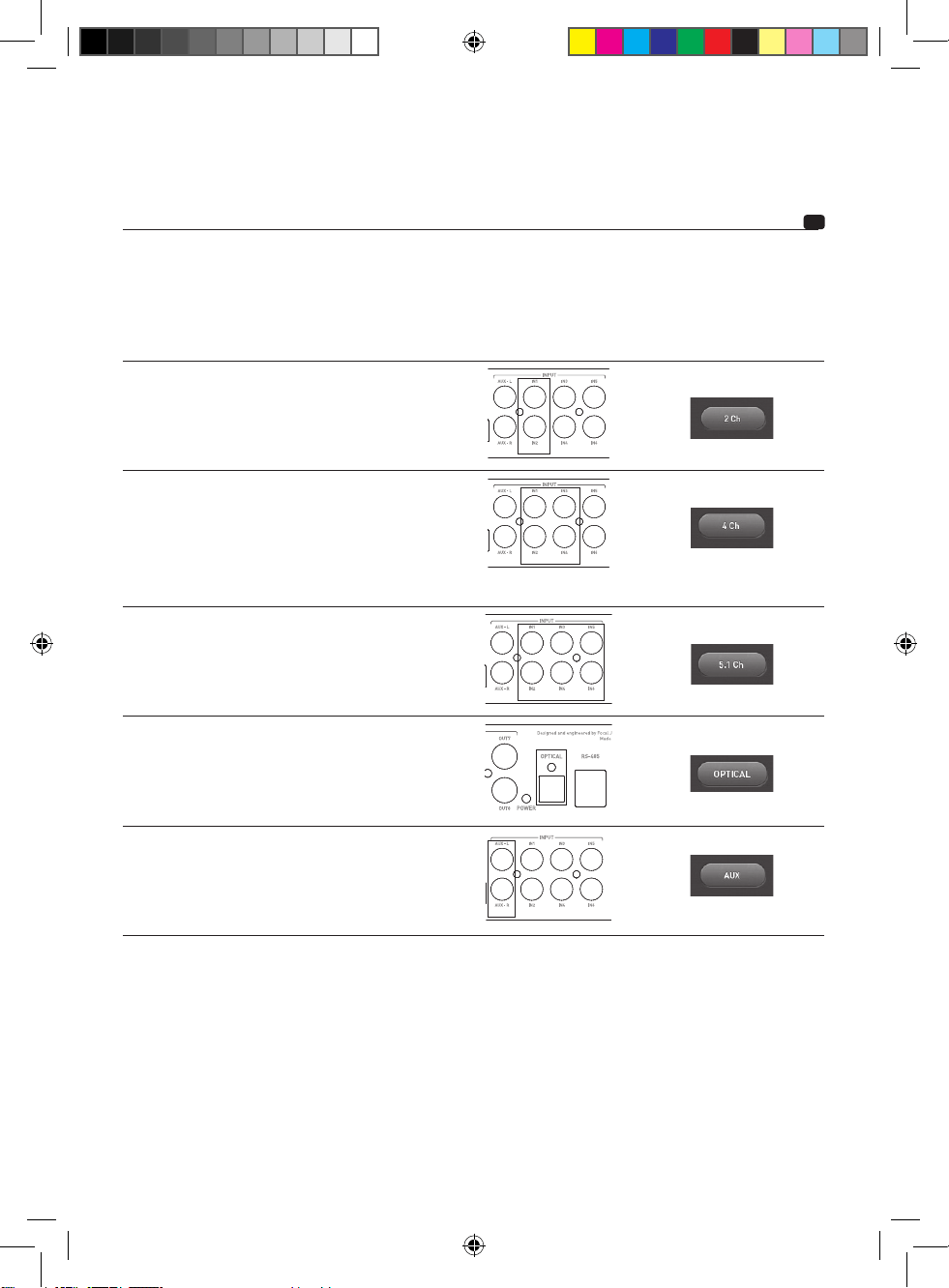
Die Eingänge nach nachstehend aufgeführten Verwendungsfällen verkabeln:
Eingangsverka
belungsmodus
Verwendungsfal Zu verbindende Eingänge Die Funktion in der
Steuersoftware wählen
Stereo Ihr Autoradio hat nur einen
Cinch-Ausgang oder ein
Lautsprecherausgangspaar.
4 Kanäle - Ihr Autoradio umfasst 4
Cinch-Ausgänge oder 4
Lautsprecherausgänge.
und/oder
-Sie möchten die Fader-
Funktion an Ihrem Autoradio
beibehalten.
5.1 Ihr Autoradio oder die Quelle
umfasst einen 5.1-Ausgang zur
Multikanal-Dekodierung.
Optik Ihr Autoradio umfasst einen
optischen digitalen Ausgang.
AUX ie möchten eine zusätzliche
Quelle
an FSP-8 anschließen.
Information über die Verkabelung des zusätzlichen AUX-Eingangs
FSP-8 ist mit einem zusätzlichen niederstufigen AUX-Eingang ausgestattet. Er ermöglicht zum Beispiel,
eine zweite Stereo-Klangquelle (zum Beispiel Smartphone, einen digitalen Musikplayer) anzuschließen. Er
kann von der Steuersoftwareschnittstelle des FSP-8 oder von der zusätzlichen Fernbedienung aus gewählt
werden.
Dieser AUX-Eingang ist nur zu unausgeglichenen Leitungspegeln mit 2 V kompatibel. Niemals ein
hochstufiges Signal aus einem Verstärker oder einem Autoradio an diesen Eingang verkabeln.
Gebrauchsanleitung
FSP-8
Audio-Prozessor mit 8 Kanälen
Notice_FSP-8.indd 27 20/01/17 12:24
28
3.2.2 – Anschluss der Ausgangssignale an FSP-8
Die Anschlussphase der Ausgangskabel kann beginnen.
Die Cinch-Ausgänge (Abschnitt OUTPUT) unter Einhaltung der Verbindung zu den Verstärkern, die Ihren
Lautsprecheraufbau steuern werden, an FSP-8 anschließen. Der Lautsprecheraufbau muss über den
Abschnitt „Konfiguration“ der Steuersoftware FSP-8 DSP Manager konfiguriert werden.
3.3 – Verkabelung und Funktion der Fernbedienung
Wenn Sie sich entschieden haben, die zusätzliche Fernbedienung zu installieren, ist das mitgelieferte
Fernbedienungskabel an den Anschluss RJ-485 anzuschließen, um über die Einstellfunktionen in Echtzeit,
die allgemeine Steuerung der Lautstärke, die Bass-Box und den Voreinstellungsspeicher zu verfügen.
Ein Klick auf die Steuerschaltfläche ermöglicht das Scrollen in den Menüs.
Das Drehen des Potentiometers ermöglicht die Auswahl.
3.4 – Strom- und REMOTE-Verkabelung (Abb. G)
Das positive (+) Stromkabel vorbereiten, um es mit einem geeigneten Gabel-Kabelschuh an FSP-8
anzuschließen, dann das Kabel festklemmen, indem Sie es fest anschrauben.
ACHTUNG
Das Kabel, das den Pluspol (+) der Batterie mit der Leiste „+ BATT“ des FSP-8 verbindet, muss UNBEDINGT
eine Sicherung (Stromstärke: 3 Ampere), maximal 40 cm von der Fahrzeugbatterie entfernt, aufweisen. Es
muss den Empfehlungen des Abschnitts 3.1 entsprechen.
Die Anschlüsse des Sicherungshalters müssen dicht sein.
Der Sicherungshalter muss auf beiden Seiten des positiven (+) Stromkabels angeschlossen werden. Es
muss sich nahe bei der Batterie befinden (10 bis 40 cm). Den Sicherungshalter abmontieren und darauf
achten, die Sicherung abzunehmen. Den Sockel des Sicherungshalters befestigen.
Das Stromkabel zwischen 10 und (höchstens) 40 cm der Batterie abschneiden. Der Kabelabfall dient dazu,
das andere Ende des Sicherungshalters an den Pluspol (+) der Fahrzeugbatterie anzuschließen.
1 cm freilegen und mit einer Folie belegen (Abb. C). Das Kabel an die Leiste des Sicherungshalters
anschrauben. Den verbleibenden Kabelabfall aufnehmen.
Das positive (+) Stromkabel vorbereiten, um es am Punkt B+ an FSP-8 anzuschließen.
Die Sicherung in den/die Sicherungshalter einführen, dann fest anschrauben.
Dann das REMOTE-Kabel an den FSP-8 anschließen (REM-Anschluss). Das andere Ende des REMOTE-
Kabels an den REMOTE-Anschluss des Autoradios anschließen.
Dann das Kabel REMOTE OUT des FSP-8 (Anschluss REM OUT) an den REMOTE-Eingang Ihrer Verstärker
anschließen. So werden Ihre Verstärker dann durch den Start des FSP-8 aktiviert.
3.5 – Start und Überprüfungen – Anschluss an die Steuersoftware FSP-8 DSP Manager
Die Anschlussphase ist jetzt abgeschlossen. Es muss nur noch die ordnungsgemäße Stromzufuhr sowie
die Funktion der Anlage (Autoradio / FSP-8 / Verstärker / Lautsprecher) überprüft werden. Stellen Sie
die Verstärkung der Quelle und Ihrer Verstärker auf den Mindestwert und setzen Sie die verschiedenen
Elemente unter Spannung.
Gebrauchsanleitung
FSP-8
Audio-Prozessor mit 8 Kanälen
Notice_FSP-8.indd 28 20/01/17 12:24
29
Unter dieser Adresse erhältlich ist:
http://www.focal.com/fsp-8/dsp-manager/fr
http://www.focal.com/fsp-8/dsp-manager/en
Sobald alle Elemente unter Spannung stehen, die Software FSP-8 DSP Manager starten, den FSP-8 über
den USB-Anschluss an den Computer anschließen und dann Ihre Einstellungen und Tests bei niedriger
Lautstärke durchführen.
Sobald die Lautsprecherkonfiguration korrekt programmiert ist, können Sie die Verstärkungen der
Verstärker einstellen und die Lautstärke nach und nach erhöhen.
Bei Problemen in Verbindung mit der Softwareinstallation sehe Sie bitte in der Softwareanleitung nach, die
online (FOCAL-Website) oder über die Softwarehilfe verfügbar ist.
4 – Steuerpulte und Anschlüsse
(fig. H)
REM: Dieser REM-Anschluss stellt die Verbindung zwischen der Quelle (Autoradio) und FSP-8 über einen
REM- oder REMOTE-Ausgang des Autoradios sicher. Dies ermöglicht die automatische Spannungszufuhr
des FSP-8 nach der Spannungszufuhr der Quelle (Autoradio). Dieser Anschluss ist bei Verwendung der
IN-Eingänge im hochstufigen Modus nicht notwendig.
B+: Der Stromanschluss B+ dient dazu, das Stromkabel aufzunehmen, das die Verbindung zwischen FSP-8
und dem Pluspol (+) der Batterie sicherstellt.
REM OUT: Der Anschluss REM OUT ermöglicht, die Spannungszufuhr der Verstärker zu steuern.
GND: Der Stromanschluss GND (Ground) dient dazu, das negative Stromkabel (-) aufzunehmen, das die
Verbindung zwischen FSP-8 und dem Fahrzeuggestell sicherstellt.
INPUT: Diese Cinch-Stecker dienen der Verkabelung des Eingangssignals vor der Verarbeitung durch FSP-
8.
IN1 bis IN6: Diese Cinch-Stecker dienen der Verkabelung des Eingangssignals in hoher oder niedriger
Stufe. Die Anpassung erfolgt über die Software FSP-8 DSP Manager.
AUX-L / AUX-R: Diese Cinch-Stecker dienen der Verkabelung einer möglichen zusätzlichen Stereo-
Hilfsquelle.
OPTICAL: Dieser Toslink-Anschluss dient der Verkabelung eines Eingangssignals in digitaler Form vor der
Verarbeitung durch FSP-8.
OUTPUT: Diese Cinch-Stecker dienen der Verkabelung des Ausgangssignals nach der Verarbeitung durch
FSP-8.
RS-485: Dieser Anschluss dient dem Netzanschluss der zusätzlichen Steuerung, falls diese installiert ist.
Dieses Zubehör ermöglicht eine Fernsteuerung der Verstärkung von FSP-8.
PC-USB: Dieser Anschluss dient dem Netzanschluss des FSP-8 an einen Computer, auf dem die Steuersoftware
FSP-8 DSP Manager installiert ist.
Gebrauchsanleitung
FSP-8
Audio-Prozessor mit 8 Kanälen
Notice_FSP-8.indd 29 20/01/17 12:24
30
5 – Betriebsdauer des FSP-8
Es ist zu vermeiden, FSP-8 über längere Zeit laufen zu lassen, ohne das Fahrzeug zu starten. Dies kann zur
vorzeitigen Entladung der Batterie führen.
6 – Störungsbehebung
Der Status der Kontrollleuchte zeigt bestimmte Ausfallsarten oder Störungsursachen an.
Wenn trotz dieser Überprüfungen der normale Betrieb nicht wiederaufgenommen wird, sollten Sie sich an
den Installateur oder Händler Ihres FSP-8 wenden.
LED-Status Ton vorhanden Mögliche Ursache Störungsbehebung
Leuchtet NEIN Ausfall der übrigen
Audiokette und/oder
Verkabelung
Das Audiosystem abschalten. Überprüfen, dass das
Eingangssignal des FSP-8 vorhanden ist.
Die Cinch-Kabel des FSP-8 zu Ihren Verstärkern
überprüfen.
Auch die ordnungsgemäße Funktion der übrigen
Audiokette (Autoradio/Verstärker) überprüfen.
Erloschen NEIN oder
abwechselnd
12 V nicht vorhanden Das Audiosystem abschalten. Vergewissern Sie sich, dass
an der Batterie 12 V vorhanden sind.
Erloschen NEIN Sicherung
beschädigt
Das Audiosystem abschalten. Die Verkabelungen
überprüfen, die Sicherung auswechseln.
Erloschen NEIN oder
abwechselnd
Fehlendes Remote-
Signal
Das Audiosystem abschalten. Sicherstellen, dass
das Remote-Signal im Moment des Einschaltens des
Autoradios vorhanden und stabil ist.
7 – Softwarekompatibilität
PC Windows XP/Vista/7/8/10
Garantiebedingungen
Wenden Sie sich bei Problemen zunächst an Ihren Focal-Händler. Die Garantie auf alle Focal-Geräte
in Frankreich gilt zwei Jahre. Bei einem fehlerhaften Gerät muss dieses auf Ihre Kosten in seiner
Originalverpackung an den Händler gesendet werden, der das Gerät analysiert und die Art der Störung
feststellt. Wenn dieses einer Garantie unterliegt, wird das Gerät Ihnen portofrei zurückgesendet oder
ersetzt. Anderenfalls wird Ihnen ein Kostenvoranschlag für die Reparatur angeboten. Die Garantie deckt
keine Schäden ab, die durch missbräuchliche Verwendung oder falschen Anschluss entstehen.
Außerhalb Frankreichs gilt für das Focal-Gerät eine Garantie, deren Bedingungen vor Ort vom offiziellen
Focal-Vertriebshändler in jedem Land in Übereinstimmung mit den im betreffenden Gebiet geltenden
Gesetzen festgelegt werden.
Gebrauchsanleitung
FSP-8
Audio-Prozessor mit 8 Kanälen
Notice_FSP-8.indd 30 20/01/17 12:24
为了使产品日益完善,Focal-JMlab保留其随时修改产品技术规格的权利,恕不另行通知。图片不具合同效力。
请于10天内寄回随附的产品质保书,使Focal-JMlab质保生效。
您现在可以在线注册产品:www.focal.com/warranty
感谢您认同Focal的理念,并为您的汽车音响系统选用了Focal产品。本产品采用Focal最先进的音频数字信号处理
(DSP)技术。
为了达到最佳效果,我们建议由Focal经销商为您安装FSP-8处理器。若要充分利用FSP-8的全部功能和最佳性能,我们
建议您仔细阅读本手册的说明,并妥善保管以备未来参考。不遵守使用规则而引起的问题可能导致保修失效。
请于购买后十天内寄回保修卡,方能使保修生效。
警告
此标志表示重要指示。不遵守这些指示可能会导致严重的人身伤害或财产损失。
包装内容:
- 1个FSP-8处理器
- 1组安装套件
- 1根USB数据线
- 1本使用手册
遥控器单独出售
警告
• 开车时请勿激活任何会使您分心的功能。在计算机界面上进行实时音频设置等功能需要持续的注意力,因此只应在车
辆完全停止后进行。激活这些功能前,请务必把车辆停在安全的地方。否则可能会发生意外事故。
• 请将音量调低,让您在行驶期间可以听到车外的声音。否则可能会发生意外事故。
• 请勿打开FSP-8或在产品上进行任何变更。否则可能会发生意外事故、火灾或触电的风险。
• 您只能在12V移动应用上使用FSP-8。指定应用之外的任何用途均可能导致火灾、触电或人身伤害等风险。
• 请选用具有合适安培数的保险丝。否则可能会发生火灾或触电的风险。
简体中文
使用手册
FSP-8
8声道音频处理器
Notice_FSP-8.indd 31 20/01/17 12:24
32
使用手册
FSP-8
8声道音频处理器
• 请务必连接正确。请检查电缆外径和电缆类型。否则可能会发生火灾、人身伤害和/或损坏FSP-8的风险。
• 请勿使用转向或制动系统的任何螺帽或螺栓来接地。制动或转向系统(或任何其它安全系统)和各种油箱的螺栓和螺
母不应用来接地。使用这些零件接地可能会停用车辆控制系统,并引起火灾或其他损坏。
• 请将螺栓或螺钉等可能被摄入的小物件放在儿童接触不到的地方。吞下小物体可能会导致严重的人身伤害。如果吞
入,请立即就医 (图A)。
• 开始安装前,请先断开蓄电池负极,以避免造成人身伤害、火灾或财产损失的风险。在开始进行任何连接之前,请务
必取下汽车电池的负端子(-)。
• 长时间以超过110分贝的高音量聆听音乐,可能会永久损害听力。即使短暂聆听超过130分贝的声音,也可能会导致
永久性的听力损伤。
• 出现问题时,请停止使用。如果不遵守这些注意事项,可能会造成人身伤害或损坏FSP-8。如果故障仍然存在,请将
FSP-8送回Focal经销商修理。
• 使用指定的配件并正确安装。请务必使用手册中指定和包装中提供的配件。使用其他组件可能导致产品内部损坏,也
可能使安装不正确。这可能会导致零件松动,从而造成产品损坏或技术故障。否则可能会发生意外事故、火灾或触电
的风险。
• 请勿安装在高湿多尘的地方。请避免将FSP-8安装在车内高湿或灰尘过多的地方。若湿气或灰尘渗透至产品内部,可
能导致技术故障。
Notice_FSP-8.indd 32 20/01/17 12:24
33
使用手册
FSP-8
8声道音频处理器
安装FSP-8
安装该产品需要技术技能和经验。
若无法确定安装能力是否足够,强烈建议由Focal经销商进行安装,以充分利用FSP-8的所有功能。
以下部分说明安装FSP-8时应考虑的车辆因素。事先规划系统布局和布线,可以节省您的时间。
在准备阶段中,请确保安装完成后所有的设置均可使用。
开始安装前,请务必严格遵守以下规则:
1 - 通读该手册后,请确定您已了解安装FSP-8前的所有指示。
2 - 开始安装前,请断开电池负极电缆 (图A)。
3 - 为了便于组装,建议在安装FSP-8之前先摊开所有电缆。
4 - 所有的RCA、喇叭、REM和远程控制(遥控器)的电缆要远离电源线,以避免信号干扰。
5 - 请在FSP-8的端子上接上优质连接器,以确保安装的可靠性,并将信号或功率的损耗降到最低。
6 - 在执行任何操作之前,请勿切割或刺穿燃料箱、电气配线和燃料、刹车、液压或真空罐的管件。
7 - 切勿让电缆通过车辆下方。请务必将电缆安装在车辆内,以确保最安全的保护。请检查电缆通过的地方是否会干扰
驾驶。阻碍或悬垂于方向盘、脚踏板(刹车、安全气囊、油门和离合器等)的电缆可能会造成极大的危险。
8 - 请避免将电缆穿过或越过锋利的边缘。越过金属的任何电线均必须使用绝缘垫圈进行保护。请让电缆远离运动部件
(座椅滑轨等)或锋利尖锐的金属边缘,以免夹住或损坏电缆。
9 - 始终以保险丝保护电池和电气系统免受潜在危害的伤害。请在距离电池端子40厘米内的12V正极(+)电源线上安
装一个保险丝座及合适的保险丝。理想情况下,该距离应越短越好(图G)。
10 - 准备汽车底盘接地时,刮下金属表面上的任何涂料,以确保良好的接地。接地的配线应该越短越好,并且始终连
接到焊接在车体或底盘的金属上(图D)。一般保留的接地点是连接电池负极端子与汽车底盘之间的连接点。
1 - 安装FSP-8
FSP-8应该安装在哪里?
FSP-8工作时需要散热。请务必将FSP-8安装在通风良好的位置。切勿覆盖FSP-8,以避免产生过热现象。
切勿将其安装在车辆的发动机舱内,这将导致保修失效。
2 - 固定FSP-8
请将装置安装在一个拧入螺钉时不会损坏车辆的支撑上。
将FSP-8放到所需位置并定位。
将FSP-8装置放在支撑上,然后使用随附的4颗螺钉紧固该装置。
Notice_FSP-8.indd 33 20/01/17 12:24
34
使用手册
FSP-8
8声道音频处理器
3 - 布线
请务必使用说明书中推荐的电缆。电源线的外径必须与表中所示(第3.1节)相同,并与设备的功耗和所需电缆的长度
相匹配。请使用双重或三重屏蔽RCA电缆来防止低电平信号的干扰。
注意
请勿让电源线通过输入/输出、天线、敏感仪器的电缆和电缆线束附近。由于电源线承载大量电流,可能对音频信号产
生干扰。
尽可能缩短电缆长度,以优化安装质量并限制信号损失。
3.1 - 电源接线
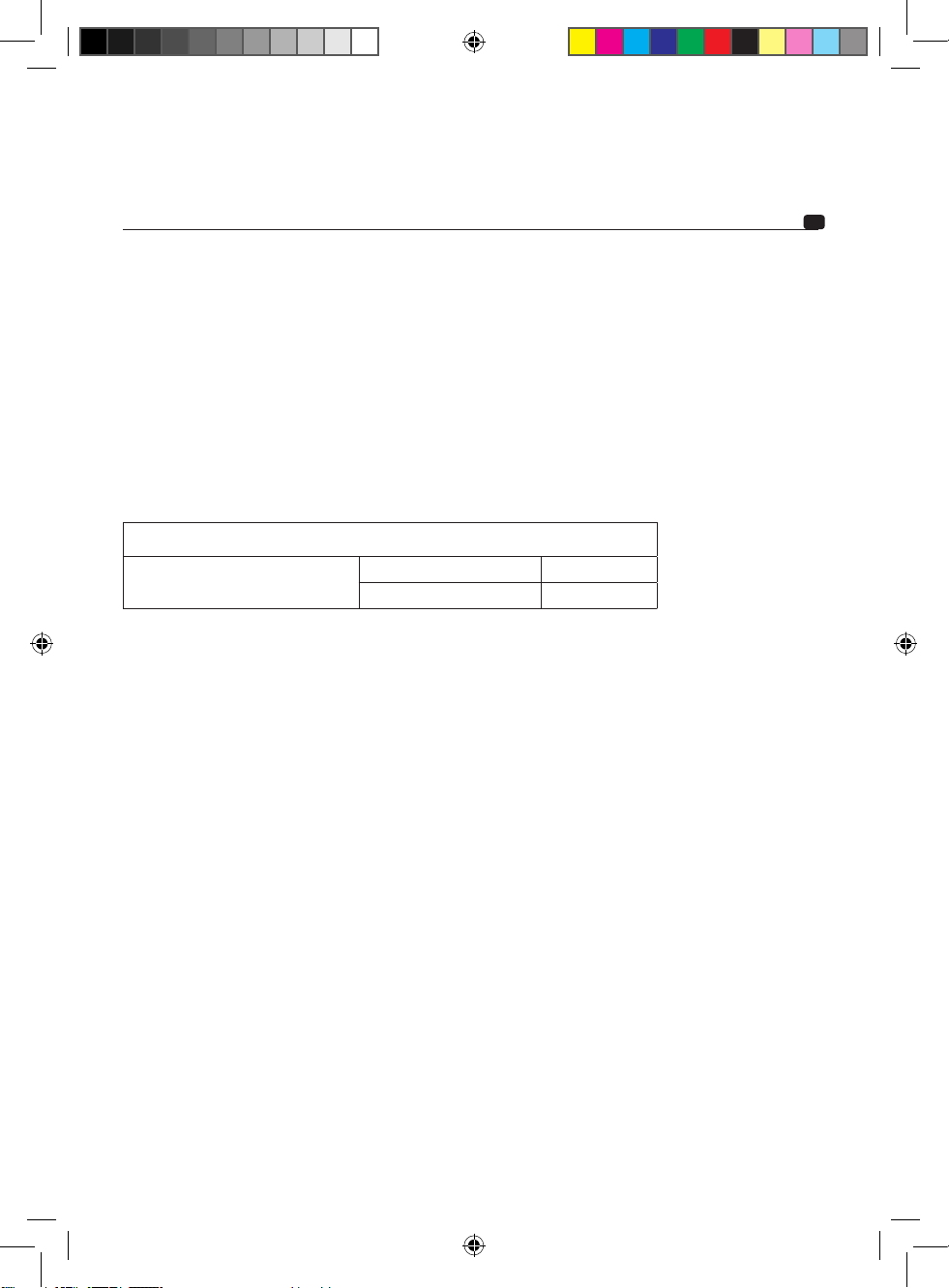
电源线的外径取决于电池和接地的布线距离,建议的最小外径列于下表中:
产品
FSP-8
外径(单位:mm
2
) > 0.5 mm²
AWG(美国线规
< 20 AWG
遵守这些布线规则是确保电气设备安全性必不可少的要素,这也对维持FSP-8的最大性能至关重要。
连接正极(+)电源线。
取一条负极(-或接地)电源线。此电缆应尽可能短并且最好不超过1米,方能确保FSP-8和车辆底盘之间完美连接。
电缆和其外径应符合上方表格所示。找到合适的接地点后,磨去油漆或清漆的痕迹,以优化接触质量。打穿预先根据
所选螺钉的直径打磨好的钢板,同时注意附近是否有任何油箱或其他敏感零件的电缆经过。剥开1厘米的电缆绝缘层
(图C)。用螺钉拧紧FSP-8的GND端子上的电缆。在另一端上镀锡,然后压接或焊接为此目的而提供的接线片。将接
线片插入螺钉内,固定螺钉和螺母后拧紧。
3.2.1 - FSP-8输入信号的配线
您的汽车音响配备了RCA低电平信号输出或光纤输出。
连接汽车音响的全部电缆(RCA)或光纤电缆、REM电缆和REMOTE CONTROL电缆(如果安装了选配的遥控器,则
为RJ-485连接器),并隔离其他高功率汽车配件,特别是电动机(雨刮器等)。
您的汽车音响仅配备了放大输出(扬声器输出)。
连接汽车音响的全部电缆和REMOTE CONTROL电缆(如果安装了选配的遥控器,则为RJ-485连接器),并隔离其他
高功率汽车配件,特别是电动机(雨刮器等)。
REM输入端口的配线并非必不可少;FSP-8的高电平输入端口设置有一个直流信号检测系统。AUX和OPTICAL输入端口
没有这一功能。
Notice_FSP-8.indd 34 20/01/17 12:24
35
使用手册
FSP-8
88声道音频处理器
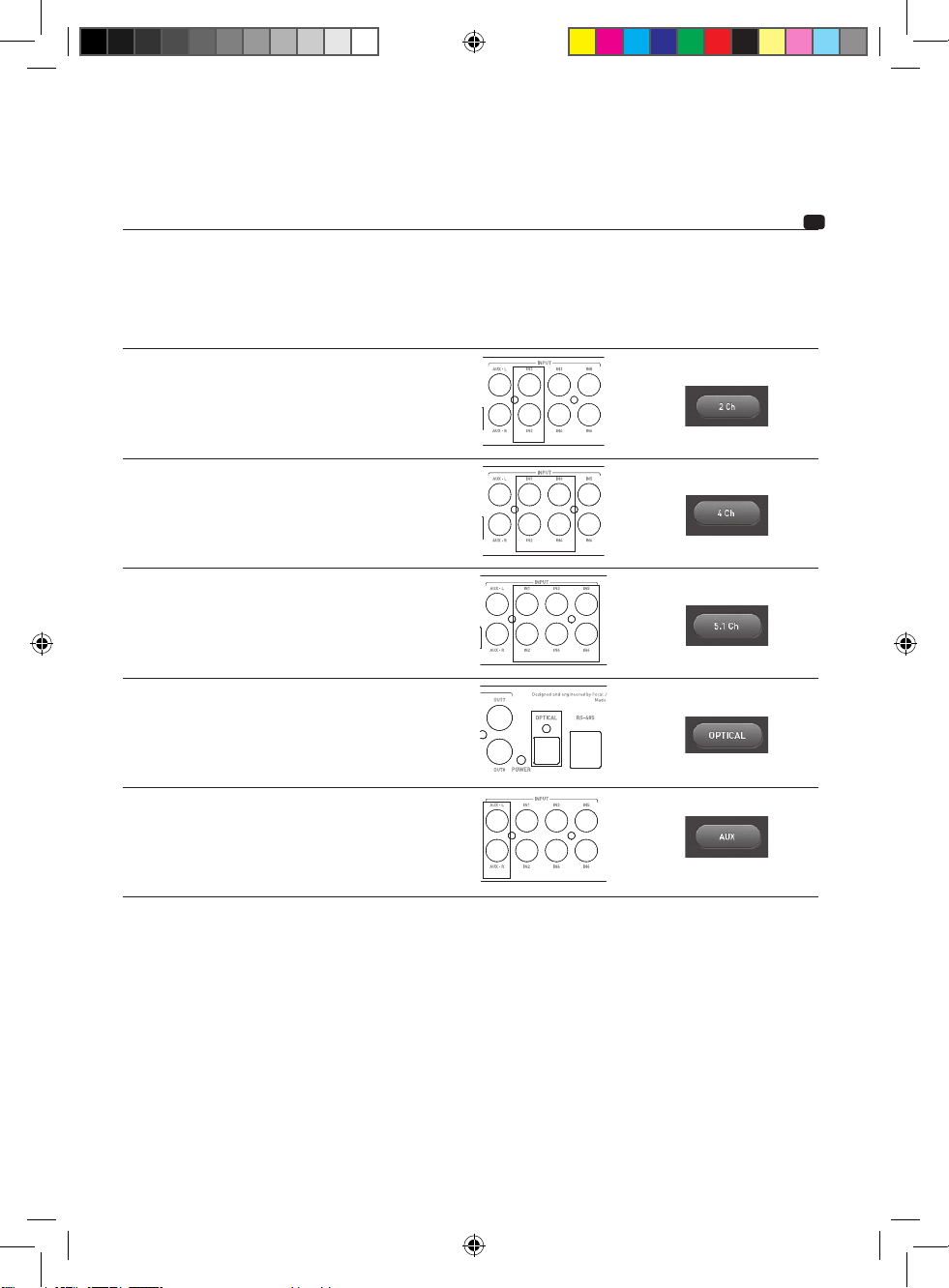
请根据下面列出的使用情况连接输入端口:
入接线模式 使用情况 输入连接 在控制软件中选择功能
立体声
您的汽车音响只有一个
RCA输出或一对扬声器输
出。
4声道
您的汽车音响设有4个RCA输
出或4个扬声器输出。
和/或
您想保留汽车音响的渐变功
能。
5.1
您的汽车音响或音频源具有
5.1输出,可解码多声道音
频。
光纤
光纤
您的汽车音响具有数字光纤输
出。
AUX
您想在FSP-8上连接额外的音
频源。
额外的AUX输入接线信息
FSP-8有一个额外的AUX低电平信号输入端口。它可以连接第二个立体声音源(例如,智能电话、数字
音乐播放器),并可从FSP-8的控制软件界面或选配的遥控器进行选择。
AUX输入端口仅兼容2V不平衡线路电平。切勿将放大器或汽车音响的高电平信号连接至这一输入端
口。
Notice_FSP-8.indd 35 20/01/17 12:24
36
使用手册
FSP-8
8声道音频处理器
3.2.2 - FSP-8上的音频输出配线
现在,您可以开始连接输出线路。
将RCA输出(OUTPUT部分)连接至FSP-8,请注意保持操控扬声器结构的放大器的连接 (图E)。请在FSP-8 DSP
Manager控制软件的“配置”部分配置扬声器架构。
3.3 - 接线和遥控器操作
如果您选择安装选配的遥控器,请将随附的遥控器电缆连接到RJ-485连接器上,以便使用实时控制、主音量和低音炮
控制以及调用预设等功能 (图F)。
单击控制按钮可滚动菜单。
旋转电位器可进行选择。
3.4 - 电源和遥控器布线 (图G)
用合适的叉端准备好连接到FSP-8的正极(+)电源线,然后用螺钉拧紧电缆,将其锁定。
注意
在连接电池正极(+)和FSP-8的“+ BATT”端子的电缆上,请务必在距离车辆电池40厘米以内的地方安装一根保险丝
(电流值:3安培)。这必须符合第3.1节的建议。
保险丝座的连接必须防水。
保险丝座必须连接到正极(+)电源线的两侧,并安装在邻近电池的位置(10至40厘米)。小心取下保险丝,以便拆下
保险丝座。固定保险丝座的底座。
在距离电池10和40厘米(最大)之间切割红色电源线。保留电缆切尾,并用它连接保险丝座的另一端和汽车电瓶的正
端子(+)。
剥开1厘米的绝缘层,然后镀锡 (图C)。用螺钉将电缆拧入保险丝座的端子。收集剩余的电缆切尾。剥开1厘米的绝
缘层,然后镀锡。用螺钉将电缆拧入保险丝座的另一个端子。
取正极(+)电源线,将其连接到FSP-8的B+点上。
将保险丝插入保险丝座中,然后拧紧螺钉。
然后连接REMOTE电缆到FSP-8(REM端子)。将REMOTE电缆的另一端连接到汽车音响的REMOTE端。
然后将FSP-8(REM OUT端子)的REMOTE OUT(遥控输出)电缆连接到放大器的REMOTE输入接口。如此一
来,FSP-8启动后将触发放大器,然后启动它。
3.5 - 启动和检查 – FSP-8 DSP Manager控制软件的连接
连接阶段现已完成,接下来还需要检查电源是否正确以及设备整体(汽车音响/FSP-8/放大器/扬声器)是否运行正常。
将音频源增益和放大器调到最小。打开各个装置的电源。
Notice_FSP-8.indd 36 20/01/17 12:24
37
使用手册
FSP-8
8声道音频处理器
进行任何USB连接之前,请先访问FOCAL网站下载、安装FSP-8 DSP Manager软件:
http://www.focal.com/fsp-8/dsp-manager/fr
http://www.focal.com/fsp-8/dsp-manager/en
开启所有装置的电源后,启动FSP-8 DSP Manager软件,使用USB数据线将FSP-8连接到计算机,然
后在低音量下进行调整和测试。
正确设置扬声器配置后,可以设置放大器增益,并逐渐调高音量。
请上网(FOCAL网站)参阅软件使用手册,或利用软件来帮助解决安装软件时出现的任何问题。
4 - 控制面板和连接 (fig. H)
REM:REM连接器经由REM输出或汽车音响的REMOTE建立音频源(汽车音响)和FSP-8之间的连
接。如此一来,音频源(汽车音响)的电源打开后,FSP-8也会自动开启。使用IN高电平模式输入时,
不需要该连接器。
B+:电源连接器B+专门用于接入连接FSP-8和电池正极(+)之间的电源线。
REM OUT(REM输出):REM OUT连接器用来控制放大器的电源。
GND(接地):GND电源接口专门用于接入连接FSP-8和车辆底盘之间的负极(-)电源线。
INPUT(输入):这些RCA插孔专门用于输入信号的布线,然后将信号传给FSP-8处理。
IN1至IN6:这些RCA插孔专门用于高电平及低电平输入信号的布线。请在FSP-8 DSP Manager软件
中进行调节。
AUX-L(AUX-左)/AUX-R(AUX-右):这些RCA插孔专门用于连接额外的辅助立体声信号源。
OPTICAL(光纤):Toslink光纤连接器专门用于数字输入信号的配线,然后将信号传给FSP-8处理。
OUTPUT(输入):这些RCA插孔专门用于FSP-8处理完后输出信号的布线。
RS-485:该连接器专门用于连接控制附件(如果已安装)。使用该附件可以远程调节FSP-8增益。
PC-USB:该连接器专门用于FSP-8和安装了FSP-8 DSP Manager控制软件的计算机之间的连接。
Notice_FSP-8.indd 37 20/01/17 12:24
38
使用手册
FSP-8
8声道音频处理器
5 - FSP-8的运行时间
请避免在车辆未启动的情况下长时间操作FSP-8,这可能会导致电池过早没电。
6 - 故障排除
LED状态表示某些故障模式或故障原因。
检查后,如果FSP-8仍没有恢复正常运行,请联系安装人员或经销商。
LED状态 声音 可能的原因 故障排除
亮起 无声音 音响系统的其余部分
和/或布线故障
关闭音频系统。检查FSP-8是否有输入信号,
熄灭 无声音或声音断
断续续
没有12V 关闭音频系统。检查12V电池。
熄灭 无声音 保险丝损坏 关闭音频系统。检查线路,更换保险丝。
熄灭 无声音或声音断
断续续
无REMOTE信号 关闭音频系统。汽车音响开机时检查REMOTE信号是否
存在,并查看其是否稳定。
7 – 软件兼容性
PC Windows XP/Vista/7/8/10
保修条件
出现问题时,请先联系Focal经销商。任何Focal硬件在法国的保修期限均为2年。器材如有损坏,请
务必将其放在原包装内,并自付运费将其寄给经销商,经销商会仔细检查器材,并确定其故障性质。在
保修期内将器材寄回给您或更换器材的“运费免付”。在保修期外,我们会提供一份维修费用报价单。
使用不当或不正确的电缆连接所造成的损害不在保修范围内。
法国境外的Focal器材保修条件是由当地正式授权的分销商根据该国境内的法律法规来决定。
Notice_FSP-8.indd 38 20/01/17 12:24
39
使用手册
FSP-8
8声道音频处理器
本表格依据 SJ/T 11364 的规定编制。
O : 表示该有害物质在该部件所有均质材料中的含量均在GB/T 26572规定的限量要求以下。
O : It means the harmful substances in the parts of content in all homogeneous
materials are specified in GB/T 26572 limited for the following.
X : 表示该有害物质至少在该部件的某一均质材料中的含量超出GB/T 26572规定的限量要求。
X : It means the harmful material in at least the parts of a homogeneous
material content beyond the limited requirements given in GB/T 26572.
部件名称
Part Name
铅
Pb
汞
Hg
镉
Cd
六价铬
CrVI
多溴联苯
PBB
多溴二苯
醚 PBDE
塑膠機構件
(Plastic Part)
O O O O O O
PCBA組件
(Component)
X O O O O O
金屬部品
(Metal Part)
X O O O O O
電纜及電纜組件/電氣部品
5Cable/Electrical Part)
X O O O O O
有毒有害物质或元素
Poisonous and harmful substances or elements
部件名称
Part Name
Notice_FSP-8.indd 39 20/01/17 12:24

Focal-JMlab
®
- BP 374 - 108, rue de l'Avenir - 42353 La Talaudière cedex - France - www.focal.com
Tel. (+33) 04 77 43 57 00 - Fax (+33) 04 77 43 57 04 - SCAB-171002/1 - CODO1502
Notice_FSP-8.indd 40 20/01/17 12:24