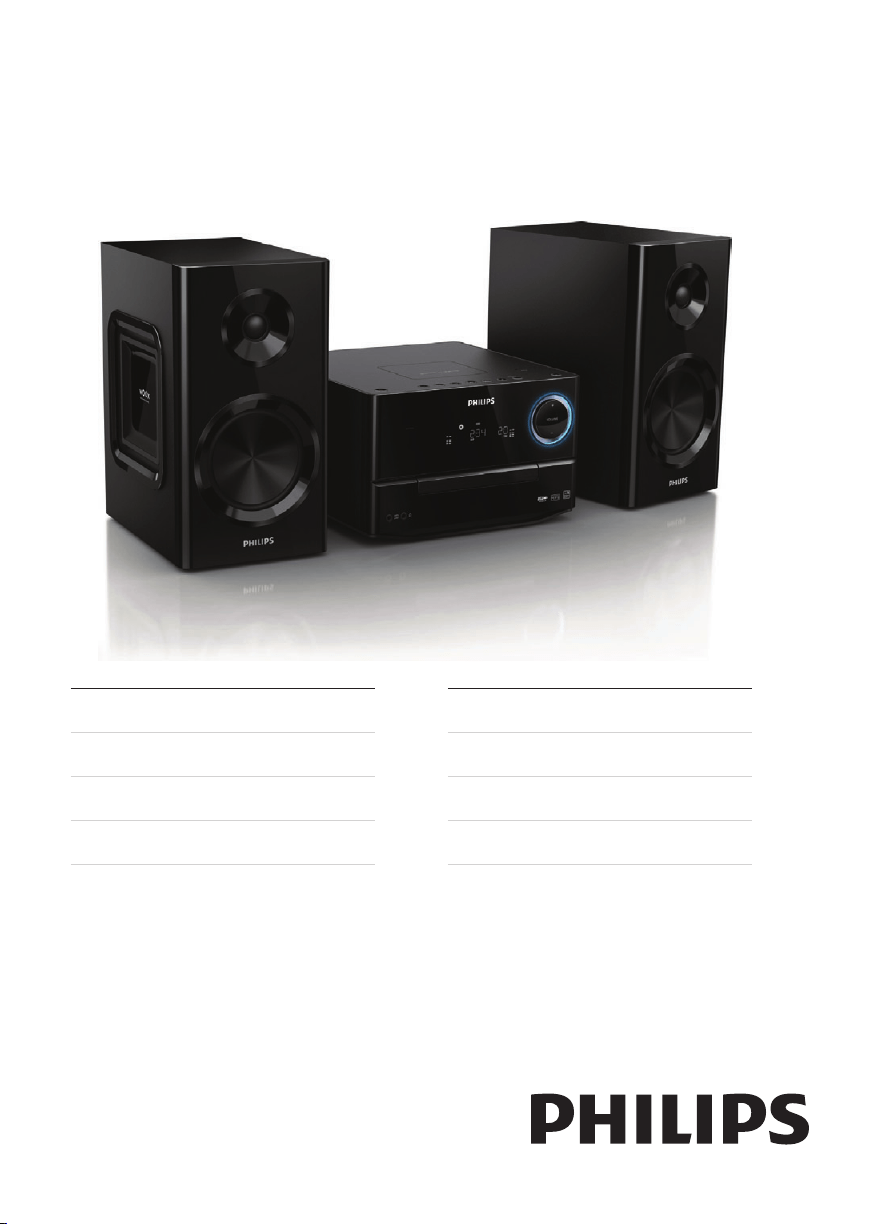
Register your product and get support at
www.philips.com/welcome
MCM3000
EN User manual 3
CS Příručka pro uživatele 21
DA Brugervejledning 39
DE Benutzerhandbuch 57
EL Εγχειρίδιο χρήσης 77
ES Manual del usuario 97
FI Käyttöopas 115
FR Mode d’emploi 133
MCM3000_UM_12_Book 1.indb 1 8/14/2012 2:57:06 PM
ČESKA REPUBLIKA
Výstraha! Tento přístroj pracuje s laserovým
paprskem. Při nesprávné manipulaci s
přístrojem (v rozporu s tímto návodem)
můże dojít k nebezpečnému ozáření. Proto
přístroj za chodu neotevírejte ani nesnímejte
jeho kryty. Jakoukoli opravu vždy svěřte
specializovanému servisu.
Nebezpečí! Při sejmutí krytů a odjištění
bezpečnostních spínačů hrozí nebezpečí
neviditelného laserového záření!
Chraňte se před přímým zásahem
laserového paprsku.
Pokud byste z jakéhokoli důvodu přístroj
demontovali, vždy nejdříve vytáhněte síťovou
zástrčku.
Přístroj chraňte před jakoukoli vlhkostí i
před kapkami vody.
ČESKA REPUBLIKA
Záruka: Pokud byste zjakéhokoli důvodu
přístroj demontovali, vždy nejdříve vytáhněte
síťovou zástrčku.
Přístroj chraňte před jakoukoli vlhkostí ipřed
kapkami vody.
Norge
Typeskilt nnes på apparatens
underside.
Observer: Nettbryteren er sekundert
innkoplet. Den innebygde netdelen er
derfor ikke frakoplet nettet så lenge
apparatet er tilsluttet nettkontakten.
For å redusere faren for brann eller
elektrisk støt, skal apparatet ikke
utsettes for regn eller fuktighet.
Advarsel: Usynlig laserstråling ved
åbning når sikkerhedsafbrydere er
ude af funktion. Undgå utsættelse for
stråling.
Bemærk: Netafbryderen er sekundært
indkoblet og ofbryder ikke strømmen
fra nettet. Den indbyggede netdel er
derfor tilsluttet til lysnettet så længe
netstikket sidder i stikkontakten.
Luokan 1 laserlaite Varoitus!
Laitteen käyttäminen muulla kuin tässä käyttöohjeessa mainitulla tavalla saattaa altistaa
käyttäjän turvallisuusluokan 1 ylittävälle näkymättömälle lasersäteilylle.
Oikeus muutoksiin varataan. Laite ei saa olla alttiina tippu-ja roiskevedelle. Huom.
Toiminnanvalitsin on kytketty toisiopuolelle, eikä se kytke laitetta irti sähköverkosta.
Sisäänrakennettu verkkoosa on kytkettynä sähköverkkoon aina silloin, kun pistoke on
pistorasiassa.
Huom.Toiminnanvalitsin on kytketty toisiopuolelle, eikä se kytke laitetta irti sähköverkosta.
Sisäänrakennettu verkko-osa on kytkettynä sähköverkkoon aina silloin, kun pistoke on
pistorasiassa.
MCM3000_UM_12_Book 1.indb 2 8/14/2012 2:57:06 PM

3
English
EN
Contents
7 Product information 17
Specications 17
USBplayabilityinformation 18
SupportedMP3discformats 18
8 Troubleshooting 19
9 Notice 20
Contents
1 Important 4
Safety 4
2 Your micro system 6
Introduction 6
What’sinthebox 6
Overviewofthemainunit 7
Overviewoftheremotecontrol 9
3 Get started 10
Connectspeakers 10
ConnectFMantenna 10
Connectpower 10
Preparetheremotecontrol 11
Setclock 11
Turnon 11
4 Play 12
Playfromdisc 12
PlayfromUSB 12
Playoptions 12
Adjustsound 13
5 Listen to the radio 14
Tunetoaradiostation 14
Programradiostationsautomatically 14
Programradiostationsmanually 14
Selectapresetradiostation 14
ShowRDSinformation 14
6 Other features 15
Setthealarmtimer 15
Setthesleeptimer 15
Playfromexternalaudiodevice 15
Listenthroughtheheadphone 16
Adjustdisplaybrightness 16
MCM3000_UM_12_Book 1.indb 3 8/14/2012 2:57:06 PM
4
or other apparatus (including ampliers)
that produce heat.
i
Protect the power cord from being
walked on or pinched, particularly at
plugs, convenience receptacles, and
the point where they exit from the
apparatus.
j
Only use attachments/accessories
specied by the manufacturer.
k
Use only with the cart, stand, tripod,
bracket, or table specied by the
manufacturer or sold with the apparatus.
When a cart is used, use caution when
moving the cart/apparatus combination
to avoid injury from tip-over.
l Unplug this apparatus during lightning
storms or when unused for long periods
of time.
m
Refer all servicing to qualied service
personnel. Servicing is required when
the apparatus has been damaged in any
way, such as power-supply cord or plug
is damaged, liquid has been spilled or
objects have fallen into the apparatus,
the apparatus has been exposed to rain
or moisture, does not operate normally,
or has been dropped.
n
Battery usage CAUTION – To prevent
battery leakage which may result in
bodily injury, property damage, or
damage to the remote control:
•
Installallbatteriescorrectly,+and-
asmarkedontheremotecontrol.
• Donotmixbatteries(oldandnew
orcarbonandalkaline,etc.).
• Removebatterieswhentheremote
controlisnotusedforalongtime.
o Apparatus shall not be exposed to
dripping or splashing.
1 Important
Safety
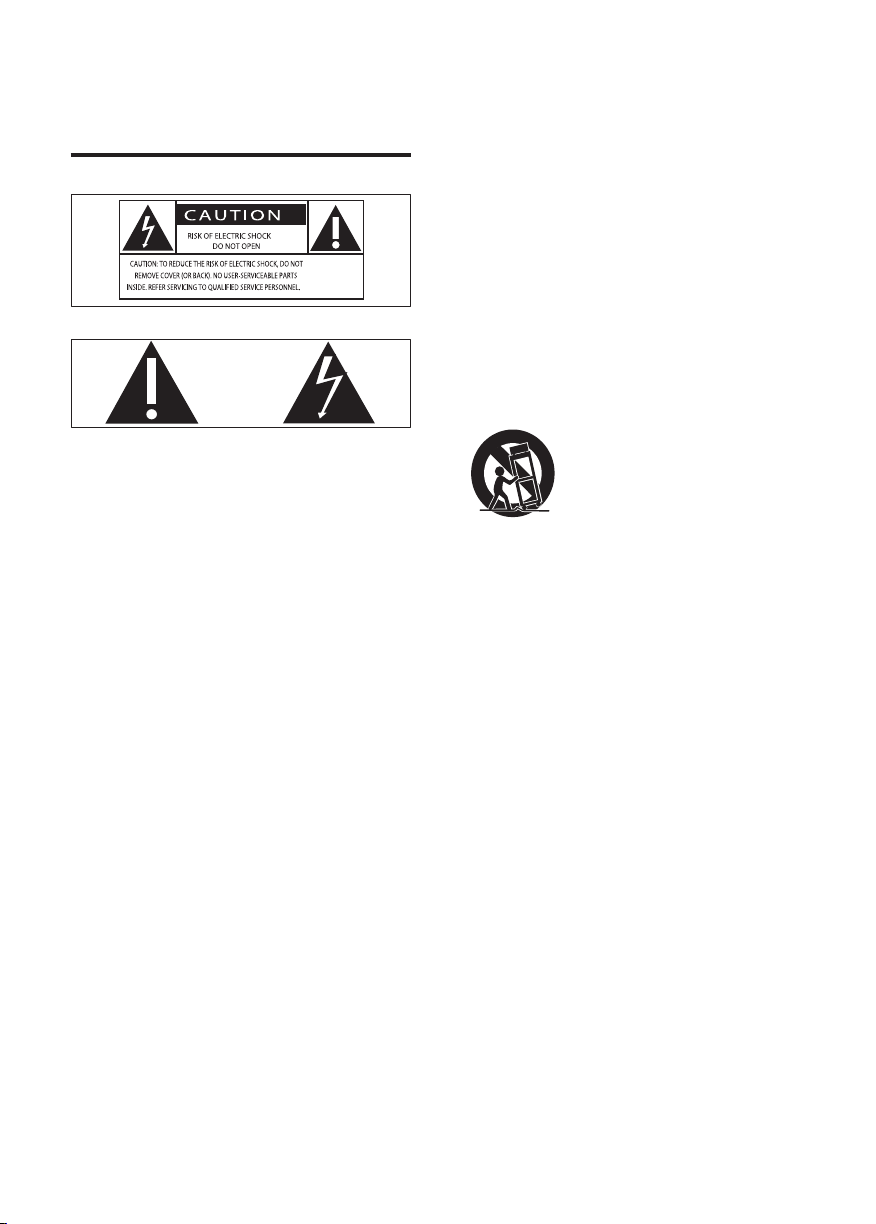
This‘boltoflightning’indicatesuninsulated
materialwithinyourunitmaycausean
electricalshock.Forthesafetyofeveryone
inyourhousehold,pleasedonotremove
productcovering.
The‘exclamationpoint’callsattentionto
featuresforwhichyoushouldreadthe
enclosedliteraturecloselytoprevent
operatingandmaintenanceproblems.
WARNING:Toreducetheriskofreor
electricshock,thisapparatusshouldnotbe
exposedtorainormoistureandobjectslled
withliquids,suchasvases,shouldnotbe
placedonthisapparatus.
CAUTION:Topreventelectricshock,match
widebladeofplugtowideslot,fullyinsert.
a Read these instructions.
b Keep these instructions.
c Heed all warnings.
d Follow all instructions.
e Do not use this apparatus near water.
f Clean only with dry cloth.
g Do not block any ventilation openings.
Install in accordance with the
manufacturer’s instructions.
h
Do not install near any heat sources
such as radiators, heat registers, stoves,
EN
MCM3000_UM_12_Book 1.indb 4 8/14/2012 2:57:07 PM
5
• Setyourvolumecontrolatalowsetting.
• Slowlyincreasethesounduntilyoucan
hearitcomfortablyandclearly,without
distortion.
Listen for reasonable periods of time:
•
Prolongedexposuretosound,even
atnormally‘safe’levels,canalsocause
hearingloss.
• Besuretouseyourequipment
reasonablyandtakeappropriatebreaks.
Be sure to observe the following guidelines
when using your headphones.
•
Listenatreasonablevolumesfor
reasonableperiodsoftime.
• Becarefulnottoadjustthevolumeas
yourhearingadapts.
• Donotturnupthevolumesohighthat
youcan’thearwhat’saroundyou.
• Youshouldusecautionortemporarily
discontinueuseinpotentiallyhazardous
situations.Donotuseheadphoneswhile
operatingamotorizedvehicle,cycling,
skateboarding,etc.;itmaycreateatrafc
hazardandisillegalinmanyareas.
p Do not place any sources of danger on
the apparatus (e.g. liquid lled objects,
lighted candles).
q
Where the MAINS plug or an appliance
coupler is used as the disconnect device,
the disconnect device shall remain
readily operable.
Warning
• Neverremovethecasingofthisapparatus.
• Neverlubricateanypartofthisapparatus.
• Neverplacethisapparatusonotherelectrical
equipment.
• Keepthisapparatusawayfromdirectsunlight,
nakedamesorheat.
• Neverlookintothelaserbeaminsidethis
apparatus.
• Ensurethatyoualwayshaveeasyaccesstothe
powercord,plugoradaptortodisconnectthis
apparatusfromthepower.
Caution
• Useofcontrolsoradjustmentsor
performanceofproceduresotherthanherein
mayresultinhazardousradiationexposureor
otherunsafeoperation.
Hearing safety
Listen at a moderate volume.
•
Usingheadphonesatahighvolumecan
impairyourhearing.Thisproductcan
producesoundsindecibelrangesthat
maycausehearinglossforanormal
person,evenforexposurelessthana
minute.Thehigherdecibelrangesare
offeredforthosethatmayhavealready
experiencedsomehearingloss.
• Soundcanbedeceiving.Overtimeyour
hearing‘comfortlevel’adaptstohigher
volumesofsound.Soafterprolonged
listening,whatsounds‘normal’can
actuallybeloudandharmfultoyour
hearing.Toguardagainstthis,setyour
volumetoasafelevelbeforeyourhearing
adaptsandleaveitthere.
To establish a safe volume level:
English
EN
MCM3000_UM_12_Book 1.indb 5 8/14/2012 2:57:07 PM
6
• MP3linkcable
• FMantenna
• 8xrubbercushionsforspeakers
• Quickstartguide
• Usermanual
2 Your micro
system
Congratulationsonyourpurchase,and
welcometoPhilips!Tofullybenetfromthe
supportthatPhilipsoffers,registeryourproduct
atwww.philips.com/welcome.
Introduction
With this unit, you can:
•
enjoyaudiofromdiscs,USBdevices,and
otherexternaldevices
• listentoradiostations
You can enrich sound output with these sound
effects:
•
DigitalSoundControl(DSC)
• DynamicBassBoost(DBB)
The unit supports these media formats:
What’s in the box
Checkandidentifythecontentsofyour
package:
•
Mainunit
• 2xspeakers
• Remotecontrol
EN
MCM3000_UM_12_Book 1.indb 6 8/14/2012 2:57:08 PM
7
• Searchwithinatrack/disc/USB.
• Tunetoaradiostation.
• Adjusttime.
d
• Stopplayoreraseaprogram.
e SOURCE
• Selectasource:CD,FM,USB,MP3
LINK,orAUX-IN.
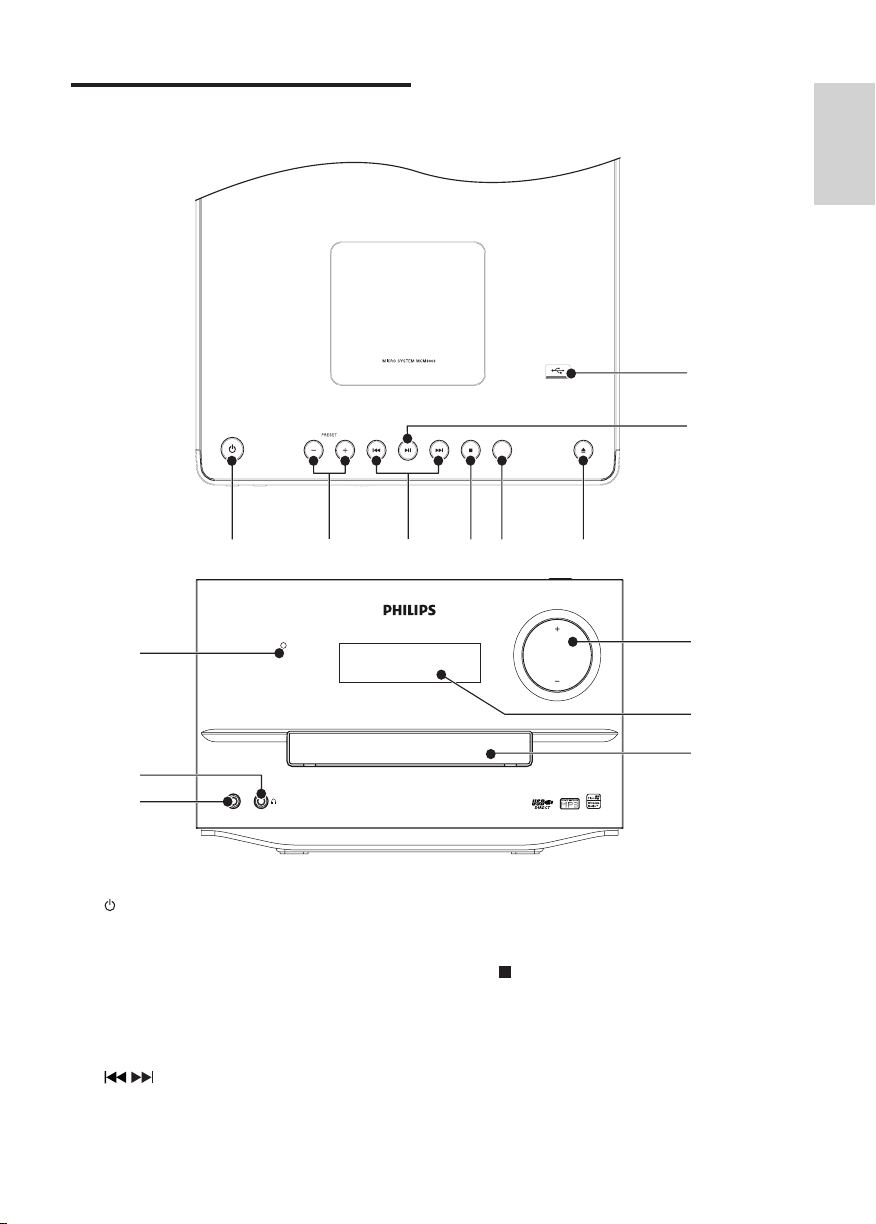
Overview of the main unit
Top and front view
a
• Turnon/offtheunit,switchto
standbymodeorEcopowerstandby
mode.
b
PRESET +/-
• Selectapresetradiostation.
• Skiptotheprevious/nextalbum.
c /
• Skiptotheprevious/nexttrack.
SOURCE
abcdef
g
h
STANDBY
PM
3
-
KNIL
VOLUME
i
j
k
l
m
n
English
EN
MCM3000_UM_12_Book 1.indb 7 8/14/2012 2:57:10 PM
8
f
• Open/closethedisccompartment.
g
• JackforaUSBmassstoragedevice.
h
• Startorpauseplay.
i VOLUME + / -
• Adjustvolume.
j Display panel
• Showcurrentstatus.
k Disc compartment
l MP3-LINK
• Audioinputjack(3.5mm)foran
externalaudiodevice.
m
• Jackfortheheadphone.
n STANDBY
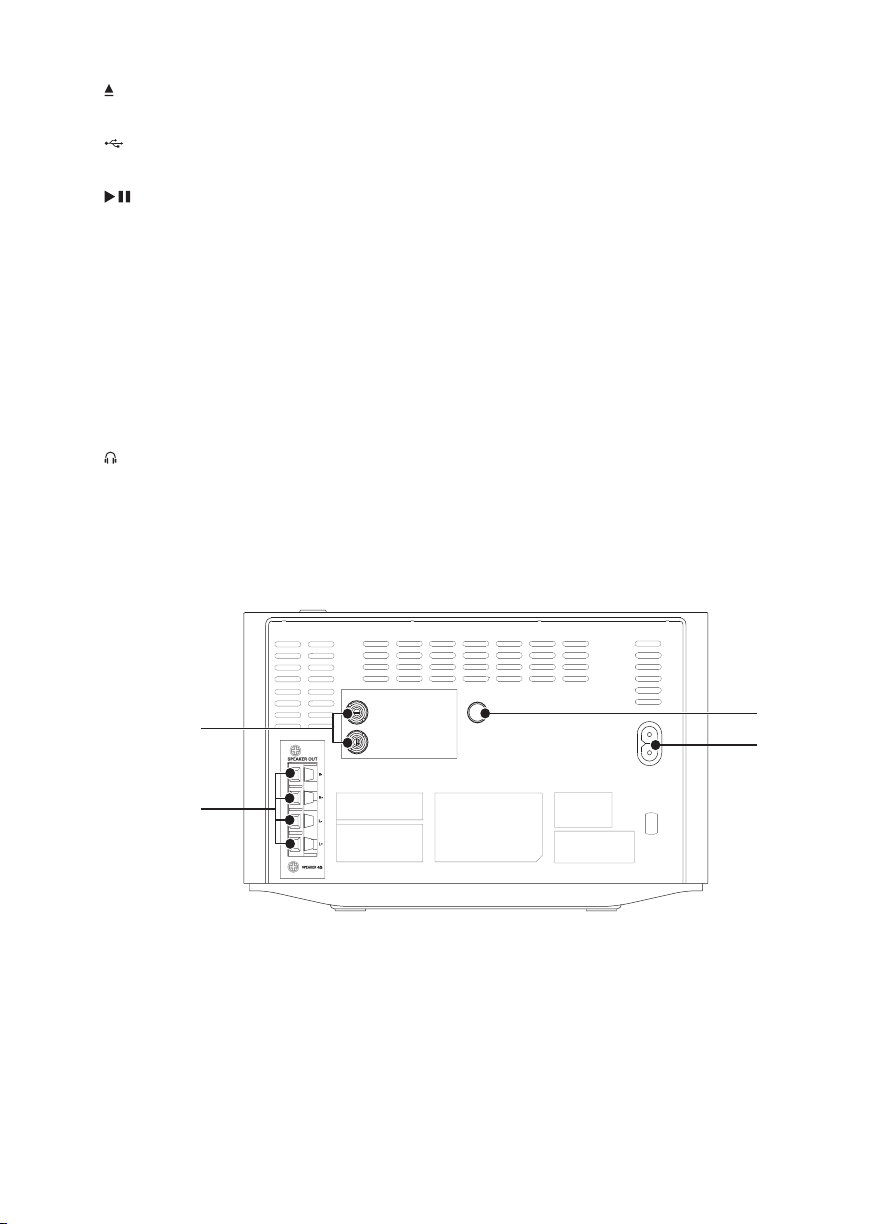
Back view
a AUX-IN
• connectanexternalaudiodevice.
b SPEAKER OUT
• Connectthespeaker.
c AC MAIN~
R
AUX IN
L
ANTENNA
FM
AC MAIN ~
c
d
b
a
EN
• Powersupplysocket.
d FM ANTENNA
• ImproveFMreception.
MCM3000_UM_12_Book 1.indb 8 8/14/2012 2:57:12 PM
9
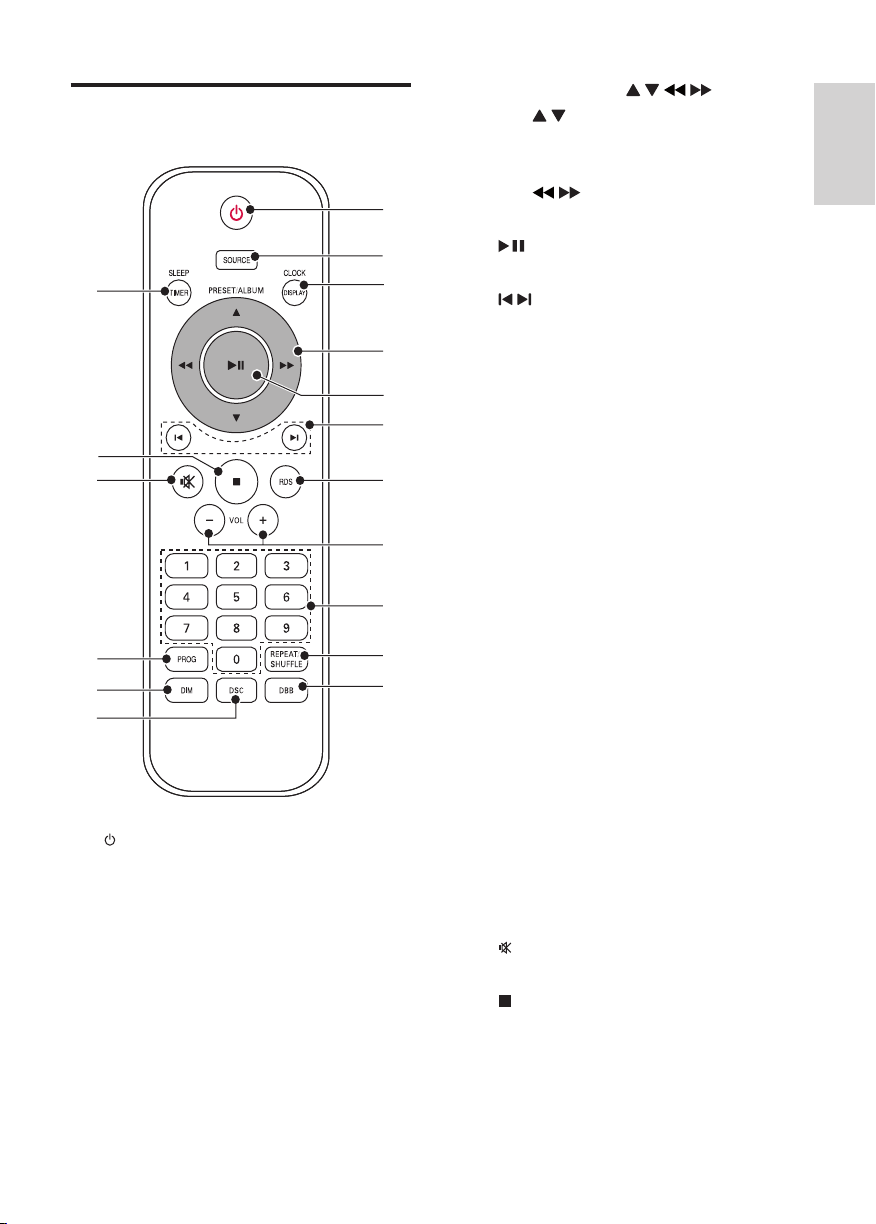
d PRESET/ALBUM / / /
• /
Selectapresetradiostation.
Skiptoprevious/nextalbum.
• /
Fastsearchbackwardorforward.
e
• Startorpauseplay.
f /
• Skiptoprevious/nexttrack.
• Tunetoaradiostation.
• Adjusttime.
g RDS
• ForselectedFMradiostations:
displayRDSinformation.
h VOL +/-
• Adjustvolume.
i Numeric Keypad 0 - 9
• Selectatrackfromadiscdirectly.
• Selectapresetradiostation.
j REPEAT/SHUFFLE
• Playatrackoralltracksrepeatedly.
• Playtracksrandomly.
k DBB
• Turnonoroffdynamicbass
enhancement.
l
DSC
• Selectapresetsoundsetting.
m DIM
• Adjustthedisplaybrightness.
n PROG
• Programtracks.
• Programradiostations.
o
• Muteorrestorevolume.
p
• Stopplayoreraseaprogram.
q SLEEP/TIMER
• Setsleeptimer.
• Setalarmtimer.
Overview of the remote
control
a
• Turnon/offtheunit,switchto
standbymodeorEcopowerstandby
mode.
b
SOURCE
• Selectasource:CD,FM,USB,MP3
LINK,orAUX-IN.
c CLOCK/DISPLAY
• Settheclock.
• Selectdisplayinformationduringplay.
a
b
c
d
e
f
g
h
i
j
k
n
o
p
q
m
l
English
EN
MCM3000_UM_12_Book 1.indb 9 8/14/2012 2:57:14 PM
10
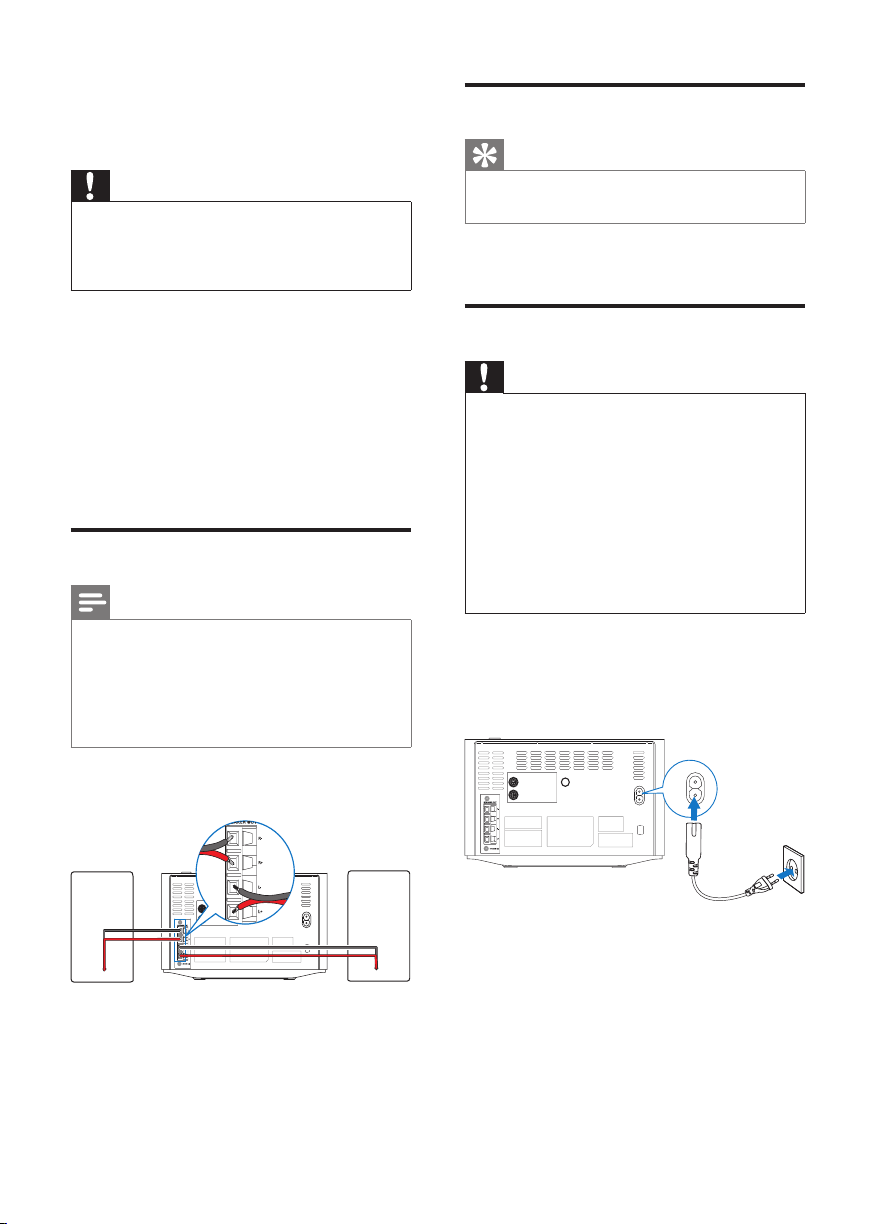
Connect FM antenna
Tip
• Foroptimalreception,fullyextendandadjust
thepositionoftheantenna.
ConnectthesuppliedFMantennatotheFM
ANTENNA
socketonthemainunit.
Connect power
Caution
• Riskofproductdamage!Ensurethatthe
powersupplyvoltagecorrespondstothe
voltageprintedonthebackortheunderside
oftheunit.
• Riskofelectricshock!Whenyouunplugthe
ACpowercord,alwayspulltheplugfromthe
socket.Neverpullthecord.
• BeforeyouconnecttheACpowercord,
ensurethatyouhavecompletedallother
connections.
Connectthepowercableto:
• theAC MAIN~jackonthemain
unit.
•
thewallsocket.
R
AUX IN
L
ANTENNA
FM
AC MAIN ~
AC MAIN ~
3 Get started
Caution
• Useofcontrolsoradjustmentsor
performanceofproceduresotherthanherein
mayresultinhazardousradiationexposureor
otherunsafeoperation.
Alwaysfollowtheinstructionsinthischapterin
sequence.
IfyoucontactPhilips,youwillbeaskedforthe
modelandserialnumberofthisapparatus.The
modelnumberandserialnumberareonthe
bottomoftheapparatus.Writethenumbers
here:
ModelNo.__________________________
SerialNo.___________________________
Connect speakers
Note
• Foroptimalsound,usethesuppliedspeakers
only.
• Connectonlyspeakerswithimpedancethatis
thesameorhigherthanthesuppliedspeakers.
RefertotheSpecicationssectionofthis
manual.
Insertthespeakerwirescompletelyintothe
speakerinputsocketsonthebackoftheunit.
R
AUX IN
L
ANTENNA
FM
AC MAIN ~
EN
MCM3000_UM_12_Book 1.indb 10 8/14/2012 2:57:15 PM
11
2 Press / ( / )tosetthehour.
3 PressCLOCK/DISPLAY.
» Theminutedigitsaredisplayedand
begintoblink.
4 Press / ( / )tosettheminute.
5 PressCLOCK/DISPLAYtoconrm.
Note
• Ifnobuttonispressedin15minutes,the
systemexitsclocksettingmodeautomatically.
Turn on
Press toturnon.
» Theunitswitchestothelastselected
source.
Switch to standby mode
Press againtoswitchtheunittostandby
mode.
» Theclock(ifset)appearsonthe
displaypanel.
Switch to ECO standby mode:
Pressandhold for3seconds.
» ECOSTANDBYisdisplayedfor3
secondsandthendisappeared.
Note
• Instandbymode,ifthereisnooperationfor
15minutes,theunitswitchestoEcoPower
Standbymodeautomatically.
Switch between standby mode and ECO
standby mode:
Pressandhold for3seconds.
Prepare the remote control
Caution
• Riskofexplosion!Keepbatteriesawayfrom
heat,sunshineorre.Neverdiscardbatteries
inre.
• Riskofdecreasedbatterylife!Nevermix
differentbrandsortypesofbatteries.
• Riskofproductdamage!Whentheremote
controlisnotusedforlongperiods,remove
thebatteries.
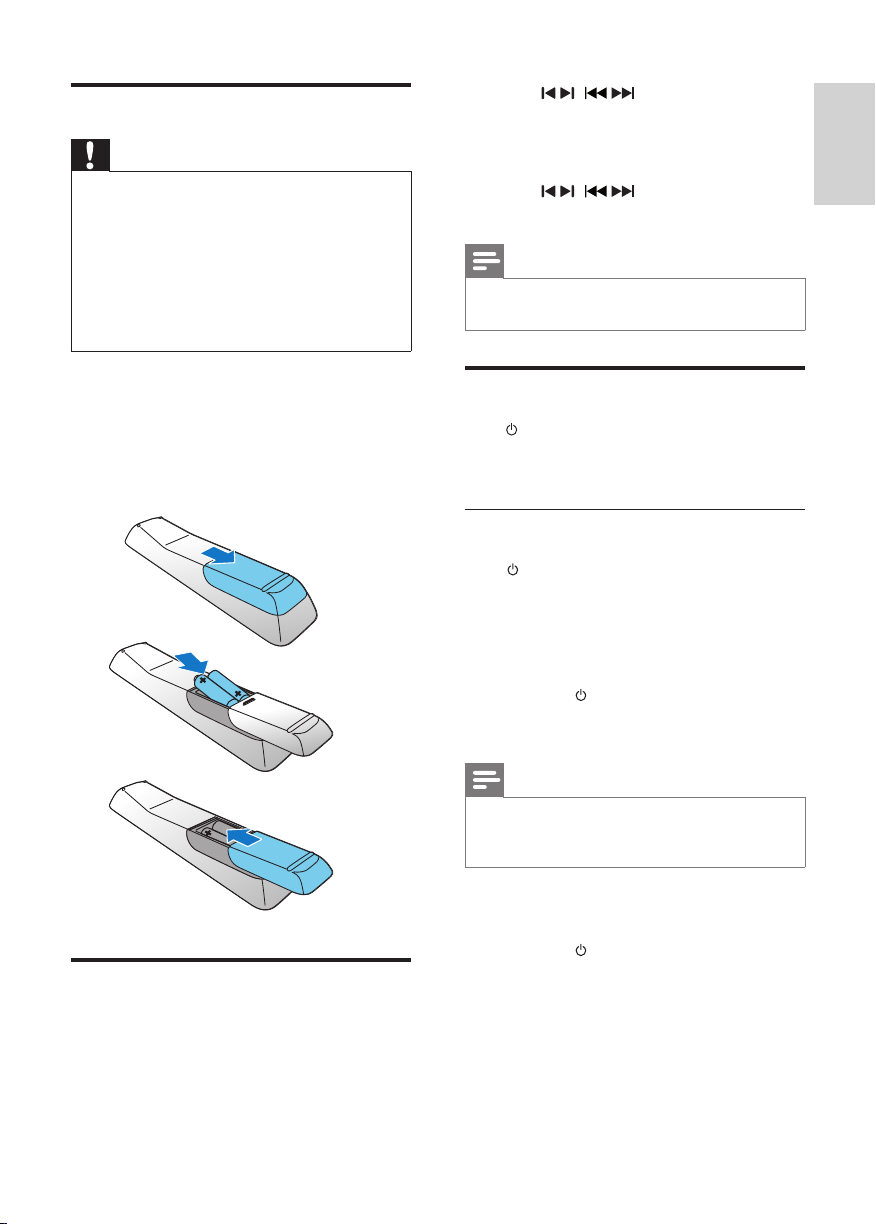
To insert the remote control battery:
1 Openthebatterycompartment.
2 Insert2AAAbatterieswithcorrect
polarity(+/-)asindicated.
3 Closethebatterycompartment.
Set clock
1 Instandbymode,pressandhold
CLOCK/DISPLAYontheremotecontrol
toactivatetheclocksettingmode.
» Thehourdigitsaredisplayedandbegin
toblink.
a
b
c
English
EN
MCM3000_UM_12_Book 1.indb 11 8/14/2012 2:57:16 PM
12
• Toselectafolder,press / .
• Toselectanaudiole,press / .
Play options
Pause/resume play
Duringplay,press topause/resumeplay.
Repeat/shufe play
1 Duringplay,pressREPEAT/SHUFFLE
repeatedlytoselectarepeatoptionor
theshufeplaymode.
• [REP]:thecurrenttrackisplayed
repeatedly.
• [REP ALL
]:alltracksareplayed
repeatedly.
• [REP ALB
]:alltracksinthisalbum
areplayedrepeatedly.
• [SHUF]:alltracksareplayed
randomly.
2 Toresumenormalplay,press
REPEAT/SHUFFLErepeatedlyuntilno
optionisdisplayed.
Skip to a track
For CD:
Press / toselectanothertrack.
• Toselectatrackdirectly,youcan
alsopressakeyonthenumerical
keypad.
For MP3 disc and USB:
1 Press / toselectanalbumorafolder.
2 Press / toselectatrackorale.
Program tracks
Youcanprogramamaximumof20tracks.
1 PressPROGtoactivatetheprogram
mode.
» [PROG](program)isdisplayed.
4 Play
Play from disc
1 PressSOURCErepeatedlytoselectCD
source.
2 Press toopenthedisccompartment.
3 Insertadiscwiththeprintedsidefacing
upward.
4 Press toclosethedisccompartment.
5 Playstartsautomatically.Ifnot,press .
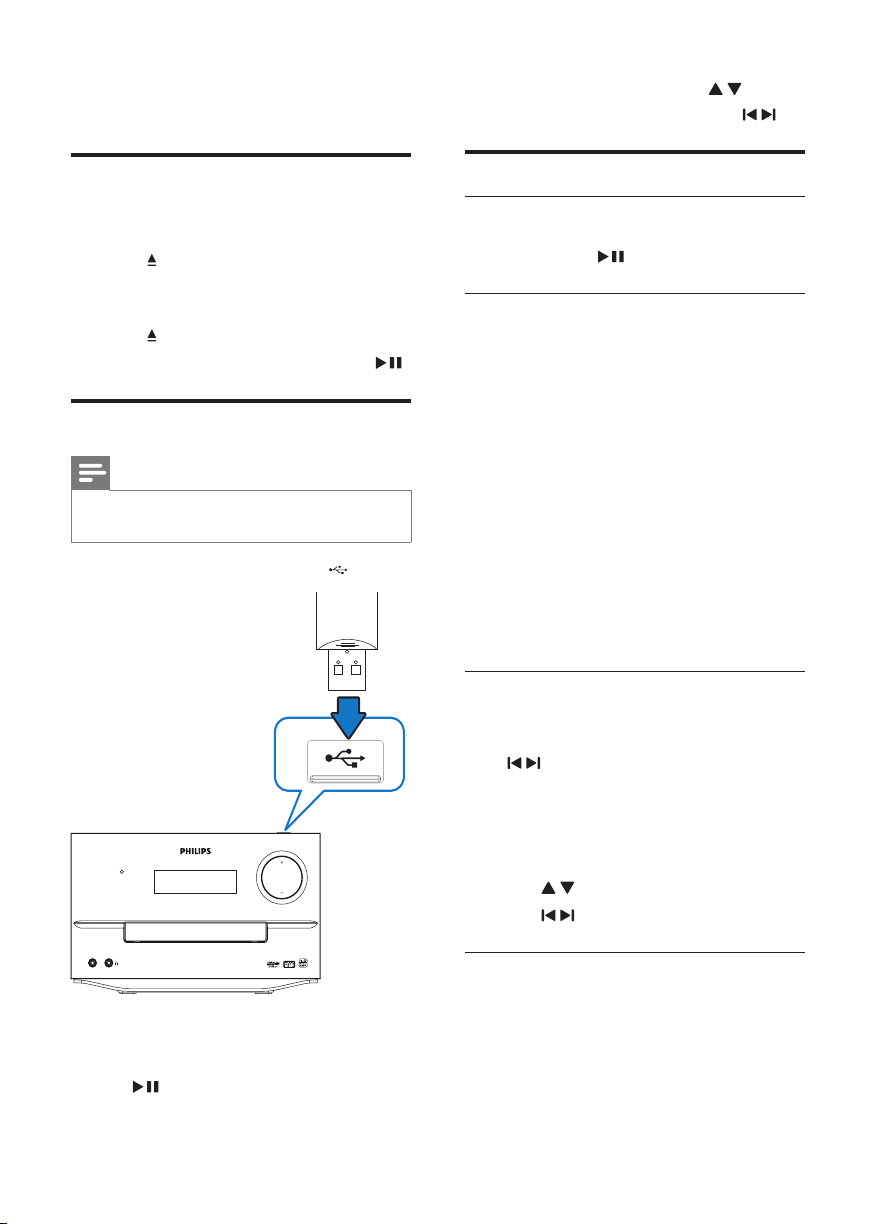
Play from USB
Note
• EnsurethattheUSBdevicecontainsplayable
audiocontent.
1 InserttheUSBdeviceintothe socket.
2 PressSOURCErepeatedlytoselectthe
USBsource.
» Playstartsautomatically.Ifnot,press
.
STANDBY
PM
3
-
K
NIL
VOLUME
EN
MCM3000_UM_12_Book 1.indb 12 8/14/2012 2:57:17 PM
13
2 ForMP3/WMAtracks,press / to
selectanalbum.
3 Press / toselectatrack,andthen
pressPROGtoconrm.
4 Repeatsteps2to3toprogrammore
tracks.
5 Press toplaytheprogrammedtracks.
» Duringplay,[PROG](program)is
displayed.
•
Toerasetheprogram,inthestop
position,press .
Adjust sound
Duringplay,youcanadjustvolumethrough
followingoperations.
Key Function
VOL +/-
Toincrease/decreasethevolume.
MUTE Tomute/restoresound.
DBB Toturnonoroffdynamicbass
enhancement.
IfDBBisactivated,[DBB]is
displayed.
DSC
Toselectyourdesiredsound
effect:
[ROCK
](rock)
[JAZZ](jazz)
[CLASSIC](classic)
[POP](pop)
English
EN
MCM3000_UM_12_Book 1.indb 13 8/14/2012 2:57:18 PM
14
Program radio stations
manually
1 Intunermode,tunetoaradiostation.
2 PressPROGtoactivateprogramming
mode.
3 Press / toselectanumberfrom1–20
forthisradiostation,andthenpress
PROGtoconrm.
4 Thepresetnumberandthefrequencyof
thepresetstationaredisplayed.
5 Repeatsteps2-3toprogramother
stations.
6 Pressandhold / for3secondsto
searchfortheneareststation.
Note
• Tooverwriteaprogrammedstation,store
anotherstationinitsplace.
Select a preset radio station
Intunermode,press / toselectapreset
number.
•
Youcanalsopressthenumericbuttons
toselectapresetnumberdirectly.
Show RDS information
RDS(RadioDataSystem)isaservice
thatallowsFMstationstoshowadditional
information.IfyoutunetoanRDSstation,an
RDSiconandthestationnamearedisplayed.
1 TunetoanRDSstation.
2 PressRDSrepeatedlytoscrollthrough
thefollowinginformation(ifavailable):
» Stationname
» Programtypesuchas[NEWS](news),
[SPORT](sport),[POP M](pop
music)...
» RDS RT
» Frequency
5 Listen to the
radio
Tune to a radio station
Note
• Positiontheantennaasfaraspossiblefrom
TV,VCR,orotherradiationsource.
• Ensurethatyouhaveconnectedandfully
extendedthesuppliedFMantenna.
1 PressSOURCErepeatedlytoselectFM.
2 Pressandhold / ( / )formore
than2seconds.
» [SEARCH](search)isdisplayed.
» Theradiotunestoastationwith
strongreceptionautomatically.
3 Repeatstep3totunetomorestations.
To tune to a weak station:
Press / ( / )repeatedlyuntilyound
optimalreception.
Program radio stations
automatically
Note
• Youcanprogramamaximumof20preset
radiostations(FM).
Intunermode,pressandholdPROGfor3
secondstoactivateautomaticprogramming.
» [AUTO SCAN](autoscan)is
displayed.
» Allavailablestationsareprogrammed
intheorderofwavebandreception
strength.
» Therstprogrammedradiostationis
broadcastautomatically.
EN
MCM3000_UM_12_Book 1.indb 14 8/14/2012 2:57:19 PM
15
Tip
• IfCD/USBsourceisselected,butnodisc
isplacedornoUSBconnected,thesystem
switchestothetunersourceautomatically.
Set the sleep timer
Whentheunitisturnedon,pressSLEEP/
TIMER
repeatedlytoselectasetperiodoftime
(inminutes).
» Whensleeptimerisactivated, is
displayed.
To deactivate sleep timer
1 PressSLEEP/TIMERrepeatedlyuntil
[OFF](off)isdisplayed.
» Whensleeptimerisdeactivated,
disappearsonthedisplay.
Play from external audio
device
Youcanplayfromanexternalaudiodevice
suchasMP3playerthroughthisunit.
1 Connecttheaudiodevice.
• Foraudiodevicewithred/white
audiooutputsockets:
Connectared/whiteaudiocable
(notsupplied)totheAUX-IN
socketsandtotheaudiooutput
socketsontheaudiodevice.
• Foraudiodevicewithheadphone
sockets:
ConnectthesuppliedMP3-Link
cabletotheMP3-LINKsocketand
totheheadphonesocketonthe
audiodevice.
2 PressSOURCEtoselectMP3-
LINK/AUX-IN
source.
3 Playthedevice.
6 Other features
Set the alarm timer
Thisunitcanbeusedasanalarmclock.Youcan
selectCD,FM,orUSBasalarmsource.
Note
• Makesurethatyouhavesettheclock
correctly.
1 Instandbymode,pressandholdSLEEP/
TIMER
until[SET TIMER](settimer)
scrollsonthedisplay.
» [SELECT SOURCE](selectsource)
scrollsonthescreen.
2 PressSOURCE repeatedlytoselecta
source:CD,FM,orUSB.
3 PressSLEEP/TIMERtoconrm.
» Thehourdigitsaredisplayedandbegin
toblink.
4 Press / ( / )repeatedlytosethour,
andthenpressSLEEP/TIMERtoconrm.
» Theminutedigitsaredisplayedand
begintoblink.
5 Press / ( / )tosetminute,and
thenpressSLEEP/TIMERtoconrm.
» VOL(volume)isdisplayedandbegins
toblink.
6 Press / ( / )toadjustvolume,and
thenpressSLEEP/TIMERtoconrm.
» The SLEEP/TIMERiconisdisplayed.
Note
• Ifnobuttonispressedin15minutes,the
systemexitstimersettingmodeautomatically.
To activate or deactivate the alarm timer
PressTIMERON/OFFrepeatedlytoactivateor
deactivatethealarm.
» Iftimerisactivated,thedisplayshows
.
» Iftimerisdeactivated, disappearson
thedisplay.
English
EN
MCM3000_UM_12_Book 1.indb 15 8/14/2012 2:57:20 PM

16
Listen through the headphone
Plugaheadphoneintothe socketontheunit.
Adjust display brightness
PressDIMrepeatedlytoselectdifferentlevels
ofdisplaybrightness:
• Highbrightness
• Midbrightness
• Lowbrightness
EN
MCM3000_UM_12_Book 1.indb 16 8/14/2012 2:57:20 PM
17
Tuner (FM)
TuningRange 87.5-108MHz
Tuninggrid 50KHz
Sensitivity
-Mono,26dBS/NRatio
-Stereo,46dBS/NRatio
<22dBf
>43dBf
SearchSelectivity >28dBf
TotalHarmonicDistortion <3%
SignaltoNoiseRatio >50dB
Speakers
Speaker
Impedance
4ohm
SpeakerDriver 4”woofer+1”tweeter
Sensitivity >80dB/m/W
General information
ACpower 220-240V,50/60
Hz
OperationPower
Consumption
40 W
EcoStandbyPower
Consumption
<0.5W
AudioOutput 1Vpp±0.1Vpp
3.5kohm
HeadphoneOutput 2x2.5mW32
ohm
USBDirect Version1.1FS
Dimensions
-MainUnit(WxHxD)
-SpeakerBox(WxH
xD)
239x141.5x
230mm
210.1x262x
142mm
Weight
-WithPacking
-MainUnit
-SpeakerBox
7.4kg
1.85kg
1.9x2kg
7 Product
information
Note
• Productinformationissubjecttochange
withoutpriornotice.
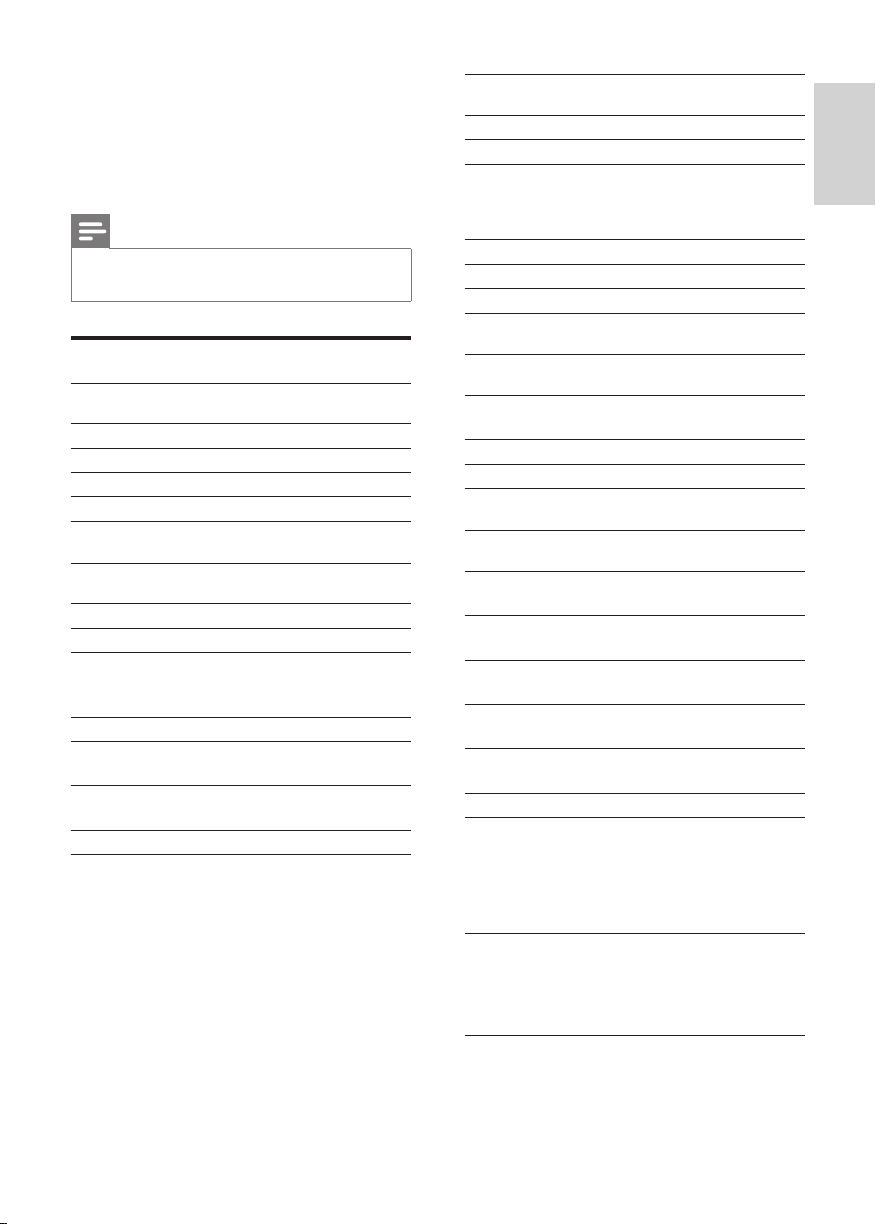
Specications
Amplier
RatedOutputPower 2X50WRMS
FrequencyResponse 80Hz-16kHZ
SignaltoNoiseRatio ≥60dB
AuxInput 0.5VRMS20kohm
Disc
LaserType Semiconductor
DiscDiameter 12cm/8cm
SupportDisc CD-DA,CD-R,CD-
RW,MP3-CD,WMA-
CD
AudioDAC 16Bits/44.1kHz
TotalHarmonic
Distortion
<1%(1kHz)
Frequency
Response
60Hz-16kHz(44.1
kHz)
S/NRatio >55dBA
English
EN
MCM3000_UM_12_Book 1.indb 17 8/14/2012 2:57:20 PM

18
• Supportedsamplingfrequencies:32kHz,
44.1kHz,48kHz
• SupportedBit-rates:32~320(kbps),
variablebitrates
USB playability information
Compatible USB devices:
•
USBashmemory(USB1.1)
• USBashplayers(USB1.1)
• memorycards(requiresanadditional
cardreadertoworkwiththisunit)
Supported formats:
•
USBormemoryleformat:FAT12,
FAT16,FAT32(sectorsize:512bytes)
• MP3bitrate(datarate):32-320Kbps
andvariablebitrate
• WMAv9orearlier
• Directorynestinguptoamaximum
of8levels
• Numberofalbums/folders:
maximum99
• Numberoftracks/titles:maximum
999
•
ID3tagv2.0orlater
• FilenameinUnicodeUTF8
(maximumlength:16bytes)
Unsupported formats:
•
Emptyalbums:anemptyalbumisan
albumthatdoesnotcontainMP3/
WMAles,andisnotbeshownin
thedisplay.
• Unsupportedleformatsare
skipped.Forexample,Word
documents(.doc)orMP3leswith
extension.dlfareignoredandnot
played.
•
AAC,WAV,PCMaudioles
• DRMprotectedWMAles(.wav,
.m4a,.m4p,.mp4,.aac)
• WMAlesinLosslessformat
Supported MP3 disc formats
• ISO9660,Joliet
• Maximumtitlenumber:999(depending
onlenamelength)
• Maximumalbumnumber:99
EN
MCM3000_UM_12_Book 1.indb 18 8/14/2012 2:57:20 PM

19
• Reducethedistancebetweentheremote
controlandtheunit.
• Insertthebatterywithitspolarities(+/–
signs)alignedasindicated.
• Replacethebattery.
• Aimtheremotecontroldirectlyatthe
sensoronthefrontoftheunit.
No disc detected
• Insertadisc.
• Checkifthediscisinsertedupsidedown.
• Waituntilthemoisturecondensationat
thelenshascleared.
• Replaceorcleanthedisc.
• UseanalizedCDorcorrectformatdisc.
Cannot display some les in USB device
• ThenumberoffoldersorlesintheUSB
devicehasexceededacertainlimit.This
phenomenonisnotamalfunction.
• Theformatsoftheselesarenot
supported.
USB device not supported
• TheUSBdeviceisincompatiblewiththe
unit.Tryanotherone.
Poor radio reception
• Increasethedistancebetweentheunit
andyourTVorVCR.
• FullyextendtheFMantenna.
• ConnectanoutdoorFMantennainstead.
Timer does not work
• Settheclockcorrectly.
• Switchonthetimer.
Clock/timer setting erased
• Powerhasbeeninterruptedorthepower
cordhasbeendisconnected.
• Resettheclock/timer.
8 Troubleshooting
Warning
• Neverremovethecasingofthisapparatus.
Tokeepthewarrantyvalid,nevertrytorepair
thesystemyourself.
Ifyouencounterproblemswhenusingthis
apparatus,checkthefollowingpointsbefore
requestingservice.Iftheproblemremains
unsolved,gotothePhilipswebsite(www.
philips.com/welcome).Whenyoucontact
Philips,ensurethattheapparatusisnearby
andthemodelnumberandserialnumberare
available.
No power
• EnsurethattheACpowercordofthe
unitisconnectedproperly.
• EnsurethatthereispowerattheAC
outlet.
• Asapower-savingfeature,thesystem
switchesoffautomatically15minutes
aftertrackplayreachestheendandno
controlisoperated.
No sound or poor sound
• Adjustthevolume.
• Disconnecttheheadphones.
• Checkthatthespeakersareconnected
correctly.
• Checkifthestrippedspeakerwiresare
clamped.
No response from the unit
• DisconnectandreconnecttheACpower
plug,thenturnontheunitagain.
• Asapower-savingfeature,thesystem
switchesoffautomatically15minutes
aftertrackplayreachestheendandno
controlisoperated.
Remote control does not work
• Beforeyoupressanyfunctionbutton,
rstselectthecorrectsourcewiththe
remotecontrolinsteadofthemainunit.
English
EN
MCM3000_UM_12_Book 1.indb 19 8/14/2012 2:57:20 PM
20
negativeconsequencesfortheenvironmental
andhumanhealth.
Environmental information
Allunnecessarypackaginghasbeenomitted.
Wehavetriedtomakethepackagingeasyto
separateintothreematerials:cardboard(box),
polystyrenefoam(buffer)andpolyethylene
(bags,protectivefoamsheet.)
Yoursystemconsistsofmaterialswhichcan
berecycledandreusedifdisassembledby
aspecializedcompany.Pleaseobservethe
localregulationsregardingthedisposalof
packagingmaterials,exhaustedbatteriesandold
equipment.
Themakingofunauthorizedcopiesofcopy-
protectedmaterial,includingcomputer
programs,les,broadcastsandsound
recordings,maybeaninfringementof
copyrightsandconstituteacriminaloffence.
Thisequipmentshouldnotbeusedforsuch
purposes.
This apparatus includes this label:
Note
• Thetypeplateislocatedonthebottomofthe
apparatus.
9 Notice
Anychangesormodicationsmadetothis
devicethatarenotexpresslyapprovedby
PhilipsConsumerLifestylemayvoidtheuser’s
authoritytooperatetheequipment.
Thisproductcomplieswiththeradio
interferencerequirementsoftheEuropean
Community.
Yourproductisdesignedandmanufactured
withhighqualitymaterialsandcomponents,
whichcanberecycledandreused.
Whenthiscrossed-outwheeledbinsymbolis
attachedtoaproductitmeansthattheproduct
iscoveredbytheEuropeanDirective2002/96/
EC.
Pleaseinformyourselfaboutthelocalseparate
collectionsystemforelectricalandelectronic
products.
Pleaseactaccordingtoyourlocalrulesand
donotdisposeofyouroldproductswithyour
normalhouseholdwaste.Correctdisposalof
youroldproducthelpstopreventpotential
negativeconsequencesfortheenvironmentand
humanhealth.
Yourproductcontainsbatteriescoveredby
theEuropeanDirective2006/66/EC,which
cannotbedisposedwithnormalhousehold
waste.Pleaseinformyourselfaboutthelocal
rulesonseparatecollectionofbatteries
becausecorrectdisposalhelpstoprevent
EN
MCM3000_UM_12_Book 1.indb 20 8/14/2012 2:57:22 PM

© 2012 Koninklijke Philips Electronics N.V.
All rights reserved.
MCM3000_UM_12_V3.0_Book 1
MCM3000_UM_12_Book 1.indb 152 8/14/2012 2:59:43 PM