ユーザマニュアル
User Manual

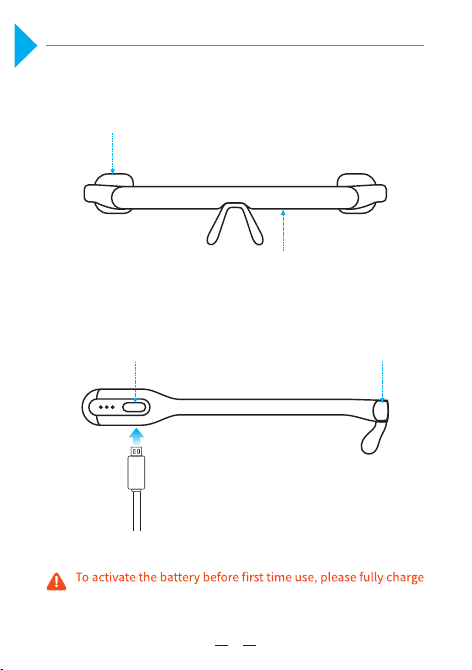
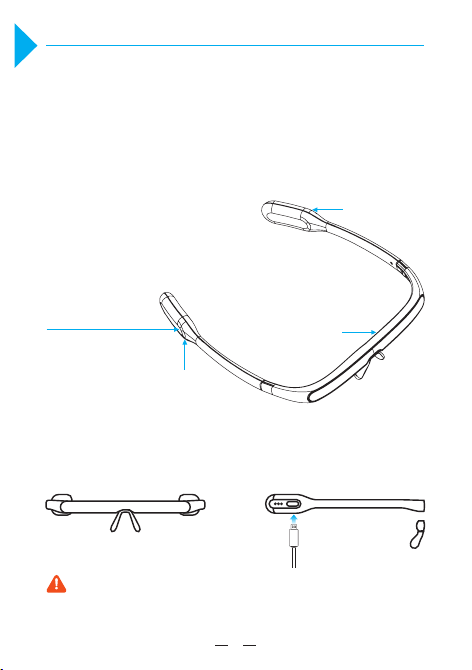
Product Image
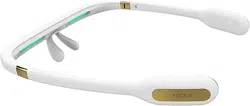
the PEGASI glasses with a USB cable.
Front View
Button
Button
Illuminant Module
Illuminant Module
Side View
1
1
1 2
3
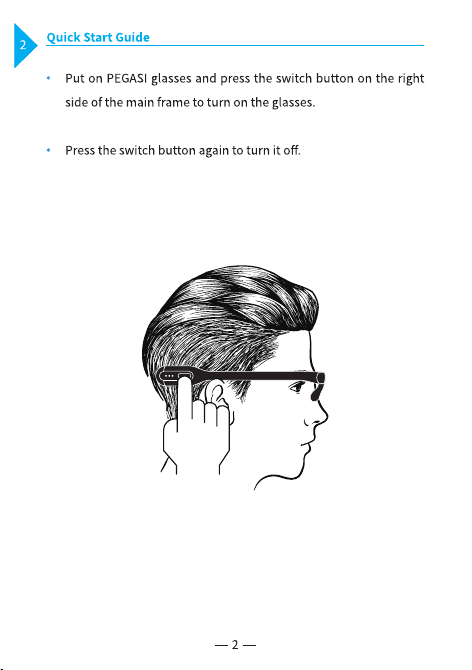
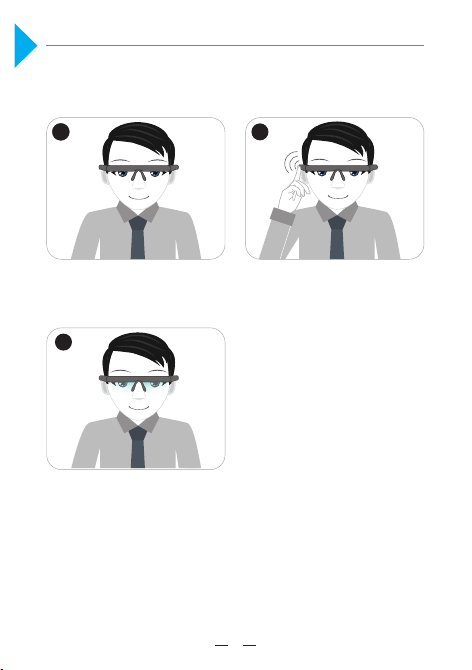
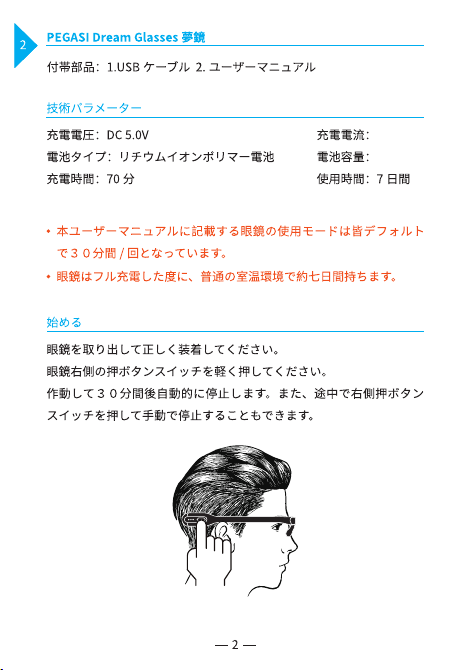
Illuminant Module Press the switch once to
activate the glasses
Wear the glasses for 30 mins
while you work or play
Steps
3
3
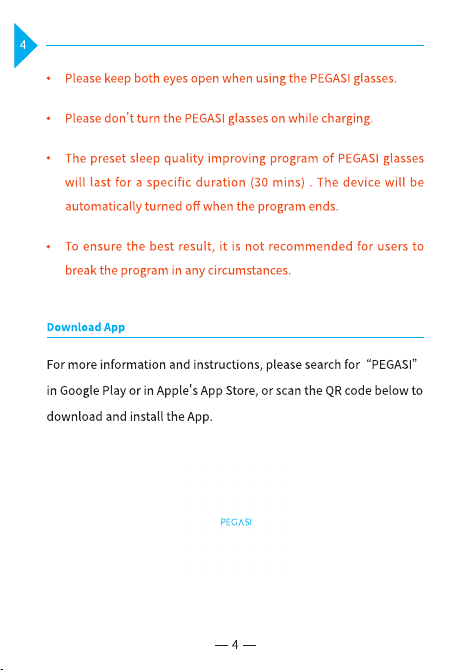
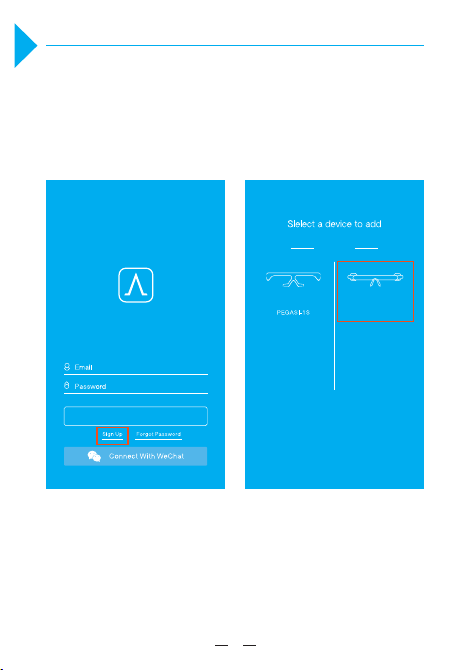
Connecting PEGASI with App
Press the switch button to activate wireless casting of the PEGASI
glasses before connecting it to the App, or follow the instructions on
the App.
Login APP Add PEGASI Glasses
5
5
PEGASI
Dream Glasses
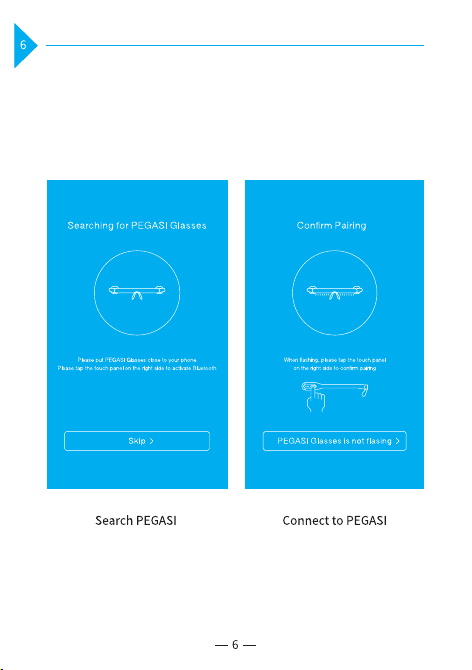
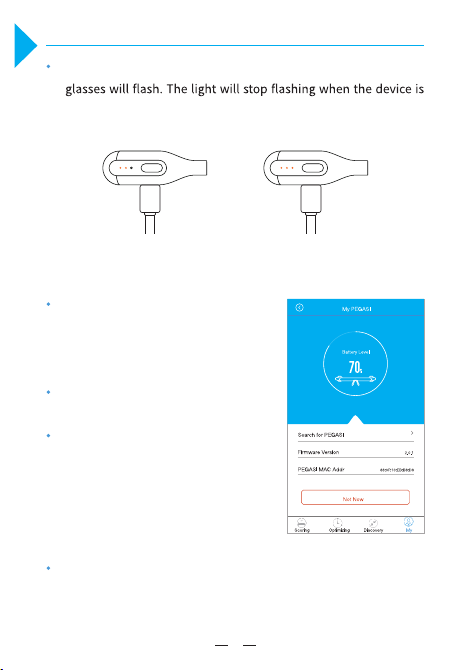
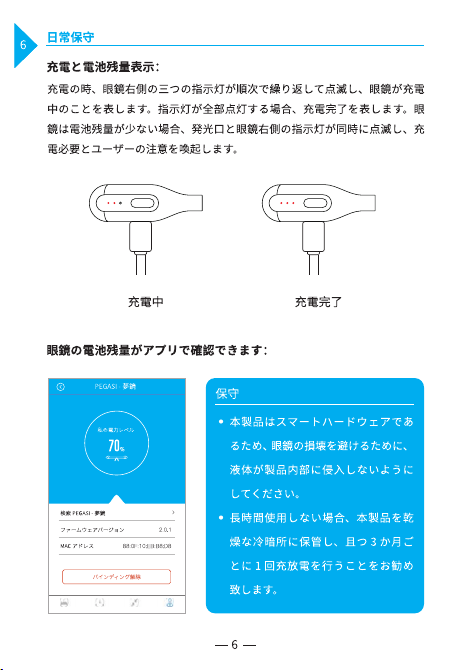
Charging Battery and Level Indication
While charging, the three indicator lights on the right side of the
fully charged.
When the battery is low, both the illuminant
module and indicator light on right side
of the glasses will flash. Please charge the
battery.
A whole charging process will take about 70
mins.
If the battery level is below the protective
threshold, the device will enter a deep sleep
mode and will not respond to any user
actions. In this case, the device needs to be
go through a whole charging process before
using again.
Accurate battery level can be read from the
App.
7
Charging
Fully charged
7
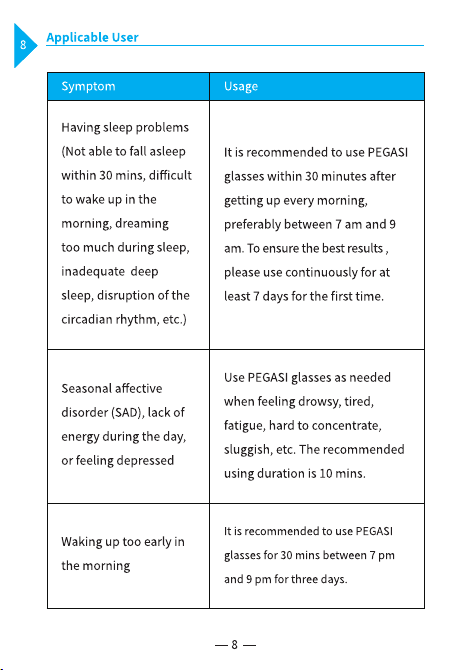
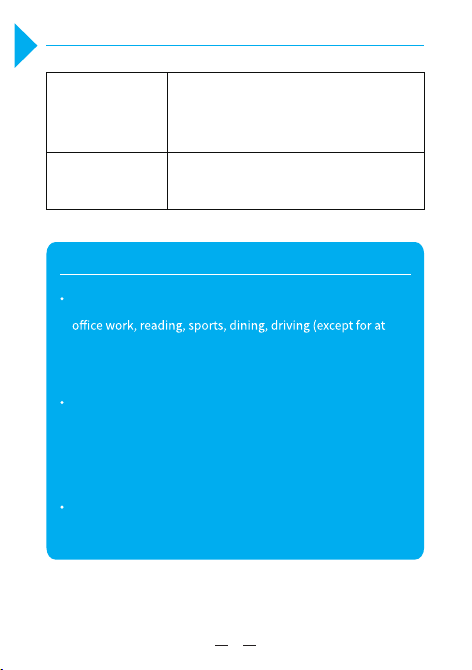
PEGASI glasses do not interfere with your daily life, such as
night), etc.
For nearsighted or farsighted users, please wear the PEGASI
glasses on top of the regular glasses, making sure that no
frame is blocking the light from the illuminant module.
Do not use PEGASI glasses while wearing tinted glasses
including sunglasses.
Notice
9
9
Use 1 to 2 cycles between 7 pm and 2 am
(next day).
Please call: +86 400-961-8288
On night duty
Others
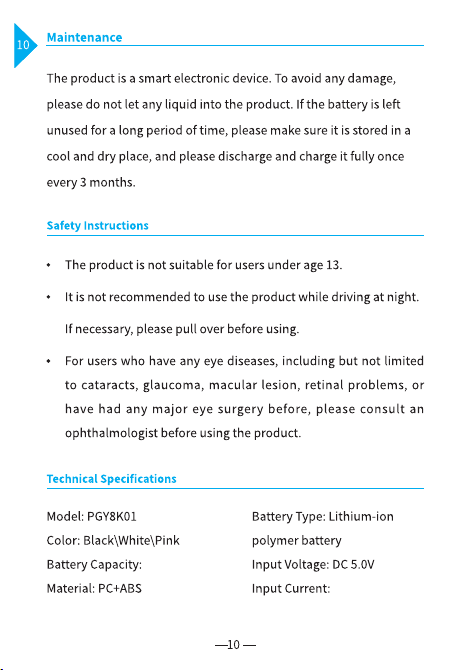
300mA(MAX)
290mAh
11
11
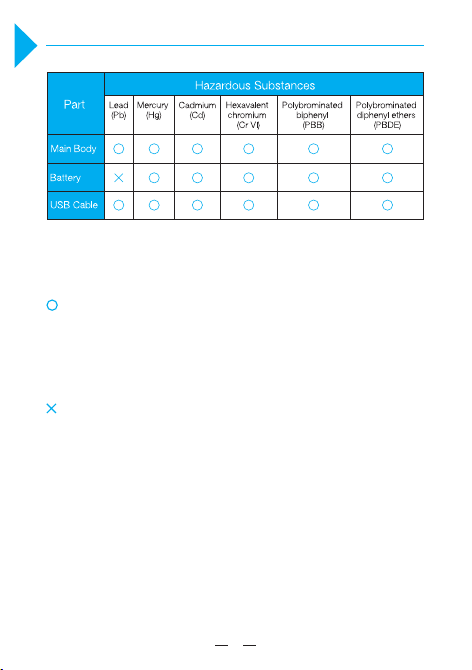
Declaration of Hazardous Substances
The table is compiled according to the regulations of SJ/T 11364.
Indicates the amount of that hazardous substance in all
homogeneous material of the specific part is below the
limitation.
Indicates the amount of that hazardous substance in at least
one of the homogeneous material of the specific part is
above the limitation.
13
13
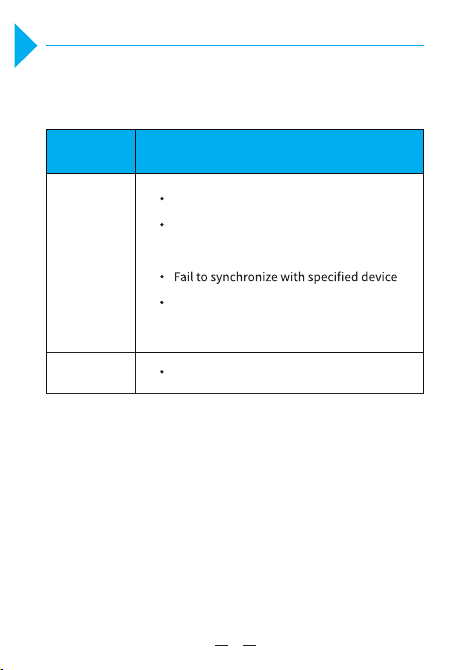
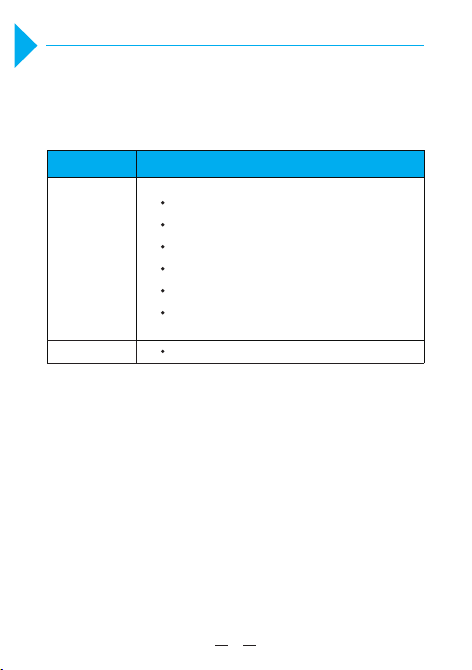
Troubleshooting Table
Part
Main Body
USB Cable
Troubleshooting
Fail to charge the glasses
Switch button failure
No light comes out of the illuminant
module when turned on
Shell damage due to structure or material
defect
compliance could void the user's authority to operate the equipment.
This equipment has been tested and found to comply with the limits for a Class
B digital device, pursuant to part 15 of the FCC Rules. These limits are designed
to provide reasonable protection against harmful interference in a residential
installation. This equipment generates, uses and can radiate radio frequency
energy and, if not installed and used in accordance with the instructions, may
cause harmful interference to radio communications. However, there is no
guarantee that interference will not occur in a particular installation. If this
equipment does cause
harmful interference to radio or television reception,
si resu eht ,no dna ffo tnempiuqe eht gninrut yb denimreted eb nac hcihw
encouraged to try to correct the interference by one or more of the following
measures:
This device complies with part 15 of the FCC Rules. Operation is subject to the
following two conditions: (1) This device may not cause harmful interference, and
(2) this device must accept any interference received, including interference that
may cause undesired operation.
This equipment complies with FCC radiation exposure limits set forth for an
uncontrolled environment . This t
ransmitter must not be co-located or operating
in conjunction with any other antenna or transmitter.
—
—
—
—
Reorient or relocate the receiving antenna.
Increase the separation between the equipment and receiver.
the receiver is connected.
Consult the dealer or an experienced radio/TV technician for help.
製品概説
PEGASI Dream Glasses 夢鏡は物理な方式を用いて睡眠を改善するス
マートハードウェアで、独特な両波長双安定素子の発光モジュール技
術を利用し、知能インテリジェントライトを折り畳み可能なスマート
眼鏡に蓄積することで、人体の内生ホルモンとなるメラトニンの分泌
量を合理的に調整するにつれ、人間の睡眠機能の覚醒を促し、睡眠の
質を上げます。
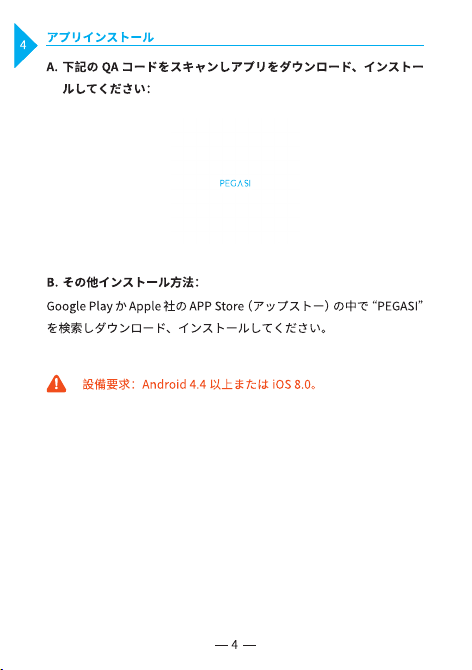
初回利用の場合、電池を活性化するために USB ケーブルで充電
してください。
押ボタンスイッチ
発光口
Logo
Micro-USB 充電コネクター
正面イメージ 側面イメージ
1
1
300mA
290mAh
群衆に適しています
眠れない、朝起きられない、多夢、深い睡眠が短い、早朝覚醒、生活
リズム乱れ等の睡眠、やる気がない、徹夜や時差による睡眠障害など。
眠れない/朝起きられない/多夢/深い睡眠が短い/生活リズム乱
れ等:
早朝覚醒 ( 一派的に、朝5時前に朝早く目が覚めてしまって眠れな
い人を指し、よく年上の人に見られます。):
そのほか:
毎日の朝、7:00-9:00 の間に、一回お使いください。7日連続でご
利用になると、期待の効果を達成できます。
毎夜 19:00-21:00 の間に、. 回お使いください。7. 連続でご利 . に
なると、期待の効果を達成できます。
更に詳しくやり方について知りたい方は電話でお問い合わせくださ
い。電話 +86 400-961-8288。
1.
2.
3.
注意事項
13 歳以下はご利用にできません。
運転中に本商品を使わないでください。ご利用になりたい方、運転する前に、
或は、運転した後にご使用ください。
それに限らないですが、次のような何らかの眼の疾患にかかる者は、例え
ば白内障、緑内障、黄斑症または重大な眼の手術を受けた場合、本製品を
利用する前に眼科の医者にお問い合わせください。
初回の時に、明るい場所でご利用ください。
安全の為、充電中、メガネのご利用をご遠慮ください。
カラー・茶色の眼鏡(コンタクトレンズ含)をかける状態で本製品を利用
することを避けてください。
近視、遠視のレンズと同時に利用する際に、外側に本商品をおかけください,
近視、遠視のレンズの枠は本商品の光は遮らないようにご注意ください。
3
3
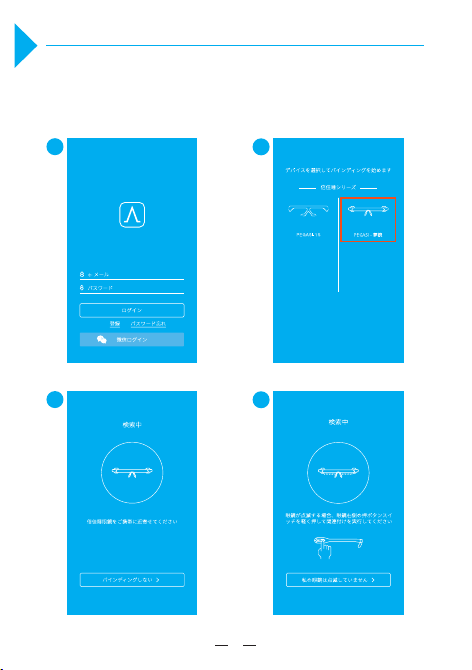
PEGASI Dream Glasses 夢鏡との関連付け
初回利用の場合、するために USB ケーブルで充電してください,眼鏡に充分
な電池残量があることを確認してください。スマホのワイヤレス接続と倍佳
睡アプリを実行した後、下記の手順で眼鏡と関連付けしてください:
1
2
3
4
5
5
7
7
PEGASI 保証
引渡日から 12 ヶ月月間以内に、「PEGASI 性能故障リスト」に属する故障が
発生した場合には、PEGASI アフターサービスセンターが修理か交換をお扱
いします。
以下のいずれかに該当すると判断した場合、修理依頼を承っておりま
せん:
PEGASI 性能故障リスト
部品
商品本体
充電ケーブル
性能故障内容
構造や素材による本体破損
ボタンがきかない
端末装置と同期が取れない
グリーンライトを射出しません
右側の指示灯が点灯しない
取扱書に書いてある機能が付かない
ケーブルが充電できない
修理対応期間が終了しております。
修理保証書をもっておりません。
領収書をもっておりません。
修理保証書は商品と一致しておりません。
修理保証書が変更された場合です。
取扱説明書通りに正しく利用になれない故障です。
改造または不当な修理による故障および破損です。
水濡れ落下などでお客様のお取り扱い不良による故障損傷などの場
合です。
1.
2.
3.
4.
5.
6.
7.
8.

このメガネは寝ている時に、かけますか?
なぜ、発光ダイオードは点滅しますか?
どうやって眼鏡に充電しますか?
いいえ、本商品に使われている特許の光技術は寝ないで、目が開く
ときに、効かれます。具体来な使用方法は P3-P4 をご参照くだ
さい。
発光ダイオードは点滅しているのは、電池残量が少ないという意味
です。本体が正常に動作できるように、充電を遅れないようご注意
ください。
1.
2.
3.
本体の充電の差込口に充電ケーブルを差し込んで、コンセント
につながって、充電してください。
充電の時、眼鏡右側の三つの指示灯が順次で繰り返して点滅し、
眼鏡が充電中のことを表します。指示灯が全部点灯する場合、
充電完了を表します。
充電時間は同時のバッテリーの残量により違いますが、一般多
くても、70 分を超えません。
a)
b)
c)
9
9
よくあるご質問(FAQ)

なぜ、眼鏡をかけて、どの感じがしませんか?
なぜ、一日間かけて、効きがありませんか?
じっと光源を見る必要がありますか?
本商品は、特許の光技術は人の体内にある多種多様なホルモンの分
泌に影響を与えて、物理的な方法で体内リズムを改善するため、安全
と感じられないほどの環境の中で、お客様の睡眠をよく改善します。
本商品は7日間の使用周期を経ってから、効きがだんだん発生しま
すが、できるだけ、使い続けたほうがいいです。
必要がありません。本商品の発光ダイオードに広角レンズ設計技術
を用いるため、普通に目が開く状態で、目の底にある光感受性細胞
に投射することを通して、効果を効きます。
8.
9.
10.
睡眠をよく改善した後で、また使い続けますか?
更に詳しく知りたい場合は、どうすればいいですか?
本商品は睡眠を改善するのに依頼性が起こりませんので、睡眠をうま
く改善した後で、効果を維持する為に、毎月に7日間使い続けたほ
うがお勧めです。
PEGASI 電話センター +86 400―961―8288 へ電話で、PEGASI
Tmall Shop/JD PEGASI 旗艦店へオンラインでご連絡してください。
11.
12.
11
11