
IPL6000USA
IPL6000COS
Use and
Care Guide
Register Your New Product Today!
By registering your new Remington
®
product, you will receive these important benefits:
Proof of Ownership • Product Protection • Product Registration • Special Offers
Register online at: www.RemingtonProducts.com
®
®

2
Contents
PAGE
3 Introduction
4 What is the Intended Use of the i-Light® Pro IPL System?
5 Skin Tone Chart
6 How does the i-Light® Pro System work?
7 i-Light® Pro System Diagram Reference
8 Getting to Know Your i-Light® Pro System
9 Benefits and Risks
11 Contraindications
12 WARNINGS
15 IMPORTANT SAFETY INSTRUCTIONS
17 OPERATION INSTRUCTIONS
17 How to Use Your i-Light® Pro IPL System
19 What to Expect with i-Light® Pro IPL System
21 Using i-Light® Pro IPL System for the First Time
22 Using i-Light® Pro IPL System Every Time
31 Getting the Best Results
32 USER-MAINTENANCE INSTRUCTIONS
32 Cleaning Your i-Light® Pro System
33 Replacing the Disposable Cartridge
36 Disposal of Your i-Light® Pro IPL System
36 Troubleshooting
42 Performance Guarantee
44 Contact Information

3
Introduction
Congratulations on the purchase of your
new i-Light® Pro Intense Pulsed Light
(IPL) Hair Removal system! You’re on
your way to being liberated from the daily
chore of hair removal.
The i-Light® Pro IPL system is a revolu-
tionary light-based device designed for
the removal of unwanted body hair at
home. It uses the same Intense Pulsed
Light (IPL) technology that professional
dermatologists and salons use, but is
optimized for use in the privacy and com-
fort of your own home.
Unlike most at-home hair removal meth-
ods, the i-Light® Pro IPL system doesn’t
cut or pull out hair—it actually works
below the skin’s surface to disable active
hairs and helps prevent new ones from
growing. This is a gradual process. You’ll
start to see results within two weeks
after your initial treatment and results will
improve gradually over time.

4
The i-Light® Pro IPL system is an over-
the-counter device intended for removal
of unwanted hair.
Skin Tone
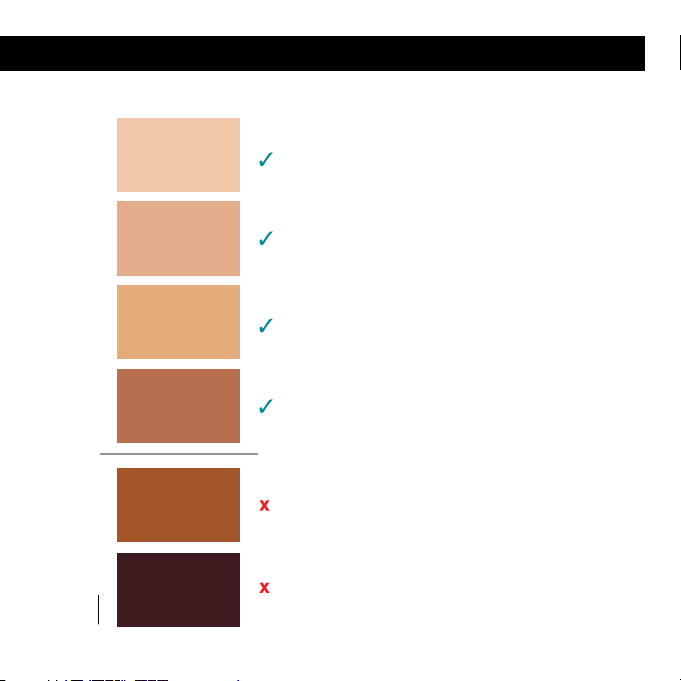
It is intended for use only on light to
medium skin colors. To determine
if your Skin Tone is suitable to use
with i-Light® Pro place skin in each
intended treatment area next to the
Skin Tone Chart on page 5. If your Skin
Tone matches panels 1-4, you can use
the i-Light® Pro IPL system. If your
Skin Tone matches 5-6, DO NOT use
the system.
The i-Light® Pro system is also equipped
with a built-in SKIN TONE SENSOR that is
designed to help prevent flashing on skin
that is too dark or too tanned for treat-
ment. See page 22-24 for details. Always
test each different area you wish to treat
with the Skin Tone Chart and Skin Tone
Sensor before treating. Some areas are
darker than others.
What is the intended use of the i-Light
®
Pro IPL System?
Hair Color
The light energy targets dark coloring in
hair, and therefore works best on darker
hair (black, dark brown, brown or dark
blond). Do not use i-Light® Pro on lighter
hair (light blond, red, grey, white hairs
or "peach fuzz"). IPL is less effective on
lighter colors.
Body Areas
It is intended for use by women and men
on body hair below the neck, including
legs, underarms, bikini line, chest, stom-
ach, and arms. It has NOT been cleared
in the U.S. for use on the face, head, ears,
back or neck.
5
What is the intended use of the i-Light
®
Pro IPL System?
1
2
3
4
5
6
NOT Suitable for Use Suitable for Use
SKIN TONE CHART

6
How does the i-Light
®
Pro IPL System Work?
The process of light-based hair removal is
well-known and has been clinically prov-
en around the world for over 15 years.
The i-Light® Pro system uses this same
proven technology to emit an intense
pulse of light (IPL) to heat up and dis-
able active hair follicles. The light energy
targets dark coloring in body hair, which
is why it works best on lighter skin tones
and naturally dark hair. To determine if
your skin and hair color are ok to use
with the i-Light® Pro IPL system, refer to
information provided on page 4 and 5.
Every hair in our body goes through a
continuous growth cycle, from active
to resting phases. The time it takes to
complete a full hair growth cycle varies,
but is typically 18-24 months. Light-
based treatments only affect hairs in
the active phase, which can account for
up to 90% of hair follicles. That’s why
we recommend using the i-Light® Pro
system three times in the first month to
ensure you hit every active hair. After that,
use the i-Light® Pro system as needed
for any missed hairs or hairs that have
recently become active.
• The first 3 sessions with the i-Light®
Pro IPL system should be 2 weeks apart.
• After that, use the i-Light® Pro system
when you start to see hair re-growth in
the treated area.
• Do NOT treat the same body part more
often than every 2 weeks.
After a hair follicle is treated, it can take
one to two weeks for the hair to fall out.
During this time, it may look like hair is
still growing, but really the hair is being
“pushed out.” You may or may not see
these stubs pushed out from the skin.
If you start treating a different body part,
start the process over for that body part.
7
Figure1
i-Light® Pro System Diagram Reference
8
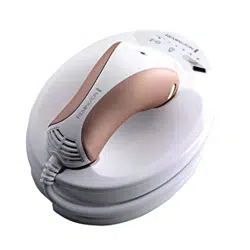
Inside the packaging for your i-Light®
Pro IPL system you will find a BASE
UNIT with HAND PIECE and POWER
CORD. You will also find a LINT FREE
CLOTH, Instructional DVD and this Use
& Care Guide. The i-Light® Pro system
comes equipped with a disposable
REPLACEMENT CARTRIDGE (inside
HAND PIECE underneath NOSE CONE).
Each Disposable Cartridge provides 1,500
flashes before it needs to be replaced.
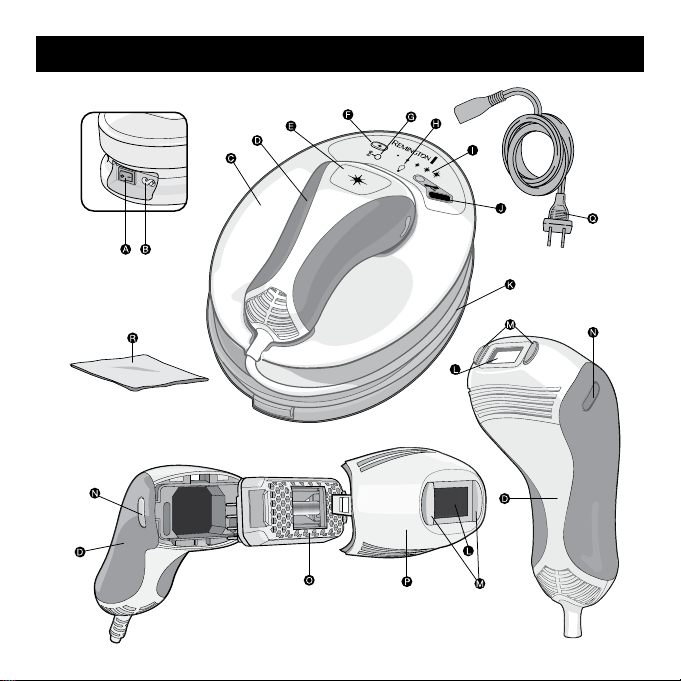
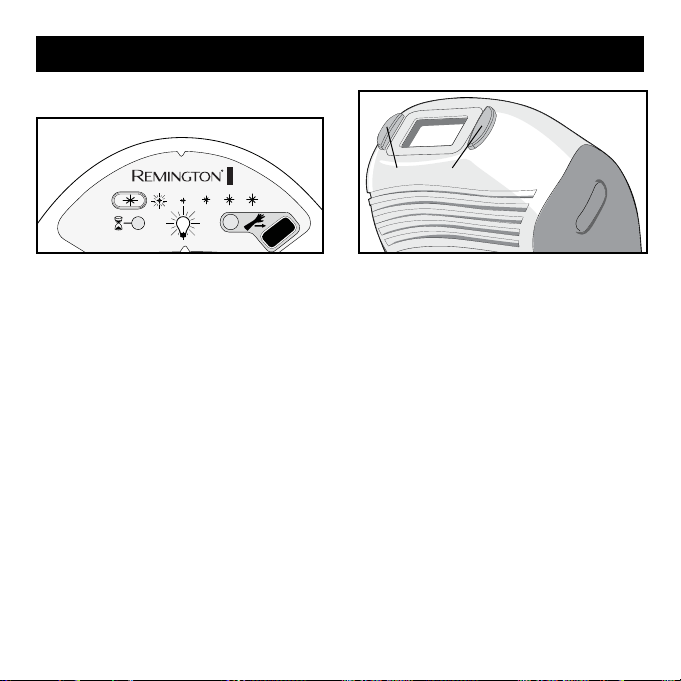
On the BASE UNIT, there is a SKIN TONE
SENSOR (fig1. J) to test for appropriate
skin tone before usage. You control the
ENERGY LEVEL (fig1. F & I) and choose
the level that’s most comfortable
for you.
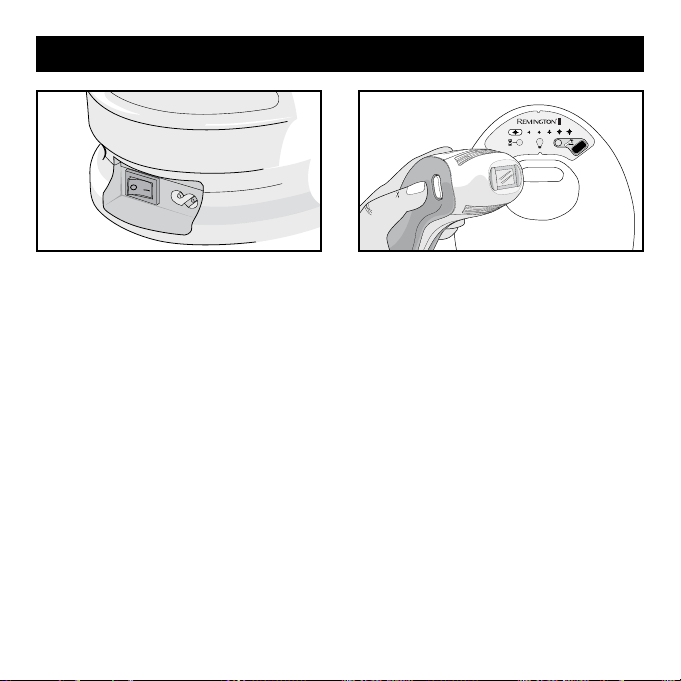
The POWER SWITCH (fig1. A) is located
on the side near the top of the unit, next
to the POWER INLET (fig1. B).
A
Power Switch
B
Power Inlet
C
Base Unit
D
Hand Piece
E
Flash Button
F
Energy Level Selection Button
G
Cool Down Mode Indicator
H
Cartridge Status Indicator Display
I
Energy Level Selection Display
J
Skin Tone Sensor
K
Hand Piece Cord
L
Flash Window
M
Skin Contact Sensors
N
Nose Cone Release Buttons
O
Replacement Cartridge
P
Nose Cone
Q
Power Cord
R
Lint Free Cloth
Getting to Know Your i-Light® Pro IPL System
i-Light® Pro System Diagram Reference

9
Benefits and Risks
A medically-supervised clinical study
showed that the i-Light® Pro IPL system
was effective in the removal of unwanted
hair when used as directed.
60 participants entered the clinical trial
with the i-Light® Pro and treated 3 times
over a 4 week period. Treatments were
performed on underarms, legs, bikini area,
stomach, chest and arms. Hair counts were
performed on site before treatment and
again 3 and 6 months after the final treat-
ment. Any side effects observed or reported
were documented by medical personnel.
This study showed the benefits and risks of
hair removal with the i-Light® Pro system.
The following sites are contraindicated and
were therefore excluded from treatment:
face, head, ears, neck, nipple, genitalia,
anus, eyes, eyebrows or eye lashes.
Benefits
When used as directed, i-Light® Pro
IPL system helps remove unwanted hair
without the need for daily shaving, wax-
ing, or plucking. In a clinical study, after
just three treatments, participants show
an average of 37% less hair 3-months
after the last treatment and 48% less
hair 6-months after last treatment.
Actual results vary from person to per-
son, depend on the body area being
treated, and whether instructions were
followed correctly.
Risks
It is important to use the i-Light® Pro
IPL system properly. Make sure that you
read and follow all the warnings (pages
12-16) and that you don’t use the device
if it isn’t right for you (see pages 4, 13). If
you don't understand any of the warnings
or have any questions, please contact
Customer Service (page 44).
If you use the i-Light® Pro system as
directed, the risks are low:
• In a clinical study, most users reported
mild or no discomfort at all from treat-
ments, with sensation decreasing over
multiple treatment sessions. This is
normal. You may feel warmth, burn-
ing, tingling, or itching; some users
described feeling the same level of

10
discomfort as when a rubber band is
lightly snapped against the skin. If the
pain is too intense or persists after
a treatment, stop using and contact
Customer Service (page 44).
• Your skin may become red within 24
hours after treatment. This redness
generally clears up within a few hours.
See your doctor if the redness does not
go away within 2–3 days.
• Temporary blisters. These are unlikely
for people with a light or medium skin
tone. If you do develop a blister, stop
using i-Light® Pro, clean the blister
with soap or antiseptic and cover the
blister with a bandage and change
daily to help prevent the blister from
becoming infected. Contact Customer
Service on page 44 if you need more
information.
• In rare cases, some users may see an
increase in the number of hairs in the
treated area after treatment. Since hair
grows in cycles, this increase is gener-
ally temporary. If at any time after you
begin using i-Light® Pro you believe
that the number of hairs regrowing in
the treatment area is greater than the
number that existed before you started
treatment, stop using i-Light® Pro and
contact Customer Service (page 44). If
this increase persists over several treat-
ments, stop using and see your doctor.
The following symptoms affected no
participants in the clinical study, but have
been reported with other hair removal
lasers or IPL devices:
• Skin swelling, especially around the hair
follicle. If the swelling doesn’t go away
within 2–3 days, stop using and contact
Customer Service (page 44).
• Skin discoloration. If you notice that
your Skin Tone in the treatment area
has changed, stop using and contact
Customer Service (page 44).
•
Eye injury. Flashing any laser or IPL
device near or around the eyes could
cause serious and permanent eye injury.
This is very unlikely so long as the device
is used below the neck as indicated.
Benefits and Risks
11
Important Safety Information –
Read Before Use!
The i-Light® Pro IPL system is not
designed for everyone. Please read and
consider the information in the following
section before use.
DO NOT use i-Light® Pro on Dark
Skin. Darker skin may absorb too
much light energy which could cause
skin swelling, temporary blisters, or
could change the color of your skin.
Refer to the Chart on page 5 to
determine if skin tone in the intended
treatment area is suitable for use
with the i-Light® Pro IPL system.
You should test each different area of
skin you want to treat. Some areas are
darker than others.
DO NOT use on tattoos, dark brown
or black spots (such as dark freckles,
birthmarks, moles or warts). Tattoos
or dark spots may absorb too much
light energy which could cause skin
swelling, temporary blisters or could
change the color of your skin.
DO NOT use on the face, head, ears,
neck, nipples, genitalia, or around
the anus. These areas may have
darker skin and using the i-Light®
Pro there could cause skin swelling,
temporary blisters, or could change
the color of your skin.
DO NOT use on or around the eyes,
eyebrows or eyelashes. Doing so
can cause serious and permanent
eye injury.
Contraindications

12
WARNINGS
The i-Light® Pro IPL system is a powerful
device. As such it should be used with
special attention to safety. Please read all
warnings and safety precautions before
use and strictly follow them when using
the i-Light® Pro system.
DO NOT flash the i-Light® Pro on the
identical treatment spot multiple times
during the same session, as this could
cause skin swelling, temporary blisters or
could change the color of your skin.
See instructions on page 22-30 for
more information on how to administer
treatment.
DO NOT use if the skin tone chart
on page 5 shows that your skin tone is
not suitable. If you are African-American,
East Indian, Native American, or Pacific
Islander, you may have a skin tone that is
not suitable. Darker skin tones can absorb
too much light energy, which can injure
the skin.
DO NOT use on damaged skin, includ-
ing open wounds, cold sores, sunburns,
or areas where you have had a skin peel
or other skin resurfacing procedures
within the last 6-8 weeks (check with
your doctor). DO NOT use on irritated skin,
including rashes or swollen skin. These
conditions can make the skin more sensi-
tive to the light treatment. Wait for the
affected area to heal before using.
DO NOT use if your skin is sensitive
to light. In order to determine if you can
use, perform a test on a small patch of
skin and wait 24 hours to determine if
there are any adverse reactions before
using more broadly. See steps for testing
on a patch of skin on page 21. Contact
Customer Service (see page 44) for assis-
tance if you experience any of the issues
described on page 21.
13
WARNINGS
DO NOT use if you are or may be
pregnant, or are breast-feeding. The
i-Light® Pro IPL system has not been
tested on pregnant women. Hormonal
changes could increase skin sensitivity
and the risk of skin injury.
DO NOT use for any purpose other
than hair removal.
DO NOT flash the i-Light® Pro against
any material other than skin.
DO NOT flash in an environment
where a spark could cause an explosion,
such as near a gas leak.
DO NOT use on any area where you
may someday want your hair to grow
back. The results may be permanent and
irreversible.
DO NOT use the system if it appears
damaged, and DO NOT attempt to open
or repair the i-Light® Pro IPL system.
These actions increase the risk of skin
or eye injury from the flash cartridge.
Contact Customer Service for assistance
(see page 44).
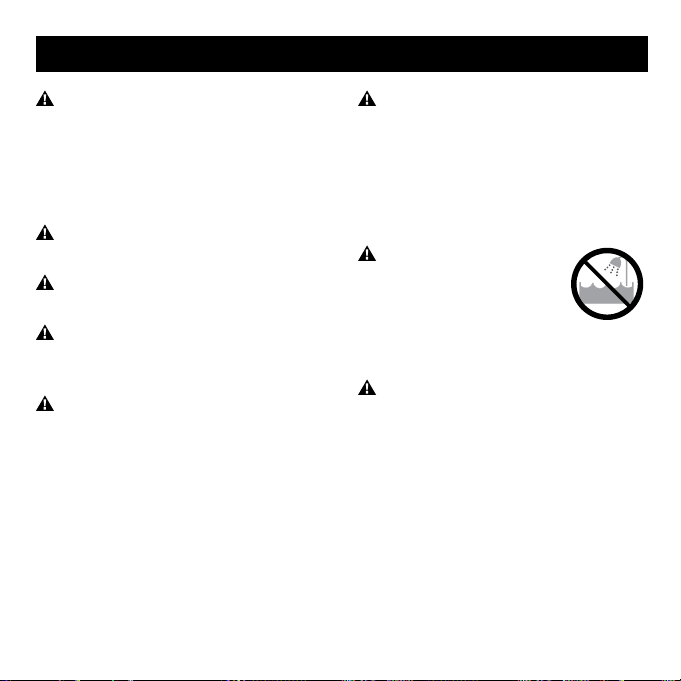
DO NOT allow the hand
piece or base to become
damp or wet. DO NOT use
near bathtubs, showers,
basins, or other vessels
containing water.
DO NOT operate with a damaged plug
or cord. Keep the cord away from heated
surfaces (such as stoves, fireplaces, radi-
ators or furnaces). DO NOT use if any part
of the i-Light® Pro system is cracked
or broken. Contact Customer Service for
assistance (see page 44).

14
WARNINGS
DO NOT open the unit (except to
replace the CARTRIDGE) or attempt to
repair your system as there are no user
serviceable parts inside the i-Light® Pro
system. Trying to open it may also dam-
age the system and will void your war-
ranty. Please contact Customer Service
(see page 44) if you have a broken or
damaged system in need of repair. Failure
to follow these precautions can cause
electrocution or electric shock.
DO NOT cover any part of the
i-Light® Pro BASE UNIT or HAND
PIECE ventilation slots during use, as
they help to keep the system cool dur-
ing operation. Covering the ventilation
slots could result in overheating.
Hair removal by laser or intense pulsed
light sources can cause increased
hair growth in some individuals. The
highest risk groups for this response,
are females of Mediterranean, Middle
Eastern, and South Asian heritage,
treated on the face or neck.
KEEP OUT OF REACH OF CHILDREN!
The i-Light® Pro IPL system is a powerful
device and should not be used by anyone
under the age of 18. DO NOT leave the
system unattended around children, as
the cords represent a choking hazard.
Children should be supervised to ensure
that they do not play with the appliance.
This appliance has a polarized plug (one
blade is wider than the other). As a safety
feature, this plug will fit in a polarized
outlet only one way. If the plug does not
fit fully in the outlet, reverse the plug. If it
still does not fit, contact a qualified electri-
cian. Do not attempt to defeat this safety
feature.

15
IMPORTANT SAFETY INSTRUCTIONS
READ ALL INSTRUCTIONS
BEFORE USING
KEEP AWAY FROM WATER
DANGER–To reduce the risk of
electrocution:
1. Always unplug this appliance
immediately after using.
2. Do not use while bathing.
3. Do not place or store appliance
where it can fall or be pulled into a
tub or sink.
4. Do not place in or drop into water
or other liquid.
5. Do not reach for an appliance that
has fallen into water. Unplug imme-
diately.
WARNING–To reduce the risk of burns,
electrocution, fire, or injury to persons:
1. An appliance should never be left
unattended when plugged in.
2. Close supervision is necessary
when this appliance is used by, on, or
near children or individuals with cer-
tain disabilities.
3. Use this appliance only for its
intended use as described in this
manual. Do not use attachments not
recommended by the manufacturer.
4. Never operate this appliance if it
has a damaged cord or plug, if it is
not working properly, or if it has been
dropped, damaged, or dropped into
water. Return the appliance to a ser-
vice center for examination and repair.
5. Keep the cord away from heated
surfaces. Do not wrap the cord around
the appliance.
6. Never block the air openings of the
product or place it on a soft surface,
such as a bed or couch, where the air
openings may be blocked. Keep the air
openings free of lint, hair, and the like.

16
IMPORTANT SAFETY INSTRUCTIONS
SERVICING OF DOUBLE-INSULATED APPLIANCES
7. Never use while sleeping or drowsy.
8. Never drop or insert any object into
any openings or hose.
9. Do not use outdoors or operate where
aerosol (spray) products are being used or
where oxygen is being administered.
10. Do not pull or carry by cord, use cord
as a handle, close a door on cord, or pull
cord around sharp edges or corners. Do
not run Appliance over cord. Keep cord
away from heated surfaces.
11. Do not unplug by pulling on cord. To
unplug, grasp the plug, not the cord.
12. Do not handle plug or Appliance with
wet hands.
13. Turn off all controls before unplugging.
In a double-insulated appliance, two
systems of insulation are provided
instead of grounding. No grounding
means is provided on a double-
insulated appliance, nor should a
means for grounding be added to the
appliance. Servicing a double-insulated
appliance requires extreme care and
knowledge of the system, and should
be done only by qualified service
personnel. Replacement parts for a
double-insulated appliance must be
identical to the parts they replace. A
double-insulated appliance is marked
with the words “DOUBLE INSULATION”
or “DOUBLE INSULATED.” The symbol
(square within a square) may also be
marked on the appliance.
SAVE THESE INSTRUCTIONS
17
Set-Up
1.
2.
1. Remove base unit, power cord and
other components from the box.
Note: before plugging in system, check
to ensure that the cartridge is properly
inserted (steps 2-4 following).
3. Verify that the disposable cartridge is
inserted correctly and fits snuggly into
hand piece.
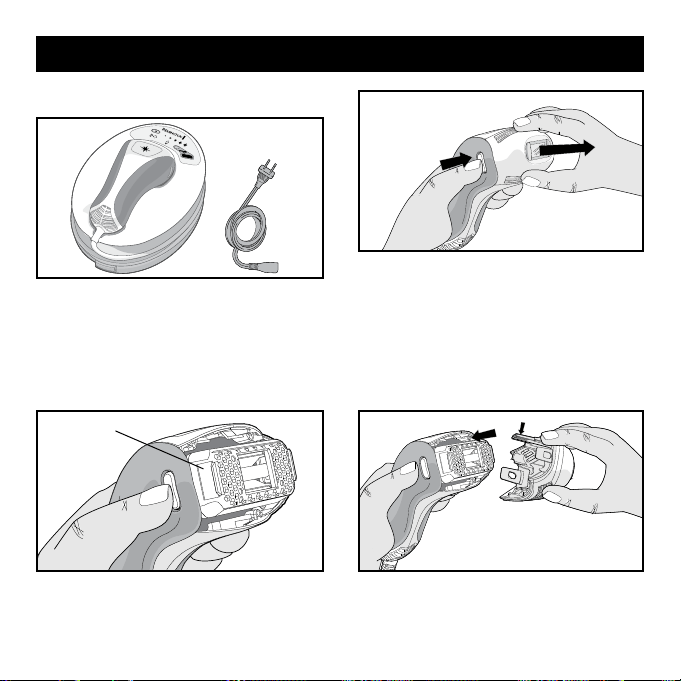
2. Press both nose cone release buttons
with your thumb and index finger. (1)
Then, with both buttons pressed, gently
remove the nose cone with your other
hand. (2) Note: set the nose cone in a
safe location taking care not to damage
the flash window and other components.
4.
Gently snap the nose cone back into the
hand piece. Note: the longer tab (with gold
circuits) must be on top to properly fit.
Disposable Cartridge
How to Use Your i-Light® Pro IPL System
18
5. Plug the power cord into the system
socket, plug the other end of the power
cord into an electrical outlet, and press
the power switch to start up the system.
6. Your i-Light® Pro IPL system is now
ready to start. Before your first use, test
a small patch of skin and wait 24 hours
(see page 21).
• Clean, shave and dry your skin before
treatment (page 22)
• Clean the system (including Hand
Piece, Flash Window, Skin Contact
Sensor and Skin Tone Sensor Window)
(page 32)
• Unlock the system using the Skin Tone
Sensor (page 22)
• Set the system to the desired
ENERGY LEVEL (page 25)
Each Time You Use the i-Light® Pro IPL System
• You can shave, but don’t wax, epilate or
pluck hair because removing the hair
root will disrupt the IPL process
• After about 1-2 weeks, hair in the treat-
ed areas will start to fall out naturally
Between Treatments
How to Use Your i-Light® Pro IPL System

19
During Treatment
The i-Light® Pro IPL system has been
designed for ease of use, and hair
removal sessions should go by quickly.
During a session it is normal to experi-
ence and feel:
■ A Fan Noise: the fan starts up once the
Skin Tone Sensor is unlocked. The
noise is similar to, but quieter than a
hairdryer. This is normal and is key to
keeping the unit and flash lamp cool.
■ A Flash of Light: the Skin Contact
Sensors ensure that most of the light
is directed into the skin. The remaining
visible light will not harm the eyes
when applied to non-facial sites, and
special eye protection is not needed
as long as you follow directions in this
Use and Care Guide.
■ A Sound with Each Flash: When a flash
of light is activated, it is normal to
hear a subtle “pop” sound as the light
flashes.
■ A Sensation of Warmth and Tingling:
Actual sensations felt by users will
vary by person and body part being
treated. Many people describe each
flash like a rubber band being lightly
snapped against the skin. If the
sensation is too intense or painful, stop
using and contact Customer Service
(page 44).
■ Some Mild Redness: During and
just after your IPL session, it is not
uncommon to see some very mild
redness , mostly noticeable around the
hairs themselves. This is normal and
typically clears up within a few hours.
However, contact Customer Service
(page 44) if the redness does not go
away within 2-3 days.
What to Expect with the i-Light® Pro IPL System
20
Note:
• You should complete your first three treatments over the first month to ensure that
you have hit all hairs in the growth phase in the targeted area.
• After the third treatment it’s important to continue your treatments only as-needed to
target hairs that have recently entered the active cycle.
• Repeat the process for every body part with unwanted hair.
Immediately
After First
Treatment
1 to 2 Weeks
After Initial
Treatments
One Month
After Initial
Treatments
Three Months
After Initial
Treatments
Completed
•
There will be no
visible change to
the hair or appear-
ance of the skin.
• On occasion,
some users
experience mild
redness that
usually dissipates
within a few hours.
• Hairs in treated
area will begin to
fall out gradually.
• You should see a
noticeable reduction
in hair re-growth in
the treated area.
• Any hair re-growth
should be lighter
and finer.
• Enjoy the
freedom!
• Only use i-Light®
Pro IPL system for
occasional
touch-ups where
necessary.
Treatment Expectations
Figure 2
What to Expect with the i-Light® Pro IPL System

21
Testing on a Patch of Skin
As with any new skin care product,
we recommend testing on a patch of
skin before your first full treatment, or
before using in any new body area. You
may want to use different energy lev-
els for different areas since sensitivity
may vary by body part.
Note: you will get better results
by using the system at higher
energy levels.
• Get your skin ready (see page 22) and
unlock the system with the Skin Tone
Sensor (see page 22). The system will
default to energy level 1.
• In energy level 1, treat your skin with
one single flash. Mild to moderate
pain is normal – if you feel more than
moderate pain, stop using immedi-
ately and call customer service (see
page 44) for help.
• If it feels tolerable on energy level 1,
press the energy level button once to
change to energy level 2 (see “set-
ting the energy level” on page 25).
Move the system to a different spot
and flash one more time. If you don’t
feel comfortable using the system at
energy level 2, then energy level 1 is
the right setting to start out with.
• Repeat this process until you find the
setting that feels right for you.
• Wait 24 hours and then look at the
test area. If the skin appears normal,
proceed with your treatment at the
setting that’s right for you.
If you notice skin swelling, tempo-
rary blisters or change in the color of
your skin, or any other side effects, or
if you are not sure about the outcome
of the test, do not use and contact
Customer Service (see page 44) or call
your doctor for assistance.
• Repeat the test if you decide to try the
system on a different part of the body,
or if your skin tone has changed (for
example, from a sun tan).
Using the i-Light® Pro IPL System for the First Time

22
Using the i-Light® Pro IPL System Every Time
Getting Ready to Use
Before using, shave the hair in the treat-
ment area to minimize the sensation felt
from the flashes. IPL works below the
skin, so the system is still effective even
if hairs are not clearly visible. After shav-
ing, wipe the skin clean and completely
dry the area before using.
Unlocking the i-Light® Pro IPL System
Using the Skin Tone Sensor
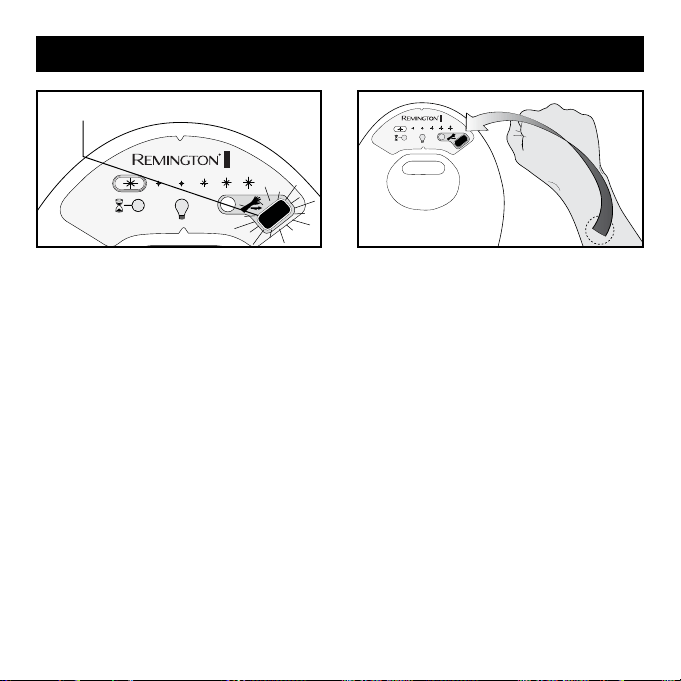
Every time you turn on the system, it
starts in locked mode. This Skin Tone
Sensor LED will be blinking and you will
hear a series of audible "beeps." The
i-Light® Pro cannot be used until it is
unlocked. You need to unlock the system
with the SKIN TONE SENSOR every time
you want to use the device and you must
use the skin tone sensor to test each
body part you intend to treat.
Using the i-Light® Pro device on darker
skin could cause skin swelling, temporary
blisters, or could change the color of your
skin. The skin tone sensor helps confirm
whether your skin is too dark to treat with
the i-Light® Pro. Since some areas are
darker than others, you should use the
skin tone sensor on each different area of
skin you wish to treat. Make sure your skin
is clean and dry and shave, if necessary, to
be sure it is free of hair.
23
Using the i-Light® Pro IPL System Every Time
2. Always place the skin tone sensor
window directly on the area of skin
you plan to treat. The reading will
take place automatically.
Note: You must use the Skin Tone
Sensor to test color on each body part
you plan to treat.
1. Turn the POWER SWITCH on. The
SKIN TONE SENSOR LED will flash
ORANGE. You will hear a series of
audible “BEEPS” every 5 seconds to
remind you to take the test.
SKIN TONE SENSOR LED
will be blinking orange
24
3. Place the body part to be treated over
the SKIN TONE SENSOR (touching the
unit) the Sensor will immediately read
the skin type.
3b. If your Skin Tone is suitable for use, a
high-pitched “BEEP” will sound and
the LED will turn green and the sys-
tem will be enabled.
3a.
If your Skin Tone is NOT suitable for use,
the SKIN
TONE
SENSOR LED turns solid
ORANGE and the system will “BUZZ”
once for 5 seconds. After 5 seconds,
you may re-try the SKIN
TONE
SENSOR.
4. Once the system is enabled, the
ENERGY LEVEL LIGHT and CARTRIDGE
STATUS INDICATOR LIGHT will turn on
and the internal fan will start. Your sys-
tem is now unlocked, set to the lowest
energy level setting, and ready for use!
Using the i-Light® Pro IPL System Every Time

25
Notes:
• Some areas are darker than others.
You must use the skin sensor on each
different area you intend to treat.
• If you feel the SKIN TONE SENSOR
has not made a proper reading, you
may try again after 5 seconds. If you
believe your skin is suitable based on
the Skin Tone chart on page 5 but the
SKIN TONE SENSOR will not enable the
system, contact Customer Service (see
page 44).
• If you have tanned skin in the intended
treatment area, DO NOT use the i-Light
Pro system in those areas as your skin
may be too dark for treatment. You
should wait until your tan has complete-
ly faded from any intended treatment
area before using the i-Light Pro system.
• For safety reasons, the system will
re-lock after 5 minutes of inactivity.
If you take a break in the middle of a
treatment, or if you turn off the system,
you will need to use the SKIN TONE
SENSOR to unlock the IPL again.
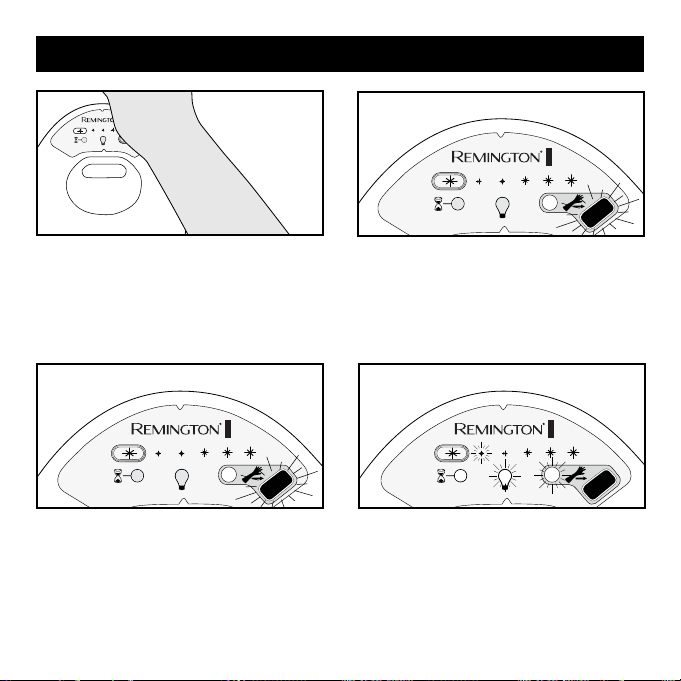
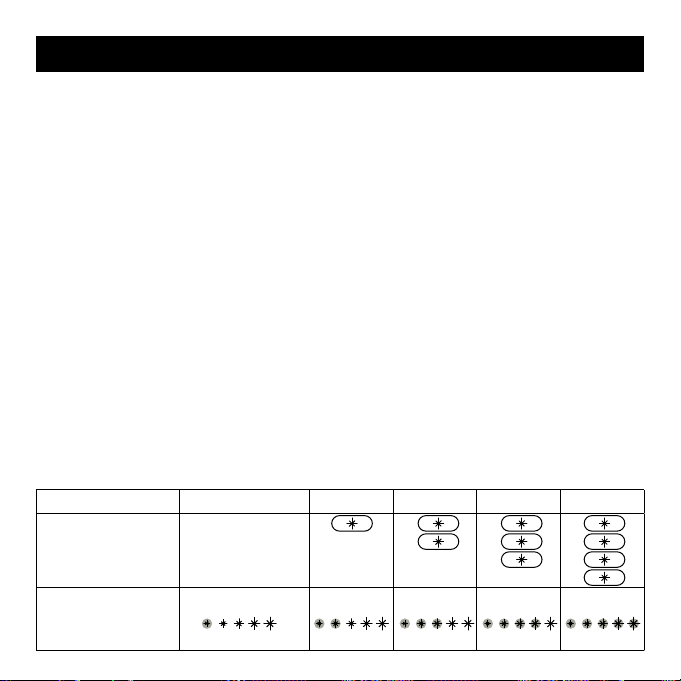
Setting the Energy Level
Energy Level Selection Display lights
determine the intensity of the light flash
delivered to your skin, from the lowest
level (*) to the highest level (*****). Higher
levels improve hair removal results, but
may be less comfortable. To get the best
results, you should use the highest setting
that’s comfortable.
There are 5 energy level settings on
the i-Light® Pro system. Whenever the
i-Light® Pro IPL system is turned on, the
device is automatically set to the lowest
energy level and only one ENERGY LEVEL
INDICATOR SELECTION light will be on
(ENERGY LEVEL 1 in the table on page
26).
To modify the energy level, press the
ENERGY LEVEL SELECTION BUTTON to
increase the energy level. Once the
energy level has reached level 5,
pressing the ENERGY LEVEL SELECTION
BUTTON will return the system to energy
level 1. The number of ENERGY LEVEL
SELECTION DISPLAY lights will coincide
with the change in energy level.
Using the i-Light® Pro IPL System Every Time
26
setting is selected. After reaching
Level 5, pressing the ENERGY LEVEL
SELECTION BUTTON an additional time
will reset to Level 1.
Note:
• Periodically, the hand piece or base unit
will hit a certain temperature and will go
into a cool down state and temporarily
stop working. The COOL DOWN MODE
INDICATOR will flash and the unit will
beep. Simply wait for the system to regu-
late itself to the appropriate temperature.
The light will turn off and you will be able
to continue treatment.
• The number of flashes delivered before
the cool down state initiates depends
on several factors, including energy
level, how fast you apply the treat-
ments, and the room temperature.
Energy Level 1 2 3 4 5
Press Energy
Level Setting
Button
Defaults to Level
1 upon start-up.
Energy Level
Selection Display
Lights:
Figure 3
1. Upon start-up, the system sets itself to
the lowest energy level (Level 1). The
system is now ready.
2. To change the energy level press
the ENERGY LEVEL SELECTION
BUTTON to increase the energy level
until the desired energy level is set.
Selection Display lights will coincide
with the energy level setting. For
example, pressing the ENERGY LEVEL
SELECTION BUTTON once will increase
from Level 1 to Level 2; pressing
another time will increase to Level 3.
3. If a higher energy level was previously
selected and a lower energy level
is desired, continue to press the
ENERGY LEVEL SELECTION BUTTON
until the desired lower energy
Using the i-Light® Pro IPL System Every Time
27
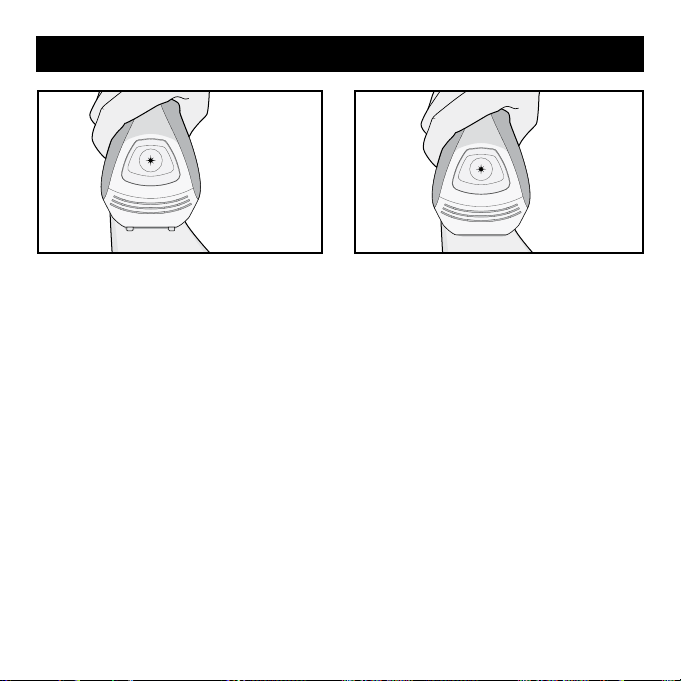
Begin Treatment
1. Ensure that the ENERGY LEVEL is on a
comfortable setting (See “Setting the
Energy Level” on Page 25 for details
about the different settings).
2. Apply the HAND PIECE to the skin
making sure the skin is spread evenly
and smoothly. Make sure the SKIN
CONTACT SENSORS on the NOSE
CONE are in full contact with the skin.
SKIN CONTACT SENSORS
Using the i-Light® Pro IPL System Every Time
28
3. If the SKIN CONTACT SENSORS are
NOT in full contact with the skin, the
system will "buzz" and will not oper-
ate if you press the FLASH BUTTON.
Double check that the contact sensors
are in full contact with the skin.
Note: DO NOT press HAND PIECE too
firmly against skin in order to make con-
tact. Doing so may cause the skin to be
too close to the flash window and could
cause skin swelling, temporary blisters or
could change the color of your skin. Try
changing the orientation of the device for
better skin contact.
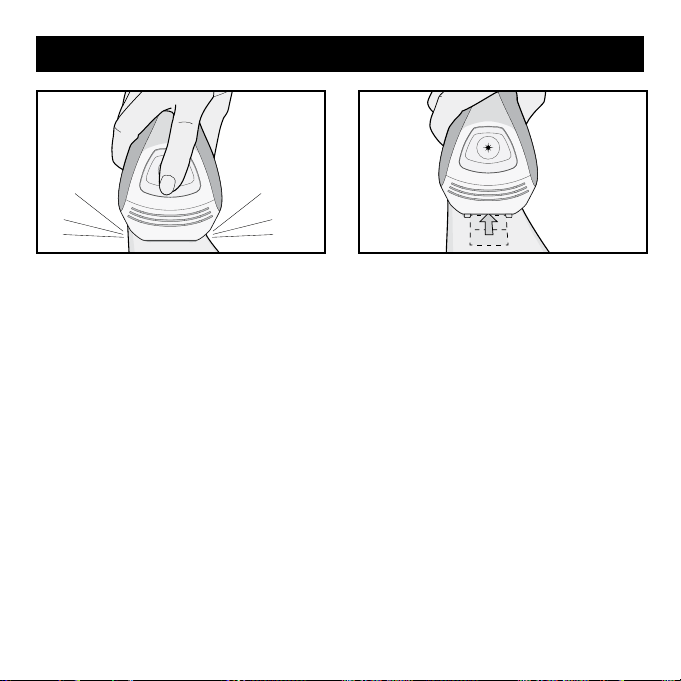
4. If the SKIN CONTACT SENSORS on the
NOSE CONE are in full contact with the
skin, a series of high-pitched beeps will
sound, indicating the system is OK to
flash.
Note: Do not block the ventilation slots on
the HAND PIECE as these help cool the
system during use.
Using the i-Light® Pro IPL System Every TimeUsing the i-Light® Pro IPL System Every Time
29
5. Press the FLASH BUTTON. The system
will flash a pulse of light onto your skin.
You will see a bright flash of light and
simultaneously hear a sound, which is
normal for the device. You may feel a
mild sensation of warmth and tingling.
6. I
mmediately after a flash is delivered,
move the HAND PIECE to a new treat-
ment location while keeping the FLASH
BUTTON pressed down. If the NOSE
CONE is in full contact with the skin and
the FLASH BUTTON is pressed down
the system will beep and another flash
will be delivered in approximately 2
seconds.
Using the i-Light® Pro IPL System Every Time
30
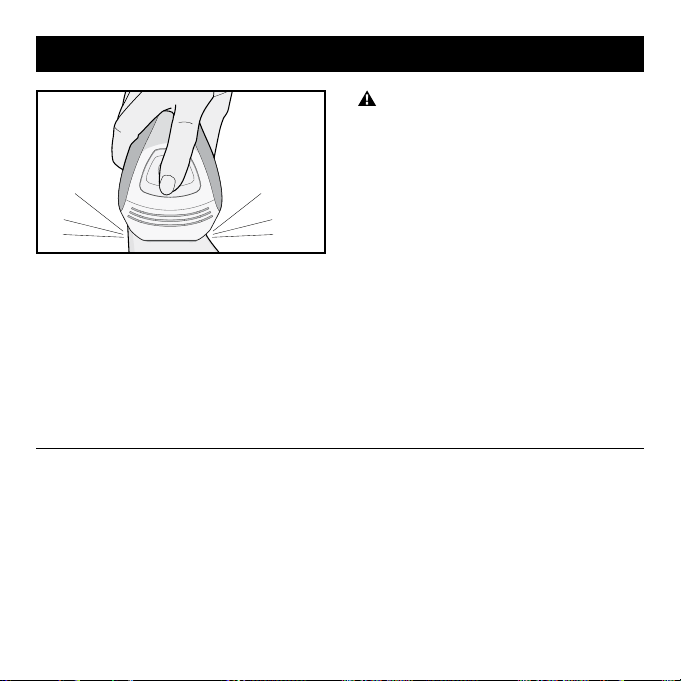
DO NOT flash on the same treatment
spot multiple times during the same ses-
sion, as this could cause skin swelling,
temporary blisters or could change the
color of your skin.
Note: For faster coverage, hold down
the FLASH BUTTON while you lift the
HANDPIECE and place it back in contact
with the new area to be treated. After
about 2 seconds, the unit will deliver a
flash to the skin as soon as full contact
between the skin and the HAND PIECE is
established.
7. Try to treat in an organized, grid-like
pattern to ensure you cover all the
hairs in the intended treatment area.
Repeat step 6 until the desired treat-
ment area is fully covered. Depending
on the body part, the treatment time
will vary.
After Use
• When your session has been com-
pleted turn off the system by turning
the POWER SWITCH off. (Be sure to
remember the last energy level setting
you used as it will not be restored when
turning the system on again).
• Unplug the power cord from the
electrical outlet.
• After each hair removal session it is rec-
ommended that you clean your system,
especially the NOSE CONE and FLASH
WINDOW (See “Cleaning” page 32)
• After cleaning, we recommend that you
store your i-Light® Pro system in its
original box and keep it away from water.
Using the i-Light® Pro IPL System Every Time

31
• Shave immediately before treating the
area. Doing this will let you use a higher
energy level, because there will be less
hair to heat up and the treatment will be
more comfortable. How well you shave
will make a big difference in how the
treatment feels. See page 22.
• Use the highest energy level setting
that’s comfortable for you. Higher energy
levels are more effective. See page 25.
• Have a plan to work each treatment
area in an organized, grid-like pattern to
ensure that you don’t overlap treatment
spots.
Getting the Best Results
Note: DO NOT physically mark the
treatment area with grid pattern as this
could cause injury to the skin.
• If you’ve waxed, tweezed or epilated the
hair in the treatment area, wait 6 weeks
before using the system. IPL uses the
hair under your skin to disable your hair
follicles, so it is not effective if the hair
has been pulled out.
• Stick with the full treatment for
each body area.

32
Cleaning Your i-Light® Pro System
After each session, it is recommended
that you clean your system, especially
the HAND PIECE, the FLASH WINDOW, the
SKIN CONTACT SENSORS, and the SKIN
TONE SENSOR window.
DO NOT place any part of the device
in water or other liquids. If any part of the
device gets wet, DO NOT USE. Contact
Customer Service (see page 44) for help.
As with any electrical device, a wet sys-
tem could cause electrocution or electric
shock.
• Make sure the device is turned off.
Remove the POWER CORD from the
BASE UNIT and Wall Socket before
cleaning.
• Use a clean, lint-free cloth (one is
provided with the unit) to gently wipe
the surface and especially the NOSE
CONE, FLASH WINDOW, SKIN CONTACT
SENSORS and the SKIN TONE SENSOR
window. If needed, you can dampen the
USER MAINTENANCE INSTRUCTIONS
cloth with water and mild soap. Allow
the unit to dry completely before using
again.
• Inspect the vents in the unit and hand-
piece for lint and debris. Vacuum out
periodically.
• If you still need to remove dirt or debris,
you can use your fingernail or a firm
piece of plastic like a credit card. Be
careful not to damage the FLASH
WINDOW.
DO NOT attempt to open or repair
your i-Light® Pro system. Contact cus-
tomer service for more information
(see page 44).

33
The DISPOSABLE CARTRIDGE can deliver
1,500 light flashes regardless of the
energy level setting. Flash intensity is
determined only according to the energy
level setting of the system. There is no
significant decrease of energy during
the usable lifetime of the DISPOSABLE
CARTRIDGE.
Replacing the Disposable Cartridge
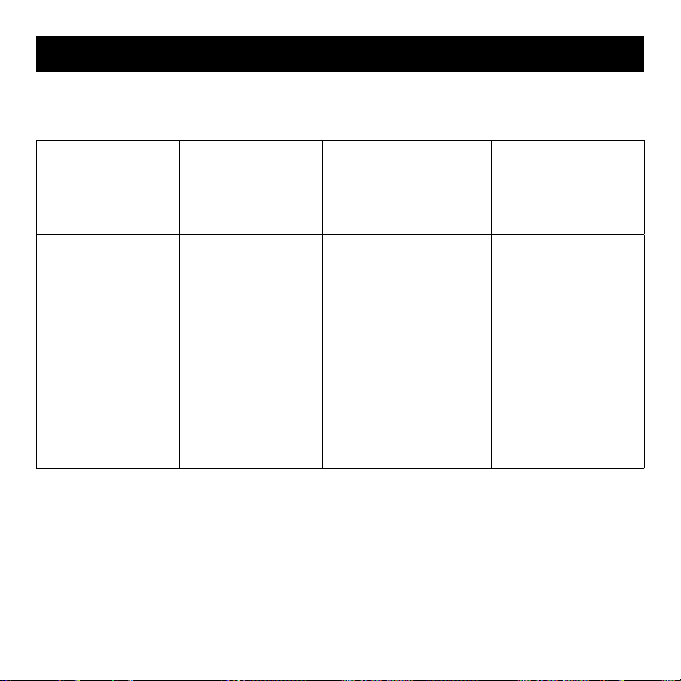
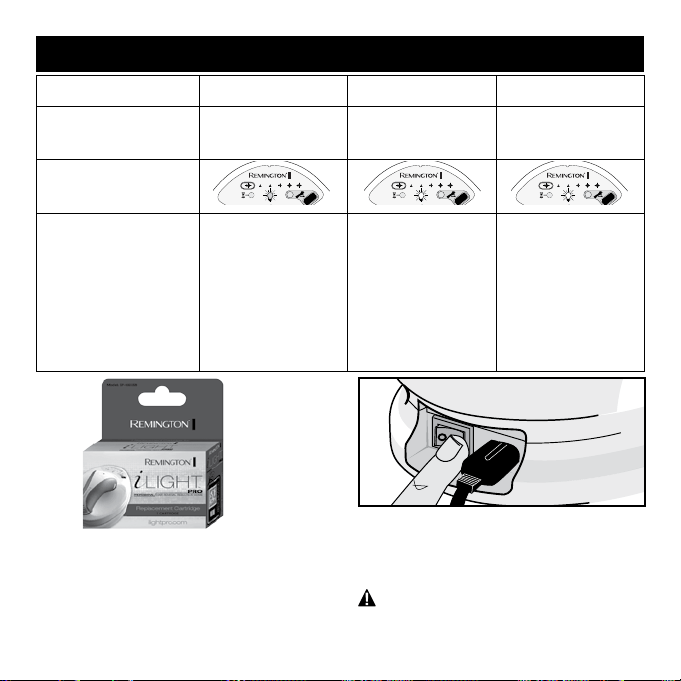
When a DISPOSABLE CARTRIDGE has
reached 90% of its possible lifetime the
CARTRIDGE STATUS INDICATOR DISPLAY
light will turn yellow indicating that the
DISPOSABLE CARTRIDGE should soon
be replaced. Once all 1,500 flashes in
a DISPOSABLE CARTRIDGE have been
used, the CARTRIDGE STATUS INDICATOR
DISPLAY light will flash yellow indicating
that further flashes cannot be delivered.
In order to continue the hair removal ses-
sion, it will now be necessary to replace
the DISPOSABLE CARTRIDGE. Note:
A DISPOSABLE CARTRIDGE must be
replaced if the LAMP TUBE is broken.
34
Flash Bulb Usage
0 – 90% 90 – 100% 100%
Flashes
0 – 1,350 flashes
1,351 – 1,500
flashes
1,500 flashes
Cartridge Status
Indicator Display
Cartridge Status
Indicator Display
Flash & Audible Tone
Cartridge Status
Indicator LED will
be lit solid GREEN,
with no audible
tone.
Cartridge Status
Indicator LED will
be lit solid YELLOW,
with no
audible tone.
Cartridge Status
Indicator LED will
flash YELLOW, with
an audible beep
every 0.5 seconds
until cartridge is
replaced.
Note: Allow the system to cool down for
5 minutes before attempting to change the
DISPOSABLE CARTRIDGE.
2. Turn the POWER SWITCH off and unplug
the POWER CORD from the electrical
outlet.
1. Obtain a new DISPOSABLE CARTRIDGE
(SP-6000SB). Check with your local
retailer or visit RemingtonProducts.com
for purchase.
Replacing the Disposable Cartridge
35
Flash Bulb Usage
0 – 90% 90 – 100% 100%
Flashes
0 – 1,350 flashes
1,351 – 1,500
flashes
1,500 flashes
Cartridge Status
Indicator Display
Cartridge Status
Indicator Display
Flash & Audible Tone
Cartridge Status
Indicator LED will
be lit solid GREEN,
with no audible
tone.
Cartridge Status
Indicator LED will
be lit solid YELLOW,
with no
audible tone.
Cartridge Status
Indicator LED will
flash YELLOW, with
an audible beep
every 0.5 seconds
until cartridge is
replaced.
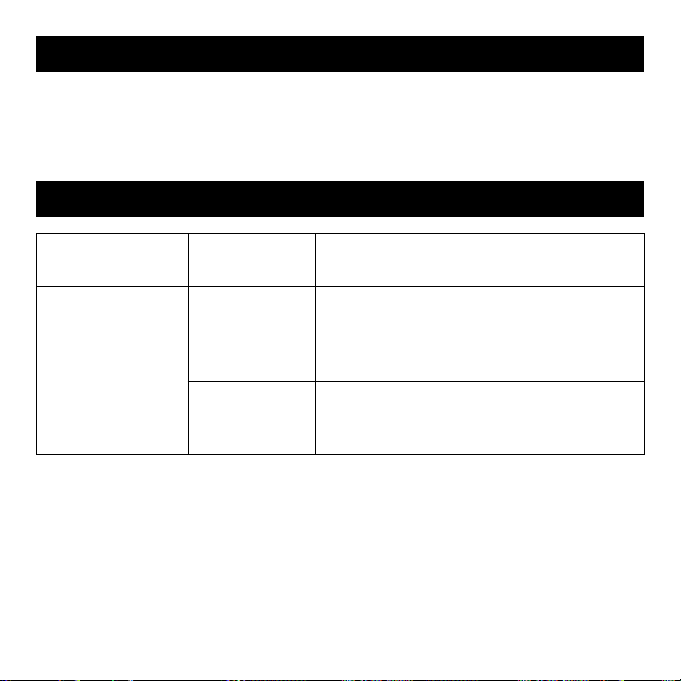
4. Grasp the DISPOSABLE CARTRIDGE
and gently pull away from the HAND
PIECE. Discard the used cartridge in
accordance with local regulations.
WARNING: Ensure cartridge has cooled
for 5 minutes before handling. Exercise
care when replacing cartridge.
5.
Push the new DISPOSABLE CARTRIDGE
gently into place, taking care not to touch
the LAMP TUBES or damage the pins
on the cartridge. Note: the DISPOSABLE
CARTRIDGE must be oriented so that
the side with 4-pins is on the left, and the
side with 1-pin is on the right.
6. Gently push the NOSE CONE back into
the HAND PIECE making sure both
sides click into place.
Note:
the longer
tab (with gold circuits) must be on top
to properly fit.
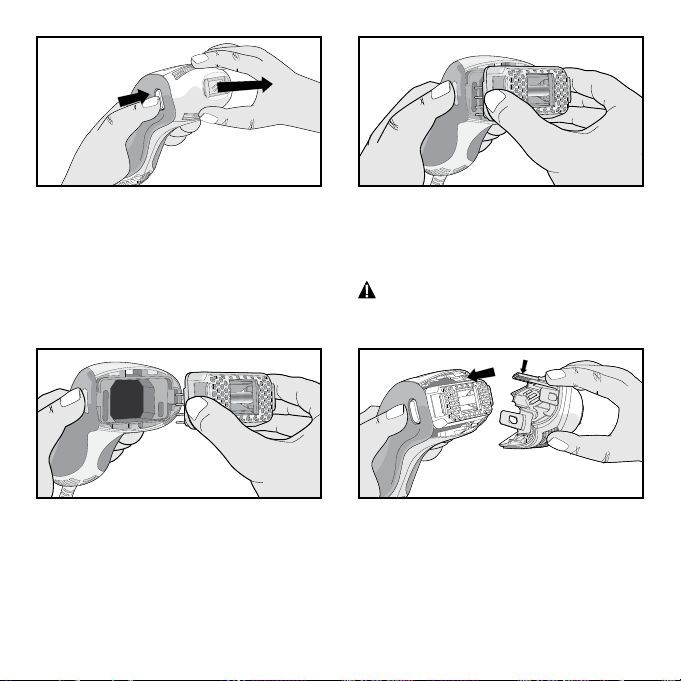
3. Grasp the NOSE CONE with one hand
while pressing both NOSE CONE
RELEASE BUTTONS with the other
hand and pull gently. Set the NOSE
CONE in a safe location taking care not
to damage the FLASH WINDOW and
other components.
1.
2.
36
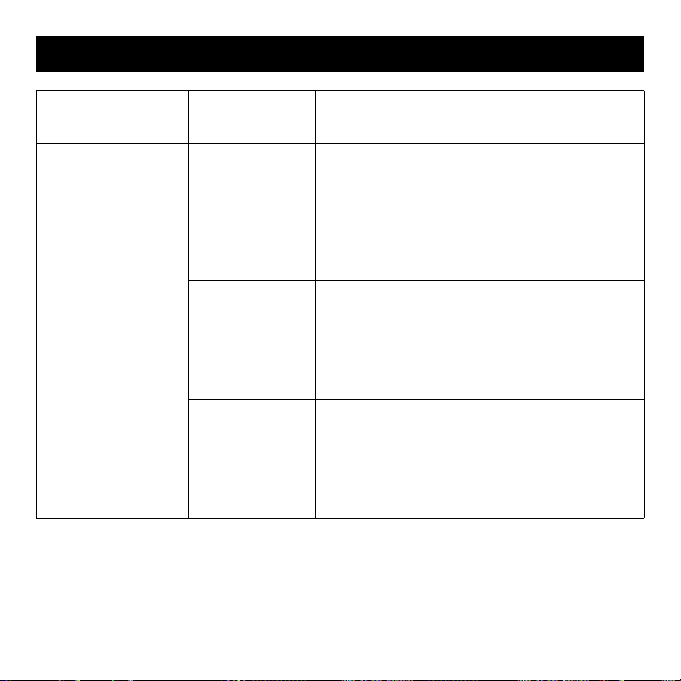
PROBLEM POSSIBLE
CAUSE
WHAT YOU SHOULD DO
My i-Light® Pro
IPL system does
not start.
The system isn’t
connected
properly.
Make sure the power cord is properly con-
nected to the i-Light® Pro system and that
the power cord is plugged into an electrical
outlet on the wall.
The outlet isn’t
working.
Check if a wall switch controls the power to
the wall outlet, or try plugging another system
into the outlet and seeing if it works.
Troubleshooting
Please follow the regulations where you live for disposal of electric systems when
recycling or disposing of your i-Light® Pro base unit, hand piece or disposable cartridge.
Disposing of Your i-Light® Pro IPL System
37
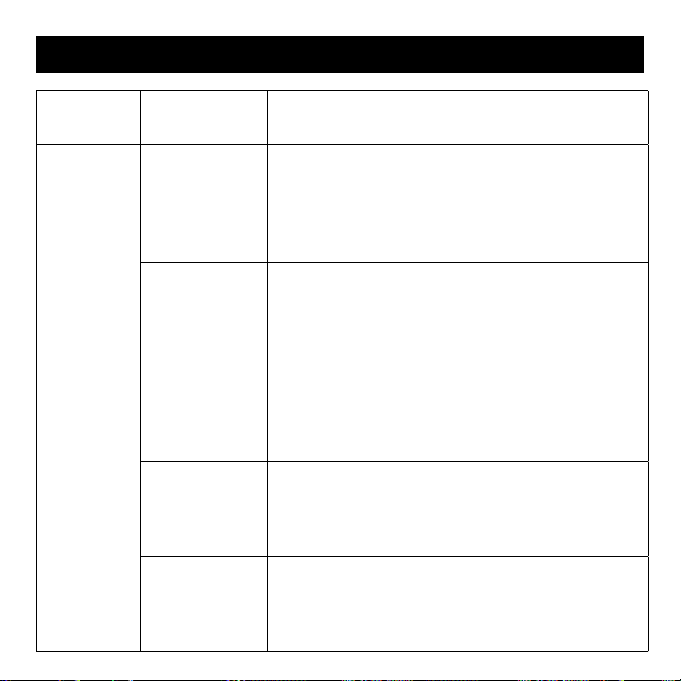
PROBLEM POSSIBLE
CAUSE
WHAT YOU SHOULD DO
When I place
the HAND PIECE
against my skin,
nothing happens.
The HAND PIECE
doesn’t beep,
even after a
few seconds.
The system is
locked.
Unlock the system with the SKIN TONE
SENSOR, using the steps on page 22-24.
Note that the system must be unlocked again
if you don’t use it for 5 minutes. If you take a
break in the middle of a treatment, or turn off
the system, you will need to unlock it again.
The SKIN CON-
TACT SENSORS
aren’t in full contact
with the skin
.
Check that both SKIN CONTACT SENSORS are
touching your skin. The system won’t work
unless it’s flat against your skin.
You are trying
to treat a small
area, such as
fingers or toes.
You can try pulling your skin taut to make a
bigger flat area, so that the window can reach
it. If you can’t get the entire window to touch
your skin, the system will not work.
Troubleshooting
38
Troubleshooting
PROBLEM POSSIBLE
CAUSE
WHAT YOU SHOULD DO
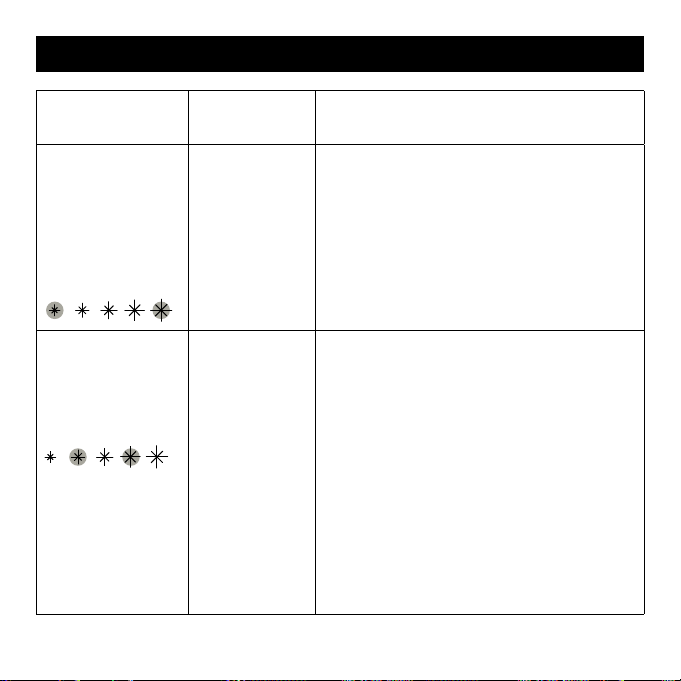
A light flash
is not
emitted
when I press
the FLASH
BUTTON.
You have not
waited enough
time between
flashes for the
bulb to recover.
The system requires about 2 seconds to recover
between flashes. When your i-Light® Pro system
is ready to flash (and assuming the SKIN CONTACT
SENSORS are flush against the skin), the system will
emit three “BEEPS” to confirm that it is ready to flash.
The DISPOSABLE
CARTRIDGE
has
flashed 1,500
times and needs
to be replaced.
You should see
the Light Bulb
flashing YELLOW.
Make sure that the CARTRIDGE STATUS INDICATOR
LIGHT is either solid green or solid yellow. If it is
flashing yellow, disconnect the system and replace
the DISPOSABLE CARTRIDGE. Refer to “Replacing the
DISPOSABLE CARTRIDGE” on page 33.
Cartridge has
misflashed.
Occasionally the cartridge may misflash. Attempt to flash
5 more times. If still no flash, disconnect the system and
replace the DISPOSABLE CARTRIDGE. Refer to "Replacing
the DISPOSABLE CARTRIDGE" on page 33.
The cartridge is
damaged.
I
f the unit emits a "chirp" but does not flash the disposable
cartridge may be damaged. Disconnect the system and
replace the DISPOSABLE CARTRIDGE. Refer to "Replacing
the DISPOSABLE CARTRIDGE" on page 33.
39
PROBLEM POSSIBLE
CAUSE
WHAT YOU SHOULD DO
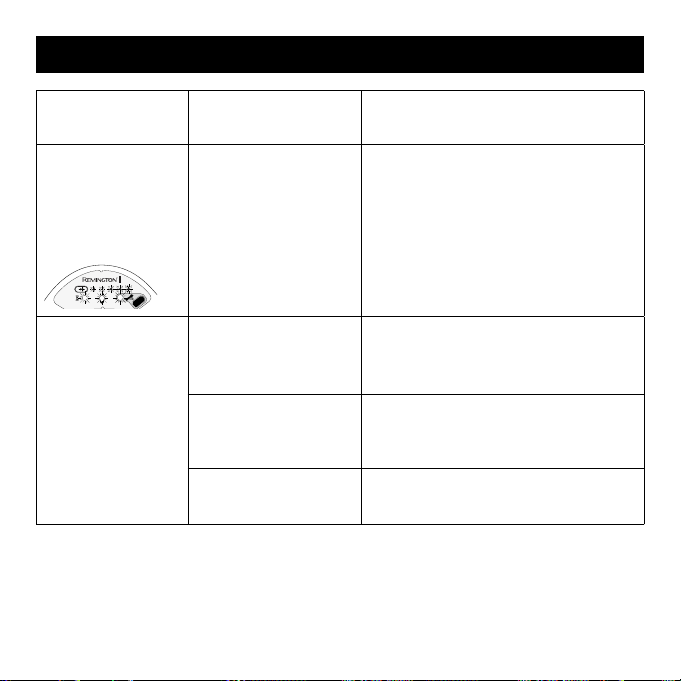
The outer ENERGY
LEVEL lights are
flashing alternately
and the i-Light®
Pro system is
beeping every ½
second.
The i-Light®
Pro
system isn’t
working
properly.
Contact Customer Service (see page 44)
for help.
The second and
fourth ENERGY
LEVEL lights are
flashing and the
system is beeping.
The SKIN
CONTACT
SENSORS may
be stuck.
Lift the HAND PIECE from the BASE UNIT and
check the SKIN CONTACT SENSORS. The
CONTACT SENSORS should slightly protrude
from the sides of the HANDPIECE. You should
be able to press the CONTACT SENSORS down
so that they are flush with the HAND PIECE.
They should spring back to about 2mm when
released. If the CONTACT SENSORS do not
depress or spring back they may be stuck and
may require cleaning. See page 32 for instruc-
tions on how to clean your i-Light® Pro IPL
system. If you still can’t get it clean, contact
Customer Service on page 44 for help.
Troubleshooting
40
PROBLEM POSSIBLE
CAUSE
WHAT YOU SHOULD DO
All the lights on
the system are
flashing and the
unit is beeping
constantly.
The NOSE CONE is
removed or not on
properly.
Check to ensure that the NOSE CONE
is properly affixed to the HAND PIECE.
You should hear a “click” when the
HAND PIECE is properly assembled.
See steps in “Set-Up” on page 17 for
instructions on how to check that the
NOSE CONE is properly affixed.
I used the SKIN
TONE SENSOR
and it showed an
ORANGE light. I
can’t unlock the
system.
Your skin is too dark
(see the Skin Tone
Chart on Page 5).
You cannot use the system with your
Skin Tone. Please contact Customer
Service (see page 44) for help.
You didn’t use the
SKIN TONE SENSOR
correctly.
Try using the SKIN TONE SENSOR again
– refer to page 22-24 for instructions
on using the SKIN TONE SENSOR.
The SKIN TONE
SENSOR isn’t working.
Please contact Customer Service
(see page 44) for help.
Troubleshooting
41
PROBLEM POSSIBLE
CAUSE
WHAT YOU SHOULD DO
Dirt or debris
is stuck to the
window.
The i-Light® Pro
system needs to be
cleaned.
See page 32 for instructions on how
to clean your IPL system. If you still
can’t get it clean, contact Customer
Service (see page 44) for help.
The Cool Down
Mode Indicator
icon is flashing
yellow and the
system is
beeping.
The hand piece needs
some time to cool down.
Under normal operating
conditions this is an
uncommon occurrence.
However this situation
can arise if either the
hand piece or base unit
become too hot.
Wait for a few minutes for the system
to cool down. There is no need to
shut the unit down, as the Cool Down
Mode Indicator light will turn off when
the i-Light® Pro IPL system is ready
to use again.
The room is too warm. Use the system in a cooler environ-
ment, where the temperature is less
than 80° F or 27° C.
Troubleshooting

42
DO NOT attempt to open or repair
your system.
Opening the device may expose you to
dangerous electrical components and
to flashed light energy, either of which
may cause serious bodily damage and/or
permanent eye injury. Trying to open the
i-Light® Pro IPL system may also dam-
age the system and will void your war-
ranty. Please contact Customer Service
(see page 44) if you have a broken
or damaged device in need of repair.
Limited Two-Year Warranty
Spectrum Brands, Inc. warrants this
product against any defects that are due
to faulty material or workmanship for a
two-year period from the original date of
consumer purchase. This warranty does
not include damage to the product result-
ing from accident or misuse.
If the product should become defec-
tive within the warranty period, we will
replace it free of charge. Return your
product and sales receipt with your
name, address and day time phone
number to: Remington Returns Center,
507 Stokely Dr., P.O. Box 1, Deforest,
WI 53532. For more information call
800-736-4648.
KEEP ORIGINAL SALES RECEIPT AS PROOF
OF PURCHASE FOR WARRANTY PURPOSES.
This warranty does not cover products
damaged by the following:
• Accident, misuse, abuse or alteration of
the product
• Servicing by unauthorized persons
• Use with unauthorized accessories
• Connecting it to incorrect current and
voltage
• Any other conditions beyond our control
Performance Guarantee
43
SPECTRUM BRANDS, INC. SHALL NOT
BE RESPONSIBLE FOR ANY INCIDENTAL,
SPECIAL OR CONSEQUENTIAL DAMAGES
RESULTING FROM THE USE OF THIS
PRODUCT. ALL IMPLIED WARRANTIES,
INCLUDING BUT NOT LIMITED TO
IM PLIED WARRANTIES OF FITNESS AND
MERCHANTABILITY, ARE LIMITED IN
DURATION TO TWO YEARS FROM DATE OF
ORIGINAL PURCHASE.
This warranty gives you specific legal
rights and you may also have other rights
which vary from state to state. Some
states do not allow the exclusion or limi-
tation of incidental, special or consequen-
tial damages.
Performance Guarantee
Spectrum Brands, Inc. Money-back Offer
If within 90 days after you have pur-
chased your Remington
®
branded
product, you are not satisfied and would
like a refund, return it with the sales slip
indicating purchase price and date of
purchase to the retailer from whom it
was purchased. Spectrum Brands, Inc.
will reimburse all retailers who accept
the product within 90 days from the date
of purchase. If you have any questions
concerning the money-back guarantee,
please call 800-736-4648 in the U.S.
® Registered Trademark of
Spectrum Brands, Inc.
Questions or comments:
For more information please visit
www.RemingtonProducts.com. If your
i-Light® Pro system is broken, damaged, in
need of repair, or for any other user assis-
tance, please contact Customer Service:
800-736-4648 or visit
www.RemingtonProducts.com
Dist. by:
Spectrum Brands, Inc.
Middleton, WI 53562
03/15 610-00028, Rev B
Made in China.
T22-31664
© 2015 Spectrum Brands, Inc.
Performance Guarantee

44
Customer Service 800-736-4648
Online: www.RemingtonProducts.com
Address: Spectrum Brands, Inc.,
3001 Deming Way
Middleton, WI 53562
Contact Information
Specifications
Spot Size
Speed
Technology
Max Energy Level
Wavelength
Electrical Requirements
Operation and Safety
Package Size
2cm
2
2.25 sec
Xenon Flash Lamp (IPL)
8 J/cm
2
(+/- 20% )
650-1200 nm
120-230 VAC 50/60Hz 1.8A
UL 60335, EN 60335, UL859
10.125" x 9.625" x 8.3125"
Labeling
EC Declaration of Conformity