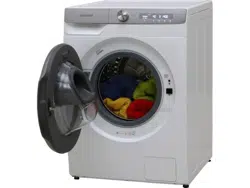
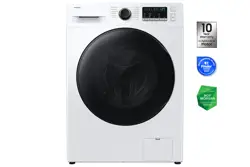
Samsung WD90T984DSH/S1 Washer Dryer
Product's Documents
Below are documents related to this product, you can read online or download:
- Owner's manual - (English) Read Online | Download pdf
Washing Machine User manual
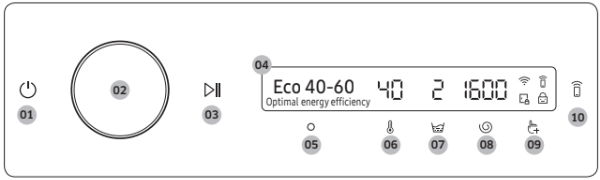
01. Power 
Tap to turn the washing machine on or off.
CAUTION
to turn the washing machine off while the wash cycle is in progress. to pause the cycle first, and then tap to turn the washing machine off.
02. Navigation dial
Turn the navigation dial left or right to navigate through cycles and functions.
When you turn the navigation dial, LCD displays your selection (such as cycle, additional functions, and system functions).
03. Start/Pause Tap and hold to start or pause an operation.
04. Display The display shows current cycle information and estimated time remaining, or an information message when a problem occurs.
05. OK  Tap to confirm your selection of function or setting.
06. Temp  . Tap to change the water temperature for the selected cycle.
07. Rinse  Tap to change the rinse count for the selected cycle.
08. Spin  Tap to change the spin speed for the selected cycle.
09. Additional function 
10. Smart Control 
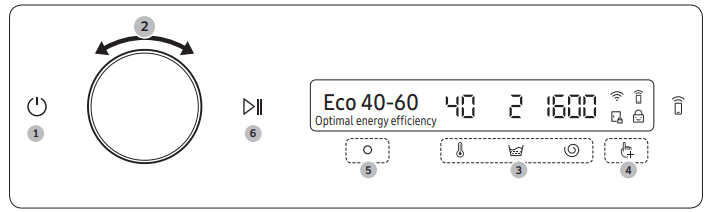 turn on the washing machine.
 or
or  to change the default cycle settings.
 and then turn the Navigation dial to select additional function. to change the settings for selected additional function. Not all cycles have additional functions available. to start operation.


Using Additional Functions
1. Tap  .
.
2. Turn the Navigation dial to select the desired additional function.
3. Tap  to change the selected function’s settings or start the function.
NOTE
again or turn the Navigation dial to select Back and tap . button is not activated.1. Select a cycle and change the cycle settings as necessary.
2. Tap .
3. Turn the Navigation dial to select Dry, and then tap .
4. Turn the Navigation dial or tap repeatedly to select the desired drying time.
- You can select from Off, Auto, 30min, 1hr 00min, 1hr 30min, 2hr 00min, 3hr 00min, or 4hr 00min.
5. Tap and hold 
Quick Drive (WD**T8*****, WD**T7***** models only)
You can reduce the overall washing time of the selected cycle settings.
1. Select a cycle and change the cycle settings as necessary.
2. Tap .
3. Turn the Navigation dial to select Quick Drive, and then tap .
4. Tap and hold .
Prewash
You can add a preliminary washing cycle before the main wash cycle.
1. Select a cycle and change the cycle settings as necessary.
2. Tap .
3. Turn the Navigation dial to select Prewash, and then tap .
4. Tap and hold
Bubble Soak
This function helps remove a wide variety of stubborn stains. With Bubble Soak selected, laundry is
thoroughly soaked in water bubbles for effective washing.
1. Select a cycle and change the cycle settings as necessary.
2. Tap .
3. Turn the Navigation dial to select Bubble Soak, and then tap .
- Bubble Soak is available with and adds up to 30 minutes to these cycles: Cotton, Synthetics, Bedding, and Super Speed.
4. Tap and hold .
Intensive
For badly soiled laundry. The operation time for each cycle is longer than normal.
1. Select a cycle and change the cycle settings as necessary.
2. Tap .
3. Turn the Navigation dial to select Intensive, and then tap .
4. Tap and hold .
Dose per Wash
You can increase or decrease the amount of detergent dispensed automatically.
1. Tap .
2. Turn the Navigation dial to select Dose per Wash, and then tap .
3. Tap to select the desired setting.
- Default setting is Med. (Medium).
- You can select from Med., High, Off, or Low.
Dose per Rinse
You can increase or decrease the amount of detergent dispensed automatically.
1. Tap
2. Turn the Navigation dial to select Dose per Rinse, and then tap .
3. Tap to select the desired setting.
- Default setting is Med. (Medium).
- You can select from Med., High, Off, or Low.
My Cycles
Add or remove cycles to create a personal cycle list.
for 3 seconds.. to add or remove the selected cycle.NOTE
Delay End
You can set the washing machine to finish your wash automatically at a later time, choosing a delay of between 1 to 24 hours (in 1 hour increments). The hour displayed indicates the time the wash will finish.
... .
.Child Lock
To prevent children or infants from accidentally starting or setting the washing machine, Child Lock locks all buttons except for  and .
and .
.. to select On or Off.NOTE
Using System Functions
1. Tap and hold for 3 seconds.
2. Turn the Navigation dial and select the desired system function, and then tap .
3. Tap to change the selected function’s settings or start the function.
NOTE
To return to the main screen, tap again or turn the Navigation dial to select Back and tap O.
Water Hardness
Set the water hardness according to your region. The detergent concentration level adjusts automatically according to the water hardness setting.
1. Tap and hold for 3 seconds.
2. Turn the Navigation dial to select Water Hardness, and then tap .
3. Tap to select the desired setting.
- The default setting is Med. (Medium).
- You can select from Med., Hard, or Soft.
Softener
You can change the concentration level of the softener.
1. Tap and hold for 3 seconds.
2. Turn the Navigation dial to select Softener, and then tap .
3. Tap to select the desired setting.
- The default setting is 1x.
- You can select from 1x, 2x, or 3x.
NOTE
The dispense amount of softener decreases as the concentration level increases.
AI Pattern
This function saves frequently used cycles and settings. When you turn the function on, the washing machine remembers the cycles you use most and their settings (Temp., Rinse, Spin) and displays them in frequency order.
1. Tap and hold for 3 seconds.
2. Turn the Navigation dial to select AI Pattern, and then tap
3. Tap to select On or Off.
- The default setting is On. Set it to Off if you do not want to use this function.
- When you turn off the function, all the saved data resets.
Alarm
You can turn on or off the sound from the washing machine. When this function is set to Off, the AddWash alarm, the melody of cycle completion, and the power-off beep does not sound. However, the other sounds stay active.
for 3 seconds.. to select On or Off.NOTE The setting remains unchanged even if you restart the washing machine.
Calibration
You can run calibration again for accurate weight detection.
for 3 seconds..Wi-Fi
You can turn the washing machine's Wi-Fi on or off.
1. Tap and hold for 3 seconds.
2. Turn the Navigation dial to select Wi-Fi, and then tap .
3. Tap to select On or Off.
 indicates that the washing machine is connected to the router through the Wi-Fi connection.
Language
You can change the system language.
for 3 seconds...Factory Reset
You can reset the washing machine.
for 3 seconds..AddWash (applicable models only) To add laundry after the wash starts, use the AddWash door.
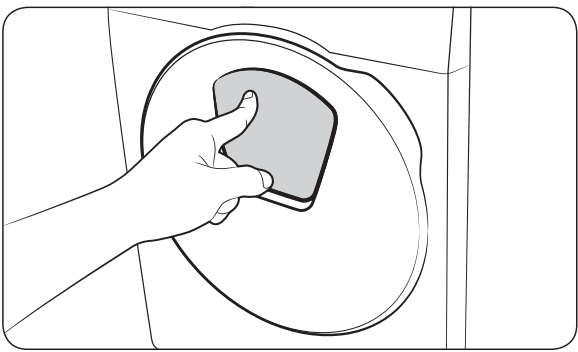 | 1. Tap and hold 2. Press the upper area of the AddWash door to unlock the door. The door will move inward slightly when you press it and then open. |
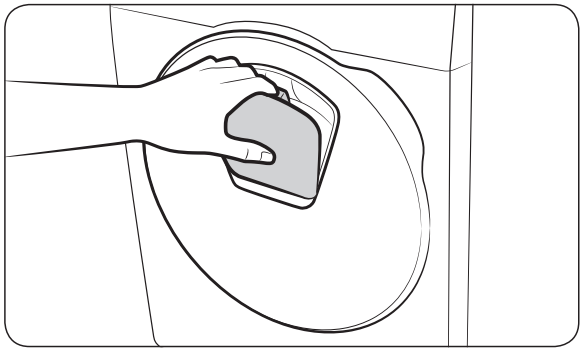 | 3. Open the AddWash door fully, and then insert additional laundry through the AddWash door into the drum. 4. Lift the AddWash door back into position, and then lock the door by pushing the upper area of the door until you hear a click. Then, tap and hold again to resume the wash cycle. CAUTION Do not put excessive force on the AddWash door. It may break. |
NOTE The water inside the drum does not leak if the AddWash door is closed properly. Water drops may form around the AddWash door, but water will not leak from inside the drum. This is normal.
CAUTION
 . Please note that the AddWash door can be opened unintentionally (without tapping and holding ) when the wash is complete.
Adding laundry for non-AddWash models (applicable models only)
to stop the wash cycle. again to resume the wash cycle.Smart control (applicable models only)
You can connect to the SmartThings app and control your washing machine remotely.
Connecting your washing machine
 to turn on the washing machine.
 . to authenticate your washing machine.
- You can use various features available in the SmartThings app.
NOTE If your washing machine fails to connect with the SmartThings app, try again.
 for 3 seconds to enter the System functions menu, and select Wi-Fi to turn it on.
Stay Connect
Set up the Stay Connect function in your SmartThings app to keep Smart Control turned on at the end of a cycle. Your washing machine stays connected to the app so you can send additional instructions, whether you are at home or away.
NOTE
Wi-Fi connection
On your smartphone or tablet, go to Settings and turn on the wireless connection and select an AP (Access Point).
Download
On an app market (Google Play Store, Apple App Store, Samsung Galaxy Apps), find the SmartThings app with a search term of “SmartThings”. Download and install the app on your device.
NOTE The app is subject to change without notice for improved performance.
Log in
You must first log into SmartThings with your Samsung account. To create a new Samsung account, follow the instructions on the app. You don’t need a separate app to create your account.
NOTE
If you have a Samsung account, use the account to log in. A registered Samsung smartphone or tablet user automatically logs in.
The software included in this product contains open source software. You may obtain the complete corresponding source code for a period of three years after the last shipment of this product by contacting our support team via http://opensource.samsung.com (Please use the “Inquiry” menu.)
It is also possible to obtain the complete corresponding source code in a physical medium such as a CD-ROM; a minimal charge will be required.

Perform this cycle regularly to clean the drum by removing bacteria from it. This cycle heats the water
between 60 °C and 70 °C, and it also removes accumulated dirt from the rubber door gasket.
1. Tap  .
.
2. Turn the Navigation dial to select Drum Clean+.
3. Tap and hold  .
.
CAUTION
Drum Clean+ reminder
Depending on the model, the Drum Clean+ reminder is either an icon or an LED.
For icons, the icon lights up on the control panel.
For LEDs, the LED lights up next to Drum Clean+, or on the option area of the control panel.
 . This does not stop or turn off the machine but marks your cycle count.
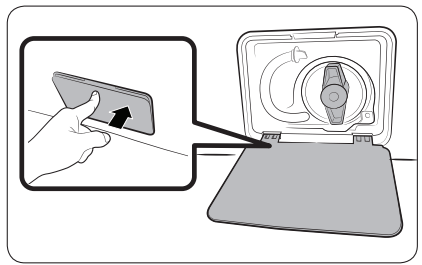 | 1. Power off and unplug the washing machine from the electrical outlet. 2. Gently press the top area of the filter cover to open. |
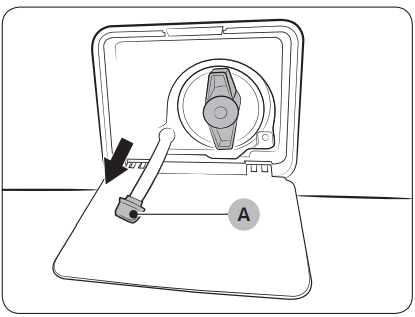 | 3. Put an empty, spacious container around the cover, and stretch the emergency drain tube to the container while holding the tube cap (A). |
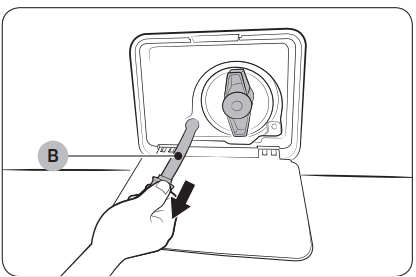 | 4. Open the tube cap and let water in the emergency drain tube (B) flow into the container. |
5. When done, close the tube cap, and reinsert the tube. Then, close the filter cover. NOTE Use a spacious container because the water in the drum may be more than expected. |
Surface of the washing machine Use a soft cloth with a nonabrasive household detergent. Do not spray water onto the washing machine.
AddWash door
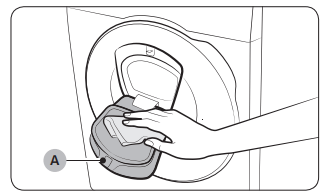 | 1. Open the AddWash door. 2. Use a wet cloth to clean the AddWash door.
3. Wipe up and close the AddWash door until you hear a clicking sound. |
CAUTION
Mesh filter
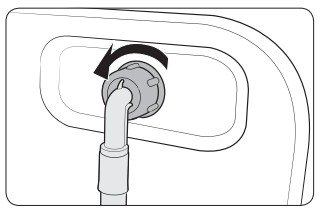 | 1. Turn off the washing machine, and unplug the power cord. 2. Close the water tap. 3. Loosen and disconnect the water hose from the back of the washing machine. Cover the hose with a cloth to prevent water from gushing out. |
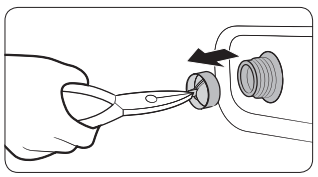 | 4. Use pliers to pull out the mesh filter from the inlet valve. 5. Submerge the mesh filter deeply in water so that the threaded connector is also submerged. 6. Dry the mesh filter completely in the shade. 7. Reinsert the mesh filter into the inlet valve, and reconnect the water hose to the inlet valve. 8. Open the water tap. |
Debris filter
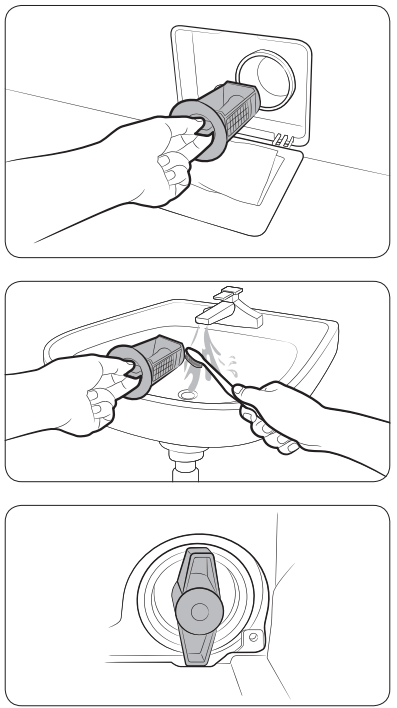 |
NOTE
|
NOTE If the pump filter is clogged, an information code of “5C” appears on the screen.
CAUTION
Detergent drawer
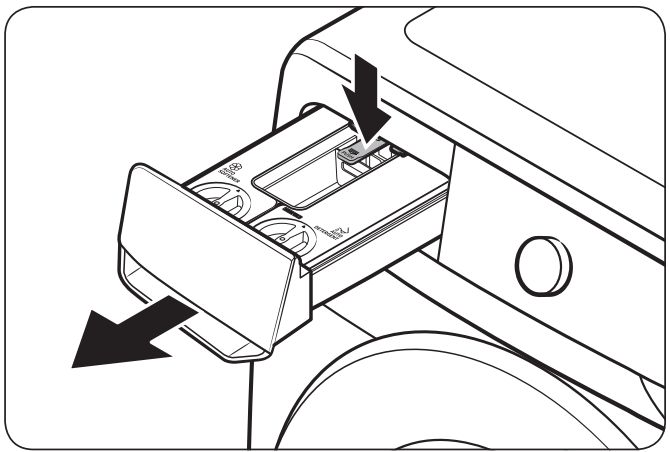 | 1. While holding down the release lever on the inner of the drawer, pull the detergent drawer to remove. |
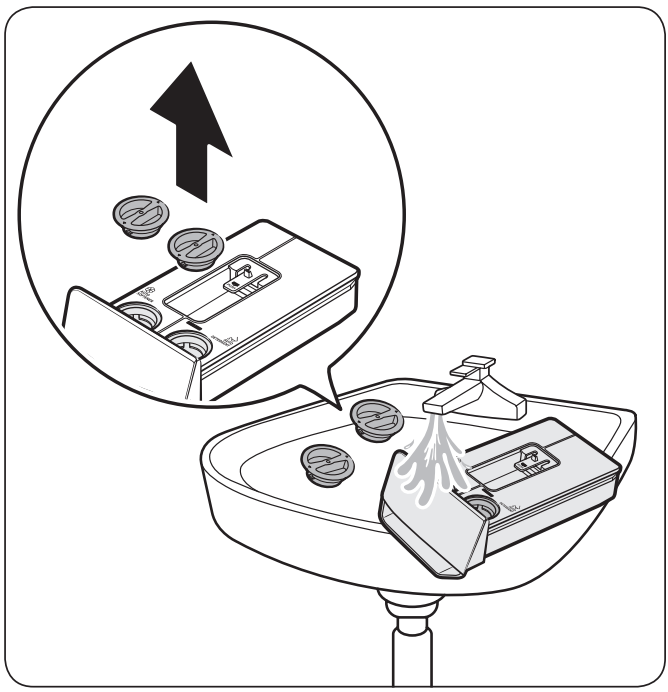 | 2. Open the cover and clean inside the auto detergent/softener compartments with water.
|
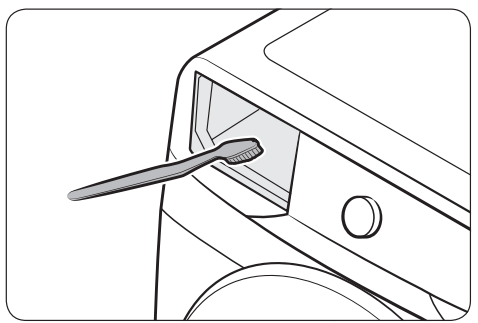 | 3. Clean the drawer recess using a bottle brush to remove detergent residues and limescale on the drawer recess. |
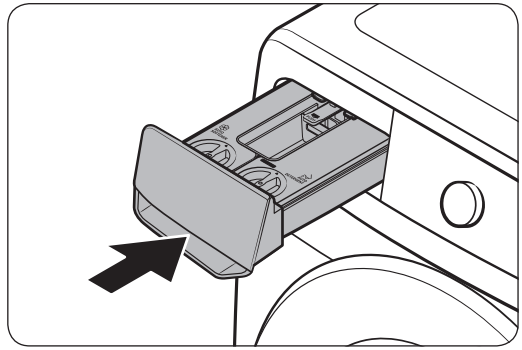 | 4. Insert the detergent drawer back into the washing machine. NOTE Make sure the drawer recess is completely dry before inserting the detergent drawer. |
CAUTION
Do not spray water into the detergent drawer recess. It may cause electric shock or fire.
The washing machine may freeze when it drops below 0 °C.
NOTE
If the washing machine still doesn’t operate normally, repeat the above steps until it operates normally.
Avoid leaving the washing machine unused for an extended time. If this is the case, drain the washing machine and unplug the power cord.
 .
.Problem | Action |
|---|---|
Does not start. | • Make sure the washing machine is plugged in. • Make sure the door is properly closed. • Make sure the water taps are open. • Tap and hold to start the washing machine. • Make sure Child Lock is not activated. • Before the washing machine starts to fill, it will make a series of clicking noises to check the door lock and will do quick drain. • Check the fuse or reset the circuit breaker. • Check if power is supplied properly. • Low voltage detected. - Check if the power cord is plugged in. • Make sure laundry is not caught in the door. • The “DDC” message appears when you open the AddWash door without tapping and holding . If this happens, do one of the following: • Press the AddWash door to close properly. Then, tap and hold and try again. • To add laundry, open the AddWash door and put in laundry. close the AddWash door completely. Then, tap and hold to resume operation. |
Water supply is insufficient, or no water is supplied. | • Fully open the water tap. • Make sure the door is properly closed. • Make sure the water supply hose is not frozen. • Make sure the water supply hose is not kinked or clogged. • Make sure there is sufficient water pressure. • Make sure that the cold water tap and the hot water tap are properly connected. • Clean the mesh filter as it may be clogged. |
After a cycle, detergent remains in the detergent drawer. | • Make sure the washing machine is running with sufficient water pressure. • Make sure the detergent is added to the centre of the detergent drawer. •Make sure the rinse cap is inserted properly. • If using granular detergent, make sure the detergent selector is in the upper position. • Remove the rinse cap and clean the detergent drawer. |
Excessive vibrations or makes noise. | • Make sure the washing machine is installed on a level, solid floor that is not slippery. If the floor is not level, use the levelling feet to adjust the height of the washing machine. • Make sure the shipping bolts are removed. • Make sure the washing machine is not in contact with any other object. • Make sure the laundry load is balanced. • The motor can cause noise during normal operation. • Overalls or clothes with metallic decorations can cause noise while being washed. This is normal. • Metal objects such as coins can cause noise. After washing, remove these objects from the drum or filter case. • Redistribute the load. If only one item of clothing needs washing, such as a bathrobe or pair of jeans, the final spin result might be unsatisfactory, and a “Ub” check message will be shown in the display. |
Does not drain and/or spin. | • Make sure the drain hose is straightened all the way to the drain system. If you encounter a drain problem, call for service. • Make sure the debris filter is not clogged. • Close the door and tap and hold . For your safety, the washing machine will not tumble or spin unless the door is closed. • Make sure the drain hose is not frozen or clogged. • Make sure the drain hose is connected to a drain system that is not clogged. • If the washing machine is not supplied with sufficient power, the washing machine will temporarily not drain or spin. As soon as the washing machine regains sufficient power, it will operate normally. • Make sure the drain hose is positioned correctly, depending on the connection type. • Clean the debris filter as it may be clogged. |
The door does not open. | • Tap and hold to stop the washing machine. • It may take a few moments for the door lock mechanism to disengage. • The door will not open until 3 minutes after the washing machine has stopped or the power has been off. • Make sure all the water in the drum is drained. • The door may not open if water remains in the drum. Drain the drum and open the door manually. • Make sure the door lock light is off. The door lock light turns off after the washing machine has drained. |
Excessive suds. | • Make sure you use the recommended types of detergent as appropriate. • Use high efficiency (HE) detergent to prevent oversudsing. • Reduce the detergent amount for soft water, small loads, or lightly soiled loads. • Non-HE detergent is not recommended. |
Cannot add additional detergent. | • Make sure the remaining amount of detergent and fabric softener is not over the limit. |
Stops. | • Plug the power cord into a live electrical outlet. • Check the fuse or reset the circuit breaker. • Close the door, and tap and hold to start the washing machine. For your safety, the washing machine will not tumble or spin unless the door is closed. • Before the washing machine starts to fill, it will make a series of clicking noises to check the door lock and will do quick drain. • There may be a pause or soak period in the cycle. Wait briefly, and the washing machine may start. • Make sure the mesh filter of the water supply hose at the water taps is not clogged. Periodically clean the mesh filter. • If the washing machine is not supplied with sufficient power, the washing machine will temporarily not drain or spin. As soon as the washing machine regains sufficient power, it will operate normally. |
Fills with the wrong water temperature. | • Fully open both taps. • Make sure the temperature selection is correct. • Make sure the hoses are connected to the correct taps. Flush water lines. • Make sure the water heater is set to supply a minimum of 49 °C hot water at the tap. Also, check the water heater capacity and recovery rate. • Disconnect the hoses and clean the mesh filter. The mesh filter may be clogged. • While the washing machine fills, the water temperature may change as the automatic temperature control feature checks incoming water temperature. This is normal. • While the washing machine fills, you may notice just hot and/or just cold water going through the dispenser when cold or warm temperatures are selected. This is a normal function of the automatic temperature control feature as the washing machine determines the water temperature. |
Load is wet at the end of a cycle. | • Use the High or Extra High spin speed. • Use high efficiency (HE) detergent to reduce oversudsing. • Load is too small. Small loads (one or two items) may become unbalanced and not spin completely. • Make sure the drain hose is not kinked or clogged. |
Leaks water. | • Make sure the door is properly closed. • Make sure all hose connections are tight. • Make sure the end of the drain hose is correctly inserted and secured to the drain system. • Avoid overloading. • Use high efficiency (HE) detergent to prevent oversudsing. • Check the drain hose.
|
Has odours. | • Excessive suds collect in recesses and can cause foul odours. • Run cleansing cycles to sanitise periodically. • Clean the door seal (diaphragm). • Dry the washing machine interior after a cycle has finished. |
No bubbles are seen (Bubble models only). | • You may not be able to see bubbles if there is too much items in the drum. • Severely contaminated laundry may not generate bubbles. |
Can I open the AddWash door at any time? | • The AddWash door can be opened only when the indicator appears. However, it does not open in the following cases:
|
A message appears on the display to alert that dispenser is open. | • Check if the detergent drawer is closed properly.
|
Code | Action |
|---|---|
Check drainage | Water is not draining. • Make sure the drain hose is not frozen or clogged. • Make sure the drain hose is positioned correctly, depending on the connection type. • Clean the debris filter as it may be clogged. • Make sure the drain hose is straightened all the way to the drain system. • If the information code remains, contact a customer service centre |
Check water supply | Water is not supplied. • Make sure the water taps are open. • Make sure the water hoses are not clogged. • Make sure the water taps are not frozen. • Make sure the washing machine is operating with sufficient water pressure. • Make sure that the cold water tap and the hot water tap are properly connected. • Clean the mesh filter as it may be clogged. • All buttons will be disabled for 3 minutes after the information code appears. • When the "4C" message appears, the machine drains water for 3 minutes. In the meantime, the Power button will be disabled. |
Check water lines | • Make sure the cold water supply hose is firmly connected to the cold water tap. If it is connected to the hot water tap, the laundry may be deformed with some cycles. |
Unbalanced laundry detected | Spinning does not work. • Make sure laundry is spread out evenly. • Make sure the washing machine is on a flat, stable surface. • Redistribute the load. If only one item of clothing needs washing, such as a bathrobe or pair of jeans, the final spin result might be unsatisfactory, and an “Ub” check message will be shown in the display. |
Door is open | Operating the washing machine with the door open. • Make sure the door is properly closed. • Make sure laundry is not caught in the door. |
AddWash door is open (applicable models only) | This message appears when you open the AddWash door without tapping and holding . If this happens, do one of the following: • Press the AddWash door to close properly. Then, tap and hold and try again. • To add laundry, open the AddWash door and input laundry. Close the AddWash door properly. Then, tap and hold to resume operation. |
OC | Water has overflowed. • Restart after spinning. • If the information code remains on the display, contact a local Samsung service centre. |
LC, LC1 | Check the drain hose. • Make sure the end of the drain hose is not placed on the floor. • Make sure the drain hose is not clogged. • If the information code remains, contact a customer service centre. |
3C | Check the drum motor for operation. • Try restarting the cycle. • If the information code remains, contact a customer service centre. |
3CP | The electronic control needs to be checked. • Try restarting the cycle. • If the information code remains, contact a customer service centre. |
UC | Check the pulsator motor for operation. • Check if power is supplied properly. • If the information code remains, contact a customer service centre. |
Low voltage detected. • Check if the power cord is plugged in. • If the information code remains, contact a customer service centre. | |
HC | High temperature heating check. • If the information code remains, contact a customer service centre. |
1C | The Water Level sensor is not working properly. • Turn the machine off, and restart the cycle. • If the information code remains, contact a customer service centre. |
AC | Check communications between main and sub PBAs. • Turn the machine off, and restart the cycle. • If the information code remains, contact a customer service centre. |
8C | The MEMS sensor is not working properly. • Turn the machine off, and restart the cycle. • If the information code remains, contact a customer service centre. |
AC6 | Check communications between the main and the inverter PBAs. • Depending on the state, the machine may automatically returns to normal operation. • Turn the machine off, and restart the cycle. • If the information code remains, contact a customer service centre. |
DC1 | The Main Door lock/unlock is not working properly. • Turn the machine off, and restart the cycle. • If the information code remains, contact a customer service centre. |
DC3 | The AddWash door lock/unlock is not working properly. • Turn the machine off, and restart the cycle. • If the information code remains, contact a customer service centre. |
FC | The drying fan motor is not working properly. • Turn the machine off, and restart the cycle. • If the information code remains, contact a local Samsung service centre. |
HC2 | The drying heater is not working properly. • Turn the machine off, and restart the cycle. • If the information code remains, contact a local Samsung service centre. |
Reference file: Samsung WD90T984DSH/S1 Washer Dryer
Additionally, the document applies to other Samsung models: WD1*T******, WD9*T******, WD8*T******, WD7*T******, WD90T984DSH


 to stop the wash cycle.