User manual Washer
Operation
Before Washing
Prepare Wash Load
Empty Pockets and Cuffs
Make sure all pockets are empty and turn them inside out. One bobby pin, metal or plastic toy, nail or sharp object in a load can catch laundry, cause tears and plug the pump. Facial tissue left in a pocket will produce extreme “lint”. A crayon or lipstick in a wash load may cause stains that cannot be removed. Roll down cuffs and shake out grass, sand and gravel.
Strings on clothing such as hooded sweatshirts may get caught in or around the agitator. Remove the strings if possible or tie them together.
Mend Rips and Tears
Little holes can become bigger in the washer. Mend holes and tears before placing garments in the washer.
Close Zipper and Fasten Hooks
These can catch on garments in a wash load and tear them. Tie belts and sashes so they won’t wind around clothes.
Check For Colorfastness
Squeeze a portion of garment in warm or hot sudsy water. If the color bleeds or runs, wash the item separately in cold water.
Sort Items
Different items use different wash cycles and temperatures. Always follow the manufacturer’s care label. Proper sorting is easy if you follow a few guidelines:
- Sort by Color: Separate items into loads of whites, darks, lights and non-colorfast.
- Sort by Fabric and Construction: Separate items into loads of cottons/linens, permanent press, synthetics/blends/ poly knits, and delicates.
- Sort by Temperature: Separate items into loads that can be washed in cold, warm or hot water.
- Sort by Type and Amount of Soil: Heavily soiled clothes will need extra treatment. Lightly soiled clothes can become dingy if washed with heavily soiled items.
- Sort Lint “Shedders” From Lint “Receivers”: Some fabrics attract lint and should not be washed with lint-shedding loads. Lint shedders are cottons, terry towels, chenille bedspreads, rugs and clothes that have been heavily bleached. Lint receivers are synthetics, permanent or durable press, knits (including socks), corduroy, and other smooth fabrics.
Pretreat
Pretreat shirt collars and cuffs with a pretreat product or liquid detergent when placing them in the washer. Before washing, treat special stains individually.
Loading the Washer
Load Articles
NOTE: Always add detergent first.
- Load items by the amount of space they take up, not by their weight. Mix large and small items in a load to get the best washing results.
- Drop items loosely into the washtub. The bulk of the clothes rather than the weight will determine load size. Do not pack items in or wrap them around the agitator. Overloading can cause poor cleaning, excessive wrinkling and tears.
- Items should move freely through the wash water for best cleaning results. Items should rollover, sink and then reappear.
- When washing very large items, do not fill washtub as full as with other loads.
Wash Temperature
Hot
Hot water is the most effective for cleaning, but it is not recommended for all fabric types (read labels).
Warm
The Warm Wash is useful for providing a thorough cleaning on light and moderately soiled clothing without damaging fabric or adding to color fading. Warm water also reduces wrinkling. Use with non-colorfast or dark colors, permanent press, silks, woolens, nylon, and acrylic.
Cool
The Cool Wash temperature is useful for washing permanent press fabrics.
Cold
The Cold Wash is ideal for delicate items. Although its cleaning abilities are not as great as with hot or warm water, it is useful for colors that bleed easily and for sensitive fabrics.
All rinses use cold water. It is the most beneficial for fabrics. Cold rinses reduce wrinkling and color fading. In addition, cold rinses will save money and energy.
NOTE: In wash temperatures colder than 60°F [16°C], detergents do not dissolve well. This may cause ineffective cleaning, or lint and residue to form.
NOTE: Always follow manufacturer’s care labels.
Water Supply Temperature
Water temperature is determined by the temperature of the incoming water supply. The washer does not heat or cool the water.
For example, northern climates will have much colder incoming water during the winter months. Southern climates will have much warmer cold water during the summer months.
Wash Temperature Guide
Water Temperature: HOT
Use:
- Sturdy whites and colorfast items
- Work clothes
- Soiled items
- Diapers
Comments: Best cleaning for items soiled with oily or greasy stains, grass, or ink.
Water Temperature: WARM
Use:
- Light and moderately soiled items
- Non-colorfast or dark colors
- Permanent press
- Silks, woolens, nylon, acrylic
Comments:
- Reduces wrinkling in permanent press fabrics
- Less fading
- Reduces shrinking in knits
Water Temperature: COOL
Use:
- Permanent press
- Silks, woolens, nylon, acrylic
Comments:
- Less fading
- Reduces shrinking in knits
Water Temperature: COLD
Use:
- Non-colorfast fabrics
- Extra delicate clothing
Comments:
- Saves energy
- Reduces color fading
- Reduces wrinkling
- Reduces shrinking
Energy
You can save energy when washing by following these guidelines:
- Save on heating water by using colder washes. Heating water accounts for the greatest energy expense when washing.
- Wash full loads, but do not overload.
- Use soak option, if available, for heavily soiled items to reduce the need for longer wash times.
Operating Your Washer
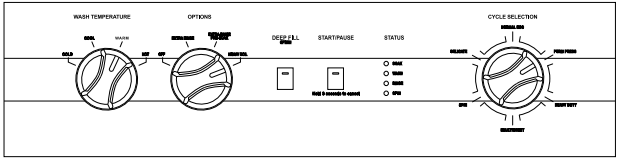
Determine Proper Cycle
The following cycle descriptions will help determine which cycle to choose depending on the type of laundry being washed.
Normal Eco
This cycle uses a spray rinse to reduce water consumption. It also uses less hot water. This cycle is recommended for washing everyday cottons and linens. If using fabric softener in this cycle, select the Extra Rinse option.
Perm Press
Use for permanent press items and synthetics. The final spin is a low spin speed.
Heavy Duty
Use for sturdy items, like play or work clothes, heavily soiled jeans, T-shirts, etc. There is a longer wash time for the best results when cleaning heavily soiled items.
Bulky/Sheet
Use this cycle when washing bulky items such as sheets, blankets and comforters. The cycle includes a gentle wash action to thoroughly clean larger items.
Spin
Use this cycle to extract water from wet items. The cycle uses the high spin.
Delicate
Wash delicate items usually washed by hand on this cycle.
On this cycle, the agitation during the wash portion of the cycle is not constant. The wash will alternate between periods of agitation and then a short soak until advancing to the spin portion of the cycle. All spin speeds are a low spin.
Waterproof Items
If waterproof or water-resistant items need to be washed, use only the Delicate Cycle.
Examples of waterproof items include rain coats and bed liners. Load the items evenly and load washtub no more than 1/2 full. For best washing results, add another item such as a cotton sheet on top of the waterproof items to make sure they get fully submersed in the water and that no air is trapped under the waterproof items.
Options
Off
When this is selected, no options will be added to the cycle. The soil level will be standard.
Extra Rinse
This Option will provide an additional rinse to the selected cycle.
Extra Rinse Pre-Soak
This Option includes a soak segment at the beginning of the cycle and an additional rinse.
Heavy Soil
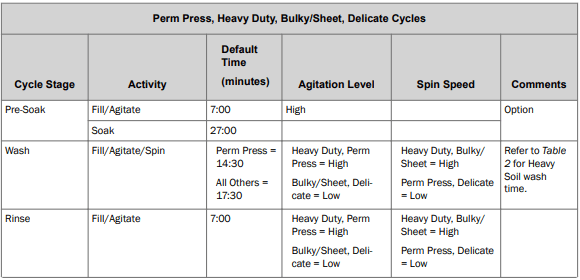
This Option extends the wash time for heavily soiled items in all cycles. In the Normal Eco cycle, the wash will alternate between periods of agitation and then a short soak until advancing to the next part of the cycle.
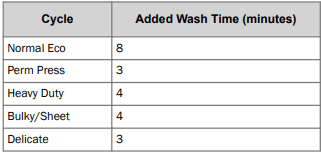
Table 2
Deep Fill
Use this option to add extra water to any cycle when a deeper fill level is desired.
Status
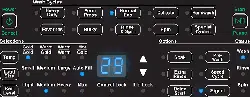
The active Status light will flash at the beginning of the cycle. The Status lights are lit throughout the cycle to show what part of the cycle is running.
Soak
- The Soak status light is lit during the PreSoak step of the cycle, if selected.
Wash
- The Wash status light is lit during the first fill step and the wash step of the cycle.
Rinse
- The Rinse status light is lit during the rinse portions of the cycle including Extra Rinse, if selected.
Spin
- The Spin status light is lit during the final spin portion of the cycle.
Audio Signals
An audio signal will sound for three seconds at the end of each cycle. To turn it off, hold the Deep Fill button for three seconds. Hold it again for three seconds to turn the signal back on. A one-second tone will sound to confirm that the End of Cycle signal is turned off or on.
Audio signals will sound when a knob selection is changed and when the Start/Pause or Deep Fill buttons are pressed. To turn them off, hold the Deep Fill button for 10 seconds. Hold it again for 10 seconds to turn the signals back on. A three-second tone will sound to confirm that these signals are turned off or on.
In addition, the Status lights will be lit in an upward pattern when the signal is turned on. The lights will be lit in a downward pattern when the signal is turned off.
To Wash Clothes
IMPORTANT: Before using your new washer, make sure the washer cord is connected to an appropriate electrical outlet that is properly installed and connected to a protective earth/ground. Make sure the washer hoses are connected to the hot and cold water faucets, and that the faucets are turned on. Be sure the drain hose is not kinked and is inserted into a drain. Refer to the INSTALLATION INSTRUCTIONS for details of proper washer installation.
IMPORTANT: Prior to first wash, use an all purpose cleaner, or a detergent and water solution, and a damp cloth to remove shipping dust from inside of wash drum.
- Get the clothes ready for washing. Empty pockets and cuffs. Sort items into separate loads. Pretreat stains and heavily soiled areas. IMPORTANT: Remove all sharp objects from laundry to avoid tears and rips to items during normal machine operation.
- Measure and add low sudsing, High Efficiency (HE) detergent to the washtub. Follow instructions on detergent package for amount to use
NOTE: High efficiency (HE) detergent is recommended for use in this machine. Look for the HE logo or “high efficiency” on the detergent’s label.
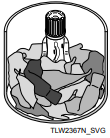
3. Add clothes loosely into the washtub (16 lbs. [7.2 kg] maximum dry clothes load).
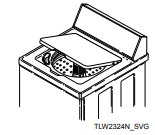
4. Close the lid. The washer will not fill, agitate or spin with the lid open.
5. Set the WASH TEMPERATURE control. (All rinses are cold.)
6. Select OPTIONS if desired.
7. Select the cycle according to the type of fabric being washed. Refer to Determine Proper Cycle. If the selected cycle is not the correct cycle for the fabric being washed, you may change the cycle selection at any time until the first wash fill is complete. IMPORTANT: Once the first wash fill is complete, changing the Cycle Selection knob will have no effect. NOTE: The Normal Eco cycle is recommended for everyday cottons and linens.
8. Press the START/PAUSE button to begin the cycle. NOTE: Lid must be closed for fill, agitation and spin to start.
The washer will stop (pause) shortly before the wash and rinse spins. This is a normal part of the cycle.
Pausing the Cycle
Lifting the lid or pressing the Start/Pause button will pause the cycle. Close the lid to resume the cycle.
You can change the cycle during the first wash fill only. You can also pause the cycle after the first fill but the cycle selection can't be changed at this time.
NOTE: You can’t pause a cycle right after starting it. There is a short delay while the machine is energizing.
1. To pause a running cycle, open the lid or press the Start/ Pause button once. The current Status light will go out.
2. The Start/Pause Status light will flash to indicate the cycle is paused.
3. Close the lid, or if lid was not previously opened press the Start/Pause button again, to resume the cycle. It will start from the place it was in the cycle when paused. You can't change the cycle selection while it is paused.
Canceling the Cycle
You can change the cycle during the first wash fill. If you need to change the cycle after that you must cancel it first.
- To cancel a cycle, hold the Start/Pause button for three seconds. The WASH, RINSE and SPIN Status lights will flash. An audio tone will sound.
- You can now change the cycle type, if desired. For example, you may want to change it from HEAVY DUTY to DELICATE depending on the type of clothes being washed.
- Press the Start/Pause button to start the new cycle.
Cycle Operation
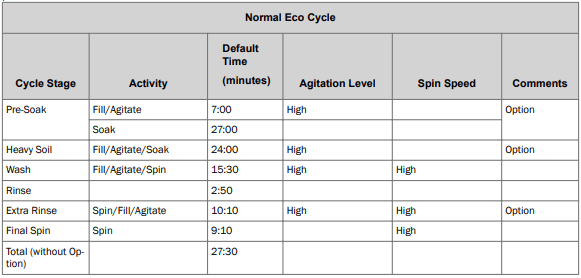
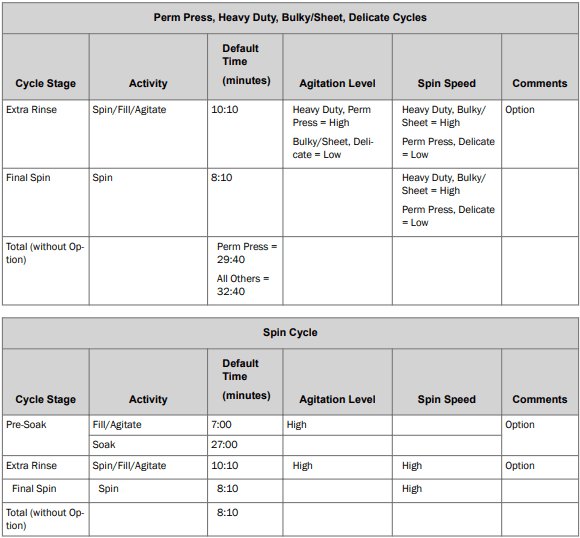
The cycles of your washer include several different stages. Refer to the tables below for what can be expected during the cycles that you select.
The times listed are the default times. They are approximate and will vary depending on the cycle and options chosen, and the size and type of the load. Fill times may vary due to water pressure.
The Extra Rinse option must be selected to be included in the cycle.
NOTE: The rinse water temperature will be cold, including when optional rinses are selected.
Optional Features
Bleach Dispenser
The bleach dispenser is located in the left front corner, under the lid.
Use liquid bleach in the dispenser. Powdered bleach must not be used in the dispenser. Add powdered bleach to the wash water.
Use no more than one cup chlorine bleach for large loads, three-quarters cup for medium and one-half cup for small loads.
Carefully pour recommended amount of bleach into the dispenser before the start of the wash cycle.
Be careful not to spill undiluted bleach. It is a strong chemical and can damage some fabrics if it is not properly diluted.
Bleach is very corrosive and overfilling the dispenser can cause chemical damage to the washer components. Components damaged by bleach are not covered under the product warranty.
Fabric Softener Dispenser
Fabric softener should not be used with the Normal Eco or Spin Only cycles unless the Extra Rinse option is also selected.
To Use Dispenser
After the clothes are loaded into the washtub and before the start of the WASH cycle, pour the proper amount of liquid fabric softener into the bottle measuring cap (refer to bottle directions). Pour into dispenser.
The large fabric softener dispenser allows for the fabric softener to be diluted with water. We recommend adding water up to the fill level. Do not exceed tip of arrow which indicates correct fill level. Over-filling can allow fabric softener to spill onto the clothes, causing stains on clothes if the softener comes into contact with detergent suds.
Setting the water level to medium or higher will result in better performance from the fabric softener.
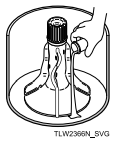
The fabric softener will remain in the dispenser during the wash fill, agitation and spin. At the end of the wash spin, the liquid fabric softener will be dispensed into the washtub through the slots in the agitator and will be mixed with the incoming rinse water.
To Clean the Dispenser
- Grasp the entire fabric softener assembly firmly with both hands and place your thumbs inside the hole at the top.
- Pull quickly up and towards you. The assembly will come off the agitator.
- Lay down a cloth on a hard, flat surface.
- Lay the assembly on the cloth on its side so the vertical lines are facing up.
- Place your palms on the ridge at the base of the dispenser housing and press down firmly. The assembly will split apart for easy cleaning.
- Soak housing, cup and funnel in hot soapy water. Use a small brush to scrub if needed.
- Rinse housing, cup and funnel clean.
- The inside of the agitator can also be cleaned.
- After cleaning, install dispenser funnel, cup and housing until they click into place.
- Push assembly directly downward onto top of agitator until firmly snapped in place.
IMPORTANT: When adding detergent to the wash load, DO NOT allow any detergent to enter the softener dispenser cup. If this happens, refer to the cleaning instructions.
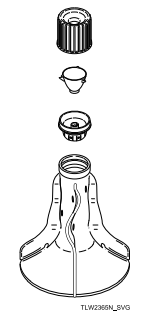
1. Dispenser Housing
2. Dispenser Cup
3. Dispenser Funnel
4. Agitator
Use Tips
- Fabric softener spilled onto garments may cause staining. To remove, dampen stain and rub with bar soap. Wash as usual.
- Liquid fabric softeners will be dispensed during the first rinse and should not be combined with bleach, bluing, starch, detergents, soaps or packaged water conditioners.
- When adding detergent to wash water, do not allow any to enter into softener dispenser cup, as softener will become gummy.
To prevent softener buildup, the dispenser can be filled with clean water for automatic cleaning. This can be done in washing cycles other than when softener is used.
Clothing Care
Clothing Concerns
To keep clothes looking white or bright, use good washing practices at all times to prevent a gradual build-up of soil or water hardness minerals on them. If you notice that your clothes are not as bright as they should be, take corrective measures immediately.
Gray or Dingy Clothes
Add more detergent to washtub before loading clothes.
Mild detergents are not suitable for average soil.
Wash whites separately. Separate light from heavily soiled items. Clothes can pick up soil from dirty wash water.
- Nonphosphate Detergent and Hard Water
Follow package directions. Soften water if possible.
White clothes will stay whiter with hot wash water. Increase temperature.
Clothes must circulate freely through the water for best results.
Yellowed Clothes
Skin soil is hard to remove. Check hem edge of sheets and pillowcases, bottom end of t-shirts, etc. If this portion is white and center is yellow, the fabric contains unremoved soil. Use sufficient detergent and a hot wash. Chlorine bleach may be needed.
- Clothes Stained from Iron in the Water
To test for an iron stain, use a rust remover that is recommended for use with washing machines on a portion of the garment. Follow bottle directions for larger items.
Some white fabrics turn yellow with age and cannot be whitened.
Clothes Tearing or Damaged
- Improper Use of Chlorine Bleach
No correction for bleach damaged clothes.
- Always measure and dilute bleach.
Take extra care to avoid unwanted spilling.
Fasten all hooks and zippers. Mend tears. Remove objects from pockets.
- Overcrowding or Overloading
Make sure all items can move freely during agitation.
Excessive Lint
Fabrics that shed lint cannot be washed with fabrics that receive lint.
- Insufficient Detergent/Non-phosphate Detergent
Use enough detergent so lint remains suspended in water and flushed out. Do not oversuds the water.
Knits and permanent press attract lint. Wash these only with similar items.
Use fabric softener in rinse water.
Wrinkling
Heavy items like towels should not be washed with light items like nightgowns.
Make sure cycle selected is appropriate for type of clothes.
Using a warm or cold wash and a cold rinse reduces wrinkling.
- Too Many Clothes in Washer
Clothes must circulate freely through the water for best results.
Maintenance
Cold Weather Care
If the unit is delivered on a cold day (below freezing), or is stored in an unheated room or area during the cold months, do not attempt to operate the washer until it has had a chance to warm up. Water from the previous cycle may remain.
Winterizing the Washer
Follow these steps to prevent damage from freezing water.
- Unplug washer.
- Remove two screws from bottom of front panel.
- Remove hose from drain pump.
- Let water drain out and reconnect hose.
- Turn off water supply.
- Remove fill hoses and allow them to drain.
- Use compressed air to blow water out of water valve:
a. Plug washer into electrical power.
b. Select a Warm wash temperature.
c. Start a cycle. This will open both sides of water valve.
d. Use compressed air to blow out any residual water.
Care of Your Washer
Use only a damp or sudsy cloth for cleaning the control panel. Some cleaning products may harm the finish on the control panel or damage the interior. DO NOT use products that contain alcohol on the control panel. Wipe the panel dry after cleaning.
Wipe the washer cabinet as needed. If detergent, bleach or other washing products are spilled on the cabinet, wipe immediately. Some products will cause permanent damage if spilled on the cabinet.
Do not use scouring pads or abrasive cleansers on control panel or cabinet.
The washtub will need no particular care though it may need rinsing or wiping after some unusual loads have been washed. This also may be necessary if too little detergent has been used.
Leave the lid open to allow the inside of the washer to dry out after use. This helps prevent musty odors from developing.
The agitator should not be removed except for service. The washtub is designed to be self cleaning.
Replacing Hoses
Hoses and other rubber parts deteriorate after extended use. Hoses may develop cracks, blisters or material wear from the temperature and constant high pressure they are subjected to.
All hoses should be checked on a monthly basis for any visible signs of deterioration. Any hose showing the signs of deterioration listed above should be replaced immediately. All hoses should be replaced every five years.
Flood safe hoses often can be the cause for no fill or slow fill issues. They are not recommended. Only use replacement fill hoses from the manufacturer.
Filter Screens
Check the filter screens in the fill hoses for debris or damage every six months. Clean or replace them if necessary.
If the washer is filling with water slower than normal, check the filter screens. Clean or replace them if necessary.
Order filter screen Part No. 803615 from the nearest authorized parts distributor.
Vacations and Extended Non-Use
IMPORTANT: To avoid possible property damage due to flooding, turn off the water supply to the washer whenever there will be an extended period of non-use.
Preventative Maintenance
Follow these guidelines to ensure the washer operates properly. Call for service if you observe any of the following: water of any amount on the floor, an increase in operating noise or water remaining in the wash basket after a cycle.
Monthly
- Check all hoses and the drain for leaks.
- Check the lid switch for proper operation.
- Check to make sure the washer is level.
- Clean upper 2-3 inches of wash tub. Fill washer with warm water at highest setting. Use an all-purpose cleaner or a steel wool soap pad.
Every six months
- Clean the filter screens in the fill hoses.
Every five years
- Have a qualified service technician conduct general preventative maintenance on the washer to ensure it operates properly.
- Replace the fill hoses.
Reinstallation of Shipping Materials
You must install the shipping brace and shipping plug any time the washer is moved.
Shipping Brace
The shipping brace in the lid opening should be saved and reinstalled whenever the washer is moved. To reinstall the brace, open the washer lid and place the brace over the washer agitator, placing the back of the brace into the lid opening first.
Shipping Plug
The plastic shipping plug should be saved and reinstalled any time the washer is moved. The plug fits into two openings: The base opening and the shipping plug opening on the bottom of the movable pivot dome. The plug MUST be inserted into both openings to prevent damage to the washer. In order to accomplish this, the shipping plug opening must be directly lined up with the base opening.
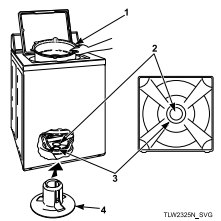
- Shipping Brace
- Shipping Plug Opening
- Base Opening
- Shipping Plug
After the shipping brace has been installed in the lid opening, tilt washer back enough to access base opening.
Insert shipping plug into base opening and, using the palm of your hand, push shipping plug into washer until it snaps into shipping plug opening
Motor Overload Protector
The internal motor overload protector will stop the motor automatically if there are too many clothes in the washtub or if a failure has occurred within the machine. The overload protector will reset itself in two or three minutes and the motor will restart automatically.
If the overload protector stops the motor again, remove the washer from use and call a service person to correct the problem.
Troubleshooting
Won't Fill
- Make sure power cord is plugged all the way into the electrical outlet.
- Make sure hot and cold water faucets are turned on.
- Make sure lid is closed.
- Make sure that the fill hoses are not kinked or twisted.
- Press Start/Pause button to start washer.
- Make sure that the controls are properly set.
- In the Normal Eco cycle, during the rinse portion of the cycle, the tub won’t fill with water. Instead, there is a spray rinse.
- Make sure that the last spin has been completed.
- Check the laundry room fuse or circuit breaker.
- Clean the screens in the water mixing valve and the filter screens located at the faucet end of the fill hoses. (Owner is responsible for service calls regarding cleaning of the screens.)
- Water is being siphoned from the washer during the cycle. Refer to the Installation instructions to make sure that the drain hose has been properly installed.
- Are flood safe stainless steel hose devices installed on the fill hoses? Such assemblies are designed to shut off the water flow if an increase in flow volume is detected (such as a burst hose). It is possible the devices are activating falsely. Replace these fill hoses with hoses that came with the unit from the factory.
Won't Start
- Make sure lid is closed.
- Press Start/Pause button to start washer.
- Make sure power cord is plugged all the way into the electrical outlet.
- Make sure that the controls are properly set.
- Check the laundry room fuse or circuit breaker.
Won't Agitate
- Make sure lid is closed.
- Press Start/Pause button to start washer.
- Make sure power cord is plugged all the way into the electrical outlet.
- Check the laundry room fuse or circuit breaker.
- Broken drive belt. Call the service person.
Won't Spin
- Make sure lid is closed.
- Press Start/Pause button to start washer.
- Make sure power cord is plugged all the way into the electrical outlet.
- Check the laundry room fuse or circuit breaker.
- Broken drive belt. Call the service person.
Stops/Pauses During Cycle
- Pauses are part of the washer’s normal operation. The washer will stop (pause) shortly before the wash and rinse spins.
- Check the laundry room fuse or circuit breaker.
Won't Drain
- Make sure drain hose is not kinked or twisted.
- Make sure drain hose is not clogged.
- Make sure drain receptacle is not clogged.
- Refer to the Installation instructions to make sure that the drain hose has been properly installed.
Water Leaks
- Check that fill hoses are properly installed on the faucets and the washer’s water mixing valve.
- Check the condition of the fill hoses. Replace fill hoses every five years.
- Make sure drain receptacle is not clogged.
- Check laundry room plumbing.
- Check house water pressure. In cases of extremely low water pressure, leaking may occur.
- Laundry load may be oversudsing or overloaded. Use less detergent (or low-sudsing detergent) and proper load sizes.
Is Noisy
- Wash load may be unbalanced. Open lid and redistribute the load.
- Make sure washer is level. Uneven leveling can cause vibration.
- A newly installed washer may make a knocking sound if the machine has been in storage. The belt may have settled. Run washer through 4-5 cycles to loosen belt. Washer operation will not be affected.
Load Is Too Wet
- Wash load may be unbalanced. Open lid and redistribute the load.
- Load is too small. Add items to make full load.
Wrong Water Temperature
- Make sure that the controls are properly set.
- Check fill hoses. Make sure hot faucet hose is connected to hot mixing valve (indicated with “H” on the valve bracket) and cold faucet is connected to cold mixing valve (indicated with “C” on the valve bracket).
- Make sure laundry room water heater is adjusted properly.
- The Normal Eco cycle uses a colder water temperature.
Too Many Soap Suds
- Laundry load may be oversudsing. Make sure you are using low-sudsing, high efficiency (HE) detergent.
- Make sure you are using the amount of detergent recommended on the detergent’s label. If using non-HE detergent, use only 1/2 of the detergent manufacturer's recommended amount.
- Laundry load may be overloaded. Make sure you are using proper load sizes.
Status Lights Flashing
- Status lights may flash or remain on continuously to indicate an error condition. The number of flashes listed below is followed by a pause. Then the flash sequence will repeat.
WASH, RINSE STATUS lights flash 2 times
Fill Error
- This code will appear if the washer has not reached the fill level after 30 minutes during a wash or rinse fill.
- Make sure hot and cold water faucets are turned on.
- Make sure that the fill hoses are not kinked or twisted.
- Clean the screens in the water mixing valve and the filter screens located at the faucet end of the fill hoses.
- Unplug the machine for 15 seconds to clear this code.
WASH, RINSE STATUS lights on continuously
Drain Error
- This code indicates that water is still in the washer at the end of the cycle.
- Check the drain hose and drain receptacle to make sure they are installed properly and not blocked.
- Unplug the machine for 15 seconds to clear this code.
WASH, RINSE STATUS lights flash 1 time
Pressure Sensor Error
- The control has detected trouble sensing the water fill level.
- Unplug the machine and call for service.
WASH, RINSE STATUS lights flash 2 times
No Water Flow Error
- The washer has not filled to the proper water level.
- No or very little change in water level has been sensed within 5 minutes of the current fill.
- Make sure hot and cold water faucets are turned on.
- Make sure that the fill hoses are not kinked or twisted.
- Clean the screens in the water mixing valve and the filter screens located at the faucet end of the fill hoses.
- Unplug the machine for 15 seconds to clear this code.
WASH, RINSE STATUS lights on continuously
Overflow Error
- This code indicates the washer has filled to the overflow level.
- The machine will begin to attempt to pump water out if the lid is closed and locked.
- If the code does not clear, unplug the machine and call for service.
SOAK light flashing
Motor Overload Condition
- Washer may be in an overload condition.
- If condition sets three times washer will show code below.
WASH, SPIN STATUS lights flash 3 times
Motor Overload Error
- Motor may be overheating. Make sure washer is not overloaded.
All STATUS lights flashing
- If the all STATUS lights flash, unplug the machine for 15 seconds. Plug the machine back in. If the lights still flash, call for service.