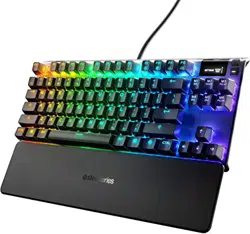
APEX 7 TKL
PRODUCT
INFORMATION
GUIDE

CONTENTS
STEELSERIES ENGINE 2
PRODUCT OVERVIEW 34
PRODUCT INFORMATION 5
SETUP 6
FUNCTIONS 78
TRANSLATIONS
Español 9
简体中文 10
繁體中文 12
日本語 13
15
Deutsch 16
Русский 18
Français 19
Italiano 21
Português 23
ไทย 24
REGULATORY 26
2
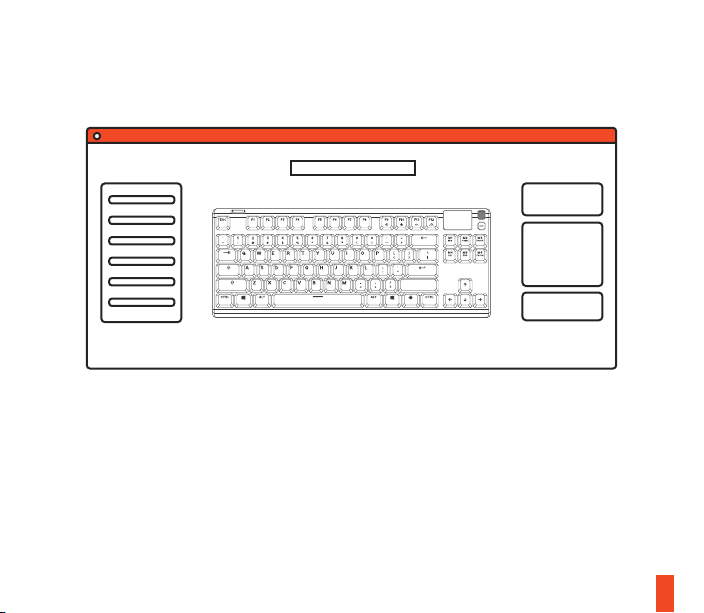
STEELSERIES ENGINE
Download SteelSeries Engine at steelseries.com/engine
3
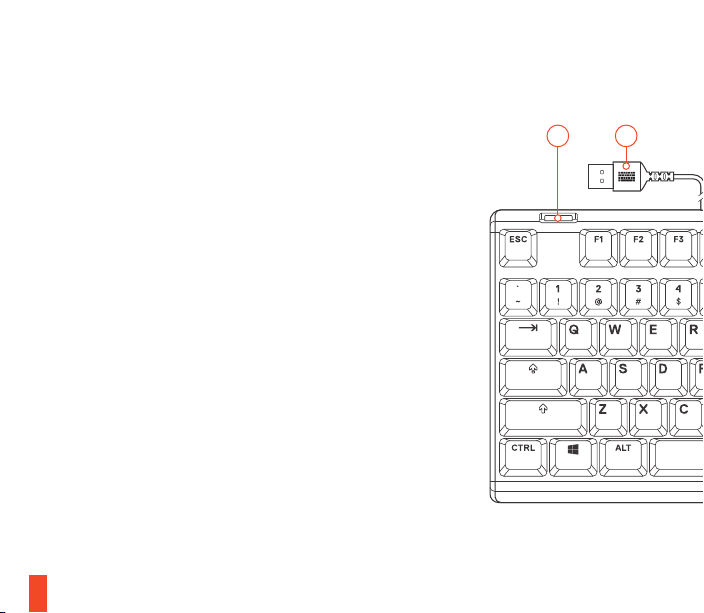
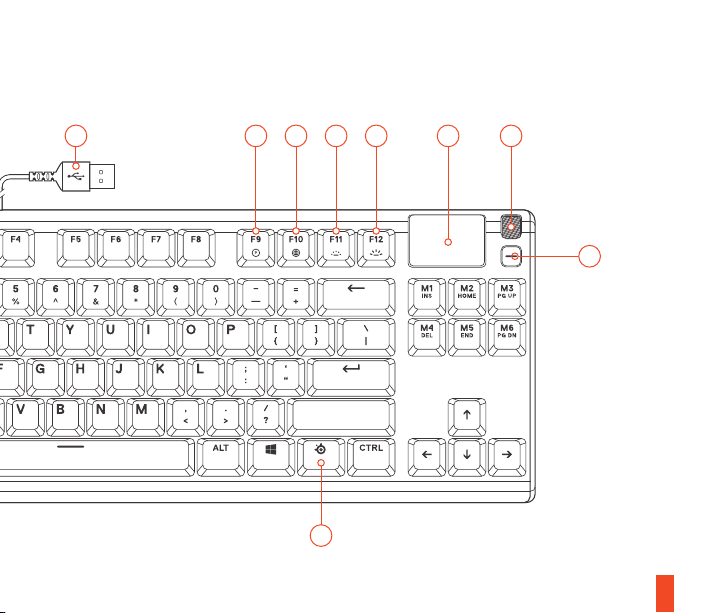
PRODUCT OVERVIEW
01 OLED Smart Display
02 Multimedia Volume Roller
03 OLED Menu Button
04 SteelSeries Function Key
05 USB Passthrough Port
06 USB Keyboard Plug
07 USB Passthrough Plug
08 Profile Switching Key
09 On-the-fly Macro Recording Key
10 Illumination Brightness Down Key
11 Illumination Brightness Up Key
05 06
4
* Find accessories and replacement parts at steelseries.com/gaming-accessories
0107 08 1009 11 02
04
03

5
find help at support.steelseries.com
PACKAGE CONTENTS
Apex 7 TKL Keyboard
Magnetic Wrist Rest
ENGINE REQUIREMENTS
Windows 7 – Windows 10
Mac OSX 10.8 – 10.12
120 MB of free hard drive space
for installation
PLATFORM COMPATIBILITY
PC
Mac
Xbox One
PS4
6
CONNECTION
SETUP
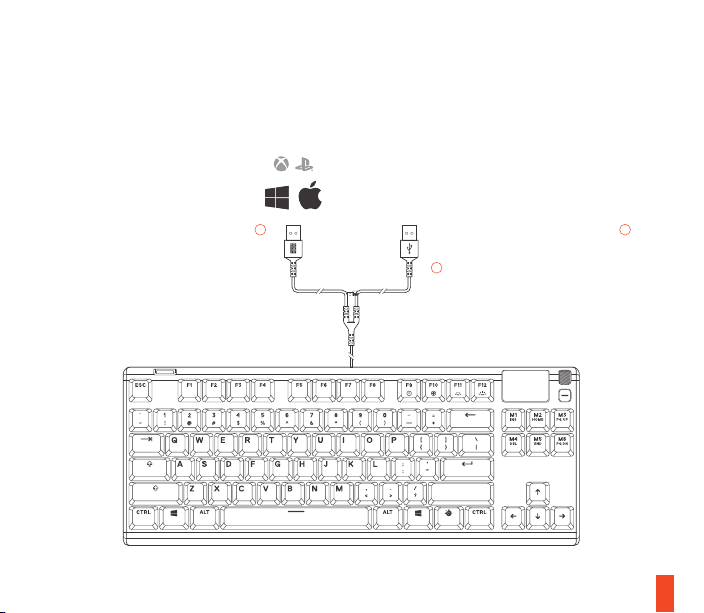
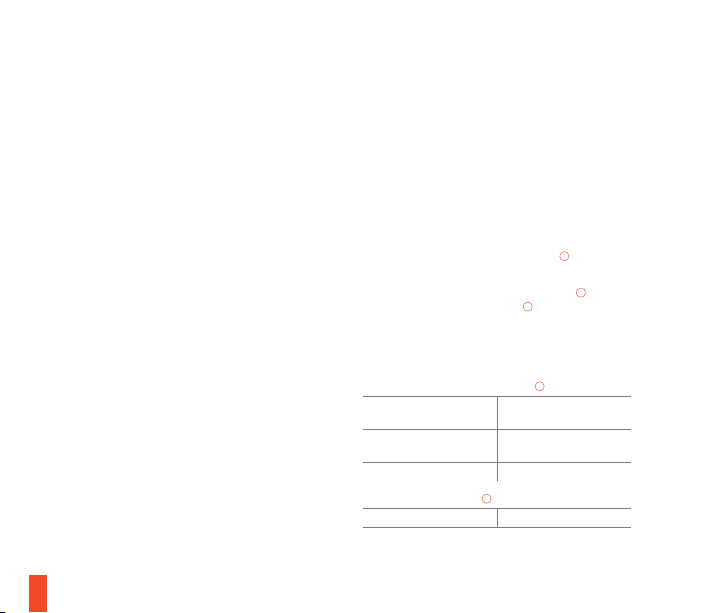
To use the USB Passthrough Port
05
connect the USB Passthrough Plug
07
to your computer
Connect the USB Keyboard Plug
06
to your computer’s USB 3.0 port
7
MULTIMEDIA CONTROLS OLED SMART DISPLAY INPUT
FUNCTIONS
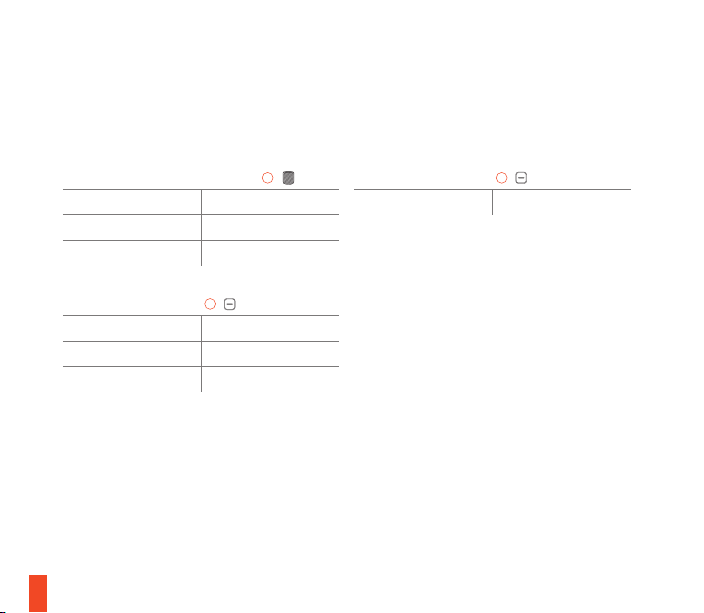
MULTIMEDIA VOLUME ROLLER
02
Volume Up Scroll Wheel Up
Volume Down Scroll Wheel Down
Mute / Unmute Toggle Press Wheel
OLED MENU BUTTON
03
Play / Pause Single Press
Forward / Skip Track Double Press
Back / Previous Track Triple Press
OLED MENU BUTTON
03
Enter OLED Menu Long Press (2 sec)
8
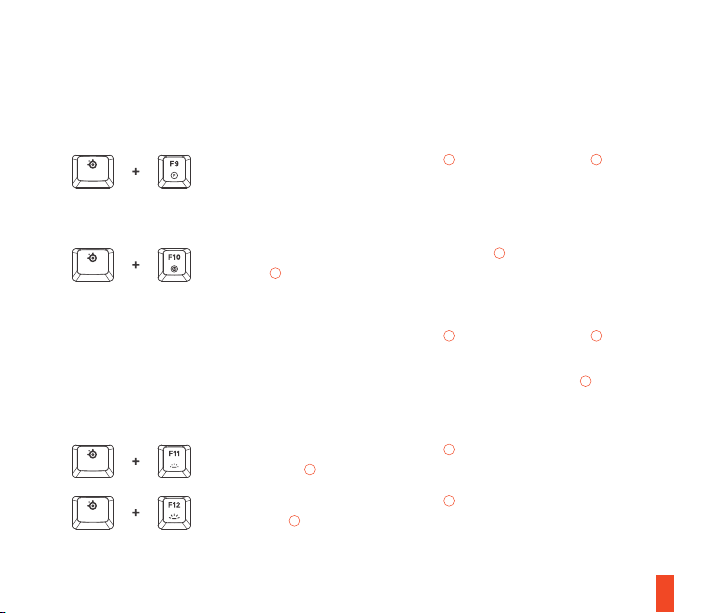
PROFILE SWITCHING
ON-THE-FLY MACRO RECORDING
ILLUMINATION BRIGHTNESS CONTROL
find help at support.steelseries.com
01 Press the SteelSeries Function Key
04
+ Illumination Brightness
Down Key
10
to reduce Illumination Brightness
02 Press the SteelSeries Function Key
04
+ Illumination Brightness
Up Key
11
to increase Illumination Brightness
01 Press and hold the SteelSeries Function Key
04
+ Macro Recording
Key
09
for 3 seconds to start recording
02 Type your desired key combinations
03 Press the SteelSeries Function Key
04
+ Macro Recording Key
09
to
end Macro Recording
To cancel the recording process, press the OLED Menu Button
03
01 Press the SteelSeries Function Key
04
+ Profile Switching Key
08
repeatedly to cycle through the profiles
ESPAÑOL
DESCRIPCIÓN GENERAL DEL PRODUCTO
01 Pantalla OLED inteligente
02 Rueda de volumen multimedia
03 Botón de menú OLED
04 Tecla de función SteelSeries
05 Puerto USB Passthrough
06 Conector de teclado USB
07 Conector USB Passthrough
08 Tecla de cambio de perfil
09 Tecla de grabación de macros sobre la marcha
10 Tecla de disminución del brillo de iluminación
11 Tecla de incremento del brillo de iluminación
CONTENIDO DEL PAQUETE
Apex 7 TKL Keyboard
Apoyo para muñeca magnético
REQUISITOS DEL SISTEMA
Windows 7 – Windows 10
Mac OSX 10.8 – 10.12
Se requieren 120 MB de espacio libre en el disco
duro para la instalación
COMPATIBILIDAD
PC
Mac
Xbox One
PS4
CONFIGURACIÓN
CONEXIÓN
Conecta el conector de teclado USB
06
al puerto
USB 3.0 de tu ordenador.
Para utilizar el puerto USB Passthrough
05
, acopla
el conector USB Passthrough
07
a tu ordenador.
FUNCIONES
CONTROLES MULTIMEDIA
RUEDA DE VOLUMEN MULTIMEDIA
02
Subir volumen
Rueda de desplazamiento
hacia arriba
Bajar volumen
Rueda de desplazamiento
hacia abajo
Silenciar/activar sonido Pulsar rueda
BOTÓN DE MENÚ OLED
03
Reproducción/pausa Pulsación única
9
Avanzar/saltar pista Doble pulsación
Retroceder/pista anterior Triple pulsación
ENTRADA DE PANTALLA OLED INTELIGENTE
RUEDA DE VOLUMEN MULTIMEDIA
02
Entrar en menú OLED
Pulsación prolongada (2
segundos)
CAMBIO DE PERFIL
Pulsa repetidamente la tecla de función
SteelSeries
04
junto con la tecla de cambio de
perfil
08
para moverte por los perfiles.
GRABACIÓN DE MACROS SOBRE LA MARCHA
01 Pulsa y mantén presionada la tecla de
función SteelSeries
04
junto con la tecla de
grabación de macro
09
durante 3 segundos
para iniciar la grabación.
02 Escribe las combinaciones de teclas que
prefieras.
03 Pulsa la tecla de función SteelSeries
04
junto
con la tecla de grabación de macro
09
para
finalizar la grabación.
Para cancelar el proceso de grabación, pulsa el
botón de menú OLED
03
.
CONTROL DEL BRILLO DE ILUMINACIÓN
Pulsa la tecla SteelSeries
06
junto con la tecla de
disminución del brillo de iluminación
10
para reducir
el brillo de la iluminación.
Pulsa la tecla SteelSeries
06
junto con la tecla
de incremento del brillo de iluminación
11
para
aumentar el brillo de la iluminación.
简体中文
产品概览
01 OLED 智能显示屏
02 多媒体音量旋钮
03 OLED 菜单按钮
04 SteelSeries 功能键
05 USB 传递端口
06 USB 键盘插头
07 USB 传递插头
08 配置文件切换键
09 动态宏录制键
10 照度亮度调低键
11 照度亮度调高键
10
包装内含
Apex 7 TKL 键盘
磁力腕托
适用平台
Windows 7 – Windows 10
Mac OSX 10.8 – 10.12
安装需要120MB磁盘空间
系统兼容性
PC
Mac
Xbox One
PS4
设置
连接
将 USB 键盘插头
06
连接到计算机的 USB 3.0
端口
要使用 USB 传递端口
05
,请将 USB 传递插头
07
连接到计算机
功能
多媒体控制
多媒体音量旋钮
02
音量调高 滚轮向上滚动
音量调低 滚轮向下滚动
静音/取消静音切换 按压滚轮
OLED 菜单按钮
03
播放/暂停 按压一次
前进/跳过曲目 按压两次
后退/上一曲 按压三次
OLED 智能显示屏输入
多媒体音量旋钮
02
进入 OLED 菜单 长按(2 秒)
配置文件切换
重复按压 SteelSeries 功能键
04
+ 配置文件切换键
08
可循环遍历配置文件
动态宏录制
01 按压 SteelSeries 功能键
04
+ 宏录制键
09
并
保持 3 秒钟可开始录制
02 键入所需的组合键
03 按压 SteelSeries 功能键
04
+ 宏录制键
09
可结束录制
要取消录制过程,请按压 OLED 菜单按钮
03
照度亮度控制
重复按压 SteelSeries 功能键
04
+ 照度亮度调低键
10
可降低照度亮度
重复按压 SteelSeries 功能键
04
+ 照度亮度调高键
11
可提高照明亮度
11
繁體中文
產品概述
01 OLED 智能顯示
02 多媒體音量控制器
03 OLED 選單按鈕
04 SteelSeries 功能鍵
05 USB 直通端口
06 USB 鍵盤插頭
07 USB 直通插頭
08 配置文件切換鍵
09 On-the-fly 巨集錄製鍵
10 燈效亮度降低鍵
11 燈效亮度增加鍵
包裝內容
Apex 7 TKL 鍵盤
磁性手腕靠墊
適用系統
Windows 7 – Windows 10
Mac OSX 10.8 – 10.12
安裝需要120MB硬體空間
系统相容性
PC
Mac
Xbox One
PS4
設定
連線
將 USB 鍵盤插頭
06
連接到您電腦的 USB 3.0
端口
將 USB 直通插頭
07
連接到您的電腦,從而使用
USB 直通端口
05
功能
多媒體控制器
多媒體音量控制器
02
音量增加 滾輪向上
音量降低 滾輪向下
靜音/取消靜音切換 按下滾輪
OLED 選單按鈕
03
播放/暫停 按下一次
前進/跳過目錄 連續按下兩次
後退/上一個目錄 連續按下三次
12
OLED 智能顯示輸入
多媒體音量控制器
02
進入 OLED 選單 長按(2 秒)
配置文件切換中
重複按下 SteelSeries 功能鍵
04
+ 配置文件切換鍵
08
,以循環瀏覽配置文件
ON-THE-FLY 巨集錄製中
01 按住 SteelSeries 功能鍵
04
+ 巨集錄製鍵
09
長達 3 秒,即可開始錄製
02 輸入所需的組合鍵
03 按下 SteelSeries 功能鍵
04
+ 巨集錄製鍵
09
,
以終止巨集錄製
若要取消錄製過程,按下 OLED 選單按鈕
03
燈效亮度控制器
按下 SteelSeries 功能鍵
04
+ 燈效亮度降低鍵
10
,
以降低燈效亮度
按下 SteelSeries 功能鍵
04
+ 燈效亮度增加鍵
11
,
以增加燈效亮度
日本語
製品概要
01 OLED スマートディスプレイ
02 マル チメディア ボリュー ム ロ ーラ ー
03 OLED メニューボタン
04 SteelSeries 機能キー
05 USB パススルーポート
06 USB キーボードプラグ
07 USB パススループラグ
08 プ ロフィー ル 切 替キ ー
09 オンザフライマクロ 記 録キ ー
10 イル ミネ ーション 輝 度 ダウンキ ー
11 イルミネーション輝度アップキー
パッケージの 内 容
Apex 7 TKL キーボード
磁 気リストレスト
システム要 件
Windows 7 – Windows 10
Mac OSX 10.8 – 10.12
インストールに120MB以上の空き
プ ラットフォ ー ム
PC
Mac
Xbox One
PS4
13
容量が必要 。
接続
USB キーボードのプラグ
06
をお使いのコンピュー
タのUSB 3.0ポートに接続してください
USB パススルーポート
05
を使用するには、USB パ
ススループラグ
07
をお使いのコンピュータに接続
してくだ さ い
機能
マル チメ ディア ボリュ ー ム ロ ー ラ ー
02
ボリューム アップ スクロールホイールアップ
ボリューム ダウン スクロールホイールダウン
ミュート/ミュート解 除 の 切 替 ホイールを押す
OLED メニューボタン
03
再生/一時停止 1回押す
進む/次のトラックに移動 2回押す
戻る/前のトラックに移動 3回押す
OLED スマートディスプレイ入力
マル チメ ディア ボリュ ー ム ロ ー ラ ー
02
OLED メニューに進む 長押し(2秒)
プロ フィー ル 切替
プ ロフィー ル を循 環して 切 り替 える に
は、SteelSeries 機能キー
04
+ プロフィール切替キ
ー
09
を繰り返し押してください
オン ザフライマクロ 記 録
01 記録を開始するには、SteelSeries 機能キー
04
+ マクロ記録キー
09
を3秒間押して保持
してくだ さ い
02 お 好 み の キ ー 組 合 せ をタイプしてくだ さい
03 記録を終了するにはSteelSeries 機能キー
04
+ マクロ記録キー
09
を 押してくだ さい
記録を中止するにはOLED メニューボタン
03
を押
してくだ さ い
イルミネーション輝度コントロール
イルミネーションの輝度を下げるにはSteelSeries
キー
04
+ イルミネーション輝度ダウンキー
10
を押
してくだ さ い
イルミネーションの輝度を上げるにはSteelSeries
キー
04
+ イルミネーション輝度アップキー
11
を押
してくだ さ い
14
한국어
제품 개요
01
02
03
04
05
06
07
08
09
10
11
설정
06
05
07
기능
02
03
15
02
프로필 전환
04
08
01
04
09
02
03
04
03
04
10
04
11
DEUTSCH
PRODUKTÜBERSICHT
01 OLED-Smart-Display
02 Multimedia-Lautstärkerad
03 OLED-Menütaste
04 SteelSeries-Funktionstaste
05 USB-Durchgangsport
06 USB-Tastaturstecker
07 USB-Durchgangsstecker
08 Profil-Wechseltaste
09 Makro-Aufzeichnungstaste
10 Taste zum Verringern der
Beleuchtungsstärke
11 Taste zum Erhöhen der Beleuchtungsstärke
LIEFERUMFANG
Apex 7 TKL Keyboard
Magnetische Handballenauflage
SYSTEMANFORDERUNG
Windows 7 – Windows 10
Mac OSX 10.8 – 10.12
120 MB freien Platz auf der Festplatte für die
Installation
16
KOMPATIBILITÄT
PC
Mac
Xbox One
PS4
INSTALLATION
ANSCHLUSS
Schließe den USB-Tastaturstecker
06
an den USB-
3.0-Port deines Computers an.
Schließe den USB-Durchgangsstecker
05
an deinen Computer an, um den USB-
Durchgangsport
07
zu verwenden.
FUNKTIONEN
MULTIMEDIABEDIENELEMENTE
MULTIMEDIALAUTSTÄRKERAD
02
Lautstärke erhöhen Rad nach oben scrollen
Lautstärke verringern Rad nach unten scrollen
Stummschaltung ein/aus Rad drücken
OLEDMENÜTASTE
03
Wiedergabe/Pause Einmal drücken
Weiter/Nächster Titel Zweimal drücken
Zurück/Vorheriger Titel Dreimal drücken
EINGANG DES OLEDSMARTDISPLAYS
MULTIMEDIALAUTSTÄRKERAD
02
OLED-Menü öffnen Lang drücken (2s)
PROFILWECHSEL
Drücke mehrmals die SteelSeries-Funktionstaste
04
und die Profil-Wechseltaste
08
, um durch die
Profile zu schalten.
MAKROAUFZEICHNUNG
01 Halte die SteelSeries-Funktionstaste
04
und die Makro-Aufzeichnungstaste
08
3Sekunden gedrückt, um die Aufzeichnung
zu starten.
02 Stelle beliebige Tastenkombinationen ein.
03 Drücke die SteelSeries-Funktionstaste
04
und
die Makro-Aufzeichnungstaste
08
, um die
Aufzeichnung zu beenden.
Drücke die OLED-Menütaste
03
, um die
Aufzeichnung abzubrechen.
EINSTELLEN DER BELEUCHTUNGSSTÄRKE
Drücke die SteelSeries-Funktionstaste
04
und die
Taste zum Verringern der Beleuchtungsstärke
10
,
um die Beleuchtungsstärke zu verringern.
Drücke die SteelSeries-Funktionstaste
04
und die
Taste zum Erhöhen der Beleuchtungsstärke
11
, um
die Beleuchtungsstärke zu erhöhen.
17
РУССКИЙ
КРАТКИЕ СВЕДЕНИЯ О ПРОДУКТЕ
01 Смарт-дисплей OLED
02 Мультимедийный ролик громкости
03 Кнопка OLED-меню
04 Многофункциональная кнопка
SteelSeries
05 Сквозной USB-порт
06 USB-разъем для клавиатуры
07 Сквозной USB-разъем
08 Кнопка переключения профилей
09 Кнопка мгновенной записи в режиме
«макро»
10 Кнопка снижения яркости подсветки
11 Кнопка увеличения яркости подсветки
КОМПЛЕКТАЦИЯ
Apex 7 TKL клавиатура
Магнитная опора для запястья
СИСТЕМНЫЕ ТРЕБОВАНИЯ
Windows 7 – Windows 10
Mac OSX 10.8 – 10.12
Для установки нужно 120 МБ свободного
места на жёстком диске.
СОВМЕСТИМОСТЬ
PC
Mac
Xbox One
PS4
ПОДКЛЮЧЕНИЕ И НАСТРОЙКА
ПОДКЛЮЧЕНИЕ
Подключите клавиатуру через USB-разъем
06
к порту USB 3.0 компьютера.
Чтобы использовать сквозной USB-порт
05
,
подключите клавиатуру к компьютеру через
сквозной USB-разъем
07
.
ФУНКЦИИ
ЭЛЕМЕНТЫ УПРАВЛЕНИЯ МУЛЬТИМЕДИА
Мультимедийный ролик громкости
02
Увеличение громкости Колесо прокрутки вверх
Уменьшение громкости Колесо прокрутки вниз
Переключатель
«Отключение/включение
звука»
Нажимное колесо
18
Кнопка OLED-меню
03
Воспроизведение/пауза Однократное нажатие
Вперед/пропустить трек Двойное нажатие
Назад/предыдущий трек Тройное нажатие
ВХОД СМАРТ-ДИСПЛЕЯ OLED
Мультимедийный ролик громкости
02
Перейдите в OLED-меню Длительное нажатие (2 с)
ПЕРЕКЛЮЧЕНИЕ ПРОФИЛЯ
Несколько раз нажмите
многофункциональную кнопку SteelSeries
04
+ кнопку переключения профилей
08
,
чтобы выбрать профиль
МГНОВЕННАЯ ЗАПИСЬ В РЕЖИМЕ «МАКРО»
01 Нажмите и удерживайте
многофункциональную кнопку
SteelSeries
04
+ кнопку мгновенной
записи в режиме «макро»
09
в течение
3 секунд, чтобы начать запись
02 Введите пользовательские сочетания
кнопок
03 Нажмите многофункциональную
кнопку SteelSeries
04
+ кнопку
мгновенной записи в режиме «макро»
09
для окончания записи
Чтобы отменить процесс записи, нажмите
кнопку OLED-меню
03
РЕГУЛИРОВКА ЯРКОСТИ ПОДСВЕТКИ
Нажмите многофункциональную кнопку
SteelSeries
04
+ кнопку снижения яркости
подсветки
10
, чтобы сделать подсветку
менее яркой
Нажмите многофункциональную клавишу
SteelSeries
04
+ кнопку увеличения яркости
подсветки
11
, чтобы сделать подсветку
более яркой
FRANÇAIS
VUE D’ENSEMBLE DU PRODUIT
01 Écran OLED intelligent
02 Molette de volume multimédia
03 Touche Menu OLED
04 Touche de fonction SteelSeries
05 Port USB supplémentaire
06 Prise USB de clavier
07 Prise USB supplémentaire
08 Touche de changement de profil
09 Touche d’enregistrement de macro à la volée
19
10 Touche de diminution de la luminosité
11 Touche d’augmentation de la luminosité
CONTENU DE L’EMBALLAGE
Apex 7 TKL Keyboard
Repose-poignet magnétique
CONFIGURATION SYSTÈME REQUISE
Windows 7 – Windows 10
Mac OSX 10.8 – 10.12
120Mo d’espace disque dur
disponible pour l’installation
COMPATIBILITÉ
PC
Mac
Xbox One
PS4
CONFIGURATION
CONNEXION
Connecter la prise USB du clavier
04
au portUSB
3.0 de votre ordinateur
Pour utiliser le port USB supplémentaire
05
,
connecter la prise USB supplémentaire
07
à votre
ordinateur
FONCTIONS
COMMANDES MULTIMÉDIA
MOLETTE DE VOLUME MULTIMÉDIA
02
Augmenter le volume
Tourner la molette vers
le haut
Baisser le volume Tourner la molette vers le bas
Activer/désactiver le mode
Silence
Appuyer sur la molette
TOUCHE MENU OLED
03
Lecture/Pause Simple pression
Avance/Suivant Double pression
Retour/Précédent Triple pression
ENTRÉE DE L’ÉCRAN OLED INTELLIGENT
MOLETTE DE VOLUME MULTIMÉDIA
02
Accéder au menu OLED Pression prolongée (2s)
CHANGEMENT DE PROFIL
Appuyer sur la touche de fonction SteelSeries
04
+ touche de changement de profil
08
à plusieurs
reprises pour faire défiler les profils
ENREGISTREMENT DE MACRO À LA VOLÉE
01 Appuyer sur la touche de fonction
SteelSeries
04
+ touche d’enregistrement de
macro
09
pendant 3secondes pour démarrer
l’enregistrement
20

02 Entrer les combinaisons de touches de votre
choix
03 Appuyer sur la touche de fonction
SteelSeries
04
+ touche d’enregistrement de
macro
09
pour mettre fin à l’enregistrement
de la macro
Pour annuler l’enregistrement, appuyez sur la
touche Menu OLED
03
COMMANDES DE LUMINOSITÉ
Appuyer sur la touche SteelSeries
04
+ touche
de diminution de la luminosité
10
pour réduire la
luminosité
Appuyer sur la touche SteelSeries
04
+ touche
d’augmentation de la luminosité
11
pour augmenter
la luminosité
ITALIANO
PANORAMICA DEL PRODOTTO
01 Display OLED intelligenti
02 Rotella di regolazione del volume
multimediale
03 Pulsante Menu OLED
04 Tasto funzione SteelSeries
05 Porta USB Passthrough
06 Connettore tastiera USB
07 Connettore USB Passthrough
08 Tasto di commutazione profilo
09 Tasto di registrazione Macro on-the-fly
10 Tasto di riduzione luminosità
11 Tasto di aumento luminosità
CONTENUTO DELLA CONFEZIONE
Apex 7 TKL Keyboard
Poggiapolsi magnetico
REQUISITI DI SISTEMA
Windows 7 – Windows 10
Mac OSX 10.8 – 10.12
120 MB di spazio libero sull’hard
drive per l’installazione
COMPATIBILITÀ
PC
Mac
Xbox One
PS4
21
CONFIGURAZIONE
CONNESSIONE
Collegare il connettore della tastiera USB
06
alla
porta del computer USB 3.0
Per utilizzare la porta USB Passthrough
10
collegare il connettore Passthrough
07
di USB al
computer
FUNZIONI
CONTROLLI MULTIMEDIALI
ROTELLA DI REGOLAZIONE DEL VOLUME MULTIMEDIALE
02
Volume su Rotellina di scorrimento su
Volume giù Rotellina di scorrimento giù
Attivazione/disattivazione
audio
Rotellina a pressione
PULSANTE MENU OLED
03
Play/pausa Pressione singola
Passa alla traccia successiva/
Salta traccia
Pressione doppia
Passa alla traccia precedente Pressione tripla
INPUT DISPLAY OLED SMART
ROTELLA DI REGOLAZIONE DEL VOLUME MULTIMEDIALE
02
Accedere al menu OLED Pressione lunga (2 sec.)
COMMUTAZIONE PROFILO
Premere il tasto funzione SteelSeries
04
+ tasto
di commutazione profilo
08
ripetutamente per
scorrere i profili
REGISTRAZIONE MACRO ONTHEFLY
01 Tenere premuto il tasto funzione SteelSeries
04
+ tasto di registrazione macro
09
per 3
secondi per avviare la registrazione
02 Digitare la combinazione di tasti desiderata
03 Premere il tasto funzione SteelSeries
04
+
tasto di registrazione macro
09
per terminare
la registrazione macro
Per annullare il processo di registrazione, premere
il pulsante Menu OLED
03
CONTROLLO DELLA LUMINOSITÀ
Premere il tasto SteelSeries
04
+ tasto di riduzione
luminosità
10
per ridurre la luminosità
Premere il tasto SteelSeries
04
+ tasto di aumento
luminosità
11
per aumentare la luminosità
22

PORTUGUÊS
VISÃO GERAL DO PRODUTO
01 Ecrã inteligente OLED
02 Botão rotativo de volume multimédia
03 Botão do menu OLED
04 Tecla de função SteelSeries
05 Porta Passthrough USB
06 Ficha de teclado USB
07 Ficha Passthrough USB
08 Chave de comutação de perfil
09 Tecla de gravação de macro imediata
10 Tecla para diminuir o brilho da luminosidade
11 Tecla para aumentar o brilho da luminosidade
CONTEÚDO DA EMBALAGEM
Apex 7 TKL Keyboard
Descanso para pulsos magnético
REQUISITOS DO SISTEMA
Windows 7 – Windows 10
Mac OSX 10.8 – 10.12
120 MB de espaço livre em disco para a instalação
COMPATIBILIDADE DO SISTEMA
PC
Mac
Xbox One
PS4
CONFIGURAÇÃO
LIGAÇÃO
Ligue a ficha do teclado USB
06
aos seus
computadores através da porta USB 3.0
Para utilizar a porta Passthrough USB
05
ligue a
ficha Passthrough USB
07
ao seu computador
FUNÇÕES
CONTROLOS DE MULTIMÉDIA
BOTÃO ROTATIVO DE VOLUME MULTIMÉDIA
02
Aumentar o volume Roda do rato para cima
Diminuir o volume Roda do rato para baixo
Comutar entre ativar/
desativar som
Pressionar a roda
BOTÃO DO MENU OLED
03
Reproduzir/pausa Pressionar uma vez
Avançar/saltar faixa Pressionar duas vezes
23
Retroceder para a faixa
anterior
Pressionar três vezes
ENTRADA DE ECRÃ INTELIGENTE OLED
BOTÃO ROTATIVO DE VOLUME MULTIMÉDIA
02
Entrar no Menu OLED
Pressionar longamente
(2 seg.)
COMUTAR PERFIL
Pressione a tecla de função SteelSeries
04
+ Tecla
de comutação de perfil
08
repetidamente para
alternar entre perfis
GRAVAÇÃO DE MACRO IMEDIATA
01 Pressione e mantenha a tecla de função
SteelSeries
04
+ Tecla de gravação de macro
09
durante 3 segundos para começar a
gravação
02 Escreva as combinações de teclas desejadas
03 Pressione a tecla de função SteelSeries
04
+
Tecla de gravação de macro
09
para terminar
a gravação de macro
Para cancelar o processo de gravação, pressione o
botão do menu OLED
03
CONTROLO DO BRILHO DA LUMINOSIDADE
Pressione a tecla SteelSeries
04
+ Tecla para
diminuir o brilho da luminosidade
10
para reduzir o
brilho da luminosidade
Pressione a tecla SteelSeries
04
+ Tecla para
aumentar o brilho da luminosidade
11
para
aumentar o brilho da luminosidade
ไทย
ภาพรวมของผลิตภัณฑ์
01 หน้าจออัจฉริยะ OLED
02
ลูกกลิ้งปรับเสียงมัลติมีเดีย
03 ปุ่มเมนู OLED
04
แป้นฟังก์ชัน SteelSeries
05
พอร์ต USB Passthrough
06
ปลั๊กคีย์บอร์ด USB
07
ปลั๊ก USB Passthrough
08
แป้นสลับโปรไฟล์
09 แป้นบันทึกแมโครในขณะใช้งาน
10 แป้นลดแสงสว่าง
11 แป้นเพิ่มแสงสว่าง
24
แพ็คเกจเนื้อหา
Apex 7 TKL คีย์บอร์ด
ที่รองข้อมือแม่เหล็ก
ข้อกำาหนดต่าง ๆ ของระบบ
Windows 7 – Windows 10
Mac OSX 10.8 – 10.12
เนื้อที่ว่างบนดิสก์ 120 MB สำาหรับการติดตั้ง
ความเข้ากันได้ของระบบ
PC
Mac
Xbox One
PS4
การตั้งค่า
การเชื่อมต่อ
เชื่อมต่อปลั๊กคีย์บอร์ด
USB
06
ไปยังพอร์ต USB 3.0 ของ
เครื่องคอมพิวเตอร์
หากต้องการใช้พอร์ต
USB Passthrough
05
ให้เชื่อมต่อ
ปลั๊ก USB Passthrough
07
ไปยังคอมพิวเตอร์ของคุณ
ฟังก์ชันต่าง ๆ
การควบคุมมัลติมีเดีย
ลูกกลิ้งปรับเสียงมัลติมีเดีย
02
เพิ่มเสียง เลื่อนล้อขึ้น
ลดเสียง เลื่อนล้อลง
สวิตช์เปิด/ปิดเสียง กดล้อ
ปุ่มเมนู
OLED
03
เล่น/หยุด กดครั้งเดียว
ไปข้างหน้า/ข้ามเพลง กดสองครั้ง
ย้อนกลับ/เพลงก่อนหน้า กดสามครั้ง
การรับสัญญาณหน้าจออัจฉริยะ OLED
ลูกกลิ้งปรับเสียงมัลติมีเดีย
02
กดเมนู OLED กดค้าง (2 วิ)
การสลับโปรไฟล์
กดแป้นฟังก์ชัน SteelSeries
04
+ ปุ่มสลับโปรไฟล
08
์ไป
เรื่อย ๆ เพื่อวนดูโปรไฟล์ต่าง ๆ
การบันทึกแมโครในขณะใช้งาน
01 กดแป้นฟังก์ชัน SteelSeries
04
+ แป้นบันทึก
แมโคร
09
ค้างไว้ 3 วินาทีเพื่อเริ่มบันทึก
02 พิมพ์แป้นผสมที่คุณต้องการ
03 กดแป้นฟังก์ชัน SteelSeries
04
+ แป้นบันทึก
แมโคร
09
เพื่อหยุดบันทึกแมโคร
หากต้องการยกเลิกกระบวนการบันทึก กดปุ่มเมนู
OLED
03
การควบคุมแสงสว่าง
กดแป้น SteelSeries
04
+ แป้นลดแสงสว่าง
10
เพื่อลด
ความสว่างของแสงไฟ
กดแป้น SteelSeries
04
+ แป้นเพิ่มแสงสว่าง
11
เพื่อเพิ่ม
ความสว่างของแสงไฟ
25
26
REGULTORY
Europe – EU Declaration of Conformity
Hereby, SteelSeries ApS. declares that the equipment which is compliance with directive
RoHS 2.0 (2015/863/EU), EMC Directive (2014/30/EU), and LVD (2014/35/EU) which are
issued by the Commission of the European Community.
The full text of the EU declaration of conformity is available at the following internet address:
https://steelseries.com/
Operating Temperature: 0 to + 40 °C
SteelSeries ApS. hereby confirms, to date, based on the feedback from our suppliers indicates
that our products shipping to the EU territory comply with REACH (Registration, Evaluation,
Authorization, and Restriction of Chemicals - (EC) 1907/2006) compliance program. We are
fully committed to offering REACH compliance on the products and posting accurate REACH
compliance status for the all of products.
WEEE
This product must not be disposed of with your other household waste or treat them in
compliance with the local regulations or contact your local city office, your household waste
disposal service or the shop where you
purchased the product.
《废弃电器电子产品回收处理管理条例》提示性说明
为了更好地关爱及保护地球,当用户不再需要此产品或产品寿命终止时,请遵守国家废弃电
器电子产品回收处理相关法律法规,将其交给当地具有国家认可的回收处理资质的厂商进行
回收处理。
Federal Communication Commission Interference Statement
This device complies with Part 15 of the FCC Rules. Operation is subject to the following
two conditions: (1) This device may not cause harmful interference, and (2) this device must

27
accept any interference received, including interference that may cause undesired operation.
This equipment has been tested and found to comply with the limits for a Class B digital
device, pursuant to Part 15 of the FCC Rules. These limits are designed to provide reasonable
protection against harmful interference in a residential installation. This equipment generates,
uses and can radiate radio frequency energy and, if not installed and used in accordance with
the instructions, may cause harmful interference to radio communications. However, there
is no guarantee that interference will not occur in a particular installation. If this equipment
does cause harmful interference to radio or television reception, which can be determined by
turning the equipment off and on, the user is encouraged to try to correct the interference
by one of the following measures:
- Reorient or relocate the receiving antenna.
- Increase the separation between the equipment and receiver.
- Connect the equipment into an outlet on a circuit different from that to which the
receiver is connected.
- Consult the dealer or an experienced radio/TV technician for help.
Industry Canada Statement:
This device complies with RSS standards of the Industry Canada Rules. Operation is subject
to the following two conditions: (1) This device may not cause harmful interference, and (2)
this device must accept any interference received, including interference that may cause
undesired operation.
Ce dispositif est conforme à la norme CNR d’Industrie Canada applicable aux appareils radio
exempts de licence. Son fonctionnement est sujet aux deux conditions suivantes: (1) le
dispositif ne doit pas produire de brouillage préjudiciable, et (2) ce dispositif doit accepter
tout brouillage reçu, y compris un brouillage susceptible de provoquer un fonctionnement
indésirable.
This Class B digital apparatus complies with Canadian ICES-003.
Cet appareil numérique de la classe B est conforme à la norme NMB-003 du Canada.
该电子电气产品含有某些有害物质,在环保使用期限内可以放心使用,超过环保使用期限之后
则应该进入回收循环系统。
28
1. : SteelSeries ApS.
2. : Keyboard
3. : KB-00011
4. : R-R-SS4-KB-00011
5. /: SteelSeries ApS./Taiwan
この装置は、クラスB機器です。この装置は、住宅環境で使用することを目的とし ていますが、こ
の装置がラジオやテレビジョン受信機に近接して使用されると、受 信障害を引き起こすことが
あります。 取扱説明書に従って正しい取り扱いをして下さい。 VCCI-B
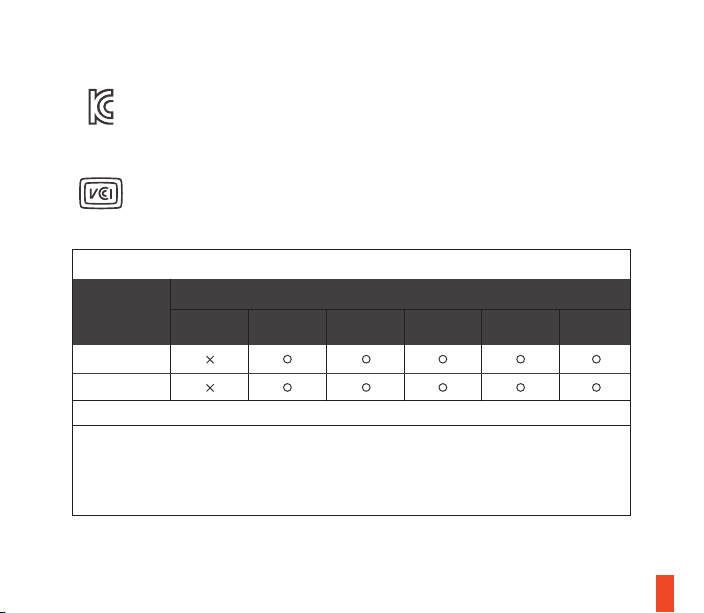
根据中国大陆《电子电气产品有害物质限制使用标识要求》,以下部分列出了产品中可能包含的有害物质的名称和含量:
*:电路板组件包括印刷电路板及其构成的零部件,如电阻、电容、集成电路、连接器等。
本表格依据SJ/T 11364的规定编制。
O:表示该有害物质在该部件所有均质材料中的含量均在 GB/T 26572规定的限量要求以下。
X:表示该有害物质至少在该部件的某一均质材料中的含量超出GB/T 26572规定的限量要求;
上表中打“X”的部件,应功能需要,部分有害物质含量超出GB/T 26572规定的限量要求,
但是符合欧盟RoHS法规要求(属于豁免部分)。
电路板组件
其他线材
零部件名称
有害物质
铅
(Pb)
汞
(Hg)
镉
(Cd)
六价铬
(Cr(VI))
多溴联苯
(PBB)
多溴二苯醚
(PBDE)

29
The RoHS test method is based on the standards JIS C 0950 and CNS 15663
備考1.〝超出0.1 wt %〞及〝超出0.01 wt %〞係指限用物質之百分比含量超出百分比含量基準值。
Note 1:“Exceeding 0.1 wt %” and “exceeding 0.01 wt %” indicate that the percentage content of the
restricted substance exceeds the reference percentage value of presence condition.
備考2.〝○〞係指該項限用物質之百分比含量未超出百分比含量基準值。
Note 2:“○” indicates that the percentage content of the restricted substance does not exceed the
percentage of reference value of presence.
備考3.〝-〞係指該項限用物質為排除項目。
Note 3:The “−” indicates that the restricted substance corresponds to the exemption
塑膠部件/Plastic
電路板及元件/PCBA
線材/Cables
金屬部件/Metal
單元
Unit
限用物質及其化學符號
Restricted substances and its chemical symbols
設備名稱:
Equipment name
鍵盤/Keyboard
KB-00011
型號(型式):
Type designation
鉛 Lead
(Pb)
汞 Mercury
(Hg)
鎘 Cadmium
(Cd)
六價鉻
Hexavalent
chromium
(Cr+6)
多溴聯苯
Polybrominated
biphenyls
(PBB)
多溴二苯醚
Polybrominated
diphenyl ethers
(PBDE)
30
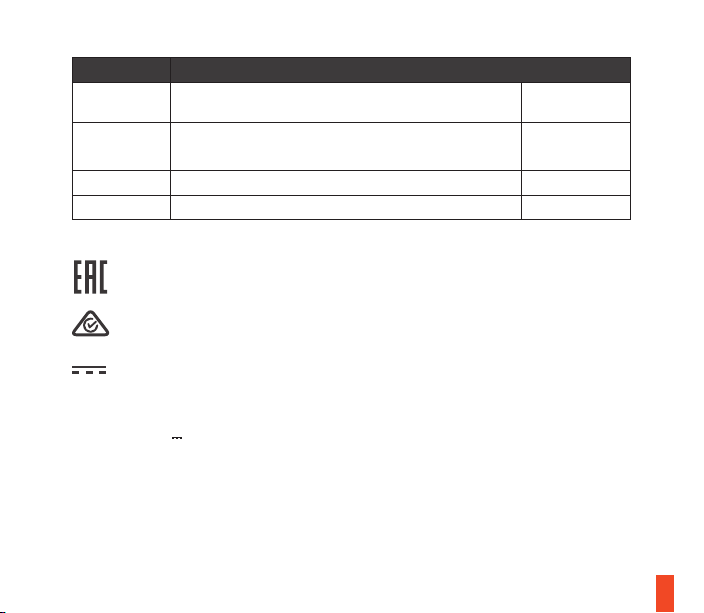
ACMA Compliance (Australia/ New-Zealand)
Custom Union Compliance. (Russia / Belarus / Kazakhstan)
Direct Current
Product Name (產品名稱/产品名称): Keyboard (鍵盤/键盘)
Model No. (型號/型号): KB-00011
Rated (規格/规格): 5V , 500mA
Made in China (中國製造/中国制造)
Regions Contact Information
亞洲
丹麥商賽睿有限公司台灣分公司
23511 新北市中和區建一路150號16樓
+886 2 8226 3858
Asia
SteelSeries ApS. Taiwan Branch
16F, No.150, Jian-Yi Rd., Chung Ho Dist., New Taipei City Taiwan
+886 2 8226 3858
USA 656 W Randolph St, Suite 3E, Chicago, IL 60661, USA +1 312 258 9467
Europe Dirch Passers Allé 27, 5.Sal., 2000 Frederiksberg, Denmark +45 702 500 75
More information and support from https://steelseries.com/

learn more at steelseries.com