
Technical Support and E-Warranty Certificate www.vevor.com/support
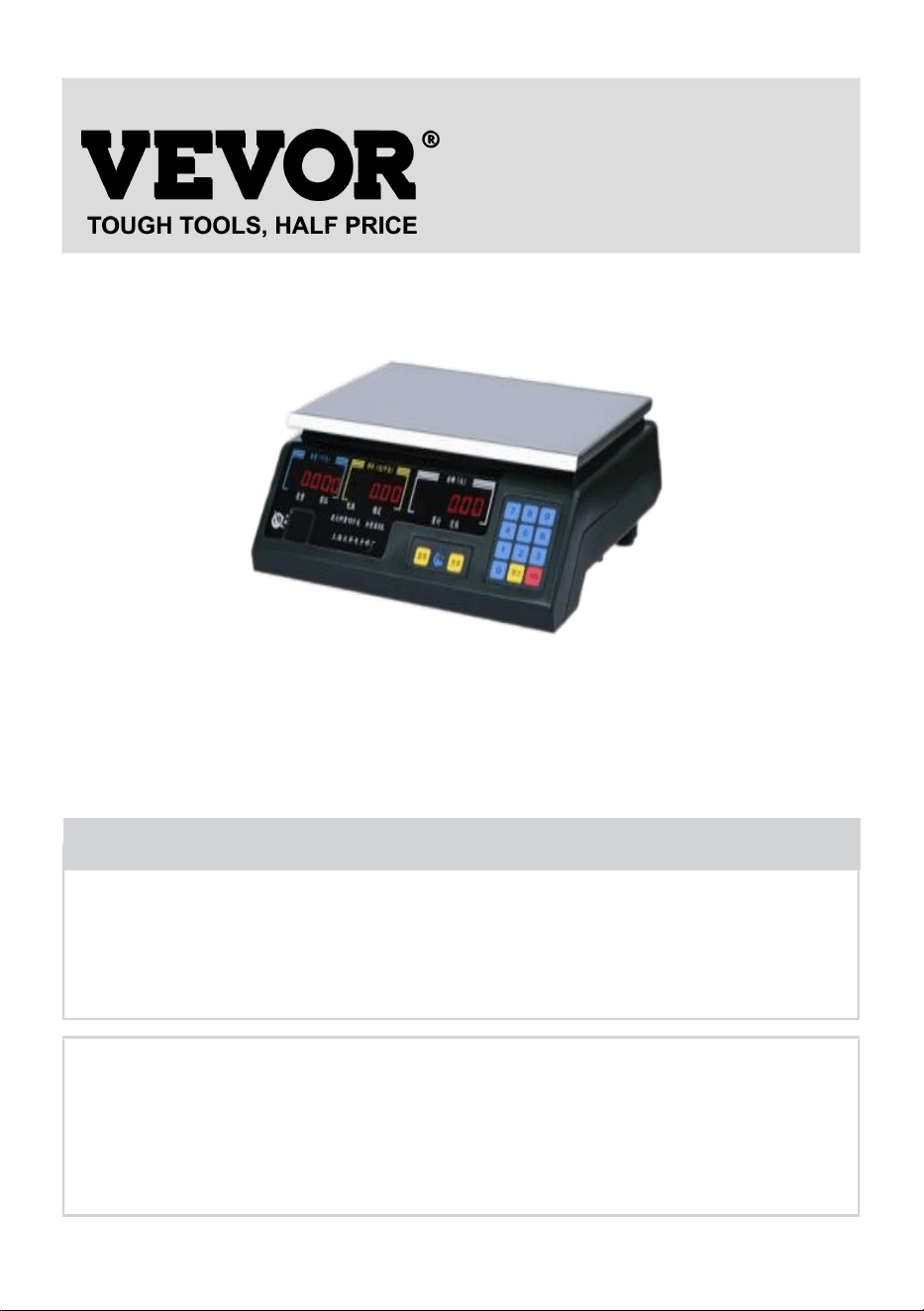
ELECTRONIC PRICE
COMPUTING SCALE
MODEL:ACS-30Ab
We continue to be committed to provide you tools with competitive price.
"Save Half", "Half Price" or any other similar expressions used by us only represents an
estimate of savings you might benefit from buying certain tools with us compared to the major
top brands and doses not necessarily mean to cover all categories of tools offered by us. You
are kindly reminded to verify carefully when you are placing an order with us if you are
actually saving half in comparison with the top major brands.
- 1 -
MODEL:ACS-30Ab
Have product questions? Need technical support? Please feel free to
contact us:
Technical Support and E-Warranty Certificate
www.vevor.com/support
NEED HELP? CONTACT US!
This is the original instruction, please read all manual instructions
carefully before operating. VEVOR reserves a clear interpretation of our
user manual. The appearance of the product shall be subject to the
product you received. Please forgive us that we won't inform you again if
there are any technology or software updates on our product.
ELECTRONIC PRICE
COMPUTING SCALE

- 2 -
1. The main function of the electronic scale
Electronic counting scales include the following functions; Self-checking; Zero
adjustment automatic adjustment; Zero adjustments automatic tracking; Zeros;
Tare; AC-DCswitch; Overload alarm; Double-sided digital display, etc.
1.1 Self-checking
After startup, SCM first into initial condition, complete initialization work, then
came self-checking program, check the stroke segment, a display is complete and
zero status is stable in weight, self-checking window, and all display "88888".
1.1.1 self-check window shows "88888" three times.
1.1.2 If shows "HHHHH", shows, and uttered his voice, means zero too great
(scale have goods).
1.1.3 If display: "LLLLL", and uttered his voice, means zero too small (don't have
the plate on the scale).
1.2. Zero automatic adjustment
Scale zero is sensor zero, and the scale of standing weight and plate of scale
weight are said the initial value.
Zero automatic adjustments: after self-inspection, the initial value is zeros.
1.3. Zero automatic tracking
Affected by environmental temperature change, power supply fluctuation, etc.
Various factors, sensors, and simulation part of the zero drift often happens, zero
adjustments automatic tracking function will be cleaned up automatically for zero
shift, and appended to zero, tracking scope for less than 0.5 d (d means division

- 3 -
value, the ACS-30Ab 5g) for.
1.4. Zeros
Zeros range: ACS - type A scale when weighing less than full scale stage to 3% of
the weighed 15Kg scales, for 450g.
1.5. Tare
The ACS - Series tare range from 0 to 100% full weight, 15Kg tare values is 15Kg.
Zeros and tare difference
Zeros: weight doesn't record (does not affect range) smaller range.
Tare: memory weight (influence range) range.
1.6. Overload alarm
The ACS - A series scale than the largest weighed 9e software of automatic alarm.
1.7. Low voltage alarm function
When a user is without alternating current and direct current, the dc voltage uses
less than 5.5 V electronic scale will automatically alarm, requirements, then the
user cannot charge, again must be immediately recharged.
- 4 -
2.Electronic scales working principle and circuit
structure
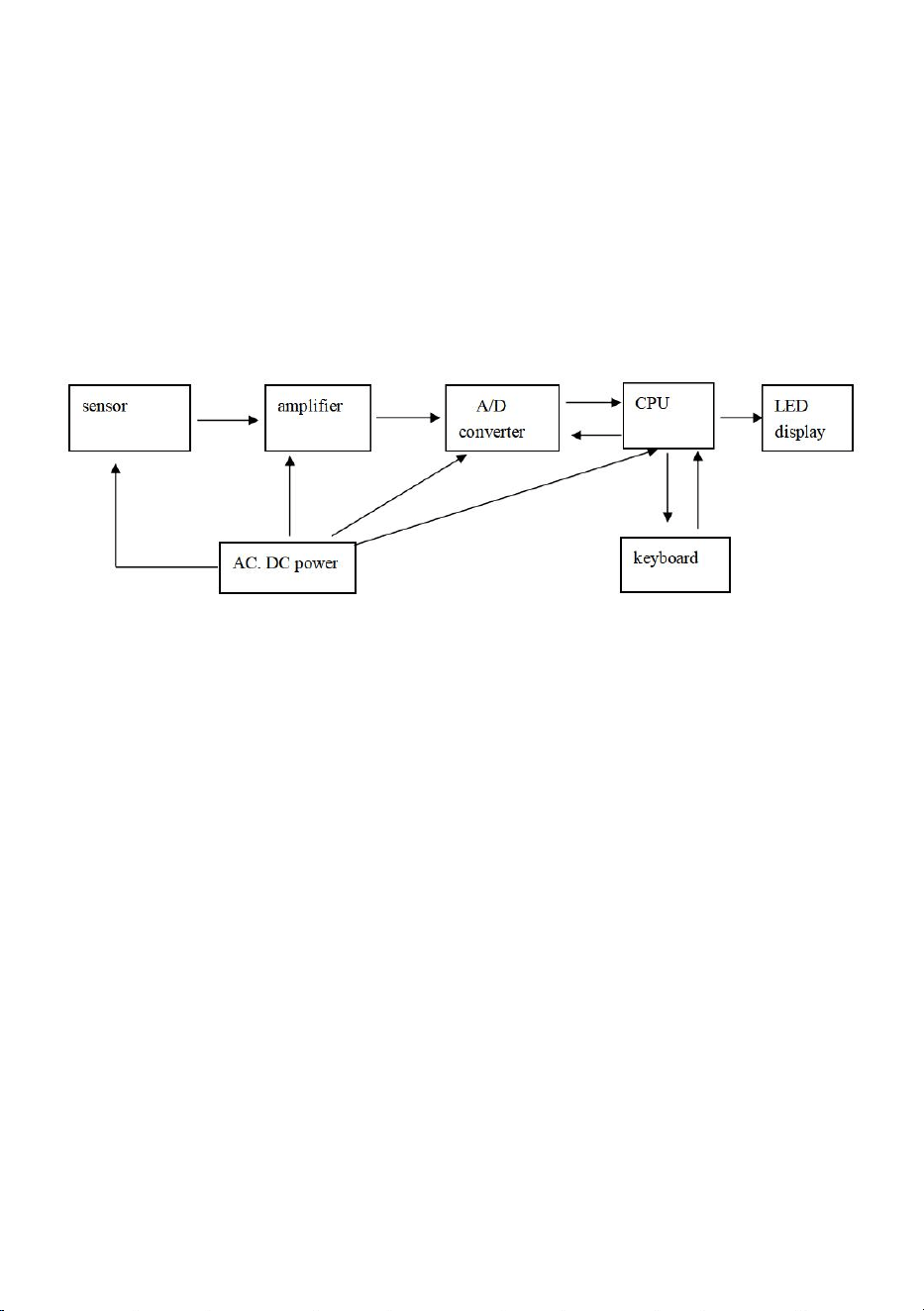
The ACS -Series scale including sensor, amplifiers, A/D converter, CPU
processor and keyboard, monitor, etc, the working principle diagram below:
Figure 1
When the weight on the scale of the plate after the resistance strain type
weighing sensor, thus bridge road produced deformation output dc signal (mv
level), DC signal size and weight is proportional to the particle weight by the
pre-amplifier amplifier, into A/D converter into the digital quantity by the CPU, the
digital quantity after processing, through the double-sided LED display is called the
actual weight items.
2.1. Instrument parts
2.1.1 weighing transducer
Scales in electronic weighing transducers occupy a very important position. It's
the performance decision on the scales of the performance. Usually, the sensor
produces errors accounted for about 50 to 70 percent of scale errors, if in the
environment of bad conditions (such as high temperature, dampness and hot), the
or accounts for the error ratio is bigger, so when that happens, the first check
Brazilians state is normal. The sensor is the original volume
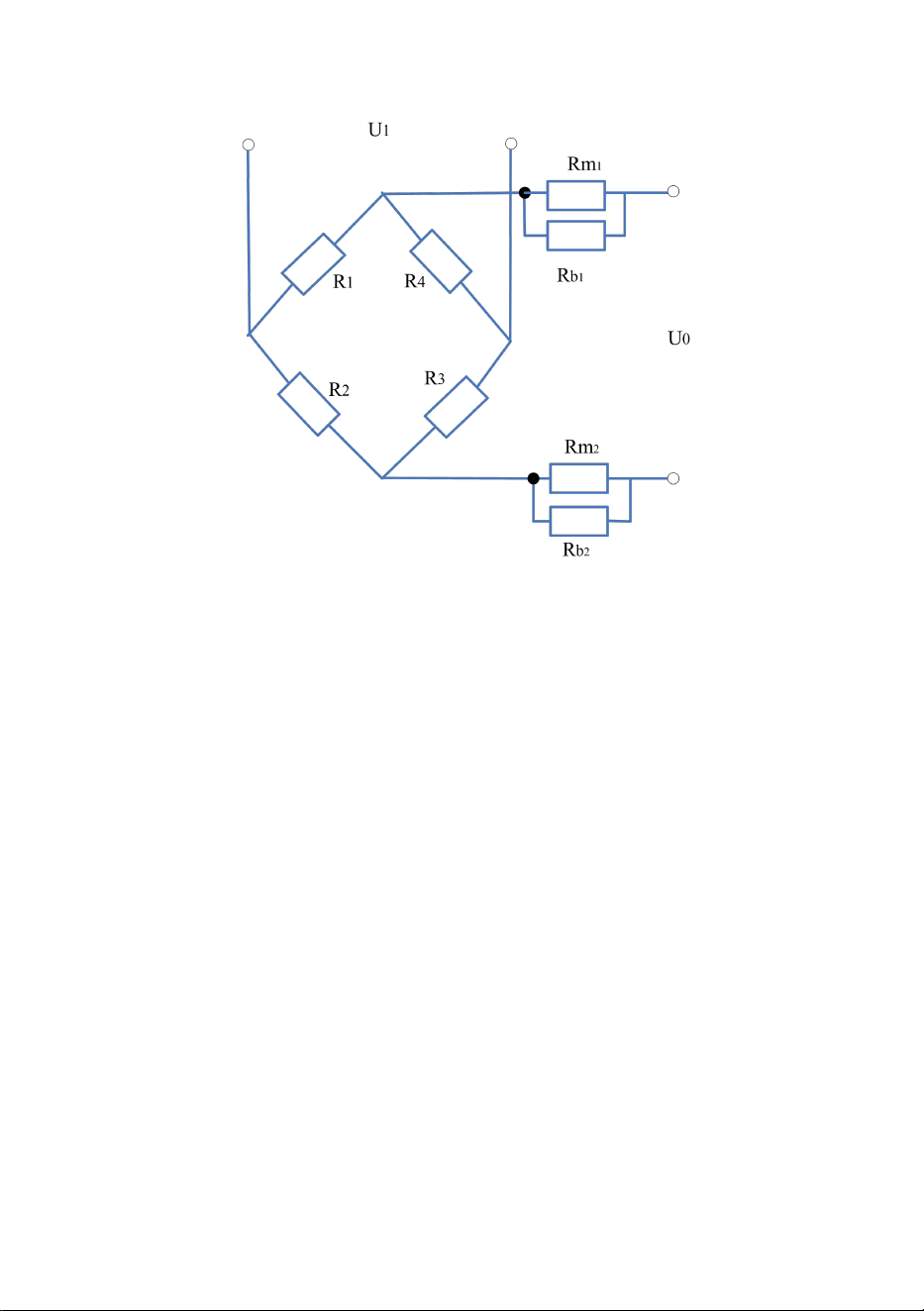
- 5 -
2.1.2 Sensor work principle
U is input voltage accuracy of 1 ‰, 5V fluctuations, U1, for output signal
voltage signal and R1R2R3R4 microvolt level since compensation for the strain
gauge for modulus compensation, Rm1Rm2 piece, Rb1Rb2 for modulus
coefficient compensation resistance when U0 input 5V RmRb after there in the
voltage of 0.5 V voltage gives way, so add in bridge the voltage of 4.5 V or so,
when no stress 0V output V CD should in theory, general factory index 100UV in
Vcd output 0 + R1R2R3R4 force, when sensor changes after a bridge circuit with
the output signal, which is proportional to the signal and weight after the operation,
through grade, enlarge input to the CPU to deal with.
R1R2R3R4 for 350 Ω sensor, Rm1Rm2 for 32 Ω, Rb1Rb2 for 196 Ω around
According to the calculation: the input impedance for 405 Ω or so, the output
impedance for 350 Ω around.
The sensor is the ground for the first 5 feet to play anti-interference function.
2.2 Analog computing amplification parts
2.2.1 pre-amplifier

- 6 -
By OP07 IC3, preamplifier amplifier, magnification Ω) by E1 (MIT $50K output
resistance and sensor in ChengPan decision, no weight, amplifier output voltage
2.5 V, the capacitance for C1, C3 C20, filter capacitance, eliminate the jamming
signal of the sensor.
2.2.2 A/D converter
A/D converter IC4, 74HC4051 by eight analog switches; LM358 IC9, STC89c52
(CPU), composed, IC9: A for integrators, IC9: B for comparator; IC9: B is in-phase
with the device to improve the input impedance, the benchmark as integrator.
2.3. The central processor and CPU work principle
2.3.1 CPU processor
CPU processor besides completing A/D conversion outside, still bears the
machine system coordinate work, if display scanning circuit output control,
keyboard scan input control and A large number of data processing, the CPU IC2
89c52, for 24C02 used for storage, calibration constant.
2.3.2 STC 89C52 pins instructions
1-8 feet P10 - P17 I/O port
9 feet RST/VPD reset/standby low consumption power
10 feet RXD pick to enter the serial port
11 feet TXD serial port send input
12 feet INT0 external interrupt request 0
13 feet INT1 external interrupt request 1
14 feet T0 timer/counter 0 outside input. Triggered
15 feet T1 timer/counter 1 foreign trigger input
16 feet WR read signals
17 feet WD write signal
18 feet XTAL2 crystals leads or clock input
19 feet XTAL1 crystals leads or clock input
20 feet Vss grounding OV
P20-21-28 feet P27 I/O port
29 feet PSEN program storage allows
30 feet ALE/PROG address latch/an EPROM programming

- 7 -
31 feet EA/VDD program storage area choice/an EPROM programming power
supply
32-39 feet P00 - P17 I/O port
40 feet VCC mains 5V
2.4. Drive display section
2.4.1 LCD display
Display of HT1621 drives partly by.
Through 89C52 (CPU) by the jammer P22 sends out signals, HT1621 drive lit by
the LCD panel.
2.4.2 keyboard
The ACS - type A scale has 14 key component 4 x 5 matrix, dynamically scan by
single-chip microcomputer by scanning signals to detect, 32-35 feet 89C52 issued,
again by the P10 - P14 P1 mouth, 1-5 feet for testing, if press A button and have
detected by microcomputer after decoding analysis to identify what function keys,
so that make corresponding processing.
2.5. Power and charging and discharging circuit
2.5.1 ac power output by transformer subprime 10V ac voltage. By D1, D2, D3 D4
rectifier, d23 for filtering, output 11.5 V dc voltage, 7810 three ends after its output
voltage, 10V dc voltage, the REG1 R0 D5, by LM2931 three end manostat, dc
voltage output 5V circuit for the digital part, another path with the LM2931 three
end REG2, output voltage stabilizer for the analog part of dc voltage 5V circuit.
2.5.2 dc supply by free maintenance rechargeable batteries (4Ah), 6V REG1,
respectively REG2 supply digital to analog part part and circuit.
2.5.3 low voltage alarm Circuit
Rechargeable batteries (4Ah), through 6V R27, R28 dividing resistor, via IC11,
LM393, input to the CPU. Judge whether the below is a certain value the voltage.

- 8 -
3.Maintenance points
3.1 Power circuit of the fault
When after startup, displays don't show up at the buzzer, first check the power
of work ever, first check normal digital part 89c52 40 feet power source, whether
5V, if not normal check whether REG1, 3 feet, if does not normally check 5V REG1,
1 foot, then check should be 9.0 V R0 D5 diode, whether good, if does not
normally check whether 7810,3 feet 10V, D1, D2, D3 D4 bridge road, input and
output is normal, and power plug is inserted, fuse, ordinal check whether
disconnect, etc when ac power at all levels, such as digital parts work good, again
check whether analog part of the power normal. When ac power after startup is
normal, and the dc power supply is not normal, i.e. the problem in rechargeable
batteries have electricity..
3.2 Analog part of failure
3.2.1 fault phenomena: When weighing readings jump or drift, the elements
involved
A. sensor
B. operational amplifier, OP07 IC3.
C. amplifier, around capacitance C1. C2 whether virtual welding or impedance C3
low
D. integral capacitance C6 whether is empty welding or impedance low
E. analog part whether stable power supply 5V
F. 4051 analog switch may also have been caused by bad
3.2.2 fault phenomena: boot self-check, slow, self-check and buzzer cry and
display the overload constantly check.
Check the analog switch IC4, 4051 10 feet, 11 feet are pulse signal whether, if no
pulse signal, or one foot fixed level, may IC4 bad, and should be replaced three
terminals, because the new working status, control integrators like fixed in a state,

- 9 -
integrators in overload, thus cause overload phenomenon.
3.2.3 fault phenomena: boot self-inspection show "HH after -".
If there was ChengPan should remove heavy weights, try again after all, as
reappear afore-mentioned phenomenon;
A. check amplifier normal no, 2.3.6 feet are the IC3 2.5 V, when ChengPan after
aggravating content on 3 foot two foot and input voltage change, between six feet
output voltage increase, normal, or doubt the IC3 has a problem, or other lines to
its influence.
B. if capacitance C1, C2, C3short-circuit also cause the above phenomenon
3.2.4 fault phenomena: commissioning show no buzzer has been ringing,
Analog switch IC4 4051 is bad, causing CPU received A/D conversion of data
mistaken for overload, so the buzzer has been ringing.
3.2.5 fault phenomena: can't zero, cannot calibration.
This fault phenomenon is the sensor zero too big, CPU can't of capturing, this kind
of circumstance, most sensor overload hind to cause the sensor IN solution to land
IN - + or resistance and Κ (300 ~ 500 Ω) can reduce zero output, then you must go
back and calibration again.
3.2.6 fault phenomena: boot no display, but according to the keyboard buzzer
rang.
Reason: analog part comparator output is not normal, IC9B, 7 feet of the fixed low,
uninterrupted output signal to CPU, but CPU still working, the keyboard is still in
scanning, so because there is no buzzer rang interrupt signals cannot receive A/D
data so no output display.
3.2.7 fault phenomena: boot self-check normal, but cannot calibration.
Reason: May 24C02 have questions or sensors to amplifier fuses disconnect,
making amplifier output not normal and cause cannot calibration.
3.2.8 fault phenomena: the sensors inserted into the motherboard have been
called, sensor buzzer out plug didn't call.
Reason: sensor plug have break line, such as sensors - E not connected to the
sensor IN + and RI suspended or 5V, between voltage amplifier overload, so it is
always, buzzer solution: sensor 5 thread one-to-one, socket weld found may also
cause disconnected.

- 10 -
3.3 digital parts fault
Digital part including CPU, keyboard, display parts.
3.3.1 fault phenomena: boot self-inspection buzzer always call, after FULL "show"
-
Analysis: such as check sensor, amplifiers, static job electricity average normal,
May 24c02 fault, because 24c02 caused by the CPU read data in calculating
appeared after spill so appear afore-mentioned phenomenon.
3.3.2 fault phenomena: boot self-inspection buzzer rang after, but don't display
Analysis: this phenomenon in driving, most fault 89c52, check the waveform and
normal feet been campaigning against the machine contests.
3.3.3 fault phenomena: boot sometimes drive up, sometimes can not open up
This kind of situation first look at whether dc power supply, such as dc supply
check the battery voltage less than 5.5 V or whether a critical state, or to charge,
such as dc voltage normal (more than 6V), or in ac supply imagination, that occurs
when the normal should check whether RESET resets signal.
A. control whether R10 RESET a resistor is going.
B.C 17 is normal.
3.3.4 fault phenomena: keyboard fault
If press any key doesn't work, first check every die key, if vertically or horizontally a
row of keys doesn't work, it's not a key fault but a vertical or horizontal line
disconnected, which can be caused by normal after rehabilitation. Another might
also clavier board PCB want to touch with host caused.
Reason: analog part comparator output is not normal, IC9B, 7 feet of the fixed low,
uninterrupted output signal to CPU, but CPU still working, the keyboard is still in
scanning, so because there is no buzzer rang interrupt signals cannot receive A/D
data so no output display.
3.3.5 fault phenomena: boot self-check normal, but cannot calibration.
Reason: May 24C02 have questions or sensors to amplifier fuses disconnect,
making amplifier output not normal and cause cannot calibration.
3.3.6 fault phenomena: the sensors inserted into the motherboard have been
called, sensor buzzer out plug didn't call
Reason: sensor plug have break line, such as sensors - E not connected the

- 11 -
sensor IN + and RI suspended or 5V, between voltage amplifier overload, so it is
always, buzzer solution: sensor 5 thread one-to-one, socket weld found may also
cause disconnected.
4.PCB simple maintenance method
Fault reasons
1 button is bad. The keyboard thrust line is loose.
2 digits lose not into the replacement 89C52, keyboard change, film plug virtual
welding, insert 89C52 connection position impassability.
3 exchange impassability, dc impassability no reaction, 2. 1.2931 burned-out C11,
C12 C14 capacitance C13, that is the sky, bad, bad, 3) a switch.
4 exchange impassability, straight at the circulation diode D5 breakdown, D1, D2,
D3, conduction D4 burnt out, already, short-circuit, d23 for.
5 exchanges don't boot check whether electricity, check the power cord power
whether electricity, whether the switch bad transformer blow out the fuse burn out.
6 exchange R37 disconnect in bright lights.
7 shows on the mainboard display plug abnormal is loose.
8 weight window, O an instability or not, stability, C1, C2 data changes C6
capacitance short circuit or bad, bad, the battery.
9 boot jitter or boot no reaction crystals 20P capacitance bad, bad or 89C52 base
virtual welding.
10 zero drift C1 capacitance impedance, normal 104P virtual welding 1-m,
capacitance.
11 no signal, signal impassability, data disorderly jump numerical vary
considerably E1, E2 fault, or resistance tolerance welding around the small
resistance impassability, short circuit, virtual welding, welding wrong.
12 boot out "HHHHH" 24C02 bad.
13 sensor overloaded.
14 boot "LLLLL" sensor zero low.
15 sensors gaskets are not loading.
16 boots always 89C52 loose or bad screaming.

- 12 -
17 boot no voice buzzer bad Jump C52 bad 4051,89 18 figures.
19 low voltage no alarm R21, R28 R27, R29, bad.
20 cannot calibrate sensor overload or bad.
21 garbled 24C02 bad.
22 burn transformer D1, D2, D3 D4 diode, bad.
23 weighing no reaction, REG2 bad fall sensor line, IC4, C9 IC3, bad.
5.Electronic scale error messages and ruled out
1. Electronic digital jump and alarm "didi" call said already finished using the
built-in battery, should immediately plug in the ac lines boot charging 10 hours also
can side charging edge work.
2. When a plate object weight more by sends out "didi......" alarm,
the weighing pan is already overweight on that, should immediately objects had,
lest sensor (one meter) damage.
3. When the boot stabilizes, the weight window for "- 0.005" or "0.005" beating, e.g.
by zeros keys not removed.
Explanation:
A. level not tuned;
B. mesa has jitter unstable;
C. around TV sets, refrigerators, mobile phones, motor interference (3 meters of
less)
D. around the fan and percussion, or flow wind more tremendous influence.
4. When the keyboard switch has several key press up no reaction.
Explanation: the keyboard already has JinYou; water, or to go to change new
thrusters. Note: the new keyboard must play around on the keyboard in the water
and JinYou encapsulant, lest, silica gel can use that sells on the market 703 silica
gel (nankai university production).
5. The battery's best working range is 5.8 V - 6.8 V; if the discharge battery is used
to 5.5 V, the following impact, battery life May 2, 3 months batteries into electricity
or can not filling with 12 hours, it must be to buy batteries for the battery indicator
6V / 4AH.

- 13 -
6. If stuck in power, electronic communication lines and electronic scale still alarm
"didi..." called.
Explanation: ac not inserted; carefully check exchanges, such as checking
whether bright light is bright; please change cables or change the power outlet and
try again.
6.PACKING LIST
ELECTRONIC PRICE COMPUTING SCALE *1
User Manual *1
Power supply cord *1
Serial port cable *1
The weighing pans *1
Shim *4
7.WARNING AND MATTERS NEEDING ATTENTION
Warning
Don’t use the product in the following occasions:
1. The occasions of vibration and swing;
2. The Occasions of air conditioning and fan blowing straightly;
3. Dusty and wet places;
4. inflammable and explosive occasions;
This product must be connected to have good grounding outlet, otherwise
may cause personal injury.
When using the machine connected to the external device, please make sure
to cut off the power supply first, otherwise it may result in equipment damage.
Don’t pull plug the communication interface in electricity boot cases , such as
parallel electricity boot cases, serial communication port etc.
Ban pulling the plug under the condition of without shutdown.

- 14 -
Matters needing attention
Put scale flat on the table. Adjusting the four foot nuts makes the level of
bubble in the center of the level and try to ensure that the Electronic Price
Computing Scale can work in a horizontal state in order that the accuracy of
weighing.
Please do not remove the Electronic Price Computing Scale easily and make
the Electronic Price Computing Scale fall or suffer the strong impact. Please
remove heavy weights immediately when put heavy than maximum range of
electronic balance on the Electronic Price Computing Scale, or electronic
scale will be permanently damaged.
Prohibit to put any weight on scale when the Electronic Price Computing
Scale is in shutdown state. Long-term unused Electronic Price Computing
Scale should be packaged and flat on somewhere and weight isn’t allowed on
the above.
Check the cause in time when you find that the show of the weight value is
unstable in the process of using the Electronic Price Computing Scale. Where
there is the electromagnetic interference, such as mobile phone, television,
freezer or other strong magnetic interference.
Electronic Price Computing Scale serial RS232 communication line length
must not exceed 8 meters, so the net TCP/IP communication line length is not
more than 300 meters.
You need not sharp nails as far as possible when pressing the keyboard of
the Electronic Price Computing Scale, so as to avoid surface damage.
FCC Statement
This device complies with Part 15 of the FCC Rules. Operation is subject to
the following two conditions:(1)This device may not cause harmful
interference, and (2)this device must accept any interference received,
including interference that may cause undesired operation.