IMPORTANT SAFETY
INSTRUCTIONS
When using a battery operated appliance, basic precautions
should always be followed,including the following:
Read all instructions before using.
WARNING
1. This appliance is intended for household use only;it is not
for commercial or industrial use.
2. Use this appliance only for its intended use as described in
this manual.Do not use accessory attachments not recom-
mended by Philips Electronics North America Corporation.
3. Do not place on or near a hot gas or electric burner, or in
a heated oven or microwave.
4. Operate on a flat surface away from edge of counter to
prevent accidental tipping.
5. Do not operate this appliance if it is not working properly,
if it has been dropped or damaged or dropped into water,
or after the appliance malfunctions,or has been damaged
in any manner.Return the appliance to the nearest
Authorized Norelco Service Location for examination,
repair or adjustment.
6. Do not immerse the appliance in water or other liquids.
7. Never drop or insert any objects into any opening of the
appliance.
8. Never use or store the appliance in direct sunlight or at
temperatures below 41ºF/5ºC or above 113ºF/45ºC.
9. Keep the appliance away from heated surfaces.
10. Do not operate this appliance in places where aerosol
(spray) products are being used or where oxygen is being
administered.
11. Any service of the kitchen scale should be performed by
an Authorized Norelco Service Location.
12. If the appliance will not be used on a regular basis,remove
the battery when storing the appliance to prevent possible
damage due to leakage. If the battery does leak, remove it
carefully.Never allow your bare skin to come into contact
with the leaking fluid.
13. Do not use a rechargeable battery in this appliance.
14. Dispose of used battery properly.
15. Do not wrap the battery in metal or aluminum foil.
16. Do not incinerate the battery.Battery may explode when
overheated.
17. Wrap the battery in a newspaper before discarding.
18. It is suggested that you contact your local town/city offi-
cials to determine the proper battery disposal site(s) in
your area.
SAVE THESE
INSTRUCTIONS
ELECTROMAGNETIC COMPATIBILITY
This product is a sensitive electronic instrument and as such may
temporarily be affected by Radio Transmitting Devices being used
in close proximity to it such as cordless or mobile phones, walkie
talkies,CB radios,radio model or remote controllers, and some
microwave ovens. Therefore,it is recommended that the scale be
kept or operated at a safe distance of approximately 6 1/2 feet or
2 meters away from these devices.If the scale does exhibit symp-
toms such as the display of erratic or erroneous data,try moving
the scale away from the source of interference or switching off
the source of interference while you are using this product.
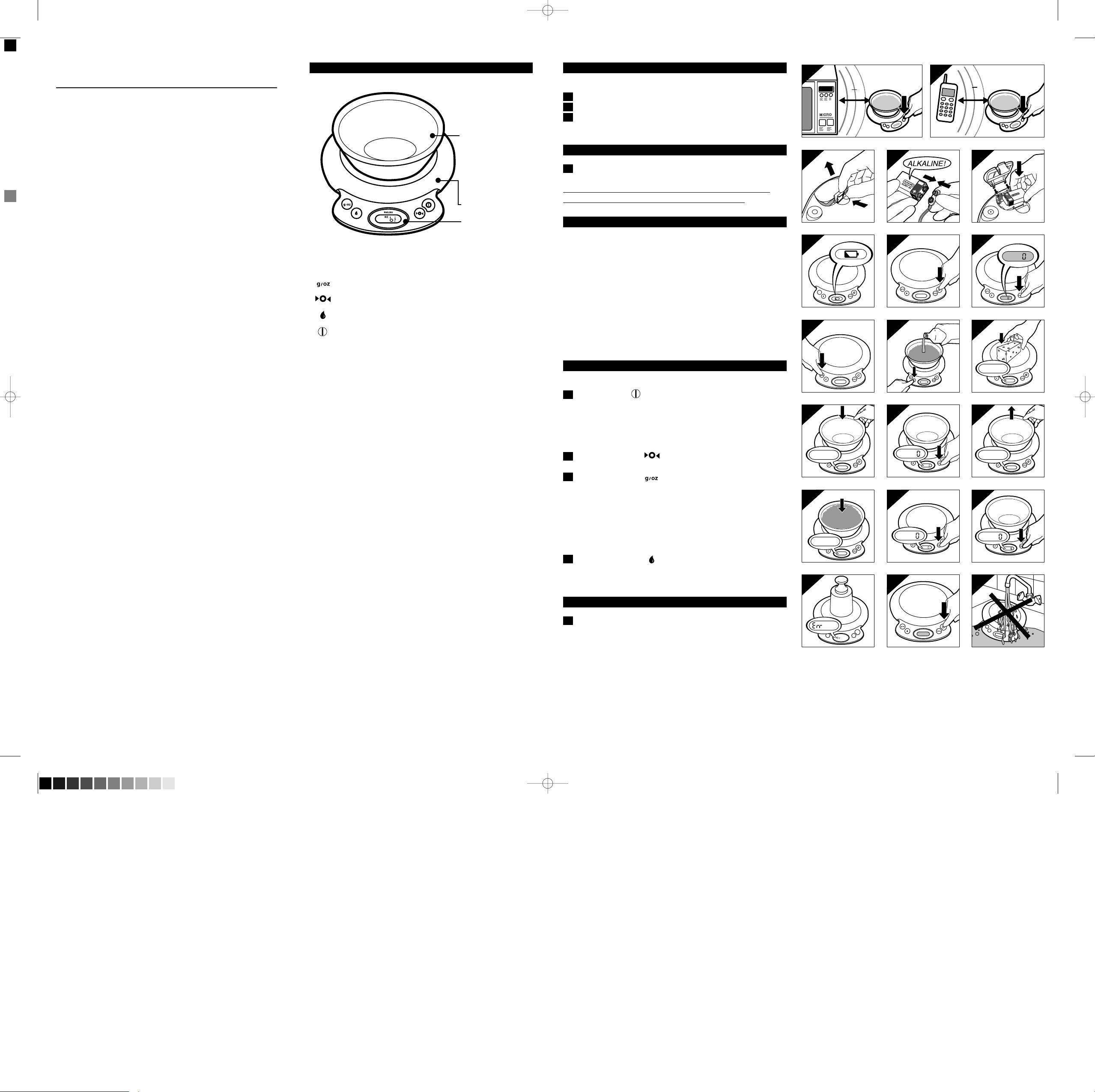
FEATURES
Automatic shut-off
in 3 minutes
- Memory retains
last measurement
until next use
Dishwasher Safe
1-Quart Capacity
Bowl
- Conveniently
weigh,measure,mix
and serve all in one
bowl
Weighing Platform
Easy-To-Read LCD
Display
Operates on one
9V alkaline battery
(not included)
Conversion Button
Reset/Tare Button
Liquid and Solid Function
On/Off Button
IMPORTANT
Read these instructions for use carefully before using the appliance
and save them for future reference.
◗This appliance can weigh up to a maximum of 11 pounds /
5 kilograms. Overloading the weighing platform with weight
heavier than the maximum amount can permanently damage the
appliance.
◗Use the appliance for its intended household use as described in
this manual.
◗This appliance is factory preset with oz (ounces) as the default
measurement standard.
◗Make sure that there is nothing on the weighing platform when
the scale is not in use.
◗Do not immerse the scale in water or any other liquid and do not
allow liquid to enter the scale.
◗Always place the appliance on a solid,smooth and horizontal
surface when you use it.
This scale is a precision appliance and should be handled with care.
Avoid rough handling,shaking and vibrations.
◗All plastic parts,including the bowl,should be cleaned immediately
after contact with spices,vinegar,fats or strongly colored/ flavored
foods or liquids.Avoid contact with acid-based foods such as
citrus fruit juices.
◗Do not place raw meat,chicken or fish directly on the weighing
platform.It is recommended that you place a piece of plastic
wrap,wax paper or aluminum foil on the platform first,press the
Reset/Tare Button to reset weight to zero,and then place the
meat,chicken or fish on it to be weighed. You may also weigh raw
meat in the bowl,but be sure to thoroughly clean the bowl after
each use.Be sure to immediately clean off any meat juices that
may spill onto the weighing platform to prevent cross-
contamination of foods.
◗Radio transmitting devices may cause interference,which can lead
to unreliable weighing results.
Use the kitchen scale at a safe distance of at least 6 1/2 feet or
2 meters from a working microwave oven,cordless or mobile
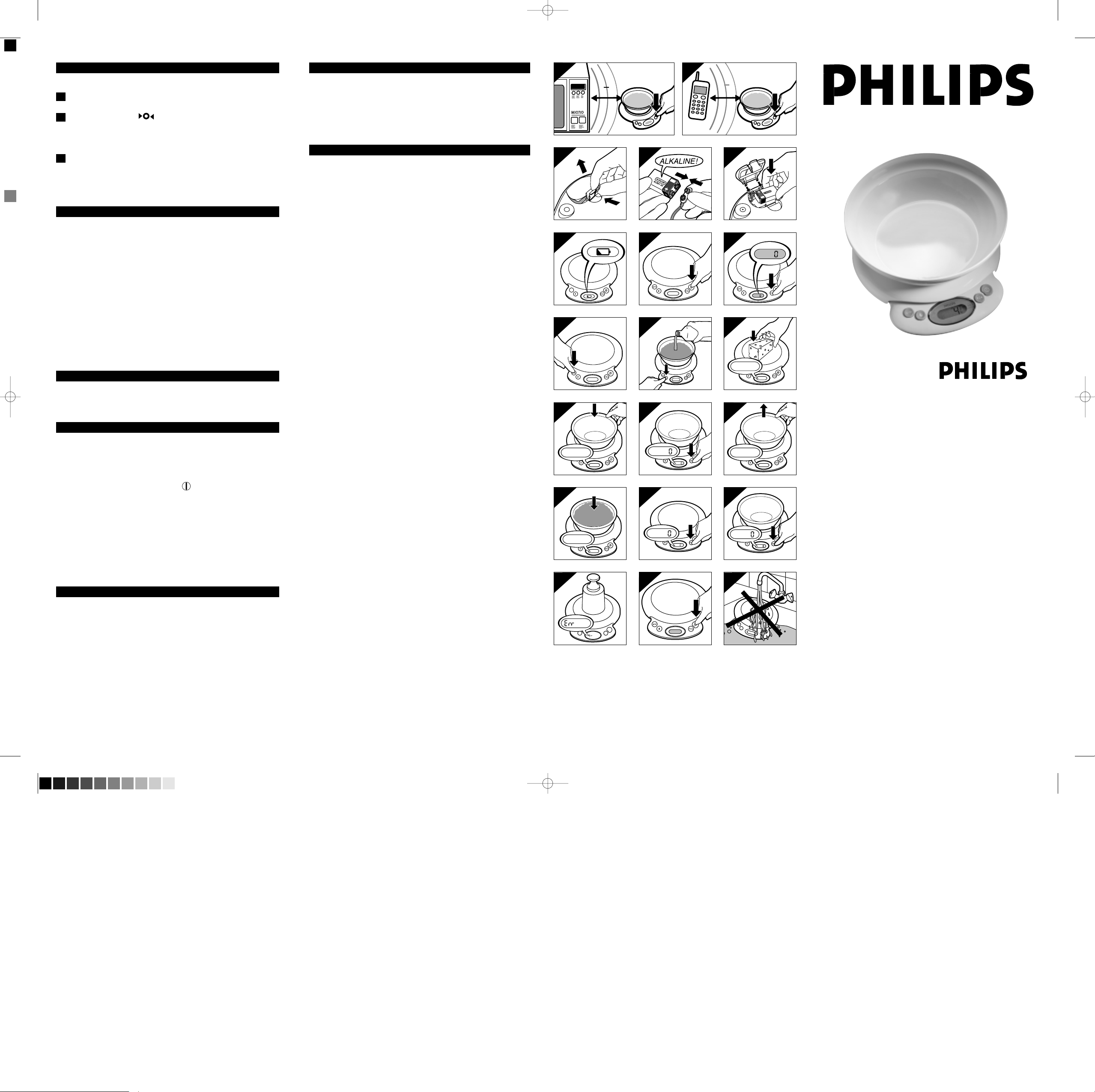
phone,etc.or switch those devices off (fig.1 and 2).
Inserting the battery
The scale operates on one 9-volt alkaline battery (not included).
1 Open the battery compartment (fig.3).
2 Connect the battery to the battery connector (fig.4).
3 Place the battery in the battery compartment and close the lid
of the compartment (fig.5).
Replacing the battery
1 Replace the battery as soon as the battery symbol appears in
the display (fig.6).
This scale has no other user
-serviceable parts. Any other service
should be performed by an Authorized Service Location.
Weighing
The scale can indicate weight in solid ounces and fluid ounces in
graduations of 1/8 oz.or 1/8 fl. oz. In addition,the scale can also
indicate weight in graduations of 1 gram from 2 grams upwards
and fluid measures in milliliters and centiliters in graduations of
1 ml.or 0.1 cl.
This appliance can weigh up to a maximum of 11 pounds / 5 kilo-
grams. Overloading the weighing platform with weight heavier
than the maximum amount can permanently damage the appliance.
Please note that 'Err' will become visible on the display if the
weighing platform has been overloaded by putting a weight of
more than 11 pounds or 5 kilograms on the platform (fig.18).
Immediately remove overweight items to avoid causing permanent
damage to the scale.
Buttons
The appliance has four buttons:
1 On/Off Button (fig.7).
Press the On/Off Button briefly to switch the scale on. A series of
"8888" will appear in the display and then "0".The appliance is ready
for use after 2 seconds.Press the On/Off Button again to switch the
appliance off. If the scale remains inactive for 3 minutes,it will
automatically shut-off but retain the last measurement in its memory.
2 Reset / Tare Button (fig.8).
Press the Reset Button to set the display to '0'.
3 Conversion Button (fig.9).
-When a solid measure is displayed,the Conversion Button will
change the weight displayed from ounces (oz) to grams (g) or from
grams (g) to ounces (oz).The scale is preset at the factory to
measure in ounces (oz).
- When a fluid measure is displayed,the Conversion Button will
change the units displayed from fluid ounces (fl:oz),milliliters (ml), or
centiliters (cl) to ounces (oz) or grams (g).
4 Fluid / Liquid Button (fig.10).
Press the Button to change the units displayed from solid measures
(oz or g) to fluid measures (fl:oz,ml,or cl) or vice-versa.
Weighing on the weighing platform
1 Place the ingredient(s) to be weighed directly on the weighing
platform.The weight will be displayed immediately (fig.11).
- Do not place raw meat,chicken or fish directly on the weighing
platform. It is recommended that you place a piece of plastic wrap,
wax paper or aluminum foil on the platform first, press the Reset/Tare
Button to reset weight to zero,and then place the meat,chicken or
fish on it to be weighed. Be sure to immediately clean off any meat
juices that may spill onto the weighing platform to prevent cross-
contamination of foods.
Buttons
6
1
ft
2
6
1
ft
2
4
7
8
-
4
7
8
-
4
3
4
_
4
3
4
_
4
3
4
_
MAX
LB
11
6
1
ft
2
6
1
ft
2
6
LR
6
1 9
V
6
1
2
6
1
_
2
_
4
7
8
-
4
7
8
-
-
20
18 19
15 16 17
12
13
14
91011
678
1
2
345
HR2394DFU.qxd 7/7/04 11:24 PM Page 1 (Black plate)
Weighing in a bowl
The bowl has a 1-quart capacity.
1 Put the empty bowl on the weighing platform.The display will
show the weight of the bowl (fig.12).
2 Press Reset Button .The display will read '0' again (fig.
13).
◗ If you remove the bowl from the weighing platform,the display
will show the negative weight of the bowl (fig.14).
3 Put the ingredient to be weighed in the bowl.The scale will
show the weight of the ingredient only (fig.15).
◗The appliance will keep on doing so until you reset the display to
'0' by pressing the Reset Button (fig.16).
Adding ingredients
◗Each time you press the Reset Button,the weight on the display is
set back to '0' again,regardless of the ingredients that are already
in the bowl on the weighing platform.For example:if you have put
4 ounces of sugar in the bowl on the scale and you press the
Reset Button,the weight will be set back to '0' and you can easily
add another ingredient,for example 4 ounces of flour,without
calculating (fig.17).
◗ Please note that 'Err' will become visible on the display if the
weighing platform has been overloaded by putting a weight of
more than 11 pounds or 5 kilograms on the platform (fig.18).
WARNING: Overloading the weighing platform with more than
the maximum allowable weight of 11 pounds / 5 kilograms can
cause permanent damage to the scale.
Automatic shut-off
If the scale is turned on,but has not been used for 3 minutes,the
scale will automatically shut off to conserve battery power.
Full memory backup
◗This appliance has 'full memory backup':if the appliance has not
been used for 3 minutes,it will switch off automatically.If you
have left the ingredient(s) you have just weighed on the weighing
platform,the previously shown weight will be displayed again
when you press the On/Off Button (fig.19).
- If the appliance has switched off automatically, it will return to the
solid or fluid / liquid measure selected last when it is switched on
again.
- If the appliance has been switched off by means of the on/off
button,it will return to the solid measure of the measurement
system (ounces or metric) selected last when it is switched on again.
- To clear the memory,be sure to switch the scale off using the
On/Off Button.
Cleaning
◗You can clean the appliance with a damp cloth and,if necessary, a
mild cleaning detergent.
◗ Do not use abrasive cleansers,scourers,alcohol,bleach,etc.to
clean the scale or bowl.
◗ Never immerse the scale in water or rinse it under the tap
(fig.20).
◗ Only the bowl is dishwasher safe.
Storage
◗Make sure that there is nothing on the weighing platform when
the scale is not being used or stored.
◗Store scale in a safe,dry location.
◗If the scale will not be used for an extended period of time,
remove the battery before storing.
Assistance
For assistance or the Authorized Norelco Service Location near-
est you,call toll free:
1-800-243-7884 or visit our website:www.philips.com
Authorized Norelco Service Location information is available 24
hours a day,7 days a week.
FULL TWO YEAR WARRANTY
Philips Electronics North America Corporation warrants each new Philips
product,model HR2394 (except battery),against defects in materials or work-
manship for a period of two years from the date of purchase and agrees to
repair or replace any defective product without charge.
IMPORTANT:This warranty does not cover damage resulting from accident,
misuse or abuse, lack of reasonable care, the affixing of any attachment not
provided with the product or loss of parts or subjecting the product to any
but the specified battery.*
PHILIPS ELECTRONICS NORTH AMERICA CORPORATION
WILL NOT PAY FOR WARRANTY SERVICE PERFORMED BY A
NON-AUTHORIZED REPAIR SERVICE AND WILL NOT REIM-
BURSE THE CONSUMER FOR DAMAGE RESULTING FROM
WARRANTY SERVICE PERFORMED BY A NON AUTHORIZED
REPAIR SERVICE. NO RESPONSIBILITY IS ASSUMED FOR ANY
SPECIAL, INCIDENTAL OR CONSEQUENTIAL DAMAGES.
In order to obtain warranty service, simply take or ship the product postage
prepaid to the nearest Authorized Norelco Service Location or call PHILIPS
directly at 1-800-243-7884 for assistance. It is suggested that for your protec-
tion you return shipments of product by insured mail,insurance prepaid.
Damage occurring during shipment is not covered by this warranty.
Note: No other warranty, written or oral,is authorized by Philips Electronics
North America Corporation.
This warranty gives you specific legal rights, and you may also have other
rights which vary from state to state. Some states do not allow the exclusion
or limitation of incidental or consequential damages,so the above exclusion
and limitations may not apply to you.
* Read enclosed instructions carefully.
Manufactured for:
Norelco Consumer Products Company
A Division of Philips Electronics North America Corporation
1010 Washington Blvd.,Stamford,CT 06912-0015
For Assistance call 1-800-243-7884
MADE IN HUNGARY.
PHILIPS and Philips Shield are Registered Trademarks of Koninklijke Philips
Electronics N.V.
© 2004 Philips Electronics North America Corporation.
All Rights Reserved.
4203 064 14421
Precison Electronic
Kitchen Scale
6
1
ft
2
6
1
ft
2
4
7
8
-
4
7
8
-
4
3
4
_
4
3
4
_
4
3
4
_
MAX
LB
11
6
1
ft
2
6
1
ft
2
6L
R
61
9V
6
1
2
6
1
_
2
_
4
7
8
-
4
7
8
-
-
HR2394
20
18 19
15 16 17
12
13
14
91011
678
1
2
345
HR2394DFU.qxd 7/7/04 11:24 PM Page 2 (Black plate)