EN User manual
Register your product and get support at
www.philips.com/welcome
AJB4500
$-%B(1LQGG$-%B(1LQGG 3030

AJB4500_EN.indd 2 7/31/2008 2:31:44 PM

3
Contents
1 Important 5
Safety 5
Important notes for users in the U.K. 7
Notice 9
Recycling 10
2 Your clock radio 11
Introduction 11
What’s in the box 11
Overview of the main unit 12
3 Get started 15
Prepare FM/DAB antenna 15
Connect power 16
Set the clock 16
4 Use your clock radio 18
Adjust the volume level 18
Adjust display brightness 18
Listen to FM radio 18
Program radio stations automatically 18
Program radio stations manually 19
Listen to a preset radio station 19
Show RDS information 19
Listen to Digital Audio Broadcasts (DAB) 20
Tune to DAB radio station manually 21
Scan DAB radio stations automatically 21
Program DAB radio stations manually 22
Listen to a preset DAB radio station 22
Show DAB information 22
$-%B(1LQGG$-%B(1LQGG 3030

4
Set the alarm timer 23
Turn on/off the alarm timer 23
Repeat alarm 24
Reset alarm 24
Stop alarm sound 24
View the alarm settings 24
5 Use more of your clock radio 25
Listen to portable audio players 25
Set the sleep timer 25
Perform more functions through DAB menu 26
6 Product information 28
Specifi cations 28
Tuner (FM) 28
General information 28
RDS program types 29
About DAB 31
7 Troubleshooting 32
$-%B(1LQGG$-%B(1LQGG 3030
5
1 Important
Safety
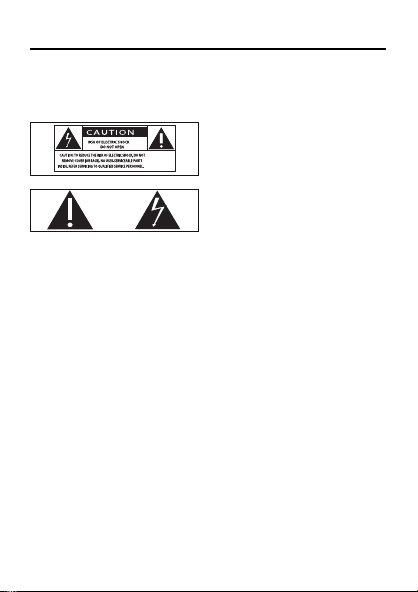
Know these safety symbols
This ‘bolt of lightning’ indicates uninsulated material within your
unit may cause an electrical shock. For the safety of everyone in
your household, please do not remove product covering.
The ‘exclamation point’ calls attention to features for which you
should read the enclosed literature closely to prevent operating
and maintenance problems.
WARNING: To reduce the risk of fi re or electric shock, this
apparatus should not be exposed to rain or moisture and
objects fi lled with liquids, such as vases, should not be placed on
this apparatus.
CAUTION: To prevent electric shock, match wide blade of plug
to wide slot, fully insert.
a Read these instructions.
b Keep these instructions.
c Heed all warnings.
d Follow all instructions.
$-%B(1LQGG$-%B(1LQGG 3030

6
e Do not use this apparatus near water.
f Clean only with dry cloth.
g Do not block any ventilation openings. Install in
accordance with the manufacturer’s instructions.
h Do not install near any heat sources such as radiators,
heat registers, stoves, or other apparatus (including
amplifi ers) that produce heat.
i Protect the power cord from being walked on or
pinched, particularly at plugs, convenience receptacles,
and the point where they exit from the apparatus.
j Only use attachments/accessories specifi ed by the
manufacturer.
k Use only with the cart, stand, tripod, bracket, or table
specifi ed by the manufacturer or sold with the apparatus.
When a cart is used, use caution when moving the cart/
apparatus combination to avoid injury from tip-over.
l Unplug this apparatus during lightning storms or when
unused for long periods of time.
m Refer all servicing to qualifi ed service personnel. Servicing
is required when the apparatus has been damaged in any
way, such as power-supply cord or plug is damaged, liquid
has been spilled or objects have fallen into the apparatus,
the apparatus has been exposed to rain or moisture, does not
operate normally, or has been dropped.
$-%B(1LQGG$-%B(1LQGG 3030

7
n Apparatus shall not be exposed to dripping or splashing.
o Do not place any sources of danger on the apparatus
(e.g. liquid fi lled objects, lighted candles).
p This product may contain lead and mercury. Disposal of
these materials may be regulated due to environmental
considerations. For disposal or recycling information,
please contact your local authorities or the Electronic
Industries Alliance: www.eiae.org.
Where the MAINS plug or an appliance coupler is used as the
disconnect device, the disconnect device shall remain readily
operable.
Important notes for users in the U.K.
Mains plug
This apparatus is fi tted with an approved 13 Amp plug. To
change a fuse in this type of plug proceed as follows:
a Remove fuse cover and fuse.
b Fix new fuse which should be a BS1362 3 Amp, A.S.T.A.
or BSI approved type.
c Refi t the fuse cover.
If the fi tted plug is not suitable for your socket outlets, it should
be cut off and an appropriate plug fi tted in its place.
If the mains plug contains a fuse, this should have a value of 3
Amp. If a plug without a fuse is used, the fuse at the distribution
board should not be greater than 3 Amp.
Note: The severed plug must be disposed off to avoid a possible
shock hazard should it be inserted into a 13 Amp socket
elsewhere.
$-%B(1LQGG$-%B(1LQGG 3030

8
How to connect a plug
The wires in the mains lead are coloured with the following code:
blue = neutral (N), brown = live (L).
As these colours may not correspond with the colour markings
identifying the terminals in your plug, proceed as follows:
Connect the blue wire to the terminal marked N or
coloured black.
Connect the brown wire to the terminal marked L or
coloured red.
Do not connect either wire to the earth terminal in the
plug, marked E (or e) or coloured green (or green and
yellow).
Before replacing the plug cover, make certain that the cord grip
is clamped over the sheath of the lead - not simply over the
two wires.
Copyright in the U.K.
Recording and playback of material may require consent. See
Copyright Act 1956 and The performer’s Protection Acts 1958
to 1972.
•
•
•
$-%B(1LQGG$-%B(1LQGG 3030
9
Warning
Never remove the casing of this clock radio.
Never lubricate any part of this clock radio.
Place this clock radio on a fl at, hard and stable surface.
Never place this clock radio on other electrical equipment.
Only use this clock radio indoors. Keep this clock radio away
from water, moisture and liquid-fi lled objects.
Keep this clock radio away from direct sunlight, naked fl ames or heat.
•
•
•
•
•
•
Notice
Any changes or modifi cations made to this device that are not
expressly approved by Philips Consumer Lifestyle may void the
user’s authority to operate the equipment.
This product complies with the radio interference requirements
of the European Community.
This product complies with the requirements of the following
directives and guidelines: 2004/108/EC + 2006/95/EC
$-%B(1LQGG$-%B(1LQGG 3030
10
Recycling
Your product is designed and manufactured with high quality
materials and components, which can be recycled and reused.
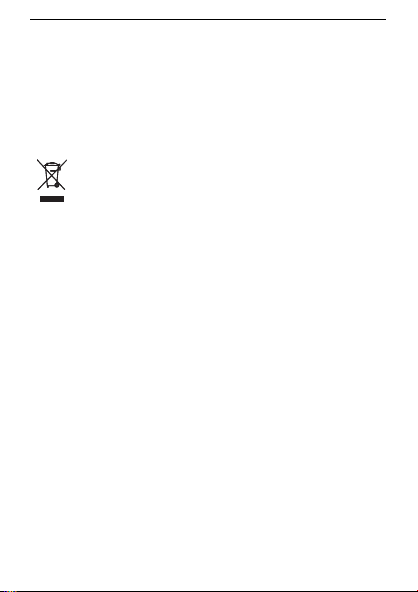
When you see the crossed-out wheel bin symbol attached to
a product, it means the product is covered by the European
Directive 2002/96/EC:
Never dispose of your product with other household waste.
Please inform yourself about the local rules on the separate
collection of electrical and electronic products. The correct
disposal of your old product helps prevent potentially negative
consequences on the environment and human health.
Environmental information
All unnecessary packaging has been omitted. We have tried
to make the packaging easy to separate into three materials:
cardboard (box), polystyrene foam (buffer) and polyethylene
(bags, protective foam sheet.)
Your system consists of materials which can be recycled
and reused if disassembled by a specialized company. Please
observe the local regulations regarding the disposal of packaging
materials, exhausted batteries and old equipment.
$-%B(1LQGG$-%B(1LQGG 3030

11
2 Your clock radio
Congratulations on your purchase, and welcome to Philips! To
fully benefi t from the support that Philips offers, register your
product at www.philips.com/welcome.
Introduction
With this clock radio, you can enjoy both FM radio and Digital
Audio Broadcasting (DAB) radio. You can also listen to portable
audio players through this clock radio.
You can set two separate alarm timings. For the alarm sound,
you can select the FM radio, DAB radio, or the buzzer.
What’s in the box
Check and identify the contents of your package:
Main unit
User manual
Quick start guide
•
•
•
$-%B(1LQGG$-%B(1LQGG 3030
12
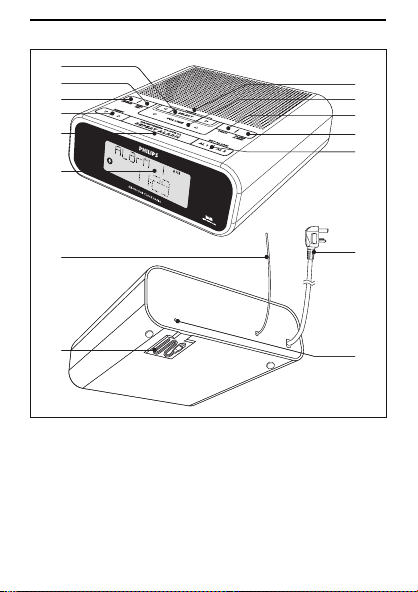
Overview of the main unit
a SELECT
Set the clock.
Program FM/DAB radio stations.
Confi rm DAB menu selection.
b INFO/MENU
Select DAB menu.
Display DAB and RDS information.
•
•
•
•
•
j
n
o
k
i
g
h
c
d
e
f
l
m
b
a
j
n
o
k
i
g
h
c
d
e
f
l
m
b
a
$-%B(1LQGG$-%B(1LQGG 3030
13
c SOURCE
Select a mode: DAB, FM TUNER, MP3 LINK or
clock (standby).
d PRESET
Select a preset radio station.
Set the time for the clock and alarm.
e BRIGHTNESS CONTROL/REPEAT ALARM
Select the display brightness.
Repeat the alarm.
f Display panel
Show current status.
g TUNING
Tune to FM/DAB radio stations.
Select DAB menu option.
h VOLUME
Adjust the volume level.
i SCAN
Scan FM/DAB radio stations.
j SLEEP/AL RESET
Set the sleep timer.
Reset the alarm.
k SET ALARM AL1/AL2
Set the alarm.
l FM/DAB antenna
Improve FM/DAB reception.
m Audio in cable
Connect to a portable audio player.
•
•
•
•
•
•
•
•
•
•
•
•
•
•
•
$-%B(1LQGG$-%B(1LQGG 3030

14
n Power plug
Power supply plug.
o Reset button
Reset the clock radio.
•
•
$-%B(1LQGG$-%B(1LQGG 3030
15
3 Get started
Caution
Use the controls only as stated in this user manual.•
Always follow the instructions in this chapter in sequence.
If you contact Philips, you will be asked for the model and
serial number of your clock radio. The model number and
serial number are on the bottom of your clock radio. Write the
numbers here:
Model No. __________________________
Serial No. ___________________________
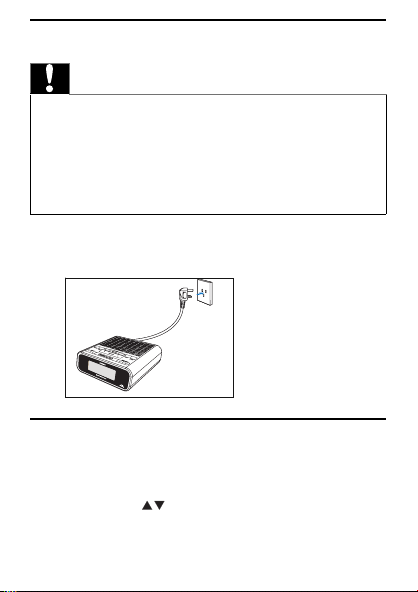
Prepare FM/DAB antenna
1 Fully extend the antenna and fi x it to the wall as shown
below.
$-%B(1LQGG$-%B(1LQGG 3030
16
Connect power
Caution
Risk of product damage! Ensure that the power supply
voltage corresponds to the voltage printed on the back or
the underside of the clock radio.
Risk of electric shock! When you disconnect the power
supply, always pull the plug from the socket. Never pull the
cord.
•
•
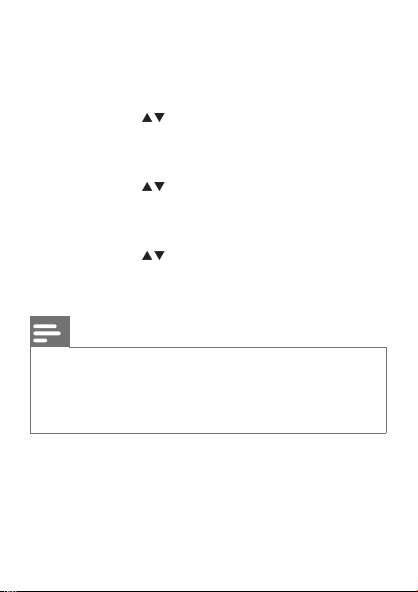
1 Connect the power plug to the power outlet.
Set the clock
1 In standby mode, press and hold SELECT for two seconds.
[SYNC ON] is displayed and [ON] begins to blink.
2 Press PRESET to select ON or OFF .
If you select [ON] , the clock radio reads the DAB/RDS time
and sets the clock automatically.
»
»
SocketSocket
$-%B(1LQGG$-%B(1LQGG 3030
17
If you select [OFF] , the clock radio turns off the time
synchronization.
3 Press SELECT to confi rm.
The time format [24H] or [12H] begins to blink.
4 Press PRESET to select 24H or 12H.
5 Press SELECT to confi rm.
The hour digits are displayed and begin to blink.
6 Press PRESET to set the hour.
7 Press SELECT to confi rm.
The minute digits are displayed and begin to blink.
8 Press PRESET to set the minute.
9 Press SELECT to confi rm the clock setting.
Note
The accuracy of the transmitted time depends on the RDS
station that transmits the time signal.
If the power supply is disconnected, the settings and clock
are saved for 3 minutes.
•
•
»
»
»
»
$-%B(1LQGG$-%B(1LQGG 3030
18
4 Use your clock radio
Adjust the volume level
1 During play, press VOLUME to increase/decrease the
volume level.
Adjust display brightness
1 Press BRIGHTNESS CONTROL/REPEAT ALARM
repeatedly to select different brightness of the display:
Full brightness
Half brightness
Backlight off
Listen to FM radio
1 Press SOURCE repeatedly to select [FM--TUNER] .
2 Press TUNING
to tune to a radio station.
To search for a radio station automatically:
1 Press TUNING .
2 Press SCAN .
The FM tuner tunes to a station with strong reception
automatically.
Program radio stations automatically
You can program a maximum of 20 preset radio stations.
1 Press SOURCE repeatedly to select [FM--TUNER] .
2 Press and hold SCAN for two seconds.
[FM SCAN] appears.
•
•
•
»
»
$-%B(1LQGG$-%B(1LQGG 3030
19
All available stations are programmed in the order of
waveband reception strength.
The fi rst programmed radio station broadcasts automatically.
Program radio stations manually
You can program a maximum of 20 preset radio stations.
1 Tune to a radio station.
2 Press PRESET to select the desired preset number.
3 Press and hold SELECT for two seconds.
The preset number of the saved station appears.
Tip
To overwrite a programmed station, store another station
in its place.
•
Listen to a preset radio station
1 Press SOURCE repeatedly to select [FM--TUNER] .
2 Press PRESET to select a preset number.
Show RDS information
RDS (Radio Data System) is a service that allows FM stations
to show additional information. If you tune to a RDS station, the
station name is displayed.
1 Tune to a RDS station.
»
»
»
$-%B(1LQGG$-%B(1LQGG 3030
20
2 Press INFO/MENU repeatedly to scroll through the
following information (if available):
Station name
Radio text messages
Program type such as [NEWS] (news(, [SPORT] (sport),
[POP M] (pop music)...
Clock time
Frequency
Tip
Detailed defi nitions of RDS program types are available
(see ‘RDS program types’ on page 29).
•
Listen to Digital Audio Broadcasts (DAB)
Digital Audio Broadcasting (DAB), is a way of broadcasting radio
digitally through a network of transmitters. It provides you with
more choice, better sound quality and more information.
1 Press SOURCE repeatedly to select [DAB] .
When you enter the DAB mode for the fi rst time, the clock
radio automatically scans DAB radio stations. The clock radio
stores all available DAB radio stations and then broadcasts the
fi rst available station.
The last selected DAB radio station broadcasts automatically.
»
»
»
»
»
»
»
$-%B(1LQGG$-%B(1LQGG 3030
21
Note
If no DAB service is available, [NO SERV] is displayed.•
Tip
Detailed information about DAB is available (see ‘About
DAB’ on page 31 ).
•
Tune to DAB radio station manually
1 Press SOURCE repeatedly to select [DAB] .
2 Press TUNING to navigate the service list.
3 Press SELECT to confi rm the selected DAB radio station.
Scan DAB radio stations automatically
You can perform both full scan and local scan to search for DAB
radio stations.
• Full scan: For users outside the UK. Wide range search.
• Local scan: Only available in the UK. Small range search.
Full scan:
1 In DAB mode, press and hold SCAN for more than two
seconds.
The clock radio scans all available DAB radio stations and
broadcasts the fi rst available station.
»
$-%B(1LQGG$-%B(1LQGG 3030
22
Local scan:
1 In DAB mode, press SCAN .
The clock radio scans all available local DAB radio stations and
broadcasts the fi rst available station.
Program DAB radio stations manually
You can program a maximum of 20 preset DAB radio stations.
1 Tune to a DAB radio station.
2 Press PRESET
to select a preset number.
3 Press and hold SELECT for two seconds.
The preset number of the saved station appears.
Listen to a preset DAB radio station
1 Press SOURCE repeatedly to select [DAB] .
2 Press PRESET to select a preset number.
Show DAB information
1 Tune to a DAB radio station.
2 Press INFO/MENU repeatedly to scroll through the
following information (if available):
Dynamic label segment (DLS)
Program type (PTY)
Ensemble Name
Time
Channel and frequency
Bit rate and audio status
Signal error rate
»
»
»
»
»
»
»
»
»
$-%B(1LQGG$-%B(1LQGG 3030
23
Set the alarm timer
You can set two separate alarm timings. For the alarm sound,
you can select the FM radio, DAB radio, or the buzzer.
1 Before you start, ensure that the clock is set correctly.
2 Press and hold AL1/AL2 for two seconds.
The sound source icon, AL1/AL2 icon and the hour digits are
displayed and begin to blink.
3 Press SOURCE repeatedly to select a sound source: DAB,
FM Tuner or Buzzer.
4 Press PRESET to set the hour.
5 Press AL1/AL2 .
The minute digits are displayed and begin to blink.
6 Press PRESET to set the minute.
7 Press AL1/AL2 to confi rm.
The alarm icon is displayed.
The clock radio turns on automatically at the set time and
switches to the selected source.
Turn on/off the alarm timer
Note
Ensure that you already set the alarms successfully.•
1 Press AL1/AL2 to turn on or off the alarm timer.
If the alarm timer is turned on, the alarm icon appears.
»
»
»
»
»
$-%B(1LQGG$-%B(1LQGG 3030

24
If the alarm timer is turned off, the alarm icon disappears.
Repeat alarm
1
When the alarm sounds, press BRIGHTNESS
CONTROL/REPEAT ALARM .
The source icon and the alarm icon begin to blink.
The alarm stops for nine minutes.
Reset alarm
1 When the alarm sounds, press SLEEP/AL RESET .
The alarm stops but the alarm settings retain for the next day.
Stop alarm sound
1 When the alarm sounds, press AL1/AL2 .
The alarm stops but the alarm settings remain.
View the alarm settings
1 Press AL1/AL2 .
»
»
»
»
»
$-%B(1LQGG$-%B(1LQGG 3030
25
5 Use more of your clock radio
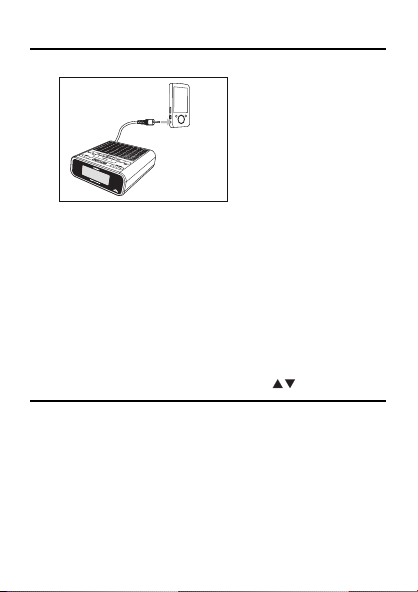
Listen to portable audio players
1 Take out the audio in cable from the bottom of the clock
radio.
2 Connect the audio in cable to the headphone or audio
out jack of a portable audio player.
3 Press SOURCE repeatedly to select [MP3--LINK] .
4 Play music on the portable audio player.
You can enjoy the music through the clock radio.
5 To adjust the volume, press VOLUME .
Set the sleep timer
1 While you listen to a source, press SLEEP/AL RESET
repeatedly to select a set period of time (in minutes).
The clock radio turns off automatically after the set period
of time.
To turn off the sleep timer:
1 Press SLEEP/AL RESET repeatedly until [OFF] appears.
»
»
$-%B(1LQGG$-%B(1LQGG 3030
26
Perform more functions through DAB menu
1 In DAB mode, press and hold INFO/MENU for two
seconds to enter the DAB menu.
2 Press TUNING
to select:
[MANUAL] (tune manually)
[SCAN LOC] (local scan)
[SCANFULL] (full scan)
[DRC] (dynamic range control)
[VERSION] (display software version)
3 If you select [DRC] , press SELECT to confi rm, and then
press TUNING
to select:
[DRC 0] (Dynamic Range Control is switched off)
[DRC 1/2] (Dynamic Range Control is set to half
normal level)
[DRC 1] (Dynamic Range Control is switched
on; the default setting recommended for noisy
environment)
4 Press SELECT to confi rm.
•
•
•
•
•
•
•
•
$-%B(1LQGG$-%B(1LQGG 3030
27
Tip
Dynamic range control (DRC) adds or removes a degree
of compensation for the differences in the dynamic range
of listening levels between radio stations.
•
Note
If no button is pressed within seven seconds, the menu exits.•
$-%B(1LQGG$-%B(1LQGG 3030
28
6 Product information
Note
Product information is subject to change without prior notice.•
Specifi cations
Tuner (FM)
Tuning Range 87.5 - 108 MHz
Tuning grid 50 KHz
Sensitivity
- Mono, 26dB S/N Ratio
<22 dBf
Search Selectivity >28 dBf
Total Harmonic Distortion <3%
Signal to Noise Ratio >50 dB
General information
AC power 230 - 240V, 50Hz
Operation Power Consumption 8W
Standby Power Consumption <3W
Dimensions
- Main Unit (W x H x D) 165 x 150 x 50 mm
Weight
- With Packing
- Main Unit
0.773 kg
0.694 kg
$-%B(1LQGG$-%B(1LQGG 3030

29
RDS program types
NO TYPE No RDS programme type
NEWS News services
AFFAIRS Politics and current affairs
INFO Special information programs
SPORT Sports
EDUCATE Education and advanced training
DRAMA Radio plays and literature
CULTURE Culture, religion and society
SCIENCE Science
VARIED Entertainment programs
POP M Pop music
ROCK M Rock music
MOR M Light music
LIGHT M Light classical music
CLASSICS Classical music
OTHER M Special music programs
WEATHER Weather
FINANCE Finance
CHILDREN Children’s programs
SOCIAL Social Affairs
RELIGION Religion
$-%B(1LQGG$-%B(1LQGG 3030

30
PHONE IN Phone In
TRAVEL Tr ave l
LEISURE Leisure
JAZZ Jazz Music
COUNTRY Country Music
NATION M National Music
OLDIES Oldies Music
FOLK M Folk Music
DOCUMENT Documentary
TES Alarm Test
ALARM Alarm
$-%B(1LQGG$-%B(1LQGG 3030

31
About DAB
About Digital Audio Broadcasting (DAB)
DAB digital radio is a new way of broadcasting radio via a
network of terrestrial transmitters. It provides listeners with
more choice and information delivered in crystal clear, crackle-
free sound quality.
– The technology allows the receiver to lock on to the strongest
signal it can fi nd.
– With DAB digital stations there are no frequencies to
remember, and sets are tuned by station name, so there’s no
returning on the move.
What is a multiplex?
Digital radio operation is made up of a single block of
frequencies called a multiplex. Each multiplex works within a
frequency spectrum, such as Band III for DAB broadcasts.
DAB BROADCASTERS AND DLS
Each DAB broadcaster (or multiplex operator) also provides
text and audio data services. Some programmes are supported
by Dynamic Label Segments (DLS).This is data which you can
read as scrolling text on your DAB radio display. Some stations
transmit the latest news, travel, and weather, what’s on now and
next, website addresses and phone numbers.
For more information on digital radio coverage and services,
please visit: www.drdb.org.
$-%B(1LQGG$-%B(1LQGG 3030
32
7 Troubleshooting
Caution
Never remove the casing of this clock radio. •
To keep the warranty valid, never try to repair the system
yourself.
If you encounter problems when using this clock radio, check
the following points before requesting service. If the problem
remains unsolved, go to the Philips web site (www.Philips.com/
support). When you contact Philips, ensure that your clock radio
is nearby and the model number and serial number are available
(see ‘Get started’ on page 15 ) .
No power
Ensure that the AC power plug of the clock radio is connected
properly.
Ensure that there is power at the AC outlet.
No sound
Adjust the volume.
No response from the clock radio
Disconnect and reconnect the AC power plug, then turn on the
system again.
Use a ball pen to press the reset button on the rear of the clock
radio to restore factory settings. This operation resets all settings
except the clock.
In clock (standby) mode, press and hold SCAN and PRESET
for
two seconds, and then press VOLUME
to reset the clock radio.
This operation resets all settings.
•
•
•
•
•
•
$-%B(1LQGG$-%B(1LQGG 3030

33
Poor radio reception
Increase the distance between the clock radio and your TV or VCR.
Fully extend the antenna.
Connect an outdoor antenna instead.
Timer does not work
Set the clock correctly.
Switch on the timer.
Clock/timer setting erased
Power has been interrupted or the power plug has been
disconnected.
Reset the clock/timer.
•
•
•
•
•
•
•
$-%B(1LQGG$-%B(1LQGG 3030

© 2008 Koninklijke Philips Electronics N.V.
All rights reserved.
Printed in China
$-%B(1LQGG$-%B(1LQGG $0$0