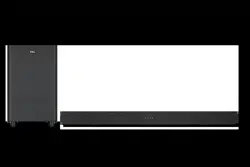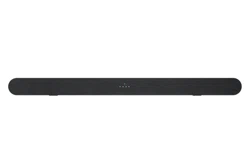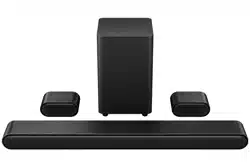
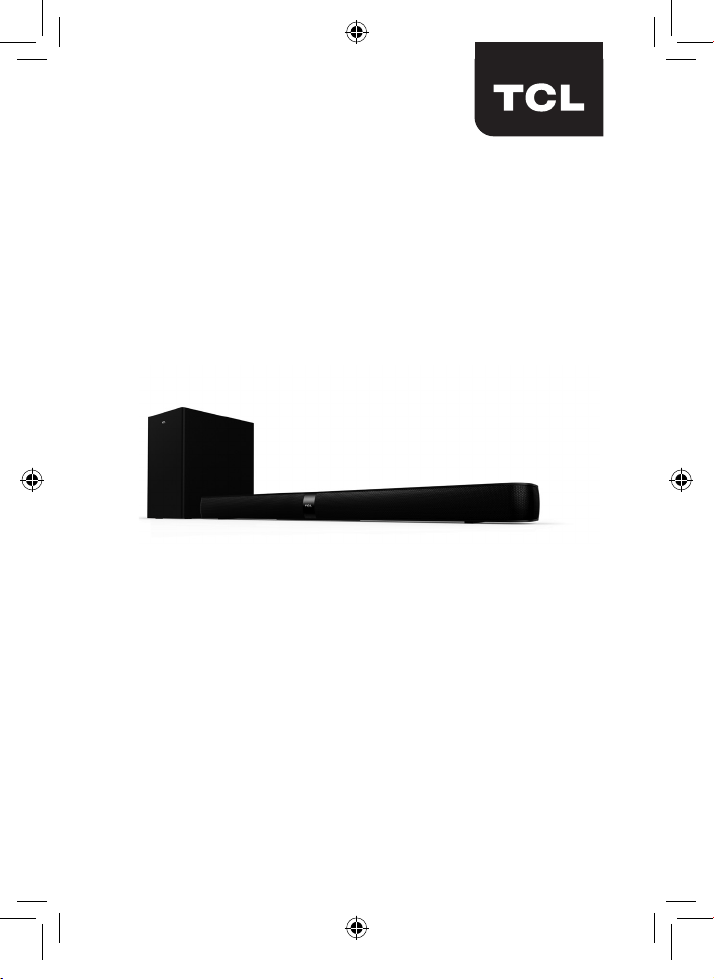
2.1 Channel Home Theater Sound Bar
Alto 7+
User manual
TS7010_UM_US_EN_print_190118a.indd 1 25/2/2019 11:49 AM

Product Registration
Please register your purchase on-line at www.tclusa.com
or www.tclcanada.com. It will make it easier to contact you
should it ever be necessary. Registration is not required for
warranty coverage.
Product Information
Keep your sales receipt to obtain warranty parts and service
and for proof of purchase. Attach it here and record the
serial and model numbers in case you need them. These
numbers are located on the product.
Model No. ____________________________________________
Purchase Date ________________________________________
Serial No. ____________________________________________
Dealer/Address/Phone _________________________________
TS7010_UM_US_EN_print_190118a.indd 2 25/2/2019 11:49 AM
1
Contents
Contents
1 Important safety instructions 3
Important information 3
Important safety instructions 5
2 Welcome 10
What’s in the box 10
Overview of the Sound Bar main unit 12
Overview of the wireless subwoofer 14
Overview of the remote control 15
Set up your Sound Bar system 17
3 Connect your Sound Bar system 21
Connect with the supplied HDMI cable 21
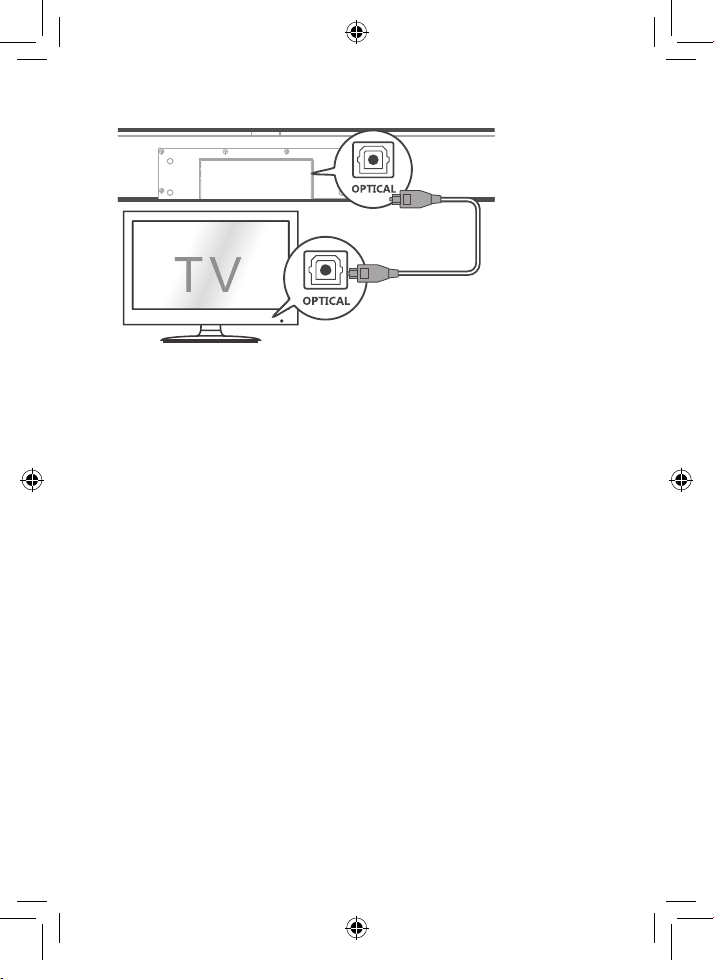
Connect with the supplied optical cable 22
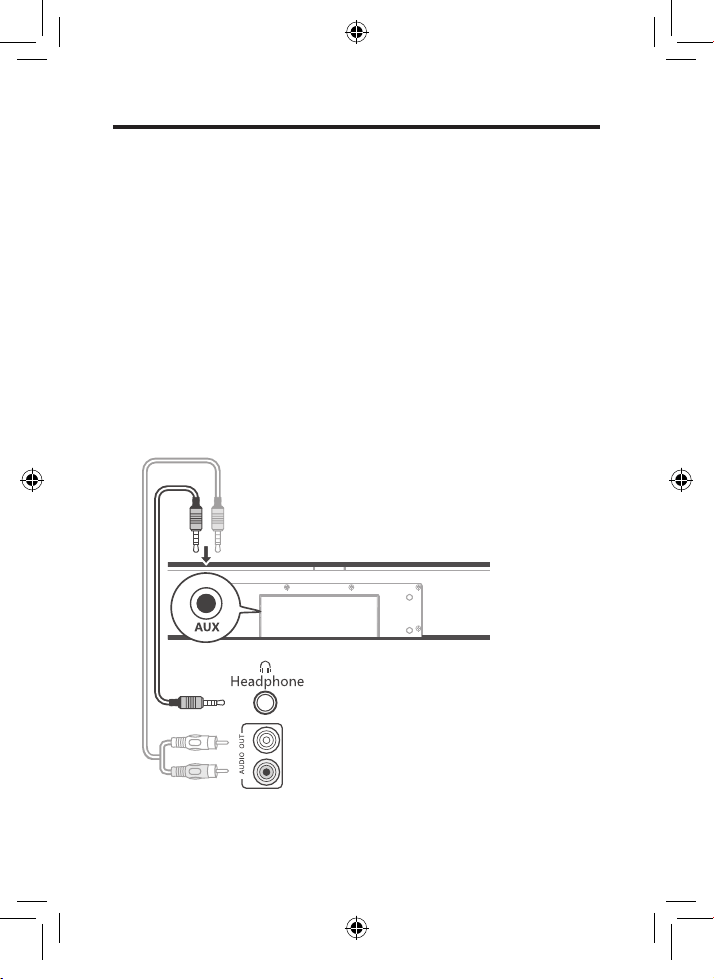
Connect with the supplied 3.5mm-to-3.5mm audio
cable 24
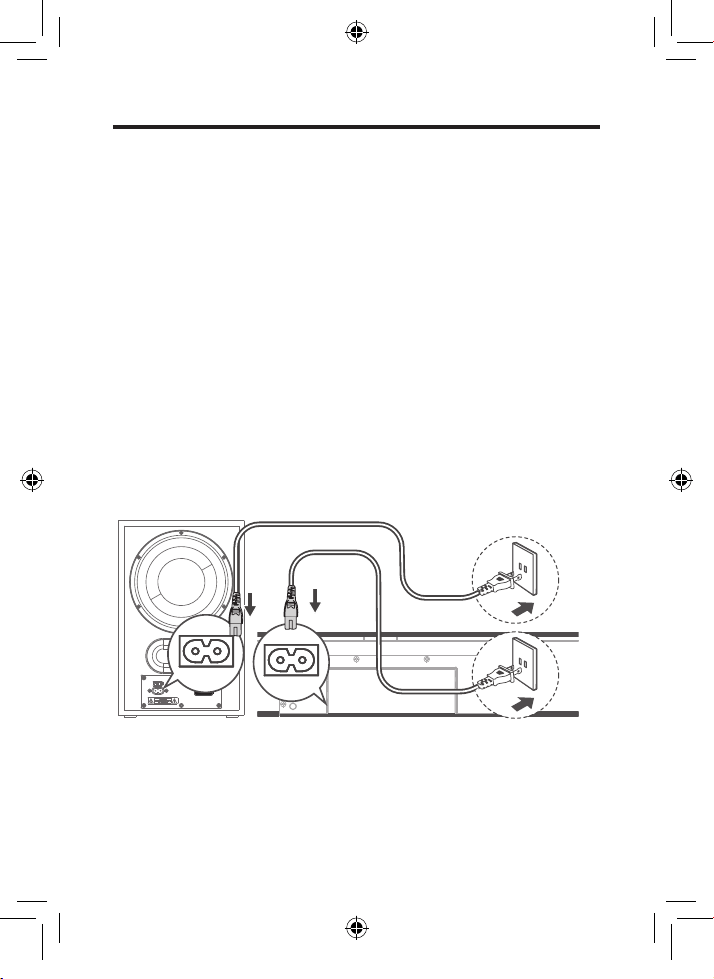
Connect your Sound Bar to power supply 25
Connect the Sound Bar with your Bluetooth device 26
Connect your wireless subwoofer to the Sound Bar 28
Connect the IR pass-through cable 30
TS7010_UM_US_EN_print_190118a.indd 1 25/2/2019 11:49 AM
2
4 Use your Sound Bar system 31
Use your Sound Bar with the top panel or remote
control 31
Sound settings 32
Control the Sound Bar with your TCL Roku TV
remote control 33
Listen to music from your Bluetooth device 35
Use the USB cable or device for music playback 36
5 Specications 38
6 Notice 39
Compliance notice 39
Disposal of your old product and battery 42
Trademarks 43
7 FAQ 44
TS7010_UM_US_EN_print_190118a.indd 2 25/2/2019 11:49 AM
3
1 Important safety
instructions
Important information
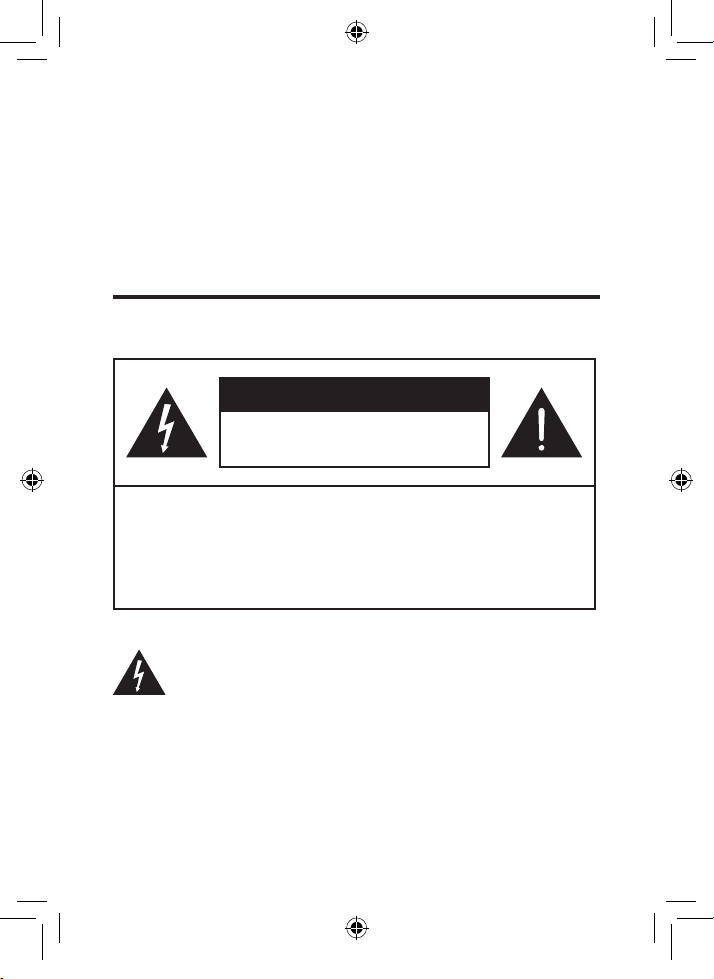
CAUTION
RISK OF ELECTRIC SHOCK
DO NOT OPEN
CAUTION: TO REDUCE THE RISK OF ELECTRIC
SHOCK, DO NOT REMOVE COVER (OR BACK).
NO USER-SERVICEABLE PARTS INSIDE. REFER
SERVICING TO QUALIFIED SERVICE PERSONNEL.
Thelightningashwitharrowheadsymbol,withinan
equilateral triangle is intended to alert the user to the
presence of uninsulated dangerous voltage within the
TS7010_UM_US_EN_print_190118a.indd 3 25/2/2019 11:49 AM
4
product’senclosurethatmaybeofsucientmagnitudeto
constitute a risk of electric shock.
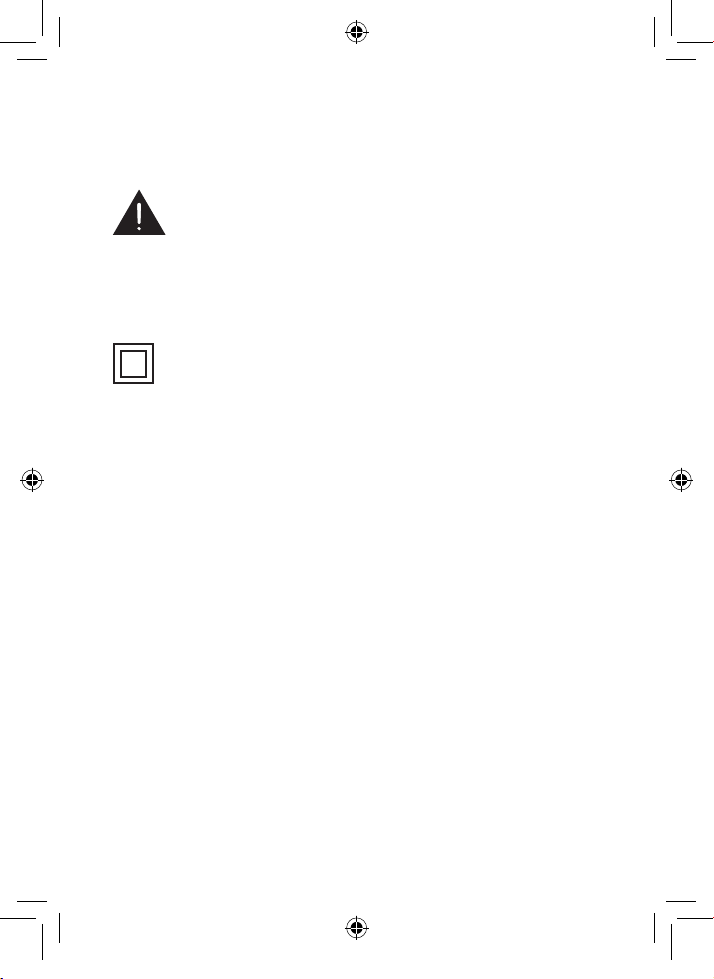
The exclamation point within an equilateral triangle is
intended to alert the user to the presence of important
operating and maintenance (servicing) instructions in the
literature accompanying the product.
This symbol indicates that this product incorporates
double insulation between hazardous main voltage and
user accessible parts. When servicing, use only identical
replacement parts.
Warnings
• To reduce the risk of re or electric shock, do not
expose this product to rain or moisture. This product
should not be exposed to dripping or splashing. No
objects lled with liquids, such as vases, should be
placed on or near the product.
• The product is unstable if it is not properly placed
or mounted to the wall. Be sure to follow the wall
mounting instructions provided in this user manual to
ensure your safety.
• Do not expose batteries to excessive heat such as
sunshine, re, and so forth.
TS7010_UM_US_EN_print_190118a.indd 4 25/2/2019 11:49 AM

5
Important safety instructions
• Read these instructions - Read all the safety and
operating instructions before operating the product.
• Retain these instructions - Retain the safety and
operating instructions for future reference.
• Heed all warnings - Adhere to all warnings on the
product and in the operating instructions.
• Follow all instructions - Follow all operating and use
instructions.
• Do not use this apparatus near water – The appliance
should not be used near water or moisture – for example,
in a wet basement or near a swimming pool and the like
• Clean only with a dry cloth.
• Do not block any ventilation openings. Install in
accordance with the manufacturer’s instructions.
• Do not install near any heat sources such as radiators,
heat registers, stoves, or other apparatus (including
ampliers)thatproduceheat.
• Do not defeat the safety purpose of the polarized or
grounding-type plug. A polarized plug has two blades with
one wider than the other. A grounding type plug has two
blades and a third grounding prong. The wide blade or the
third prong are provided for your safety. If the provided
plugdoesnottintoyouroutlet,consultanelectricianfor
replacement of the obsolete outlet.
• Protect the power cord from being walked on or pinched
particularly at plugs, convenience receptacles, and the
point where it exits from the product.
TS7010_UM_US_EN_print_190118a.indd 5 25/2/2019 11:49 AM
6
• Use only attachments/accessoriesspeciedbythe
manufacturer.
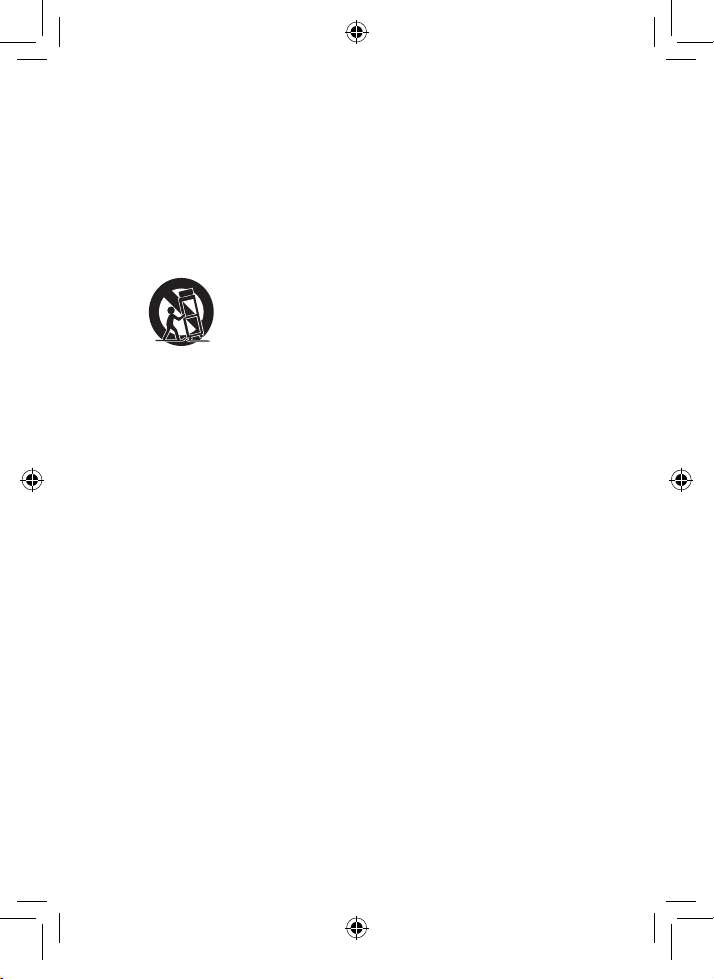
• Use only with the cart, stand, tripod, bracket, or table
speciedbythemanufacturer,orsoldwiththeapparatus.
When a cart is used, use caution when moving the
cart/apparatus combination to avoid injury from tip-over.
• Unplug this apparatus during lightning storms or when
unused for long periods of time.
• Refer all servicingtoqualiedservicepersonnel.
Servicing is required when the apparatus has been
damaged in any way, such as power-supply cord or plug
damaged, liquid has been spilled or objects have fallen
into the apparatus, the apparatus has been exposed to
rain or moisture, does not operate normally, or has been
dropped.
TS7010_UM_US_EN_print_190118a.indd 6 25/2/2019 11:49 AM
7
Cautions
• To prevent electric shock, match wide blade of plug to
wide slot, fully insert
• The product shall not be exposed to dripping or
splashing.
• Do not place any sources of danger on the product (for
example.liquidlledobjects,lightedcandles).
• Disconnectthepowercordtoshutowhenndtrouble
or not in use. The power cord shall be readily operable.
• Use of controls or adjustments or performance of
procedures other than those described herein, may
result in hazardous radiation exposure or other unsafe
operation.
• Toreducetheriskofreorelectricshock,donot
expose this apparatus to rain or moisture. The
apparatus must not be exposed to dripping or splashing
andobjectslledwithliquids,suchasvases,mustnot
be placed on apparatus.
• The power cord/appliance coupler is used as the
disconnect device, the disconnect device must remain
readily operable.
Battery caution and disposal information
• Install only new batteries of the same type in your product.
• Failure to insert batteries in the correct polarity, as
indicated in the battery compartment, may shorten the life
of the batteries or cause batteries to leak.
• Do not mix old and new batteries.
TS7010_UM_US_EN_print_190118a.indd 7 25/2/2019 11:49 AM

8
• Do not use rechargeable (Nickel Cadmium) or (Nickel
Metal Hydride) batteries.
• Do not mix alkaline, standard (Carbon-Zinc) or
rechargeable (Nickel Cadmium) or (Nickel Metal Hydride)
batteries.
• Donotdisposeofbatteriesinreorwater.
• Recycle or dispose of batteries as per state and local
guidelines.
• Danger of explosion if battery is incorrectly replaced.
Replace only with the same or equivalent type.
• When the remote control is not to be used for a long time
(more than a month), remove the battery from the remote
control to prevent it from leaking.
• If the batteries leak, wipe away the leakage inside the
battery compartment and replace the batteries with new
ones.
• Keep away the batteries from heat or moisture.
• Do not carry or store batteries with other metallic objects.
Doing so could cause batteries to short circuit, leak or
explode.
• Do not carry or store batteries with other metallic objects.
Doing so could cause batteries to short circuit, leak or
explode.
• Neverrechargeabatteryunlessitisconrmedtobea
rechargeable type.
TS7010_UM_US_EN_print_190118a.indd 8 25/2/2019 11:49 AM

9
Installation location
• Thisproductisdesignedtositonarm,atsurface.Do
not place the product on built-in installation such as a
bookcase or rack because the ventilation slots around
the product will be blocked, resulting in reduced lifetime
from overheating. To assure adequate ventilation for this
product, maintain a spacing of 7.8 inches (20cm) or more
around the product.
• Make sure the product on the furniture is of adequate size
and strength to prevent it from being accidentally tipped
over,pushedo,orpulledo.Thiscouldcausepersonal
injury and/or damage to the product.
• Installation of wall mount must be carried out by
qualiedpersonnelonly.Incorrectassemblycanresult
in severe personal injury and property damage (if you
intend to install this product yourself, you must check
for installations such as electrical wiring and plumbing
that may be buried inside the wall). It is the installer’s
responsibility to verify that the wall will safely support the
total load of the product and wall mount brackets.
TS7010_UM_US_EN_print_190118a.indd 9 25/2/2019 11:49 AM
10
2 Welcome
Congratulations on the purchase of your new TCL Sound
Bar! After it is set up and connected, you can experience
a superb sound quality and state-of-the-art design to best
tyourhomeentertainmentsystem.Youarerecommended
to read through this user manual which helps you set up,
connect and operate the product easily and properly. For
more information, visit
www.tclusa.com or www.tclcanada.com
Let’s get started.
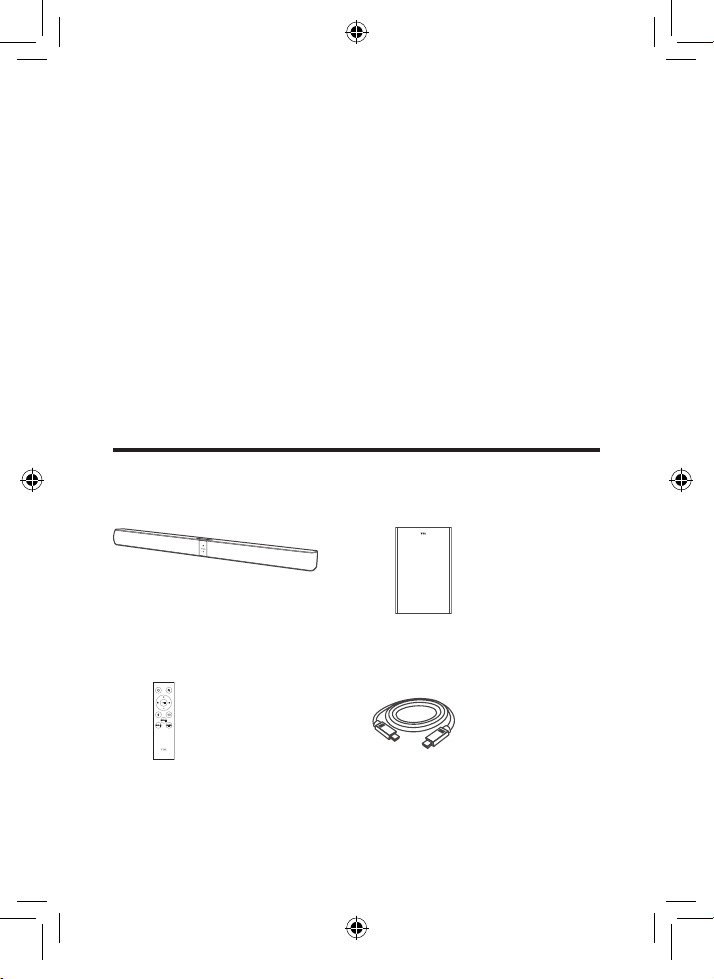
What’s in the box
Sound Bar main unit
Remote control
Wireless subwoofer
HDMI cable
TS7010_UM_US_EN_print_190118a.indd 10 25/2/2019 11:49 AM
11
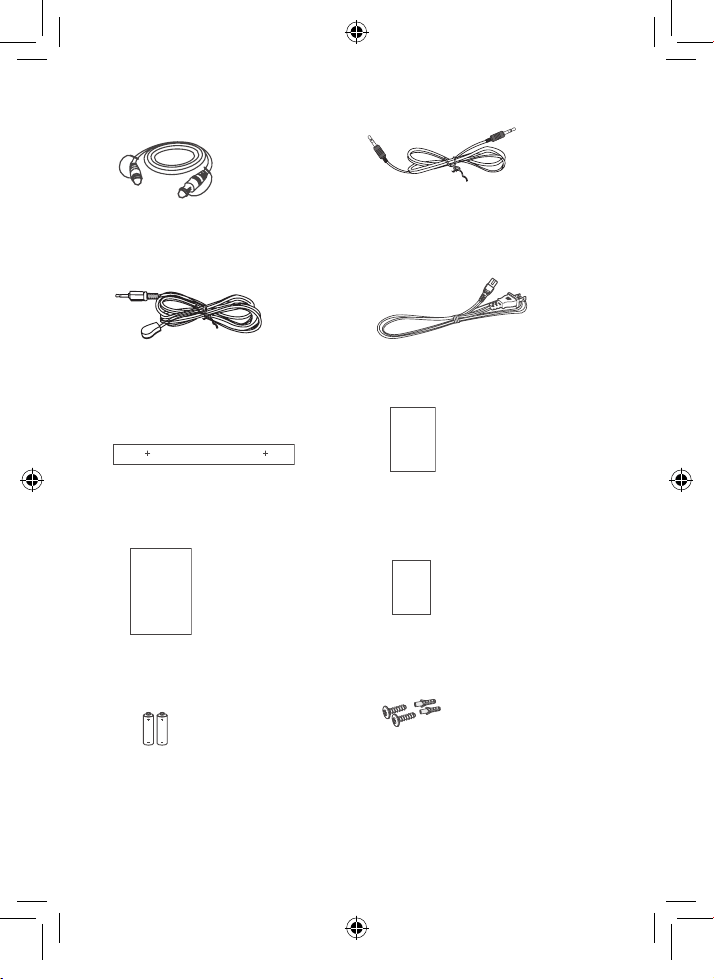
Optical cable
IR pass-through cable
Wall mount template
User
manual
User manual
AAA battery x 2
3.5mm-to-3.5mm audio
cable
AC power cord x 2
QSG
Quick start guide
Warranty
Warranty card
Wall screw (M3.6) x 2
Wall anchor x 2
TS7010_UM_US_EN_print_190118a.indd 11 25/2/2019 11:49 AM
12
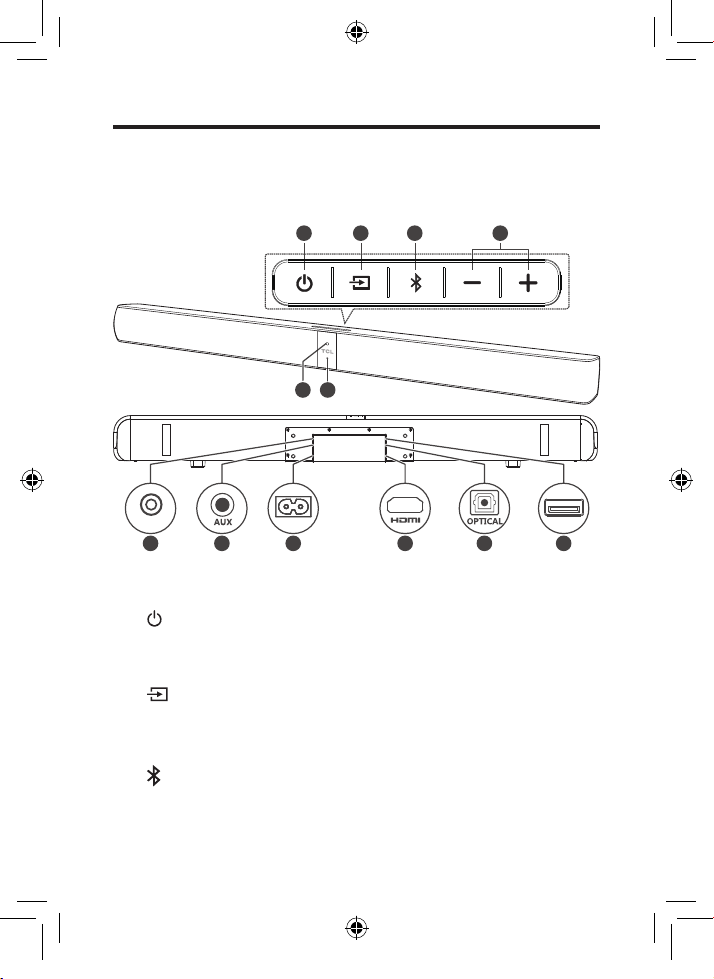
Overview of the Sound Bar main unit
65
7
1 2 3 4
USB
7 8 9 10 11 12
~AC IN
IR pass-through
1
Press to turn the Sound Bar main unit on or to standby
mode.
2
Press to switch the audio source among
HDMI/USB/AUX/Bluetooth/Optical modes.
3
Press to select the Bluetooth function.
TS7010_UM_US_EN_print_190118a.indd 12 25/2/2019 11:49 AM

13
4 +/-
Press to increase or decrease the volume level.
5 Remote control sensor
Receive signals from the remote control.
6 LED indicator
Red: in standby mode.
Purple: in HDMI mode.
Green: in AUX mode.
Blue: in Bluetooth mode.
Yellow:inOpticalmode.
White: in USB mode.
7 IR pass-through cable connector
8 AUX input connector
9 AC input power connector
10 HDMI ARC connector
11 Optical input connector
12 USB Type A connector (only for music playback)
TS7010_UM_US_EN_print_190118a.indd 13 25/2/2019 11:49 AM
14
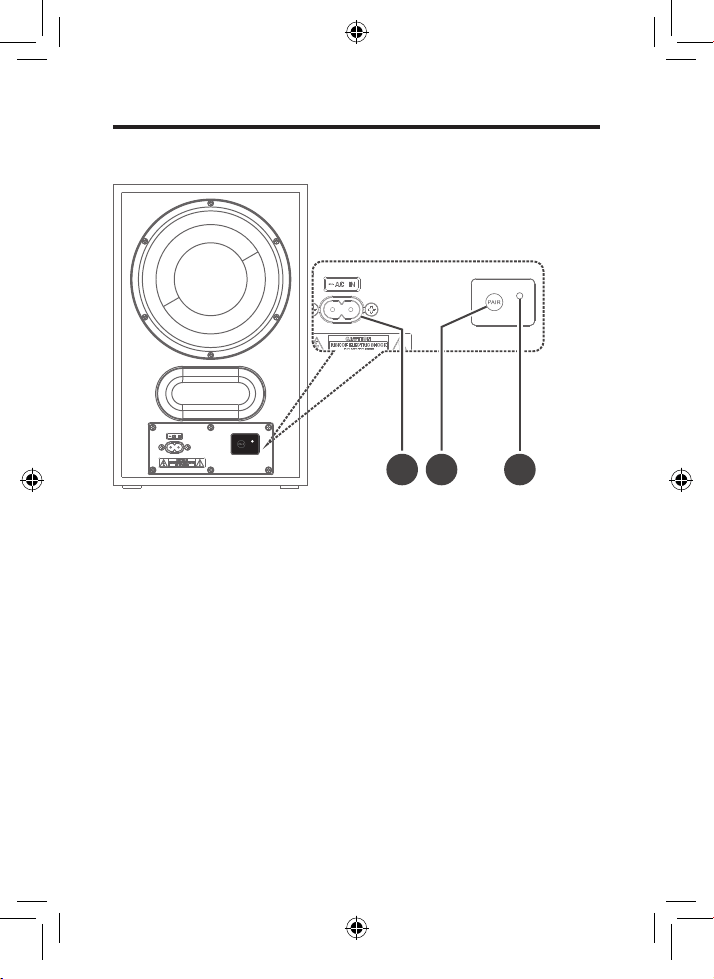
Overview of the wireless subwoofer
2 31
1 AC input power connector
2 PAIR
Press to activate pairing with the Sound Bar main unit.
3 Blue LED indicator
• ashesslowlywhenthesubwooferisinstandby
mode.
• ashesslowlywhenpairingisinprogress.
• remains on solidly when pairing is successful.
TS7010_UM_US_EN_print_190118a.indd 14 25/2/2019 11:49 AM
15
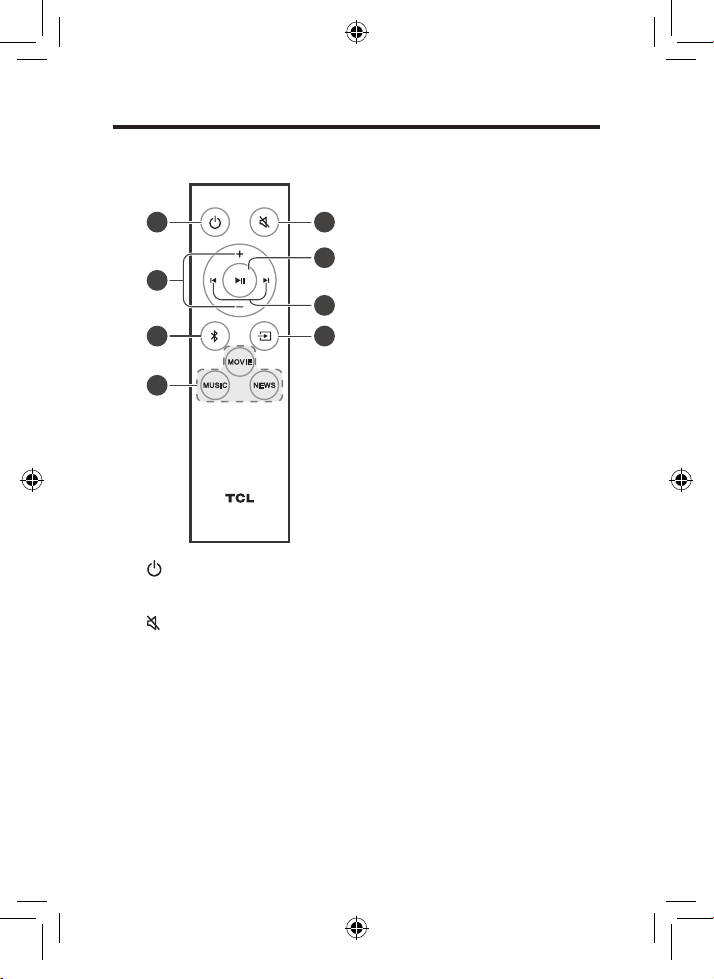
Overview of the remote control
1
6
8
3
4
5
2
7
1
Press to turn the Sound Bar on or to standby mode.
2
Press to mute or unmute the sound.
3 +/-
Press to increase or decrease the volume level.
TS7010_UM_US_EN_print_190118a.indd 15 25/2/2019 11:49 AM
16
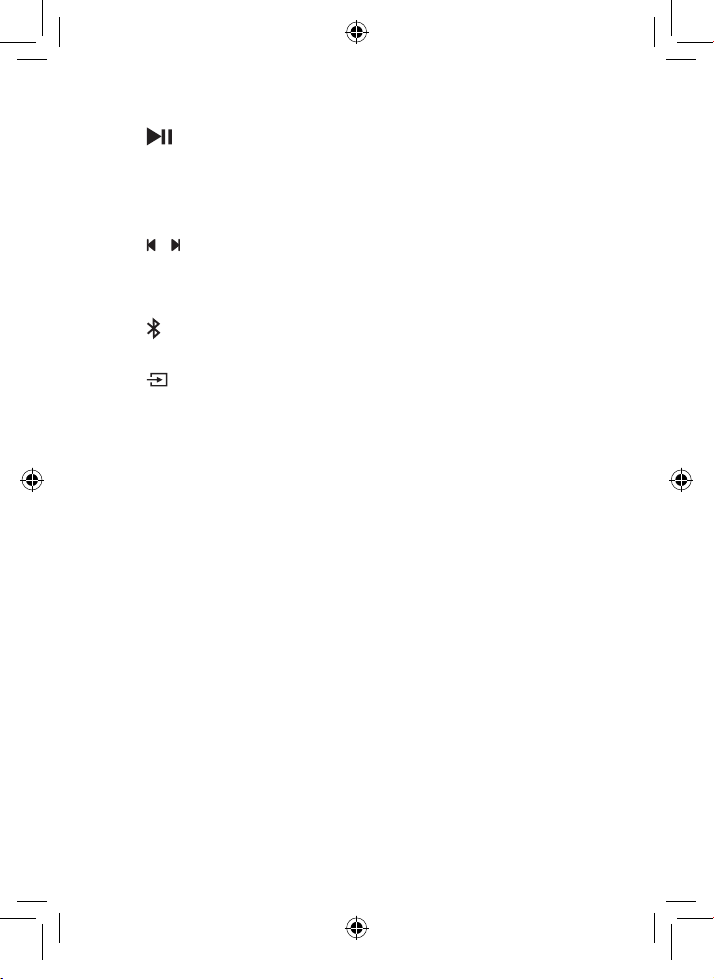
4
Play/pause/resume playback in Bluetooth/USB mode.
Press and hold for 3 seconds to disconnect the
Bluetooth function.
5 /
Press to skip to previous or next track in Bluetooth/USB
mode.
6
Press to switch the audio source to Bluetooth mode.
7
Press to switch the audio source among
HDMI/USB/AUX/Bluetooth/Optical modes.
8 NEWS/MOVIE/MUSIC
Presstoselecttheequalizer(EQ)eectwhenyouare
watching news or movies or listening to music.
TS7010_UM_US_EN_print_190118a.indd 16 25/2/2019 11:49 AM
17
Set up your Sound Bar system
Notes
• Make sure you read all the safety information before
you mount the Sound Bar main unit on the wall. (see
‘Important safety instructions’ on page 5).
• Makesureyouusescrewsprovidedorspeciedbythe
authorized manufacturer.
• TCL Corporation bears no responsibility for accidents or
damage caused by improper wall mounting and screws
installationorinsucientwallstrength,etc.
• Additional tools (not supplied) are required for
installation.
Mount your Sound Bar main unit on the wall
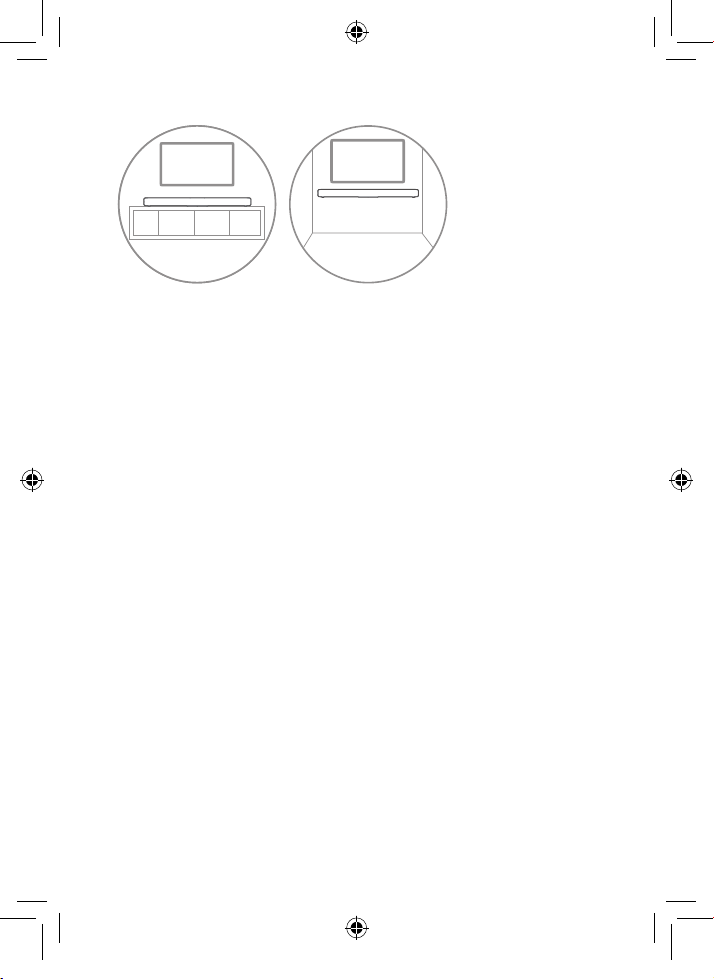
YoucanchoosetoplaceyourSoundBarmainunitbelowthe
center of your TV or mount it on the wall.
TS7010_UM_US_EN_print_190118a.indd 17 25/2/2019 11:49 AM
18
A B
1
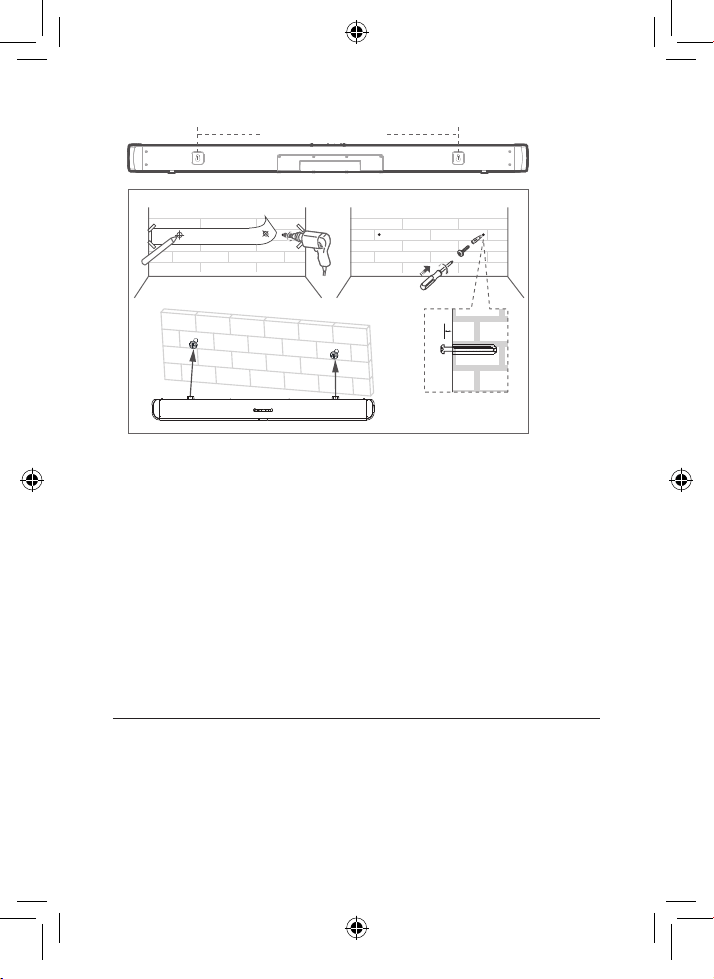
Place the supplied wall mount template on the wall.
Make sure the wall mount template is at least 2 inches
(5cm) below the center of the TV.
2
Use a level to make sure the Sound Bar is positioned
accurately.
3
Usethetapetostickthewallmounttemplatermlyon
the wall.
4
Mark on the wall using each marking on the template
through the mounting holes (Fig.1).
5
Take away the wall mount template.
6
Drill a screw hole at each marking on the wall.
7
Insert the supplied wall anchors into 2 screw holes on
the wall (Fig. 1).
8
Insert the supplied screws into the wall anchors. Leave
4mm between the screw heads and the wall (Fig. 2).
9
Fix and tighten the screws on the wall (Fig. 3).
10
Hang the Sound Bar main unit on the screws (Fig. 3).
TS7010_UM_US_EN_print_190118a.indd 18 25/2/2019 11:49 AM
19
Fig.1
Fig.3
Fig.2
Wall mount template
4mm
600 mm / 23.62”
Notes
• Check the installation location before you mount the
Sound Bar on the wall (see ‘Installation location’ on
page 9).
• Youmayconsidertoconnectthecablesrstbefore
mounting the Sound Bar on the wall.
Position your subwoofer
The distance between the subwoofer and the Sound Bar
main unit should be within 3 meters (9.8 feet).
TS7010_UM_US_EN_print_190118a.indd 19 25/2/2019 11:49 AM
20
Install/replace the remote control batteries
Warnings
• Danger of explosion if battery is incorrectly replaced.
Replace only with the same or equivalent type.
Caution
• The battery contains perchlorate material, handle
it with care. For information, refer to www. dtsc.
ca.gov/hazardous waste/perchlorate.
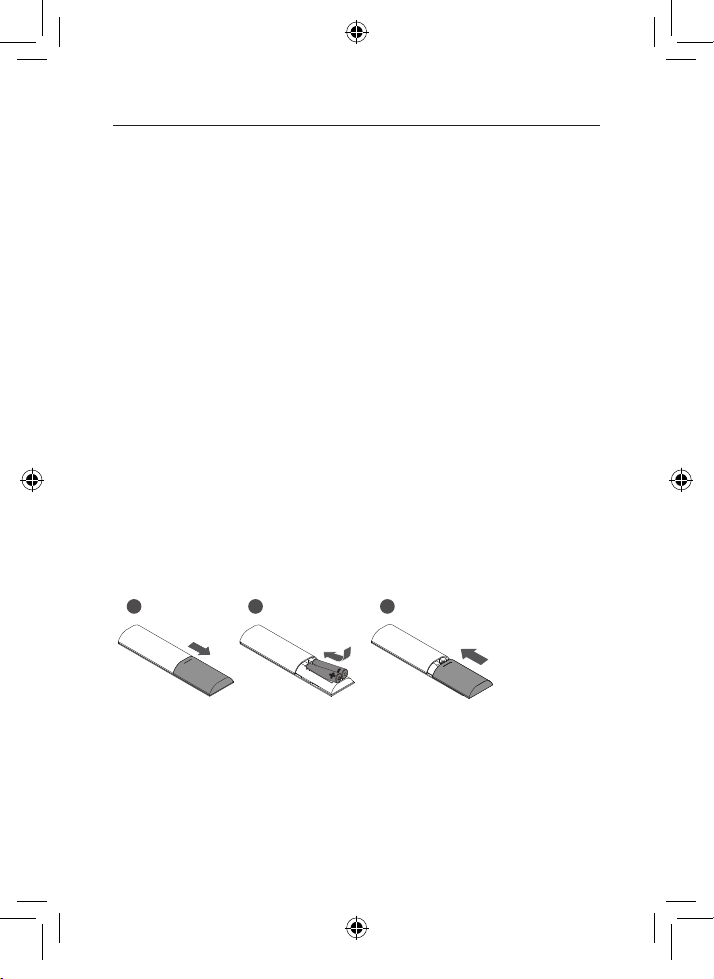
1
Open the battery compartment, remove the old batteries
if necessary.
2
Place two new AAA batteries into the battery
compartment with the correct polarity (+/-).
3
Close the battery compartment.
1 2 3
TS7010_UM_US_EN_print_190118a.indd 20 25/2/2019 11:49 AM

21
3 Connect your Sound
Bar system
AfteryouhavexedthepositionoftheSoundBarmainunit,
you can start connecting it to your TV or other devices and
listen to the audio through your Sound Bar. Make sure you
have muted the audio of your TV or device. For information,
check the user manual of your TV or device.
Connect with the supplied HDMI cable
Note
• Make sure your TV or device supports the HDMI ARC
feature. For information, check the user manual of your
TV or device.
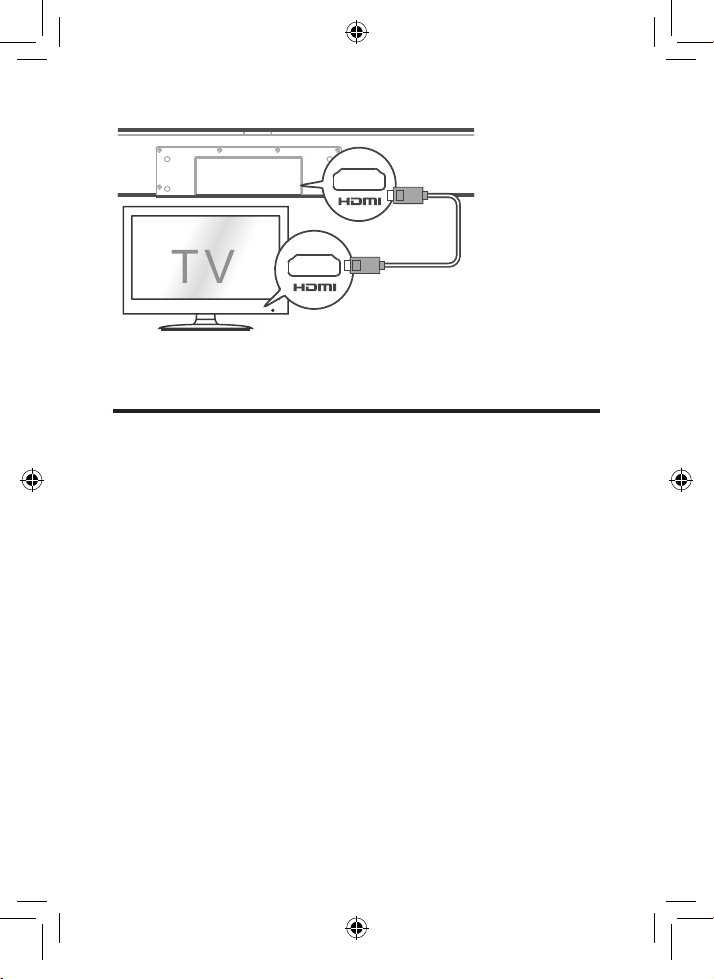
Connect one end of the HDMI cable to the HDMI ARC input
connector on your Sound Bar main unit and another end to
the HDMI ARC output connector of your TV or device.
TS7010_UM_US_EN_print_190118a.indd 21 25/2/2019 11:49 AM
22
Connect with the supplied optical
cable
1
Remove the protective caps from the optical cable.
2
Connect one end of the optical cable to the optical input
connector on your Sound Bar main unit and another end
to the optical output connector of your TV or device.
TS7010_UM_US_EN_print_190118a.indd 22 25/2/2019 11:49 AM
23
Note
• If there is no sound output from the Sound Bar main unit
andtheyellowLEDashesrapidly,trytoactivatethe
PCM signal output on your TV or device. PCM is used
to convert analog audio signals into digital audio signals
in most devices. For more information of how to activate
the PCM signal output, check the user manual of your
TV or device.
TS7010_UM_US_EN_print_190118a.indd 23 25/2/2019 11:49 AM
24
Connect with the supplied 3.5mm-to-
3.5mm audio cable
Youcaneither:
• connect one end of the supplied 3.5mm-to-3.5mm
audio cable to the AUX input connector on your Sound
Bar main unit and another end to the headphone or
audio output connector on your TV or device. This will
disable the sound of your TV built-in speakers; or
• connect one end of an RCA-to-3.5mm audio cable (not
supplied) to the AUX input connector on your Sound
Bar main unit and other ends to the TV’s audio output
connectors.
Not supplied
TS7010_UM_US_EN_print_190118a.indd 24 25/2/2019 11:49 AM
25
Connect your Sound Bar to power
supply
1
Make sure that you have completed all other
connections before connecting the Sound Bar to power
supply.
2
Make sure the power supply voltage complies with your
country’ssafetystandards(see‘Specications’onpage
38).
3
Connect one end of another supplied AC power cord to
the AC input connector on your subwoofer and another
end to the power socket on the wall.
4
Connect one end of a supplied AC power cord to the
AC input connector on your Sound Bar main unit and
another end to the power socket on the wall.
~AC IN
~AC IN
TS7010_UM_US_EN_print_190118a.indd 25 25/2/2019 11:49 AM
26
Connect the Sound Bar with your
Bluetooth device
Notes
• Make sure your wireless device supports the Bluetooth
function.
• The operational range between the Sound Bar main unit
and your Bluetooth device is approximately 10 meters
(without any obstacle between the Bluetooth device and
Sound Bar main unit).
1
Press on the top panel of your Sound Bar main unit or
remote control to power on the Sound Bar.
2
Press on the top panel of your Sound Bar main unit or
remote control.
TheblueLEDashesslowly.TheSoundBarisready
to pair.
3
Power on your Bluetooth device and activate its
Bluetooth function.
4
Select TCL Alto 7+ on the pairing list of your Bluetooth
device.
Youheardistinctdoublebeepsound.
The blue LED remains on solidly when pairing is
successful.
TS7010_UM_US_EN_print_190118a.indd 26 25/2/2019 11:49 AM
27
Tip
• IfyoucannotndthemodelnameTCL Alto 7+ on your
Bluetooth device, press and hold on the remote
control.YouwillseetheblueLEDashesrapidly.Now
the Sound Bar main unit is entering the pairing mode.
YourSoundBarsystemisnowsetupandreadytouse.
5
To disconnect the Bluetooth function, you can:
• press on the Sound Bar main unit or remote
control to switch to another source; or
• disable the Bluetooth function on your device; or
• press and hold on the remote control for 3
seconds.
TS7010_UM_US_EN_print_190118a.indd 27 25/2/2019 11:49 AM
28
Connect your wireless subwoofer to
the Sound Bar
When the wireless subwoofer is connected, you can enjoy
powerful deep bass sounds and a truly immersive audio
experience.
Auto pairing
Make sure both the Sound Bar and wireless subwoofer are
connected to the power supply and are turned on.
The Sound Bar will pair with the subwoofer
automatically.
TheblueLEDwillashwhenpairingisinprogress.
The blue LED will remain on solidly when pairing is
successful.
Note
• Do not press PAIR at the back of the wireless
subwoofer during auto pairing.
TS7010_UM_US_EN_print_190118a.indd 28 25/2/2019 11:49 AM

29
Manual pairing
1
Make sure the Sound Bar and wireless subwoofer are
properly connected to the power supply.
2
Press PAIR at the back of the wireless subwoofer until
theblueLEDonthesubwooferashesslowly.
The wireless subwoofer is ready to pair.
3
Press on the top panel of your Sound Bar main unit
or the remote control to power on your Sound Bar main
unit.
The Sound Bar and wireless subwoofer will pair
automatically.
Pairing is successful. The blue LED remains on
solidly.
Note
• If the blue LED at the back of the subwoofer still
ashesafterpairing,itmeanspairingisnotsuccessful.
Disconnect the AC power cord from the wireless
subwoofer and then connect again after 3 minutes.
Then repeat steps 1 to 3.
TS7010_UM_US_EN_print_190118a.indd 29 25/2/2019 11:49 AM
30
Connect the IR pass-through cable
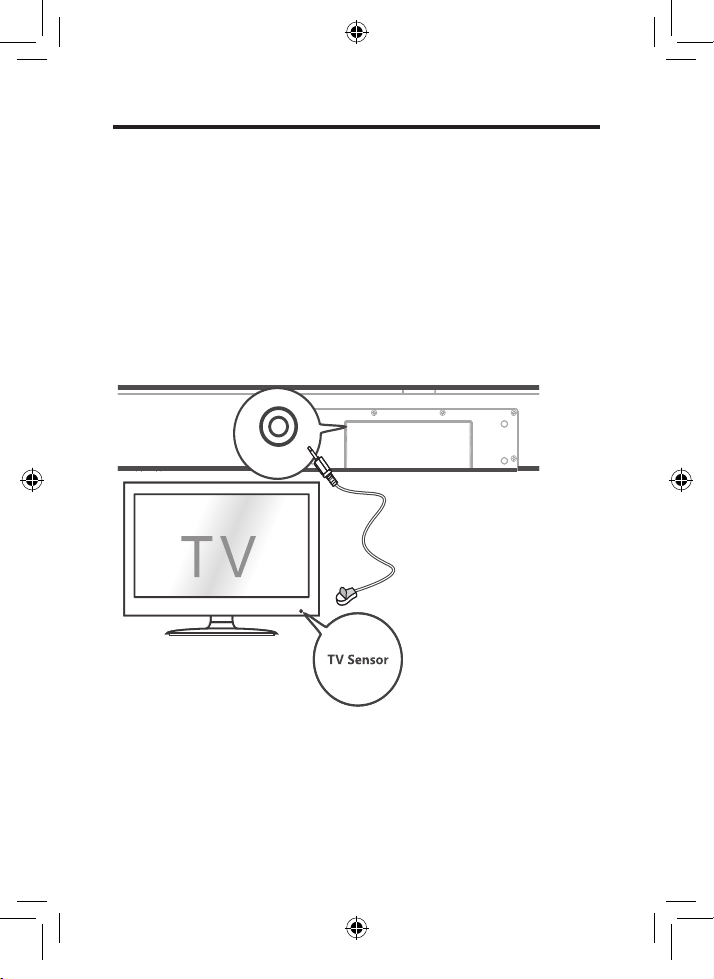
If the Sound Bar blocks the IR receiver of the TV when
placing directly in front of it, you can connect the Sound Bar
and TV with the supplied IR pass-through cable so that it
can receive signal from the remote control of your TV.
Connect one end of the IR pass-through cable to the IR
pass-through cable connector on your Sound Bar main unit.
Then, place another end with the IR blaster close to the TV
sensor. For information, check the user manual of your TV.
IR pass-through
TS7010_UM_US_EN_print_190118a.indd 30 25/2/2019 11:49 AM
31
4
Use your Sound Bar
system
Use your Sound Bar with the top panel
or remote control
1
Make sure the Sound Bar is properly connected to the
power supply and sources.
2
Press on the top panel of your Sound Bar main unit or
remote control to power on the Sound Bar.
The Sound Bar will pair with the subwoofer
automatically. If pairing is not successful, pair
your Sound Bar with the subwoofer manually (see
‘Connect your wireless subwoofer to the Sound Bar’
on page 28).
3
Press at the top panel of your Sound Bar main unit or
remote control to switch to the correct source.
LED behaviors under dierent source modes
LED indicators Source mode
The red LED is on solidly. in standby mode
The purple LED is on solidly. in HDMI ARC mode
The green LED is on solidly. in AUX mode
TS7010_UM_US_EN_print_190118a.indd 31 25/2/2019 11:49 AM
32
The blue LED is on solidly. in Bluetooth mode
TheblueLEDashesslowly. ready to pair
TheblueLEDashesslowly. pairing in progress
The yellow LED is on solidly. in optical mode
The white LED is on solidly. in USB mode
Tip
• Youcanusemoreadvancedfunctionsontheremote
control (see ‘Overview of the remote control’ on page
15).
Sound settings
Youcanenjoyyourmoviesormusicwithyouridealsound.
• Press +/- to adjust the volume.
• Press on the remote control to mute the sound. Press
again to unmute the sound.
• Press the EQ buttons (NEWS/MOVIE/MUSIC) on the
remotecontroltoselecttheequalizer(EQ)eectwhen
you are watching news or movies or listening to music.
TS7010_UM_US_EN_print_190118a.indd 32 25/2/2019 11:49 AM
33
Operation LED indicators
Adjust the volume. ThewhiteLEDashesquickly
and goes back to the source
LED.
Mute the Sound Bar. TheredLEDkeepsashing.
Unmute the Sound Bar. TheredLEDashesandgoes
back to the source LED.
Maximum or minimum
volume level is reached.
The red LED is on for 2
seconds and goes back to the
source LED.
Select the equalizer (EQ)
eect).
Movie:ThewhiteLEDashes
once.
Music:ThegreenLEDashes
once.
News:TheyellowLEDashes
once.
Control the Sound Bar with your TCL
Roku TV remote control
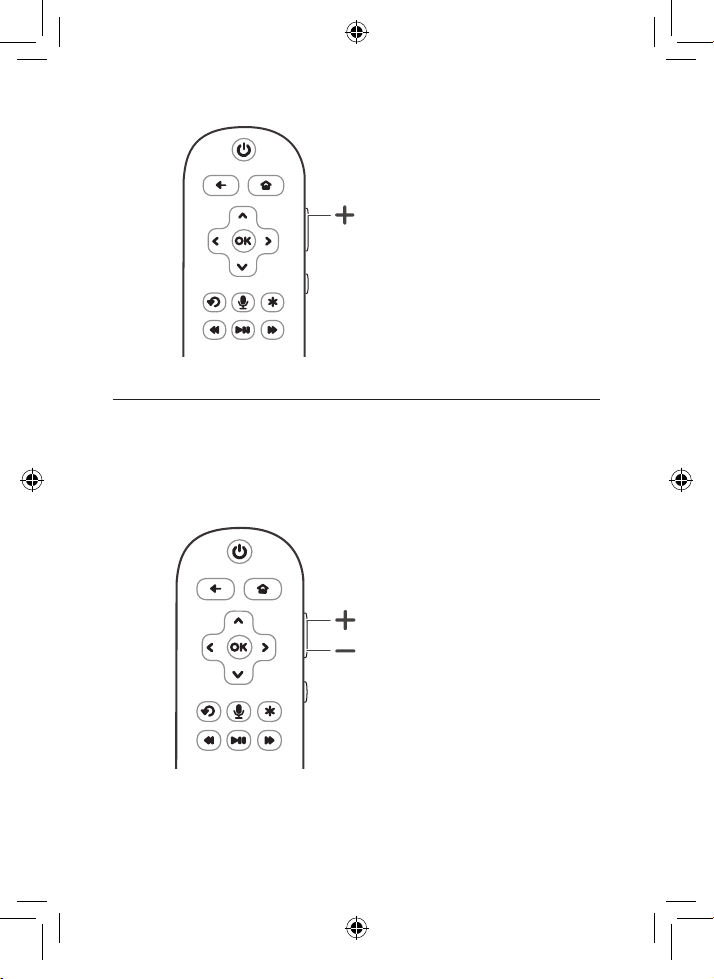
Turn on the Sound Bar
When the sound bar is in standby mode, pressing the
volume up (+) button of your TCL Roku TV remote control
will turn on the Sound Bar.
TS7010_UM_US_EN_print_190118a.indd 33 25/2/2019 11:49 AM
34
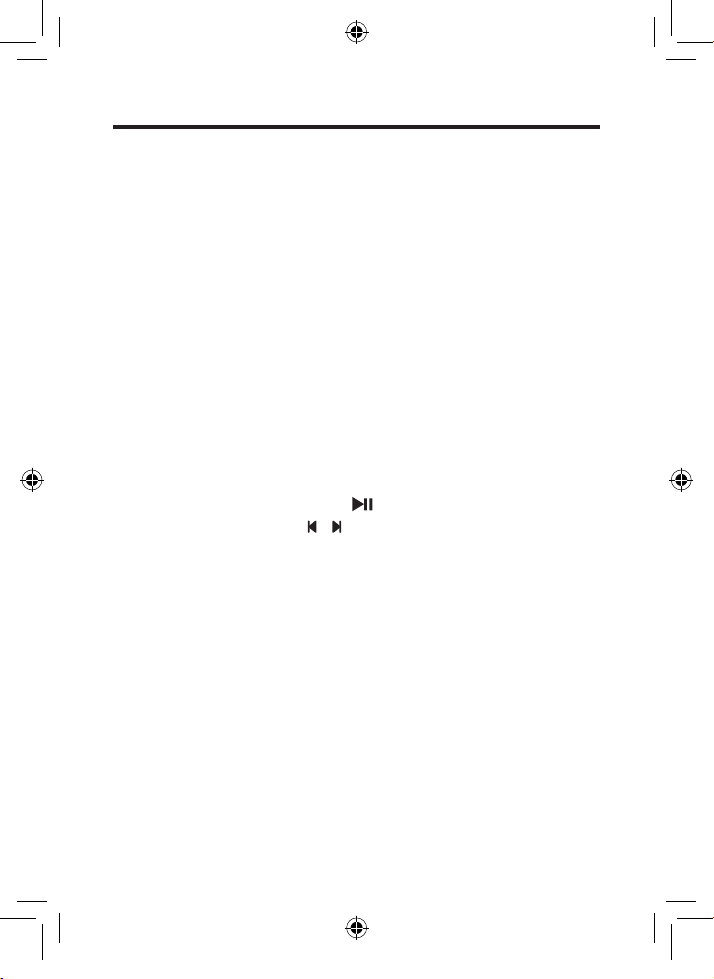
Control the Sound Bar volume
When the sound bar is on, pressing the volume up or down
button of your TCL Roku TV remote control will turn the
Sound Bar volume up (+) or down (-).
TS7010_UM_US_EN_print_190118a.indd 34 25/2/2019 11:49 AM
35
Listen to music from your Bluetooth
device
1
Make sure that your device supports A2DP and/or
AVRCP.Forinformation,checkthespecicationofyour
device.
2
Pair your Bluetooth device with the Sound Bar main
unit (see ‘Connect the Sound Bar with your Bluetooth
device’ on page 26).
3
Start listening to music stored in your Bluetooth device
through the Sound Bar.
• If your Bluetooth device supports A2DP, you can
listen to music, but you cannot control the playback.
• If your Bluetooth device supports AVRCP, you can
listen to music and control music playback with the
remote control. Press to pause or resume music
playback. Press / to skip to the previous/next
track.
Note
• The operational range between the Sound Bar main unit
and your Bluetooth device is approximately 10 meters
(without any obstacle between the Bluetooth device and
Sound Bar main unit).
TS7010_UM_US_EN_print_190118a.indd 35 25/2/2019 11:49 AM
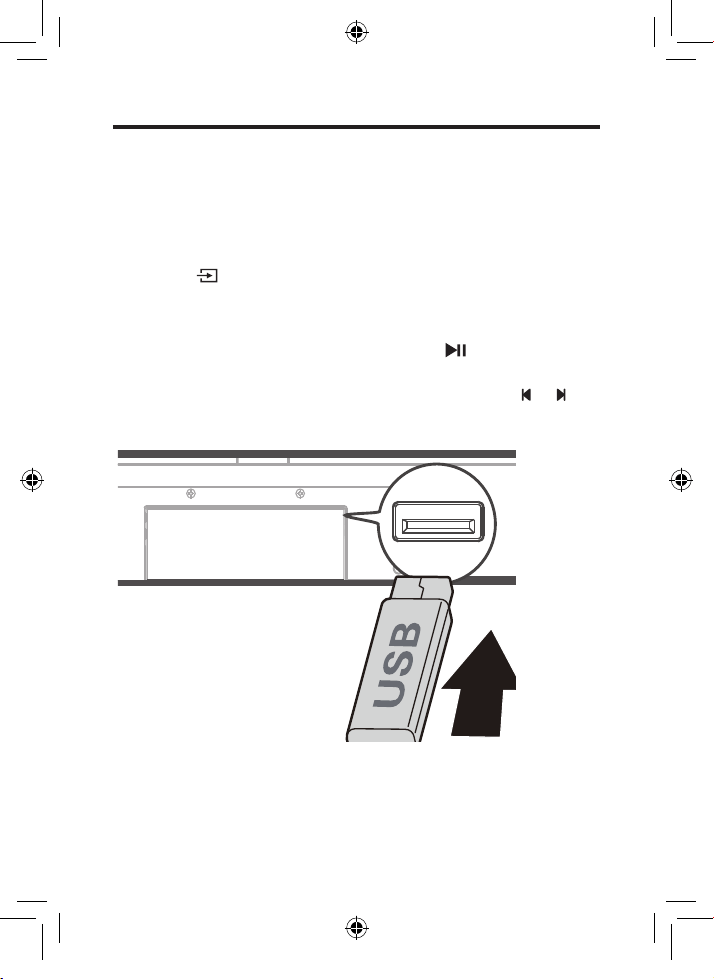
36
Use the USB cable or device for music
playback
1
Connect the USB device to the USB Type A connector
on your Sound Bar main unit.
2
Press on the Sound Bar main unit or remote control.
until the white LED is on.
3
YoucannowlistentomusicthroughtheSoundBar.
• To pause or resume music, press on the remote
control.
• To skip to the previous or next track, press or on
the remote control.
USB
TS7010_UM_US_EN_print_190118a.indd 36 25/2/2019 11:49 AM
37
Operation LED indicators
Listen to music. The white LED is on.
Press to pause the
music.
ThewhiteLEDkeepsashing.
Press or to skip to the
previous/next track
ThewhiteLEDashesquickly
and goes back to the source
LED.
Tip
• This Sound Bar can support USB devices of up to 32GB
memoryandthesupportedleformatsareMP3,WAV,
FLAC.
TS7010_UM_US_EN_print_190118a.indd 37 25/2/2019 11:49 AM

38
5 Specifications
Sound Bar main unit
• Power adapter: AC~100-240V, 50/60Hz
• Power consumption: 25W
• Powerconsumptionatstandbymode:≤0.5W
• Impedance:6Ω
• Frequency response: 150 Hz-20 kHz
• Dimensions (W x D x H): 920 x 98 x 64 mm
• Weight: 2.48 kg
• Operating temperature: 0°C - 45°C
Wireless subwoofer
• Power adapter: AC~100-240V, 50/60Hz
• Power consumption: 25W
• Powerconsumptionatstandbymode:≤2.0W
• Frequency response: 40 Hz-120 Hz
• Frequency range: 2402 Mhz – 2480 Mhz
• Max transmitting power: 2.85dBm
• Dimensions (W x D x H): 210 x 248 x 328 mm
• Weight: 3.6 kg
Bluetooth
• Bluetoothversion:4.2,Bluetoothprole-Bluetooth
stereosupported(AdvancedAudioDistributionProle-
A2DP;AudioVideoRemoteControlProle-AVRCP)
• Frequency range: 2402 Mhz – 2480 Mhz
• Max transmitting power: 3.587dBm
Remote control
• Distance/Angle: 6m/ 30°
• Battery type: 1.5V AAA battery x 2, user replaceable.
TS7010_UM_US_EN_print_190118a.indd 38 25/2/2019 11:49 AM
39
6 Notice
Compliance notice
Notice for US
FCC Information
Warning
• Changes or modications to this unit not expressly
approved by the party responsible for compliance could
void the user’s authority to operate the equipment.
Note
• This equipment has been tested and found to comply
with the limits for a Class B digital device, pursuant to
Part 15 of the FCC Rules. These limits are designed
to provide reasonable protection against harmful
interference in a residential installation. This equipment
generates, uses and can radiate radio frequency energy
and, if not installed and used in accordance with the
instructions, may cause harmful interference to radio
communications. However, there is no guarantee that
interference will not occur in a particular installation.
TS7010_UM_US_EN_print_190118a.indd 39 25/2/2019 11:49 AM

40
If this equipment does cause harmful interference to radio
or television reception, which can be determined by turning
theequipmentoandon,theuserisencouragedtotry
to correct the interference by one or more of the following
measures:
• Reorient or relocate the receiving antenna.
• Increase the separation between the equipment and
receiver.
• Connect the equipment into an outlet on a circuit
dierentfromthattowhichthereceiverisconnected.
• Consult the dealer or an experienced radio / TV
technician for help.
To assure continued compliance, any changes or
modicationsnotexpresslyapprovedbytheparty
responsible for compliance could void the user’s authority
to operate this equipment. (Example- use only shielded
interface cables when connecting to computer or peripheral
devices).
This set complies with the FCC rules, Part 15 and with 21
CFR 1040.10. Operation is subject to the following two
conditions:
1 This device may not cause harmful interference, and
2 This device must accept any interference received,
including interference that may cause undesired
operation.
FCC Radiation Exposure Statement:This equipment
complies with FCC radiation exposure limits set forth for an
uncontrolled environment. This transmitter must not be co-
TS7010_UM_US_EN_print_190118a.indd 40 25/2/2019 11:49 AM
41
located or operated in conjunction with any other antenna or
transmitter.
WARNING: Changes or modications made to this
equipment not expressly approved by TCL Corporation
may void the FCC authorization to operate this
equipment.
Caution
• The manufacturer is not responsible for any radio or TV
interferencecausedbyunauthorizedmodicationsto
thisequipment.Suchmodicationscouldvoidtheuser
authority to operate the equipment.
Notice for Canada
Class B Clause
This digital apparatus does not exceed the Class B limits
for radio noise emissions from digital apparatus as set
out in the Radio Interference Regulations of the Canadian
Department of Communications.
This Class B digital apparatus complies with Canadian
ICES-003
This device complies with Industry Canada licence-
exempt RSS standard(s). Operation is subject to the
following two conditions: (1) this device may not cause
harmful interference, and (2) this device must accept any
interference received, including interference that may cause
undesired operation.
TS7010_UM_US_EN_print_190118a.indd 41 25/2/2019 11:49 AM

42
CAN ICES-3(B)/NMB-3(B)
IC Radiation Exposure Statement
This equipment complies with Canada radiation
exposure limits set forth for uncontrolled environments.
This transmitter must not be co-located or operating in
conjunction with any other antenna or transmitter.
Caution: The user is cautioned that changes or
modicationsnotexpresslyapprovedbytheparty
responsible for compliance could void the user’s authority to
operate the equipment.
Disposal of your old product and
battery
Yourproductisdesignedandmanufacturedwithhigh
quality materials and components, which can be recycled
and reused.
This product may contain lead and mercury. Disposal of
these materials may be regulated due to environmental
considerations. For disposal or recycling information, please
contact your local authorities.
This product contains non-removable batteries:
• Do not incinerate. Batteries may explode if overheated.
• For disposal or recycling information, please contact
your local authorities.
TS7010_UM_US_EN_print_190118a.indd 42 25/2/2019 11:49 AM
43
Trademarks
Bluetooth
The Bluetooth
®
word mark and logos are registered
trademarks owned by Bluetooth SIG, Inc. and any use
of such marks by TCL Corporation under license. Other
trademarks and trade names are those of their respective
owners.
Dolby Audio
Manufactured under license from Dolby Laboratories. Dolby,
Dolby Audio, and the double-D symbol are trademarks
of Dolby Laboratories. Copyright 1992-2015 Dolby
Laboratories. All rights reserved.
HDMI
HDMI, and HDMI logoandHigh-DenitionMultimedia
Interface are trademarks or registered trademarks of HDMI
licensing LLC.
TS7010_UM_US_EN_print_190118a.indd 43 25/2/2019 11:49 AM

44
7 FAQ
No power
• Make sure the AC power cord and AC input connector
are connected properly.
• Make sure there is power supply.
• Make sure the Sound Bar has turned on.
No sound
• Make sure the audio cable is connected to the Sound
Bar and your device.
• Make sure you have selected the correct source.
• Press + to increase the volume level.
• Make sure the Sound Bar is not muted.
The remote control does not work.
• Make sure you have selected the correct source.
• Make sure the distance of remote control and the Sound
Bar main unit is within operational range.
• Make sure the battery is correctly inserted and is
working.
• Make sure the remote control is close to the remote
control sensor of the Sound Bar main unit.
I hear distorted sound.
• Make sure all cables are properly connected.
• Make sure you have selected the correct source.
• Make sure the TV is muted if you play audio from the TV.
TS7010_UM_US_EN_print_190118a.indd 44 25/2/2019 11:49 AM

45
IcannotndtheBluetoothnameofthisSoundBaronmy
Bluetooth device.
• Make sure the Bluetooth function is activated on your
Bluetooth device.
• Make sure the Sound Bar has paired with your
Bluetooth device.
TheLEDindicatorofthesubwooferiso.
• Reset the subwoofer by disconnecting the power
supply and reconnecting after 2 minutes.
For further support, visit
www.tclusa.com/support or www.tclcanada.com/support
TS7010_UM_US_EN_print_190118a.indd 45 25/2/2019 11:49 AM
www.tclusa.com/support or
www.tclcanada.com/support
1-877-300-9223
TCL SUPPORT:
WE ARE
READY TO
HELP
contact us first
with any questions
DO NOT RETURN TO STORE
TAKE CARE WHEN
REMOVING THE SOUNDBAR
Copyright © 2019 TCL. All rights reserved.
TS7010_US_EN_UM_V4.0
TS7010_UM_US_EN_print_190118a.indd 46 25/2/2019 11:49 AM