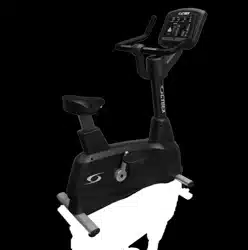
Cybex 770C/770R Cycle
Cybex GO Monitor, Owner's Manual
Cardiovascular Systems
Part Number LT-24919-4 D
www.cybexintl.com

Table of Contents
Safety
Safety Guidelines and Practices.........................4
Power Cord Information......................................4
Important Safety Instructions..............................5
Warnings and Cautions......................................6
Assembly
Specifications - 770C, 770R, Cybex GO
Monitor.........................................................11
Choosing and Preparing a Site.........................12
Environment.....................................................13
Electrical Power Requirements........................13
Tools Required..................................................14
Assembly Procedure........................................14
Cybex GO Setup..............................................27
Equipment Setup..............................................33
Testing operation..............................................34
Operation
Intended Use....................................................36
Terms Used......................................................36
User Control Symbols Used.............................37
CardioTouch Symbols Used.............................37
CardioTouch Screen and User Controls...........40
Cybex GO Console and User Controls.............41
Cybex GO Console Log In or Sign Up..............42
Mount and Dismount........................................43
Quick Operation Guide.....................................43
Detailed Operation Guide.................................44
Workout Choices..............................................46
Data Readouts..................................................47
Heart Rate Indicator.........................................48
Fan Control.......................................................49
iPod/iPhone Functions......................................49
Battery Sentry...................................................49
Maintenance
Warnings...........................................................50
Clean Unit.........................................................50
Rechargeable Battery.......................................51
Cybex GO Monitor............................................52
Customer Service
Product Registration.........................................53
Contacting Service...........................................53
Ordering Parts..................................................53
Return Material Authorization (RMA)................54
Damaged Parts.................................................54
Appendix - Workout Overviews
Weight Loss - Rollers 1....................................55
Weight Loss - Rollers 2....................................57
Weight Loss - Hills............................................59
Weight Loss - Peaks.........................................61
Cardio - Ramps................................................63
Cardio - Interval................................................65
Cardio - Bursts..................................................67
Cardio - Wave...................................................69
Cardio - Heartrate Control................................71
Power - Constant Power...................................73
Power - Isokinetic.............................................74
Tests - YMCA....................................................75
Cybex
®
and the Cybex logo are registered trademarks of Cybex International, Inc. Polar
®
is a registered trademark of Polar Electro Inc. iPod and
iPhone are trademarks of Apple Inc., registered in the U.S. and other countries.
DISCLAIMER: Cybex International, Inc. makes no representations or warranties regarding the contents of this manual. We reserve the right to
revise this document at any time or to make changes to the product described within it without notice or obligation to notify any person of such
revisions or changes.
©
Copyright 2016, Cybex International, Inc.
10 Trotter Drive, Medway, MA 02053 • 888-462-9239 • 508-533-4300 • FAX 508-533-5183
www.cybexintl.com • LT-24919-4 D • February 2016
Page 2 of 76
Cybex 770C/770R Cycle Part Number LT-24919-4 D

FCC Compliance Information
Changes or modifications to this unit not expressly approved by the party responsible for compliance
could void the user’s authority to operate the equipment.
This equipment has been tested and found to comply with the limits for a Class B digital device, pursuant
to part 15 of the FCC Rules. These limits are designed to provide reasonable protection against harmful
interference in a residential installation. This equipment generates, uses and can radiate radio frequency
energy and, if not installed and used in accordance with the instructions, may cause harmful interference
to radio communications. However, there is no guarantee that interference will not occur in a particular
installation. If this equipment does cause harmful interference to radio or television reception, which can
be determined by turning the equipment off and on, the user is encouraged to try to correct the
interference by one or more of the following measures:
• Reorient or relocate the receiving antenna.
• Increase the separation between the equipment and receiver.
• Connect the equipment into an outlet on a circuit different from that to which the receiver is connected.
• Consult the dealer or an experienced radio/TV technician for help.
Page 3 of 76
Cybex 770C/770R Cycle Part Number LT-24919-4 D
Safety
Safety Guidelines and Practices
Read the Owner’s Manual carefully before assembling, servicing, or using the equipment. Owner
must comply with all safety guidelines in this manual. It is also the owner’s responsibility to instruct
users on the safe and proper operation of the equipment and to properly display any and all
warning labels and instructional placards. All users should read these labels and placards before
using equipment.
Serious injury or death could occur if the following safety precautions and
instructions are not followed.
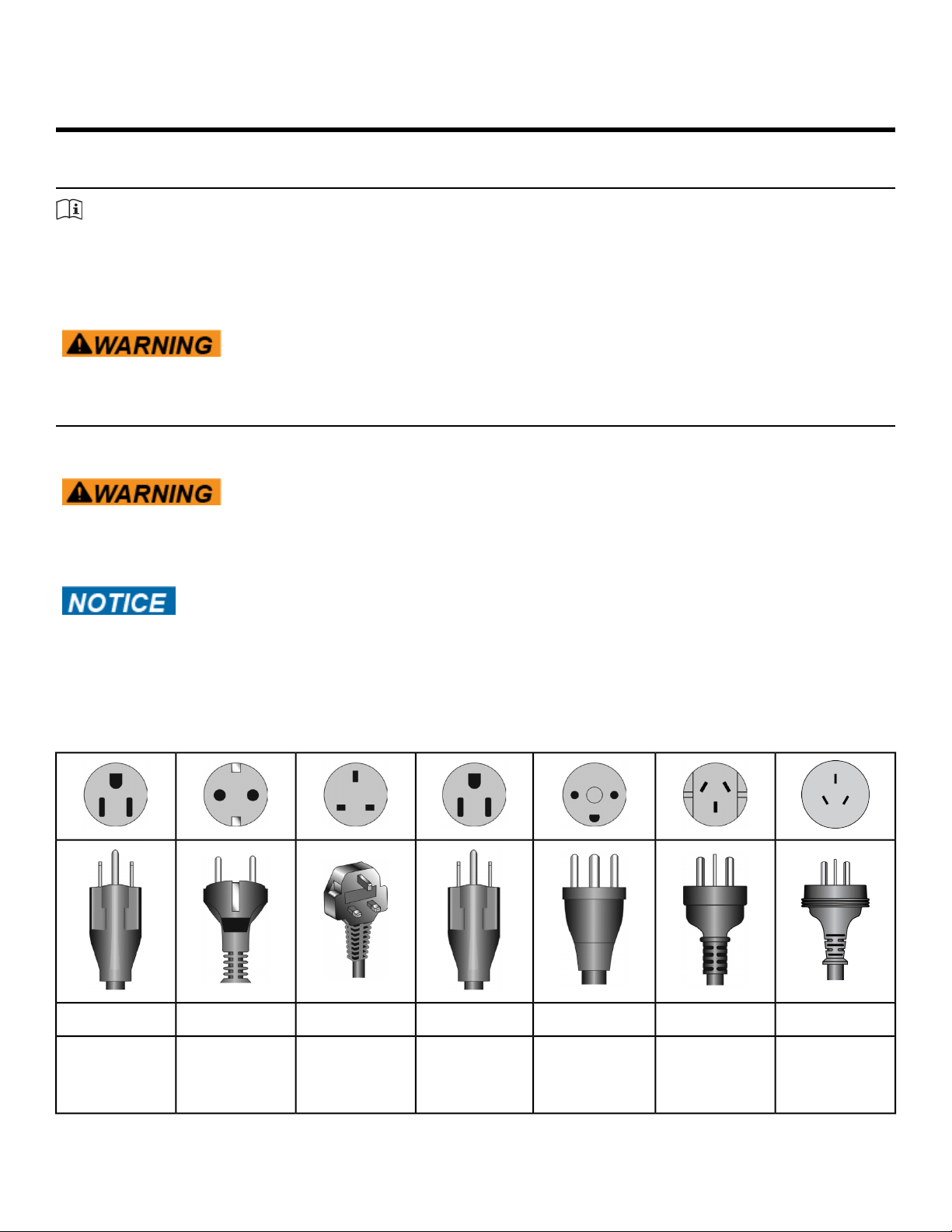
Power Cord Information
AC Power Adapter is optional.
Shock and electrocution hazard.
• Connect unit to a grounded outlet.
• Do not use voltage adapter or extension cord.
Cybex is not responsible for injuries or damages as a result of cord or plug
modification.
• Verify voltage requirements of unit match local voltage requirements.
• Verify unit outlet is the same configuration as the plug.
Power cord configurations
ChineseAustraliaDanishJapaneseUK 230 VACEuro Plug115 VAC
GB 2099-1
and GB
1002-1
AS/NZS 3112107-2-D1JIS 8303BS 1363CEE 7/7NEMA 5-15
Page 4 of 76
Cybex 770C/770R Cycle Part Number LT-24919-4 D
Important Safety Instructions
(Save These Instructions)
Shock and electrocution hazard.
• Unplug unit and let sit 10 minutes before cleaning or performing
maintenance.
• Electrical charge can remain in unit after unplugging.
• Keep water and liquids away from electrical parts.
User Safety Precautions
Prior to use:
• Obtain a medical exam before beginning any exercise program.
• Obtain instruction before using.
•
Read and understand warning labels.
• Maximum user weight is 400 lbs. (180 kg).
• Inspect unit. If damaged, notify floor staff. DO NOT USE.
• Do not remove this label. Replace if damaged or illegible.
During use
• Do not use for stretching and do not attach straps or other devices.
• Do not allow children 12 or younger to be on or near machine.
• Stop exercise if feeling faint, dizzy, or have pain.
• Use the handrails for support and to maintain balance.
• Keep all body parts, clothing, and accessories, clear of moving parts.
Facility Safety Precautions
It is the sole responsibility of the user/owner or facility operator to ensure that regular maintenance is
performed.
• Enforce all user and safety precautions.
• Read and understand the Owner’s Manual completely before assembling, servicing or using unit.
• Verify all users are properly trained on using the equipment.
• Do not use unit outdoors.
• Verify that each unit is setup, leveled and operated on a solid, level surface. Do not install equipment
on an uneven surface.
• Verify there is enough room for safe access and operation of unit.
• Use Cybex AC power adapters only.
• Do not use the optional power adapter in damp or wet locations.
• Do not use the unit if: (1) the unit is plugged into an optional power adapter that has a damaged cord;
(2) the unit is not working properly or (3) if the unit has been dropped or damaged. Seek service from
a qualified technician.
• EQUIPMENT is not suitable for use in the presence of aerosol (spray), FLAMMABLE ANAESTHETIC
MIXTURE WITH AIR or WITH OXYGEN or NITROUS OXIDE.
Page 5 of 76
Cybex 770C/770R Cycle Part Number LT-24919-4 D
• Perform regular maintenance checks on unit. Performance level can be maintained only if examined
regularly. Pay close attention to all areas most susceptible to wear, including (but not limited to)
cables, pulleys, belts and grips.
• Replace any warning labels if damaged, worn or illegible.
• Immediately replace worn or damaged components. If unable to immediately replace worn or damaged
components, then remove unit from service until repair is made.
• Do not attempt repairs; electrical or mechanical. Seek qualified repair technician when servicing.
Failure to do so could result in serious injury. See Customer Service for contact information.
• Use only Cybex supplied components to maintain/repair unit.
• Keep a repair log of all maintenance activities.
• Disconnect the optional power adapter before servicing unit.
• Do not use attachments unless recommended for the unit by Cybex.
• The unit may generate electromagnetic or other forms of interference, or it may be affected by
interference from other equipment nearby. If this is suspected, take precautions by separating the
equipment or otherwise shielding it to avoid such interference.
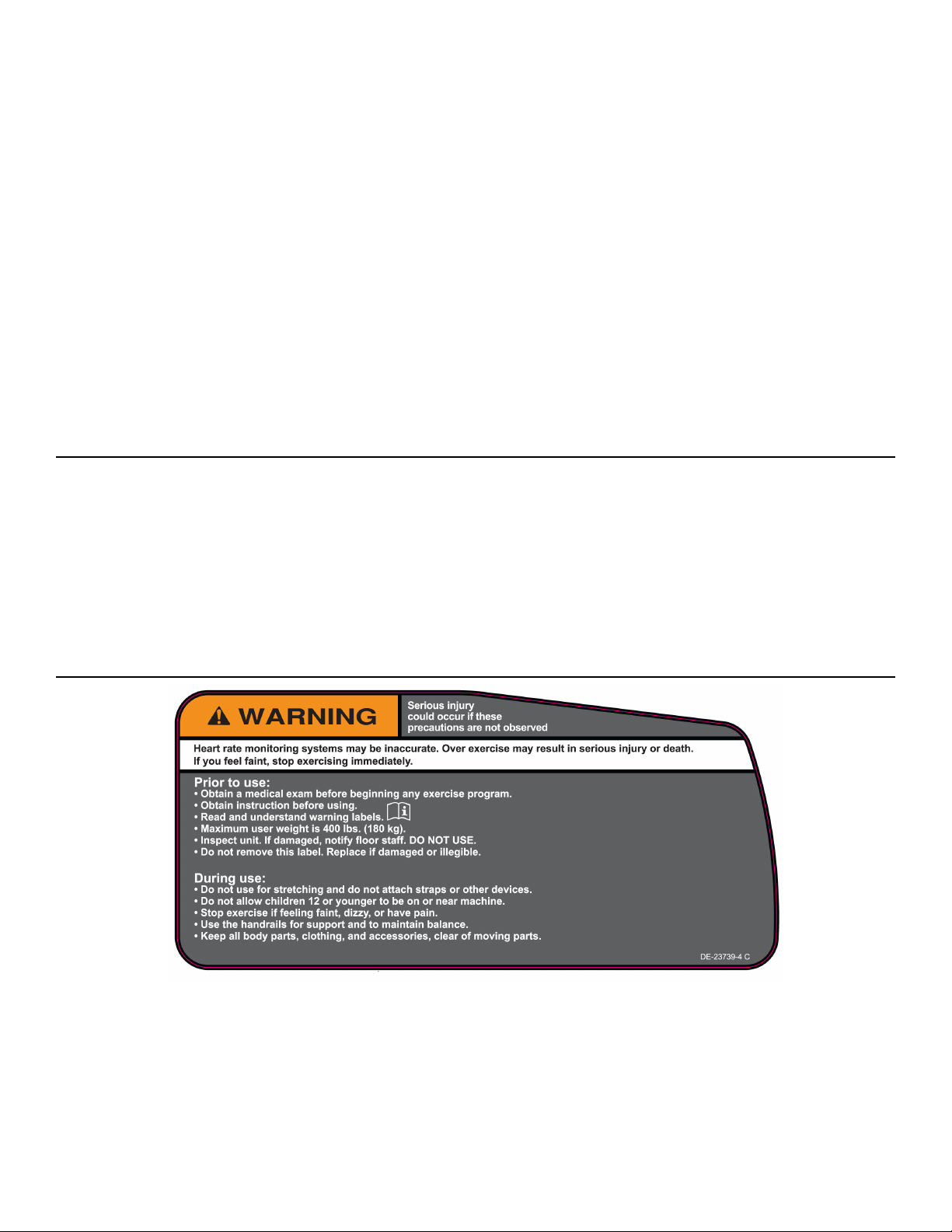
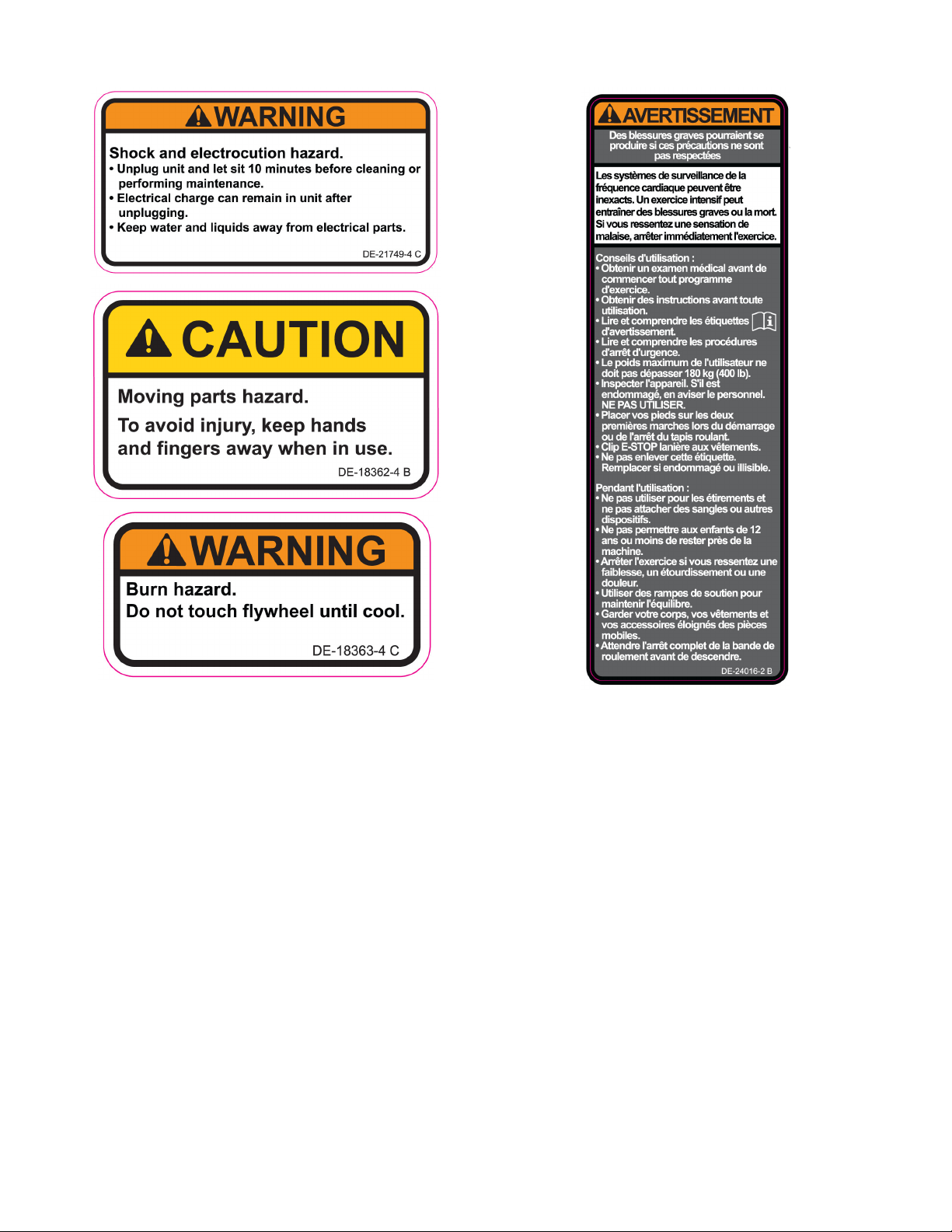
Warnings and Cautions
Warning labels indicate a potentially hazardous situation that could result in serious injury or death if
the precautions are not observed.
Caution labels indicate a potentially hazardous situation that could result in serious injury or damage to
machine if the precautions are not observed.
Contact Cybex Customer Service to replace any worn or damaged labels.
Warning and Caution Decals - 770C
Page 6 of 76
Cybex 770C/770R Cycle Part Number LT-24919-4 D
Page 7 of 76
Cybex 770C/770R Cycle Part Number LT-24919-4 D
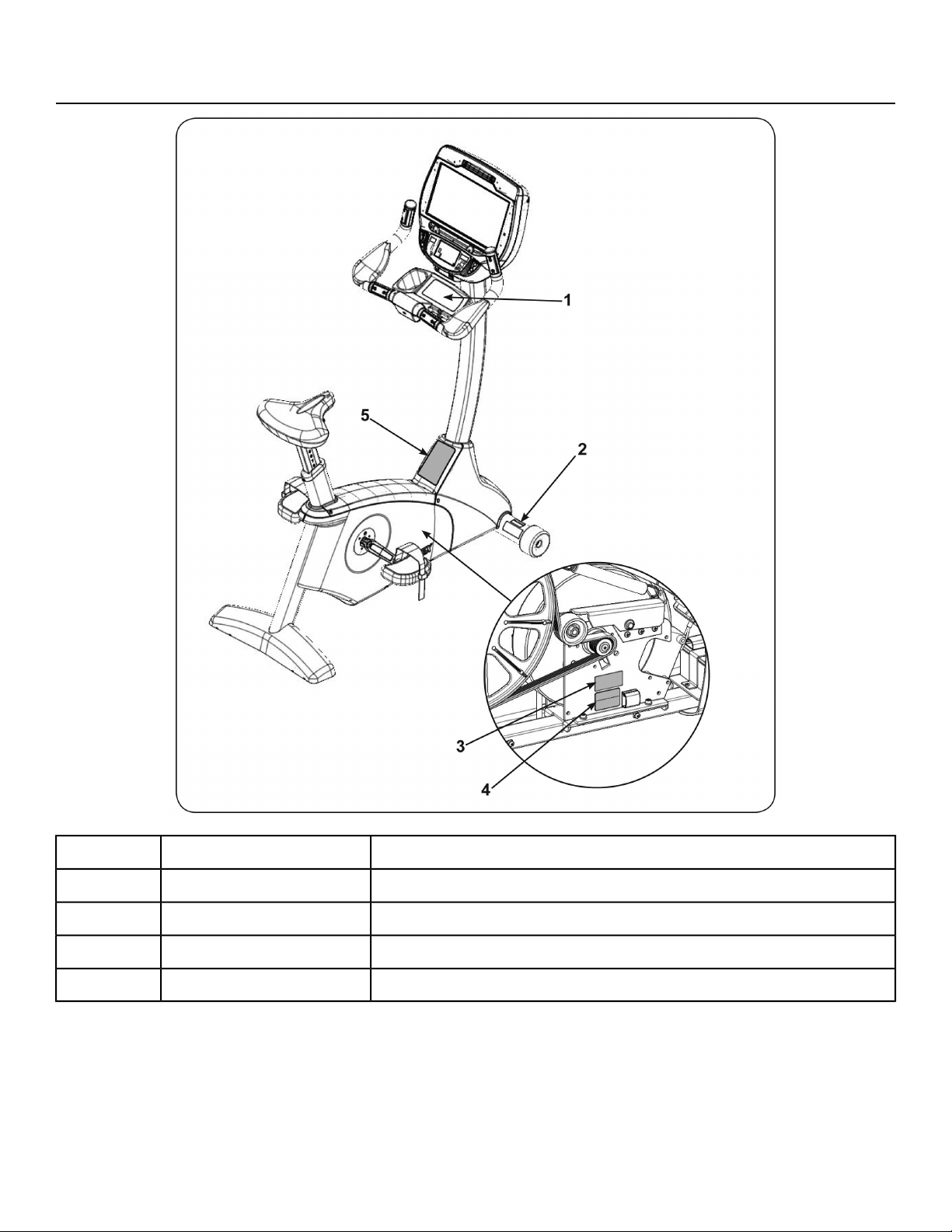
Label Placement - 770C
Label, Warning, Access tray,DE-23739-X1
Label, Warning, Disconnect PowerDE-21749-X2
Label, Warning, Hot flywheelDE-18363-X3
Decal, Caution moving partsDE-18362-X4
Label, Warning, CanadaDE-24016-25
Page 8 of 76
Cybex 770C/770R Cycle Part Number LT-24919-4 D
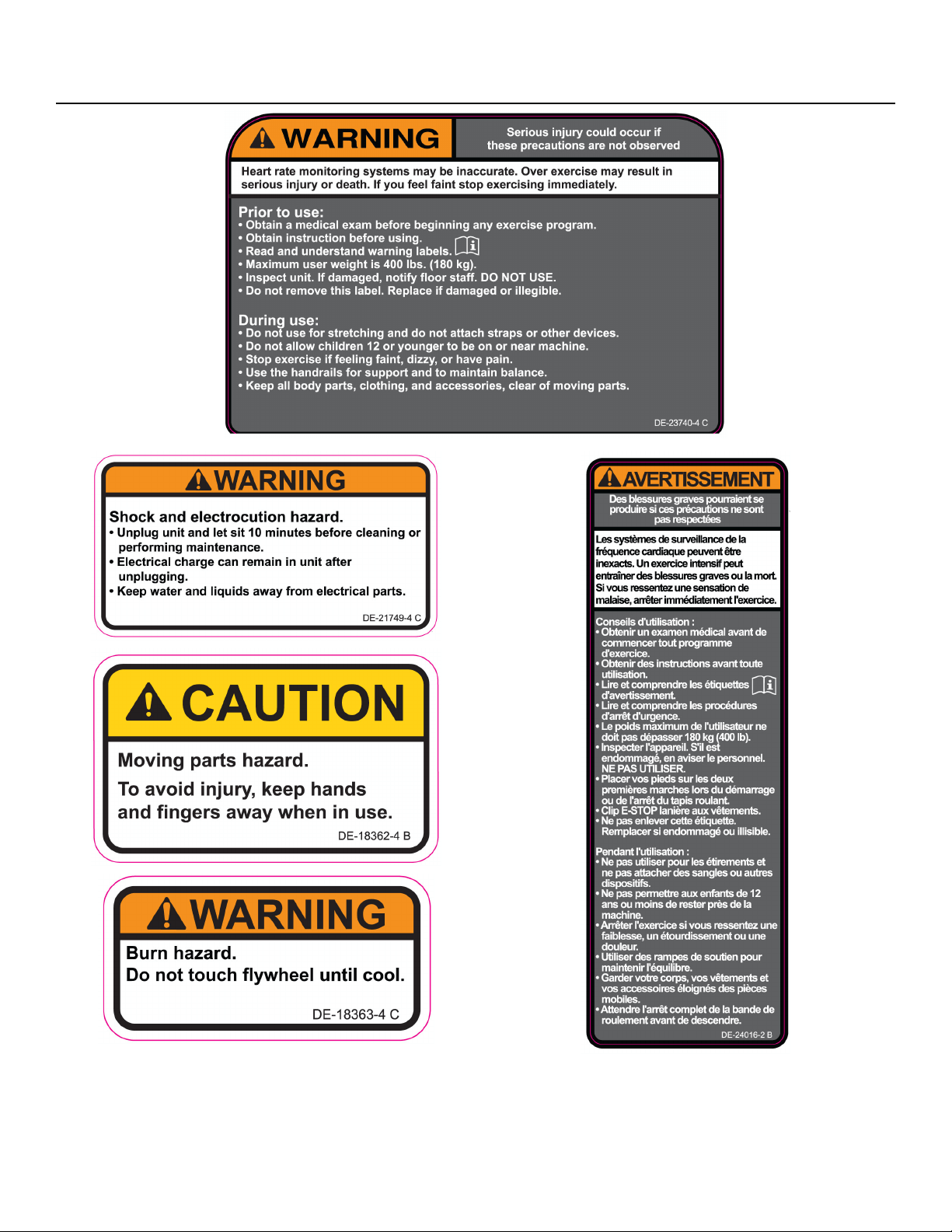
Warning and Caution Decals - 770R
Page 9 of 76
Cybex 770C/770R Cycle Part Number LT-24919-4 D
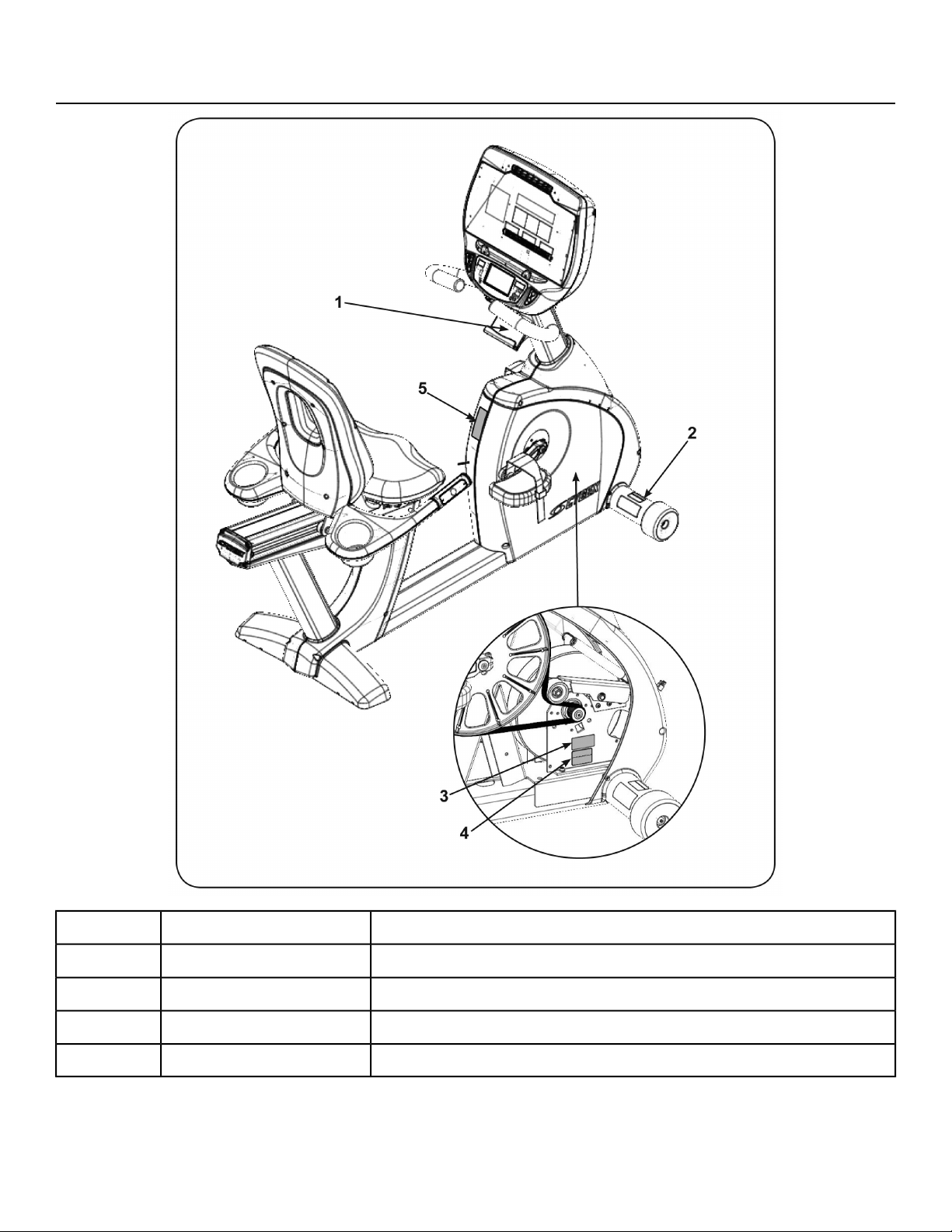
Label Placement - 770R
Label, Warning, Access tray,DE-23740-X1
Label, Warning, Disconnect PowerDE-21749-X2
Label, Warning, Hot flywheelDE-18363-X3
Decal, Caution moving partsDE-18362-X4
Label, Warning, CanadaDE-24016-25
Page 10 of 76
Cybex 770C/770R Cycle Part Number LT-24919-4 D
Assembly
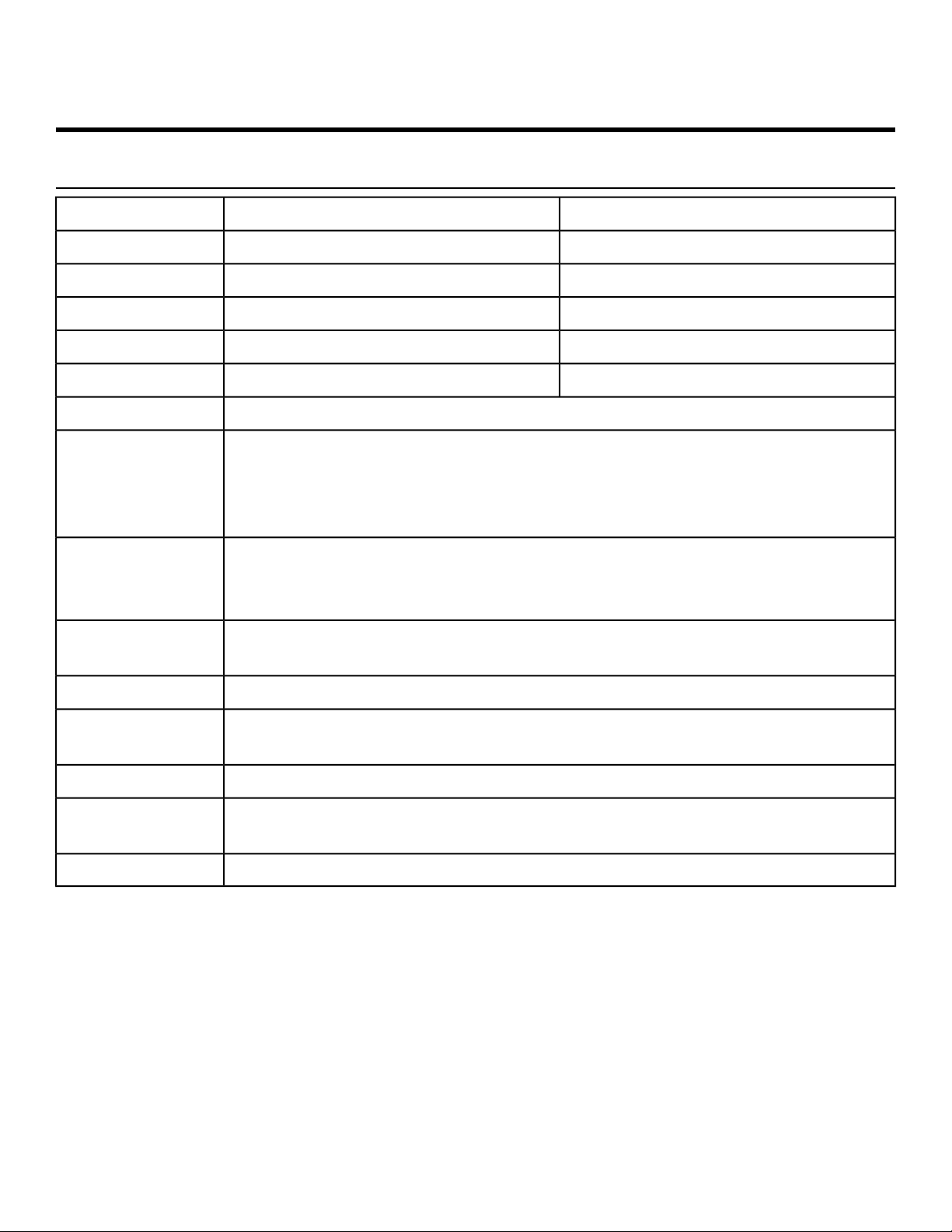
Specifications - 770C, 770R, Cybex GO Monitor
770R Cycle770C Cycle
65” (165 cm)48” (122 cm)Assembled Length
25” (64 cm)22.5” (57 cm)Assembled Width
52” (132 cm)64” (163 cm)Assembled Height
183 lbs. (83 kg)142 lbs. (64 kg)Weight of Product
231 lbs. (105 kg)176 lbs. (80 kg)Shipping Weight
21 (User selected in Manual or Bike Mode)Resistance Levels
Quick Start, four Weight Loss, five Cardio, two Power, and one Fitness Test.
Quick Start is facility selectable as “Bike” mode or Constant Power.
Weight Loss and Cardio workouts are constant power.
Quick Start and Workouts have 21 levels.
Workouts
Upper console: Cybex GO Monitor.
Displays: RPM, Calories, Cal/Hr, Distance, MET, Pace, Time, and Watt.
Lower display shows road speed and resistance level.
Console Features
Built-in 5 KHz wireless heart rate receiver (transmitter not included) and contact
heart rate monitoring.
Heart Rate
Features
Minimum - 20 Watts; Maximum - 900 Watts.Resistance Range
400 lbs. (180 kg).
Maximum User
Weight
Self-powered or optional AC adapter for full time display.Power
100-240 V, 50/60 Hz, 1.0 A, AC (9V DC, 1.7A). NEMA 5-15 plug (TR-18231) or
IEC-320 inlet (TR-18230).
Power Supply
Water bottle holder and utility tray.Other
Page 11 of 76
Cybex 770C/770R Cycle Part Number LT-24919-4 D
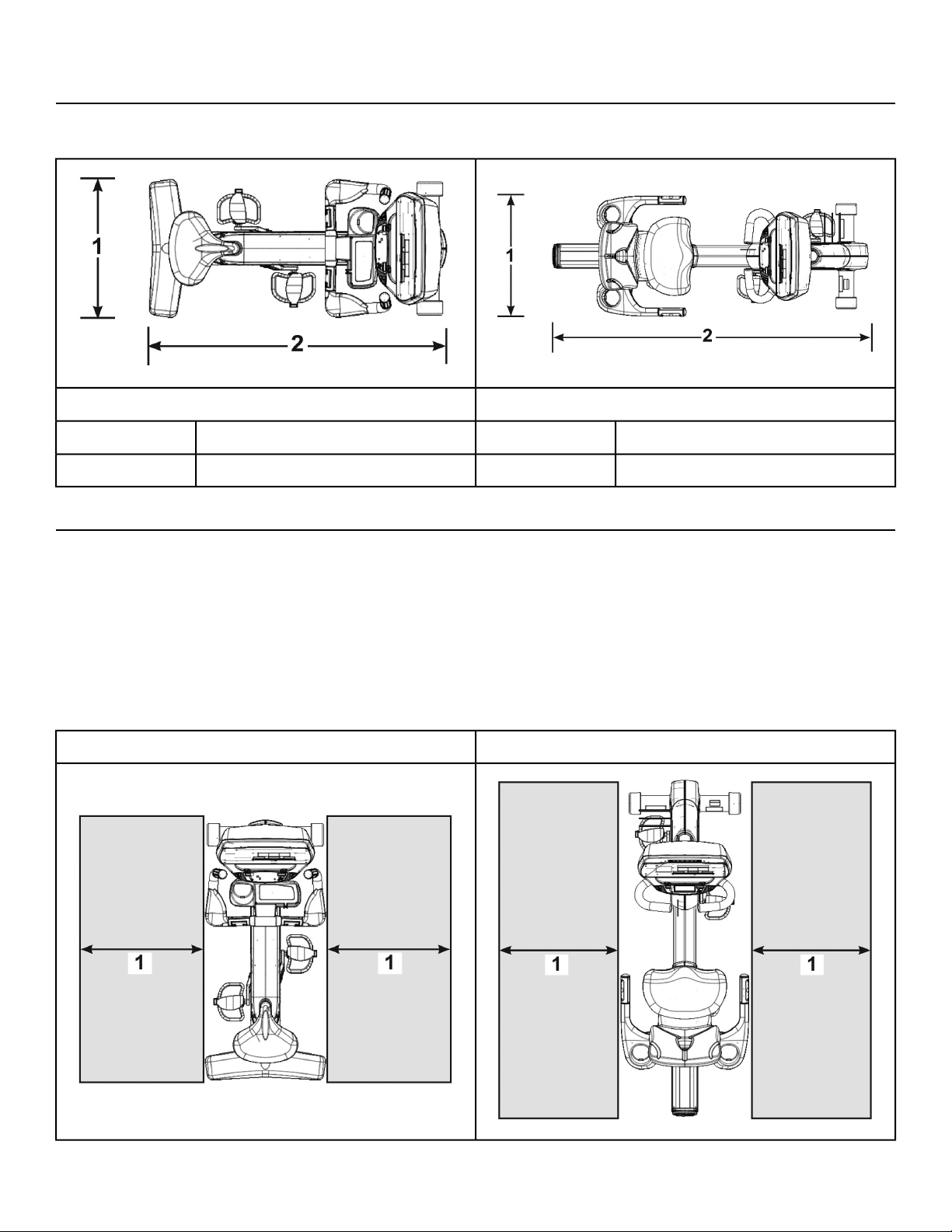
Top View 770CR
Dimensions
770R Cycle770C Cycle
25” (64 cm)1
22.5” (57 cm)1
65” (165 cm)248” (122 cm)2
Choosing and Preparing a Site
Before assembling the unit, verify the chosen site meets the following criteria:
• Area is well lit and well ventilated.
• Surface is structurally sound and properly leveled.
• Free area for access to unit and emergency dismount. Minimum clearance is 23.6 inches (0.6 meters).
• Adjacent units may share the free area.
Free area
770R770C
Page 12 of 76
Cybex 770C/770R Cycle Part Number LT-24919-4 D
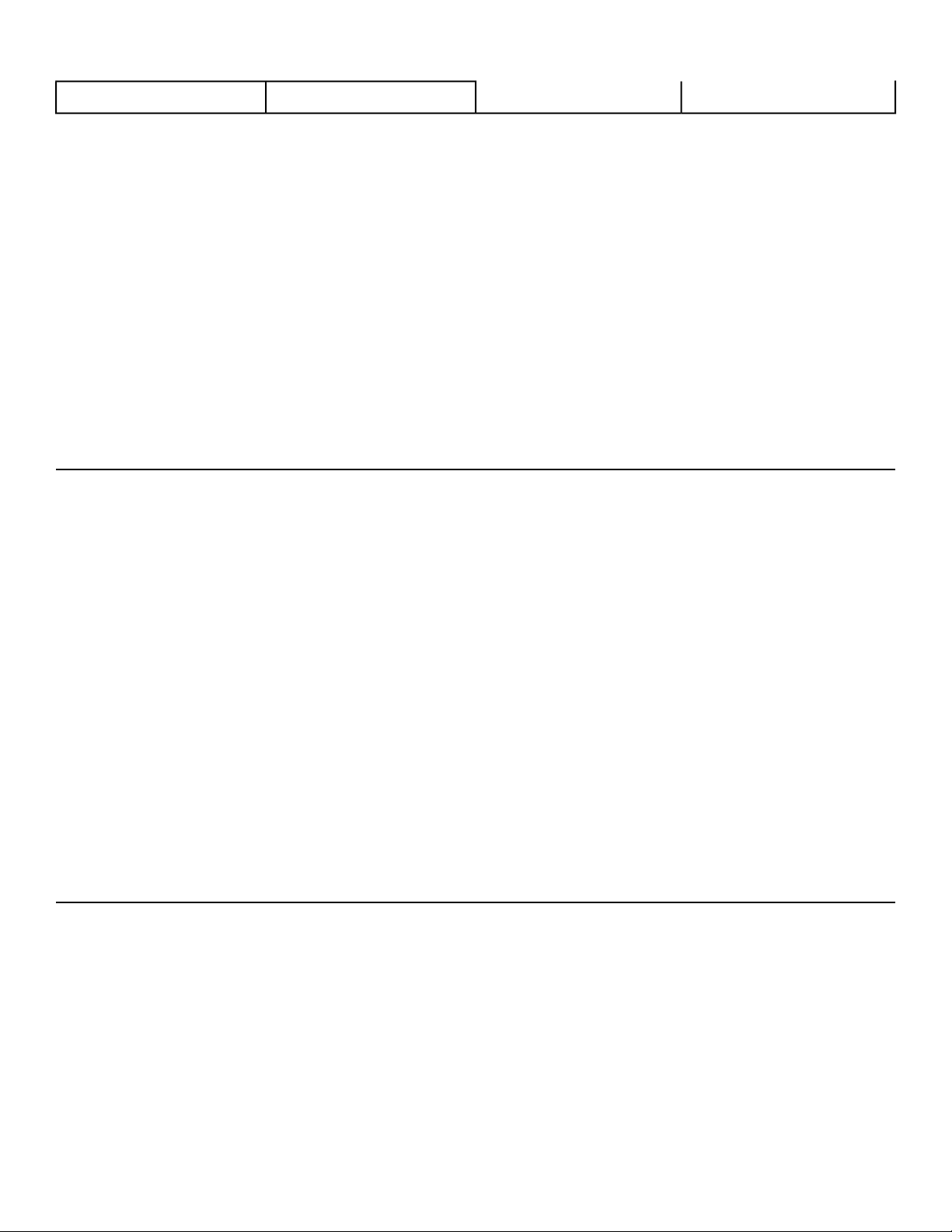
23.6”, 0.6m1
23.6”, 0.6m1
It is the responsibility of the facility owner/owner of the equipment to ensure that there is appropriate
clearance around each machine to allow for safe use and passage.
In compliance with the ADA (American Disabilities Act) there must be clear floor space of at least 30 by
48 inches and be served by an accessible route for at least one of each type of exercise equipment. If
the clear space is enclosed on three sides (e.g., by walls or the equipment itself), the clear space must
be 36 by 48 inches.
All other machines must have a clear floor space of 23" for all access point on the machine.
The dimensions stated in the assembly instructions of this manual include the maximum foot print (in
use) dimensions.
Minimum clearance of 12” (30 cm) between units for proper wireless heart rate signal operation.
Environment
Humidity and Static Electricity
The unit is designed to function normally in an environment with a relative humidity range of 30% to
75%. The unit can be shipped and stored in a relative humidity range of 10% to 90%.
Climatic dry air may cause static electricity. During workout, user may experience a shock due to build
up of static electricity on the body and the discharge path of the unit. If static electricity is experienced,
increase humidity to a comfortable level through the use of a humidifier.
Do not install, use or store the unit in an area of high humidity, such as in the vicinity of a steam room,
sauna, indoor pool or outdoors. Exposure to extensive water vapor, chlorine and/or bromine could
adversely affect the electronics as well as other parts of the unit.
Temperature
The unit is designed to function normally in an environment with an ambient temperature range of 50°
F (10° C) to 104° F (40° C). The unit can be shipped and stored in an environment with an ambient
temperature range of 32° F (0° C) to 140° F (60° C).
Electrical Power Requirements
The AC power kit is optional.
Verify the unit is connected to an outlet having the same configuration as the plug.
Verify connection is a grounded circuit. Do not use a ground-plug adapter to adapt the 3-prong power
cord to a non-grounded electrical outlet.
Use Cybex supplied AC power kit only. Consult an electrician with any questions.
Verify power supply is compliant with local building codes.
Page 13 of 76
Cybex 770C/770R Cycle Part Number LT-24919-4 D
Tools Required
• 3/16” Allen wrench (supplied with recumbent only)
• Phillips screwdriver
• 1/2” Socket wrench
• 9/16” Open end wrench
Assembly Procedure
Two people will be required for this procedure.
Read and understand all instructions thoroughly before assembling this unit. Check all items
carefully. If there is damage, see the Customer Service section of this manual for proper procedure
to return, replace, or reorder parts.
The words "left" and "right" denote the user's orientation.
Verify you have received the correct package
1. Read box label to verify the model number and voltage (optional) match what was ordered.
2. Verify paint color matches what was ordered.
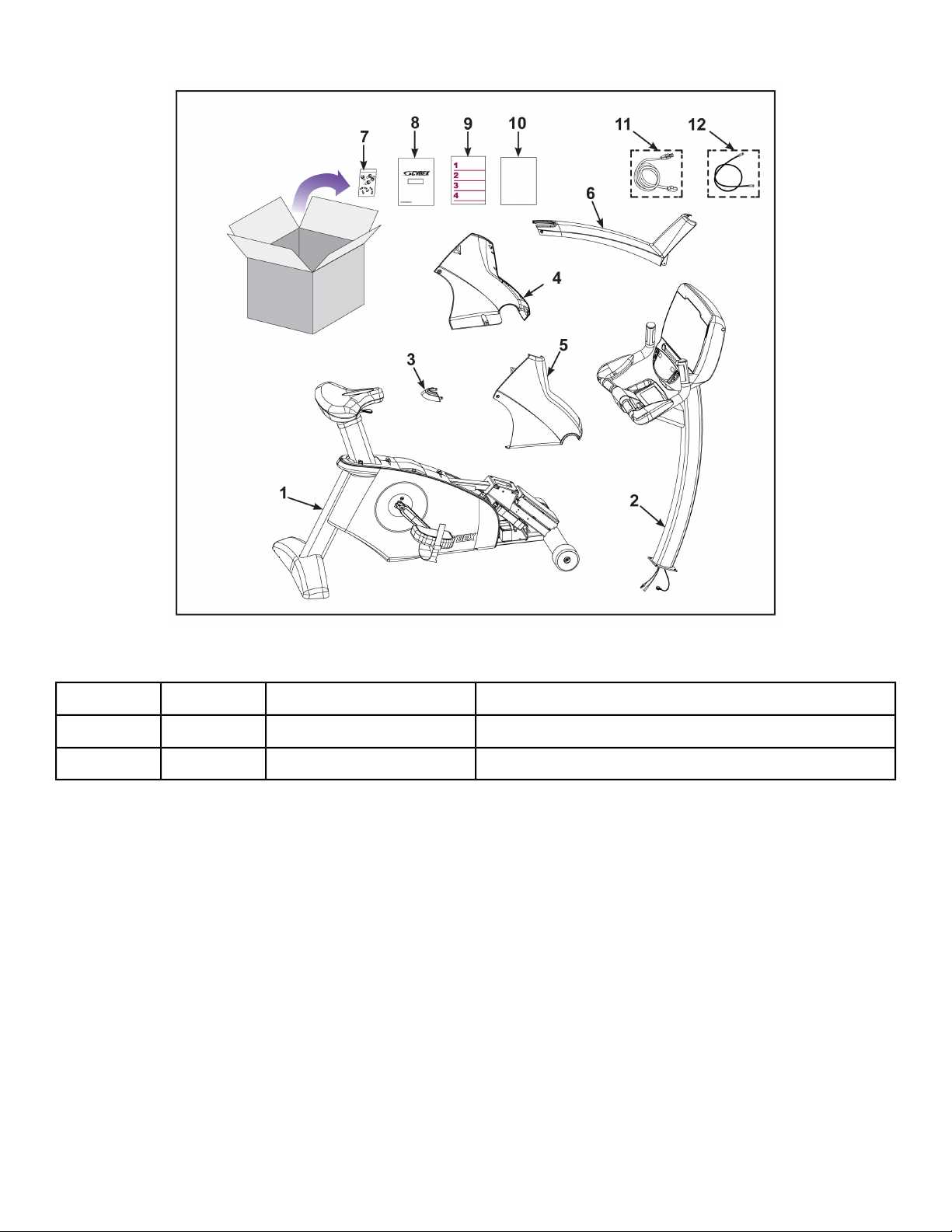
770C Assembly
Verify parts list shown below
DescriptionPart NumberQuantityItem
Base with covers attachedVaries11
Console assemblyVaries12
Back CapPL-2158413
Front Left CoverPL-2158114
Front Right CoverPL-2158215
Top CapPL-2158316
Hardware packAX-2169817
Owner’s ManualLT-23688-X18
Assembly posterLT-2369019
Warranty sheet, ConsumerLT-23693110
Warranty sheet, CommercialLT-23692110
Power cord (E3 View Monitor option)Varies111
Cable, 6’, Coax (E3 View Monitor option)AW-23836112
Page 14 of 76
Cybex 770C/770R Cycle Part Number LT-24919-4 D
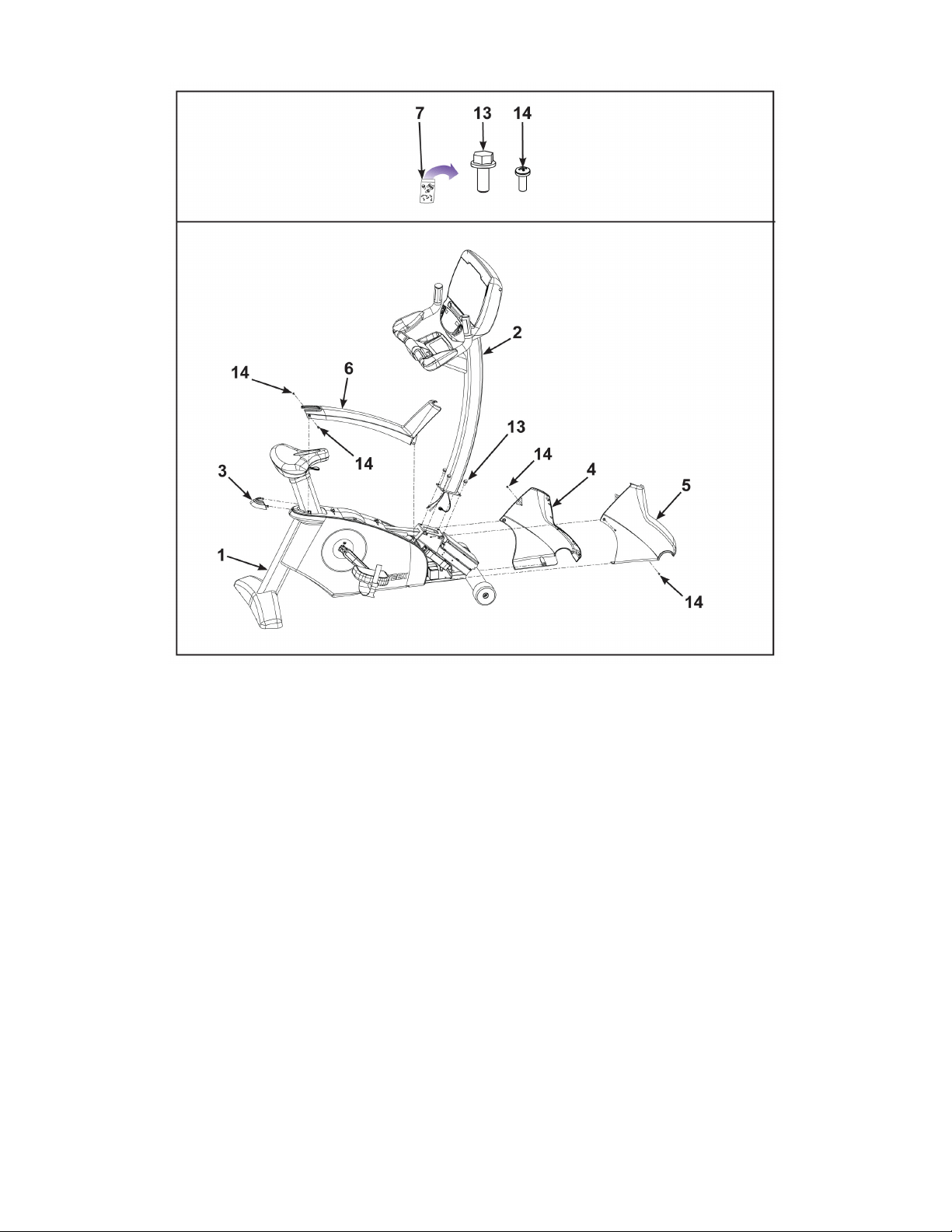
Hardware
DescriptionPart NumberQuantityItem
Screw, 5/16-18 × .75”,HXHD,WHIZ-LOCK,GR5HS-19108413
Screw, 8-16 × .50”, PNHDHS-15706614
Page 15 of 76
Cybex 770C/770R Cycle Part Number LT-24919-4 D
Lift and move the unit
1. Grasp the rear foot.
2. Lift the rear foot so the front transport wheels are able to roll on floor.
Use proper lifting methods.
3. Move unit to intended location.
4. Lower the rear foot.
Page 16 of 76
Cybex 770C/770R Cycle Part Number LT-24919-4 D
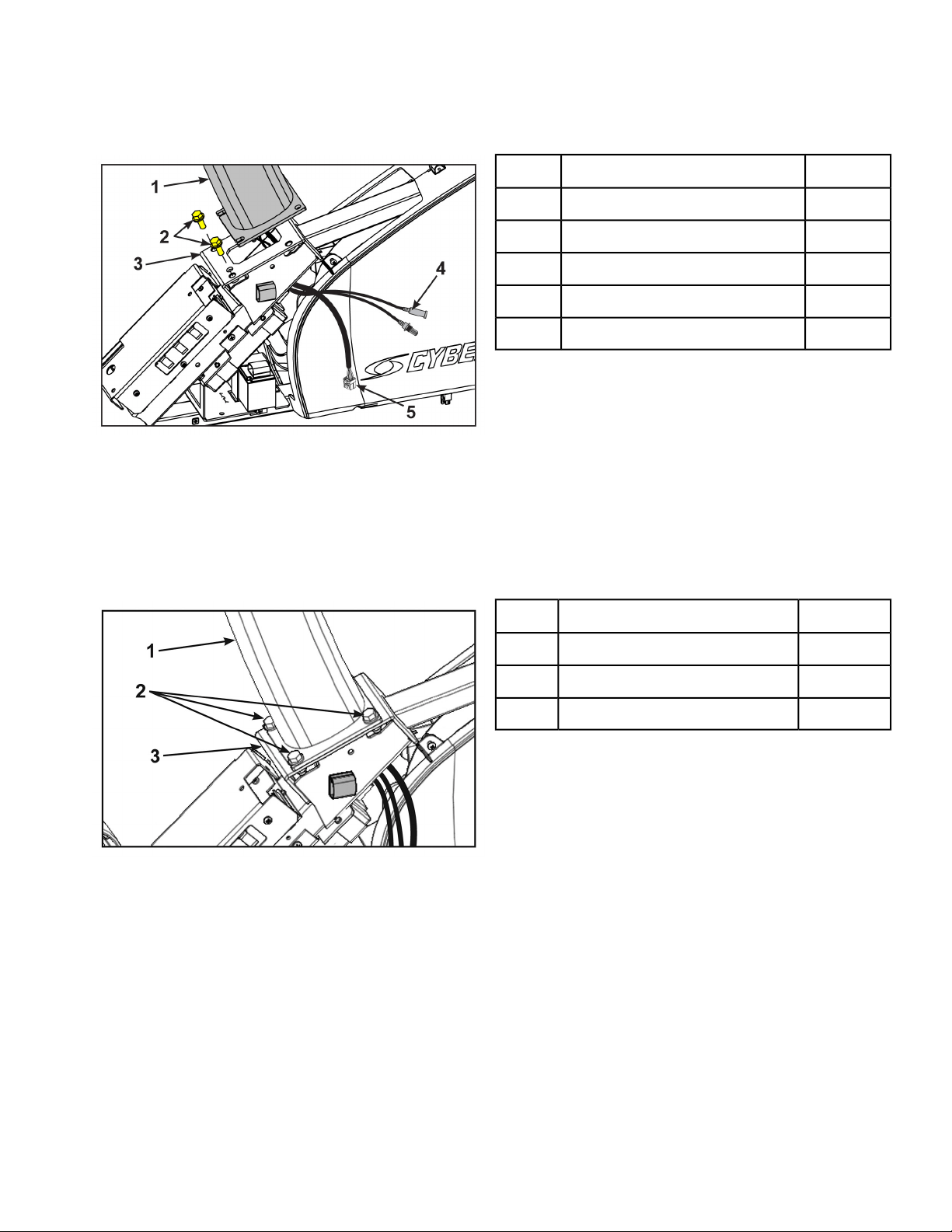
Install console assembly
1. Hand thread two screws into the base assembly.
Qty.Description
1Console Assembly1
2Screws2
1Base Assembly3
1Optional A/V Cable4
1Display Cable5
The console assembly will need to be supported during steps 2 through 5.
2. Insert the display cable and optional A/V cable through the frame to the left side.
Do not pinch or damage the cables during assembly.
3. Place the console assembly in the correct position on the base assembly by sliding into position
onto the two mounting screws.
4. Hand thread the other two screws.
Qty.Description
1Console Assembly1
2Screws2
1Base Assembly3
5. Securely fasten the four screws with a 1/2” socket wrench.
Page 17 of 76
Cybex 770C/770R Cycle Part Number LT-24919-4 D
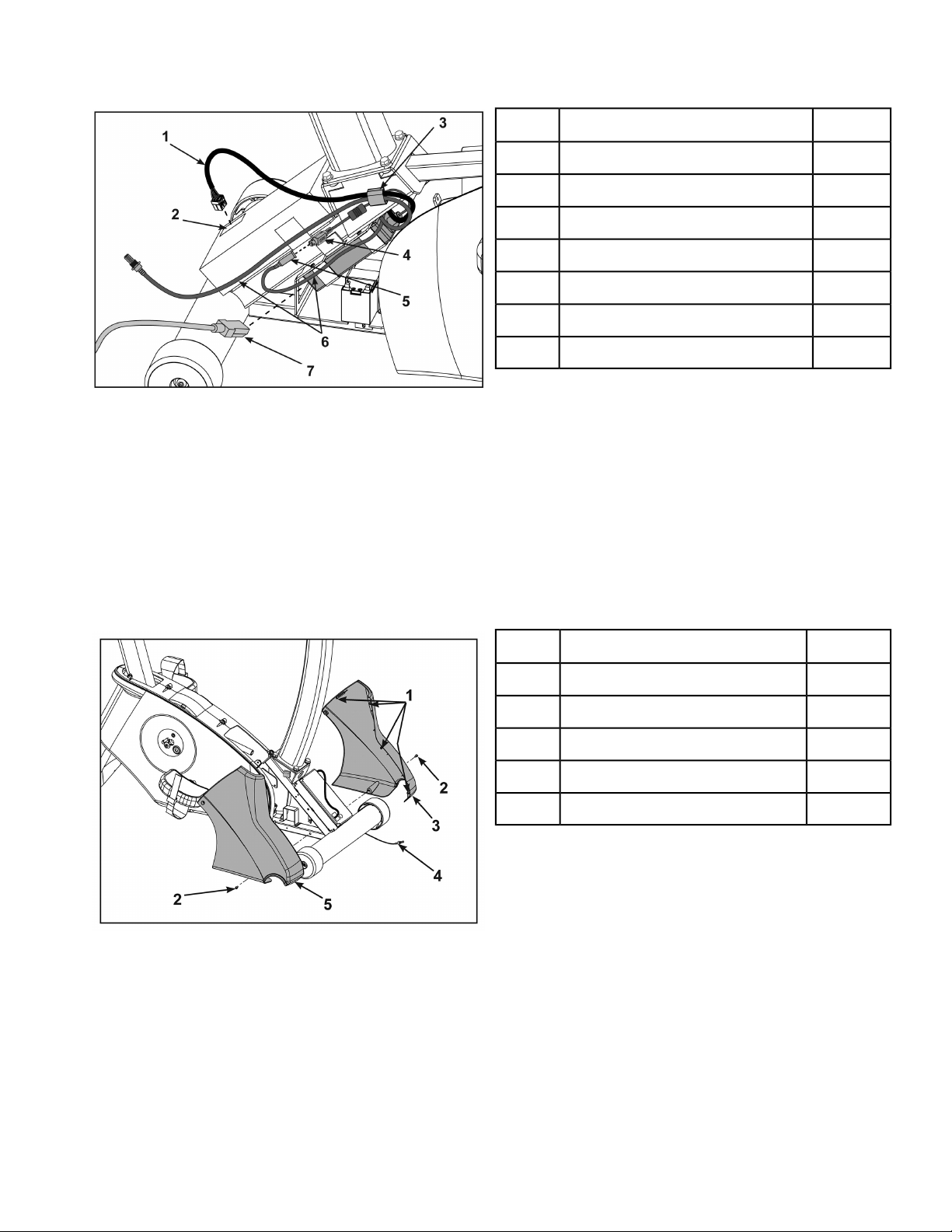
6. Route cables through gray clip on controller.
Qty.Description
1Display cable1
1Display cable connector2
1Gray clip3
1Power supply output4
1Console cable DIN connector5
1A/V cables, optional6
1Power cord7
7. Plug the display cable into the display cable connector on the lower control board.
Ensure the cable connector is securely fastened.
8. Connect the console cable’s DIN connector to the power supply output.
Make sure the two connectors snap firmly together and can not be pulled apart without pulling the
sleeve back to release it.
Install front covers
1. Install front left cover with one screw using a Phillips screwdriver.
Qty.Description
4Plastic Connectors1
2Screw2
1Front Left Cover3
1Optional A/V Cables4
1Front Right Cover5
2. Route optional A/V cables through front covers to front of unit.
Do not pinch or damage the cables during assembly.
In addition to the mounting screws, there are four plastic connectors that secure the front covers
together. Ensure that all four plastic connectors are inserted properly in each front cover.
3. Install front right cover with one screw using a Phillips screwdriver.
Page 18 of 76
Cybex 770C/770R Cycle Part Number LT-24919-4 D

Install top cap
Install top cap with two screws using a Phillips screwdriver.
Qty.Description
1Top Cap1
2Screws2
Install back cap
1. Place the back cap into the top cap.
Ensure the back cap is fully inserted into the top cap.
Qty.Description
1Top Cap1
2Screws2
1Back Cap3
2. Install the back cap with two screws using a Phillips screwdriver.
Page 19 of 76
Cybex 770C/770R Cycle Part Number LT-24919-4 D
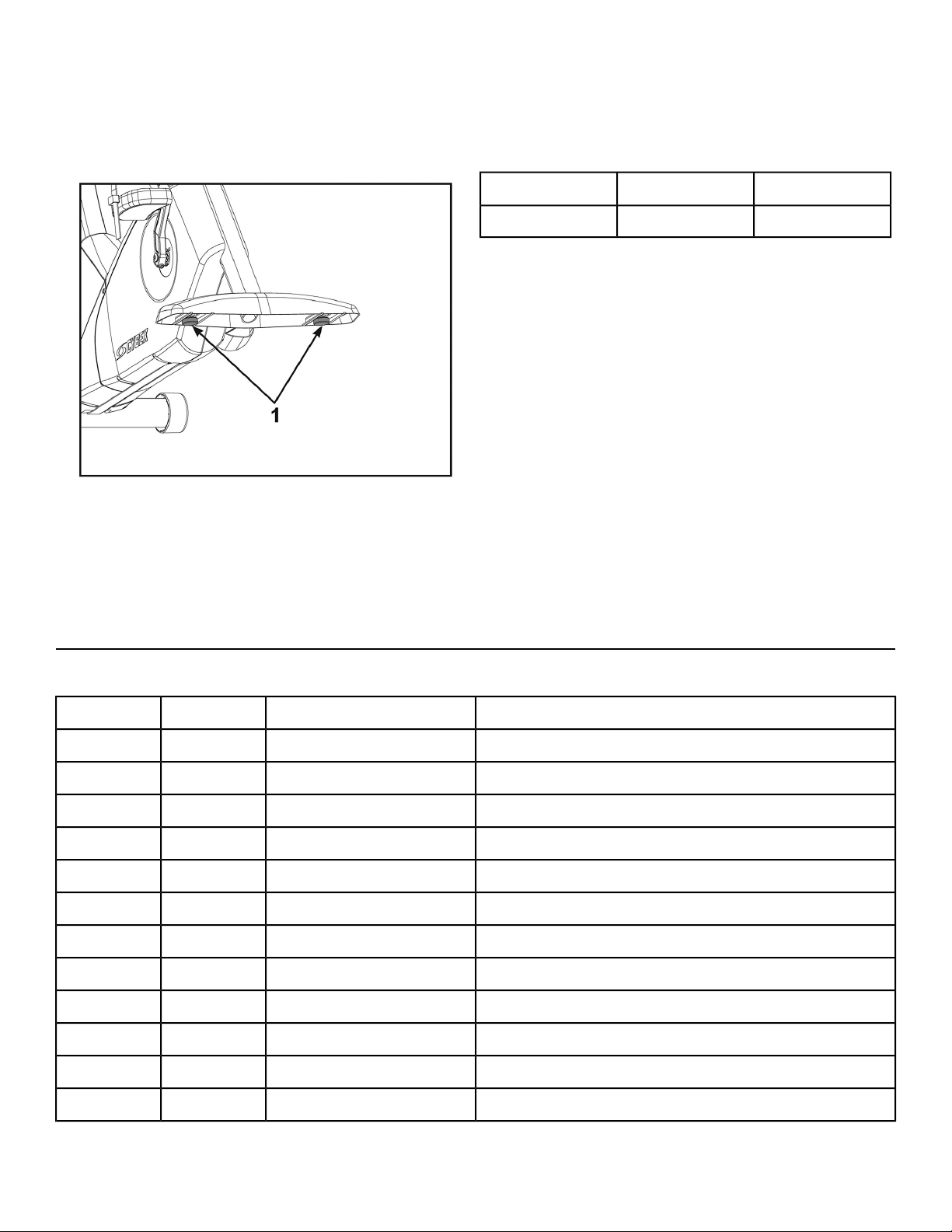
Level unit
Confirm that the unit is on a level surface. If not, use a 9/16” open-end wrench to adjust the leveling feet
up or down.
Qty.Description
2Leveling Feet1
Visually inspect unit
1. Remove any packing material from unit.
2. Examine the unit to ensure that the assembly is correct and complete.
770R Assembly
Verify parts list shown below
DescriptionPart NumberQuantityItem
Base with covers attachedVaries11
Console assemblyVaries12
Front Left CoverPL-2151713
Front Right CoverPL-2151814
Seat Back AssemblyAX-2167015
Accessory TrayAX-2173816
Hardware packAX-2169917
Owner’s ManualLT-23688-X18
Assembly posterLT-2369119
Warranty sheet, ConsumerLT-23693110
Warranty sheet, CommercialLT-23692110
Power cord (E3 View Monitor option)Varies111
Page 20 of 76
Cybex 770C/770R Cycle Part Number LT-24919-4 D
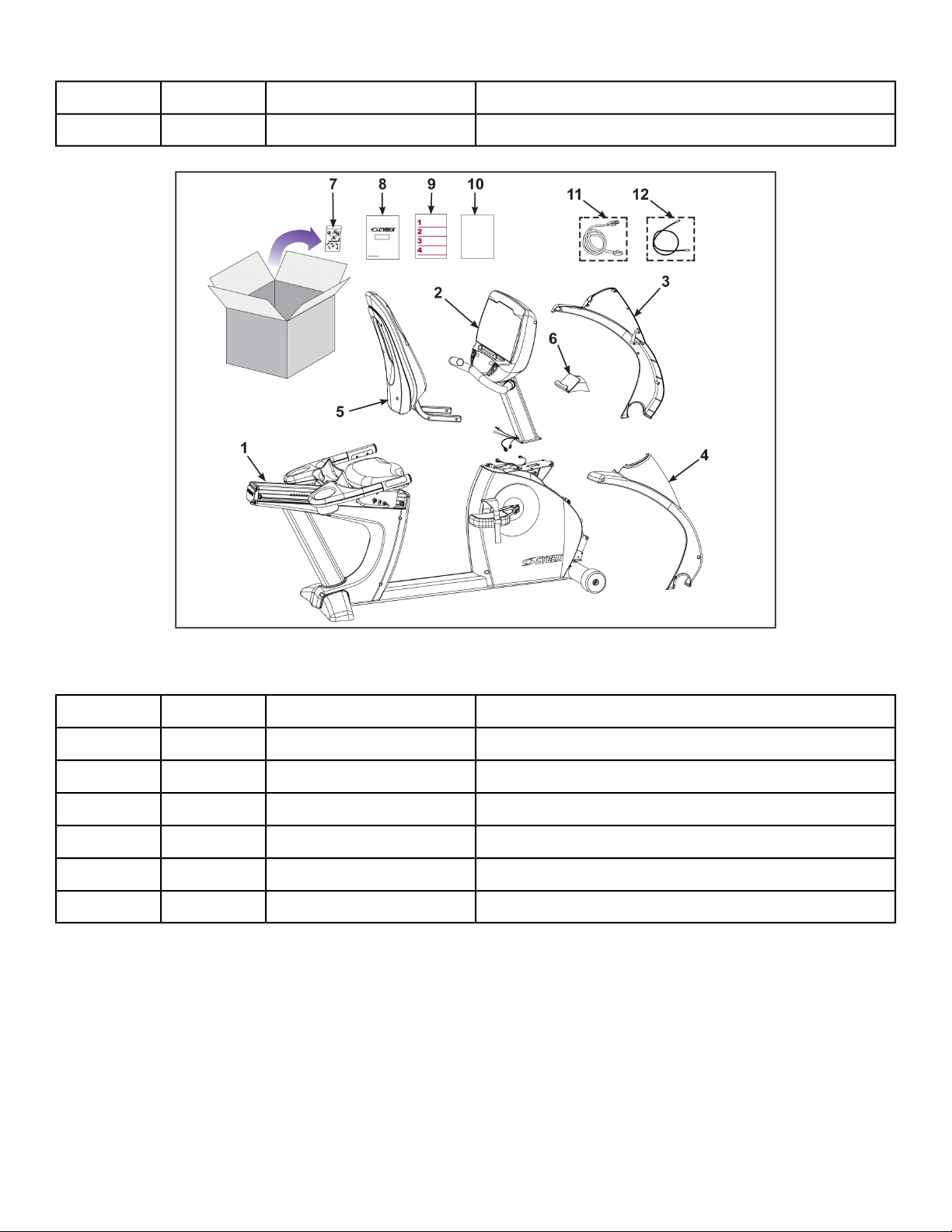
DescriptionPart NumberQuantityItem
Cable, 6’, Coax (E3 View Monitor option)AW-23836112
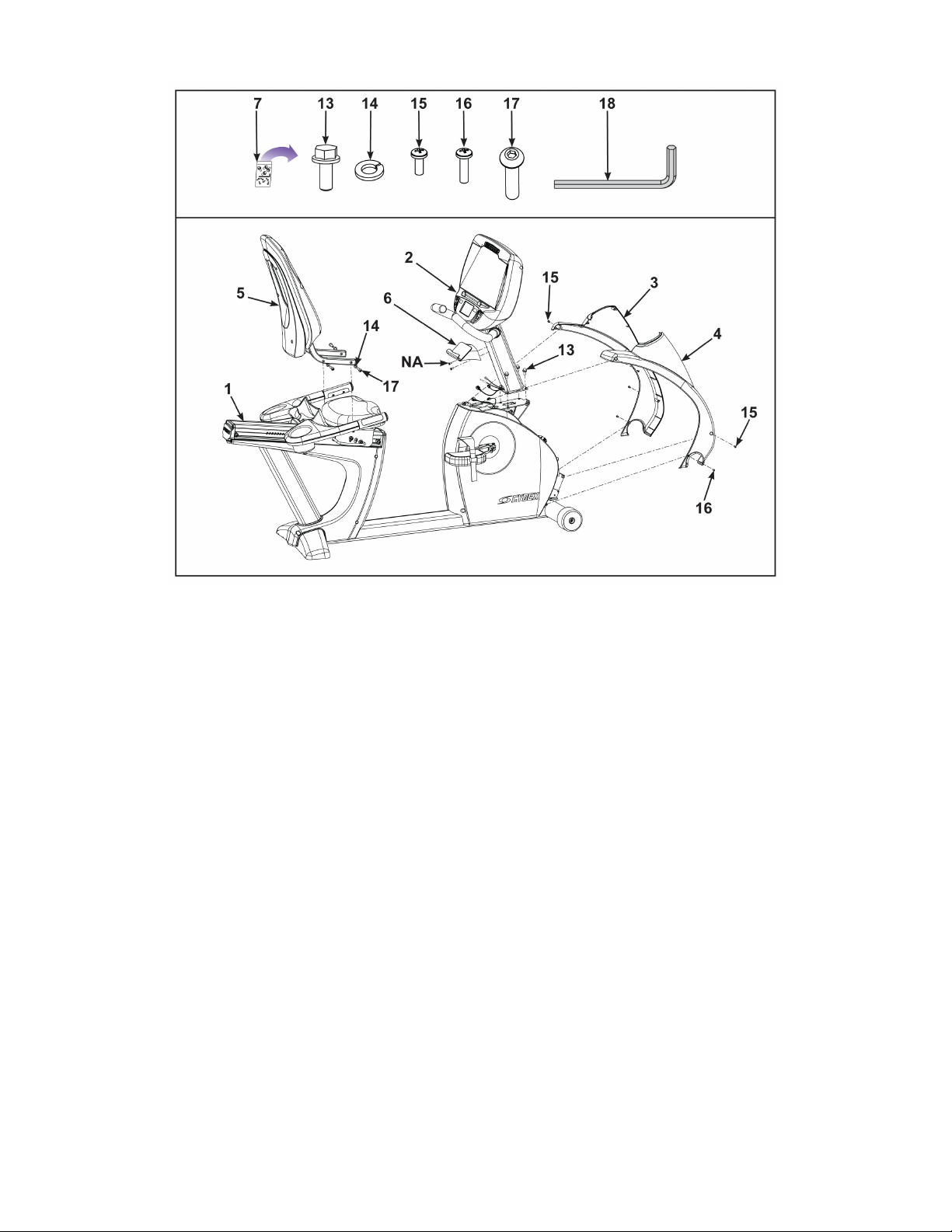
Hardware
DescriptionPart NumberQuantityItem
Screw, 5/16-18 × .75”,HXHD,WHIZ-LOCK,GR5HS-19108413
Washer, 5/16” SplitHW-53018414
Screw, 8-16 × .50”, PNHDHS-15706415
Screw, 8-16 × .75”, PNHDHS-18311216
Screw, 5/16-18 × 1.50”HS-41107417
3/16” Allen wrenchHX-00438118
Page 21 of 76
Cybex 770C/770R Cycle Part Number LT-24919-4 D
Lift and move the unit
1. Grasp the rear foot.
2. Lift the rear foot so the front transport wheels are able to roll on floor.
Use proper lifting methods.
3. Move unit to intended location.
4. Lower the rear foot.
Page 22 of 76
Cybex 770C/770R Cycle Part Number LT-24919-4 D
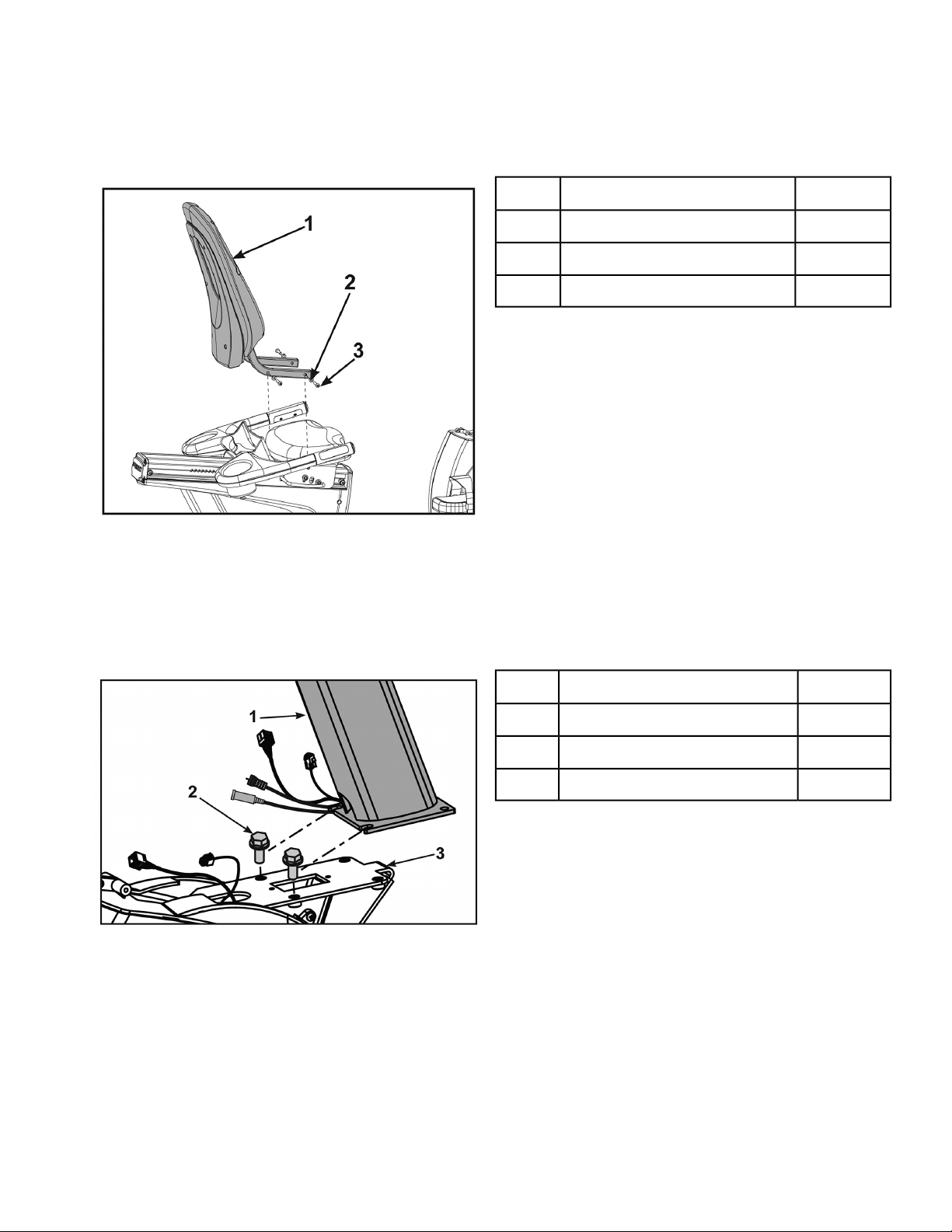
Install seat back assembly
1. Place the seat back assembly in the correct position and hand thread each of the screws and four
washers.
Qty.Description
1Seat Back Assembly1
4Washers2
4Screws3
2. Securely fasten the screws with the 3/16” Allen wrench provided.
Install console assembly
1. Hand thread two mounting screws into the base assembly.
Qty.Description
1Console Assembly1
2Screws2
1Base Assembly3
The console assembly will need to be supported during steps 2 through 4.
Page 23 of 76
Cybex 770C/770R Cycle Part Number LT-24919-4 D
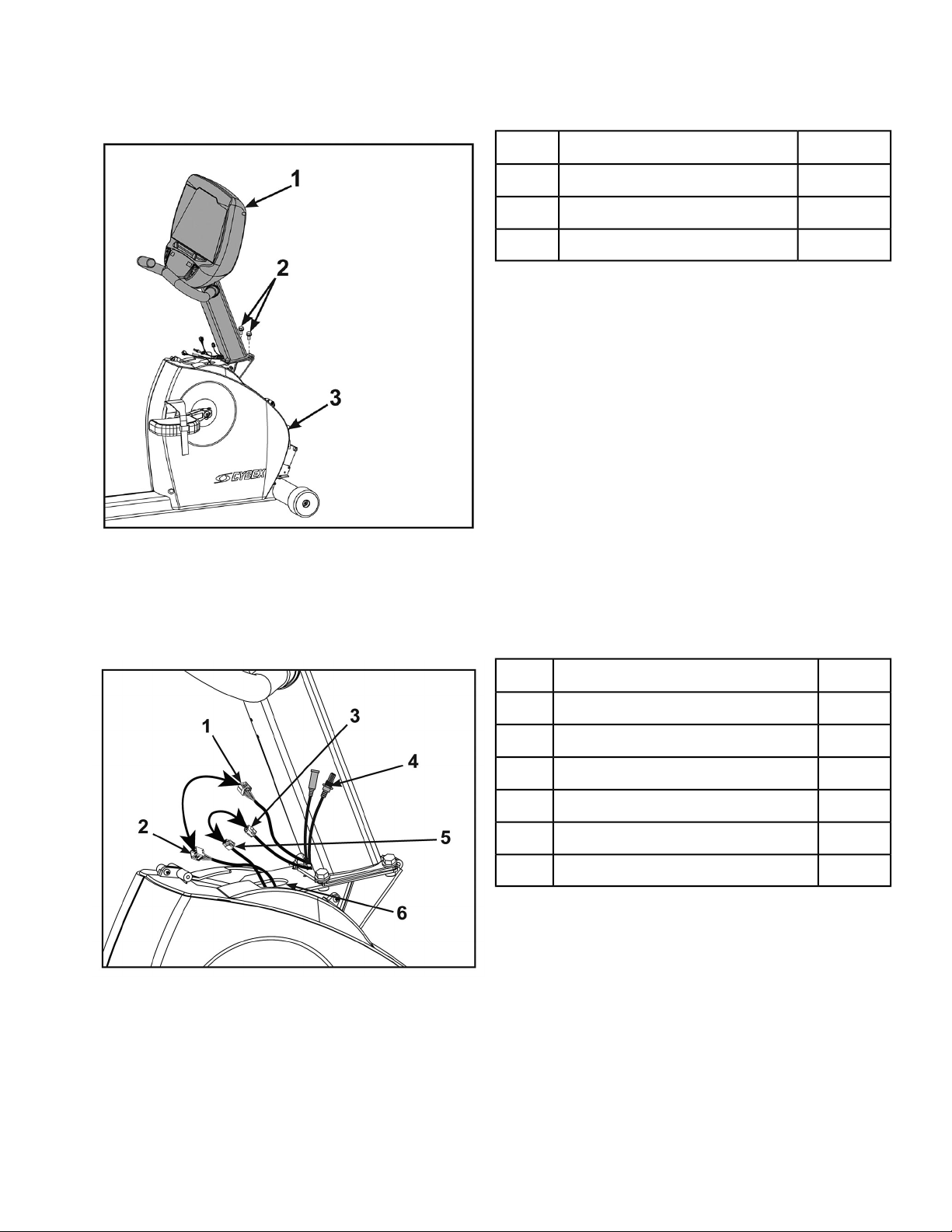
2. Place the console assembly in the correct position on the base assembly by sliding into position
onto the two mounting screws.
Qty.Description
1Console Assembly1
2Screws2
1Base Assembly3
3. Hand thread the other two screws.
4. Securely fasten the four screws with a 1/2” socket wrench.
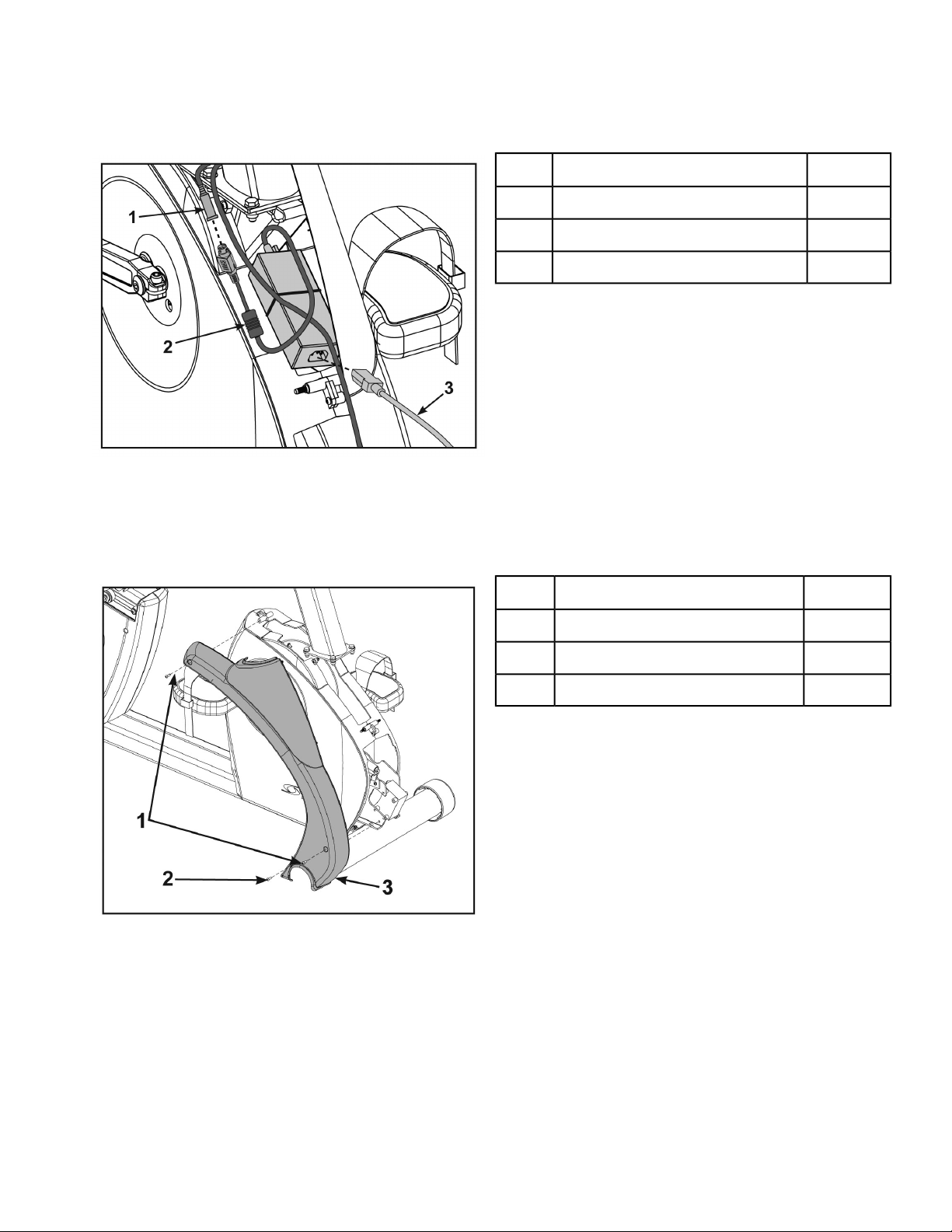
5. Plug the upper display cable connector into the lower display cable connector.
Ensure cable connectors click together and are securely fastened.
Qty.Description
1Upper Display Connector1
1Lower Display Connector2
1Upper Heart Rate Connector3
1A/V Cables (optional)4
1Lower Heart Rate Connector5
1Top Hole In Frame6
6. Plug the upper heart rate connector into the lower heart rate connector.
7. Tuck each of the cable connectors into the top hole in the frame.
Do not pinch or damage the cables during assembly.
Page 24 of 76
Cybex 770C/770R Cycle Part Number LT-24919-4 D
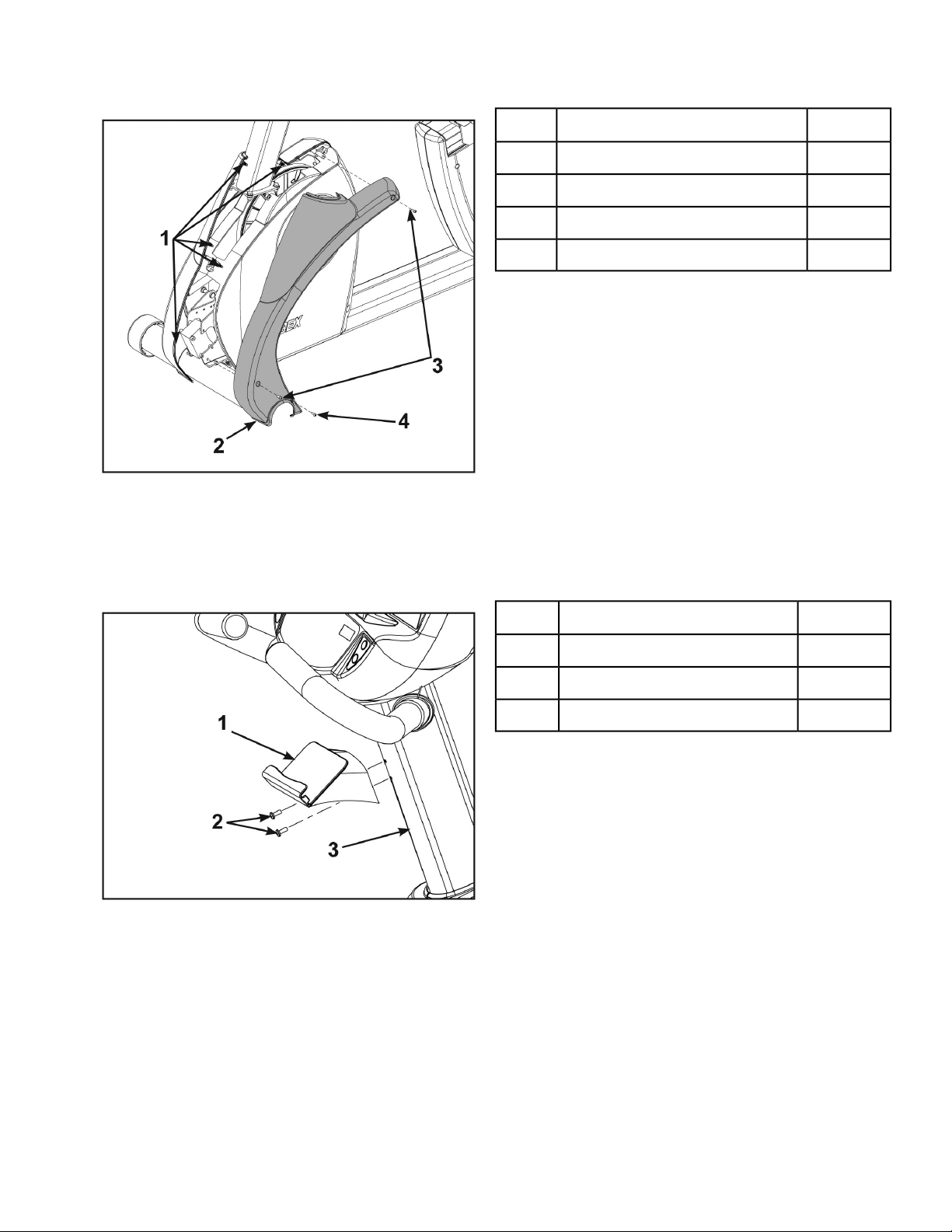
8. Connect the console cable’s DIN connector to the power supply output.
Make sure the two connectors snap firmly together and can not be pulled apart without pulling the
sleeve back to release it.
Qty.Description
1Power Supply Output1
1Console Cable DIN Connector2
1Power Cord3
Install front covers
1. Install front right cover with three screws using a Phillips screwdriver.
Qty.Description
2Screw, 8-16 × .50”1
1Screw, 8-16 × .75”2
1Front Right Cover3
In addition to three mounting screws per front cover, there are five plastic connectors that secure
the front covers together. Ensure that all four plastic connectors are inserted properly in each front
cover.
Page 25 of 76
Cybex 770C/770R Cycle Part Number LT-24919-4 D
2. Install front left cover with three screws using a Phillips screwdriver.
Qty.Description
5Plastic Connectors1
1Front Left Cover2
2Screw, 8-16 × .50”3
1Screw, 8-16 × .75”4
Install accessory tray
1. Remove the two screws in the console assembly using a Phillips screwdriver.
Qty.Description
1Accessory Tray1
2Screws2
1Console Assembly3
2. Install the accessory tray to the console assembly with the two screws removed in previous step
using a Phillips screwdriver.
Level unit
Confirm that the unit is on a level surface. If not, use a 9/16” open-end wrench to adjust the leveling feet
up or down.
Page 26 of 76
Cybex 770C/770R Cycle Part Number LT-24919-4 D
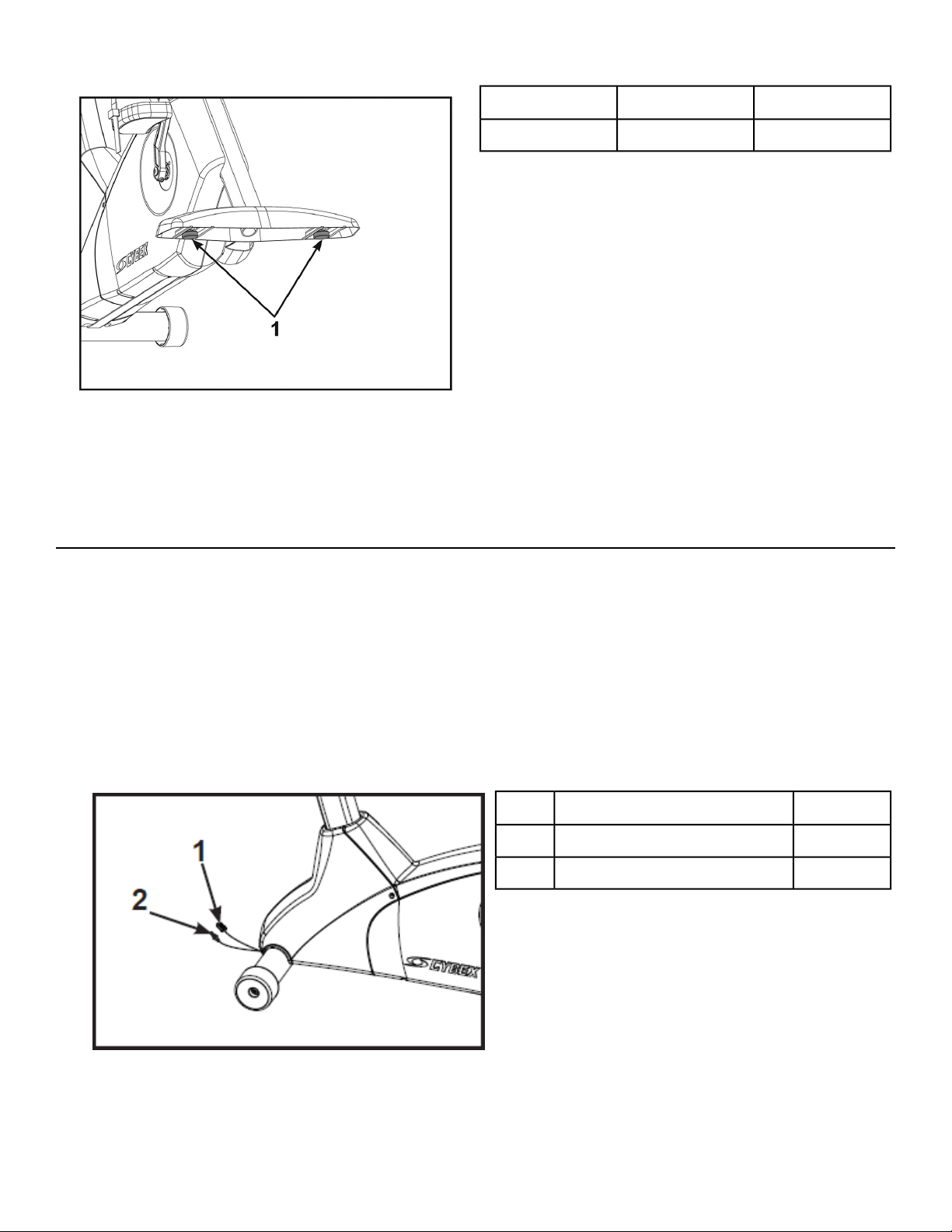
Qty.Description
2Leveling Feet1
Visually inspect unit
1. Remove any packing material from unit.
2. Examine the unit to ensure that the assembly is correct and complete.
Cybex GO Setup
Prerequisites:
• Coax cable with TV signal
• Netpulse Gateway installed and running, providing the connection via:
• Wired (Ethernet) – Ethernet cable is connected to the Cybex equipment through a network switch
to the Gateway
• Wireless – Gateway has been installed in the facility using a unique wireless access point. Cybex
GO Monitor will not connect to any other routers in the area.
• Power to the Cybex Equipment.
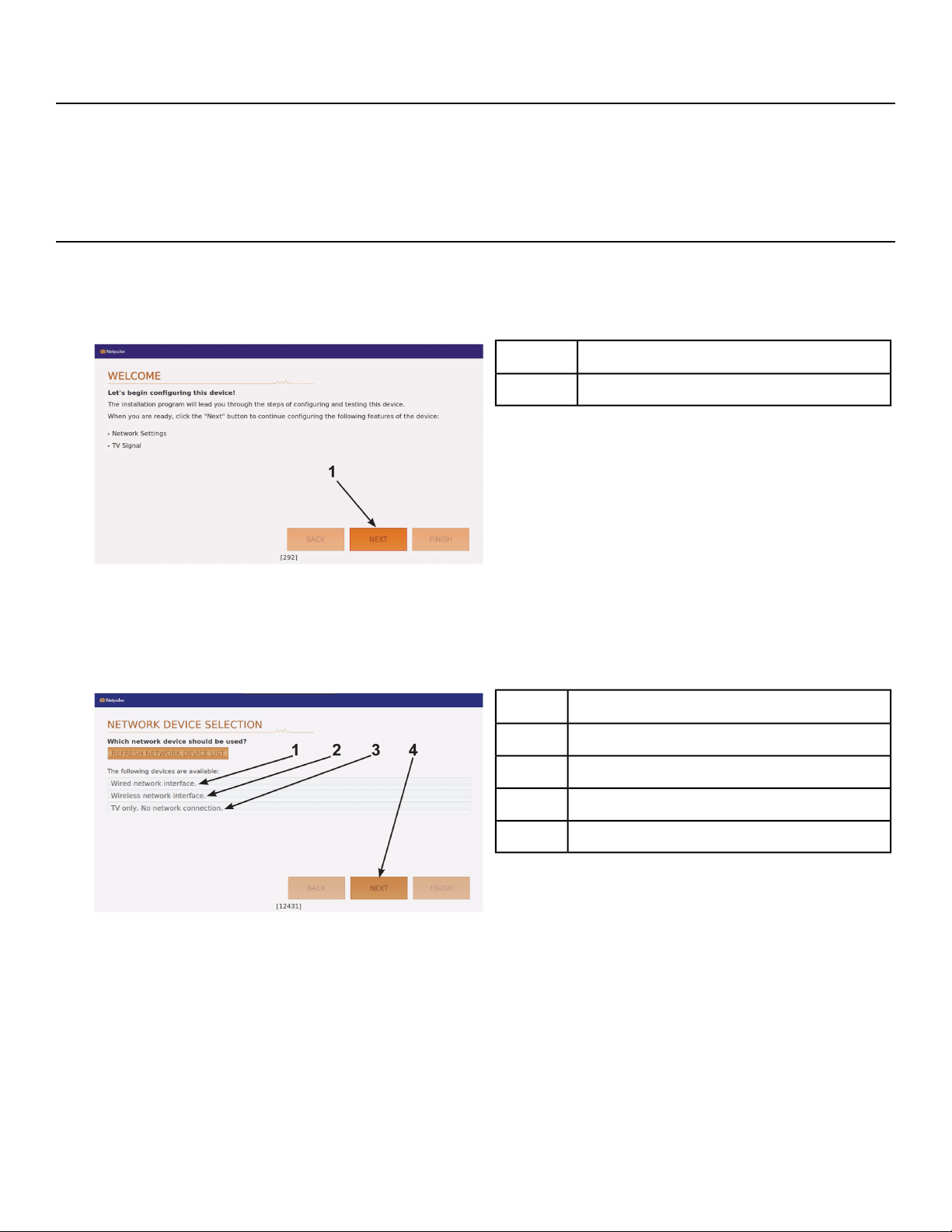
1. Install 6' coax cable to the coax cable connector in base of unit.
Qty.Description
1Ethernet Cable1
16’ Coax Cable2
2. For wired networks, Install ethernet cable with ethernet coupler in base of unit.
Page 27 of 76
Cybex 770C/770R Cycle Part Number LT-24919-4 D
Turn power on
1. Plug the power cord into a power outlet from a grounded circuit as described under Electrical
Requirements in this chapter.
2. The control panel will light up.
Cybex GO installer
The Cybex GO installer only occurs during the initial installation of the unit. Once complete, refer to
Initial setup.
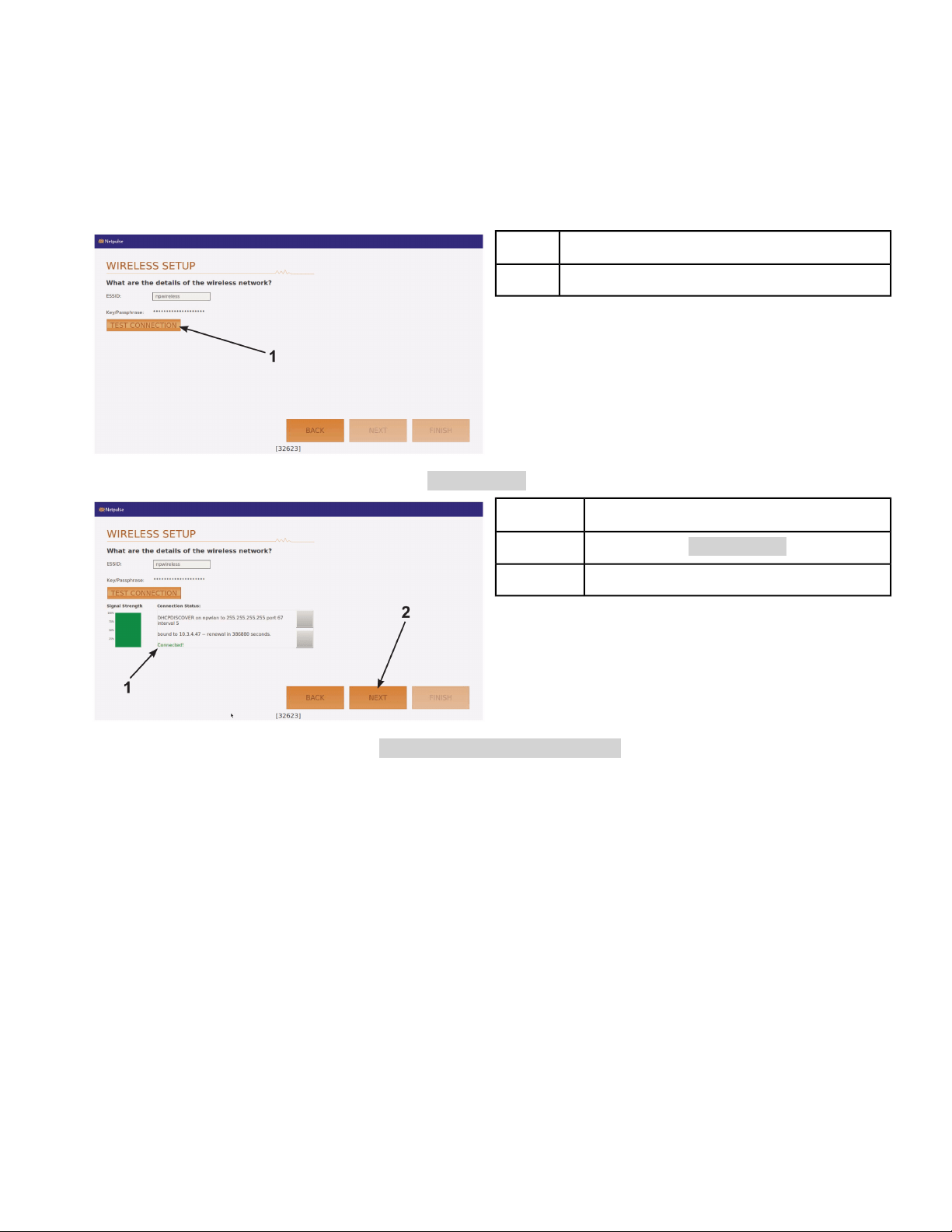
1. Tap NEXT to begin configuration.
Description
NEXT1
2. Select one of the three network devices.
• Wired network interface.
• Wireless network interface.
• TV only. No network connection.
Description
Wired network interface1
Wireless network interface2
TV only. No network connection3
NEXT4
Follow the procedure for the network device selected.
Wired network interface
1. Tap Wired network interface.
2. Tap NEXT to confirm selection.
3.
Go to Test network.
Page 28 of 76
Cybex 770C/770R Cycle Part Number LT-24919-4 D
Wireless network interface
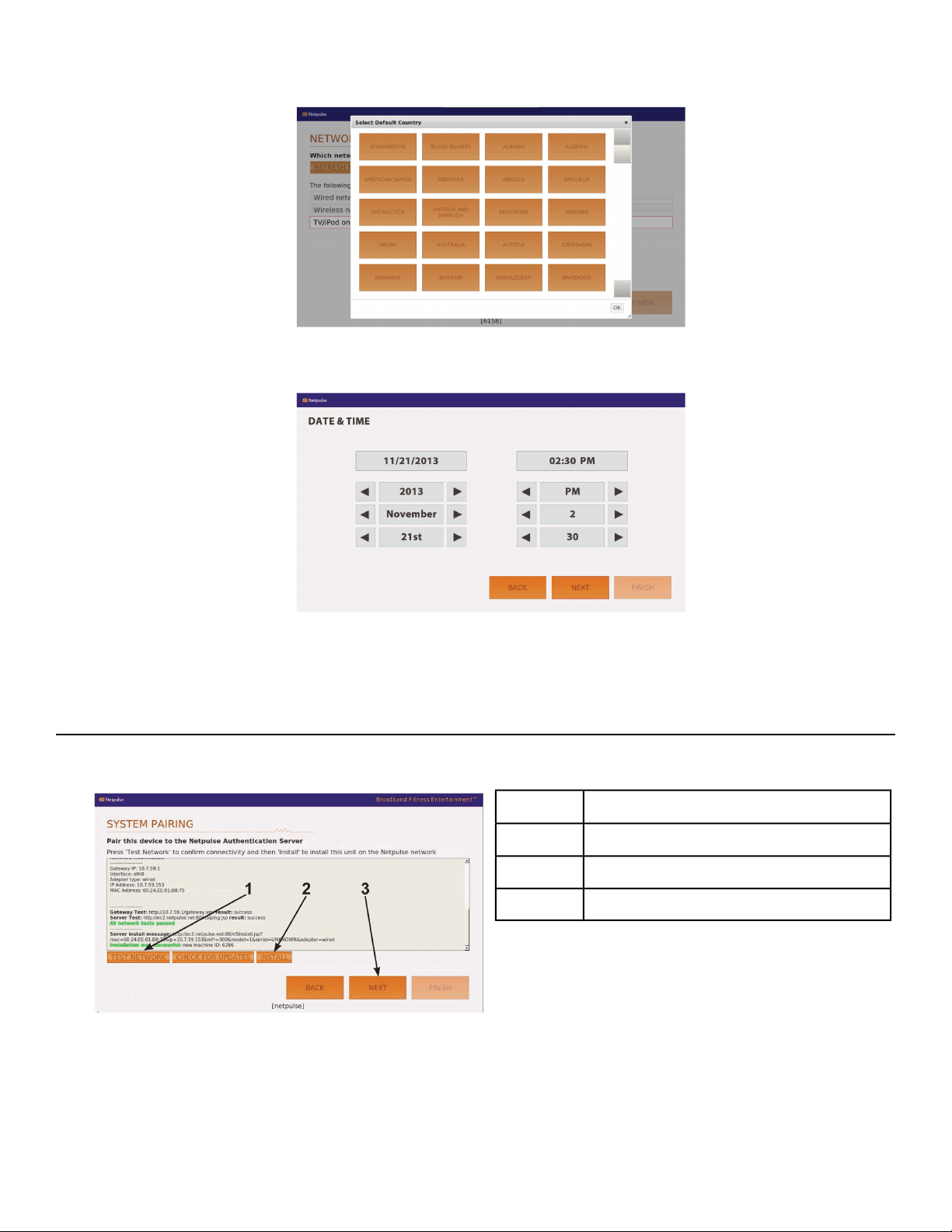
1. Tap Wireless network interface.
2. Tap NEXT to confirm selection.
3. Tap TEST CONNECTION.
This may take up to five minutes to complete. If test fails, retry.
Description
TEST CONNECTION1
4. Tap NEXT after test passes and displays Connected!.
Description
Connected!1
NEXT2
5. Tap OK after alert window displays Wireless network configured!.
6.
Go to Test network.
TV only
1. Tap TV only. No network connection.
Page 29 of 76
Cybex 770C/770R Cycle Part Number LT-24919-4 D
2. Select Default Country.
3. Tap OK
4. Set Date and Time.
5. Tap NEXT.
6.
Go to Channel configuration.
Test network
1. Tap TEST NETWORK.
Description
TEST NETWORK1
INSTALL2
NEXT3
2. When network test passes, tap INSTALL.
If network test fails, check the network connections and retry.
3. Tap NEXT.
Page 30 of 76
Cybex 770C/770R Cycle Part Number LT-24919-4 D
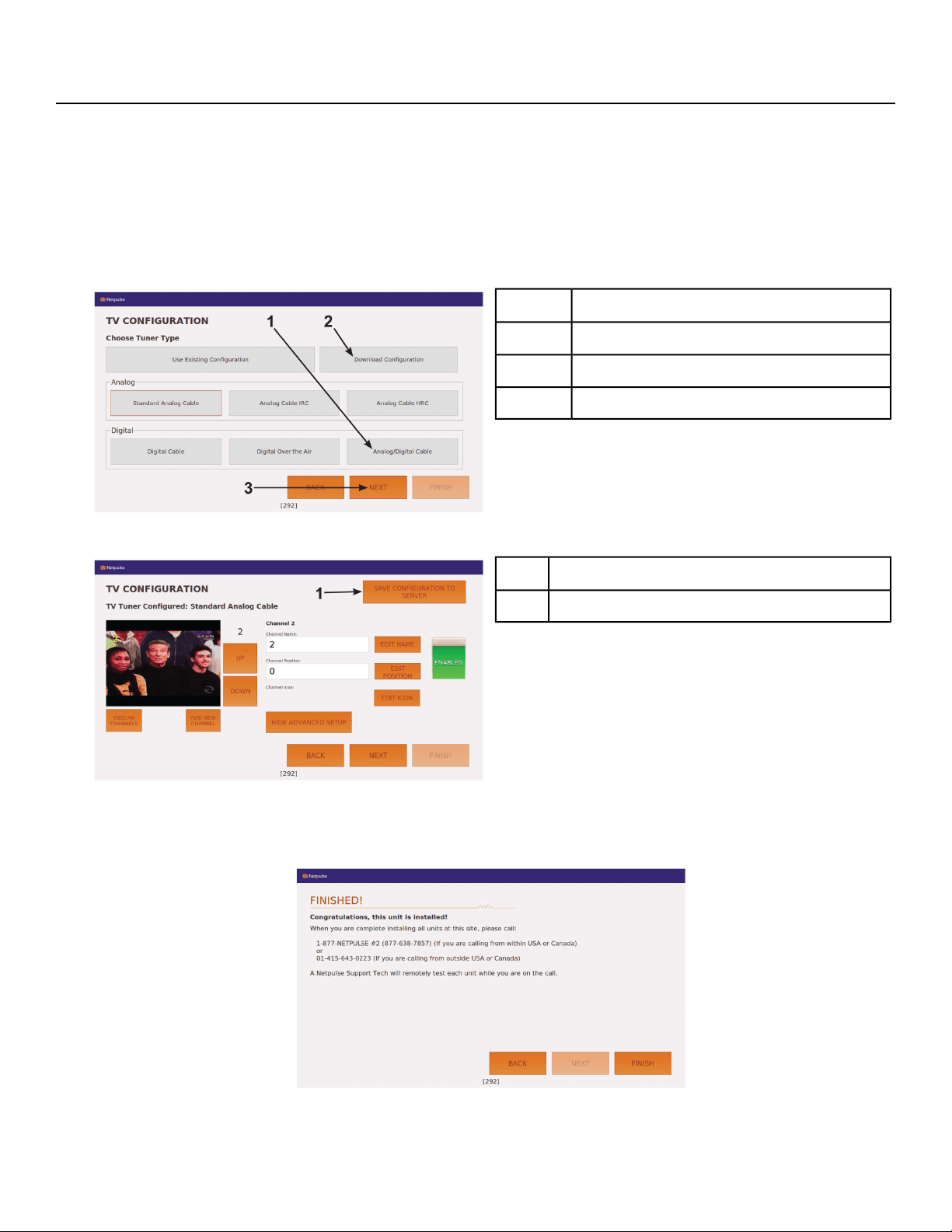
TV configuration
The TV configuration only needs to be performed on the first unit installed. Configure the first unit
completely, save the configuration, then assemble and configure all other units.
1. Select Analog/Digital Cable and tap NEXT.
This will scan for all available channels. The scan can take 20 minutes to complete.
If scan was previously configured and stored, choose Download Configuration and tap NEXT to
configure other units. Go to Test Cybex GO Monitor.
Description
Analog/Digital Cable1
Download Configuration2
NEXT3
2. Tap SAVE CONFIGURATION TO SERVER.
Description
SAVE CONFIGURATION TO SERVER1
To configure each of the channels see Channel configuration.
3. Tap FINISH to complete installation.
Cybex GO monitor will reset. Do not call Netpulse.
Page 31 of 76
Cybex 770C/770R Cycle Part Number LT-24919-4 D
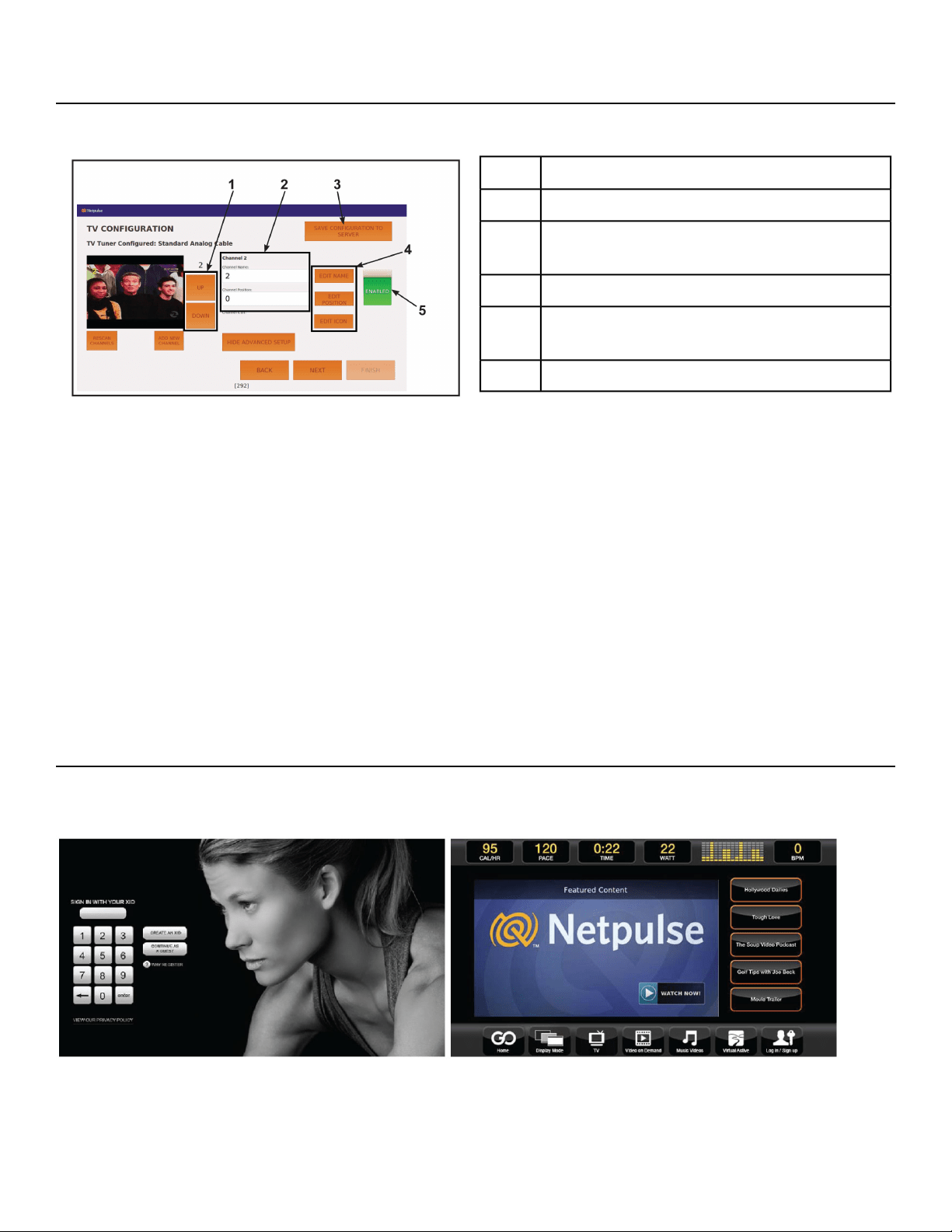
Channel configuration
Each channels name, position, and icon can be edited. Channels not needed or channels with poor
signals can be disabled.
Description
Channel Up/Channel Down1
Channel Name and Channel Position
number
2
SAVE CONFIGURATION TO SERVER3
EDIT NAME, EDIT POSITION, and EDIT
ICON
4
Channel ENABLED or DISABLED5
1. Tap SHOW ADVANCED SETUP, if edit icons are not visable.
2. Tap the Channel Up or Channel Down icons to select channel to edit.
3. Tap EDIT NAME.
A keyboard is displayed to edit the channel name. Tap SAVE when done.
4. Tap EDIT POSITION.
A keypad is displayed to edit the channel position. Tap SAVE when done.
5. Tap EDIT ICON.
Icons are displayed to edit the channels icon. Tap SAVE when done.
6. Tap the ENABLED or DISABLED icon to toggle the viewing of each channel.
The channel configuration only needs to be performed on the first unit installed. Configure the first
unit completely, save the configuration, then assemble and configure all other units.
Test Cybex GO monitor
Test Cybex GO monitor by tapping CONTINUE AS GUEST at home screen. Select from TV or Videos
to test Cybex GO monitor
Page 32 of 76
Cybex 770C/770R Cycle Part Number LT-24919-4 D
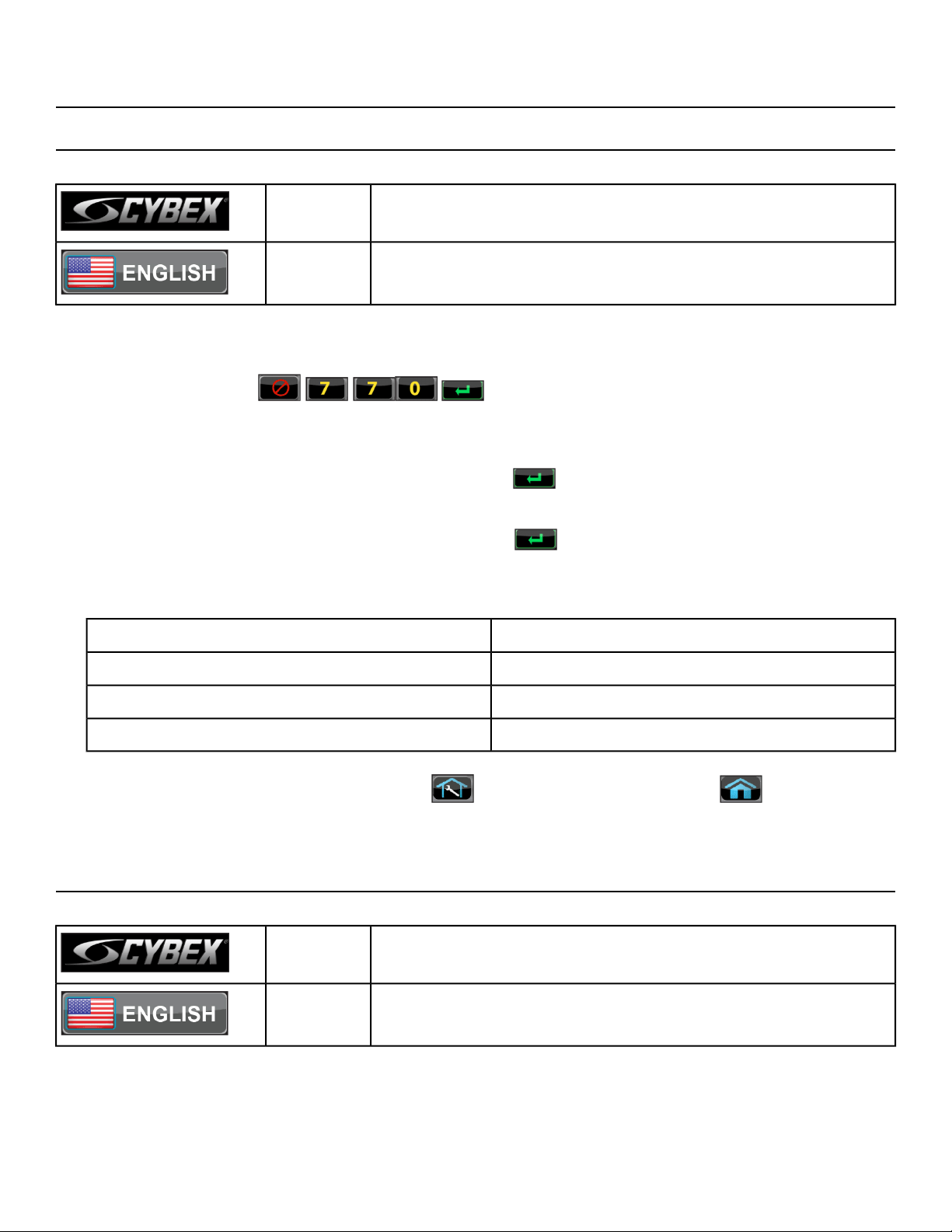
Equipment Setup
Initial setup
Perform this procedure during the installation of the unit. Once complete, refer to Setup Options below.
Press and hold Cybex logo for 6 seconds to access Screen
Lock and Toolbox.
CYBEX
LOGO
Press and hold language logo for 6 seconds to access Screen
Lock and Toolbox.
LANGUAGE
ICON
1. Tap the Access Toolbox icon to display the Access to Toolbox login screen.
2.
Enter the sequence: .
3. Tap the Setup icon to display the Setup menu.
4. Tap the Time icon to advance to the Set the Time screen.
5.
Adjust the time if needed, then tap the ENTER icon .
6. Tap the Date icon to advance to the Set the Date screen.
7.
Adjust the date if needed, then tap the ENTER icon .
8. Tap the Units icon to select the Set units preference screen.
9. Select the unit preferences from the following options:
Weight UnitsDistance Units
Lbs.Miles
KgKm
Stone
10.
Exit Set Up Mode by tapping the Toolbox icon, then tap the Home icon . The screen will
refresh.
Setup options - Cybex GO Monitor
Enter setup options.
Press and hold Cybex logo for 6 seconds to access Screen
Lock and Toolbox.
CYBEX
LOGO
Press and hold language logo for 6 seconds to access Screen
Lock and Toolbox.
LANGUAGE
ICON
1. Tap the Access Toolbox icon to display the Access to Toolbox login screen.
Page 33 of 76
Cybex 770C/770R Cycle Part Number LT-24919-4 D
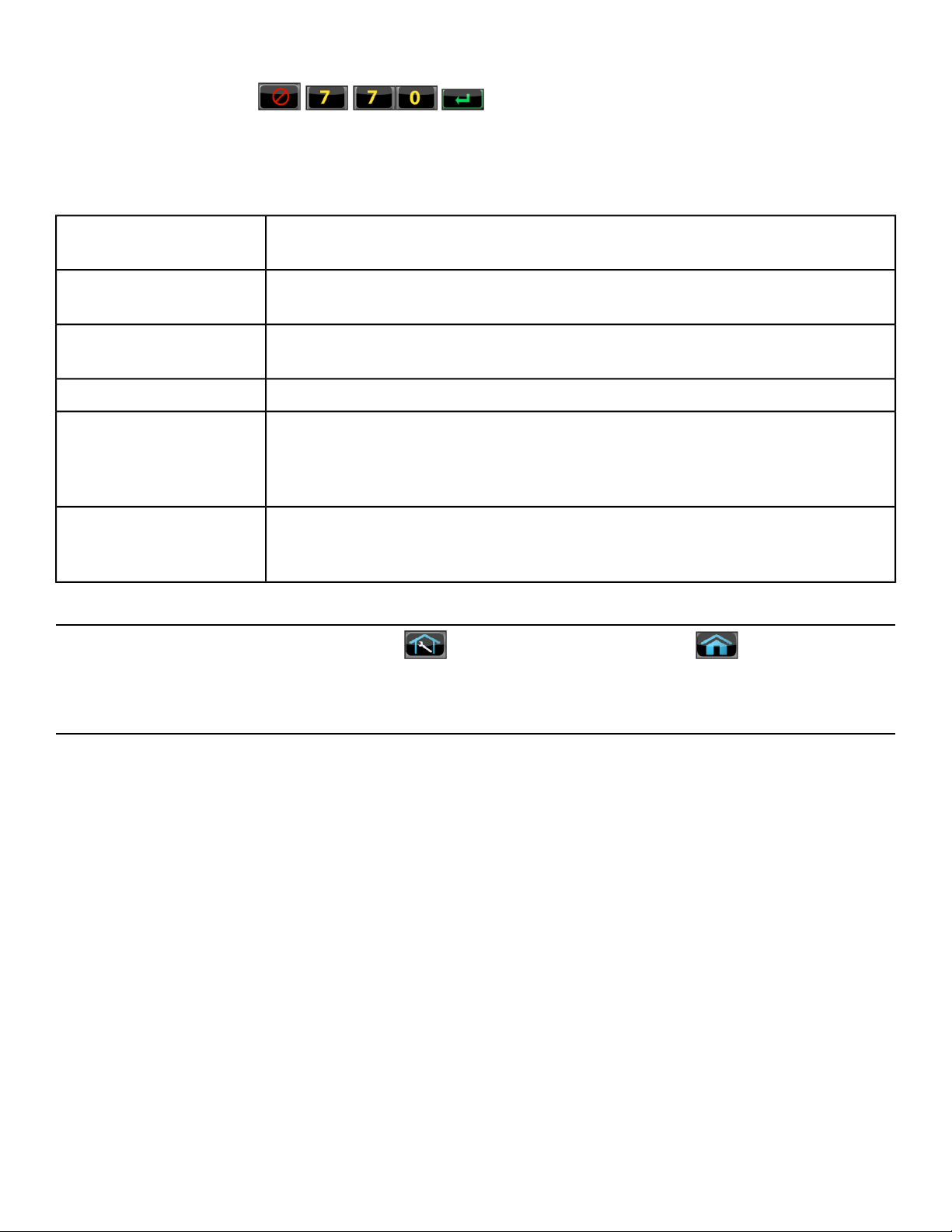
2.
Enter the sequence: .
3. Tap the Setup icon to display the Setup menu.
Setup menu
Select distance units. Miles or Km (Kilometers). Select weight units. Lbs.
(Pounds), Kg. (Kilograms) or Stone (Stones).
Units
Perform Touch Calibration, Network Setup, or Channel Setup. See A/V
Configuration.
A/V Config
Set Default and Max workout times. Default choices are 20, 30, or 60 minutes.
Max choices are 20, 30, 60, or OFF.
Workout times
Set Pause time. Choices are OFF, 0:30, 1:00, or 2:00 minutes.Pause
Select console beeper settings. Choices are ON, Some, or OFF.
Selecting Some enables beeper for safety related notifications, such as
Entering Active, Exiting Active, and Cool Down.
Sound
Select default language to display on CardioTouch screen. Toolbox is only
available in English. Include Optional Languages. Select optional languages
to display on CardioTouch screen. Choices are Include or Off.
Language
Exit Set Up Mode
Exit Set Up Mode by tapping the Toolbox icon, then tap the Home icon . The screen will
refresh.
Testing operation
Use the following instructions to test the full resistance range of the unit:
1. Plug the optional power cord into a power outlet from a grounded circuit.
Coil up the remainder of the power cord and place it out of the way. If you do not have the optional
power supply, skip to step 3.
2. Verify the control panel will illuminate and is in Dormant Mode.
3. Hold the handrails to steady self while stepping into the pedals.
4. Begin pedaling.
5. Press Quick Start.
6. Run unit through full resistance range.
First press the Resistance + key until unit reaches its highest load (the display will show 21). Then
press the Resistance - key until unit reaches its lowest load (the display will show 1). The resistance
should increase and decrease while pedaling.
When unit reaches the set resistance, the displays will stop flashing and remain steadily illuminated
to indicate the desired setting has been reached.
Page 34 of 76
Cybex 770C/770R Cycle Part Number LT-24919-4 D

7. Wait until pedals come to a complete stop before dismounting the unit.
Hold the handrails to steady self while stepping off the unit.
Page 35 of 76
Cybex 770C/770R Cycle Part Number LT-24919-4 D

Operation
Intended Use
The intended commercial use of this machine is to aid exercise and improve general physical fitness.
Terms Used
This section lists some of the common terms and symbols used in this chapter. Other terms and symbols
are listed in this chapter as appropriate.
Any time the unit is controlling resistance and accumulating workout data. Active
Mode begins after tapping Quick Start icon during the initial count-down screen,
Active Mode
after completing the setup for a workout, or by default if the initial count-down
screen times out and enters Quick Start mode.
Display automatically cycles through workout data.Auto-Scan
Control the gear used from 1 to 21. Gear 1 is very easy to pedal at slow road
speed, gear 21 is very hard to pedal at high road speed.
Bike Mode
The CardioTouch Screen is the touch screen located in the handset area.CardioTouch
Screen
Control the brake power from 35 to 500 Watts. The bike will decrease the resistance
at higher speeds or increase resistance at slower speeds. The bike will maintain
a constant power setting.
Constant Power
Mode
A reduction of work load for a short duration allows user to gently reduce heart
rate. Cool Down occurs two minutes prior to completion of the workout-controlled
workout sessions.
Cool Down
Occurs when unit is plugged in and not in use.Dormant Mode
Accommodating resistance, where unit provides a corresponding amount of
resistance on the user to keep them at a fixed pedal speed. Such exercise is used
to test and improve muscular strength and endurance, especially after injury.
Isokinetic
Exercise
In this active mode the user sets a goal for Time. The user controls speed and
resistance. Manual Mode continues until the goal is reached. Manual Mode is only
available during Active Mode.
Manual Mode
Occurs only if the Pause feature is enabled and user selects the STOP key from
Active Mode.
Pause Mode
This begins by tapping the Quick Start icon. User has full control over the workout
as time counts up.
Quick Start
Review of the accumulated workout data will happen at the end of each workout
session.
Workout Review
A collection of workouts with a common theme.Workout Type
Page 36 of 76
Cybex 770C/770R Cycle Part Number LT-24919-4 D
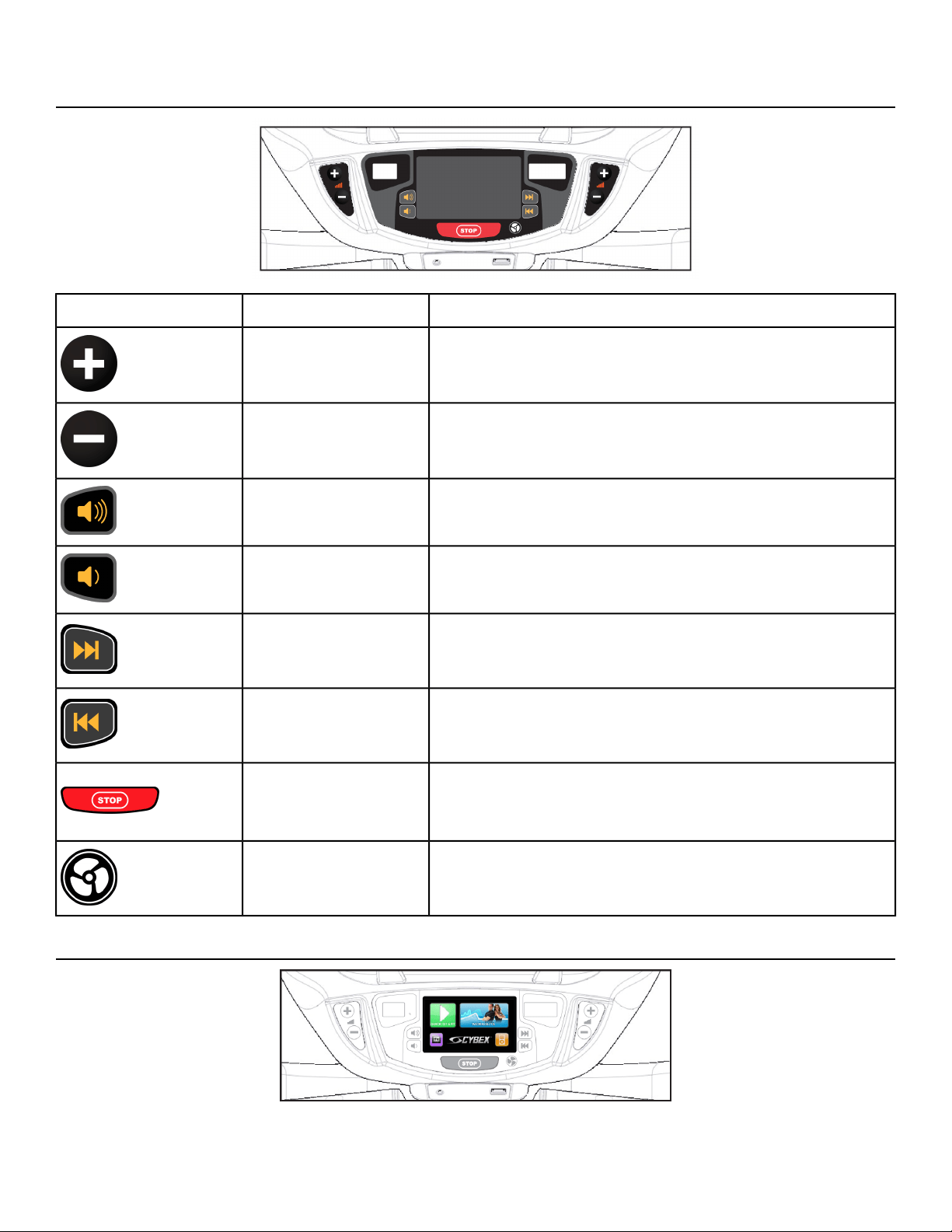
User Control Symbols Used
DescriptionControl NameControl
Increase Bike Gear (1-21), Power (35-500) or Target
RPM (20-100).
RESISTANCE UP
Decrease Bike Gear (1-21), Power (35-500) or Target
RPM (20-100).
RESISTANCE DOWN
Adjust Volume up.VOLUME UP
Adjust Volume down.VOLUME DOWN
iPod - NEXT track
A/V - Channel UP
CHANNEL/TRACK
CONTROL
iPod - PREVIOUS track
A/V - Channel DOWN
CHANNEL/TRACK
CONTROL
Press STOP once to end the workout session and start
the Workout Review. Press STOP again to exit to
Dormant Mode.
STOP
Default speed is OFF during active mode. Press the FAN
key to control fan speed. Choices are OFF, LOW and HI.
FAN
CardioTouch Symbols Used
Page 37 of 76
Cybex 770C/770R Cycle Part Number LT-24919-4 D
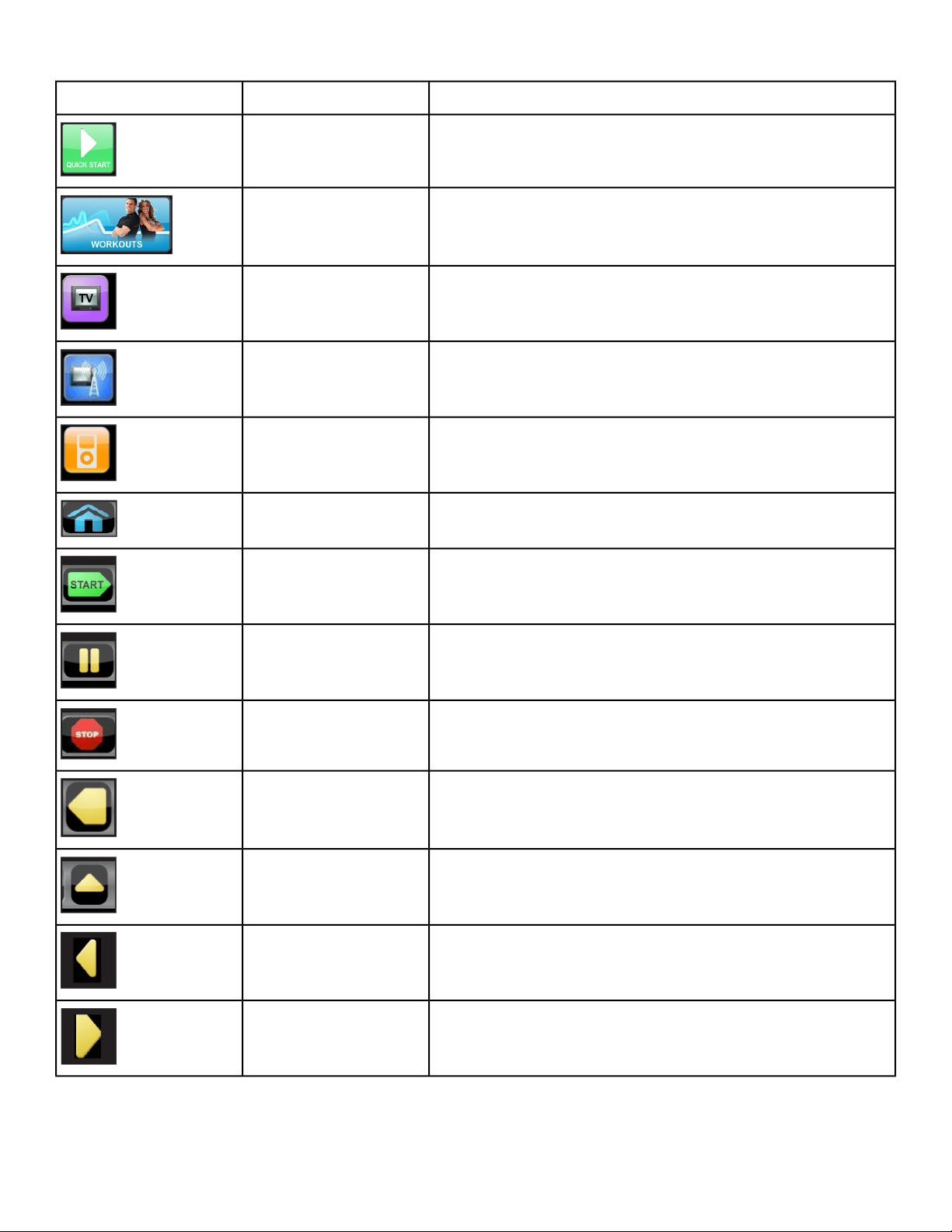
DescriptionIcon NameIcon
Quick Start enters Active Mode at the default settings
with time counting up from 0:00.
Quick Start
Tap Workouts icon to enter workout group selection.WORKOUTS
Tap TV icon to enter TV control menu. If TV is not
connected, icon will not be shown.
TV
Tap TV + FM icon to enter TV + FM control menu. If TV
+ FM is not connected, icon will not be shown.
TV + FM
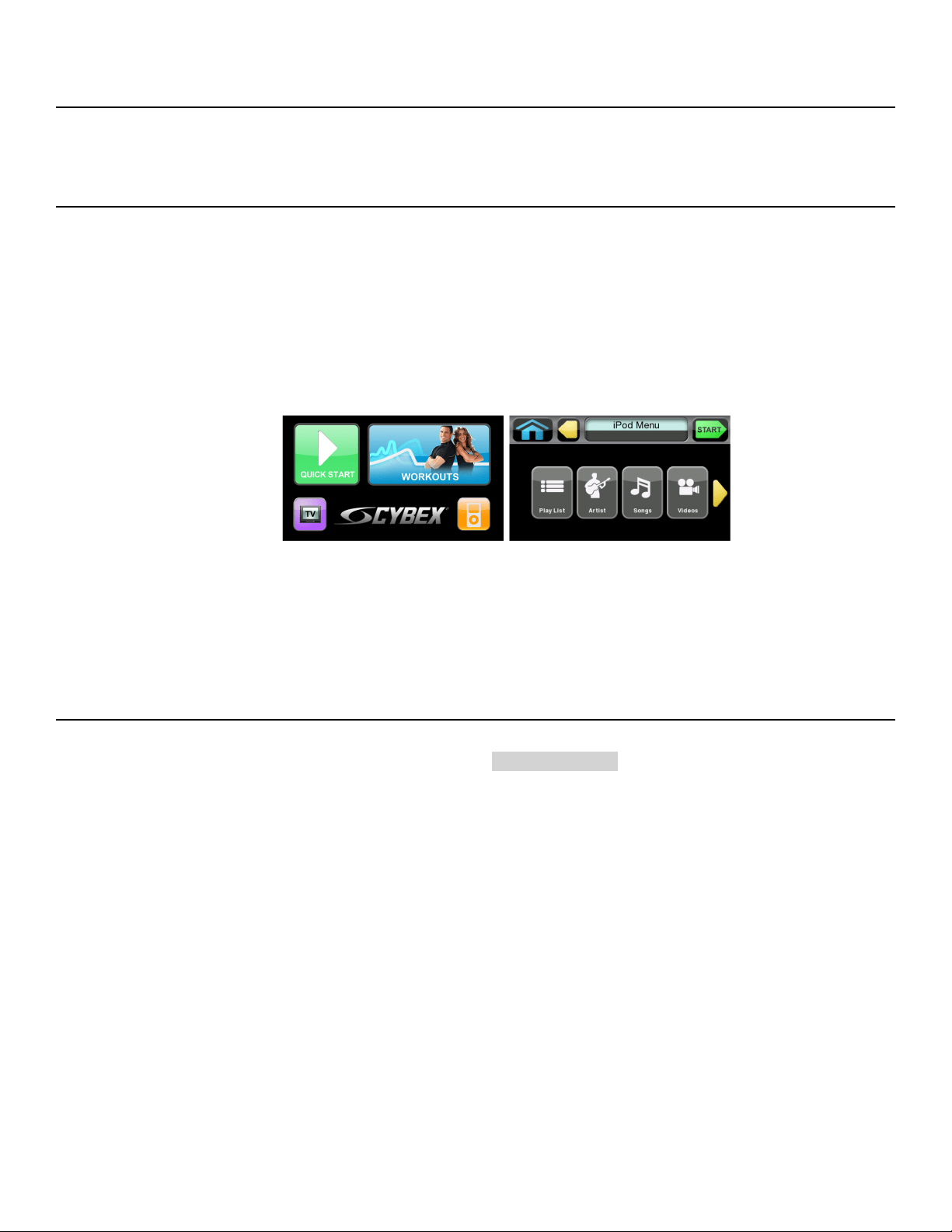
Tap iPod icon to enter iPod/iPhone control menu. If
iPod/iPhone is not connected, icon will be grayed out.
iPod
Return to opening screen.HOME
Enter Active Mode.START
If pause feature is enabled, pause icon is shown. Press
Pause icon once to enter pause mode.
PAUSE
If pause feature is disabled, stop icon is shown. Press
Stop icon or STOP button once to enter Workout review.
STOP
Return to previous or opening screen.BACK
Go up one level.UP LEVEL
Shift the screen left to view more options.SHIFT LEFT
Shift the screen right to view more options.SHIFT RIGHT
Page 38 of 76
Cybex 770C/770R Cycle Part Number LT-24919-4 D
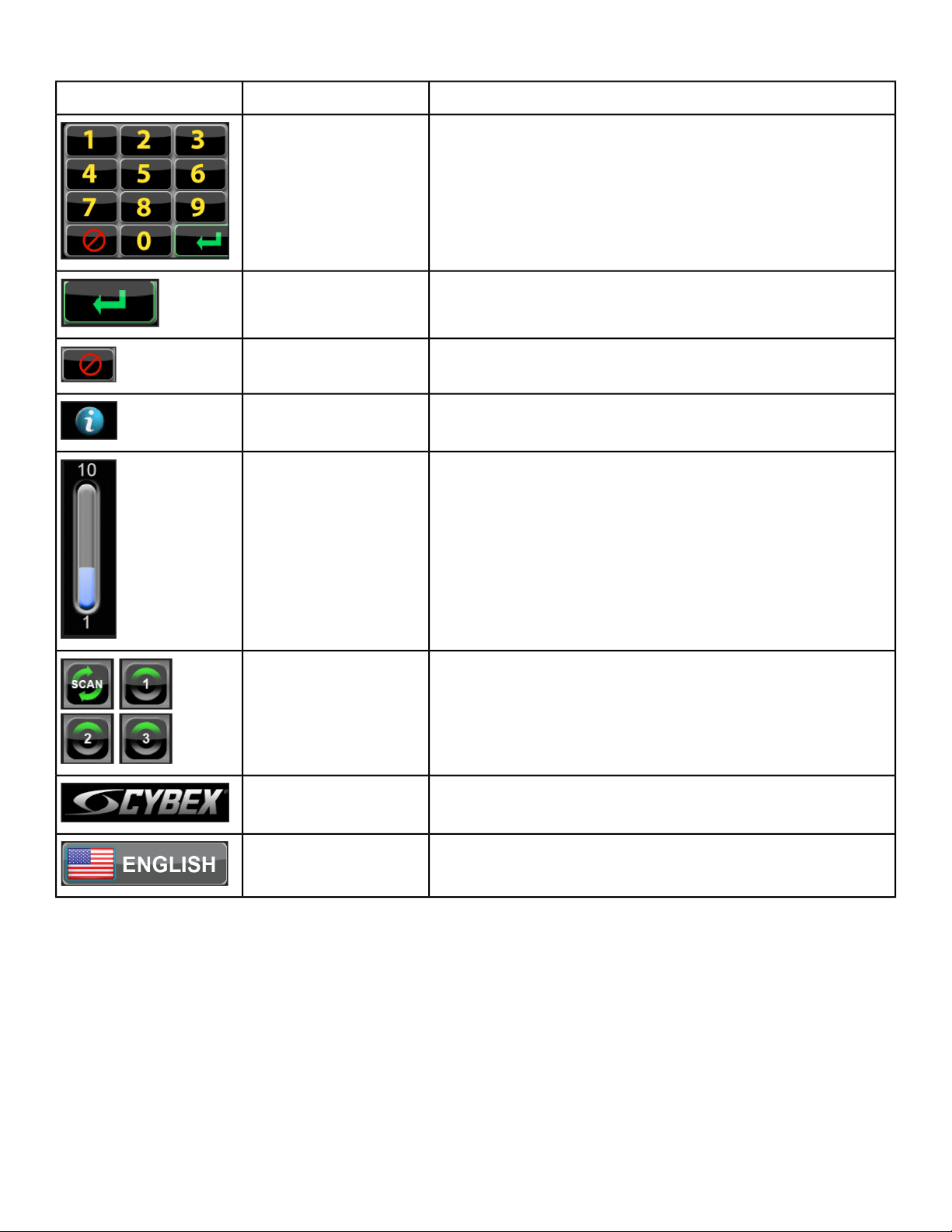
DescriptionIcon NameIcon
Numeric keypad for entering data.KEYPAD
Accepts the value shown.ENTER
Clear any values selected.CLEAR
Select to provide more information and details.INFO
Displays current value in the minimum and maximum
range.
SCALE
This icon defaults to SCAN, which displays the workout
info on the upper display, changing every 5 seconds. Tap
the SCAN icon to display different data sets. Tap again
to change the data set, or multiple times to get back to
SCAN.
SCAN
Press and hold Cybex logo for 6 seconds to access
Screen Lock and Toolbox.
CYBEX LOGO
Press and hold language logo for 6 seconds to access
Screen Lock and Toolbox.
LANGUAGE ICON
Page 39 of 76
Cybex 770C/770R Cycle Part Number LT-24919-4 D
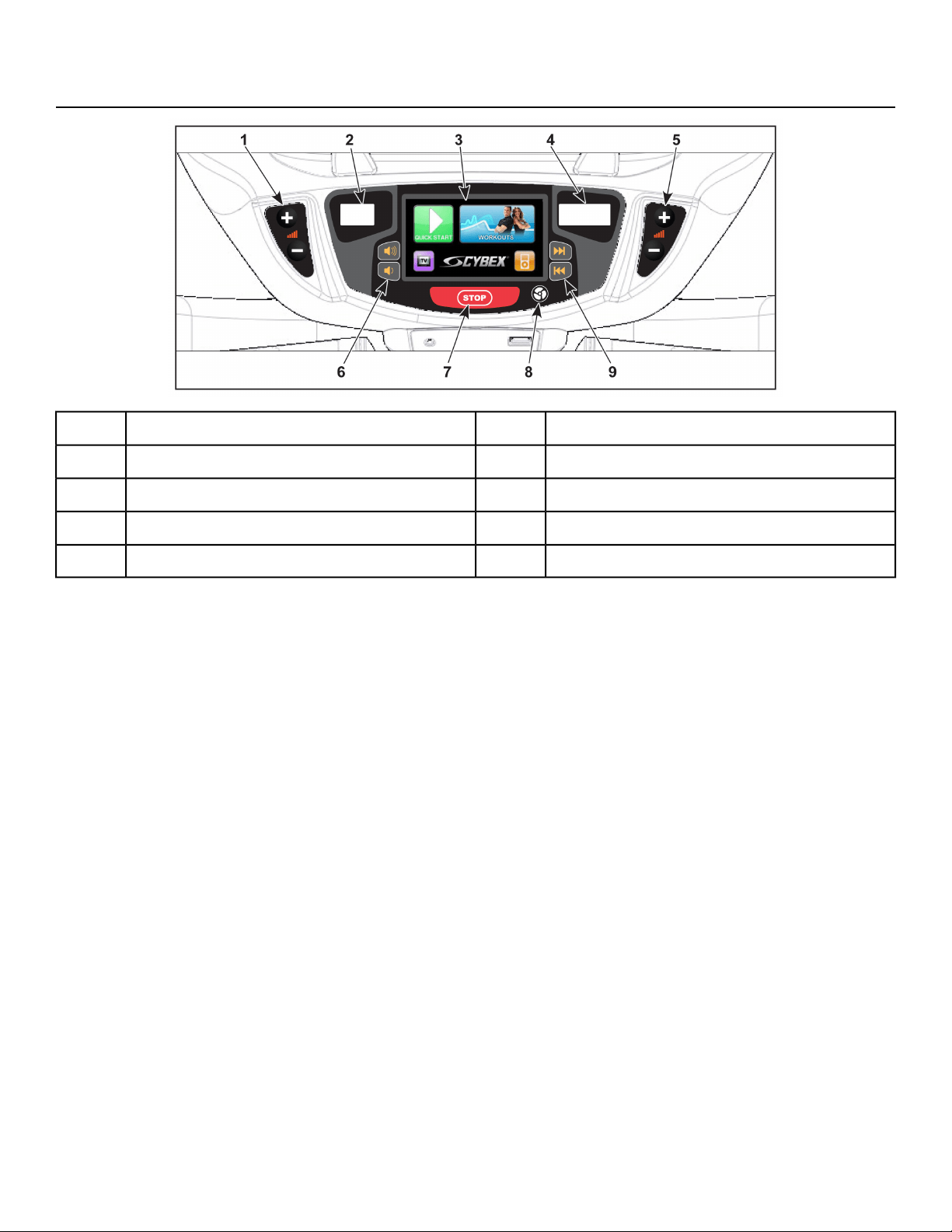
CardioTouch Screen and User Controls
Volume Keys6Gear/Power/RPM Keys (Left)1
STOP Key7Gear/Level Display2
Fan Key8CardioTouch Screen3
Channel/Track Keys9Speed/Power/RPM Display4
Gear/Power/RPM Keys (Right)5
Page 40 of 76
Cybex 770C/770R Cycle Part Number LT-24919-4 D
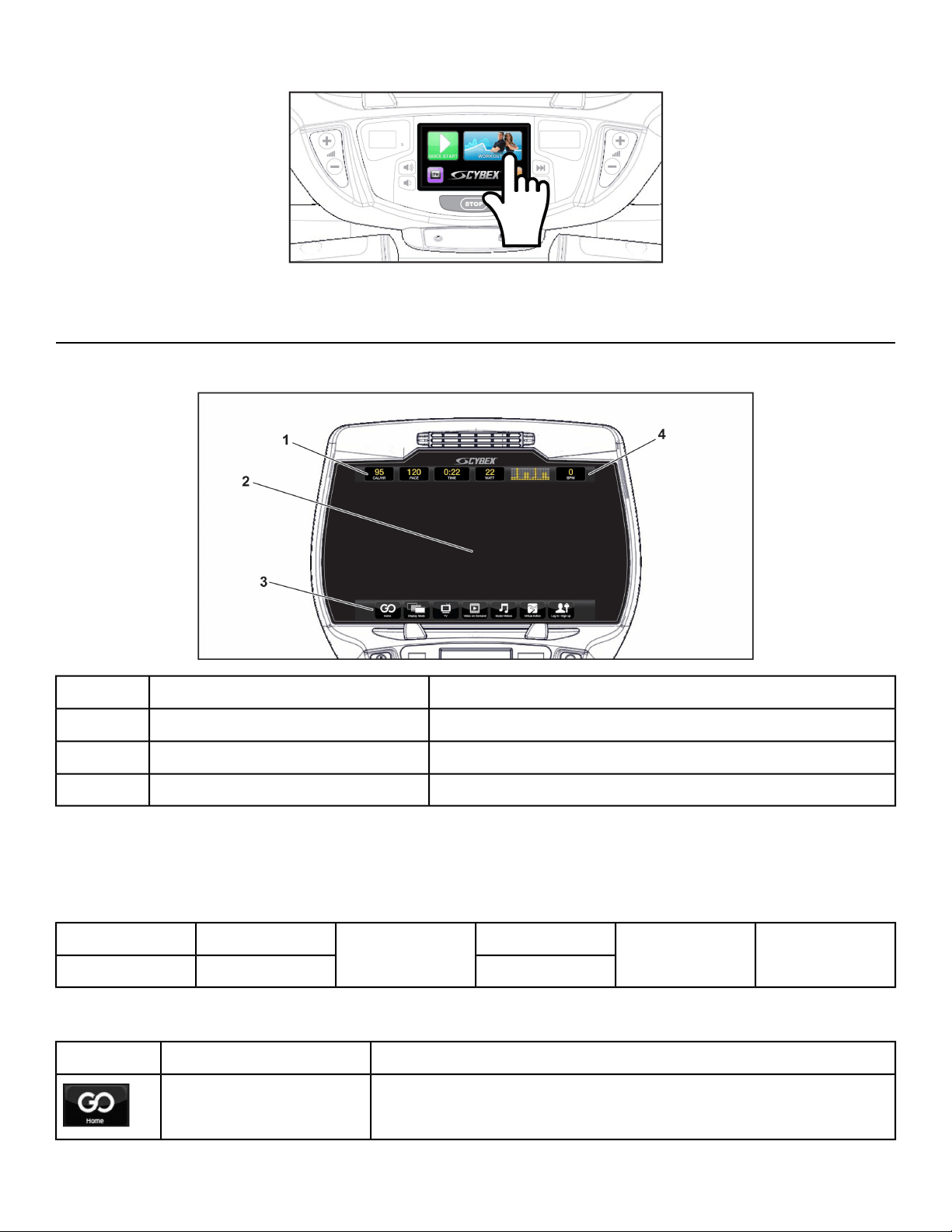
CardioTouch Screen — Tap the icons to make selections.
Cybex GO Console and User Controls
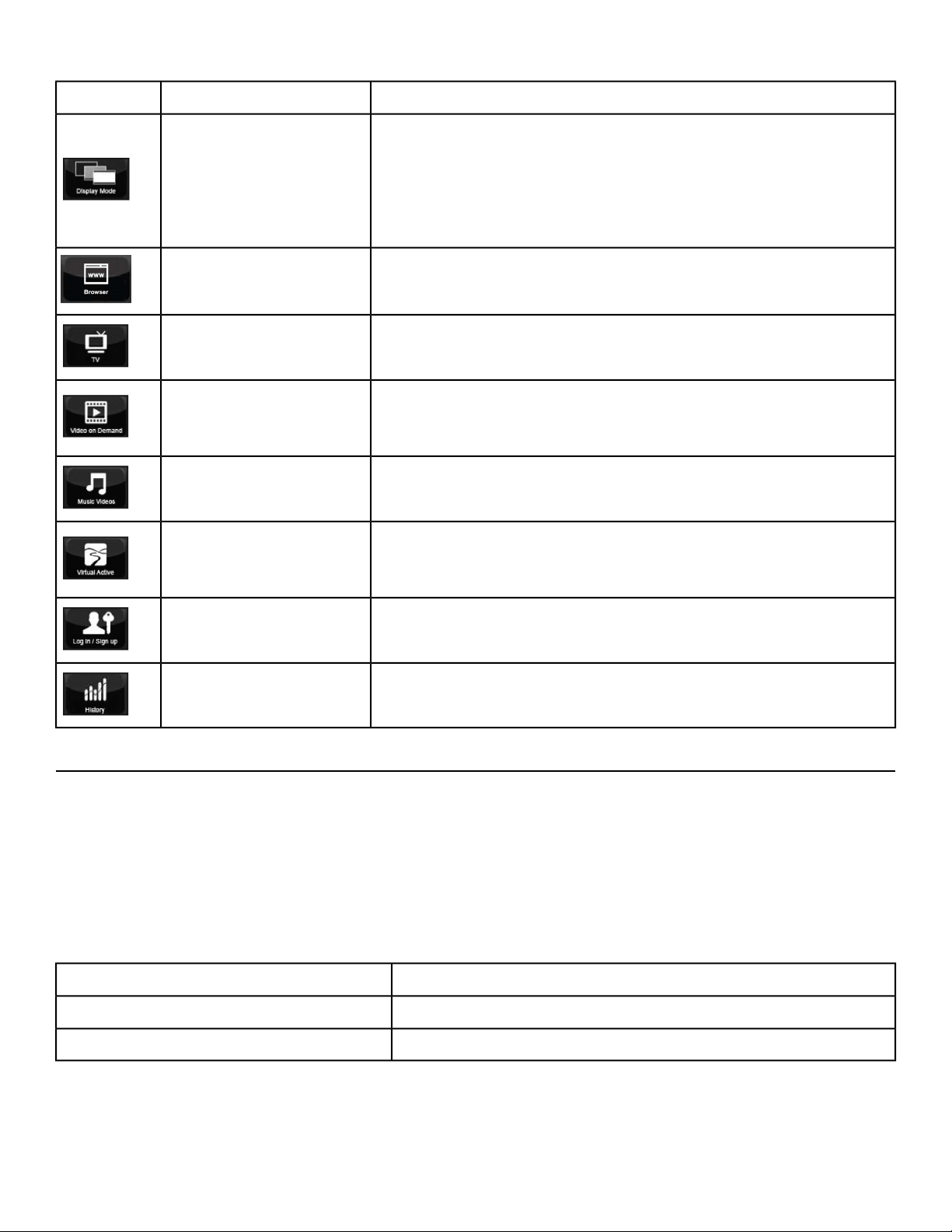
Cybex GO Console
Displays messages and workout data.Data bar1
Displays video, data, or blank.Video display area2
Menu icons for Cybex GO options.Menu bar3
Display heart rate and multi color indicator.Heart rate indicator4
Data bar
Tap data icons to toggle the data displayed. TIME and BPM do not toggle. See Heart rate indicator for
more information about BPM (Beats Per Minute).
BPM
Graph or
message
MET
TIME
CALORIESDISTANCE
WATTRPMCAL/HR
Menu bar
DescriptionIcon NameIcon
Main landing page with content tailored to each user.Home
Page 41 of 76
Cybex 770C/770R Cycle Part Number LT-24919-4 D
DescriptionIcon NameIcon
Tap Display Mode icon to toggle between 4 display modes:
• TV + Data- Display video with data at top of screen
• TV Only- Display video only, no data
• Data Only- Display data only, no video
• Blank- Screen is blank, video and data are not displayed
Display Mode
Select from available website links.Browser
Select from available TV channels. Channels available are based
on the local cable TV provider.
TV
Watch videos on demand. Various content categories (TV
Shows, Movie Trailers, Classic TV, etc) are grouped into
channels.
Video on Demand
Watch available music videos. Playlists are organized by music
genre. Create your own playlist.
Music Videos
The Virtual Active attraction features videos, shot from first
person perspective, through beautiful landscapes, cityscapes
and events from around the world.
Virtual Active
Sign up as a new user or login with existing account.Log in/Sign up
Review workout history if logged in.History
Cybex GO Console Log In or Sign Up
XID is a universal network that allows you to log into connected fitness equipment.
An XID account allows you to:
• Create playlists for your favorite audio and video tracks
• Track your workouts
• Join in group challenges
At the opening screen there are three options available.
Enter an existing XID account number.Sign-in with XID
Create a new XID account.CREATE ACCOUNT
Skip the log in process. Some functions will be limited.CONTINUE AS GUEST
Page 42 of 76
Cybex 770C/770R Cycle Part Number LT-24919-4 D
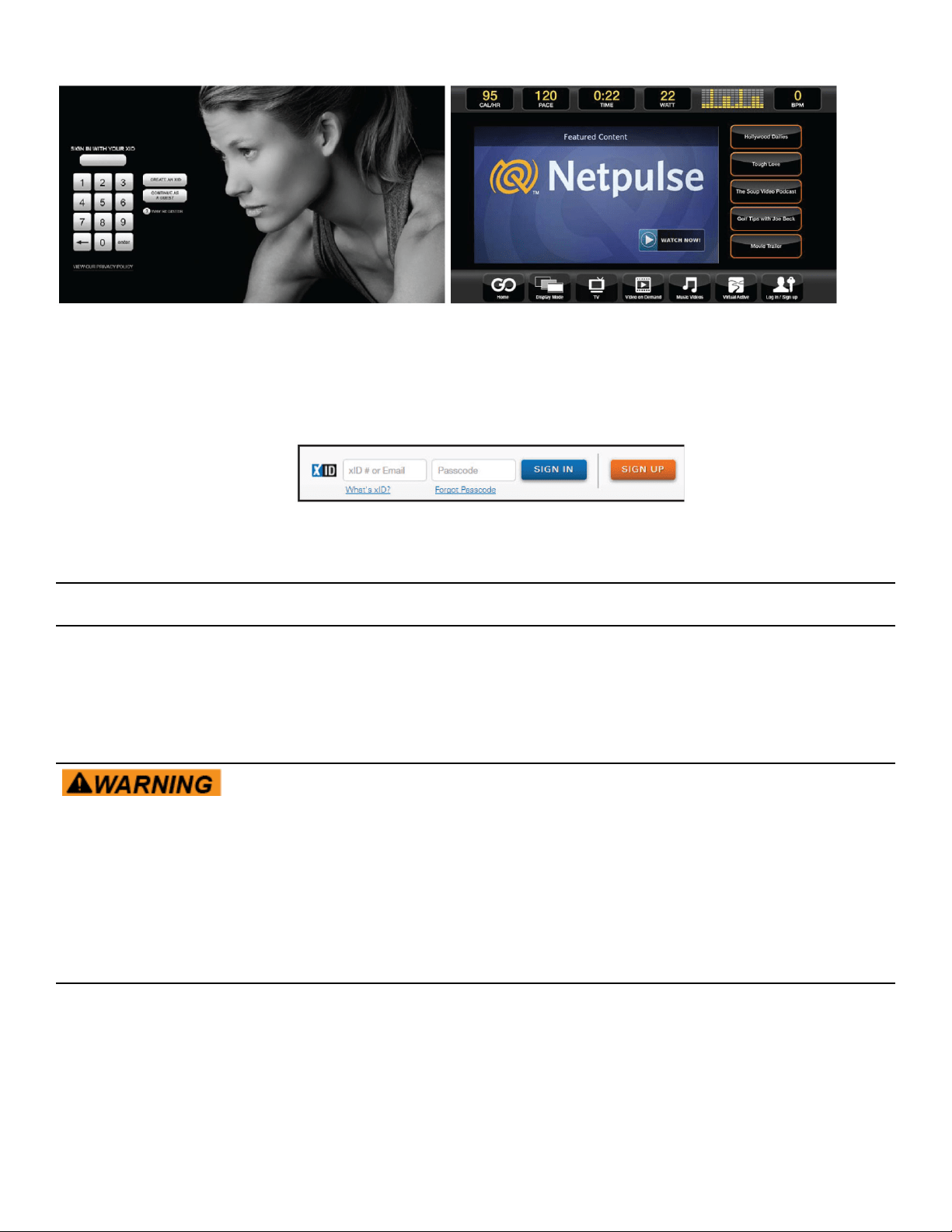
1.
Visit one.netpulse.com.
2. To create an account, click Sign Up.
3. Select your club from the dropdown list.
4. To Sign In, enter your XID number and passcode.
5.
If your club has their own custom URL, log into ClubName.netpulse.com.
Mount and Dismount
Mount unit safely
1. Verify pedals are completely stopped.
2. Grasp handrail and step carefully onto pedals.
Dismount unit safely
Moving parts and fall hazard. To avoid serious injury wait until pedals come
to a complete stop before getting off unit.
1. Grasp handrails for support.
2. Stop pedaling.
3. Continue to hold handrails while carefully stepping off unit.
Quick Operation Guide
Maximum user weight is 400 lbs. (181 kg).
The following is a quick overview of the operation of the unit.
1. Verify pedals are completely stopped.
Page 43 of 76
Cybex 770C/770R Cycle Part Number LT-24919-4 D
2. Grasp handrails and step carefully into pedals.
Begin pedaling.
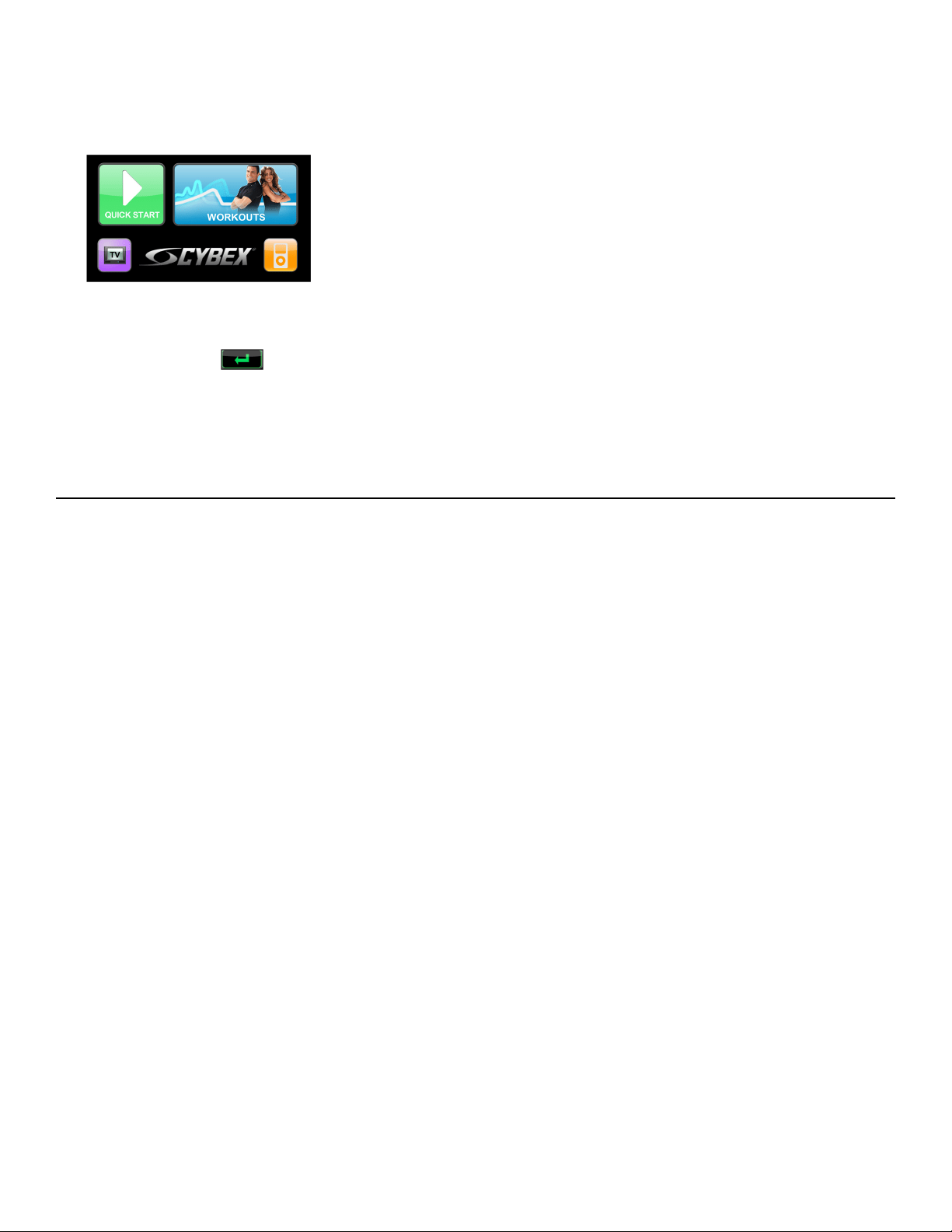
3. Tap QUICK START on the CardioTouch screen.
4. Tap the Weight icon to select weight.
5. Tap the keypad to enter user weight.
6.
Tap the ENTER icon to complete weight input.
7. Press the Gear/Power/RPM + – keys to change the Gear/Power/RPM at any time.
8. Press the STOP key at any time to end workout.
“Workout Review” is displayed.
Detailed Operation Guide
Maximum user weight is 400 lbs. (181 kg).
1. Plug the Cybex GO monitor power cord or optional power cord into a power outlet from a grounded
circuit, See Electrical Requirements.
Coil up the remainder of the power cord and place it out of the way. The control panel will light up
and be in the Dormant Mode.
2. Verify pedals are completely stopped.
3. Grasp handrails and step carefully into pedals.
Begin pedaling.
Page 44 of 76
Cybex 770C/770R Cycle Part Number LT-24919-4 D
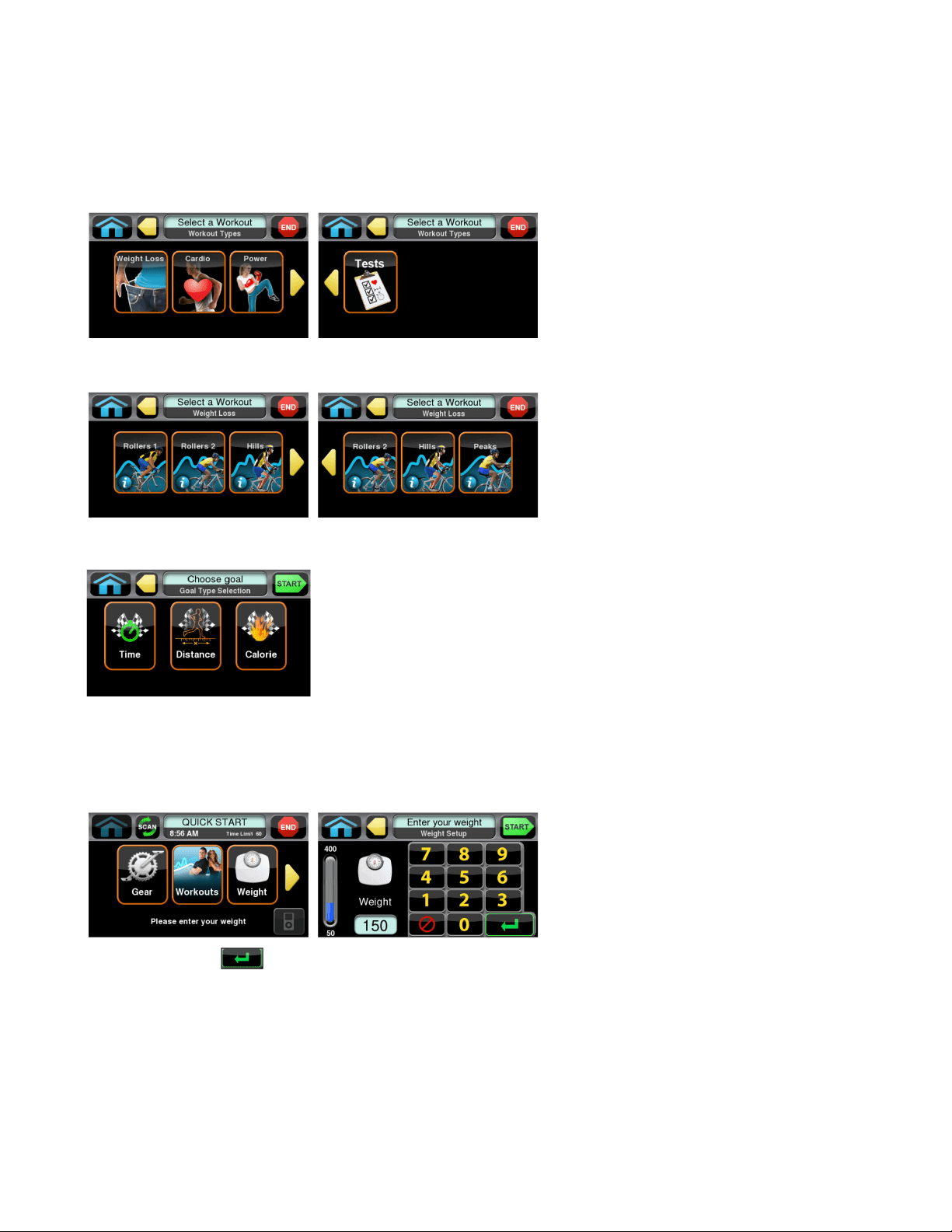
4. Select Quick Start or Workouts.
If Quick Start is selected, The console will beep for one second and enter Active Mode.
If Workouts is selected, Select a workout and setup options.
Tap one of the workout type icons from the workout options screen.
Tap one of the workout icons from the workouts screen.
Select a goal of Time, Distance, or Calorie.
Tap the Start key to begin workout.
For the most accurate resistance and calorie count, you must set your correct weight before beginning
your workout (including clothing). Valid weight range is 50 - 400 lbs, 23-181 kgs, or 3.6-28.6 stones.
Tap the ENTER icon to accept the displayed value and either move forward in the setup
process or review more options.
5. Tap the Start icon.
Page 45 of 76
Cybex 770C/770R Cycle Part Number LT-24919-4 D
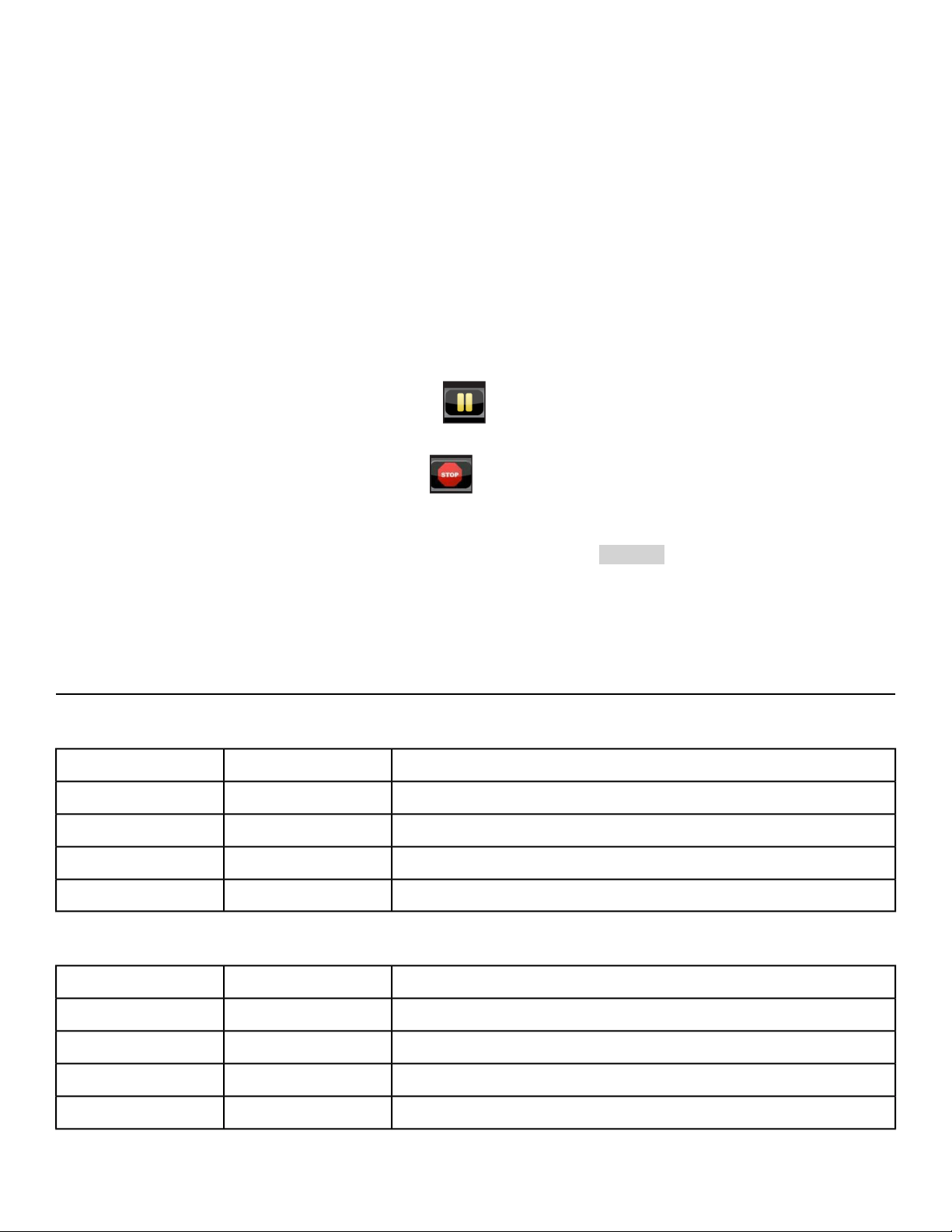
6. Observe the console.
When screen option of TV and Data or Data Only is selected, display the workout values such as
Distance, Calories, BPM (Heart rate, if available), MET and RPM (crank RPM in rotations per minute).
Heart rate will be displayed if a valid heart rate is available from a wireless chest strap (not included)
or by holding the contact heart rate grips.
7. Press the Gear/Power/RPM + – keys to change the Gear/Power/RPM at any time.
The display will show the current gear or watt level. Gear range is 1-21, watt level range is 20-500.
When you adjust Gear/Power/RPM in a workout, the change will affect only the current segment.
The workout control will resume starting with the next segment. To increase or decrease overall
intensity, adjust the Gear, Power, or RPM.
8. Press the STOP key at any time to pause.
a)
If pause feature is enabled, pause icon is shown.
Press pause icon or STOP button once to enter pause mode.
b)
If pause feature is disabled, stop icon is shown.
Press stop icon or STOP button once to enter Workout review. Workout review is displayed
and the incline returns to 6%.
When a workout is complete the unit begins a countdown, 3...2...1 and sounds a tone for each
count. Workout Review is displayed for the preset time or until you press the Home key. The
unit returns to Dormant Mode when using the optional AC adapter.
Workout Choices
Weight Loss
SettingsLevelsName
Select goal*, level, and weight.21Rollers 1
Select goal*, level, and weight.21Rollers 2
Select goal*, level, and weight.21Hills
Select goal*, level, and weight.21Peaks
Cardio
SettingsLevelsName
Select goal*, level, and weight.21Ramps
Select goal*, level, and weight.21Interval
Select goal*, level, and weight.21Bursts
Select goal*, level, and weight.21Wave
Page 46 of 76
Cybex 770C/770R Cycle Part Number LT-24919-4 D
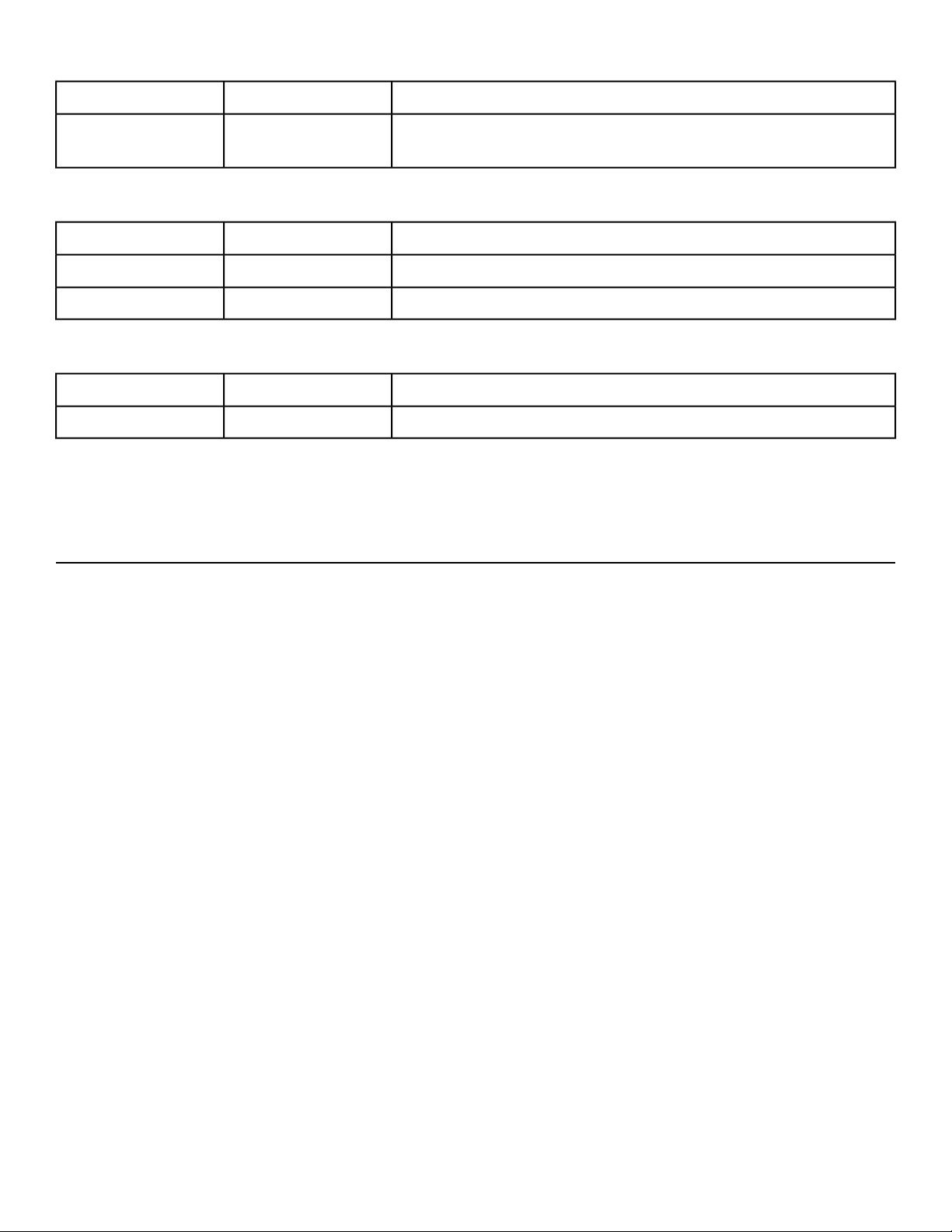
SettingsLevelsName
Select goal*, weight, age, and target heart rate.N/A
Heart Rate
Control**
Power
SettingsLevelsName
Select goal*, weight and power.21Constant Power
Select goal*, weight, and target RPM.21Isokinetic
Tests
SettingsLevelsName
Weight, age, and gender.YMCA
*A goal is Time, Distance, or Calorie.
**The Heart Rate Control workout requires wearing a 5 KHz Polar® compatible chest strap (not included).
Data Readouts
As you exercise, the unit keeps track of the following data:
Your current heart rate. Heart rate will appear when a signal is introduced. Use
the hand grips for Contact Heart rate or wear a Polar
®
compatible heart rate chest
strap.
BPM (Beats Per
Minute)
The total accumulated calories burned during your workout. Your weight must be
correctly set before beginning your workout for this measurement to be most
accurate.
Calories
Calculation of present workload's energy exertion in Calories per Hour.Calories Per Hour
The total accumulated distance, in miles or kilometers, during your workout.
Depending on the defaults you've chosen this measurement will show in English
or Metric
Distance
Displays level of workout, range is 1-21.Level
Relates to the user's energy expenditure. A MET is a basic unit of measurement
that is used to compare relative work between individuals and activities. 'One MET'
Metabolic
Equivalent (MET)
is the amount of oxygen consumed at rest. For example, two MET would be twice
that amount. If an individual were working at four MET he/she would be consuming
oxygen at a rate equal to four times their resting consumption. MET can be used
to compare walking on a grade with running or even to cycling and other activities.
User’s crank revolutions per minute.RPM (Rotation Per
Minute)
Page 47 of 76
Cybex 770C/770R Cycle Part Number LT-24919-4 D
The total time you've been working out or time remaining. Display time as
minutes:seconds.
Time
00:01 to 99:99Minutes:SecondsMM:SS
100 minutes or moreMinutesMMMM
Present workload energy exertion.Watt
Displayed when the console prompts for the user to enter their body weight.Weight
Displayed when the console prompts the user to select a workout.Workout
Heart Rate Indicator
Lightly hold hand grips on the handlebar ensuring that hands are clean and contact
both the front and back sensors of each grip. A heart rate will display in typically
30 seconds or less.
Contact Heart
Rate
Factors that interfere with heart rate signal:
• hand lotions
• oils or body powder
• excessive dirt
• excessive movement
• body composition
• hydration
• too loose grip
• too tight grip
• resting or leaning on grips
To use this feature, a 5 KHz Polar
®
compatible heart rate transmitter belt (not
included) must be worn.
Wireless Heart
Rate
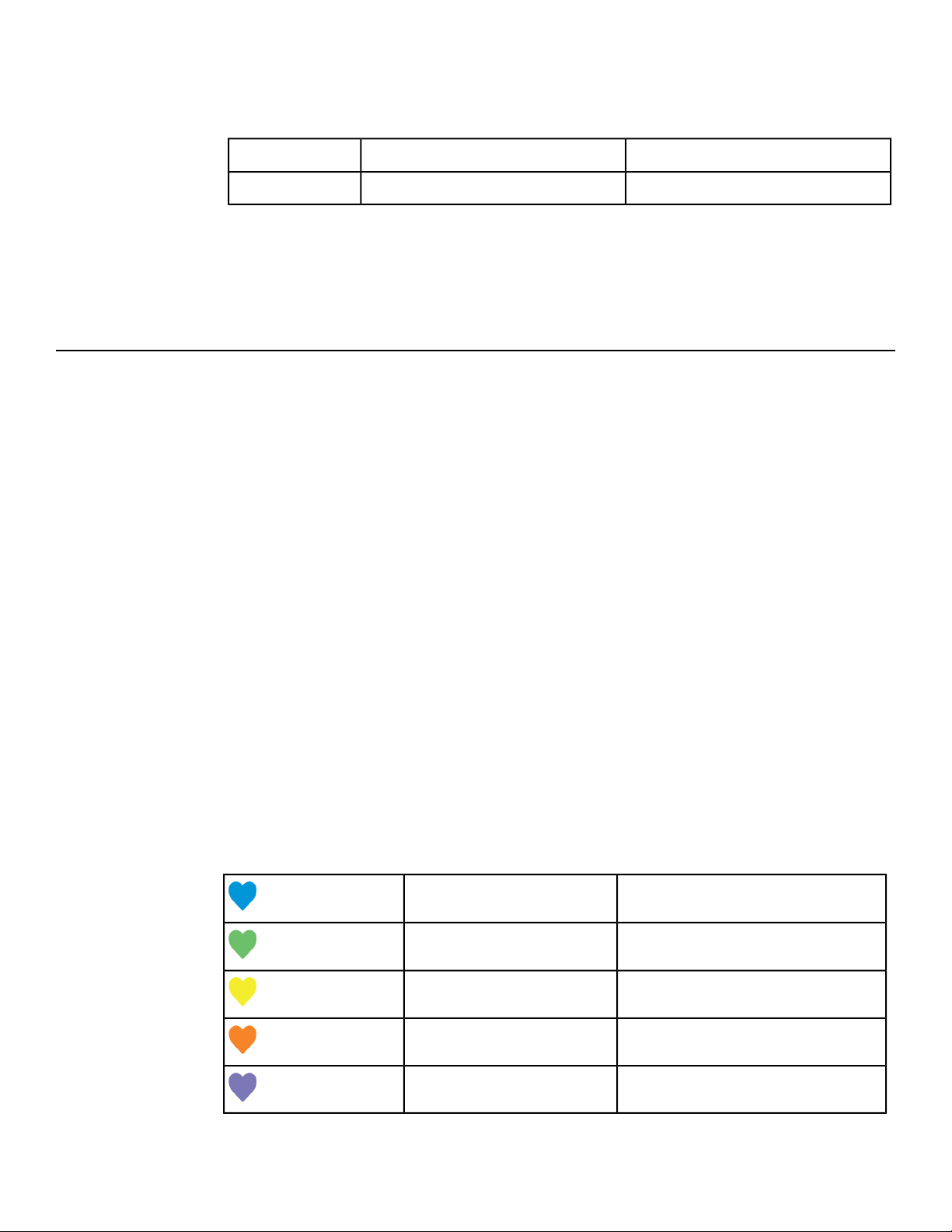
Once the actual heart rate is determined, the LED is blinking to the displayed BPM
and the Heart LED lights up. The color of the light represents a scale of low to
high target heart rate.
0 - 69 BPMBlue
70 - 93 BPMGreen
94 - 119 BPMYellow
120 - 169Dark Orange
170 and higherMagenta
Page 48 of 76
Cybex 770C/770R Cycle Part Number LT-24919-4 D
Fan Control
The fan defaults to the "OFF" setting. The user can change to "Fan Low", "Fan High", or "Fan Off" setting
by pressing the appropriate control key.
iPod/iPhone Functions
Connecting an iPod/iPhone allows some control through the keypad. The iPod/iPhone will not be charged
while connected.
1. Connect iPod/iPhone (not supplied) into the 30 pin connector.
2. Place iPod/iPhone onto the accessory tray.
3. Plug headphones (not supplied) into the console headphone jack.
4. iPod/iPhone Playlist
a) Select the iPod/iPhone icon to display the iPod/iPhone navigation screen.
b) If iPod/iPhone is already playing use the standard iPod/iPhone controls.
c) If iPod/iPhone is Dormant make a selection from the iPod/iPhone Menu.
Once a selection is made from the iPod/iPhone menu, make further selections until the desired
media is found.
Battery Sentry
Battery Sentry uses crank RPM or key presses to determine user presence. If a user is not detected
within 10 seconds, the CardioTouch Screen displays Are you there?
Resume pedaling or touch the screen to reset the sentry, otherwise the bike will exit the workout.
Page 49 of 76
Cybex 770C/770R Cycle Part Number LT-24919-4 D
Maintenance
All preventive maintenance activities must be performed on a regular basis. Performing routine preventive
maintenance actions can aid in providing safe, trouble-free operation of all Cybex equipment.
Cybex is not responsible for performing regular inspection and maintenance actions for your machines.
Instruct all personnel in equipment inspection and maintenance actions and also in accident reporting
and recording. Cybex representatives are available to answer any questions that you may have.
Warnings
Read all warnings in this chapter.
For maintenance, service and repair:
• Must be performed by trained service personnel only
• Use only Cybex replacement parts
• Unplug unit before working on it
• Keep water and liquids away from electrical parts.
Electrocution hazard. To avoid death or serious injury unplug unit when not
in use or when performing maintenance.
Equipment hazard. To avoid serious injury or death replace worn or damaged
components immediately and keep the equipment out of use until repair is
completed.
Clean Unit
Shock and electrocution hazard.
• Unplug unit and let sit 10 minutes before cleaning or performing
maintenance.
• Electrical charge can remain in unit after unplugging.
• Keep water and liquids away from electrical parts.
Tools Required
• Cleaning solution
• Rubbing alcohol
• Clean cloth
• Vacuum
After Each Use
Wipe up any liquid spills immediately. After each workout, use a cloth to wipe up any remaining
perspiration from the handrails and painted surfaces.
Page 50 of 76
Cybex 770C/770R Cycle Part Number LT-24919-4 D
Be careful not to spill or get excessive moisture between the edge of the display panel and the console,
as this might create an electrical hazard or cause failure of the electronics.
As Needed
Vacuum any dust or dirt that might accumulate under or around the unit. Cleaning this area should be
done as often as indicated in the Service Schedule.
Clean Console
Do not spray cleaning solution directly on the console. Direct spraying could
cause damage to the electronics and may void the warranty.
• Spray a mild cleaning agent on a clean cloth.
• Clean the console, accessory tray, and cup holder with a damp cloth.
Clean Base
• Spray a mild cleaning agent on a clean cloth.
• Clean the base of the unit with a damp cloth.
Contact Heart Rate Grips
Clean the grips using a cloth dampened with a cleaning solution containing rubbing alcohol.
Contaminants, such as hand lotions, oils or body powder, may come off on the contact heart rate grips.
These can reduce sensitivity and interfere with the heart rate signal. It is recommended that the user
have clean hands when using the contact heart rate.
CardioTouch Screen
While in Dormant Mode press the Cybex logo icon to access the Lock and Toolbox options. Press the
Lock screen for cleaning icon to lock the screen for 10 seconds. The CardioTouch screen will stay
locked for 10 seconds to prevent any key presses from being processed. Clean the CardioTouch screen
using a soft cloth dampened with a cleaning solution containing rubbing alcohol.
Rechargeable Battery
The unit is designed with a 12 volt Lead-Acid rechargeable battery. The battery will recharge during
regular operation of unit or when the optional power adapter is plugged in.
The display will indicate dashes in the left display if the battery fails to provide enough energy.
If the battery is completely discharged, the workout review will also be truncated if the user is not pedaling
during the time period. Contact Cybex Customer Service to replace the battery or purchase the optional
AC adapter kit.
Battery replacement must be performed only by qualified technician.
Page 51 of 76
Cybex 770C/770R Cycle Part Number LT-24919-4 D

Remove battery and dispose of safely before unit disposal.
Cybex GO Monitor
Cleaning
• Clean with a dust free cloth. For further cleaning, use a soft cloth or paper towel dampened with
water. To avoid damage to the surface of the monitor, do not use abrasive or chemical cleaning
agents.
• Disinfecting: to avoid damage to the surface, test a small portion of the monitor’s cabinet with any
disinfectant to verify that the disinfectant will not discolor or soften the enclosure.
Storage or Long Non-Use Periods
When not using product for an extended period of time the product should be disconnected from the
Power Supply, TV/Cable Signal Feed, and any Peripheral Devices.
Pixels
Very small red, blue, white or green spots may be visible or may appear on the screen. This is a
characteristic of liquid crystal display panels and is not considered a defect for replacement. The liquid
crystal panel is built with very high precision technology giving fine picture details. Occasionally, a few
non-active pixels may appear on the screen as a fixed point. This does not affect the performance of
monitor or merit a warranty claim.
Maintenance
• It is very important to have the unit regularly examined by a qualified technician to ensure the product
is fit for use.
• If the unit malfunctions, please refer to a qualified technician for repair or replacement of defective
parts immediately. Do not attempt to use the monitor until it has been inspected and repaired by a
qualified technician.
• For inspection, installation and servicing, please consult qualified technician.
• Failure to use a manufacturer approved repair technician may void any warranty claims.
Page 52 of 76
Cybex 770C/770R Cycle Part Number LT-24919-4 D
Customer Service
Product Registration
To register product do the following:.
1.
Visit www.cybexintl.com.
2. Locate Product Registration in the Support section.
3. Fill out form completely.
4. Click the Submit button to register product.
Contacting Service
Hours of phone service are Monday through Friday from 8:30 a.m. to 6:00 p.m. Eastern Standard Time.
For Cybex customers living in the USA, contact Cybex Customer Service at 888-462-9239.
For Cybex customers living outside the USA, contact Cybex Customer Service at 508-533-4300 or fax
Find information on the web at www.cybexintl.com.
To contact us online go to www.cybexintl.com.
Ordering Parts
To order parts online go to www.cybexintl.com.
To speak with a customer service representative, call 888-462-9239 (for customers living within the
USA) or 508-533-4300 (for customers outside the USA).
The following information located on the serial number decal will assist our Cybex representatives in
serving you.
• Unit Serial Number, Product Name and Model Number
• Part Description and Part Number if you have it. All parts can be found on the web at
www.cybexintl.com
• Shipping Address
• Contact Name
• Include a description of the problem.
In addition to your shipping address and contact name, your account number is helpful but not required.
You may also fax orders to 508-533-5183.
Page 53 of 76
Cybex 770C/770R Cycle Part Number LT-24919-4 D
Return Material Authorization (RMA)
The Return Material Authorization (RMA) system is used when returning material for placement, repair
or credit. The system assures that returned materials are properly handled and analyzed. Follow the
following procedures carefully.
Contact your authorized Cybex dealer on all warranty-related matters. Your local Cybex dealer will
request a RMA from Cybex, if applicable. Under no circumstances will defective parts or equipment be
accepted by Cybex without proper RMA and an Automated Return Service (ARS) label.
Please contact Cybex Customer Service for the return of any item that is defective.
Provide the technician with a detailed description of the problem you are having or the defect in the item
you wish to return. Provide the model and serial number of your Cybex equipment.
At Cybex’s discretion, the technician may request that you return the problem part(s) to Cybex for
evaluation and repair or replacement. The technician will assign you a RMA number and will send you
an ARS label. The ARS label and the RMA numbers must be clearly displayed on the outside of the
package that contains the item(s) to be returned. Include the description of the problem, the serial
number of the equipment and the name and address of the owner in the package along with the part(s).
Merchandise returned without an RMA number on the outside of the package or shipments sent COD
will not be accepted by the Cybex receiving department.
Damaged Parts
Materials damaged in shipment should not be returned for credit. Shipping damages are the responsibility
of the carrier (UPS, Federal Express, trucking companies, etc.)
Apparent Damage
Upon receipt of your shipment, check all items carefully. Any damage seen with a visual check must be
noted on the freight bill and signed by the carrier’s agent. Failure to do so will result in the carriers refusal
to honor your damage claim. The carrier will provide you with the required forms for filing such claims.
Concealed Damage
Damage not seen with a visual check upon receipt of a shipment but notices later must be reported to
the carrier as soon as possible. Upon discovery of the damage, a written or phone request to the carrier
asking them to perform an inspection of the materials must be made within ten days of the delivery date.
Keep all shipping containers and packing materials as they will be needed in the inspection process.
The carrier will provide you with an inspection report and the necessary forms for filing a concealed
damage claim. Concealed damage claim is the carrier’s responsibility.
Page 54 of 76
Cybex 770C/770R Cycle Part Number LT-24919-4 D
Appendix - Workout Overviews
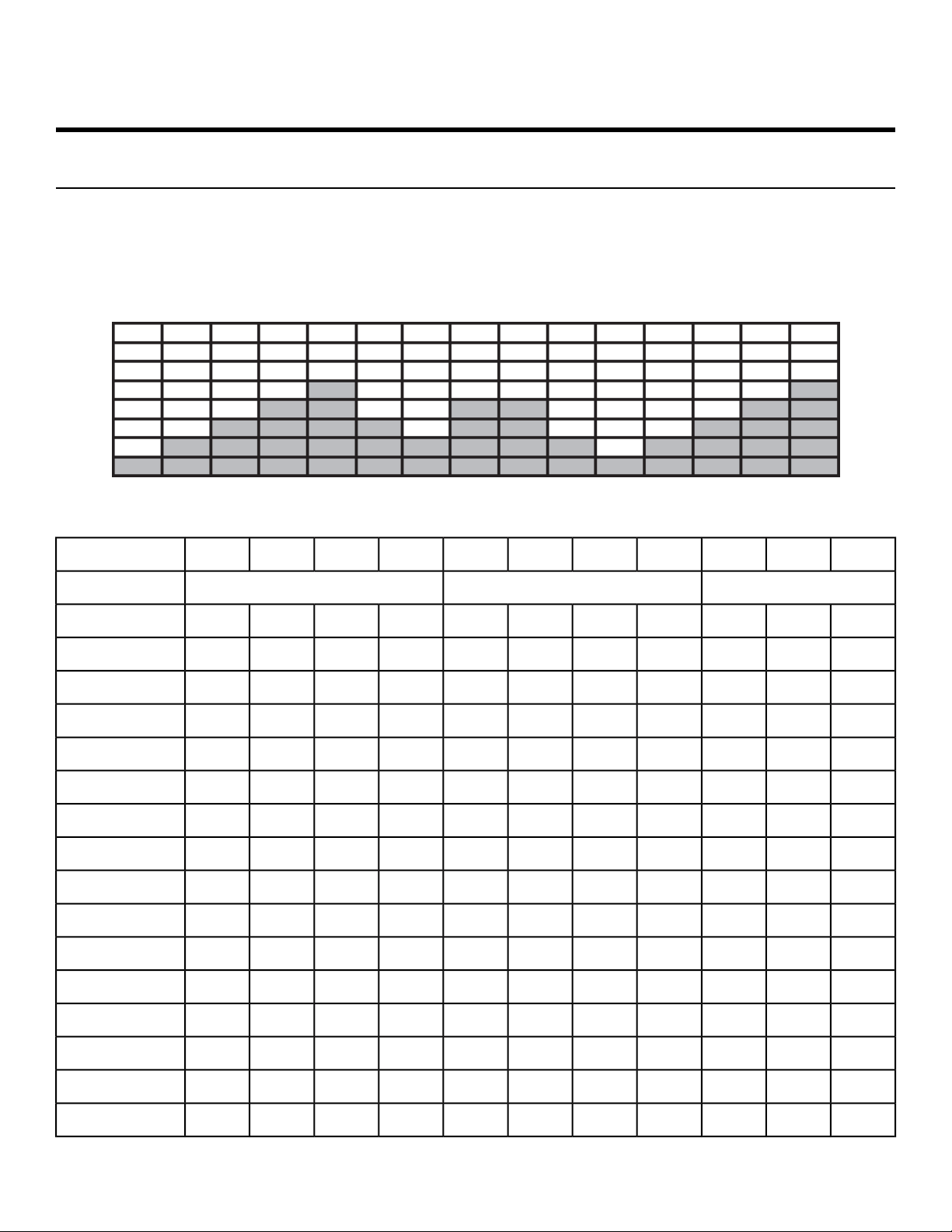
Weight Loss - Rollers 1
This workout is designed for low to medium intensity training that the user can sustain for an extended
period of time. It uses a low intensity resistance baseline for its two and a half minute core workout with
forty-five second periods of higher resistance. The constant variety provides for periods of higher
expenditure and training effect without the introduction of undue fatigue allowing the user to perform for
longer periods of time.
Watt per level/gear
:30:45:45:45:30:30:45:30:30:30:30Time
Cool DownCore SegmentsWarm Up
32143214321Level
501001501501001502502001501005021
509013513590135225180135905020
509013013090130220175130905019
508512512585125205165125855018
458011511580115195155115804517
458011511580115190150115804516
457510510575105175140105754515
457510510575105170135105754514
40659090659015012090654013
40608585608514011085604012
40608080608013010580604011
40608080608012510080604010
405575755575115957555409
355065655065105856550358
35456060456095756045357
Page 55 of 76
Cybex 770C/770R Cycle Part Number LT-24919-4 D
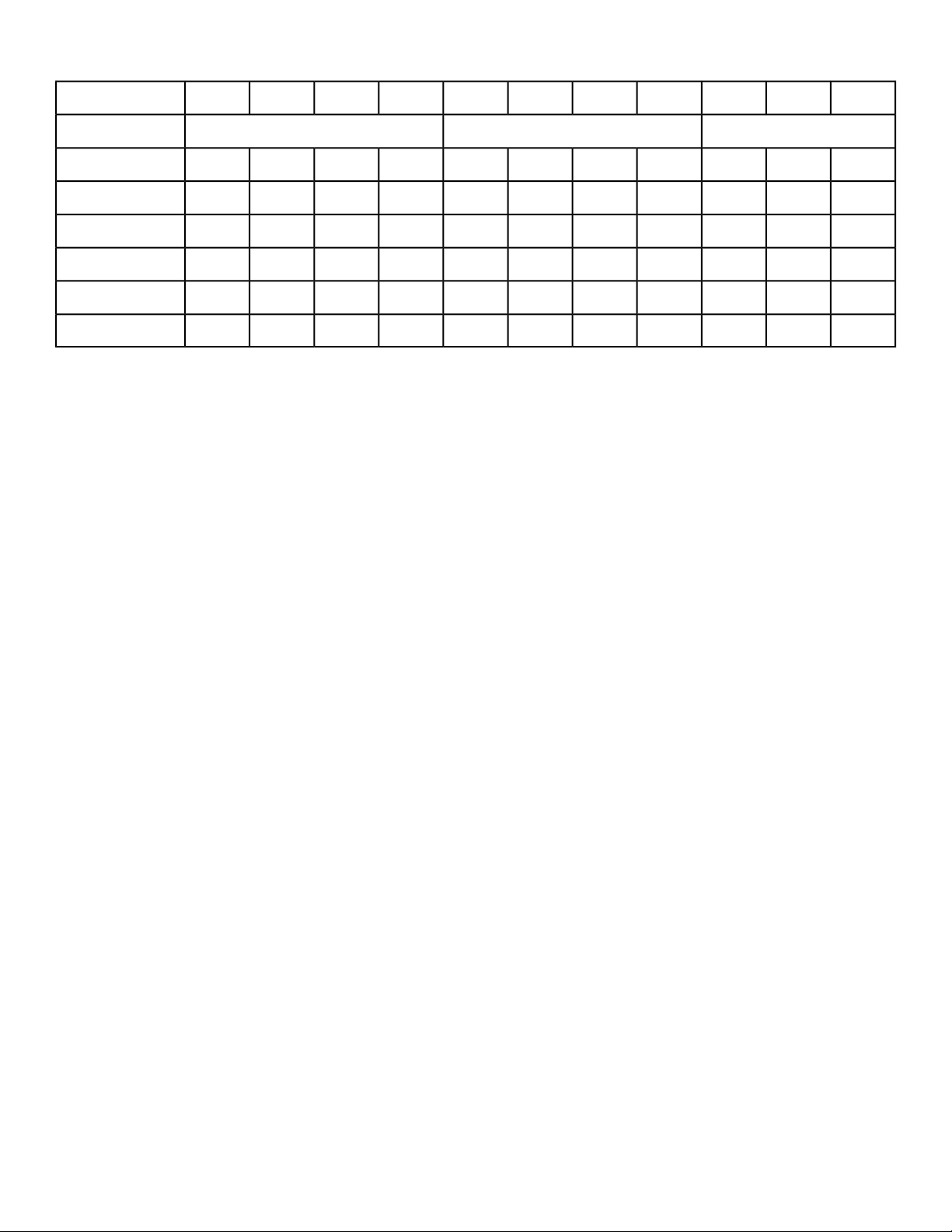
:30:45:45:45:30:30:45:30:30:30:30Time
Cool DownCore SegmentsWarm Up
35455555455585705545356
35455555455580655545355
30354545354565554535304
30354040354060504035303
30354040354055454035302
30354040354050454035301
Page 56 of 76
Cybex 770C/770R Cycle Part Number LT-24919-4 D
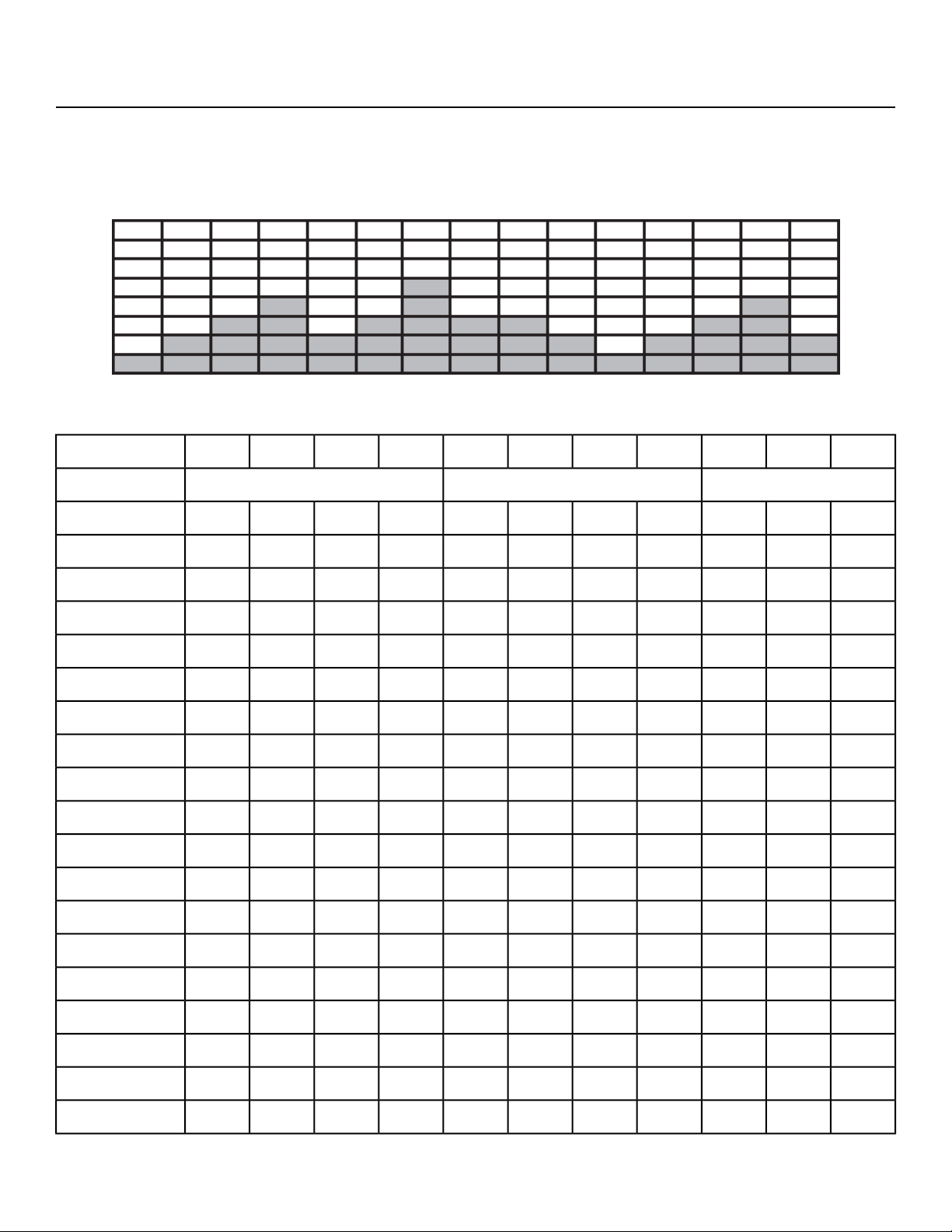
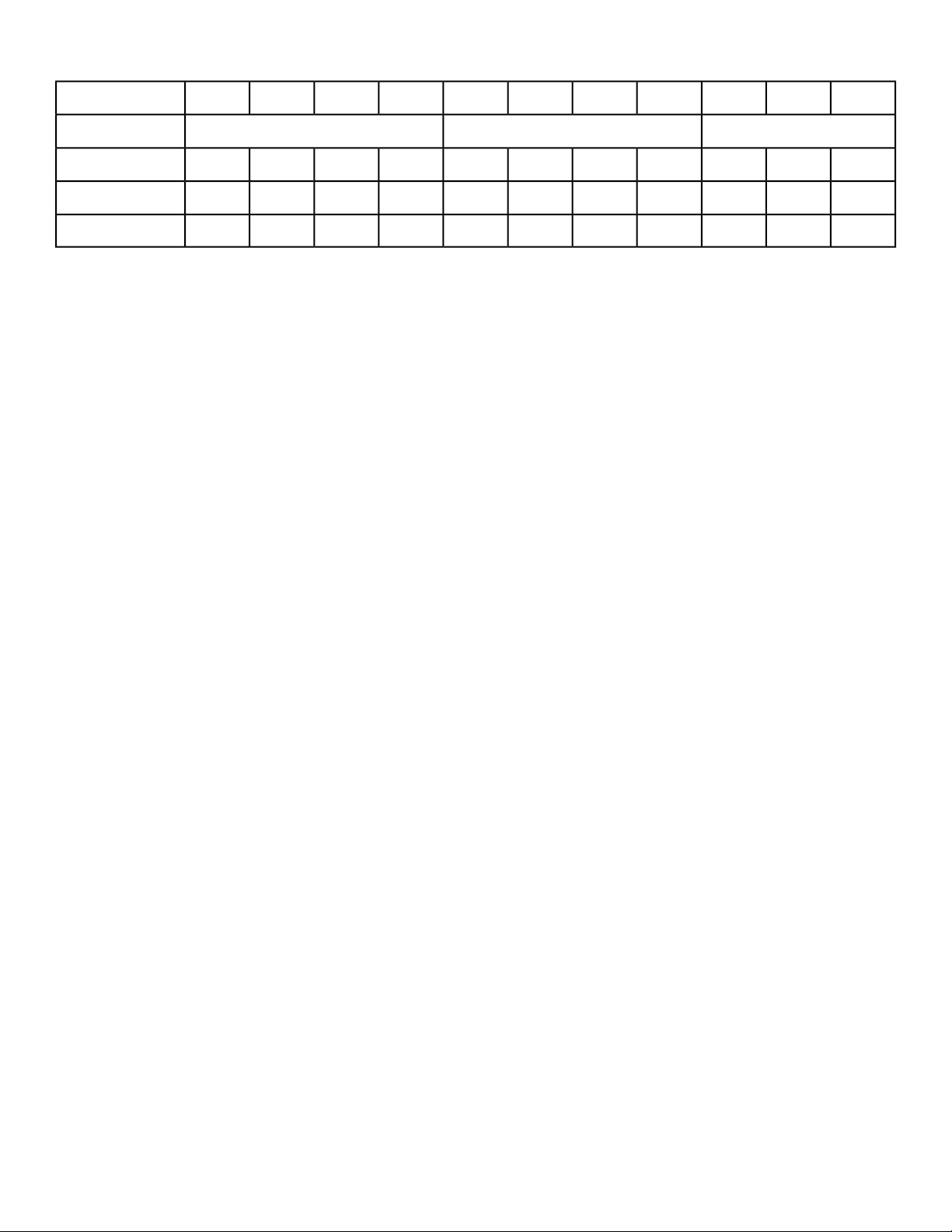
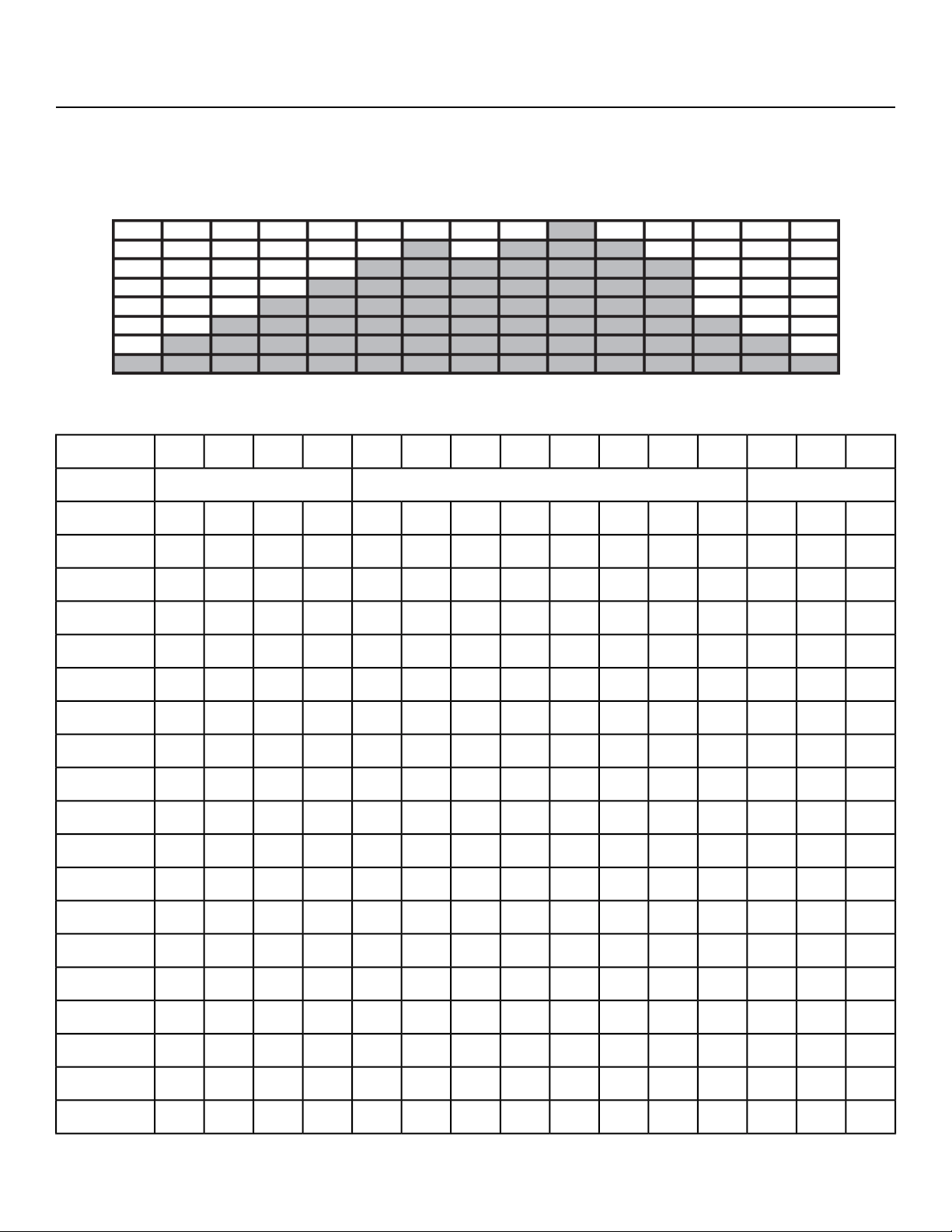
Weight Loss - Rollers 2
This workout is a two and a half-minute core workout designed to give the users the experience of riding
constantly rolling hills without the steep grades of the Hills workout. Users will ride at a lower intensity
with twice as much time spent at each resistance level and a two-minute rest period before the core
workout repeats.
Watt per level/gear
:30:45:45:30:451:00:15:30:30:30:30Time
Cool DownCore SegmentsWarm Up
32143214321Level
501001501502501501002001501005021
509013513522513590180135905020
509013013022013090175130905019
508512512520512585165125855018
458011511519511580155115804517
458011511519011580150115804516
457510510517510575140105754515
457510510517010575135105754514
40659090150906512090654013
40608585140856011085604012
40608080130806010580604011
40608080125806010080604010
405575751157555957555409
355065651056550856550358
35456060956045756045357
35455555855545705545356
35455555805545655545355
30354545654535554535304
Page 57 of 76
Cybex 770C/770R Cycle Part Number LT-24919-4 D
:30:45:45:30:451:00:15:30:30:30:30Time
Cool DownCore SegmentsWarm Up
30354040604035504035303
30354040554035454035302
30354040504035454035301
Page 58 of 76
Cybex 770C/770R Cycle Part Number LT-24919-4 D
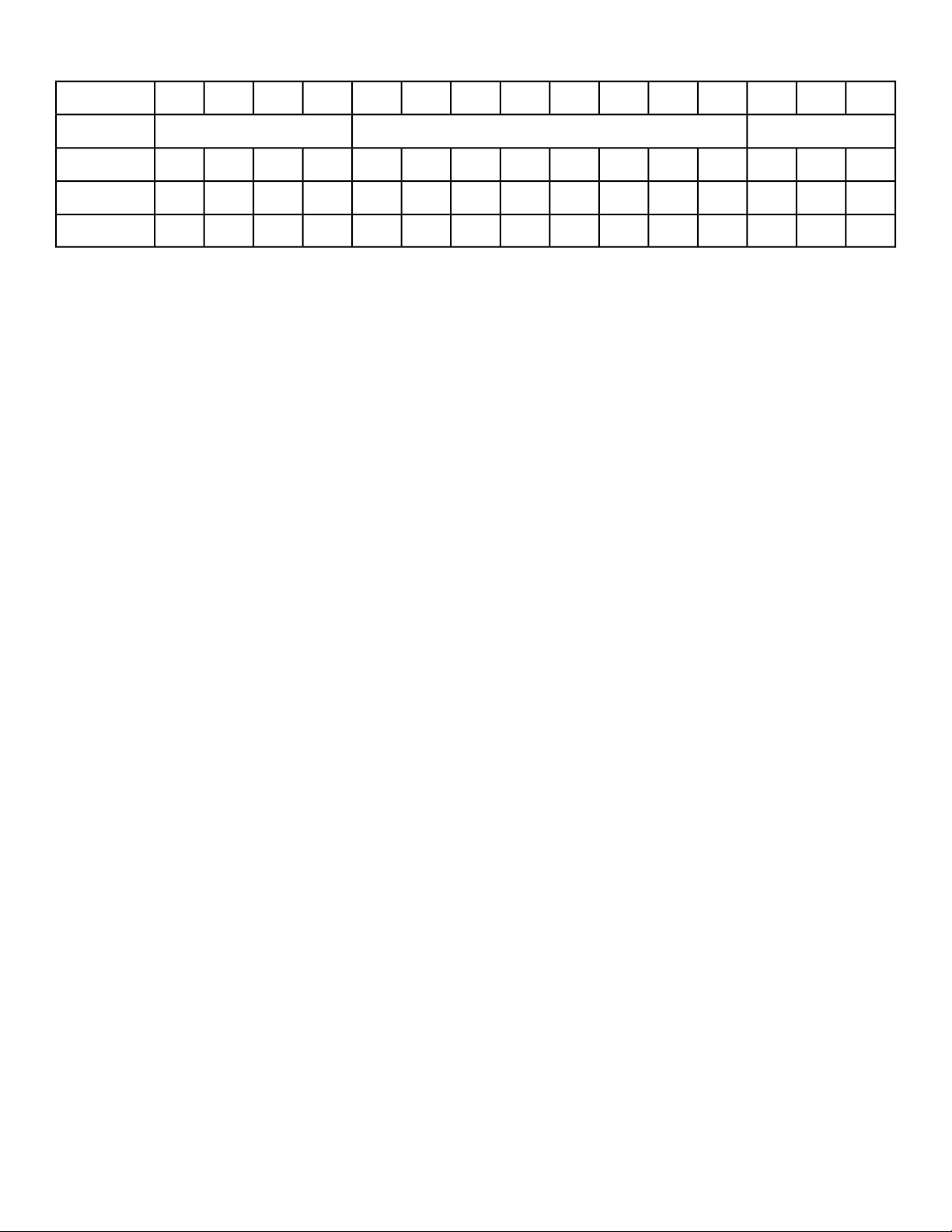
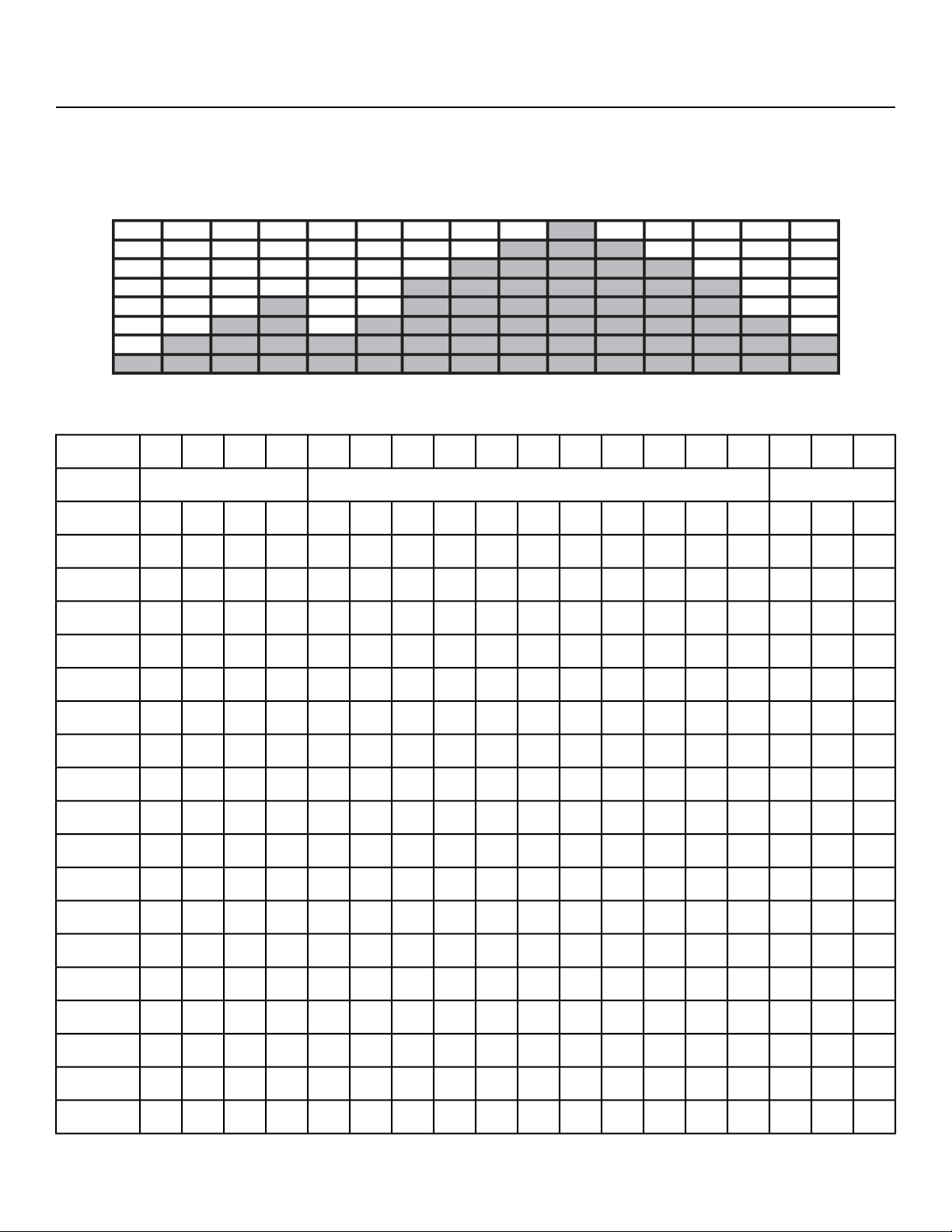
Weight Loss - Hills
This workout is a three-minute core workout designed to give the user an intense interval workout. Users
will experience intervals of moderate resistance at the beginning to simulate the start of the climb and
will deliver peak resistance after two and a half minutes. The resistance then returns to the preliminary
level and the core workout repeats itself.
Watt per level/gear
:30:45:45:15:15:30:15:15:30:30:30:30:30:30:30Time
Cool DownCore SegmentsWarm Up
321876543214321Level
501001503003504003503003503002502001501005021
5090135275325375325275325275225180135905020
5090130265315365315265315265220175130905019
5085125250295345295250295250205165125855018
4580115235280325280235280235195155115804517
4580115230270315270230270230190150115804516
4575105215255300255215255215175140105754515
4575105205245285245205245205170135105754514
40659018522026022018522018515012090654013
40608517020524020517020517014011085604012
40608016019022519016019016013010580604011
40608015018021018015018015012510080604010
405575140165195165140165140115957555409
355065125150175150125150125105856550358
35456011513516013511513511595756045357
35455510512514512510512510585705545356
35455595115135115951159580655545355
30354580951159580958065554535304
Page 59 of 76
Cybex 770C/770R Cycle Part Number LT-24919-4 D
:30:45:45:15:15:30:15:15:30:30:30:30:30:30:30Time
Cool DownCore SegmentsWarm Up
30354070851008570857060504035303
3035406575907565756555454035302
3035406070857060706050454035301
Page 60 of 76
Cybex 770C/770R Cycle Part Number LT-24919-4 D
Weight Loss - Peaks
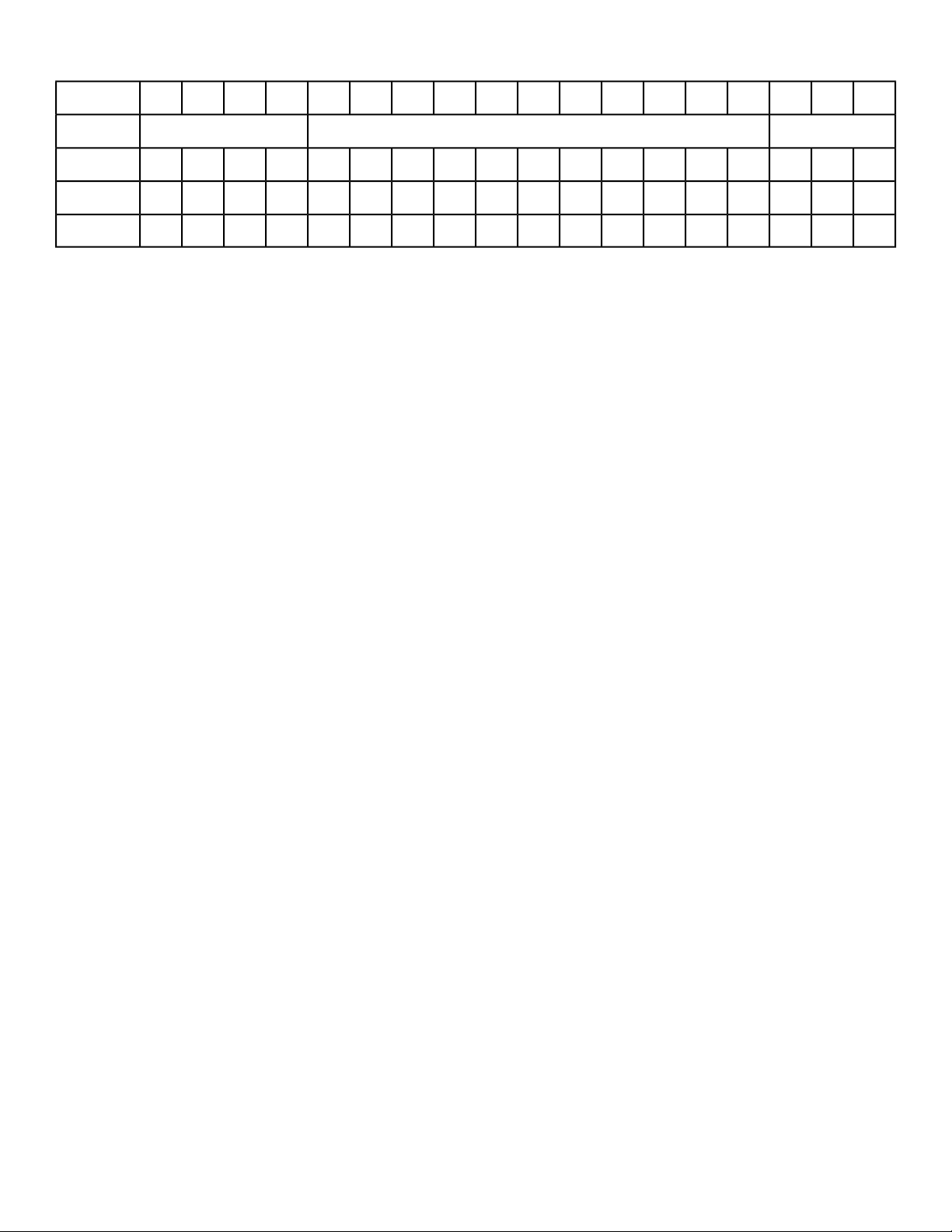
This workout is a three-minute fifteen-second core workout that begins at a low intensity level and
incrementally climbs to peak resistance after one and a half-minutes and remains at that level for 45
seconds before ramping back down to the initial level. The repetitive workout is designed to keep the
user in an aerobic state before reaching their anaerobic threshold.
Watt per level/gear
:30:45:45:15:15:15:15:15:45:15:15:15:15:15:30:30:30:30Time
Cool DownCore SegmentsWarm Up
32111109876543214321Level
501001501001502503003504003503002501501002001501005021
50901359013522527532537532527522513590180135905020
50901309013022026531536531526522013090175130905019
50851258512520525029534529525020512585165125855018
45801158011519523528032528023519511580155115804517
45801158011519023027031527023019011580150115804516
45751057510517521525530025521517510575140105754515
45751057510517020524528524520517010575135105754514
4065906590150185220260220185150906512090654013
4060856085140170205240205170140856011085604012
4060806080130160190225190160130806010580604011
4060806080125150180210180150125806010080604010
40557555751151401651951651401157555957555409
35506550651051251501751501251056550856550358
354560456095115135160135115956045756045357
354555455585105125145125105855545705545356
3545554555809511513511595805545655545355
30354535456580951159580654535554535304
Page 61 of 76
Cybex 770C/770R Cycle Part Number LT-24919-4 D
:30:45:45:15:15:15:15:15:45:15:15:15:15:15:30:30:30:30Time
Cool DownCore SegmentsWarm Up
30354035406070851008570604035504035303
3035403540556575907565554035454035302
3035403540506070857060504035454035301
Page 62 of 76
Cybex 770C/770R Cycle Part Number LT-24919-4 D
Cardio - Ramps
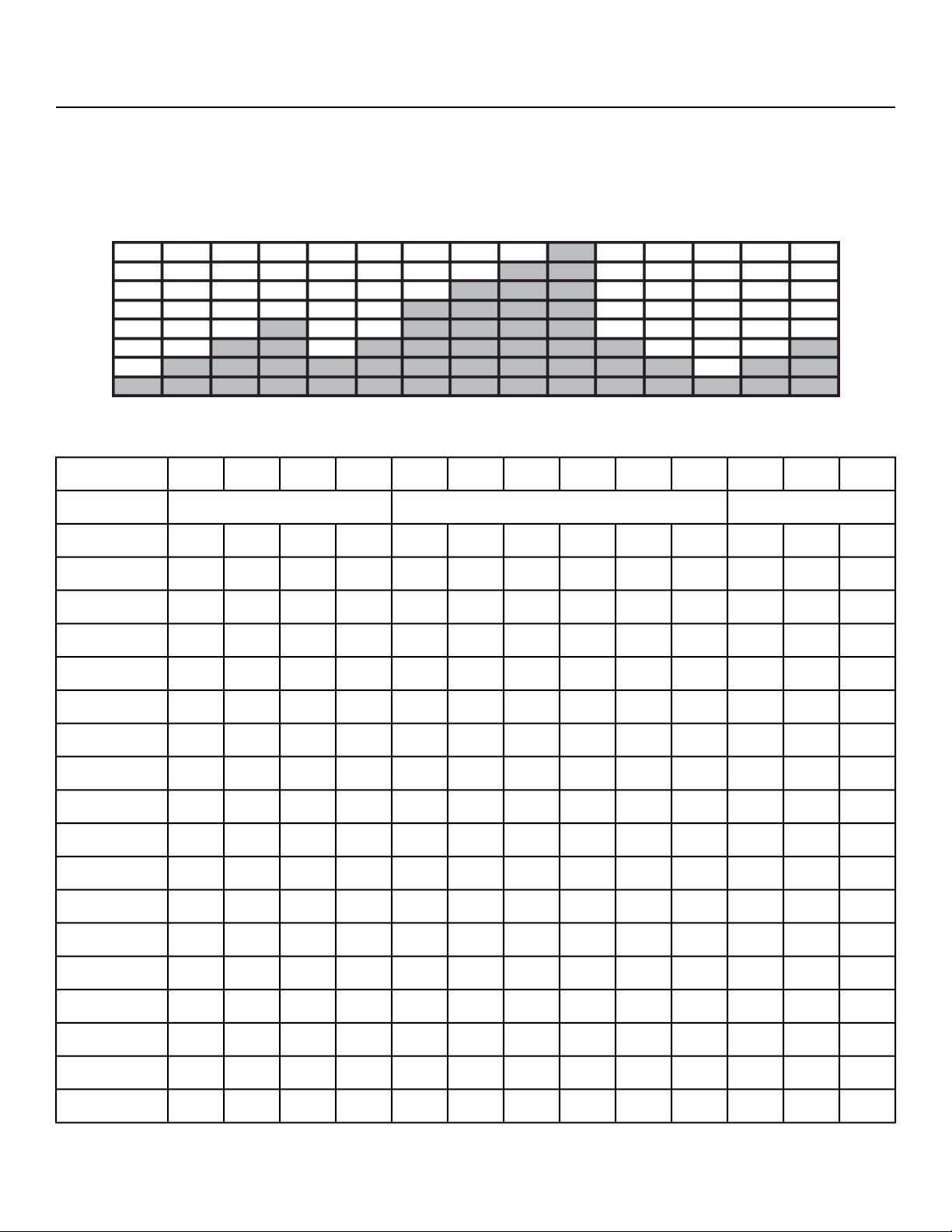
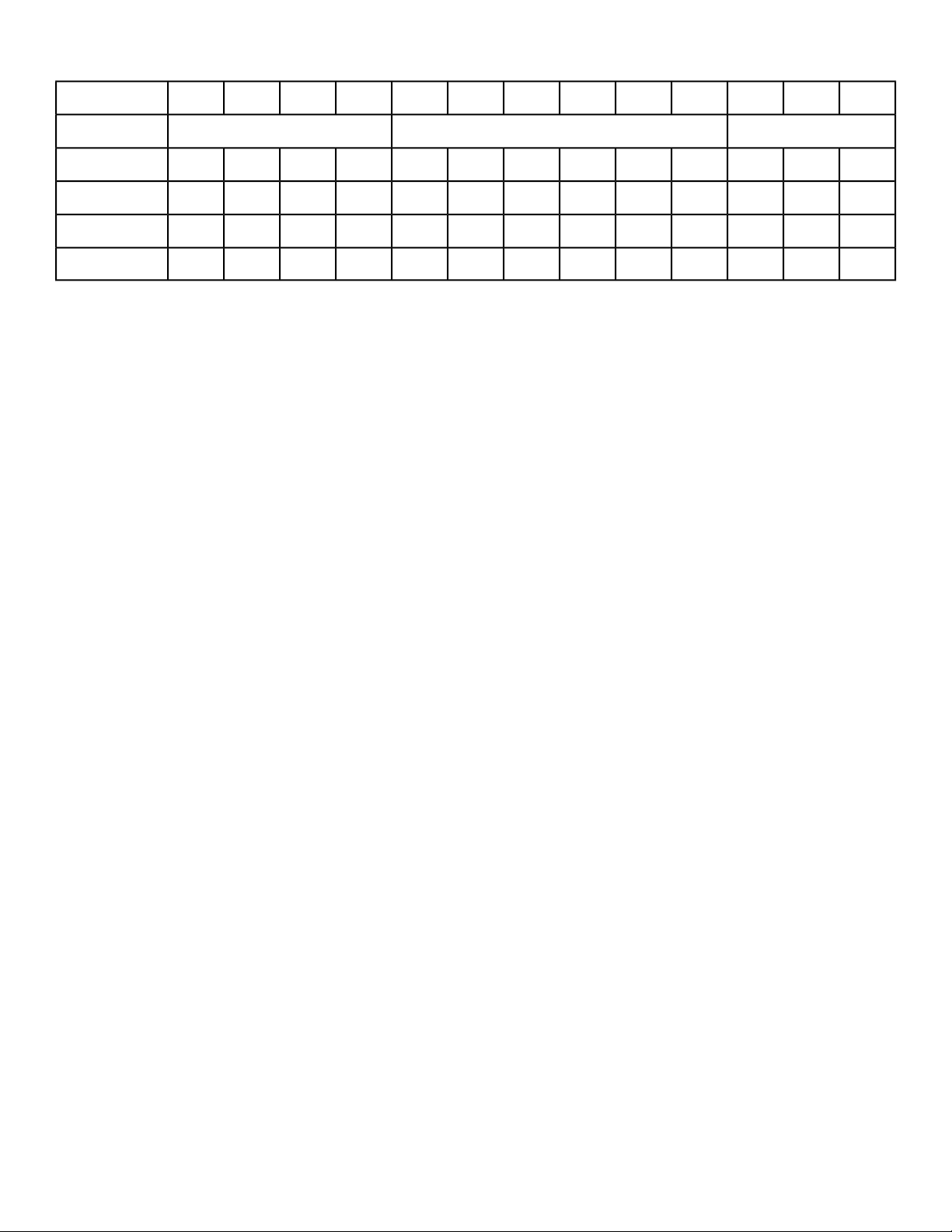
This workout is a three-minute forty-five second core workout with a progressively increasing resistance
profile designed to encourage the user to work towards their anaerobic energy system. The first three
stages are forty-five seconds each and with the last three at thirty seconds each ending with the final
stage at peak resistance. The resistance then returns to the preliminary level and the core workout
repeats itself.
Watt per level/gear
:30:45:45:30:30:30:45:45:45:30:30:30:30Time
Cool DownCore SegmentsWarm Up
3216543214321Level
501001504003503002501501002001501005021
509013537532527522513590180135905020
509013036531526522013090175130905019
508512534529525020512585165125855018
458011532528023519511580155115804517
458011531527023019011580150115804516
457510530025521517510575140105754515
457510528524520517010575135105754514
406590260220185150906512090654013
406085240205170140856011085604012
406080225190160130806010580604011
406080210180150125806010080604010
4055751951651401157555957555409
3550651751501251056550856550358
354560160135115956045756045357
354555145125105855545705545356
35455513511595805545655545355
Page 63 of 76
Cybex 770C/770R Cycle Part Number LT-24919-4 D
:30:45:45:30:30:30:45:45:45:30:30:30:30Time
Cool DownCore SegmentsWarm Up
3035451159580654535554535304
3035401008570604035504035303
303540907565554035454035302
303540857060504035454035301
Page 64 of 76
Cybex 770C/770R Cycle Part Number LT-24919-4 D
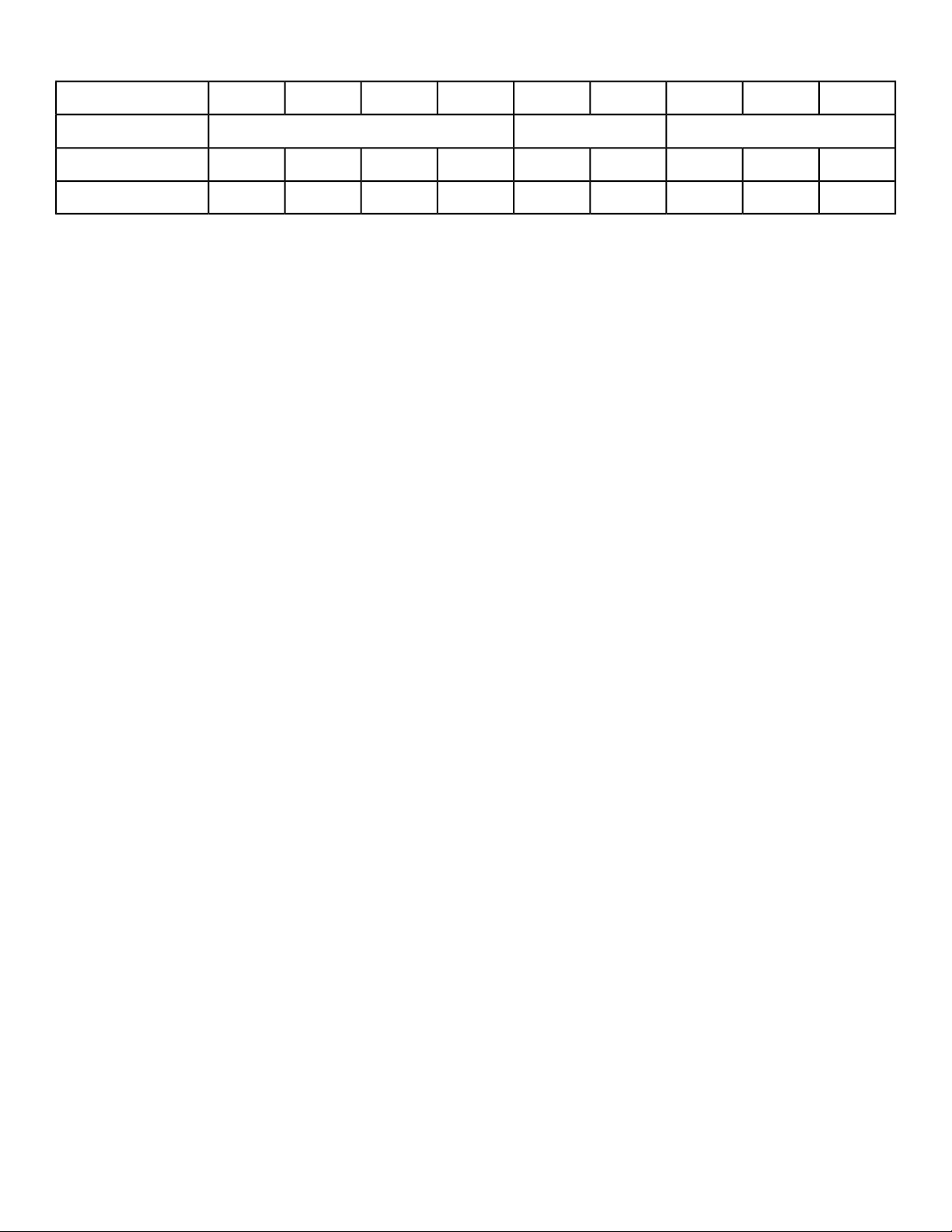
Cardio - Interval
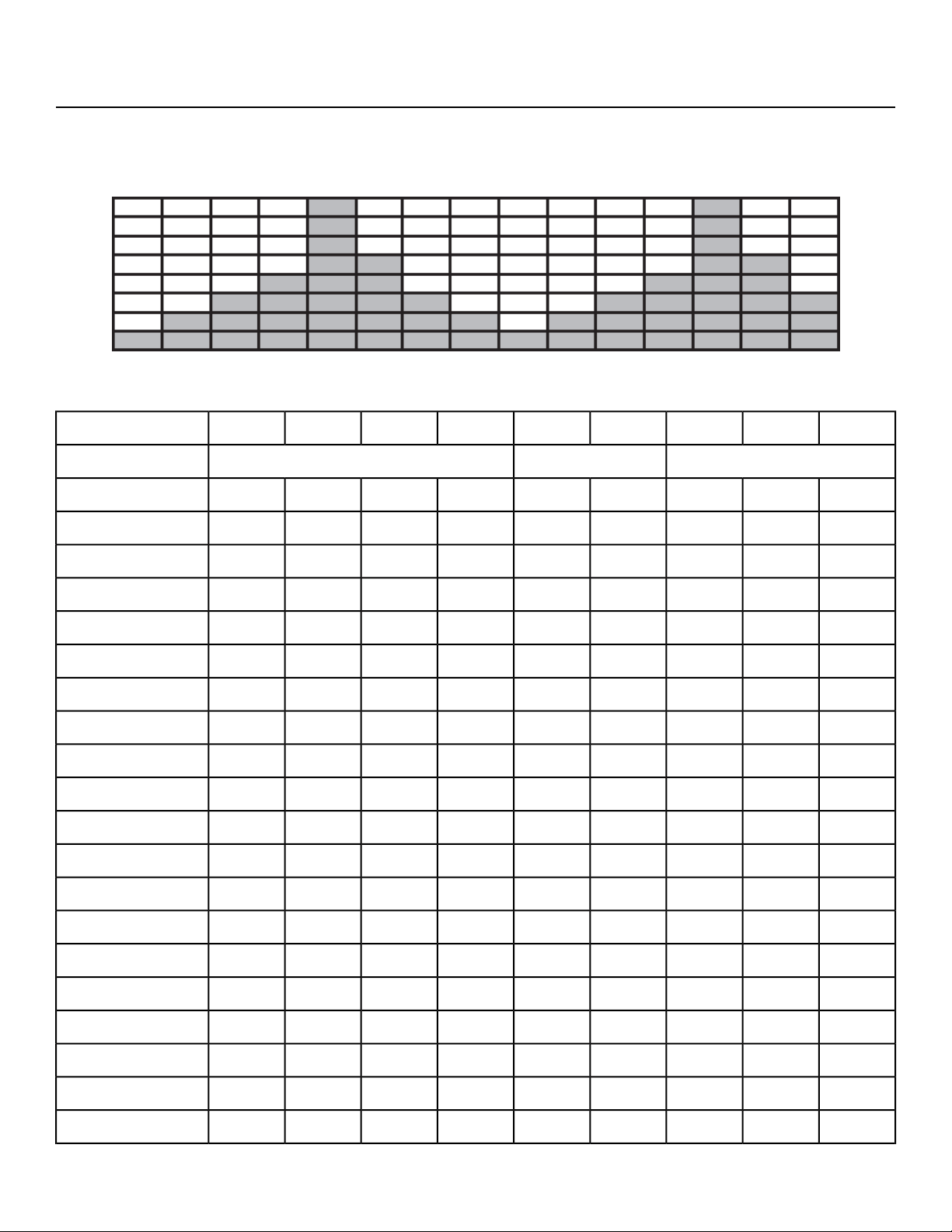
This workout uses a 1:2 work to rest ratio. It is designed for high resistance training with longer rest
periods. Users will face a high level of resistance for thirty-seconds followed by a one minute recuperation
period before performing the interval again.
Watt per level/gear
:30:45:451:00:30:30:30:30:30Time
Cool DownCore SegmentsWarm Up
321214321Level
501001502504002001501005021
5090135225375180135905020
5090130220365175130905019
5085125205345165125855018
4580115195325155115804517
4580115190315150115804516
4575105175300140105754515
4575105170285135105754514
40659015026012090654013
40608514024011085604012
40608013022510580604011
40608012521010080604010
405575115195957555409
355065105175856550358
35456095160756045357
35455585145705545356
35455580135655545355
30354565115554535304
30354060100504035303
Page 65 of 76
Cybex 770C/770R Cycle Part Number LT-24919-4 D
:30:45:451:00:30:30:30:30:30Time
Cool DownCore SegmentsWarm Up
3035405590454035302
3035405085454035301
Page 66 of 76
Cybex 770C/770R Cycle Part Number LT-24919-4 D
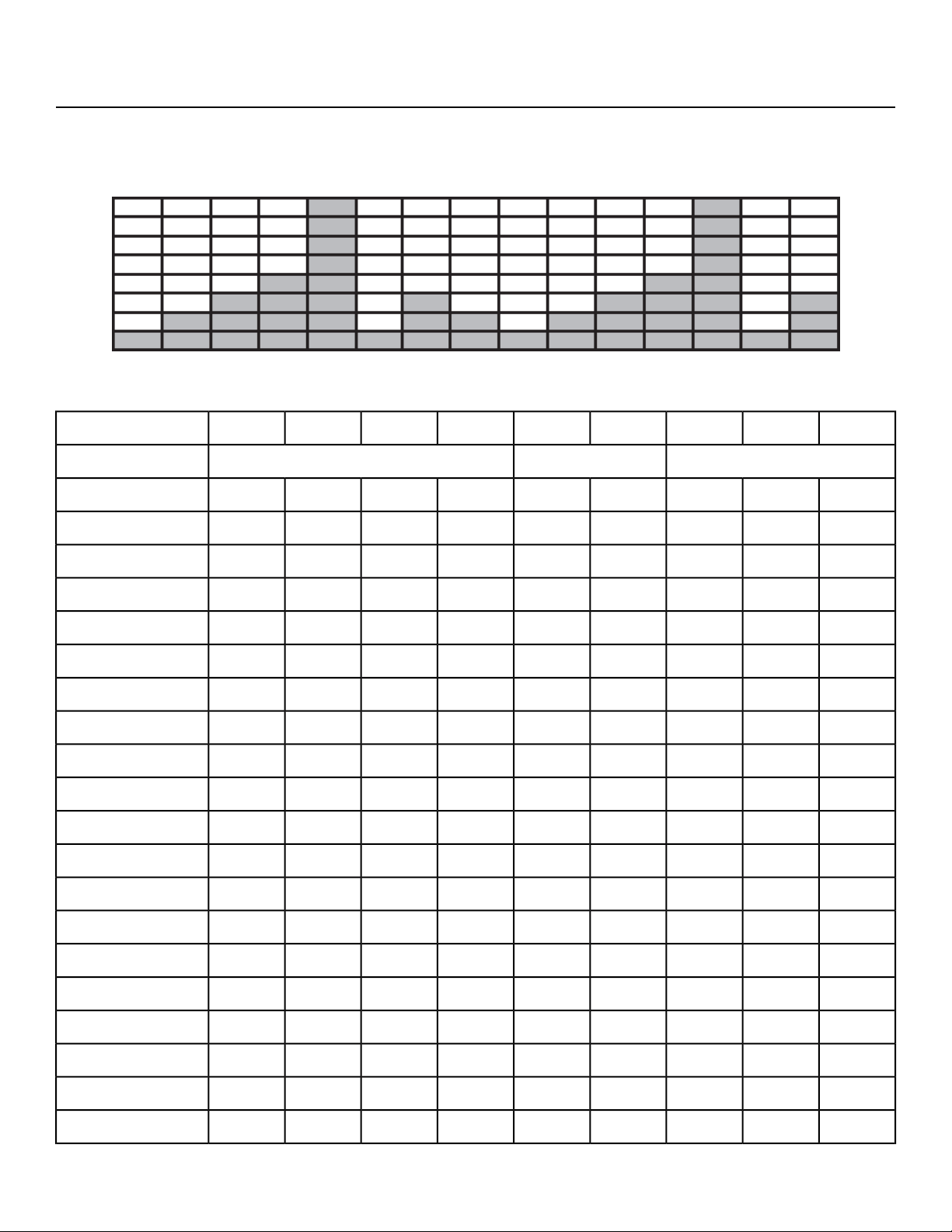
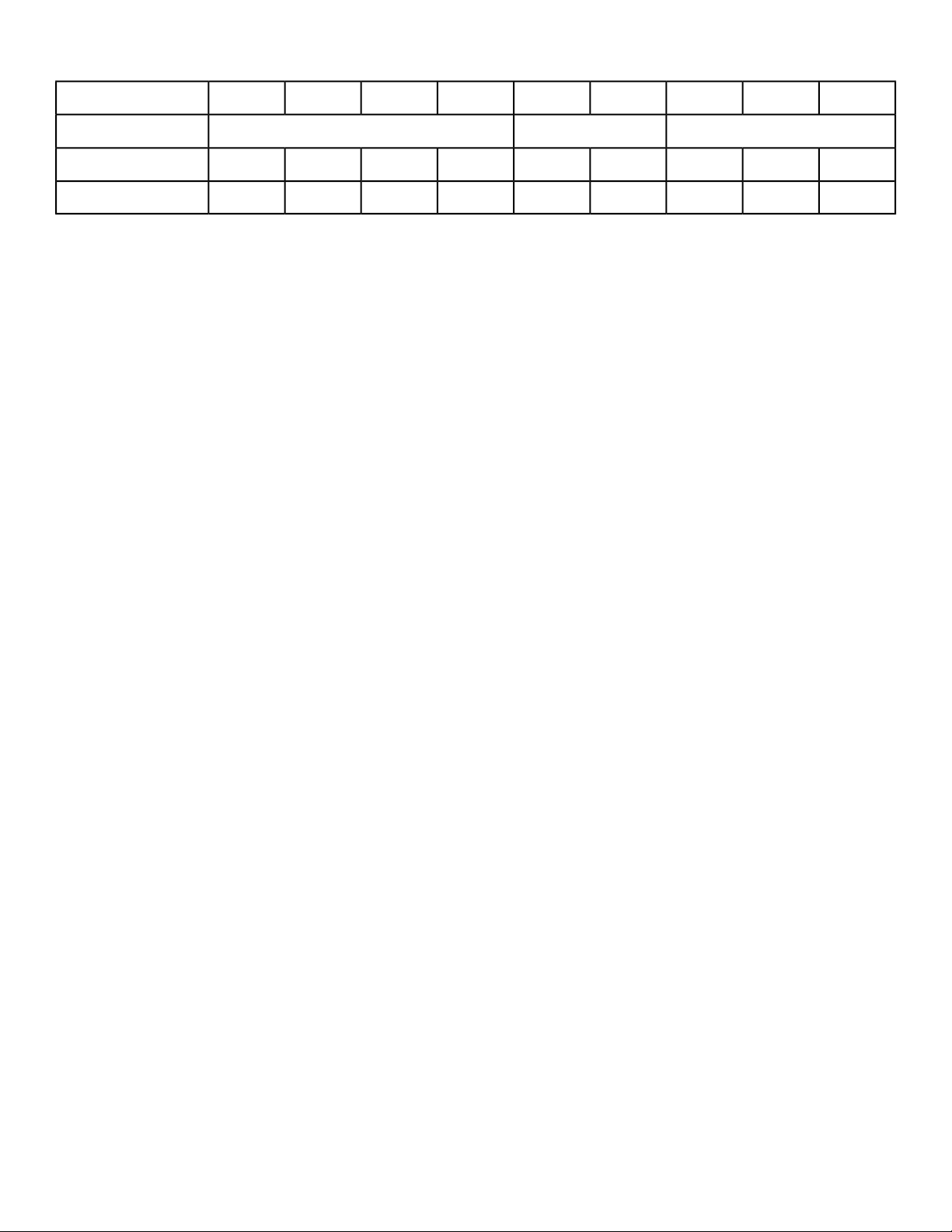
Cardio - Bursts
This workout is designed with the specific goal of raising the users’ lactic acid threshold. The workout
uses a 1:3 work to rest ratio with fifteen-second intervals for maximum power development and forty-five
second rest periods for recuperation.
Watt per level/gear
:30:45:45:45:15:30:30:30:30Time
Cool DownCore SegmentsWarm Up
321214321Level
50100150504002001501005021
509013550375180135905020
509013050365175130905019
508512550345165125855018
458011545325155115804517
458011545315150115804516
457510545300140105754515
457510545285135105754514
4065904026012090654013
4060854024011085604012
4060804022510580604011
4060804021010080604010
40557540195957555409
35506535175856550358
35456035160756045357
35455535145705545356
35455535135655545355
30354530115554535304
30354030100504035303
Page 67 of 76
Cybex 770C/770R Cycle Part Number LT-24919-4 D
:30:45:45:45:15:30:30:30:30Time
Cool DownCore SegmentsWarm Up
3035403090454035302
3035403085454035301
Page 68 of 76
Cybex 770C/770R Cycle Part Number LT-24919-4 D
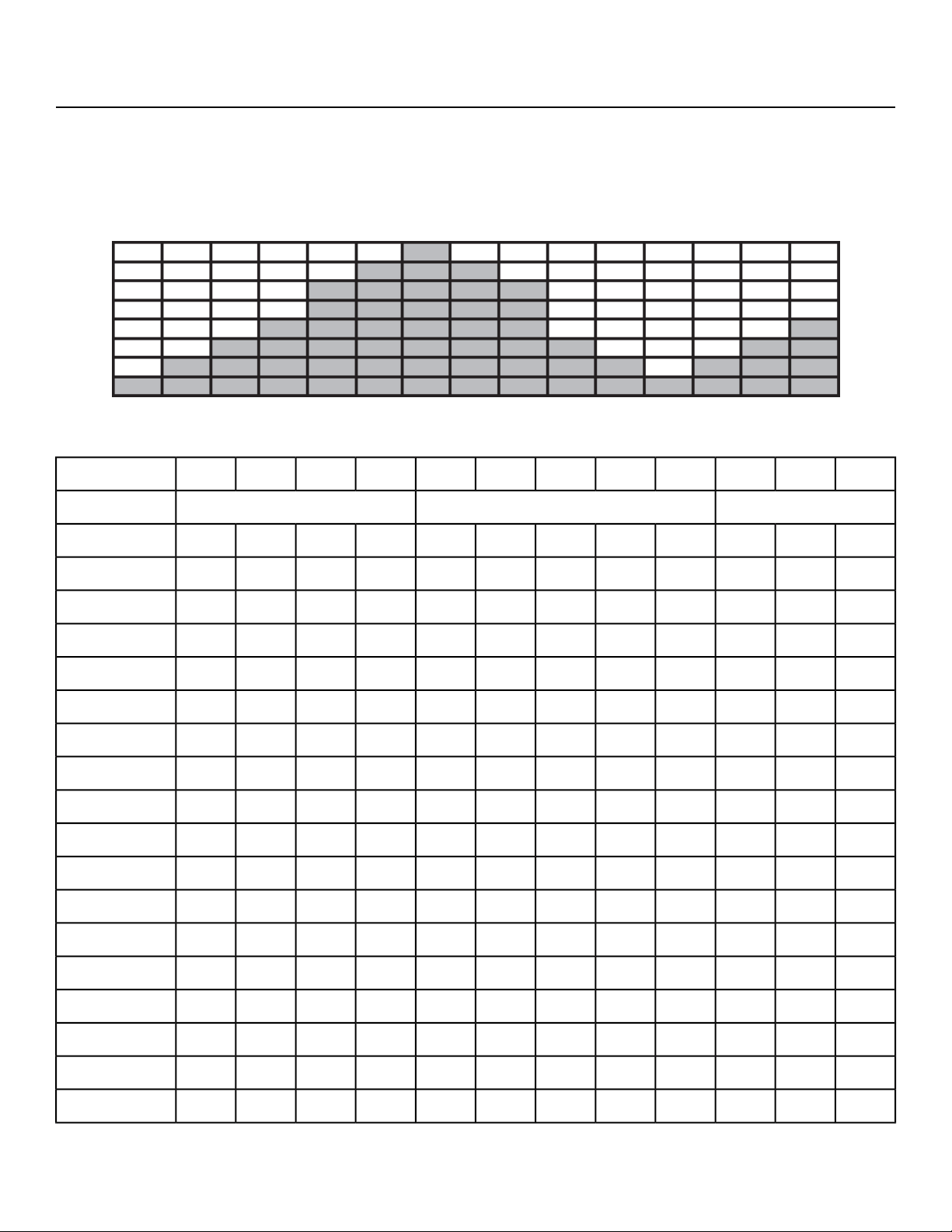
Cardio - Wave
This workout is designed to maintain a high total demand with one minute at peak resistance out of the
total two and a half minute core workout. The prolonged exertion period takes advantage of the long
term energy stores and total aerobic capability when associated with speeds that require a high sustained
cardiovascular demand. Users will benefit from a forty-five second recuperation period before beginning
the next interval.
Watt per level/gear
:30:45:45:45:30:30:45:30:30:30:30Time
Cool DownCore SegmentsWarm Up
321543214321Level
501001503003504003503002001501005021
5090135275325375325275180135905020
5090130265315365315265175130905019
5085125250295345295250165125855018
4580115235280325280235155115804517
4580115230270315270230150115804516
4575105215255300255215140105754515
4575105205245285245205135105754514
40659018522026022018512090654013
40608517020524020517011085604012
40608016019022519016010580604011
40608015018021018015010080604010
405575140165195165140957555409
355065125150175150125856550358
354560115135160135115756045357
354555105125145125105705545356
3545559511513511595655545355
Page 69 of 76
Cybex 770C/770R Cycle Part Number LT-24919-4 D
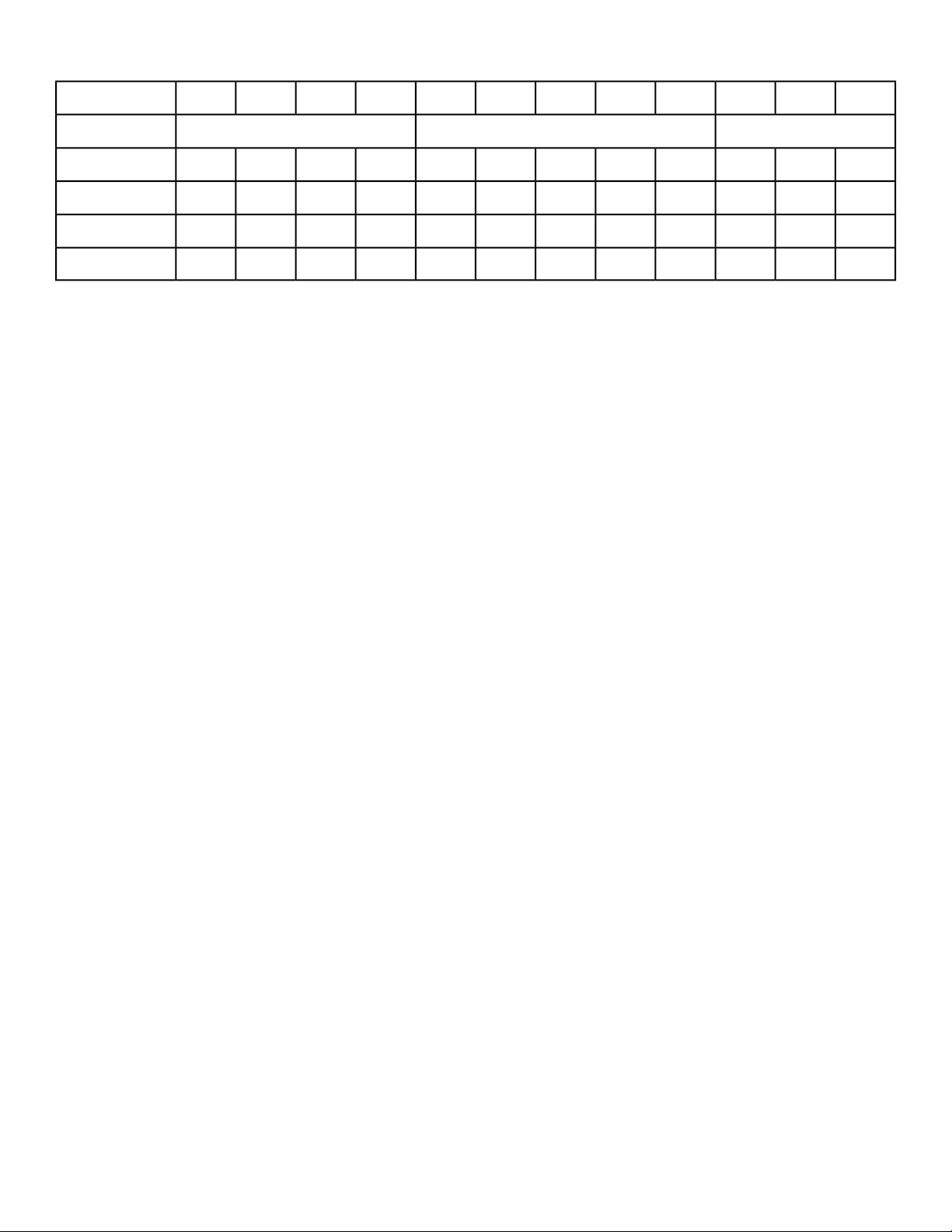
:30:45:45:45:30:30:45:30:30:30:30Time
Cool DownCore SegmentsWarm Up
30354580951159580554535304
30354070851008570504035303
3035406575907565454035302
3035406070857060454035301
Page 70 of 76
Cybex 770C/770R Cycle Part Number LT-24919-4 D
Cardio - Heartrate Control
The Heartrate Control (HRC) workout will attempt to bring the user to their target heartrate in 3-5 minutes,
then keep them there for the duration of the body of the program. A Cool Down is built in to the end of
the program. HRC is run in Constant Power and thus defines watts.
Note: This workout requires the user to wear a 5 KHz Polar
®
or compatible heart rate transmitter
belt. The Heart Rate Control workout (HRC) cannot be selected on the control console unless it
detects a heart rate signal. The HRC workout will not work with the cardio touch contact heart
rate system.
The user selects a target heartrate, which defaults to 75% of max. Limits should be set to not allow a
Target HR (THR) less than 60% of max or more than 95% of max.
Max HR formula: 208-(0.7 x Age).
The protocol starts in Stage II, with the entry point based on Target HR.
• 80 – 120 BPM = Step 6
• 121-127 BPM = Step 8
• 128-134 BPM = Step 10
• 135-up BPM = Step 12
A running pulse-to-pulse BPM value is continuously measured.
Every 15 seconds the user’s pulse rate is sampled and a prediction function is evaluated (decision.)
This is subtracted from the target heartrate to form an error value which is scaled and added to the
current load value. There is a maximum rate of change of 15 steps per decision.
A chart of Step and Watts has been created. It has four defined stages:
• Stage 1 ramps the load from Step 1 to Step 5.
• Stage 2 ramps the load from Step 6 through Step 18.
• Stage 3 ramps the load from Step 19 through Step 39.
• Stage 4 ramps the load from Step 40 through Step 100.
The user has full control over incline throughout the program, with incline having no bearing on the
program at all. The user has limited control over the load in that the user’s selections are not permanent.
At the next decision, a new load can be chosen by the software as described above to override any
user modifications.
If the user presses the LEVEL key, they can modify their Target Heartrate real-time. Utilize the Target
Heartrate Setup selection screen and exit back to the program in progress, making the change to their
target heartrate real-time.
Page 71 of 76
Cybex 770C/770R Cycle Part Number LT-24919-4 D

Lost Signal
If a signal is lost for two consecutive decisions (roughly 30 seconds), the display will beep four times,
show HR SIGNAL LOST, show dashes in the BPM window and show the heart solid white. During this
HR signal lost period, the load will remain steady.
If after two further decisions (roughly an additional 30 seconds) the heartrate signal has not been
reestablished, continue to show HR SIGNAL LOST on the Text area. The program will reduce the
workload by 10 steps per minute until minimum workload or Step 1. After one minute at minimum
workload, go to Exiting Active Mode.
Cool Down
By default, Cool Down occurs at session time minus two minutes. Cool Down goes to 75% of existing
step, then drops by 1 step every 15 seconds for the remainder of Cool Down.
Page 72 of 76
Cybex 770C/770R Cycle Part Number LT-24919-4 D

Power - Constant Power
Control the brake power from 35 to 500 Watts. The bike will decrease the resistance at higher speeds
or increase resistance at slower speeds. The bike will maintain a constant power setting.
Page 73 of 76
Cybex 770C/770R Cycle Part Number LT-24919-4 D

Power - Isokinetic
Accommodating resistance, where unit provides a corresponding amount of resistance on the user to
keep them at a fixed pedal speed. Such exercise is used to test and improve muscular strength and
endurance, especially after injury.
Page 74 of 76
Cybex 770C/770R Cycle Part Number LT-24919-4 D
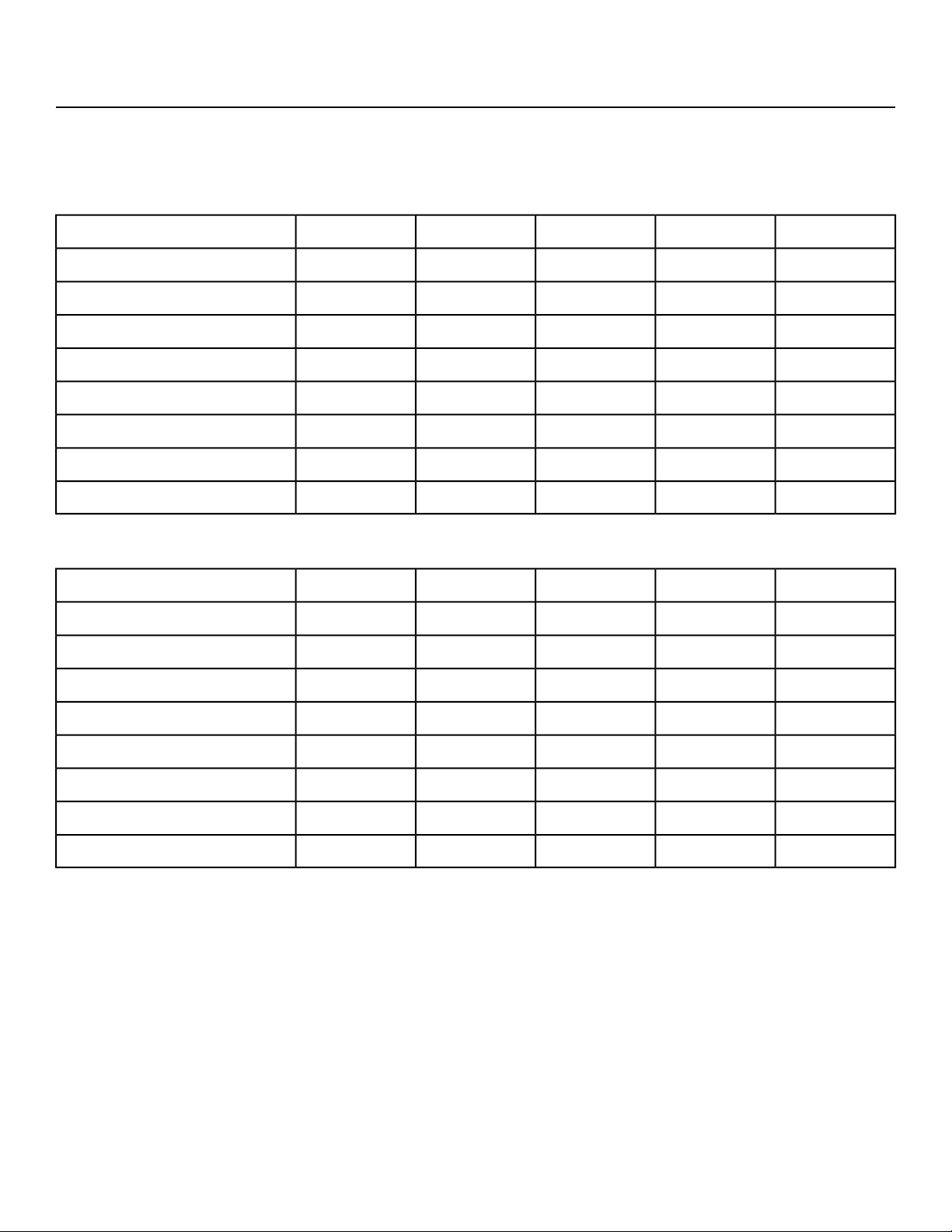
Tests - YMCA
This workout requires a 5 KHz Polar
®
compatible heart rate transmitter belt (not included). Test includes
a warm up and three stages. The test result is a score, see charts below for ranking.
Male
60-6950-5940-4930-3920-29Age
45+48+50+52+55+Elite
40-4443-4745-4947-5150-54Excellent
35-3938-4240-4442-4645-49Good
30-3433-3735-3937-4140-44Above Average
26-2929-3231-3433-3636-39Average
21-2524-2826-3028-3231-35Below Average
16-2018-2320-2523-2726-30Poor
<16<18<20<23<26Very Poor
Female
60-6950-5940-4930-3920-29Age
40+42+44+46+49+Elite
35-3937-4139-4341-4544-48Excellent
30-3432-3634-3836-4039-43Good
25-2927-3129-3331-3534-38Above Average
21-2423-2625-2827-3030-33Average
16-2018-2220-2422-2625-29Below Average
11-1513-1715-1917-2120-24Poor
<11<13<15<17<20Very Poor
Page 75 of 76
Cybex 770C/770R Cycle Part Number LT-24919-4 D

10 Trotter Drive, Medway, MA 02053 • 888-462-9239 • 508-533-4300 • FAX 508-533-5183
www.cybexintl.com