Ed : 03/17 Rev : 00
INSTRUCTION
BEHAVIOURS ALLOWED
• Use the equipment in households only. Make sure to
explain how to safely use this equipment to all your
family members and to any friends whom you allow the
use.
•
from being damaged.
• Make sure that the equipment user has understood the
Keep the instruction manual always at hand for quick
reference, in case of necessity.
• Make sure that the equipment is used only by persons
over 16 and in good physical conditions.
• Always wear clothes suitable for training, not hindering
movements or perspiration. Use trainer shoes. Do not
use leather sole shoes or shoes with soles in any stiff
material.
• Do not allow other people, children or pets to get near
the equipment because of the danger caused by moveable
both hands, as per the instructions in the manual. Keep
your heartrate under control and adjust the exercize
intensity consequently during the training.
• If you should feel light-headed, or breathlessness or if you
feel chest pain during your training with the equipment,
immediately stop and consult a doctor.
• Periodically check that bolts and screws are adequately
tightened.
DON’T DO BEHAVIOURS
•
commercial premises. Do not rent it. This equipment is
not designed for intensive use in professional activities
or for rehabilitation purposes.
• DO NOT place glasses or bottles containing drinks next
to or above the equipment.
• DO NOT ruin the equipment with pointed or sharp ob-
jects, brushes or abrasive sponges, or aggressive chemical
substances.
• DO NOT disassemble parts of the equipment, except if
the operation is requested by the instruction manual.
• DO NOT place the equipment in any building basement,
cellars, humid areas in general. Do no leave it exposed to
atmospheric agents (rain, sun, etc).
• DO NOT allow children or pets to get near the equip-
ment. It is advisable to place the equipment in a dedi-
cated room with a door to prevent access to anybody
non authorized to use the product.
• NEVER use the equipment if it is damaged or is not in
perfect conditions. In case of breakdown of failure of the
equipment swith it off and do not tamper with it.
For any repairing please only contact specialized assis-
tance services.
• A
lways wear gym shoes suitable for running.
• DO NOT wear synthetic clothes or linsey woolsey fabric
which do not allow natural perspiration during training.
Use of unsuitable clothes can cause hygienic problems.
SAFETY WARNINGS
4
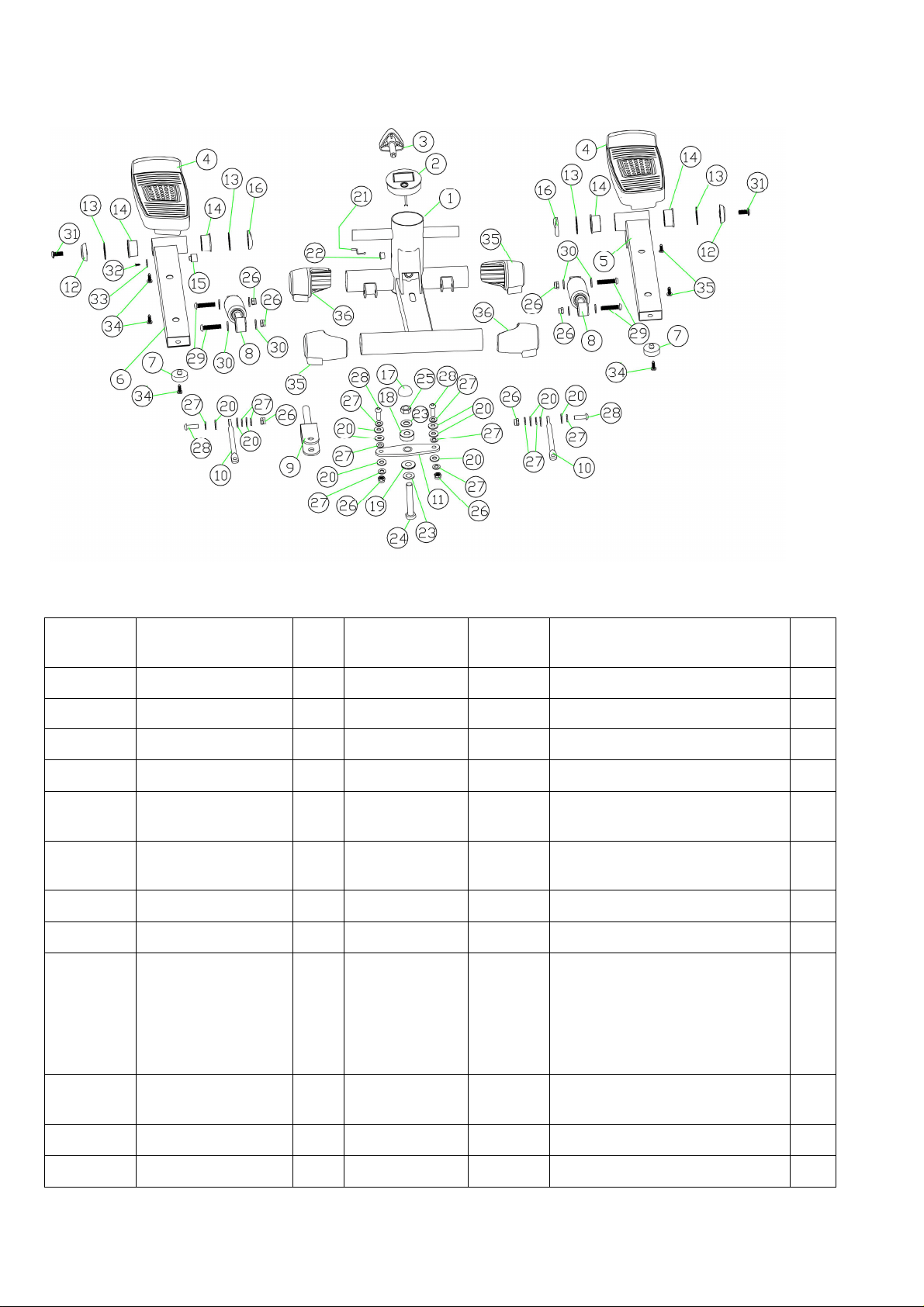
Explosion Diagram
Parts List
PART
NO.
DESCRIPTION QT
Y
PART
NO.
DESCRIPTION QT
Y
1 Main frame 1 14 Alex sleeve 4
2 Display 1 15 Magnetic fix base 1
3 Adjustment knob
1 21 Cable 1
4 Pedal 2 22 Protective sheeve 1
5 Support pole (
R)
for pedal
1 29 Screws 4
6 S
upport pole (R)
for pedal
1 30 Cushion 8
7 Cushion rubber 2 31 screws 2
8 Hydraulic rod 2 32,33 Cushion 1
9 ,11,17,
18,19,20
,23,24,2
5,26,27,
28
Power drive unit 1
set
34 Tapping screws 6
10,20,26
,27,28
Master rod unit 2
set
35,36 Plastic cover 4
12,16 Plastic cover 4
13 Cushion 4

5
Product Operation Guide
Operation Procedure
1. Rotate the adjustment knob to alter the pedal’s movement range.
2. Adjust the tension of the adjustment knob to ensure tension wire is well connected for
proper function.
3. The computer will automatically shut off if there is no movement for 4 minutes.
4. The computer will automatically turn on when exercise commences.
5. All functions will automatically stop and a “STOP” sign will appear on top left corner of the
computer when there is no movement for 4 sections. Functions will recommence when you
begin to exercise.
Function Parameter
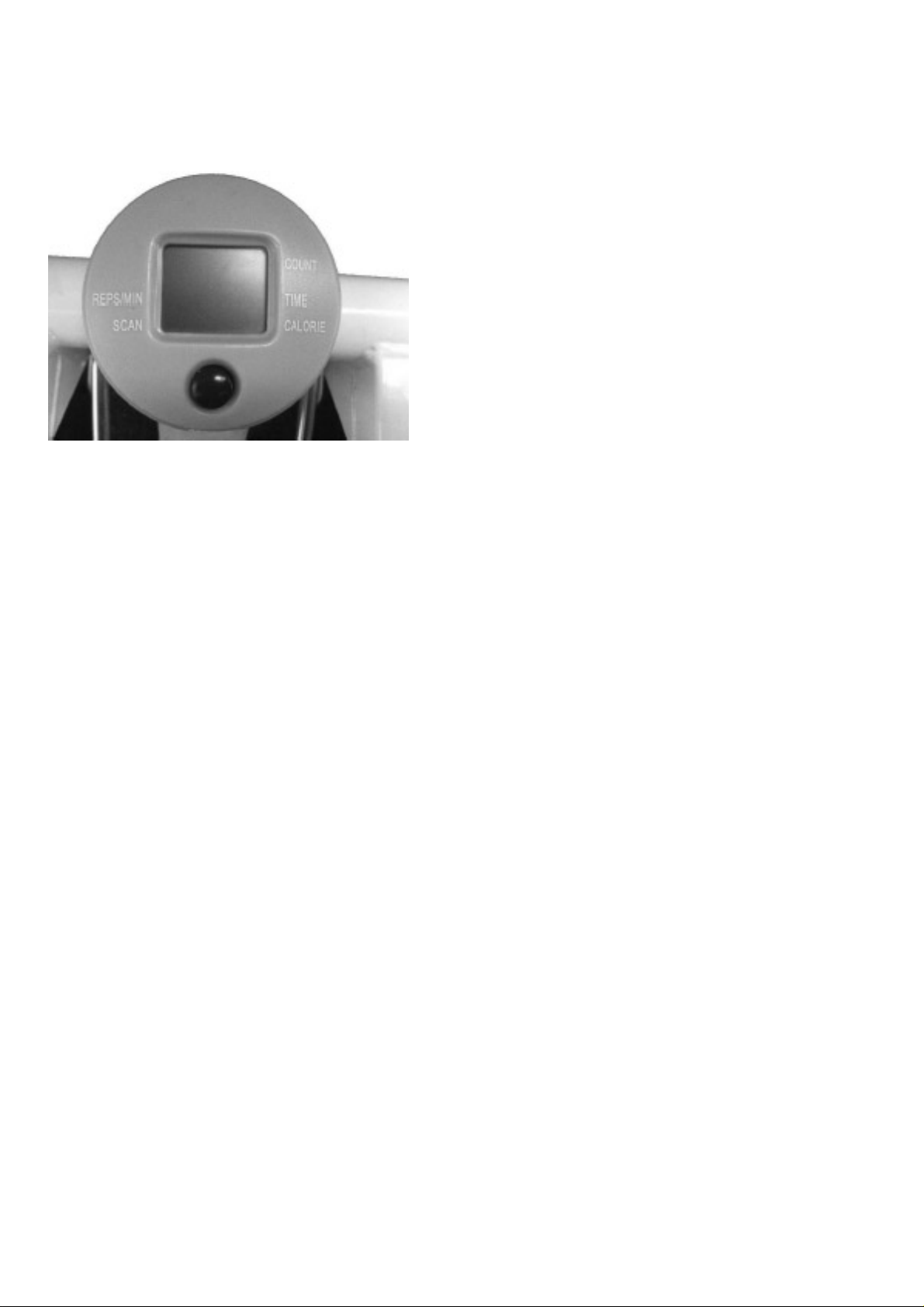
SCAN Automatically scans each function in sequence.
TIME Displays the total time of the workout session starts from 00:00 –
99:59.
COUNT Displays the total number of steps taken during the workout session.
REPS/MIN Displays the repetitions (or strides) per minute during the workout
session.
CAL Displays the calories burned during the workout session. NOTE: This
is an approximate measurement.
FUNCTION
BUTTON
To select TIME, COUNT, REPS/MIN, CALORIES To RESET the
values to default. Press 4 secs to reset the value.
6
Product Installation
Step 1
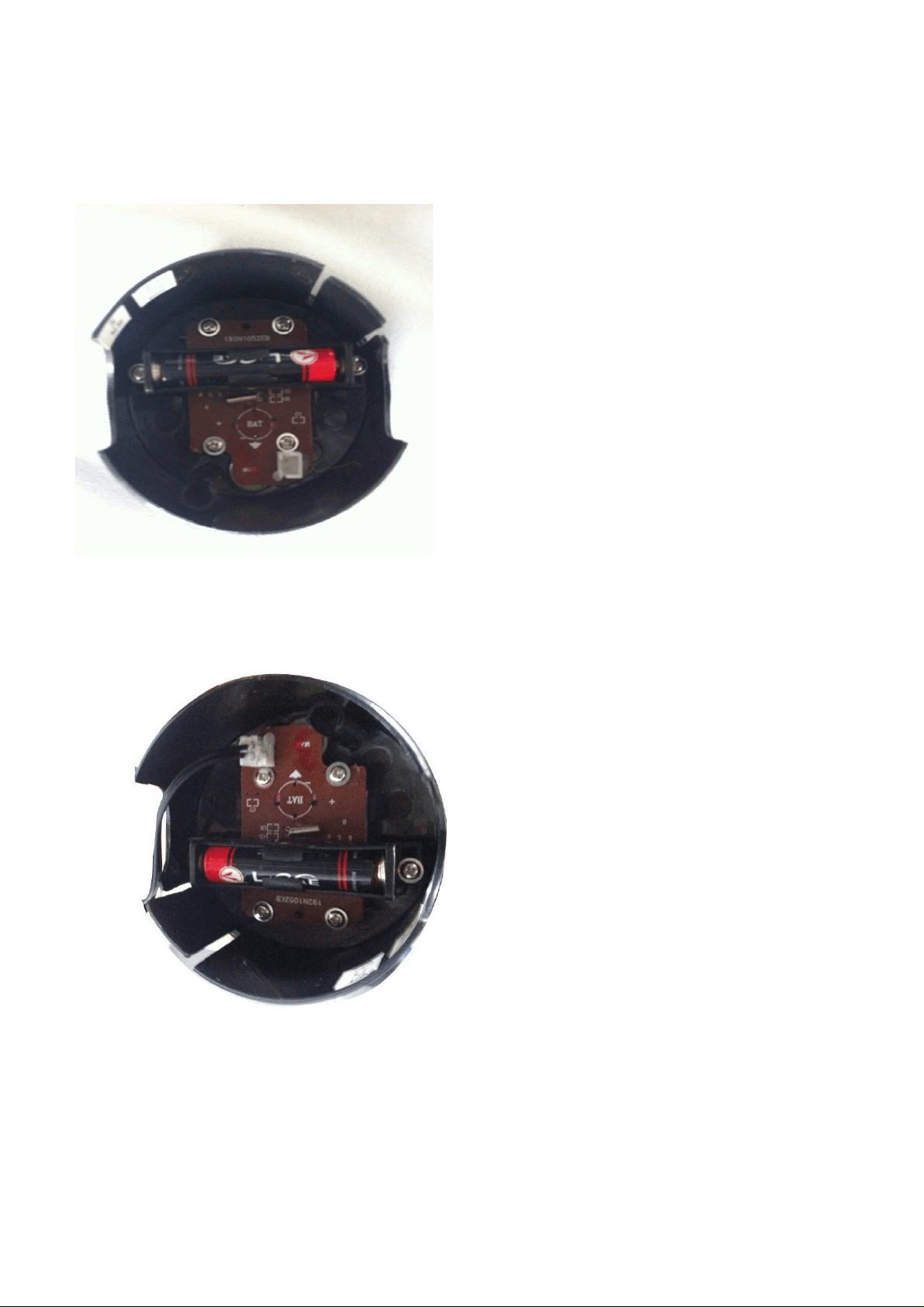
Open the Computer (Part: 22), Install the battery into the correct position (Pic.: 1)
Step 2
Connect the Computer (Part: 22) with Main Frame cable (part: 22) (Pic: 2)
7
Step 3
Install the Computer (Part: 22) into Main Frame (Part: 1) (Pic: 3)


GARLANDO SPA
Via Regione Piemonte, 32 - Zona Industriale D1
15068 - Pozzolo Formigaro (AL) - Italy
www.evert.it - info@evert.it