1
Welcome to a
Healthy Home
ALLERGY+
PET9550™
READ AND SAVE THESE INSTRUCTIONS

2

Delivering healthier indoor air has been our business since 1954.
For over 60 years, HVAC professionals have made Aprilaire their
trusted choice for indoor air quality solutions, including: air
purification, ventilation, humidification, and temperature control.
Our network of top quality dealers has installed millions of air
purifiers in homes across North America and sold tens of millions
of genuine Aprilaire replacement filters.
With the introduction of the Aprilaire 9550 series, we are proud
to bring our legacy of quality, features, and innovation to portable
room air purifiers.
2
Trusted solutions
for a healthy home.


4
Improving the indoor air quality in your
home, starts with Aprilaire — the leader in
Indoor Air Quality (IAQ) solutions.
What is Indoor Air Quality?
IAQ refers to the condition of the air in your
home. The aspects of IAQ include: temperature,
humidity, air purity and ventilation. When these
conditions aren’t properly managed, it can lead
to poor indoor air quality which can impact
the health and wellness of you and your family.
According to the U.S. E.P.A., the air inside your
home can be up to ten times more polluted than
the air outside.
Temperature
Temperature plays an essential role in comfort and health. With
improved programmability, Wi-Fi and zoned controls, comfort
can be improved while preserving energy eciency.
Humidity
The relative humidity in the home can impact asthma, allergies
and skin conditions and increase the incidence of cold and flu.
Control of humidity also protects against mold growth, odors
and damage to the home.
Air Purity
Air purification protects your family’s health (as well as your
HVAC system) from harmful particulates like allergens, mold
spores, dust mites and viruses.
Ventilation
Stale air leads to odors, increased humidity and a high
concentration of Volatile Organic Compounds (VOCs). Without
proper ventilation, comfort and health are at risk.

*Particles 0.3 microns and larger in size.
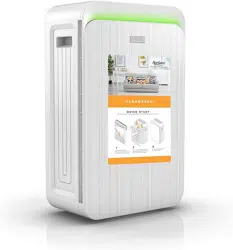
A Cleaner Home Starts Here
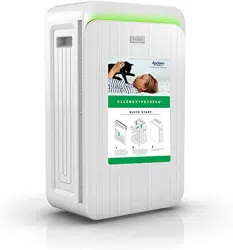
Create a no-fly zone for airborne allergens – including those from your pets,
with the Aprilaire Allergy + Pet9550. Its 4-stage True HEPA filtration system is
99.97%* eective at helping to remove visible and invisible airborne impurities and
allergens. It has a special filter designed to remove allergens specific to pets, like
fine hair and dander. The full filtration system helps to remove dust, pollen, germs,
mold spores, and odors, all of which can trigger allergy and even asthma symptoms
including sneezing, coughing, and watery eyes.

6
TABLE OF CONTENTS
About Us 1
Safety Instructions 7
A Closer Look at Your Air Purifier 9
The Control Panel 12
Placement of Your Air Purifier 15
Initial Air Purifier Set-up 17
Care & Maintenance 19
Troubleshooting Tips 25
Answers to Frequently Asked Questions 26
Warranty 28
Congratulations on your purchase of a genuine Aprilaire Air Purifier. You’re making an
investment in one of the most important aspects of health and wellness—the air you and your
family breathe.
In this User Manual you’ll find step-by-step instructions for operation and maintenance, along
with answers to common questions. Take a look around and discover how you can get the
most out of your new Aprilaire Air Purifier.

7
IMPORTANT SAFETY INSTRUCTIONS
READ AND SAVE THESE INSTRUCTIONS BEFORE USING THIS AIR PURIFIER
WARNING: Failure to follow these instructions can result in fire, electric shock, injury or property damage.
• Read all the instructions before operating the air purifier.
• Remove plastic shipping bag from filter(s) before turning the unit on. Keep the plastic shipping bag away from children.
• This appliance has a polarized plug (one blade is wider than the other). To reduce the risk of electric shock, this plug is intended to fit
in a polarized outlet only one way. If the plug does not fit fully in the outlet, reverse the plug. If it still does not fit, contact a qualified
electrician. Do not attempt to defeat this safety feature.
• Use only with 110-120 VAC outlet. Be sure unit is plugged in firmly and completely. As with any electrical device, plug and unplug the
air purifier with dry hands only.
• Do not operate air purifier with a damaged cord or plug.
• Do not run cord under carpeting. Do not cover cord with throw rugs, runners, or similar coverings. Do not route cord under furniture
or appliances.
• Arrange cord away from trac areas and place cord where it will not be stepped on or tripped over.
• Keep the power cord away from heated surfaces.
• Do not use an extension cord.
• Do not pull on the cord to remove the plug from the outlet. Grip plug and pull from the outlet.

ETL tested for safety.
8
• Always turn OFF the air purifier before unplugging the cord from the power supply.
• Always unplug or disconnect the air purifier from the power supply before servicing.
• WARNING: To reduce the risk of fire or electric shock, do not use this air purifier with any solid-state speed control device.
• Do not operate the air purifier where combustible products are present.
• Turn the air purifier OFF and unplug the unit when not in use or before moving.
• Do not operate the air purifier if it malfunctions, has been dropped, or is damaged.
• Do not operate the air purifier outdoors. Do not operate the air purifier in a bathroom, laundry area or any other damp location.
• Never place the air purifier in water or other liquids as electrical shock may occur.
• Do not place the air purifier on soft surfaces. Place the air purifier on a flat, level surface.
• Keep the air purifier at least 12” away from any heat sources.
• Only operate the air purifier in the upright position.
• Do not allow foreign objects to enter the intake or exhaust openings on the air purifier.
• Do not block or cover the intake or exhaust openings of the air purifier in any manner.
• Do not stand, sit, or place heavy objects on the air purifier.
• Never try to take apart or repair the air purifier.
9
A Closer Look At Your Air Purifier
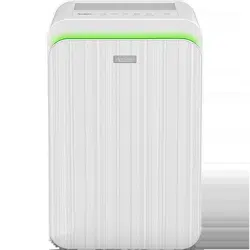
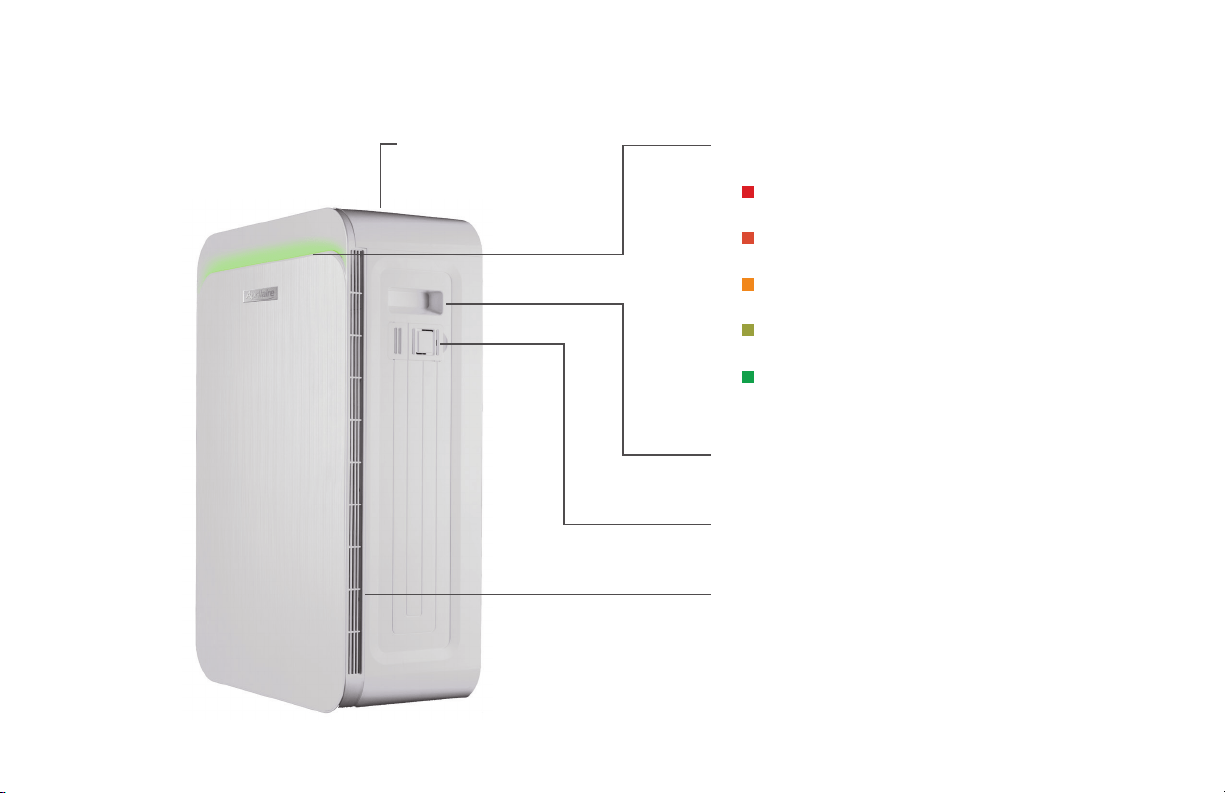
Purified Air Outlet Air Quality Indicator Color Meaning:
• Red - Very Poor Air Quality
• Orange - Poor Air Quality
• Yellow - Moderate Air Quality
• Yellow/Green - Good Air Quality
• Green - Very Good Air Quality
Side Handles- Make it easy to carry from room to room
Smart Mode Particle Sensor
Air Inlet
10
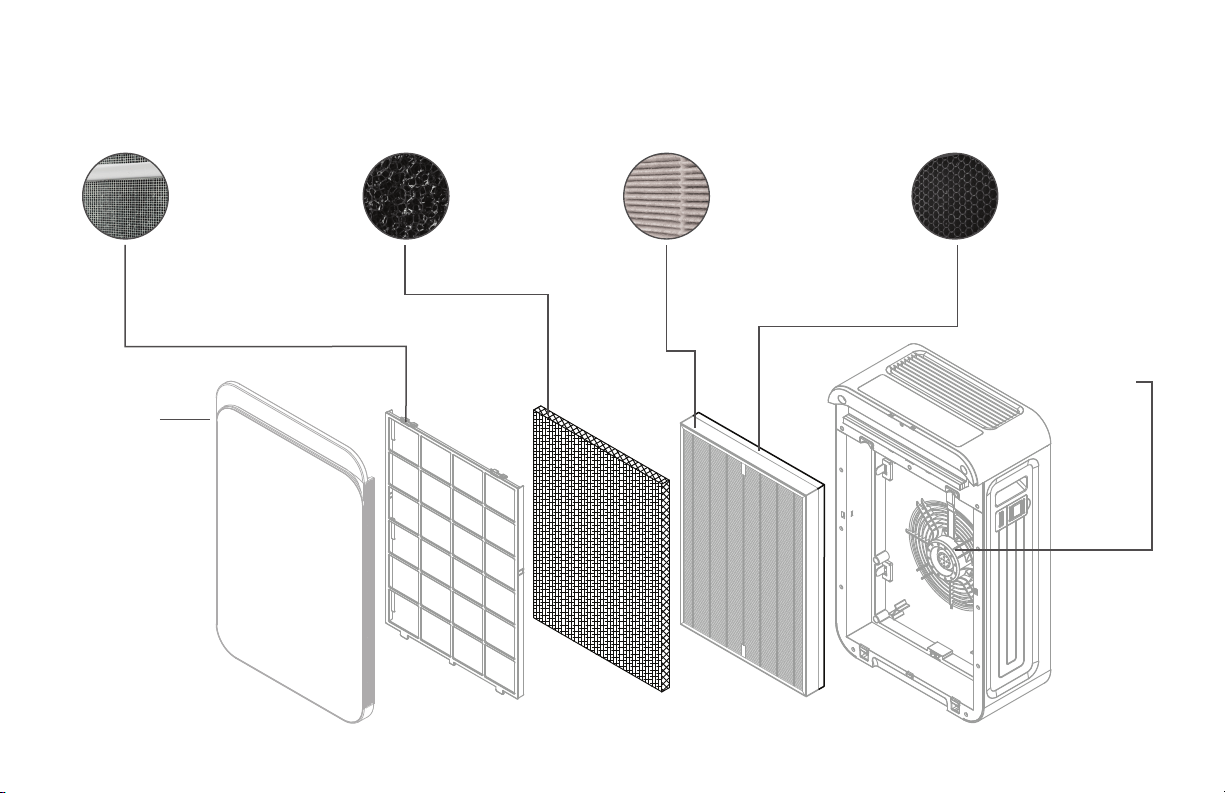
4-Stage Filtration System
Front
Cover
Fan
Powerful 6
speed fan
Alumina Oxide +
Activated Carbon
Bed Filter
Helps remove pet odors,
VOCs, & gaseous allergy
triggers
True HEPA Type Filter
Removes 99.97% airborne
allergens, including pet
dander, pollen, mold spores,
germs, & other pollutants
larger than 0.3 microns
Pet filter
Traps fine airborne pet
hair & dander
Pre-filter
Captures large to medium
airborne particles
11
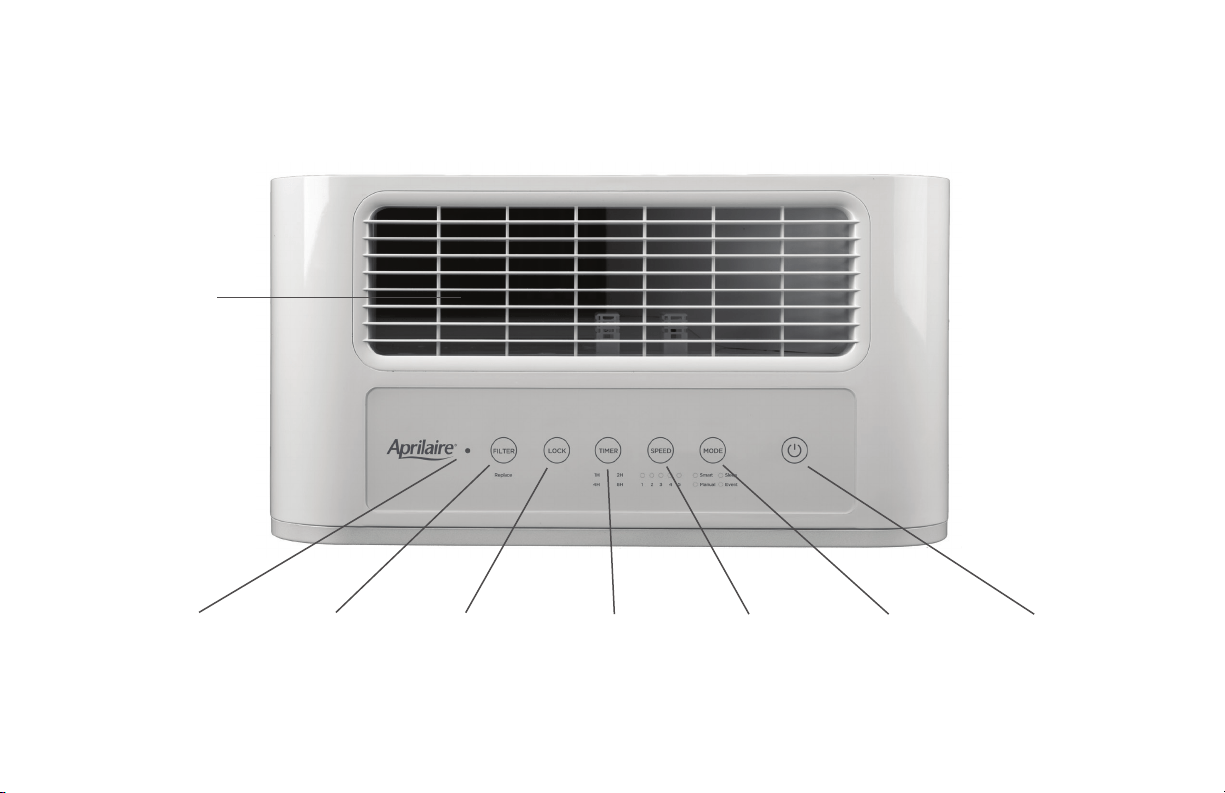
Top View
Light Sensor Filter Life
Indicator
Control Panel
Lock Indicator
Timer Fan Speed Mode
Indicator
Power
Purified
Air Outlet

12
The Control Panel
1. Power Press the button to start the air purifier. (This button will also shut it o.)
• The air purifier will beep 1 time when powered on.
• The air purifier will automatically start in Smart Mode.
2. Air Quality Indicator Light The light bar on the front of the air purifier changes color to indicate the current air quality level as
measured by the Smart Mode Particle Sensor. It moves from red to yellow to green as the air quality improves.
3. Four Operating Modes
Smart Mode
In Smart Mode, the fan speed adjusts automatically to improve indoor air quality based on the Smart Mode Particle Sensor
reading. The fan speed is faster when particle levels are high, and will slow down as air quality improves. The Air Quality
Indicator Light on the front of the air purifier changes color to indicate the current air quality level.
Manual Mode
In Manual Mode, press the Speed button to manually adjust the fan speed.
Sleep Mode
In Sleep Mode, the fan speed automatically adjusts to Low (1), the Air Quality Indicator Light turns o, the control panel lights
dim, and the Timer counts down from 8 hours. The air purifier will automatically turn o when the selected time expires.
In Sleep Mode you can manually adjust the fan Speed and Timer using the control panel.
Turbo Mode
In Turbo Mode, the fan Speed automatically adjusts to Turbo Purifying (6) for maximum cleaning power. The lights on Fan
Speed turn o. You can manually set the Timer for the length of Turbo Purifying you want, and/or Lock the setting.

13
4. Fan Speed
Press the Speed button to manually adjust the fan speed from the Sleep or Manual modes.
1. Whisper Quiet Purifying
2. Light Pet Allergen
3. Moderate Pet Allergen
4. Heavy Pet Allergen
5. Extra-Heavy Pet Allergen
6. Turbo Purifying
5. Timer
Press the Timer button to choose a length of operation: 1, 2, 4, or 8 hours. When the set time expires, the air purifier
automatically turns o.
6. Control Panel Lock
The Lock button locks the Control Panel in the current setting.
To engage the Lock, press and hold the Lock button for 5 seconds. The air purifier will beep 3 times, and the Lock
button will light up.
If the control panel is set to Sleep Mode, the air purifier will not beep when the Lock button is pressed.
To unlock, press and hold the Lock button for 6 seconds. The Lock button light will turn o and the air purifier will beep 3 times.
Alternative: Easily unlock the air purifier by simply unplugging the unit, then plugging it back in. This will also turn o the
Lock button light.

14
7. Filter Life Indicator
When the Filter Cartridge is at 90% of its capacity, the air purifier will beep 3 times when the power is turned on indicating it is
time to order a new filter cartridge. The Filter button will flash until the Filter Cartridge is replaced and the Filter Life Indicator is
reset.
To reset the Filter Life Indicator, press and hold the Filter button for 5 seconds. The air purifier will beep 3 times and the light for
the Filter button will turn o.
To order a replacement filter
cartridge, go to Aprilaire.com
or call 800.931.0014.
8. Light Sensor
If the room is dark for more than 3 minutes, the air purifier will automatically go into Sleep Mode. When that occurs, you can still
adjust the fan Speed and Timer, and use the Lock function.
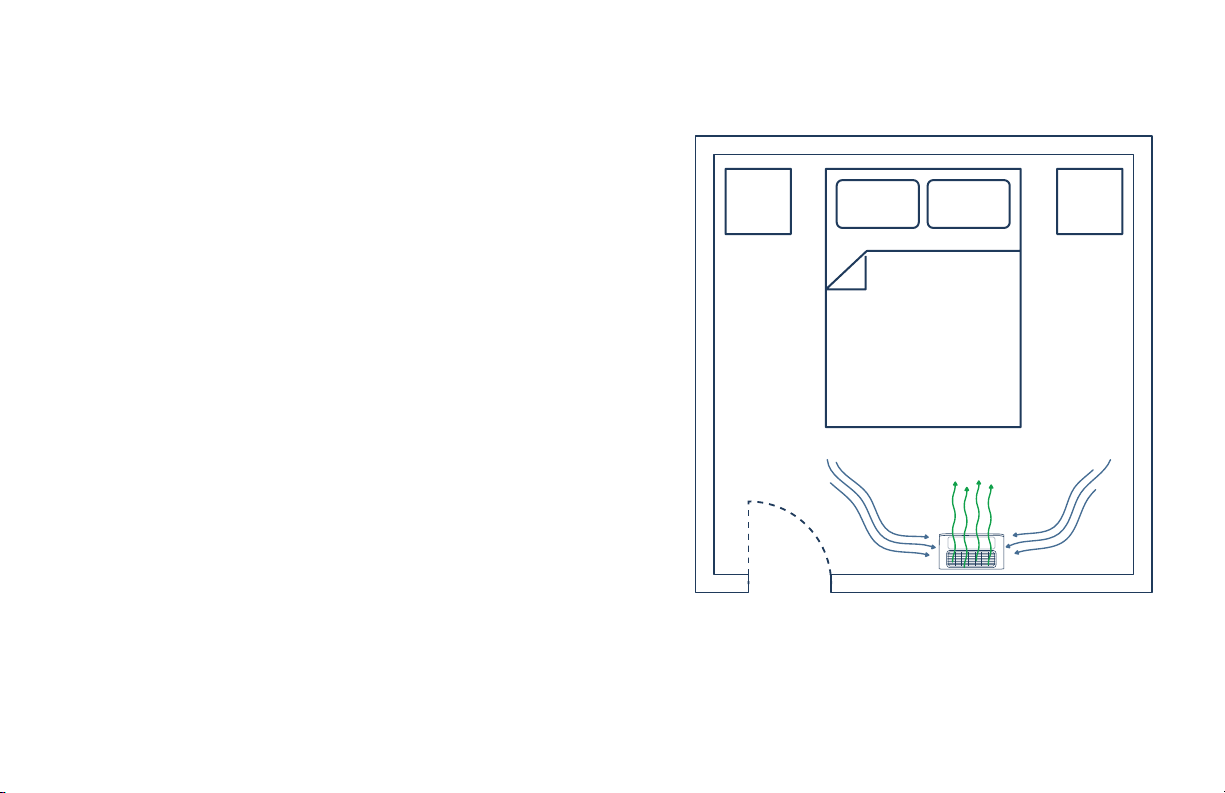
Bedroom Overhead View
PURIFIED AIR
15
Placing Your Air Purifier
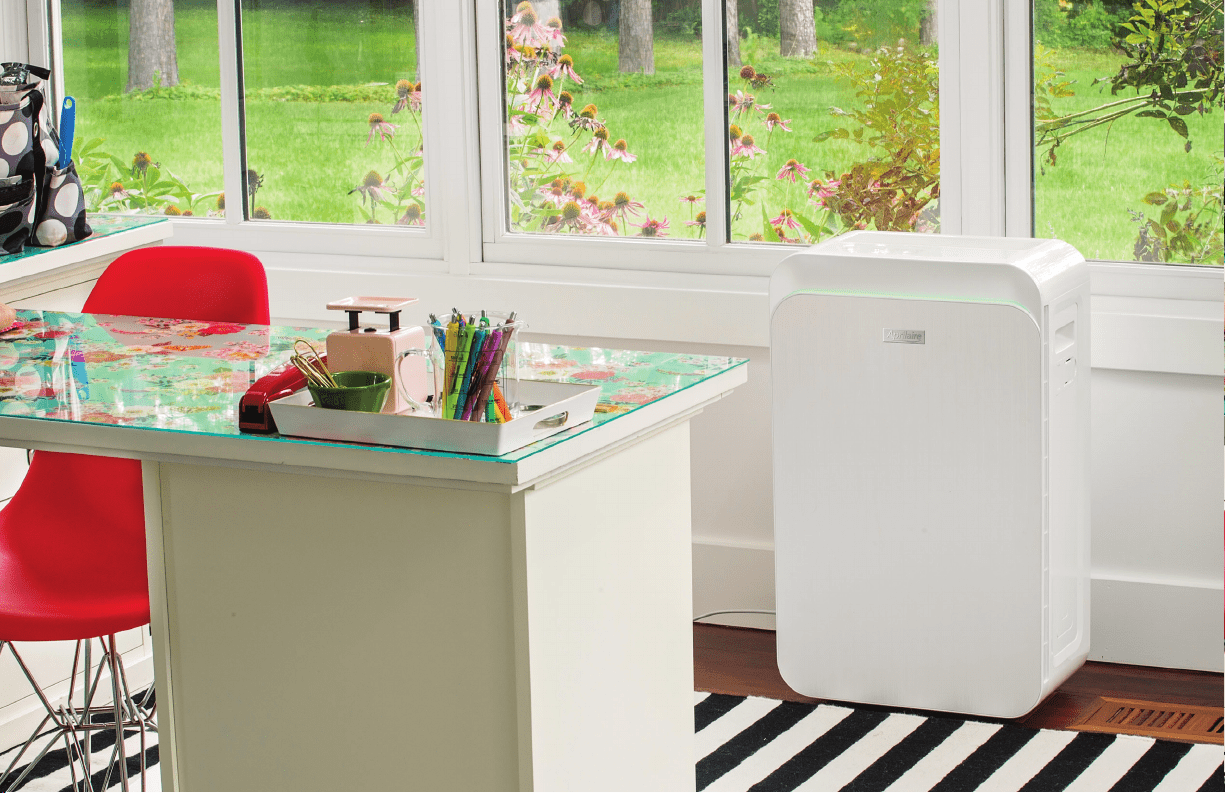
Deciding where to place your air purifier is all about safety and airflow.
Follow the simple steps below to get the most out of your investment.
• Thoroughly read and follow the Safety Instructions in this User Manual.
• As a general rule, you should allow 1 to 2 feet of open space on all
sides of your air purifier, including the top. Air enters through vents
on the sides of the unit. Keep these areas free from obstruction at all
times for maximum cleaning eciency.
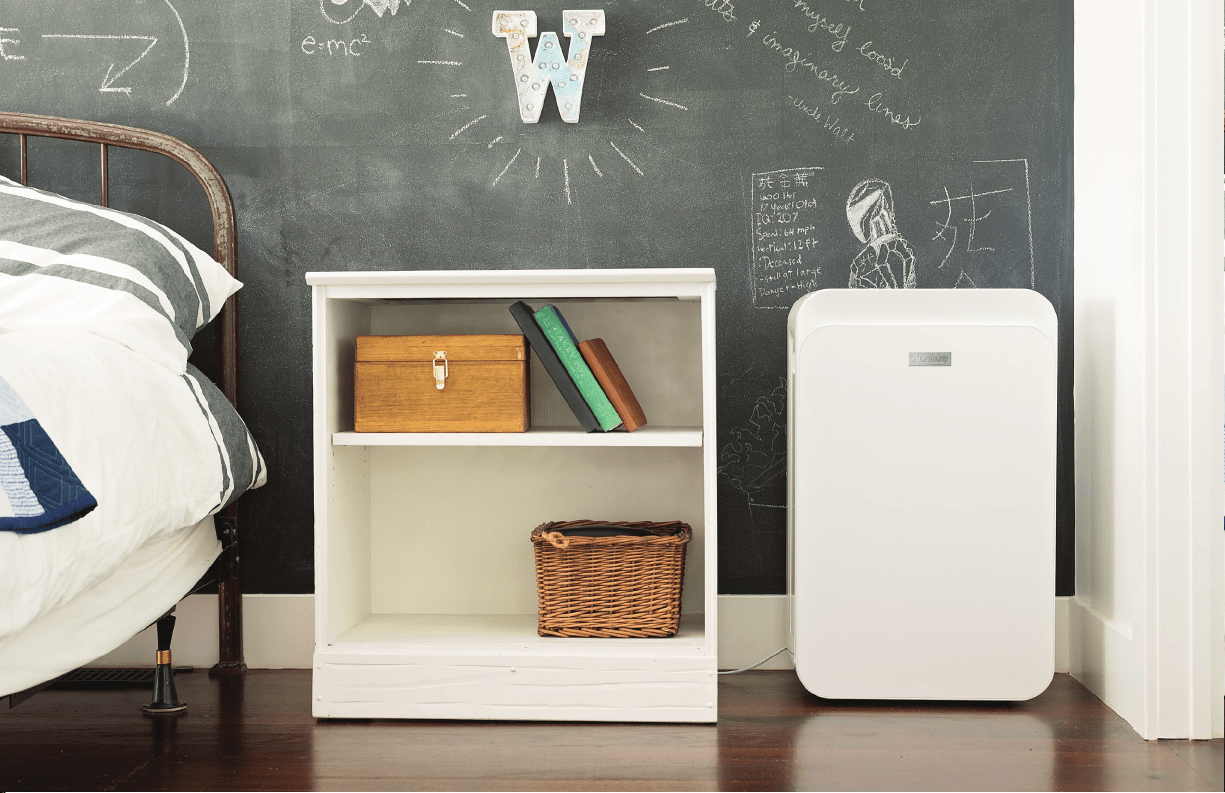
• The Aprilaire 9550 was designed to draw impure air through side
vents, expelling purified air through the top vent so it can be placed
near a wall.
• Avoid placing the air purifier in a corner. This makes it more dicult to
eciently clean the air throughout the entire space.
• Air purifiers are designed to eectively clean the air in a room that’s
closed to other rooms and the outdoors. So avoid areas where new,
impure air is continually introduced, as this can significantly reduce the
eciency of the air purifier.
16

17
Initial Set-up
Let The Freshness Begin
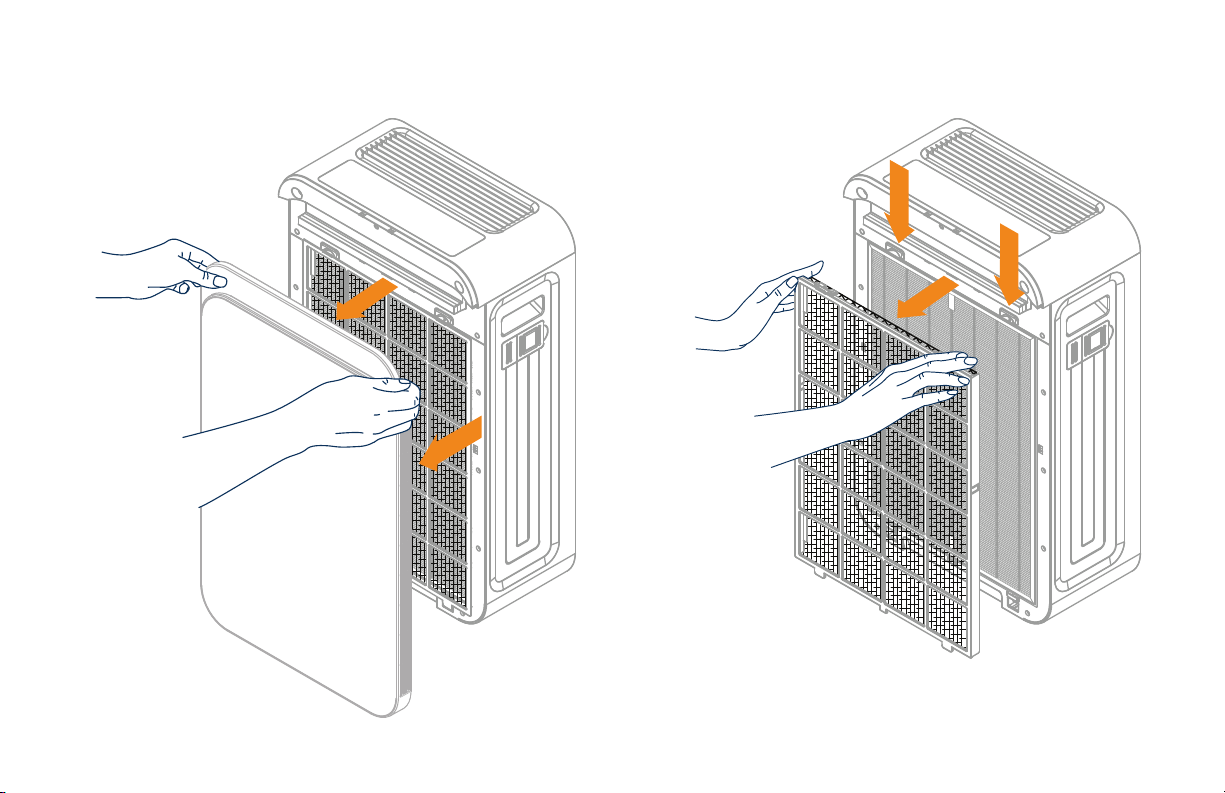
1. IMPORTANT: For the initial setup, ensure the air purifier is not plugged into an electrical outlet.
2. Remove the front cover of the air purifier by pulling the front panel away from the purifier, as shown in figure A.
3. Remove the Pre-filter, including the black Fine Pet Hair & Dander Trap, by pressing down on the top tabs and pulling back, as
shown in figure B. Remove the protective plastic bag from the black Fine Pet Hair & Dander Trap and recycle or discard it.
4. Remove the Filter Cartridge from inside the air purifier, remove its protective plastic bag and recycle or discard it.
5. Place the Filter Cartridge back inside the air purifier so:
a. You can see the words “This Side Out” printed on the top of the Filter Cartridge frame.
b. The fabric tab is facing outward so you can use it to easily remove and replace the Filter Cartridge in the future.
6. Return the black Fine Pet Hair & Dander Trap to the Pre-filter.
7. Return the Pre-filter containing the black Fine Pet Hair & Dander Trap to the air purifier by first inserting the 3 tabs on the bottom,
then pinching and inserting the 2 tabs on the top until it snaps into place.
8. Return the front cover panel by inserting the 2 tabs on the bottom and tilting the cover upward to set it in place at the top. The
front cover should be flush with the top of the air purifier.
9. Plug in the air purifier to an electrical outlet to begin air purification.
18
Figure A Figure B

19
Care & Maintenance
Fresh Filter = Fresh Air
Top reasons you should replace your Filter Cartridge on schedule:
1. Optimize your air quality for the health and wellness of you and your family
2. Maximize the longevity of your Air Purifier
3. Fulfill a term of the Aprilaire® Air Purifier Limited Warranty
Filter Life Expectancy
An Aprilaire Filter Cartridge will last about 6 – 12 months, depending on usage.
Filter Replacement Notification
When the filter is at 90% of its capacity, the air purifier will beep 3 times when the power is turned on. This indicates it is time
to order a new Filter Cartridge. The Filter button will flash until the filter is replaced and the Filter Life Indicator is reset.
How to Order a New Filter Cartridge
To order a replacement filter
cartridge, go to Aprilaire.com
or call 800.931.0014.
20
How To Clean the Pre-filter and Fine Pet Hair & Dander Trap
On a monthly basis, we recommend you check the Pre-filter and the Fine Pet Hair & Dander Trap for
visible particle build-up. If you see any, simply clean the filters using the steps below.
Note: Do NOT clean or wash the Filter Cartridge. This will make it unusable.
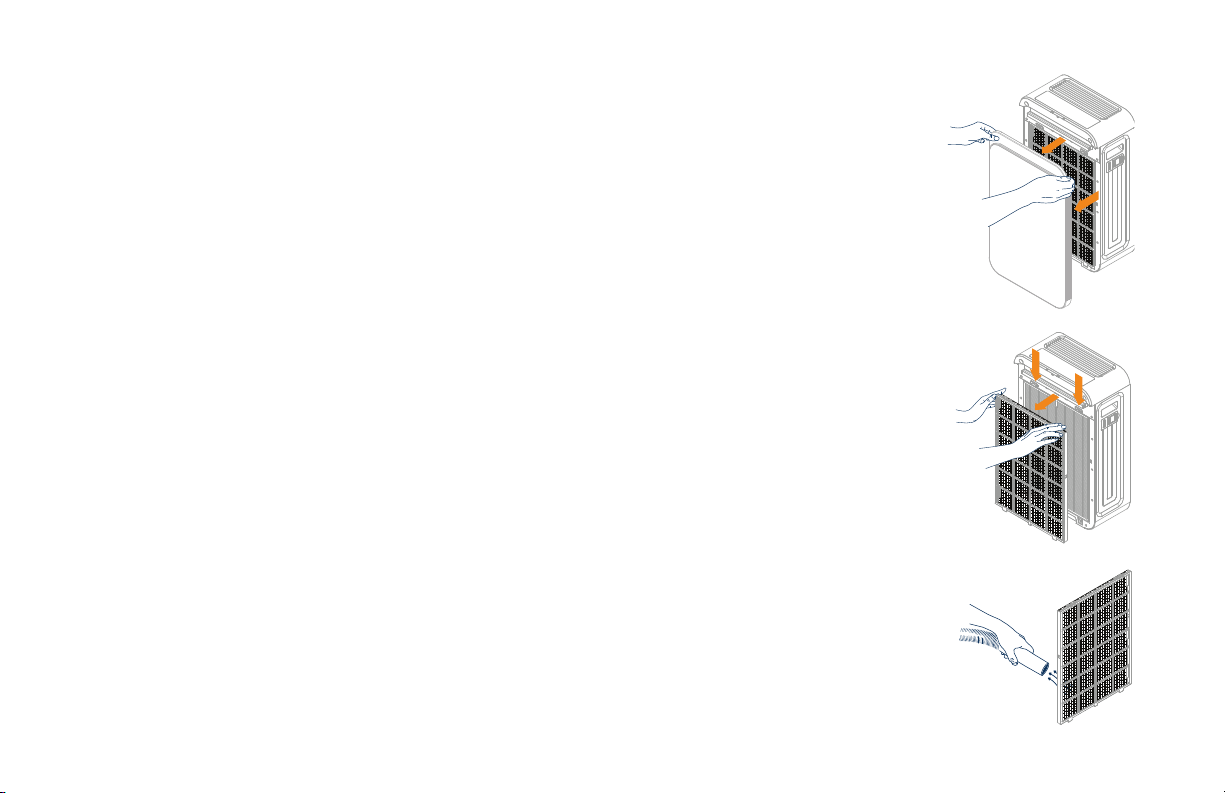
1. IMPORTANT: First, unplug the air purifier from the electrical outlet.
2. Remove the front cover of the air purifier by pulling the front panel away from the purifier, as
shown in figure A.
3. Remove the Pre-filter, including the black Fine Pet Hair & Dander Trap, by pressing down on
the top tabs and pulling back, as shown in figure B.
4. Remove the black Fine Pet Hair & Dander Trap from the Pre-filter.
5. Gently vacuum the Pre-filter and the Fine Pet Hair & Dander Trap, as shown in figure C.
If visible build-up remains, use soap and water to gently wash the filters. (Reminder: Do not
clean or wash the Filter Cartridge.)
6. I MPORTANT: Completely dry the Pre-filter and the Fine Pet Hair & Dander Trap before
re-installing them.
7. When completely dry, return the black Fine Pet Hair & Dander Trap to the Pre-filter.
8. Replace the Pre-filter containing the black Fine Pet Hair & Dander Trap to the air purifier by
first inserting the 3 tabs on the bottom, then pinching and inserting the 2 tabs on the top until
it snaps into place.
9. Replace the front cover panel by inserting the 2 tabs on the bottom and tilting the cover upward
to set it in place at the top. The front cover should be flush with the top of the air purifier.
10. Plug in the air purifier to an electrical outlet to resume air purification.
Figure B
Figure C
Figure A
21
How To Replace the Fine Pet Hair & Dander Trap and the Filter Cartridge
The Filter Cartridge should be replaced every 6-12 months, depending on usage.
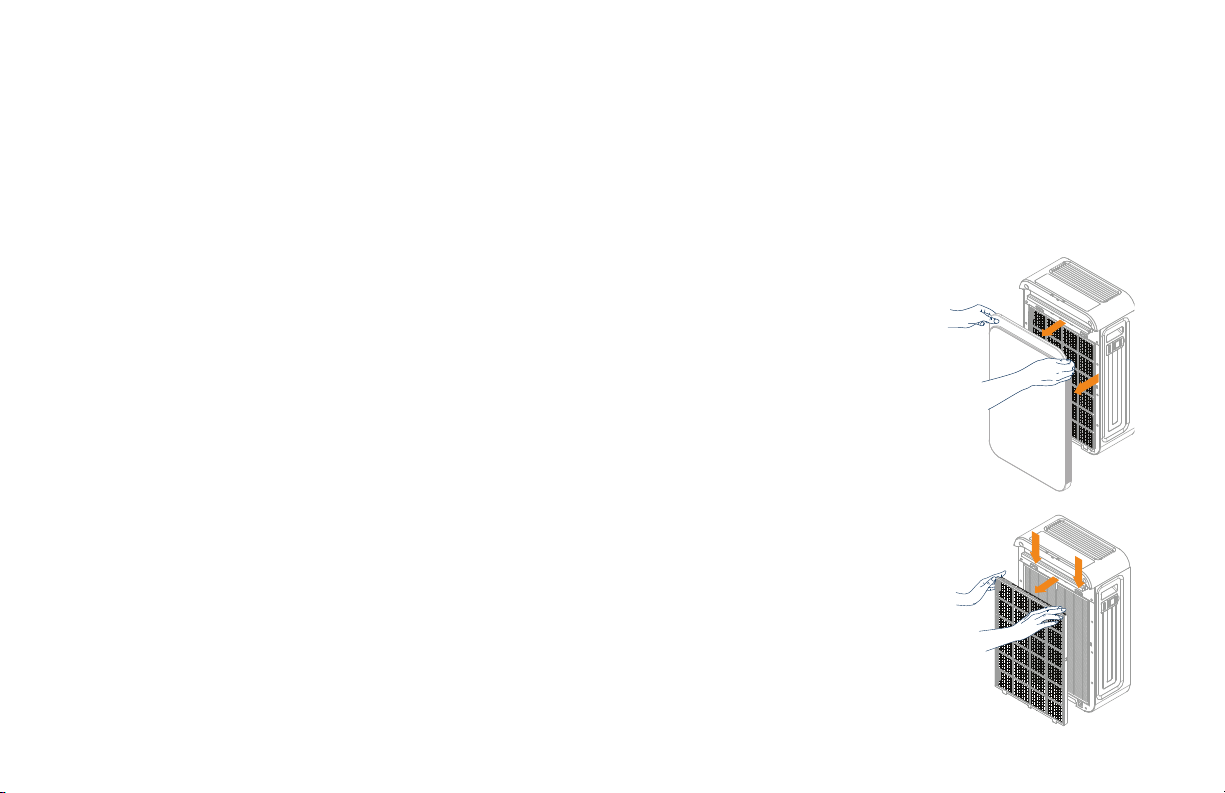
1. IMPORTANT: First, unplug the air purifier from the electrical outlet.
2. Remove the front cover of the air purifier by pulling the front panel away from the purifier, as
shown in figure A.
3. Remove the Pre-filter, including the black Fine Pet Hair & Dander trap, by pressing down on
the top tabs and pulling back, as shown in figure B.
4. Remove the protective plastic bags from the replacement Fine Pet Hair & Dander Trap and
the Filter Cartridge.
5. Remove the black Fine Pet Hair & Dander Trap from the Pre-filter. Pull the fabric tab on top of
the used Filter Cartridge to remove it from the air purifier.
6. Place the used black Fine Pet Hair & Dander Trap and Filter Cartridge into the plastic bag to
contain the accumulated particulates and discard.
7. Place the Filter Cartridge in the air purifier so:
a. You can see the words “This Side Out” printed on the top of the Filter Cartridge frame.
b. The fabric tab is facing outward so you can use it to easily remove and replace the
Filter Cartridge in the future.
8. Place the new Fine Pet Hair & Dander Trap in the Pre-filter.
9. Return the Pre-filter containing the black Fine Pet Hair & Dander Trap by first inserting the 3
tabs on the bottom, then pinching and inserting the 2 tabs on the top until it snaps into place.
Figure B
Figure A
22
10. Replace the front cover panel by inserting the 2 tabs on the bottom and tilting the cover upward to set it in place at
the top. The front cover should be flush with the top of the air purifier.
11. Plug in the air purifier to an electrical outlet to resume air purification.
12. To reset the Filter Life Indicator, press and hold the Filter button for 5 seconds. The air purifier will beep 3 times and the
light for the Filter button will turn o. Plug in the air purifier to an electrical outlet to resume air purification.
How To Reset the Filter Life Indicator
After replacing the Filter Cartridge, you can reset the Filter Life Indicator by pressing and holding the Filter button for 5 seconds.
The air purifier will beep 3 times and the light for the Filter button light will turn o.
23
Cleaning the Smart Mode Particle Sensor
Particles can build up on the particle sensor and prevent it from accurately measuring the air
quality in your room. To keep your air purifier performing optimally, the particle sensor should be
cleaned every time the Filter Cartridge is replaced.
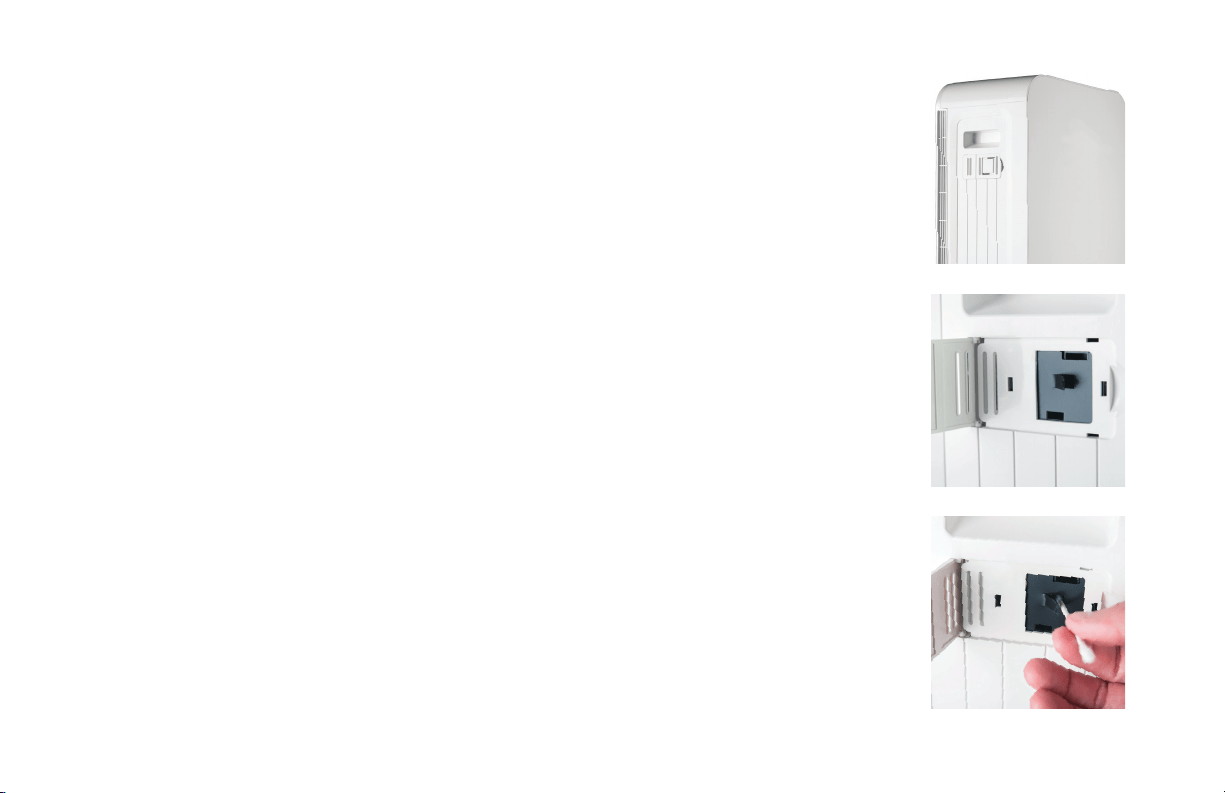
1. IMPORTANT: First, unplug the air purifier from the electrical outlet.
2. Open the white access door on the right side panel of the air purifier. You will see a
small black door.
3. Open the small black tab to gain access to the particle sensor lens.
4. Lightly moisten one end of a cotton swab with water. Use the wet end of the cotton
swab to gently clean o the particle sensor lens.
5. Use the dry end of the cotton swab to dry the particle sensor lens.
6. Close the black door to the particle sensor lens. The particle sensor will still work
if the black door is not completely closed.
7. Close the door on the side panel of the air purifier.
8. Plug in the air purifier to an electrical outlet to resume air purification.
A
B
C
24

25
Troubleshooting Tips
I plugged in and turned on my new Aprilaire Air Purifier for the first time, but no air is coming out.
Refer to page 17 for instructions on the initial setup of your new air purifier.
My Aprilaire Air Purifier beeps 3 times every time I turn it on. What does that mean?
If the beeping happens at the same time the Filter button is illuminated, it’s time to order a new Filter Cartridge.
To order a replacement filter
cartridge, go to Aprilaire.com
or call 800.931.0014.
Go to page 21 to learn how to change the Filter Cartridge and reset the Filter Life Indicator.
I put in a new filter but the Filter button is still illuminated and flashing.
Any time you replace the filter, you should also reset the Filter Life Indicator. To do this, press and hold the Filter button for
5 seconds. The air purifier will beep 3 times and the Filter button light will turn o.
My Aprilaire Air Purifier always runs on the highest speeds when in Smart Mode.
This may occur for two reasons:
• The surrounding air is dirty and needs to be purified at the highest setting.
• The particle sensor lens has dust on it and needs to be cleaned. See “How To Clean the Particle Sensor” on page 23.

26
Answers To Frequently Asked Questions
What are the electric specifications for my air purifier?
Refer to the rating label on the back of the unit. There you will find your air purifier’s voltage, hertz, amps and outlet requirements.
Can I clean the Pre-filter?
Yes. The Pre-filter, which captures large dust particles and hair, can be gently vacuumed to remove buildup. If buildup remains, you can
gently wash the Pre-filter with soap and water. IMPORTANT: The Pre-filter must be completely dry before it’s placed into the air purifier.
Refer to page 20 for instructions on cleaning the pre-filter.
Can I clean the Fine Pet Hair & Dander Trap?
Yes, you can gently vacuum the Fine Pet Hair & Dander Trap to remove build-up. If build-up remains, you can gently wash the trap with
soap and water. IMPORTANT: The Fine Pet Hair & Dander Trap must be completely dry before it’s placed back into the air purifier.
Can I clean the HEPA and activated carbon filter cartridge?
No, this filter cannot be cleaned or reused.
To optimize the performance of your Aprilaire air purifier and fulfill a term of the Aprilaire Limited Warranty, make sure to replace the
filter when notified by the Filter Life Indicator. (More information on page 14.)
Does this air purifier produce ozone?
No. Unlike many room air purifiers, the Aprilaire 9550 does not contain an ionizer so it does not produce even a small amount of ozone.
It was designed with a non-arcing motor and therefore does not produce any ozone as an operational byproduct.
I have additional questions not covered in this User Manual.
Please contact the party from whom you purchased the Aprilaire air purifier, or visit Aprilaire.com.
27

28
LIMITED WARRANTY
Warranty Registration
Visit Aprilaire.com to register your Aprilaire air purifier for warranty.
Your Warranty Registration information will not be sold or shared outside of this company.
Warranty Inquiry
For a warranty claim, contact the party from whom you purchased the product.
LIMITED WARRANTY
As the original purchaser, your Research Products Corporation Aprilaire Room Air Purifier is expressly warranted for one (1) year from
the date of purchase to be free from defects in materials or workmanship, except, however, for the disposable filter which will have
to be replaced from time to time depending upon usage. Research Products Corporation’s exclusive obligation under this warranty
shall be to supply, without charge, a replacement for any part of the Room Air Purifier which is found to be defective, or to provide
a replacement Room Air Purifier, at the discretion of Research Products Corporation, within such one (1) year period and which is
returned not later than thirty (30) days after said one (1) year period by you to Research Products Corporation, PO Box 1467, Madison,
WI 53701, together with the dated purchase receipt for the Air Purifier. This warranty is not transferable. IMPLIED WARRANTIES OF
MERCHANTABILITY OR FITNESS FOR A PARTICULAR PURPOSE SHALL BE LIMITED IN DURATION TO THE AFORESAID ONE YEAR
PERIOD. RESEARCH PRODUCTS CORPORATION’S LIABILITY FOR INCIDENTAL OR CONSEQUENTIAL DAMAGES, OTHER THAN
DAMAGES FOR PERSONAL INJURIES, RESULTING FROM ANY BREACH OF THE AFORESAID IMPLIED WARRANTIES OR THE ABOVE
LIMITED WARRANTY IS EXPRESSLY EXCLUDED. Some states do not allow limitations on how long an implied warranty lasts or the
exclusion or limitation of incidental or consequential damages so the above exclusion or limitations may not apply to you. This warranty
gives you specific legal rights and you may also have other rights, which vary from state to state.

Copyright © 2018 Aprilaire - Division of Research Products Corporation. All Rights Reserved.
B2701438A 61001521