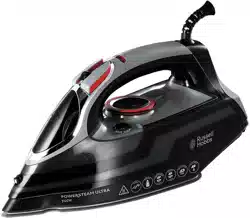
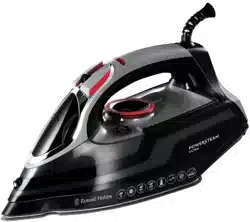
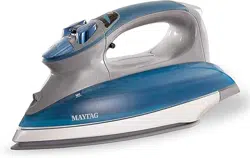
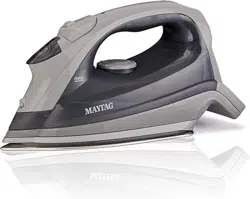
User manual Steam Iron
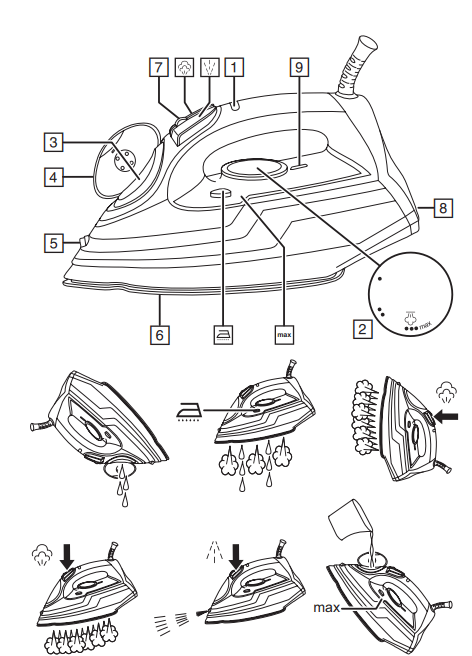
PARTS
1. Light
2. Temperature control
3. Water inlet
4. Cover
5. Spray nozzle
6. Soleplate
7. Steam control
8. Heel
9. Index mark
BEFORE USING FOR THE FIRST TIME
- Remove labels, stickers and packing from the iron and soleplate.
- Don’t worry if the iron smokes a bit at first because it will soon stop.
- Iron an old piece of cotton fabric, to clean the soleplate.
PREPARATION
- Check for textile care symbols (
 ).
).
- Iron fabrics needing low temperatures
 first, then those that need medium temperatures
  , and finish with those needing high temperatures
TEMPERATURE SETTING GUIDE
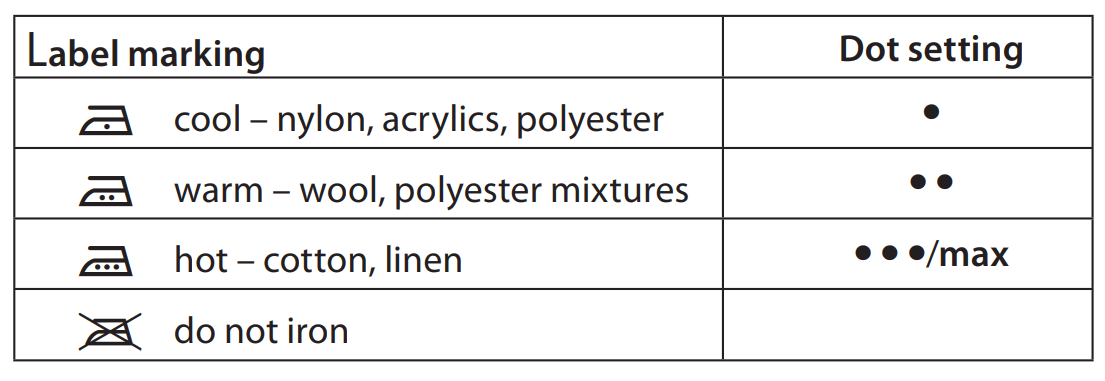
If the instructions on the fabric label differ from this guide, follow the instructions on the label.
FILLING
You may use the iron with tap-water, but if you live in a hard water area, you should use distilled water (not chemically descaled or softened water). If you buy distilled water, check that it’s suitable for use in irons.
- Set the temperature control to
 set the steam control to
  .
.
- Unplug the iron.
- Hold the iron with the front raised.
- Raise the side of the water inlet cover to open it.
- Pour slowly, to let the air in the reservoir escape, otherwise you’ll cause an air lock and the water will overflow.
- Don’t fill past max, or water will escape in use.
- Wipe up any spillage.
SWITCH ON
- Set the temperature control to set the steam control to .
- Stand the iron on its heel.
- Put the plug into the power socket (switch the socket on, if it’s switchable).
- Turn the temperature control to bring the setting you want next to the index mark. The light will come on.
- When the iron reaches the temperature you set, the light will go off. It’ll then cycle on and off as the thermostat operates to maintain the temperature.
STEAM IRONING
- Steam is available when the temperature control is at
 or above.
- Set the steam control to the setting you want, = no steam,
 = high steam.
- Wait till the light goes off, then start ironing
SPRAY
Water spotting can affect some fabrics. Test this out on a hidden part of the fabric.
- Lift the iron off the fabric.
- Aim the spray nozzle at the fabric.
- Press the
 button – you may have to press it 2 or 3 times to pump water through the system.
SHOT OF STEAM
- Steam is available when the temperature control is at or above.
- Lift the iron off the fabric.
- Press the button.
- Leave 4 seconds between shots, to let the temperature build up.
DRY IRONING
- Set the steam control to .
- Wait until the light goes off then start ironing.
VERTICAL STEAMING
Remove wrinkles from hanging clothes, hanging curtains, and furnishing fabrics.
- Check that there’s adequate ventilation behind the fabric, otherwise moisture may build up, causing mildew.
- Check that there’s nothing behind the fabric that may be damaged by the steam.
- Check that pockets, turn-ups, and cuffs are empty.
- Check that there’s water in the reservoir.
1. Set the temperature control to max set the steam control to .
2. Hold the iron close to (but not touching) the fabric.
3. Press the button (you’re using the “shot of steam” function vertically).
4. Leave 4 seconds between shots, to let the temperature build up.
AUTO SHUT-OFF
- If the iron is motionless, it will switch off after about 30 seconds lying down, or about 8 minutes if it’s upright.
- The iron will beep and the light will flash continuously until you move the iron.
- To switch on again, lift it up, tilt it forward, then sit it upright to return to operating temperature. No settings are lost during auto shut-off.
AFTER USE
- Set the temperature control to set the steam control to .
- Unplug the iron.
- Raise the side of the water inlet cover to open it.
- Hold the iron over a sink, turn it upside down, and drain the water from the reservoir.
- Sit the iron on its heel, and leave it to cool down completely.
- When cold, wipe off any moisture, and close the water inlet cover.
- Wipe outer surfaces with a damp cloth.
- Remove spots from the soleplate with a little vinegar – take care not to scratch it.
- Store the iron on its heel, to avoid corrosion and damage to the soleplate.
SELF CLEAN
To avoid scale build up, use the self clean function at least monthly in normal water areas, more often in hard water areas.
You’ll need a basin or a large bowl to catch the water coming out of the soleplate.
- Fill the reservoir to the max mark.
- Set the temperature control to set the steam control to .
- Sit the iron on its heel.
- Put the plug into the power socket, and wait till the light goes out.
- Hold the iron over the basin or bowl, with the soleplate down.
- Press the
 , and hold it down.
- Gently move the iron to and fro, over the basin or bowl.
- Water and steam will wash scale and dust through the soleplate, and into the sink.
- When the reservoir is empty, release the button.
- Unplug the iron, and sit it on its heel to cool.
- Follow the steps under AFTER USE.
ANTI-SCALE
- The anti-scale agent incorporated in the iron helps prevent the build-up of scale. Don’t use a descaling solution, or you’ll destroy the anti-scale agent.
FAQ
1. My iron doesn't produce any steam.
- Answer 1: The steam control may have been set to the no steam position. Set the steam control to a steam position.
- Answer 2: There is no water in the tank and/or the settings are not set correctly.
Solution:
- Step 1: Ensure there is water in the tank.
- Step 2: Set to the appropriate steam and temperature setting - When steam ironing, you must set the steam control to steam and the temperature control to a temperature equal to or higher than the steam symbol on the dial.
2. The mains power switches off when I switch my iron on or when the iron is in use. Can the appliance cause a power failure?
- Step 1: Check that the connection to the plug is secure and not loose and also check how many appliances are using the same output. Failure could be caused by over current in your mains.
- Step 2: Check the iron's power cord for visible signs of damage (e.g. kinks, flaring of the braiding). Remove the rest of the appliances and switch it on again.
- Step 3: if the mains power goes off again, contact the Russell Hobbs Customer Service Department on 0345 658 9700.
3. The steam boost function or vertical steam boost function on my iron doesn't work.
- Answer 1: The (vertical) steam boost function has been used too often within a very short period.
- Put the iron in a horizontal position and wait for a while before using the (vertical) steam boost function again.
- Answer 2: The iron is not hot enough. Set the temperature dial to a temperature suitable for steam ironing.
4. The Spray function or Spray button on my iron isn't working (properly).
- Make sure there is enough water in the tank and check that the spray button is able to spring back on its own after pressing.
- If the spray nozzle hole is blocked, you can clean it carefully with a sharp needle or pin.
5. The indicator light isn't working (properly).
- Make sure the iron is plugged into a working mains power and set the temperature dial to a desired position.
- It is normal for the orange pilot light to turn on and off during ironing. It comes on as the iron is heating up, and goes off when it is hot enough.
6. Smoke comes out of the appliance.
- Some parts of the appliance have been slightly greased and as a result, the appliance may produce some smoke when it is switched on for the first time.
- Also, if there is remaining water in the soleplate from the last usage, the smoke observed may actually be water evaporating. However, these will stop after a short while.
7. The soleplate coating is scratched/worn away.
- Your iron has multiple thin layers of coating and light scratches will not impede the performance of the iron. You can continue using the iron as per normal.
8. My iron leaves shiny patches on fabrics.
- Fabrics can acquire shiny patches if they are ironed at too high temperatures. Try a lower temperature setting.
- Also, to prevent shiny patches, you can put a cloth (e.g. a tea towel) between the iron and the fabric.
9. What type of water should I use?
- Your appliance has been designed to be used with tap water.
10. Water drips from the holes of the soleplate during ironing. What should I do?
There may be several reasons for this:
- Your iron produces a lot of steam. Steam could have condensed on the ironing board cover, making it wet and cause water marks on your garment when the iron is pressed on it.
- Ironing aids or fragrance water could have been added to the water tank. This can cause problems with the steaming function, causing water to leak. Use only tap water or distilled water or a mixture of these two types of water.
- Steam setting is being used at too low a temperature - The steam function should be switched to "no steam" when using the iron at lower temperatures or the water tank shoud be emptied.
- Steam surge/shot/spray being used too rigorously - try using these facilities more slowly.
11. Water drops appear on the garment during ironing or drip on to the floor.
- The water droplets may appear on the garments when you have steam ironed for a while. This happens because steam has condensed on the ironing board.
- Dry the wet spots on the garment and the ironing board cover by passing the iron over them without pressing the steam button. If the underside of the ironing board is wet, wipe it dry.
- Make sure you use a mesh-top ironing board with a thick felt material as this minimises steam condensation on the ironing board.
IMPORTANT SAFEGUARDS
- Follow basic safety precautions, including: This appliance can be used by children aged from 8 years and above and persons with reduced physical, sensory or mental capabilities or lack of experience and knowledge if they have been supervised/instructed and understand the hazards involved. Children shall not play with the appliance. Cleaning and user maintenance shall not be done by children unless they are older than 8 and supervised.
- Use and store the appliance out of reach of children under 8 years. Use the iron, or set it on its heel, on a stable, level, heat-resistant surface.
- Don’t leave the iron unattended while plugged in, or while it’s standing on the ironing board.
- Unplug the iron before filling, cleaning, and after use.
- Don’t operate the appliance if it’s dropped or damaged, or if it malfunctions or leaks.
- If the cable is damaged, return the iron, to avoid hazard.
- The surfaces of the appliance will get hot.
- Do not use this appliance near bathtubs, showers, basins or other vessels containing water.
- Don’t iron clothing while it’s being worn – you’ll injure the wearer.
- Don’t use the appliance for any purpose other than those described in these instructions.
- Don’t scratch the soleplate – avoid buttons, zips, etc.
- Don’t wrap the cable round the appliance
- The appliance has a protective thermal fuse, which will blow if it overheats. If this happens the appliance will stop working and must be returned for repair