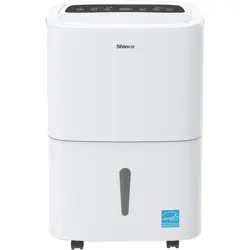
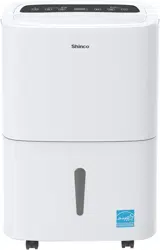
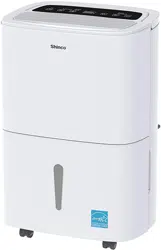
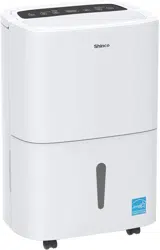
Manual of dehumidifier
IMPORTANT NOTICE
- Thank you a lot for choosing Shinco's dehumidifier, let it be a member of your family to protect the health of the whole family.
- Please read the manual carefully before you use the dehumidifier, it will help you operate the machine better, so as to achieve the best effect and extend the life of the machine.
IMPORTANT NOTICE BEFORE FIRST USE:
- To prevent any internal damage, it is very important to keep refrigeration units (like this one) upright throughout theirjourney. Please leave it standing upright and outside the box for 24 HOURS before plugging it in.
- Please check if there is any damage around the machine, if the machine is damaged. Please contact customer service immediately.
IMPORTANT NOTICE FOR FIRST TIME USE:
- When you open the machine,the machine will turn on in automatic mode, and the default dehumidification is 50% which means when the room humidity drops to 50%, the machine will automatically shut down.
- The dehumidifiers are lightweight and easy to move. They are designed to extract unwanted humidity while saving money due to their power saving logic. They feature an intelligent humidistat where the desired relative humidity can be adjusted in increments of 5% between 30% and 80% ensuring your room is not dried too much and power is not wasted.
- The "Compressor" circuit has an automatic 3 minutes time delayed start if the unit is turned off and on quickly. This prevents overheating of the compressor and possible circuit breaker tripping. Make sure the tank is fitted correctly otherwise unit will not turn on.
- When the unit is started, the fan begins to pull moisture-laden air across the dehumidifying coils. The coils condense or draw moisture from the air, and air flows through the top louvers into the room as dry, warm air. Moisture removed from air is collected in a bucket on the rear of the dehumidifier. Therefore, it is normal for the dehumidifier to discharge hot air.
Important Safety Instructions
Warning
- Carefully read the instructions before operating the unit.
- This appliance is for indoor use only and intended for use in a domestic environment only.
- Any other use is not recommended by the manufacturer and may cause fire, electrical shocks or other injury to user or property.
- If you are in any doubt about the suitability of your electrical supply, have it checked and if necessary, modified by a qualified electrician.
- This dehumidifier has been tested and is safe to use. However, as with any electrical appliance,use it with care.
- Disconnect the power before dismantling, assembling or cleaning.
- Avoid touching any moving parts within the appliance.
- Never insert fingers, pencils or any other objects though the guard.
- This appliance is not intended for use by persons (including children) with reduced physical, sensory or mental capabilities. It is also not intended for use by those with a lack of experience and knowledge, unless they have been given supervision or instruction, concerning the use of the appliance by a person responsible for their safety.
- Do not leave children unsupervised with this appliance.
- Do not clean the unit by spraying it or immersing it in water.
- Never connect the unit to an electrical outlet using an extension cord. If a power outlet is not available, one should be installed by a qualified electrician.
- Never operate this appliance if the cord, power adapter or plug is damaged. Ensure the power cord is not stretched or exposed to sharp objects/edges.
- A damaged power supply cord should be replaced by the manufacturer or a qualified electrician in order to avoid a hazard.
- Any service other than regular cleaning or filter replacement should be performed by an authorised service representative. Failure to comply could result in a voided warranty.
- Do not use the appliance for any purpose other than its intended use.
- Do not tilt the unit while in use. The unit is design to work only in vertical position.
- This dehumidifier must always be stored and transported upright, otherwise irreparable damage may be caused to the compressor; if in doubt we suggest waiting at least 24 hours before starting the unit.
- Avoid restarting the dehumidifier unless 5 minutes have passed since being turned off. This prevents damage to the compressor.
- Never use the plug as a switch to start or turn off the dehumidifier. Use the provided POWER button located on the control panel.
- Always place the unit on a dry and stable surface.
- Do not dry laundry above the unit to prevent water entering the dehumidifier. Place the laundry at least 1 meter away from your dehumidifier.
- Before moving the appliance,the water tank should be emptied.
- The handle on the appliance is designed to aid in its movement and should not be used to support the full weight of the dehumidifier. When carrying the unit, it should be kept upright and sufficiently supported from its base.
- The appliance must be placed in a room without sources of ignition (for example: open flames, an operating gas appliance or an operating electric heater).
- Do not use or store the appliance in an unventilated space with an area smaller than 43 sq.ft per unit.
- If the appliance is installed, used or stored in an unventilated room, the room must be such as to prevent stagnation of possible leaks of refrigerant gas as there could be a danger of fire or explosion once the refrigerant comes into contact with electric heaters, stoves or other sources of ignition.
- Do not use the product and contact the retailer for advice, if damage has occurred to the unit which may have compromised the refrigerant system.
- Any repairs or maintenance must only be carried out on the unit by a suitably qualified engineer.Before opening and servicing the unit,the authorized engineer must be in possession of a copy of the manufacturer’s service manual and must follow the safety information contained within it to ensure all hazards are minimized.
- The refrigerant system should not be perforated or punctured.
- Do not place the unit next to heat sources (e.g. electrical fires, fireplaces, etc.)
- Avoid mishandling the dehumidifier. Dropping, throwing the unit can cause damage to its internals and increases the risks of operating it.
- Do not store or use gasoline, petrol, paint, solvents or other flammable vapours or liquids in the vicinity of this dehumidifier or any other appliance.
- This dehumidifier must not be used in spaces where there is a high concentration of gases, solvent or other volatile organic compounds; in very dusty environments; in any domestic, commercial or industrial environment where the air composition is flammable.
ELECTRICAL INFORMATION

|
|
• Be sure the dehumidifier is properly grounded. To minimize shock and fire hazards, proper grounding is important. This power cord is equipped with a three-prong grounding plug for protection against shock hazards.
• Your dehumidifier must be used in a properly grounded wall socket. If your wall socket is not adequately grounded or protected by a time delay fuse or circuit breaker, have a qualified electrician install the proper socket.
• Avoid fire hazard or electric shock. Do not use an extension cord or an adapter plug. Do not remove any prong from the/power cord
|
Location & How it works
Location
• TO REDUCE NOISE LEVELS:
Place a piece of carpet or a rubber mat under the unit to reduce any vibrations while the unit is running. Our dehumidifier uses compressor technology to extract water from the environment.
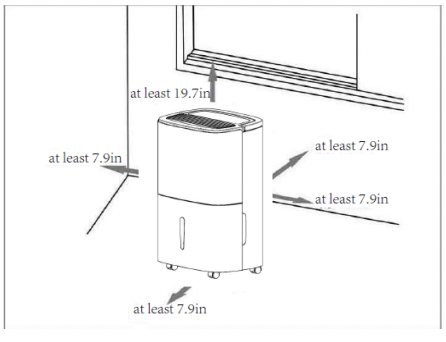
• A badly positioned dehumidifier will have little effect. In positioning the dehumidifier,please ensure circulation of air is not restricted around the unit. Maintain a minimum clearance of 20 cm (8 in) on the sides and back of the dehumidifier and 50cm (19.7 in) on the top of the dehumidifier to allow for proper air circulation.
• The recommended ambient operating temperature is between 5°C (41°F) and 35°C (95° F).The unit will not work properly if the temperature is out of this temperature range, or the performance of the unit will fall greatly
How it works
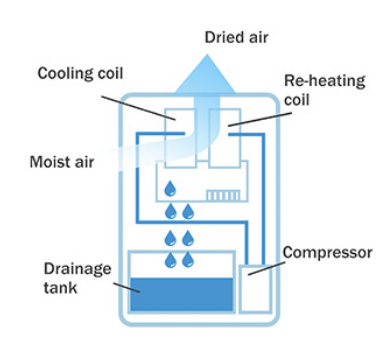
How does the dehumidifier work?
It helps to think of your dehumidifier like a vacuum cleaner: it sucks in air from your room, removes the moisture, and then blows the air back into the room again.
First, humid air is pulled into the Shinco dehumidifier through the grill on the front of the unit. The warm, moist air is pulled across freezing-cold pipes where water from the moist air collects (kind of like water gathering on a glass of iced tea during a hot summer day.) As the water collects on the pipes, it drips down into the drain bucket for later removal. While the water is collecting in the drain bucket, the now moisture-free air is reheated so it can be blown out the top of the unit and back into the room.
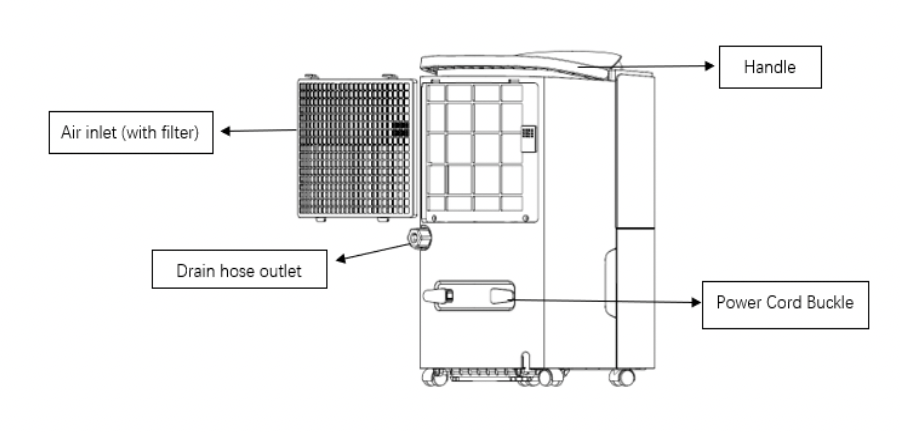
Product Overview
Front
 Rear
Rear
Operation Instruction
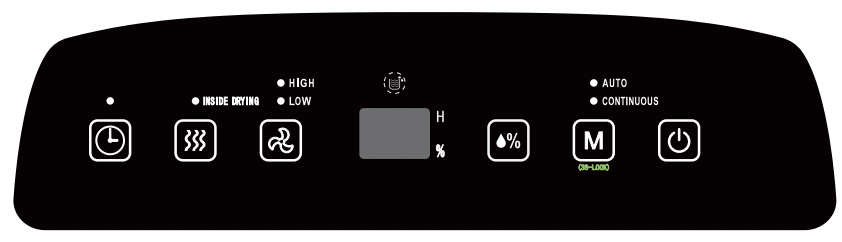
1. Plug the power cord into a properly grounded 115 volt AC outlet.
2. To turn the unit on, press the  ON/OFF button. The unit will run in the factory setting of AUTO mode and low fan speed. And the default dehumidification is 50%.And the unit will display the RH,if the room humidity drops to 50%, the machine will automatically shut down.
3. Press  to switch between automatic mode(when it reaches the humidity you set, the unit will stop working)and continuous mode (it will always dehumidify without stopping).When unit is in operation,you can press for 3 seconds to lock all the buttons on the control panel in case children will play on it. Re-press it for3s, you can cancel the function.
4.If you switch to the auto mode,you have to set your ideal humidity by pressing the .The humidity level can be set within a range of 30% RH (Relative Humidity) to 80% RH (Relative Humidity) in 5%increments. If you switch to continuous mode,regardless of the relative humidity in the room, the compressor starts, the fan runs at high speed by default, and the wind speed can be adjusted.
5.You can also press to change the fan speed to HIGH or LOW. The indicator light will show the setting you have selected. A higher fan speed will result in quicker moisture removal.
6.Then to run the dehumidifier for a preset amount of hours, press ."0" blinks on the display. Set the time you wish the appliance to operate between 1 and 24 hours. And you can set time to turn on this machine by pressing this button in standby.
7.If "Water full" lights up and the display shows "FL", the water tank needs to be emptied (see "Removing Collected Water") .After reinstalling the emptied water tank, the dehumidifier restarts automatically after three mins.
8.Before storing the unit , pls dry inside of the dehumidifier by pressing .This will prevent mold from forming during storage.
Note: SMART FUNCTIONS
When the bucket is full and/or the humidity setting is reached, the dehumidifier will be shut off automatically.
- Wait 3 minutes before resuming operation
To avoid any damage to the dehumidifier, the dehumidifier will not start operation following a complete cycle until after three (3) minutes. Operation will automatically start after three (3) minutes.
When frost builds up on the evaporator coils, the compressor will cycle off and the fan will continue to run until the frost disappears.
If the dehumidifier shuts off unexpectedly due to power being cut, the dehumidifier will restart with the previous function setting automatically when the power resumes.
Removing Collected Water
There are two ways to remove collected water:
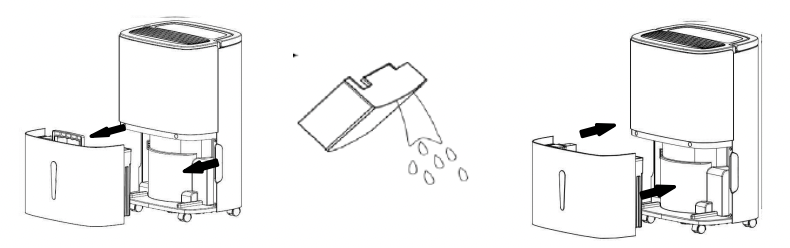
1. Use the bucket
When the bucket is full, remove the bucket and empty it.
- Do not move the unit at this time otherwise water may spill on the floor.
- Press sides of bucket gently to unclip the bucket from the unit.
- Remove the bucket as shown in the photographs below and empty the bucket.
- Discard water from bucket. Water is not potable and cannot be used for drinking
2.Continuous Drainage:
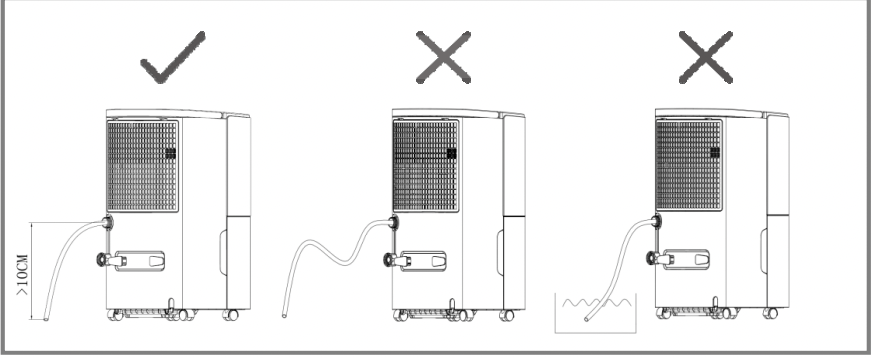
Water can be automatically be emptied into a floor drain by attaching the dehumidifier to a water hose.
STEP1: Cut off the power;
STEP2:Unscrew the water cap counterclockwise and pull out the rubber water plug;
STEP3:Connect the water pipe (Inner diameter * wall thickness * length= 9mm * 2mm * 60cm) to the drainage outlet.
Note:
- Make sure the connection is tight and there is no leaking.
- Lead the water hose to the floor drain or a suitable drainage facility, the drainage facility should be lower than the drain outlet of the dehumidifier.
- Be sure to run the water hose sloping downward to let the water flow out smoothly.
- Improper installation or use of hose may result in water filling up the bucket and causing the unit to shut off. Empty water bucket if shut-off occurs, then check dehumidifier location and hose for proper installation.
For example, the following conditions will cause water to flow into the water tank.
- Connect the garden water pipe, and the water pipe is too long and the water pipe bends and generates pressure, making the water unable to drain out.
- The end of the pipe is immersed in water, and the water pressure prevents the water from draining smoothly.
- If bucket fills after a long period of continuous use, remove and check the water pipe for blockage by dirt.
Care and Cleaning & Storage
Warning: Turn the dehumidifier off and remove the plug from the wall outlet before cleaning.
1. Clean the bucket
Clean the bucket with water every two weeks.
2. Clean the air filter
Clean the filter with potable water at least once every 30 days. (Notes: It must be air-dried naturally after cleaning. Never use any type of dryer.)
3. Storing the dehumidifier
When not using the dehumidifier for long time periods
- Press the drying inside button .
- Clean the main dehumidifier, bucket and air filter.
- Wrap the cord and bundle it with the band.
- Cover the dehumidifier with a plastic bag.
- Store the dehumidifier upright in a dry, well-ventilated place.
Troubleshooting
(Before contact our customer service, review this list. It may save your time and expense. This list includes the most common occurrences that are not the result of defective workmanship or materials in this dehumidifier.)
| Issue |
Cause |
Solution |
| Hot or cold air being produced |
Normal Operation |
When the unit is in dehumidifying mode it absorbs humid air from room and freezes it to reduce the humidity.
During the cold cycle there should be cold air coming out of the unit,
During the defrost cycle hot dry air should be coming out of the outlet grill.
|
| Unit does not operate |
Is the plug properly inserted in the socket? |
Insert the plug into the socket and turn the switch on. |
| Does the tank full indicator is red? |
Tank full, float displaced or tank not properly inserted. Empty tank, check float and make sure tank is properly inserted in unit. |
| Dehumidifier does not extract water |
Is the unit set to a humidity level lower than the one in the room? |
Set the humidity level on the humidistat bellow current humidity reading. |
| Is the temperature too low for water extraction to be efficient? |
Increase temperature in the room or reposition the unit. |
| Is any intake grill or discharge blocked? Is the unit too close to walls. |
Remove obstructions and restart the unit. Ensure a distance of at least 7.9 in(20cm) between the unit & walls |
| Airflow seems weak |
Is filter dirty or clogged? |
Please service the filters regularly as per user manual. |
| Unit is noisy during operation |
Is the unit on an uneven surface? |
Please place on flat horizontal surface. |
| Is filter clogged? |
Please service the filters regularly as user manual. |
| E2 Error Code |
Temperature sensor error |
Use the unit within the prescribed temperature range. Unplug the unit, rest and plug it back in. If error repeats, call for service centre. |
| P1 Error Code |
Appliance in defrost mode |
This is normal operation to prevent a build up of ice on the coils. Leave the unit, and it will return to normal operation. |
| FL Error Code |
Water tank full notification |
Tank is full or is not in the right position-- Empty the tank and replace in the right position. |
| E1 Error Code |
The coil sensor detects anomaly |
Please contact our customer service. |
| CL Error Code |
The unit is in the internal drying state,which is normal . |
When you press the inside drying button,this code will display on the screen . |
| LC Error Code |
The child lock function starts. |
When you press the Mode button for 3s,this code will display on the screen. |
(Please contact our Customer Service by writing an email to: serviceshinco. if dehumidifier operates abnormally or does not operate, and the solutions above are not useful.)