

Contents
ProductOverview............................................................................4
Features...................................................................................................................4
Specifications...........................................................................................................4
FrontView...............................................................................................................5
Mounting.................................................................................................................6
Connectors..............................................................................................................6
Warnings..................................................................................................................7
Cautions...................................................................................................................7
Planforinstallationlocation............................................................8
Viewingangle..........................................................................................................8
WeatherConditions.................................................................................................8
HardwareInstallation......................................................................9
Cabling.....................................................................................................................9
Waterproofcap.......................................................................................................9
Mountyourcamera.................................................................................................9
SetupYourCamerawithCameraUtility..........................................11
AccessyourCamerawiththeWebBrowser....................................12
Logging‐intotheCamerafortheFirstTime(Windows)......................................12
Logging‐intotheCamerafortheFirstTime(OSX)..............................................15
LiveView...............................................................................................................19
Playback................................................................................................................20
Searchforvideorecordings.....................................................................................................20
TimeLine.................................................................................................................................20
Playback...................................................................................................................................21
Sliceimagesfromvideoplayback............................................................................................21
Downloadsectionsofvideo....................................................................................................22
Downloadsnapshots................................................................................................................22
Log........................................................................................................................23
Searchforlogs.........................................................................................................................23
SystemInformation..............................................................................................24
SystemConfiguration.....................................................................25
DeviceSettings.....................................................................................................25
UserAccounts.......................................................................................................26
TimeSettings........................................................................................................26
DaylightSavings....................................................................................................27
LiveViewSettings.................................................................................................27
Maintenance.........................................................................................................28
NetworkSettings...........................................................................29
TCP/IP...................................................................................................................29
Port.......................................................................................................................30
DDNS.....................................................................................................................31
PPPoE....................................................................................................................31
SNMP....................................................................................................................32
802.1X...................................................................................................................33
IPAddressFilter....................................................................................................34
QualityofService(QoS)........................................................................................34
UPnP.....................................................................................................................35
VideoSettings................................................................................35
VideoFormat........................................................................................................35
DisplaySettings.....................................................................................................36
OnScreenDisplaySettings................................................................................... 40
Text Overlay.......................................................................................................... 41
PrivacyMask.........................................................................................................41

VideoRecording...................................................................................................42
Events.............................................................................................43
MotionDetection.................................................................................................43
VideoTampering..................................................................................................45
Notification...........................................................................................................46
Snapshot...............................................................................................................47
Email.....................................................................................................................48
NetworkStorage.............................................................................49
NetworkStorage...................................................................................................49
StorageManagement...........................................................................................50
FTPServer.............................................................................................................51
Regulations.....................................................................................52
FederalCommunicationCommissionInterferenceStatement................................52
RoHS....................................................................................................................52
Europe–EUDeclarationofConformity...............................................................53
LimitedWarranty............................................................................54

ProductOverview
Features
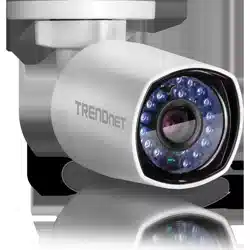
TRENDnet’sIndoor/Outdoor4MPH.265WDRPoEIRBulletNetworkCamera,
model TV‐IP314PI, provides day and night surveillance with a night vision
rangeofupto30meters(98ft.).Thisnetworkcameradeliversyear‐round
surveillance with an IP67 weather rated housing to withstand outdoor
environments.Recordupto4MPHDvideoat30fpsinaspacesavingH.265
compressionformat.Viewlivevideowithincludedcomplimentarysoftware
andmobileapps.
Specifications
4Megapixel
Recordupto4MPHDvideo(2560x1440)at30fpsinthespacesavingH.265
compressionformat.
CovertNightVision
MaskedIRLEDsprovidecovertnight‐timeviewingupto30meters(98ft.)
away.
SmartIR
Smart IR dynamically adjusts the Infrared (IR) LEDs by loweringtheIR
intensitywhenobjectsarenear,andincreasingIRintensitywhenobjectsare
fartheraway
PoE
SaveinstallationcostswithPoweroverEthernet(PoE)
OutdoorReady
OutdoorIP67weatherratedhousing
AdjustableMountingBase
Fullyadjustableintegratedmountingbaseprovidesinstallationflexibility
Storage
RecordvideotoanetworkstoragedeviceortoaMicroSDcard(upto128GB
notincluded).
AdvancedPlayback
Advancedin‐cameraarchivedvideoplaybackfunctionality
MotionDetection
Createcustommotiondetectionzonestorecordvideoandsendemail
notificationswhenazoneistriggered.
TamperDetection
Createcustomtamperdetectionzonestosendanemailnotificationwhen
thecameraviewhasbeenobstructed.
WideDynamicRange(WDR)
Adjustable 120dB WDR setting improves image quality and focus when a
cameraisexposedtohighcontrastlightingenvironmentsbyenhancingthe
darkareasoftheimagetomakethemmorevisible.
RecordingFlexibility
Definecustomschedulesusingcontinuous(24/7)andeventbasedrecording
modes.
ONVIF
ONVIFProfileSandProfileG
ComplimentarySoftware
Complimentarypro‐gradesoftwaretomanageTRENDnetcameras
ComplimentaryApps
LivevideotoamobiledevicewithfreeiOS
®
andAndroid
™
apps
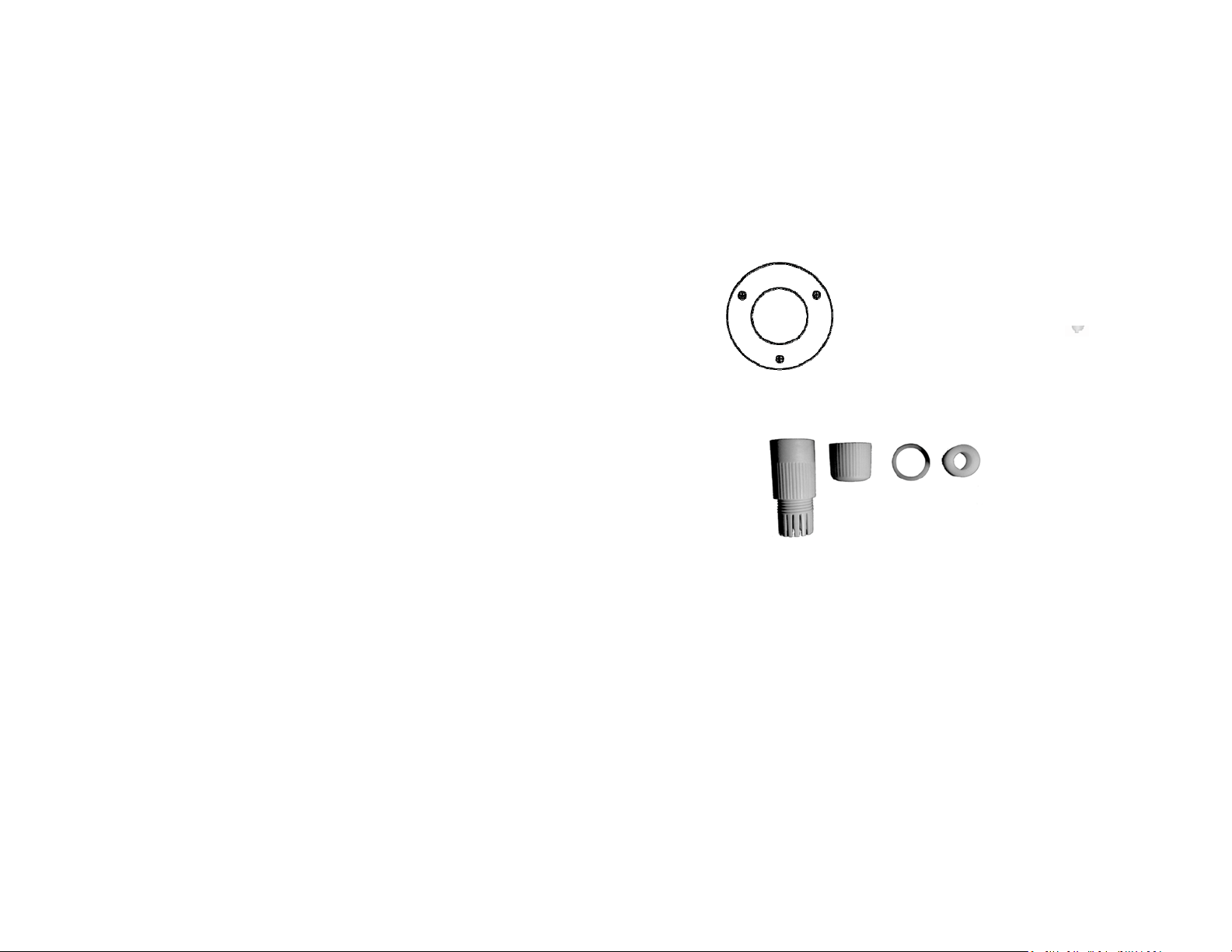
TV‐IP314PIpackageincludes:
TV‐IP314PI
Weatherseal
Quickinstallationguide
Cameramountinghardware
DrillingTemplate MountingScrews
NetworkCable
WaterproofAccessories
Ifanypackagecontentismissingordamaged,pleasecontacttheretailstore,online
retailer,orreseller/distributorfromwhichtheproductwaspurchased.
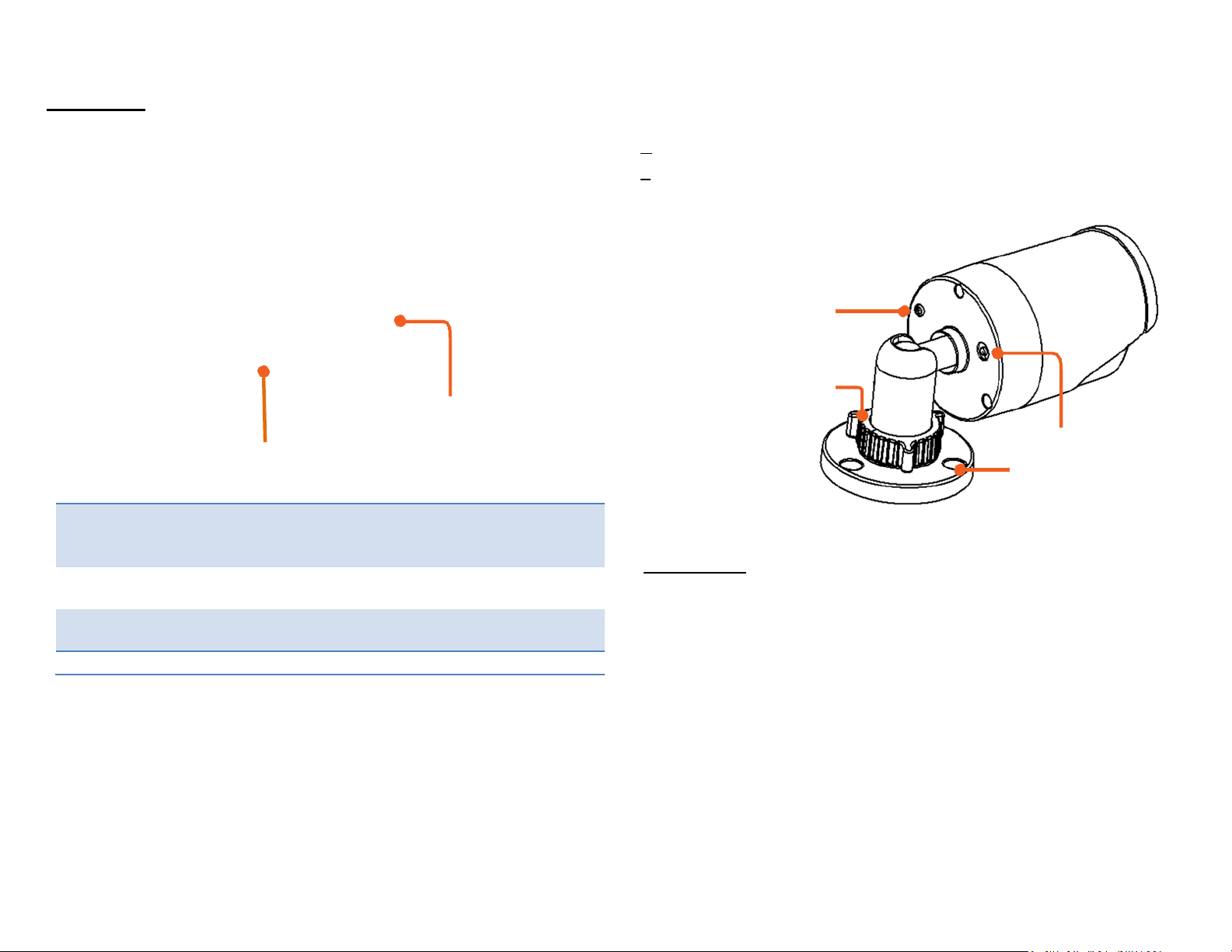
FrontView
n
g
Grounding
Screw
LightSensor/IRLEDs
LockRing
ResetButton/MicroSDslot
ResetButton Pushandholdtheresetbuttonthenpoweronthecamera.
Keepholdingtheresetbuttonformorethan10secondsto
resetconfigurationtofactorydefault.
MicroSDslot Openthecasewiththeincludedtoolandinsertthe
MicroSDslotforstorage.
Connectors
ResetButton
MountingBase
AmbientLight
Sensor
Detectsthebrightnessintheenvironmentandenable
day/nightmodesautomatically.
10/100PoENetworkPort
IRLEDs
Infra‐redLEDsfornightvision.
DCPower12VDC1A
(Optional)

Warnings
Seriousinjuryordeathmaybecausedifanyofthesewarningsareneglected.
Followthesesafetyguardstopreventseriousinjuryordeath.
• If using the power adapter, please choose the power adapter that
meetsthesafetyextralowvoltage(SELV)standardorIEC60950‐1and
LimitedPowerSourcestandard.
• Iftheproductdoesnotworkproperly,pleasecontactyourdealeror
thenearestservicecenter.Neverattempttodisassemblethecamera
yourself. Disassemblingthe product will void the warranty and may
causeharmorinjury.
• Toreducetheriskoffireorelectricalshock,donotexposethisproduct
torainorwater.
• The installation should be done by a qualified service person and
shouldconformtoallconstructionandelectricregulationsandother
localcodes.
Cautions
Injury or equipment damage may be caused if any of these cautions are
neglected.Followthese precautionsto preventpotentialinjuryor material
damage.
•MakesurethepowersupplyvoltageiscorrectbeforeusingtheCamera.
•Donotdropthecameraorsubjecttophysicalshock.
• Donottouchsensormoduleswithfingers.Ifcleaningisnecessary,use
acleanclothwithabitofethanolandwipeitgently.Ifthecamerawill
not be used foran extended period of time, put on the lens capto
protectthesensorfromdirt.
• DonotaimthecameralensatthestronglightsuchastheSunoran
incandescentlamp.Stronglightcandamagethecamerasensor.
• The sensor may be burned out by a laser beam, so when any laser
equipmentisbeingused,makesurethatthesurfaceofthesensorwill
notbeexposedtothelaserbeam.
•Donotplacethecamerainextremelyhot,coldtemperatures(the
operating temperature should be between ‐10°C to 60°C), dusty or
damp environment, and do not expose it to high electromagnetic
radiation.
• Toavoidheataccumulation,goodventilationisrequiredforaproper
operatingenvironment.
•Keepoutofwaterandanyliquid.
•Whileshipping,thecamerashouldbepackedinitsoriginalpacking.

Planforinstallationlocation
Viewingangle
TheTV‐IP314PIisabulletcamerawithafocusedviewinganglethatprovides
non‐distorted and detailed images. Choose the location where has good
angletoshoottheimageyouexpecttosee.Themotiondetectionareashould
alsobeconsideredwheninstallingthecamera.
WeatherConditions
• Sunlight:Avoiddirectsunlightexposure.Directsunlightwilldamage
the image sensor.Ifsunlightis necessaryfor your viewingpurposes,
provideprotectionfortheimagesensor.
• Lighting: Considerinstallingyour camerafacesthesame directionof
thelightsources.Shootingimageswithtop‐downpositionoutdooror
nexttotheexistinglightsourcearegoodchoices.Avoidthelightsource
ifitcreatesashadethatdarkenstheviewingarea.
TheTV‐IP314PIis asmallbulletcamera,whichfitsmostinstallationsindoor
andoutdoor. Thecameracanworkunderawiderangeofweatherconditions.
For severe weather conditions, a camera housing with temperature and
moisture control is recommended. Using the camera in milder weather
conditionswillhelpextendthecamera’sproductlifeandpreservethequality
ofthevideoimage.
• Moisture:Avoiddampormoistenvironmentswheneveryoucan. The
TV‐IP314PIis an IP66 grade water proof camera, and it will work in
moist environments. However, rain may affect the picture quality,
especially at night, water may reflect the light from the infra‐red
illuminationanddegradepicturequality.
• Temperature:TV‐IP314PIworkswithinaspecifiedtemperaturerange.
Areaswithseveretemperaturesshouldbeavoidedwheninstallingthe
camera.It’s
recommended
thatyouuseanenclosurewithaheaterand
blower if you plan on using this camera outside of the specified
temperaturerange.
HardwareInstallation
Cabling
It’s recommended that the wiring the cable in your home or office by a
professional.Ifyoualreadyhavethecabledeployed,makesurethecableand
theconnectorsmeetthecategory5Ethernetcablestandards.Atleast2pairs
oftwistedlinesarerequiredforpoweranddata.Poorcablequalitymaycause
unexpectedproblems.Testingyourcableorrunninganewcableissuggested
fornewcamerainstallation.
Waterproofcap
The TV‐IP314PI itself is IP66 grade water and dust proof. There is a set of
networkcable water proofcapsthatcomeswith the package as well. Run
yourcablegoingthroughtheaccessories,andthencrimpthecablewithan
RJ45module.Pluginthenetworkcableandthentightenthewaterproofcap
topreventwaterrunningintocamerathroughthecable.
Mountyourcamera
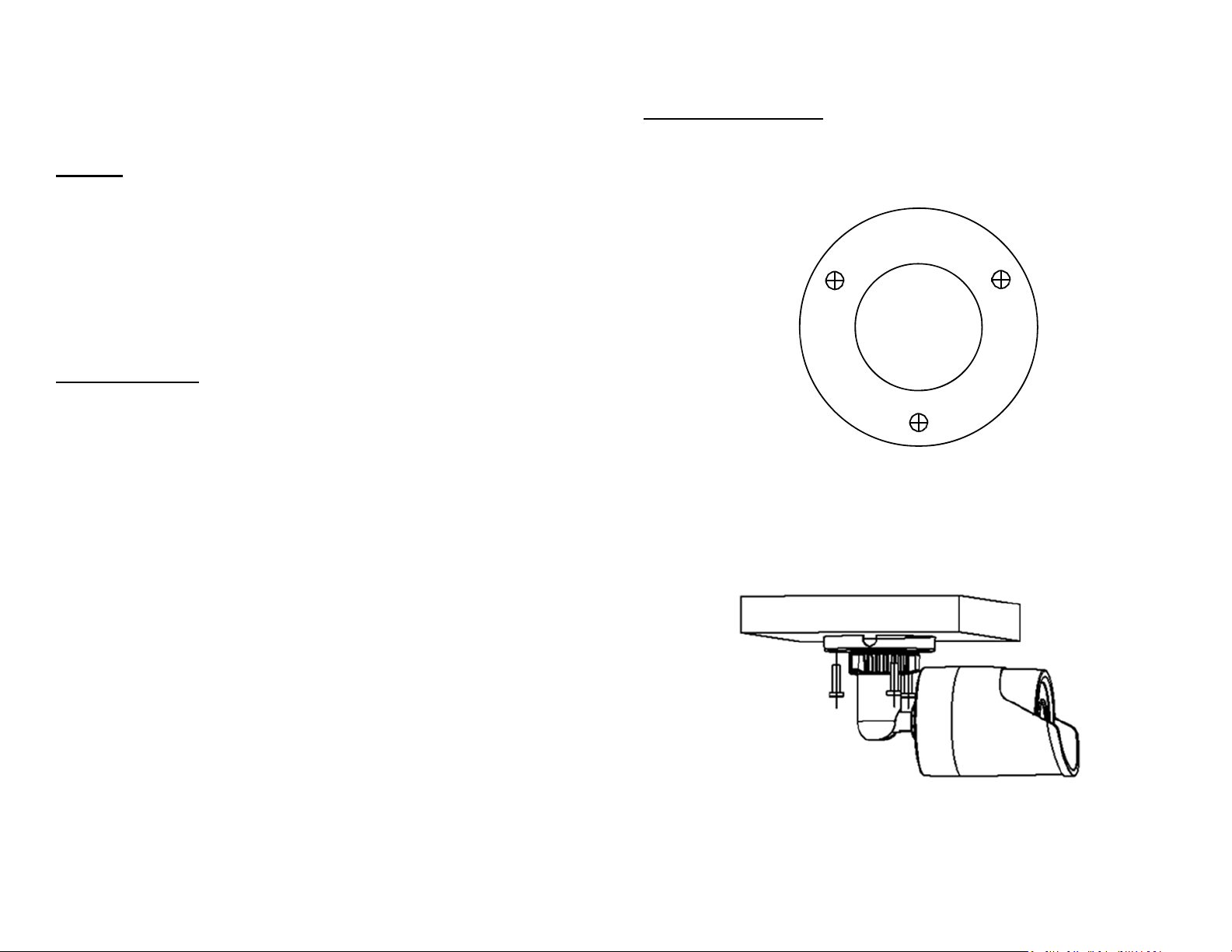
Drillthescrewholesandthecableholeifnecessarywiththedrilltemplate
comeswiththepackage.
Fixthemountingbaseontheceilingorthewallwiththescrewsthatcome
withthepackage.Routethecablestothecablehole.
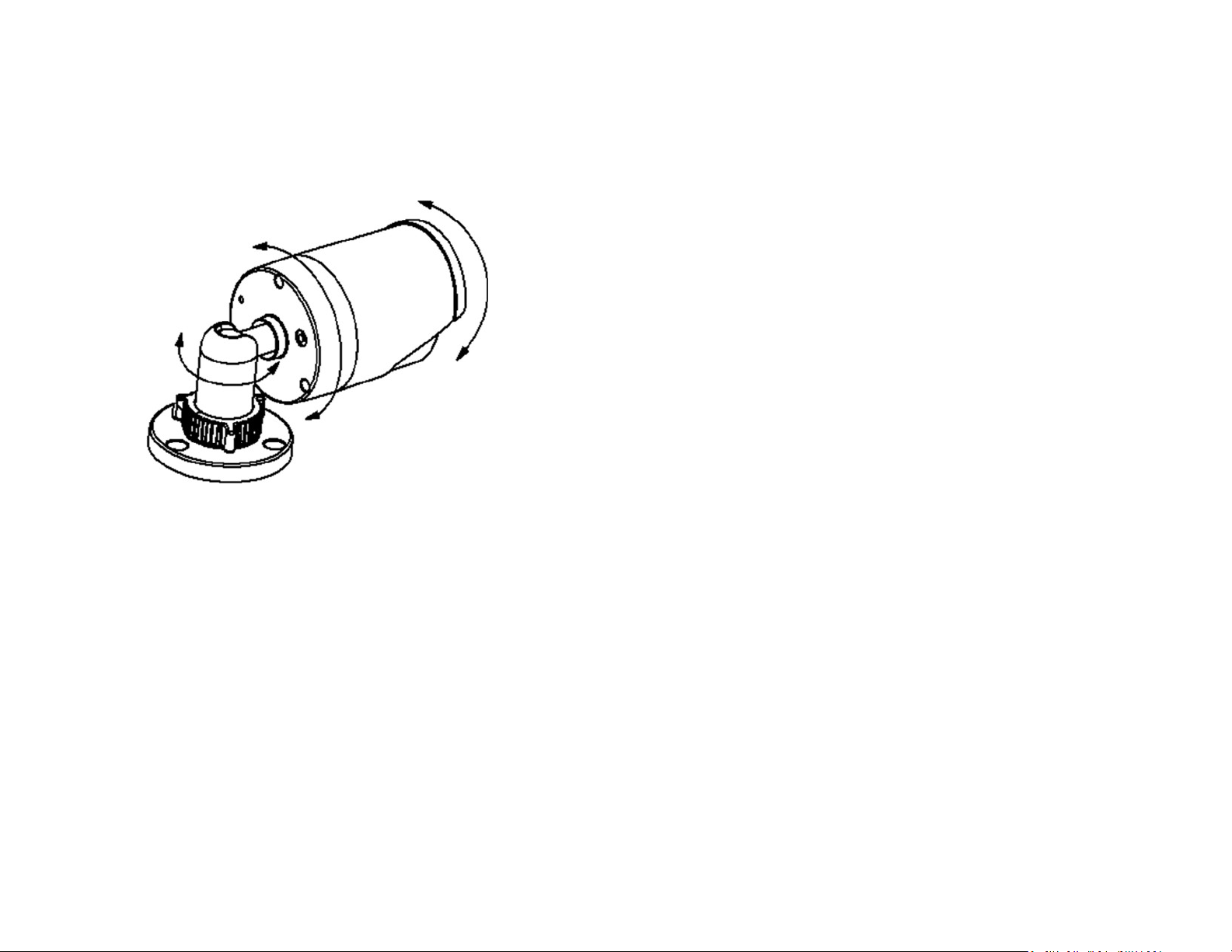
Loosen
the lock ring and then adjust the camera position. Tighten the
lock
ring when you setup the camera
position.

TRENDnetUser’sGuide
TV‐IP314PI
©Copyright2018TRENDnet.AllRightsReserved. 11
SetupYourCamerawithCameraUtility
1. Pleasedownloadtheutilityat
http://www.trendnet.com/camerautility
2. Extractthedownloadedfileanddoubleclickonthecamerautilityfile
toinstall
3. Last,clickNexttofinishtheinstallation.
4. ThiswillalsorequireyoutoInstallWinPcapprogramifyoudon’thave
this installed before, please follow the on screen Instructionsto
InstallIt.
5. RestartthecomputeraftertheInstallation.

TRENDnetUser’sGuide
TV‐IP314PI
©Copyright2018TRENDnet.AllRightsReserved. 12
6. Afterthecomputerhasrestarted,doubleclickontheCameraUtilityicon
tolaunchtheprogram.
7. Findthecamerayouwouldliketoaccessandconfigurethendoubleclick
ontheIPaddress.
8. ContinuetothenextsectionAccessyourCamerawiththeWeb
Browserfordetailconfigurationsofthecamera.
AccessyourCamerawiththeWebBrowser
Logging‐intotheCamerafortheFirstTime(Windows)
1. FindthecamerafromtheUtilityanddoubleclickontheIPaddressto
openthebrowser.
2. ActivatetheadminUserAccountbyenteringyourdesiredpassword,and
thenclickOK.

TRENDnetUser’sGuide
TV‐IP314PI
©Copyright2018TRENDnet.AllRightsReserved. 13
3. The camera management page will detect if you installed the camera
videostreamingplug‐inornot.Clickthelinktodownloadtheplug‐infrom
the camera. (For Internet Explorer and Safari only) Google and Firefox
users,skiptostep9.
4. Downloadtheplug‐intoyourcomputerandthenandcloseyourbrowser.
Launchtheplug‐ininstallationtoinstalltheplug‐in.
5. PermissionrequestmayshowupdependsontheInternetsecurity
settingsonyourcomputer.ClickYestoinstalltheplug‐in.
6. ClickNexttoinstalltheplug‐in.

TRENDnetUser’sGuide
TV‐IP314PI
©Copyright2018TRENDnet.AllRightsReserved. 14
7. ClickFinishtofinishtheinstallation.
8. Openthebrowserandloginagain,entertheusernameadminandnew
passwordagaintostartsecuredsession.
9. Refresh the browser and the Live View page will show up and begin
streamingvideo.

TRENDnetUser’sGuide
TV‐IP314PI
©Copyright2018TRENDnet.AllRightsReserved. 15
Logging‐intotheCamerafortheFirstTime(OSX)
1. Openthewebbrowseronyourcomputer. Intheaddressbar,enterthe
default IP address of the camera 192.168.10.30. If the camerais
connectedtoarouter/network,pleaseuseawindowsmachinetosetup
thecamerawithCameraUtility.
2. ActivatetheadminUserAccountbyenteringyourdesiredpassword,and
thenclickOK.
3. The camera management page will detect if you installed the camera
webcomponentplug‐inornot.Clickthelinktodownloadtheplug‐infrom
thecamera.
Note:Internetconnectionisrequiredtodownloadtheplug‐in.Ifyoudonothave
Internetaccess,youcanfindtheplug‐inontheCDcomeswiththepackageunder
/Macfolder.
4. Quit your browser completely by command‐Click onthebrowsericon
andthenclickQuitbeforeinstallingtheplug‐in.

TRENDnetUser’sGuide
TV‐IP314PI
©Copyright2018TRENDnet.AllRightsReserved. 16
5. GototheFinderandnavigatetotheDownloadfolder.Command‐Click
theWebComponents.pkgandthenclickOpen.(Ifyouareinstalltheplug‐
infromtheCDwhenyoudon’thaveinternetconnection,justbrowseto
/MacfolderanddoubleclicktheWebComponents.pkgfile.)
6. ClickOpenwith Installertostartinstallation.
7. ClickContinuetoinstalltheplug‐in.
8. Selectadestinationtoinstalltheplug‐in.ThenclickContinue.

TRENDnetUser’sGuide
TV‐IP314PI
©Copyright2018TRENDnet.AllRightsReserved. 17
9. UsethedefaultlocationandclickInstall.
10. EnteryourpasswordandclickInstallSoftware
11. Installationwillprocessautomatically.
12. ClickClosetoexittheinstallation.

TRENDnetUser’sGuide
TV‐IP314PI
©Copyright2018TRENDnet.AllRightsReserved. 18
13. OpenthebrowserandloginagainwiththedefaultIP192.168.10.30or
theIPthatwasdynamicallyassignedbyyourrouter.Entertheusername,
admin,andthedefaultpassword,admin,andthenclickOK.
14. TheLiveViewpageshowsupandthevideostartstostream.

TRENDnetUser’sGuide
TV‐IP314PI
©Copyright2018TRENDnet.AllRightsReserved. 19
LiveView
Afteryoulog‐inintothecameramanagementpage,you’llseetheLiveViewpage.
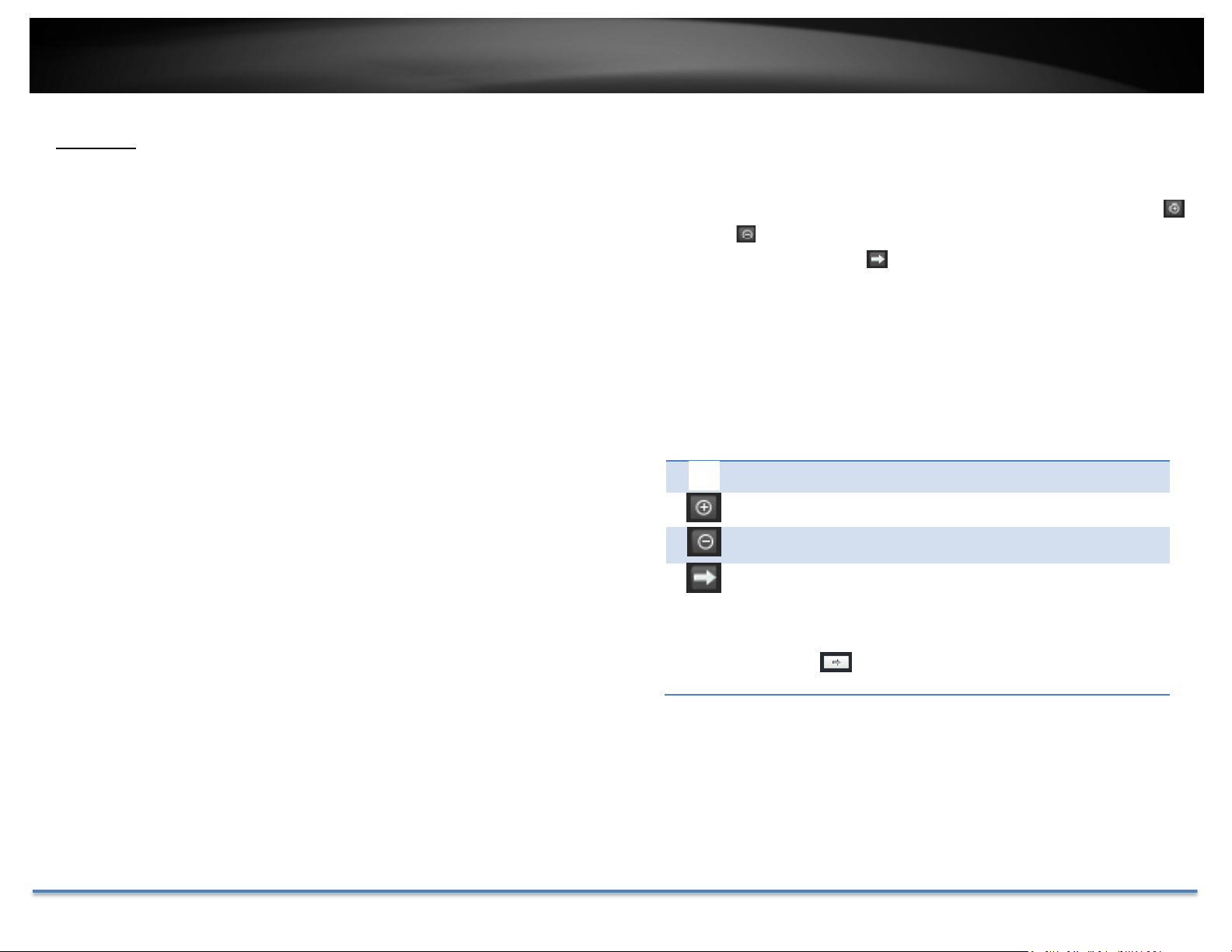
Snapshot
Clickthisicontotakeavideosnapshot.
Zoom
Click once to enable zoom. When
enabled,clickanddragtheareaonthe
picture to zoom in. Right click to
resume 100% zoom. Click the icon
again to disable zoom. The zoom
functionworks
infullscreenmodeas
well.
Recording
Click once to start recording. Click it
againtostoprecording.Thestatusbar
willindicateifitisinrecordingstateor
not.
VideoStream
Camerahastwovideo streams: H.265,H.264and
MJPEG.Switchtoviewthedifferentvideostreamsby
clickingthisicon.(ForInternetExplorerandSafarionly,
Google and Firefox stream Third steam resolution by
default)
FullScreenMode
Clickthepicturetoviewinfullscreen
mode. Double click again or press
escapekeyonyourkeyboardtoexit
fullscreenmode.
StatusBar
Thestatusbarshowsthestatusyou
are at, including enabled the zoom,
recording video, and successfully
takingasnapshot.
TRENDnetUser’sGuide
TV‐IP314PI
©Copyright2018TRENDnet.AllRightsReserved. 20
Playback
Youcanplaybackthevideorecordingonthenetworkstorageanddownload
thevideoclipandsnapshotstoyourlocalcomputer.
Searchforvideorecordings
Clickthedateselection,andthenchooseadateasthedaterangeofsearching.
ClickSearchtostartsearching.
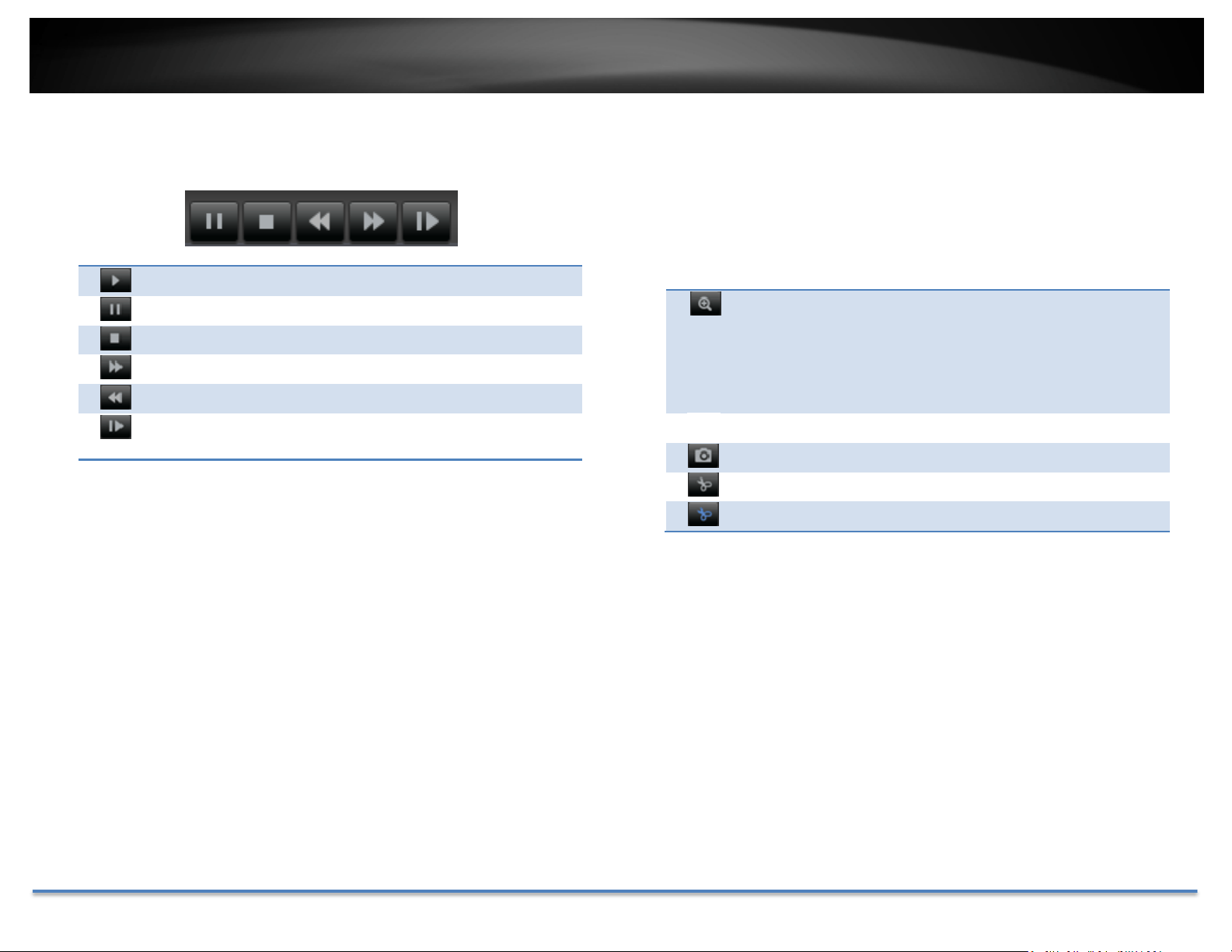
TimeLine
Thereisaplaybackheadinthecenterofthetimelinerepresentedinayellow
vertical line. To look for a specific video recording, move the time line by
clicking and dragging it. If the recording is short, zoom in by clicking
button.Click
tozoomoutthetimescale.Ifyouknowtheexacttimeof
thedayyouarelookingfor,click
thenenterthetimeyouwanttoplayback.
Different types of recordings are identified differently. The scheduled
recordings are marked in blue, and the recordings triggered by motion
detectionaremarkedinred.
Clickanddragthetimelinetomoveyourtimemanually.
Clickthisbuttontozoominthescale
Clickthisbuttontozoomoutofthescale
Clickthisbuttontospecifyaspecifictimeoftheday.
thenclick toconfirmselectionandthenclickXtoclose
thisdialogbox.
TRENDnetUser’sGuide
TV‐IP314PI
©Copyright2018TRENDnet.AllRightsReserved. 21
Playback
Useplaybackcontrolstoplaybackthevideorecording.
Clickthisbuttontoplaythevideo.
Clickthisbuttontopausevideoplayback.
Clickthisbuttontostopplayback.
Clickthisbuttonincreaseplaybackspeed*.
Clickthisbuttondecreaseplaybackspeed*.
Clicktoplaybackvideoframebyframe.Clickagainfor
the
next
fr
ame
�
*Note:Thereare5stepsofplaybackspeedyoucanchoosefrom:1/4,1/2,1,2,and
4timesoforiginalspeed.
Sliceimagesfromvideoplayback
Youcantakesnapshotsfromplaybackvideoormakenewvideoclipsfrom
thevideoyouareplayingback.
Clickthisbuttontoenablezoom.Thenclickanddragon
thevideotodefinetheareayouwanttozoomin.Click
againtogetbackto100%zoom.
Doubleclicktoshowvideoinfullscreenandpress
ES
C
onkeyboardtoexitfullscreenmode.
Clickthisbuttontodisablezoom.
Clickthisbuttontotakeasnapshotofcurrentplayback.
Clickthisbuttontostartclippingavideofromplayback.
Clickthisbuttontostopclippingavideofromplayback.
TRENDnetUser’sGuide
TV‐IP314PI
©Copyright2018TRENDnet.AllRightsReserved. 22
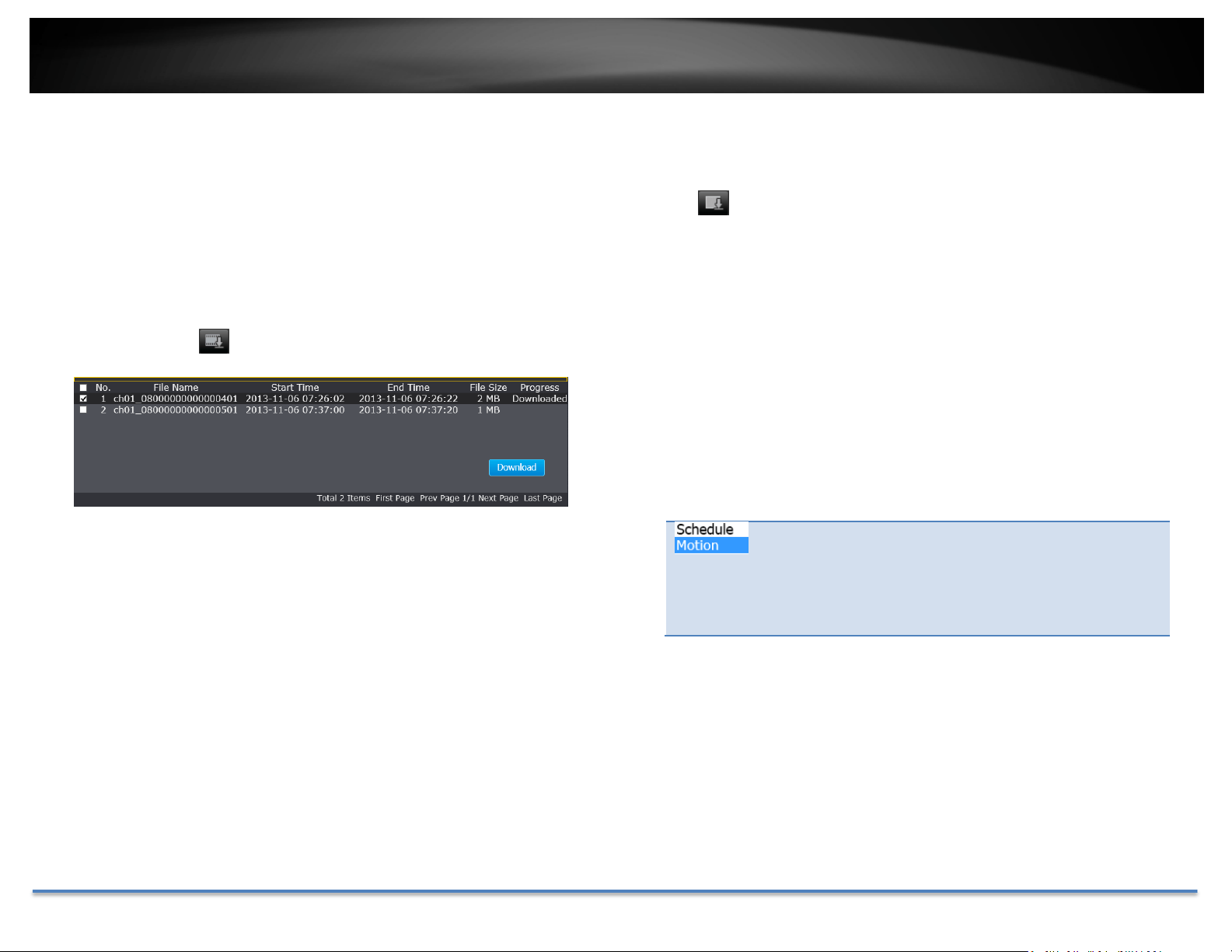
Downloadsectionsofvideo
Tosavecompletevideosectionsorsnapshots,youcandownload thefiles
directly.
Click buttontodownloadvideosections.
Checkthetimeoftherecording,selectthevideosyouwanttodownload,and
thenclickDownload.
Downloadsnapshots
Click buttontolistsnapshotstodownload
Select the type of event that triggered the snapshots.
ChoosetheStartTimeandEndTime.Then,clickSearch
tofindthesnapshotlist.Checkthetimeofthesnapshot,
and then select the snapshots you want to download,
thenclickDownload.
TRENDnetUser’sGuide
TV‐IP314PI
©Copyright2018TRENDnet.AllRightsReserved. 23
Log
The log of the TV‐IP314PI will be saved on the network storage.Youcan
searchtherelevantrecordsandsavetoyourlocalcomputer.(SeeNetwork
Storageonpage49tosetupthestorage.)
Searchforlogs
ClickthetypeoflogandthentheStartTimeandEndTime.ClickSearchto
startsearching.
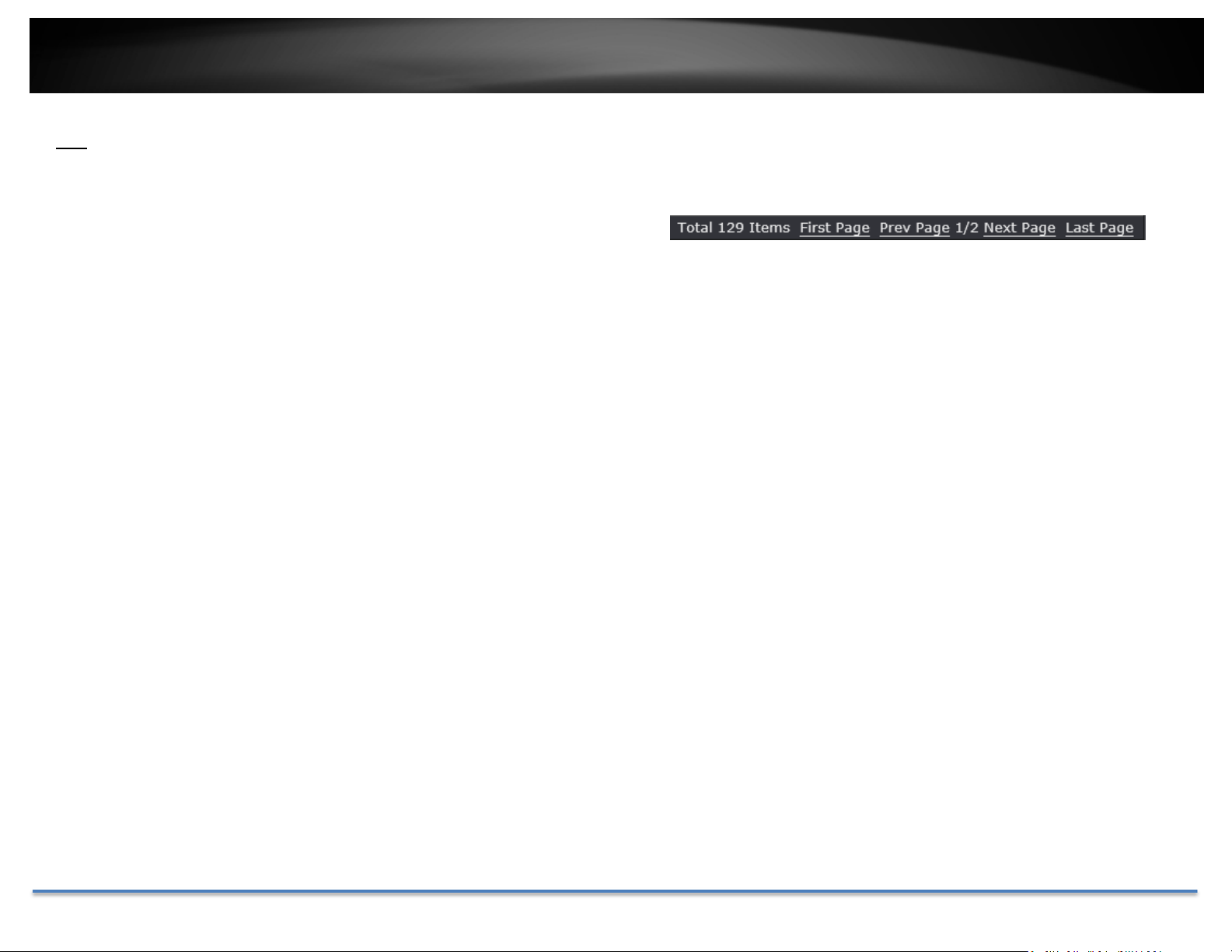
ClickFirstPage,PrevPage,NextPage,andLastPagetoshowthelogs.Click
SaveLogtosavethelogstoyourcomputer.
TRENDnetUser’sGuide
TV‐IP314PI
©Copyright2018TRENDnet.AllRightsReserved. 24
SystemInformation
SystemInformationpageshowsthecamera’sbasicinformation.
BasicInformation
DeviceName: Humanreadabledevicenameforeasy
identification.
FirmwareVersion: Firmwareversion
MACAddress: TheMACaddressofEthernetInterface
SystemTime:Thesystemtimesetupinthecamera.Keepingthis
timecorrectisimportantforrecording,scheduled
controlandloggingaccurately.
DeviceName: Humanreadabledevicenameforeasy
identification.
NetworkInformation
IPAddress: IPaddressoftheTV‐IP314PI
SubnetMask: NetworkrangeofIPaddress
DefaultGateway: ThedefaultroutegoingfromtheTV‐IP314PI
subnet.
PrimaryDNS: PrimaryDNSserveraddress
SecondaryDNS: SecondaryDNSserveraddress
TRENDnetUser’sGuide
TV‐IP314PI
©Copyright2018TRENDnet.AllRightsReserved. 25
SystemConfiguration
DeviceSettings
Setup your camera name and location for easy identification. This camera
namewillalsoberecognizedbyothernetworkcamerasoftwareasthename
ofthiscamera.OSD,OnScreenDisplay,cameranameisreferring to this
settingaswell.
Authentication
RTSP: TV‐IP314PI’svideostreamcanbeaccessedwith
RTSP,RealTimeStreamingProtocol.Onlythe
administratoranduserscanviewthisvideostream
Un‐checkingthisboxwillalloweveryoneaccesstothisvideo
streamwithoutauthentication.Default:Checked.
Service
Names
CameraName:
Nameofthecamera. Thecameranamesetup
herecanbediscoveredbyothernetworkcamera
softwareandOSD,OnScreenDisplay.Thedefault
cameranameisthemodelnumber:TV‐IP314PI
Location: Labelwhereyouinstalledthiscameraforreference
Enable
Telnet:
TV‐IP314PIembeddedTelnetserviceformultiplecamera
controlforsystemdeveloper.Default:disabled.
TRENDnetUser’sGuide
TV‐IP314PI
©Copyright2018TRENDnet.AllRightsReserved. 26
UserAccounts
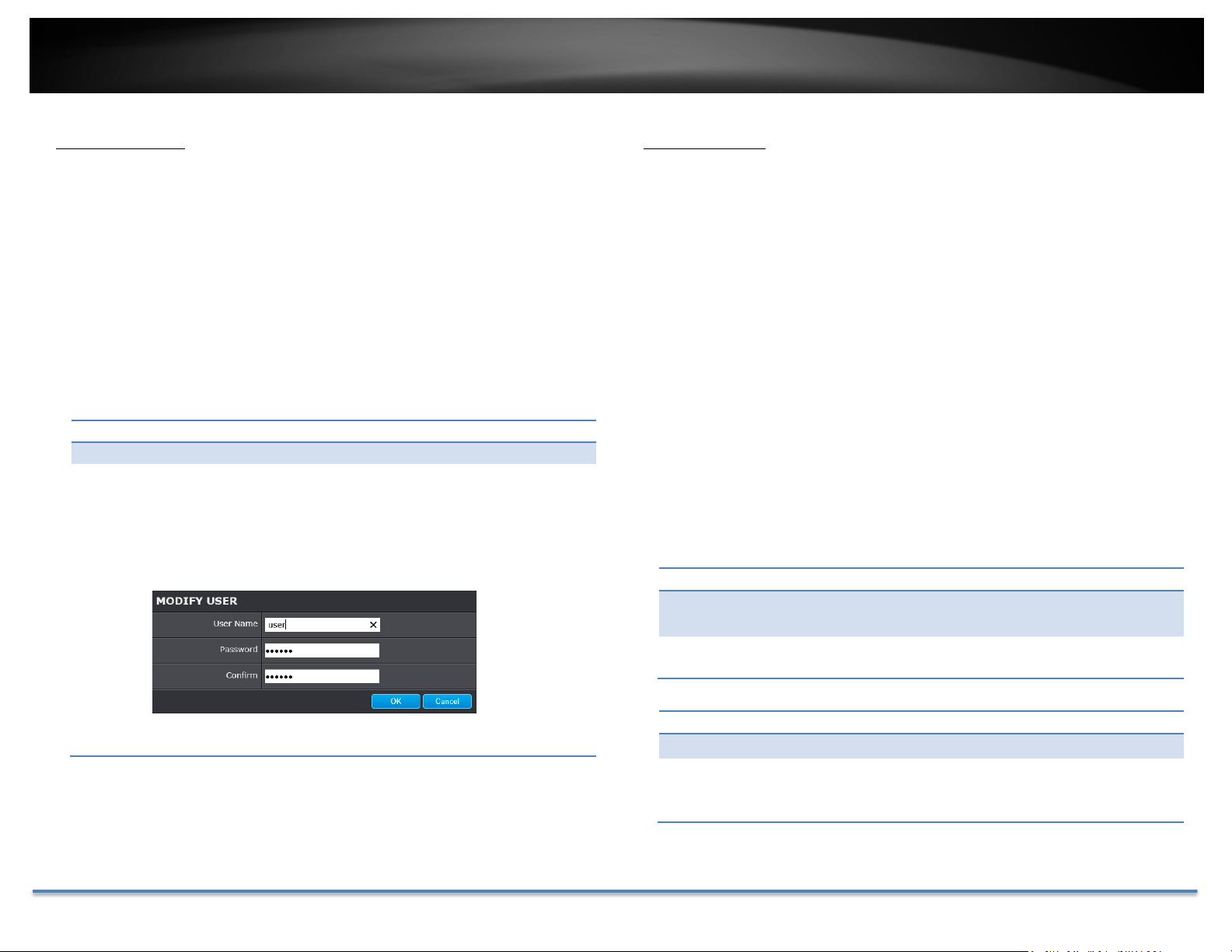
Youcansetupupto16useraccounts toaccessthecamera’svideostream
withawebbrowserorrealtimevideostream(RTSP).Onlyoneadministrator
accountcanbesetuptoconfiguretheTV‐IP314PIandcannotbedeleted.
UserAccounts
Add: ClickAddbuttontoaddoneuseraccount
Modify: Tochangeauser’snameandpassword,highlighttheuserby
clickingonit.Then,clickModifybutton.Youcanchangethe
user’snameandpassword.Youcanalsochangethe
administrator’spasswordhere.But,theadministrator’sname
isfixed,youcannotchangethat.
TimeSettings
Theaccuracyof the systemclock is importantforscheduling and accurate
logging. You can synchronize the system time with your computer, or
automaticallycheckthetimeaccuracywithanetworktimeserver (NTP
server).
AutomaticUpdate
NTP
Server:
Specifyatimeserver(NTPserver)tosynchronizewith.
(e.g.pool.ntp.org)
Interval: ThetimeintervalthattheTV‐IP314PIwillsynchronizethetime
withNTPserver.Default:1440minutes(24hours)
ClickOKtosavethechanges.
ManualTimeSync
DeviceTime: Thesystemtimeofthiscamera.
SetTime: Clickthecalendar icon andmanuallyselectthedate.
Check the Sync. with computer time to copy the time
fromyourcomputer.
ClickSavetosavethechanges
TRENDnetUser’sGuide
TV‐IP314PI
©Copyright2018TRENDnet.AllRightsReserved. 27
DaylightSavings
Setupdaylightsavings.
AutomaticUpdate
EnableDST: Checkthisboxifyourtimezonehasdaylightsavings.
StartTime: Enterthedatethatdaylightsavingsstarts
EndTime: Enterthedatethatdaylightsavingsends
DSTBias Enter how much time the daylight saving adjusted by
daylightsavings.
ClickSavetosavethechanges
LiveViewSettings
Setuptheliveviewvideoquality,filesizeandfilesavingdirectories.
LiveViewParameters
LiveView
Buffer:
Configurethebuffersizeforliveviewvideostream.With
low buffer size setting, you can get real‐time video
stream,butthevideomaybestopandgoifthenetwork
is congested. With high buffer setting, you can have
smooth video streaming, but the video is delayed from
the time happening. Medium size can have moderate
videostreamsmoothnessandtimedelay.
TRENDnetUser’sGuide
TV‐IP314PI
©Copyright2018TRENDnet.AllRightsReserved. 28
RecordFileSettings
Recordfilesize: Thissizeofliveviewvideorecording.Youcanchoose
256MB,512MB,or1GBafile.Smallerfilesizeisgood
formanyshortrecordings.
Maintenance
Youcanrestart,loadcamerasettingsandupgradethecamerafirmwareon
thispage.
Saverecord
filesto:
Save
downloaded
filesto:
ClickBrowseandthenchooseanewdestinationifyou
wanttosavethefilesomewhereelse.
ClickBrowseandthenchooseanewdestinationifyou
wanttosavethefilesomewhereelse.
PictureandClipSettings
Savesnapshots
in
liveviewto:
Savesnapshots
whenplayback
to:
ClickBrowseandthenchooseanewdestinationifyou
wanttosavethefilesomewhereelse.
ClickBrowseandthenchooseanewdestinationifyou
wanttosavethefilesomewhereelse.
Saveclipsto: ClickBrowseandthenchooseanewdestinationifyou
wanttosavethefilesomewhereelse.
ClickSavetosavethechanges
Reboot
Reboot: Clickthisbuttontorebootthiscamera.
Reset
Reset: Resetallcameraparameters,excepttheIPparameters
anduserinformation.
Default: Loadcompletefactorydefaulttothecamera.
TRENDnetUser’sGuide
TV‐IP314PI
©Copyright2018TRENDnet.AllRightsReserved. 29
InportConfig.File
ConfigFile: Toloadpreviouslysavedsettings,clickBrowsetofindthe
configurationfileandthenclickImport.
Status: Showsthestatusinloadingconfigurationfile.
ExportConfig.File
Export: ClickExporttodownloadconfigurationfile.Thefilewill
bedownloadedtotheDownloadfolderbydefault.
RemoteUpgrade
Firmware: ClickBrowsetofindthelatestfirmwareandthenclick
Upgrade.
Status: Showsthestatusinfirmwareupgrade.
TRENDnet may periodically release firmware upgrades that might add
featuresorfixproblemsassociatedwithyourcamera.Tofindoutifthereisa
firmware upgrade available for your device, please check your TRENDnet
modelandversionusingthelink.
http://www.trendnet.com/downloads/
1. Ifafirmwareupgradeisavailable,downloadthefirmwaretoyour
computer.
2. Unzipthefiletoafolderonyourcomputer.
3. Readthefirmwareupgradeinstructionforspecificversionupdate
information.
4. LogintotheTV‐IP314PI.
5. GettingtothisMaintenancepagetoupgradefirmware.
NetworkSettings
TCP/IP
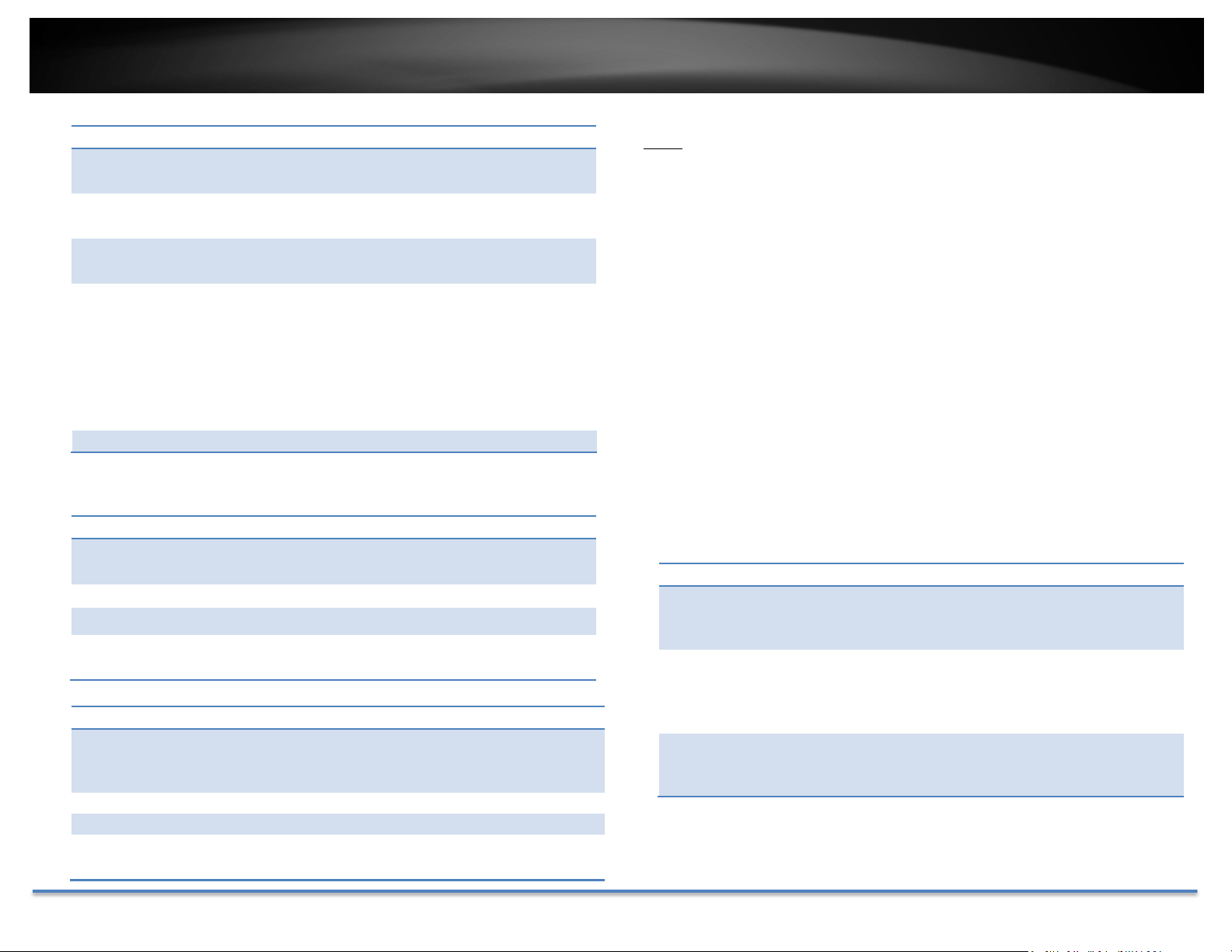
SetupyourbasicIPv4andIPv6networksettingsonthispage.
TRENDnetUser’sGuide
TV‐IP314PI
©Copyright2018TRENDnet.AllRightsReserved. 30
NetworkInterface
MACAddress: Clickthisbuttontorebootthiscamera.
Port
YoucanchangetheserviceportnumbersofTV‐IP314PIandenable/disable
Duplexand
Speed:
Choose one of the Ethernet duplex and speed to
matchyournetwork.Default:auto.
RTSPorHTTPSservices.
MTU:
Maximumtransmissionunit. Themaximumfieldsize
intheEthernetpacket.
Multicast: Sends a stream to the multicast group address
andallowsmultipleclientstoacquirethestream
atthesametimebyrequestingacopyfromthe
multicast group address. Multicast function
needstobeenabledonyourrouterbefore
utilizingthefeatureonthecamera.
PrimaryDNS: EnteryourfirstIPv4orIPv6DNSserveraddress
SecondaryDNS: EnteryoursecondIPv4orIPv6DNSserveraddress
IPv4
DHCP: CheckthisboxiftheIPaddressisassignedbyDHCP
server.
PortNumbers
IPv4Address: TheIPv4dynamicorstaticaddress
SubnetMask: Networkrangeofthesubnet
DefaultGateway: ThedefaultroutegoingfurtherfromTV‐IP314PIIPv4
subnet
IPv6
IPv6Mode:ChooseManual,DHCP,orRouteAdvertisement.Click
View Route Advertisement to find a route
advertisement.
IPv6Address: IPv6addressofTV‐IP314PI
PrefixLength: Lengthofnetworkprefix
HTTPPort:Thedefaultwebaccessport.Youcanchangetheport
number. However, you cannot disable the web
service.Thedefaultportnumberis80.
RTSPPort:TheReal‐TimeStreamingProtocolportforvideo
streaming. You can change the port number or
disabletheservice byuncheckthebox.The default
portnumberis554.
HTTPSPort: The secured web service port. You can change the
port number, or you can disable the service by
uncheckthebox.Thedefaultportnumberis443.
ClickSavetosavethechanges
Default
Gateway:
ThedefaultroutegoingfurtherfromTV‐IP314PIIPv6
subnet
*Note:Toviewthecameraremotely,pleasemakesuretheHTTPandRTSP
portsareopened(portforwarded)onyournetwork/router.
TRENDnetUser’sGuide
TV‐IP314PI
©Copyright2018TRENDnet.AllRightsReserved. 31
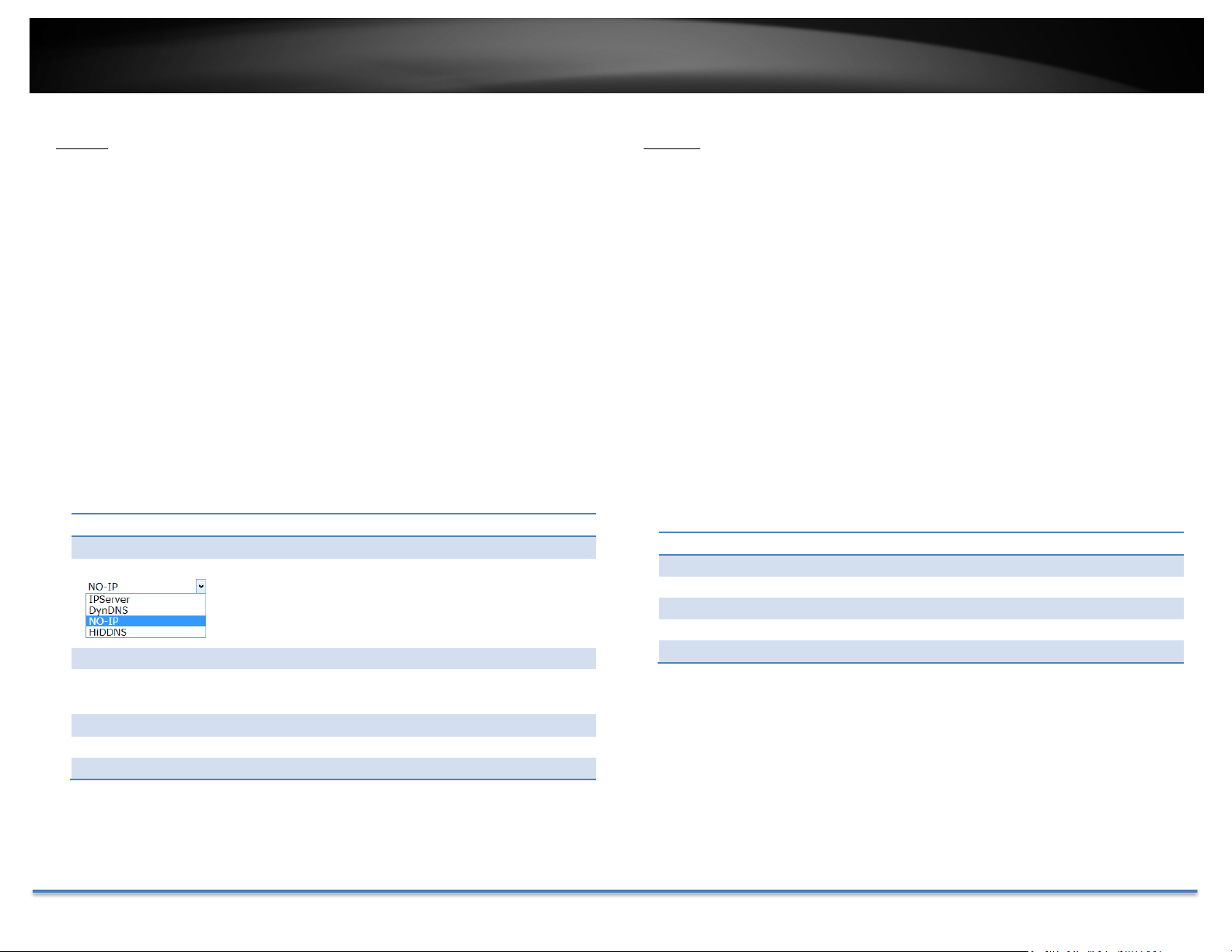
DDNS
DynamicDomainNameService,DDNS,allowsyoutofindyourcamerafrom
theInternetwithaneasytorememberdomainname.
DDNS
EnableDDNS: CheckthisboxtoenableDDNSService.
DDNSType: SelectaDDNSserviceprovider.
ServerAddress:
EntertheDDNSserveraddress.
Domain: Enteryourregistereddomain/hostnameonselected
DDNSservice.
UserName:
Entertheaccountname.
Password: Enterthepassword.
Confirm: Enterthepasswordagain.
ClickSavetosavethechanges
PPPoE
SetupPPPoE(ADSL)connectiontoconnectyourcamerawithyourISP,
InternetServiceProvider.
PPPoE(ADSL)
EnablePPPoE: CheckthisboxtoenablePPPoEconnection.
DynamicIP: TheIPaddressassignedbyISP
UserName:
Entertheaccountname.
Password:
Enterthepassword.
Confirm:
Enterthepasswordagain.
ClickSavetosavethechanges
TRENDnetUser’sGuide
TV‐IP314PI
©Copyright2018TRENDnet.AllRightsReserved. 32
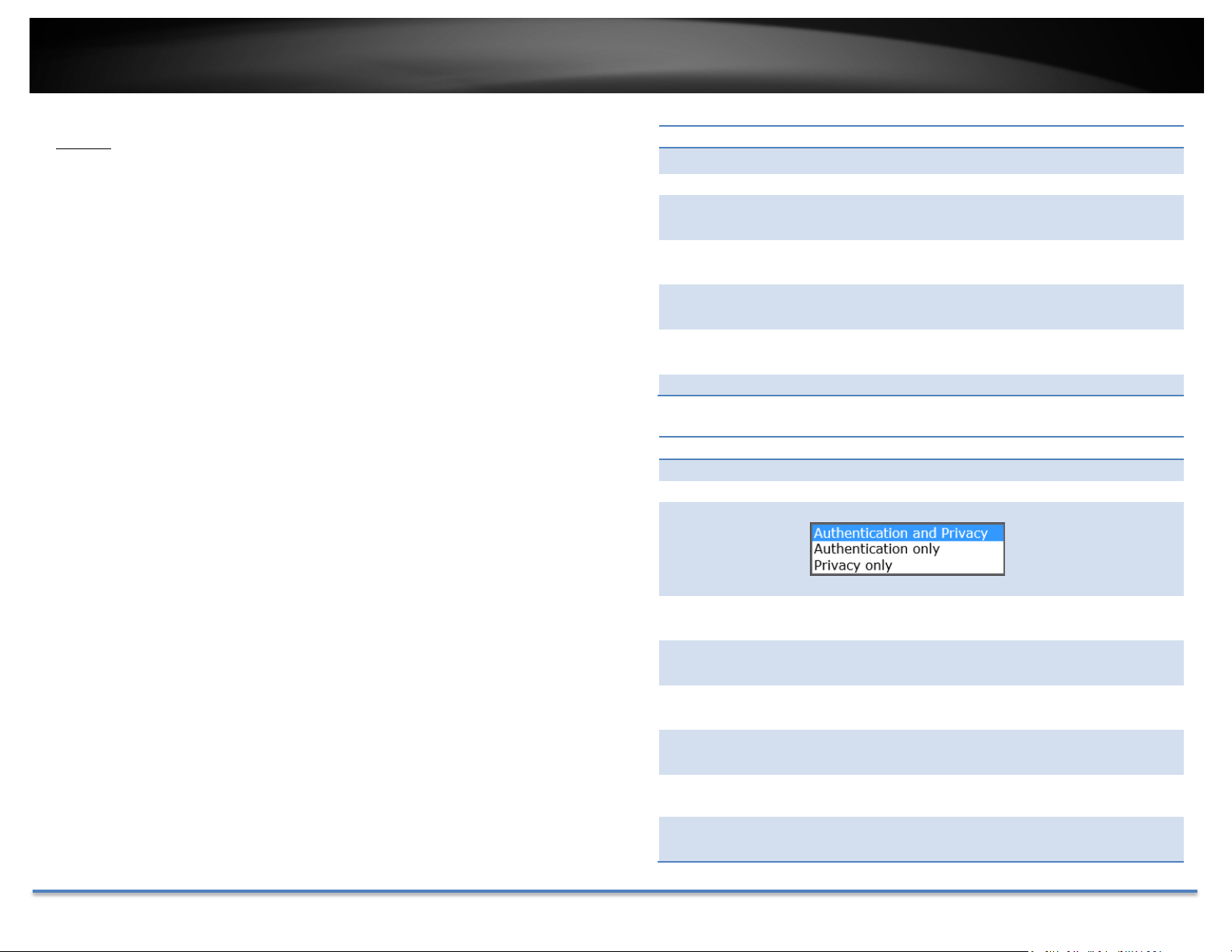
SNMP
SNMPSettingsallowsyoutoassignthecontactdetails,location,community
SNMPV1/V2
EnableSNMPv1: CheckthisboxtoenableSNMPv1management.
EnableSNMPv2c: CheckthisboxtoenableSNMPv2cmanagement.
nameandtrapsettingsofSNMP.Thisisanetworkingmanagementprotocol
used to monitor network‐attached devices. SNMP allows messages (called
protocoldataunits)tobesenttovariouspartsofanetwork. Uponreceiving
thesemessages,SNMPcompatibledevices(calledagents)returndatastored
Read SNMP
Community:
WriteSNMP
Community:
SpecifythepasswordtoaccesstheSNMP
communityforreadonlyaccess.
SpecifythepasswordforaccesstotheSNMP
communitywithread/writeaccess.
intheirManagementInformationBases.
TrapAddress: SpecifytheIPaddressfortheSNMPtrap
community.
TrapPort: SpecifytheportnumberfortheSNMPtrap
community.
TrapCommunity: SpecifythenameofSNMPtrapcommunity.
SNMPV3
EnableSNMPv3: CheckthisboxtoenableSNMPv3management.
ReadUserName: SNMPv3memberusername.
SecurityLevel: Chooseoneofthesecuritylevels.
Authentication
Algorithm:
Authentication
Password:
Private‐key
Algorithm:
Private‐key
Password:
WriteUser
Name:
Choosetheauthenticationmethodtoverifythe
sourceofinformation:MD5orSHA.
Specifytheauthenticationpasswordbetween8to
32letters.
ChoosetheprivacykeytoencryptSNMPmessages:
DESorAES.
Specifytheprivacykeybetween8to32letters.
SNMPv3managerusername.
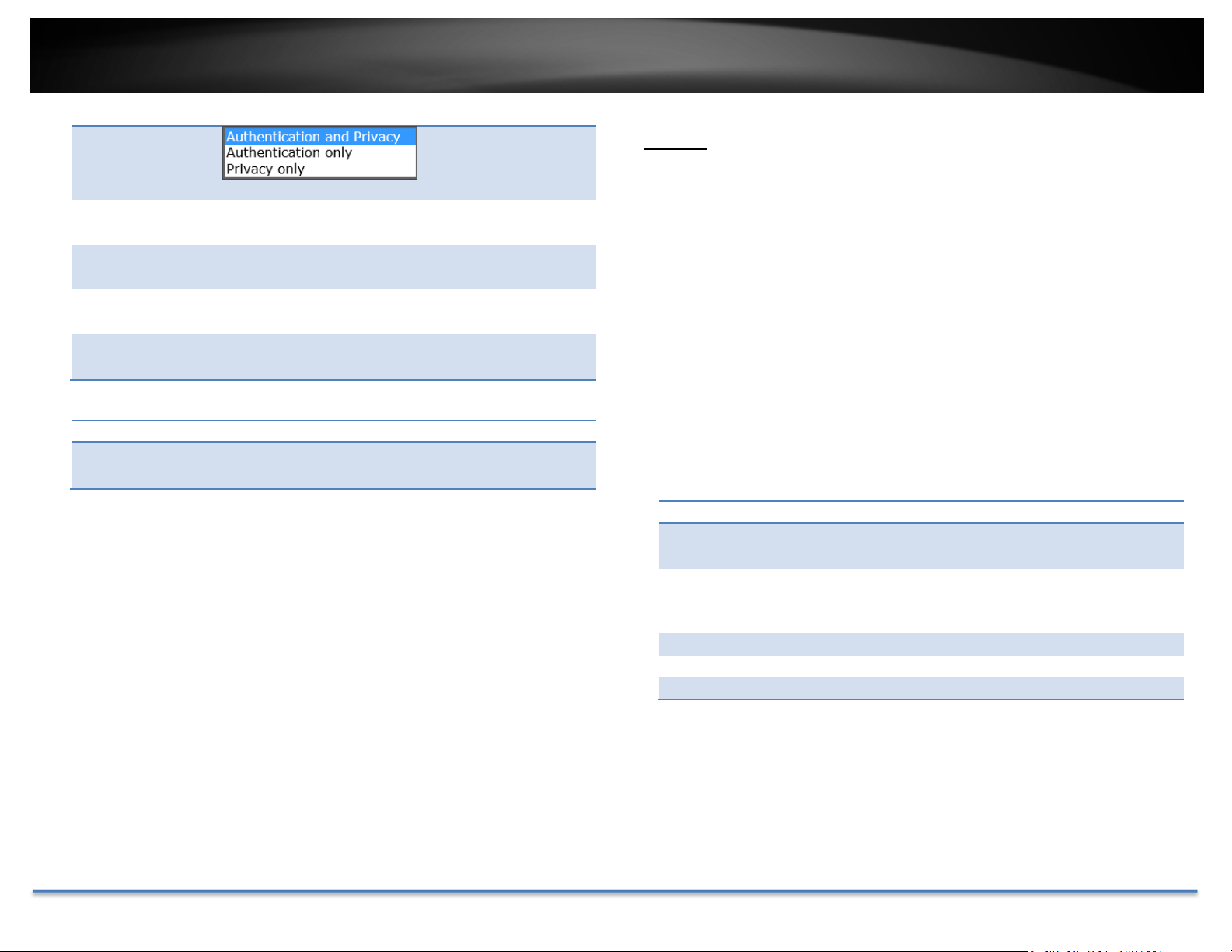
SecurityLevel: Chooseoneofthesecuritylevels.
TRENDnetUser’sGuide
TV‐IP314PI
©Copyright2018TRENDnet.AllRightsReserved. 33
802.1X
Authentication
Algorithm:
Authentication
Password:
Private‐key
Algorithm:
Private‐key
Password:
Choosetheauthenticationmethodtoverifythe
sourceofinformation:MD5orSHA.
Specifytheauthenticationpasswordbetween8to32
letters.
ChoosetheprivacykeytoencryptSNMPmessages:
DESorAES.
Specifytheprivacykeybetween8to32letters.
Setup802.1Xforremoteauthenticationservice.
SNMPOtherSettings
SNMPPort: SNMPserviceportnumber.
ClickSavetosavethechanges
802.1XAuthentication
EnableIEEE
802.1X:
Check this box to enable 802.1X authentication
service.
EAPOLversion:Extensible Authentication Protocol (EAP) over LAN
(EAPoL). Chooseversion1or2. Thisversionnumber
hastomatchtoyour802.1XserviceEAPOLversion.
UserName:
Entertheaccountname.
Password:
Enterthepassword.
Confirm:
Enterthepasswordagain.
ClickSavetosavethechanges
TRENDnetUser’sGuide
TV‐IP314PI
©Copyright2018TRENDnet.AllRightsReserved. 34
IPAddressFilter
Setupalistofclientsallowonlytheclientsonthelisttoaccessthiscamera
ortorejectclientsonthelistfromaccessthiscamera.
QualityofService(QoS)
Setup traffic prioritization tags the video packets to go through network
switchesandrouterswith assigned priority.Youcanset the Differentiated
ServicesCodePoint(DSCP)bitsonoutgoingdatastreams.TheQoScapable
networkdevicewillforwarddifferentdataindifferentpriorities.Themeaning
ofthevalueisdifferentindifferentDiffServdomains.Consultyournetwork
managerforthesetupdetails.
IPAddressFilter
EnableIP
AddressFilter:
IPAddressFilter
Type:
CheckthisboxtoenableIPaddressfilteringservice.
ChooseForbiddentobanthelistedIPaddressesor
Allowedtoallowlistedhosttoaccessthiscamera.
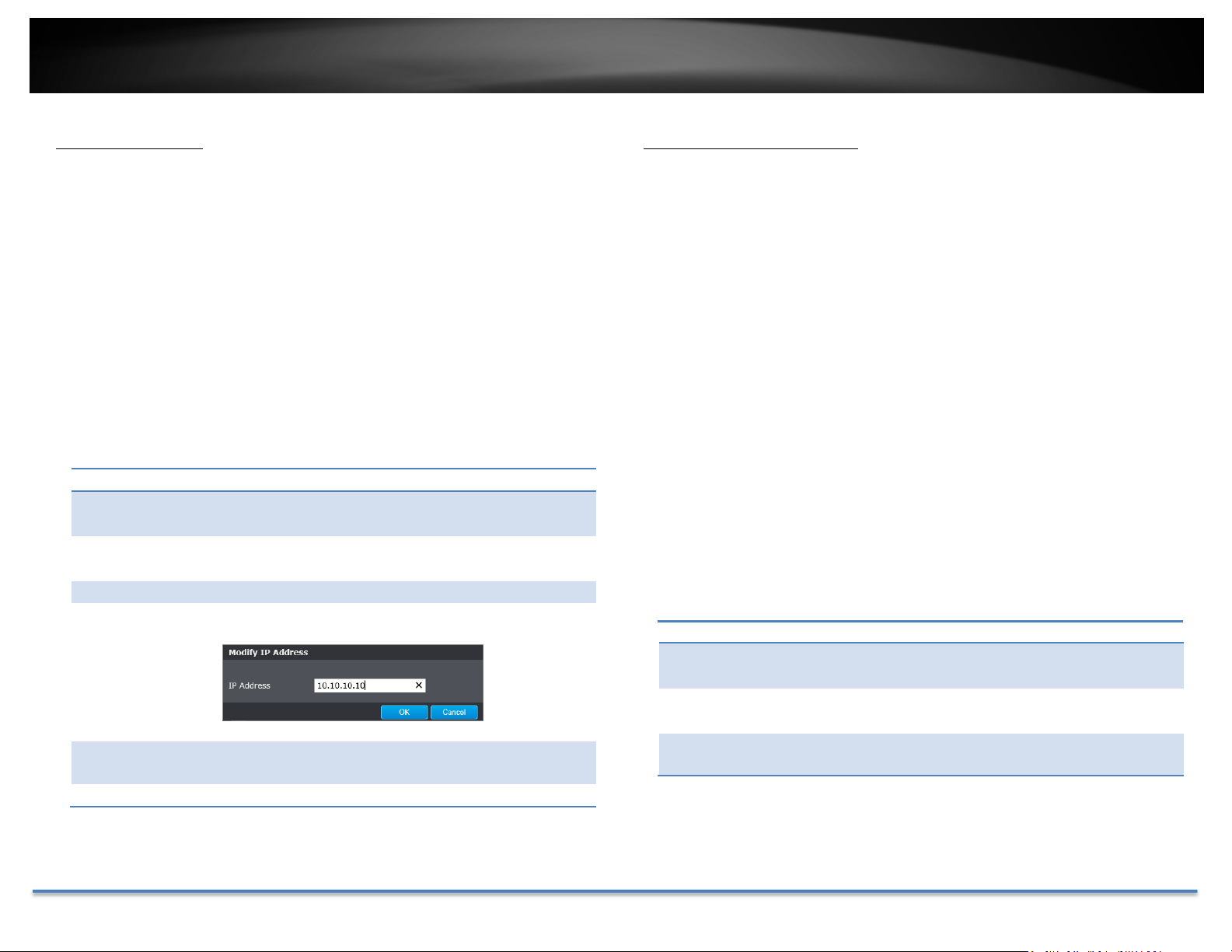
Add: ClickAddtoaddauseraccount
Modify: Tomodifyanentryonthelist,highlighttheentryby
clickingonit.Then,clicktheModifybutton.
EntertheIPaddressthenclickOK
Delete: Todeleteanentryonthelist,highlighttheentryby
clickingonit.Then,clickDelete
IPAddressFilter
Video/Audio
DSCP:
Event/Alarm
DSCP:
Management
DSCP:
Enter Video/Audio DSCP. Default: 0.
Enter Event/Alarm DSCP. Default: 0.
EnterManagementDSCP.Default:0.
Clear: Toclearallentries,clickClear
ClickSavetosavethechanges
ClickSavetosavethechanges
TRENDnetUser’sGuide
TV‐IP314PI
©Copyright2018TRENDnet.AllRightsReserved. 35
UPnP
Universal Plug‐and‐Play is a device discovery protocol set. It allows your
cameratoeasilybefound,forexample,onaWindowsoperationsystem.
UPnP
EnableUPnP: CheckthisboxtoenableUPnPconnection.
FriendlyName: Thenamethatwillbeappearedwhensearched.
VideoSettings
VideoFormat
PortMapping
EnablePort
Mapping:
PortMapping
Mode:
CheckthisboxtoenableUPnPconnection.
ChooseManualorAutoportmapping.
ExternalPort:
Choosetheportnumberformapping.
ClickSavetosavethechanges
VideoEncoding: Choosethevideostreamyouwanttomodify.
H.264andH.265videosarealwaysstreamingand
canbeconfiguredseparately.
H.264+/H.265+ Highercompressionoption
TRENDnetUser’sGuide
TV‐IP314PI
©Copyright2018TRENDnet.AllRightsReserved. 36
Resolution: H.264/H.265 MJPEG
BitrateType: Choosebetweenvariablebitrateorconstantbit
rateforvideocompression.Thedefaultisvariable
rate.
VideoQuality: Choosethevideoquality.Thedefaultismedium
quality.
FrameRate: Choosethecapturingframerate.Thedefaultvalue
is30framespersecond.Reducetheframerateto
reducethecapturefilesize.
Max.Bitrate: Choosethemaximumvideosamplingbitrate.
Default:2048
IFrameInterval AnIFrameisaframethatrecordsacomplete
picture.FramesbetweenIframes,(PframeorB
frame)onlyrecordstheimagedifferencesbetween
twoframes.ChoosetheIFrameIntervalhere.The
defaultis60.
ClickSavetosavethechanges
Substreamcanbeusedforlowerresolutionneededapplication,forexample
mobileappstreamingorNVRstreaming.
ThirdstreamisusedforLiveviewonly,ithasresolutionlimitationonChrome,
FirefoxandSafari.MaxresolutioncanbesupportedunderInternetExplorer.
Note:WhenH.264+/H.265+isenabled,LiveviewonChromeorFirefoxwill
be disabled due to browser limitation, you can continue to use Internet
Explorer or Safari to view the camera otherwise disable the H.264+ and
H.265+option.
DisplaySettings
Adjustvideoimagequality,lightness,andcolorsettingshere.
(Auto‐SwitchMode)
Brightness:Usethesliderorenteranumber(0‐100)toadjustthe
imagebrightness.Default:50
Contrast: Usethesliderorenteranumber(0‐100)toadjustthe
imagecontrast.Default:50
Saturation:Usethesliderorenteranumber(0‐100)toadjustthe
colorsaturation.Thegreaternumbermeansthecolor
willbemoresaturated.Default:50
Sharpness: Usethesliderorenteranumber(0‐100)toadjustthe
imagesharpness.Default:50
TRENDnetUser’sGuide
TV‐IP314PI
©Copyright2018TRENDnet.AllRightsReserved. 37
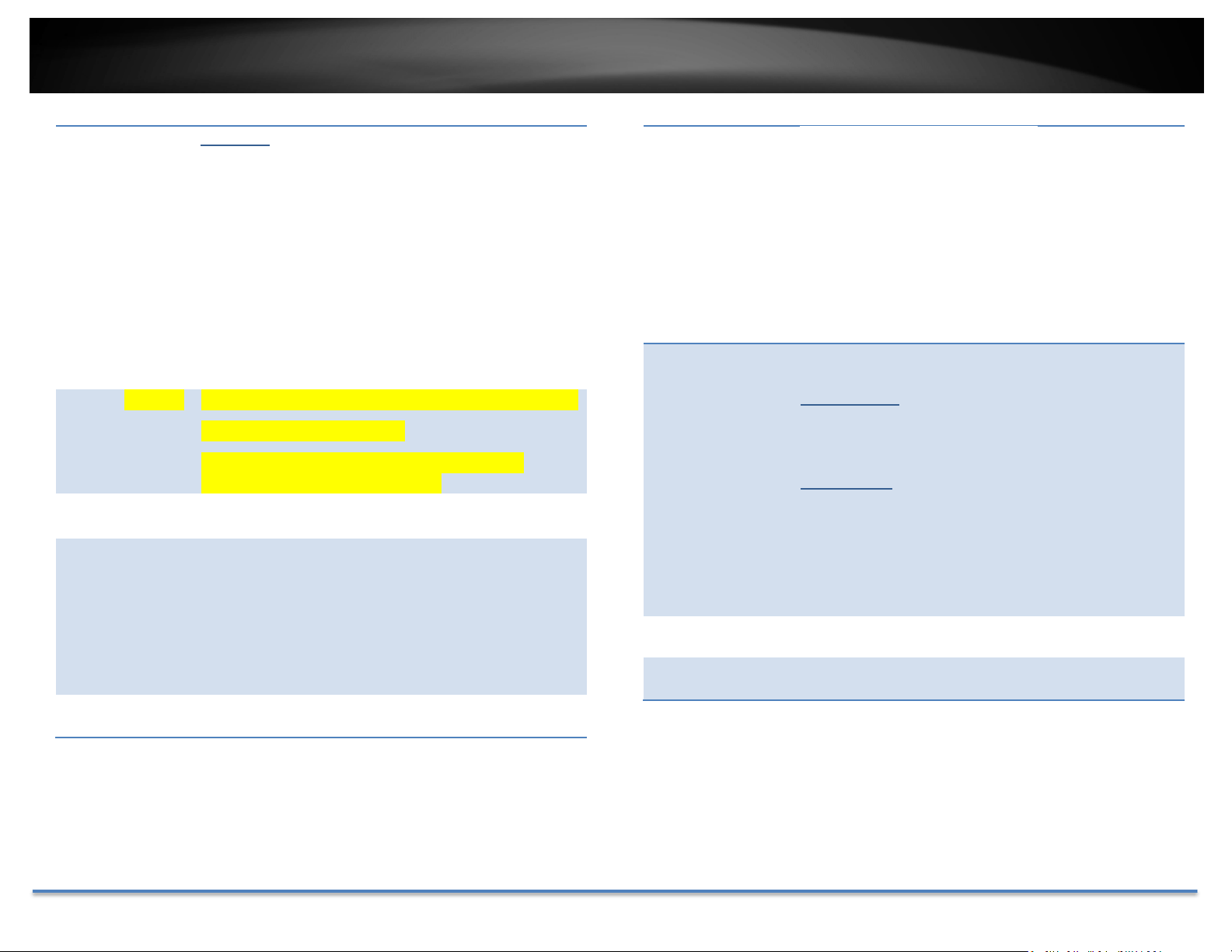
Lightsensitivities
IrisMode: Thiscamerausesfixedlens,thereforetheIrisfunction
isnotconfigurable.
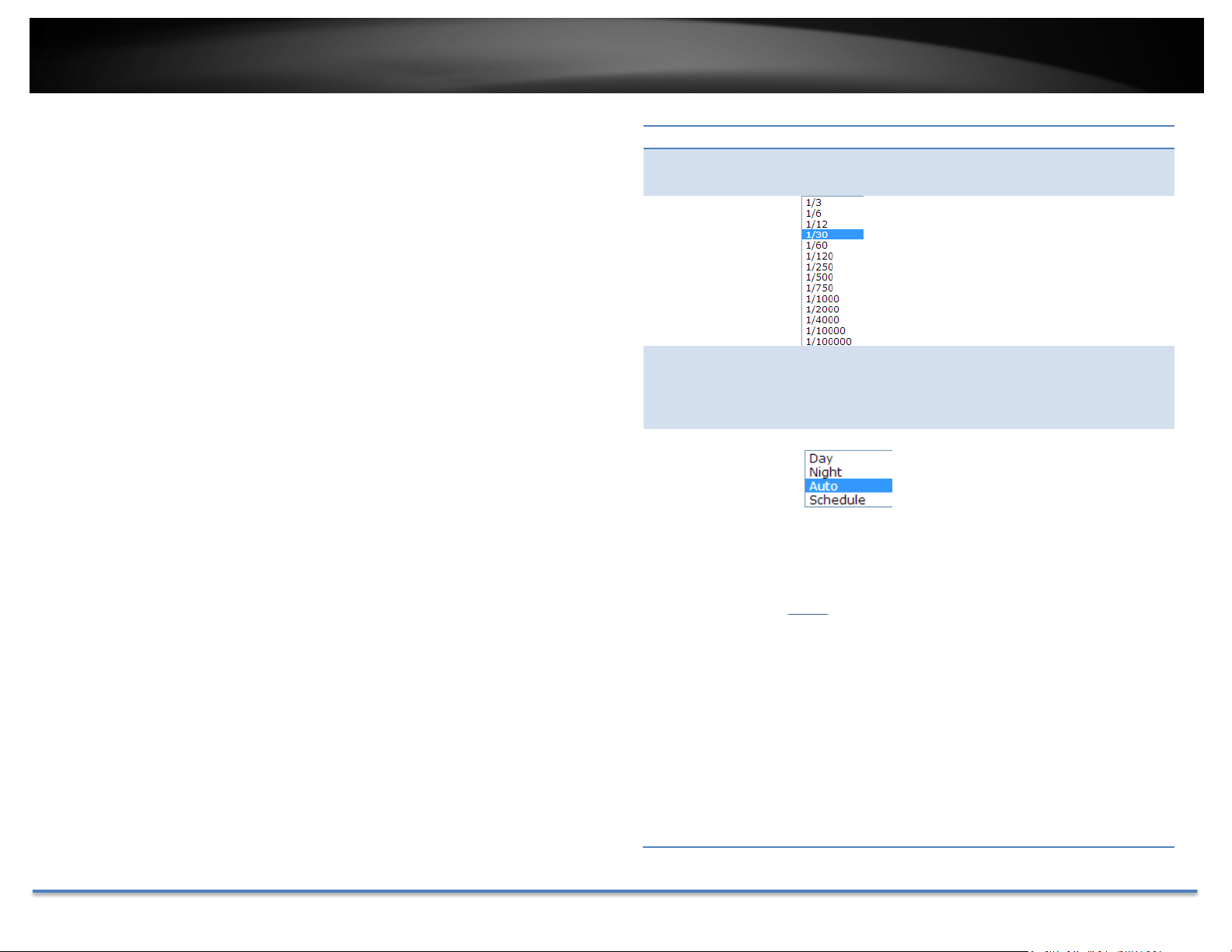
ExposureTime: Adjustthisvalueforexposuretimefor
eachpicture.Youcanchooseavalue
between1/3secondto1/100,000
second.Thedefaultvalueis1/30second
exposuretimeforeachpicture.
Gain Thisvaluebemanuallyconfiguredfrom0to100.The
biggerthevalueis,thebrighterwouldtheimagebe,
andthenoisewouldalsobeamplifiedtoalarger
extent.
Day/Night
Switch:
Choosewhetheryouwantthe
cameratobesettothedaymode
(colorvideo)ornightmode(IR
enhancedblack/whitevideo).You
canmanuallysetittodaymodeor
nightmode,adjustbylighting
(Auto),orpre‐defineschedule.
Auto:
Sensitivity:Thelightsensorsensitivity.
SwitchTime:Thetimedelayedtoswitchbetween
modes.Longerswitchtimecanpreventunnecessary
modeflippingifanobjectisblockingthelightsource
temporarily.Range:5‐120seconds,default:5
seconds.
TRENDnetUser’sGuide
TV‐IP314PI
©Copyright2018TRENDnet.AllRightsReserved. 38
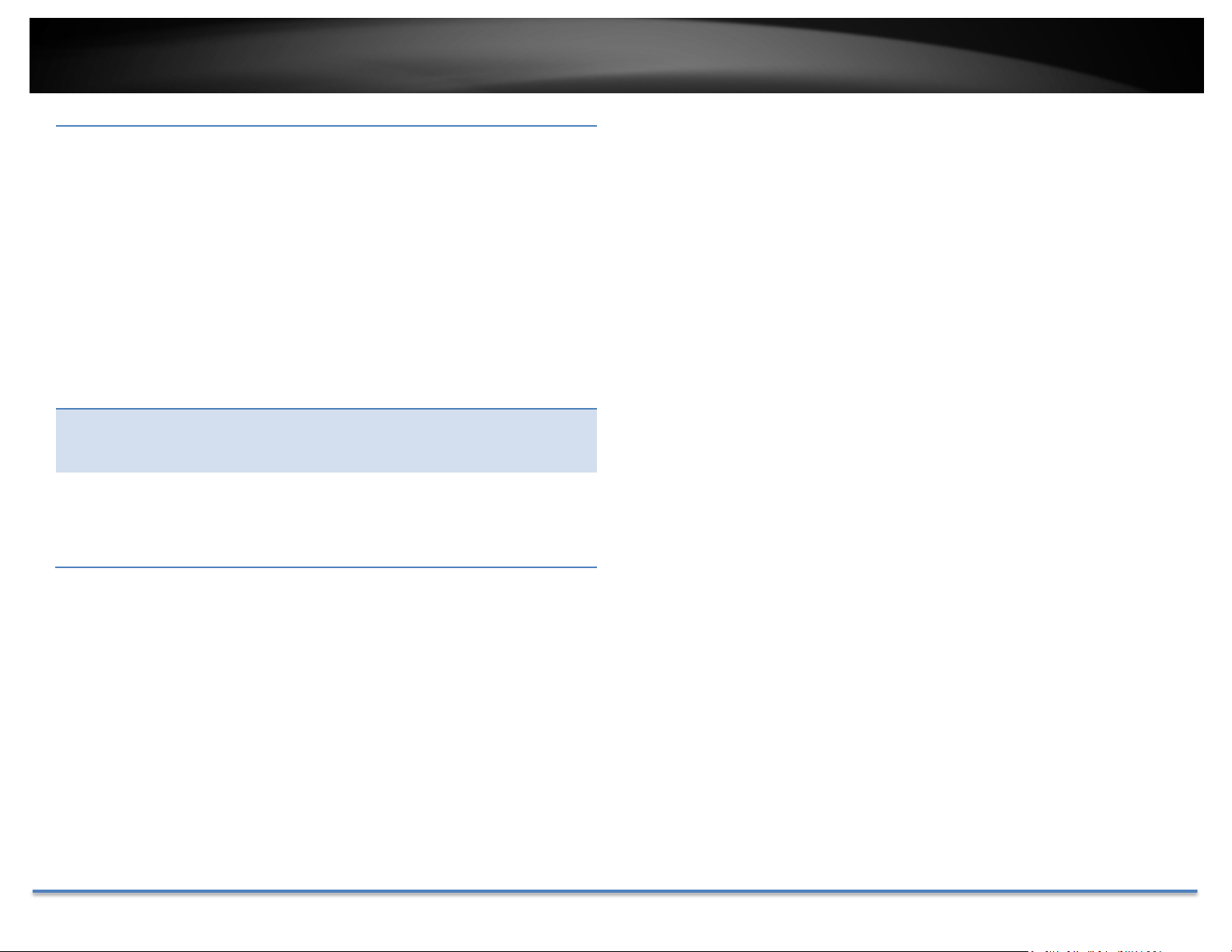
Schedule:
Usequickselectionorenterthetimedownbelow.
ClickOKtoconfirmthetimeyouwanttoset.
StartTime:Thestarttimefordaymode.
StopTime:Thestarttimefordaymode.
SmartIRSetthesupplementlightasON,andAutoandManual
areselectableforlightmode.
SelectAuto,andthesupplementlightchanges
accordingtotheactualluminance.
Mode Adjusttheimagesettingsmanuallyorautomatically.
Ifsettomanual,thedistancecanbeadjusted
BLCAreaIfyoufocusonanobjectagainststrongbacklight,the
object will be too dark to be seen clearly. BLC
compensateslighttotheobjectinthefronttomakeit
WhiteBalance:
DigitalNoise
Reduction:
Noise
Chooseacolortemperatureasthewhitecolorand
compensatethecoloronthewholeimage.
Choosethemodeofnoisereduction.
NormalMode
NoiseReductionLevel:Adjusttheeffectofdigital
noisereduction.Range:0‐100%,default:100%
ExpertMode
SpaceDNR Level:Adjustthespecialdigitalnoise
reductionwithadjacentpixels.Changetherange (0‐
100%)tochangetheadjacencyeffect,default:50%
TimeDNRLevel:Adjustthe3Ddigitalnoisereduction.
Compareandreducenoisebetweenvideoframes.
Range:0‐100%,default:100%
clear. OFF, Up, Down, Left, Right, Center, Auto, and
Customareselectable.
WDR WideDynamicRangecanbeusedwhentheobjectis
infrontofadirectlight.
ReductionLevel Adjustthevalueofthenoisereduction
Mirror Adjusttheimagetochangefromlefttorightorupand
down.
TRENDnetUser’sGuide
TV‐IP314PI
©Copyright2018TRENDnet.AllRightsReserved. 39
RotateTomakeacompleteuseofthe16:9aspectratio,you
can enable the rotate function when you use the
camerainanarrowviewscene.
Wheninstalling,turnthecameratothe90degreesor
rotatethe3‐axislensto90degrees,andsettherotate
modeason,youwillgetanormalviewofthescene
with9:16aspectratiotoignoretheneedless
information such as the wall, and get more
meaningfulinformationofthescene.
SceneMode Choosethesceneasindoororoutdooraccordingto
therealenvironment.
(Scheduled‐Switchmode)
Video
Standard
50Hzand60Hzareselectable.Chooseaccordingto
thedifferentvideostandards;normally 50HzforPAL
standardand60HzforNTSCstandard.

TRENDnetUser’sGuide
TV‐IP314PI
©Copyright2018TRENDnet.AllRightsReserved. 40
Toconfigurethissection
1. Clickthecalendaricontoselectthestarttimeandtheendtime.
• Thestarttimeandendtimerefertothevalidtimefordaymode.
• Thetimeperiodcanstartandendontwodaysinarow.Forexample,
ifyousetstarttimeas10:00andendtimeas1:00,thedaymodewill
beactivatedat10o'clockinthemorningandstoppedat1o'clock
earlyinthenextmorning.
2. ClickWorkingmodetoconfigurecommonparametersapplicabletothe
daymodeandnightmode.
3. ClickDaytabtoconfiguretheparametersapplicablefordaymode.
4. ClickNighttabtoconfiguretheparametersapplicablefornightmode.
Note:Thesettingsaresavedautomaticallywhenparametersarechanged.
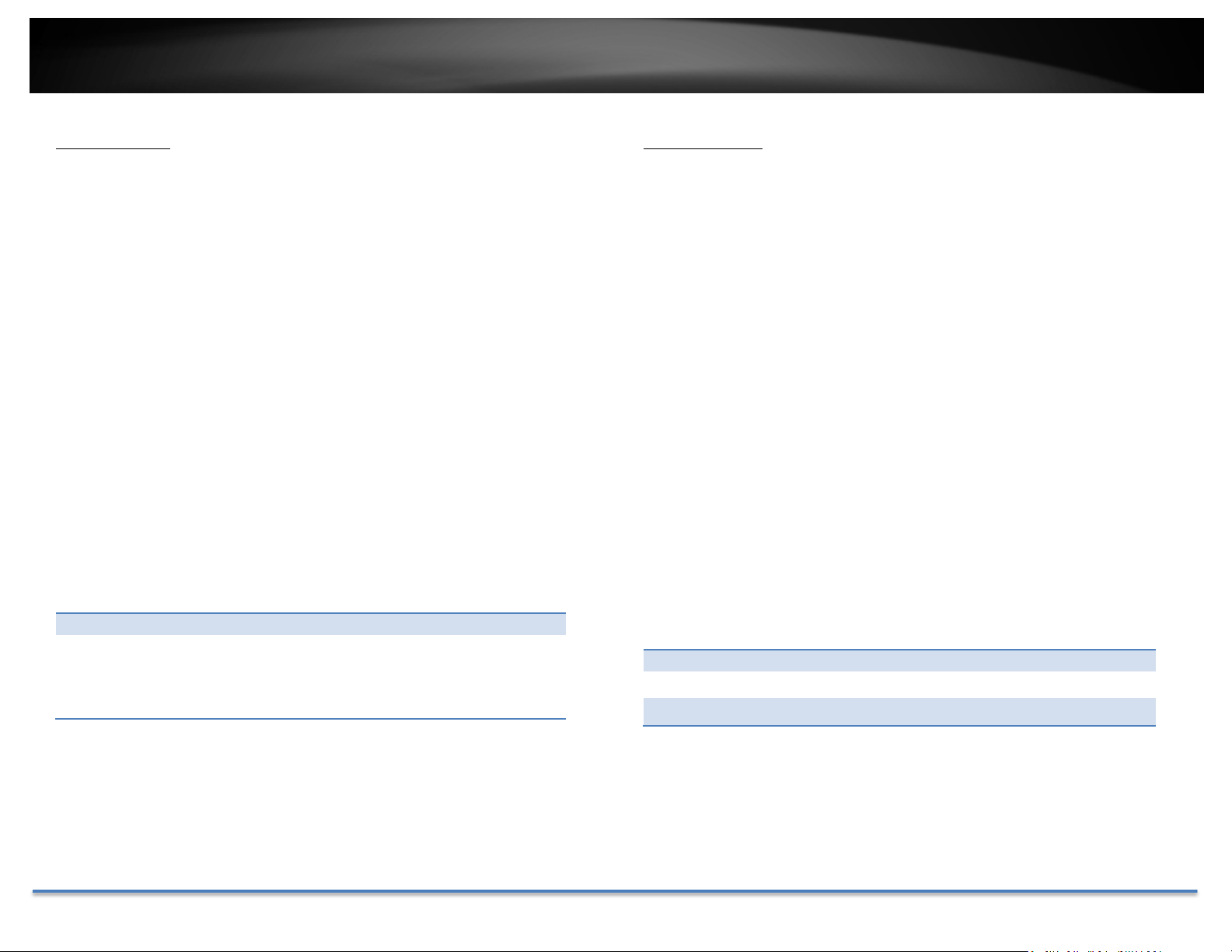
OnScreenDisplaySettings
Displaythecameranameandthetimethevideoisshootingonthescreen
Display
Name:
Checkthisboxtodisplaytheproductnamethatwas
setupinthedevicesettings
DisplayDate:
Checkthisboxtodisplaysystemtime.
DisplayWeek:
Checkthisboxtodisplaytimeoftheweek.
TimeFormat: Select12or24‐hourtimeformat.
DateFormat: Selectthedateformat
DisplayMode: Choosehowthetextwillshowonthescreen.
OSDSize: Select the text size from 16 to 64 or adjusted by
screensizeautomatically.
Movetheredboxtopositionthetext.ClickSavetosavethechanges.
TRENDnetUser’sGuide
TV‐IP314PI
©Copyright2018TRENDnet.AllRightsReserved. 41
TextOverlay
Displayextrainformationonthescreenovertheimage.
CheckBox: Checkthisboxtoenabletextoverlay.
TextField:Enterthetextyouwanttodisplay.Youcanenteryour
local language if you want. The text field allows
maximum 44 English letters or 20 non‐English
characters.
Movetheredboxtopositionthetext.
ClickSavetosavethechanges
PrivacyMask
Create a masking area to keep your privacy. You can create up to four
independentmaskingareasbyclickinganddraggingonthescreen.
EnablePrivacyMask: Checkthisboxtoenableprivacymasking.
StopDrawing: Clickthisbuttontostopdrawing.
ClearAll: Clickthisbuttontoclearallthemaskingareas.
ClickSavetosavethechanges

TRENDnetUser’sGuide
TV‐IP314PI
©Copyright2018TRENDnet.AllRightsReserved. 42
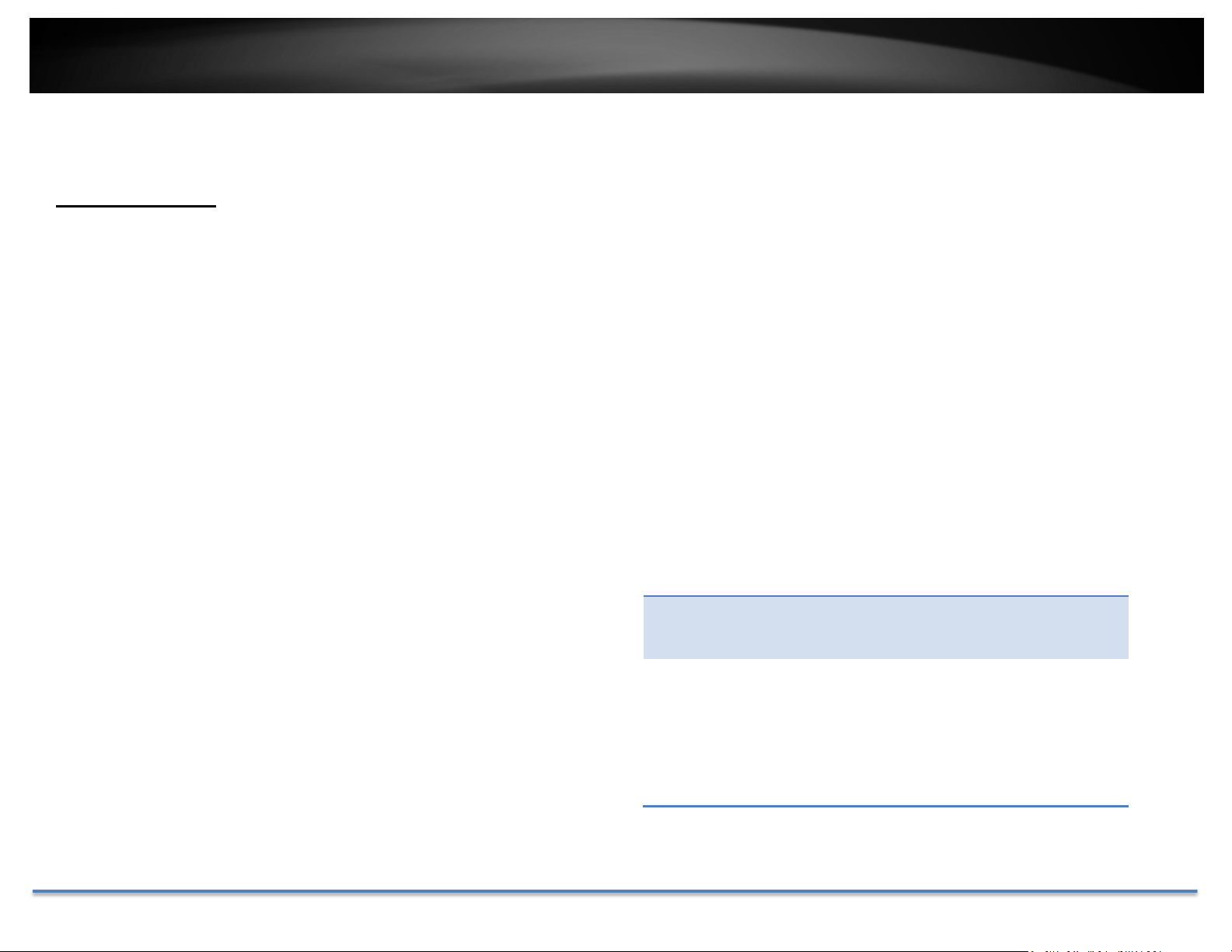
VideoRecording
Pre‐record: Recordingtimebeforetriggerevent.
Post‐record: Recordingtimeaftertriggerevent.
Overwrite: SelectYestoallowolderrecordingstobe
overwritten.
Edit: ClickEdittoedittherecordingschedule.TheEdit
Schedulewindowwillpopup.
1. Selectdayoftheweekyouwanttoedit.
2. SelectAllDayorCustomizedscheduleof
theday.
3. Setthetimeperiodandtheeventyou
wanttotriggerthevideorecording
continuous(alwaysrecording)ormotion
detection.
4. ClickSelectAllortheweekdayyouwant
tohavethesamescheduleondifferent
EnableRecord
Schedule:
CheckthisboxandthenclickSavetoenablevideo
recording.
day.
5. Clickanotherdayoftheweekbyclicking
onitstabtosetthenextschedule.Click
ClickSavetosavethechanges
OKwhenyouhavefinishedyoursettings.
TRENDnetUser’sGuide
TV‐IP314PI
©Copyright2018TRENDnet.AllRightsReserved. 43
Events
MotionDetection
Setuphowthemotiondetectioneventwillbetriggeredandwhatactionswill
betriggered.
Enable
Motion
Detection:
Enable
Motion
Tracking:
Checkthisboxtoenablemotiondetection.ClickSave
tosavethechoice.
Check this box to enable motion tracking. Motion
tracking is a dynamic display that shows the current
status of motion detection. The motion tracking is
displayedwithgridsingreen.Thegridarearepresents
thecameramotionishappening.ClickSavetosavethe
choices.

TRENDnetUser’sGuide
TV‐IP314PI
©Copyright2018TRENDnet.AllRightsReserved. 44
DrawArea: Click Draw Area button to start drawing. Click and
dragontheareayouwanttosetupthemotion
detection.Youcandrawupto8differentareas.Click
Stop Drawing to stop drawing motion detection
areas.
Theredgridsrepresentthemotiondetectionarea.
Sensitivity: Movetheslidertoadjustdetectionsensitivity.
ClearAll: Clickthisbuttontoclearallthesetupareas.
ArmingSchedule
3. Setthetimeperiodandtheeventyouwant
totriggerthevideorecordingcontinuous
(alwaysrecording)ormotiondetection.
4. ClickSelectAllortheweekdayyouwantto
havethesamescheduleondifferentday.
5. Clickanotherdayoftheweekbyclickingon
itstabtosetthenextschedule.ClickOK
whenyouhavefinishedyoursettings.
Notification
SendEmail: Checkthisboxtosendane‐mailnotificationwhen
motionisdetected.
Edit: ClickEdittoedittherecordingschedule.TheEdit
Schedulewindowwillpopup.
Network
Storage:
Checkthisboxtorecordvideotonetworkstorage
whenmotionisdetected.
1. Selectdayoftheweekyouwanttoedit.
2. SelectAllDayorCustomizedscheduleofthe
day.
UploadtoFTP: CheckthisboxtosendsnapshotstoanFTPserver
whenmotionisdetected.
ClickSavetosavethechanges
TRENDnetUser’sGuide
TV‐IP314PI
©Copyright2018TRENDnet.AllRightsReserved. 45
VideoTampering
Thisistodetectifthecamerahasbeentamperedwithandsurveillanceis
compromised.Youcansetuptamperproofnotificationstoalertthesystem
managertocheckthecamera.
Enable
Tamper
Detection:
Checkthisboxtoenabletamperdetection.ClickSave
tosavethesettings.
DrawArea: ClickDrawAreabuttontostartdrawing.Clickanddrag
ontheareayouwanttosetupthetamperdetection.
You can setup only one area for tamper detection.
ClickStop Drawingtostopdrawingmotiondetection
areas.Thegrayblockrepresentsthedetectionarea.
Sensitivity: Movetheslidertoadjustdetectionsensitivity.
ClearAll: Clickthisbuttontoclearallthesetupareas.
TRENDnetUser’sGuide
TV‐IP314PI
©Copyright2018TRENDnet.AllRightsReserved. 46
ArmingSchedule
Edit: ClickEdittoedittherecordingschedule.TheEdit
Schedulewindowwillpopup.
Notification
Providenotificationsforothersystemevents,setupyournotificationshere.
1. Selectdayoftheweekyouwanttoedit.
2. SelectAllDayorCustomizedscheduleofthe
day.
3. Setthetimeperiodandtheeventyouwant
totriggerthevideorecordingcontinuous
(alwaysrecording)ormotiondetection.
4. ClickSelectAllortheweekdayyouwantto
havethesamescheduleondifferentday.
Notification
Notification
Type:
First,choosetheexceptiontype,andthenchoose
thecorrespondingaction.
5. Clickanotherdayoftheweekbyclickingon
itstabtosetthenextschedule.ClickOK
whenyouhavefinishedyoursettings.
Notification
SendEmail: Checkthisboxtosendane‐mailnotificationwhen
motionisdetected.
ClickSavetosavethechanges
SendEmail: Checkthisboxtosendane‐mailnotificationwhen
motionisdetected.
ClickSavetosavethechanges
TRENDnetUser’sGuide
TV‐IP314PI
©Copyright2018TRENDnet.AllRightsReserved. 47
Snapshot
You can set up yourcamera to continuously taking snapshots ortaking
snapshotsonlywheneventshappening.
Eventtriggered
Enable: Check this box to take snapshots when an event is
occurred.
Format: SavesnapshotsinJPEGformat
Resolution: UsesthesameresolutionsetinVideoFormatforthe
snapshotresolution.
Quality: Chooseacompressionqualityforsnapshot.
Interval: Statethetimeintervalbetweenthisseriesof
snapshots.Thedefaultintervalis1second.
Capture
Number:
Statehowmanysnapshotsyouwanttotakeinasingle
triggeredevent.Default:3pictures.
Continuous
Enable: Checkthisboxtotakesnapshotscontinuously.
Format: SavesnapshotsinJPEGformat
Resolution: UsesthesameresolutionsetinVideoFormatforthe
snapshotresolution.
Quality: Chooseacompressionqualityforsnapshots.
Interval: Statethetimeintervalbetweensnapshots.Thedefault
intervalis10seconds.
ClickSavetosavethechanges

TRENDnetUser’sGuide
TV‐IP314PI
©Copyright2018TRENDnet.AllRightsReserved. 48
Email
EnableSSL: CheckthisboxifyourserviceproviderrequiresaSSL
securedconnection.
Setupemailaccountsfornotifications.
Attach
Image/Interval:
CheckAttachImageifyouwanttosendasnapshot
image with the email notification and select the
intervalofsnapshotsinseconds.
Authentication: Checkthisboxifyourserverrequiresapasswordin
ordertosendemail.Mostemailserversrequire
authenticationwhensendinganemail.
Username: Entertheusernameofoutgoingemailaccount
Password: Enterthepassword
Confirm: Enter the password again to confirm that the
passwordwasenteredcorrectly.
ClickSavetosavethechanges
Receiver
Receiver1: Thefirstreceiver’sname.
Receiver1’s
Address:
Thefirstreceiver’semailaddress.
Receiver2: Thesecondreceiver’sname.
Receiver2’s
Address:
Thesecondreceiver’semailaddress.
Receiver3: Thethirdreceiver’sname.
Receiver3’s
Address:
Thethirdreceiver’semailaddress.
Sender
Sender: Enterthenametobeappearedastheemailsender.
ClickSavetosavethechanges
*Note:ManyISPsdoesnotallowserviceport25goingthroughtheirnetwork.Other
Sender’s
Address:
Entersender’semailaddress.
popularportsare587and465.PleaseconsultyouremailserviceproviderandISPfor
detail.
SMTPServer:SimpleMailTransportationProtocolServeraddress,
the outgoing email server address. It may be has
address as your incoming email server, maybe not.
Pleaseaskyouremailserviceproviderfordetail.
SMTPPort: Serviceportnumberforoutgoingemail.*
TRENDnetUser’sGuide
TV‐IP314PI
©Copyright2018TRENDnet.AllRightsReserved. 49
NetworkStorage
NetworkStorage
No: Thesequentialnumberofthenetworkstorage.
Type: Thetypeofstorage.
NetworkStoragemustbesetupbeforeitcanbemanaged. For storage
Server
Address:
EntertheIPaddressofyournetworkstorage.
management,pleaserefertothenextsection.
TheTV‐IP314PIsupportstwoformatsofnetworkstoragefilesystems:NFS
andCIFS.NFS,NetworkFileSystem,isnativelysupportedbyLinuxcomputers
and most NAS, Network Attached Storage. CIFS, Common Internet File
System, is natively supported by Windows® systems and now is generally
supported by Linux. (OS X® file sharing is not standard SMB andnot
compatibleasanetworkstoragediskhere.)
Youcanaddupto8networkstoragesforyourcamera. Therecordingswill
subsequentlybestoredinthesespaces.Savevideofromthefirststorageand
then the next when the first one is full. Click on the entry to change the
settingsandclickSavetosavethesettings.
FilePath: Enterthesharedfolderasfilepathfornetworkstorage.You
can create a folder under the shared folder and make it a
networkvolumehere. Justcreatethe folder and enter the
correctpathnamehere.
Capacity:Enterthesizeofthediskspaceyouwanttoassignforthis
storage.Theminimumdiskspacerequirementis8GB.Ifyou
donotwant to limit the size and use thefullphysical disk
space,putnumber0inthisfield.
FileSystem:ChoosebetweenNFSorCIFSforfilesystem.Ifyouassignthe
networkstorageonaWindows®computer,setittoCIFS.
UserName:Enter the user name if the network storage requires user
name and password. Enter any non‐blank letters if no
authenticationisrequired.
Password: Enterthepasswordtoaccessthenetworkstorage.Enterany
non‐blanklettersifnoauthenticationisrequired.
ClickSavetosavethechanges.Thecameramayreboottomakethe
networkstorageavailable.Gotothenextsectiontoformatandmanage
yournetworkstorage.
Tip:TocreateanetworkstorageonyourWindows®basedsystem,createa
sharedfolderandthentestyoursetupwithanother
computer.EntertheIPaddressofthecomputerhere
and enter the shared folder name with a leading
forwardslash.Forexample,ifyouhaveasharedfolder
named“SMB”,enter“/SMB”intheFilePath.

TRENDnetUser’sGuide
TV‐IP314PI
©Copyright2018TRENDnet.AllRightsReserved. 50
StorageManagement
NetworkStoragemustbesetupbeforeitcanbemanaged.Tosetupstorage,
pleaserefertotheprevioussection.
Format: SelectanetworkstoragevolumeandthenclickFormat to
format your network storage. This action will format the
network volume (shared folder) for video recording.
Placeholder files (formatting files) will be created to make
sure disk allocation is appropriate and the file searching is
optimized.
The volume format is a proprietary user space storage
format. Meaning that you visit the shared folder and see
some structured files. Please do not modify these files
manually. Modifying these files may cause recording and
playbackproblems.Accessyourrecordingandsystemlogvia
the web management user interface to download the
recordingandsnapshots.
Capacity: Thetotalcapacitythisnetworkstoragecanuse.
FreeSpace: Thefreespaceleftforvideorecording,snapshotandlog.
Status: Theconnectionstatustothenetworkstorage.
Property: Thisnetworkstorageisreadonlyorcanbereadandwrite.
Progress: Theprogressofongoingtask.
Note:Theformattingprogressdependsonthesizeofthestorage
andthenetworkbandwidth.Ittakesawhileifyouareformatting
abigvolumeorthenetworkconnectionisnotstable.
TRENDnetUser’sGuide
TV‐IP314PI
©Copyright2018TRENDnet.AllRightsReserved. 51
FTPServer
EnableSnapshot
toFTP:
Checkthisboxifyouwanttostoresnapshotsonthe
FTP.
ServerAddress: EntertheFTPserverIPaddress.
Port: EntertheserviceportnumberoftheFTPserver.
User
Name/Anonymous
:
CheckAnonymousiftheFTPserverdoesnotrequire
authentication.EntertheUserNameiftheFTP
serverrequiresauthentication.
Password: EnterthepasswordoftheFTPaccount.
Confirm: Enterthepasswordagaintomakesurethepassword
wasenteredcorrectly.
Directory
Structure:
WhensavingsnapshotsonanFTPserver,theycan
besavedinasingleplaceororganizedwith
meaningfuldirectorynames.
Saveinrootdirectory:Youcanchoosetostore
allfilesinthesamefolderofFTPlogin.
Saveindirectory:Structureyourfolderswith
cameranameorIPaddress.
Directory:
UseCameraName:Usethecameranameto
organizethesavedfiles.
UseCameraIP:UsethecameraIPaddressto
organizethesavedfiles.
ClickSavetosavethechanges
TRENDnetUser’sGuide
TV‐IP314PI
©Copyright2018TRENDnet.AllRightsReserved. 52
Regulations
FederalCommunicationCommissionInterferenceStatement
Thisequipmenthasbeentestedandfoundtocomplywiththelimitsfora
ClassBdigitaldevice,pursuanttoPart15oftheFCCRules.Theselimitsare
designedtoprovidereasonableprotectionagainstharmfulinterferenceina
residentialinstallation.Thisequipmentgeneratesusesandcanradiateradio
frequency energy and, if not installed and used in accordance with the
instructions, may cause harmful interference to radio communications.
However,thereisnoguaranteethatinterferencewillnotoccurinaparticular
installation. If this equipment does cause harmful interference to radio or
televisionreception,whichcanbedeterminedbyturningtheequipmentoff
andon,theuserisencouragedtotrytocorrecttheinterferencebyoneof
thefollowingmeasures:
• Reorientorrelocatethereceivingantenna.
• Increasetheseparationbetweentheequipmentandreceiver.
• Connecttheequipmentintoanoutletonacircuitdifferentfrom
thattowhichthereceiverisconnected.
• Consultthedealeroranexperiencedradio/TVtechnicianforhelp.
FCC Caution: Any changes or modifications not expressly approved by the
partyresponsibleforcompliancecouldvoidtheuser’sauthoritytooperate
thisequipment.
ThisdevicecomplieswithPart15oftheFCCRules.Operationissubjecttothe
followingtwoconditions:(1)Thisdevicemaynotcauseharmfulinterference,
and (2) this device must accept any interference received, including
interferencethatmaycauseundesiredoperation.
IMPORTANTNOTE:
FCCRadiationExposureStatement:
ThisequipmentcomplieswithFCCradiationexposurelimitssetforthforan
uncontrolledenvironment.Thisequipmentshouldbeinstalledandoperated
withminimumdistance20cmbetweentheradiator&yourbody.
Thistransmittermustnotbeco‐locatedoroperatinginconjunctionwithany
otherantennaortransmitter.
The availability of some specific channels and/or operational frequency
bandsarecountrydependentandarefirmwareprogrammedatthefactory
tomatchtheintendeddestination.Thefirmwaresettingisnotaccessibleby
theenduser.
RoHS
ThisproductisRoHScompliant.
TRENDnetUser’sGuide
TV‐IP314PI
©Copyright2018TRENDnet.AllRightsReserved. 53
Europe–EUDeclarationofConformity
Thisdevicecomplieswith the essentialrequirements oftheDirective
2004/108/ECand2006/95/EC.Thefollowingtestmethodshavebeenapplied
inordertoprovepresumptionofconformitywiththeessentialrequirements
oftheDirective2004/108/ECand2006/95/ECandotherrelevantprovisions
underoursoleresponsibility.
Safety/EMC
ΛΟΙΠΕΣΣΧΕΤΙΚΕΣΔΙΑΤΑΞΕΙΣΤΗΣΟΔΗΓΙΑΣ2004/108/EK,
2006/95/ΕΚκαι.
Français[French]ParlaprésenteTRENDnetdéclarequel'appareilTV‐IP314PIest
conformeauxexigencesessentiellesetauxautresdispositions
pertinentesdeladirective2004/108/CE,2006/95/CEet.
Italiano[Italian] ConlapresenteTRENDnetdichiarachequestoTV‐IP314PIè
conformeairequisitiessenzialiedallealtredisposizioni
pertinentistabilitedalladirettiva2004/108/CEe2006/95/CE.
Latviski[Latvian] AršoTRENDnetdeklarē,kaTV‐IP314PIatbilstDirektīvas
2004/108/EKun2006/95/EKbūtiskajāmprasībāmuncitiemar
tosaistītajiemnoteikumiem.
EN60950‐1:2006+A11:2010+A12:2011+A2:2013
EN55024:2010+A1:2015
EN55032:2015
EMCDirective2014/30/EC/RoHSDirective2011/65/EU
WEEEDirective2012/19/EU/REACHRegulation(EC)No.1907/2006
Lietuvių
[Lithuanian]
Nederlands
[Dutch]
ŠiuoTRENDnetdeklaruoja,kadšisTV‐IP314PIatitinkaesminius
reikalavimusirkitas2004/108/EBir2006/95/EBDirektyvos
nuostatas.
HierbijverklaartTRENDnetdathettoestelTV‐IP314PIin
overeenstemmingismetdeessentiëleeisenendeandere
relevantebepalingenvanrichtlijn2004/108/EGen2006/95/EG.
LowVoltageDirective2014/35/EC
Česky[Czech] TRENDnettímtoprohlašuje,žetentoTV‐IP314PIjeveshoděse
Malti[Maltese] Hawnhekk,TRENDnet,jiddikjaralidanTV‐IP314PIjikkonforma
mal‐ħtiġijietessenzjaliumaprovvedimentioħrajnrelevantili
hemmfid‐Dirrettiva2004/108/KEu2006/95/KE.
základnímipožadavkyadalšímipříslušnýmiustanoveními
směrnice2004/108/ESa2006/95/ES.
Dansk[Danish] UndertegnedeTRENDneterklærerherved,atfølgendeudstyr
Magyar
[Hungarian]
Alulírott,TRENDnetnyilatkozom,hogyaTV‐IP314PImegfelela
vonatkozóalapvetõkövetelményeknekésaz2004/108/EKésa
2006/95/EKirányelvegyébelõírásainak.
TV‐IP314PIoverholderdevæsentligekravogøvrigerelevante
kravidirektiv2004/108/EFog2006/95/EF.
Deutsch[German] HiermiterklärtTRENDnet,dasssichdasGerätTV‐IP314PIin
Polski[Polish] NiniejszymTRENDnetoświadcza,żeTV‐IP314PIjestzgodnyz
zasadniczymiwymogamiorazpozostałymistosownymi
postanowieniamiDyrektywy2004/108/WEi2006/95/.
ÜbereinstimmungmitdengrundlegendenAnforderungenund
denübrigeneinschlägigenBestimmungenderRichtlinie
2004/108/EGund2006/95/EGbefindet.
Eesti[Estonian] KäesolevagakinnitabTRENDnetseadmeTV‐IP314PIvastavust
direktiivi2004/108/EÜja2006/95/EÜpõhinõueteleja
nimetatuddirektiivisttulenevateleteisteleasjakohastele
Português
[Portuguese]
Slovensko
[Slovenian]
TRENDnetdeclaraqueesteTV‐IP314PIestáconformecomos
requisitosessenciaiseoutrasdisposiçõesda
Directiva2004/108/CEe2006/95/CE.
TRENDnetizjavlja,dajetaTV‐IP314PIvskladuzbistvenimi
zahtevamiinostalimirelevantnimidoločili
direktive2004/108/ESin2006/95/ES.
sätetele.
English Hereby,TRENDnet,declaresthatthisTV‐IP314PIisin
compliancewiththeessentialrequirementsandotherrelevant
provisionsofDirective2004/108/ECand2006/95/EC.
Español[Spanish] PormediodelapresenteTRENDnetdeclaraqueelTV‐IP314PI
cumpleconlosrequisitosesencialesycualesquieraotras
disposicionesaplicablesoexigiblesdelaDirectiva2004/108/CE
y2006/95/CE.
Ελληνική[Greek] ΜΕΤΗΝΠΑΡΟΥΣΑTRENDnetΔΗΛΩΝΕΙΟΤΙTV‐IP314PI
ΣΥΜΜΟΡΦΩΝΕΤΑΙΠΡΟΣΤΙΣΟΥΣΙΩΔΕΙΣΑΠΑΙΤΗΣΕΙΣΚΑΙΤΙΣ
Slovensky[Slovak] TRENDnettýmtovyhlasuje,žeTV‐IP314PI
spĺňazákladnépožiadavkya
všetkypríslušnéustanoveniaSmernice2004/108/ESa
2006/95/ES.
Suomi[Finnish] TRENDnetvakuuttaatätenettäTV‐IP314PItyyppinenlaiteon
direktiivin2004/108/EYja2006/95/EYoleellistenvaatimustenja
sitäkoskeviendirektiivinmuidenehtojenmukainen.
Svenska[Swedish] HärmedintygarTRENDnetattdennaTV‐IP314PIstårI
överensstämmelsemeddeväsentligaegenskapskravochövriga
relevantabestämmelsersomframgåravdirektiv2004/108/EG
och2006/95/EG.

TRENDnetUser’sGuide
TV‐IP314PI
©Copyright2018TRENDnet.AllRightsReserved. 54
LimitedWarranty
TRENDnetwarrantsitsproductsagainstdefectsinmaterialandworkmanship,under
normaluseandservice,forthefollowinglengthsoftimefromthedateofpurchase.
TV‐IP314PI–3YearsWarranty
Ifaproductdoesnotoperateaswarrantedduringtheapplicablewarrantyperiod,
TRENDnetshallreservetheright,atitsexpense,torepairorreplacethedefective
product or part and deliver an equivalent product or part to the customer. The
repair/replacementunit’swarrantycontinuesfromtheoriginaldateofpurchase.All
productsthatarereplacedbecomethepropertyofTRENDnet.Replacementproducts
may be new or reconditioned. TRENDnet does not issue refunds orcredit.Please
contactthepoint‐ofpurchasefortheirreturnpolicies.
TRENDnet shall not be responsible for any software, firmware, information, or
memorydataofcustomercontainedin,storedon,orintegratedwithanyproducts
returnedtoTRENDnetpursuanttoanywarranty.
Therearenouserserviceablepartsinsidetheproduct.Donotremoveorattemptto
servicetheproductbyanyunauthorizedservicecenter.Thiswarrantyisvoidedif(i)
theproducthasbeenmodifiedorrepairedbyanyunauthorizedservicecenter,(ii)
the productwas subject toaccident, abuse,or improperuse (iii) theproductwas
subjecttoconditionsmoreseverethanthosespecifiedinthemanual.
Warranty service may be obtained by contacting TRENDnet within the applicable
warranty period and providing a copy of the dated proof of the purchase. Upon
propersubmissionofrequireddocumentationaReturnMaterialAuthorization(RMA)
number will be issued. An RMA number is required in order to initiate warranty
servicesupportforall TRENDnetproducts.ProductsthataresenttoTRENDnetfor
RMAservicemusthavetheRMAnumbermarkedontheoutsideofreturnpackages
andsenttoTRENDnetprepaid,insuredandpackagedappropriatelyforsafeshipment.
CustomersshippingfromoutsideoftheUSAandCanadaareresponsibleforreturn
shippingfees. Customersshippingfrom outside ofthe USAare responsible for
customcharges,includingbutnotlimitedto,duty,tax,andotherfees.
WARRANTIES EXCLUSIVE: IF THE TRENDNET PRODUCT DOES NOT OPERATE AS
WARRANTED ABOVE, THE CUSTOMER’S SOLE REMEDY SHALL BE, AT TRENDNET’S
OPTION, REPAIR OR REPLACE. THE FOREGOING WARRANTIES AND REMEDIES ARE
EXCLUSIVEANDAREINLIEUOFALLOTHERWARRANTIES,EXPRESSEDORIMPLIED,
EITHERINFACTORBYOPERATIONOFLAW,STATUTORYOROTHERWISE,INCLUDING
WARRANTIESOFMERCHANTABILITYANDFITNESSFORAPARTICULARPURPOSE.
TRENDNETNEITHERASSUMES NORAUTHORIZESANYOTHERPERSONTOASSUME
FOR IT ANY OTHER LIABILITY IN CONNECTION WITH THE SALE, INSTALLATION
MAINTENANCEORUSEOFTRENDNET’SPRODUCTS.
TRENDNETSHALLNOTBELIABLEUNDERTHISWARRANTYIFITSTESTINGAND
EXAMINATION DISCLOSE THAT THE ALLEGED DEFECT IN THE PRODUCT DOES NOT
EXISTORWASCAUSEDBYCUSTOMER’SORANYTHIRDPERSON’SMISUSE,NEGLECT,
IMPROPER INSTALLATION OR TESTING, UNAUTHORIZED ATTEMPTS TO REPAIR OR
MODIFY,ORANYOTHERCAUSEBEYONDTHERANGEOFTHEINTENDEDUSE,ORBY
ACCIDENT,FIRE,LIGHTNING,OROTHERHAZARD.
LIMITATIONOFLIABILITY:TOTHEFULLEXTENTALLOWEDBYLAWTRENDNETALSO
EXCLUDES FOR ITSELF AND ITS SUPPLIERS ANY LIABILITY, WHETHER BASED IN
CONTRACTORTORT(INCLUDINGNEGLIGENCE),FORINCIDENTAL,CONSEQUENTIAL,
INDIRECT,SPECIAL,ORPUNITIVEDAMAGESOFANYKIND,ORFORLOSSOFREVENUE
OR PROFITS, LOSS OF BUSINESS, LOSS OF INFORMATION OR DATE, OR OTHER
FINANCIALLOSSARISINGOUTOFORINCONNECTIONWITHTHESALE,INSTALLATION,
MAINTENANCE, USE, PERFORMANCE, FAILURE, OR INTERRUPTION OF THE
POSSIBILITYOFSUCHDAMAGES,ANDLIMITSITSLIABILITYTOREPAIR,REPLACEMENT,
ORREFUNDOFTHEPURCHASEPRICEPAID,ATTRENDNET’SOPTION.THIS
DISCL
AIMER OF LIABILITY FOR DAMAGES WILL NOT BE AFFECTED IF ANY REMEDY
PROVIDEDHEREINSHALLFAILOFITSESSENTIALPURPOSE.
GoverningLaw:ThisLimitedWarrantyshallbegovernedbythelawsofthestateof
California.
SomeTRENDnetproductsincludesoftwarecodewrittenbythirdpartydevelopers.
ThesecodesaresubjecttotheGNUGeneralPublicLicense(“GPL”) orGNULesser
GeneralPublicLicense(“LGPL”).
Gotohttp://www.trendnet.com/gplorhttp://www.trendnet.comDownloadsection
andlookforthedesiredTRENDnetproducttoaccesstotheGPLCodeorLGPLCode.
ThesecodesaredistributedWITHOUTWARRANTYandaresubjecttothecopyrights
of the developers. TRENDnetdoes not provide technical support for these codes.
Pleasegotohttp://www.gnu.org/licenses/gpl.txtorhttp://www.gnu.org/licenses/
lgpl.txtforspecifictermsofeachlicense.
1.2.18 TV‐IP314PI2.0