For Swann Wireless Alert systems
Add-on
Alert Sensor
DIY WIRELESS ALERT
EN
Instruction Manual
READ ME
FIRST

2
About this Manual
Important Safety Instructions
FCC Statement
The content in this manual is for information purposes only and is
subject to change without notice. While every effort is made to ensure
that this manual is accurate and complete at the time of printing,
no liability is assumed for any errors and omissions that may have
occurred. As we’re constantly making improvements to our products,
firmware, software and user manuals, we reserve the right to change
the information without prior notice. For the latest version of this user
manual, please visit: www.swann.com
When fitting the screws into the wall, make sure you are not inserting
them anywhere near electrical wires, including wires that may be
behind the wall. If you are unsure at all, please get a professional to
check first and install the screws for you.
This equipment has been tested and found to comply with the limits
for Class B digital device, pursuant to part 15 of the FCC Rules. These
limits are designed to provide reasonable protection against harmful
interference in a residential installation. This equipment generates,
uses and can radiate radio frequency energy and, if not installed
and used in accordance with the instructions, may cause harmful
interference to radio or television reception, which can be determined
by turning the equipment off and on, the user is encouraged to try to
correct the interference by one or more of the following measures:
• Reorient or relocate the receiving antenna
• Increase the separation between the equipment and the receiver
• Connect the equipment into an outlet on a circuit different from
that to which the receiver is connected
• Consult the dealer or an experienced radio/TV technician for help
This device complies with part 15 of the FCC Rules. Operation is subject
to the following two conditions: (1) This device may not cause harmful
interference, and (2) This device must accept any interference received,
including interference that may cause undesired operation.
FCC Caution: Any changes or modifications not expressly approved by
the party responsible for compliance could void the user's authority to
operate this equipment.

3
Battery Safety Information
Limited Warranty Terms & Conditions
Replace batteries at the same time. Do not mix new and old batteries
or battery types (for example, alkaline and lithium batteries). Keep
batteries out of reach of children. Dispose of used batteries promptly in
accordance with local regulations.
Swann Communications warrants this product against defects in
workmanship and material for a period of one (1) year from it’s
original purchase date. You must present your receipt as proof of date
of purchase for warranty validation. Any unit which proves defective
during the stated period will be repaired without charge for parts or
labour or replaced at the sole discretion of Swann. The end user is
responsible for all freight charges incurred to send the product to
Swann’s repair centres. The end user is responsible for all shipping
costs incurred when shipping from and to any country other than the
country of origin.
The warranty does not cover any incidental, accidental or consequential
damages arising from the use of or the inability to use this product.
Any costs associated with the fitting or removal of this product by a
tradesman or other person or any other costs associated with its use
are the responsibility of the end user. This warranty applies to the
original purchaser of the product only and is not transferable to any
third party. Unauthorized end user or third party modifications to any
component or evidence of misuse or abuse of the device will render all
warranties void.
By law some countries do not allow limitations on certain exclusions
in this warranty. Where applicable by local laws, regulations and legal
rights will take precedence.
For Australia: Our goods come with guarantees which cannot be
excluded under Australian Consumer Law. You are entitled to a
replacement or refund for a major failure and for compensation
for any other reasonably foreseeable loss or damage. You are also
entitled to have the goods repaired or replaced if the goods fail to be
of acceptable quality and the failure does not amount to major failure.

4
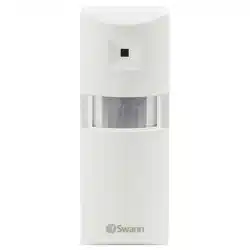
Status LED
Groove
Passive
Infrared
Motion
Detector
Battery
compartment
At a Glance
Installing batteries
Thank you for choosing the Add-on Alert Sensor. It's the ideal
addition to your Swann Wireless Alert system.
Please take a moment to familiarize yourself with key parts of
your Alert Sensor.
The Alert Sensor requires 3 x AAA batteries (not included) to
operate. To install batteries:
1. Use a small Phillips screwdriver to remove the screws from
the battery compartment cover, and then lift up the cover.
2. Insert 3 new "AAA" alkaline batteries, matching the polarity
markings (+ and -) inside the battery compartment.
3. Screw the battery compartment cover back into place.

Pairing with the receiver
Assign your Alert Sensor to one of the 3 channels (each
with distinct audible sound) available on the Indoor Alarm
Receiver.
1. Place the Alert Sensor faced down to avoid triggering it.
2. Decide which channel (1, 2 or 3)
you want to assign your sensor to,
and then press and hold the desired
Channel button on the back of the
Indoor Alarm Receiver until the LED
indicator for that channel lights up.
3. Within 10 seconds, trigger the Alert Sensor by lifting it up.
The Indoor Alarm Receiver sounds the channel alarm and
flashes the channel LED to confirm successful pairing.
Mounting the Alert Sensor
The Alert Sensor can be deployed outdoors (it's
weatherproof!), for example near the entry to your driveway
or garage, or simply mount it indoors near a likely access
point such as the front door/entrance to your home or
business.
For more useful installation tips, see "Placement guide" on
page 7.
1. Attach the mounting bracket for the Alert Sensor to a
wall using the supplied screws. You may need to use wall
plugs depending on the surface.
2. Fit the tab on the mounting bracket into the groove on
the back of the Alert Sensor. Slide the Alert Sensor down
until it locks into place.
3. Adjust the angle of the Alert Sensor accordingly.

6
Adjusting the alarm volume
You can change the loudness of the Indoor Alarm Receiver
using the Volume button on the back of the receiver.
Three volume levels are available: High, Medium and Low.
Silent mode
Like some peace and quiet for a period of time? You can put the
alarm triggered by the Alert Sensor on “silent”. Simply press
the Channel button that corresponds with the Alert Sensor that
you want the alarm muted. The Indoor Alarm Receiver beeps
twice, confirming the alarm has been turned off.
If the Alert Sensor detects movement while the alarm
is muted, you will still be visually alerted by the
corresponding Channel LED indicator blinking on the
Indoor Alarm Receiver.
To unmute the alarm, press the corresponding Channel
button again. You will hear a single confirmation beep from
the Indoor Alarm Receiver.
Low battery warning
When the status LED on the Alert Sensor starts blinking
continuously, this indicates the batteries are running low on
power. Install new batteries immediately so the Alert Sensor
can continue to operate normally.

7
Ideally, the Alert Sensor should only see the entry/exit
point (e.g., your driveway), and the only moving objects in
front of the sensor should be the cars or people you want
to detect (i.e., no obstructions in the field of view).
Avoid placing the Alert Sensor in an area where it will face
direct or reflected sunlight, or where the environmental
temperature may change suddenly (for example, near
heat or cold producing devices such as heaters, air
conditioners, or lamps).
Any moving heat source can trigger the Alert Sensor. For
example, a moving shadow on a sunny day may trigger the
Alert Sensor, or the sun coming out from behind clouds.
False triggers should be rare, but will occasionally occur.
Wandering small animals (such as a cat or similar) can,
under some circumstances, trigger the Alert Sensor.
Therefore, we suggest that the Alert Sensor is not suited to
areas where pets are routinely kept.
Placement guide
The Alert Sensor, under typical conditions, is designed to detect
people and vehicles moving within an area of approximately 6
meters (around 20 feet) at a 100° angle from the sensor.
For best coverage and to maximize detection, mount the Alert
Sensor approximately 2m/6ft off the ground, pointing on a
slightly downwards angle.
6ft/2m
13ft/4m
20ft/6m
100°

MALSEN1110815E
© Swann Communications 2015
Helpdesk / Technical Support Details
Swann Technical Support
All Countries E-mail: [email protected]
Telephone Helpdesk
USA 1800 627 2799
USA Parts & Warranty 1800 627 2799
(M-F, 9am-5pm US PT)
AUSTRALIA 1800 788 210
NEW ZEALAND 0800 479 266
UK 0808 168 9031