WARNING
!
Do not use on circuits exceeding specified voltage.
Higher voltage will damage control and could cause
shock or fire hazard.
Do not short out terminals on gas valve or primary
control to test. Short or incorrect wiring will damage
thermostat and could cause personal injury and/or
property damage.
Thermostat installation and all components of the system
shall conform to Class II (current limited) circuits per the
NEC code. Failure to do so could cause a fire hazard.
FAILURE TO READ AND FOLLOW ALL INSTRUCTIONS CAREFULLY
BEFORE INSTALLING OR OPERATING THIS CONTROL COULD CAUSE
PERSONAL INJURY AND/OR PROPERTY DAMAGE.
DESCRIPTION
SPECIFICATIONS
ELECTRICAL DATA
Electrical Rating:
20 to 30 VAC 50/60 Hz. or D.C.
0.05 to 1.0 Amps (Load per terminal)
1.5 Amps Maximum Total Load (All terminals combined)
THERMAL DATA
Setpoint Temperature Range:
45°F to 90°F (7°C to 32°C)
Operating Ambient Temperature Range:
32°F to 105°F
Operating Humidity Range:
0 to 90% RH (non-condensing)
Shipping Temperature Range:
-4°F to 149°F
APPLICATIONS
For use with the following Class II systems:
• Standard heat pump systems with electric, gas or oil Aux
heat with 24VAC Hot and Common available
• Single-stage heat pump systems with no Aux heat with
24VAC Hot and Common available
DO NOT USE WITH:
• Millivolt systems
• Systems exceeding 30 VAC and 1.5 amps
• 3-wire zoned hydronic heating systems
1F82-261
Programmable Electronic Digital
Heat Pump Thermostat
INSTALLATION AND
OPERATION INSTRUCTIONS
PRECAUTIONS
This thermostat is intended for use with a low voltage NEC
Class II system. Do not use this thermostat with a line voltage
system. If in doubt about whether your wiring is millivolt, line,
or low voltage, have it inspected by a qualified heating and air
conditioning contractor or electrician.
Do not exceed the specification ratings.
All wiring must conform to local and national electrical codes
and ordinances.
This control is a precision instrument, and should be handled
carefully. Rough handling or distorting components could cause
the control to malfunction.
Operator: Save these instructions for future use!
CAUTION
!
To prevent electrical shock and/or equipment damage,
disconnect electric power to system at main fuse or
circuit breaker box until installation is complete.
• LCD continuously displays set point, and alternately
displays time and room temperature
• Continuous Backlit display option
• Temperature override until next program period
• Manual program override (HOLD temperature)
• Temporary HOLD
• °F/°C convertibility
• Temperature range 45° to 90°F
• R, C, Y, W2, G, O/B, E, and L terminals for single or
two-transformer systems
Your new 5-Day/1-Day/1-Day Digital Thermostat uses the tech-
nology of a solid-state microcomputer to provide precise time/
temperature control. This thermostat offers you the flexibility to
design heating and cooling programs that fit your needs.
Features:
• Separate 5-day (weekday) and 1-day/1-day (Saturday/
Sunday) programming with four separate time/temperature
periods per day
• Simultaneous heat and cool program storage
• Preprogrammed temperature control
• Optional battery back-up for AC power loss
white-rodgers.com
emersonclimate.com
PART NO. 37- 6175G
Replaces 37-6175F
1632
WARNING
!
For California Residents: This product contains a
chemical known to the state of California to cause
cancer and birth defects and other reproductive harm.
2
INSTALLATION
REMOVE OLD THERMOSTAT
1. Shut off electricity at the main fuse box until installation is
complete. Ensure that electrical power is disconnected.
2. Remove the front cover of the old thermostat. With wires
still attached, remove wall plate from the wall. If the old
thermostat has a wall mounting plate, remove the thermostat
and the wall mounting plate as an assembly.
3. Identify each wire attached to the old thermostat using
the labels enclosed with the new thermostat.
4. Disconnect the wires from old thermostat one at a time. DO
NOT LET WIRES FALL BACK INTO THE WALL.
5. Install new thermostat using the following procedures.
ATTENTION!
This product does not contain mercury. However, this product
may replace a unit which contains mercury.
Do not open mercury cells. If a cell becomes damaged, do not
touch any spilled mercury. Wearing nonabsorbent gloves, take
up the spilled mercury and place into a container which can be
sealed. If a cell becomes damaged, the unit should be discarded.
Mercury must not be discarded in household trash. When the unit
this product is replacing is to be discarded, place in a suitable
container. Refer to www.thermostat-recycle.org for location
to send the product containing mercury.
ATTACH THERMOSTAT BASE TO WALL
1. Remove the packing material from the thermostat. Gently pull the
cover straight off the base. Forcing or prying on the thermostat
will cause damage to the unit.
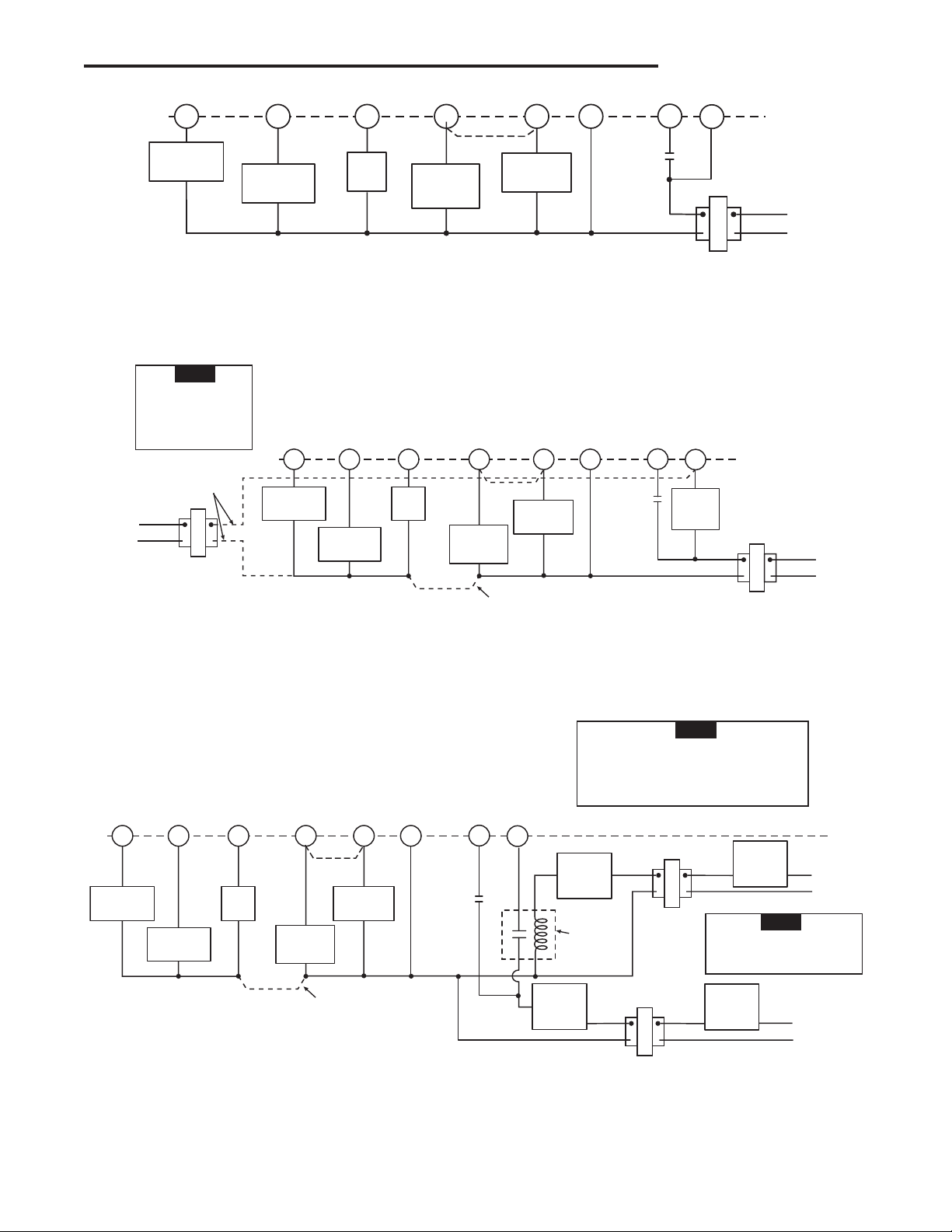
2. Connect wires beneath terminal screws on base using ap-
propriate wiring schematic (see figs. 2 through 4).
3. Place base over hole in wall and mark mounting hole locations
on wall using base as a template.
4. Move base out of the way. Drill mounting holes.
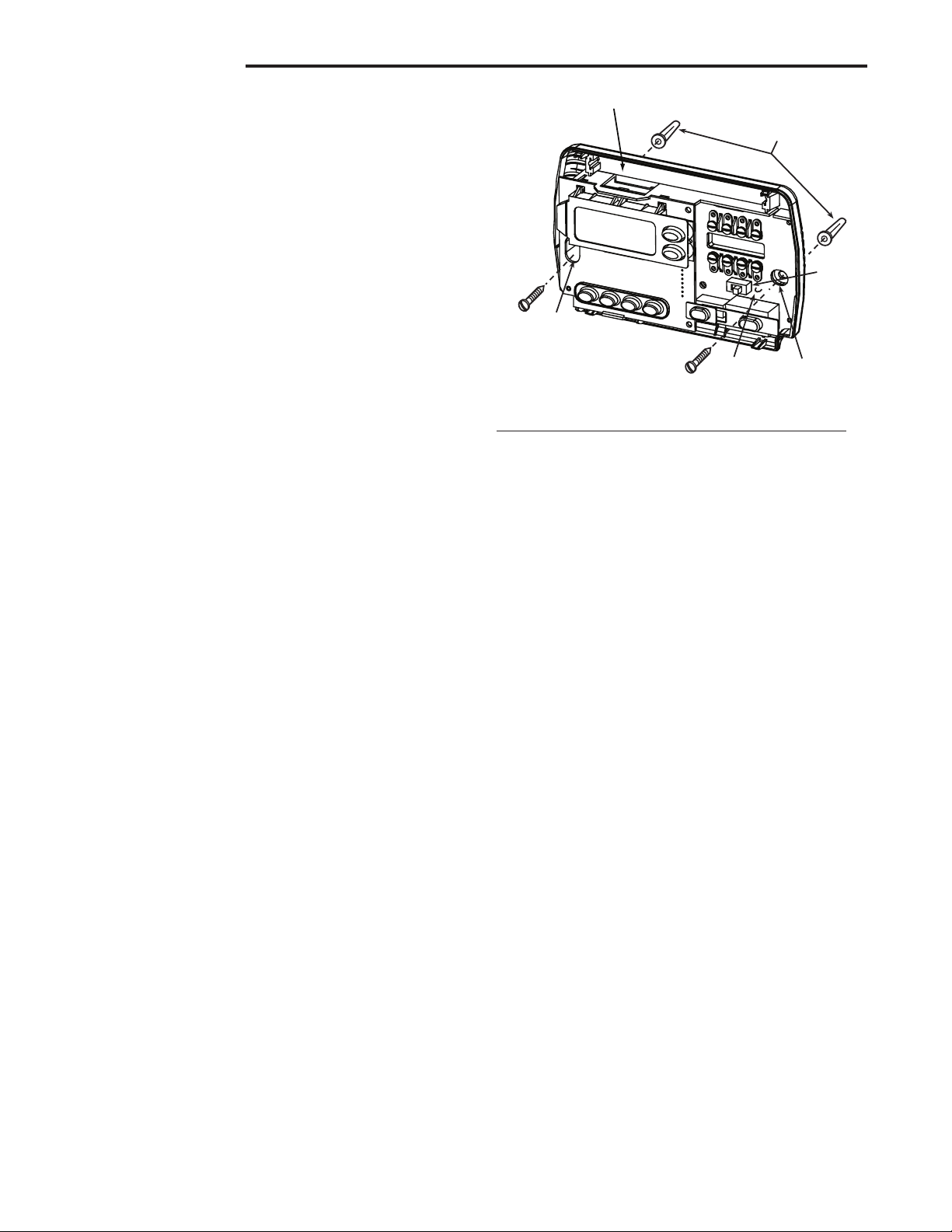
5. Fasten base loosely to wall, as shown in fig. 1, using two
mounting screws. Place a level against bottom of base,
adjust until level, and then tighten screws. (Leveling is for
appearance only and will not affect thermostat operation.)
If you are using existing mounting holes, or if holes drilled
are too large and do not allow you to tighten base snugly,
use plastic screw anchors to secure subbase.
6. Push excess wire into wall and plug hole with a fire-resistant
material (such as fiberglass insulation) to prevent drafts from
affecting thermostat operation.
ELECTRIC/GAS JUMPER (Fan Option)
Read the following information before clipping the nonelectric
heat jumper. If you are unsure of your application, contact a
qualified service person.
If your emergency or auxiliary system will energize the blower,
then jumper, W904, on the thermostat base must be cut (see
fig. 1).
If your emergency or auxiliary heat system requires that the
thermostat energize the fan circuit, do not cut jumper W904.
OPTIONAL BATTERIES
With two "AA" batteries installed, your thermostat will maintain
time and continuously display the temperature during a loss of
AC power. Installed batteries will also allow programming prior
to installation. For best results, use new premium brand batteries
such as Duracell
®
or Energizer
®
.
ENERGY MANAGEMENT RECOVERY
(EMR)
When the EMR feature is activated the thermostat's microcomput-
er calculates the time it will take to change the room temperature
to the next heat or cool program setting. Then the thermostat
will start the system before the next programmed period so that
the desired temperature is reached at or near the beginning of
the period (the thermostat calculates 15 minutes for every 1°F
temperature change). This minimizes the use of auxiliary stages
during the transition period to reduce energy costs.
For example: The thermostat is programmed to provide an over-
night heating temperature of 66°F, and during the next program
period, beginning at 6:00 AM, the programmed temperature
is 70°F. With EMR activated, the thermostat will automatically
start the heating system at 5:00 AM, so that the programmed
temperature of 70°F is reached by about 6:00 AM.
If the overnight room temperature drops only to 68F°, the ther-
mostat will start the system at 5:30 to reach the programmed
temperature of 70°F at 6:00.
The thermostat is shipped with the EMR feature active, which
means that the thermostat will start the heating system before
the beginning of the next program period. This feature provides
better efficiency by allowing gradual temperature changes using
only the first stage of heat.
To deactivate the EMR function, see the Configuration menu
on Page 5). The thermostat will then wait until the programmed
time to start the system for a temperature change.
O/B TERMINAL SWITCH SELECTION
The O/B switch on this thermostat is factory set to the “O” position.
This will accommodate the majority of heat pump applications,
which require the changeover relay to be energized in COOL.
If the thermostat you are replacing or the heat pump being in-
stalled with this thermostat requires a “B” terminal, to energize
the changeover relay in HEAT, the O/B switch must be moved
to the “B” position.
Optional (2) "AA" batteries
Mounting
hole
Mounting
hole
W904
Electric/Gas
jumper
O/B
switch
Screw anchors
W904
Figure 1. Thermostat Base
3
L
R
E
24 VAC
120 VAC
Hot
SYSTEM
MONITOR
SWITCH
Neutral
THERMOSTAT
SYSTEM
G W2
Figure 2. Typical wiring diagram for single transformer systems
TRANSFORMER
(Class II Current Limited)
Changeover
Relay*
CYO/B
Compressor
Contactor
* Changeover Relay is energized in COOL when O/B switch is in the “O” position
Changeover Relay is energized in HEAT when O/B switch is in the “B” position
Aux
Relay
(Stage 2)
Fan
Relay
Emergency
Relay
See Note **
** Jumper required to use a single Aux Heat for both Second Stage Heat and Emergency
L
R
E
24 VAC
120 VAC
Hot
SYSTEM
MONITOR
SWITCH
Neutral
THERMOSTAT
SYSTEM
G W2
Figure 3. Typical wiring diagram for two transformer systems with NO safety circuits
TRANSFORMER
(Class II Current Limited)
Changeover
Relay*
CYO/B
Compressor
Contactor
* Changeover Relay is energized in COOL when O/B switch is in the “O” position
Changeover Relay is energized in HEAT when O/B switch is in the “B” position
Aux
Relay
(Stage 2)
Fan
Relay
Emergency
Relay
Limit or
Safety
Switches
TWO COMMONS MUST
BE JUMPERED TOGETHER!
HOT
NEUTRAL
120 VAC
24 VAC
CUT AND
TAPE OFF!
If safety circuits are in
only one of the systems,
remove the transformer
of the system with NO
safety circuits.
NOTE
** Jumper required to use a single Aux Heat for both Second Stage Heat and Emergency
See Note **
L
R
E
SYSTEM
MONITOR
SWITCH
G W2
Figure 4. Typical wiring diagram for two transformer systems with safety circuits in BOTH systems
Changeover
Relay*
CYO/B
Compressor
Contactor
* Changeover Relay is energized in COOL when O/B switch is in the “O” position
Changeover Relay is energized in HEAT when O/B switch is in the “B” position
Aux
Relay
(Stage 2)
Fan
Relay
Emergency
Relay
TWO COMMONS MUST
BE JUMPERED TOGETHER!
24 VAC 120 VAC
HOT
NEUTRAL
THERMOSTAT
SYSTEM
HOT
NEUTRAL
120 VAC
Limit or
Safety
Switches
Limit or
Safety
Switches
Limit or
Safety
Switches
24 VAC
Limit or
Safety
Switches
COMMON
COMMON
Auxiliary
Heating
Transformer
(Class II
Current Limited)
Heat Pump Transformer
(Class II Current Limited)
24 VAC
ACCESSORY
RELAY N.O.
CONTACT
Polarity must be observed. If the HOT side of
the second transformer is jumpered to the
COMMON side of the first transformer a short
will be made. Damage to equipment will occur
when power is restored.
NOTE
The accessory relay scheme
is required when safety
circuits exist in both systems.
NOTE
See Note **
** Jumper required to use a single Aux Heat for both Second Stage Heat and Emergency
WIRING DIAGRAMS
4
Cooling System
1. Move SYSTEM switch to COOL position.
2. Press to adjust thermostat setting below room tempera-
ture. The blower should come on immediately on high speed,
followed by cold air circulation
3. Press to adjust temperature setting above room tem-
perature. The cooling system should stop operating.
2
1
3 4 5 6 7
8
11 1416 12
15
11
10
13 13
9
9
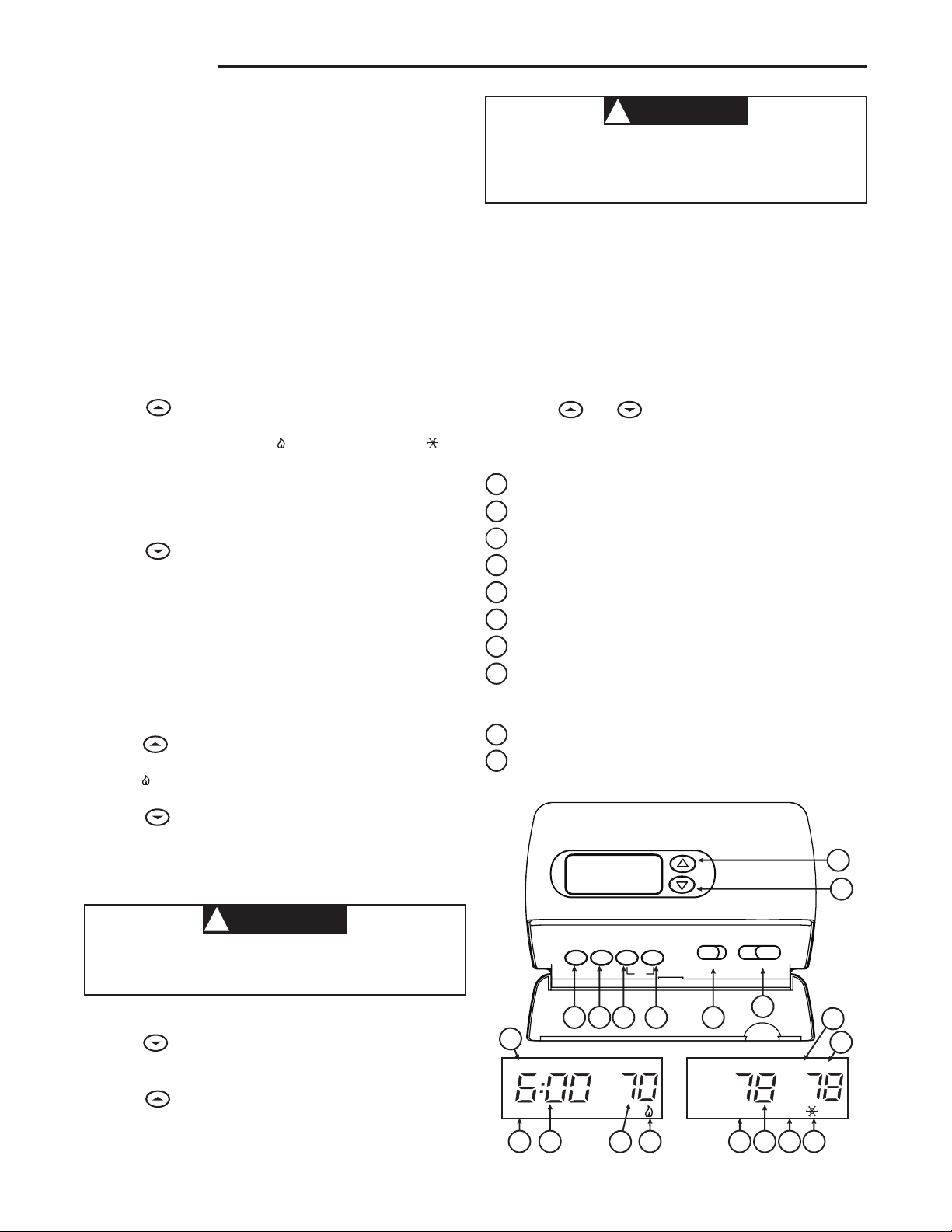
Figure 5. Thermostat display, buttons, and switches
SU
EMERHOLD
PM
SA MALF
FLTR
AM
MO TU WE TH FR
TIME PRGM RUN HOLD
Fltr
FAN
EMER
ON AUTO COOL
OFF HEAT
OPERATION
Before you begin programming your thermostat, you should be
familiar with its features and with the display and the location and
operation of the thermostat buttons. Your thermostat consists of
two parts: the thermostat cover and the base. To remove the
cover, pull it straight out from the base. To replace the cover,
line up the cover with the base and press until the cover snaps
onto the base.
THE THERMOSTAT BASE
Other than and , the following buttons and switches
are located on the bottom of the thermostat cover (see fig. 5).
The Thermostat Buttons and Switches
1
Raises temperature setting.
2
Lowers temperature setting.
3
TIME button.
4
PRGM (program) button.
5
RUN (program) button.
6
HOLD temperature button.
7
FAN switch (ON, AUTO).
8
SYSTEM switch (COOL, OFF, HEAT, EMER).
The Display
9
Indicates day of the week.
10
Indicates a malfunction with the system.
CHECK THERMOSTAT OPERATION
If at any time during testing your system does not operate
properly, contact a qualified service person.
Turn on power to the system.
Fan Operation
If your system does not have a G terminal connection, skip to
Heating System.
1. Move fan switch to ON position. The blower should begin to
operate.
2. Move fan switch to AUTO position. The blower should stop
immediately.
Heating System
1. Move SYSTEM switch to HEAT position. If the auxiliary
heating system has a standing pilot, be sure to light it.
2. Press to adjust thermostat setting to 1° above room
temperature. The Heat Pump system should begin to operate.
However, if the Flame icon ( ) and Snowflake icon ( ) are
flashing, the compressor lockout feature is operating (see
Configuration menu, item 7).
3. Adjust temperature setting to 4° above room temperature.
The auxiliary heat system should begin to operate and the
Flame icon will be flashing.
4. Press to adjust temperature setting below room tem-
perature. The heating system should stop operating.
Emergency System
EMER bypasses the Heat Pump to use the heat source wired
to terminal E on the thermostat. EMER is typically used when
compressor operation is not desired, or you prefer back-up
heat only.
1. Move SYSTEM switch to EMER position, EMER will flash
on the display.
2. Press to adjust the thermostat above room temperature.
The Aux heating system will begin to operate. The Flame
icon ( )will display flashing to indicate that the Aux system
is operating.
3. Press to adjust the thermostat below room temperature.
The Aux heating system should stop operating.
CAUTION
!
To prevent compressor and/or property damage, if the
outdoor temperature is below 50°F, DO NOT operate
the cooling system.
CAUTION
!
Do not allow the compressor to run unless the
compressor oil heaters have been operational for 6
hours and the system has not been operational for at
least 5 minutes.
5
1) Select Temporary Hold Time - The thermostat can hold any
temperature you set it to for the amount of time you select on
this option. Your choices are 0:00 to 8:00 hours in 15 minute
increments. 0:00 disables the function
Example: Using the Temporary Hold Function
1. You have selected 3:00 hours for the Temporary Hold
time period.
2. With the thermostat set to Heat or Cool, press HOLD
for five seconds (time will show 3:00 hours as a setting
reminder).
3. HOLD on the display will blink. Release the HOLD button
after the temporary hold time is displayed.
4. Use or to set the temperature to your pref-
erence. The thermostat will maintain this temperature
setting for 3 hours with HOLD blinking to remind you it
is in Temporary Hold. After 3 hours the thermostat will
go back to the program temperature and HOLD will no
longer blink or display.
2) Select FA or SL (Fast or Slow) Heat Pump stage Cycle
Rate - The FA setting is used to produce shorter heating cy-
cles. The SL setting produces a longer heating/cooling cycle.
Both settings produce very accurate temperature control and
can be set to your personal preference. FA cycles the system
just under .75°F and the SL setting cycles at approximately
1.2°F.
3) Select FA or SL (Fast or Slow) Auxiliary or Emergency
Cycle Rate - The FA setting is frequently used for gas, oil or
electric heat. The SL setting produces a longer heating cycle.
Both settings produce very accurate temperature control and
can be set to your personal preference. FA cycles the system
just under .6°F and the SL setting cycles at approximately
1.°F.
4) Select backlit display - The display backlight improves
display contrast in low lighting conditions. Selecting backlight
ON will keep the light on continuously. Selecting OFF will
keep the light off.
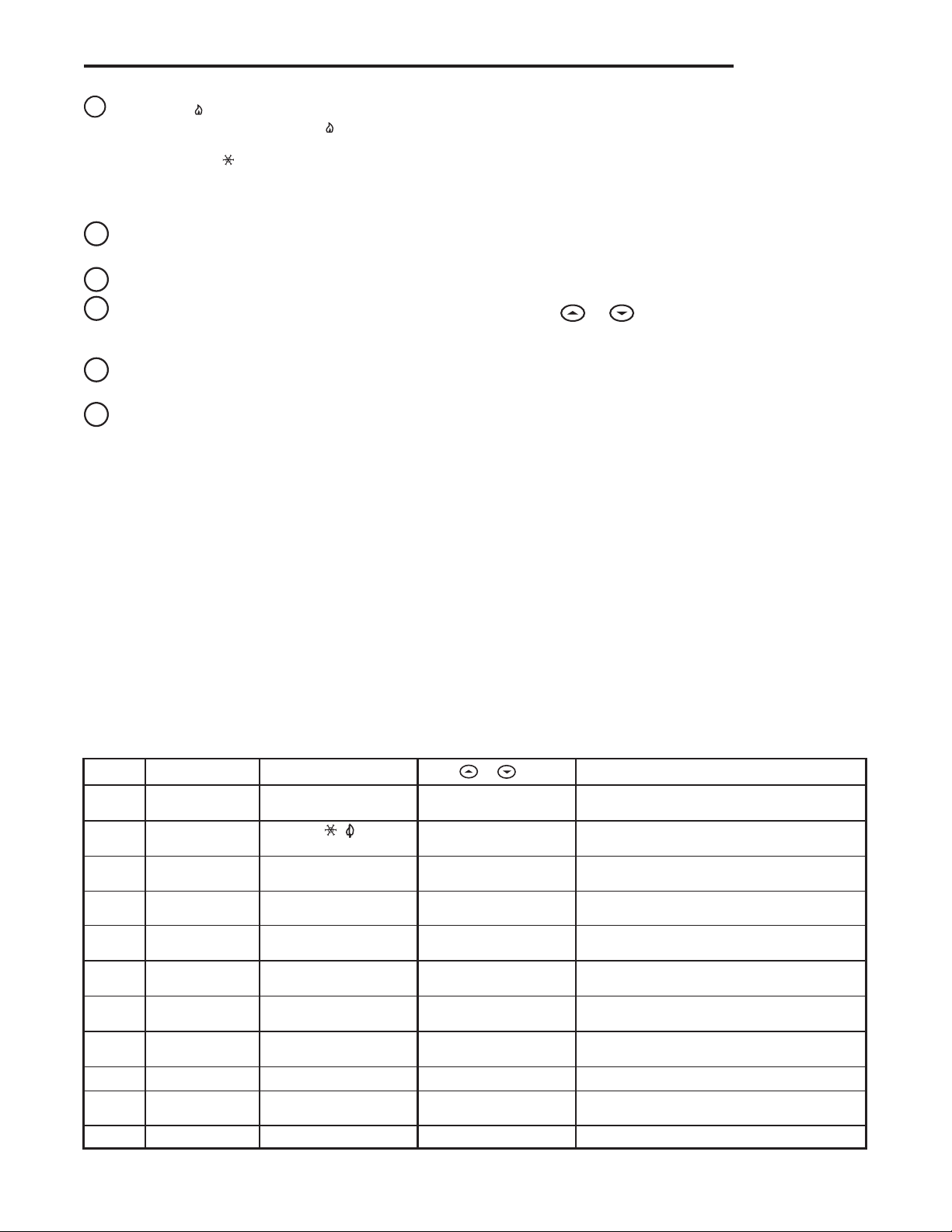
11
Flame icon ( ) is displayed when the SYSTEM switch is
in the HEAT position. Flame icon ( ) is displayed flashing
when 2nd-stage heat (Aux or Emergency) is energized.
Snowflake icon ( ) is displayed (non-flashing) when the
SYSTEM switch is in the COOL position. Snowflake and
Flame are displayed (flashing) if the thermostat is in lockout
mode to prevent the compressor from cycling too quickly.
12
EMER is displayed flashing when the system switch is in
EMER position.
13
Alternately displays current time and temperature.
14
The word HOLD is displayed when the thermostat is in
the HOLD mode. HOLD is displayed flashing when the
thermostat is in a temporary HOLD Mode.
15
Displays currently programmed set temperature (this is
blank when SYSTEM switch is in the OFF position).
16
Displays FLTR when the system has run for the programmed
filter time period as a reminder to change or clean your air
filter.
CONFIGURATION MENU
The configuration menu allows you to set certain thermostat op-
erating characteristics to your system or personal requirements.
Press RUN to make sure the thermostat is in the run program
mode, then press PRGM and RUN at the same time to enter
the configuration menu. The display will show the first item in
the configuration menu.
The configuration menu chart summarizes the configuration
options. An explanation of each option follows.
Press HOLD to change to the next menu item or press TIME
to go backwards to the previous item in the menu. To exit the
menu and return to the program operation, press RUN. If no keys
are pressed within fifteen minutes, the thermostat will revert to
normal operation.
1
Step Press Button(s) Displayed (Factory Default) Press or to select: COMMENTS
HOLD
(0:00)
0 to 8 hrs (in
15 minute increments)
2
(SL)
FA
Select temporary Hold time
5
6
E
(on)
OFF
7
8
LOC
(OFF)
on
0 HI
(0)
4 LO to
4 HI
(F) C
Returns to normal operation
9
11
Select Energy Management Recovery OFF or ON
Select Compressor lockout OFF or ON
Select temperature display adjustment higher or lower
Select temperature display to F or C
RUN
PRGM
and RUN
HOLD
*
HOLD
*
4
d-L
(on)
FA
(on)
OFF
Select display backlight OFF or ON
OFF
Select fast second stage ON or OFF
HOLD
*
HOLD
*
Filter
(000)
0 to 1950 hours
(in 50 hour increments)
Select filter replacement run time
HOLD
*
HOLD
*
HOLD
*
10
HOLD
*
Select FA or SL (Fast or Slow) pump cycle rate
Configuration Menu
* Press
HOLD to advance to next item or TIME to move backwards to previous item
3
EMER
(FA)
SL
Select FA or SL (Fast or Slow) Auxiliary and
Emergency Aux heating cycle rate
HOLD
*
OPERATION
6
WEEKDAYS
(5 Day)
SATURDAY
(1 Day)
Start
Time Temp
Start
Time Temp
1ST
2ND
3RD
4TH
1ST
2ND
3RD
4TH
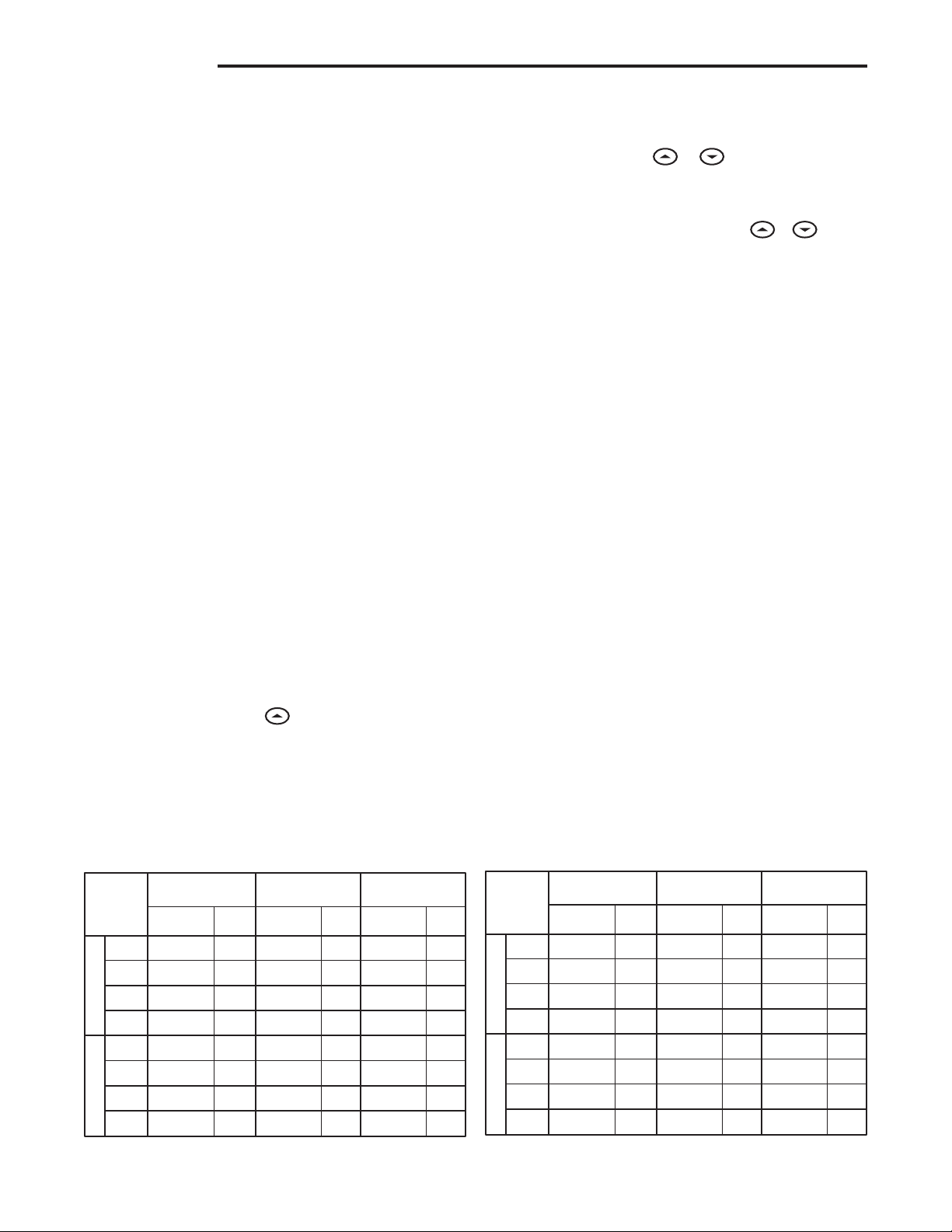
SAMPLE
Heating/Cooling Schedule Plan (Factory Program)
Period
6:00 AM
8:00 AM
5:00 PM
10:00 PM
6:00 AM
8:00 AM
5:00 PM
10:00 PM
6:00 AM
8:00 AM
5:00 PM
10:00 PM
6:00 AM
8:00 AM
5:00 PM
10:00 PM
70°F
62°F
70°F
62°F
78°F
85°F
78°F
82°F
SUNDAY
(1 Day)
Start
Time Temp
6:00 AM
8:00 AM
5:00 PM
10:00 PM
6:00 AM
8:00 AM
5:00 PM
10:00 PM
70°F
62°F
70°F
62°F
78°F
85°F
78°F
82°F
70°F
62°F
70°F
62°F
78°F
85°F
78°F
82°F
HEAT
COOL
WEEKDAYS
(5 Day)
SATURDAY
(1 Day)
Start
Time Temp
Start
Time Temp
1ST
2ND
3RD
4TH
1ST
2ND
3RD
4TH
Heating/Cooling Schedule Plan
Period
SUNDAY
(1 Day)
Start
Time Temp
HEAT
COOL
MANUAL OPERATION
• HOLD TEMPERATURE — With the SYSTEM switch set to
HEAT or COOL, momentarily press HOLD button. HOLD
will be displayed. Use or to adjust the tempera-
ture. The thermostat will hold the room temperature at the
selected setting until you press RUN button to start program
operation again.
• TEMPERATURE OVERRIDE — Press or until the
temperature you want is displayed. The thermostat will over-
ride current programming and keep the room temperature
at the selected temperature until the next program period
begins. Then the thermostat will automatically revert to the
program.
• TEMPORARY HOLD TEMPERATURE — The thermostat
can hold any temperature within its range for the length of
time selected in the configuration menu. See Configuration
Menu section, step 1.
PROGRAMMING YOUR THERMOSTAT
This section will help you plan your thermostat’s program to
meet your needs. For maximum comfort and efficiency, keep
the following guidelines in mind when planning your program.
• When heating (cooling) your building, program the tempera-
tures to be cooler (warmer) when the building is vacant or
during periods of low activity.
• During early morning hours, the need for cooling is usually
minimal.
Planning Your Program
Look at the factory preprogrammed times and temperatures
shown in the sample schedule. If this program will suit your
needs, simply press the RUN button to begin running the factory
preset program.
If you want to change the preprogrammed times and tempera-
tures, follow these steps.
Determine the time periods and temperatures for your program.
You must program four periods for each day. However, you may
use the same heating and cooling temperatures for consecutive
time periods. You can choose start times, heating temperatures,
OPERATION
5) Select Energy Management Recovery OFF or ON - Energy
Management Recovery (EMR) causes the thermostat to start
heating or cooling early to make the building temperature
reach the program setpoint at the time you specify.
6) Select filter replacement run time - The thermostat will
display FLTR after a set time of operation. This is a reminder
to change or clean your air filter. This time can be set from
0 to 1950 hours in 50 hour increments. A selection of 000
will cancel this feature. When FLTR is displayed, you can
clear it by pressing HOLD and RUN at the same time. This
resets the timer and starts counting the hours until the next
filter change. Contact your heat pump manufacturer for a
specific replacement/maintenance interval.
7) Select Compressor Lockout LOC OFF or ON - Selecting
LOC ON will cause the thermostat to wait 5 minutes before
turning on the compressor if the heating and cooling system
loses power. It will also wait 5 minutes minimum between
cooling or heating cycles. This is intended to help protect the
compressor from short cycling. Some newer compressors
already have a time delay built in and do not require this
feature. Your compressor manufacturer can tell you if the
lockout feature is already present in their system. When
the thermostat compressor time delay occurs it will flash the
Snowflake and Flame icons for about five minutes.
8) Select Temperature Display Adjustment 4 LO to 4 HI -
Allows you to adjust the room temperature display up to 4°
higher or lower. Your thermostat was accurately calibrated
at the factory but you have the option to change the display
temperature to match your previous thermostat. The current
or adjusted room temperature will be displayed on the right
side of the display.
9) Select F° or C° Readout - Changes the display readout to
Celsius or Fahrenheit as required. The current room tem-
perature will be displayed on the right side of the display.
10) Select Fast second stage - In the RUN mode, if the tem-
perature is manually raised by 3°F ( 2°C) or more above
room temperature using and the fast second stage
feature is enabled, FA on, the second stage will energize
immediately. With FA off, the second stage will not energize
until the setpoint temperature is 10°F or more above room
temperature.
7
and cooling temperatures independently (for example, you may
select 5:00 AM and 70° as the weekday 1st period heating
start time and temperature, and also choose 7:00 AM and 76°
as the weekday 1st period cooling start time and temperature).
Use the table to plan your program time periods and the tem-
peratures you want during each period. Fill in the complete table
to have a record of your programs.
Entering Your Program
Set Current Time and Day
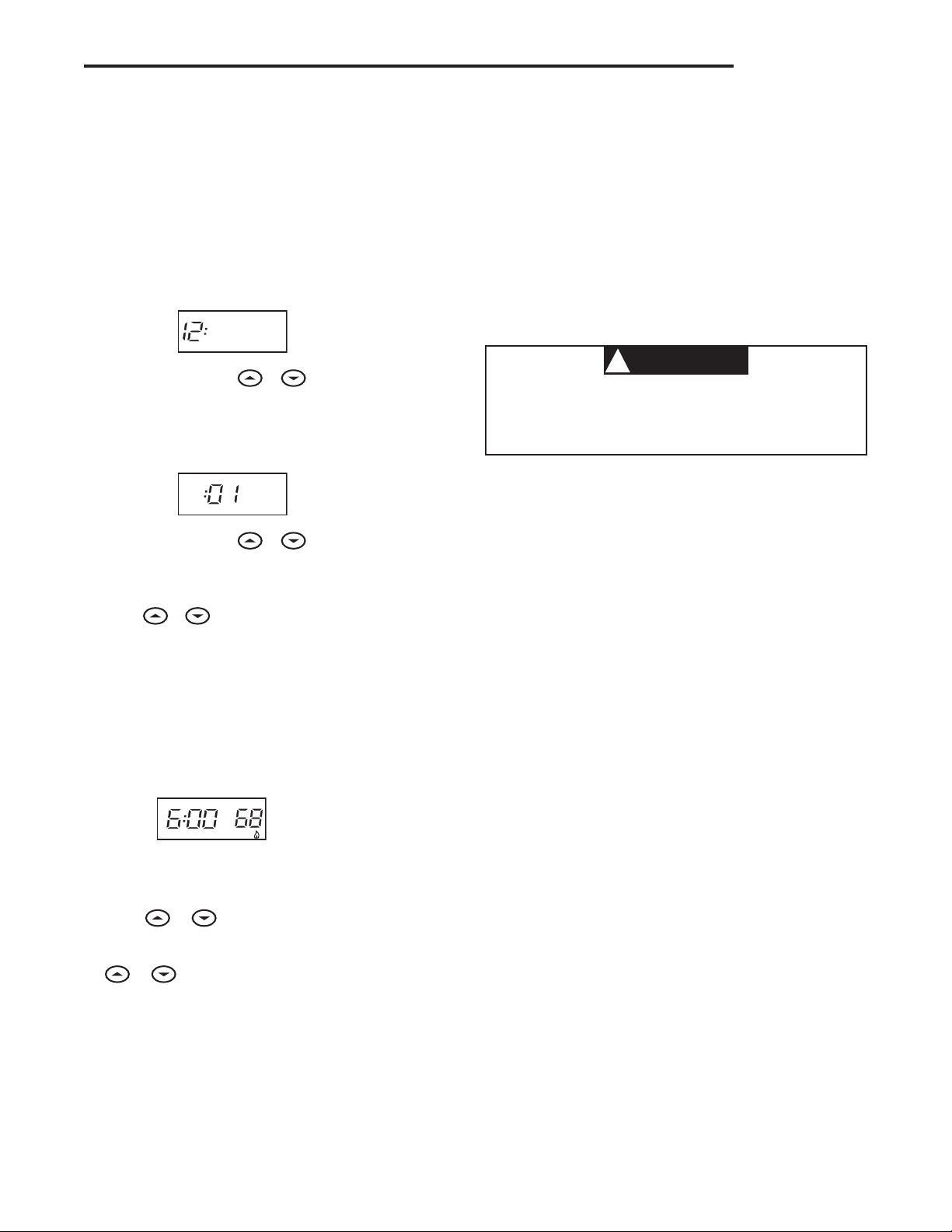
1. Press TIME button once. The display will show the hour only.
EXAMPLE:
PM
2. Press and hold either or until you reach the correct
hour and AM/PM designation (AM begins at midnight; PM
begins at noon).
3. Press TIME once again. The display window will show the
minutes only.
EXAMPLE:
4. Press and hold either or until you reach the correct
minutes.
5. Press TIME once again. The display will show the day of the
week.
6. Press or until you reach the current day of the week.
7. Press RUN once. The display will show the correct time and
room temperature alternately.
Enter Heating Program
1. Move the SYSTEM switch to HEAT.
2. Press PRGM once. “MO TU WE TH FR” (indicating weekday
program) will appear in the display. Also displayed are the
currently programmed start time for the 1st heating period
and the currently programmed temperature (flashing).
EXAMPLE:
AM
MO TU WE TH FR
This display window shows that for the 1st weekday period,
the start time is 6:00 AM, and 68° is the programmed tem-
perature (this example reflects factory preprogramming).
3. Press or to change the displayed temperature to
your selected temperature for the 1st heating program period.
4. Press TIME once (the programmed time will flash). Press
or until your selected time appears. The time will
change in 15 minute increments. When your selected time
is displayed, press TIME again to return to the change tem-
perature mode.
5. Press PRGM once. The currently programmed start time and
setpoint temperature for the 2nd heating program period will
appear.
6. Repeat steps 3 and 4 to select the start time and heating
temperature for the 2nd heating program period.
▲
7. Repeat steps 3 through 5 for the 3rd and 4th heating program
periods.
8. Press PRGM once. “SA” (indicating Saturday program) will
appear in the display, along with the start time for the 1st
heating period and the currently programmed temperature.
9. Repeat steps 3 through 7 to complete Saturday heating
programming.
9. Press PRGM once to change to SU (Sunday) heating pro-
gramming and repeat steps 3 through 7 to complete Sunday
programming.
11. When you have completed entering your heating program,
press RUN.
Enter Cooling Program
CAUTION
!
If the outside temperature is below 50°F, disconnect
power to the cooling system before programming.
Energizing the air conditioner compressor during cold
weather may cause personal injury or property damage.
1. Move SYSTEM switch to COOL position.
2. Follow Enter Heating Program for entering your cooling
program, using your selected cooling times and temperatures.
CHECK YOUR PROGRAMMING
Follow these steps to check your thermostat programming one
final time before beginning thermostat operation.
1. Move SYSTEM switch to HEAT position.
2. Press PRGM to view the 1st weekday heating period time and
temperature. Each time you press PRGM, the next heating
period time and temperature will be displayed in sequence for
weekday, then Saturday and Sunday program periods (you
may change any time or temperature during this procedure).
3. Press RUN.
4. Move SYSTEM switch to COOL position.
5. Repeat step 2 to check cooling program.
6. Move SYSTEM switch to HEAT or COOL and press RUN to
begin program operation.
NOTE: Batteries are not required to keep your programming
or menu data. With two optional “AA” batteries installed, your
thermostat will maintain time and continuously display the tem-
perature during a loss of AC power. Installed batteries will also
allow programming prior to installation.
YOUR THERMOSTAT IS NOW PROGRAMMED AND READY TO
PROVIDE MAXIMUM COMFORT AND EFFICIENCY!
OPERATION
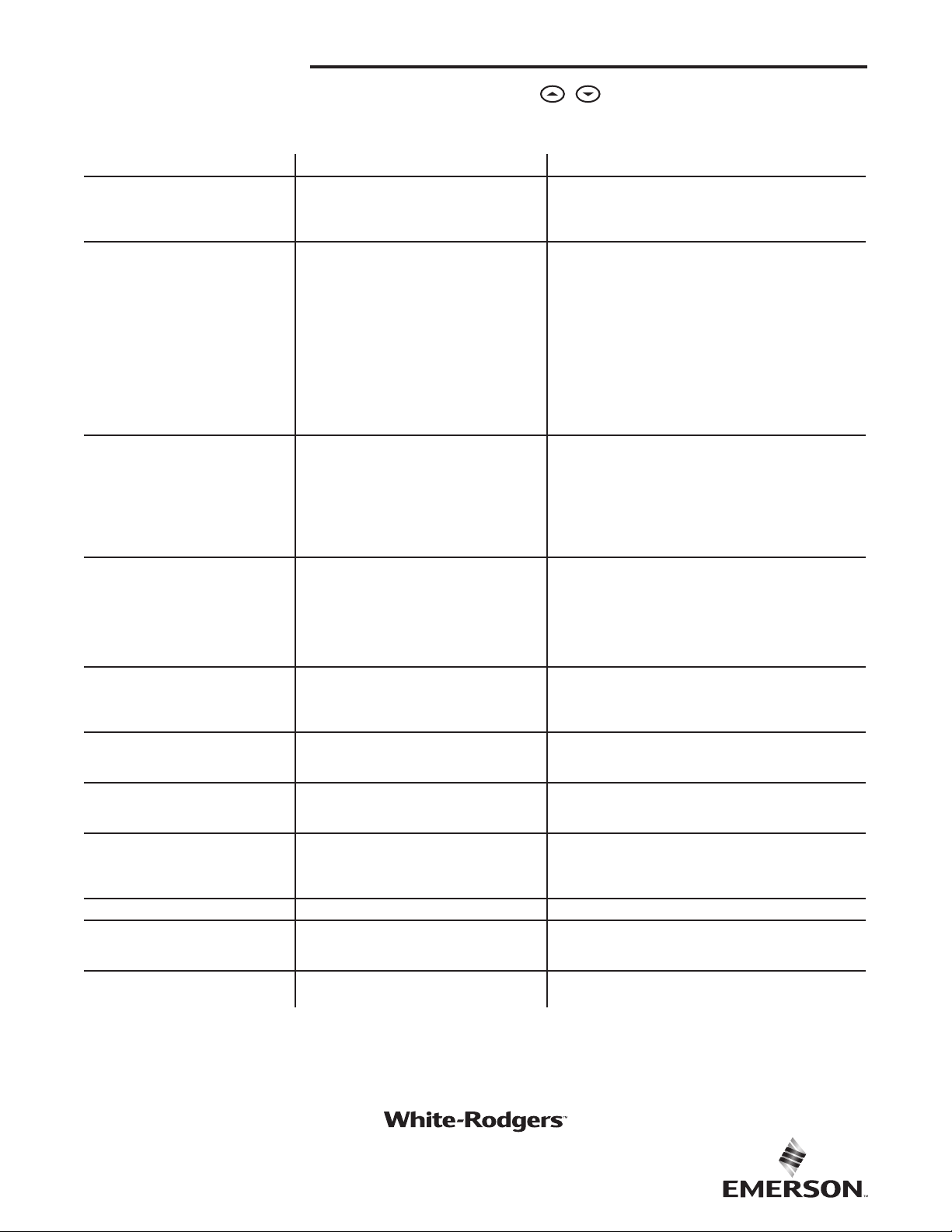
TROUBLESHOOTING
Reset Operation
If a voltage spike or static discharge blanks out the display or
causes erratic thermostat operation, reset the thermostat by
pressing , and TIME at the same time. If the thermostat
has power, has been reset and still does not function correctly
contact your heating/cooling service person or place of purchase.
Symptom Possible Cause Corrective Action
No Heat/No Cool/No Fan
(common problems)
1. Blown fuse or tripped circuit breaker.
2. Furnace power switch to OFF.
3. Furnace blower compartment door or panel
loose or not properly installed.
Replace fuse or reset breaker.
Turn switch to ON.
Replace door panel in proper position to engage safety inter-
lock or door switch.
No Heat
1. System Switch not set to Heat.
2. Loose connection to thermostat or system.
3. Heating System requires service or thermo-
stat requires replacement.
Set System Switch to Heat and raise setpoint above room
temperature.
Verify thermostat and system wires are securely attached.
Diagnostic: Set System Switch to Heat and raise the setpoint
above room temperature. Within a five minutes the thermostat
should make a soft click sound. This sound usually indicates
the thermostat is operating properly. If the thermostat does
not click, try the reset operation listed above. If the thermostat
does not click after being reset, contact your heating and
cooling service person or place of purchase for a replace-
ment. If the thermostat clicks, contact the furnace manu-
facturer or a service person to verify the heating system is
operating correctly.
No Cool
1. System Switch not set to Cool.
2. Loose connection to thermostat or system.
3. Cooling System requires service or thermo-
stat requires replacement.
Set System Switch to Cool and lower setpoint below room
temperature.
Verify thermostat and system wires are securely attached.
Same procedure as diagnostic for No Heat condition except
set the thermostat to Cool and lower the setpoint below the
room temperature. There may be up to a five minute delay
before the thermostat clicks in Cooling if the compressor lock-
out option is selected in the configuration menu (Item 7).
Heat, Cool or Fan Runs Constantly.
1. Possible short in wiring.
2. Possible short in thermostat.
3. Possible short in Heat/Cool/Fan system.
4. Fan Switch set to Fan On.
Check each wire connection to verify they are not shorted or
touching together. No bare wire should stick out from under
terminal screws. Try resetting the thermostat as described
below. If the condition persists, the manufacturer of your
system or service person can instruct you on how to test
the Heat/Cool system for correct operation. If the system
operates correctly, replace the thermostat.
Furnace Cycles Too Fast or Too Slow
(narrow or wide temperature swing)
1. The location of the thermostat and/or the size
of the Heating System may be influencing the
cycle rate.
Item 2 in the Configuration Menu is the adjustment that
controls the cycle rate. If an acceptable cycle rate is not
achieved using the FA (Fast) or SL (Slow) adjustment contact
a local service person for additional suggestions.
Cooling Cycles Too Fast or Too Slow
(narrow or wide temperature swing)
1. The location of the thermostat and/or the size
of the Cooling System may be influencing the
cycle rate.
The cycle rate for cooling is fixed and can not be adjusted.
Contact a local service person for suggestions.
Thermostat Setting and Thermometer
Disagree
1. Thermostat thermometer setting requires
adjustment.
The thermometer can be adjusted +/- 4 degrees as listed
in item 8 of the Configuration Menu. No other adjustment is
possible.
Clock Loses or Gains Time
1. Loss of power to thermostat. The thermostat will maintain its program in memory even with
no power but the clock time will be incorrect when power is
restored. See No Heat/No Cool/No Fan (common problems)
above for items to check in the system.
Heat or Cool Starts Early
1.EMR activated See Configuration Menu (Item 5).
Thermostat Does Not Follow
Program
1. AM or PM set incorrectly in program.
2. AM or PM set incorrectly on the clock.
3. Voltage spike or static discharge.
Check current clock and program settings including the AM
or PM designations for each time period. If a voltage spike or
static discharge occurs use the Reset Operation listed above.
Blank Display and/or Keypad Not
Responding
1. Voltage Spike or Static Discharge. If a voltage spike or static discharge occurs use the Reset
Operation listed above.
White-Rodgers is a business
of Emerson Electric Co.
The Emerson logo is a
trademark and service mark
of Emerson Electric Co.
white-rodgers.com
emersonclimate.com