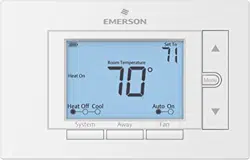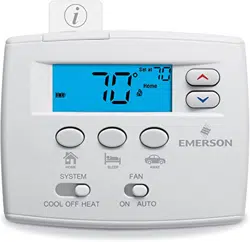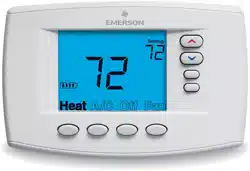
Blue Easy Reader Thermostat
1F95EZ-0671
Homeowner’s Guide

Congratulations on choosing the Emerson Blue Easy Reader Thermostat. Blue Easy
Reader is designed to be the easiest thermostat you have ever used. This thermostat
features large numbers and letters for easier viewing, and “one button to one function”
operation for total simplicity. As with all Emerson Blue thermostats, no other brand offers
better temperature accuracy or reliability.
Blue Easy Reader Thermostat consists of two parts, the base or wall plate mounted
on your interior wall and the display and control front that snaps onto the base piece.
Depending on your installation, your Blue Easy Reader may be battery powered or system
powered. Either way, it is recommended to keep fresh batteries installed. Batteries are
accessible by removing the control front from the base. Whenever “Change ” appears
in the display, new premium brand AA alkaline batteries should be installed. If the house
will be unoccupied for an extended period and is displayed, install new batteries before
leaving.
If you plan to use Blue Easy Reader as a non-programmable thermostat, please turn
the page to get started. Keep in mind that Easy Reader can also be a programmable
thermostat if you should change your mind later. Please call 800-284-2925 if you need
assistance in changing to programmable.
If you plan to use Easy Reader as a programmable thermostat, please skip to page 6.
Message to Homeowners

Blue Easy Reader Thermostat
Non-Programmable Mode ................................... 4
Thermostat Display Overview ............................ 4
Using Your Thermostat –
Non-Programmable Mode .................................. 5
Blue Easy Reader Thermostat
Programmable Mode ........................................... 6
Thermostat Display Overview ............................ 6
The Display Icons for Programming ................... 7
Setup Guide for Programmable Mode ............. 10
Set Current Time and Day ............................... 10
Energy Saving Factory Pre-program ................ 12
Programming Your Thermostat......................... 13
Copy Program .................................................. 13
Heating and A/C Worksheet ............................. 14
Enter Heating Program .................................... 15
Enter A/C Program ........................................... 15
TABLE OF CONTENTS
Using Your Thermostat – Programmable Mode
Auxiliary Heat ................................................... 16
Temporary Program Override .......................... 16
Permanent Temperature Hold .......................... 16
System Diagnostics ........................................ 17
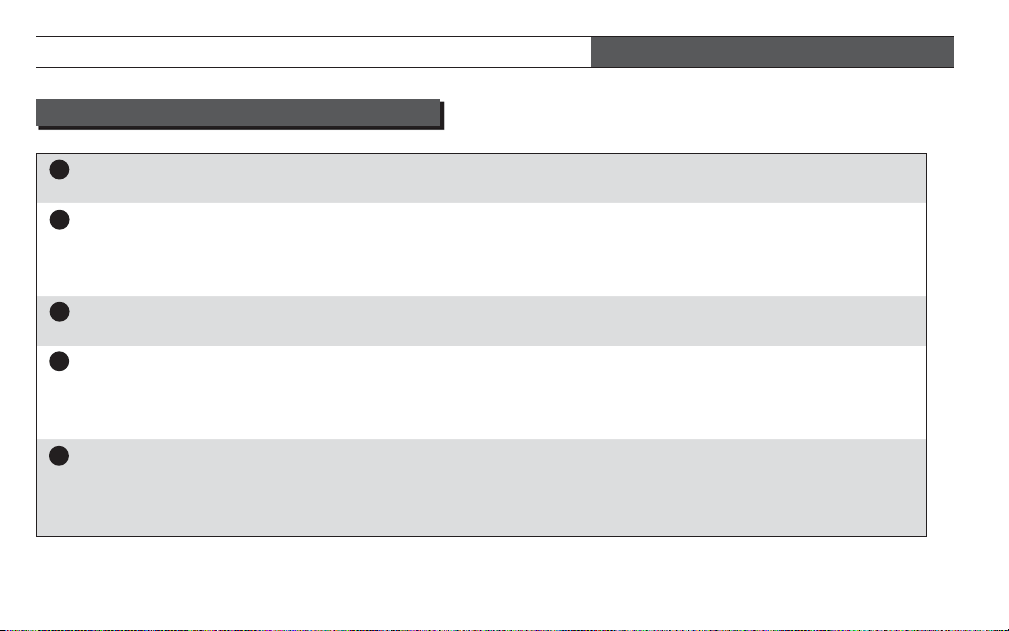
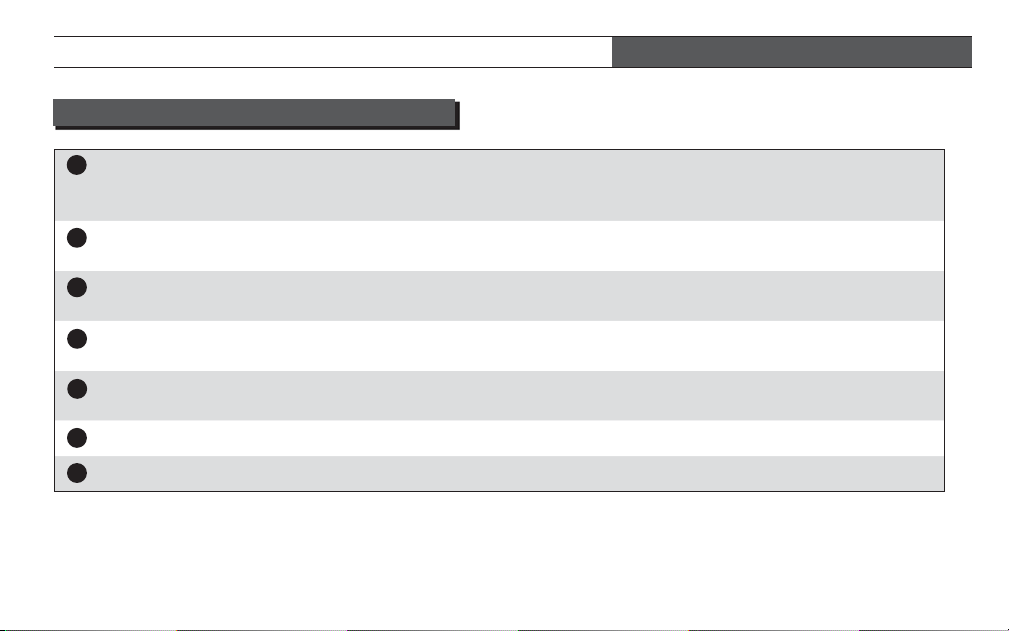
Setting Up Your Thermostat Options ............... 18
Confi guration Menu Items ................................ 18
Confi guration Menu Descriptions ..................... 20
Record of Thermostat Options Selected ......... 24
Blue Easy Reader Thermostat Homeowner’s Guide • 3
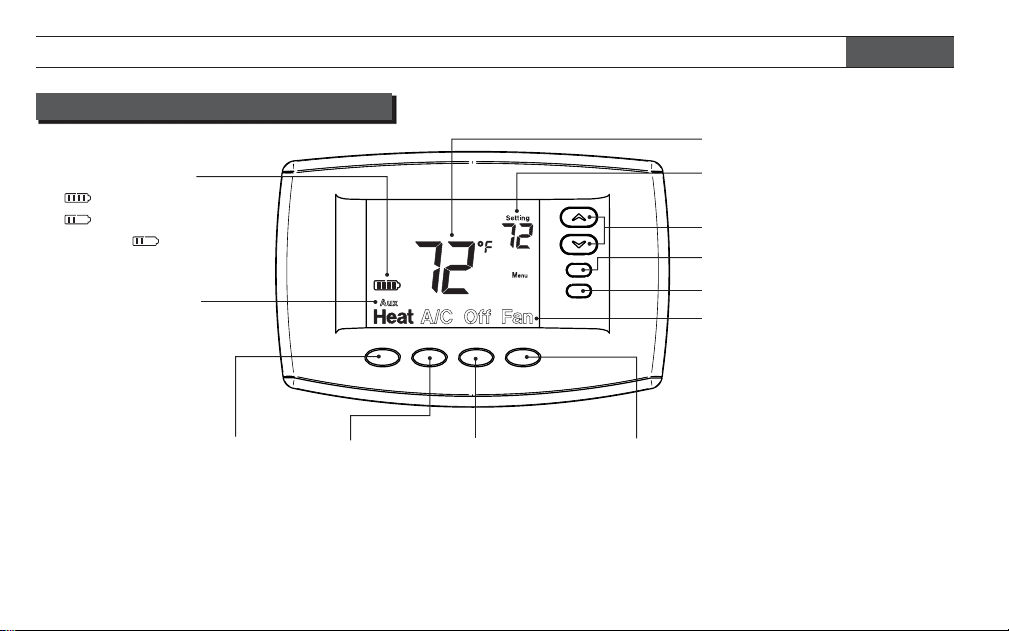
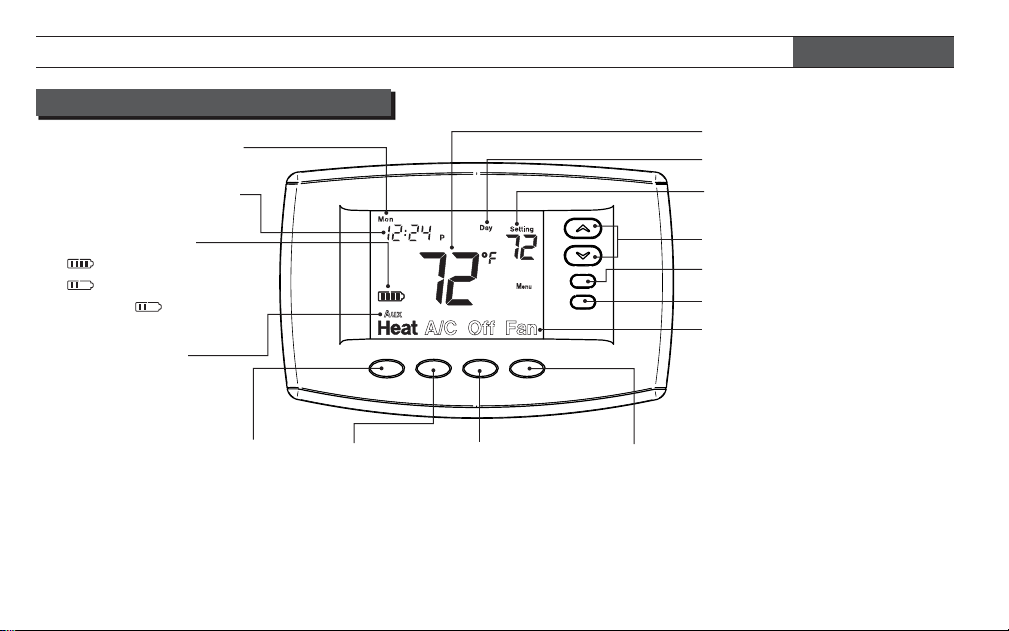
THERMOSTAT DISPLAY OVERVIEW
Off Button
Press to turn
off both Heating
and Air Condi-
tioning systems
and fan
A/C Button
Press to
select Air
Conditioning
Heat Button
Press to select
Heating
BLUE EASY READER THERMOSTAT – NON-PROGRAMMABLE MODE
4 • Blue Easy Reader Thermostat Homeowner’s Guide
Battery Status
= Full Charge
= Half Capacity
Change = Replace
Batteries
Indicates Heat
Pump System
(does not appear
for multi-stage or
single stage)
Actual Room Temperature
Desired Temperature
Temperature Adjustment
Buttons
Menu Button
Button Labels
Solid colored labels
indicate selection is On.
Non-solid or outlined labels
indicate not selected or Off.
(Heat is on in this example.)
Button not used
Fan Button
Press to select Fan operation
Fan = Fan On/continuous Fan
Fan
Fan = Fan Auto – Fan runs only
during a call for Heat or Air
Conditioning (typical setting)
BLUE EASY READER THERMOSTAT – NON-PROGRAMMABLE MODE
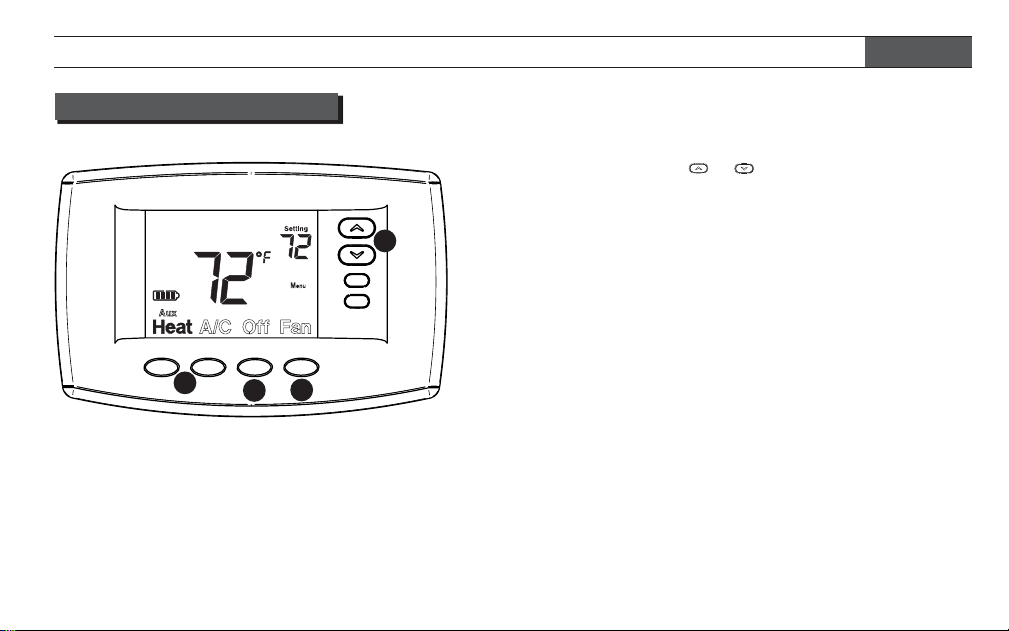
1 On the home screen display select your desired
system operating mode (Heat or A/C).
2 Press either the or button to select the
desired room temperature “setting”.
3 Press the Fan button to select the desired fan
operation, Auto or On.
4 Press Off to turn Heating and A/C system Off. Fan
will turn Off if it is On.
If your heating or A/C system is a heat pump, the
system automatically activates Auxiliary Heating when
the outside temperature is too cold for the heat pump
to effi ciently heat the home. You can manually activate
the auxiliary heating by pressing and holding the Heat
button until
Aux
Aux changes to Aux. To turn the manual
auxiliary off press the Heat button again.
Now enjoy the simple operation of your Easy Reader
Non-Programmable Thermostat.
1
3
2
4
USING YOUR THERMOSTAT
Blue Easy Reader Thermostat Homeowner’s Guide • 5
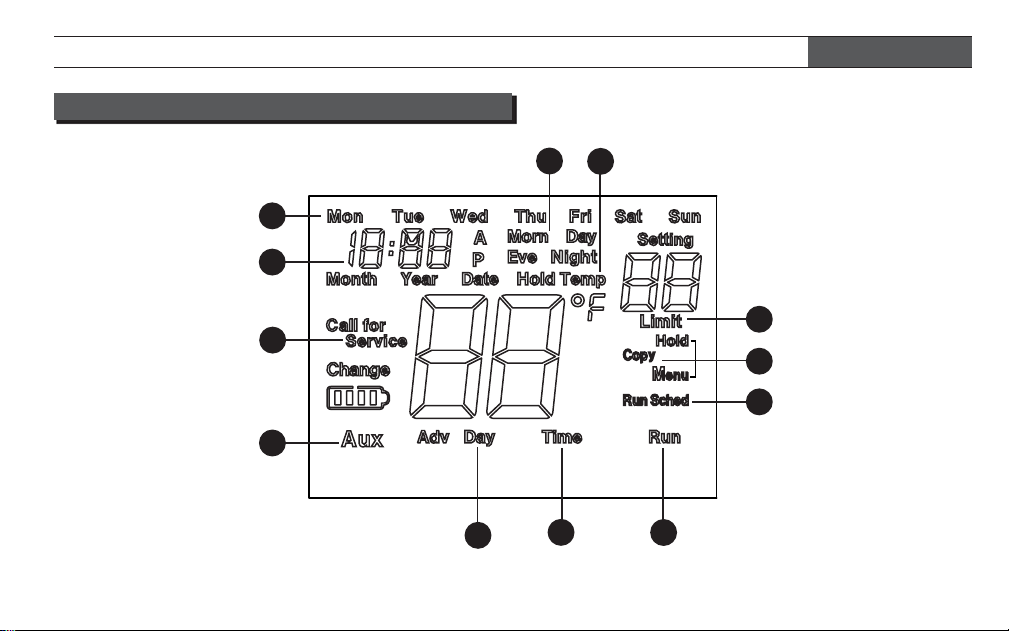
BLUE EASY READER THERMOSTAT – PROGRAMMABLE MODE
Actual Room Temperature
Desired Temperature
Temperature Adjustment
Buttons
Menu Button
Button Labels
Solid colored labels indicate
selection is On. Non-solid or
outlined labels indicate not
selected or Off. (Heat is On
in this example.)
Program Period
Off Button
Press to
turn off both
Heating and Air
Conditioning
systems and fan
A/C Button
Press to
select Air
Conditioning
Heat Button
Press to
select
Heating
Time of Day
Day of Week
6 • Blue Easy Reader Thermostat Homeowner’s Guide
THERMOSTAT DISPLAY OVERVIEW
Button used for Programming
Indicates Heat
Pump System
(does not appear
for multi-stage or
single stage)
Battery Status
= Full Charge
= Half Capacity
Change = Replace
Batteries
Fan Button
Press to select Fan operation
Fan = Fan On/continuous Fan
Fan
Fan = Fan Auto – fan runs only
during a call for Heat or Air
Conditioning (typical setting)
1
2
3
4
5
6
7
8
9
10
11
12
BLUE EASY READER THERMOSTAT – PROGRAMMABLE MODE
OTHER DISPLAY ICONS FOR PROGRAMMING
Blue Easy Reader Thermostat Homeowner’s Guide • 7
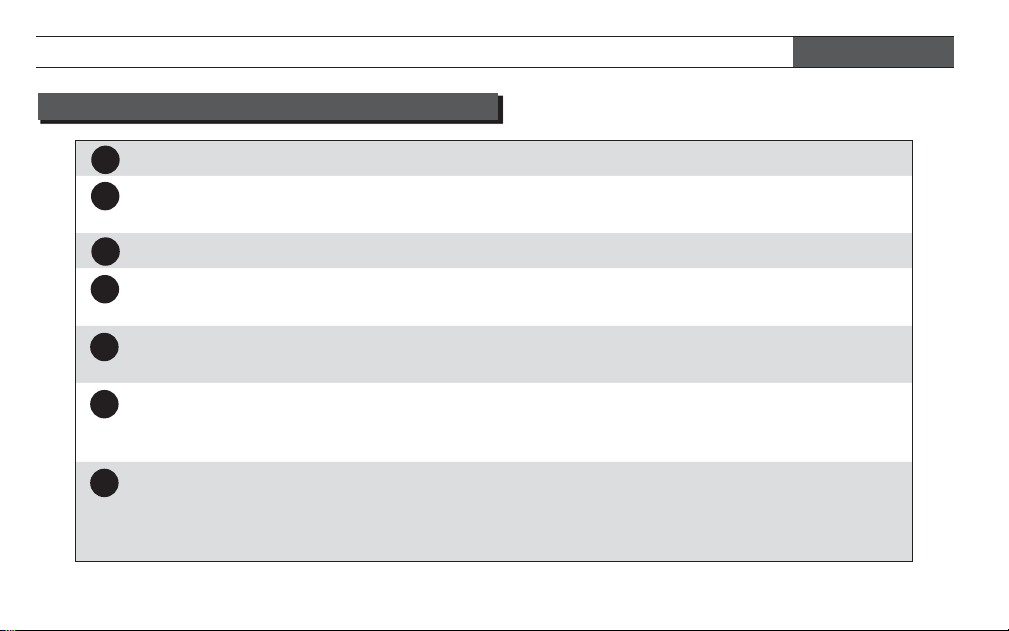
Run
Indicates button to press to exit any menu and return to normal operation.
Time
Indicates button used to set time and date. Press button to step through the hour,
minute, Year, Month, and Date.
Adv Day
Indicates button used when programming to advance through the days of the week.
Aux
Indicates system is selected as heat pump or indicates that auxiliary heating system
is operating.
5
Call for
Service
Will display if your heating or A/C system has diagnostic capability and needs a
qualifi ed technician to service the equipment.
6
Shows time of day. When setting the Time, displays time or date. Each press of the
“Time” button will change hour, minute, Year, Month, and Date. In Sched (Schedule)
mode, will show start time for period.
7
In Normal operation, the current day of the week will be displayed. When setting the
Time, indicates the day of the week selected. In Sched mode indicates the day of the
week being programmed starting with Monday. Press Adv Day button to step through
the days of the week.
1
2
OTHER DISPLAY ICONS FOR PROGRAMMING
BLUE EASY READER THERMOSTAT – PROGRAMMABLE MODE
3
4
8 • Blue Easy Reader Thermostat Homeowner’s Guide
8
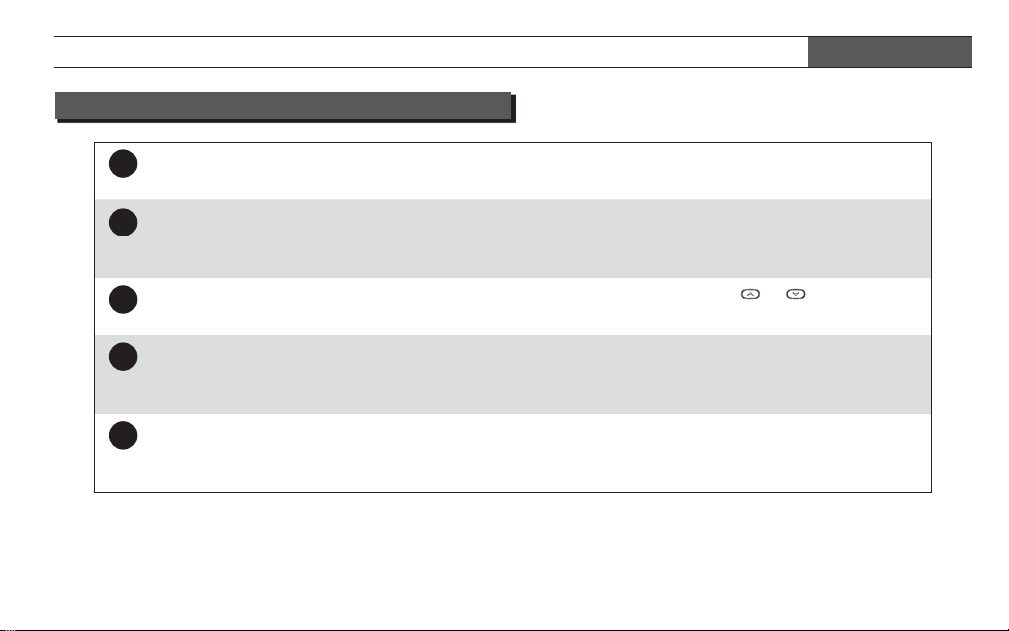
In Normal operation mode indicates the current Program period “Morn, Day, Eve, or
Night”. In Sched mode will indicate the period of the day being programmed
9
Hold
Temp
Indicates the program schedule is temporarily overridden. The thermostat will maintain
the current desired temperature for a two hour period. “Hold” will be displayed when
the thermostat is placed in permanent hold using the Hold button.
10
Limit
Is displayed when the desired temperature is adjusted with the
or keys to the
temperature limit selected in the setup menu.
11
Hold
Copy
Menu
Menu indicates button to press to access the programming and time setting functions
or to enter the Confi guration menu. Hold indicates button to press to enter permanent
Hold. Copy is used in programming.
12
Sched
Indicates button to press to enter Sched mode to enable setting of program schedule.
In Hold or Hold Temp mode, “Run Sched” indicates button to press to return to Run
mode.
BLUE EASY READER THERMOSTAT – PROGRAMMABLE MODE
OTHER DISPLAY ICONS FOR PROGRAMMING
Blue Easy Reader Thermostat Homeowner’s Guide • 9
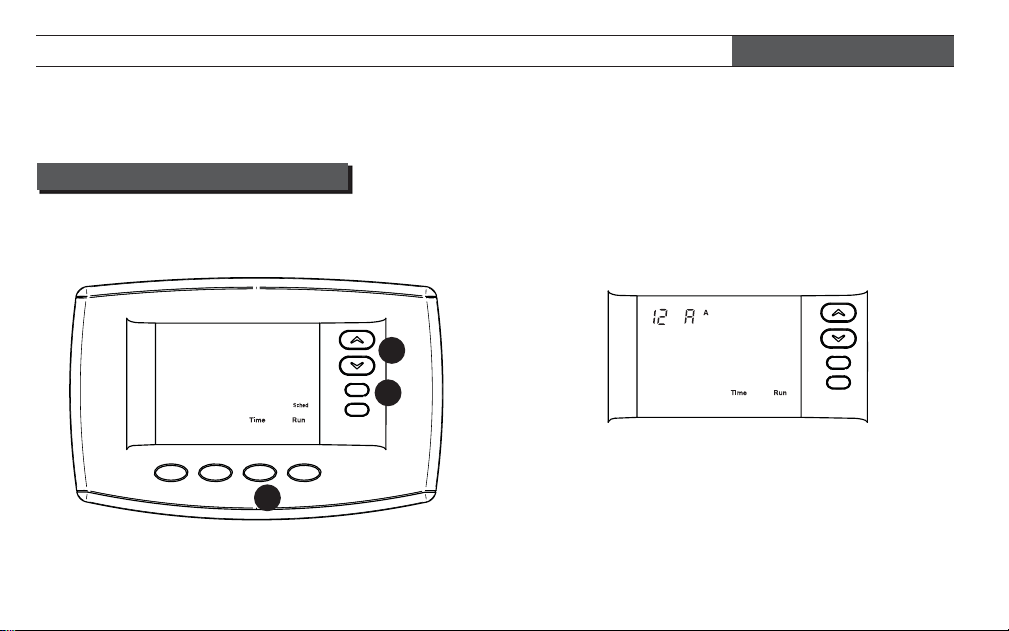
2 Press the Time button to display hour and A or P in
the clock display
SET CURRENT TIME AND DAY
1 On the Home display in Heat or A/C, press Menu
button to display additional button choices
SETUP GUIDE FOR PROGRAMMABLE OPERATING MODE
1
3
2
10 • Blue Easy Reader Thermostat Homeowner’s Guide
To change your thermostat to be a Programmable, Item 14, Schedules per Week, in Confi guration Menu must be
changed from P0 to P7. See page 18-19, “Setting Up Your Thermostat Options.”
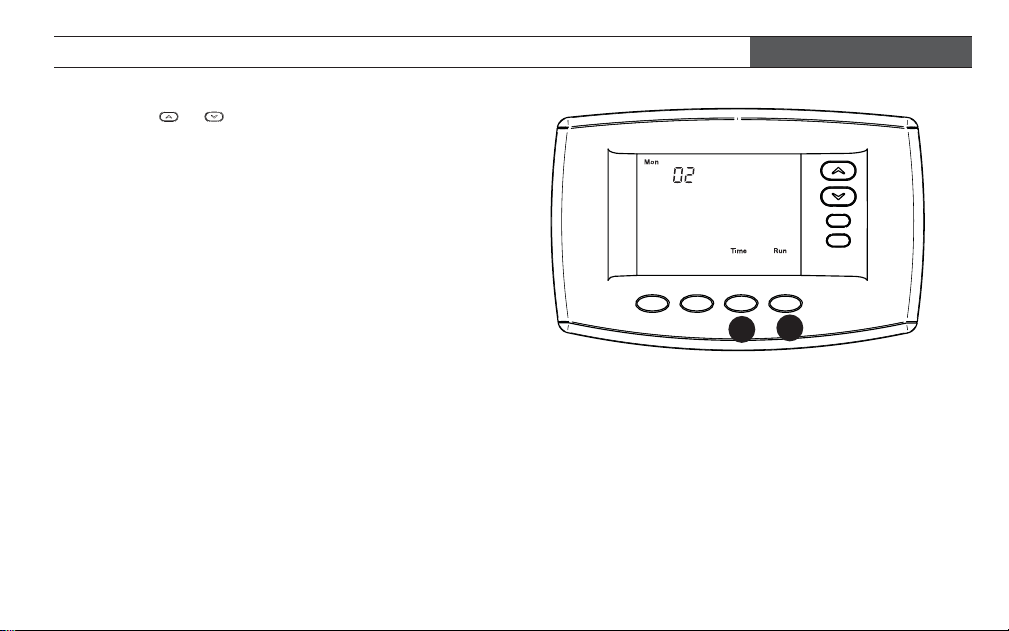
SETUP GUIDE FOR PROGRAMMABLE OPERATING MODE
3 Press the or button to reach the correct hour
and A (AM) or P (PM).
4 Press Time to display the minutes.
5 Repeat steps 3 and 4 to set minute(s), Year, Month
and day of week.
6 Press Run to return to home screen and run the
preset program that meets Energy Star guidelines.
Blue Easy Reader Thermostat Homeowner’s Guide • 11
4
6
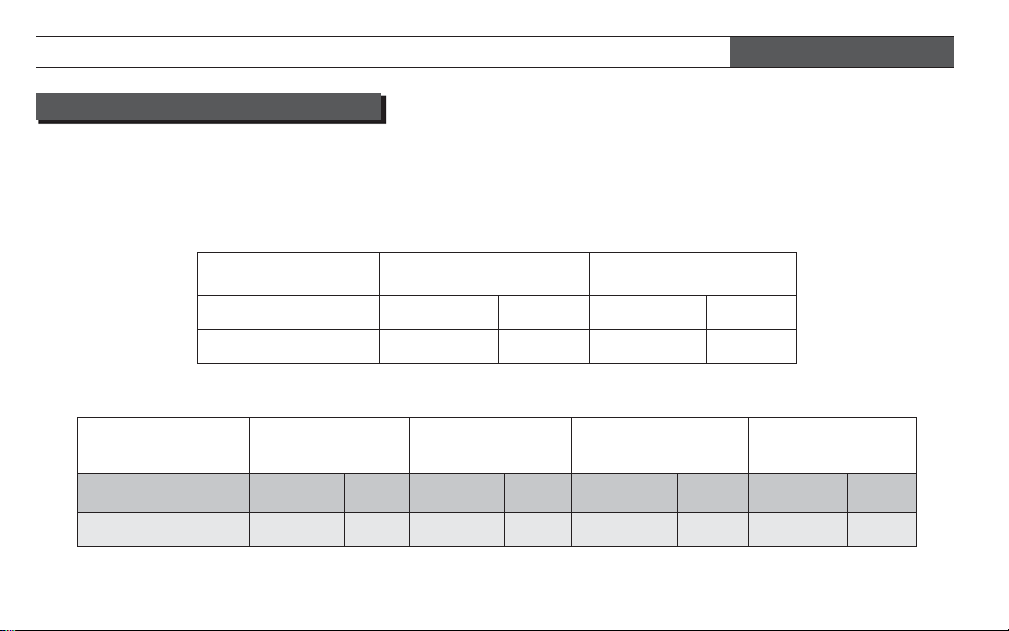
ENERGY SAVING PRE-PROGRAM
Factory Pre-Programmed schedule for the default two period Day / Night programs
Day Night
Heating Program
6:00 AM 70°F 10:00 PM 62°F
A/C Program
6:00 AM 75°F 10:00 PM 78°F
Factory Pre-Programmed schedule for four periods per day, all days of the week
Wake Up
(Morning)
Leave For Work
(Day)
Return Home
(Evening)
Go To Bed
(Night)
Heating Program
6:00 AM 70°F 8:00 AM 62°F 5:00 PM 70°F 10:00 PM 62°F
A/C Program
6:00 AM 75°F 8:00 AM 83°F 5:00 PM 75°F 10:00 PM 78°F
SETUP GUIDE FOR PROGRAMMABLE OPERATING MODE
This thermostat is set up for 7 independent day
programming with 2 or 4 time/temperature periods
per day. If the factory programming meets your needs,
skip to page 16, using your thermostat. If you wish to
change the heating or A/C schedules, please proceed
to the “Programming Your Thermostat” section.
12 • Blue Easy Reader Thermostat Homeowner’s Guide
The Heating and A/C Worksheet on page 14 allows
you to pencil in your own program times and tem-
peratures. Factory settings are listed on Monday (for
Monday thru Friday), Saturday and Sunday.
If you are re-programming all 7 days, fi ll in all lines with
the times and temperatures you want. Use this work-
sheet as a guide to reprogram the thermostat.
Keep the following guidelines in mind when planning
your program.
Ê In Heating, lower temperatures will save energy.
Ê In A/C, higher temperatures will save energy.
COPY PROGRAM
When programming your thermostat, you may copy
the program from one day to another day. To copy a
program:
1 In Sched mode, enter the program for the day.
2 Press Copy. “Copy” will begin to fl ash and the day
being copied will show.
3 Press Advance Day to select the day to copy to.
This day will be fl ashing.
4 Press Copy. “Copy” will stop fl ashing and the day
copied to will also stop fl ashing. The day copied
from will disappear.
PROGRAMMING YOUR THERMOSTAT
Blue Easy Reader Thermostat Homeowner’s Guide • 13
HEATING AND A/C WORKSHEET
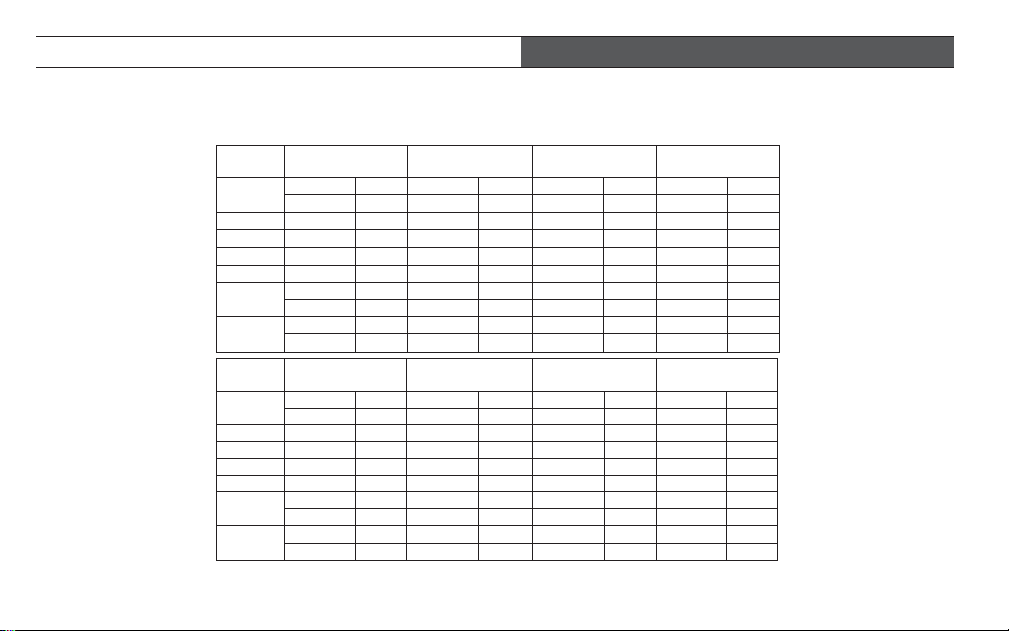
A/C
Program
Wake Up
(Morning)
Leave For Work
(Day)
Return Home
(Evening)
Go To Bed
(Night)
MON
6:00 AM 75°F 8:00 AM 83°F 5:00 PM 75°F 10:00 PM 78°F
TUE
WED
THU
FRI
SAT
6:00 AM 75°F 8:00 AM 83°F 5:00 PM 75°F 10:00 PM 78°F
SUN
6:00 AM 75°F 8:00 AM 83°F 5:00 PM 75°F 10:00 PM 78°F
Worksheet for Re-Programming 7 Day Program
Heating
Program
Wake Up
(Morning)
Leave For Work
(Day)
Return Home
(Evening)
Go To Bed
(Night)
MON
6:00 AM 70°F 8:00 AM 62°F 5:00 PM 70°F 10:00 PM 62°F
TUE
WED
THU
FRI
SAT
6:00 AM 70°F 8:00 AM 62°F 5:00 PM 70°F 10:00 PM 62°F
SUN
6:00 AM 70°F 8:00 AM 62°F 5:00 PM 70°F 10:00 PM 62°F
Fill in the blank worksheet with your desired times and temperatures:
PROGRAMMING YOUR THERMOSTAT
14 • Blue Easy Reader Thermostat Homeowner’s Guide
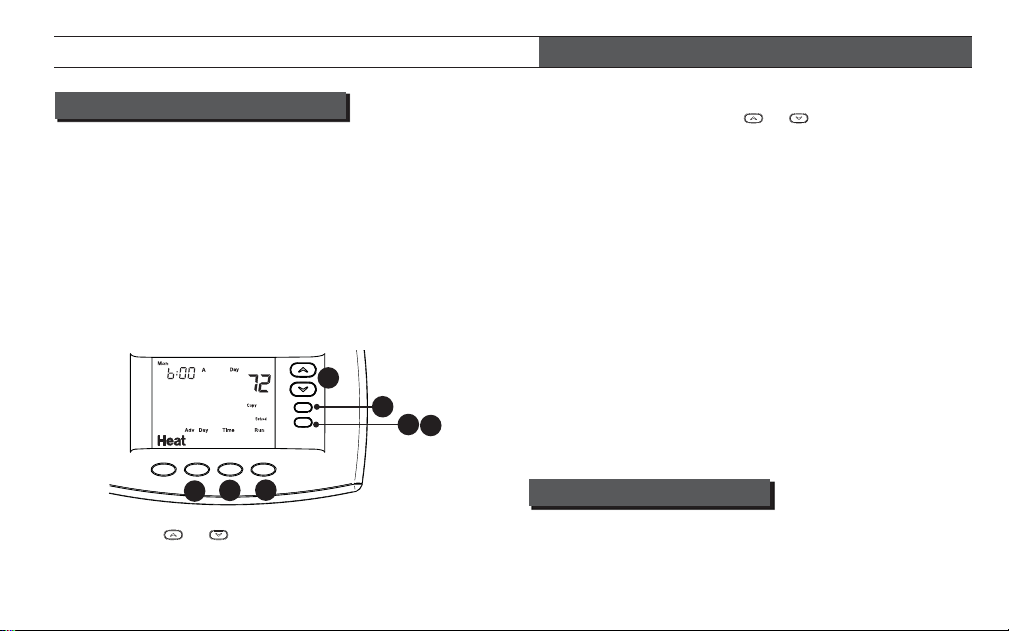
4 Press the Time button to toggle between Time and
Temperature. Press the
or buttons to adjust
the start time for the period. The time will change in
15 minute increments.
5 After you have set the time and the temperature for
the period to begin, press Sched to advance to the
next program period.
6 Repeat steps 3 through 5 until all of the program
times and temperatures are set for all program
periods for that day.
7 Use the Copy button to copy current day’s program
to any other day as described above. Or press Adv
Day and repeat steps 3 through 6 until programs for
all days are entered.
8 When programming is complete and all of the times
and temperatures match your desired heating
schedule, press Run. The thermostat will now run
your heating program.
ENTER A/C PROGRAM
Press A/C to place thermostat in air conditioning mode. Set
the A/C program following the “Enter Heating Program”
steps.
ENTER HEATING PROGRAM
1 In Heat mode, press the Menu button to display
additional button choices.
2 Press Sched button. The display will show the
day being programmed and the time and desired
temperature for the period. Either “Day” for two
period confi guration or “Morn” for four period
confi guration will be displayed to indicate the
period. “Heat” is displayed indicating the mode
being programmed.
3 Press the or button to change the
temperature to your selected temperature for the
1st heating period (Day or Morn).
PROGRAMMING YOUR THERMOSTAT
Blue Easy Reader Thermostat Homeowner’s Guide • 15
3
4
7
8
7
5
2
TEMPORARY PROGRAM OVERRIDE
This feature will override the program temperature
setting for a two hour period. Press or buttons
to adjust the temperature. The display will show “Hold
Temp” to the left of the desired temperature. To cancel
the temporary setting and return to the program,
press Run. Example: If you turn up the heat during the
morning program, it will be automatically lowered later,
when the temporary hold period ends.
PERMANENT TEMPERATURE HOLD
The Permanent Temperature Hold feature bypasses
the program and allows you to adjust the temperature
manually as needed. The temperature you set in Hold
will be maintained indefi nitely. Press or buttons
to adjust the temperature. The display will show “Hold
Temp” to the left of the desired temperature. Press the
Hold button to maintain the new temperature.
1Press Heat or A/C button to turn your system On.
Press Off to turn Heating and A/C Off. Fan will turn
Off if it is On.
2Press Run or Run Sched to begin running
thermostat program
3Press either the or buttons to change the
desired room temperature “setting”.
4Press the Fan button to select the desired fan
operation.
AUXILIARY HEATING
Programmable or Non-Programmable
If your heating or A/C system is a heat pump, the
system automatically activates Auxiliary Heating when
the outside temperature is too cold for the heat pump
to effi ciently heat the home. You can manually activate
the auxiliary heating by pressing and holding the Heat
button until
Aux
Aux changes to Aux. To turn the manual
auxiliary off press the Heat button again.
USING YOUR THERMOSTAT – PROGRAMMABLE MODE
16 • Blue Easy Reader Thermostat Homeowner’s Guide
“Hold Temp” will change to “Hold”. To cancel the
permanent hold setting at any time and return to the
program, press Run Sched button. Example: You turn
up the heat during the Morning program and press
the Hold button, it will remain at the new temperature
until you press Run Sched or you manually adjust to
another temperature.
SYSTEM DIAGNOSTICS
“Call for Service” will be displayed if your heating or
air conditioning system has diagnostic capability and
needs a qualifi ed service technician to service the
equipment. On some systems with diagnostic capabil-
ity “Call for Service” will fl ash on thermostat display
when a technician is needed.
USING YOUR THERMOSTAT – PROGRAMMABLE MODE
Blue Easy Reader Thermostat Homeowner’s Guide • 17
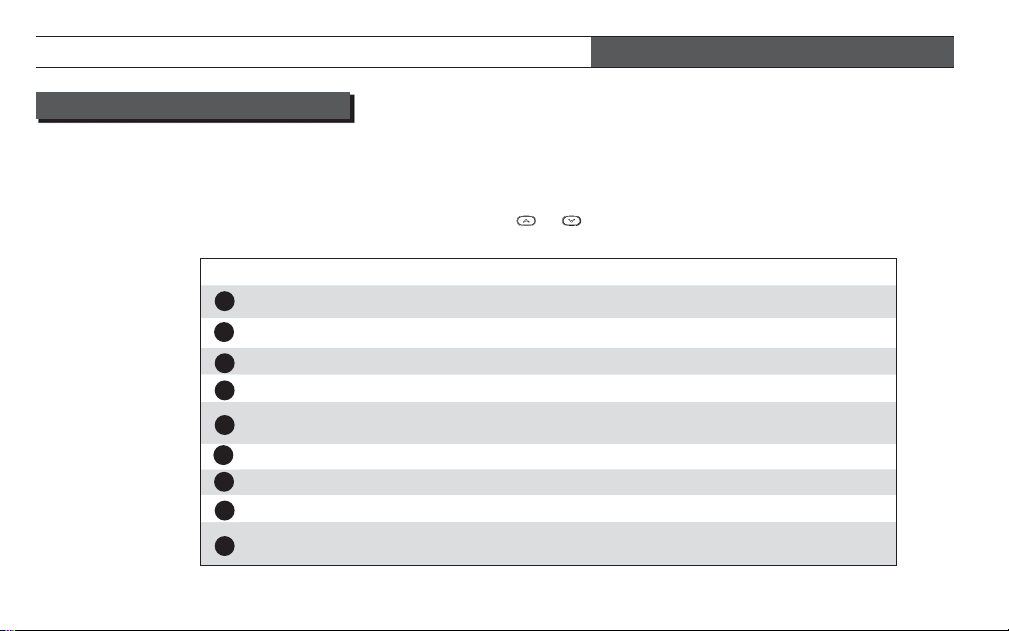
CONFIGURATION MENU ITEMS
Your thermostat has several confi guration items. Some
of these items will be set by the installer and should
not be changed. However these settings should be
recorded for future reference if the installer settings
are inadvertently changed.
MENU ITEM DISPLAY (DEFAULT) OPTIONS COMMENTS
1
System Confi guration (MS 2) HP1, HP2, SS1 Installer Set
Electric Heat Fan (GAS) ELE Installer Set
3
EMR E (On) Off
4
Heat Cycle Rate Cr HEAT (ME) SL, FA SS1, MS2 only
5
Heat Pump Confi guration
Cycle Rate
Cr Heat / A/C (ME) SL, FA
Heat Pump HP1, HP2
only
A/C Cycle Rate Cr A/C (ME) SL, FA SS1, MS2 only
Auxiliary Heat Cycle Cr AUX Heat (FA) SL HP1, HP2 only
8
Compressor Lock-out CL (OFF) On Installer Set
9
System Mode
Confi guration
(Heat, A/C, Off)
Heat, Off, Fan /
Heat, Off / A/C, Off
Installer Set
SETTING UP YOUR THERMOSTAT OPTIONS
To enter the Confi guration Menu, Easy Reader ther-
mostat must be in Heat or A/C. Press and hold Menu
button for fi ve seconds. Once in the menu, each press
of the Menu Button will step to the next menu item.
Menu item options can be changed by pressing the
or buttons.
2
6
7
18 • Blue Easy Reader Thermostat Homeowner’s Guide
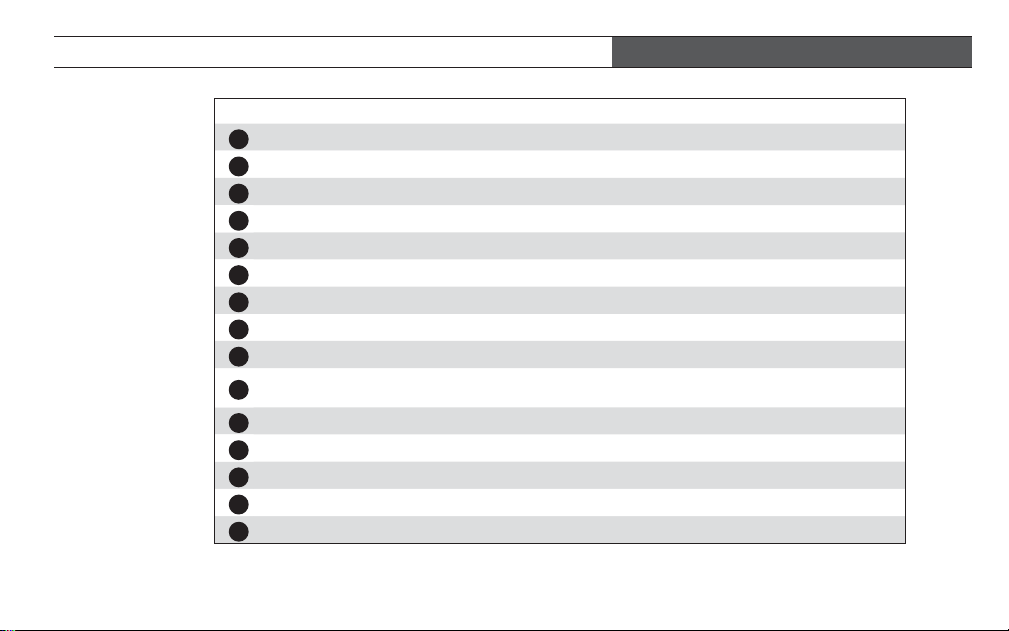
MENU ITEM DISPLAY (DEFAULT) OPTIONS COMMENTS
10
Compressor Optimization CO (OFF) On Installer Set
11
LCD Display Light dL (On) Off
12
Temperature Display Adj. HI (0) 1 to 5 Hi or LO
13
o
F/
o
C Selection (
o
F)
o
C
14
Schedules per week P (0) 7
15
Periods per day PS (2) 4
16
Fast HEAT HEAT FA (On) Off
17
Fast A/C A/C FA (On) Off
18
Daylight Savings Time dS (On) Off
19
Temperature Range Heat
Limit
HL (99) 62-98
20
Temperature Range A/C Limit LL (45) 46-82
21
Dual Fuel / Electrical Fuel dF (0) 1-9 HP1, HP2, Installer Set
22
Compressor Delay Cd (60) 00-99 HP1, HP2, Installer Set
23
O/B Output Confi guration On A/C (O) On Heat (B) Installer Set
24
Exit Menu
SETTING UP YOUR THERMOSTAT OPTIONS
Blue Easy Reader Thermostat Homeowner’s Guide • 19
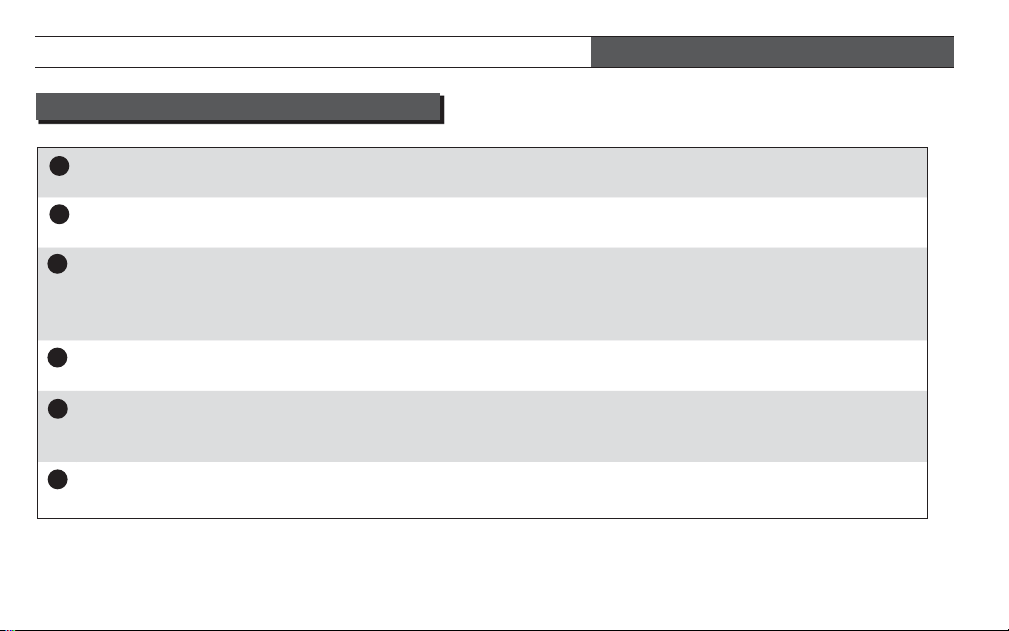
Confi guration for your
Heating or A/C system
Set by installer to match your system. Record the setting.
Electric or Gas fan
operation
Set by installer to match your system. Record the setting.
EMR
Energy Management Recovery (EMR) [will not appear if thermostat is set
for Non-Programmable] Default setting is On. EMR starts your system
early so the temperature in your home is at the desired temperature at the
beginning of a program period.
Heat Cycle Rate Setting
(if system is MS or SS)
Default setting is ME (medium), if you desire a longer heating cycle set to
SL (Slow) or shorter cycle set to FA (Fast).
Heat Pump Cycle Rate
Setting (if system is Heat
Pump)
Default setting is ME (medium), if you desire a longer heat pump cycle set
to SL (Slow) or shorter cycle set to FA (Fast).
A/C Cycle Rate Setting or
Aux Heat Cycle Rate
Default setting is ME (medium) if you desire a longer cooling cycle set to
SL (Slow) or shorter cycle set to FA (Fast).
CONFIGURATION MENU DESCRIPTIONS
6
1
3
2
4
5
SETTING UP YOUR THERMOSTAT OPTIONS
20 • Blue Easy Reader Thermostat Homeowner’s Guide
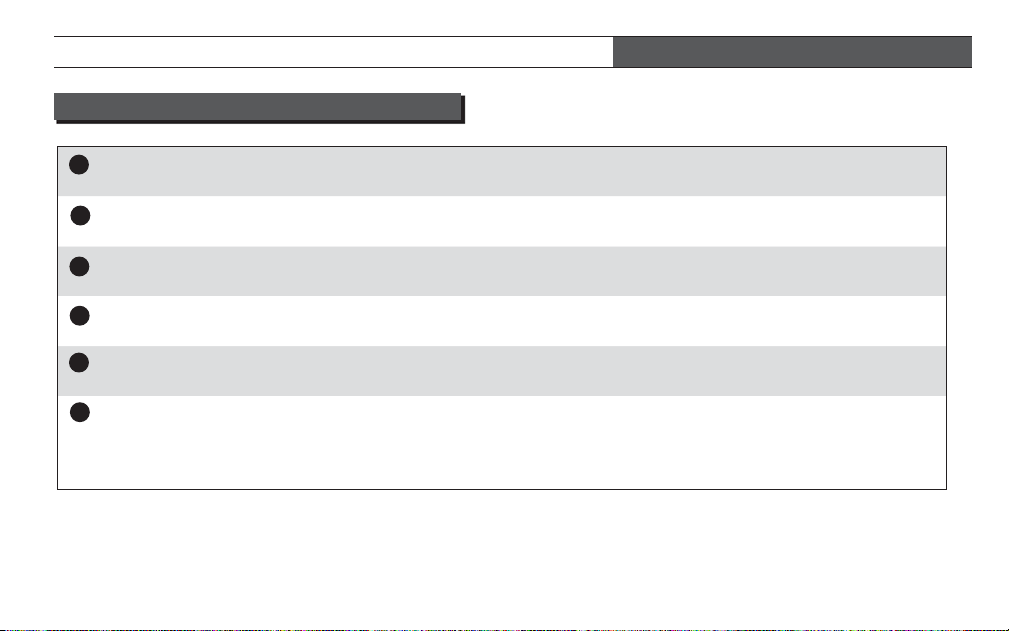
Auxiliary Heat Cycle Rate
(if system is Heat Pump)
Default setting is FA (Fast). If you desire a longer Aux heat cycle set to SL
(Slow).
Compressor Lockout
Protection
Set by installer to match your system. Record the setting.
System mode
confi guration
Set by installer to match your system. Record the setting.
Compressor
Optimization
Set by installer to match your system. Record the setting.
Display light
The display light is defaulted on so when any button is pressed the light will
illuminate the display. When set to Off, the light will not turn on.
Temperature Display
Adjustment
The Easy Reader thermostat was accurately set at the factory. However,
if you want to change the temperature, you can adjust the reading by plus
or minus fi ve degrees. Your thermostat displays to match your previous
thermostat.
7
8
9
10
11
12
CONFIGURATION MENU DESCRIPTIONS
Blue Easy Reader Thermostat Homeowner’s Guide • 21
SETTING UP YOUR THERMOSTAT OPTIONS
Fahrenheit or Celsius
display
The Easy Reader can display temperature in either °F or °C.
Schedules Per Week
The Easy Reader thermostat is shipped from the factory as an easy to
operate non-programmable thermostat (P 0). However if you want the
energy saving benefi ts of a programmable thermostat, a seven day
programming option (P 7) is available.
Periods per Schedule
If programming is selected you can choose between 2 period (Day, Night)
per day or 4 period (Morning, Day, Evening, Night) per day.
Fast Heat
If your system is a multi-stage and/or Heat Pump you can select to have
the additional stage of heating come on anytime the temperature setting
is adjusted up by three degrees or more. If you do not desire this feature,
select Off.
Fast A/C
If your system is a multi-stage Air Conditioner or multi-stage Heat Pump
you can select to have the additional stage of A/C come on anytime the
temperature setting is adjusted down by three degrees or more. If you do
not desire this feature, select Off.
13
14
15
16
17
CONFIGURATION MENU DESCRIPTIONS
SETTING UP YOUR THERMOSTAT OPTIONS
22 • Blue Easy Reader Thermostat Homeowner’s Guide
Daylight Savings
Time adjustment
In Programmable mode the Easy Reader thermostat can automatically
change the time in spring and fall. If you do not desire this feature select
Off.
Temperature Range
Heat Limit
The Easy Reader thermostat can be set to limit the highest desired
temperature in heat to anywhere between 98° and 62°.
Temperature Range
A/C Limit
The Easy Reader thermostat can be set to limit the lowest desired
temperature in A/C to anywhere between 46° and 82°.
Dual Fuel Setting
Set by installer to match your heat pump dual fuel system. Record the
setting.
Compressor Delay
for Dual Fuel
Set by installer to match your heat pump dual fuel system. Record the
setting.
O/B Output Confi guration
Set by installer to match your heat pump system. Record the setting.
Exit
CONFIGURATION MENU DESCRIPTIONS
18
19
20
21
23
24
22
SETTING UP YOUR THERMOSTAT OPTIONS
Blue Easy Reader Thermostat Homeowner’s Guide • 23
HOMEOWNER HELP LINE: 1-800-284-2925
White-Rodgers is a division
of Emerson Electric Co.
The Emerson logo is a
trademark and service mark
of Emerson Electric Co.
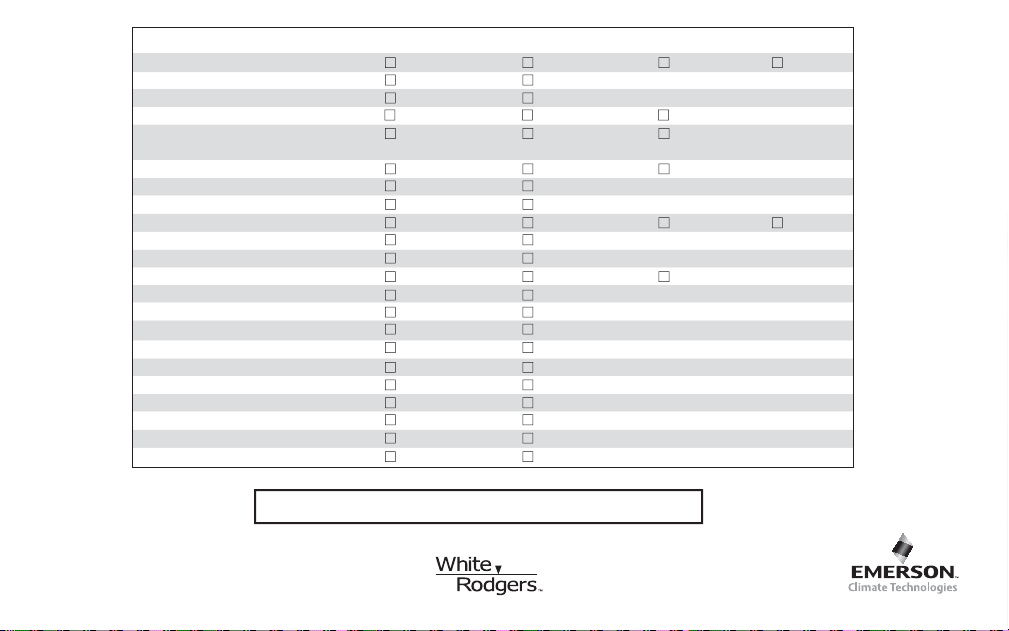
CONFIGURATION MENU RECORDING (Default Settings in Bold)
System Confi guration
MS 2
HP 1 HP 2 SS 1
Electric Heat Fan
Gas
Ele
EMR (E)
On
Off
Heat Cycle Rate (Cr Heat)
ME
SL FA
Heat Pump Confi guration
Cycle Rate (Cr Heat A/C)
ME
SL FA
A/C Cycle Rate (Cr A/C)
ME
SL FA
Auxiliary Cycle Rate (Cr Heat)
FA
SL
Compressor Lockout (CL)
Off
On
Mode Confi guration
Heat, A/C, Off
Heat, Off, Fan Heat, Off A/C Off
Compressor Optimization (CO)
Off
On
Display Light (dL)
On
Off
Temperature Display Adjust
0 Hi
__ 1 to 5 Hi __ 1 to 6 Lo
°F/°C Selection
°F
°C
Schedules per Week (P)
0
7
Periods per Schedule Day (PS)
2
4
Fast Heat (Heat FA)
On
Off
Fast A/C (A/C FA)
On
Off
Temperature Range Heat Limit (HL)
99°
__ (62° to 99°)
Temperature Range A/C Limit (LL)
45°
__ (45° to 82°)
Dual Fuel/ (dF)
0 (Off)
__ (1 to 9)
Compressor Delay (Cd)
60
__ (00 to 99 sec)
O/B Output Confi guration
On A/C 0
On Heat B
Part No. 37-6994A
0905