The ignition switch (1) is used for starting and stopping the engine (page 82). Insert the key and turn it to the right for the ON (I) position.
The ignition switch is also used to reset the maintenance tripmeter and the maintenance hourmeter (page 34).
Range Select Lever
The range select lever (1) has two positions: Drive (D), Low (L). See Shifting Gears, page 95.
4WD Switch
Your ATV is equipped with a 4WD switch (1), which permits a choice between the "2WD" and "4WD" drive modes. Select a drive mode that's suitable for your riding.
Keep both hands on the handlebar while machine is in motion and come to a complete stop before using the 4WD switch.
The 4WD switch is located above the throttle lever. To select the drive mode, with your ATV stopped, push the 4WD switch.
To check your present drive mode, look at the 4WD indicator (2).
2WD mode: the 4WD indicator disappears when the 2WD mode engages.
4WD mode: the 4WD indicator appears when the 4WD mode engages.
If the 4WD indicator does not appear when selecting the 4WD mode, accelerate your ATV slowly until the 4WD indicator appears.
The 4WD indicator and differential lock indicator both flash together when there is any abnormality in the front final gear system. See Front Differential Lock and Speed Limiter Over-Ride (Differential Lock Switch and Start/Over Ride Button),page 40.
Front Differential Lock and Speed Limiter Over-Ride (Differential Lock Switch and Start/Over Ride Button)
Your ATV is equipped with a front differential lock feature that includes a speed limiter and speed limiter over-ride. This system is designed to provide maximum use of available traction to help you escape from situations where the vehicle might otherwise become stuck, in the mud for example. When the front differential lock mode is activated, the front differential gear is locked causing all four wheels to rotate at the same speed. Because locking all four wheels together changes the way the vehicle handles and increases the amount of room necessary to turn, a speed limiter restricts the speed to 20 mph (32 km/h). Pushing and holding the start/over ride button in this mode allows you to momentarily over-ride the 20 mph (32 km/h) speed limiter, up to 40 mph (64 km/h), to help you free the vehicle in more severe conditions. You should only use this feature where maximum traction is required and only in low speeds. For normal riding, use 2WD and 4WD modes.
To select the front differential lock mode:
When the 4WD mode is engaged, reduce the speed of your ATV to below 10 mph (16 km/h) and slide the differential lock switch (1) over the 4WD switch. The differential lock indicator (2) will flash fast and the front differential locking process begins. When the locking is complete, the differential lock indicator stays on.
If the speed of your ATV is above 10 mph (16 km/h), the locking process will be interrupted and the differential lock indicator will slowly flash.
If the differential lock indicator does not stay on when the front differential lock mode is selected, steer the handlebar either to the left or right all the way while your ATV is stopped. If the differential lock indicator is still flashing, move your ATV slowly while steering the handlebar all the way to right or left.
To activate the speed limiter over-ride mode:
Push the start/over ride button (3) when the front differential lock mode is activated.
Front final gear system failure:
The differential lock indicator and 4WD indicator (4) will both flash when there is any abnormality in the front final gear system. If this occurs, the front final gear actuator will stop moving, and the front final gear system will be fixed in the current position, either 2WD mode, 4WD mode or front differential lock mode.
If both the differential lock indicator and 4WD indicator flash, reduce speed and take your ATV to your dealer as soon as possible.
Start/Over Ride Button
The start/over ride button (1) is used for starting the engine and activate the speed limiter over-ride mode. Pushing the button in starts the engine. See Starting Procedure, page 84.
When the engine is not running and the start/over ride button is pushed, the starter motor will crank the engine. The starter motor will not operate if the engine stop switch is in the OFF (r) position when the start/over ride button is pushed.
To activate the speed limiter over-ride mode, see Front Differential Lock and Speed Limiter Over-Ride (Differential Lock Switch and Start/ Over Ride Button), page 38
Engine Stop Switch
The engine stop switch (1) is used to stop the engine in an emergency. To operate, slide the switch to the OFF () position. The switch must be in the RUN () position to start the engine, and it should normally remain in the RUN () position even when the engine is OFF.
If your ATV is stopped with the ignition switch ON (I) and the engine stop switch OFF (), the battery will discharge. Turn the ignition switch to OFF O) to prevent battery discharge.
Headlight Switch
The headlight switch (1) is used to turn the headlights and assist headlight ON () or OFF (). The assist headlight turns on only when the headlight dimmer switch (2) is in the HI () position. To operate, turn the switch to ON (y) or OFF ().
Headlight Dimmer Switch
The headlight dimmer switch (2) is used to change between the high and low beams of the headlights and to activate the assist headlight. To operate, turn the switch to HI () for high beam of the headlights and activate the assist headlight, LO () for low beam of the headlights and deactivate the assist headlight.
Recoil Starter (Canada only)
The recoil starter (1) is used to start the engine when the battery is low. See Using the Recoil Starter (Canada only), page 88.
Throttle Lever
The throttle controls engine rpm (speed). To increase engine rpm, press the throttle lever (1) with your thumb. To reduce engine rpm, release pressure on the throttle lever. The throttle will automatically return to the closed position (engine idle) when you remove your thumb.
Drive Mode Select Switch
The drive mode select switch (1) has two positions: AUTO (automatic shift mode) and ESP (manual shift mode). See Shifting Gears, page 89.
Gearshift Switch
AUTO (automatic shift mode)
These gearshift switches [upshift switch (1) and downshift switch (2)] are used to select the drive (D), neutral (N) and reverse (R). See Shifting Gears, page 89 and Riding in Reverse, page 96.
ESP (manual shift mode)
These gearshift switches are used to select the next higher or lower gear in the transmission. To operate, press the upshift switch (1) to engage the next higher gear or press the downshift switch (2) to engage the next lower gear. See Shifting Gears, page 89 and Riding in Reverse, page 96.
Front Brake Lever
The front brake lever is used to slow or stop your ATV. To operate, pull the lever. For information on braking techniques, see page 98.
Rear Brake Lever/Parking Brake Lever
The rear brake lever/parking brake lever is used to slow or stop your ATV. To operate, pull the lever. For information on braking techniques, see page 98.
Rear Brake Pedal
The rear brake pedal is used to slow or stop your ATV. To operate, depress the pedal. For information on braking techniques, see page 98.
Parking Brake/Reverse Lever (P/R Lever)
The P/R lever (1) on the rear brake lever/parking brake lever (2) is used to apply the parking brake or to shift the transmission into reverse.
To apply the parking brake:
Bring the vehicle to a complete stop, then make sure the transmission is in neutral.
Squeeze the rear brake lever/parking brake lever, then rotate the P/R lever clockwise until it engages the slot on the rear brake lever/ parking brake lever bracket.
For more information on Parking, see page 113.
To release the parking brake:
Squeeze the rear brake lever/parking brake lever until the P/R lever is released from the slot on the rear brake lever/parking brake lever bracket.
The brake light is activated by applying the parking brake. When using the parking brake, be sure turn the ignition switch to OFF (O) to avoid discharging the battery
To shift the transmission into reverse:
See Riding in Reverse, page 96.
Flag Pole Bracket
Flag poles are optional equipment available from your dealer. To mount a pole in the bracket (1), follow the instructions that come with the flag pole kit.
Flag poles are required in some riding areas. Check local regulations before riding.
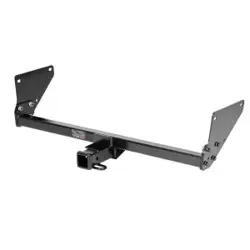
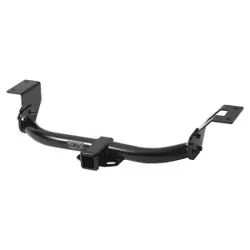
Trailer Hitch
The trailer hitch (1) is located on the rear frame. To use the hitch, you’ll need a proper size ball (2) as specified by the trailer manufacturer.
To attach the ball and properly hook up a trailer, follow the trailer manufacturer’s instructions. For load limits and operational guidelines, see page 69.
Accessory Socket
The accessory socket (1) is attached to the left side of the front center cover (2). You can use the accessory socket to power a trouble light, spotlight, CB radio, or cell phone, etc.
To use the accessory socket, turn the ignition switch to ON (I), start the engine. Then turn the headlights OFF (), and open the accessory socket cap (3).
Be sure the engine is on and the headlights are turned off before using the accessory socket, otherwise you may drain the battery
The accessory socket’s rated capacity is DC 12 V, 120 Watts (10 A) or less. If you exceed this limit, you may blow a fuse. See If a Fuse Blows, page 232.
When you are done using an accessory, unplug it, and cover the socket with the cap.
Be careful not to flood this accessory socket when washing your ATV.
Utility Box
The utility box (1) is located on the left side of the front fender. You may store small, lightweight items in the box.
To open:
Pull up the front of the utility box cover (2).
To close:
Push down the front of the utility box cover until it locks in place. Make sure that the stud (3) is locked securely in position by pulling up lightly on the front of the utility box cover.
Storage Compartment
The storage compartment (1) is located below the rear cargo rack (2).
To open the compartment, unhook the rubber strap (3).
Be careful not to flood this area when washing your ATV.
PS (Electric Power Steering) (TRX500FA6/FA7)
This ATV is equipped with an electronically controlled, electricpower-assisted steering system.
While the engine is running, the PS (Electric Power Steering) system provides power from the electric motor, which helps you to turn the ATV’s handlebar more easily.
The PS system on this ATV utilizes an overheat protection feature to prevent damage to system components. In certain extended, repetitive high-load situations, the system will reduce or even disable power steering assist. The steering will perform as a normal non-PS system during this brief period. After cooling down, it will then return to normal PS operation.
The PS indicator should light when the ignition switch is turned on and remain on until the engine is started.
The PS indicator also lights when there is any abnormality in the PS system. If this occurs, the electric power assist for turning will not be available, but the manual steering system will perform as usual.
If the PS indicator lights at any time while riding, reduce speed and take your ATV to your dealer as soon as possible. Continuing to ride with a PS system problem can cause system damage.
Do not modify your Electric Power Steering system. In case of a malfunction, take your ATV to your dealer.
Starting & Stopping the Engine
Always follow the proper starting procedure described below.
For your safety, avoid starting or operating the engine in an enclosed area such as a garage. Your ATV’s exhaust contains poisonous carbon monoxide gas which can collect rapidly in an enclosed area and cause illness or death.
If you turn the ignition switch to the OFF (O) position while in reverse, the transmission will automatically return to neutral (N) when the ignition switch is turned to the ON (I) position.
The starter motor will operate when the transmission is in neutral or the front brake lever is pulled in.
Preparation
Before starting, make sure the vehicle is on a level surface and lock the parking brake (page 49).
Turn the ignition switch (1) to ON (I).
Confirm the following:
• The transmission is in neutral, and the neutral indicator (2) is ON and the gear position indicator shows “N”.
• The engine stop switch (3) is set to RUN ().
Starting Procedure
This ATV is fuel-injected with an automatic choke. Follow the procedure indicated below.
Any Air Temperature
• With the throttle completely closed, press the start/over ride button.
The engine will not start if the throttle is fully open (because the electronic control module cuts off the fuel supply).
Snapping the throttle or fast idling for more than 5 minutes may cause exhaust pipe and muffler discolorations.
Flooded Engine
If the engine fails to start after repeated attempts, it may be flooded with excess fuel. To clear a flooded engine:
1. Leave the engine stop switch set to RUN ().
2. Open the throttle fully.
3. (USA)
Press the start/over ride button for 5 seconds.
(Canada)
Press the start/over ride button for 5 seconds (or operate the recoil starter several times).
4. Follow the normal starting procedure.
5. If the engine starts, then open the throttle slightly if idling is unstable. If the engine does not start, wait 10 seconds, then follow steps 1 – 4 again
If the engine still won’t start, refer to If Your Engine Quits or Won’t Start, page 218.
Bank Angle Sensor Ignition Cut-off System
Your vehicle’s banking (lean angle) sensor system is designed to automatically stop the engine if the vehicle is overturned.
Before restarting the engine, you must turn the ignition switch to the OFF (O) position and then back to ON (I). The engine will not restart until you perform this procedure.
Stalled Engine
You can restart the engine while the vehicle is stopped by squeezing the front brake lever and pressing the start/over ride button.
Do not press the throttle lever while starting in gear. Your ATV is equipped with a start inhibitor system that will cut off the ignition if the throttle is open while attempting to start in gear.
Once you have started the engine, release the front brake lever, then apply throttle gradually.
How to Stop the Engine
Normal Engine Stop
To stop the engine, make sure the transmission is in neutral by checking that the neutral indicator light is on, then turn the ignition switch to OFF (O).
The engine stop switch should normally remain in the RUN () position even when the engine is OFF.
If your ATV is stopped with the engine stop switch OFF () and the ignition switch ON (I), the battery will discharge.
Emergency Engine Stop
To stop the engine in an emergency, use the engine stop switch. To operate, slide the switch to either OFF () position.
Using the Recoil Starter (Canada only)
The recoil starter is used to start the engine when the battery is low. To operate the recoil starter:
Check that the transmission is in neutral.
Grasp the starter grip (1) firmly, then pull it out slowly approximately 4 in (100 mm).
Pull the grip up briskly and fully.
After the engine starts, allow the starter grip to return slowly
Pull the recoil starter grip straight out so that the cord does not touch the side cover. Repeated contact with the side cover can damage the starter cord.
If the starter grip does not return smoothly (because of dirt in the assembly), see your dealer.
Your ATV has two shift modes: AUTO (automatic shift mode) and ESP (manual shift mode).
You can select the desired shift mode with the drive mode select switch
AUTO (automatic shift mode):
Use this mode for everyday riding. The transmission automatically shifts to keep the engine at the best speed for riding condition. The gear position indicator shows “D” for forward gears, “N” for neutral, and “R” for reverse. Select gear position with the gear shift switches.
ESP (manual shift mode):
In this mode, you can shift gears much like a manual transmission, but without operating a clutch.
You can select five forward gears neutral and reverse by operating the gearshift switches.
The gear position indicator will show “1, 2, 3, 4, or 5” for forward gears, “N” for neutral, and “R” for reverse.
Taking Care of the Unexpected
General Guidelines
Keeping your ATV well-maintained is the best way to reduce the possibility of having a problem while riding. However, problems can arise even with well-maintained machines.
Remember to take along your owner’s manual, the tool kit that came with your ATV, and any other items (such as tire repair supplies and additional tools) that might help you solve a problem on your own.
If something goes wrong during a ride, the first thing to do is stop as soon as you safely can. Do not continue riding if you have a flat tire, or you hear an unusual noise, or your ATV just doesn’t feel right. If you continue riding, you could cause more damage and endanger your own safety.
After stopping, take time to assess the situation. Carefully inspect your ATV to identify the problem, then consider your options before you decide what to do.
If a problem is relatively minor and you have the tools, supplies, and skills to make a permanent repair, you may be able to fix it on the trail and continue riding. Or, you may be able to make a temporary repair that allows you to slowly ride back to your base where you can make a permanent repair or get help.
When a problem is more serious — or you don’t have the tools, supplies, experience, or time to deal with it — you need to choose the safest way to get yourself and your ATV back to base. For example, if you are close enough, you (or you and another person) might be able to push it back.
Should you ever have a problem while riding, please follow these guidelines:
• Always put personal safety first.
• Take time to assess the situation and your options before deciding what to do.
• If the problem is relatively minor and you have the tools, supplies, and skills to make a temporary repair, be sure to have permanent repairs made as soon as possible.
• Do not continue riding if you are hurt or your ATV is not in safe riding condition.
Additional recommendations for specific problems follow.
If Your Engine Quits or Won’t Start
Proper operation and maintenance can prevent starting and engine performance problems. In many cases, the cause of the problem may be a simple operational oversight.
If you have a problem starting the engine — or experience poor engine performance — the following information may help you. If you can’t correct the problem, see your dealer.
If your ATV won’t start, listen as you press the start/over ride button. If you don’t hear the starter motor turning, refer to the Starter motor doesn’t operate symptom. If you can hear the starter motor working normally, refer to the Starter motor works, but the engine won’t start symptom.
SYMPTOM: Starter motor doesn't operate.
POSSIBLE CAUSE
WHAT TO DO
ignition switch OFF
Turn the ignition switch ON.
engine stop switch OFF
Slide the engine stop switch to RUN.
transmission not in neutral
Shift into neutral or squeeze the front brake lever.
blown fuse
Replace with a new fuse of the same rating (page 232).
battery lead loose
Tighten the battery lead.
low (or dead) battery
Charge the battery (page 198). If charging doesn't help, see your dealer.
faulty starter motor
If all possible causes are negative, the starter motor may be faulty. See your dealer.
SYMPTOM: Starter motor works, but the engine won't start.
POSSIBLE CAUSE
WHAT TO DO
out of fuel
Fill the fuel tank.
flooded engine
See Flooded Engine (page 85).
loose or unconnected spark plug cap
Install the spark plug cap securely. If the engine still won't start, see your dealer.
loose battery cables
Tighten the battery terminal bolts.
weak battery
Charge the battery (page 198). If charging doesn't help, see your dealer.
SYMPTOM: Engine starts, but runs poorly.
POSSIBLE CAUSE
WHAT TO DO
high coolant temperature
Check the coolant temperature gauge and high coolant temperature indicator. Refer to If the High Coolant Temperature Indicator Lights, page 230.
runs erratically, misfires
See your dealer.
blubbers (rich fuel mixture)
See your dealer.
sooty exhaust (rich fuel mixture)
See your dealer.
detonates or pings under load
If applicable, switch to the recommended octane gasoline (page 134)or change your brand of gasoline. If the problem persists, see your dealer.
afterfires (backfires)
See your dealer.
pre-ignition (runs on after ignition switched OFF)
See your dealer.
SYMPTOM: Engine starts, but runs poorly or dies when hot.
POSSIBLE CAUSE
WHAT TO DO
poor or inadequate fuel flow due to clogged fuel filter
See your dealer.
(ensure clean fuel supply)
If the Transmission Is Not Functioning Properly
ESP (manual shift mode):
If one or both shift switches do not function, see the following instruction. If proper function cannot be restored, see your dealer.
1. Stop the ATV.
2. Turn the ignition switch to the OFF (w) position.
3.After the engine stops, turn the ignition switch to the ON (q) position.
4. Press both shift switches and check that they are functioning.
5. If both switches are functioning, shift into neutral and restart the engine.
If one or both switches are not functioning, see Emergency Gear Selection & Operation, page 224.
AUTO (automatic shift mode):
When the automatic transmission is not shifting properly, the gear position indicator will show “–” and blink.
See your dealer to check and restore the automatic transmission.
If the gear position indicator shows “–” and blink while riding, perform the following:
1. Stop the ATV.
2. Turn the ignition switch to the OFF (O) position.
3. After the engine stops, turn the ignition switch to the ON (I) position.
4.Check the gear position indicator.
If these efforts do not restore proper operation, have your ATV inspected by your dealer.
When the “–” is blinking in the gear position indicator:
Restart the engine; drive the ATV to a location where it can be loaded and transported to your dealer.
When the display on the gear position indicator returns to normal:
You may drive on the ATV as usual after restarting the engine. However, we urge you to have your ATV inspected by your dealer.
If the ATV does not move, even through “–” is not blinking in the gear position indicator:
If your ATV won’t move, it is possible the transmission system has malfunctioned. Use the following procedure to manually over-ride the clutch of the transmission.
Shift the transmission into 2nd gear.
Apply the parking brake (page 50).
Turn the ignition switch to the OFF (O) position.
Loosen the screw (1) and release the lock plate (2).
Locate the emergency valve access hole (4) inside the left front fender. Using a screwdriver, turn the emergency valve (3) all the way in. With the engine running, slowly open the throttle to move the ATV forward.
See your dealer as soon as possible.
When the battery is low (or dead):
• See If the Battery Is Low (or Dead), page 239.
Emergency Gear Selection & Operation
If the shift switches do not operate, use the following procedure to manually select a gear so you may drive the vehicle to a location where it can be loaded and transported to your dealer.
1. Turn the ignition switch to the ON (q) position.
2. Remove the seat (page 130) and tank cover assembly (page 132).
3. Remove the gear change tool from the storage compartment (page 128).
4. Check the neutral indicator.
If the transmission is in neutral, go to step 5.
If the transmission is not in neutral, use the gear change tool to shift to neutral so you will be able to start the engine. Refer to How to Shift Gears Manually: (page 225).
5. Apply the parking brake (page 50).
6. Press the start/over ride button to start the engine.
7. Set 2nd gear position. Refer to How to Shift Gears Manually: (page 225).
8. Return the gear change tool to the storage location.
9. Install the tank cover assembly and seat.
10. Get on the ATV, release the parking brake, and drive it at a safe speed to a place where it can be repaired or serviced.
How to Shift Gears Manually:
• With the ATV unoccupied, align the hexagonal hole of the gear change tool (1) with the hexagonal end of the secondary spindle which is located on the front crankcase next to the front propeller shaft.
• To downshift, turn the gear change tool to counterclockwise (A). To upshift, turn the gear change tool to clockwise (B).
• If the transmission does not shift, rock the vehicle back and forth and try again.
• Return the gear change tool to the storage location.
Do not attempt to shift gears manually using the gear change tool while riding.
If the transmission is shifted manually when the electric shift system is functioning, the system will shutdown automatically and the shift switches will not operate. To reactivate the system, turn the ignition switch to the OFF (O) position, then turn it back to the ON (I) position.
It may be required to rock the ATV back and forth to get proper transmission gear alignment to allow shifting between gears.
If You Have a Flat Tire
How you handle a flat tire on the trail depends on how serious the tire damage is, and what tools and supplies you have with you.
If you have a slow leak or a minor puncture, use the plug method to make a temporary repair. (The plug method is applied from the outside of the tire and is the same as that for conventional tubeless tires.)
A plug-type repair kit, available at most auto parts stores or service stations, provides a plug, an installation tool, tire cement, and an instruction sheet. Follow the instructions provided with the repair kit to make a temporary repair.
As soon as possible, have the tire permanently repaired by your dealer. Any tire that cannot be repaired should be replaced.
Whenever the ATV is to be operated far from service facilities or available transportation, we recommend that you carry a tire pump and a repair kit with the vehicle.
If the leak is more serious, or a temporary repair doesn’t hold, the tire must be replaced. The tire will also need to be replaced if it is damaged (page 191). Replacing a tire involves removing and reinstalling the wheel (page 228).
If you are unable to repair a flat tire on the trail, you will need to send for help. We strongly recommend that you do not try to ride with a flat tire. The ATV will be hard to handle, and if the tire comes off the rim, it may lock up the wheel and cause you to crash.
Emergency Wheel Removal/Installation
Removal
1. Park your ATV on a firm, level surface.
2. Loosen — but do not remove — the wheel nuts (1).
3. Raise the front (or rear) wheels off the ground and place a support block under the vehicle.
4. Remove the wheel nuts.
5. Remove the wheel.
• Avoid getting grease, oil, or dirt on the front brake disc or pad surfaces when removing and installing each wheel. Any contamination can cause poor brake performance or rapid pad wear after reassembly.
Installation
1. Position the wheel.
2. Position each wheel nut so that the tapered side faces the wheel rim (2).
3.Hand-tighten the wheel nuts on the wheel, then lower the ATV to the ground before tightening the nuts in a crisscross (rather than circular) pattern to the specified torque:
If a torque wrench was not used for installation, see your dealer as soon as possible to verify proper assembly. Improper assembly may lead to loss of braking capability
If the High Coolant Temperature Indicator Lights
Normally, the high coolant temperature indicator will only light momentarily when you turn the ignition to ON (I).
High coolant temperature may be caused by restriction of air flow to the radiator (such as mud caked on the radiator), extended idling, an oil leak, a coolant leak, a low oil level, a low coolant level, or extended operation under adverse conditions.
If the all segment of the coolant temperature gauge and high coolant temperature indicator are on while you're riding, don't ignore it. Pull safely to a stop. Stop the engine as soon as it's safe to do so, and let it cool.
NOTICE
Continuing to ride with high coolant temperature or an overheated engine can cause serious engine damage.
• A steaming engine indicates a coolant leak. Shut the engine off and wait until the steaming stops. Look for a leak, but don't touch the engine or radiator system. Let everything cool off first.
• Check for any restriction of air flow to the radiator.
• If there's no obvious problem, leave the engine on so the fan and coolant circulating system can continue working. Monitor the coolant temperature gauge and high coolant temperature indicator. The indicator may turn off after a brief stop with no load on the engine.
• Check the radiator fan.
If the fan is not working, turn the engine off. Open the fuse box (page 233) and check the radiator fan fuse. If the fuse is blown, replace it with the proper (same rating) spare fuse. Start the engine. If the all segment of the coolant temperature gauge and high coolant temperature indicator stays on, turn the engine off. If the radiator fan is working, visually check the coolant level in the reserve tank, located under the left front fender. It isn't necessary to touch the radiator system.
• If the reserve tank is low or empty, don't ride without adding coolant (page 152). After adding coolant, turn the engine on and check the coolant temperature gauge and high coolant temperature indicator.
If the indicator doesn't turn off, do not ride. The engine needs repair.
Transport your ATV to your dealer (page 208).
If the temperature drops to normal, check the coolant level. If it has gone down, add more coolant.
• Check for an oil leak.
• Check the oil level. If necessary, add the recommended oil (page 140) to the upper level mark. If you must leave your ATV to get oil, secure it as much as possible.
• Start the engine, and check that the coolant temperature gauge and high coolant temperature indicator goes off.
If you are able to resume riding, continue to monitor the coolant temperature gauge and high coolant temperature indicator frequently.
If there is an oil leak — do not ride the ATV until the leak is repaired by your dealer (page 208).
If there's a mild coolant leak, you can ride for awhile, carefully watching the coolant temperature gauge and indicator. Be prepared to stop and add more coolant or water. If the leak is bad, transport your ATV to your dealer (page 208).
If a Fuse Blows
All of the electrical circuits on your ATV have fuses to protect them from damage caused by excess current flow (short circuit or overload).
If something electrical on your ATV stops working, the first thing you should check for is a blown fuse (1). Check all the fuses before looking elsewhere for another possible cause of the problem. Replace any blown fuses and check component operation
The main fuse and the circuit fuses are located under the rear fender cover.
TRX500FA6/FA7:
The PS (Electric Power Steering) fuse is located under the rear fender cover.
Recommended Fuses
main fuse 1
40 A
main fuse 2
10 A
ES (shift motor) fuse
30 A
other fuses
20 A x 3, 10 A
PS (Electric Power Steering) fuse
(TRX500FA6/FA7)
40 A
Main Fuses Access
1. To prevent an accidental short circuit, turn the ignition switch to OFF (O) before checking or replacing the fuses.
2. Remove the seat (page 130).
3. Remove the rear fender cover (page 131).
4. To access the main fuse 1 (2), remove the fuse cover (3).
5.To access the main fuse 2 (4), remove the fuse box cover (5).
6. Pull the main fuses out.
If the main fuse 1 is blown, install the spare fuse (page 129).
If the main fuse 2 is blown, install the spare fuse (6).
7. Install the fuse cover.
Circuit Fuses Access
8. To check or replace a circuit fuse (7), pull the old fuse out of its retaining clips.
If the fuse is blown, replace it with a spare fuse (8) of the same rating.
If you do not have a replacement fuse with the proper rating for the circuit, install one with a lower rating.
9. Install the fuse box cover.
10. Install the rear fender cover.
11. Install the seat.
PS (Electric Power Steering) Fuse Access (TRX500FA6/FA7)
1. Turn the ignition switch to OFF (O) before checking the fuse.
2. Remove the seat (page 130).
3. Remove the rear fender cover (page 131).
4. To access the PS fuse (1), remove the PS fuse box cover (2). If the PS fuse is blown, install the spare fuse (page 129).
5. Install the PS fuse box cover.
6. Install the rear fender cover.
7. Install the seat.
If you do not have a spare fuse and you cannot ride the ATV without fixing the problem, take a fuse of the same rating or a lower rating from one of the other circuits that you can do without temporarily.
If you replace a blown fuse with a spare fuse that has a lower rating, replace the fuse with the correct rating as soon as you can. Also remember to replace any spare fuses that were installed.
If the replacement fuse of the same rating burns out in a short time, there is probably a serious electrical problem on your ATV. Leave the blown fuse in that circuit and have your ATV checked by your dealer.
If You Crash
Personal safety is your first priority after a crash. If you or anyone else has been injured, take time to assess the severity of the injuries and whether it is safe to continue riding. If you cannot ride safely, send someone for help. Do not ride if you will risk further injury.
If you decide you are capable of riding safely, carefully inspect your ATV for damage and determine if it is safe to ride. Check the tightness of critical nuts and bolts securing such parts as the handlebar, control levers, brakes, and wheels.
If there is minor damage, or you are unsure about possible damage but decide to try riding the ATV back to your base, ride slowly and cautiously.
Sometimes, crash damage is hidden or not immediately apparent. When you get home, thoroughly check your ATV and correct any problems you find. Also, be sure to have your dealer check the frame and suspension after any serious crash.
If You Lose Your Key
Be sure to record your key number (1). Store the spare key and recorded key number in a safe location. You’ll need this number to have a duplicate key made.
If you lose your key and aren’t carrying a duplicate, either get your spare or have one made. If you don’t know your key number, call the dealer where you purchased your Honda ATV. They may have it listed in their records. If they don’t, transport your ATV to them or the nearest dealer. The dealer will probably have to remove the ignition switch assembly to find the key number so they can make a key for you.
If the Battery Is Low (or Dead)
Jump starting is not recommended, especially if you use an automobile battery. The greater amperage of an automobile battery when the car engine is running can damage your ATV’s electrical system.
Bump starting is also not recommended.
If you can’t charge the battery or it appears unable to hold a charge, contact your dealer.
(Canada only)
Your ATV will operate even if the battery is low (or dead), as long as the engine is running. If the engine is not running, it may be started using the recoil starter.
1. Turn the ignition switch to the ON (I) position.
2.Check if the transmission is in neutral by moving the vehicle back and forth.
3. If the transmission is in neutral, the vehicle will move easily. Go to step 6. If the transmission is not in neutral, the vehicle will not move.
4. Remove the gear change tool from the storage compartment (page 128).
5.Use the gear change tool to shift to neutral so you will be able to start the engine. Refer to How to Shift Gears Manually: (page 225).
6.Apply the parking brake.
7. Turn the ignition switch to the OFF (O) position, then turn it back to the ON (I) position.
8.Use the recoil starter (page 88) to start the engine.
If a Component Fails
The brake levers or pedal, control cables, and other components can be damaged as you ride in dense brush or over rocky terrain. Making a trailside repair depends on how serious the damage is and what tools and supplies you have with you.
• If any component of the brake system is damaged, you may be able to ride carefully back to your base using the other brake components for slowing or stopping.
• If you damage a throttle cable or other critical component, your ATV may be unsafe to ride. Carefully assess the damage and make any repairs that you can. But if there is any doubt, it’s best to be conservative and safe.


 ) position. The switch must be in the RUN (
 ) position to start the engine, and it should normally remain in the RUN (

 ) or OFF (
 ). The assist headlight turns on only when the headlight dimmer switch (2) is in the HI (
 ) position. To operate, turn the switch to ON (y) or OFF (
 ) for low beam of the headlights and deactivate the assist headlight.


 ), and open the accessory socket cap (3).


 ).
). ) and the ignition switch ON (I), the battery will discharge.