
www.delonghi.com
5711811741_00_0517 printed in China
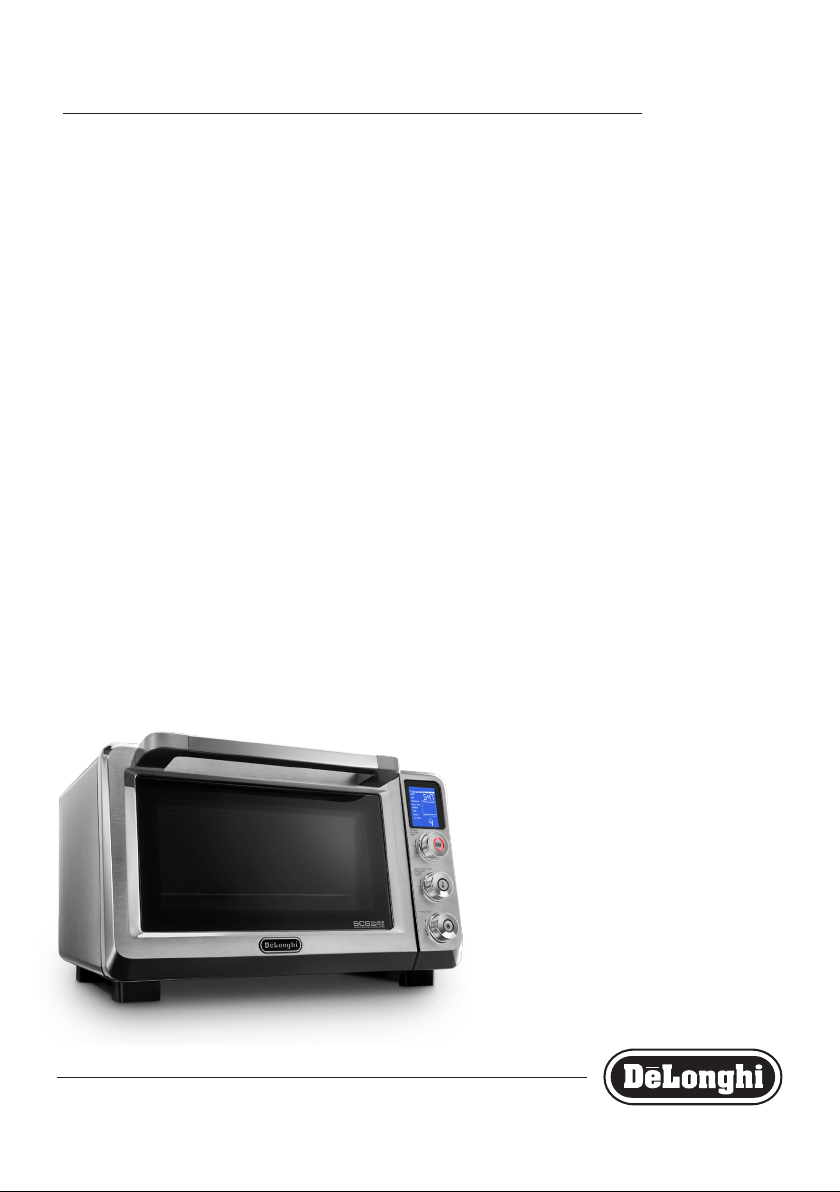
EO241150
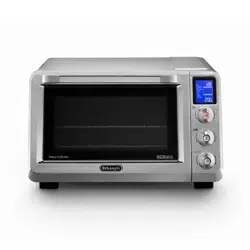
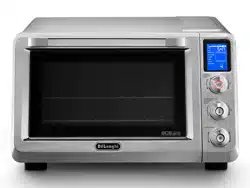
ELECTRIC OVEN
FOUR ÉLECTRIQUE
HORNO ELÉCTRICO

EN
FR
ES
page 10 page 27 pág. 51
3
C
E
Q
R
D
P
G
H
I
L
M
N
O
F
A
B
S
4
3
2
1
4
CONTENTS
ELECTRICAL CONNECTION .......................................................4
IMPORTANT SAFEGUARDS ......................................................5
TECHNICAL SPECIFICATION .....................................................6
DESCRIPTION OF THE APPLIANCE ...........................................6
INSTALLATION .........................................................................6
ERROR MESSAGE .....................................................................6
SETTING THE CLOCK .................................................................7
OVEN FUNCTION ......................................................................7
FUNCTION SUMMARY TABLE ................................................... 8
TOAST ....................................................................................10
BAKE ......................................................................................11
CONVECTION .........................................................................12
BROIL/GRILL .......................................................................... 13
DEFROST ................................................................................14
PIZZA .....................................................................................15
COOKIES .................................................................................17
KEEP WARM ...........................................................................18
SLOW COOKER .......................................................................19
CARE AND CLEANING ............................................................19
DISPOSAL ..............................................................................20
RECIPES LIST..........................................................................21
TROUBLESHOOTING ..............................................................23
RECIPES .................................................................................24
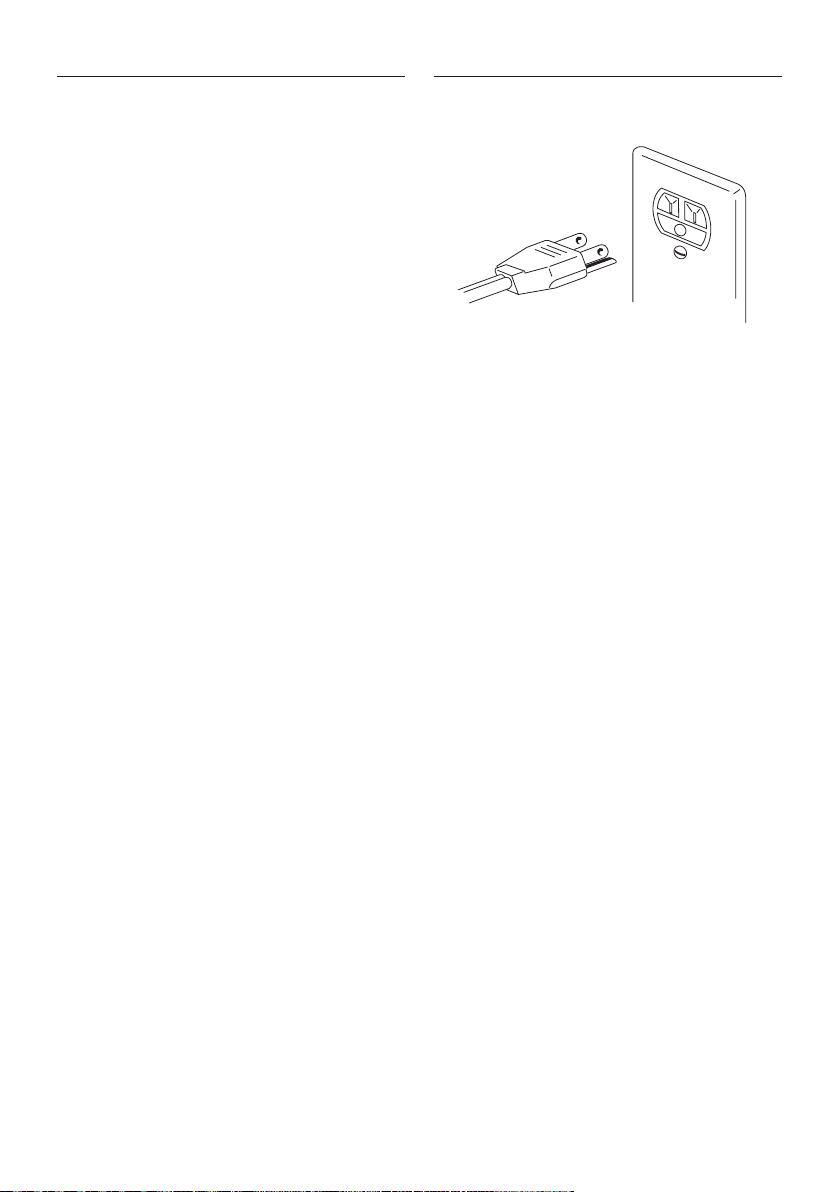
ELECTRICAL CONNECTION
Only use a three-pin, 120 Volt, 60 Hz power outlet
GROUNDING INSTRUCTIONS
CAUTION: MAKE SURE THAT THE PLUG IS CORRECTLY
GROUNDED
This appliance must be grounded: in the event of short
circuits, the ground connection reduces the risk of elec-
tric shock, allowing the electrical current to be dispersed.
This appliance is tted with a power cable with ground
wire.
The plug must be connected to a power outlet that has
been correctly installed and grounded.
WARNING: IMPROPER USE OF THE GROUND
WIRE MAY LEAD TO THE RISK OF ELECTRIC
SHOCK.
If you are not sure that the power outlet is properly
grounded, contact a qualied electrician.
The length of the power cable for this appliance has been
devised so as to avoid the possibility of tripping on or
getting entangled in a long cable.
If an extension cord is required, only use three-wire
extension cords with three-pin plugs and sockets that t
the plug on the appliance.
The electrical ratings of the extension cord must be at
least as great as the electrical ratings of the appliance.
If a longer cable is required, an extension cord UL/CSA
approved can be used.
When using an extension cord, make sure it does not
hang loose in the work area or where someone may
accidentally trip on it or get entangled in it.
Handle the power cable with care for longer life; avoid
pulling or stressing the cable around the connectors to
the power outlet and the appliance.

5
IMPORTANT SAFEGUARDS
When using electrical appliances, a number of funda-
mental safety rules must be observed, including the
following:
1. READ ALL INSTRUCTIONS
THIS PRODUCT IS DESIGNED FOR HOUSEHOLD
USE ONLY. DO NOT USE OUTDOORS.
2. Do not use this appliance for purposes other than
those it has been designed for.
3. Do not touch the hot surfaces. Only use the knobs or
handles to operate the appliance .
4. Remove any objects located above the appliance.
Do not use on surfaces that may be damaged by the
heat. If the oven is used on countertop made in solid
surface material (e.g. Silestone®, Corian®, etc.), fol-
low carefully the indications of countertop manufac-
turer and/or supplier.
5. To avoid electric shock, do not immerse the appliance
in water. See the instructions for cleaning.
6. If the appliance is used when children are around,
pay careful attention to the metal walls of the oven
and the door, which become very hot .
The appliance must not be used by children or per-
sons with reduced physical, sensory or mental capa-
bilities or lack of experience and knowledge without
supervision. Make sure that children do not play with
the appliance.
7. Unplug the appliance from the power outlet when
this is not being used or before cleaning.
Wait for the appliance to cool down at least 30 min-
utes before tting or removing any parts.
8. Never operate the appliance with the cable or the
plug damaged, if any malfunctions have occurred, or
if the appliance has been damaged in any way. Take
the appliance to the nearest authorized service cen-
ter, which will inspect it and, if necessary, will adjust
or repair it.
9. After-sales accessories may be used if their shape,
size and material are suitable for the use on this oven.
The use of accessories that are not recommended by
the manufacturer may cause injuries.
10. Do not let the power cable hang from the counter or
come into contact with hot surfaces.
11. Do not place the appliance above or near a gas or
electric cooker.
12. Use maximum care when moving the appliance or
accessories if they contains hot oil or other hot liq-
uids. Always use oven gloves.
13. If the plug heats up, contact a qualied electrician.
14. Use maximum care when removing the bake pan or
throwing out the hot fat.
15. Do not use abrasive/aggressive/acid detergent, met-
al sponges or steel wool to clean the appliance.
16. To ensure the safe operation of the appliance, never
introduce foods that are too large for the oven.
17. If the appliance, when operating, is covered by or
comes into contact with ammable materials, such
as curtains, fabrics or wall coverings etc. there will
be risk of re! Use extreme care to avoid these con-
ditions.
18. WARNING: Never leave the appliance unattended
when operating (especially when broiling or toast-
ing).
19. When broiling, the bake pan and the wire racks must
be used as described in the instructions.
20. Extreme care must be taken when using containers
made from materials other than glass, metal or ov-
enproof ceramics.
21. Do not place any objects in the oven when it is not
being used, apart from the accessories recommend-
ed by the manufacturer.
22. Do not place any of the following materials into or
on top of the oven: paper, cardboard, plastic and the
like.
23. Do not cover parts of the oven with metal foil, to
avoid overheating. Do not place any materials over
the vent openings (S), located on top housing.
24. To switch the appliance o, press START/STOP but-
ton.
25. To disconnect the appliance, turn o any control,
than remove the plug from wall outlet.
26. Oversize food or metal utensiles must not be inserted
inside the oven as they may create risk of re or risk
of electric shock.
27. The appliance does not exceed 60 minutes “on” in a
two hours period.
28. This product is in compliance with UL and CSA safety
standards.
6
SAVE THESE INSTRUCTIONS
WARNING: After having removed the appliance from its
packaging, check that the door is intact.
The door is made from glass and is therefore fragile. If
it is visibly chipped, scored or scratched, it should be re-
placed. While using, cleaning or moving the appliance,
avoid slamming or knocking the door. Do not pour cold
liquid onto the glass while the appliance is hot.
WARNING: The accessories for cooking of this appliance
are not suitable for food preservation. Avoid leaving
for prolonged time acid substances as lemon/oragne
juice, tomato or vinegar on accessorie’s surface. If left
on surfaces for prolonged time these substances may
damage and impire the non stick coating.
WARNING: Caution should be exercised when using
baking paper or metal foil to cover accessories, pans
and dishes. Close contact with heating elements of
baking paper and metal foil may cause overheating
and risk of re.
TECHNICAL SPECIFICATION
Voltage: 120 V ~ 60Hz
Absorbed power: 1800 W
Overall dimensions: LxPxH 193x173x118 in (490x445x300 cm)
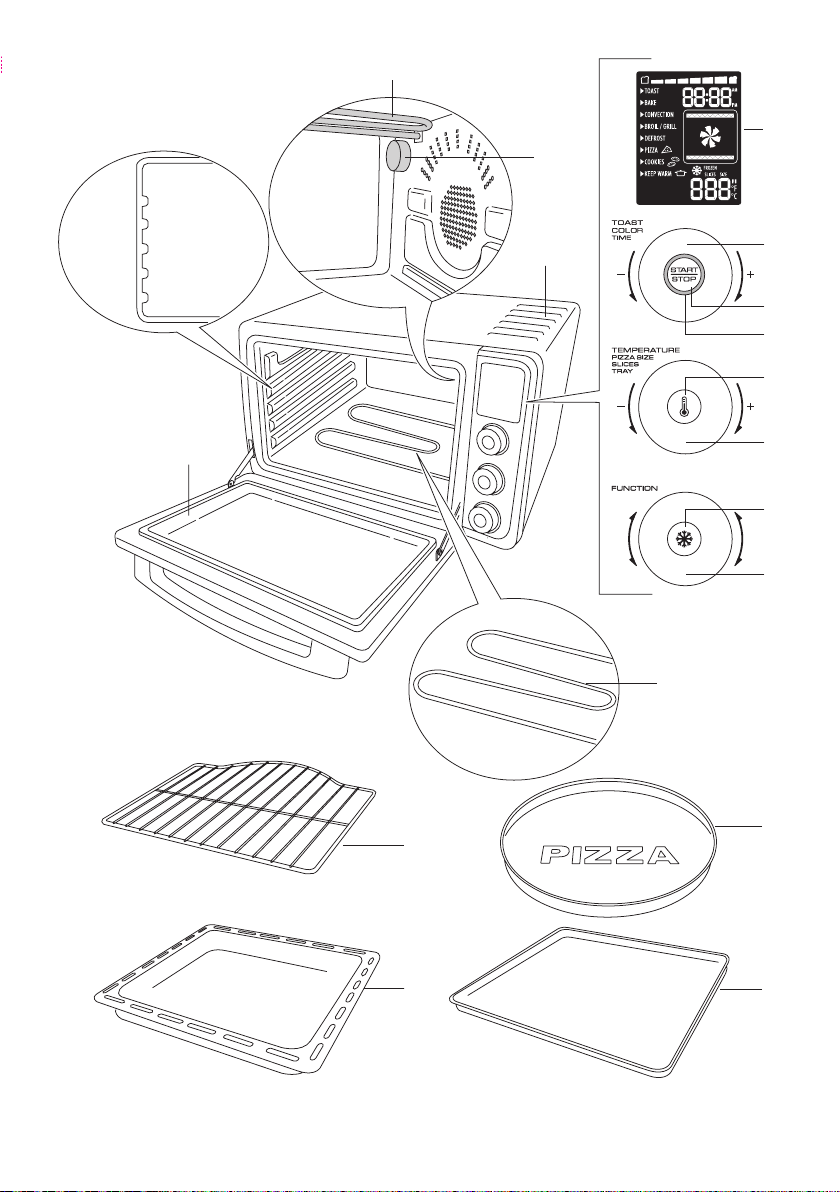
DESCRIPTION OF THE APPLIANCE
A Top heating element
B Internal light
C Glass door
D Wire rack
E Bake pan
F Display
G TOAST COLOR/TIME dial
H START/STOP button
I Red on light
L Cavity temperature check button (°C/°F setting)
M TEMPERATURE/PIZZA SIZE/SLICES/TRAY dial
N Frozen option button
O FUNCTION selection dial
P Lower heating element
Q Pizza pan
R Crumb tray
S Vent openings
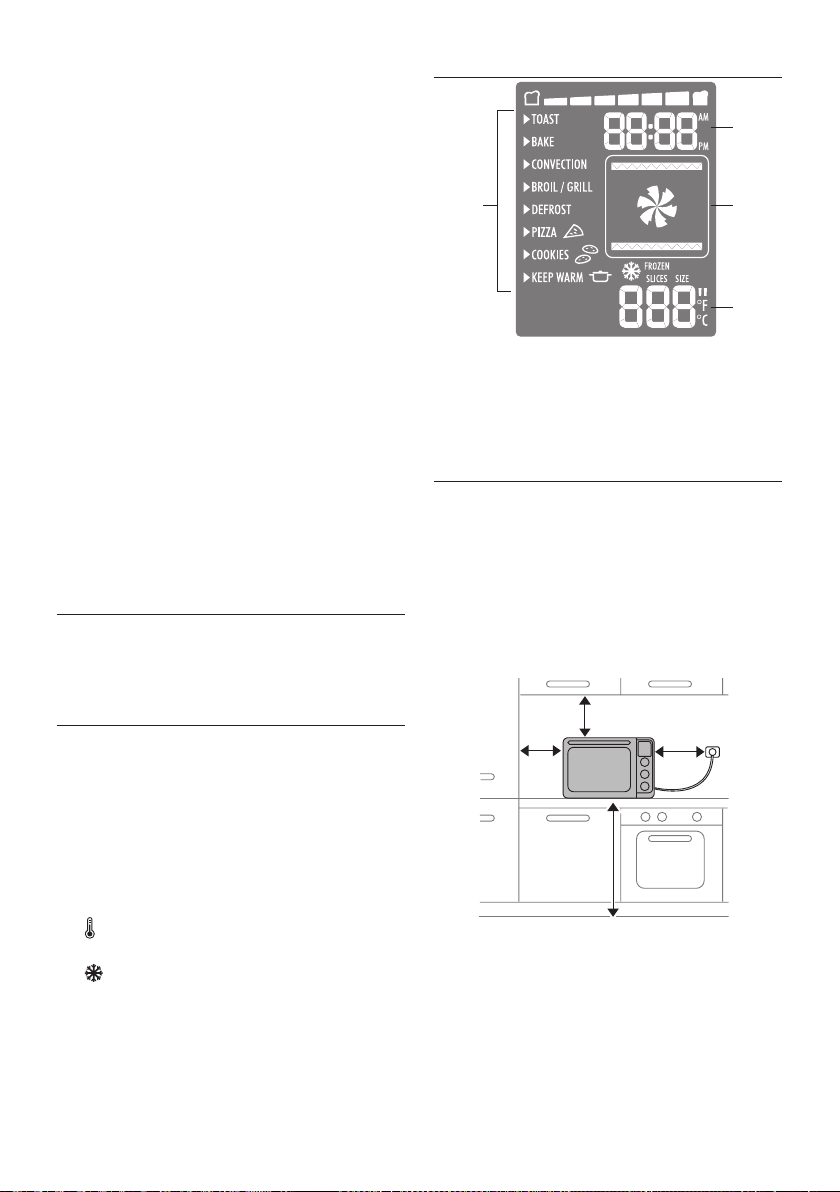
DISPLAY
2
3
4
1
1 Function selected indicator
2 Timer/clock indicator
3 Function icon
4 Temperature/size/slices indicator
INSTALLATION
• Checkthattheappliancehasnotsueredanydamagedue
to transportation.
• Placetheapplianceonaat,stablesurfaceoutofthereach
of children (the glass door becomes hot while the oven is in
operation).
• Beforeusingthisappliance,moveitawayfromthewallor
any object on the counter top. Remove any object that may
have been placed on top of the appliance. Do not use on
surfaces where heat may be a problem.
4 “
Min
(10cm)
8 “
Min
(20cm)
4 “
Min
(10cm)
33.5 “
Min
(85cm)
• Inordertoremoveanyprotectivesubstancesontheheat-
ing elements surfaces, it is necessary to run the oven emp-
ty for 30 minutes in CONVECTION function at 450 °F, as rst
use. This operation may result in minimal smell and smoke.
This is normal. Let the appliance cool down for 30 minutes
after this operation.
• Thecrumbtray(R)mustbealwaysplacedonovenbottom,
under lower heating element (P).
7
ERROR MESSAGES
If ERR message is shown on display, with relevant acoustic sig-
nal, the oven had a malfunction. Press START/STOP button (H)
for 2 seconds to reset the control and disconnect the plug from
wall outlet. Check troubleshooting section.
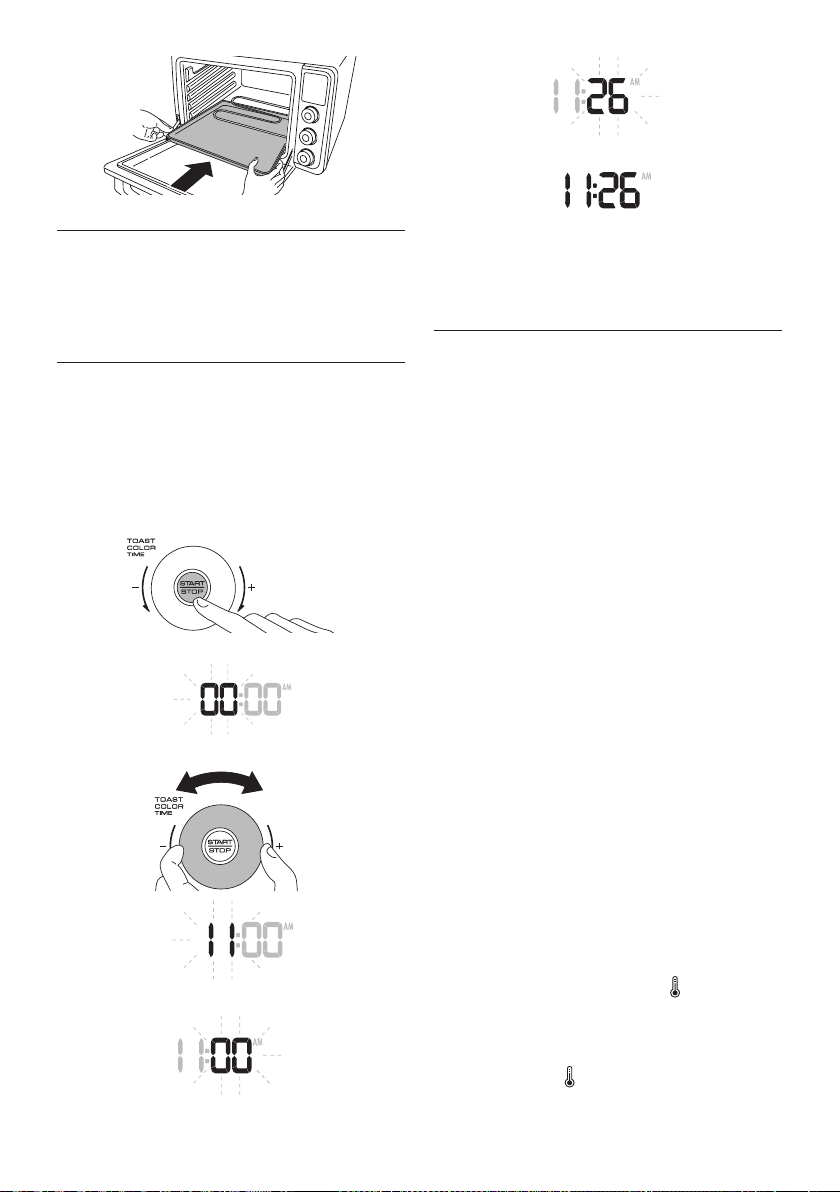
SETTING THE CLOCK
The rst time the appliance is connected to the main electricity
supply or after it has been without power for some time, it will
beep and four dashes (“-- : --”) appear on the display.
After 5 seconds the display will turn o, since the clock has not
been set, and the electronic control will go into stand-by mode.
To set the time, proceed as follows:
Press the START/STOP button (H) for at least 5 seconds.
The hour ashes.
Set the required hour with TOAST COLOR/TIME dial (G).
Press the START/STOP button (H). The minutes ash.
Set the required minutes with TOAST COLOR/TIME dial (G).
Press the START/STOP button (H). The set time is displayed.
If you want to adjust the time later, repeat the setting procedure
described above. The electronic control must be in stand-by
state to adjust the clock.
OVEN FUNCTION
In the stand-by mode, the Display shows the
clock (if set)
or --:--.
• Pressanybutton(HLN)orturnanydial(GMO).Theoventurns
on. This is the Function selecting mode. The Default selected
function is BAKE. The modiable values ash.
If there are no buttons pressed or dials turned within 2 minutes of
the selection mode function, the control defaults back into stand-
by mode.
• TurntheFUNCTION selection dial (O) to select the function want-
ed.
• TurntheTEMPERATURE/PIZZASIZE/SLICES/TRAYdial(M)toset
the temperature if needed (not required in some programs). In
some function the temperature is automatically set (the display
doesn’t show the preset temperature).
In the PIZZA function set the size.
In the COOKIES function set the number of trays.
• Turnthe TOAST COLOR/TIME dial (G) to set the timer if needed.
- Both PIZZA and COOKIES functions have a preset timer.
- In PIZZA function the time will change depending on the selected
size.
- In COOKIES function it is possible to modify the cooking time.
• PresstheSTART/STOPbutton(H)tostartcooking.TheredONlight
(I), that is located around the edge of the START/STOP button (H)
, turns on. When the timer elapsed, the display shows “End” and
play a sound signal.
Press START/STOP button (H) to reset the oven and stop the func-
tion. It is possible to interrupt the cooking process at any time
by pressing START/STOP button (H). The oven goes into stand-by
mode. In the BAKE, CONVECTION and COOKIES functions, the
oven plays a sound signal when the rst target temperature is
reached. In BAKE and CONVECTION function is possible to check
the cavity temperature by pressing the Cavity temperature
check button (L). The temperature is displayed for 5 seconds.
• Itispossibletochoosethetemperaturevisualizationin°Forin°C.
Default setting is in °F. To change setting select BAKE or CONVEC-
TION function, press Cavity temperature check button (L) for 5
seconds. The visualization will change to °C with acoustic signal.
To come back to °F visualization repeat the same oparation.
8
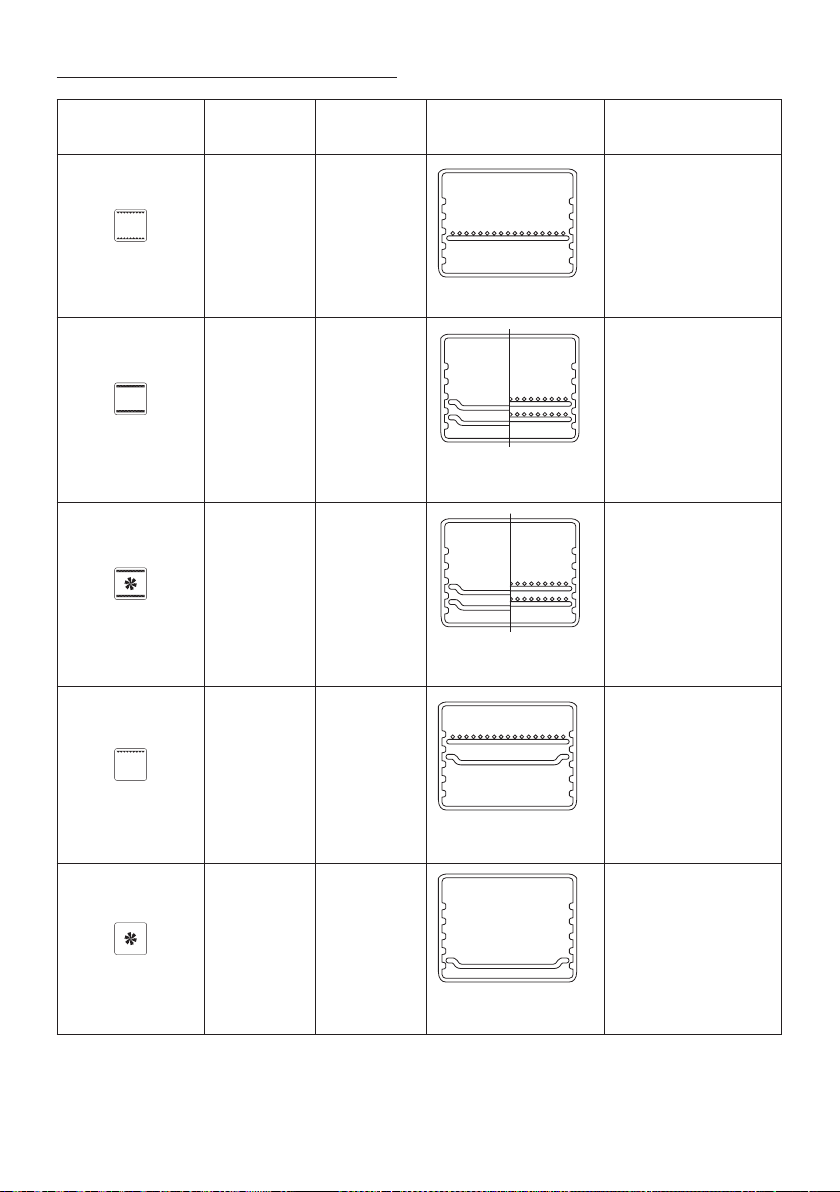
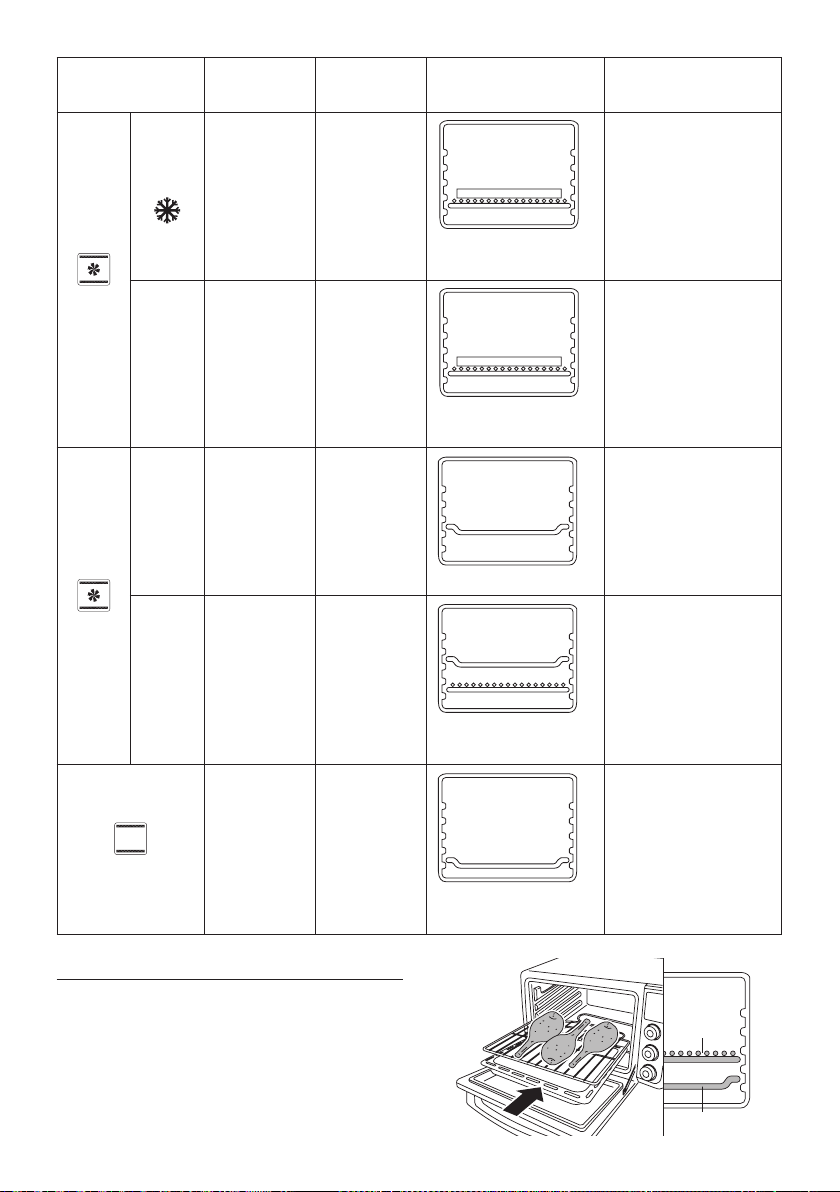
FUNCTIONS SUMMARY TABLE
FUNCTION
TEMPERATURE
TIMER
WIRE RACK AND BAKE
PAN POSITION
RECIPES
TOAST
(Auto selected) (Auto selected)
4
3
2
1
4
3
2
1
4
3
2
1
4
3
2
1
4
3
2
1
4
3
2
1
4
3
2
1
wire rack in position 2
Specic for toasting slices
of bread.
BAKE
170°F - 450°F
75°C - 230°C
0:01 (minutes) -
2:00 (hours)
4
3
2
1
wire rack or bake pan in
position 1 or 2
Ideal for:
cakes
bread
sh
lasagna
(see page 21-22)
CONVECTION
170°F - 450°F
75°C- 230°C
0:01 (minutes) -
2:00 (hours)
4
3
2
1
wire rack or bake pan in
position 1 or 2
Ideal for:
quiches
poultry
potatoes
pastry cakes
(see page 21-22)
BROIL/GRILL
(Auto selected)
0:01 (minutes) -
2:00 (hours)
4
3
2
1
4
3
2
1
4
3
2
1
4
3
2
1
4
3
2
1
4
3
2
1
4
3
2
1
wire rack in position 4, bake
pan in position 3
Ideal for:
pork chops
sausages
pork ribs
wurstel
(see page 21-22)
DEFROST
-
0:01 (minutes) -
2:00 (hours)
4
3
2
1
4
3
2
1
4
3
2
1
4
3
2
1
4
3
2
1
4
3
2
1
4
3
2
1
wire rack or bake pan in
position 1
Ideal for food to be defrosted
in shorter time frame.
9
FUNCTION
TEMPERATURE
TIMER
WIRE RACK AND BAKE
PAN POSITION
RECIPES
PIZZA
Frozen
(Auto selected)
(Auto selected
and adjustable)
4
3
2
1
pizza pan on wire rack in
position 1
Automatic program for crispy
frozen pizza.
Fresh
(Auto selected)
(Auto selected
and adjustable)
4
3
2
1
pizza pan on wire rack in
position 1
Automatic program for
perfect fresh pizza.
COOKIES
1tr (Auto selected)
(Auto selected
and adjustable)
4
3
2
1
4
3
2
1
4
3
2
1
4
3
2
1
4
3
2
1
4
3
2
1
4
3
2
1
bake pan in position 2
Automatic program for
perfect cookies.
2tr (Auto selected)
(Auto selected
and adjustable)
4
3
2
1
4
3
2
1
4
3
2
1
4
3
2
1
4
3
2
1
4
3
2
1
4
3
2
1
wire rack in position 1, bake
pan in position 3
Automatic program for
cookies for the entire family.
KEEP WARM
(Auto selected)
0:01 (minutes) -
6:00 (hours)
4
3
2
1
4
3
2
1
4
3
2
1
4
3
2
1
4
3
2
1
4
3
2
1
4
3
2
1
wire rack or bake pan in
position 1 or 2
Ideal to keep prepared food
warm.
This function can be also
used as slow cooker.
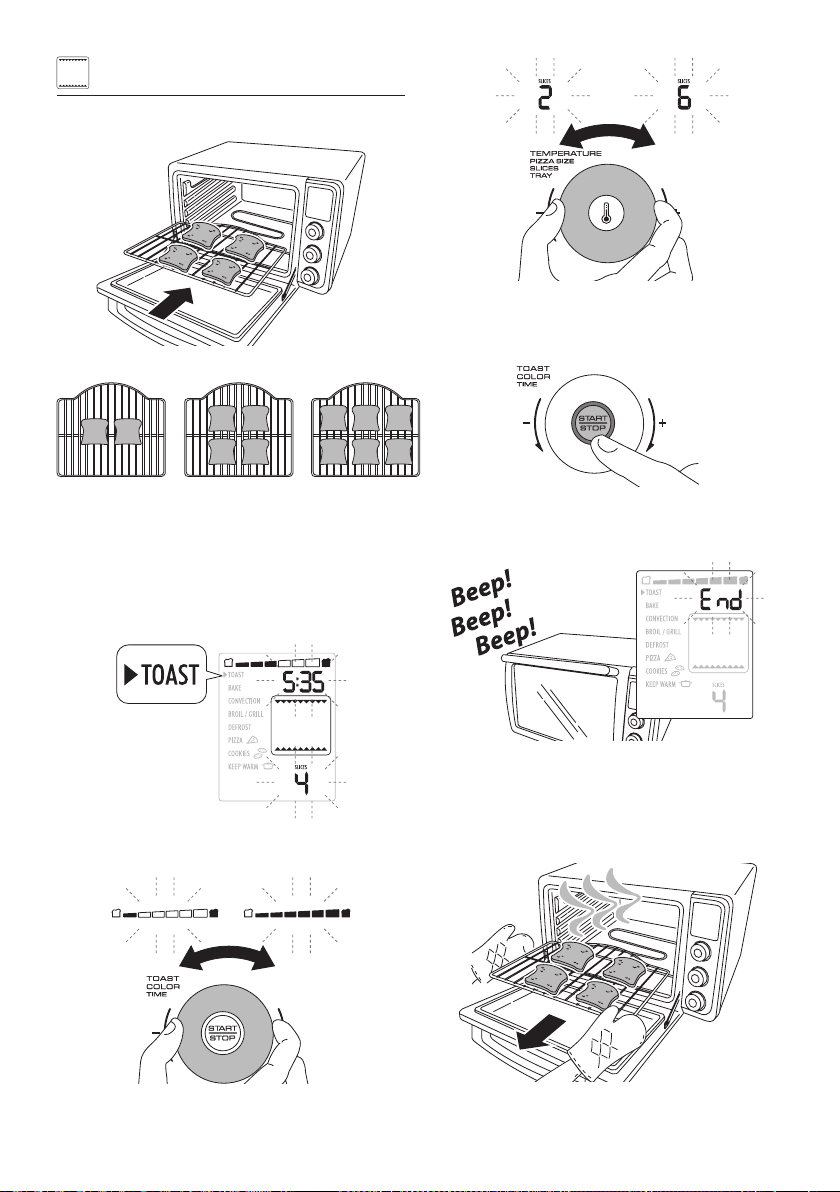
TIPS FOR HEALTY COOKING
When you are cooking high fat content food, in BAKE and CONVEC-
TION functions, we suggest to place the food directly on the wire
rack inserted in position 2 and the bake pan in position 1.
In this way the excessive fat will drain on the bake pan.
D
4
3
2
1
E
10
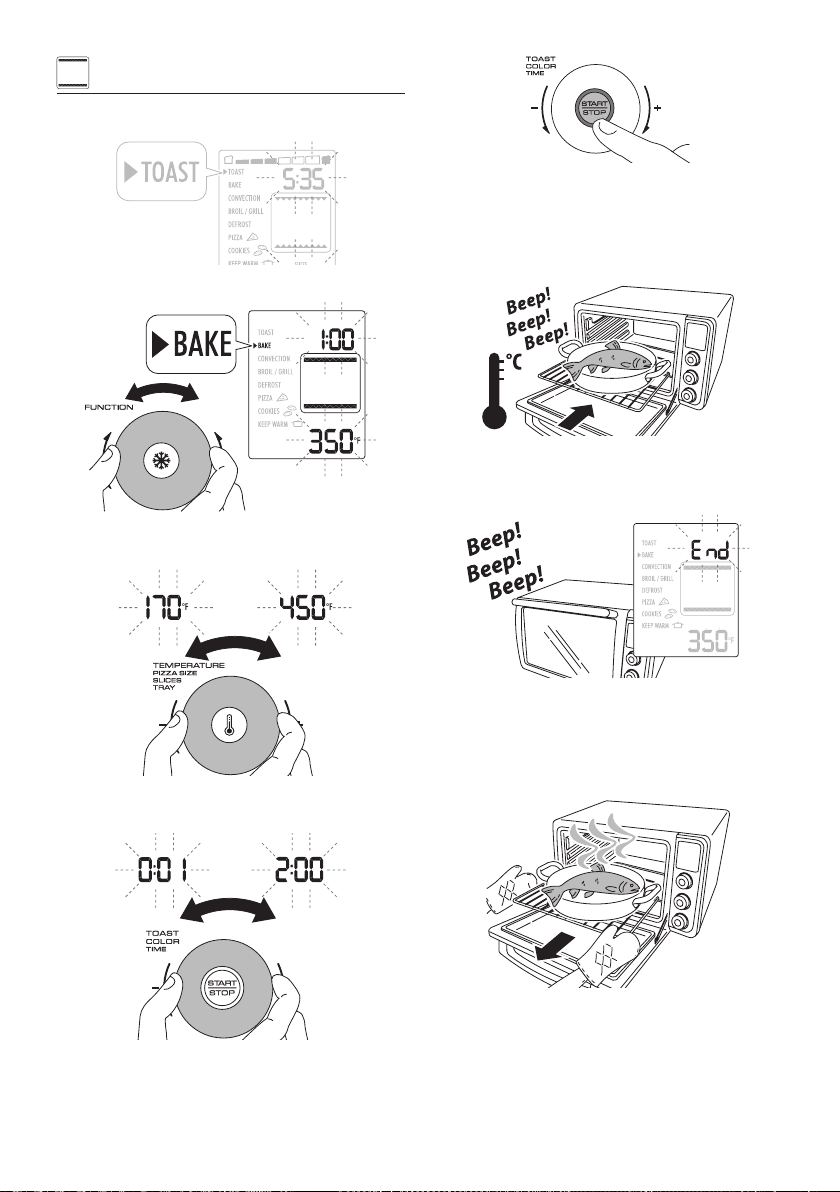
TOAST
Place the slices to toast (2, 4 or 6) on the wire rack (D) and insert
in the oven in position 2.
For a better toasting result place the slices as shown.
2 slices 4 slices 6 slices
The edges of the slices should be aligned and close to the central
wire.
Close the door.
Press any button (H L N) or turn any dial (G M O)
The oven turns on.
The default selected function is TOAST.
Set the desired level of toasting by turning the TOAST COLOR/
TIME dial (G).
Turn the TEMPERATURE/PIZZA SIZE/SLICES/TRAY dial (M) to se-
lect the desired number of slices to toast.
Press the START/STOP button (H) to start cooking.
The red ON light (I), that is located around the edge of the
START/STOP button (H) , turns on.
The oven starts the cooking process.
At the end of the set time the appliance will play a sound signal
and the display will show END.
To turn the appliance o during running function or reset the
control at end of time when END is showed on display, press the
START/STOP button (H) for 2 seconds.
Open the door and remove the food. Take great care when tak-
ing the food out of the oven. Use oven gloves.
11
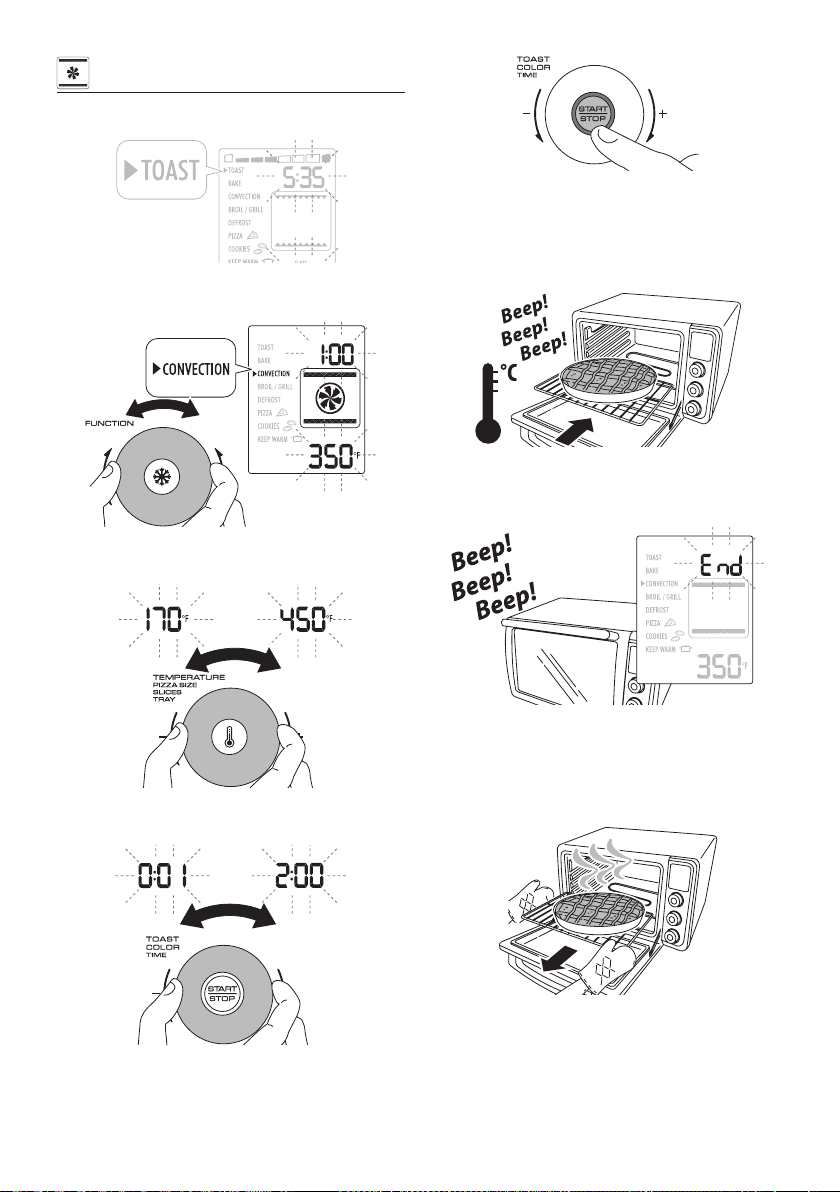
BAKE
Press any button (H L N) or turn any dial (G M O).
The oven turns on. The default selected function is TOAST.
Turn the FUNCTION selection dial (O) to set the BAKE mode.
Turn the TEMPERATURE/PIZZA SIZE/SLICES/TRAY dial (M) to set
the desired temperature. The default temperature is 350 °F.
Turn the TOAST COLOR/TIME dial (G) to set the desired timer.
The default time is 1:00 (hour).
Press the START/STOP button (H) to start cooking.
The red ON light (I), that is located around the edge of the
START/STOP button (H) , turns on.
The oven starts the preheating phase. pre heat message is
shown on display. When the oven reaches the set temperature,
an audible signal will sound. The countdown will start. Place the
food on the wire rack (D) or bake pan (E) and insert in the oven
in position 1 or 2.
Close the door.
At the end of the set time the appliance will play a sound signal
and the display will show END.
To turn the appliance o during running function or reset the
control at end of time when END is showed on display, press the
START/STOP button (H) for 2 seconds. Open the door and remove
the food. Take great care when taking the food out of the oven.
Use oven gloves.
While BAKE function is running , it is possible to switch the func-
tion between CONVECTION and BROIL/GRILL without stopping
the cooking process. Just turn the FUNCTION selection dial (O)
to select the desired new function. Timer and set temperature
will be kept between BAKE and CONVECTION. For BROIL/GRILL
function, the timer will be kept and temperature is auto selected.
12
CONVECTION
Press any button (H L N) or turn any dial (G M O).
The oven turns on. The default selected function is TOAST.
Turn the FUNCTION selection dial (O) to set the CONVECTION
mode.
Turn the TEMPERATURE/PIZZA SIZE/SLICES/TRAY dial (M) to set
the desired temperature. The default temperature is 350 °F.
Turn the TOAST COLOR/TIME dial (G) to set the desired timer.
The default time is 1:00 (hour).
Press the START/STOP button (H) to start cooking.
The red ON light (I), that is located around the edge of the
START/STOP button (H), turns on.
The oven starts the preheating phase. pre heat message is
shown on display. When the oven reaches the set temperature,
an audible signal will sound. The countdown will start. Place the
food on the wire rack (D) or bake pan (E) and insert in the oven
in position 1 or 2.
Close the door.
At the end of the set time the appliance will play a sound signal
and the display will show END.
To turn the appliance o during running function or reset the
control at end of time when END is showed on display, press the
START/STOP button (H) for 2 seconds. Open the door and remove
the food. Take great care when taking the food out of the oven.
Use oven gloves.
While CONVECTION function is running , it is possible to switch
the function between BAKE and BROIL/GRILL without stopping
the cooking process. Just turn the FUNCTION selection dial (O)
to select the desired new function. Timer and set temperature
will be kept between CONVECTION and BAKE. For BROIL/GRILL
function, the timer will be kept and temperature is auto selected.
13
BROIL/GRILL
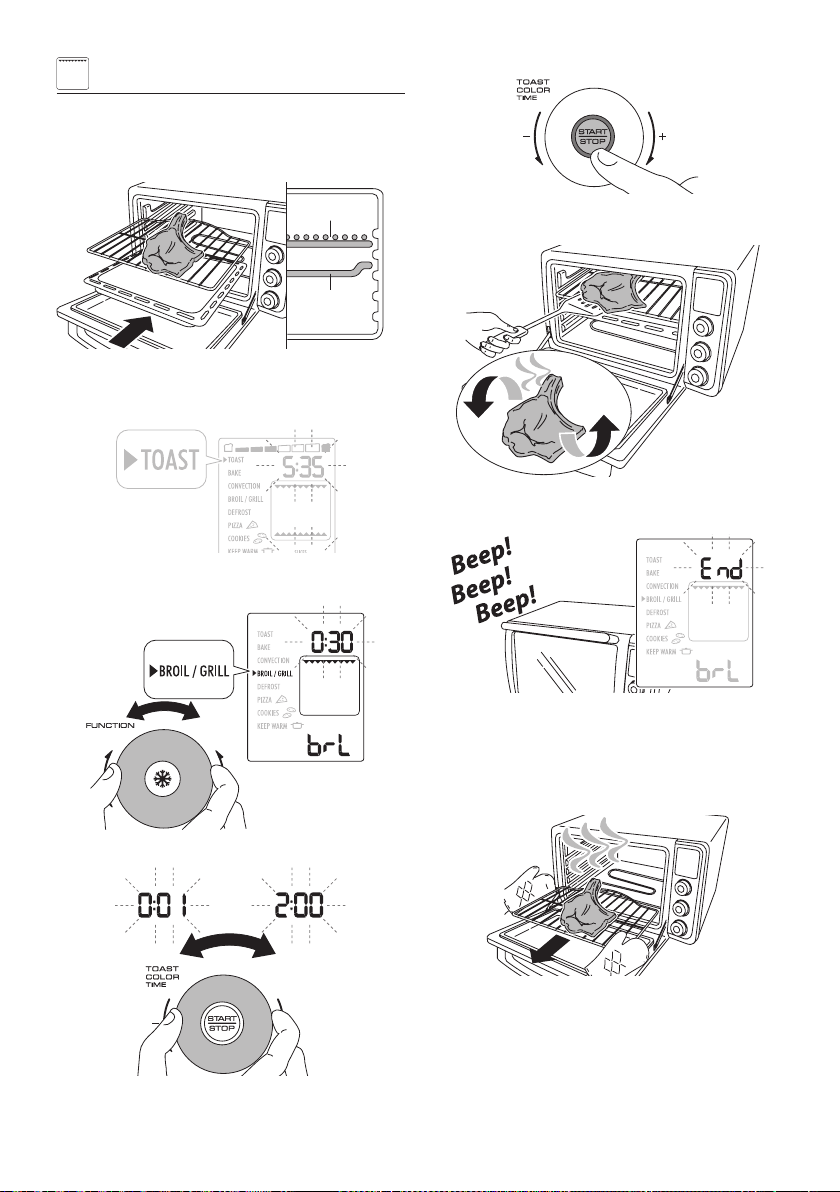
Place the food on the wire rack (D) and insert in the oven.
No preheat is needed.
The wire rack (D) and the bake pan (E) must be positioned as
shown in the gure (position 3 and 4).
D
4
3
2
1
E
Close the door.
Press any button (H L N) or turn any dial (G M O).
The oven turns on. The default selected function is TOAST.
Turn the FUNCTION selection dial (O) to set the BROIL/GRILL
mode.
Turn the TOAST COLOR/TIME dial (G) to set the desired timer.
Press the START/STOP button (H) to start cooking.
The red ON light (I), that is located around the edge of the
START/STOP button (H), turns on.
Close the door. The oven starts the cooking process.
Turn the food halfway through cooking.
At the end of the set time the appliance will play a sound signal
and the display will show END.
To turn the appliance o during running function or reset the
control at end of time when END is showed on display, press the
START/STOP button (H) for 2 seconds. Open the door and remove
the food. Take great care when taking the food out of the oven.
Use oven gloves.
While BROIL/GRILL function is running , it is possible to switch
the function between CONVECTION and BAKE without stopping
the cooking process. Just turn the FUNCTION selection dial (O)
to select the desired new function. Timer will be kept between
BAKE and CONVECTION , and set temperature will be automati-
cally selected to default (350 °F). For BROIL/GRILL function, the
timer will be kept and temperature is auto selected.
14
DEFROST
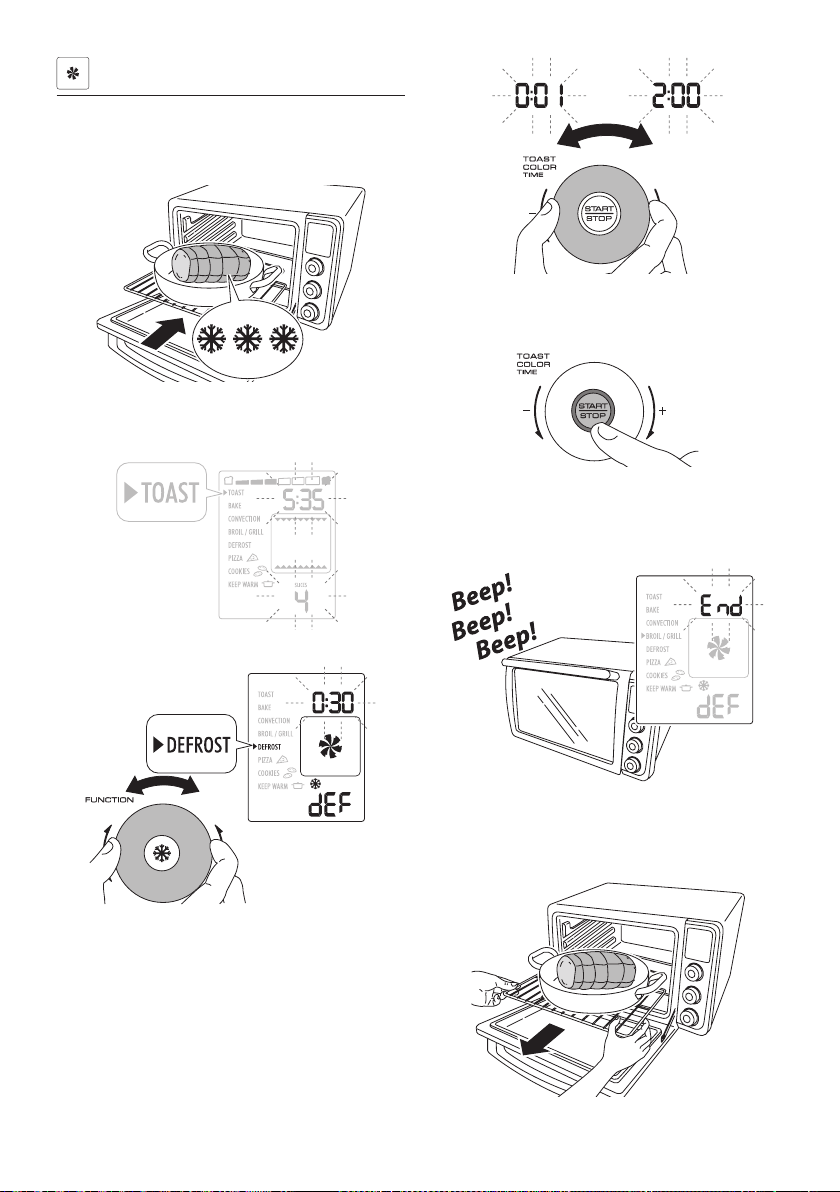
Make sure that the oven has completly cooled down at room
temperature before starting this function.
Place the frozen food on the wire rack (D) or bake pan (E) and
insert in the oven in position 1.
Close the door.
Press any button (H L N) or turn any dial (G M O).
The oven turns on. The default selected function is TOAST.
Turn the FUNCTION selection dial (O) to set the DEFROST mode.
Turn the TOAST COLOR/TIME dial (G) to set the desired timer.
Press the START/STOP button (H) to start cooking.
The red ON light (I), that is located around the edge of the
START/STOP button (H), turns on.
Close the door.
The oven starts the cooking process.
At the end of the set time the appliance will play a sound signal
and the display will show END.
To turn the appliance o during running function or reset the
control at end of time when END is showed on display, press the
START/STOP button (H) for 2 seconds.
Open the door and remove the food.
15
PIZZA
Pizza is special automatic function that incorporates preset
programs. Temperature, cooking time and cooking mode are
automatically selected. Cooking time is extendible to desired
cooking results, at the end of cooking process.
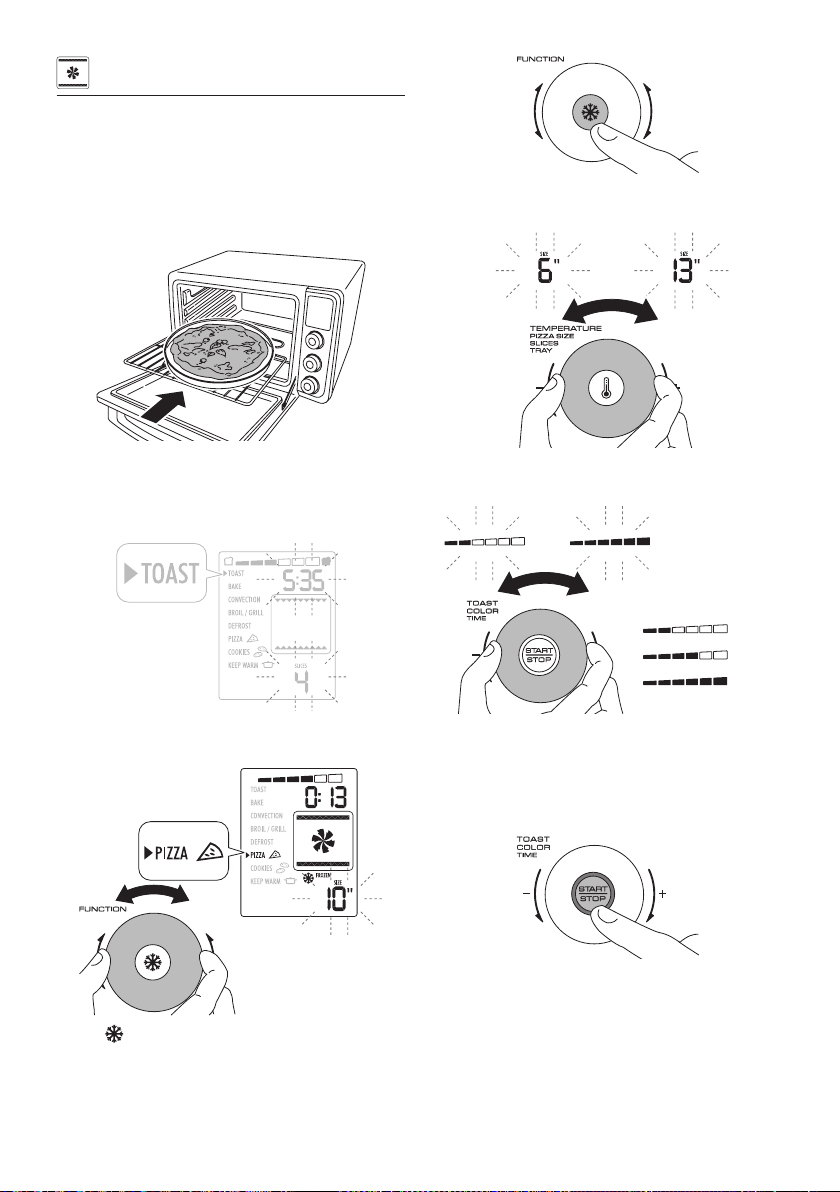
Place the pizza on the pizza pan (Q) or directly on the wire rack
(D) and insert in the oven in position 1.
No preheat is needed.
Close the door.
Press any button (H L N) or turn any dial (G M O).
The oven turns on.
The default selected function is TOAST.
Turn the FUNCTION selection dial (O) to set the PIZZA program.
Default mode is “FROZEN”.
Pressing FROZEN option button (N) is possible to disable the
‘FROZEN’ option, to cook ‘FRESH’ pizza.
Further pressing will return ‘FROZEN’ mode.
Turn the TEMPERATURE/PIZZA SIZE/SLICES/TRAY dial (M) to set
the desired pizza size.
Set the desired level of crusting by turning the TOAST COLOR/
TIME dial (G).
(min)
(med)
(max)
For thin pizza we suggest min crust level. For thick pizza we sug-
gest max level of crust.
Press the START/STOP button (H) to start cooking.
The red ON light (I), that is located around the edge of the
START/STOP button (H), turns on.
The oven starts the cooking process.
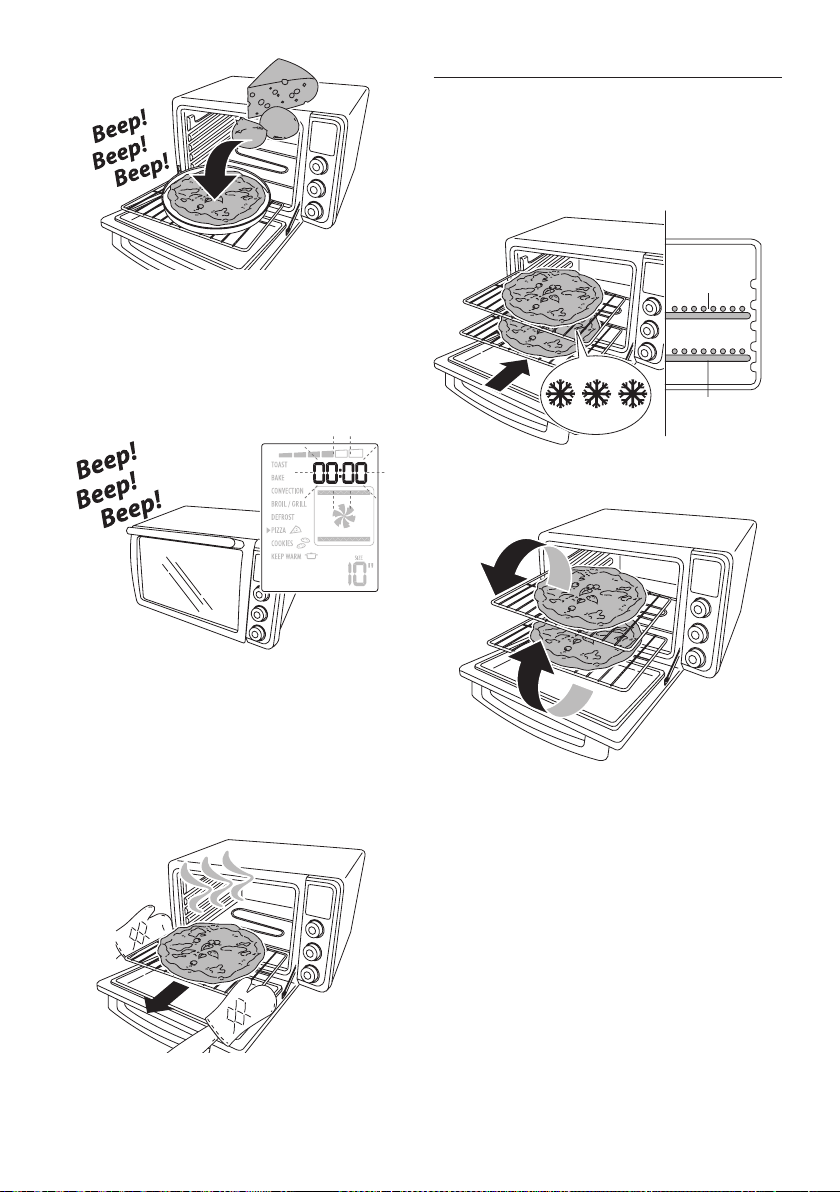
During cooking ‘FRESH’ pizza only, the oven will play a sound
signal. It is signal to add mozzarella or soft cheese to topping
your pizza.
16
Close the door and complete the cooking process.
At the end of the set time the appliance will play a sound signal
and the display will show 00:00 ashing.
The control in now in ‘waiting mode’. In this state you can add up
to 10 minutes, if necessary, to complete the cooking.
This state is kept for 5 minutes, after that the control will turn o
the oven automatically.
Turn the TOAST COLOR/TIME dial (G) to adjust up to 10 additional
minutes, if necessary, and press the START/STOP button (H) at
the end of time, the control will turn o the oven.
To turn the appliance o during running function or reset the
control at end of time when END is showed on display, press the
START/STOP button (H) for 2 seconds.
Open the door and remove the food. Take great care when tak-
ing the food out of the oven. Use oven gloves.
Cooking 2 ‘frozen’ pizza
To cook 2 ‘FROZEN’ pizzas at the same time as shown in gure
(position 1 and 3). (*) Requires optional rack. The accessory can
be purchased at After-Sales Service Centers or household applian-
ce dealers.
For cooking 2 pizza set the size of single one, than set the crust
level at maximum.
4
3
2
1
D
D
(*)
At half cooking time, turn the two pizza, placing the top one on
the bottom rack and vice-versa.
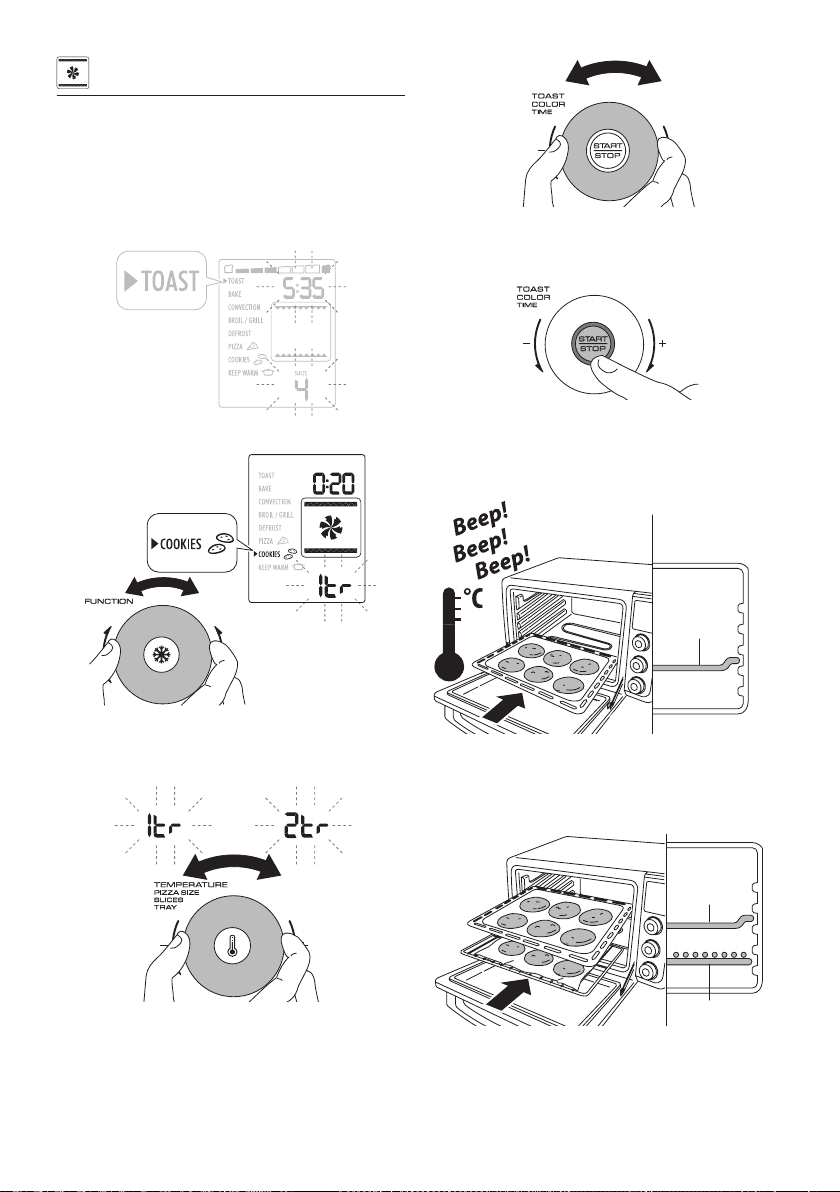
17
COOKIES
Cookies is special automatic function that incorporates preset
programs. Temperature and cooking mode are automatically
selected. Cooking time is adjustable for the desired cooking
results.
Press any button (H L N) or turn any dial (G M O).
The oven turns on.
The default selected function is TOAST.
Turn the FUNCTION selection dial (O) to set the COOKIES mode.
Turning TEMPERATURE/PIZZA SIZE/SLICES/TRAY dial (M) is pos-
sible to select “1tr” mode (1 tray of cookies) or “2tr” mode (2
trays of cookies).
To modify the preset time, turn the TOAST COLOR/TIME dial (G)
to set the desired timer.
Press the START/STOP button (H) to start cooking.
The red ON light (I), that is located around the edge of the
START/STOP button (H), turns on.
The oven starts the preheating phase and the display will show
pre HEAT.
When the oven reaches the set temperature, an audible signal
will sound.
4
3
2
1
E
Place the food on the bake pan and insert in the oven (pos. 2).
To cook two trays of cookies at the same time, place the
wire rack covered by aluminium foil and bake pan as shown
(position 1 and 3).
4
3
2
1
E
D
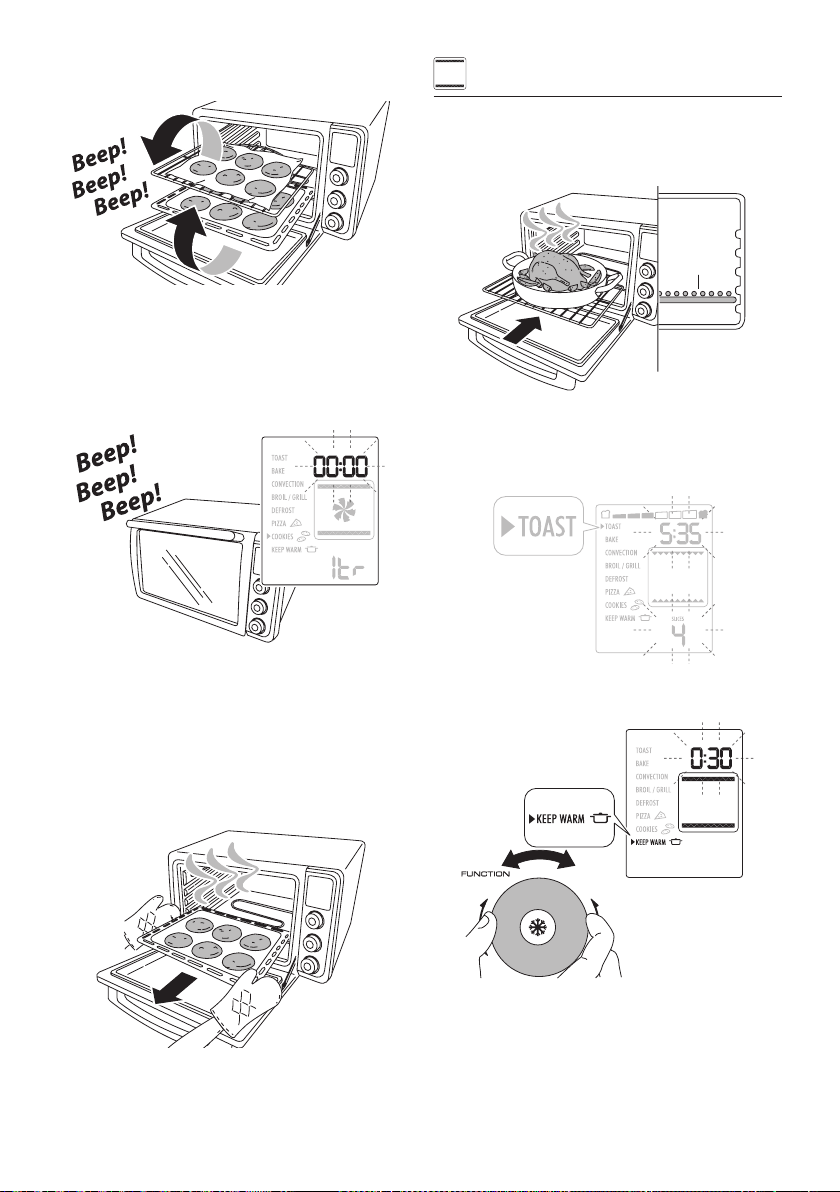
While in the 2 tray cookie mode the oven will beep 3 times. It
is a signal to swap the trays, placing the top one on the bottom
and vice-versa and press the START/STOP button (H).
The oven will restart the cooking function.
18
If START/STOP button (H) is not pressed within 15 minutes, the
oven will automatically restart the function.
At the end of the set time the appliance will play a sound signal
and the display will show 00:00.
The control is now in ‘waiting mode’. In this state you can add up
to 10 minutes, if necessary, to complete the cooking.
This state is kept for 5 minutes, after that the control will turn o
the oven automatically.
Turn the TOAST COLOR/TIME dial (G) to adjust up to 10 additional
minutes, if necessary, and press the START/STOP button (H) at
the end of time, the control will turn o the oven.
To turn the appliance o during running function or reset the
control at end of time when END is showed on display, press the
START/STOP button (H) for 2 seconds.
Open the door and remove the food. Take great care when tak-
ing the food out of the oven. Use oven gloves.
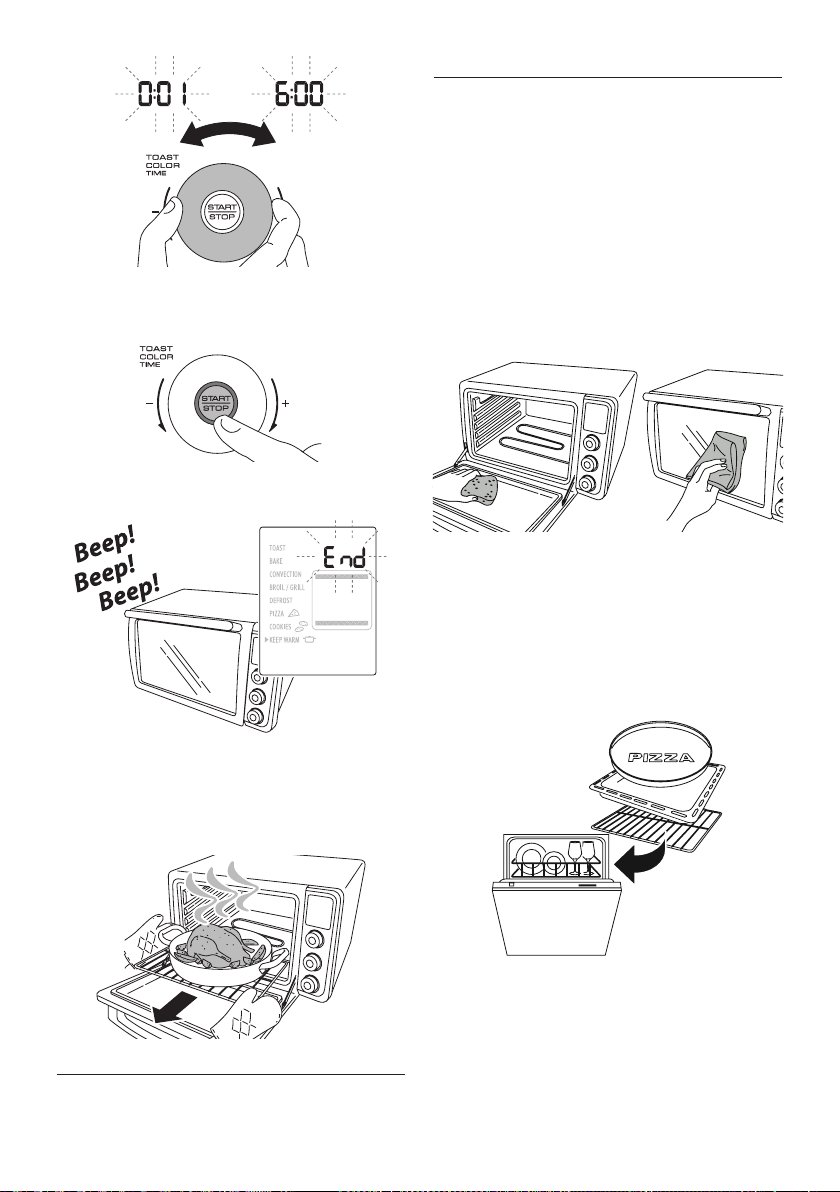
KEEP WARM
Place the food previously cooked on the wire rack or on the bake
pan and insert in the oven.
The wire rack or the bake pan must be positioned as shown in
the gure (position 1).
D
4
3
2
1
Close the door.
Press any button (H L N) or turn any dial (G M O).
The oven turns on.
The default selected function is TOAST.
Turn the FUNCTION selection dial (O) to set the KEEP WARM
mode.
Turn the TOAST COLOR/TIME dial (G) to set the desired timer.
The default time is 0:30 (minutes).
19
Press the START/STOP button (H) to start cooking.
The red ON light (I), that is located around the edge of the
START/STOP button (H), turns on.
At the end of the set time the appliance will play a sound signal
and the display will show END.
To turn the appliance o during running function or reset the
control at end of time when END is showed on display, press the
START/STOP button (H) for 2 seconds.
Open the door and remove the food. Take great care when tak-
ing the food out of the oven. Use oven gloves.
Slow cooker
The keep warm function, thanks to its low and accurate tem-
perature, it can also be used as a slow cooker. In this function
the time can be set up to 6 hours.
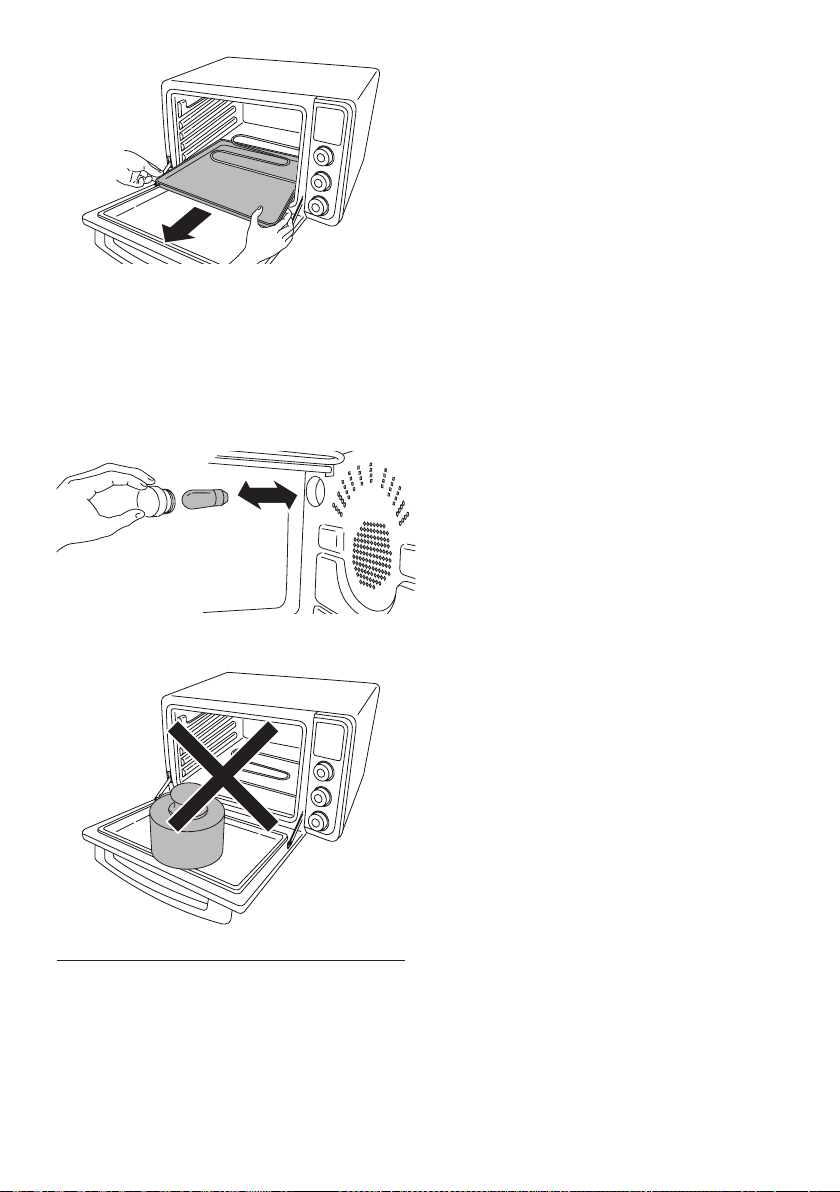
CARE AND CLEANING
Frequent cleaning prevents the formation of smoke and bad
odors during cooking. Do not let fat and food residues accumu-
late inside the appliance.
Before any maintenance or cleaning operation, unplug the oven
and wait for it to cool down.
Clean the door, the inside walls and surfaces of the oven with a
soap and water solution; dry thoroughly. Never use steel wool or
abrasive sponges for cleaning.
To clean the aluminum surfaces on the inside of the oven, never
use products that corrode aluminum (detergents in spray cans)
and never scrape the walls with sharp objects.
Never use corrosive or agressive detergents.
To clean the outside surface always use a damp sponge.
Avoid using abrasive products that may damage the exterior.
Make sure water or liquid soap does not seep into the vents on
the top of the oven.
Never immerse the appliance in water; never wash it under a
jet of water.
Never use amable liquids for cleaning.
All accessories are washed like normal dishes, either by hand or
in the dishwasher, except crumb tray.
Slide the crumb tray (R) out from the bottom of your oven. Wash
by hand. Should the dirt be dicult to remove, rinse the crumb
tray with hot soapy water and if necessary, scour it delicately,
without scratching it. Carefully dry after operation.
20
When the oven is on, the internal light (B) inside the oven is
always on.
To replace the bulb, proceed as follows: ensure that the appli-
ance has cooled down, unplug the appliance from the pow-
er outlet, unscrew the glass cover and replace the bulb with a
new one of the same type (resistant to high temperatures) and
then replace the glass cover.
Bulb type: E14, 15W, 300 °C.
Never place heavy weights over the door when it is open, in
order to avoid damages on its structure and the glass.
l
b
Disposal
When disposing of appliance, follow local regulations of your
state.
Consumers should contact their local authority or retailer for in-
formation concerning the correct disposal of their old appliance.
21
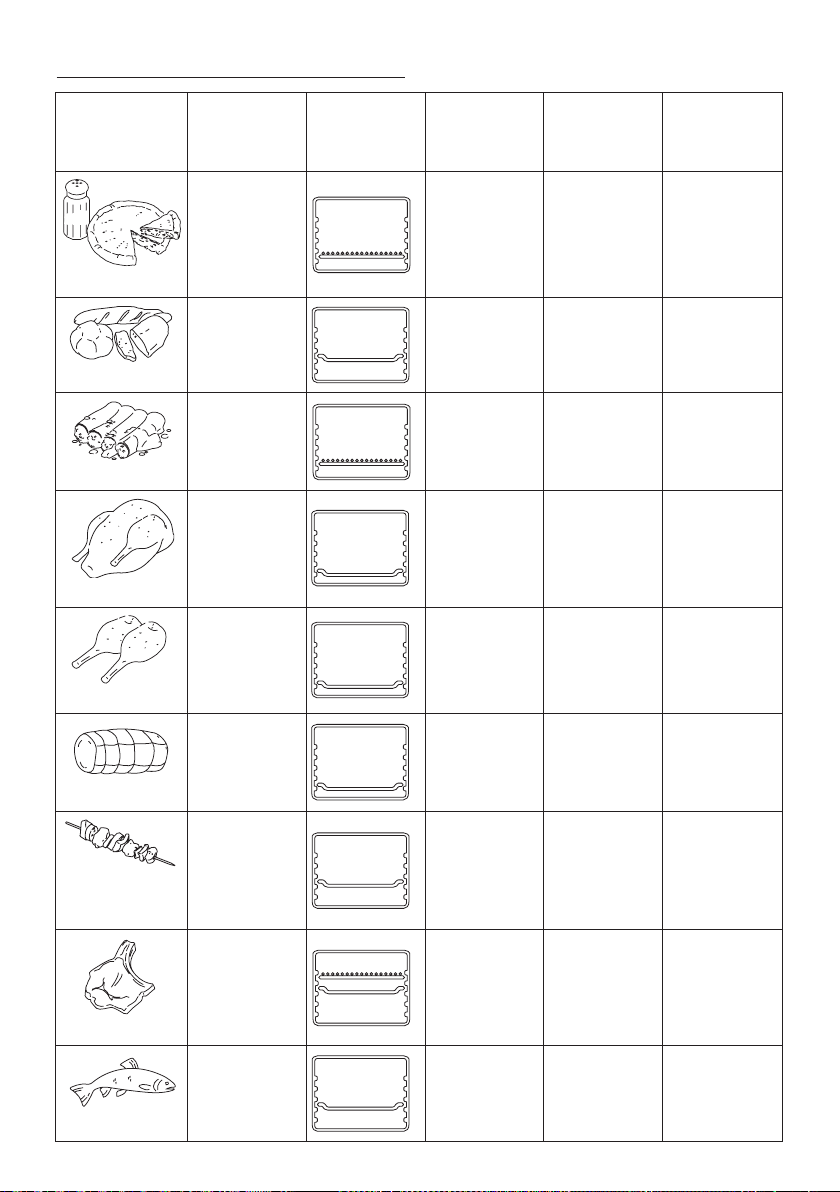
RECIPES WEIGHT
WIRE RACK
AND BAKE PAN
POSITION
FUNCTION TEMPERATURE TIME
saltsalt
Quiche
1.5 lb
700g
4
3
2
1
4
3
2
1
4
3
2
1
4
3
2
1
4
3
2
1
CONVECTION
390 °F
200 °C
30-35 min
Bread
1.0 lb
500g
4
3
2
1
4
3
2
1
4
3
2
1
4
3
2
1
4
3
2
1
CONVECTION
360 °F
180 °C
35-40 min
Cannelloni
3.3 lb
1500g
4
3
2
1
4
3
2
1
4
3
2
1
4
3
2
1
4
3
2
1
BAKE
360 °F
180 °C
35-40 min
Chicken
5.5 lb
2500g
4
3
2
1
4
3
2
1
4
3
2
1
4
3
2
1
4
3
2
1
CONVECTION
375 °F
190 °C
90-100 min
Chicken piece
3.3 lb
1500g
4
3
2
1
4
3
2
1
4
3
2
1
4
3
2
1
4
3
2
1
CONVECTION
375 °F
190 °C
40-45 min
Roast
2.2 lb
1000g
4
3
2
1
4
3
2
1
4
3
2
1
4
3
2
1
4
3
2
1
CONVECTION
375 °F
190 °C
75-80 min
Meat and vegetable
kebabs
2.2 lb
1000g
4
3
2
1
4
3
2
1
4
3
2
1
4
3
2
1
4
3
2
1
CONVECTION
360 °F
180 °C
55-60 min
Meat
1.2 lb
550g
4
3
2
1
BROIL/GRILL Auto selected 25-30 min
Fish
2.2 lb
1000g
4
3
2
1
4
3
2
1
4
3
2
1
4
3
2
1
4
3
2
1
BAKE
400 °F
200 °C
30-35 min
RECIPES LIST
22
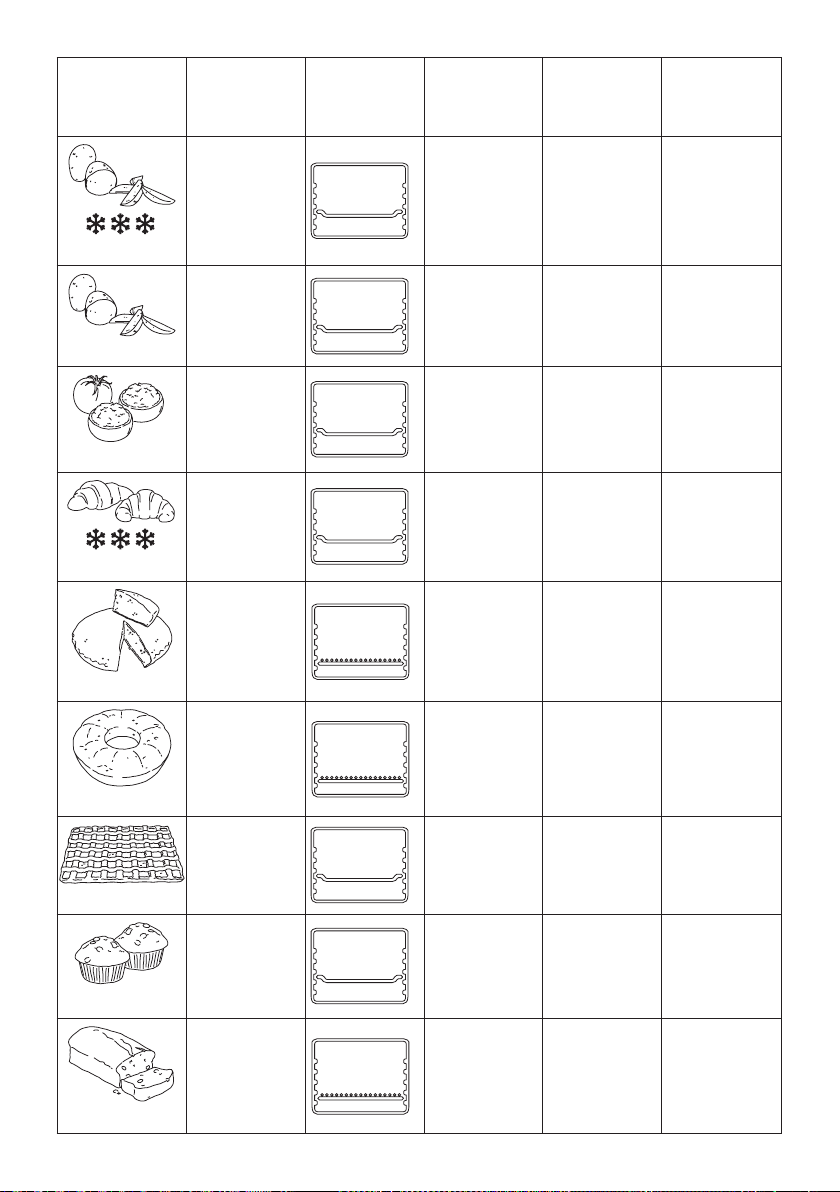
RECIPES WEIGHT
WIRE RACK
AND BAKE PAN
POSITION
FUNCTION TEMPERATURE TIME
Frozen potatoes
2.2 lb
1000g
4
3
2
1
4
3
2
1
4
3
2
1
4
3
2
1
4
3
2
1
CONVECTION
400 °F
200 °C
55-60 min
Fresh potatoes
2.2 lb
1000g
4
3
2
1
4
3
2
1
4
3
2
1
4
3
2
1
4
3
2
1
CONVECTION
400 °F
200 °C
50-55 min
Tomato gratin
2.2 lb
1000g
4
3
2
1
4
3
2
1
4
3
2
1
4
3
2
1
4
3
2
1
BAKE
400 °F
200 °C
25-30 min
Frozen brioche
6
4
3
2
1
4
3
2
1
4
3
2
1
4
3
2
1
4
3
2
1
CONVECTION
340 °F
170 °C
25-30 min
Sponge cake
1.5 lb
700g
4
3
2
1
4
3
2
1
4
3
2
1
4
3
2
1
4
3
2
1
BAKE
340 °F
170 °C
25-30 min
Cake
1.6 lb
750g
4
3
2
1
4
3
2
1
4
3
2
1
4
3
2
1
4
3
2
1
BAKE
360 °F
180 °C
30-35 min
Pie
2.2 lb
1000g
4
3
2
1
4
3
2
1
4
3
2
1
4
3
2
1
4
3
2
1
BAKE
360 °F
180 °C
30-35 min
Muns
12
4
3
2
1
4
3
2
1
4
3
2
1
4
3
2
1
4
3
2
1
BAKE
340 °F
170 °C
20-25 min
Plum cake
2.0 lb
900g
4
3
2
1
4
3
2
1
4
3
2
1
4
3
2
1
4
3
2
1
BAKE
300 °F
150 °C
85-90 min

23
ERROR
MESSAGE ON
DISPLAY
DESCRIPTION
POSSIBLE
PROBLEMS
SOLUTION
E0:11
Err
Temperature probe
malfunction
The electronic control
detected a malfunc-
tion on temperature
probe
Record the error number.
Reset the control by pressing START/STOP button (H) for
2 seconds and disconnect the plug from wall outlet.
The temperature probe needs to be replaced.
Contact a De’Longhi customer service reporting the error
number.
E0:12
Err
Temperature probe
malfunction
The electronic control
detected a malfunc-
tion on temperature
probe
Record the error number.
Reset the control by pressing START/STOP button (H) for
2 seconds and disconnect the plug from wall outlet.
The temperature probe needs to be replaced.
Contact a De’Longhi customer service reporting the error
number.
E0:21
Err
Target temperature
not reached:
The oven cannot reach
the target tempera-
ture in a reasonable
time range
The electronic control
detected an excessive
time to reach the
target temperature
inside the oven
Record the error number.
Reset the control by pressing START/STOP button (H) for
2 seconds and disconnect the plug from wall outlet.
First check that the oven door has been closed during
the use.
If door is kept open while in use , the oven cannot reach
the target temperature.
If oven door was properly closed, the heating elements
could be damaged.
Contact a De’Longhi customer service reporting the error
number.
E0:22
Err
Over temperature:
The oven reaches
excessive temperature
The electronic control
detected an excessive
temperature inside
the oven
Record the error number.
Reset the control by pressing START/STOP button (H) for
2 seconds and disconnect the plug from wall outlet.
The electronic control could be damaged.
Contact a De’Longhi customer service reporting the error
number.
E0:27
Err
Unexpected heating:
The temperature
probe detected a
temperature rise when
heating elements
should be OFF
The electronic control
detected an unexpect-
ed temperature rise
inside the oven, when
heating elements
should be not
energized
Record the error number.
Reset the control by pressing START/STOP button (H) for
2 seconds and disconnect the plug from wall outlet.
This error may be displayed when the oven starts the
DEFROST function when it is still warm from a previous
cooking process.
Let the oven cool down before starting the DEFROST
function.
If above case was not, the electronic control could be
damaged.
Contact a De’Longhi customer service reporting the error
number.
TROUBLESHOOTING

24
POSSIBLE
PROBLEMS
SOLUTION
Oven will not switch
ON
- Check that the power plug is properly inserted into wall outlet
- Insert the power plug into a dierent outlet
- Verify the circuit breaker
If the solution above does not resolve the problem, the oven probably had a malfunction.
Contact a De’Longhi customer service.
LCD display light has
gone out
The oven goes in standby mode , when not used for 30 seconds , if Clock was not set.
When Clock is set , the display light is kept ON
Clock setting has
gone out
If the LCD display light has gone out even if Clock was previously set , a power supply interruption
greater than 5 seconds occurred. The electronic control has been reset.
Set the Clock again.
Oven lamp is OFF
while oven is ON
- The bulb is broken. Replace the bulb.
- The bulb is not properly screwed into its housing. Verify that it is completely screwed.
If the solution above does not resolve the problem, the electronic control of the lamp probably had a
malfunction. Contact a De’Longhi customer service.
The pizza does not
cook evenly
Some large pizza , or particular dough pizza may brown unevenly. We suggest in these cases to switch
the position of the pizzas halfway through the cooking of the pizzas for a perfect nal result.
Steam coming out
from housing
This is normal. The oven is vented to release excessive steam created from bread or high-moisture
content foods.
Water dripping on
internal glass
This is normal. The condensation created by toasting bread and frozen bread will run down the inside
of door glass , and collected into a special slot on internal lower side of door.
RECIPES
MEDITERANEAN PAN PIZZA
Serves: 6
Ingredients: Quantity:
eggplant, cut into 1-in cubes (2.5 cm) 1/2 lb (250 g)
zucchini, cut into 1-in cubes (2.5 cm) 1
plum tomatoes, cut into 1-in cubes (2.5 cm)
2
extra virgin olive oil 2 tbsp
salt 1 tsp
refrigerated pizza dough 1 lb (450 g)
marinara sauce 1/2 cup
mozzarella cheese, shredded 1/2 cup
fresh basil, chopped 2 tbsp
1. Turn the function dial to Pizza and set to deep dish. Turn
the temperature to 450ºF and preheat the oven.
2. Line the baking tray with foil. Toss together the eggplant,
zucchini, tomatoes, olive oil, and salt in a large bowl. Scat-
ter the vegetables evenly on the baking tray.
3. Place the vegetables in the oven and roast until the vege-
tables are tender and browned, about 20 minutes. Transfer
to a rack to cool slightly. Leave the oven on.
4.
Spray a 10-inch (25 cm.) cast-iron skillet with cooking spray.
5. On a lightly oured surface with a oured rolling pin, roll
out the dough to a 10-inch (25 cm.) round. Transfer the
dough to the skillet, gently pulling the dough up the sides
of the skillet. Brush the top of the dough with a little olive
oil. Place the dough in the oven position 2 and bake until
the bottom begins to brown, about 20 minutes.
6. Spoon the sauce on the dough; top with the roasted ve-
getables. Cover with foil and bake 15 minutes. Remove
the foil, sprinkle with the cheese and continue to bake,
uncovered, until the lling is hot and the cheese is melted,
about 5 minutes longer.

25
MEDITERRANEAN ONEPAN CHICKEN WITH LEMON
AND POTATOES
Serves: 4
Ingredients: Quantity:
extra virgin olive oil 1/4 cup
lemons, zest and juice of 2; wedges of 1 3
dried oregano 1 tbsp
fresh parsely, chopped 1 tbsp
fresh rosmeary, chopped 2 tsp
garlic cloves, minced 2
salt 1 tsp
medium russet potatoes, peeled and
cut into 1 1/2-cubes (4 cm) 4
large chicken thighs, skin-on and
bone-in 4
1. Remove the baking tray from the oven and line with foil.
Turn the function dial to convection. Turn the temperature
to 400ºF and preheat the oven.
2. Whisk together the olive oil, lemon zest, lemon juice, ore-
gano, parsley, rosemary, garlic, and salt in a large bowl.
Add the chicken and potatoes and toss to coat well. Scatter
the potatoes onto the baking tray. Arrange the chicken and
lemon wedges on top of the potatoes. Place the baking
tray on position 3 and roast until an instant-read ther-
mometer inserted into the center of the chicken registers
165ºF and the potatoes are tender, about 40 minutes.
3. Transfer the chicken to a platter and cover loosely with foil.
Let stand 10 minutes.
4. Turn the oven temperature to 425ºF and continue cooking
the potatoes until they are browned and crisp, about 10
minutes longer. Serve the chicken with the potatoes.
HONEY ROASTED PEANUT BUTTER COOKIES
Serves: 14 cookies
Ingredients: Quantity:
creamy peanut butter 1 cup
sugar 1 cup
large egg, lightly beaten 1
baking soda 1 tsp
honey roasted peanuts, nely chopped 1/4 cup & 1 tbsp
1. Line both wire racks with foil. Turn the function selection
dial to cookie setting, selecting the two-tray option, and
preheat the oven.
2. Combine the peanut butter, sugar, egg, and baking soda
in a large bowl. Stir in 1/4 cup of the peanuts until well
mixed.
3. Roll the dough, by heaping tablespoons, into 14 balls and
place evenly on the wire racks. With the tines of a fork,
make a crosshatch pattern onto each cookie. Sprinkle the
cookies with the remaining 1 tablespoon of chopped pea-
nuts.
4. Place the cookies in the oven on position 2 and 3 and bake
until golden, about 15 minutes, rotating the racks halfway
through baking time. Let cool 10 minutes, then transfer to
a rack to cool completely.
ROASTED PORK AND GREEN BEANS
Serves: 4
Ingredients: Quantity:
shallots, nely chopped 2
honey 3 tbsp
soy sauce 2 tbsp
oyster sauce 2 tbsp
fresh ginger, chopped 2 tbsp
dark Sesame Oil 2 tbsp
jalapeno pepper, sedded and minced 1
garlic cloves, minced 2
pork tenerloin, trimmed 1 1/4 lb (600 g)
green beans, trimmed 1 lb (450 g)
scallions, cut in half 6
1. Remove the baking tray from the oven and line with foil.
Lightly spray the foil with nonstick spray. Turn the function
selection dial to convection. Turn the temperature to 425ºF
and preheat the oven.
2. Combine the shallots, honey, soy sauce, oyster sauce, gin-
ger, sesame oil, jalapeno, and garlic in a small bowl. Brush
half of the shallot mixture all over pork. Toss the green
beans, scallions, and remaining honey mixture in a large
bowl until well mixed.
3. Place the pork on one side of the baking tray. Scatter the
green beans on the other side of the pork. Place the baking
tray in the oven. Set the timer for 15 minutes and roast un-
til an instant-read thermometer inserted into the center of
the pork registers 155ºF for medium and the green beans
are tender, about 15 minutes. Transfer the pork to a cutting
board. Let stand 10 minutes, then cut into 12 slices and
serve with the green beans.

26
SALMON EN PAPILLOTE
Serves: 2
Ingredients: Quantity:
medium Yukon Gold potato, cut
into 1/4-in (0.6 cm) thick slices 1
Kalamata olives, pitted and chopped 1/4 cup
soft sundried tomatoes (not oil packed)
and chopped 1/4 cup
fersh parsley, chopped 2 tbsp
capers, rinsed and drained 1 tbsp
olive oil 1 tbsp
garlic clove, minced 1
zest of lemon 1
salmon llets 2 6-8oz (170 -250 g)
fresh rosemary, chopped 1 tbsp
salt 1/2 tsp
1.
Bring the potato and enough water to cover to a boil in a
medium saucepan over high heat. Reduce the heat and sim-
mer, uncovered, until just tender, about 10 minutes; drain.
2. Meanwhile, combine the olives, tomatoes, parsley, capers,
oil, garlic, and lemon zest in a medium bowl; add the po-
tatoes and toss gently. Sprinkle the salmon llets with the
rosemary and salt.
3. Remove the baking tray from the oven. Turn the function
selection dial to bake 425ºF and preheat the oven.
4. Tear o 2 (15 x 12-inch
30x40cm
) wide sheets of foil. Place
half of the potato mixture in the center of each sheet. Top
each with a salmon llet. Seal each packet by bringing the
two opposite sides of the foil up to meet in the center; fold
the edges over to seal tightly.
5. Place the packets on the baking tray and roast until the
salmon is opaque in the center, about 15 minutes. With a
wide spatula, transfer the packets to a cutting board; care-
fully open. Transfer the salmon and vegetables to 2 serving
plates and serve at once.
POLENTA AND EGGPLANT LASAGNA
Serves: 2
Ingredients: Quantity:
eggplant 1
olive oil for brushing
marinara sauce 1 15oz
(420 g)
jar
refrigerated polenta, cut into six 1/2-in
(1.5 cm) thick slices 1/2 tube (16oz-450 g)
ricotta 6 tbsp
mozzarella cheese, shredded 6 tbsp
fresh basil, chopped 2 tbsp
Parmesan cheese, grated 3 tbsp
1. Line both wire racks with foil and lightly spray with non-
stick spray. Turn the function selection dial to convection
and preheat the oven to 425ºF.
2. Brush both sides of the eggplant slices with olive oil. Place
the slices evenly on the racks. Set the timer for 25 minutes
and bake until the eggplant is tender and lightly browned,
rotating the racks halfway between baking time. Transfer
the eggplant to a plate.
3. Turn the function selection dial to bake and preheat the
oven to 375ºF.
4. Spoon some of the sauce on the bottom of a medium ba-
king dish. Place 6 of the eggplant slices in the baking dish.
Top each with a slice of polenta, a tablespoon of ricotta,
and the remaining eggplant. Spoon the remaining sauce
over all. Cover loosely with foil and bake until the lling is
hot and the sauce is bubbly, about 25 minutes.
5. Remove the foil and top with the mozzarella. Bake, unco-
vered, until the cheese is melted, about 10 minutes longer.
Sprinkle with the basil and Parmesan. Serve warm or at
room temperature.
BAKED MEATBALLS
Serves: 4-6
Ingredients: Quantity:
milk 1/2 cup
sanwich bread, torn 2 slices
ground beef, 80% lean 1 lb (450 g)
Parmsan Cheese 1/2 cup
ricotta cheese 1/4 cup
bread crumbs 1/4 cup
large egg 1
fresh parsley, chopped 2 tbsp
salt 1 tsp
marinara sauce 1 15oz
(420 g)
jar
1. Remove the baking tray from the oven and line with foil.
Lightly spray the foil with nonstick spray. Turn the function
selection dial to bake. Turn the temperature to 400ºF and
preheat the oven.
2. Combine the milk and bread in a large bowl; let stand un-
til softened, about 5 minutes. Add the ground beef, Par-
mesan, ricotta, bread crumbs, egg, parsley, and salt. Mix
gently but thoroughly. Roll into fourteen 1 3/4-inch balls
(4 cm). Transfer to the baking tray, set the timer for 30 mi-
nutes and bake until the meatballs are cooked through.
3. Heat the sauce in a large skillet over medium heat. Add the
meatballs and bring to a simmer. Reduce the heat to low;
cover and cook until the sauce is hot and the meatballs are
heated through, about 5 minutes.