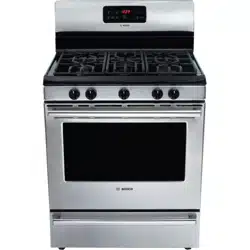
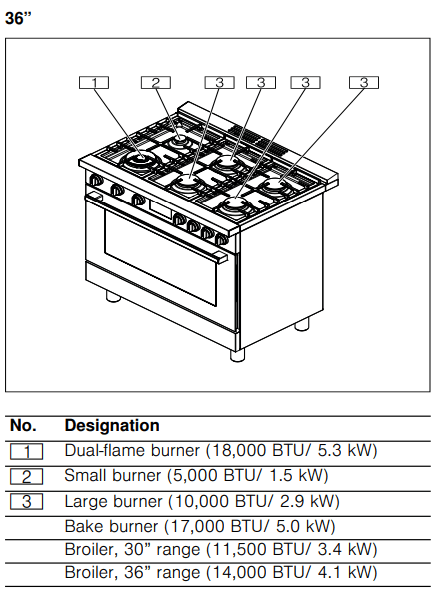
Your new cooktop has sealed gas burners. There are no burner parts under the cooktop to clean, disassemble or adjust. Your cooktop has three different burner sizes: small, large and dual-flame.
WARNING
To prevent flare-ups, do not use the cooktop without all burner caps and all burner grates properly positioned.
WARNING
To prevent burns, do not touch burner caps orgrates while hot. Turn the cooktop off and allow the burners to cool.
The burner parts must be correctly positioned for the cooktop to function properly. If the burner parts are not correctly positioned, one or more of the following problems may occur:
Burner flames are too high.
Flames shoot out of burners.
Burners do not ignite.
Burner flames light unevenly.
Burner emits gas odor.
Burner Cap and Burner Base Placement
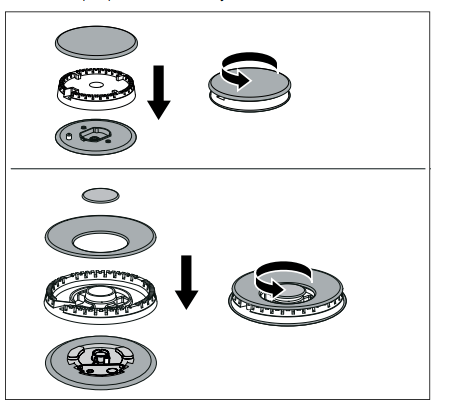
After electrical connection is complete, place each burner base on the corresponding location on the cooktop. One of the three bars on the burner base should line up with the notch and prevent the base from rotating. The small hole or cutout near the edge should also line up with the igniter. Pay special attention to avoid damaging the igniter during installation of the base. See Illustration below.
Once each base is located and resting evenly, place each burner cap on its correct burner base. See Illustration.
Place burner cap gently on top of base so that the prongs of the burner base fit snugly into the groove of the burner cap. If the maintop is removed by a certified installer (for example to check electrical or piping connection) the panhead screws that were removed must be re-installed to ensure proper functionality of burners.
Checking Burner Cap Placement
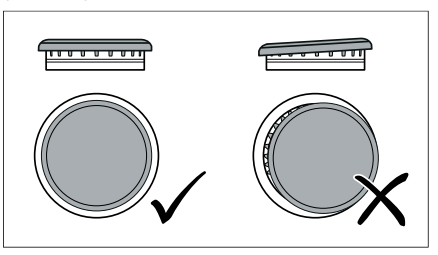
Check to make sure that there is no gap between the burner cap and burner base. See illustration below for correct and incorrect placements of the burner cap.
You may gently try to move the burner cap from side to side to check if it is properly placed. If properly placed, the cap will click from side to side as the prongs hit the groove ridge.
Install Grates
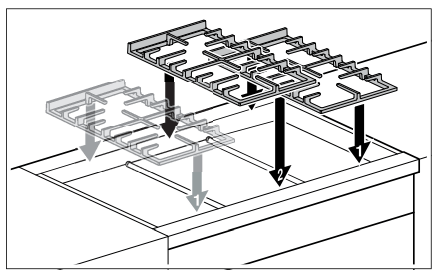
First position the outer grates, followed by the the central grate. If you only have two grates, the order in which you position them is not relevant.
Inserting Racks
CAUTION
To avoid burns, place oven racks in desired positions before turning oven on. Always use oven mitts when the oven is warm. If a rack must be moved while the oven is hot, do not let oven mitts contact hot heating elements.
Use caution when removing oven racks from the lowest rack position to avoid contact with the hot oven door.
To avoid possible injury or damage to the appliance, ensure racks are installed exactly per installation instructions and not backwards or upside down.
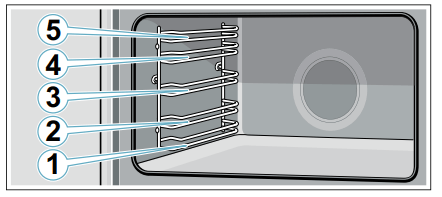
The wire rack can be inserted into the cooking compartment at five different levels. Always push accessories in fully so that they do not touch the door panel. Make sure that you always insert the accessories into the cooking compartment the right way round.
Flat Rack
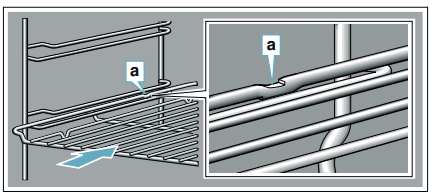
The rack is designed with a stop so it will stop before coming completely out of the oven and not tilt.
To insert wire rack into oven:
1. Grasp rack firmly on both sides.
2. Insert rack (see picture).
3. Tilt rack up to allow stop into rack guide.
4. Bring rack to a horizontal position and push the rest of the way in. Rack should be straight and flat, not crooked.
To remove Flat Rack from Oven:
1. Grasp rack firmly on both sides and pull rack toward you.
2. When the stop is reached, tilt rack up and pull the rest of the way out.
Telescopic Rail
WARNING
RISK OF BURNS
The telescopic shelves become hot when the appliance is in use. You must take great care to avoid burning yourself when they are pulled out.
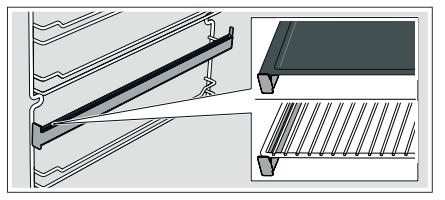
The telescopic rails allow you to pull accessories out completely. When inserting the baking tray and roasting shelf, ensure that it locks into place in front of the tab on the telescopic rails.
To insert Telescopic Rail into Oven:
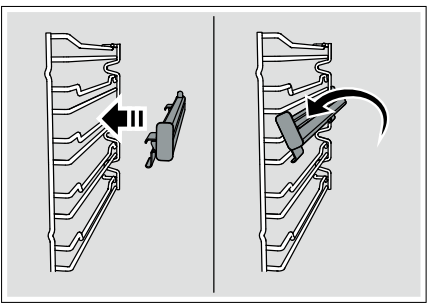
1. Hang the upper part of the rail into the rack.
2. Clip the lower part of the rail into the rack.
3. Slide the movable part of the telescopic rack in and out a few times to make sure it is able to move freely and that the non-moving part of the telescopic rack is securely anchored.
CAUTION
To avoid possible injury or damage to the appliance, ensure the telescopic rack is installed exactly per installation instructions and not backwards or upside down.
To Remove Telescopic Rail from the Oven:
1. Pull the lower part of the rail away from the rack.
2. Hang the upper part of the rail out of the rack.
Cleaning and Maintenance-Cooktop
Cleaning
The entire cooktop can be safely cleaned by wiping with a soapy sponge, then rinsing and drying. If stubborn soil remains, follow the recommended cleaning methods below.
Cleaning recommendations:
Always keep the appliance area clear and free from combustible materials, gasoline, and other flammable vapors and liquids.
Always use the mildest cleaner that will do the job. Use clean, soft cloths, sponges or paper towels.
Rub stainless steel finishes in the direction of the grain. Wipe area dry to avoid water marks.
Before cleaning, be certain the burners are turned off and the grates and burners are cool.
Do not clean removable cooktop parts in any self cleaning oven or dishwasher.
Do not obstruct air flow around cooktop burners, range backguard and door area.
After cleaning, place all parts in their proper positions before using cooktop.
For proper burner performance, keep igniters clean and dry.
Keep the igniter ports clean for proper lighting performance of the burners. It is necessary to clean these when there is a boilover or when the burner does not light even though the electronic igniters click.
Do not use flammable cleansers such as lighter fluid.
Do not use chlorine based cleaners.
Always test cleaners on a small inconspicuous area first.
CAUTION
All igniters spark when any single burner is turned on. Do not touch any of the burners when the cooktop is in use.
Cleaning Guidelines
The cleaners recommended below and on the following page indicate a type and do not constitute an endorsement of a particular brand. Use all products according to package directions.
Burner base / aluminum alloy
Detergent and hot water; rinse and dry thoroughly.
Do not scratch or gouge the port openings.
Stiff nylon bristle tooth brush to clean port openings.
Clean ports with a wire or straightened paper clip.
Abrasive cleansers: Brillo® or S.O.S.® pads. Rinse and dry.
Do not use a toothpick that may break off.
Do not soak burner bases.
Burner cap / porcelain enamel
Detergent and hot water; rinse and dry thoroughly.
Acidic and sugar-laden spills deteriorate the porcelain enamel.
Nonabrasive Cleansers: Omit ammonia, Fantastic®, Formula 409®.
Remove soil immediately after unit has cooled enough to touch.
Mild Abrasive Cleansers: Bon Ami®, Ajax®, Comet®.
Do not use wet sponge or towel on hot porcelain.
Liquid cleaners: Bar Keeper's Friend®, Soft Scrub®.
Do not soak burner caps.
Always apply minimal pressure with abrasive cleaners.
Bar Keeper's Friend Soft Cleanser Liquid®.
Reassemble. Make sure that the cap is seated on the base.
Dry thoroughly after cleaning.
Control knobs and bezels
Detergent and hot water; rinse and dry thoroughly.
Do not soak knobs.
To remove knobs, pull outward.
Do not use abrasive scrubbers or cleansers, such as Bon Ami®, Ajax®, or Comet®. They may permanently damage the finish or remove graphics
Exterior finish / stainless steel
Nonabrasive Cleaners: Hot water and detergent, Fantastic®, Formula 409®. Rinse and dry immediately.
Do not use steel wool pads. They will scratch the surface.
Stainless steel resists most food stains and pit marks providing the surface is kept clean and protected.
Cleaner Polish: Stainless Steel Magic® to protect the finish from staining and pitting; enhances appearance.
Never allow food stains or salt to remain on stainless steel for any length of time.
Hard water spots: Household white vinegar.
Rub lightly in the direction of the grain.
Mild Abrasive Cleaners: Bon Ami®.
Heat discoloration: Bar Keepers Friend®
Chlorine or chlorine compounds in some cleaners are corrosive to stainless steel. Check ingredients on label before using.
Grates and grate bridge / porcelain enamel on cast iron
Nonabrasive cleaners: Hot water and detergent, Fantastic®, Formula 409®. Rinse and dry immediately.
The grates are heavy; use care when lifting. Place on a protected surface for cleaning.
Mild abrasive cleaners: Bon Ami® and Soft Scrub®.
Blisters/ crazing/ chips are common due to the extreme temperatures on grate fingers and rapid temperature changes.
Abrasive cleaners for stubborn stains: soap-filled steel wool pad.
You may also clean the burner grates in the dishwasher. Remove any burnton food prior to placing the burner grates in the dishwasher. Place them on the lowest rack of dishwasher and use the dishwasher manufacturer's recommended detergent.
Acidic and sugar-laden spills deteriorate the enamel. Remove soil immediately after unit has cooled enough to touch.
Abrasive cleaners, used too vigorously or too often can eventually mar the enamel.
Do not clean in a self-cleaning oven.
Igniters / ceramic
Carefully wipe with a cotton swab dampened with water or Formula 409®.
Avoid excess water on the igniter. A damp igniter will prevent burner from lighting.
Gently scrape soil off with a toothpick.
Remove any lint that may remain after cleaning.
Operating the Oven
Before Using the Appliance for the First Time
There may be a slight odor during the first several uses. This is normal and will disappear.
Read all safety precautions and Use and Care Manual information prior to operating.
Setting the time
Once the appliance is connected to a power supply, flashes on the display. Set the time.
1. Use the or button to set the time.
2. Press the button.
Note: Once the period allowed for setting the time on the clock has elapsed, the time will automatically be saved.
The time has now been set.
Prepping the oven
Remove the accessories and the rack guides from the cooking compartment.
Completely remove any leftover packaging, e.g. small pieces of polystyrene, from the cooking compartment.
Remove protection film from parts.
Clean the outside of the appliance with a soft, damp cloth.
Clean the oven cavity with hot soapy water.
Initial start up
In order to prevent excess smoke and odor from manufacturing oils, heat up the oven for the first time when it is empty and closed.
Note: Make sure that there is no leftover packaging, such as polystyrene pellets, in the oven cavity. Before heating the appliance, wipe the smooth surfaces in the oven cavity with a soft, damp cloth. Keep the kitchen ventilated while the appliance is heating.
Operate the cooktop burners to ensure they all light and air is out the gas system. Follow instructions -> Page 12
Turn off the cooktop burners.
Operate the oven by firmly pushing in the oven temperature control knob and holding for two seconds. The cooling fan will come on and the sparking will be heard.
Turn the knob counter-clockwise to bake 500°F and release. The oven will begin to heat and the ignition sparking will stop after a few seconds.
After about one hour, turn the oven temperature control clockwise to off.
Push in and turn the oven temperature control knob clockwise to Broil and release
After about 10 minutes, turn the knob clockwise to off.
Once oven has cooled wipe out with hot soapy water and replace rack guides.
Note: When the appliance is heating up for the first time, you may hear crackling noises coming from the oven.
Cleaning the accessories
Before using the accessories, clean them thoroughly using a cloth and warm soapy water.
Fitting the telescopic rack set
Instructions on fitting the telescopic rack set are enclosed with the set.
About the Appliance
Oven control panel
Buttons
Oven light / minus
Time functions
Convection fan / plus
Note: You only need to press lightly on the buttons to operate them.
Display
Convection fan on
Kitchen timer
AM/PM Time
Control knobs
WARNING
Failure to operate knobs properly may result in personal injury and damage to the appliance.
Oven
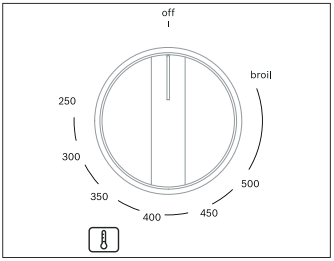
Set the temperature for the bake burner or the broiler using the control knob for the oven.
off: Oven switched off 250-500: Oven baking temperature broil: Switching on the gas broiler
To operate:
Push the oven temperature control knob in firmly and turn counter clockwise to bake or clockwise to broil. The sparking will start with this motion and ignite the flame at according burner. Turn off by turning the control knob clockwise to off.
Notes
The oven has a push and turn feature to limit gas flow if the control is not pressed firmly in for a few seconds prior to turning the oven to the desired temperature.
Broil has only one setting, at the positon marked broil.
Do not try to turn the oven control knob from broil to bake temperatures clockwise, or from bake temperatures to broil counter-clockwise. The control needs to go to off then change to bake or broil.
Time-setting Options
Setting the electronic clock
To set the clock the oven must be switched off.
Press and hold the button until : flashes.
Change the time using the and buttons.
Press button.
Setting the short-term timer
The short-term timer has no effect on how the oven operates. The duration of the short-term timer can be set from 30 seconds to 23 hours and 59 minutes.
Press the button. The symbol flashes and the display shows
Use the and buttons to set the desired time for the timer. An audible signal sounds once the time has elapsed.
Notes
To change the remaining time, press the button. Then use the and buttons to change the remaining time.
To cancel the short-term timer, press the button. Then set the remaining time to zero using the and buttons.
Switching off the signal tone
Press any button to switch off the audible signal.
Note: After 7 minutes, the audible signal will stop automatically.
Changing the signal tone
Three different signal tones are available.
Press and hold the and buttons at the same time for approximately two seconds.
Press the button. The signal tone that is currently selected is shown in the display, e.g. "Tone 1".
Press the button to select a different signal tone.
Press the button.
Oven Features
Cooling Fan
The cooling fan runs during all cooking modes. The fan can be heard when it is running, and warm air may be felt as it is released from the oven vent. The fan may run until the oven has cooled down.
Convection Fan
The convection fan is not available for broiling. You can turn on and off the convection fan by pressing . If the oven door is opened, the convection fan will turn off.
Oven light
Your appliance is equipped with an oven light. You can turn the oven light on and off by pressing .
Surfaces in the oven cavity
The back wall and side parts in the oven cavity are selfcleaning. You can tell this from the rough surface. The oven cavity floor and ceiling are enameled and have smooth surfaces.
Notes
Use an oven tray on the first bottom shelf to collect liquids produced by broiling.
Use an oven tray to bake food that could release fats or oils, in order to avoid spillage of these substances on the floor plate of the oven.
Self-cleaning surfaces
The self-cleaning surfaces are coated with a porous, matte ceramic layer. This coating absorbs and dispels splashes from baking and roasting while the appliance is in operation.
CAUTION
Do not use oven cleaner on the self-cleaning surfaces. These will damage the surfaces. If oven cleaner does get onto these surfaces, dab it off immediately using water and a sponge cloth. Do not rub the surface and do not use abrasive cleaning aids.
Getting the Most Out of Your Appliance
Aluminum Foil
WARNING Do not use aluminum foil or protective liners to line any part of the appliance, especially the oven bottom. Installing these liners may result in risk of electric shock or fire.
Preheating the oven
Place oven racks in the required position before heating the oven.
Always preheat the oven.
Allow the oven to preheat while preparing recipe ingredients or food items.
Increasing the oven temperature will require a longer preheat time.
When the oven has preheated a beep indicator will sound for 2 seconds.
Once the oven is preheated, place the food in the oven as quickly as possible to minimize the loss of heat and reduction of oven temperature.
Baking Pans and Dishes
Glass baking dishes absorb heat. Some cookware manufacturers recommend reducing the temperature by 25°F when using this type of dish. Follow the manufacturers’ recommendations.
Cookie sheets should have at least 1" clearance on all sides.
Use pans that provide the desired level of browning. For tender, light, golden brown crusts, use light, anodized or shiny metal bakeware.
Dark, rough or dull pans (nonstick or anodized) will absorb heat and result in a browner, crisper crust. Some manufacturers recommend reducing the temperature by 25°F when using this type of pan. Follow the manufacturers’ recommendations.
Insulated cookie sheets or bakeware may increase the length of cooking time.
Do not place broil pans or any other heavy objects down on the open oven door.
Do not store empty pans or pizza stones in the oven during cooking as this changes the cooking performance. Store pans outside of the oven.
Opening the oven door
Open and close the appliance door only by holding the door handle. To avoid risk of burns, do not touch any other parts of the door.
Open the door as briefly as possible to avoid temperature reduction. Use the interior oven light to view the food through the oven window rather than opening the door frequently.
High Altitude Baking
When cooking at high altitudes, recipes and cooking times will vary. For accurate information, write the Extension Service, Colorado State University, Fort Collins, Colorado 80521.
There may be a cost for the guides. Specify which high altitude food preparation guide you prefer: general information, cakes, cookies, breads, etc.
Condensation
It is normal for certain amount of moisture to evaporate from the food during any cooking process. The amount depends on the moisture content of the food. The moisture may condense on any surface cooler than the inside of the oven, such as the control panel.
Broil
Broil uses intense heat radiated from the upper element. Broil mode is best suited for cooking thin, tender cuts of meat (1" or less), poultry and fish. It can also be used to brown breads and casseroles. Always broil with the door closed.
The benefits of broiling include:
Fast and efficient cooking.
Cooking without the addition of fats or liquids.
Tips
Preheat oven for 3–4 minutes. Do not preheat for more than 5 minutes.
Steaks and chops should be at least 3/4" thick.
Brush fish and poultry with butter or oil to prevent sticking.
Use broiler pan with grid when broiling.
Do not cover the broil grid with foil. It is designed to drain fats and oils away from the cooking surface to prevent smoking and spattering.
Turn meats (other than fish) once during the recommended cooking time. Fish does not need to be turned.
When browning the top of casseroles, use only metal or glass ceramic dishes.
Never use heat-proof glass; it cannot tolerate the high temperature.
Cleaning and Maintenance-Oven
To avoid electrical shock hazard, before servicing the appliance, switch power off at the service panel and lock the panel to prevent the power from being switched on accidentally.
Cleaning the Oven
Avoid These Cleaners
Do not use commercial oven cleaners such as Easy Off®. They may damage the oven finish or parts.
Chlorine or chlorine compounds in some cleansers are corrosive to stainless steel. Check ingredients on label.
Never use scouring pads or abrasive cleaners
Cleaning Self-cleaning Surfaces
CAUTION
Do not use oven cleaner on the self-cleaning surfaces. These will damage the surfaces. If oven cleaner does get onto these surfaces, dab it off immediately using water and a sponge cloth. Do not rub the surface and do not use abrasive cleaning aids.
Use a microfiber cloth with soapy water to clean the upper and lower part of the self-cleaning surfaces.
Set the bake burner to the highest temperature.
Press w to switch on air recirculation.
Switch off the appliance after one hour.
If the side, self-cleaning surfaces are particularly dirty, remove these from the cooking compartment.
Note: The self-cleaning surface on the back panel must remain in the cooking compartment.
Wash the self-cleaning surfaces with hot soapy water.
Rinse and dry the self-cleaning surfaces.
Insert the self-cleaning surfaces into the cooking compartment.
Set the bake burner to 350°F.
Press w to switch on air recirculation.
Switch off the appliance after one hour.
Maintenance
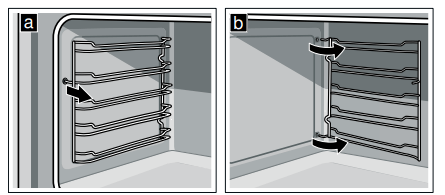
How to Remove the Rack Guides and Self-cleaning Surfaces
The rack guides are fixed to the side panels of the cooking compartment at three points. The self-cleaning surfaces are fixed with the rack guides.
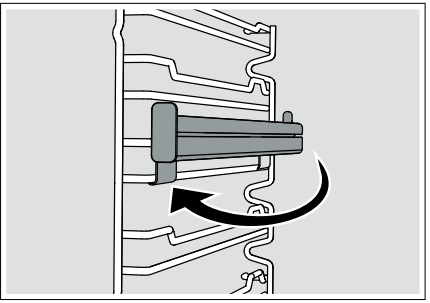
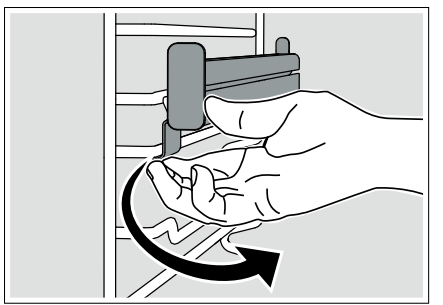
When the oven is cool, grip the front of the rack guide and pull it round to the middle of the cooking compartment. The front hook of the rack guide will come out of the hole.
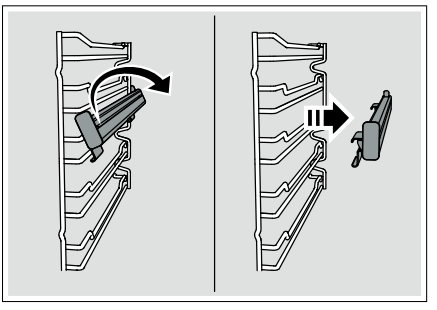
Swing the rack guide round further and pull it out of the rear holes in the side panel.
Remove the rack guides from the cooking compartment.
4. Replace the self-cleaning surfaces and rack guides in the reverse order in which they were removed.
How to Remove the Oven Door Glass
WARNING
Make sure oven is cool and power to the oven has been turned off before removing the door. Failure to do so could result in electrical shock or burns.
The glass panels are big, heavy and parts are fragile. Use both hands to remove the glass. Handle carefully to avoid breakage.
Failure to grasp the glass firmly and properly could result in personal injury or product damage.
Do not place the glass on sharp or pointed objects as this could break the glass. Lay on a flat, smooth surface, positioned so that the glass cannot fall over.
CAUTION: Wear gloves to avoid cutting fingers on broken glass.
For easier cleaning the internal glass panes of the door can be removed.
Open the oven door fully.
Lock the two hinges on the left and right using the locking pin.The locking pins must be fully inserted into the holes in the hinges.
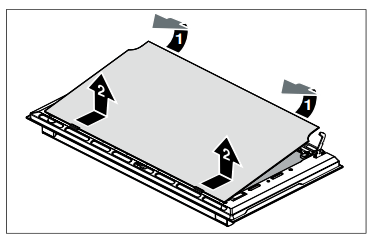
3. Remove the internal glass pane by pulling the rear part gently upwards, following the movement indicated by the arrows (1). This way, the first 2 pins attached to the rear of the glass detach from their housings in the oven door. Then, push the glass pane slightly towards the cooking compartment and pull it upwards (2). This way, the other 2 pins attached to the front of the glass detach from their housings in the oven door. 9
CAUTION
Move the glass pane slow to avoid damage to the glass and the cooking compartment frame.
4. Remove the intermediate glass pane by lifting it upwards.
5. Clean the external glass pane and the panes removed previously. Use absorbent kitchen roll. In case of stubborn dirt, wash with a damp sponge and neutral detergent.
6. Reinsert the middle panel.
Notes
If the Low-E symbol can be read, the middle panel is inserted correctly.
Make sure that the panel is seated correctly. All rubber mounts must lay flat against the outer panel.
7. Reposition the internal glass pane. First insert the front part into the two clips and the 2 pins in the front into their housings. Then insert the 2 pins in the rear into their housings in the oven door by applying slight pressure.
CAUTION
Do not use with intermediate glass pane not correctly re-fitted.
8. Remove the locking pins and close the oven door.
How to Remove the Oven Door
WARNING
Make sure the oven is cool and the power to the oven has been turned off before removing the door. Failure to do so could result in electrical shock or burns.
The oven door is heavy and parts of it are fragile. Use both hands to remove the oven door. The door front is glass. Handle carefully to avoid breaking.
Grasp only the side of the oven door. Do not grasp the handle as it may swing in your hand and cause damage or injury.
Failure to grasp the oven door firmly and properly could result in personal injury or product damage.
To avoid injury from the hinge bracket snapping closed, make sure that both levers are securely in place before removing the door. Also, do not force the door open or closed – this could damage the hinge or result in injury.
Do not place the removed door down on sharp or pointed objects as this could break the glass. Lay on a flat, smooth surface, positioned so that the door cannot fall over.
To avoid injury or damage, make sure that you read the above WARNING before attempting to remove the oven door.
1. Open the oven door to its fully open position.
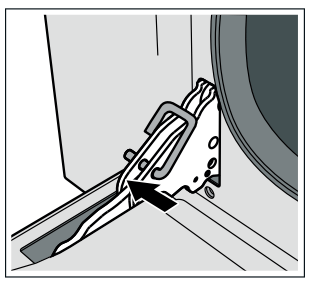
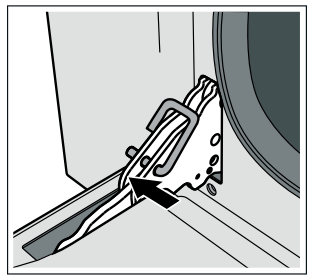
2. Lock the two hinges on the left and right using the locking pin. The locking pins must be fully inserted into the holes in the hinges.
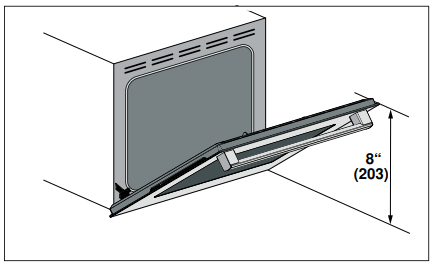
3. Close the oven door until it catches on the hinge stop levers, locking the hinges at the correct angle for door removal. The door can be removed when it is pulled up from the open position by about 8 inches (203 mm). This takes the tension off the spring-loaded hinges so that the door can be easily lifted out.
CAUTION
RISK OF PINCHING Closing the door by 8" (203 mm) takes the pressure off the spring. If this is not done, the door can still be removed but the latch will now slam shut and will pinch or cut your hand.
4. The door is heavy. Use both hands to firmly grip it by the sides. Do not grip the door by the handle. Keeping the angle of the door the same, lift the door straight up approximately 3/4" (19 mm) to unhook the hinges from the slots, and then pull it out towards you until the hinges are clear of the oven housing.
5. Place the door in a convenient and stable location for cleaning.
6. Refit the door in the reverse order in which it was removed.
Replacing an Oven Light
CAUTION
WHEN REPLACING AN OVEN LIGHT:
Make sure the appliance and lights are cool and that the power to the appliance has been turned off before replacing the light bulb(s). Failure to do so may result in electrical shock or burns.
Wear gloves.
The lenses must be in place when using the appliance.
The lenses serve to protect the light bulb from breaking.
The lenses are made of glass. Handle carefully to avoid breaking. Broken glass may cause an injury.
The light socket is live when the door is open.
Bulb specifications:
Voltage: 120 V;
Power: 40 W;
Fitting: G9;
Temperature resistance: 575°F (300°C)
To change the bulb:
1. Allow the cooking compartment to cool down.
2. Open the appliance door.
3. Place a cloth in the oven cavity to prevent damage.
4. Remove the racks and rack guides.
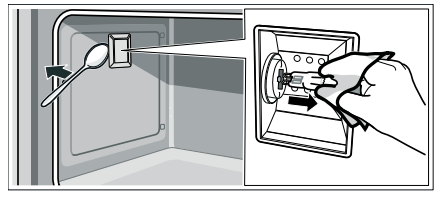
5. Remove the glass cover. To do this, open the glass cover at the front with your hand. Should you experience difficulties removing the glass cover, use a spoon to help.
6. Remove the oven light bulb.
7. Replace the oven light bulb with a bulb of the same type.
8. Replace the glass cover for the oven light bulb.
 flashes on the display. Set the time.
 or
or  button to set the time.
 button.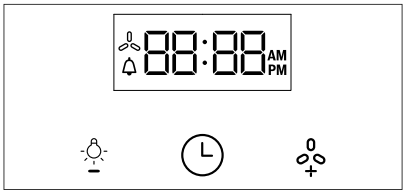
 Convection fan on
 Kitchen timer