
Questions or Concerns?
Please contact us Mon–Fri, 9:00 am–5:00 pm PST/ PDT
at [email protected] or at (888) 726-8620.
LV110WP-RF
Pitcher Replacement Filter
SAFETY INFORMATION
Follow all safety guidelines. Read all instructions before using.
• Only filter tap water. This filter cartridge is not designed to filter
water from other sources (such as river water).
• The filter cartridge may become clogged and may not work
correctly if filtering liquids other than tap water.
• Do not filter hot water (over 35°C / 95°F). This may damage the
filter and may release contaminants.
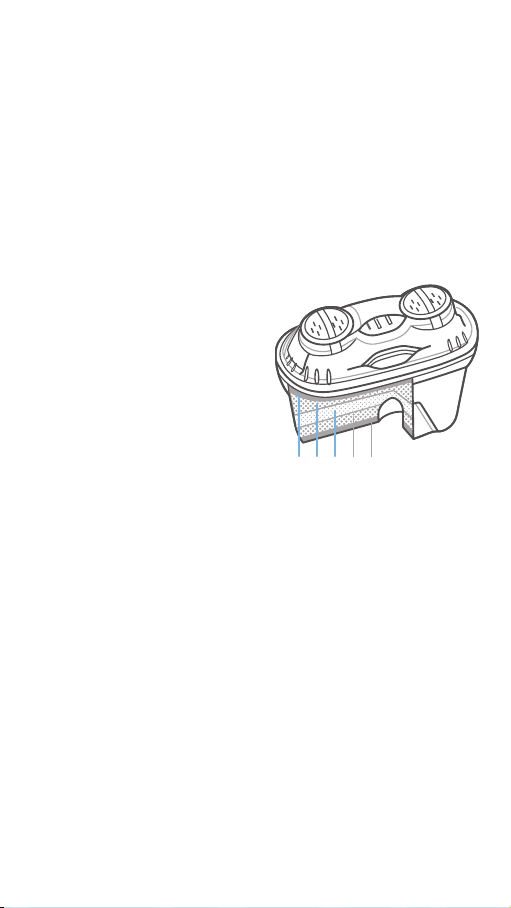
ABOUT YOUR FILTER
A. Upper Micro Net
• Removes particles
suspended in the water, such
as sand, rust, sludge, and
organic matter.
B. Activated Carbon
• Uses high-quality activated
carbon for excellent filtration.
• Removes chlorine taste and
odor eectively.
• Removes pesticides
(including Endrin) and
residual pollutants.
• Improves taste of water.
C. Ion-Exchange Resin
• Removes heavy metals (such as lead, cadmium, mercury,
copper, and aluminum).
• Removes minerals from water to soften it, leaving a percentage
of beneficial minerals behind (such as calcium and magnesium).
D. Lower Micro Net
• Final filtration removes any remaining unwanted particles in the
water.
A B C B D
BEFORE USING
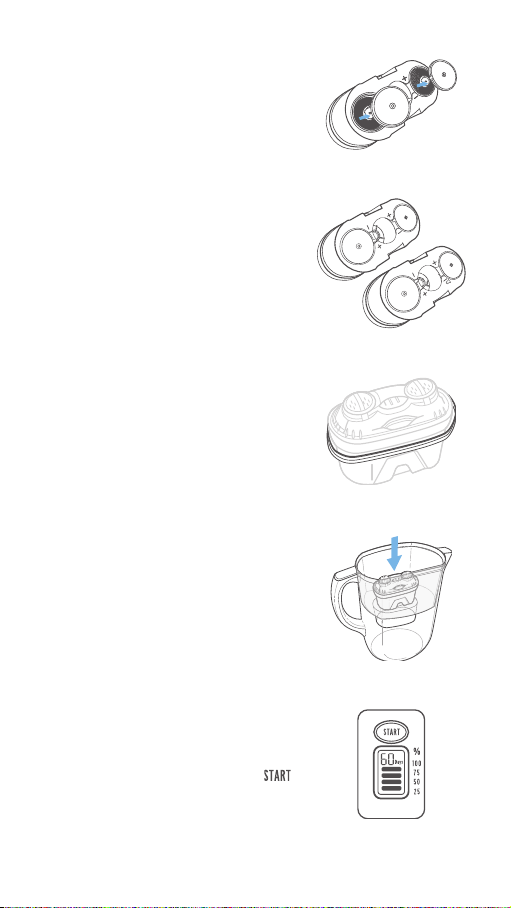
1. Remove all packaging from the filter
cartridge.
2. Remove the restrictor caps from the
bottom of the filter. [Figure 1.1]
3. Soak the filter cartridge in clean tap
water (submerged completely) for 15
minutes.
NOTE: There may be carbon dust in the water
while rinsing or soaking the filter. This is normal.
4. Rinse the filter cartridge thoroughly for
10 seconds under running water.
5. Replace the restrictor caps on the
bottom of the filter.
Figure1.1
Figure1.2
Figure1.3
Figure 1.4
Figure1.5
+ position
– position
Restrictor Cap Settings
Restrictor Cap Settings
• Place the restrictor cap in the “+”
position if you want water to filter
faster, or in the “-” position if you want
water to filter more thoroughly.
[Figure 1.2]
• You can remove the caps completely
if you want water to filter as fast as
possible.
• Make sure the rubber gasket is
correctly in place on the filter cartridge.
If the rubber gasket has come loose,
press into place, making sure the ridge
is facing up. [Figure 1.3]
6. Place the filter cartridge into the filter
chamber. Press the cartridge into place
as firmly as possible to prevent leaks.
[Figure 1.4]
7. Fill the pitcher with cold tap water.
Discard the filtered water. Refill and
discard the water 2 more times.
8. Reset the filter timer by pressing
firmly for 8 seconds. Your filter is ready
to use. [Figure 1.5]

WARRANTY
WARRANTY
Levoit warrants all products to be of the
highest quality in material, craftsmanship,
and service, eective from the date of
purchase to the end of the warranty
period. Warranty lengths may vary
between product categories.
Product Name Pitcher Replacement Filter
Model LV110WP-RF
Default Warranty Period 1 year
For your own reference, we strongly recommend that you
record your order ID and date of purchase.
If you have any questions or concerns about your new product,
please contact our helpful Customer Support Team.
Arovast Corporation
1202 N. Miller St., Suite A
Anaheim, CA 92806
Email: [email protected]
Toll-Free: (888) 726-8520
Support Hours
Mon–Fri, 9:00 am–5:00 pm PST/PDT
*Please have your order invoice and order ID ready before
contacting Customer Support.

Connect with us @LevoitLifestyle

levoit.com
JJ0719CY-M1.1_0719LV110WP