
1
TLS1CARD
TIMER LIGHT STATUS OPTION CARD
The TLS1CARD has different configuration modes that determine how the TLS1CARD will function.
MODE COMPARABLE MODIFICATION DESCRIPTION
TCP Mode 1 90-T1, 90-515774, or RDGRNCARD • 3 relay outputs (R1, R2, and R3) with optional flashing for R1
• Adjustable Pre-Warning
• R1 output on during Pre-Warning, while in motion, and at an
undefined stopped position
• R2 output on at fully open and at open mid-stop
• R3 output on while closing only
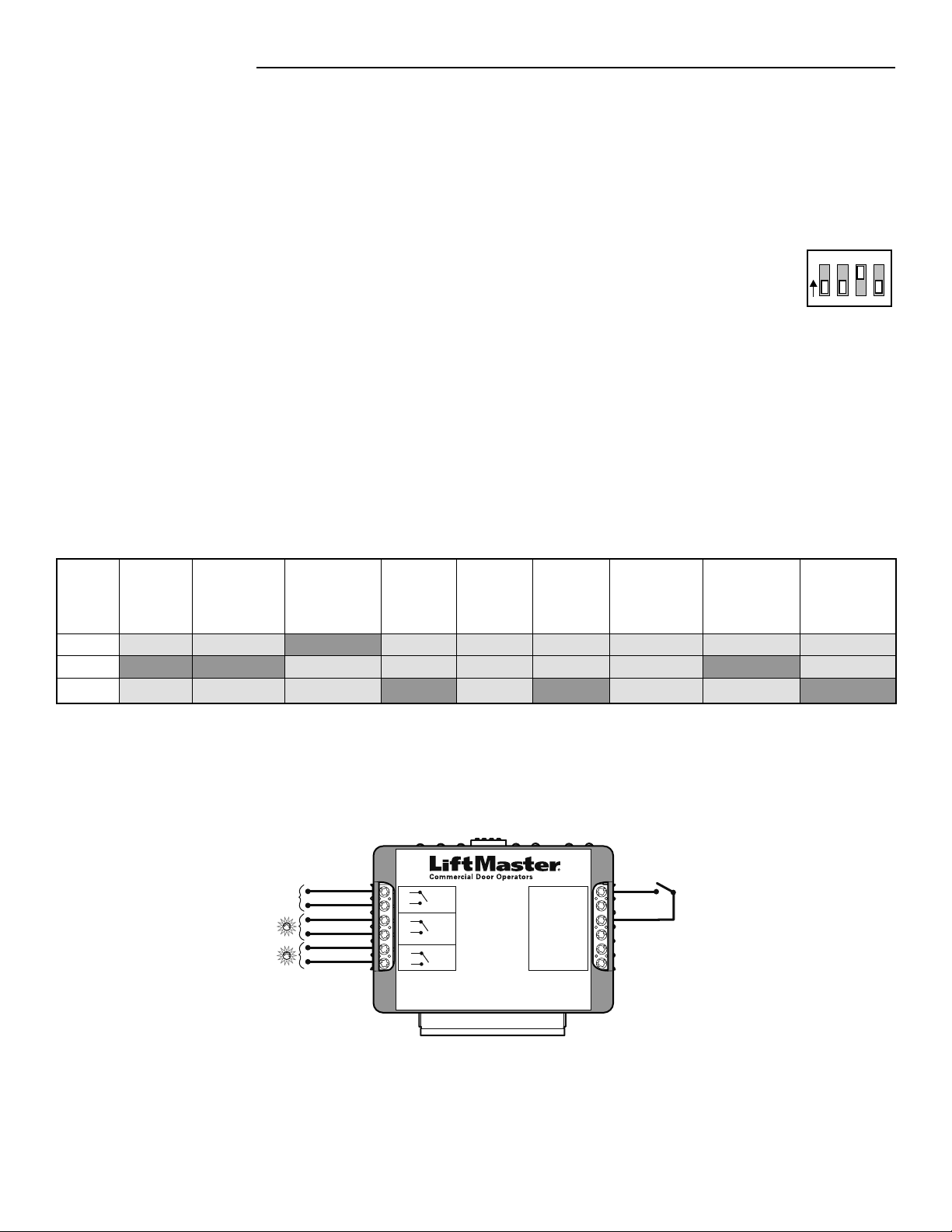
TCP Mode 2 90-T2 • 3 relay outputs (R1, R2, and R3)
• Adjustable Pre-Warning
• R1 output on during Pre-Warning only
• R2 output on at fully open
• R3 output on only when a special input to open has been used to
open the door which does not activate the Timer-to-Close
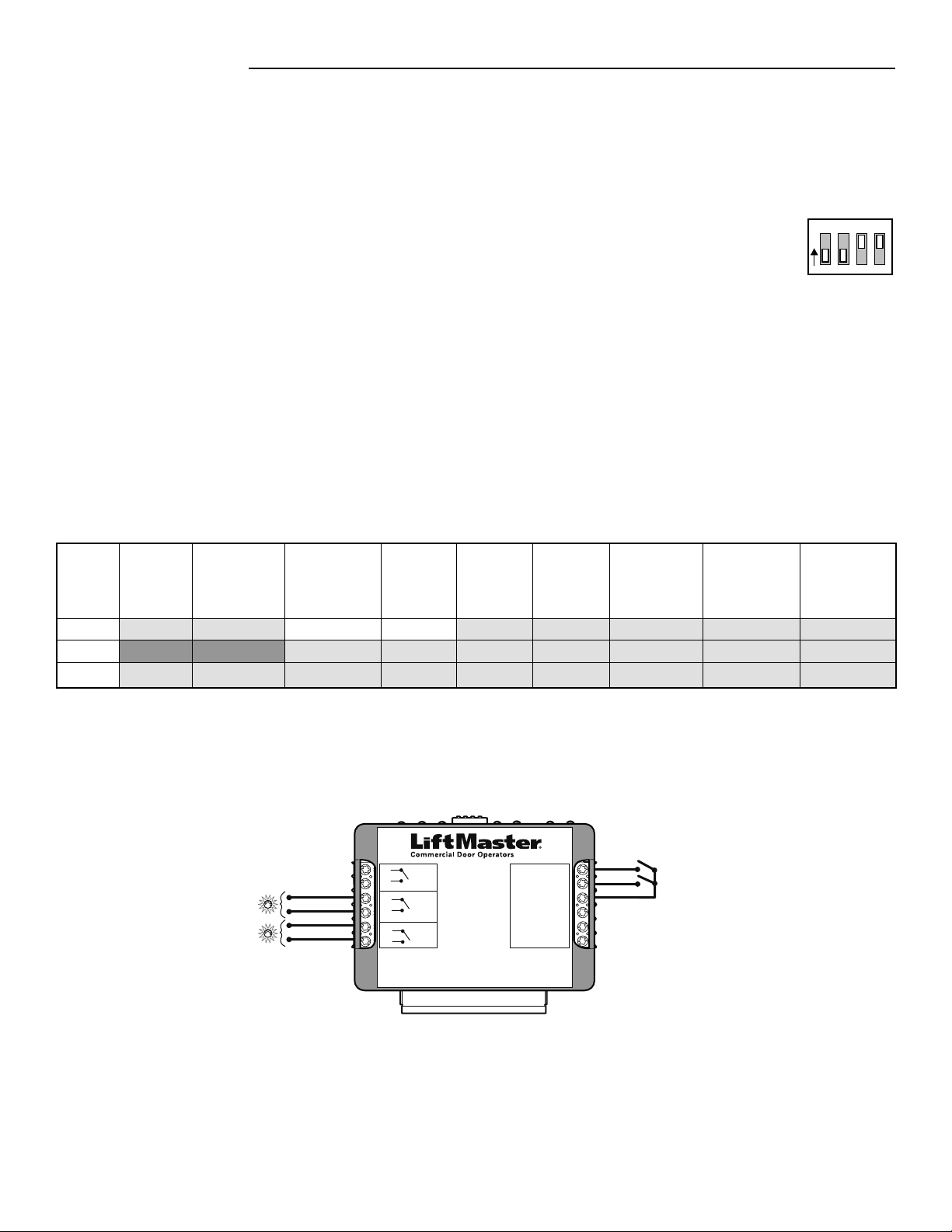
TCP Mode 3 90-T4 • 3 relay outputs (R1, R2, and R3)
• Adjustable Pre-Warning
• R1 output on during Pre-Warning only
• R2 output on at fully open and at open mid-stop
• R3 output on while in motion
TCP Mode 4 90-RGLFCIR or 90-HDFLASH2 • 2 relay outputs (R1, R2) with optional flashing for R1
• Adjustable Pre-Warning
• R1 output on during Pre-Warning and while closing
• R2 output on at fully open
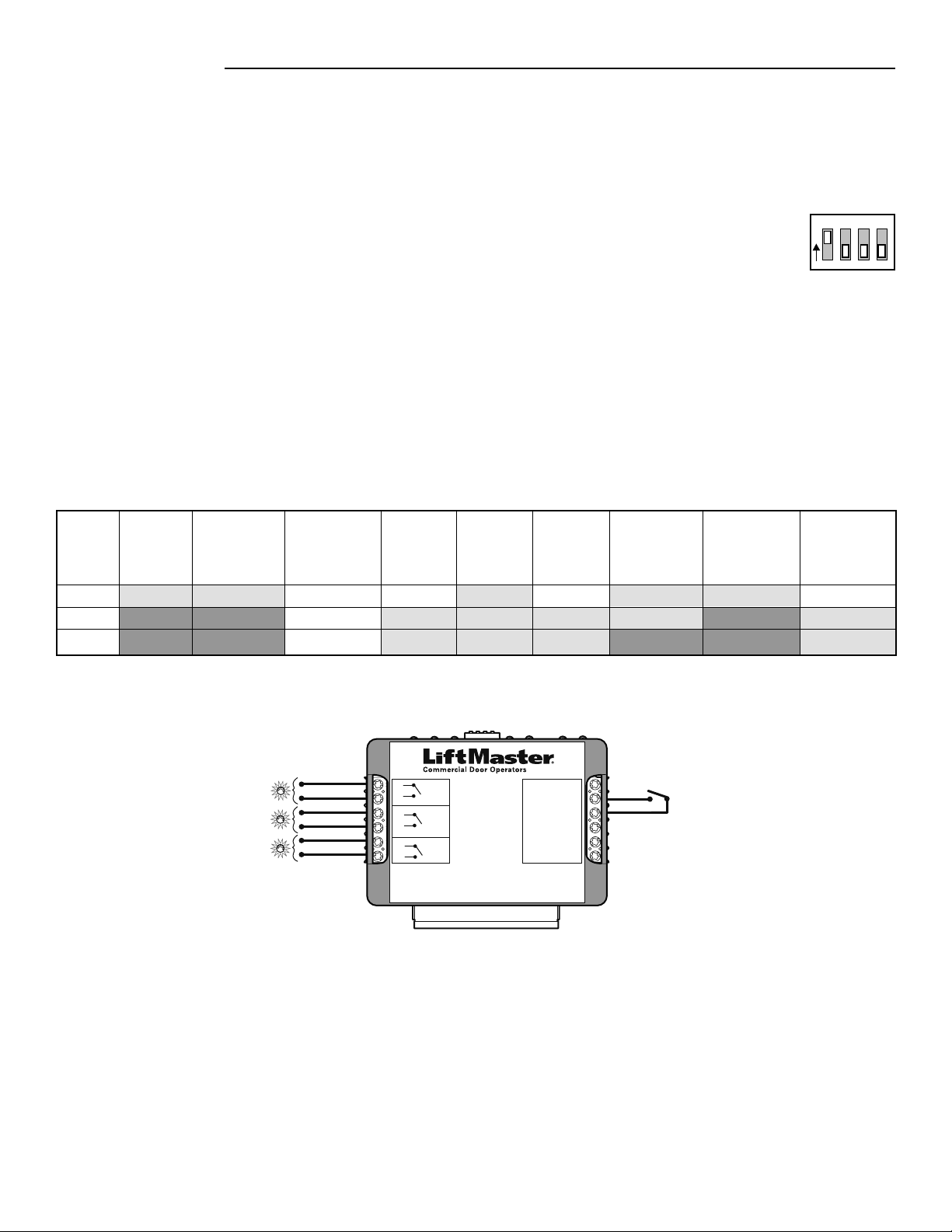
TCP Mode 5 90-T3 • 3 relay outputs (R1, R2, and R3)
• Adjustable Pre-Warning
• R1 output on at all times except fully open and fully closed
• R2 output on at fully open
• R3 output on only when a special input to open has been used to
open the door which does not activate the Timer-to-Close
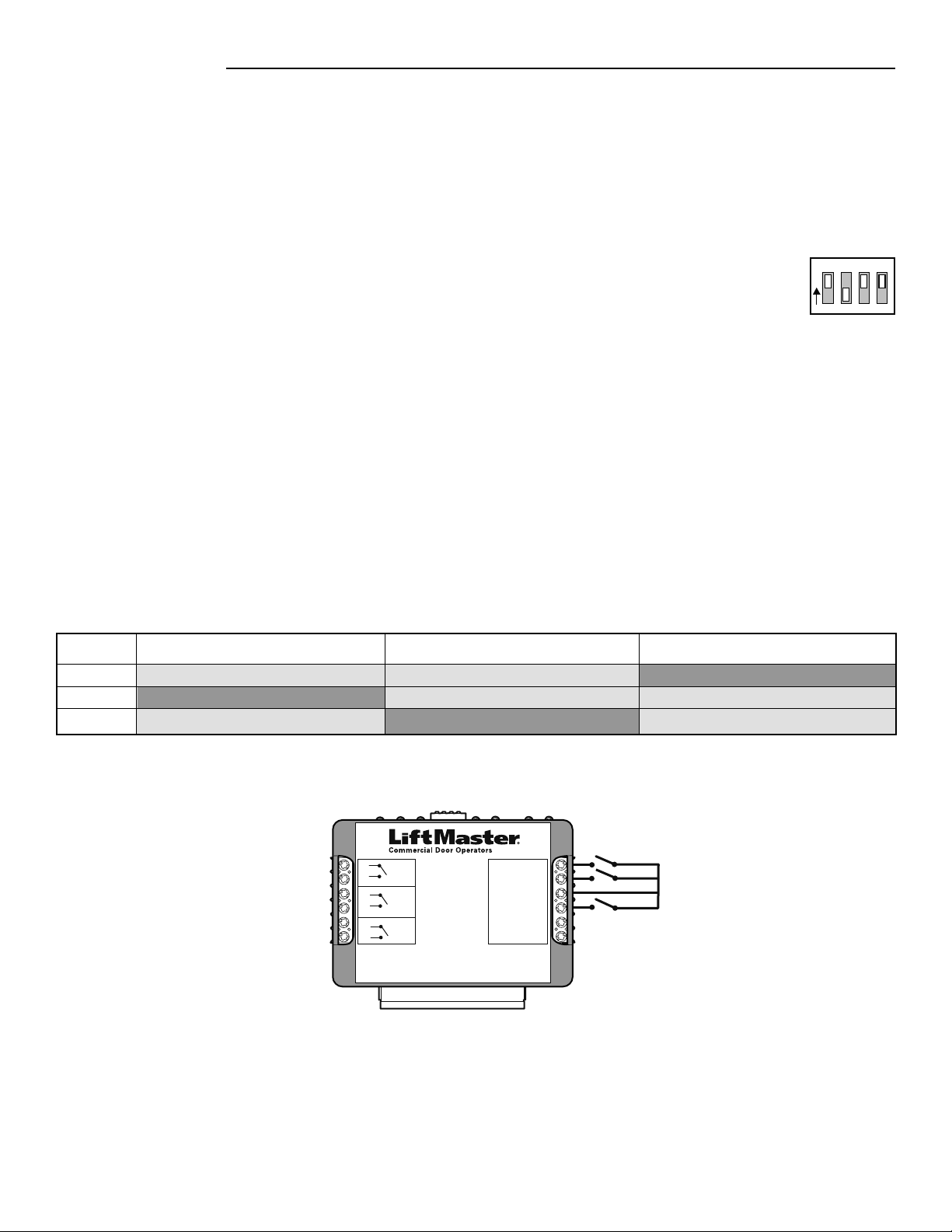
TC Mode 1 90-L3FLASH • 3 relay outputs (R1, R2, and R3) with optional flashing for R1
• R1 output on while in motion
• R2 output on at fully open and at open mid-stop
• R3 output on at fully open, open mid-stop, and at an undefined
stopped position
SP Mode 1 90-42104 This mode allows a second set of external, track mounted limits to act
as primary or backup for the operator’s open, close, and safety limits.
NOTE: It is not required that all three inputs have a switch connected to
the TLS1CARD. Either the external close, external safety, external open,
or all three may be used.
2
TIMER FUNCTIONS
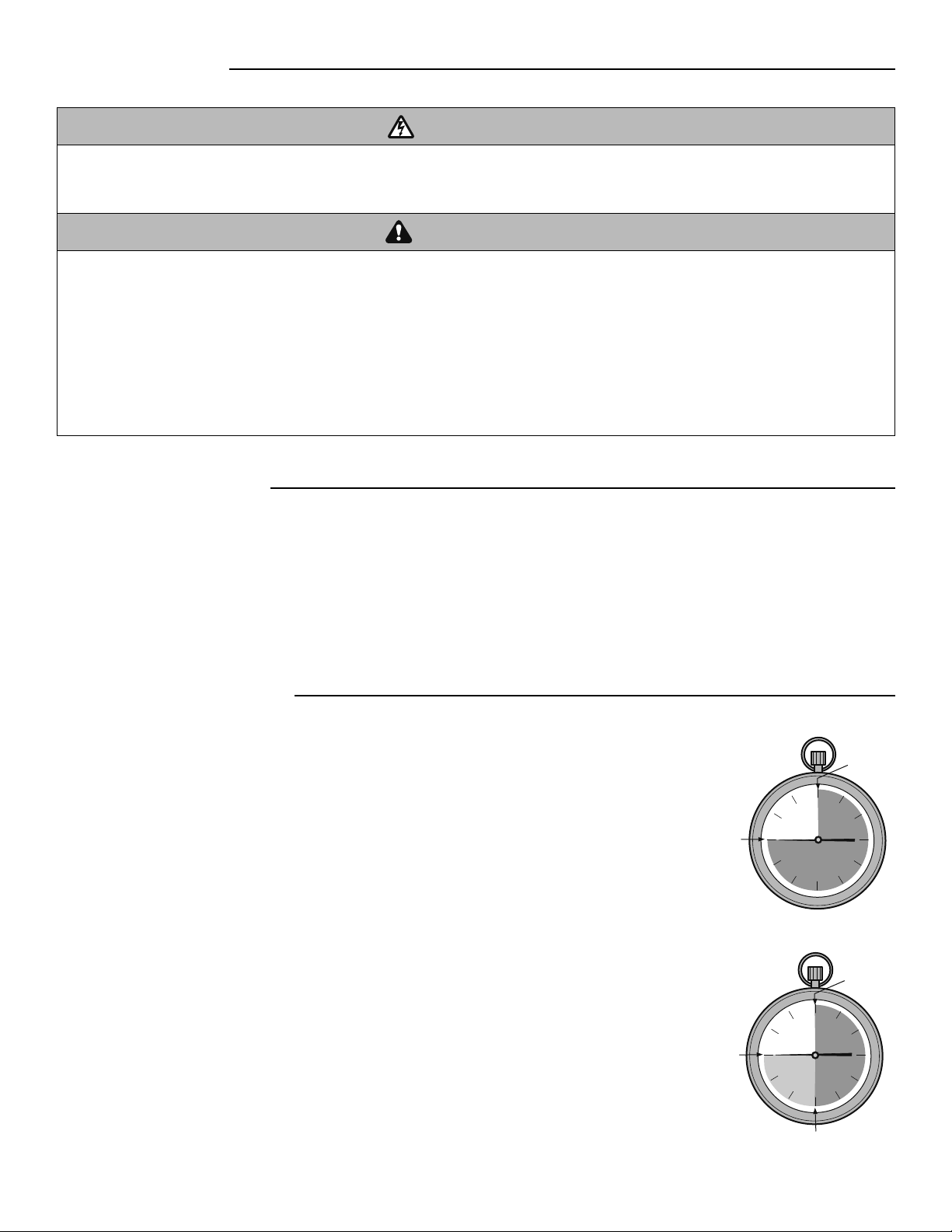
Timer-to-Close (TTC): The TTC is an adjustable setting that can be set to automatically close the
door after a specified period of time (Figure 1).
Timer-to-Close (TTC) with Pre-Warning: The TTC is an adjustable setting that can be set to
automatically close the door after a specified period of time. Pre-Warning is a separate adjustable
setting that will activate an auxiliary device for a specified period of time before the door starts to
close (Figure 2).
INTRODUCTION
TTC
starts
FIGURE 1: TIMER-TO-CLOSE (TTC)
Door starts
to close
EXAMPLE: TTC set
to 45 seconds.
FIGURE 2: TIMER-TO-CLOSE (TTC)
WITH PRE-WARNING
EXAMPLE: TTC set
to 45 seconds and
Pre-Warning set
to 15 seconds.
TTC
starts
Pre-Warning starts
Stage 1
Stage 2
Door starts
to close
WARNINGS
To prevent possible SERIOUS INJURY or DEATH from
electrocution, disconnect electric power to operator BEFORE
installing.
ALL electrical connections MUST be made by a qualified
individual.
ATTENTION
AVERTISSEMENT AVERTISSEMENT
AVERTISSEMENT
WARNING
CAUTION
WARNING WARNING
WARNING
PRECAUCIÓN
ADVERTENCIA
ADVERTENCIA ADVERTENCIA
To prevent possible PROPERTY DAMAGE, ACCIDENTAL
ENTRAPMENT, SEVERE INJURY, or DEATH:
• Disconnect power to the operator and fully open or close the
door BEFORE installing ANY entrapment protection devices.
• LiftMaster Monitored Entrapment Protection (LMEP) devices
MUST be installed for all wiring types except constant
pressure to close. However, LiftMaster Monitored Entrapment
Protection (LMEP) devices are recommended for constant
pressure to close.
• LiftMaster Monitored Entrapment Protection (LMEP) devices
MUST be installed when a radio is used.
• LiftMaster Commercial Door Operators require that ONLY
LiftMaster Monitored Entrapment Protection (LMEP) devices
be installed. Installing devices other than LiftMaster Monitored
Entrapment Protection (LMEP) devices will void the warranty.
ATTENTION
AVERTISSEMENT AVERTISSEMENT
AVERTISSEMENT
WARNING WARNING
CAUTION
WARNING
WARNING
PRECAUCIÓN
ADVERTENCIA
ADVERTENCIA ADVERTENCIA
APPLICATION
For use with Logic 4 Industrial Duty and Heavy Industrial Duty Operators.
When installed in a Logic 4 (L4) operator, the Timer Light Status Option Card (TLS1CARD) provides special functionality to control
auxiliary devices such as lights, bells, horns, horn/strobes, etc. at various door positions. The TLS1CARD also provides special timer
functions that are described in more detail on the following pages.
NOTE: Only one TLS1CARD can be used within the Logic 4 operator however it can be used in conjunction with other option cards such
as the AUXCARD, FDRCARD, or CPS3.
3
Disconnect power to the operator.
Turn all the DIP switches on the TLS1CARD to the OFF position.
Connect the auxiliary device(s) to the input and output terminals on the TLS1CARD as described below.
After configurations and connections have been made for your card mode proceed to Installation page 10.
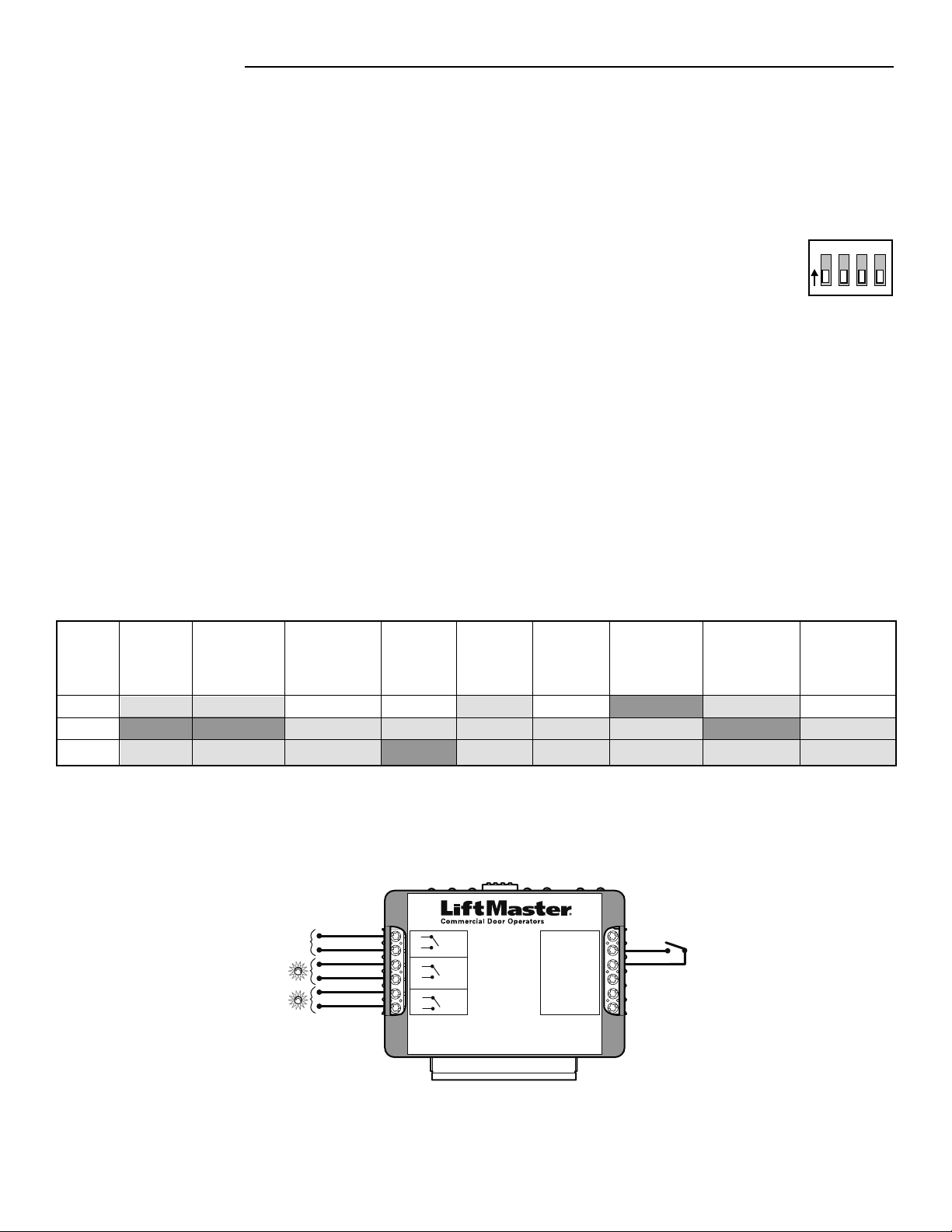
TCP MODE 1
TCP (TRAFFIC CONTROL MODE WITH PRE-WARNING) MODE 1
This mode is intended to control auxiliary devices connected to relays R1, R2, and R3 with optional flashing for relay R1. It also
incorporates an adjustable Timer-to-Close (TTC) plus a separately adjustable Pre-Warning. The relays can be used with or without the
timers programmed. This mode has similar functionality to the RDGRNCARD used with Logic 3 operators. This mode would be used in
lieu of previous modification 90-T1, 90-515774, or RDGRNCARD functionality (light box not included).
Fully Open
(OLS)
Timer Stage 1
(OLS & OMS
Only)
Timer Stage 2
(Pre-Warning)
(OLS & OMS
Only)
Closing
Fully Closed
(CLS)
Opening Undefined
Stopped
Position (USP)
Open Mid-Stop
(OMS)
Reversing from
Obstruction
R1 LED
R2 LED
R3 LED
OFF
ON
OFF
OFF
ON
OFF
ON or Flash
OFF
OFF
ON or Flash
OFF
ON
OFF
OFF
OFF
ON or Flash
OFF
OFF
ON
OFF
OFF
OFF
ON
OFF
ON or Flash
OFF
OFF
NOTES:
• Relay LEDs R1, R2, and R3 on the TLS1CARD will turn ON at the same time as relays R1, R2, and R3.
• During timer stages 1 and 2 the relays shown are only ON/OFF when the door is positioned as shown in parenthesis. The selector
dial on the operator would be set to T, TS, or FSTS.
1
234
O
N
TCP MODE 1 DIP SWITCH SETTINGS
TLS1CARD
40-35757-1
Timer Light Status Option Card
R3
R2
R1
6
5
4
3
2
1
T/TS 12
FD/SIS 11
COMMON 10
SIC 9
SIO 8
COMMON 7
(RELAYS)
OUTPUTS
INPUTS
5 A, 230 Vac, 30 Vdc Dry Contact Only
N.O.
Comm
N.O.
Comm
N.O.
Comm
Horn/Strobe
Green
Red
2-Position
Maintained Switch
TCP MODE 1 (TYPICAL CONNECTION)
1
2
3
Outputs:
• Connect a red light to the R1 terminals on the TLS1CARD. This will signal when the door is at any position other than the fully
open, fully closed or at a programmed mid-stop. With a timer enabled, this relay is also the Pre-Warning signal when at fully open
or at open mid-stop.
• Connect a green light to the R2 terminals on the TLS1CARD. This will signal that the door is fully open or at the open mid-stop
position.
• Connect an audio/visual signalling device to the R3 terminals on the TLS1CARD. This will signal that the door is closing.
Inputs:
• If the application warrants the use of Timer Secure mode at some times and Timer modes at other times, set the operator selector
dial to TS and make a connection to the T/TS input. The input should have a latched contact, such as a 2-position maintained
keyswitch to switch between TS and T.
• If the application requires the ability to turn off the flash feature, connect a selector switch to the FD/SIS input terminals for a
flasher defeat. The input device should have a latched contact, such as a 2-position maintained keyswitch. A jumper wire can also
be used to disable the flash function.
4
Disconnect power to the operator.
Turn DIP switch 4 on the TLS1CARD to the ON position. All other DIP switches should remain OFF.
Connect the auxiliary device(s) to the input and output terminals on the TLS1CARD as described below.
Fully Open
(OLS)
Timer Stage 1
(OLS Only)
Timer Stage 2
(Pre-Warning)
(OLS, OMS, &
USP Only)
Closing
Fully Closed
(CLS)
Opening Undefined
Stopped
Position (USP)
Open Mid-Stop
(OMS)
Reversing from
Obstruction
OFF
ON
ON*
OFF
ON
OFF
ON
OFF
OFF
OFF
OFF
OFF
OFF
OFF
OFF
OFF
OFF
ON*
OFF
OFF
ON*
OFF
OFF
ON*
OFF
OFF
OFF
NOTES:
• Relay LEDs R1, R2, and R3 on the TLS1CARD will turn ON at the same time as relays R1, R2, and R3.
• * R3 turns ON as soon as SIO is enabled and remains ON until closing begins.
R1 LED
R2 LED
R3 LED
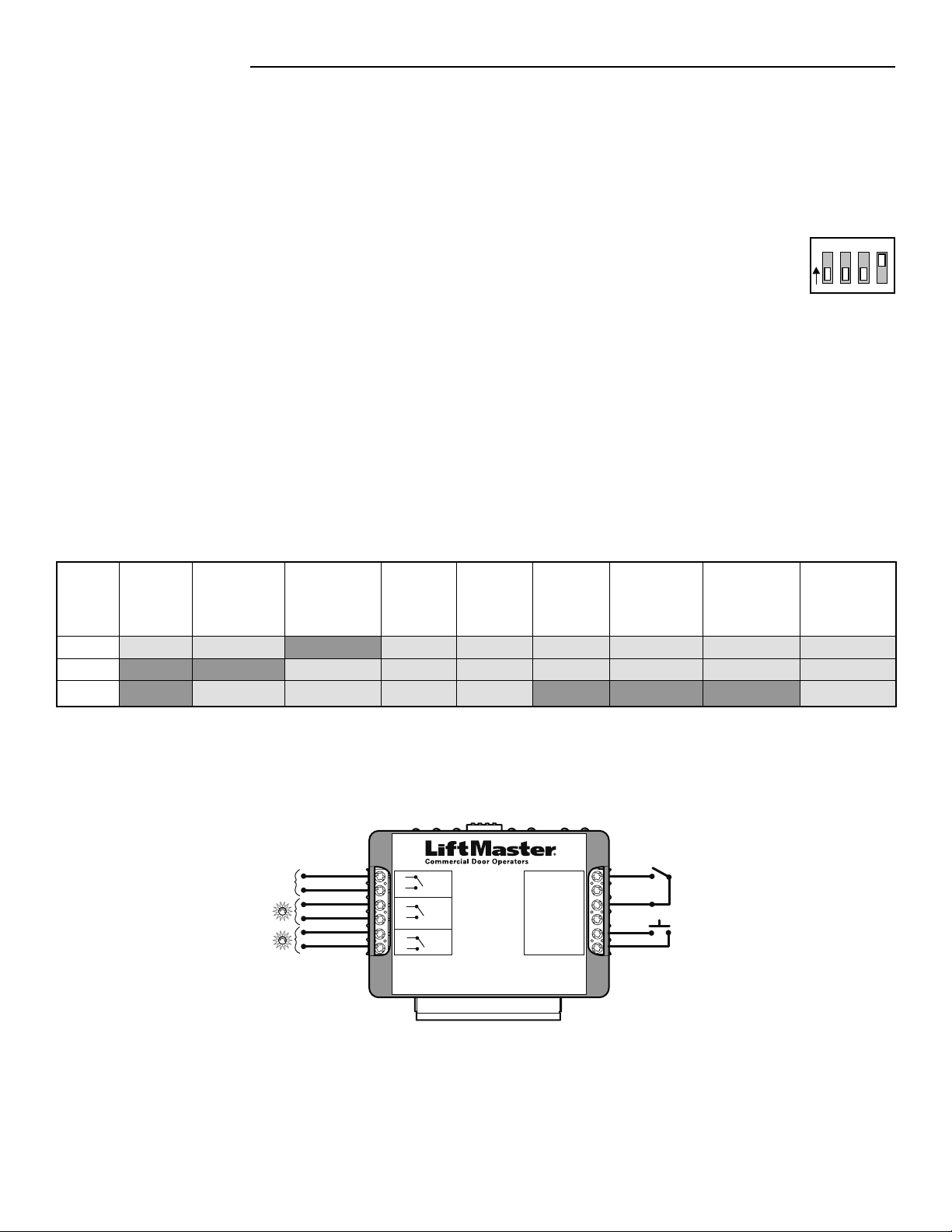
Outputs:
• Connect a red light to the R1 terminals on the TLS1CARD. This will signal the door is about to close.
• Connect a green light to the R2 terminals on the TLS1CARD. This will signal that the door is fully open.
• Connect an audio/visual signalling device to the R3 terminals on the TLS1CARD. This will signal that the door has been opened by
the special input to open (SIO) and the timer is not enabled.
Inputs:
• Connect a push button, keyswitch, etc. to the SIO input terminals. This will open the door without enabling the TTC.
• If the application warrants the use of Timer Secure mode at some times and Timer modes at other times, set the operator selector
dial to TS and make a connection to the T/TS input. The input should have a latched contact, such as a 2-position maintained
keyswitch to switch between TS and T.
TCP MODE 2
TCP (TRAFFIC CONTROL MODE WITH PRE-WARNING) MODE 2
This mode is intended as a special input to open the door without activating the TImer-to-Close (TTC) while any other open signal will
activate the TTC with Pre-Warning. It provides dry contact control based on the position/movement of the door and the TTC status. The
relays can be used with or without the timers programmed. An open signal from the standard push button or radio input would not
re-enable the timer if the special input to open has been enabled. This mode would be used in lieu of previous modification 90-T2.
1
234
O
N
TCP MODE 2 DIP SWITCH SETTINGS
1
2
3
After configurations and connections have been made for your card mode proceed to Installation page 10.
TLS1CARD
40-35757-1
Timer Light Status Option Card
R3
R2
R1
6
5
4
3
2
1
T/TS 12
FD/SIS 11
COMMON 10
SIC 9
SIO 8
COMMON 7
(RELAYS)
OUTPUTS
INPUTS
5 A, 230 Vac, 30 Vdc Dry Contact Only
N.O.
Comm
N.O.
Comm
N.O.
Comm
Horn/Strobe
Green
Red
TCP MODE 2 (TYPICAL CONNECTION)
2-Position
Maintained Switch
Momentary
Push Button
5
TCP MODE 3
TCP (TRAFFIC CONTROL MODE WITH PRE-WARNING) MODE 3
This mode is intended to control auxiliary devices connected to relays R1, R2, and R3. It provides dry contact control based on the
position/movement of the door and the Timer-to-Close (TTC) status. It also incorporates an adjustable TTC plus a separately adjustable
Pre-Warning. The relays can be used with or without the timers programmed. This mode would be used in lieu of previous
modification 90-T4.
Fully Open
(OLS)
Timer Stage 1
(OLS & OMS
Only)
Timer Stage 2
(Pre-Warning)
(OLS, OMS, &
USP Only)
Closing
Fully Closed
(CLS)
Opening Undefined
Stopped
Position (USP)
Open Mid-Stop
(OMS)
Reversing from
Obstruction
R1 LED
R2 LED
R3 LED
OFF
ON
OFF
OFF
ON
OFF
ON
OFF
OFF
OFF
OFF
ON
OFF
OFF
OFF
OFF
OFF
ON
OFF
OFF
OFF
OFF
ON
OFF
OFF
OFF
ON
NOTES:
• Relay LEDs R1, R2, and R3 on the TLS1CARD will turn ON at the same time as relays R1, R2, and R3.
• During timer stages 1 and 2 the relays shown are only ON/OFF when the door is positioned as shown in parenthesis. The selector
dial on the operator would be set to T, TS, or FSTS.
After configurations and connections have been made for your card mode proceed to Installation page 10.
Outputs:
• Connect a red light to the R1 terminals on the TLS1CARD. This will signal the door is about to close.
• Connect a green light to the R2 terminals on the TLS1CARD. This will signal that the door is fully open or at the open mid-stop
position.
• Connect an audio/visual signalling device to the R3 terminals on the TLS1CARD. This will signal that the door is in motion.
Inputs:
• If the application warrants the use of Timer Secure mode at some times and Timer modes at other times, set the operator selector
dial to TS and make a connection to the T/TS input. The input should have a latched contact, such as a 2-position maintained
keyswitch to switch between TS and T.
Disconnect power to the operator.
Turn DIP switch 3 on the TLS1CARD to the ON position. All other DIP switches should remain OFF.
Connect the auxiliary device(s) to the input and output terminals on the TLS1CARD as described below.
1
2
3
1
234
O
N
TCP MODE 3 DIP SWITCH SETTINGS
TLS1CARD
40-35757-1
Timer Light Status Option Card
R3
R2
R1
6
5
4
3
2
1
T/TS 12
FD/SIS 11
COMMON 10
SIC 9
SIO 8
COMMON 7
(RELAYS)
OUTPUTS
INPUTS
5 A, 230 Vac, 30 Vdc Dry Contact Only
N.O.
Comm
N.O.
Comm
N.O.
Comm
Horn/Strobe
Green
Red
TCP MODE 3 (TYPICAL CONNECTION)
2-Position
Maintained Switch
6
TCP MODE 4
TCP (TRAFFIC CONTROL MODE WITH PRE-WARNING) MODE 4
This mode is intended to control auxiliary devices connected to relays R1 and R2, with optional flashing for relay R1. It also
incorporates an adjustable Timer-to-Close (TTC) plus a separately adjustable Pre-Warning. The relays can be used with or without the
timers programmed. This mode would be used in lieu of previous modification 90-RGLFCIR or 90-HDFLASH2.
Outputs:
• Connect a red light to the R1 terminals on the TLS1CARD. This will signal the door is about to close or is closing.
• Connect a green light to the R2 terminals on the TLS1CARD. This will signal that the door is fully open.
Inputs:
• If the application warrants the use of Timer Secure mode at some times and Timer modes at other times, set the operator selector
dial to TS and make a connection to the T/TS input. The input should have a latched contact, such as a 2-position maintained
keyswitch to switch between TS and T.
• If the application requires the ability to turn off the flash feature, connect a selector switch to the FD/SIS input terminals for a
flasher defeat. The input device should have a latched contact, such as a 2-position maintained keyswitch. A jumper wire can also
be used to disable the flash function.
Fully Open
(OLS)
Timer Stage 1
(OLS Only)
Timer Stage 2
(Pre-Warning)
(OLS, OMS, &
USP Only)
Closing
Fully Closed
(CLS)
Opening Undefined
Stopped
Position (USP)
Open Mid-Stop
(OMS)
Reversing from
Obstruction
R1 LED
R2 LED
R3 LED
OFF
ON
OFF
OFF
ON
OFF
ON or Flash
OFF
OFF
ON or Flash
OFF
OFF
OFF
OFF
OFF
OFF
OFF
OFF
OFF
OFF
OFF
OFF
OFF
OFF
OFF
OFF
OFF
NOTES:
• Relay LEDs R1, R2, and R3 on the TLS1CARD will turn ON at the same time as relays R1, R2, and R3.
• During timer stages 1 and 2 the relays shown are only ON/OFF when the door is positioned as shown in parenthesis. The selector
dial on the operator would be set to T, TS, or FSTS.
Disconnect power to the operator.
Turn DIP switch 3 and 4 on the TLS1CARD to the ON position. DIP switches 1 and 2 should remain OFF.
Connect the auxiliary device(s) to the input and output terminals on the TLS1CARD as described below.
1
2
3
1
234
O
N
TCP MODE 4 DIP SWITCH SETTINGS
After configurations and connections have been made for your card mode proceed to Installation page 10.
TLS1CARD
40-35757-1
Timer Light Status Option Card
R3
R2
R1
6
5
4
3
2
1
T/TS 12
FD/SIS 11
COMMON 10
SIC 9
SIO 8
COMMON 7
(RELAYS)
OUTPUTS
INPUTS
5 A, 230 Vac, 30 Vdc Dry Contact Only
N.O.
Comm
N.O.
Comm
Green
Red
TCP MODE 4 (TYPICAL CONNECTION)
2-Position
Maintained Switch

7
Fully Open
(OLS)
Timer Stage 1
(OLS Only)
Timer Stage 2
(Pre-Warning)
(OLS Only)
Closing
Fully Closed
(CLS)
Opening Undefined
Stopped
Position (USP)
Open Mid-Stop
(OMS)
Reversing from
Obstruction
R1 LED
R2 LED
R3 LED
OFF
ON
ON*
OFF
ON
OFF
ON
OFF
OFF
ON
OFF
OFF
OFF
OFF
OFF
ON
OFF
ON*
ON
OFF
ON*
ON
OFF
ON*
ON
OFF
OFF
NOTES:
• Relay LEDs R1, R2, and R3 on the TLS1CARD will turn ON at the same time as relays R1, R2, and R3.
• * R3 turns ON as soon as SIO is enabled and remains ON until closing begins.
TCP MODE 5
TCP (TRAFFIC CONTROL MODE WITH PRE-WARNING) MODE 5
Similar to Mode 2, this mode is intended as a special input to open the door without activating the Timer-to-Close (TTC) while any other
open signal will activate the TTC with Pre-Warning. It provides dry contact control based on the position/movement of the door and the
TTC status. The relays can be used with or without the timers programmed. An open signal from the standard push button or a radio
input would not re-enable the timer if the special input to open has been enabled. This mode would be used in lieu of previous
modification 90-T3.
Outputs:
• Connect a red light to the R1 terminals on the TLS1CARD. This will signal the door is not fully open or not fully closed.
• Connect a green light to the R2 terminals on the TLS1CARD. This will signal that the door is fully open.
• Connect an audio/signalling device to the R3 terminals on the TLS1CARD. This will signal that the door has been opened by the
special input to open (SIO) and the timer is not enabled.
Inputs:
• Connect a push button, selector switch, loop detector, etc. to the SIO input terminals. This will open the door without enabling
the TTC.
• If the application warrants the use of Timer Secure mode at some times and Timer modes at other times, set the operator selector
dial to TS and make a connection to the T/TS input. The input should have a latched contact, such as a 2-position maintained
keyswitch to switch between TS and T.
Disconnect power to the operator.
Turn DIP switch 2 on the TLS1CARD to the ON position. All other DIP switches should remain OFF.
Connect the auxiliary device(s) to the input and output terminals on the TLS1CARD as described below.
1
2
3
1
234
O
N
TCP MODE 5 DIP SWITCH SETTINGS
After configurations and connections have been made for your card mode proceed to Installation page 10.
TLS1CARD
40-35757-1
Timer Light Status Option Card
R3
R2
R1
6
5
4
3
2
1
T/TS 12
FD/SIS 11
COMMON 10
SIC 9
SIO 8
COMMON 7
(RELAYS)
OUTPUTS
INPUTS
5 A, 230 Vac, 30 Vdc Dry Contact Only
N.O.
Comm
N.O.
Comm
N.O.
Comm
Horn/Strobe
Green
Red
TCP MODE 5 (TYPICAL CONNECTION)
2-Position
Maintained Switch
Momentary
Push Button
8
Fully Open
(OLS)
Timer Stage 1
(OLS & OMS
Only)
Timer Stage 2
(Pre-Warning)
Closing
Fully Closed
(CLS)
Opening Undefined
Stopped
Position (USP)
Open Mid-Stop
(OMS)
Reversing from
Obstruction
R1 LED
R2 LED
R3 LED
OFF
ON
ON
OFF
ON
ON
NA
NA
NA
ON or Flash
OFF
OFF
OFF
OFF
OFF
ON or Flash
OFF
OFF
OFF
OFF
ON
OFF
ON
ON
ON or Flash
OFF
OFF
NOTE: Relay LEDs R1, R2, and R3 on the TLS1CARD will turn ON at the same time as relays R1, R2, and R3.
Outputs:
• Connect a red light to the R1 terminals on the TLS1CARD. This will signal the door is in motion.
• Connect a green light to the R2 terminals on the TLS1CARD. This will signal that the door is at fully open or at the open mid-stop.
• Connect a yellow light to the R3 terminals on the TLS1CARD. This will signal that the door is not in motion or not fully closed.
Inputs:
• If the application requires the ability to turn off the flash feature, connect a selector switch to the FD/SIS input terminals for a
flasher defeat. The input device should have a latched contact, such as a 2-position maintained keyswitch. A jumper wire can also
be used to disable the flash function.
TC MODE 1
TC (TRAFFIC CONTROL MODE WITHOUT PRE-WARNING) MODE 1
This mode is intended to control devices connected to relays R1, R2, and R3 with optional flashing for relay R1. Relays R1, R2, and R3
can be used with or without the Timer-to-Close (TTC) programmed. This mode would be used in lieu of previous modification
90-L3FLASH.
Disconnect power to the operator.
Turn DIP switch 1 on the TLS1CARD to the ON position. All other DIP switches should remain OFF.
Connect the auxiliary device(s) to the input and output terminals on the TLS1CARD as described below.
1
2
3
1
234
O
N
TC MODE 1 DIP SWITCH SETTINGS
After configurations and connections have been made for your card mode proceed to Installation page 10.
TLS1CARD
40-35757-1
Timer Light Status Option Card
R3
R2
R1
6
5
4
3
2
1
T/TS 12
FD/SIS 11
COMMON 10
SIC 9
SIO 8
COMMON 7
(RELAYS)
OUTPUTS
INPUTS
5 A, 230 Vac, 30 Vdc Dry Contact Only
N.O.
Comm
N.O.
Comm
N.O.
Comm
Yellow
Green
Red
TC MODE 1 (TYPICAL CONNECTION)
2-Position
Maintained Switch
9
External Open Limit External Safety Limit External Close Limit
R1 LED
R2 LED
R3 LED
OFF
ON
OFF
OFF
OFF
ON
ON
OFF
OFF
NOTE: Relay LEDs R1, R2, and R3 on the TLS1CARD will turn ON at the same time as relays R1, R2, and R3.
SP MODE 1
SP (SPECIAL MODES) MODE 1
This mode allows a second set of external, track mounted limits to act as primary or backup for the operator’s open, close, and safety
limits. The position of these limits can be set either before or after the operator’s limits. This mode would be used in lieu of previous
modification 90-42104.
NOTE: It is not required that all three inputs have a switch connected to the TLS1CARD. Either the external close, external safety,
external open, or all three may be used.
Outputs:
• Connect a red light to the R1 terminals on the TLS1CARD. This will signal that the external close limit switch has been activated.
• Connect a green light to the R2 terminals on the TLS1CARD. This will signal that the external open limit switch has been activated.
• Connect a yellow light to the R3 terminals on the TLS1CARD. This will signal that the external safety limit switch has been
activated.
Required Inputs:
• Connect external CLOSE limit switch common and normally open contacts to the COMMON (#10) and FD/SIS (#11) terminals on
the TLS1CARD respectively.
• Connect external OPEN limit switch common and normally open contacts to the COMMON (#10) and T/TS (#12) terminals on the
TLS1CARD respectively.
• Connect external SAFETY limit switch common and normally open contacts to the COMMON (#10) and SIC (#9) terminals on the
TLS1CARD respectively.
Disconnect power to the operator.
Turn DIP switches 1, 3, and 4 on the TLS1CARD to the ON position. DIP switch 2 should remain OFF.
Connect the auxiliary device(s) to the input and output terminals on the TLS1CARD as described below.
1
2
3
1
234
O
N
SP MODE 1 DIP SWITCH SETTINGS
TLS1CARD
40-35757-1
Timer Light Status Option Card
R3
R2
R1
6
5
4
3
2
1
T/TS 12
FD/SIS 11
COMMON 10
SIC 9
SIO 8
COMMON 7
INPUTS
5 A, 230 Vac, 30 Vdc Dry Contact Only
(RELAYS)
OUTPUTS
* External Track Mount
Limit Switch
*OLS
*CLS
*SLS
SP MODE 1 (TYPICAL CONNECTION)
After configurations and connections have been made for your card mode proceed to Installation page 10.
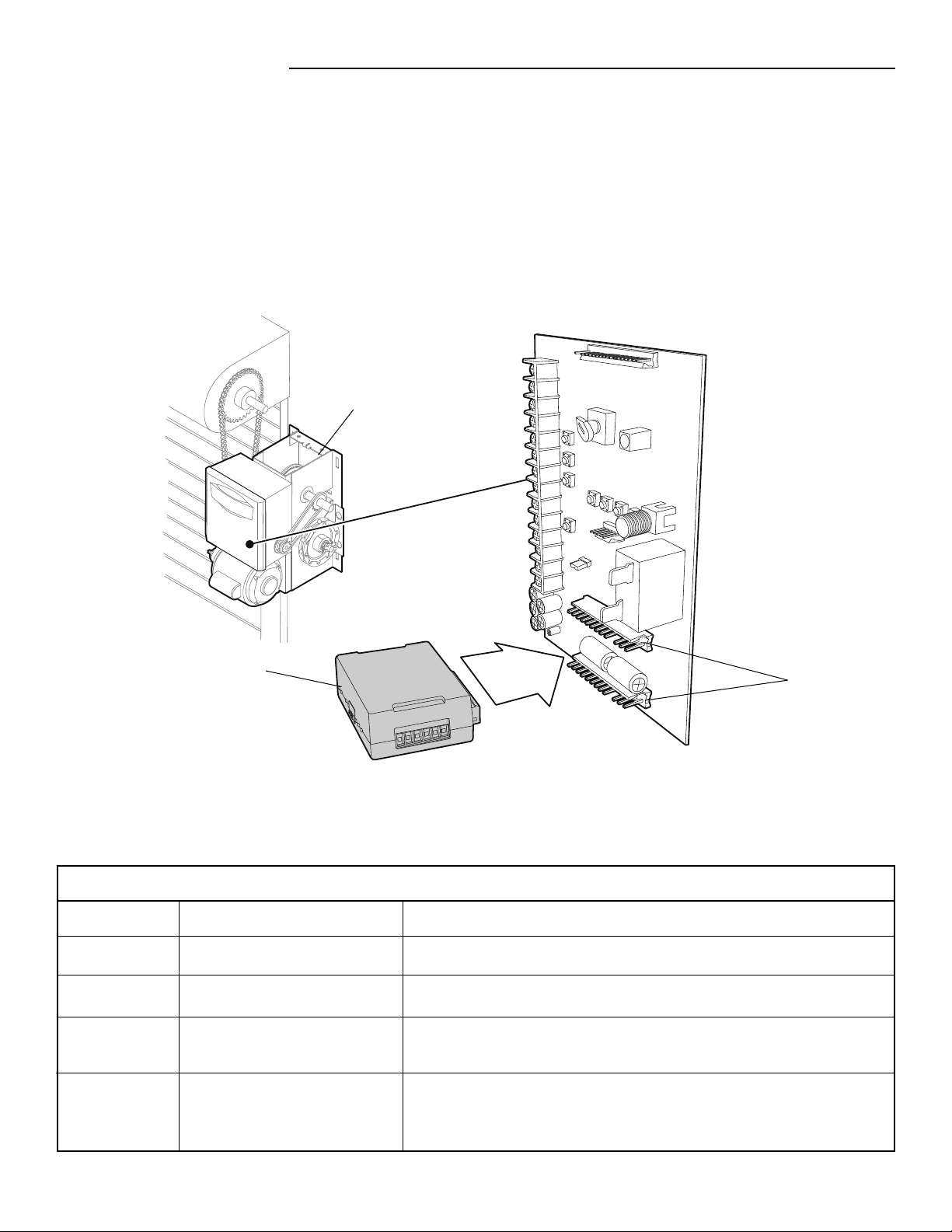
10
Remove the electrical box cover of the operator. NOTE: Your operator may look different than the operator shown.
Insert the TLS1CARD onto either option card receptacle on the logic board.
See the following page if a Timer-to-Close (TTC) is required.
Reconnect power to the operator.
1
2
3
4
Option Card
Receptacles
TLS1CARD
Operator
INSTALLATION
INSTALL THE TLS1CARD
Error Description
Solution
Board Communication Error
Improper Mode Setting
DIP Switch Changed During
Operation
Operator Mode Not Compatible
with the TLS1CARD Mode
Ensure TLS1CARD is seated properly and power cycle the operator.
Refer to manual for proper selection.
Check mode and reset the operator board by moving the selector dial to PROG
and back to desired mode.
Refer to manual for proper mode selection for both the operator board and the
TLS1CARD.
Number of Blinks
1
2
3
4
TLS1CARD ERROR CODES
11
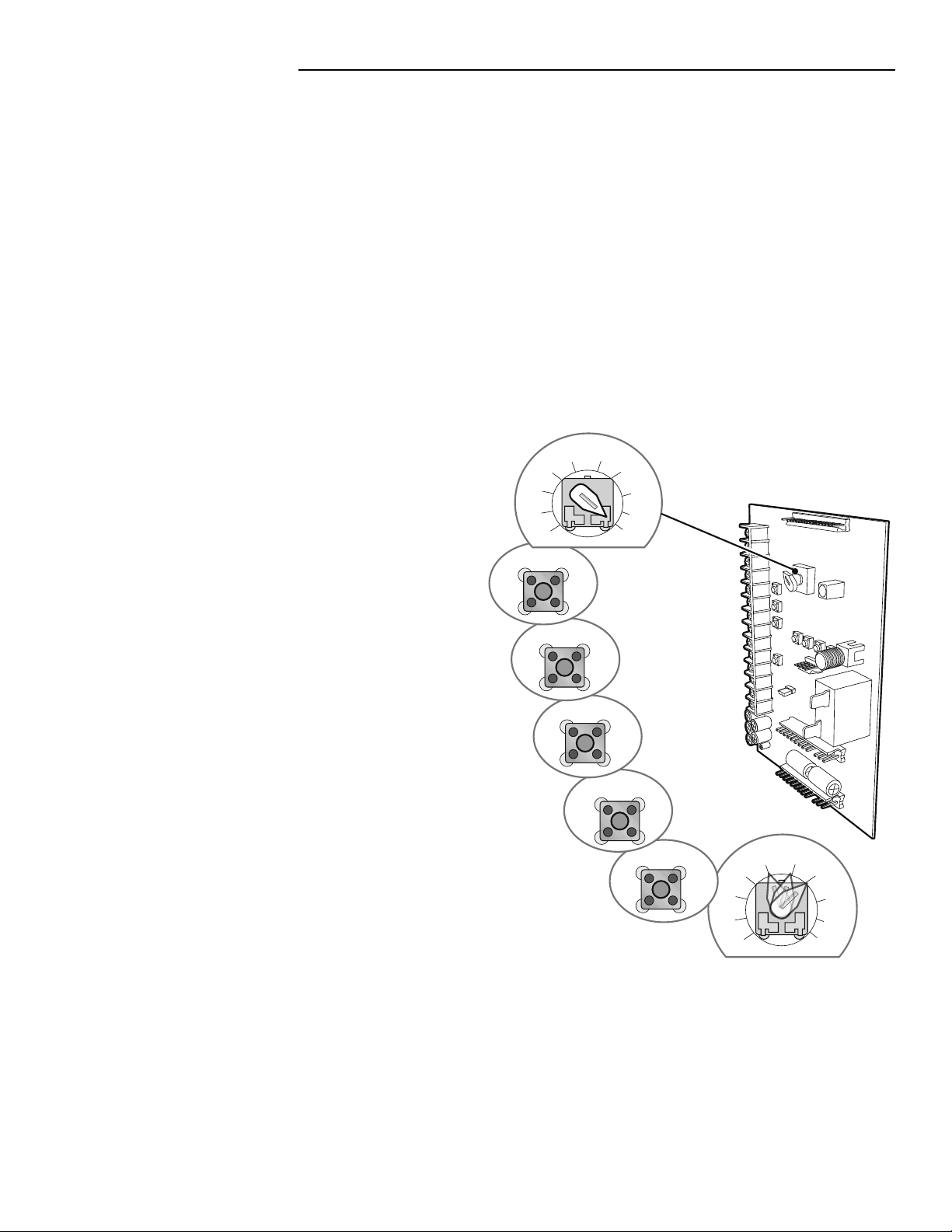
TO PROGRAM
Close the door.
Turn the selector dial to PROG.
Press and release the TTC button on the logic board.
Press and release the STOP button to clear the timer.
Press and release the OPEN button for every second the
operator should wait before attempting to close the door.
Press and release the CLOSE button for every 15 seconds the
operator should wait before closing the door.
Press and release the TTC button to complete programming.
The OPEN/CLOSE Button LEDs will flash to confirm the timer
setting. The OPEN LED will flash once for every second
programmed and the CLOSE LED will flash once for every
15 seconds programmed.
Turn the selector dial to desired timer wiring (TS, T, or FSTS).
EXAMPLE: To close the door after 70 seconds, turn the
selector dial to PROG. Press and release the TTC button.
Press and release the STOP button. Press and release the
CLOSE button 4 times for 60 seconds and press and release
the OPEN button 10 times for 10 seconds. Press the TTC
button to finish programming the Timer-to-Close. Turn the
selector dial to desired timer wiring type (TS, T, or FSTS), or
follow the steps to program the Pre-Warning (following page).
PROGRAMMING
TIMER-TO-CLOSE (TTC)
FUNCTION
The TTC automatically closes the door after a preset time. All entrapment protection devices must be unobstructed.
BENEFIT
The TTC is recommended for applications where the door should close after a specified amount of time, like apartment buildings or fire
stations.
REQUIREMENTS
The application MUST have at least one of the following LiftMaster Monitored Entrapment Protection (LMEP) devices installed: CPS-U,
CPS-UN4, or a CPS-EI with a valid door sensing edge. Wiring type must be set to T, TS, or FSTS.
1
2
3
4
5
6
7
C54
T
T
TS
TS
FSTS
FSTS
E2
D1
DIAG
OPTN
C2
B2
PROG
C54
T
TS
FSTS
E2
D1
DIAG
OPTN
C2
B2
PROG
PROG
TTC
STOP
OPEN
CLOSE
TTC
PROG
T
TS
FSTS
T
TS
FSTS
OPTN
8
2
3
4
5
6
7
8
Selector Dial
PROGRAMMING
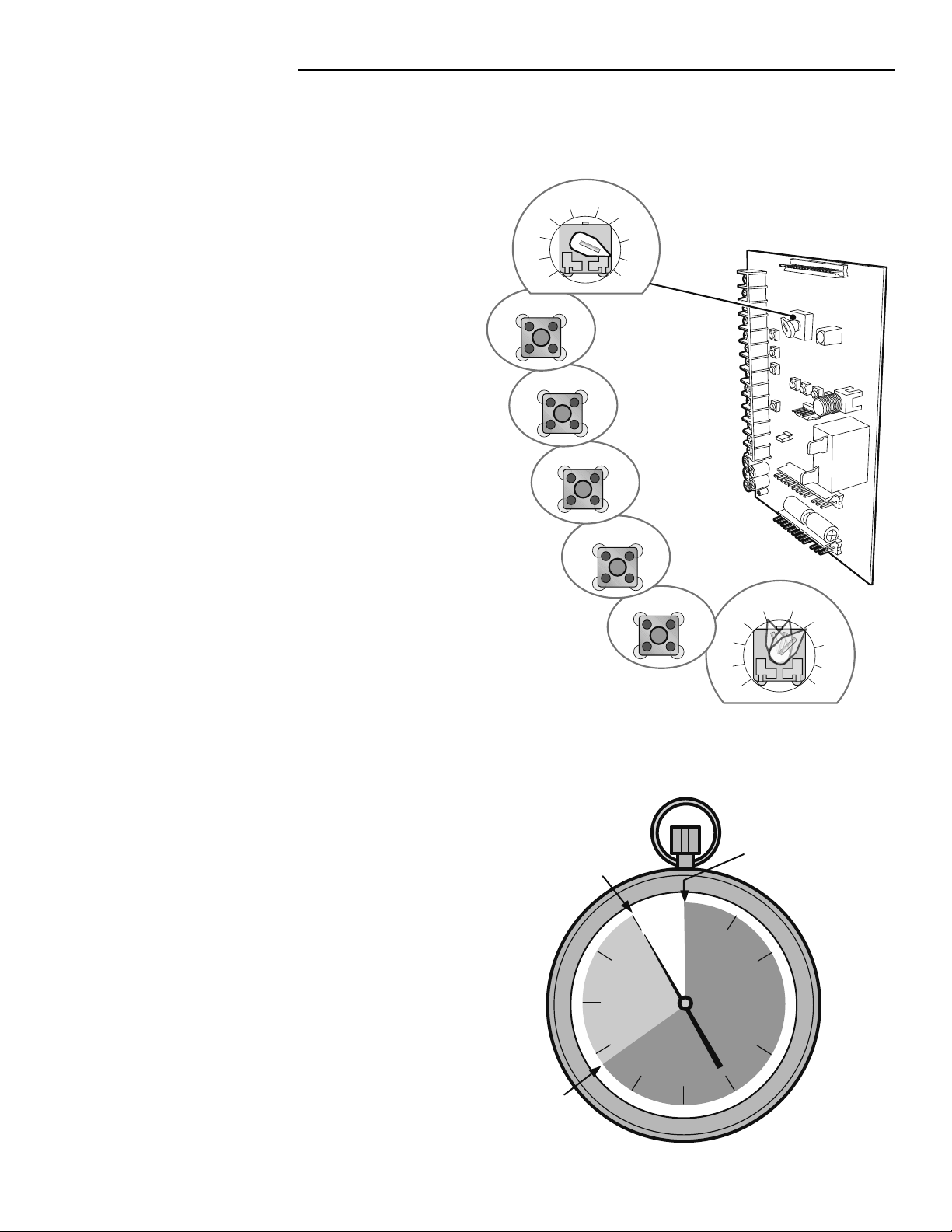
PRE-WARNING
NOTE: The TTC must be programmed prior to this step.
Turn the selector dial to OPTN.
Press and release the TTC button on the logic board.
Press and release the STOP button to clear the Pre-Warning
setting.
Press and release the OPEN button for every second of
Pre-Warning.
Press and release the CLOSE button for every 15 seconds of
Pre-Warning.
Press and release the TTC button to complete programming.
The OPEN/CLOSE button LEDs will flash to confirm the timer
setting. The OPEN LED will flash once for every second
programmed and the CLOSE LED will flash once for every
15 seconds programmed.
Turn the selector dial to desired timer wiring (TS, T, or FSTS).
EXAMPLE: To close the door in 55 seconds and have 17
seconds of Pre-Warning:
Turn the selector dial to PROG. Press and release the TTC
button. Press and release the STOP button. Press and release
the CLOSE button 3 times for 45 seconds then press and
release the OPEN button 10 times for 10 additional seconds.
Press and release TTC button to finish programming the TTC.
Turn the selector dial to OPTN. Press and release the TTC
button. Press and release the STOP button. Press and release
the CLOSE button once for 15 seconds then press and release
the OPEN button twice for 2 additional seconds (total
Pre-Warning equals 17 seconds). Press and release the TTC
button to finish programming the Pre-Warning. Turn the
selector dial to desired timer wiring type (TS, T or FSTS).
NOTE: It is not recommended to set the Pre-Warning to more
than 30 seconds.
© 2010, The Chamberlain Group, Inc.
01-35668C All Rights Reserved
1
2
3
4
5
6
7
T
TS
FSTS
PROG
C54
T
TS
TS
FSTS
FSTS
E2
D1
DIAG
OPTN
C2
B2
PROG
C54
T
TS
FSTS
E2
D1
DIAG
C2
B2
OPTN
OPTN
TTC
STOP
OPEN
CLOSE
TTC
OPTN
T
TS
FSTS
PROG
1
2
3
4
5
6
7
Selector Dial
TTC Starts
Timer Stage 1
Pre-Warning Start
Timer Stage 2
(Programmable,
Example: 17
seconds)
Door starts to close
according to TTC
setting
(Example: 55 seconds)
TIMER-TO-CLOSE (TTC) WITH PRE-WARNING