1 2
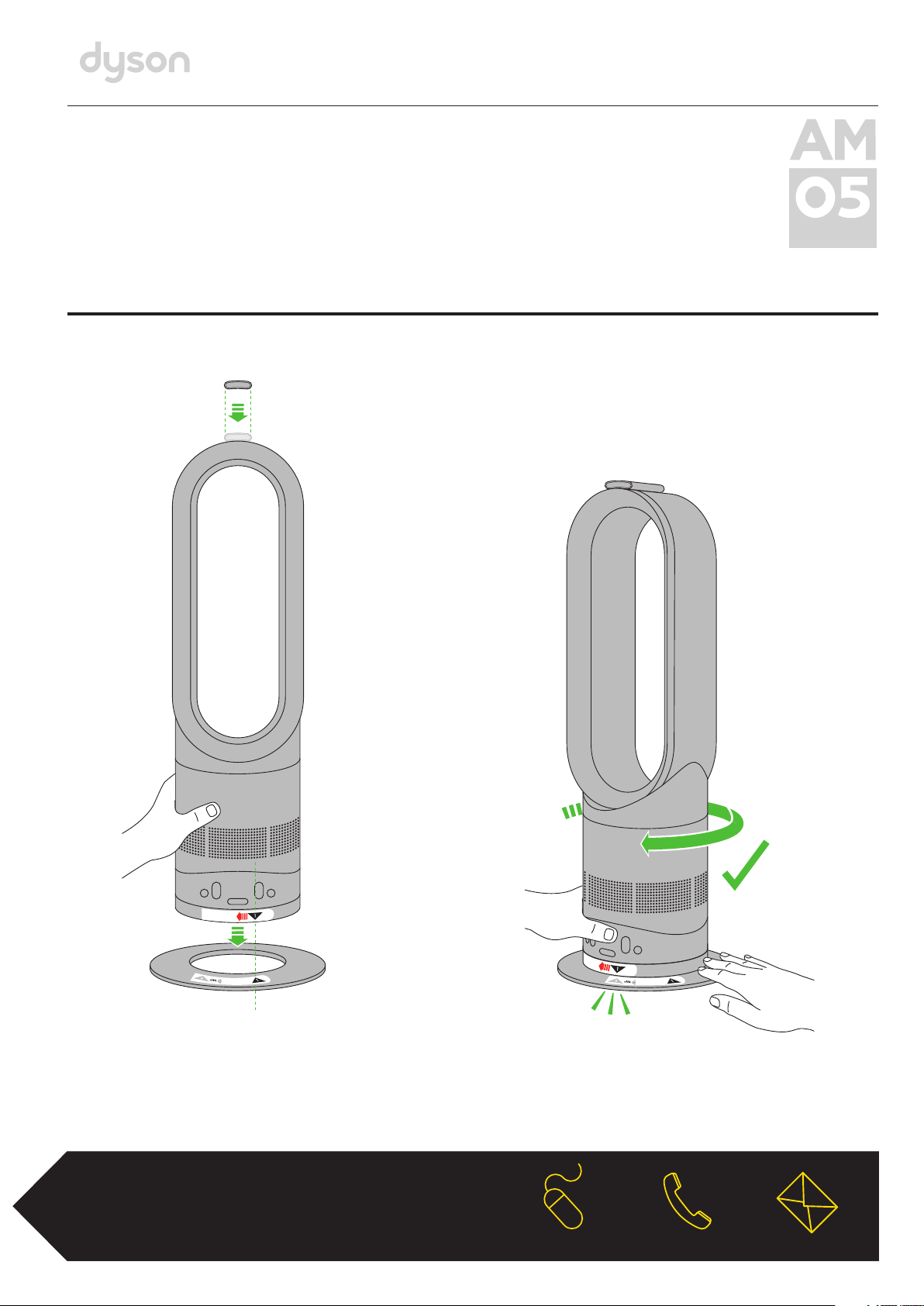
Align the black arrows.
Alinee las flechas negras.
Then twist clockwise
until it clicks and locks.
Haga ahora un giro en el sentido
de las manecillas del reloj hasta
escuchar un chasquido que indica
que se ha trabado.
clik
OPERATING MANUAL
INSTRUCCIONES DE SEGURIDAD
ASSEMBLY • ARMADO
REGISTER TODAY
3 easy ways to register
your 2 year warranty
REGISTRE HOY
3 maneras fáciles de registrar
sus 2 años de garantía.
Remote control docks magnetically.
El control remoto se acopla
magnéticamente.

IMPORTANT SAFETY INSTRUCTIONS
BEFORE USING THIS APPLIANCE READ ALL INSTRUCTIONS AND CAUTIONARY MARKINGS IN THIS MANUAL
AND ON THE APPLIANCE
When using an electrical appliance, basic precautions should always be followed, including the following:
WARNING
THE HEATER AND THE REMOTE CONTROL BOTH CONTAIN MAGNETS.
1. Pacemakers and defibrillators may be affected by strong magnetic fields. If you or someone in your household has a
pacemaker or defibrillator, avoid placing the remote control in a pocket or near to the device.
2. Credit cards and electronic storage media may also be affected by magnets and should be kept away from the remote
control and the top of the heater.
WARNING
TO REDUCE THE RISK OF FIRE, ELECTRIC SHOCK OR INJURY:
1. This heater is hot when in use and for a short period after use. To avoid burns, do not let bare skin touch hot surfaces.
When moving the heater, hold it by the base, not the air loop amplifier.
2. Keep combustible materials, such as furniture, pillows, bedding, papers, clothes and curtains, at least 3feet (0.9m) from the
front of the heater and keep them away from the sides and rear when the heater is plugged in.
3. Extreme caution is necessary when any heater is used by or near children or infirm persons and whenever the heater is left
operating and unattended.
4. Do not allow to be used as a toy. Close attention is necessary when used by or near young children. Children should be
supervised to ensure that they do not play with the heater or remote control.
5. This heater and remote control are not intended for use by young children or infirm persons with reduced physical, sensory
or reasoning capabilities, or lack of experience and knowledge, unless they have been given supervision or instruction by a
responsible person concerning use of the heater to ensure that they can use it safely.
6. The base must be fitted securely before operating. Do not dismantle or use without the base fitted.
7. Suitable for dry locations ONLY. Do not use outdoors or on wet surfaces. Do not use in bathrooms, laundry areas and similar
indoor locations. Never locate the heater where it may fall into a bath or other water container. Do not use or store where it
may get wet or in the immediate surroundings of a bath, a shower or a swimming pool.
8. A heater has hot parts inside. Do not use it in areas where gasoline, paint, or flammable liquids are used or stored or where
their vapors are present. Do not use in conjunction with or directly next to an air freshener or similar products.
9. Do not locate directly below a mains electricity supply outlet.
10. Always plug directly into a wall outlet. Never use with an extension cord or relocateable power tap (outlet/power strip) as
overloading may result in the cord overheating and catching fire.
11. Do not handle any part of the plug or heater with wet hands.
12. Do not unplug by pulling on the cord. To unplug, grasp the plug, not the cord.
13. Do not stretch the cord or place the cord under strain. Do not run the cord under carpeting. Do not cover the cord with throw
rugs, runners, or similar coverings. Do not route the cord under furniture or appliances. To avoid a tripping hazard arrange
the cord away from traffic area so that it will not be tripped over.
14. Do not use with a damaged cord or plug. If the supply cord is damaged it must be replaced by Dyson or its service agent or
similarly qualified persons in order to avoid a hazard.
15. To disconnect the heater, turn the controls off, then remove the plug from the outlet. Always unplug the heater when not
in use.
16. Do not use if the heater malfunctions or has been dropped or damaged in any manner. Contact the Dyson Helpline or return
to an authorized service facility for examination and/or repair.
17. To prevent a possible fire, do not use with any opening or exhaust blocked, and keep free of dust, lint, hair, and anything that
may reduce airflow. Do not put any object into the inlet grill or the exhaust opening as this may cause an electric shock or
fire, or damage the heater.
18. Do not use on soft surfaces, such as a bed, where openings may become blocked.
19. Use only as described in this Dyson Operating Manual. Any other use not recommended by the manufacturer may cause fire,
electric shock, or injury to persons.
20. In order to avoid overheating and fire hazard, do not cover the heater.
21. Choking hazard: the remote control unit contains a small battery. Keep the remote control away from children and do not
swallow the battery. If the battery is swallowed seek medical advice at once.
22. Check your heater cord and plug connections. A loose fitting outlet can cause the plug to overheat and or cause a fire.
Be sure plug fits tight in the outlet. Check frequently during use to make sure plug and outlet are not hot. If so, discontinue
using heater and have outlet replaced by a qualified electrician. Note: Heaters draw more current than small appliances,
overheating of the outlet may occur even if it has not occurred with the other appliances.
23. The heater should be positioned so the airflow is directed away from any walls or room corners.
24. WARNING: This product contains chemicals known to the State of California to cause cancer, birth defects or other
reproductive harm.
2
IMPORTANT SAFETY FEATURES
For your safety this heater is fitted with automatic cut-out switches that operate if the heater tips over or overheats. If the switches
operate, unplug the heater and allow it to cool. Before restarting the heater check and clear any blockages and ensure the heater
is on a solid level surface.
It is normal for the plug to feel warm to the touch; however, if there is a loose fit between the plug and the outlet or the plug
becomes very hot, the outlet may need to be replaced. Check with a qualified electrician to replace the outlet.
READ AND SAVE THESE INSTRUCTIONS
THIS DYSON APPLIANCE IS INTENDED FOR HOUSEHOLD USE ONLY
POLARIZATION INSTRUCTIONS
This heater has a polarized plug (one blade is wider than the other). To reduce the risk of electric shock, this plug is intended to
fit in a polarized outlet only one way. If the plug does not fit fully in the outlet, reverse the plug. If it still does not fit, contact a
qualified electrician. Do not attempt to defeat this safety feature.
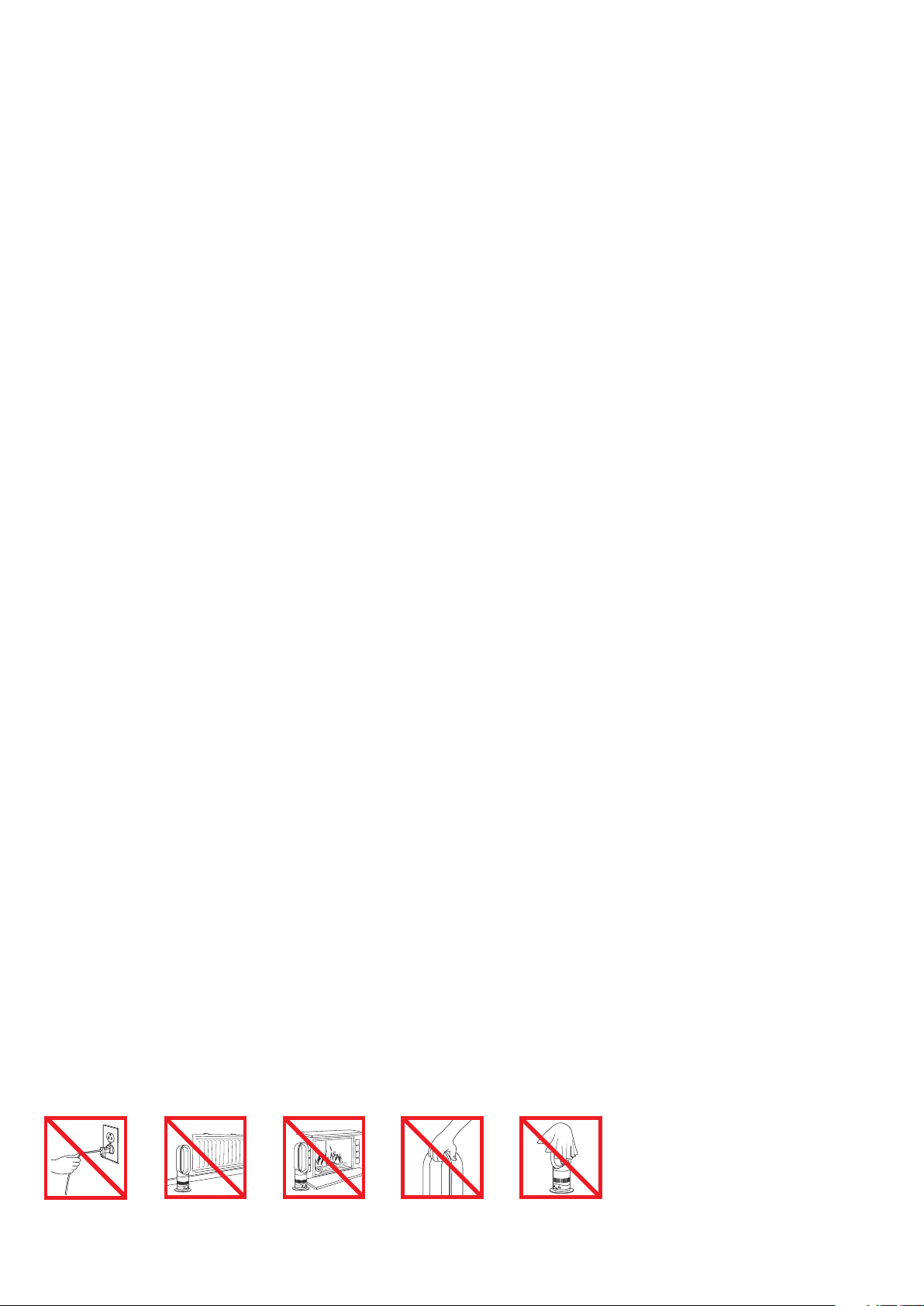
Do not pull on
the cord.
Do not store near
heat sources.
Do not use near
open flames.
Do not carry by the
air loop amplifier.
The air loop amplifier
is not a handle.
In order to avoid
overheating and fire
hazard, do not cover
the heater.
3

INSTRUCCIONES DE SEGURIDAD IMPORTANTES
ANTES DE UTILIZAR ESTE APARATO, LEA TODAS LAS INSTRUCCIONES E INDICACIONES DE PRECAUCIÓN DE
ESTE MANUAL Y DEL APARATO
Cuando se usa un aparato eléctrico, deben seguirse las precauciones básicas:
PELIGRO
EL CALEFACTOR Y EL CONTROL REMOTO CONTIENEN IMANES.
1. Los marcapasos y desfibriladores puedan verse afectados por fuertes campos magnéticos. Si usted o alguien en su casa
tiene un marcapasos o un desfibrilador, evite colocar el control remoto en un bolsillo o cerca del aparato.
2. Las tarjetas de crédito y medios de almacenamiento electrónico también pueden ser afectados por los imanes y debe
mantenerse alejado del control remoto y la parte superior del calefactor.
PELIGRO
PARA DISMINUIR EL RIESGO DE PROVOCAR UN INCENDIO, RECIBIR UNA DESCARGA ELÉCTRICA O
LESIONES:
1. Este calefactor está calienta durante el uso y durante un período breve después de usarlo. Para evitar quemaduras, evite que
la piel toque las superficies calientes. Si mueve el calefactor, sujételo por la base, no por el bucle amplificador.
2. Mantenga materiales combustibles, como muebles, almohadas, ropa blanca, papeles, prendas de vestir y cortinas, a por lo
menos 3pies (0.9 m) de distancia del frente del calefactor, lejos de los costados y la parte trasera cuando el calefactor está
conectado.
3. Tenga extrema precaución si utiliza el calefactor cerca de niños o personas enfermas y siempre que el calefactor esté
funcionando o sin vigilancia.
4. No permita que se utilice como juguete. Es necesario poner mucha atención si se utiliza cerca de niños pequeños.
Debe vigilar a los niños, a fin de garantizar que no jueguen con el calefactor o el control remoto.
5. Este calefactor no fue diseñada para que ser utilizada por niños o personas débiles con capacidades físicas, sensoriales o
mentales reducidas, o que carezcan de conocimiento y experiencia al respecto, a menos que sean supervisadas o hayan
recibido instrucciones por parte de una persona responsable.
6. La base se debe ajustar perfectamente antes de iniciar el funcionamiento. No lo desmantele o use sin la base instalada.
7. Idóneo ÚNICAMENTE para lugares secos. No lo utilice en exteriores ni sobre superficies húmedas. No lo utilice en baños,
áreas para lavar ropa o lugares interiores similares. Nunca coloque el calefactor en lugares desde los que pueda caer en
una bañera o un contenedor de agua. No lo utilice ni almacene donde pueda mojarse o en la entorno inmediato de una
bañera, ducha, u piscina.
8. Un calefactor contiene piezas calientes en su interior. No lo utilice en áreas en las que se almacena o utiliza petróleo, pintura
o líquidos inflamables, o donde se encuentren presentes sus vapores. No lo utilice en combinación con o directamente cerca
de un aromatizador de aire o productos similares.
9. No lo coloque directamente debajo de tomas de alimentación eléctrica.
10. Conéctelo siempre directamente a la toma de corriente. Nunca lo use con un cable de extensión, o una toma de corriente
móvil (toma/contacto múltiple), se puede producir una sobrecarga que sobrecaliente el cable y provocar un incendio.
11. No manipule ninguna parte del cable o del calefactor con las manos mojadas.
12. No jale el cable para desconectarlo. Para desconectar, sujete el enchufe, no el cable.
13. No estire el cable ni lo tense. No pase el cable por debajo de la alfombra. No cubra el cable con tapetes, correderas o
cubiertas similares. No encauce el cable por debajo de muebles u otros aparatos. Para evitar el riesgo de tropezar coloque
el cable lejos de áreas de tráfico, de modo que no tropiece con él.
14. No lo utilice si el cable o el enchufe están dañados. Si el cable de alimentación está dañado debe ser reemplazado por
Dyson, su agente de servicio o personas debidamente capacitadas a fin de evitar peligros.
15. Para desconectar el calefactor, apague los controles, luego quite el enchufe de la toma de corriente. Siempre desconecte el
calefactor si no lo está usando.
16. No utilice el calefactor si está descompuesto o se ha dejado caer o se ha dañado de alguna forma. Llame a la Línea de
ayuda de Dyson o bien, llévelo a un establecimiento de servicio autorizado a fin de que lo examinen y/o reparen.
17. Para evitar la posibilidad de un incendio, no lo utilice si alguna abertura o extractor están obstruidos, manténgalo sin polvo,
pelusa, cabello, y todo los que pueda reducir el flujo del aire. No coloque ningún objeto en la rejilla de entrada o en la
abertura de descarga, porque esto puede producir una descarga eléctrica o un incendio, o bien dañar el calefactor.
18. No lo utilice sobre superficies blandas, como una cama, en donde se puedan obstruir las aberturas.
19. Utilícelo únicamente como se describe en este Manual de funcionamiento Dyson. Cualquier otro uso no recomendado por el
fabricante podría producir incendios, descargas eléctricas, o lesiones a otras personas.
20. A fin de evitar riesgos de sobrecalentamiento e incendio, no cubra el calefactor.
21. Peligro de asfixia: la unidad de control remoto contiene una batería pequeña. Mantenga el control remoto lejos del alcance
de los niños y evite ingerir la batería. Si la batería se ingiere busque asistencia médica de inmediato.
22. Revise las conexiones del cable y el enchufe del calefactor. Una toma de corriente floja puede ocasionar que se recaliente
el enchufe y/o provocar un incendio. Compruebe que el enchufe encaja perfectamente en la toma de corriente. Durante el
uso, revise frecuentemente el enchufe y la toma de corriente para comprobar que no están calientes. Si lo están, suspenda
el uso del calefactor y haga que un técnico electricista competente reemplace la toma de corriente. Nota: Los calefactores
consumen más corriente que los aparatos eléctricos pequeños, se puede producir un recalentamiento de la toma de
corriente aunque esto no ocurra cuando se usan otros aparatos.
23. El calefactor debe colocarse de manera que el flujo de aire se dirija lejos de cualquier pared o rincón del cuarto.
24. ADVERTENCIA: Este producto contiene sustancias químicas reconocidas por el estado de California como causantes de
cáncer, anomalías congénitas y otros daños reproductivos.
4
ASPECTOS IMPORTANTES DE SEGURIDAD
Para brindarle seguridad, este calefactor tiene integrados interruptores de apagado automático que funcionan si el calefactor se
cae o se sobrecalienta. Si se activan los interruptores, desconecte el calefactor y deje que se enfríe. Antes de ponerlo a funcionar
nuevamente, inspeccione y elimine cualquier obstrucción y compruebe que el calefactor esté colocado sobre una superficie sólida
y nivelada.
Es normal que el cable se sienta caliente al taco; sin embargo, si el ajuste entre el enchufe y la toma de corriente es incorrecto,
o el enchufe se calienta demasiado, se deberá reemplazar la toma de corriente. Consulte a un electricista capacitado para
reemplazar la toma de corriente.
LEA Y GUARDE ESTAS INSTRUCCIONES
ESTE APARATO ES PARA USO DOMÉSTICO SOLAMENTE
INSTRUCCIONES DE POLARIZACIÓN
Este calefactor cuenta con un enchufe polarizado (una hoja es más ancha que la otra). Para aminorar el riesgo de una descarga
eléctrica, este enchufe está diseñado para adaptarse a una toma de corriente polarizada en un solo sentido. Si el enchufe no se
ajusta completamente a la toma de corriente, invierta el enchufe. Si aún así no se ajusta, contacte a un electricista capacitado.
No intente violar este dispositivo de seguridad.
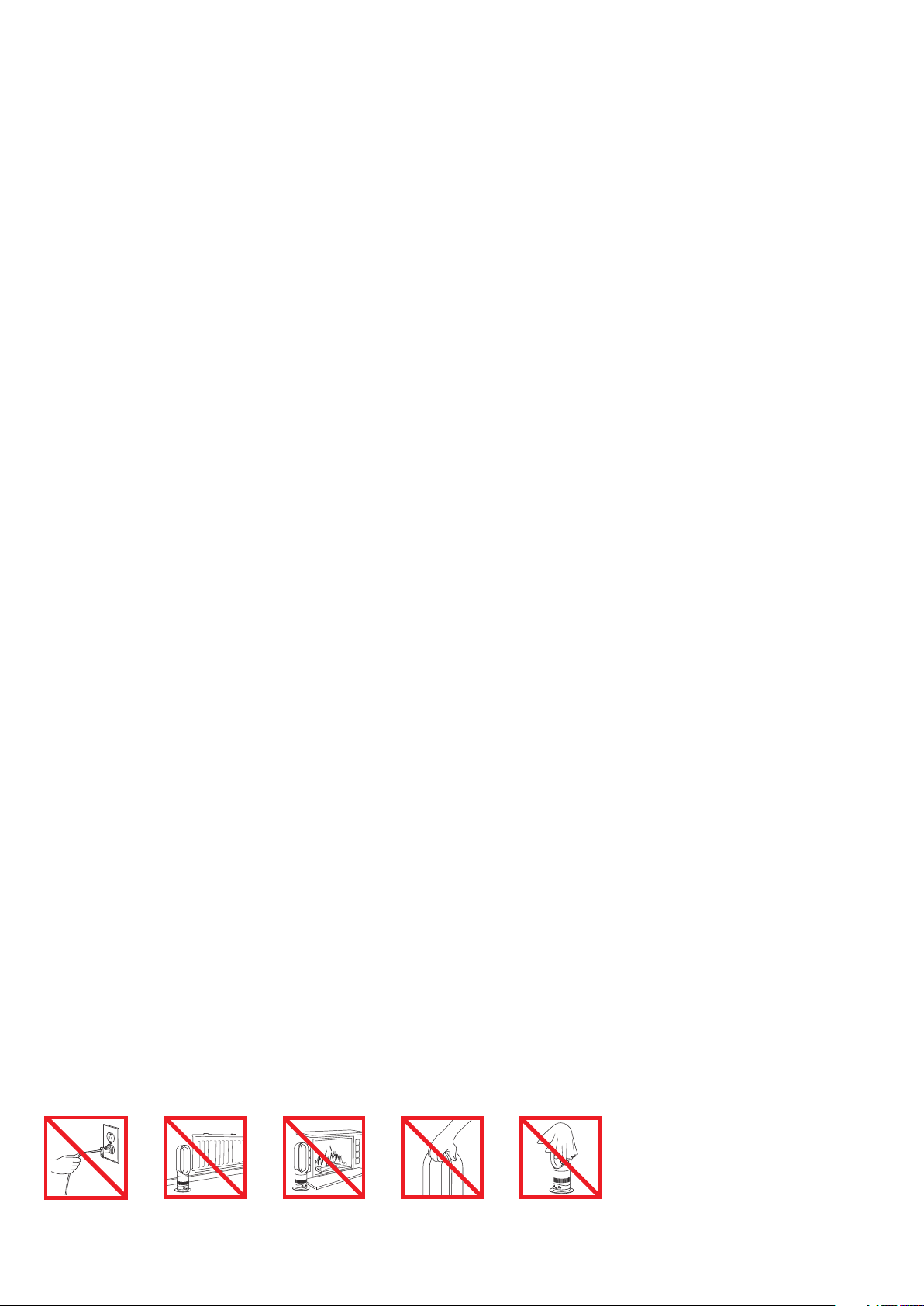
No tire del cable. No guarde el calefactor
cerca de fuentes
de calor.
No utilice el calefactor
cerca de una llamas.
No lo transporte
sujetando el bucle
amplificador. El bucle
amplificador de aire
no es una manija.
A fin de evitar riesgos
de sobrecalentamiento
e incendio, no cubra
el calefactor.
5
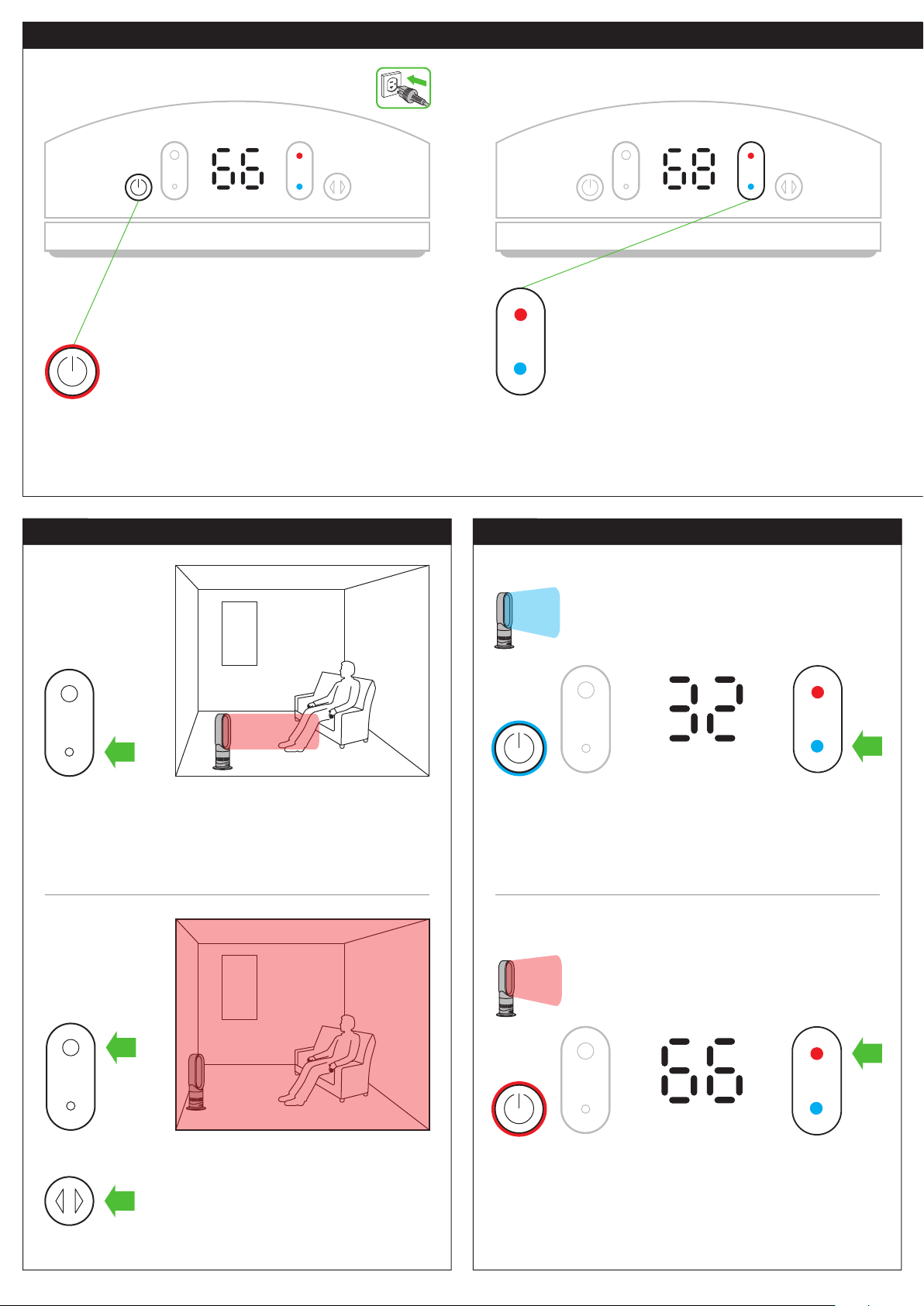
Controls
Heating mode
Cool air mode
6
Press the blue thermostat control button to change the
target temperature to 32°F. The power button light will
change from red to blue. To adjust the airflow speed use the
airflow speed control.
Press the red thermostat control button until the digital
display shows the desired target temperature. The power
button light will change from blue to red.
For best results turn on the oscillation control.
Select a high flow of air.
Select a low flow of air.
To return to heating mode
Whole room
Spot heat
Each time the heating mode is activated, it conducts
a short calibration cycle. Airflow will be automatically
controlled during this cycle. Once the calibration cycle
is complete, it will revert to the selected airflow speed.
On first use, the heater will default to a temperature
1°F higher than the current room temperature.
Thereafter, the heater will remember the last target
temperature set.
Select the desired room temperature. Pressing red
increases the target temperature, blue decreases it.
The heater will not operate unless the target
temperature is above the room temperature.
2. Thermostat control1. Power on
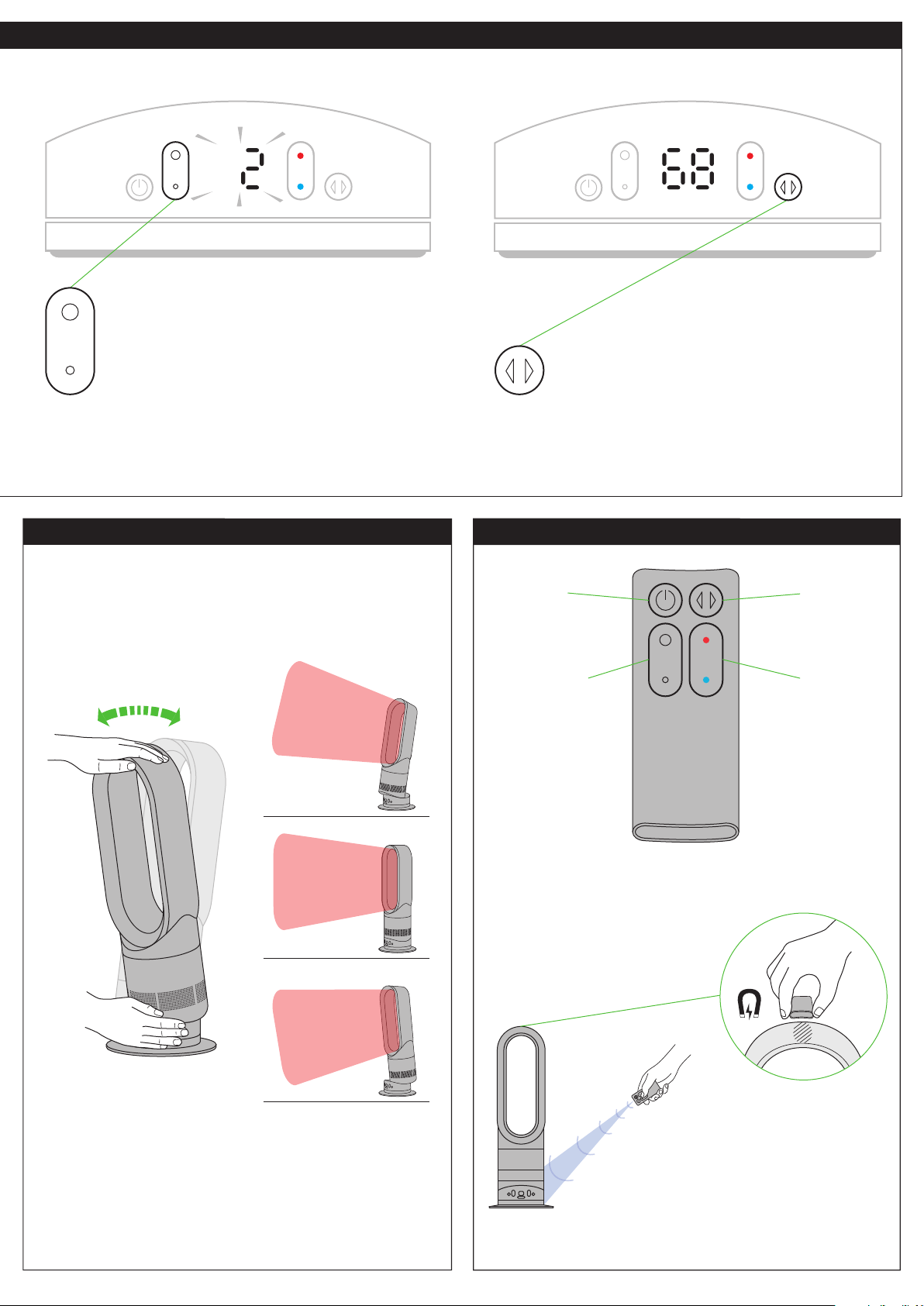
Power and remote control*Tilt function
7
Remote control docks magnetically
Attach remote control to top of heater
with the buttons facing down.
To operate, point remote control toward the front of the base.
Carefully hold the base and the top of the air loop amplifier.
Tilt forward or backward for the required airflow angle.
Stand by
on/off
Airflow speed
control
Oscillation
on/off
Thermostat
control
To change the airflow speed press the airflow speed
control button. The digital display will show the new
speed; after 3seconds it will change back to the
target temperature.
To start the heater oscillating, press the oscillation
control button. To stop the heater oscillating, press it
again. The heater will not oscillate when the control
buttons are pressed.
4. Oscillation control3. Airflow speed control
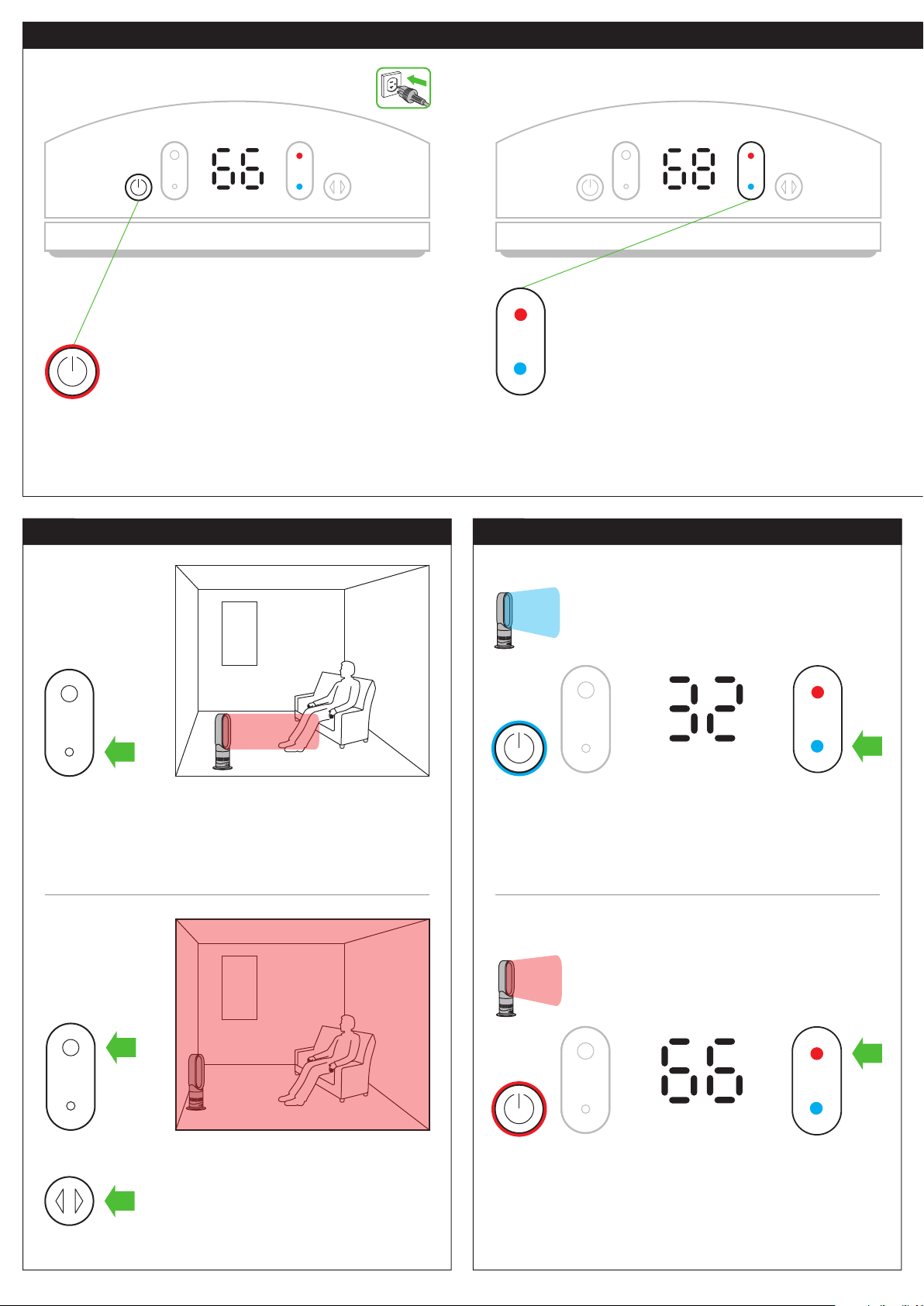
Controles
Modo de calefacción
Modo de aire frío
8
Presione el botón azul del control del termostato para
cambiar la temperatura a 32°F. La luz del botón de
encendido-apagado cambiará de color rojo a color azul.
Para ajustar la velocidad de flujo del aire, utilice el control
de flujo del aire.
Presione el botón rojo del control del termostato hasta que
la pantalla digital muestre la temperatura objetivo que desea.
La luz del botón de encendido cambiará de color azul
a color rojo.
Para obtener mejores resultados, active el control de oscilación.
Seleccione un flujo de aire alto.
Seleccione un flujo de aire bajo.
Para volver al modo de aire caliente
Toda la
habitación
Calor
concentrado
Cada vez que se activa el modo de calefacción,
el aparato ejecuta un breve ciclo de “calentamiento”.
El flujo de aire se controla automáticamente
durante este ciclo. Una vez que finaliza el ciclo de
“calentamiento”, el aparato regresa a la velocidad
de flujo de aire seleccionada.
En el primer uso, el calefactor mostrará
automáticamente la temperatura predeter-minada
de 1° F más alta que la temperatura ambiente.
En usos posteriores, el calefactor recordará la última
temperatura objetivo que configuró el usuario.
Seleccione la temperatura ambiente que desea.
Si se presiona el botón rojo aumenta la temperatura,
disminuye con el botón azul. El calefactor no
funcionará a menos que la temperatura objetivo sea
superior a la temperatura ambiente.
2. Control del termostato1. Encendido
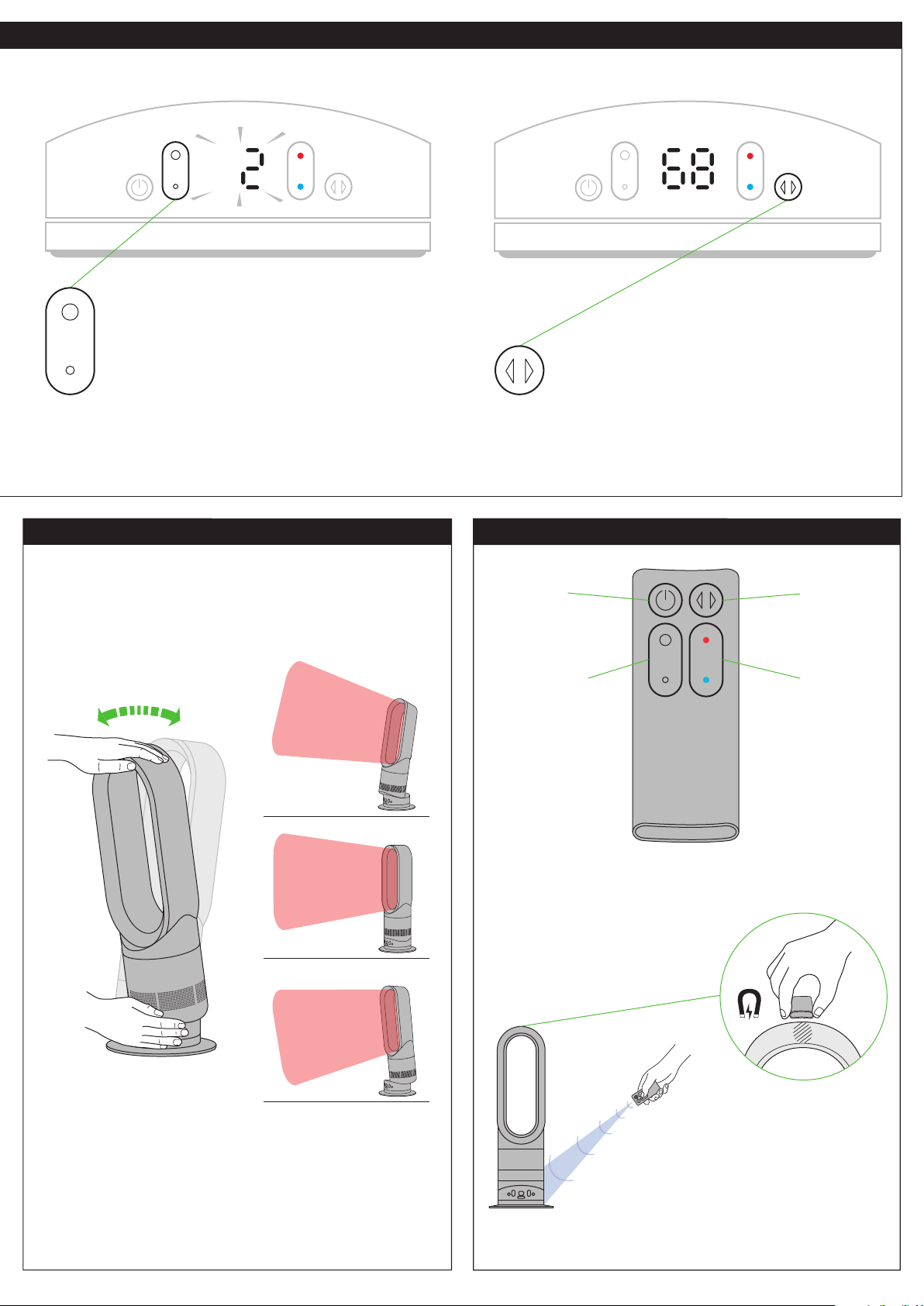
Control remoto de encendido-apagado*
Función de inclinación
9
El control remoto se acopla
magnéticamente Adjunte el
control remoto ala parte superior
del calefactor con los botones
hacia abajo.
Para poner en funcionamiento, apunte el control remoto hacia
el frente de la base.
Sujete con cuidado la base y la parte superior del bucle
amplificador. Incline hacia adelante o hacia atrás para obtener
el ángulo de flujo del aire que desea.
Modo
de espera
Control de
flujo del aire
Encendido-
apagado de
oscilación
Control del
termostato
Para cambiar la velocidad del flujo de aire presione
el botón de control de velocidad del flujo de aire.
Aparecerá la velocidad nueva en la pantalla digital;
después de transcurrir 3 segundos cambiará
nuevamente a la temperatura objetivo.
Para que el calefactor comience a oscilar, presione
el botón de control de oscilación. Para detener la
oscilación del calefactor, presione otra vez el botón.
El calefactor no oscilará si se presionan los botones
de control.
4. Control del oscilación3. Control de velocidad del flujo de aire
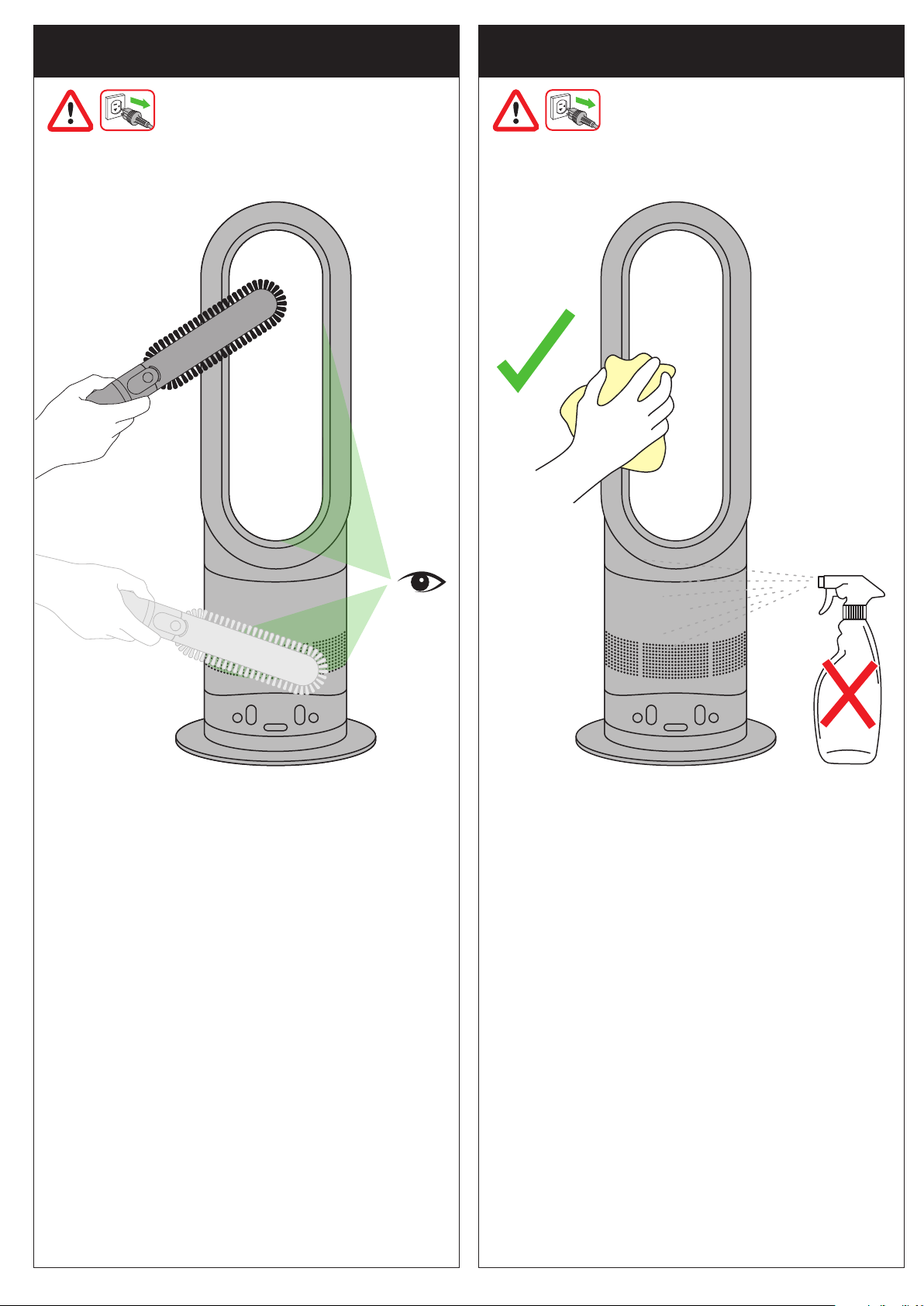
Ensure the heater is unplugged and has been allowed to cool.
Look for blockages in the air inlet holes and in the small
aperture inside the air loop amplifier.
Use a soft brush to remove debris.
Compruebe que el calefactor está desconectado y se ha
dejado enfriar.
Busque las obstrucciones en los agujeros de la entrada de
aire y el bucle amplificador de aire.
Utilice un cepillo suave para quitar escombros.
Unplug from the mains electricity supply.
Allow to cool for 1 to 2 hours before cleaning if the heater
has been in use.
To clean, wipe with a dry or damp cloth.
Do not use detergents or polishes.
Desconéctelo de la alimentación eléctrica.
Deje que se enfríe durante 1 a 2 horas antes de efectuar
la limpieza si ha estado usando el calefactor.
Para limpiar, frote con un paño seco o húmedo.
No use detergentes o pulidores.
Clearing blockages
Para eliminar obstrucciones
Cleaning
Limpieza
10
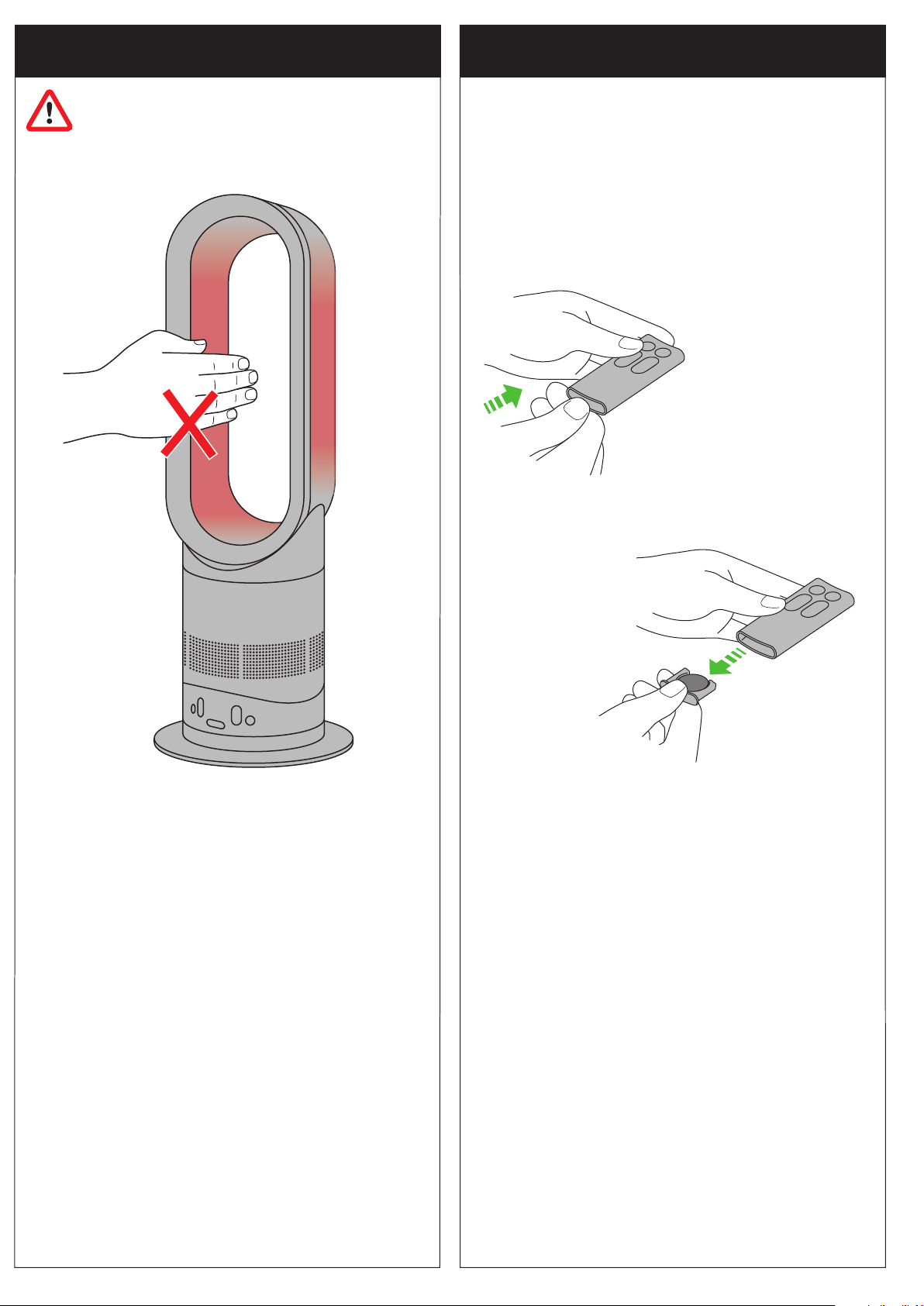
Press the end of the remote to release the battery.
Remote control with select models only.
Presione el extremo del control remoto para liberar la batería.
Control remoto únicamente en modelos selectos.
This heater is hot when in use and for a short period after use.
Do not let bare skin touch hot surfaces. If children are present,
consider positioning the heater out of their reach.
Este calefactor está caliente durante el uso y durante un
período breve después de usarlo. Evite que la piel toque las
superficies calientes. Si hay niños alrededor, procure colocar
el calefactor lejos de su alcance.
Caution: hot when in use
Precaución: caliente cuando está en uso
Battery replacement
Reemplazar la batería
Battery type CR 2032.
Batería tipo CR 2032.
11

USING YOUR DYSON HEATER
PLEASE READ THE ‘IMPORTANT SAFETY INSTRUCTIONS’ IN THIS
DYSON OPERATING MANUAL BEFORE PROCEEDING.
OPERATION
• The base must be fitted securely before operating. Do not dismantle or use
without the base fitted.
• The heater will not operate unless the target temperature is above the room
temperature.
• Each time the heating mode is selected, it conducts a short calibration cycle.
Airflow will be automatically controlled during this cycle. Once the calibration
cycle is complete, it will revert to the selected airflow speed.
• The heater will not oscillate when the control buttons are pressed.
• For your safety this heater is fitted with automatic cut-out switches that operate if
the heater tips over or overheats. If the switches operate, unplug the heater and
allow it to cool. Before restarting the heater check and clear any blockages and
ensure the heater is on a solid level surface.
• If power is interrupted an E1 or E5 failure message will be displayed. The heater
will need to be turned off and unplugged until the display is clear, before being
turned back on. If the problem persists, call the Dyson Helpline.
• Do not carry out any maintenance or repair work other than that shown in this
Dyson Operating Manual, or advised by the Dyson Helpline.
• Do not lubricate any part of this heater.
TILT FUNCTION
Carefully hold the base and the top of the air loop amplifier. Tilt forward or
backward for the required airflow angle.
CLEANING
• Turn the heater into stand by mode/off.
• Unplug from the mains electricity supply.
• Allow to cool for 1 to 2 hours before cleaning if the heater has been in use.
• To clean, wipe with a dry or damp cloth only.
• Do not use detergents or polishes to clean the heater.
STORAGE
• When not in use, unplug from the mains electricity supply.
• Store the heater in a dry location and arrange the cord away from traffic area so
that it will not be tripped over or damaged.
BATTERY REPLACEMENT
CAUTION:
• Put the heater into stand by mode and unplug from the mains electricity supply
before replacing the battery.
• Ensure the polarity is correct when installing the battery.
• Do not attempt to dismantle or charge the battery. Keep away from fire.
• Follow battery manufacturers’ instructions when installing the new battery
(battery type CR2032).
TROUBLESHOOTING
• Remember: Always unplug from the mains electricity supply before inspecting
for problems.
• If the heater will not operate, first check the mains outlet has electricity supply
and that the plug is properly inserted into the outlet.
• If you are still experiencing problems, call the Dyson Helpline.
• To watch a short online video visit: www.dyson.com/AMO4gettingstarted
DYSON CUSTOMER CARE
THANK YOU FOR CHOOSING TO BUY A DYSON APPLIANCE
If you have a question about your Dyson appliance, call the Dyson Helpline with
your serial number and details of where and when you bought the appliance.
Most questions can be solved over the phone by one of our Dyson Helpline staff.
If your appliance needs service, call the Dyson Helpline so we can discuss the
available options. If your Dyson appliance is under warranty, and it is a covered
repair, it will be repaired at no cost.
Your serial number can be found on your rating plate which is on the base of the
appliance.
PLEASE REGISTER AS A DYSON APPLIANCE
OWNER
To help us ensure you receive prompt and efficient service, please register as a
Dyson appliance owner. There are three ways to do this:
• Online at www.dyson.com
• Telephone the Dyson Helpline.
• Complete the enclosed Warranty Form and post it to us.
This will confirm ownership of your Dyson appliance in the event of an insurance
loss, and enable us to contact you if necessary.
2 YEAR WARRANTY
TERMS AND CONDITIONS OF THE DYSON 2 YEAR LIMITED WARRANTY.
WHAT IS COVERED
Your Dyson appliance is warranted against original defects in material and
workmanship for a period of 2 years from the date of purchase, when used for
private household purposes in accordance with this Dyson Operating Manual.
This warranty provides, at no extra cost to you, all labor and parts necessary
to ensure your appliance is in proper operating condition during the warranty
period. This limited warranty is subject to the following terms:
WHAT IS NOT COVERED
Dyson, Inc. shall not be liable for costs, damages or repairs incurred as a
result of:
• Appliances purchased from an unauthorized dealer.
• Accidental damage, faults caused by negligent use or care, neglect, careless
operation or handling of the appliance which is not in accordance with this
Dyson Operating Manual.
• Use of the appliance other than for normal domestic purposes within the United
States, e.g. for commercial or rental purposes.
• Use of parts not in accordance with this Dyson Operating Manual.
• Use of parts and accessories other than those produced or recommended by
Dyson, Inc.
• Repairs or alterations carried out by unauthorized parties or agents.
• Damage from external sources such as transit, weather, electrical outages or
power surges.
• Failures caused by external sources such as weather outside of Dyson, Inc’s
control.
• Damage as a result of use not in accordance with the rating plate.
• Blockages – please refer to this Dyson Operating Manual for details of how to
look for and clear blockages.
• Normal wear and tear, such as batteries.
• The repair to any appliance that has had the serial number altered or removed.
WARRANTY SERVICE
• Please fill out and return the Warranty Form, or register online at
www.dyson.com
• Before service can take place, the terms of the limited warranty require that you
contact the Dyson Helpline with your model name/number, serial number, date
and place of purchase.
• Please keep your purchase receipt in a safe place to ensure you have this
information.
• All work will be carried out by Dyson, Inc.
• Any replaced defective parts will become the property of Dyson, Inc.
• Service under this warranty will not extend the period of this warranty.
• If your appliance is not functioning properly, please call the Dyson Helpline.
Most issues can be rectified over the telephone by our trained Customer Care
staff. If this is not possible Dyson, Inc. will arrange for your appliance to be
repaired and returned in full working order at no extra cost to yourself.
WARRANTY LIMITATION AND EXCLUSIONS
• Any implied warranties relating to your appliance including but not limited to
warranty of merchantability or warranty of fitness for a particular purpose, are
limited to the duration of this warranty. This limitation is not allowed by some
States and so this limitation may not apply to you.
• Your remedy for breach of this warranty is limited to the warranty service
described above. Dyson, Inc. will not be liable for any consequential
damages or incidental damages you may incur in connection with your
purchase and use of your appliance. This limitation is not allowed by some
States and so this limitation may not apply to you.
• This limited warranty gives you specific legal rights. You may also have other
rights which vary by State.
• This limited warranty is not transferable.
IMPORTANT DATA PROTECTION INFORMATION
Your details will be held by Dyson, Inc. or others on behalf of Dyson, Inc. so
that we can assist you more quickly in our Customer Service department. From
time to time, Dyson, Inc. may send you special offers and news of our latest
innovations. Check the box on the Warranty Form within this Operating Manual
if you do not wish to receive marketing or promotional information from Dyson,
Inc. For more information about our data collection practices, please refer to the
Dyson, Inc. privacy policy at www.dyson.com/privacy
DISPOSAL INFORMATION
Dyson products are made from high grade recyclable materials and so should
not be treated as household waste. To protect the environment please dispose of
this product responsibly and recycle where possible.
CONFORMITY INFORMATION
This device complies with Part 15 of the FCC rules. Operation is subject to the
following two conditions: (1) this device may not cause interference, and (2)
this device must accept any interference, including interference that may cause
undesired operation of the device. Changes or modifications not expressly
approved by the party responsible for compliance could void the user’s authority
to operate the equipment.
PRODUCT INFORMATION
Please note: Small details may vary from those shown.
CONFORMITY INFORMATION
This equipment has been tested and found to comply with the limits for a Class
B digital device, pursuant to part 15 of the FCC Rules. These limits are designed
to provide reasonable protection against harmful interference in a residential
installation. This equipment generates, uses and can radiate radio frequency
energy and, if not installed and used in accordance with the instructions, may
cause harmful interference to radio communications. However, there is no
guarantee that interference will not occur in a particular installation. If this
equipment does cause harmful interference to radio or television reception,
which can be determined by turning the equipment off and on, the user is
encouraged to try to correct the interference by one or more of the following
measures:
• Reorient or relocate the receiving antenna.
• Increase the separation between the equipment and receiver.
• Connect the equipment into an outlet on a circuit different from that to which the
receiver is connected.
• Consult the dealer or an experienced radio/TV technician for help.
Changes or modifications not expressly approved by the party responsible for
compliance could void the user’s authority to operate the equipment.
12

PARA USAR SU CALEFACTOR DYSON
FAVOR DE LEER LAS ‘INSTRUCCIONES IMPORTANTES DE SEGURIDAD’
DE ESTE MANUAL DE FUNCIONAMIENTO DYSON ANTES DE
CONTINUAR.
FUNCIONAMIENTO
• La base se debe levantar de manera segura antes del funcionamiento.
No lo desmantele o utilice sin la base instalada.
• El calefactor no funcionará a menos que la temperatura objetivo sea superior a
la temperatura ambiente.
• Cada vez que se selecciona el modo de calefacción, el aparato ejecuta un breve
ciclo de “calentamiento”. El flujo de aire se controla automáticamente durante
este ciclo. Una vez que finaliza el ciclo de “calentamiento”, el aparato regresa a
la velocidad de flujo de aire seleccionada.
• El calefactor no oscilará si se presionan los botones de control.
• Por su seguridad, este calefactor cuenta con interruptores de apagado
automático que funcionan si el calefactor se cae o sobrecalienta. Si los
interruptores comienzan a funcionar, desconecte el calefactor y deje que se
enfríe. Antes de poner nuevamente en funcionamiento el calefactor, inspeccione
y elimine cualquier obstrucción y compruebe que el calentador está colocado
sobre una superficie firme y nivelada.
• Si se interrumpe el suministro de corriente eléctrica aparecerá el mensaje de
falla E1 o E5. Tendrá que apagar y desconectar el calefactor hasta que la
pantalla no tenga información antes de volver a encenderlo. Si el problema
persiste, llame a la línea directa de Asistencia al Cliente de Dyson.
• No efectúe ningún trabajo de reparación o mantenimiento que no sea el que se
indica en este Manual de funcionamiento Dyson o que le indiquen en la línea
de ayuda de Dyson.
• No lubrique ninguna parte de este calefactor.
FUNCIÓN DE INCLINACIÓN
Sujete con cuidado la base y la parte superior del bucle amplificador de aire.
Incline hacia delante o hacia atrás para obtener el ángulo de flujo del aire que
desea.
LIMPIEZA
• Ponga el calefactor en el modo de espera/apagado.
• Desconéctelo de la alimentación eléctrica.
• Deje que se enfríe durante 1 a 2 horas antes de efectuar la limpieza si ha
estado usando el calefactor.
• Para limpiar, frote con un paño seco o húmedo.
• No use detergentes o pulidores para limpiar el calefactor.
ALMACENAMIENTO
• Si no lo utiliza, desconéctelo de la alimentación eléctrica principal.
• Almacene el calefactor en un lugar seco y coloque el cable lejos de zonas de
paso para que nadie se tropiece con el cable o este se pueda dañar.
REEMPLAZAR LA BATERÍA
ADVERTENCIA:
• Ponga el calefactor en el modo de espera y desconéctelo de la alimentación
eléctrica principal.
• No instale al revés ni cree cortocircuitos en la batería.
• No intente desmontar o cargar la batería. Mantenga alejada del fuego.
• Siga las instrucciones del fabricante de las baterías al instalar la nueva batería
(batería tipo CR 2032).
• Un agente de servicio autorizado debe realizar cualquier otro tipo servicio.
SOLUCIÓN DE PROBLEMAS
• Recuerde: Siempre desconecte el enchufe de la alimentación eléctrica antes de
inspeccionar en busca de problemas.
• Si el calefactor no funciona, inspeccione primero la toma de corriente eléctrica y
que el enchufe esté correctamente insertado en la toma de corriente.
• Si sigue teniendo problemas, comuníquese con la Linea de ayuda de Dyson.
• Para ver un breve vídeo en línea, visite: www.dyson.com/AMO4gettingstarted
SERVICIO DE ATENCIÓN AL CLIENTE DYSON
GRACIAS POR ELEGIR COMPRAR UN APARATO DYSON
Si tiene alguna duda acerca de su aparato Dyson, llame a la línea de ayuda de
Dysonal con el número de serie e información de cuándo y dónde compró el
producto.
Si tiene más preguntas, puede consultar por teléfono a algún miembro de la
línea de ayuda.
Si su aparato necesita reparación llame a la Línea de ayuda de Dyson para
poder analizar las opciones disponibles. Si su aparato tiene garantía y la
reparación necesaria está incluida dentro de esa garantía, se reparará sin costo
alguno.
El número de serie se encuentra en la placa de especificaciones, situada en la
base del aparato.
POR FAVOR REGÍSTRESE COMO PROPIETARIO DE
UN APARATO DYSON
Para ayudarnos a asegurarle que reciba un servicio rápido y eficaz, por favor
regístrese como propietario de un aparato Dyson. Hay dos maneras de hacerlo:
• En línea en www.dyson.com
• Llame por teléfono a la Línea de ayuda de Dyson.
• Envíe por correo el formulario completo de garantía que se anexa, dirigido a
nuestra dirección.
Esto confirmará que el aparato Dyson es de su propiedad en caso de que
ocurra una pérdida cubierta por el seguro, y nos permitirá contactarle si fuese
necesario.
2 AÑOS DE GARANTÍA
TÉRMINOS Y CONDICIONES DE LA GARANTÍA LIMITADA DE 2 AÑOS
DE DYSON.
QUÉ ESTÁ CUBIERTO
Su aparato Dyson está garantizada contra defectos originales de material
o mano de obra por un período de 2 años a partir de la fecha de compra,
cuando se utilice para fines domésticos privados y de acuerdo con el Manual
de Instrucciones de Dyson. Esta garantía proporciona, sin costo para usted,
toda la mano de obra y piezas para poner su aparato en perfectas condiciones
de funcionamiento durante el plazo de garantía. Esta garantía está sujeta a los
siguientes términos:
QUÉ NO ESTÁ CUBIERTO
Dyson, Inc. no será responsable de los costos incurridos como resultado de:
• Aparatos comprados a proveedores no autorizados.
• Daño accidental, fallas ocasionadas por mal uso o desatención,
negligencia, descuido en la operación, o manejo del aparato sin respetar las
recomendaciones de este Manual de Instrucciones de Dyson.
• El uso del aparato contrario a los usos domésticos normales dentro de los
Estados Unidos de América, por ejemplo, para el uso comercial o alquiler.
• El uso de piezas que no estén contempladas en el Manual de Instrucciones de
Dyson.
• El uso de piezas y accesorios que no sean los producidos o recomendados por
Dyson, Inc.
• Reparaciones o alteraciones llevadas a cabo por partes o agentes no
autorizados.
• Daños por fuentes externas como tránsito, clima, interrupciones eléctricas o
sobrecargas de energía.
• Fallas ocasionadas por agentes externos, como el clima, ajenos al control de
Dyson.
• Daño como resultado de un uso que contravenga las indicaciones de la placa
de especificaciones.
• Obstrucciones: Favor de consultar en el Manual de Funcionamiento de Dyson
los detalles sobre cómo inspeccionar y eliminar obstrucciones.
• Desgaste normal, como en el caso de la batería.
• La reparación de cualquier aparato cuyo número de serie se haya modificado
o removido.
SERVICIO DE GARANTÍA
• Por favor complete y devuelva el Formulario de registro del producto, o
regístrese en línea en www.dyson.com
• Antes de poder realizar el servicio, los términos de la garantía exigen que se
ponga en contacto con la Línea Directa de Asistencia al Cliente de Dyson y que
proporcione el nombre/número del modelo, número de serie, y la fecha y sitio
de compra.
• Por favor mantenga la factura de compra en un sitio seguro para asegurarse de
tener esta información.
• Todo el trabajo lo llevará a cabo Dyson, Inc.
• El cambio de cualquier pieza defectuosa no extenderá el período de la misma.
• El servicio según esta garantía no extenderá el período de esta garantía.
• Si su aparato no funciona correctamente, por favor llame a la Línea Directa
de Asistencia al Cliente de Dyson. La mayoría de los problemas pueden
solucionarse por teléfono a través de nuestro personal capacitado en atención
al cliente. Si esto no es posible, Dyson, Inc. hará que se repare y se le devuelva
su aparato en perfectas condiciones sin costo adicional para usted.
LIMITACIONES Y EXCLUSIONES DE LA GARANTÍA
• Cualquier garantía implícita relacionada con su aparato, incluyendo pero sin
limitarse a una garantía de comerciabilidad o garantía de idoneidad para un
propósito en particular, se limita a la duración de esta garantía. Esta limitación
no está permitida por algunos estados, por lo que esta limitación puede no
aplicarse a usted.
• El recurso por el incumplimiento de esta garantía se limita al servicio de
garantía descrito anteriormente. Dyson, Inc. no será responsable de ningún
daño consecuente o incidental en el que se pueda incurrir en conexión con
la compra y uso de su aparato. Esta limitación no está permitida por algunos
estados, por lo que esta limitación puede no aplicarse a usted.
• Esta garantía le otorga derechos legales específicos.
• Esta garantía limitada no es transferible.
INFORMACIÓN IMPORTANTE PARA LA
PROTECCIÓN DE DATOS
Sus detalles serán retenidos por Dyson, Inc. u otros en nombre de Dyson,
Inc.de manera que nuestro departamento de Servicio al cliente pueda
brindarleasistencia con mayor rapidez. Dyson, Inc. podrá enviarle
periódicamenteofertas especiales y noticias relacionadas con nuestras más
recientesinnovaciones. Marque la casilla que se encuentra en el Formulario
de lagarantía que se incluye en el Manual de Instrucciones si usted no
desearecibir información comercial o promocional de Dyson, Inc. Para obtener
másinformación acerca de nuestras prácticas de recopilación de datos, consulte
lapolítica de privacidad de Dyson, Inc. en www.dyson.com/privacy
13

JN.76994 PN.300231-01-04 13.08.15
INFORMACIÓN DE ELIMINACIÓN DE RESIDUOS
Los productos Dyson están hechos a partir de materiales reciclables de alta
calidad y, por tanto, no deben tratarse como residuos domésticos. Para proteger
el medio ambiente, deseche este producto de forma responsable y recíclelo
siempre que sea posible.
INFORMACIÓN DE CONFORMIDAD
Se han realizado pruebas en este equipo que han permitido determinar que
cumple con los límites establecidos para los dispositivos de Clase B, en base
al artículo 15 de las Normas FCC. Estos límites están diseñados para brindar
una protección razonable contra interferencias dañinas en instalaciones
residenciales. Este equipo genera, utiliza y puede irradiar energía de
radiofrecuencia y, si no se instala y utiliza en base a las instrucciones, puede
causar interferencia dañina en las comunicaciones radiales. Sin embargo, no
existe garantía alguna de que no se produzca interferencia en una instalación
en particular. Si este equipo causa interferencia dañina en la recepción de
una radio o un televisor (que se puede determinar mediante el encendido y
el apagado del equipo), se recomienda que el usuario trate de corregir la
interferencia mediante la aplicación de una o más de las siguientes medidas:
• Cambie la orientación o la ubicación de la antena receptora.
• Aumente la distancia entre el equipo y el receptor.
• Conecte el equipo en un toma de corriente que se encuentre en un circuito
distinto al que está conectado el receptor.
• Solicite ayuda al proveedor o a un técnico de radio o TV con experiencia.
Los cambios o modificaciones no aprobados por el grupo responsable de
las reglas de conformidad pueden invalidar la autoridad del usuario en la
operación del equipo.
WARRANTY FORM CONTINUED
CONTINUACIÓN DEL FORMULARIO DE GARANTÍA
THANK YOU FOR YOUR TIME • GRACIAS POR DEDICARNOS SU TIEMPO
1. Do you own any other heating products?
Check all that apply.
■ Fan heater
■ Ceramic heater
■ Oil heater
■ Gas heater
■ Wood fire heater
■ Electric heater
■ Radiator
■ Reverse cycle air conditioner
■ Fan convector
■ None of the above
■ Other, please specify
■
2. Why did you choose to buy a Dyson heater?
Please select up to 5 of the following choices below.
■ Frustration with existing heater
■ Latest heater technology
■ Dyson brand reputation
■ Smooth, powerful airflow
■ Previous experience of Dyson
■ Safe, no fast-spinning blades
■ Features – oscillation, touch-tilt
■ Easy to clean
■ Price/special offer
■ Store staff recommendation
■ Aesthetics
■ Friend/family recommendation
■ Warranty coverage
■ Other, please specify
■
3. Where did you first hear about Dyson heaters?
■ From friends and family
■ Saw it on the internet
■ From a TV/magazine advertisement
■ Email from Dyson
■ Saw it in a store/catalog
■ News item or article
■ Recommended by salesperson
■ Saw it at an event
■ Social media
■ Other, please specify
■
4. Do you own any other Dyson products?
■ Upright vacuum
■ Canister vacuum
■ Handheld vacuum
■ Dyson Airblade™ hand dryer
■ Dyson Air Multiplier™ fan
■ My first Dyson purchase
5. What type of home do you live in?
■ Single family home
■ Town home
■ Condominium
■ Apartment
■ Other, please specify
■
1. ¿Posee algún otro producto de movimiento de aire?
Seleccione todos los que apliquen.
■ Calefactor de aspas
■ Calefactor cerámico
■ Calefactor de aceite
■ Calefactor de gas
■ Calefactor de leña
■ Calefactor eléctrico
■ Radiador
■ Acondicionador de aire de ciclo inverso
■ Convector del ventilador
■ Ninguno de los anteriores
■ Otro, favor de especificar
■
2. ¿Por qué eligió comprar un calefactor Dyson?
Seleccione por favor hasta 5 de lo siguiente opciones de abajo.
■ Frustración por el calefactor que ya tenía
■ Tecnología calefactor más nueva
■ Prestigio de la marca Dyson
■ Flujo uniforme y potente
■ Experiencia anterior con Dyson
■ Aspas seguras sin giro rápido
■ Funciones: oscilación, inclinación con un toque
■ Fácil de limpiar
■ Precio, oferta especial
■ Recomendación del personal de la tienda
■ Apariencia estética
■ Recomendación de amigos o familiares
■ Cobertura de la garantia
■ Otro, favor de especificar
■
3. ¿Dónde se enteró por primera vez de los calefactors Dyson?
■ Por amigos y familiares
■ Lo vi en Internet
■ Por un anuncio en televisión/revista
■ Correo electrónico de Dyson
■ Lo vi en el catálogo de una tienda
■ Noticias o articulo de noticias
■ Recomendación de un vendedor
■ Lo vi en un evento
■ Redes sociales
■ Otro, favor de especificar
■
4. ¿Posee otro aparato Dyson?
■ Aspiradora vertical
■ Aspiradora tipo canasta
■ Aspiradora portátil
■ Secador de manos Dyson Airblade™
■ Ventilador Dyson Air Multiplier™
■ Mi primera compra Dyson
5. ¿Qué tipo de casa habita usted?
■ Vivienda unifamiliar
■ Vivienda adosada
■ Condominio
■ Apartamento
■ Otro, favor de especificar
■
Please take a few moments to answer our questions.
They will help us develop new products for the future.
Tómese unos instantes para responder a nuestras preguntas.
Esto nos ayudará a desarrollar nuevos productos en el futuro.
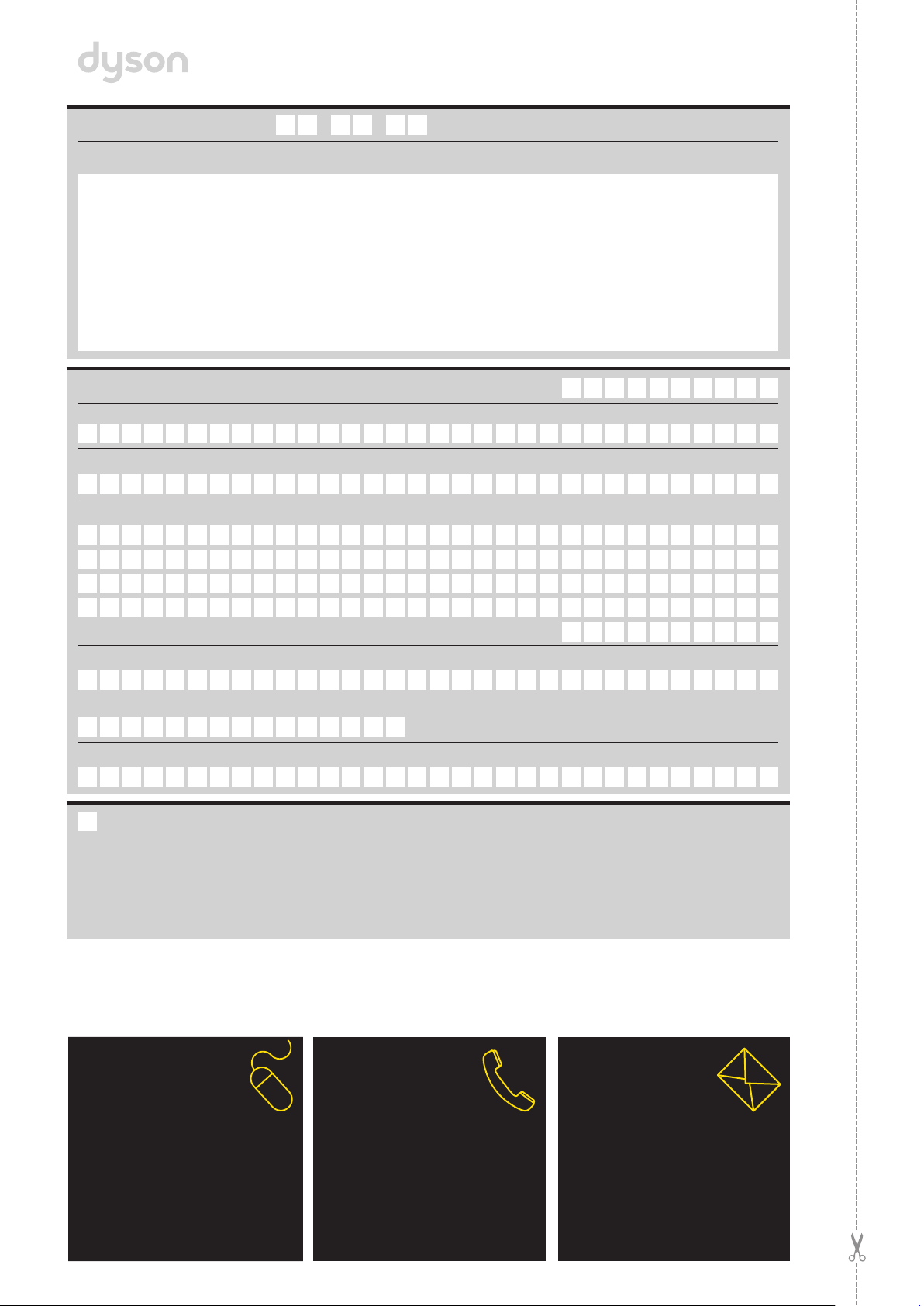
MAIL
Complete and return the
form in the envelope supplied.
POR CORREO
Complete este formulario y envíelo.
PHONE
Dyson Helpline:
1-866-277-9896
(Monday - Friday 7am – 9pm CST;
Saturday - Sunday 9am to 6pm CST).
POR TELÉFONO
Servicio de atención al cliente Dyson:
1-866-277-9896 (lunes a viernes de
7am - 9pm, sábado y domingo de
9am - 6pm).
ONLINE
Convenient and instant.
www.dyson.com/register
EN LíNEA
Conveniente y al instante.
www.dyson.com/register
Title | Tratamiento
Last name | Apellido
First name | Nombre
Telephone | Teléfono
email | email
Store of purchase | Tienda de compra
Zip Code | Código postal
Address | Dirección
3 EASY WAYS TO REGISTER | 3 MANERAS FÁCILES DE REGISTRARSE
Date of purchase | Fecha de compra
/ /
Serial number | Número de série
WARRANTY FORM • FORMULARIO DE GARANTÍA
From time to time, we’d like to send you emails about
new Dyson technology and services or get your opinion
about your purchase. If you’d like us to keep in touch,
please check this box.
Ocasionalmente, nos gustaría enviarle correos electrónicos
con información sobre los nuevos servicios y tecnologías de
Dyson o para saber su opinión sobre su compra. Si desea
que nos mantengamos en contacto, seleccione esta casilla.