Anker Innovations Limited. All rights reserved. eufy Security and eufy Security Logo are
trademarks of Anker Innovations Limited, registered in the United States and other
countries. All other trademarks are the property of their respective owners.
51005002590 V01
QUICK
START GUIDE
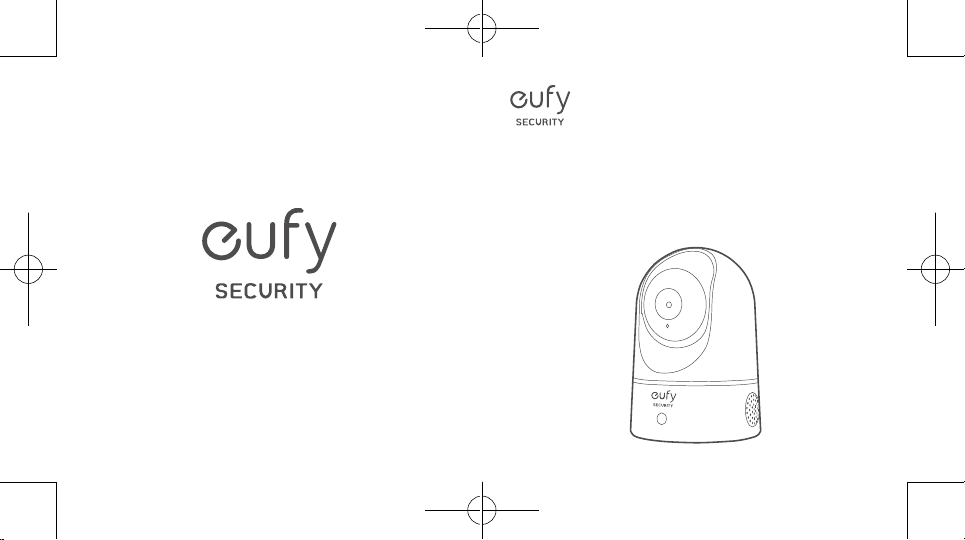
Indoor Cam 1080p Pan & Tilt
Table of Contents
What’s included 01
Product overview 02
Setting up the system 03
Mounting the indoor cam 05
Powering on the indoor cam 10
Notice 11
English 01
Deutsch 16
Español 28
Français 40
Italiano 52
English
0201
English
WHAT’S INCLUDED
Indoor Cam 1080p Pan & Tilt
Model: T8411
Mounting Plate
USB Cable
USB Adapter
Mounting Screw Pack
User Manual
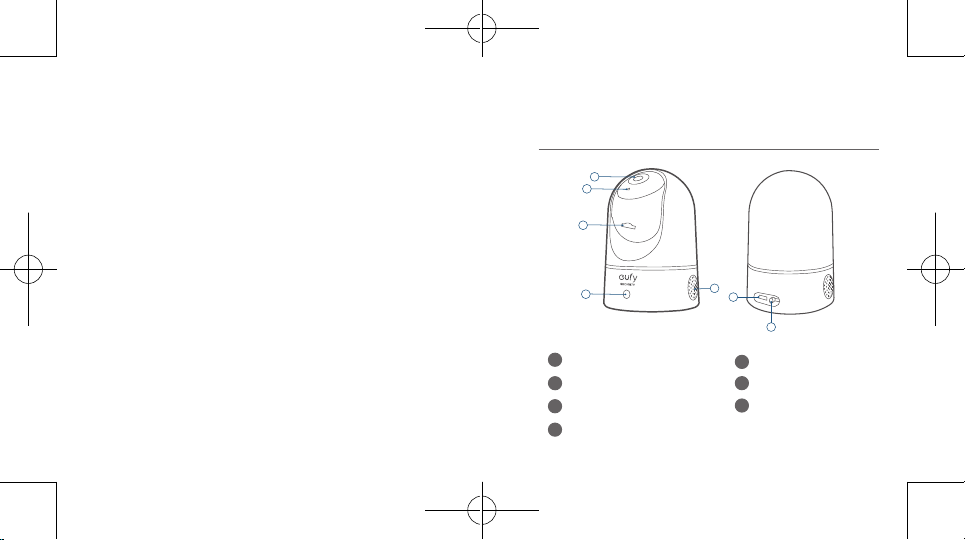
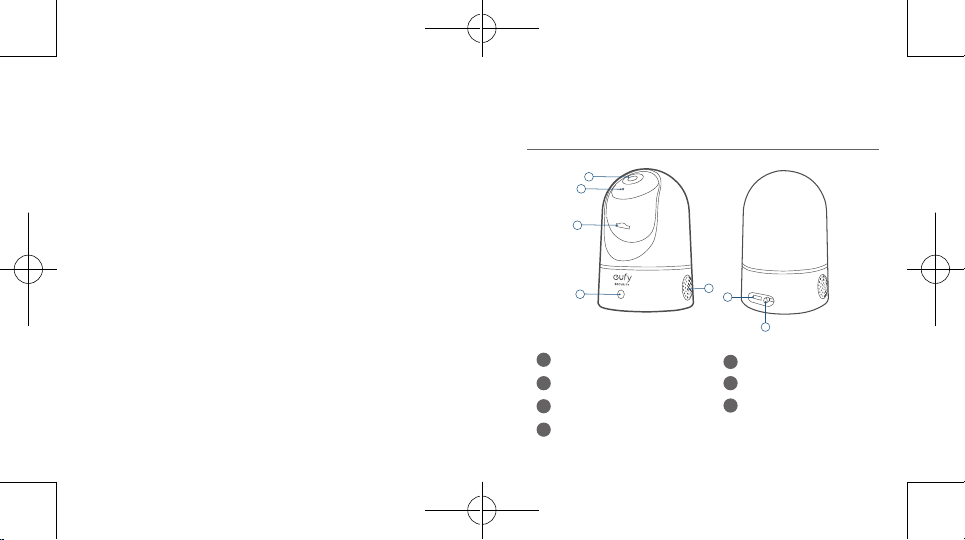
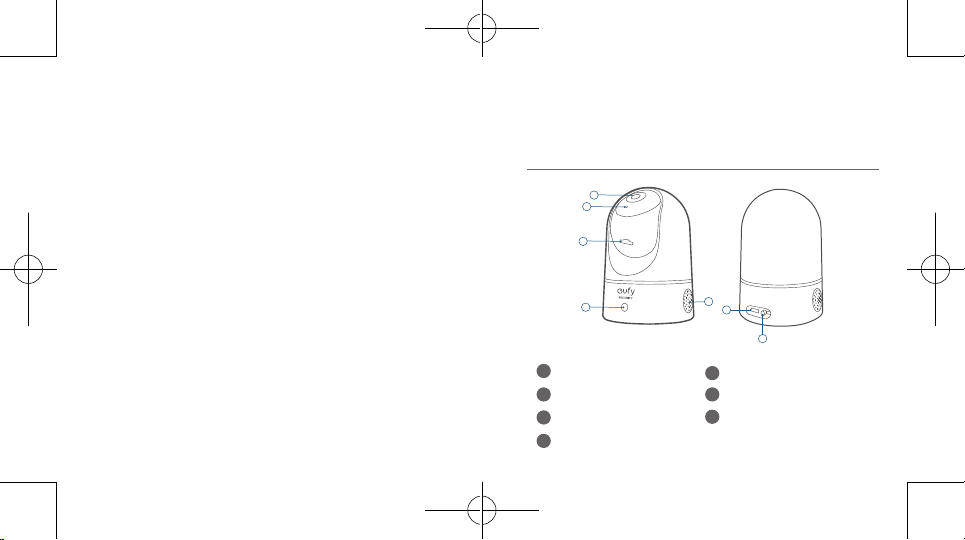
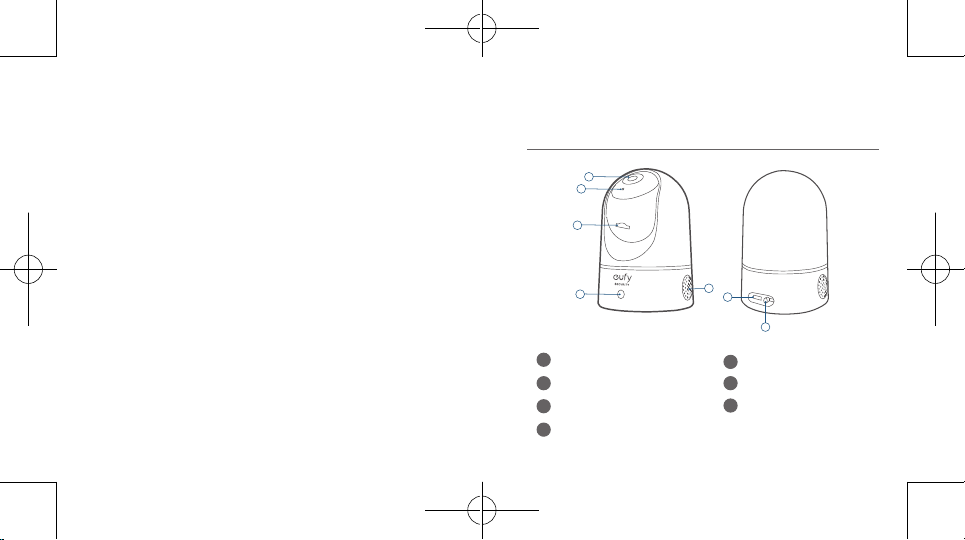
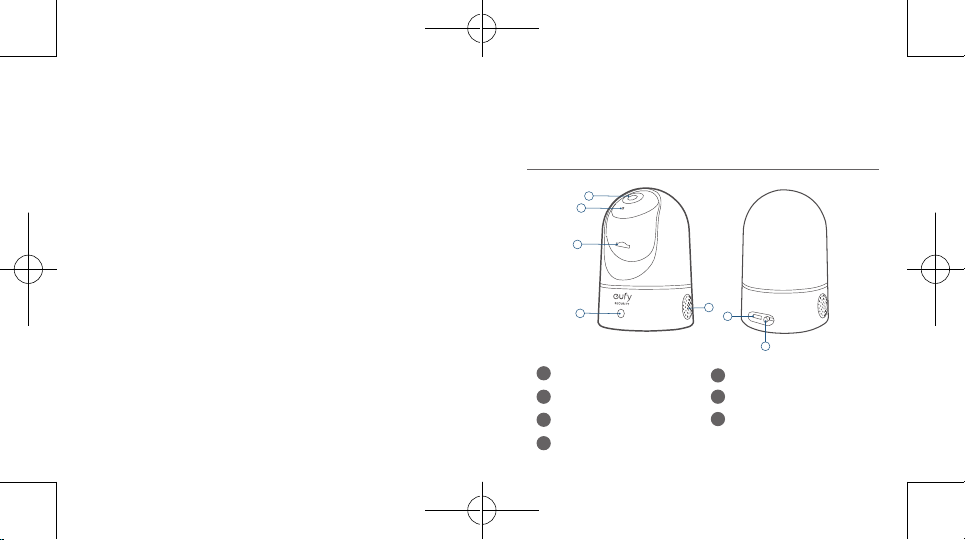
PRODUCT OVERVIEW
Indoor Cam 1080p Pan & Tilt
1
2
3
4
5
6
7
1
Lens
5
Speaker
2
Microphone
6
Power input
3
SD card slot
7
SYNC button
4
Status LED
English
0403
English
SETTING UP THE SYSTEM
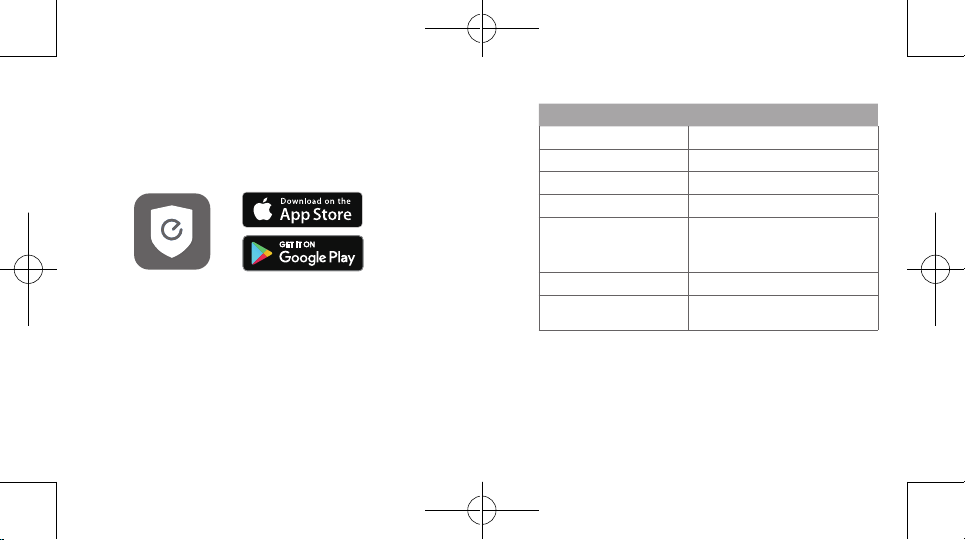
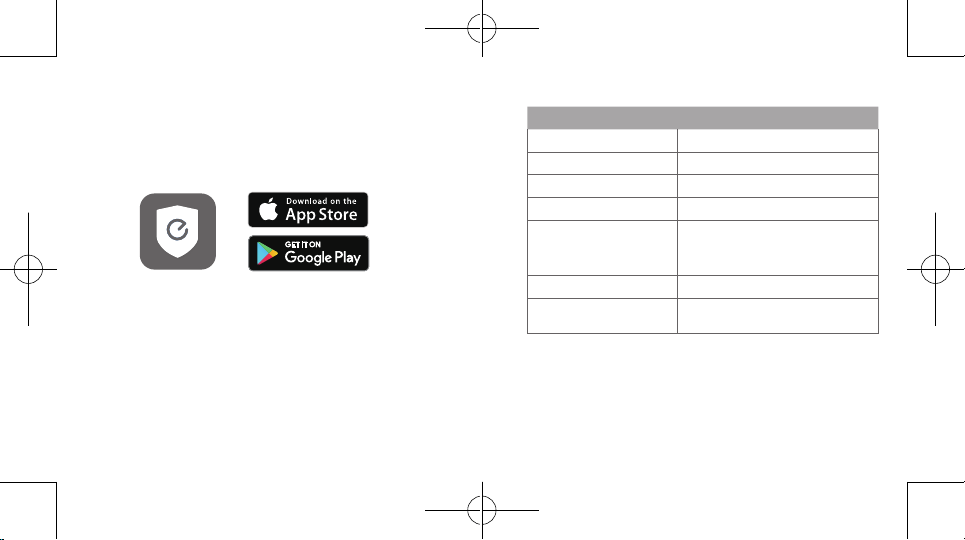
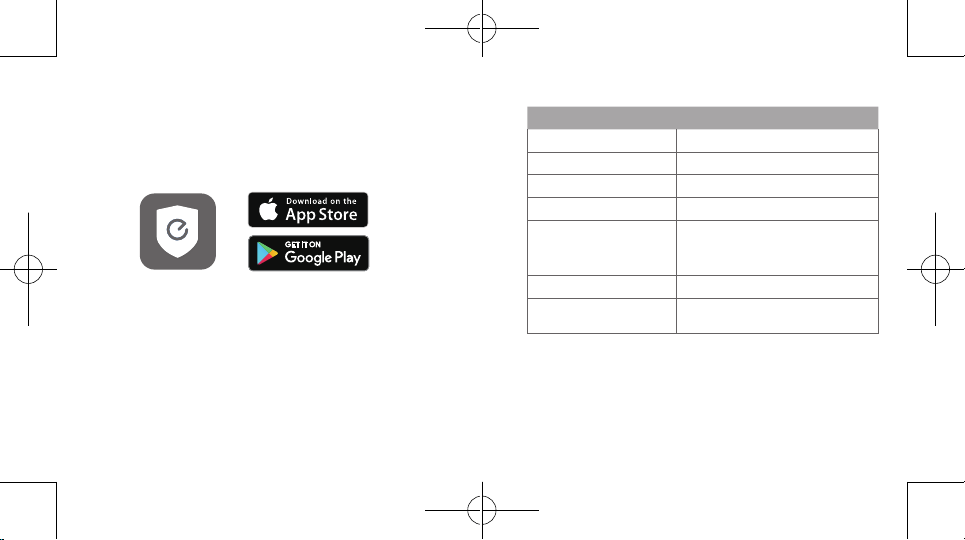
1. Download the eufy Security app from the App Store
(iOS devices) or Google Play (Android devices).
2. Sign up a eufy Security account. Go to the app
homepage. Tap
Add Device
, and add the IndoorCam
Pan 1080p to your system.
3. Follow the on-screen instructions to complete the
setup.
LED Status
LED Status Description
Breathing blue Ready for setup
Solid blue Powered on and working properly
Blinking red Disconnected from the internet
Blinking red once Motion or sound detected
Solid red
Working properly with someone
viewing the live stream or
recording event
Solid bluish violet System is initializing
Flashing blue and red
alternately
Firmware upgrade in progress
English
0605
English
MOUNTING THE INDOOR CAM
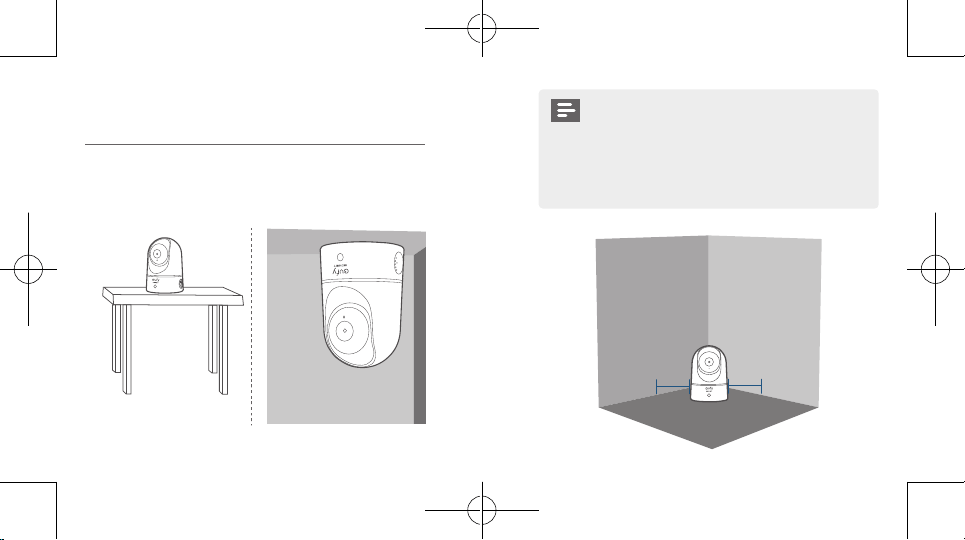
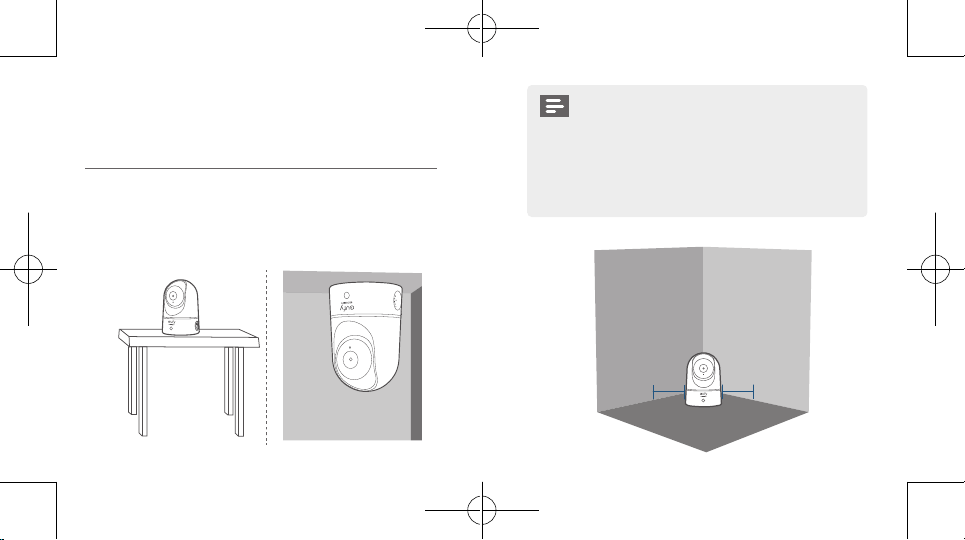
Select a Location for Mounting
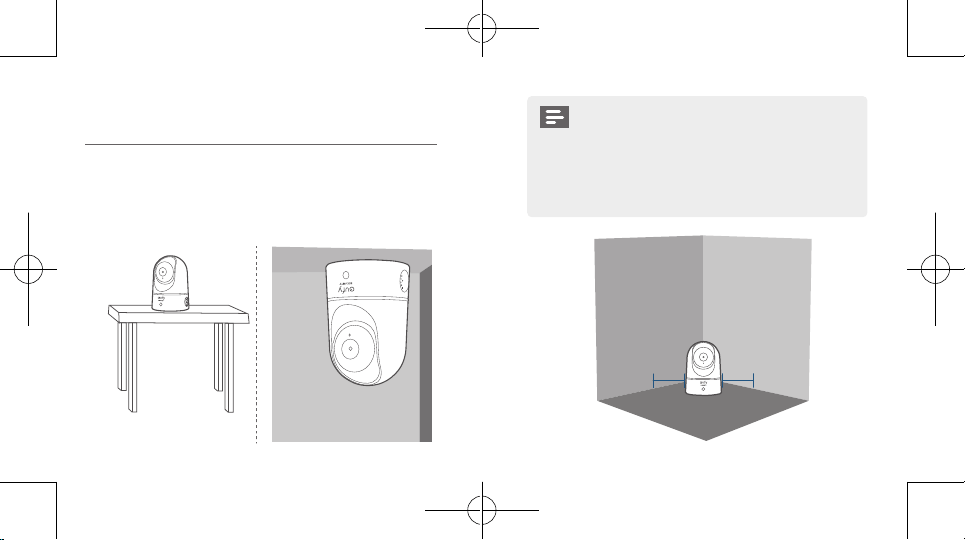
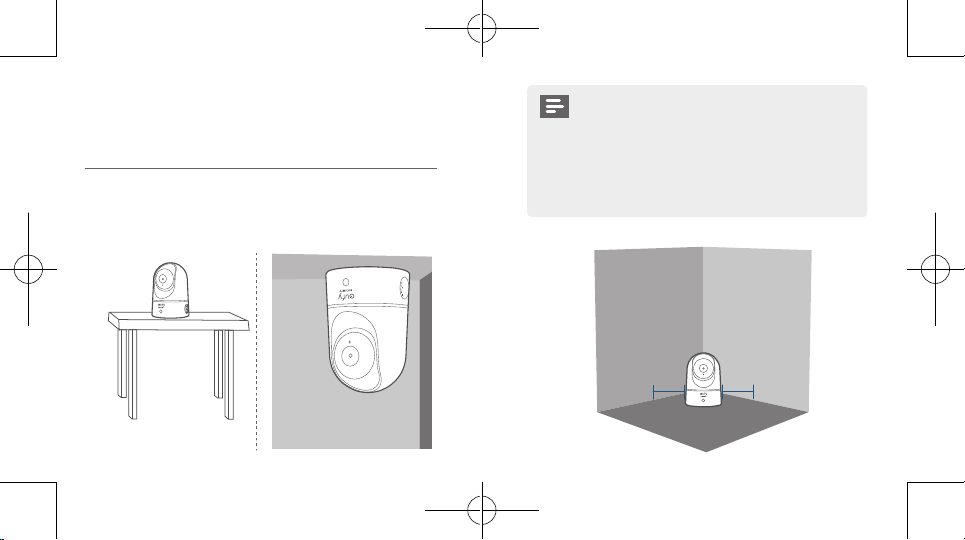
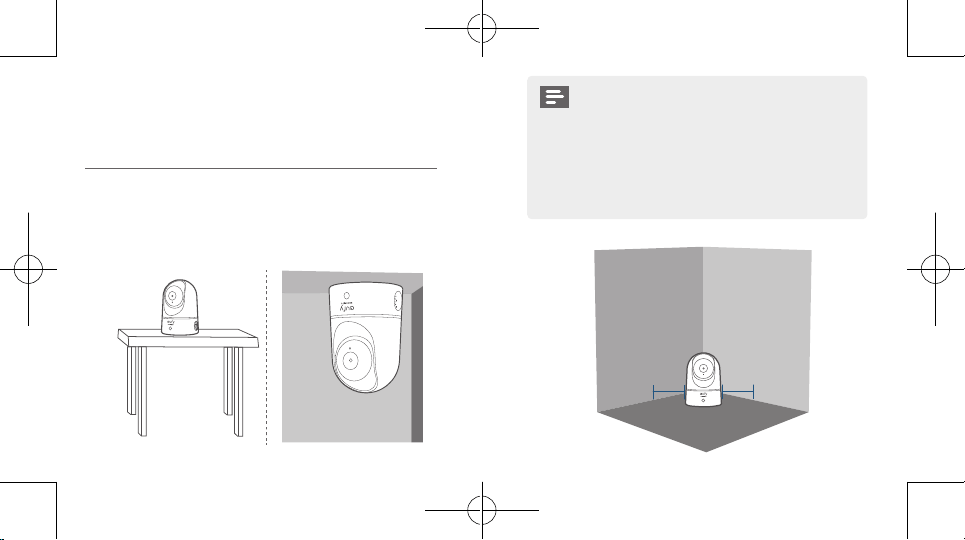
The camera can be placed on a table, shelf, or can be mounted
on a wall or ceiling. Select a location and height where you can
get the desired view, and can reach a power outlet easily.
• Disconnect the Indoor Cam from the power
outlet before mounting.
• Keep the Indoor Cam at least 0.7 ft / 20 cm away
from walls or anything that may obstruct the view.
Do this to avoid infrared reection which can have
a negative impact on the night vision performance.
> 20CM
> 20CM
English
0807
English
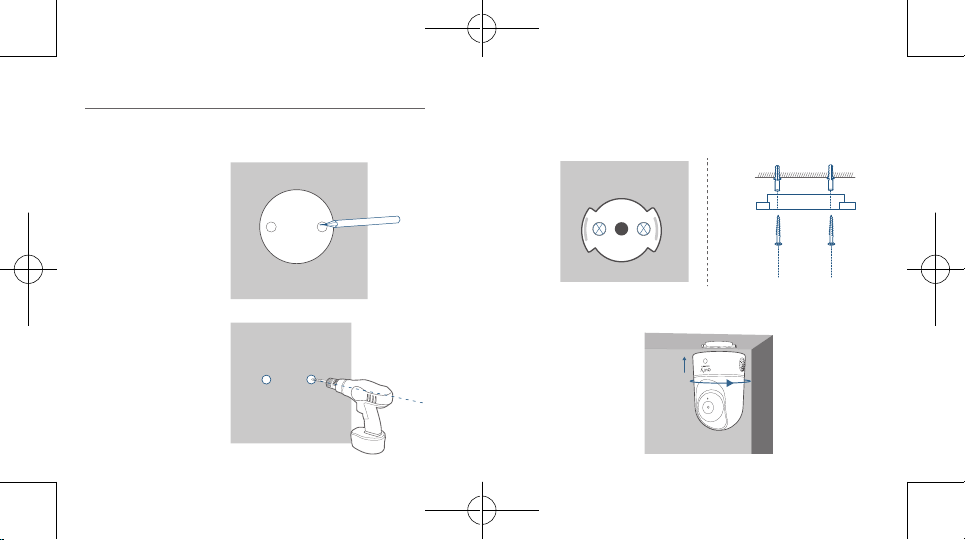
Mount the Indoor Camera
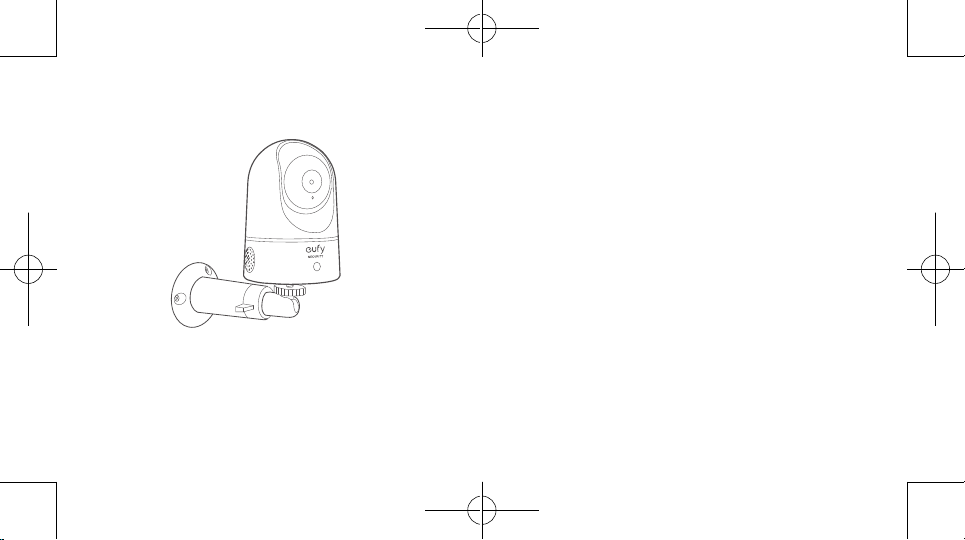
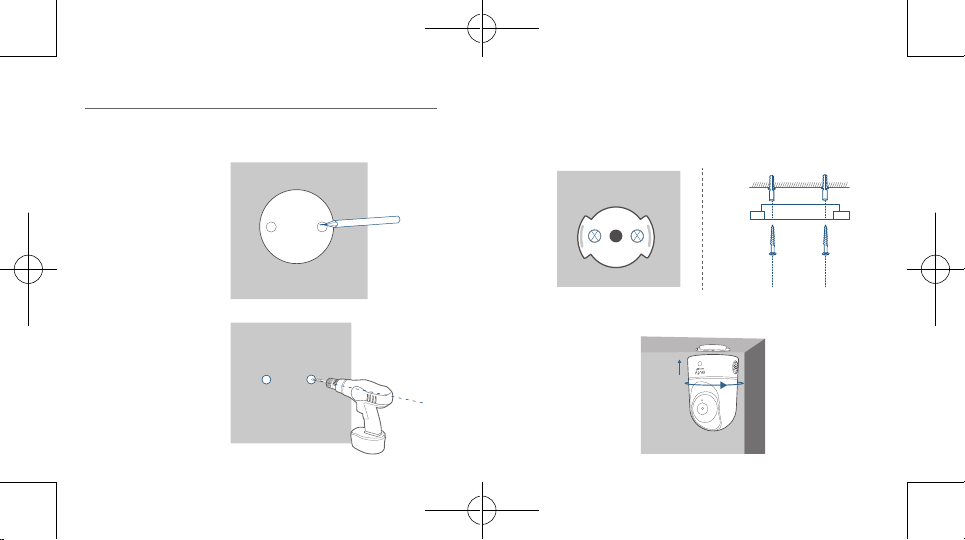
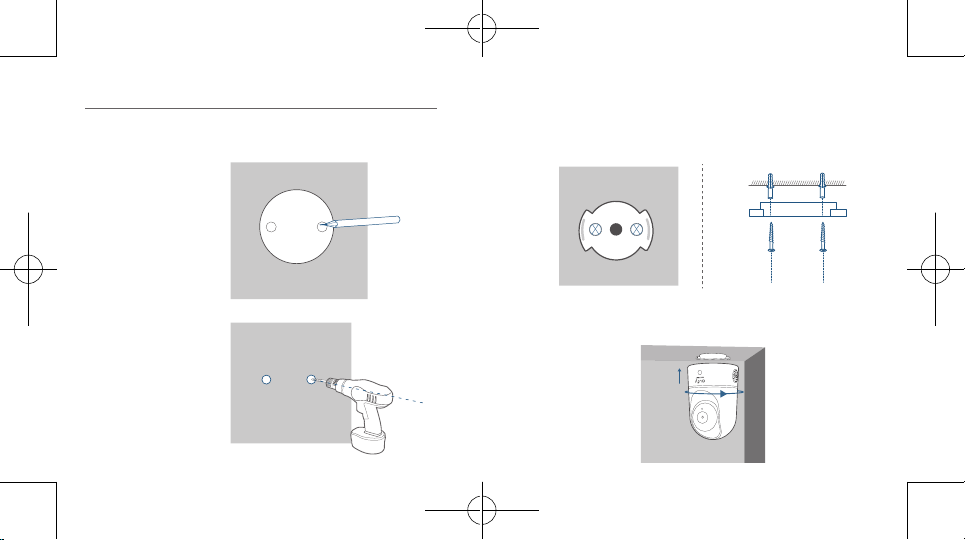
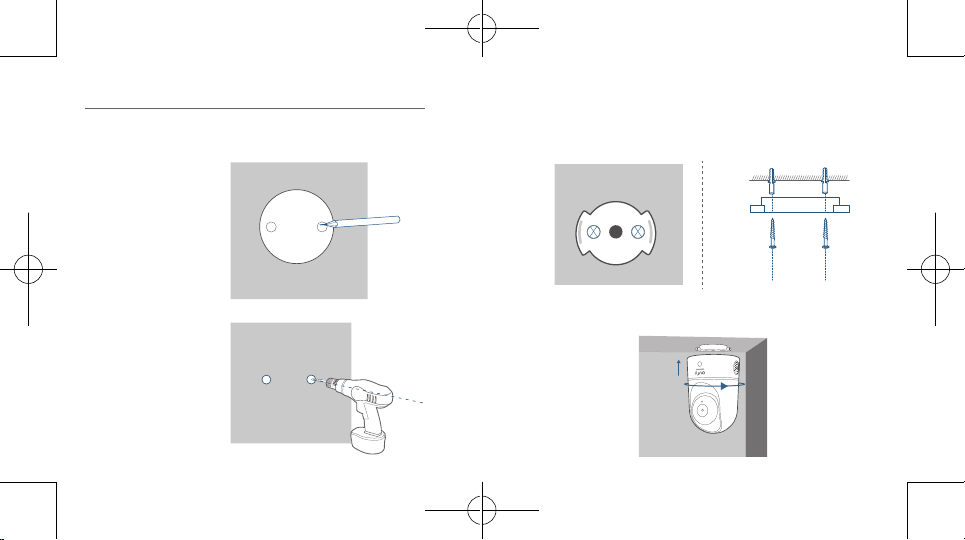
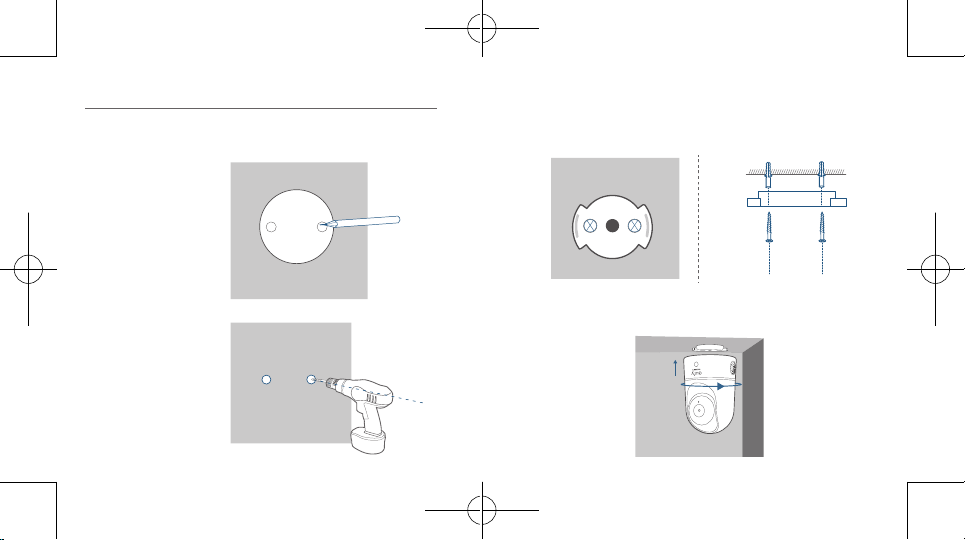
To mount the Indoor Cam on the ceiling, follow the steps
below:
1. Place the positioning
card against the
ceiling and then
mark the points at
which drilling will be
required.
Ceiling
2. Drill holes with a
5/16” (8 mm) drill
bit.
Ceiling
3. Align the holes on the mounting plate with those in the
ceiling. Insert the anchors into the holes; anchors are
necessary for walls that are made out of hard materials such
as concrete, brick, or stucco. Fix the screws with a Phillips-
head screwdriver to fasten the mounting plate to the ceiling.
Ceiling
Ceiling
4. Align the grooves with the mounting plate and rotate the
Indoor Cam clockwise until it clicks into place.
English
1009
English
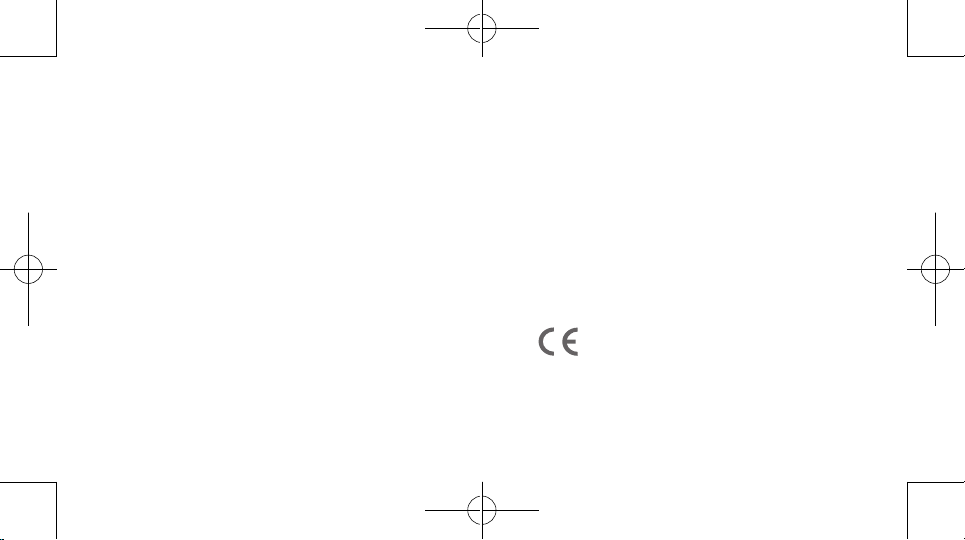
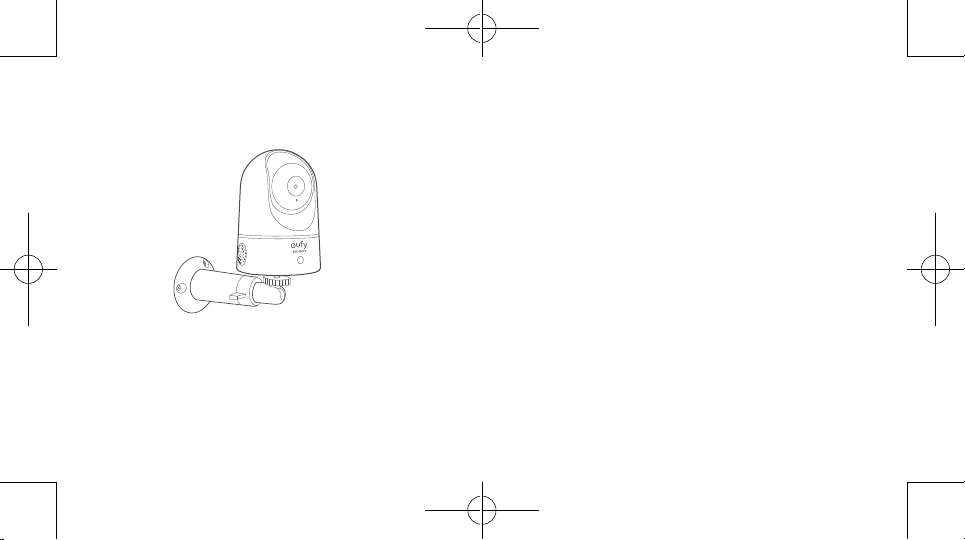
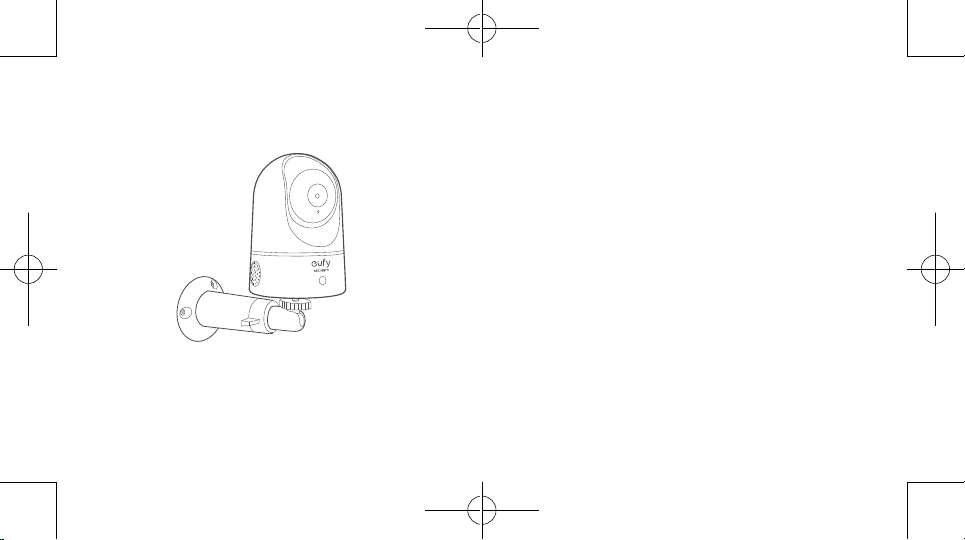
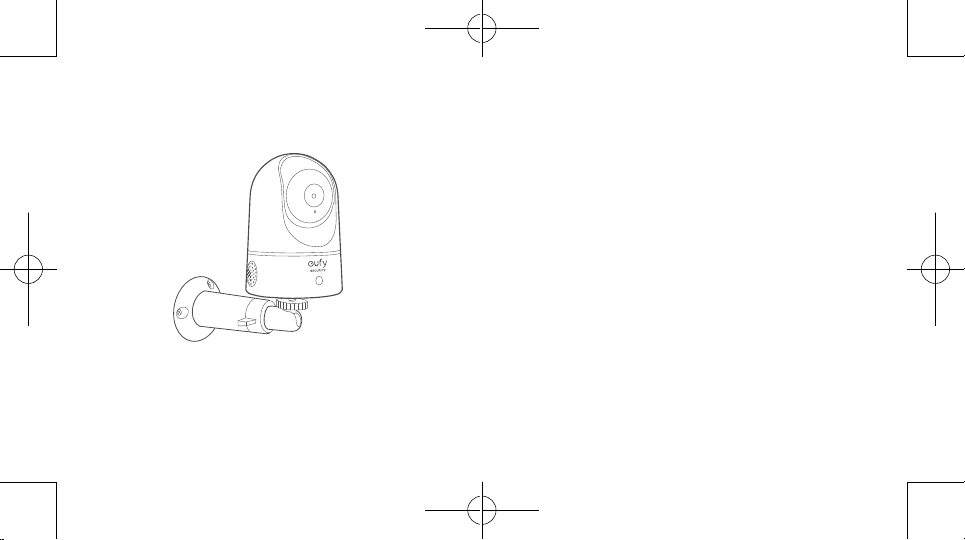
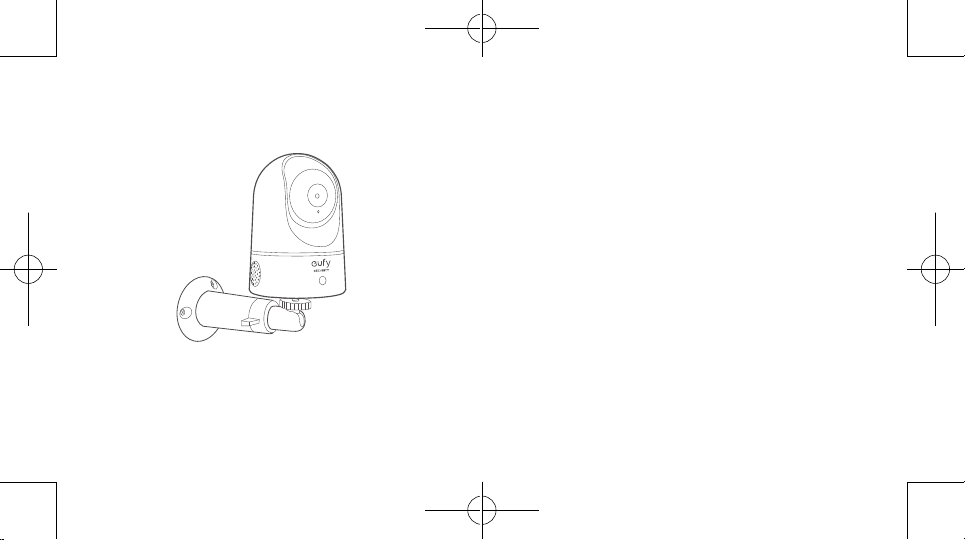
To mount the Indoor Cam on a wall, we recommend using the
mounting bracket (not provided) as the illustration below.
POWERING ON THE INDOOR CAM
Connect the Indoor Cam to a power outlet using the provided
USB cable and USB adapter. After being powered on, the Indoor
Cam will be connected to the system. When it is successfully
connected, the status LED will turn solid blue.
Rotate the Indoor Cam to adjust the view and check it using the
live stream which you can access in the eufy Security app. You
are now all set to use your Indoor Cam.
Tip:
For troubleshooting, check Help on the eufy Security app.
English
1211
English
NOTICE
FCC Statement
This device complies with Part 15 of the FCC Rules. Operation
is subject to the following two conditions: (1) this device may
not cause harmful interference, and (2) this device must accept
any interference received, including interference that may cause
undesired operation.
Warning:
Changes or modications not expressly approved by the
party responsible for compliance could void the user's authority
to operate the equipment.
Note:
This equipment has been tested and found to comply
with the limits for a Class B digital device, pursuant to Part 15 of
the FCC Rules. These limits are designed to provide reasonable
protection against harmful interference in a residential installation.
This equipment generates uses and can radiate radio frequency
energy and, if not installed and used in accordance with
the instructions, may cause harmful interference to radio
communications. However, there is no guarantee that interference
will not occur in a particular installation. If this equipment does
cause harmful interference to radio or television reception, which
can be determined by turning the equipment off and on, the user
is encouraged to try to correct the interference by one or more
of the following measures: (1) Reorient or relocate the receiving
antenna. (2) Increase the separation between the equipment and
receiver. (3) Connect the equipment into an outlet on a circuit
different from that to which the receiver is connected. (4) Consult
the dealer or an experienced radio/ TV technician for help.
FCC Radio Frequency Exposure Statement
The device has been evaluated to meet general RF exposure
requirements. The device can be used in xed/mobile exposure
condition. The min separation distance is 20cm.
Notice: Shielded cables
All connections to other computing devices must be made using
shielded cables to maintain compliance with FCC regulations.
The following importer is the responsible party
Company Name: POWER MOBILE LIFE, LLC
Address: 400 108th Ave NE Ste 400, Bellevue, WA 98004-5541
Telephone:1-800-988-7973
This product complies with the radio interference
requirements of the European Community.
Declaration of Conformity
Hereby, Anker Innovations Limited declares that this device is in
compliance with the essential requirements and other relevant
provisions of Directive 2014/53/EU.For the declaration of
conformity, visit the Web site:https://www.eufylife.com/.
English
1413
English
This product can be used across EU member states.
Due to the used enclosure material, the product shall only be
connected to a USB Interface of version 2.0 or higher.
The adapter shall be installed near the equipment and shall be
easily accessible.
Do not use the Device in the environment at too high or too low
temperature, never expose the Device under strong sunshine or
too wet environment.
The suitable temperature for T8411 and accessories is 0°C-40°C.
When charging, please place the device in an environment that has
a normal room temperature and good ventilation.
It is recommended to charge the device in an environment with a
temperature that ranges from 5°C~25°C
Please ensure to use only the charger offered by the manufacturer.
Using unauthorized charger may cause danger and violate the
authorization of the device and the guarantee article.
This charger is for indoor use only.
The charger type is TEKA-UCA20EU , output voltage/current is
5Vdc/2A. The plug considered as disconnect device of adapter.
RF exposure information: The Maximum Permissible Exposure
(MPE) level has been calculated based on a distance of d=20 cm
between the device and the human body. To maintain compliance
with RF exposure requirement, use product that maintain a 20cm
distance between the device and human body.
CAUTION RISK OF EXPLOSION IF BATTERY IS REPLACED
BY AN INCORRECT TYPE. DISPOSE OF USED BATTERIES
ACCORDING TO THE INSTRUCTIONS
Wi-Fi Operating Frequency Range:2412~2472MHz ; Wi-Fi Max
Output Power:14.46dBm(ERIP)
Bluetooth Operating Frequency Range:2402~2480MHz; Bluetooth
Max Output Power:0.64dBm(EIRP)
Anker Innovations Deutschland GmbH | Georg-Muche-Strasse 3-5,
80807 Munich, Germany
Anker Technology (UK) Ltd | Suite B, Fairgate House, 205 Kings
Road, Tyseley, Birmingham, B11 2AA, United Kingdom
This product is designed and manufactured with high
quality materials and components, which can be recycled
and reused.
This symbol means the product must not be discarded
as household waste, and should be delivered to an
appropriate collection facility for recycling. Proper
disposal and recycling helps protect natural resources,
human health and the environment. For more information
on disposal and recycling of this product, contact your
local municipality, disposal service, or the shop where you
bought this product.
15
English
IC Statement
This device complies with Industry Canada licence-exempt RSS
standard(s). Operation is subject to the following two conditions:
(1) this device may not cause interference, and
(2) this device must accept any interference, including interference
that may cause undesired operation of the device."
Le présent appareil est conforme aux CNR d'Industrie Canada
applicables aux appareils radio exempts de licence. L'exploitation
est autorisée aux deux conditions suivantes:
(1) l'appareil nedoit pas produire de brouillage, et
(2) l'utilisateur de l'appareil doit accepter tout brouillage
radioélectrique subi, même si le brouillage est susceptible d'en
compromettre le fonctionnement."
This Class B digital apparatus complies with Canadian ICES-003.
Cet appareil numérique de la classe B est conforme à la norme
NMB-003 du Canada.
IC RF Statement:
When using the product, maintain a distance of 20cm from the
body to ensure compliance with RF exposure requirements.
Lors de l'utilisation du produit, maintenez une distance de 20
cm du corps an de vous conformer aux exigences en matière
d'exposition RF.
Inhaltsverzeichnis
Im Lieferumfang 17
Produktübersicht 18
Einrichten des Systems 19
Montage der Indoor Cam 21
Einschalten der Indoor Cam 26
17 Deutsch Deutsch 18
PRODUKTÜBERSICHT
Indoor Cam 1080p Pan & Tilt
1
2
3
4
5
6
7
1
Objektiv
5
Lautsprecher
2
Mikrofon
6
Stromeingang
3
SD-Kartensteckplatz
7
SYNC-Taste
4
Status-LED
IM LIEFERUMFANG
Indoor Cam 1080p Pan & Tilt
Modell
:
T8411
Montageplatte
USB-Ladekabel
USB-Netzteil
Paket Befestigungsschrauben
Benutzerhandbuch
19 Deutsch Deutsch 20
EINRICHTEN DES SYSTEMS
1. Laden Sie die eufy Security-App aus dem App Store
(iOS-Geräte) oder bei Google Play (Android) herunter.
2. Richten Sie ein eufy Security-Konto ein. Navigieren
Sie zur Startseite der App.Tippen Sie auf "Gerät
hinzufügen", und fügen Sie die IndoorCam Pan 1080p
zu Ihrem System hinzu.
3. Befolgen Sie die Bildschirmanweisungen, um die
Einrichtung abzuschließen.
LED-Status
LED-Status Beschreibung
Blau an-/abschwellend Bereit zur Einrichtung
Leuchtet blau Eingeschaltet und in Funktion
Blinkt rot Vom Internet getrennt
Blinkt einmal rot Bewegung oder Geräusch erkannt
Leuchtet rot
In Funktion, Live-Stream oder die
Aufzeichnung eines Ereignisses wird
betrachtet
Leuchtet blau-violett System wird initialisiert
Blinkt abwechselnd blau
und rot
Firmware-Aktualisierung wird
durchgeführt
21 Deutsch Deutsch 22
MONTAGE DER INDOOR CAM
Auswählen des Montageorts
Die Kamera kann auf einem Tisch oder in einem Regal aufgestellt
oder an der Wand oder Decke montiert werden. Wählen Sie einen
Standort nahe an einer Steckdose und eine Höhe aus, von wo aus
Sie die gewünschte Ansicht erhalten.
• Trennen Sie die Indoor Cam vor der Montage von
der Steckdose.
• Halten Sie die Indoor Cam mindestens 20 cm von
Wänden oder allen anderen Objekten entfernt, die
die Sicht behindern könnten. Dies ist erforderlich,
um Infrarot-Reexionen zu vermeiden, die sich
negativ auf die Nachtsichtleistung auswirken können.
> 20CM
> 20CM
23 Deutsch Deutsch 24
Montage der Indoor Cam
Um die Indoor Cam an der Decke zu montieren, führen Sie die
folgenden Schritte aus:
1. Halten Sie die
Montageschablone
gegen die Decke und
markieren Sie dann
die Punkte, an denen
gebohrt werden
muss.
Ceiling
2. Bohren Sie die
Löcher mit einem
8-mm-Bohrer.
Ceiling
3. Richten Sie die Löcher in der Montageplatte mit denen in der
Decke aus.Setzen Sie die Dübel in die Löcher ein. Dübel sind
für Wände erforderlich, die aus einem harten Material wie
Beton, Ziegel oder Gips bestehen. Ziehen Sie die Schrauben mit
einem Kreuzschlitzschraubendreher an, um die Montageplatte
an der Decke zu befestigen.
Ceiling
Ceiling
4. Richten Sie die Nuten mit der Montageplatte aus und drehen
Sie die Indoor Cam im Uhrzeigersinn, bis sie einrastet.
25 Deutsch Deutsch 26
Zur Montage der Indoor Cam an einer Wand empfehlen wir die
Verwendung der Montagehalterung (nicht mitgeliefert) wie in der
Abbildung unten dargestellt.
EINSCHALTEN DER INDOOR CAM
Schließen Sie die Indoor Cam mit dem mitgelieferten USB-
Kabel und dem USB-Adapter an eine Steckdose an. Nach dem
Einschalten wird die Indoor Cam mit dem System verbunden.
Wenn die Verbindung erfolgreich hergestellt wurde, leuchtet die
Status-LED blau.
Drehen Sie die Indoor Cam, um die Ansicht anzupassen und
überprüfen Sie die Einstellung im Live-Stream, auf den Sie in der
eufy Security App zugreifen können. Sie können Ihre Indoor Cam
nun verwenden.
Tipp:
Tipps zur Fehlerbehebung nden Sie in der Hilfe der eufy Security-
App.
27 Deutsch
Tabla de contenido
Contenido 29
Descripción del producto 30
Conguración del sistema 31
Instalación de la cámara de interior 33
Encendido de la cámara de interior 38
Dieses Produkt ist mit hochwertigen Materialien und
Komponenten für Recycling und Wiederverwertung
konzipiert.
Dieses Symbol bedeutet, dass das Produkt nicht
als Hausmüll entsorgt werden darf, sondern einer
angemessenen Sammelstelle für das Recycling zugeführt
werden muss. Durch das ordnungsgemäße Entsorgen und
Recyceln tragen Sie zum Schutz natürlicher Ressourcen und
zur Vermeidung von Umwelt- und Gesundheitsschäden bei.
Weitere Informationen zum Entsorgen und Recyceln dieses
Produkts erhalten Sie von Ihrer Gemeindeverwaltung, Ihrem
zuständigen Entsorgungsdienst oder dem Geschäft, in dem
Sie dieses Produkt erworben haben.
29 Español Español 30
CONTENIDO
Cámara de interior 1080p con desplazamiento vertical y lateral
Model
o:
T8411
Placa de montaje
Cable USB
Adaptador USB
Paquete de tornillos de montaje
Manual del usuario
DESCRIPCIÓN DEL PRODUCTO
Cámara de interior 1080p con desplazamiento
vertical y lateral
1
2
3
4
5
6
7
1
Lente
5
Altavoz
2
Micrófono
6
Entrada de alimentación
3
Ranura para tarjetas SD
7
Botón Sincronizar
4
LED de estado
31 Español Español 32
CONFIGURACIÓN DEL SISTEMA
1. Descargue la aplicación eufy Security desde la
App Store (dispositivos iOS) o Google Play (dispositivos
Android).
2. Regístrese para crear una cuenta eufy Security. Vaya
a la página de inicio de la aplicación.Toque Añadir
dispositivo y añada la cámara de interior 1080p al
sistema.
3. Siga las instrucciones en pantalla para completar la
conguración.
Estado de LED
Estado de LED Descripción
Parpadeo azul Listo para congurar
Azul jo
Encendido y en funcionamiento
correcto
Rojo intermitente Sin conexión a Internet
Rojo intermitente (una vez) Movimiento o sonido detectado
Rojo jo
Funcionamiento correcto con un
usuario visualizando las imágenes en
tiempo real o grabando un evento
Violeta jo Inicialización del sistema en curso
Parpadeo azul y rojo
alternativamente
Actualización de rmware en curso
33 Español Español 34
INSTALACIÓN DE LA CÁMARA DE
INTERIOR
Seleccione una ubicación para la instalación
La cámara se puede colocar sobre una mesa o estantería, o
instalarse en la pared o en el techo. Seleccione una ubicación y
altura desde las que pueda obtener la vista deseada y alcanzar una
toma de corriente sin problemas.
• Desconecte la cámara de interior de la toma de
corriente antes de proceder a la instalación.
• Mantenga la cámara de interior a una distancia
mínima de 20 cm de paredes o cualquier objeto
que pueda obstruir la vista. Realice esto para evitar
el reejo infrarrojo, que puede tener un efecto
negativo sobre el rendimiento de visión nocturna.
> 20CM
> 20CM
35 Español Español 36
Instale la cámara de interior
Para montar la cámara de interior en el techo, siga los pasos a
continuación:
1. Coloque la tarjeta
de posicionamiento
contra el techo
y, a continuación,
marque los puntos
donde se deberán
taladrar los oricios.
Ceiling
2. Taladre los oricios
con una broca de
8 mm (5/16”).
Ceiling
3. Alinee los oricios de la placa de montaje con los oricios
taladrados en el techo. Inserte los tacos dentro de los oricios;
es necesario utilizar los tacos en paredes que están hechas con
materiales duros, como hormigón, ladrillo o estuco. Apriete
los tornillos con un destornillador Phillips para jar la placa de
montaje al techo.
Ceiling
Ceiling
4. Alinee las ranuras de la placa de montaje y gire la cámara de
interior eufy en sentido de las agujas del reloj hasta que encaje
en su lugar.
37 Español Español 38
Para instalar la cámara de interior en la pared, se recomienda
utilizar el soporte de montaje (no suministrado), como se indica
en la siguiente ilustración.
ENCENDIDO DE LA CÁMARA DE
INTERIOR
Conecte la cámara de interior a una toma de corriente mediante
el uso del cable USB y el adaptador USB suministrados. Una vez
encendida, la cámara de interior se conectará al sistema. Cuando
se haya conectado correctamente, el LED de estado se iluminará
en color azul jo.
Gire la cámara de interior para ajustar la vista y compruébela
mediante las imágenes en tiempo real, que se pueden visualizar a
través de la aplicación eufy Security. Ya está listo para utilizar la
cámara de interior eufy.
Consejo:
Para solucionar problemas, consulte la sección Ayuda de la
aplicación eufy Security.
39 Español
Este producto se ha diseñado y fabricado con materiales
y componentes de gran calidad que pueden reciclarse y
reutilizarse.
Este símbolo indica que el producto no debe desecharse
como residuo doméstico, sino que debe depositarse en
unas instalaciones de recogida adecuadas para su reciclaje.
La eliminación y el reciclaje adecuados ayudan a proteger
los recursos naturales, la salud humana y el medio ambiente.
Para obtener más información acerca de la eliminación
y el reciclaje de este producto, póngase en contacto con
su ayuntamiento, el servicio de retirada de desechos o la
tienda donde compró el producto.
Sommaire
Contenu 41
Présentation du produit 42
Conguration du système 43
Fixation de la caméra intérieure 45
Alimentation de la caméra intérieure 50
41 Français Français 42
PRÉSENTATION DU PRODUIT
Indoor Cam 1080p Pan et incl.
1
2
3
4
5
6
7
1
Objectif
5
Haut-parleur
2
Microphone
6
Entrée d'alimentation
3
Logement de carte SD
7
Bouton SYNC
4
LED d'état
CONTENU
Indoor Cam 1080p Pan et incl.
Model
:
T8411
Support de xation
Câble USB
Adaptateur USB
Lot de vis de montage
Manuel utilisateur
43 Français Français 44
CONFIGURATION DU SYSTÈME
1. Téléchargez l'application eufy Security sur l'App Store
(appareils iOS) ou Google Play (Android).
2. Inscrivez-vous à un compte eufy Security. Rendez-
vous sur la page d'accueil de l'application.Appuyez sur
Ajouter un appareil, puis ajoutez l'IndoorCam Pan
1080p à votre système.
3. Suivez les instructions à l'écran pour effectuer le
processus de conguration.
État LED
État LED Description
Bleu clignotant lentement Prêt pour la conguration
Bleu xe Allumé et fonctionne correctement
Rouge clignotant Déconnecté d'Internet
Rouge clignotant une fois Mouvement ou son détecté
Rouge xe
Fonctionne correctement, une
personne consulte le ux en direct
ou enregistre un événement
Bleu-violet xe Initialisation du système
Voyant clignotant en bleu
et rouge alternativement
Mise à niveau du rmware en cours
45 Français Français 46
FIXATION DE LA CAMÉRA
INTÉRIEURE
Trouver un emplacement pour le montage
La caméra peut être placée sur une table ou une étagère, ou être
xée sur un mur ou au plafond. Sélectionnez un emplacement et
une hauteur vous fournissant la vue de votre choix, à portée d'une
prise.
• Déconnectez la caméra intérieure de la prise avant
de la xer.
• Maintenez une distance d'au moins 20 cm/0,7 pi
entre la caméra intérieure eufy et des murs
ou tout élément pouvant obstruer la vue. Cela
permet d'éviter toute réexion infrarouge qui
peut avoir un impact négatif sur les performances
de vision de nuit.
> 20CM
> 20CM
47 Français Français 48
Fixation de la caméra intérieure
Pour monter la caméra intérieure eufy au plafond, suivez les
étapes ci-dessous :
1. Placez la carte de
positionnement
au plafond, puis
marquez les points
où percer.
Ceiling
2. Percez des trous
avec une mèche de
8 mm (5/16 po).
Ceiling
3. Alignez les trous sur la plaque de montage à ceux du plafond.
Insérez les ancrages dans les trous ; les ancrages sont
nécessaires pour les murs faits de matériaux durs tels que
le béton, la brique ou le stuc. Fixez les vis avec un tournevis
cruciforme pour xer la plaque de montage au plafond.
Ceiling
Ceiling
4. Alignez les rainures avec la plaque de xation et faites pivoter
la caméra intérieure, jusqu'à ce qu'elle se clipse.
49 Français Français 50
Pour monter la caméra intérieure sur un mur, nous vous
recommandons d'utiliser le support de xation (non fourni)
comme illustré ci-dessous.
ALIMENTATION DE LA CAMÉRA
INTÉRIEURE
Branchez la caméra intérieure à une prise de courant à l'aide
du câble et de l'adaptateur d'alimentation USB fournis. Une fois
allumée, la caméra intérieure est connectée au système. Lorsque
la connexion est réussie, le voyant d'état devient bleu xe.
Faites pivoter la caméra intérieure pour ajuster la vue et vériez à
l'aide de la diffusion en direct, accessible depuis l'application eufy
Security. Vous pouvez maintenant utiliser votre caméra intérieure
eufy.
Conseil :
Pour le dépannage, consultez « Aide » sur l'application eufy
Security.
51 Français
Indice
Contenuto della confezione 53
Panoramica del prodotto 54
Congurazione del sistema 55
Montaggio della telecamera per interni 57
Alimentazione della telecamera per interni 62
Ce produit a été conçu et fabriqué avec des matériaux et
composants de haute qualité, qui peuvent être recyclés et
réutilisés.
Ce symbole signie que le produit ne doit pas être jeté
avec les déchets ménagers, mais doit être transmis à un
établissement de collecte adapté pour permettre son
recyclage. L'élimination et le recyclage appropriés aident
à protéger les ressources naturelles, la santé humaine et
l'environnement. Pour plus d'informations sur l'élimination
et le recyclage de ce produit, contactez votre municipalité
locale, le service de mise au rebut ou la boutique où vous
avez acheté ce produit.
53 Italiano Italiano 54
CONTENUTO DELLA CONFEZIONE
Telecamera per interni 1080p con funzioni panoramica e
inclinazione
Model
:
T8411
Piastra di montaggio
Cavo USB
Adattatore USB
Confezione viti di montaggio
Manuale utente
PANORAMICA DEL PRODOTTO
Telecamera per interni 1080p con funzioni
panoramica e inclinazione
1
2
3
4
5
6
7
1
Obiettivo
5
Altoparlante
2
Microfono
6
Ingresso alimentazione
3
Slot per scheda SD
7
Pulsante SYNC
4
LED di stato
55 Italiano Italiano 56
CONFIGURAZIONE DEL SISTEMA
1. Scaricare l’app eufy Security dall’App Store (dispositivi
iOS) o da Google Play (dispositivi Android).
2. Registrarsi per creare un account eufy Security.
Accedere alla home page dell’app.Toccare Aggiungi
dispositivo e aggiungere la telecamera per interni 1080p
con funzione panoramica al sistema.
3. Seguire le istruzioni visualizzate sullo schermo per
completare la congurazione.
Stato LED
Stato LED Descrizione
Blu intermittente Pronto per la congurazione
Blu sso
Alimentata e propriamente
funzionante
Rosso lampeggiante Scollegato da Internet
Rosso lampeggiante una
volta
Movimento o suono rilevato
Rosso sso
Funziona correttamente con
qualcuno che visualizza lo streaming
live o che registra
l’evento
Viola bluastro sso Inizializzazione del sistema
Lampeggiamento blu e
rosso alternato
Aggiornamento del rmware in
corso
57 Italiano Italiano 58
MONTAGGIO DELLA TELECAMERA
PER INTERNI
Selezionare una posizione per il montaggio
La telecamera può essere posizionata su un tavolo, uno scaffale o
può essere montata su una parete o sul softto. Selezionare una
posizione e un’altezza da cui è possibile ottenere la vista desiderata
e raggiungere facilmente una presa di corrente.
• Scollegare la camma interna dalla presa di corrente
prima del montaggio.
• Tenere la telecamera per interni ad almeno 20 cm
dalle pareti o da qualsiasi oggetto che possa
ostruire la vista. Seguire questa indicazione per
evitare il riesso dei raggi infrarossi che può avere
un impatto negativo sulle prestazioni della visione
notturna.
> 20CM
> 20CM
59 Italiano Italiano 60
Montaggio della telecamera per interni
Per montare la telecamera per interni eufy sul softto, attenersi
alla seguente procedura:
1. Posizionare
la scheda di
posizionamento
contro il
softto e quindi
contrassegnare i
punti in cui sarà
necessaria la
perforazione.
Ceiling
2. Praticare i fori
con una punta da
trapano da 5/16” (8
mm).
Ceiling
3. Allineare i fori sulla piastra di montaggio con quelli sul softto.
Inserire i tasselli all’interno dei fori, necessari nei casi in cui
le pareti siano in materiali duri come calcestruzzo, mattoni o
stucco. Fissare le viti con un cacciavite a stella per ssare la
piastra di montaggio al softto.
Ceiling
Ceiling
4. Allineare le scanalature con la piastra di montaggio e ruotare
la telecamera per interni in senso orario no a quando non
scatta in posizione.
61 Italiano Italiano 62
Per montare la telecamera per interni su una parete, si consiglia
di utilizzare la staffa di montaggio (non fornita) come nella gura
seguente.
ALIMENTAZIONE DELLA
TELECAMERA PER INTERNI
Collegare la telecamera per interni a una presa di corrente
utilizzando il cavo USB e l’adattatore USB forniti. Dopo essere
stata accesa, la telecamera per interni verrà collegata al sistema. Se
collegata correttamente, il LED di stato diventerà blu.
Ruotare la telecamera per interni eufy per regolare la vista e
controllarla con lo streaming live a cui è possibile accedere tramite
l’app eufy Security. Ora è tutto pronto per usare la telecamera per
interni eufy.
Suggerimento:
Per la risoluzione dei problemi, consultare la Guida nell’app eufy
Security.
63 Italiano
Il prodotto è progettato e realizzato con materiali e
componenti di alta qualità, riciclabili e riutilizzabili.
Questo simbolo indica che il prodotto non deve essere
smaltito tra i riuti domestici e deve essere consegnato
presso un centro di raccolta per il riciclo. Lo smaltimento
e il riciclaggio effettuati in modo corretto aiutano a
proteggere le risorse naturali, la salute umana e l’ambiente.
Per ulteriori informazioni sullo smaltimento e sul riciclaggio
di questo prodotto, contattare gli ufci comunali preposti, il
servizio per lo smaltimento oppure il negozio in cui è stato
acquistato il prodotto.
CUSTOMER SERVICE
Kundendienst | Servicio de atención al cliente | Service clientèle | Servizio clienti
• Warranty
Garantie | Garantía | Garantie | Garanzia
12-month Limited Warranty
12 Monate eingeschränkte Garantie | Garantía limitada de 12 meses
Garantie limitée de 12 mois | Garanzia limitata di 12 mesi
• Call Us
Rufen Sie uns an | Contacto por teléfono | Par téléphone | Telefono
United States +1 (800) 988 7973 Mon-Fri 9AM-5PM (PT)
United Kingdom +44 (0) 1604 936 200 Mon-Fri 6AM-11AM (GMT)
Germany +49 (0) 69 9579 7960 Mon-Fri 6:00-11:00
• Email Us
Senden Sie uns eine E-Mail | Contacto por correo electrónico | Par e-mail | E-mail
Anker Innovations Limited
Room 1318-19,Hollywood Plaza,610 Nathan Road,Mongkok,Kowloon,Hong Kong