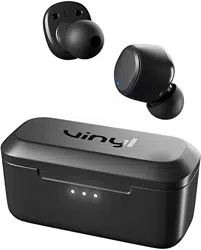

TROUBLESHOOTING
PAIRING ISSUES?
ISSUE: The biggest challenge with true wireless earbuds is ensuring your buds are
properly connected to each other and your device. There are times when you may
unintentionally disconnect the buds and change their paired state, this can create
pairing challenges and impact your ability to use either bud solo (Solo Mode). Do not
worry, as there is an easy fix!
SOLUTION:
To ensure ease of re-pairing, please unpair or forget your Vinyl in your paired Bluetooth
device list
Remove the Vinyl earbuds from the charging case and manually power OFF by pressing the
button on BOTH earbuds for 4 seconds
Once both buds have been powered OFF, reset them:
1. Press the button on each bud for 10 seconds to completely reset them (this will power cycle
them on and off again).
Sync the buds together:
1. Place the buds back in the case until both LEDs show red, and then pull them back out.
2. Both buds will automatically power ON and the LEDs will simultaneously flash BLUE while
they sync to each other.
3. You will hear a tone to indicate the sync was successful, and the right OR the left bud will
begin to flash RED/BLUE.
At this time, turn on your device’s Bluetooth and look for Vinyl in your list of available
Bluetooth devices. Please make sure it only appears once, and select it.
1. IMPORTANT – Select all “Pair” and “Ok” prompts that will pop up on your screen.
2. Once successfully paired, a voice prompt will notify you that you are now “Connected” and
you will see Vinyl twice in your “paired devices” list.
USE EITHER BUD SOLO:
ISSUE: If you’re a user that would like to use the Vinyl with only one earbud, you’re
in luck! The technology in Vinyl allows the user to use either the left OR the right bud
in Solo Mode. Once paired correctly, you will be able to switch between buds at your
discretion. Although, if you’re having any challenges using either bud solo, you may

follow these simple steps to ensure ease of use when pairing and switching between
Solo and Stereo Modes.
SOLUTION:
Please note – BOTH the left and right bud can be used in Solo Mode
For the optimal Solo Mode functionality, first Power On and pair your buds to your device
normally or as described in our troubleshooting section. This will ensure the seamless
transition between Stereo and Solo modes.
Once both Vinyl buds are paired together, simply place the RIGHT or LEFT bud back into the
case; whichever you prefer! The remaining bud will stay paired and function with both phone
calls and music.
You will maintain bud functionality, but you will lose some of the media control functionality
such as “Volume + or -“, and “Track << or >>”, depending on which bud was placed in the
case when in Solo Mode. The RIGHT bud will always control Volume Up and Track forward,
and the LEFT bud will always control Volume Down and Track Back.
If you would like to change back to Stereo Mode from Solo Mode, simply pull the other bud
from the case at any time and you will hear a tone, or the music will seamlessly begin to
stream to indicate that you have automatically entered back into Stereo Mode.
PLEASE NOTE - If you’re having any trouble switching between the LEFT and RIGHT buds
in Solo Mode, you will need to follow the reset instructions explained above and clear BOTH
earbuds and re-pair to enter back into the correct paired state to use either bud in Solo Mode
again.
BUDS NOT CHARGING IN CASE/CASE LID NOT
CLOSING PROPERLY?
ISSUE: Not seeing the RED LED indicator on the buds when you’ve placed your
Vinyl back in the charging case?
SOLUTION:
Check to see if any debris is blocking the charging pins at the bottom of the case, or on the
bud.
Check to see if the ear gels have been twisted or are falling off. This could be keeping the
buds from sitting correctly in the case. If you’re having a hard time closing the lid completely,
it is likely because the earbuds are not set correctly or the gels are interfering.
Check the battery level fuel gauge on the charging case to ensure the case is holding a
charge.

FAQS
BATTERY & CHARGE:
WHAT IS THE TOTAL CHARGING TIME FOR VINYL VIA MICRO-USB
CHARGING CABLE?
1 hour 45 minutes for the earbuds to charge to 100% inside the case
2 hours for the case to charge to 100%
DOES VINYL HAVE SOME SORT OF FAST CHARGE?
No – Vinyl does not have Rapid Charge technology.
BATTERY LIFE AND PLAY TIME IS VERY IMPORTANT TO ME, HOW
LONG DOES THE VINYL LAST?
There is up to 4+ hours of play time in the ear buds, and up to 10+ hours in the case,
allowing up to 14+ Hours of total play time.
CAN I CHARGE VINYL WITH MY SKULLCANDY POWER
ACCESSORIES/PC/LAPTOP?
Pretty much all USB-A to Micro USB charging cables will work to charge your Vinyl earbuds
NEW FEATURES:
WHAT IS THE BENEFIT OF THE USE EITHER BUD SOLO FEATURE AND
FUNCTIONALITY?
This allows both the LEFT and RIGHT bud to work alone, which allows more media controls
and features to be activated from either side, and the microphone to work on either side.

Functions such as, play/pause, answer call/hang up call and Activate Assistant, can be
controlled on both the LEFT and RIGHT bud, simplifying the user experience.
This feature also allows the user to utilize either the LEFT or RIGHT bud in Solo Mode,
rather than being limited to just one specific side.
DOES THE VINYL HAVE WIRELESS CHARGING IN THE CASE?
No, there is no wireless charging in the case.
CONNECTION:
DOES THE VINYL PAIR WITH THE SKULLCANDY APP?
The Vinyl will not pair with the Skullcandy App.
WHAT IS THE BLUETOOTH RANGE OF THE VINYL?
You will be able to listen up to 30+ feet (10+ meters) away from your paired device, though
your connection experience may vary based on your environment.
CAN I CONNECT VINYL TO A COMPUTER?
Yes as well as to a phone, tablet, MP3 player, laptop, or anything else with a Bluetooth
connection.
CAN I USE VINYL WITH A PS4/XBOX ONE/SWITCH?
Xbox One: No
Switch: Yes
PS4: No
WHICH VERSION OF BLUETOOTH DOES VINYL USE?
Bluetooth® version 5.0

WHICH SIDE OF VINYL IS CONSIDERED THE “MAIN” BUD?
The LEFT and RIGHT side earbud can be your main earbud, so either bud can be used in
Solo Mode (one earbud listening).
WHEN ON A CALL OR LISTENING TO MY CONTENT, WILL I HEAR
AUDIO IN ONE OR BOTH EARBUDS?
Vinyl has stereo (both bud) calling and streaming so you’ll always hear the caller or your
content in both ears.
Although, you do have the option to use only one earbud (left or right side) if you prefer Solo
Mode in some situations.
GENERAL QUESTIONS:
CAN I USE SIRI/GOOGLE ASSISTANT/ALEXA WITH MY VINYL?
When paired to your device, you can press the LEFT or RIGHT bud three times to activate
your voice assistant feature at any time.
CAN I USE VINYL FOR SPORTS OR WORKING OUT?
Yes! Vinyl is sweat and water-resistant (IPX4).
WARRANTY:
***Please be sure to reach out to customer service before filing a claim, we can likely
help you quickly troubleshoot and solve your problem***
WHAT HAPPENS IF MY EARBUDS BREAK?
If it is a manufacturer's defect, Skullcandy has you covered with a 1-Year Limited Warranty.