User Manual
Dual Channel TENS
Prescription Strength Pain Relief
• Quick and Easy Set-Up
• 20 Minute Treatment Timer
• 12 Preset Modes
• 100 Intensity Levels
• Treatment Record Log
• Auto Shut-Off

2
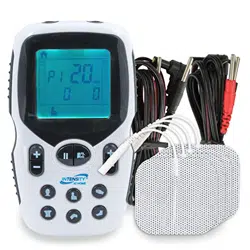
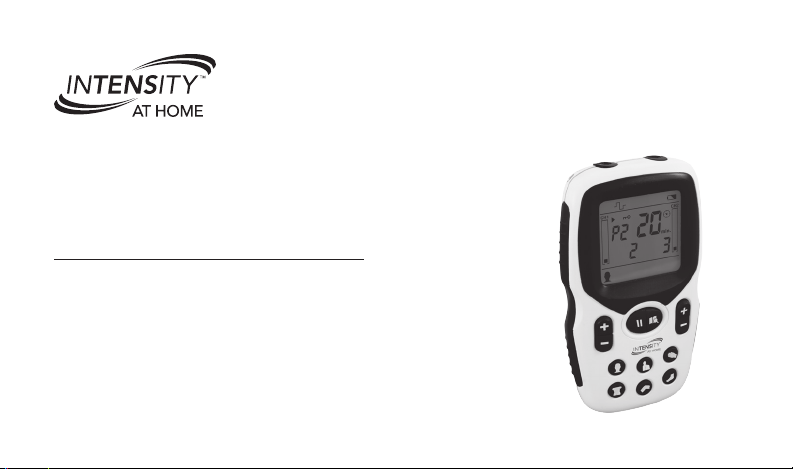
This manual is valid for the InTENSity at Home
™
Dual Channel TENS E200-6R.
This instruction manual is published by Compass Health Brands Corp.
Compass Health Brands reserves the right to improve and amend this manual at any time without prior
notice. Amendments may however be published in new editions of this manual.
All Rights Reserved. Rev. V2.0 © 2017
Please Note:
Compass Health Brands recommends consulting a physician before using
a TENS unit to verify any possible contraindications.
Conformity to safety standards.
Compass Health Brands declares that the device complies with the following normative documents:
IEC60601-1, IEC60601-1-2, I EC60601-2-10,
IEC62366, IEC60601-1-11, ISO10993-5, ISO10993-10,
ISO10993-1, ISO7010

3
Introduction ......................................................... 4
Important Safety Precautions and Warnings ......... 6
• Safety Symbols .............................................. 6
Package Contents ............................................. 13
Know Your Device .............................................. 14
Battery Information ............................................ 16
• Disposal of Batteries .................................... 16
Treatment Setup ................................................ 17
• Connect Electrodes and Lead Wires ............ 17
• Electrode Placement .................................... 18
• Select Body Part and Program ..................... 19
• Therapeutic Programs ................................. 20
• Intensity Adjustment .................................... 22
• Start Treatment ............................................ 22
• Pause or Stop Treatment ............................. 23
Other Important Features ................................... 24
• Safety Lock ................................................. 24
• Treatment Record Log ................................. 25
Electrode Positioning ........................................ 26
Cleaning and Storage ........................................ 29
• Cleaning the Unit ......................................... 29
• Cleaning the Electrodes ............................... 29
• Washing the Electrodes ............................... 29
• Storage ....................................................... 31
Technical Information ......................................... 32
Technical Specifications ..................................... 32
Troubleshooting ................................................. 33
Disposal............................................................. 36
Glossary of Symbols .......................................... 36
Important Information Regarding
Electromagnetic Compatibility (EMC) .................. 37
Warranty ............................................................ 44
TABLE OF CONTENTS

4
How does TENS work?
Scientic theory suggests that electrical stimulation
therapy may work in several ways:
• The gentle electrical pulses move through the skin
to nerves nearby the source of pain, shutting out
the pain message from ever reaching the brain.
• The gentle electrical pulses increase the
production of endorphins, the body’s natural
pain killer.
Thank you for purchasing the InTENSity at Home
™
Dual Channel TENS (Model E200-6R) for your pain
relief solution.
Please read the complete manual carefully before
using the device for the rst time, and keep this
instruction manual in a convenient place or store with
the device for future reference.
What is TENS?
TENS stands for Transcutaneous Electrical Nerve
Stimulation. It is a noninvasive, drug-free method of
controlling pain. TENS uses tiny electrical impulses
sent through the skin to the nerves to modify pain
perception. TENS does not cure any physiological
problem. It only helps control the pain. TENS does
not work for everyone. However, in most patients,
it is eective in reducing or eliminating the pain,
allowing for a return to normal activity.
INTRODUCTION
5
What conditions can TENS help relieve?
TENS provides pain relief for a number of dierent
pain conditions associated with exercise, normal
work and household activities. This product is
designed for temporary relief of pain associated with
sore and aching muscles in the:
• Neck • Waist
• Shoulders • Upper Extremities (arms)
• Back • Lower Extremities (legs)
The InTENSity at Home
™
Dual Channel
TENS should be applied to normal, healthy,
clean and dry skin of adult patients.
What can I treat?
The InTENSity at Home
™
Dual Channel TENS can
treat many dierent types of pain. Refer to diagrams
on pages 26 – 28 for the ideal locations to place
the electrodes to treat the most common forms of
pain. For other areas of pain, place the electrodes on
either side of the pain area. PLEASE NOTE: Never
place the electrodes on the head, throat, face, heart,
chest area, eyes, oral cavity, sexual organs or over
the spine or bony premises.
How long can I use the TENS unit?
You may use the TENS unit no more than 20 minutes
a session, up to 2 times per day for each area of
your body, or muscles in that region may become
exhausted and sore.
PLEASE NOTE: The electrodes are designed for
temporary use for approximately 10 treatments.
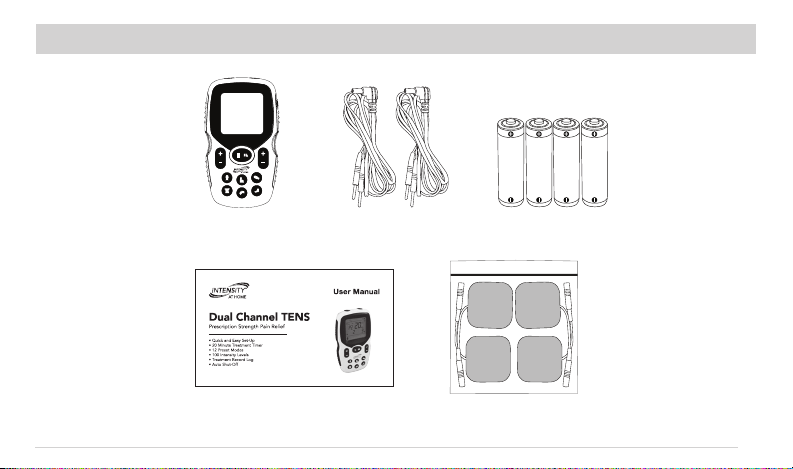
Package Contents:
• 1 x TENS Device • 4 x “AAA” Batteries
• 4 x Electrodes • 2 x Lead Wires
• 1 x User Manual
INTRODUCTION (CONT’D)
6
SAFETY SYMBOLS USED IN
THIS MANUAL
Indicates a potentially hazardous situation
which, if not avoided, could result in
death or serious injury.
Indicates a potentially hazardous situation
which, if not avoided, could result in
serious injury and equipment damage.
Indicates a potentially hazardous situation
which, if not avoided, may result in minor
or moderate injury to the user, or damage
to the device or other property.
DANGER
This stimulator must not be used in combination
with the following medical devices:
• Internally transplanted electronic
medical devices, such as pacemakers.
• Electronic life-support equipment, such
as respirators.
• Electronic medical devices attached to the body,
such as electrocardiographs.
Using this stimulator with other electronic medical
devices may cause erroneous operation of those
devices.
It is important that you read all the warning and precautions included in this manual because
they are intended to keep you safe, prevent injury and avoid a situation that could result in
serious injury and equipment damage.
IMPORTANT SAFETY PRECAUTIONS AND WARNINGS
7
WARNING
Consult with your physician before using this
device, because the device may cause lethal rhythm
disturbances in certain susceptible individuals.
DO NOT USE THIS DEVICE UNDER
THESE CONDITIONS:
• If you have a cardiac pacemaker, implanted
debrillator, or other implanted metallic or
electronic device. Such use could cause electric
shock, burns, electrical interference, or death.
• Together with a life-supporting medical electronic
device such as an articial heart, lung or respirator.
• In the presence of electronic monitoring equipment
(e.g., cardiac monitors, ECG alarms), which may
not operate properly when the electrical stimulation
device is in use.
• If there are any underlying skin conditions (i.e.
erythema, psoriasis, eczema, etc.)
• On open wounds or rashes, over swollen, red,
infected, inamed areas, or skin eruptions (e.g.,
phlebitis, thrombophlebitis, varicose veins); or on
top of, or in proximity to, cancerous lesions.
• Over areas of skin that lack normal sensation.
• On the opposite sides of your head since the
eects of stimulation of the brain are unknown.
DO NOT USE ON THESE INDIVIDUALS:
• Pregnant women, because the safety of
electrical stimulation during pregnancy has not
been established.
• Children or infants, because the device has not
been evaluated for pediatric use.
• Persons incapable of expressing their thoughts
or intentions.
IMPORTANT SAFETY PRECAUTIONS AND WARNINGS (CONT’D)

8
DO NOT USE THIS DEVICE DURING
THESE ACTIVITIES:
• Bathing or showering
• Sleeping
• Driving, operating machinery or any activity in which
electrical stimulation can put you at risk for injury.
PAIN MANAGEMENT WARNINGS
• If you have had medical or physical treatment for
your pain, consult with your physician before using
this device.
• If your pain does not improve, becomes seriously
chronic or severe, or continues for more than ve
days, stop using the device and consult with
your physician.
• The mere existence of pain functions as a very
important warning telling us that something
is wrong. Therefore, if you suer from any serious
illness, consult your physician in order to conrm
that it is advisable for you to use this TENS unit.
• Consult a physician if you are on any pain
medications as they may decrease your normal
level of sensation, causing possible adverse
reactions not to be felt.
WARNING AND PRECAUTIONS
REGARDING THE ELECTRODES
• Apply electrodes to normal, healthy, clean, dry
skin (of adult patients) because it may otherwise
disrupt the healing process.
• If you experience any skin irritation or redness
after a session, do not continue stimulation in that
area of the skin.
NEVER APPLY THE ELECTRODES TO:
• The head or any area of the face.
IMPORTANT SAFETY PRECAUTIONS AND WARNINGS (CONT’D)
9
• The neck or any area of the throat
because this can cause severe muscle
spasms resulting in closure of the airway,
diculty breathing, or adverse eects on heart
rhythm or blood pressure.
• Both sides of the thorax simultaneously
(lateral or front and back), or across your
chest because the introduction of
electrical current may cause rhythm disturbances,
which could be lethal.
WARNING AND PRECAUTIONS
REGARDING THE ELECTRODE
• Do not bend or fold because the electrode may
not function properly. Place the electrode onto the
plastic lm and then store in the sealed container
when not in use.
• Do not apply ointment or any solvent to the
electrodes or to your skin because it will keep
the electrode from functioning properly.
• The electrode is already pre-gelled and will adhere
to your skin.
• To avoid damage to the adhesive surface of the
electrode, put the electrodes only on the skin or
on the plastic lm provided.
• Place electrodes anywhere from 2”-6” apart from
each other on your skin.
• Always place clean electrodes in accordance with
the illustrations provided (Refer to pages 26 – 28
for electrode placement).
DO NOT USE YOUR ELECTRODES THIS WAY:
• Do not place on your spine or backbone.
• Electrodes should not touch any metal object,
such as a belt buckle, necklace or other jewelry
made from metal.
IMPORTANT SAFETY PRECAUTIONS AND WARNINGS (CONT’D)
10
DO NOT USE YOUR ELECTRODES THIS WAY (CONT’D)
• Do not share electrodes with another person. This may
cause a skin irritation or infection. Electrodes are
intended for use by one person.
• Do not place or relocate the electrodes while the
device is on.
• Always turn the power o before removing or
changing the electrode location.
• Do not leave electrodes attached to the skin
after treatment.
• Electrodes should not be placed on the soles of
both feet at the same time.
• Electrodes should not be placed on the calves of
both legs at the same time.
CAUTION WHILE USING THE TENS UNIT
• If the TENS unit is not functioning properly or you
feel discomfort, immediately stop using the device.
• Do not use for any other purpose except as
described in this manual.
• Do not insert the electrode plug into any place
other than the output socket on the main unit.
• Do not mix Alkaline and Manganese batteries as
this will shorten the battery life.
• Do not pull on the electrode cord during
treatment.
• Do not use the TENS device while wearing
electronic devices such as watches as this may
damage the device.
• Do not use near a cell phone as this may cause
the stimulator to malfunction.
• Do not bend or pull the end of the cord.
• When pulling out the cord from the device, hold
the plug and pull.
• Replace the cord when broken or damaged.
IMPORTANT SAFETY PRECAUTIONS AND WARNINGS (CONT’D)

11
• Do not throw the batteries into a re.
The batteries may explode.
• Dispose of the device and components according
to applicable legal regulations. Unlawful disposal
may cause environmental pollution.
• Using electrodes that are too small or incorrectly
applied, could result in discomfort or skin burns.
• Always use electrodes that are legally marked and
sold in the United States for over-the-counter (OTC)
use only (InTENSity at Home
™
Electrodes – E201-6R).
GENERAL PRECAUTIONS
• The long-term eects of electrical stimulation
are unknown.
• Apply stimulation to only normal, intact, clean,
dry, and healthy skin.
• TENS is not eective in treating the original source
or cause of the pain, including headache.
• TENS is not a substitute for pain medications and
other pain management therapies.
• TENS devices do not cure diseases or injuries.
• TENS is a symptomatic treatment and, as such,
suppresses the sensation of pain that would
otherwise serve as a protective mechanism.
• Eectiveness is highly dependent upon patient
selection by a practitioner qualied in the
management of pain patients.
• You may experience skin irritation or hypersensitivity
due to the electrical stimulation or electrical
conductive medium (gel) on the electrodes.
• If you have suspected or diagnosed heart disease,
you should follow precautions recommended by
your physician.
• If you have suspected or diagnosed epilepsy,
you should follow precautions recommended by
your physician.
IMPORTANT SAFETY PRECAUTIONS AND WARNINGS (CONT’D)
12
GENERAL PRECAUTIONS (CONT’D)
• Use caution if you have a tendency to bleed
internally, such as following an injury or fracture.
• Consult with your physician prior to using the
device after a recent surgical procedure, because
stimulation may disrupt the healing process.
• This stimulation should not be applied over the
menstruating or pregnant uterus.
• This stimulation should not be applied over areas
of skin that lack normal sensation.
• Keep unit away from young children.
The unit contains small pieces that may
be swallowed. Contact your physician
immediately if ingested.
• Use this device only with the InTENSity at Home
™
brand electrodes (E201-6R).
POSSIBLE ADVERSE REACTIONS
• Do not use the device to treat one region for
extended periods of time (more than 20 minutes
a session, up to 2 times/day) or muscles in that
region may become exhausted and sore.
• You may experience skin irritation and burns
beneath the stimulation electrodes applied to your
skin.
• You should stop using the device and consult with
your physician if you experience adverse reactions
from using the device.
IMPORTANT SAFETY PRECAUTIONS AND WARNINGS (CONT’D)
13
Instruction Manual
E200-6R Unit (2) Lead Wires
(4) “AAA” Batteries
(4) 2” x 2” Electrodes
PACKAGE CONTENTS
14
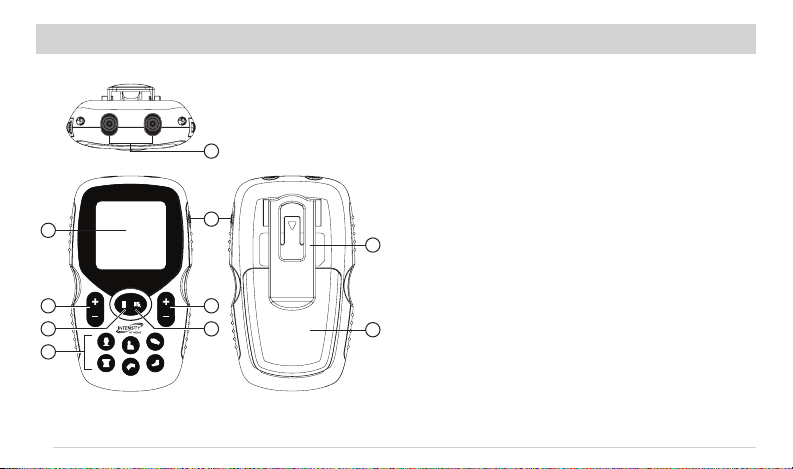
CH1 CH 2
1. LCD Display: Operating state of the device
2. Program Buttons: Select body part and treatment
program.
3. CH 1 Output Intensity: Increase or decrease
channel 1 intensity.
4. CH 2 Output Intensity: Increase or decrease
channel 2 intensity.
5. Pause Button: Pause/resumes treatment.
6. Treatment Records: To check treatment records
and usage history.
7. Power: Press to turn on the device. Press and
hold for 3 seconds to turn o the device.
8. Output Sockets: Lead wire output sockets
9. Belt Clip
10. Battery Cover
1
3
5
4
6
7
9
8
10
2
KNOW YOUR DEVICE
15
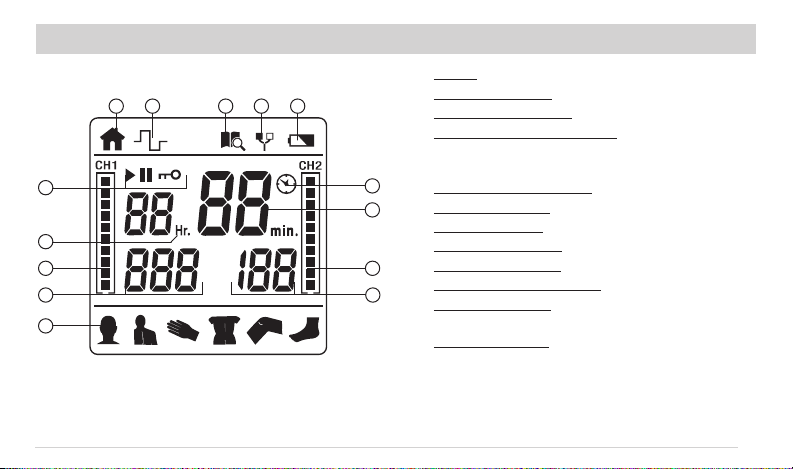
1. Home
2. Treatment Mode
3. Treatment Records
4. Electrode Load Indicator: Alerts user of
a bad connection between the lead wires,
electrodes and skin.
5. Low-Battery Indicator
6. Output Display: Start, pause or lock
7. Hour Indicator: For treatment records only
8. Channel Intensity: Graphic display (CH1 & CH2)
9. Channel Intensity: Numeric display (CH1 & CH2)
10. Therapeutic Body Part: Displays selection
11. Treatment Time: Displays time remaining for
selected treatment.
12. Timer Indicator: Will blink while treatment is in
progress and stay solid when paused or stopped.
1
2
3
4 5
6
7
8
8
9
9
10
11
12
KNOW YOUR DEVICE (CONT’D)
16
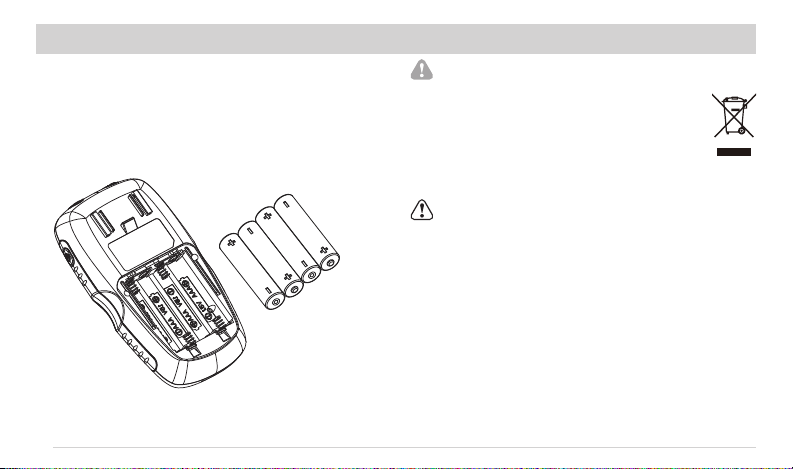
Check/Replace the battery
• Remove the belt clip and battery cover
• Insert 4 “AAA” batteries, as shown.
• Replace the battery cover and belt clip.
DISPOSAL OF BATTERIES
Depleted batteries do not belong in the
household waste. Dispose of the batteries
according to your federal, state and local
regulations. As a consumer, you are obligated
by law to properly dispose depleted batteries.
CAUTION
• Keep the batteries and TENS unit out of the reach
of children.
• Do not dismantle, throw into re or short-circuit
batteries.
• Do not expose the batteries to excess heat.
• Remove the batteries from the TENS unit if it is not
going to be used for a long period of time.
• Always replace with the same type of battery.
BATTERY INFORMATION
17
Step 1
Cleaning the Skin
Clip excess hair from the treatment area. Wash area
with soap and water, and dry completely.
Step 2
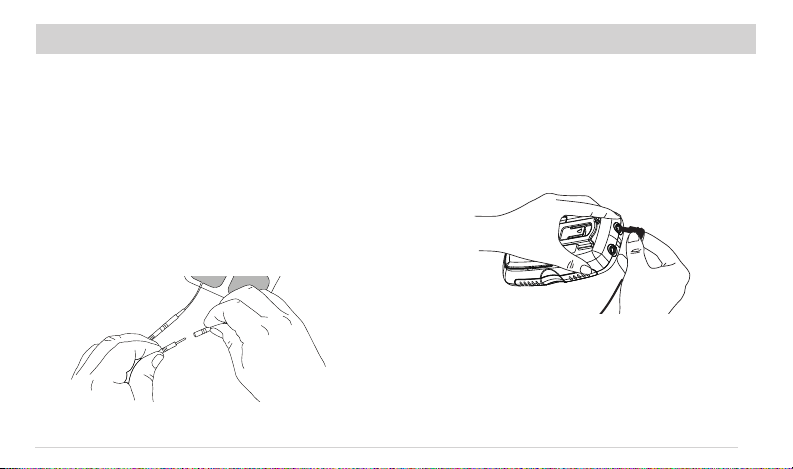
Connect Electrodes to Lead Wires
Take the electrodes out of the sealed package and
insert the pin end of the lead wire into each pigtail
connection of the electrodes you plan to use.
Make sure there is no bare metal exposed from the pins.
NOTE: You must use at least 2 electrode pads.
Step 3
Connect Lead Wires to the Device
1. Make sure the device is turned OFF.
2. Holding the insulated portion, push the plug end
of the lead wire into CH1 output socket. If using
all 4 electrodes, repeat for CH2.
NOTE: This device has two output sockets called
channels. You may use one or both channels with
a pair of lead wires on each. Using both channels
gives you the advantage of stimulating two dierent
areas at the same time. If using just one channel,
only connect to CH1 and leave CH2 empty.
TREATMENT SETUP

18
WARNING
Before using the device for the rst time, you
are strongly advised to take careful note of the
contraindications and safety measures detailed on
pages 6 – 12 of this manual. This is a powerful piece
of equipment and is neither a toy nor a gadget!
Step 4
Electrode Placement
1. Ensure skin is clean and thoroughly dry before
applying the electrodes.
2. Remove the electrodes from the plastic lm and
position them on your body — pressing rmly to
ensure good contact.
Note: Electrode placement suggestions can be
found on pages 26 –28.
TREATMENT SETUP (CONT’D)
19
Step 6
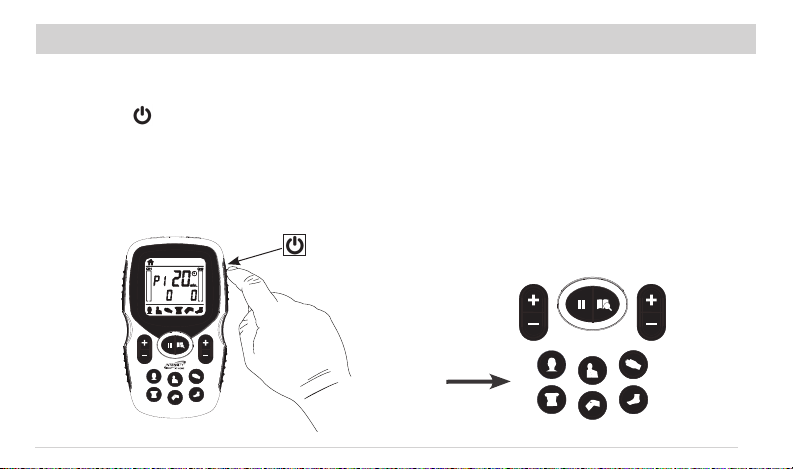
Select the Therapeutic Body Part and Program
1. There are 6 therapeutic body part buttons
available: neck, shoulder, hand, low back,
knee and foot.
2. Each therapeutic body part has 2 programs
(12 total programs) — P1 and P2. You can
toggle between them by pressing the body
part button repeatedly.
3. P1 is for acute pain and P2 is for chronic pain.
Step 5
Turn the Power On
1. Press the " " button on the top right side
to turn the unit on. This will be indicated by
the LED screen lighting up blue and an audible
quick chirp sound.
2. The device will not start treatment until a channel
intensity is increased.
TREATMENT SETUP (CONT’D)
20
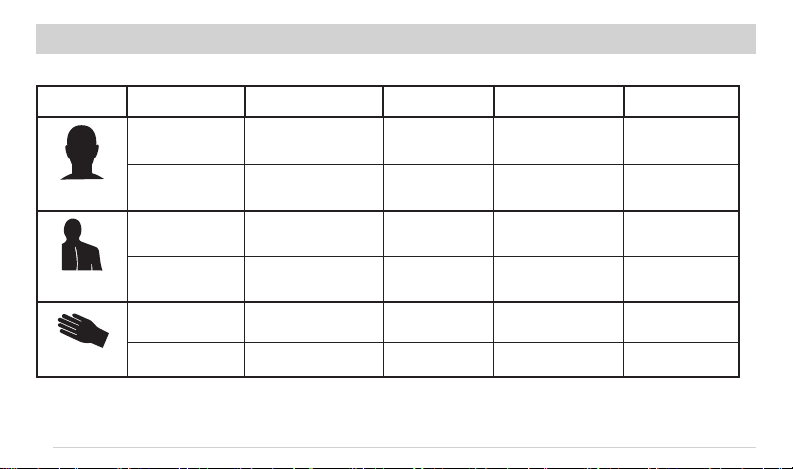
Body Part Program Treatment Time Frequency Pulse Width Cycle Time
Neck
P1 20 Min. 80 – 100Hz 100 – 150µs 10 Sec
P2 20 Min. 4Hz 150 – 200µs 20 Sec
Shoulder
P1 20 Min. 80 – 100Hz 100µs 10 Sec
P2 20 Min. 10Hz 220 – 260µs 20 Sec
Hand
P1 20 Min. 100Hz 100µs Fixed
P2 20 Min. 1 – 10Hz 150µs 20 Sec
TREATMENT SETUP (CONT’D)
21
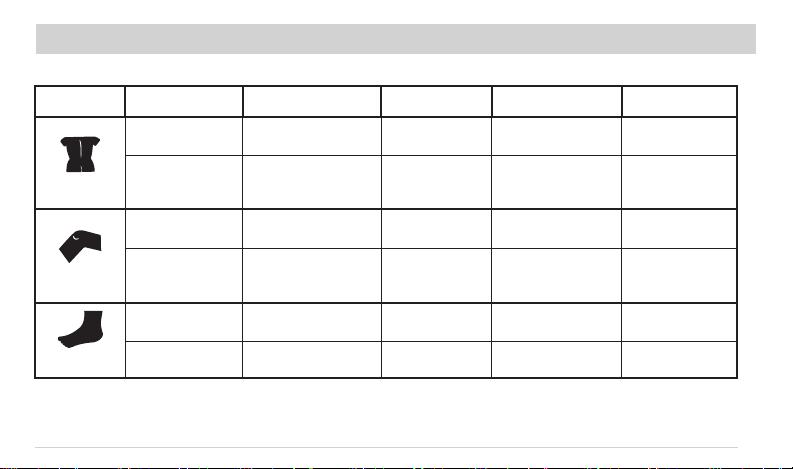
Body Part Program Treatment Time Frequency Pulse Width Cycle Time
Low back
P1 20 Min. 80 – 100Hz 120µs 10 Sec
P2 20 Min. 4Hz 200 – 260µs 20 Sec
Knee
P1 20 Min. 120Hz 100 - 120µs 10 Sec
P2 20 Min. 1 – 10Hz 150 – 200µs 20 Sec
Foot
P1 20 Min. 80 – 120Hz 100 – 120µs 10 Sec
P2 20 Min. 1 – 10Hz 200µs 20 Sec
TREATMENT SETUP (CONT’D)

22
Step 7
Adjust Intensity and Start Treatment
1. To start treatment, press [CH1+] or [CH2+].
2. The intensity output will start at 1. Repeatedly
press the [CH1+] or [CH2+] buttons to increase
the output intensity to the desired level.
3. Press [CH1–] or [CH2–] to decrease the output
intensity.
CAUTION
1. If the electrodes are not placed rmly on the skin
or the device is not connected to the electrodes
and the output intensity level is equal to 10mA or
greater, the intensity will stop automatically.
2. If the stimulation levels are uncomfortable or
become uncomfortable, reduce the stimulation
intensity to a comfortable level and contact your
medical practitioner if problems persist.
TREATMENT SETUP (CONT’D)

23
Step 8
Pause or Stop Treatment
1. In case of an emergency or the need to stop
treatment immediately, please press the [ II ]
button to pause treatment, the “II” will display on
the LCD screen.
2. Press [ II ] again to continue treatment, or
press the [ ] to stop treatment. The device will
return to the home screen.
Step 9
Treatment Timer
1. All 12 presets are set to a 20 minute timer.
2. When the timer counts all the way down to
zero, the device will stop and return to the
home screen.
Step 10
Turn the Power O
1. Press and hold the [ ] button for 3 seconds.
2. When the screen turns o then the devise is o.
CAUTION
To conserve battery and prevent unexpected shock,
the device will automatically power o when it is
not in use for three (3) minutes (standby mode).
The device will beep and shut o automatically.
TREATMENT SETUP (CONT’D)
24
PLEASE NOTE:
• Be sure not to move the electrode to another part
of your body without turning o the power rst.
• Keep the electrodes clean and do not expose to
heat or direct sunlight.
• If the electrodes do not adhere to your body or are
dirty, replace with a new electrode (item# E201-6R).
• Always use the electrodes with a CE mark, or which
are legally marketed in the US under 510(K) procedure.
• Do not clean the electrode or adhesive gel with
any chemical.
• Place the electrodes on intact skin only. Do not
place on cuts or damaged skin.
• The InTENSity at Home
™
Dual Channel TENS is for
single person use.
• Place the electrode on the protective transparent
lm when not in use.
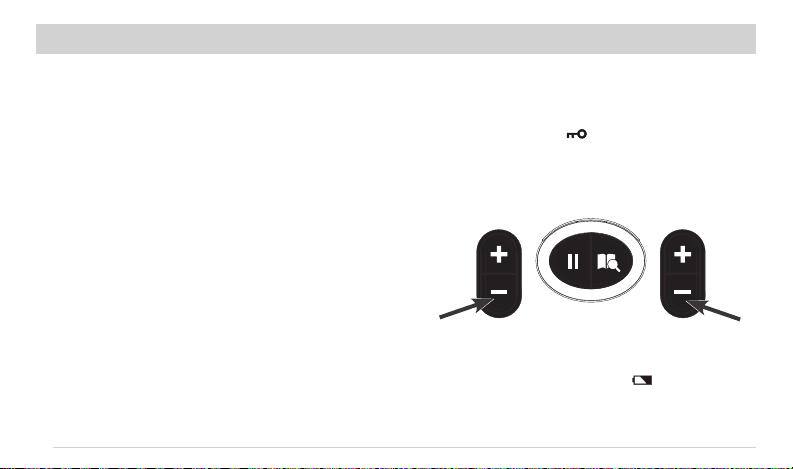
Safety Lock
• The lock function automatically activates after
there is no operation for 20 seconds in treatment
status, the indicator “ “ display on LCD. This is
a safety feature to prevent accidental changes to
your settings and to prevent accidental increases
to the output intensity level. Press [CH1–] or
[CH2–] button to unlock.
Low Battery Indicator
• When the low power indicator “ ” ashes on
the LCD, you should replace all four (4) “AAA”
batteries with new ones as soon as possible.
TREATMENT SETUP (CONT’D) OTHER IMPORTANT FUNCTIONS
25
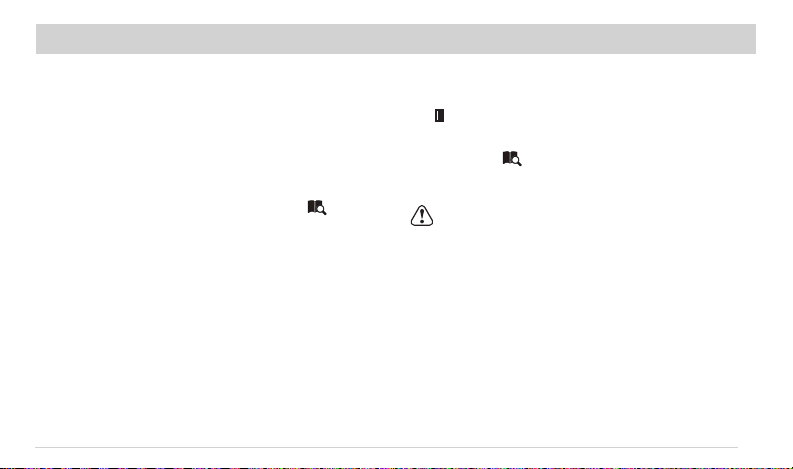
Check and Delete Accumulative Records
• While in the individual records menu, press the
[ II ] button to switch to accumulative records
menu.
• Press the [ ] button and hold for 3 seconds.
All records stored on the device will be deleted
followed by an audible beeping sound.
CAUTION
The records will be permanently deleted and can
not be restored if you complete the deletion process.
Treatment Record Log
• The treatment record log can store up to
60 treatments.
• The treatment record log can store up to
100 hours of total usage.
Check and Delete Individual Records
• While on the home screen, press the [ ]
button to enter the treatment record log. The LCD
will show each of the records and corresponding
treatment times. Press [
+
] and [
–
] buttons to
cycle through each record.
OTHER IMPORTANT FUNCTIONS (CONT’D)
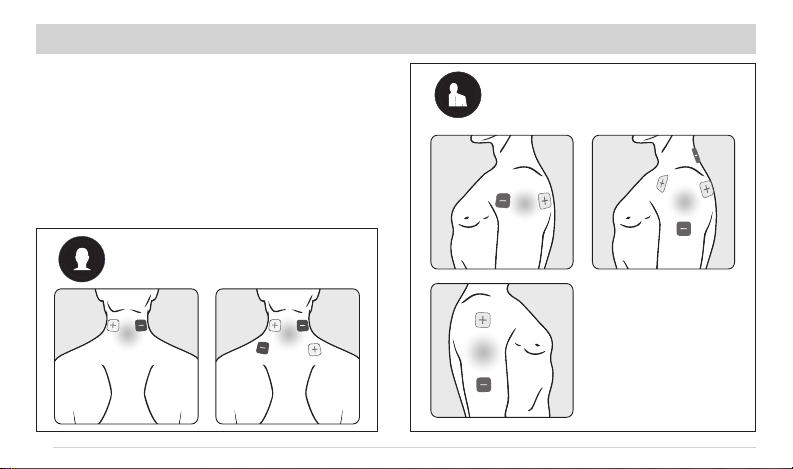
26
• Apply electrodes around the pain site as indicated
and keep them at least 2” but no more than 6”
apart.
• The skin must be clean and dry.
• Press on rmly, making good contact between
the skin and the electrodes.
• Never remove electrodes from the skin while the
device is turned on.
Cervical/Neck Pain
Shoulder Pain
ELECTRODE PLACEMENT GUIDE
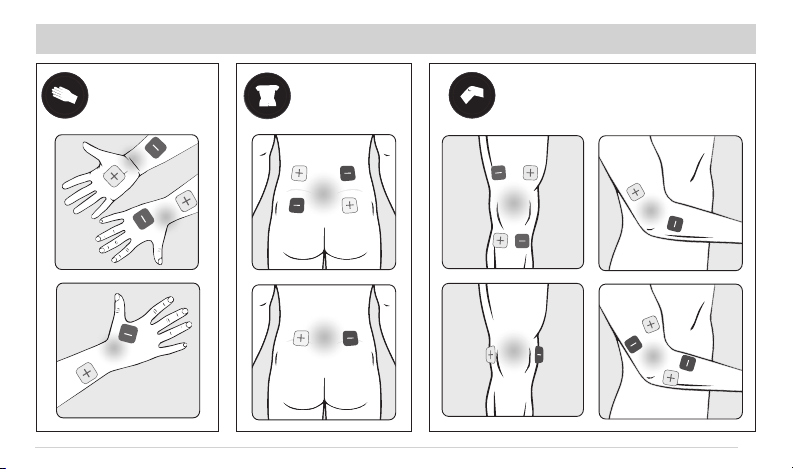
27
Knee/Elbow Pain
Carpal Tunnel/
Wrist Pain
Lower Back/
Lumbar Pain
ELECTRODE PLACEMENT GUIDE (CONT’D)
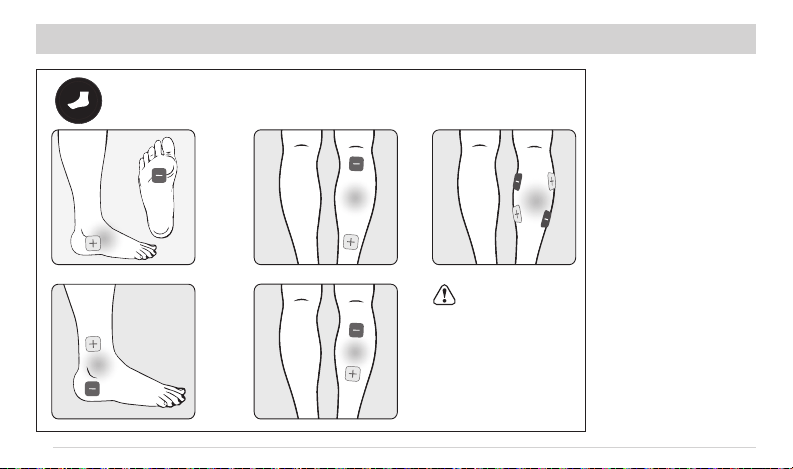
28
Foot/Calf Pain
Caution:
Do not stimulate
both feet or calves
simultaneously.
ELECTRODE PLACEMENT GUIDE (CONT’D)
29
Cleaning the Unit
1. Turn unit o and disconnect the lead wires from
the unit.
2. Clean the device after use with a soft, slightly
moistened cloth and wipe gently.
• Do not use chemicals (like thinner, benzene).
• Do not let water get into the internal area.
NOTE:
This device and accessories (including the
electrodes) do not require sterilization.
Cleaning the Electrode Pads
1. Turn the power o and remove the lead wires
from the electrodes.
2. Wash the electrodes when the adhesive surface
becomes dirty and/or the electrodes are dicult
to attach to the skin.
Washing the Electrode Pads
• To “wash” the electrodes, place a small drop of
water on your clean ngertip and rub the water
across the entire gel surface. Place the gel
adhesive face up and let it air dry until the water
is absorbed and has been reconstituted. Do not
wipe with a tissue paper or cloth. If the electrode
still does not stick properly, replace them with
new electrodes (E201-6R).
CLEANING AND STORAGE
30
CAUTION
• The life of electrodes may vary by the frequency
of washing, skin condition, and storage state.
• If the electrodes no longer stick to your skin or the
electrodes are broken, you should replace with
new electrodes.
• Before applying the self-adhesive electrodes,
it is recommended to wash and degrease the
skin, and then dry it.
• Do not turn on the device when the electrodes are
not positioned on the body.
• Never remove the self-adhesive electrodes from
the skin while the device is still turned on.
• If replacement electrodes are necessary, use only
electrodes that are the same size (2" x 2") as the
electrodes provided with the TENS.
• Use of electrodes that are larger, may reduce the
eect of the stimulation. Use of electrodes that
are much smaller than the electrodes provided
with the TENS may increase the chance of skin
irritation or burns occurring under the electrodes.
• Always use the electrodes with a CE mark,
or which are legally marketed in the US under
510(K) procedure.
CLEANING AND STORAGE (CONT’D)
31
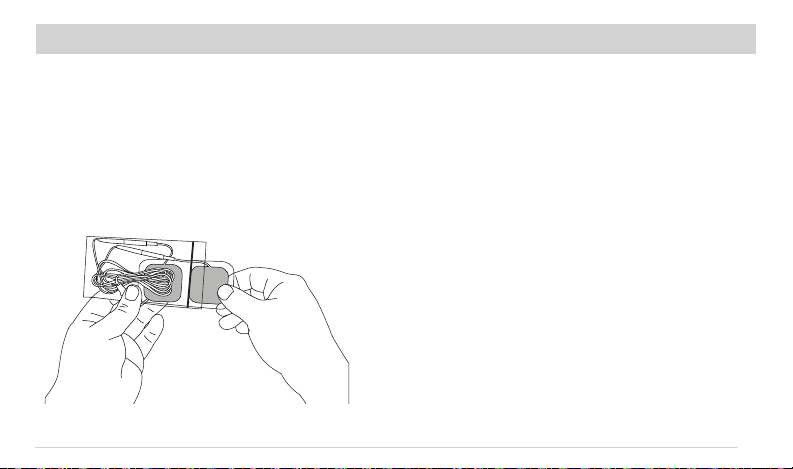
Storing the Electrode Pads and Lead Wires
1. Turn the device o and remove the lead wires
from the unit.
2. Remove the electrodes from your body and
disconnect the lead wires from the TENS unit.
3. Place the electrodes onto the plastic lm and
then store them and the lead wires in the
sealed package.
Storing the Unit
1. Place the unit, electrodes, lead wires and manual
back into the retail packaging. Store the box in a
cool, dry place, 14°F ~ 122°F; 10% ~ 90%
relative humidity.
2. Do not store in places that can be easily reached
by children.
3. When not in use for a long period of time,
remove the batteries before storage.
CLEANING AND STORAGE (CONT’D)
32
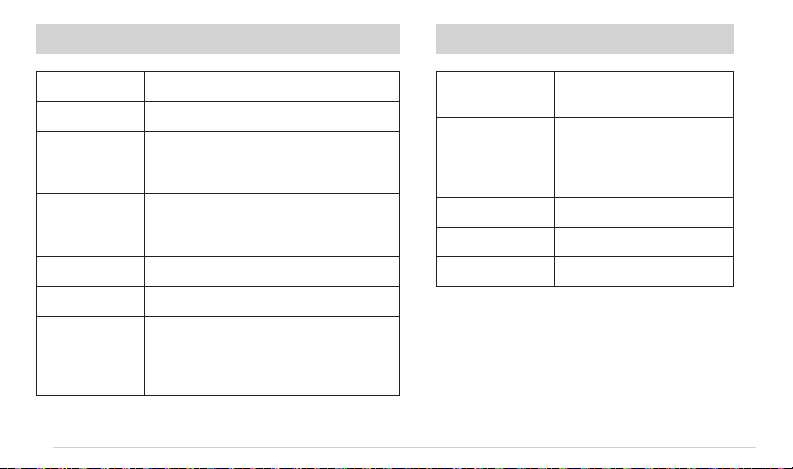
TECHNICAL SPECIFICATIONSTECHNICAL INFORMATION
NOTE: If the unit does not operate after taking these measures, contact your nearest dealer.
Channel
Dual, isolated between channels
Power Supply
(4) “AAA” Batteries
Operating
Conditions
10°C ~ 50°C (50ºF to 122ºF)
Relative Humidity: 10% – 90%
Atmospheric Pressure: 700 – 1060 Hpa
Storage
Conditions
-10°C ~ 50°C (14ºF to 122ºF)
Relative Humidity: 10% – 90%
Atmospheric Pressure: 700 – 1060 Hpa
Dimensions
12.0×7.0×2.7cm (4.7"x2.8"x1.1") L*W*H
Weight
100g (3.5 oz.) Without Battery
Electrode
Detection
Function
The amplitude level will reset to 0mA
when the amplitude level is 10mA or
greater and an open circuit on either
channel is detected.
Waveform
Symmetrical Biphasic
Rectangular Wave
Pulse
Amplitude
Adjustable,
0 ~ 100mA @ 1,000 ohm
Load each channel,
1mA/Step.
Pulse Width
100µs ~ 260µs
Pulse Rate
1Hz ~ 120Hz
Treatment Time
20 Minutes
33
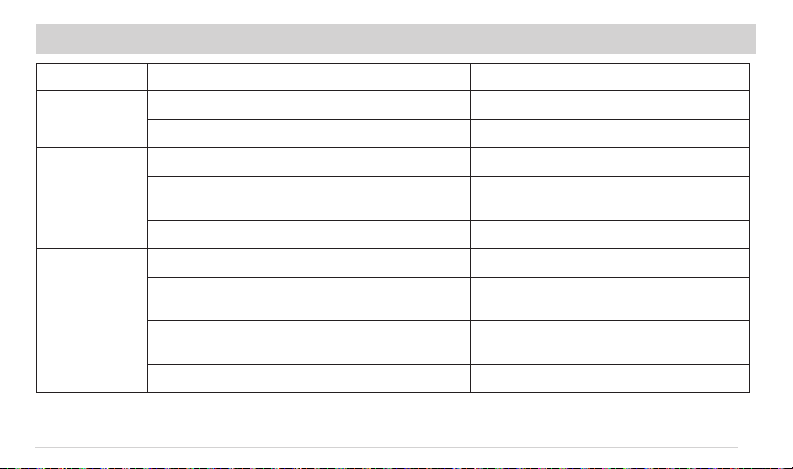
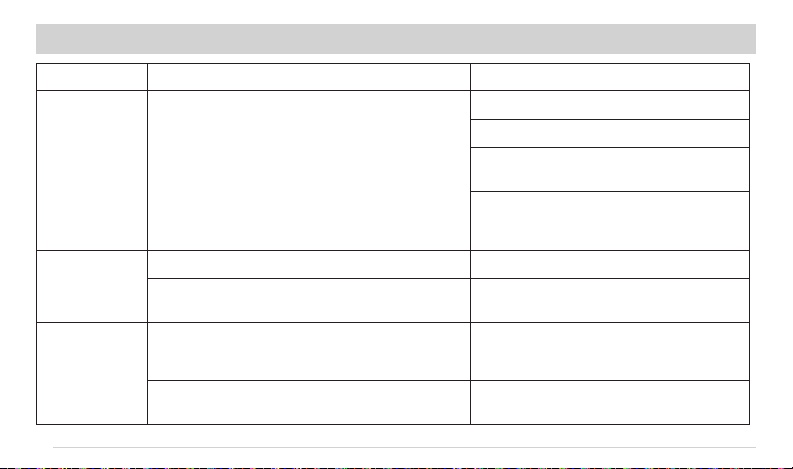
TROUBLESHOOTING
PROBLEM
POSSIBLE CAUSES
POSSIBLE SOLUTION
The Unit Cannot
Power On
Are the batteries depleted? Recharge or replace the batteries.
Are the batteries installed correctly? Insert the batteries observing the correct polarity.
Stimulation Weak
Or Cannot Feel
Any Stimulation
Electrodes are dried out or dirty. Replace with new electrodes.
Electrodes will not stick to skin. Clean treatment area of dirt and/or oily
substances (lotion).
Lead wires are old/worn/damaged Replace with new lead wires.
Stimulation Is
Uncomfortable
Intensity is too high. Decrease intensity.
Electrodes are too close together Reposition the electrodes to be a minimum of
1½" apart.
Electrode active area size is too small Replace electrodes with ones that have an active
area no less than 25.0cm
2
(5cm x 5cm).
May not be operating the device according to the manual. Please check the manual before use.
NOTE: If the unit does not operate after taking these measures, contact your nearest dealer.
34
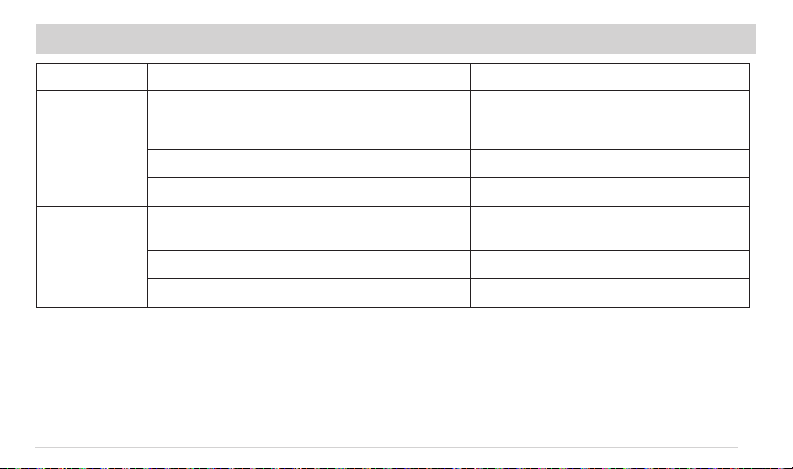
PROBLEM
POSSIBLE CAUSES
POSSIBLE SOLUTION
Intermittent
Output
Lead Wires
Verify connection is secure.
Turn down the intensity.
Rotate lead wire in the socket 90º. If still
intermittent, replace the lead wire.
If still intermittent after replacing a lead wire, a
component may have failed. Call tech support at
1-800-3-ROSCOE (376-7263).
Stimulation is
Ineective
Improper electrode placement Reposition electrodes.
Unknown Contact tech support at 1-800-3-ROSCOE
(376-7263)
Skin Becomes
Red And/Or You
Feel A Stabbing
Pain
Using the electrode on the same site every time. Re-position the electrode to another area. If at
any time you feel pain or discomfort stop use
immediately.
The electrode is not sticking onto the skin properly. Ensure the electrode is securely placed
on the skin.
NOTE: If the unit does not operate after taking these measures, contact your nearest dealer.
CLEANING AND STORAGE (CONT’D)
35
PROBLEM
POSSIBLE CAUSES
POSSIBLE SOLUTION
Skin Becomes
Red And/Or You
Feel A Stabbing
Pain
The electrode is dirty. Clean the electrodes according to the description
in this manual (page 29) or replace with new
electrodes.
The surface of the electrode is scratched. Replace with a new electrode.
If problems persist. Contact your physician.
Output Current
Stops During
Therapy
The electrode came o the skin or the edges are lifting
away from the skin.
Turn o the device and reapply the electrodes to
your skin.
The lead wires are disconnected. Turn o the device and reconnect the lead wires.
The batteries are depleted. Charge or replace the batteries.
NOTE: If the unit does not operate after taking these measures, contact your nearest dealer.
TROUBLESHOOTING (CONT’D)
36
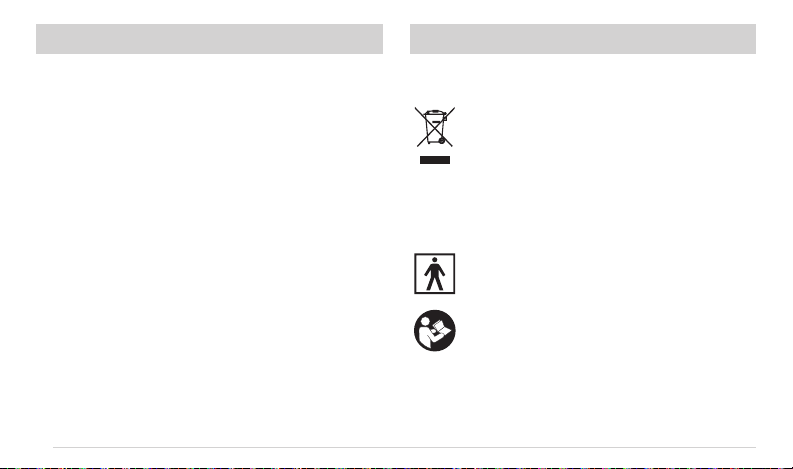
Used fully discharged batteries must be disposed
of in a specially labeled collection container, at toxic
waste collection points or through an electrical
retailer. You are under legal obligation to dispose
of batteries correctly.
Please dispose of the device in accordance with the
legal obligation.
Electrical devices are recyclable material
and should not be disposed of with
household waste after their useful life!
Help us to protect the environment and
save resources and take this device to the
appropriate collection points. Please contact
the organization which is responsible for
waste disposal in your area if you have any
questions.
Type BF Applied Part
Please refer to instruction manual because
of the higher levels of output.
GLOSSARY OF SYMBOLSDISPOSAL

37
With the increased number of electronic
devices such as computers and mobile
(cellular) telephones, medical devices in
use may be susceptible to electromagnetic
interference from other devices. Electromagnetic
interference may result in incorrect operation of
the medical device and create a potentially unsafe
situation. Medical devices should also not interfere
with other devices.
In order to regulate the requirements for EMC
(Electromagnetic Compatibility) with the aim to
prevent unsafe product situations, the IEC60601-
1-2 standard has been implemented. This standard
denes the levels of immunity to electromagnetic
interferences as well as maximum levels of
electromagnetic emissions for medical devices.
Medical devices manufactured for Compass
Health Brands conform to this IEC60601-1-2:2007
standard for both immunity and emissions.
Nevertheless, special precautions need to be
observed:
• The use of accessories and cables other than
those specied by Compass Health Brands,
with the exception of cables sold by Compass
Health Brands as replacement parts, may result
in increased emission or decreased immunity of
the device.
• The medical devices should not be used adjacent
to or stacked with other equipment. In case
adjacent or stacked use is necessary, the medical
device should be observed to verify normal
operation in the conguration in which it will
be used.
• Refer to further guidance below regarding the
EMC environment in which the device should
be used.
IMPORTANT INFORMATION REGARDING ELECTROMAGNETIC COMPATIBILITY (EMC)
38
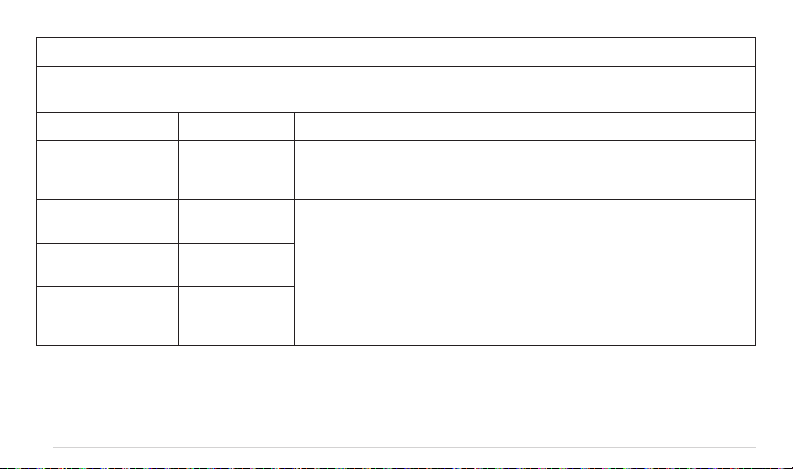
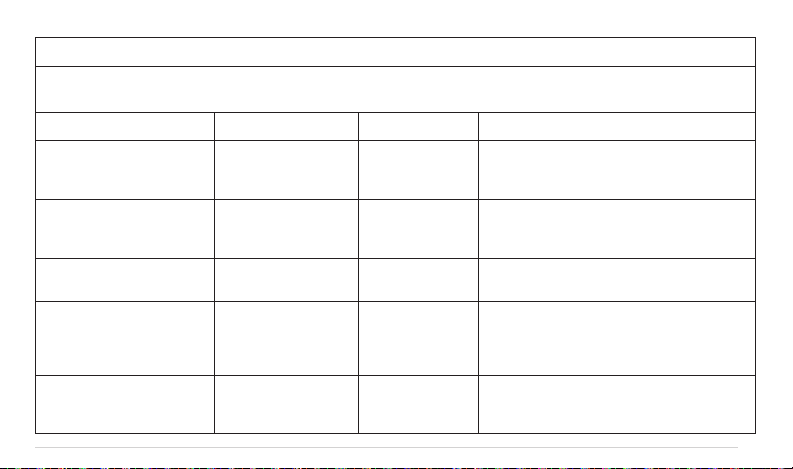
GUIDANCE AND MANUFACTURER’S DECLARATION – ELECTROMAGNETIC EMISSIONS
InTENSity at Home
™
electrical stimulators are intended for use in the electromagnetic environment specied below.
The customer or the user of these electrical stimulators should assure that it is used in such environment.
Emissions test Compliance Electromagnetic environment — guidance
RF emissions
CISPR 11
Group 1 The device uses RF energy only for its internal function. Therefore, its RF emissions
are very low and are not likely to cause any interference in nearby electronic
equipment.
RF emissions
CISPR11
Class B The device is suitable for use in all establishments including domestic and those
directly connected to the public low-voltage power supply network that supplies
buildings used for domestic purposes.
Harmonic emissions
lEC 61000-3-2
Not applicable
Voltage uctuations/
icker emissions
lEC 61000-3-3
Not applicable
TABLE 1:
39
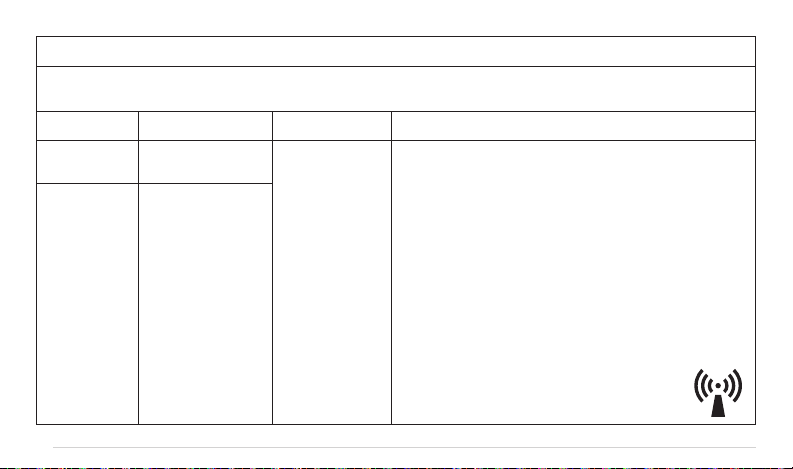
GUIDANCE AND MANUFACTURER’S DECLARATION — ELECTROMAGNETIC IMMUNITY
InTENSity at Home
™
electrical stimulators are intended for use in the electromagnetic environment specied below.
The customer or the user of these electrical stimulators should assure that it is used in such environment.
Immunity test IEC 60601 test level Compliance level Electromagnetic environment - guidance
Electrostatic
discharge (ESD)
lEC 61000-4-2
±6 kV contact
±8 kV air
±6 kV contact
±8 kV air
Floors should be wood, concrete or ceramic tile.
If oors are covered with synthetic material, the
relative humidity should be at least 30%.
Electrical fast
transient/burst
IEC 61000-4-4
Not applicable Not applicable Not applicable
Surge IEC
61000-4-5
Not applicable Not applicable Not applicable
Voltage dips, short
interruptions and voltage
variations on power supply
input lines IEC 61000-4-11
Not applicable Not applicable Not applicable
Power frequency
(50/60Hz) magnetic eld
IEC 61000-4-8
3 A/m 3 A/m Power frequency magnetic elds should be at
levels characteristic of a typical location in a
typical commercial or hospital environment.
TABLE 2:
40
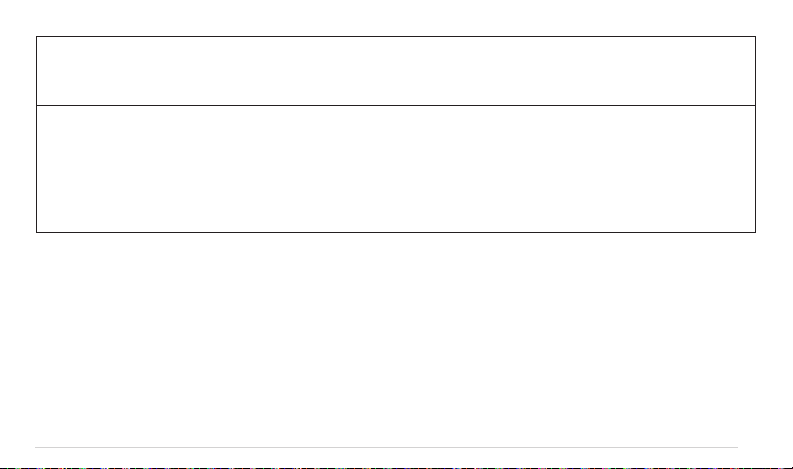
GUIDANCE AND MANUFACTURER’S DECLARATION — ELECTROMAGNETIC IMMUNITY
InTENSity at Home
™
electrical stimulators are intended for use in the electromagnetic environment specied below.
The customer or the user of these electrical stimulators should assure that it is used in such environment.
Immunity test IEC 60601 test level Compliance level Electromagnetic environment - guidance
Conducted RF
lEC 61000-4-6
Not applicable
Portable and mobile RF Communications equipment should
be used no closer to any part of the device, including cables,
than the recommended separation distance calculated from the
equation applicable to the frequency of the transmitter.
Recommended separation distance
d = 1.2 √P
d = 1.2 √P 80 MHz to 800 MHz
d = 2.3 √P 800 MHz to 2.5 GHz
Where P is the maximum output power rating of the transmitter in
watts (W) according to the Transmitter manufacturer and d is the
recommended separation distance in meters (m).
Field strengths from xed RF transmitters, as determined by an
electromagnetic site survey,
a
should be less than the compliance
level in each frequency range.
b
Interference may occur in the vicinity of equipment
marked with the following symbol:
Radiated RF
lEC 61000-4-3
3 V/m
80 MHz to 2.5 GHz
3 V/m
TABLE 4 :
41
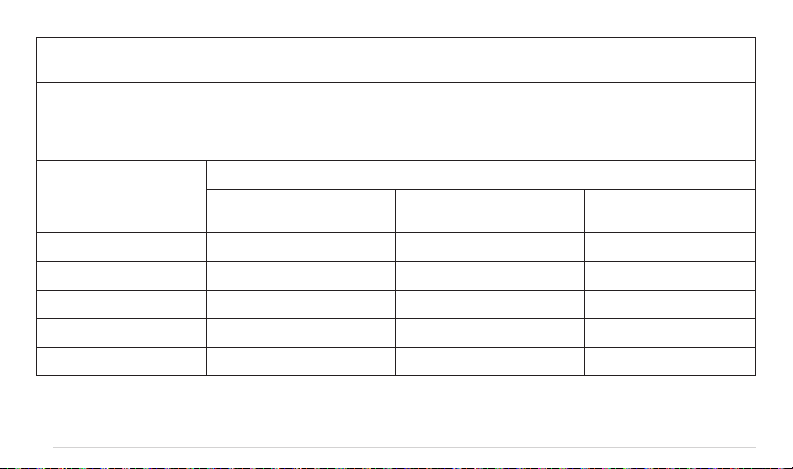
NOTE I: At 80 MHz ends 800 MHz. the higher frequency range applies.
NOTE 2: These guidelines may not apply in all situations. Electromagnetic propagation is aected by absorption and reection from
structures, objects and people.
a Field strengths from xed transmitters, such as base stations for radio (cellular/cordless) telephones and land mobile radios,
amateur radio, AM and FM radio broadcast and TV broadcast cannot be predicted theoretically with accuracy. To assess the
electromagnetic environment due to xed RF transmitters, an electromagnetic site survey should be considered. If the measured
eld strength in the location in which the device is used exceeds the applicable RF compliance level above, should be observed
to verify normal operation. If abnormal performance is observed, additional measures may be necessary, such as reorienting or
relocating the device.
b Over the frequency range 150 kHz to 80 MHz, eld strengths should be less than 3 V/m.
TABLE 4 (CONT’D):
42
RECOMMENDED SEPARATION DISTANCES BETWEEN
PORTABLE AND MOBILE RF COMMUNICATIONS EQUIPMENT AND THE DEVICE
The device is intended for use in an electromagnetic environment in which radiated RF disturbances are controlled.
The customer or the user of the device can help prevent electromagnetic interference by maintaining a minimum
distance between portable and mobile RF communications equipment (transmitters) and as recommended below,
according to the maximum output power of the communications equipment.
Output Power of
Transmitter in Watt
Separation Distance According To Frequency Of Transmitter In Meter
150 kHz to 80 MHz
d = 1.2 √P
80 MHz to 800 MHz
d = 1.2 √P
800 MHz to 2.5 GHz
d = 2.3 √P
0.01 0.12 0.12 0.23
0.1 0.38 0.38 0.73
1 1.2 1.2 2.3
10 3.8 3.8 7.3
100 12 12 23
TABLE 6:
43
For transmitters rated at a maximum output power not listed above, the recommended separation distance (d) in meters (m) can
be estimated using the equation applicable to the frequency of the transmitter, where P is the maximum output power rating of the
transmitter in watts (W) according to the transmitter manufacturer.
NOTE I At 80 MHz and 800 MHz. the separation distance for the higher frequency range applies.
NOTE 2 These guidelines may not apply in all situations. Electromagnetic propagation is aected by absorption and reection from
structures, objects and people.
NOTE: EMC tests conducted including attached electrode cord of 1.5 m length.
TABLE 6 (CONT’D):

44
Limited Consumer Product Warranty (United States)
This InTENSity at Home
™
Dual Channel TENS is warranted to the original consumer “the purchaser” to be free from defects
in material and workmanship which are not commercially acceptable for the period of one year from the date of purchase.
Warranty coverage terminates if you sell or otherwise transfer this product to another person. This warranty gives you specic
legal rights and you may also have other rights, which vary by location.
COMPASS HEALTH BRANDS MAKES NO EXPRESS WARRANTY OF ANY KIND REGARDING THIS PRODUCT OTHER
THAN THOSE WARRANTIES SET FORTH HEREIN. ANY IMPLIED WARRANTY, INCLUDING ANY IMPLIED WARRANTY OF
MERCHANTABILITY OR ANY IMPLIED WARRANTY OF FITNESS FOR A PARTICULAR PURPOSE TO THE EXTENT PERMITTED
BY LAW, SHALL BE LIMITED IN DURATION TO A PERIOD OF 120 DAYS FROM THE DATE OF PURCHASE BY THE ORIGINAL
PURCHASER.
In the event that this product is found by Compass Health Brands to not meet the above limited warranty, as purchaser’s sole
and exclusive remedy, Compass Health Brands will repair or at the option of Compass Health Brands, replace this product
without charge for such replacement parts or labor. The purchaser shall bear all expenses related to returning this product to
Compass Health Brands
This warranty does not apply to any part of the product that has been subject to misuse, abuse, or alteration. Improper or
incorrectly performed maintenance or repair voids this warranty. The warranty applies to the device only, accessories are not
included in warranty.
TO THE EXTENT PERMITTED BY LAW, COMPASS HEALTH BRANDS SHALL NOT BE LIABLE FOR ANY INCIDENTAL
OR CONSEQUENTIAL DAMAGES INCLUDING, BUT NOT LIMITED TO, REPLACEMENT COSTS RESULTING FROM THE
BREACH OF ANY WRITTEN OR IMPLIED WARRANTY.
LIMITED ONE YEAR WARRANTY

45
If you wish to make a claim under this warranty, please contact your local DME dealer/retailer where you purchased the unit
from. You will need the following information when making your claim:
• The entire original InTENSity at Home
™
product and packaging
• The original receipt showing date of purchase
• Detailed description of the problem
• Serial Number
InTENSity at Home
™
Model: ___________________________________
Serial Number: _______________________________________________
Date of Purchase: ____________________________________________
Distributor: __________________________________________________
LIMITED ONE YEAR WARRANTY (CONT’D)

46
Middleburg Heights, OH, 44130
800.376.7263
compasshealthbrands.com
Made in China /Hecho en China
Manufactured for: