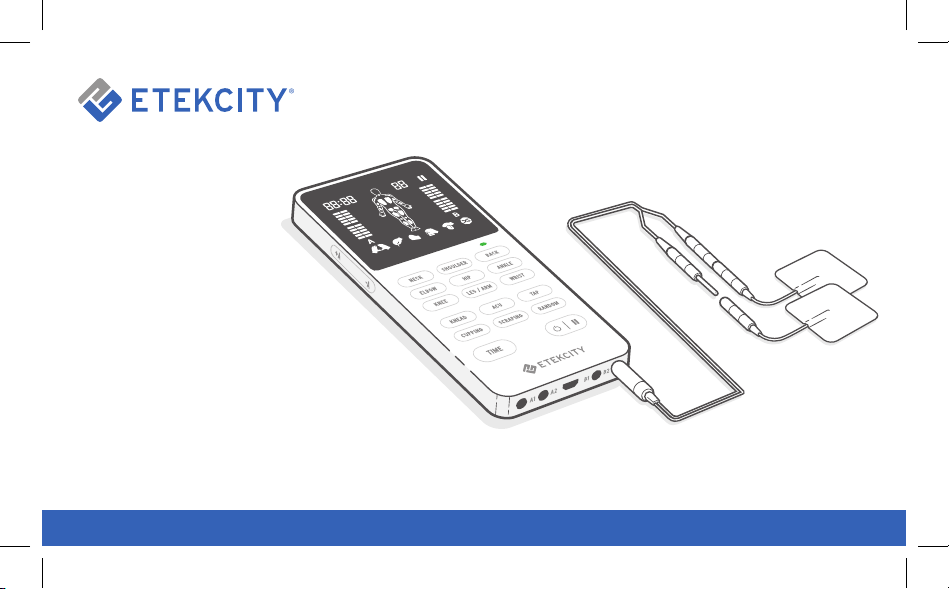

2
Thank you for purchasing the
TENS Unit by Etekcity.
If you have any questions or concerns,
please reach out to our helpful Customer
Support Team at [email protected].
We hope you enjoy your new TENS unit!
BECOME AN ETEKCITIZEN
Get exclusive deals, giveaways, and product
registration. Better products for better living.
Find us at etekcity.com

3
Table of Contents
Package Contents
Specications
Safety Information
Function Diagram
Digital Display
Controls
Getting to Know Your TENS Unit
• Controlling Pain
• Length and Intensity
• Using the TENS Unit
- Electrode Placement Guide
- Treatment
Maintenance
Troubleshooting
Glossary of Symbols
Warranty Information
Customer Support
3
4
6
11
12
13
14
14
15
16
16
19
21
24
27
37
39
1 x TENS Unit
2 x Electrode Pads (40 x 40 mm)
4 x Electrode Pads (50 x 50 mm)
2 x Electrode Pads (50 x 100 mm)
4 x Lead Wires
1 x Micro USB Cable
1 x User Manual
1 x Quick Start Guide
Package Contents

4
Frequency 1–100Hz
Pulse Width 70–300µs
Output Voltage 0–60V±20% (at 1000Ω load)
Output Intensity level 0~20 levels
Electrode Connection Type Pigtail
Operation Time 10–60 minutes
Dimensions
5.5 x 2.5 x 0.6 in /
138.8 x 63.3 x 15.5 mm
Weight 3.2 oz / 96 g
Operating Environment
Temperature: 41°F–104°F / 5°C–40°C
Relative Humidity: 30–75%
Atmospheric Pressure: 700hPa–1060hPa
Transport and Storage Environment
Temperature: 14°F–131°F / -10°C–55°C
Relative Humidity: 10–90%
Air Pressure: 700hPa–1060hPa
Specifications

5
Suggest Adapter
Input: 100–240V~, 50/60 Hz, 0.2A
Output: DC 5V, 300mA
Battery Type 3.7V, 250mAh Li-ion battery
Rated Power 4.2V
Charging Time 3 hours
Automatic Shutoff 3 minutes
Service Life
TENS Unit: 3 years
Electrodes: 10–15 uses
IP Code IP22
Classification of ME Equipment:
Internally powered(operating) / Class II (charging)/
Continuous operation

6
Safety Information
Contraindication
Warnings
• Do not use the TENS unit if you have or use
cardiac pacemakers, implanted debrillators,
respirators, electrocardiographs, or any
implanted metallic or electronic devices,
including any electronic life support. This
can cause electric shock, burns, electrical
interference, or even death.
• Always check the TENS unit and the electrode
pads for damage before using. Do not use the
TENS unit or electrodes if they are damaged in
any way.
Please read and follow all instructions and safety
guidelines in this manual.
• You should consult your physician if:
- You have never used a TENS unit
before. The TENS unit may cause lethal
disturbances to heart rhythm in certain
individuals.
- You have had or are using medical or
physical treatment for your pain.
- Your pain worsens or continues for more
than 5 days.
- You experience adverse reactions from the
TENS unit.
• Do not use the TENS unit on someone with a
cognitive impairment (e.g., dementia, Alzheimer’s
disease). People who have a cognitive
impairment may be unable to use the TENS unit
according to the instructions and may become
agitated by the treatment.
• Do not use the TENS unit on children, as it has
not been evaluated for pediatric use.

7
• Keep the TENS unit out of reach of children. The
unit contains small pieces that may be swallowed,
and the cable may cause strangulation.
• Do not use the TENS unit on your eyes, mouth,
face, the side of your neck (the carotid sinus),
any area of the throat (front of the neck), or
your across your heart. This could cause severe
muscle spasms that may result in airway closure,
breathing difculties, or adverse effects on heart
rhythm or blood pressure.
• Do not use the TENS unit on your chest. The
TENS unit uses electrical currents. Using the
TENS unit on your chest may cause rhythm
disturbances to your heart, which could be lethal.
• Use the TENS unit only on normal, intact, clean,
and healthy skin.
• Do not use the TENS unit over open wounds
or rashes, or over swollen, red, infected, or
inamed areas or skin eruptions (e.g., phlebitis,
thrombophlebitis, varicose veins).
Warnings (cont.)
• Do not use the TENS unit over, or close to,
cancerous lesions.
• Do not place the electrodes inside body cavities,
such as the mouth. This may cause irritation,
burns, or electric shock. The TENS unit is not
designed for internal application.
• Do not use the TENS unit in the presence of
electronic monitoring equipment (e.g., cardiac
monitors, ECG alarms). This equipment may not
operate properly when the TENS unit is in use.
• Do not use the TENS unit in the bath or shower.
The TENS unit is not waterproof, and a humid
environment may damage it, resulting in
personal injury.
• Do not use the TENS unit while sleeping.
• Do not use the TENS unit while driving, operating
machinery, or during any activity in which
electrical stimulation can put you at risk of injury.
• Do not modify the TENS unit or the electrodes.
This could cause improper functioning.

8
Warnings (cont.)
Precautions
• The condition of your electrode pads may affect
the safety and effectiveness of the treatment.
Take the following into account:
1. If the electrode pads are too small or
not correctly applied, this may result in
discomfort or skin burns.
2. If you do not know if the electrode pads
can be used with the TENS unit, contact
Customer Support (see page 39).
• Do not use in places with ammable or explosive
gases.
• The TENS unit is not effective for pain of central
origin, including headaches.
• The TENS unit is not a substitute for pain
medications and other pain management
therapies.
• The TENS unit has no curative benets.
• The TENS unit treatment may not be effective
for everyone. Consult your physician or
healthcare professional to nd out if TENS will
work for you.
• The long-term effects of electrical stimulation
are unknown.
• Because the effects of electrical stimulation on
the brain are unknown, do not use the TENS unit
on your head.
• Electrical stimulation and the pads’ conductive
gel may cause skin irritation or hypersensitivity.
The irritation can usually be reduced by
alternative pad placement.
• If you have a suspected or diagnosed heart
disease, follow precautions from your physician.
• If you have suspected or diagnosed epilepsy,
follow precautions from your physician.
• Do not use if you may have internal bleeding,
such as from an injury or a fracture.
• If you had surgery recently, consult your
physician before using the TENS unit. Using the
TENS unit may disrupt the healing process.

9
• Use caution when you use the TENS unit over
areas of skin that lack sensation.
• The impact of using the TENS unit during
pregnancy is unknown and may be unsafe. Use
caution when you use the TENS unit over the
uterus during pregnancy or menstruation.
• Do not use plaster or tape to attach the
electrodes to the skin.
• Do not let the electrode pads touch metal
objects, such as belt buckles or jewelry.
• Use the TENS unit only with the electrodes and
accessories recommended by Etekcity.
• Always end the TENS unit treatment before you
unplug the TENS unit or the electrodes. If you do
not end the treatment, you may get a harmless
but unpleasant sensation in your ngers.
• Do not use on your spine or backbone.
• Do not place electrodes on both legs or feet at
the same time. Only treat 1 at a time.
Precautions (cont.) General Recommendations
• Do not use the TENS unit for any other purpose
than what it is intended for.
• The TENS unit is designed for use by a single
adult person. For hygienic reasons, electrodes
should not be shared.
• Do not use the TENS unit if you are connected
to high-frequency surgical equipment. This may
result in burns on the skin under the electrodes
and may damage the TENS unit.
• Do not use the TENS unit within 3.3 ft / 1 m from
shortwave or microwave medical equipment.
Close proximity to this equipment may cause
unstable TENS unit output.
• Although you can use the TENS unit indoors
and outdoors, it cannot withstand all weather
conditions.
• The electrode pads have a limited shelf life.
Please check the packaging for the use-by date
before use. Do not use expired electrode pads.
• Always use and store the electrodes according
to the instructions.

10
General Risk
Specic RisksGeneral Recommendations (cont.)
• The TENS unit should be kept at least
3.3 ft / 1 m from electric equipment such as TVs,
radios, electromagnetic furnaces, to avoid likely
electromagnetic interference.
• Do not use while charging. Unplug the power
cord before using.
• Not for commercial use. Household use only.
• The TENS unit only treats symptoms. It reduces
the feeling of pain, but it does not cure the cause
of the pain. Pain may be a signal from your body
that some part of your body is damaged and
needs attention.
• You may get skin irritation and burns on the skin
under the electrodes.
• You may get a headache or other pain if you use
the TENS unit near your eye, or on your head or
face.
• You may experience muscle exhaustion or
muscle soreness after extended use on the same
muscles (more than 30 minutes a session, up to 3
times a day).
SAVE THESE
INSTRUCTIONS
11
A
F
C
D
I
J
K
L
M
E N
O
H
G
B
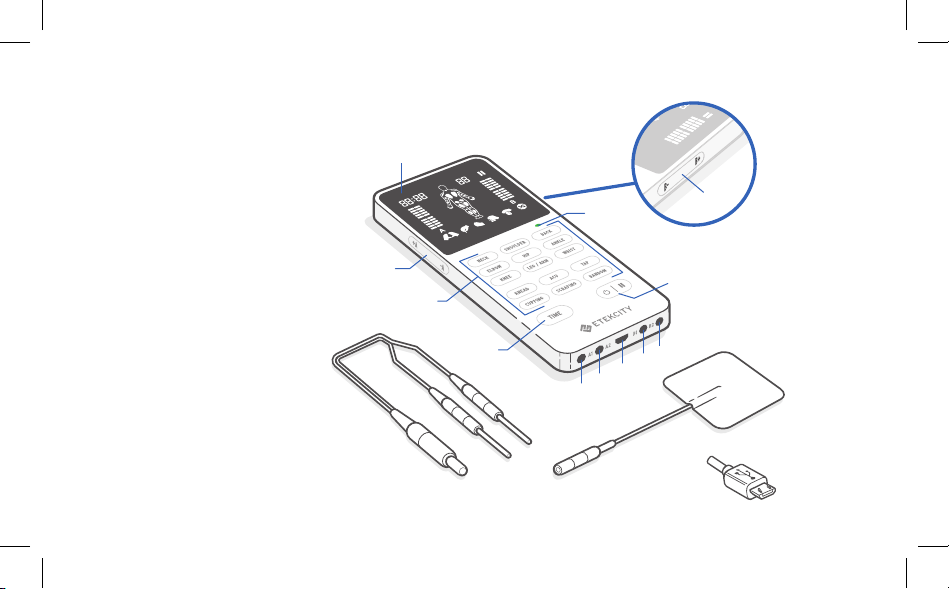
A.
Display
B. A Channel Intensity
Increase/Decrease
C. Therapy Modes [15]
D. Time Button
E. Lead Wires
F. Battery Indicator
G. B Channel Intensity
Increase/Decrease
H. Power/Pause Button
I. A1 Output
J. A2 Output
K. Micro USB Port
L. B1 Output
M. B2 Output
N. Electrode Pad
O. Micro USB Cable
Function Diagram

12
A
B
G I KH J L
C D
E
F
A. Time Display
B. A Channel Intensity Level
C. Body Part Icons
D. Program Number
E. Pause Icon
F. B Channel Intensity Level
G. Kneading Icon
H. ACU (Acupuncture) Icon
I. Tap Icon
J. Cupping Icon
K. Scraping Icon
L. Random Icon
Digital Display

13
Controls
Press to turn on. Press again during
treatment to pause or continue. Press and
hold for 2 seconds to turn off.
Press to increase time in 10-minute
increments.
Note: When you rst turn on the TENS unit,
the default time will be 20 minutes.
Note:
•
You can only use 1 therapy mode at a time.
• The TENS unit will automatically default to the
last mode selected.
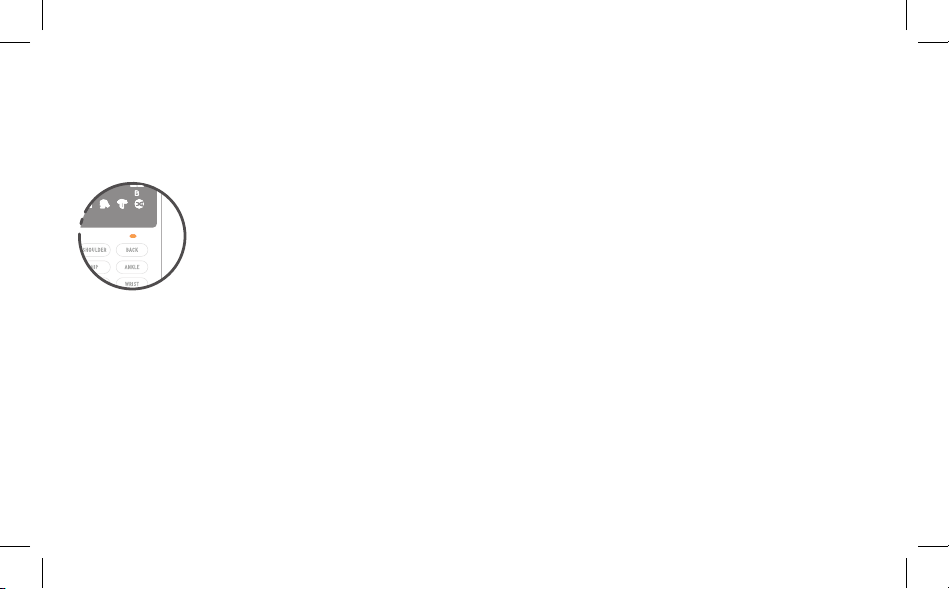
Body Part: Press to select which area of the body to
focus on. The selection will ash on the display and
show the corresponding number.
Massage Type: Press to select the massage type.
The selection will ash on the display and show the
corresponding number.
1. Neck
2. Shoulder
3. Back
10. Knead
11. ACU
4. Elbow
5. Hip
6. Ankle
12. Tap
13. Cupping
7. Knee
8. Leg/Arm
9. Wrist
Therapy Modes
14. Scraping
15. Random

14
Getting to Know Your TENS Unit
Transcutaneous Electrical Nerve Stimulation
(TENS) units are used for temporary relief of sore
and aching muscles in the body due to exercise or
strenuous activities such as normal household work
activities. The 4 channels deliver tiny electrical
impulses sent through the skin to the nerves to
help manage pain by signaling the body to produce
endorphins, the body’s natural pain killer.
The TENS Unit is designed to be used for temporary
relief of pain associated with sore and aching
muscles in the shoulder, waist, back, neck, upper
extremities (arm) and lower extremities (leg) due
to strain from exercise or normal household work
activities. It should be applied to normal, healthy, and
dry skin of adult patients.
The TENS unit works best on acute pain because it
is localized. Acute pain occurs in 1 area for less than
3 months. If you have chronic pain (often including
experiencing pain in more than 1 area and for
longer than 6 months), then the chronic pain may
be compounded by other issues that the TENS unit
cannot address.
The TENS unit cannot cure pain or the original cause
of the pain. It can only provide temporary relief or
reduction of pain.
Use the TENS unit as soon as your pain begins. Start
with 1 session. If you address your pain early, it may
prevent the pain from becoming worse.
Controlling Pain

15
The TENS unit should be used once a day, for up to
30 minutes for each treatment area. Depending on
the level of pain, you may use the TENS unit up to 3
times a day for a maximum of 90 minutes total. Do
not use more than 3 times a day or 90 minutes total
per treatment area.
When turning off the TENS unit, always turn
it off with pads still adhered to skin. Rate your
pain between 1 (low) and 20 (high) to check your
progress.
Intensity is based upon your level of comfort. When
learning how to use the TENS unit, begin with a low
intensity and use the TENS unit for a short period
of time. Use caution when working with higher
intensities at the limit of what you can tolerate. Do
not exceed your comfort level.
Length and Intensity
Stop using the TENS unit if:
• Pain has reduced or stopped.
• You experience an adverse reaction such as
skin irritation, redness, burns, headaches, other
painful sensations, or any increased discomfort.
• Your pain becomes chronic and severe, or
continues for more than 5 days.
Note:
• If pain does not improve and you become
sore from overuse, stop using and do not
treat those areas for 2 days. If this happens
again, reduce the treatment time and
intensity settings for future treatments.
• If you feel pain, dizziness, discomfort, or
nausea while using the TENS unit, call your
physician or medical practitioner.
16
1. Prep the area by cleaning your skin. Wash and
pat dry.
2. Gently peel the pads from the plastic and place at
least 2 in / 5 cm apart on clean, dry, and healthy
skin near or surrounding the area of pain.
Using the TENS Unit
Note:
• Before placing electrodes on skin, make
sure the TENS unit is completely turned
OFF or the intensities are set to 0.
• Do not allow the pads to touch each other.
• Never remove the self-adhesive pads from
the skin while the TENS unit is turned on.
Note: Before rst use, fully charge the TENS unit
(see Charging the Battery, page 21).
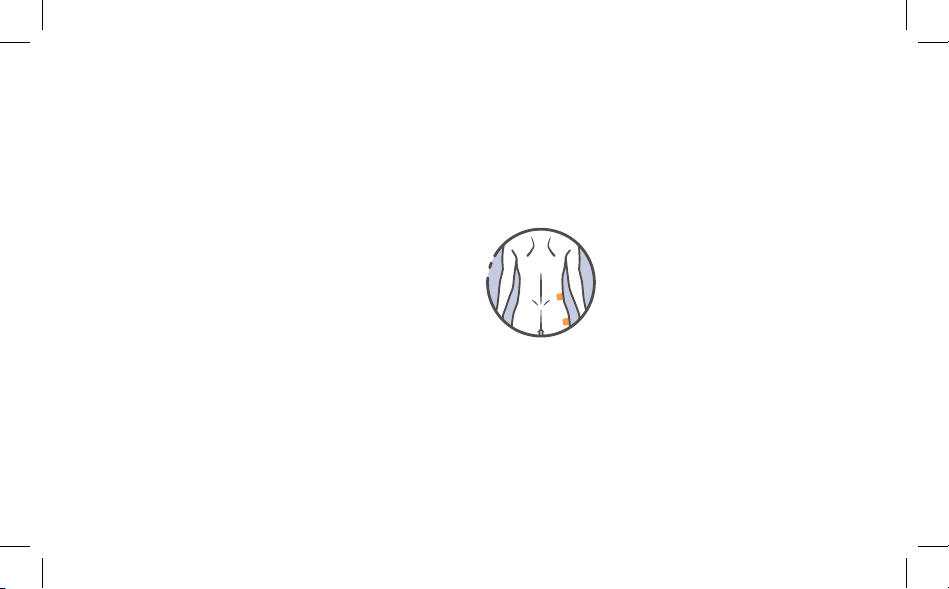
Electrode Placement Guide
Hip: Pain in the hip area is often
the result of wearing of the
joints (arthrosis). Pain in the hip
region may be treated with the
application of electrodes above
and below the joint. In addition,
pain may also radiate outwards,
e.g. towards the groin. In this
case, an electrode is applied
to the main pain point on the
hip while a second electrode is
applied in the direction that the
pain is radiating.
17
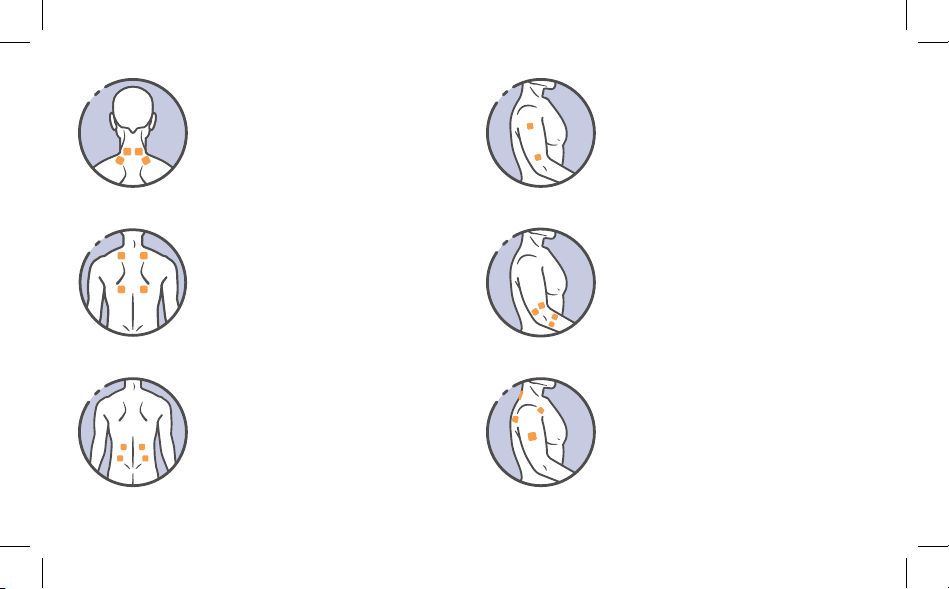
Shoulder: Attach 1 set of
electrodes in front and 1 set on
the back of the muscle where you
feel pain. Also attach both pads
on the shoulder according to your
pain.
Upper Arm: Attach both
electrodes on either side where
you feel pain.
Elbow: Attach both sets of
electrodes on either side of the
joint where you feel pain.
Neck: Attach both sets of pads to
the back of the neck. Do not place
on carotid artery or throat.
Lower Back/Lumbar: Attach
both sets of electrodes to the
lower back with the backbone in
the center. Do not place on the
backbone or spine.
Upper Back: Attach both sets
of electrodes to the upper back
with the backbone in the center.
Do not place on the backbone or
spine.
18
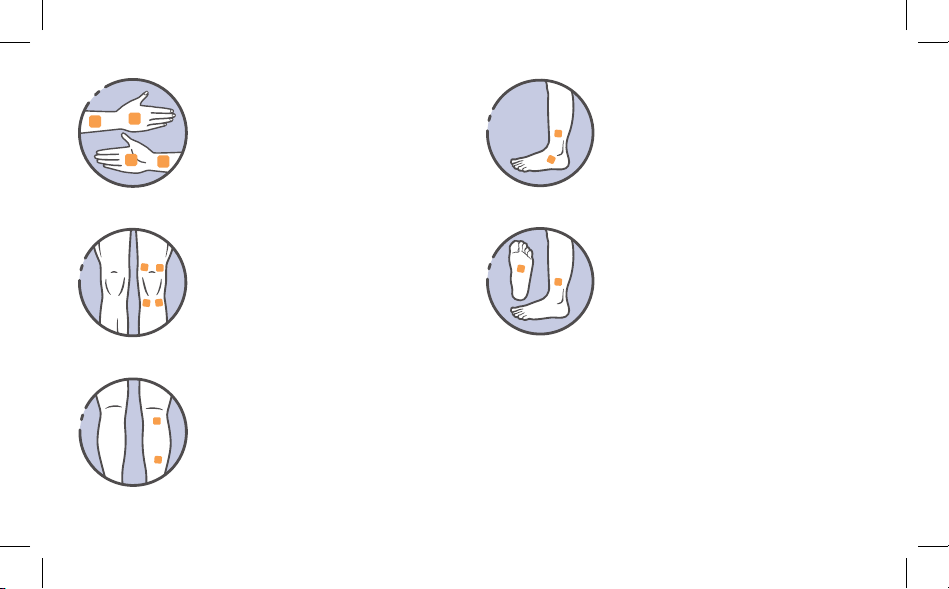
Wrist/Hand: Attach both sets of
electrodes to the hand where you
feel pain.
Knee/Joint: Attach both sets of
electrodes above or above and
below the joint with pain.
Calf: Attach both electrodes on
the calf or leg where you feel
pain.
Ankle/Foot:
• For pain on the outside of
the ankle or foot, attach
electrodes above and below
the pain point.
• For pain on the inside of
the ankle or foot, attach 1
electrode above the ankle
and 1 in the center of the
sole of your foot.
Note:
• Do not place electrodes on both legs or feet
at the same time. Only treat 1 at a time.
• Only place electrodes according to Electrode
Placement Guide.
19
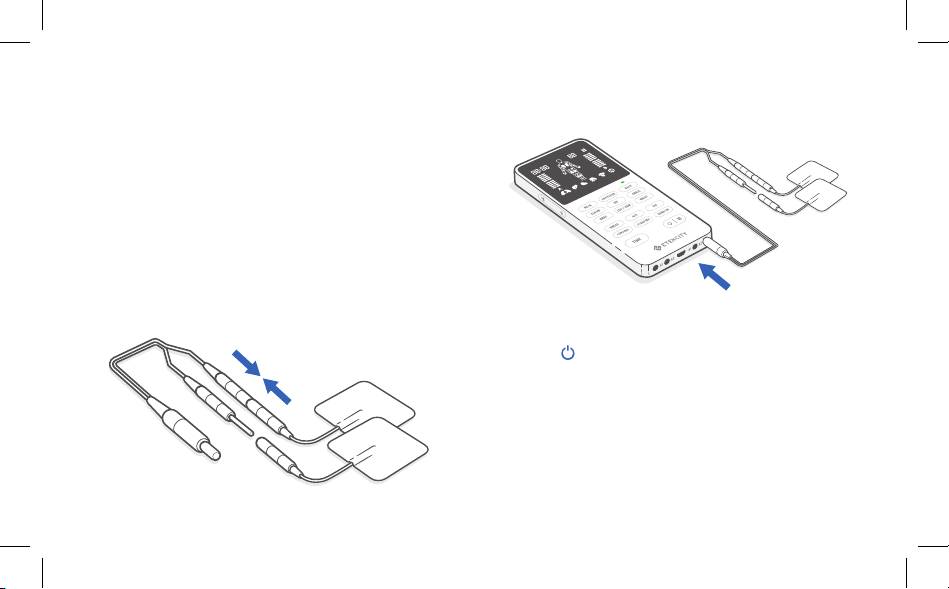
1. Connect the lead pins to the connectors on the
electrodes. Then, place the electrodes on your
skin (with the TENS unit turned OFF). Each wire
has 2 leads with pin-inserted connectors. Make
sure the metal on the pins is not exposed.
Treatment
2. Insert the lead wire plugs into the sockets on the
TENS unit. You can use up to 4.
3. Press to turn on the TENS unit. Wait 2
seconds for the TENS unit to fully turn on.
4.
Select 1 of 15 therapy modes. The selected
icon will flash on the screen and show the
corresponding number.
Note: This TENS unit has 4 independent channels
(A1, A2, B1, B2). Make sure you know which
channel(s) you want to use before you connect
wires to the TENS unit.
Figure 1.1
20
7. Press to pause the treatment at any time.
Press again to resume.
8. Press and hold for 2 seconds to turn off the
TENS unit at any time.
9. Unplug the electrodes from the TENS unit. Then
peel the pads off the skin gently and replace on
the plastic lm. Never remove pads from skin
before turning off the TENS unit.
Note: If the TENS unit is inactive for 3 minutes, it
will turn off automatically.
5. Optionally, press to increase the time by
10-minute increments for up to 60 minutes . The
time will show on the screen. The default time is
20 minutes.
6. Press or to begin the treatment. Press
again to increase the intensity.
Note:
• Intensity can be adjusted independently for
A and B channels.
• Press / repeatedly on the left side and
right side to raise or lower intensity for
channel A (A1 and A2 output) and channel B
(B1 and B2 output).
• Lowering both intensities to 0 will reset the
timer.
Caution:
• Do not remove electrode pads by pulling on
the wire. Peel gently from any corner.
• Do not place electrodes on the carotid
artery, throat, backbone, or spine.
• If you feel pain, dizziness, discomfort, or
nausea while using the TENS unit, stop
using immediately and call your physician
or medical practitioner. Do not exceed your
comfort level.
21
Maintenance
1. Insert the micro USB cable into the micro USB
port charging socket on the TENS unit.
2. Plug the micro USB cable into a DC 5V adapter
and plug into an outlet. You can also plug the
cable into a powered USB outlet.
3. The TENS unit is fully charged when the indicator
turns solid green.
Charging the Battery
orange/yellow when the TENS
unit needs to be charged. On a
full charge, the battery will last
approximately 1 week when used
for 20 minutes a day at level 10
intensity.
Note:
• Charging time is about 3 hours.
• For best results, fully charge your TENS unit
before using.
The battery indicator will flash
Warning:
• If batteries leak and come into contact with skin
or eyes, wash immediately with water.
• The life of any rechargeable battery depends
on the number of recharge/rundown cycles it
undergoes and how these cycles are performed.
The service life of the rechargeable battery
is more than 300 recharge/rundown cycles.
Whenever the TENS unit is not used for a long
period of time, recharge the battery monthly.
• The battery cannot be replaced. If the battery
no longer holds a charge, contact Customer
Support (see page 39).
•
Adapter is not provided, always use with IEC
60601-1 or IEC 60950-1 approved adapter.

22
1. Turn the TENS unit off and disconnect the lead
wires.
2. Clean gently with a damp cloth and wipe dry
immediately.
1. Turn the TENS unit off and disconnect the lead
wires from the pads.
2. Rinse the pads under cold water for several
seconds, using your ngers to remove any dirt
or debris.
3. Allow the adhesive to air dry completely.
Cleaning the TENS Unit Cleaning the Electrode Pads
Note:
• Do not use chemicals or detergents to clean
the unit.
• Do not let water get into the TENS unit.
• The TENS unit and the accessories do not
require sterilization.
Note:
• Do not use chemicals, detergents, or soap
to clean the electrode pads.
• Do not use a sponge, cloth, or any sharp
object on the adhesive side of the pads.
Wash the pads when the adhesive becomes dirty and
the pads are difcult to attach. Electrodes may be
washed and reused 10–15 times.

23
Replacing the Electrode Pads Storage
The life of an electrode may vary due to skin
condition, the frequency of washing, and storage.
You may need to replace the electrodes if:
• They do not stick to skin.
• They are ripped or broken.
Only use electrodes that are the same size as the
electrodes that come with the TENS unit and have
a pigtail connection. Always use the electrodes
that are legally marketed in the US under 510(K)
procedure. Using electrodes that are larger may
reduce the effect of the stimulation while smaller
electrodes may increase the chance of skin irritation
or burns.
• Turn the device off and remove lead wires from
the TENS unit.
• Place the pads on the plastic lm, wrap the lead
wires, and store in a sealed package.
• Store in a dry, clean place.
•
Do not
store in extreme temperatures. Storage
environment should be 14°F–131°F / -10°C–55°C,
10–90%RH.
• Keep away from heat sources and direct
sunlight.
• Do not store in places that can be easily
reached by children.
• Do not leave the TENS unit exposed to any
chemical solvent, lint, or dust.
• When not in use for a long period of time,
recharge the battery monthly.

24
Troubleshooting
Problem Possible Solution
The TENS unit won’t turn
on.
Make sure the TENS unit is charged.
Electrical stimulation is
weak or I cannot feel any
stimulation.
Intensity is too low. Raise the intensity (see Using the TENS Unit, page 16).
Electrode pads may be dried out or dirty. Wash or replace with new pads.
Lead wire may be old, worn, or damaged. Stop using and contact Customer Support (see
page 39).
Electrical stimulation is
uncomfortable.
Intensity is too high. Lower the intensity (see Using the TENS Unit, page 16).
Electrode pads may be too close together. Reposition them at least 2 in / 5 cm apart.
Electrode pads may be too small. Replace with pads that have a diameter no smaller than
2 in / 5 cm.
Make sure you’re following the instructions correctly (see page 16).

25
Problem Possible Solution
Electrical stimulation is
inconsistent.
Check the wires and make sure they are plugged in securely.
Turn down the intensity and rotate the lead plug in the socket 90°.
Replace the lead wire.
Electrical stimulation is
ineffective.
Electrodes may be placed incorrectly (see Electrode Placement Guide, page 16).
Reposition the electrodes.
Contact your physician or medical practitioner.
Skin turns red or there is a
stabbing pain.
Using electrodes on the same area every time can cause discomfort. Reposition the
electrodes (see Electrode Placement Guide, page 16). Stop using immediately if you
feel any more pain or discomfort.
The electrodes may be damaged, dirty, or may not be attached to the skin properly. Make
sure they are clean or replace with new electrodes if necessary.
You may have sensitive skin. Turn off the TENS unit and stop using immediately.
Troubleshooting (cont.)

26
Troubleshooting (cont.)
Problem Possible Solution
Output stops during
treatment.
The electrodes may have come off. Turn off the TENS unit, then reattach the electrodes
and continue the treatment.
Make sure the lead plug is inserted into the correct output socket.
Charge the TENS unit.
Lead wires may be damaged. Stop using and contact Customer Support (see page 39).
The TENS unit runs out of
battery too quickly or does
not hold any charge.
Contact Customer Support (see page 39).
If your problem is not listed, please contact Customer Support (see page 39).
27
Glossary of Symbols
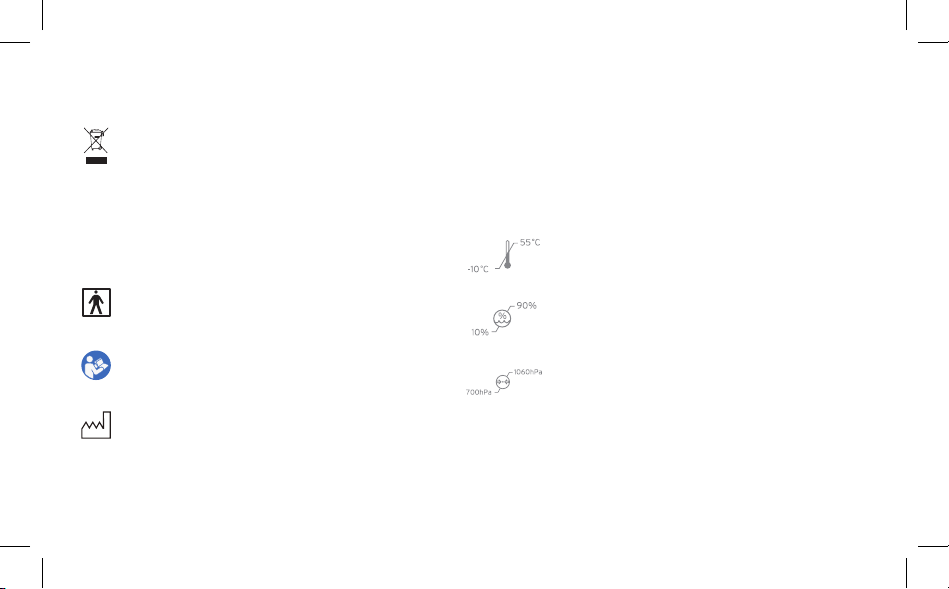
Electrical devices are recyclable material and
should not be disposed of with household
waste after their useful life. Help us protect the
environment and save resources by taking this
device to the appropriate collection point. Please
contact the organization which is responsible
for waste disposal in your area if you have any
questions.
The second number 2: Protected against vertically
falling water drops when tilted up to 15°.
Type BF Applied Part (The applied part is the
electrode).
Refer to instruction manual.
Date of manufacture.
IP22
B/N
Transportation and storage temperature from
14°F–131°F / -10°C–55°C.
Transportation and storage humidity limits from
10–90%.
Transportation and storage atmospheric pressure
limits from 700hPa–1060hPa.
The first number 2: Protected against solid foreign
objects of 12.55 mm and greater.
The B/N code combine with destination country,
PO number, date of manufacture and serial
number.

28
IMPORTANT INFORMATION REGARDING
ELECTROMAGNETIC COMPATIBILITY (EMC)
• Use of accessories other than those specied or provided by the manufacturer of this equipment
could result in increased electromagnetic emissions or decreased electromagnetic immunity of this
equipment and result in improper operation.
• Use of this equipment adjacent to or stacked with other equipment should be avoided because it could
result in improper operation. If such use is necessary, this equipment and the other equipment should
be observed to verify that they are operating normally.
• Portable RF communications equipment (including peripherals such as antenna cables and external
antennas) should be used no closer than 12 in / 30 cm to any part of the device, including cables
specied by the manufacturer. Otherwise, degradation of the performance of this equipment could
result.

29
• When the operating environment is relatively dry, strong electromagnetic interference usually occurs. At
this time, this device may be affected as follows:
— The device stops output
— The device turns off
— The device restarts
The above will not affect the basic safety and essential performance of the device, and the user can use
it according to the instructions. If you want to avoid this, please use it according to the environment
requirements specied in the manual.

30
Declaration - Electromagnetic Emission
The device is intended for use in the electromagnetic environment specied below. The customer or
the user of device should assure that it is used in such an environment.
Emissions Test Compliance Electromagnetic Environment - Guidance
RF emissions
CISPR 11
Group 1
The device uses RF energy only for its internal function
Therefore, its RF emissions are very low and are not likely
to cause any interference in nearby electronic equipment.
RF emissions
CISPR 11
Class B
The device is suitable for use in all establishments,
including domestic establishments and those directly
connected to the public low-voltage power supply network
that supplies buildings used for domestic purposes.
Harmonic emissions
IEC 61000-3-2
Class A
Voltage uctuations/
icker emissions
IEC 61000-3-3
Complies
Table 1

31
Declaration - Electromagnetic Immunity
The device is intended for use in the electromagnetic environment specied below. The customer or the user of device
should assure that it is used in such an environment.
Immunity Test IEC 60601 Test Level Compliance Level
Electromagnetic Environment -
Guidance
Electrostatic
discharge (ESD)
IEC 61000-4-2
± 8 kV contact
± 2 kV, ±4 kV, ±8 kV,
± 15 kV air
± 8 kV contact
± 2 kV, ± 4 kV, ± 8kV,
± 15 kV air
Floors should be wood, concrete, or
ceramic tile. If oors are covered with
synthetic material, the relative humidity
should be at least 30%.
Electrical fast
transient/burst
IEC 61000-4-4
± 2 kV for power supply lines
± 1 kV for input/output lines
± 2 kV for power supply
lines
± 1 kV for input/output
lines
Mains power quality should be that
of a typical commercial or hospital
environment.
Surge
IEC 61000-4-5
± 0.5kV, ± 1 kV line(s) to lines
± 0.5kV, ± 1 kV, ± 2 kV line(s)
to earth
± 0.5kV, ± 1 kV line(s)
to lines
± 0.5kV, ± 1 kV, ± 2 kV
line(s) to earth
Mains power quality should be that
of a typical commercial or hospital
environment.
Table 2

32
Voltage dips, short
interruptions and
voltage variations on
power supply input
lines IEC 61000-4-11
0% UT;
0.5 cycle At 0°,
45°, 90°, 135°, 180°,
225°, 270° and 315°
0 % UT;
1 cycle and 70% UT;
25/30 cycles
Single phase:
at 0° 0% UT; 250/300 cycles
0% UT;
0.5 cycle At 0°, 45°,
90°, 135°, 180°, 225°,
270° and 315°
0 % UT;
1 cycle and 70% UT;
25/30 cycles
Single phase:
at 0° 0% UT;
Mains power quality should be that
of a typical commercial or hospital
environment. If the user of the
device requires continued operation
during power mains interruptions, it
is recommended that the device be
powered from an uninterruptible power
supply or a battery.
Power frequency
(50/60 Hz) magnetic
eld IEC 61000-4-8
30 A/m 30 A/m
Power frequency magnetic elds should
be at levels characteristic of a typical
location in a typical commercial or
hospital environment.
Note: UT is the a.c. mains voltage prior to application of the test level.
Table 2 (cont.)

33
Declaration - Electromagnetic Immunity
The device is intended for use in the electromagnetic environment specied below. The customer or
the user of the device should assure that it is used in such an environment.
Immunity Test IEC 60601 Test Level Compliance Level Electromagnetic Environment - Guidance
Conducted RF
IEC 61000-4-6
3 V 0.15 MHz to 80 MHz
6 V in ISM and amateur
radio bands between
0.15 MHz and 80 MHz
3 V 0.15 MHz to 80
MHz 6 V in ISM and
amateur radio bands
between 0.15 MHz and
80 MHz
Portable and mobile RF communications
equipment should be used no closer to any part
of the device than the recommended separation
distance calculated from the equation applicable
to the frequency of the transmitter. Recommended
separation distance
d = 1.2 √P 150 KHz to 80 MHz
d = 1.2 √P 80 MHz to 800 MHz
d = 2.3 √P 80 MHz to 2.7 GHz
where P is the maximum output power rating
of the transmitter in watts (W) according to
the transmitter manufacturer and d is the
recommended separation distance in meters (m).
Field strengths from xed RF transmitters, as
determined by an electromagnetic site survey,
should be less than the compliance level in each
frequency range.
Radiated RF
IEC 61000-4-3
10V/m 80 MHz to 2.7
GHz
10V/m
Table 3
34
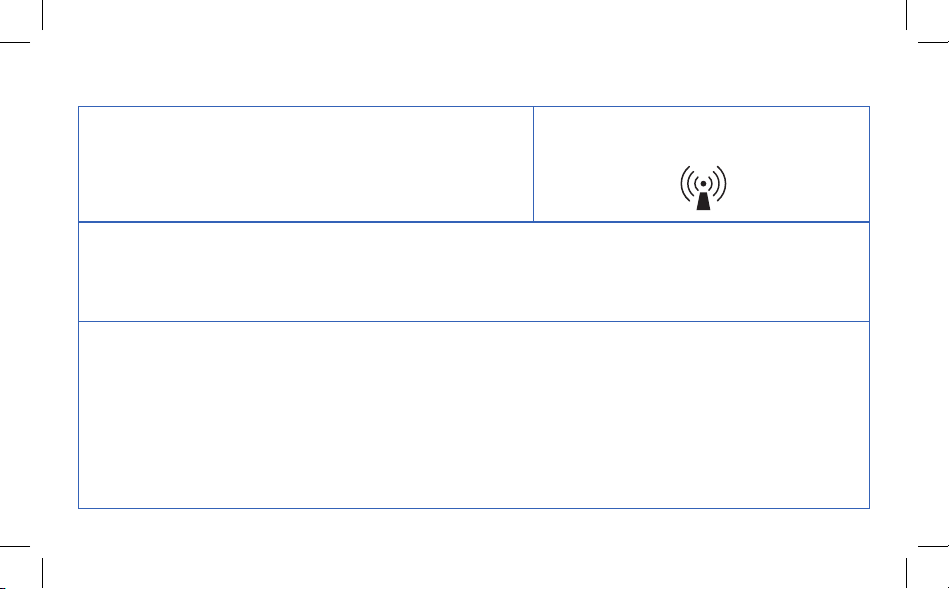
Interference may occur in the vicinity of
equipment marked with the following symbol:
Note 1: At 80 MHz and 800 MHz, the higher frequency range applies.
Note 2: These guidelines may not apply in all situations. Electromagnetic propagation is affected by absorption and
reection from structures, objects and people.
A. Field strengths from xed RF transmitters, such as base stations for radio (cellular/cordless) telephones and land
mobile radios, amateur radio, AM and FM radio broadcast and TV broadcast cannot be predicted theoretically with
accuracy. To assess the electromagnetic environment due to xed RF transmitters, an electromagnetic site survey
should be considered. If the measured eld strength in the location in which device is used exceeds the applicable RF
compliance level above, device should be observed to verify normal operation. If abnormal performance is observed,
additional measures may be necessary, such as reorienting or relocating device.
B. Over the frequency range 0.15 MHz to 80 MHz, eld strengths should be less than 3 V/m.
Table 3 (cont.)

35
Recommended Separation Distances Between Portable and
Mobile RF Communications Equipment and Device
The device is intended for use in an electromagnetic environment in which radiated RF disturbances are controlled. The
customer or the user of device can help prevent electromagnetic interference by maintaining a minimum distance between
portable and mobile RF communications equipment (transmitters) and device, as recommended below, according to the
maximum output power of the communications equipment.
Rated maximum output
power of transmitter W
Separation distance according to frequency of transmitter m
0.15 MHz to 80 MHz
d = 1.2 √P
80 MHz to 800 MHz
d = 1.2 √P
80 MHz to 2.7 GHz
d = 2.3 √P
0.01 0.12 0.12 0.23
0.1 0.38 0.38 0.73
1 1.2 1.2 2.3
10 3.8 3.8 7.3
100 12 12 23
Table 4

36
For transmitters rated at a maximum output power not listed above, the recommended separation
distance d in meters (m) can be estimated using the equation applicable to the frequency of the
transmitter, where P is the maximum output power rating of the transmitter in watts (W) according to
the transmitter manufacturer.
Note 1: At 80 MHz and 800 MHz, the higher frequency range applies.
Note 2: These guidelines may not apply in all situations. Electromagnetic propagation is affected by
absorption and reection from structures, objects and people.
Table 4 (cont.)

37
Warranty Information
Terms & Policy
Etekcity Corporation warrants all products to be of the highest quality in
material, craftsmanship, and service, effective from the date of purchase
to the end of the warranty period.
Etekcity Corporation will replace any product found to be defective due
to manufacturer aws based on eligibility. Refunds are available within
the rst 30 days of purchase. Refunds are only available to the original
purchaser of the product. This warranty extends only to personal use
and does not extend to any product that has been used for commercial,
rental, or any other use in which the product is not intended for. There
are no warranties other than the warranties expressly set forth with each
product.
This warranty is non-transferrable. Etekcity Corporation is not responsible
in any way for any damages, losses, or inconveniences caused by
equipment failure or by user negligence, abuse, or use noncompliant with
the user manual or any additional safety or use warnings included in the
product packaging and manual.
This warranty does not apply to the following:
• Damage due to abuse, accident, alteration, misuse, tampering, or
vandalism.
• Improper or inadequate maintenance.
• Damage in return transit.
• Unsupervised use by children under 18 years of age.
Etekcity Corporation and its subsidiaries assume no liability for damage
caused by the use of the product other than for its intended use or as
instructed in the user manual. Some states do not allow this exclusion or
limitation of incidental or consequential losses so the foregoing disclaimer
may not apply to you. This warranty gives you specic legal rights and you
may also have other rights which may vary from state to state.
ALL EXPRESSED AND IMPLIED WARRANTIES, INCLUDING THE
WARRANTY OF MERCHANTABILITY, ARE LIMITED TO THE PERIOD
OF THE LIMITED WARRANTY.
Product Name TENS Unit
Model ETU-134
Default Warranty Period 1 year
For your own reference, we strongly recommend that you record
your order ID and date of purchase.
Order ID
Date of Purchase

38
Additional 1-Year Warranty
You can extend your 1-year warranty by an additional year. Log onto
www.etekcity.com/warranty to register your new product for the
extended warranty.
Please ll out all required elds and include your order ID, place of
purchase, and purchase date, if applicable.
Defective Products & Returns
If you discover your product is defective within the specied warranty
period, please contact Customer Support via [email protected] with
a copy of your invoice and order ID. DO NOT dispose of your product
before contacting us. Once our Customer Support Team has approved
your request, please return the product with a copy of the invoice and
order ID.
Warranty Information (cont.)

39
Customer Support
If you encounter any issues or have any questions about
your new product, please contact our helpful Customer
Support Team. Your satisfaction is our goal!
Customer Support
Distributed by Etekcity Corporation
1202 N. Miller St., Suite A
Anaheim, CA 92806
Email: [email protected]
Toll-Free: (855) 686-3835
Support Hours
Monday—Friday
9:00 am —5:00 pm PST/PDT
*Please have your invoice and order ID ready before
contacting Customer Support.

40
Notes

41
Notes

42
Notes

43
Connect with us @Etekcity

Building on better living.
V1.0_20190621