D:\TV's JOB\SONY TV\SY0429_A8\4411857E11_GB\GB01COV.fm
4-411-857-E1(1)
KDL-55HX850 / 46HX850
4-411-857-E1(1)
LCD TV
Operating Instructions
Before operating the TV, please
read this manual thoroughly and
retain it for future reference.
KDL-55HX850 / 46HX850
2
GB
D:\TV's JOB\SONY TV\SY0429_A8\4411857E11_GB\GB02REG.fm
KDL-55HX850 / 46HX850
4-411-857-E1(1)
Introduction
Thank you for choosing this
Sony product.
~
• The illustrations used in this
manual are of the
KDL-46HX850 series unless
otherwise stated.
• The illustrations of the remote
used in this manual are of the
RM-SD014 unless otherwise
stated.
Trademark information
HDMI, the HDMI Logo, and
High-Definition Multimedia
Interface are trademarks or
registered trademarks of HDMI
Licensing LLC in the United
States and other countries.
DLNA®, the DLNA Logo and
DLNA CERTIFIED® are
trademarks, service marks, or
certification marks of the Digital
Living Network Alliance.
Manufactured under license
from Dolby Laboratories. Dolby
and the double-D symbol are
trademarks of Dolby
Laboratories.
“BRAVIA” and are
trademarks of Sony
Corporation.
TrackID is a trademark or
registered trademark of Sony
Ericsson Mobile
Communications AB.
Music and video recognition
technology and related data
are provided by Gracenote®.
Gracenote is the industry
standard in music recognition
technology and related content
delivery. For more information,
please visit
www.gracenote.com.
CD, DVD, Blu-ray Disc, and
music and video-related data
from Gracenote, Inc., copyright
© 2000-present Gracenote.
Gracenote Software, copyright
© 2000-present Gracenote.
One or more patents owned by
Gracenote apply to this
product and service. See the
Gracenote website for a
nonexhaustive list of applicable
Gracenote patents. Gracenote,
CDDB, MusicID, MediaVOCS,
the Gracenote logo and
logotype, and the “Powered by
Gracenote” logo are either
registered trademarks or
trademarks of Gracenote in the
United States and/or other
countries.
Opera® Browser from Opera
Software ASA. Copyright
1995-2012 Opera Software
ASA. All rights reserved.
Wi-Fi Direct is a mark of the
Wi-Fi Alliance.
“Blu-ray Disc”, “Blu-ray” and
“Blu-ray Disc” logo are
trademarks of Blu-ray Disc
Association.
“Sony Entertainment Network
logo” and “Sony Entertainment
Network” are trademarks of
Sony Corporation.
Notes on using Internet
features
• You agree to comply with any
and all terms and conditions
that any content on the Web
may require for said content’s
service and usage.
• Your ability to access Internet
content is subject to your
Internet provider’s service
and terms, and your network
environment.
• Sony shall have no
responsibility for Internet
content.
• Sony may add, change,
discontinue, remove, or
suspend any services or Sony
content services, temporarily
or permanently, at any time,
without notice and without
liability.
• By using this feature, you
agree to be bound by above
terms and conditions.
Location of the
identification label
Labels for Model No. and
Power Supply rating (in
accordance with applicable
safety regulation) are located
on the rear of the TV.
3
GB
D:\TV's JOB\SONY TV\SY0429_A8\4411857E11_GB\GB02REG.fm
KDL-55HX850 / 46HX850
4-411-857-E1(1)
无线功能的主要技术参数及其指标值
D:\TV's JOB\SONY TV\SY0429_A8\4411857E11_GB\GB01TOC.fm
KDL-55HX850 / 46HX850
4-411-857-E1(1)
4
GB
About this manual
(Operating Instructions)
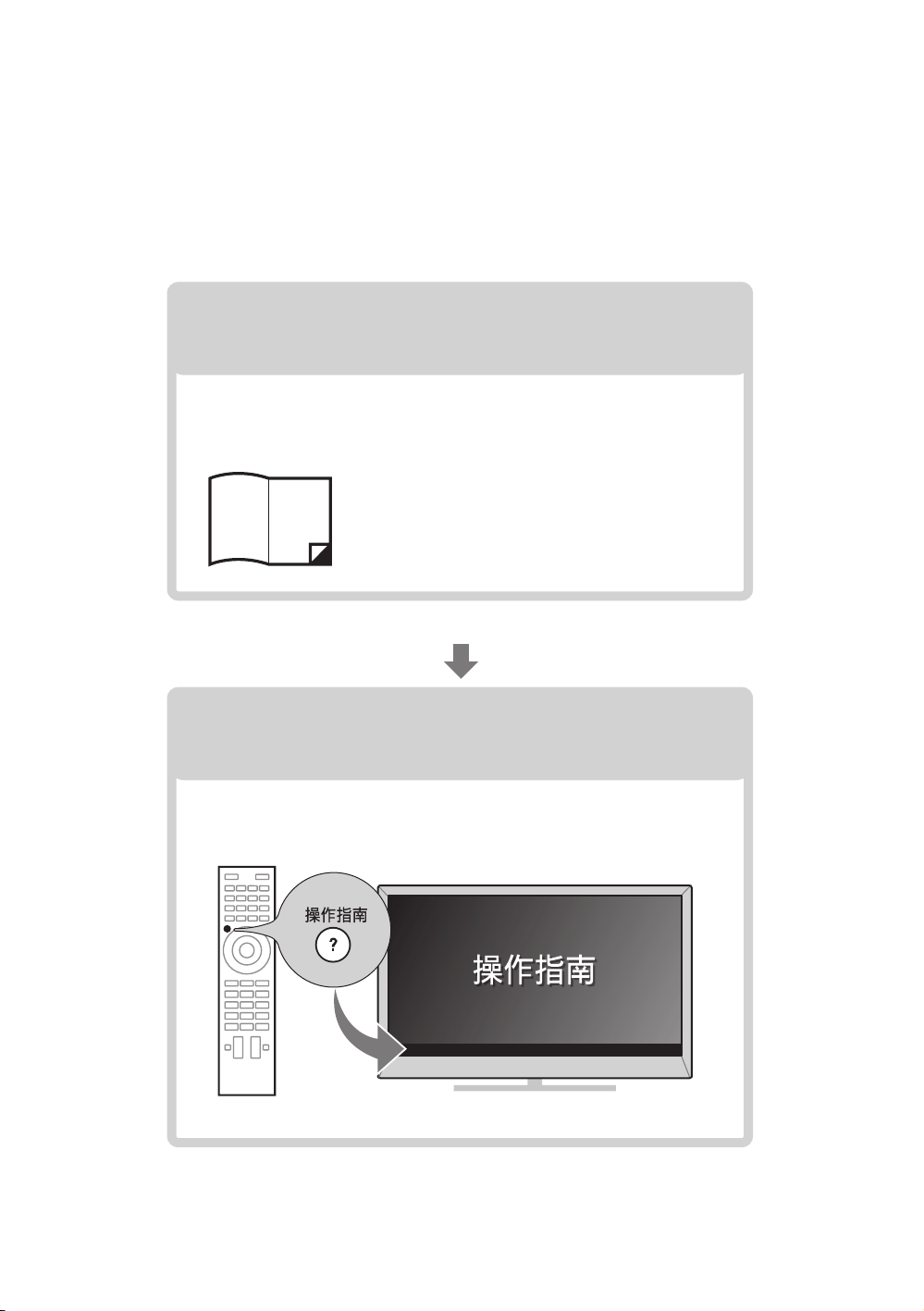
This manual explains how to set up your TV. For more
information on how to use BRAVIA TV, refer to the “Electronic
manual”.
Operating Instructions
Electronic manual
(i-Manual)
Explains how to set up your TV such as connections,
initial set-up, and basic operations.
For more information, press the 操作指南 button
Explains how to use all the features. See page 19 on
how to use the i-Manual.
Images and illustrations used in this manual may differ from
the actual screen.
D:\TV's JOB\SONY TV\SY0429_A8\4411857E11_GB\GB01TOC.fm
KDL-55HX850 / 46HX850
4-411-857-E1(1)
5
GB
Table of Contents
Getting Started
Checking the accessories......................................................................... 6
Inserting batteries into the remote.............................................................6
1: Attaching the Table-Top Stand ............................................................. 7
2: Adjusting the viewing angle of the TV ...................................................8
3: Connections .......................................................................................... 8
4: Preventing the TV from toppling over..................................................10
5: Bundling the cables ............................................................................ 11
6: Connecting the TV to the Internet........................................................ 12
7: Performing the initial set-up................................................................. 13
Using Your BRAVIA TV
Watching TV
B
............................. qf
Selecting various functions and settings (Home Menu).......................... 16
Watching Internet Video ..........................................................................18
Looking for Instructions
Looking for instructions in the
electronic manual
(i-Manual)
B
.................................. ql
Additional Information
Troubleshooting....................................................................................... 21
Specifications .......................................................................................... 22
Safety Information....................................................................................25
Precautions..............................................................................................27
D:\TV's JOB\SONY TV\SY0429_A8\4411857E11_GB\GB03STU.fm
KDL-55HX850 / 46HX850
4-411-857-E1(1)
6
GB
Getting Started
Checking the
accessories
Remote (1)
Size AAA batteries (R03 type) (2)
Table-Top Stand (1)*
1
Fixing screws for Table-Top Stand
(M5 × 16) (3)
Assembling screws for Table-Top Stand
(M5 × 16) (4)
Operating Instructions (this manual) and other
documents
*
1
Refer to the supplied Table-Top Stand leaflet to
assemble the Table-Top Stand.
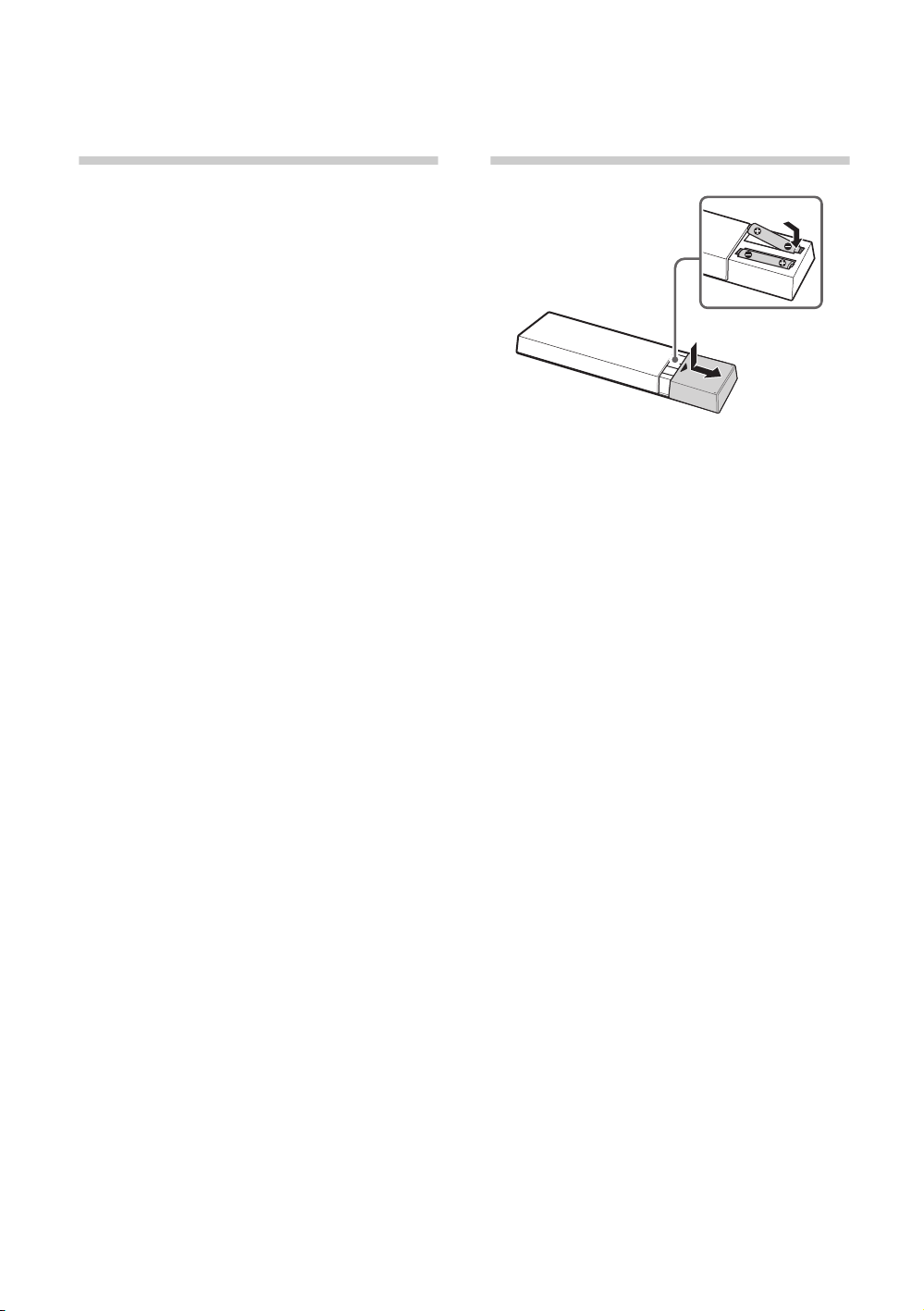
Inserting batteries
into the remote
1 Remove the protection sheet.
2 Push and slide the cover to open.
D:\TV's JOB\SONY TV\SY0429_A8\4411857E11_GB\GB03STU.fm
KDL-55HX850 / 46HX850
4-411-857-E1(1)
Getting Started
7
GB
1: Attaching the
Table-Top
Stand
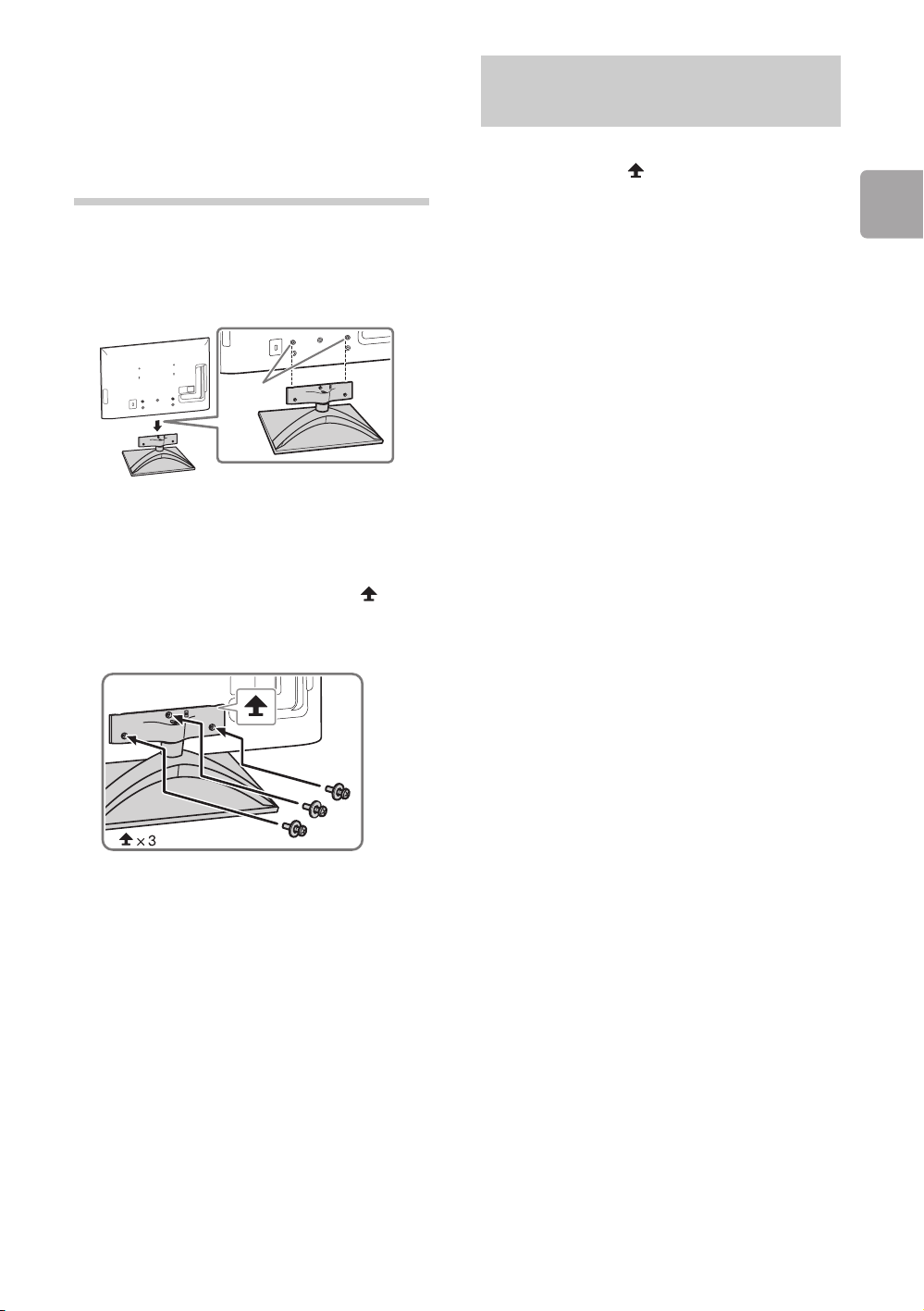
Refer to the supplied Table-Top Stand leaflet for
proper attachment.
1 Place the TV set on the Table-Top Stand.
~
• Align the TV from the top, slide it in until the
guide pins cannot be seen.
2 Fix the TV to the Table-Top Stand using the
supplied screws. The arrow marks
indicate the location of the screw holes used
for securing the Table-Top Stand.
~
• If using an electric screwdriver, set the
torque at approximately 1.5 N·m {15 kgf·cm}.
To detach the Table-Top Stand from the TV,
remove the screws fixed in step 2.
~
• Do not remove the Table-Top Stand for any
reason other than to install corresponding
accessories on the TV.
• When removing the Table-Top Stand from the
TV, lay the display face down on a stable work
surface that is larger than the TV.
• To prevent damaging the surface of the LCD
display, make sure to place a soft cloth on the
work surface.
• For bracket installation, refer to the instruction
guide provided by the Wall-Mount Bracket
model for your TV. Sufficient expertise is
required in installing this TV, especially to
determine the strength of the wall for
withstanding the TV’s weight. For product
protection and safety reasons, Sony strongly
recommends that you use the Wall-Mount
Bracket model designed for your TV and the
wall-mounting of your TV should be
performed by Sony dealers or licensed
contractors.
Guide
pins
Detaching the Table-Top
Stand from the TV
D:\TV's JOB\SONY TV\SY0429_A8\4411857E11_GB\GB03STU.fm
KDL-55HX850 / 46HX850
4-411-857-E1(1)
8
GB
2: Adjusting the
viewing angle
of the TV
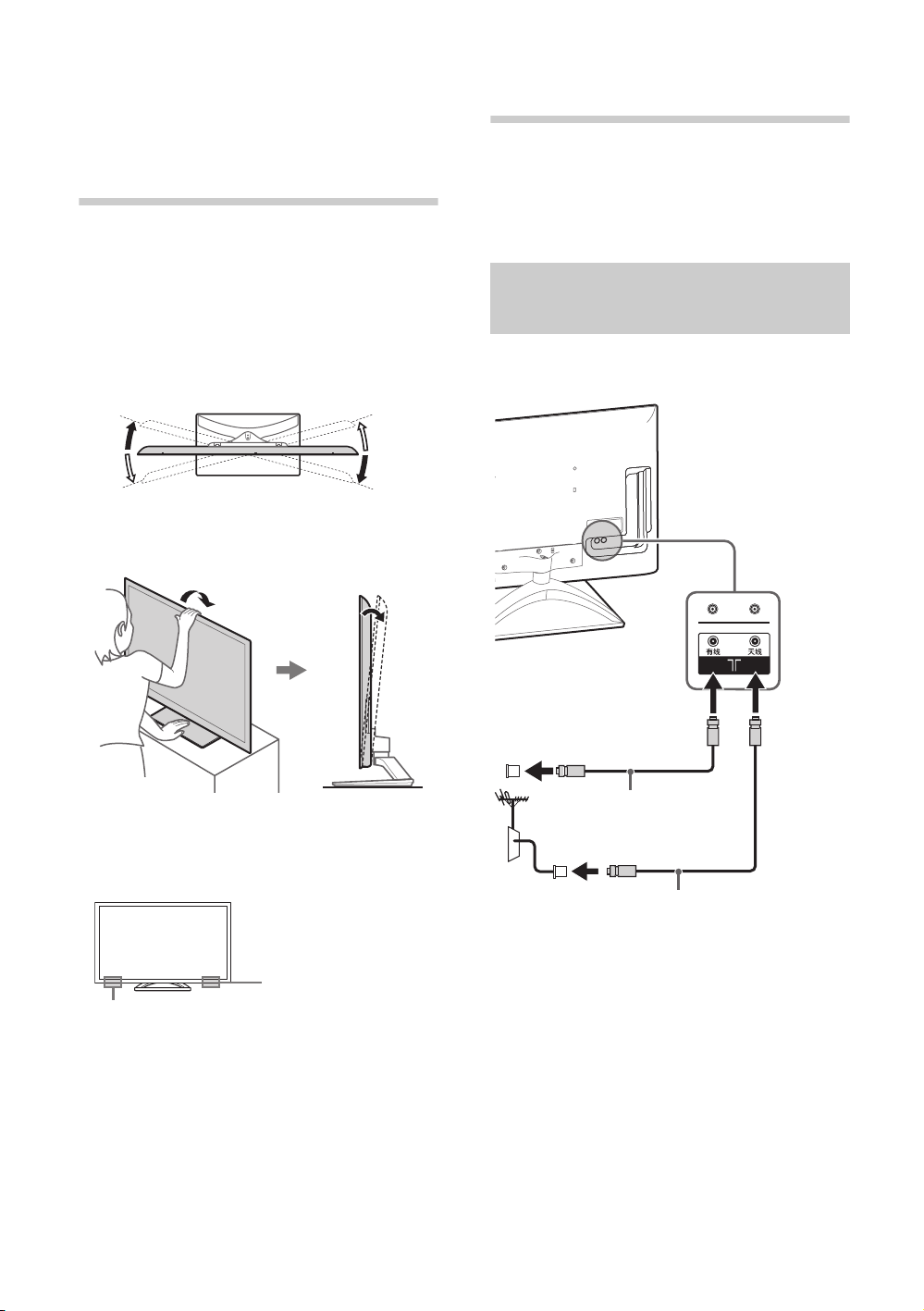
This TV can be adjusted within the angles as
illustrated.
x Angle adjustment (Swivel)
~
• When adjusting the angle, hold the stand with
one hand to avoid having the stand slip or TV tip
over.
x Angle adjustment (Tilt)
* The angle is approximate value.
~
• Ensure that there are no objects in front of the TV.
3: Connections
~
• Use an antenna cable connector no greater than
14 mm in thickness.
• Use an HDMI cable connector within 12 mm
(thickness) × 21 mm (width).
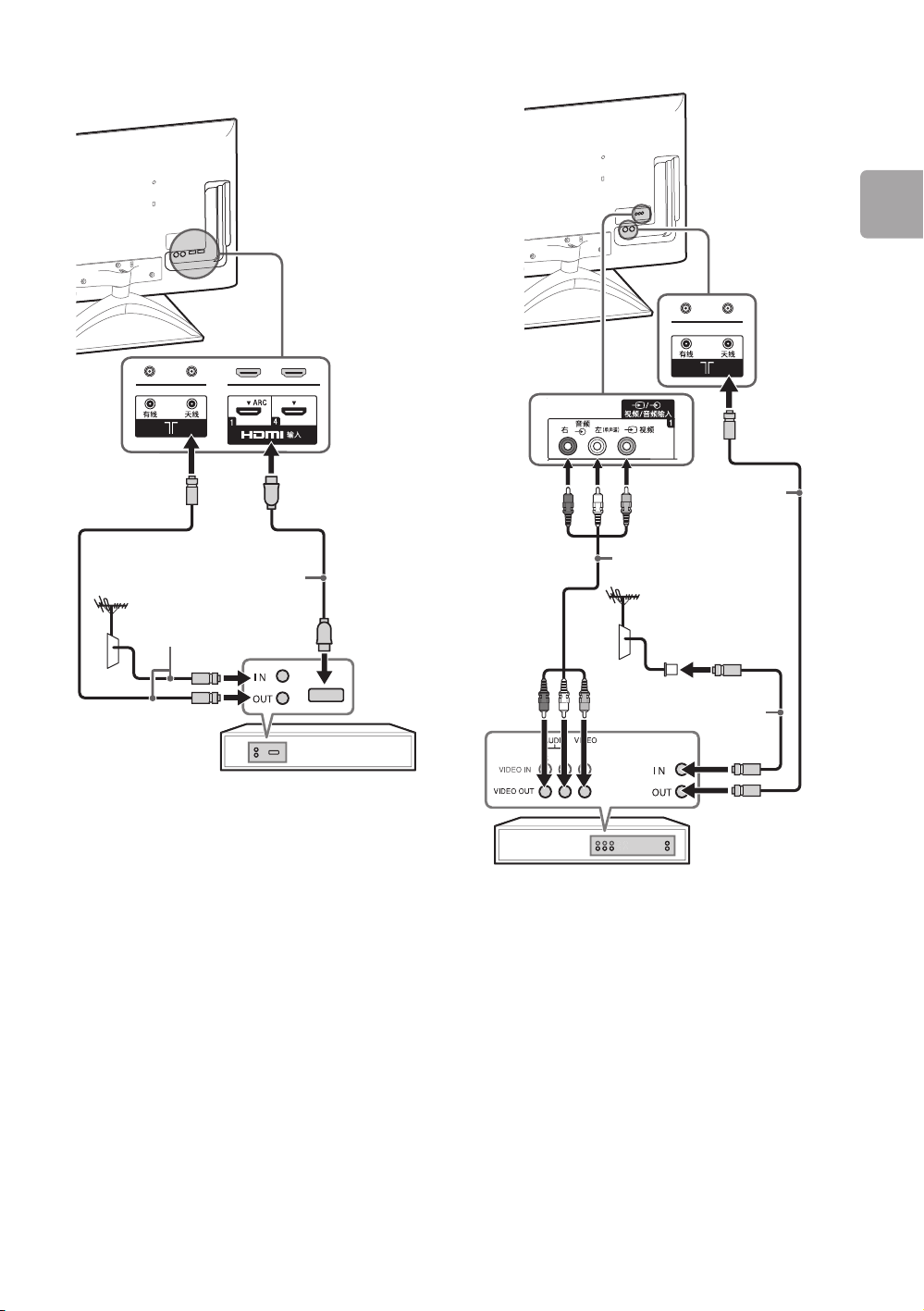
x To connect an antenna (aerial)/cable
*15°
*15°
*15°
*15°
*6°
3D Sync Transmitter
IR Sensor
Connecting an antenna
(aerial)/cable/VCR
Antenna cable
(not supplied)
Antenna cable
(not supplied)
D:\TV's JOB\SONY TV\SY0429_A8\4411857E11_GB\GB03STU.fm
KDL-55HX850 / 46HX850
4-411-857-E1(1)
Getting Started
9
GB
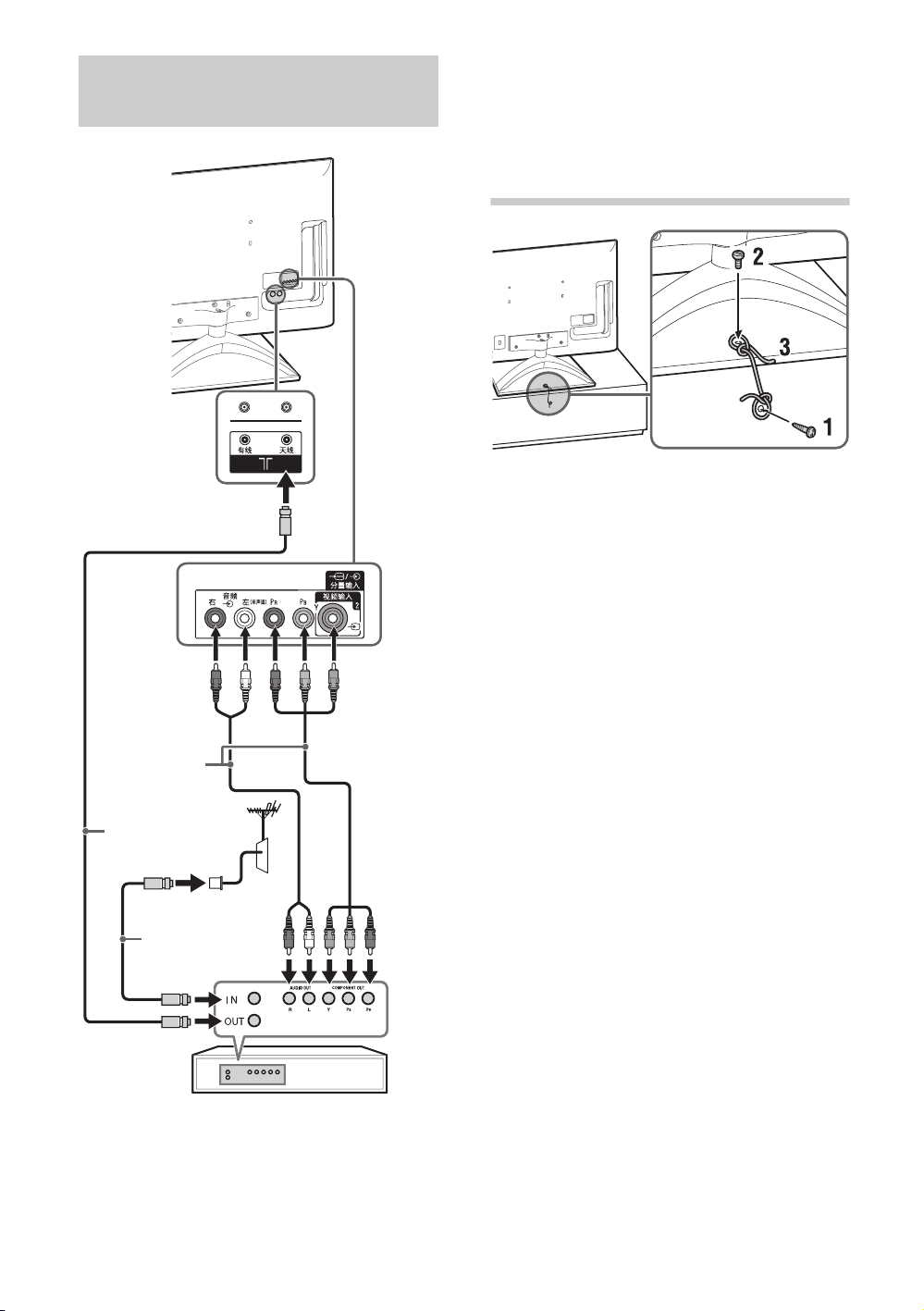
x To connect a Set Top Box/recorder
(e.g. DVD recorder) with HDMI
x To connect an antenna/cable and VCR
Set Top Box/recorder (e.g. DVD recorder)
Antenna cable
(not supplied)
HDMI cable
(not supplied)
Antenna cable
(not supplied)
Antenna cable
(not supplied)
AV cable
(not supplied)
VCR
(Continued)
D:\TV's JOB\SONY TV\SY0429_A8\4411857E11_GB\GB03STU.fm
KDL-55HX850 / 46HX850
4-411-857-E1(1)
10
GB
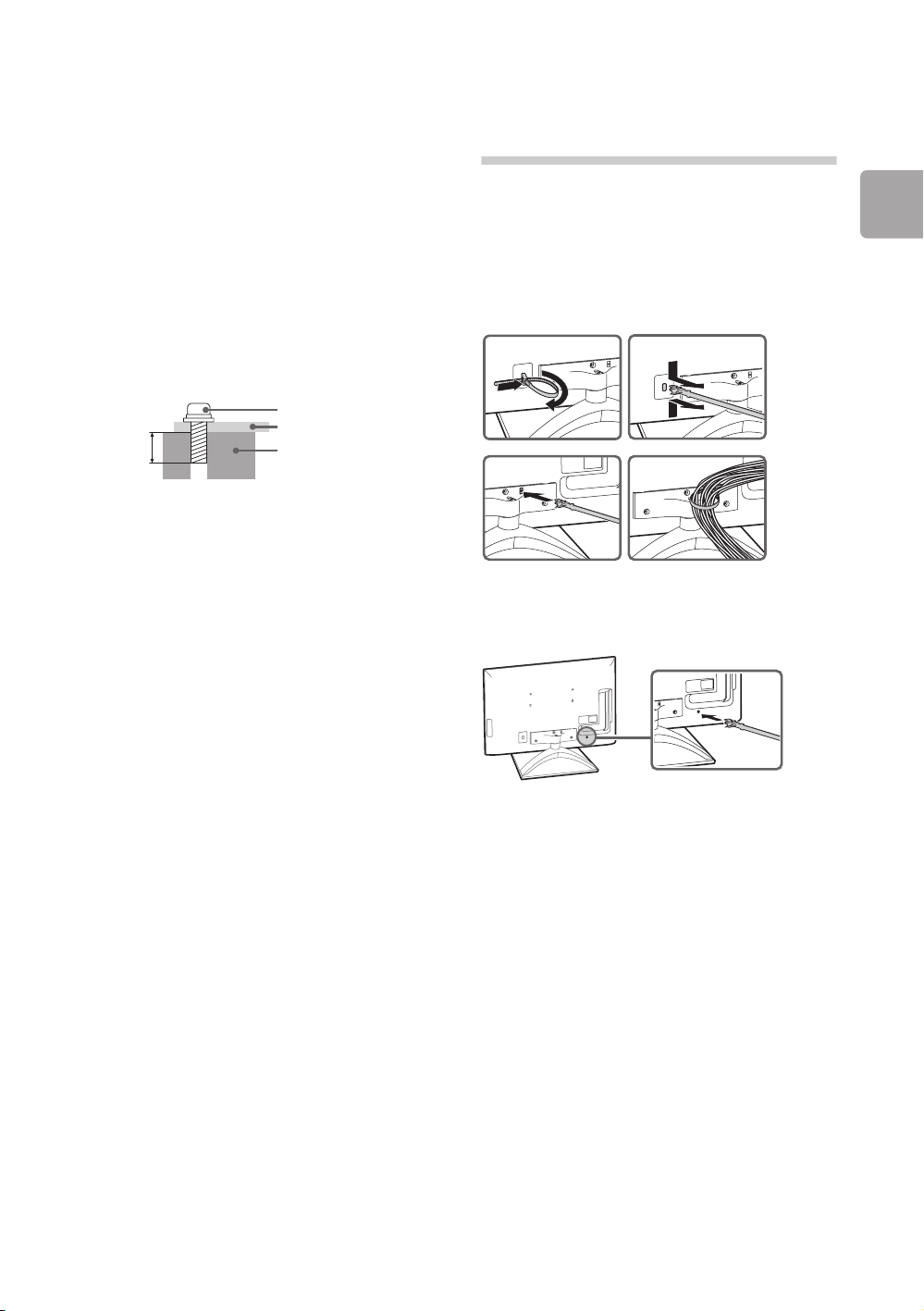
4: Preventing the
TV from
toppling over
1 Install a wood screw* (4 mm in diameter, not
supplied) in the TV stand.
2 Install a machine screw* (M4, not supplied)
into the screw hole of the TV.
3 Tie the wood screw and the machine screw
with a strong cord (not supplied).
* LCD-TV securing accessories package (sold
separately)
Connecting audio/video
devices
DVD Player
Antenna cable
(not supplied)
AV cable
(not supplied)
Antenna cable
(not supplied)
D:\TV's JOB\SONY TV\SY0429_A8\4411857E11_GB\GB03STU.fm
KDL-55HX850 / 46HX850
4-411-857-E1(1)
Getting Started
11
GB
~
• Please place the TV set on a stable, level
surface, if place on an unstable place, it may
caused TV set to topple over, fall down, and
caused injuries to people.
• For safety reasons, recommend to use securing
method as illustrated. Regarding the securing
accessories, it is recommended to buy from
those sold in market or buy the LCD-TV securing
accessories package which is sold separately
by Sony (additional fees may be charged). If
required, please contact Sony customer service
centre for help. Please refer “after sales service
website” for details (supplied leaflet).
The length of the M4 machine screw differs
depending on the cord diameter.
Please see below illustration.
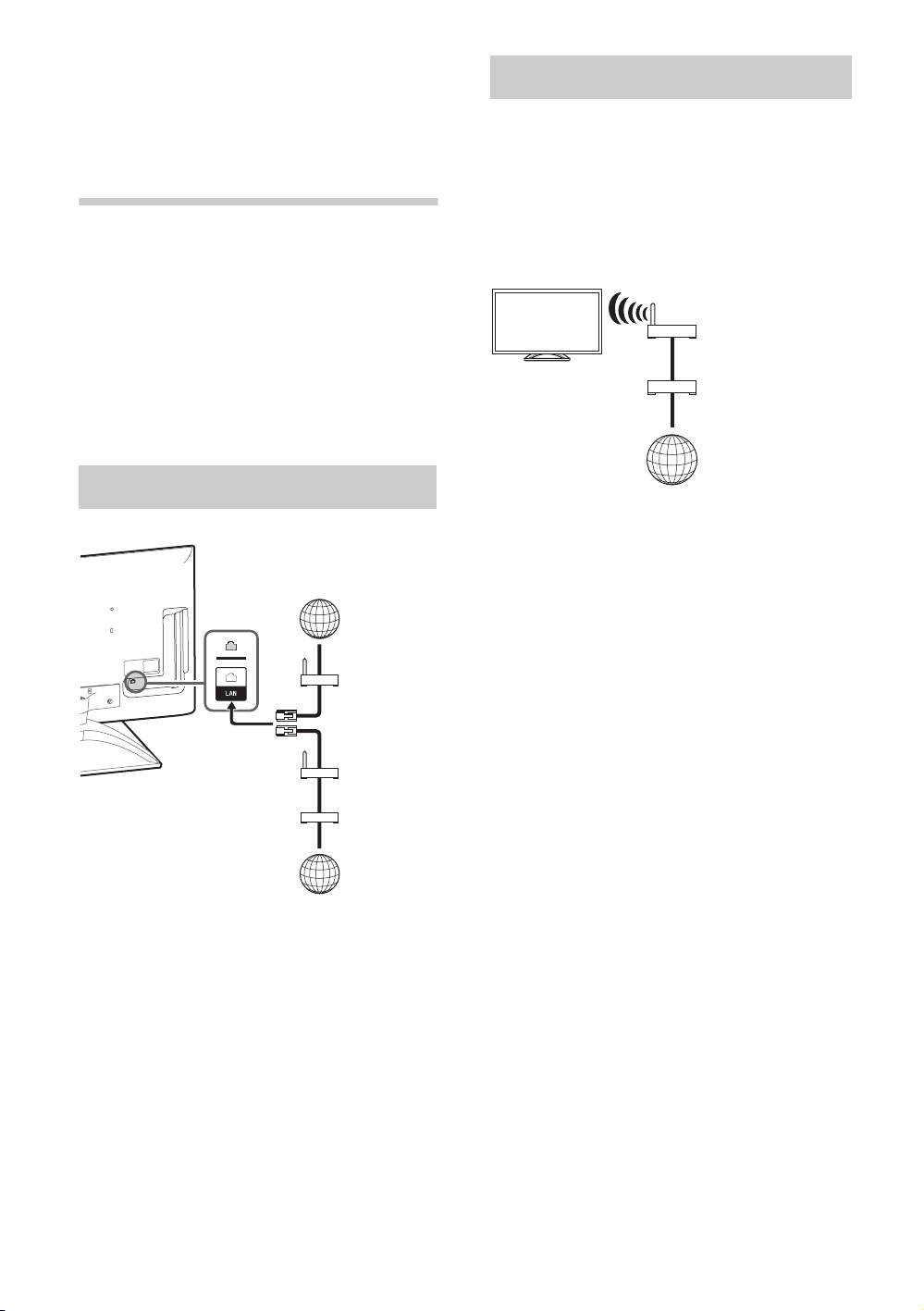
5: Bundling the
cables
Before bundling the cables, remove the cable
holder from the AC cover. Reuse the cable
holder to bundle the other cables.
~
• Do not bundle the AC power cord (mains lead)
together with other cables.
* When installing on the wall, attach the cable holder
under the terminals.
6-8 mm
Screw M4
Cord
TV’s Table-Top
Stand
12
4
3
*
D:\TV's JOB\SONY TV\SY0429_A8\4411857E11_GB\GB03STU.fm
KDL-55HX850 / 46HX850
4-411-857-E1(1)
12
GB
6: Connecting the
TV to the
Internet
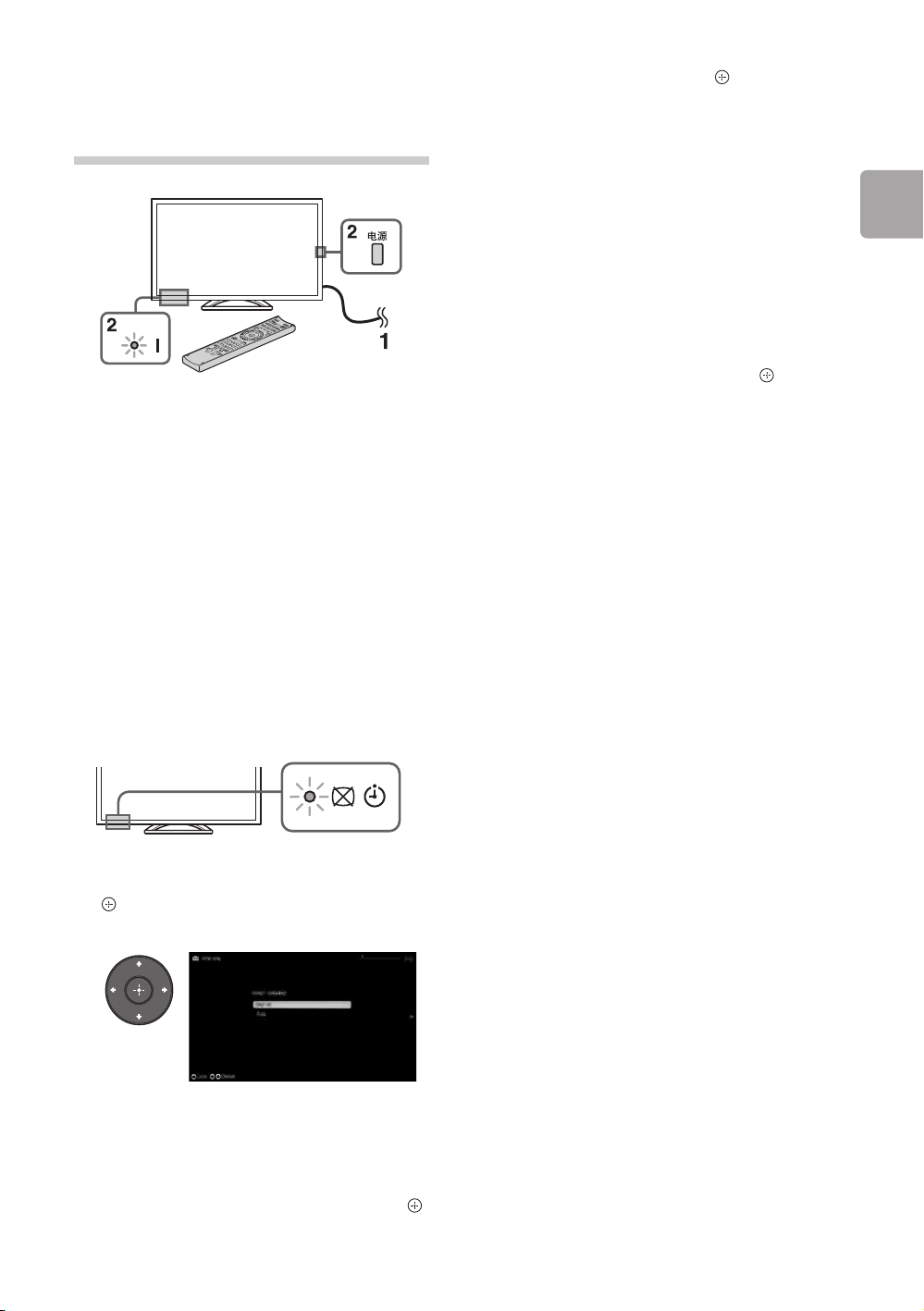
When you connect this TV to the Internet, you
can enjoy multiple functions: displaying a
photograph that shows its location on the map,
enjoying Internet video, etc. For details on the
functions, refer to the i-Manual.
~
• You will need to contract with an Internet service
provider to connect to the Internet.
• You need to buy digital camera or GPS
equipment with GPS function to show the picture
map function.
~
• For LAN connections, use a Category 7 cable
(not supplied).
The built-in wireless LAN device allows you to
access the Internet and your home network.
With this feature, you can connect to a wireless
LAN and enjoy the benefits of networking in a
cable-free environment. Before setting up the
wireless LAN function of the TV, be sure to set
up a wireless LAN router.
Preparing a wired network
TV
Internet
Modem
with router
functions
Router
Modem
Internet
or
Preparing a wireless LAN
Wireless
router
Modem
Internet
TV
D:\TV's JOB\SONY TV\SY0429_A8\4411857E11_GB\GB03STU.fm
KDL-55HX850 / 46HX850
4-411-857-E1(1)
Getting Started
13
GB
7: Performing the
initial set-up
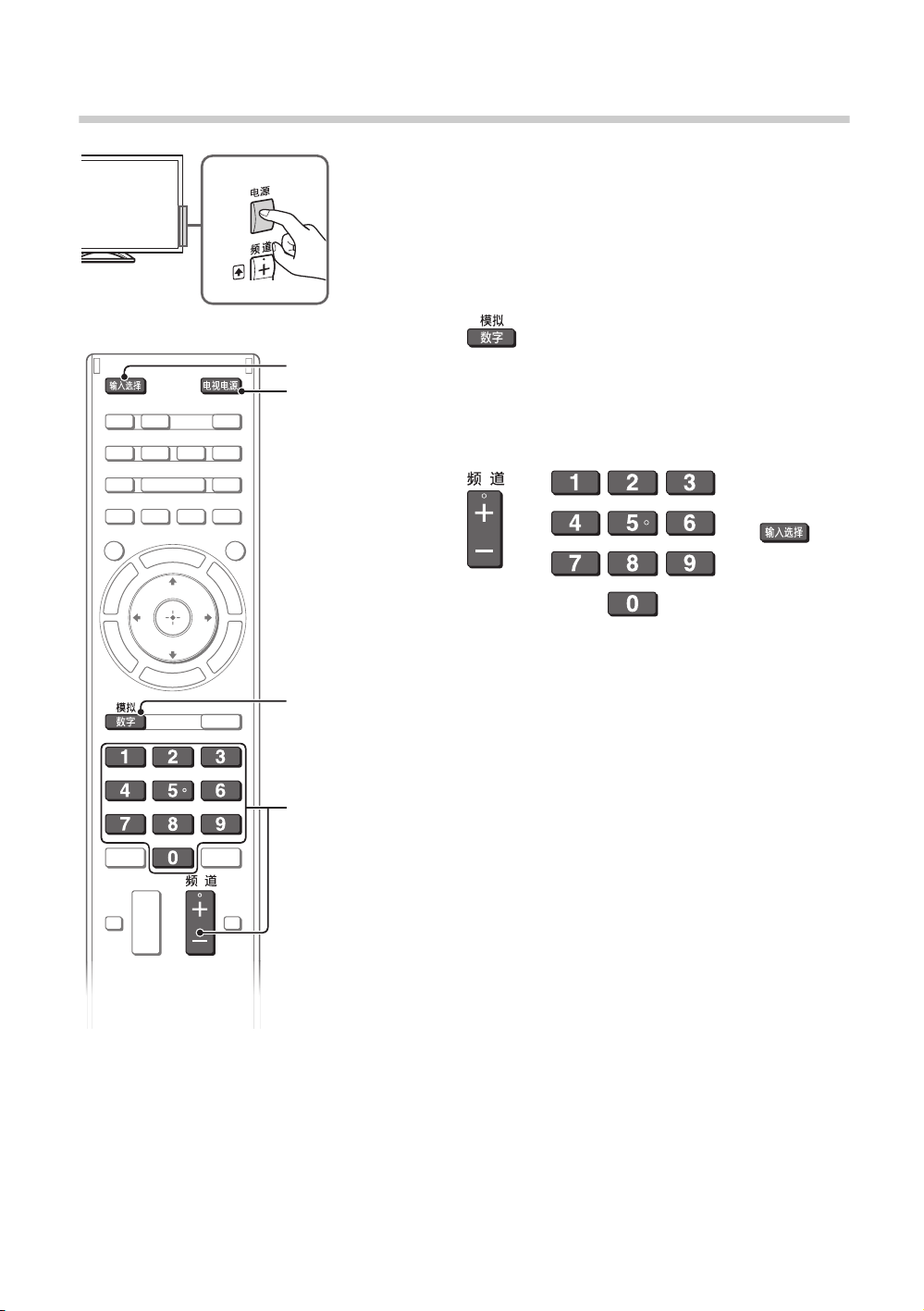
1 Connect the TV to your AC power outlet
(mains socket).
2 Press 电源 on the TV. The = (power) indicator
will light up in green.
When you switch on the TV for the first time,
the Language menu appears on the screen.
~
• When you turn on the TV for the first time, the
TV requires some internal processing for
optimisation before you can perform the
initial setup. There will be no picture and
sound, and the timer indicator on the front of
the TV blinks orange for about 40 seconds.
Do not turn off the TV during this process.
This process has been completed at the
factory for some TVs.
3 Press F/f/G/g to select an item, then press
.
Follow the instructions on the screen.
Programme Sorting: Changes the order of
analogue channels stored in the TV.
1 Press F/f to select the channel you want
to move to a new position, then press .
2 Press F/f to select the new position for
the channel, then press .
~
• You can also tune channels manually.
Network Set-up: Sets up the Internet
settings. Select “Auto” to connect to the
network automatically. Select “Custom” to
connect manually.
If you do not access the Internet, or to set up
later, select “Skip”.
~
• If you use WEP security, select “Custom” t
“Wireless Set-up” t “Scan”. Then, select the
network name (SSID) you want to connect.
If you cannot find the required network name,
select “[Manual Entry]” and press
to enter
network name.
• Use the optional USB Wireless LAN Adapter
to connect with your wireless router (or
access point) at 5GHz. Insert USB Wireless
LAN Adapter and set “Standby for Wi-Fi
Direct” to “Off”. Press HOME, then select
“Settings” t “Network” t “Standby for Wi-
Fi Direct” t “Off”.
• To set “Network Set-up” later, press HOME,
then select “Settings” t “Network” t
“Network Set-up”.
D:\TV's JOB\SONY TV\SY0429_A8\4411857E11_GB\GB04SAF.fm
KDL-55HX850 / 46HX850
4-411-857-E1(1)
14
GB
Using Your BRAVIA TV
Watching TV
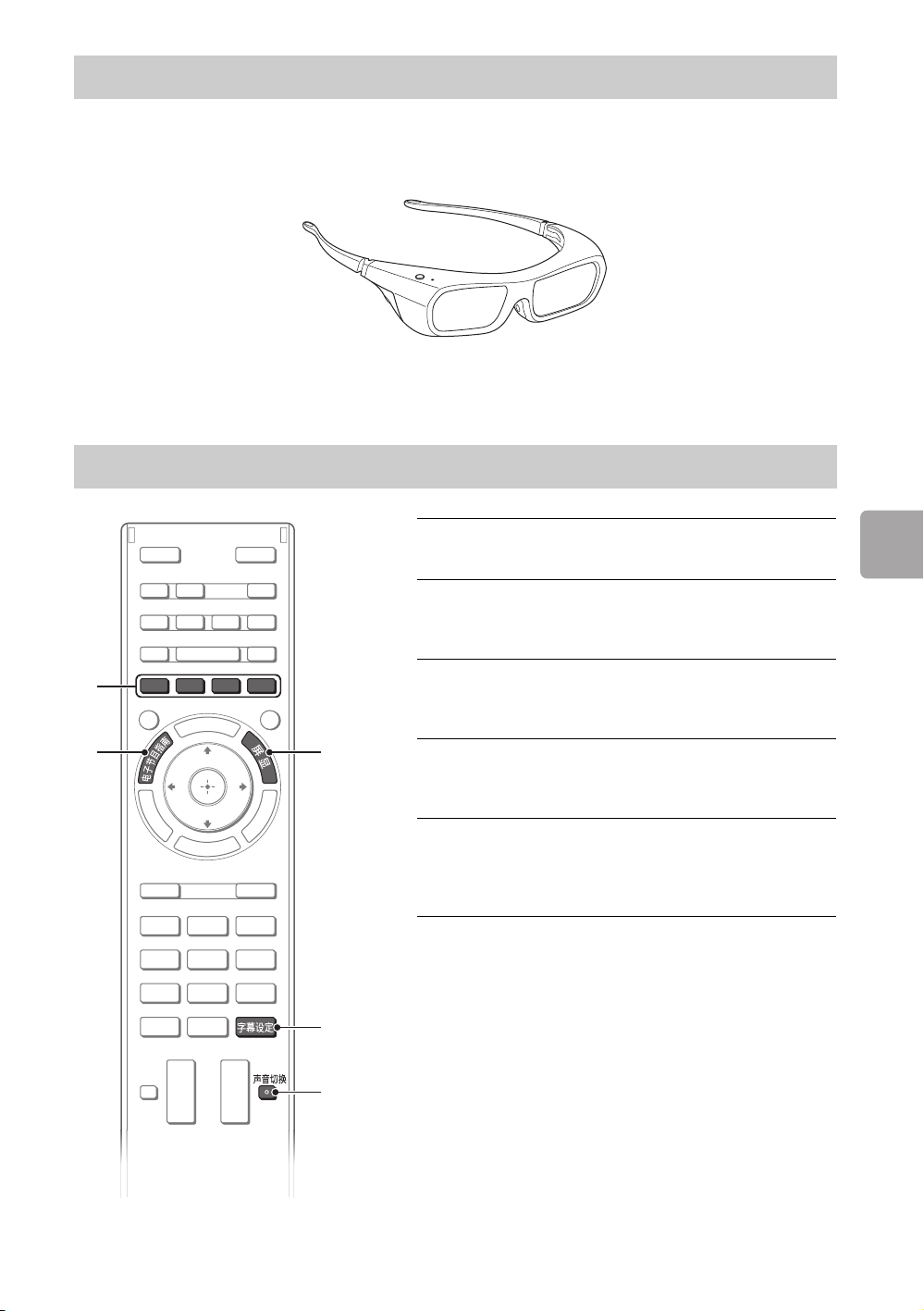
1 Turn on the TV.
Press 电源 on the TV or 电视电源 on the remote to
turn on the TV.
2 Select a mode.
3 Select a TV channel or select an
input.
x To select digital channels
Use 0-9. For channel numbers 10 and above, press the
next digit quickly.
1
3
3
2
1
or or
D:\TV's JOB\SONY TV\SY0429_A8\4411857E11_GB\GB04SAF.fm
KDL-55HX850 / 46HX850
4-411-857-E1(1)
15
GB
Using Your BRAVIA TV
This feature lets you experience powerful 3D entertainment, such as stereoscopic 3D games and 3D
Blu-ray Disc. Refer to the i-Manual as well as the instruction manual supplied with the 3D Glasses on
how to set the 3D settings or watch the 3D contents.
Depending on different signal source and format, not all the features in 3D display can be used under
certain circumstances.
Watching 3D contents
Frequently used buttons
3
4
5
1
2
1
电子节目指南
Displays the digital programme guide.
2 Colour buttons
When the colour buttons are available, an
operation guide appears on the screen.
3
屏显
Displays channel number, details of programmes,
and the clock.
4
字幕设定
You can turn subtitle on/off while watching digital
broadcasting.
5
声音切换
You can select the sub sound or secondary
language while watching multiplex broadcasts
(digital broadcasts only).
D:\TV's JOB\SONY TV\SY0429_A8\4411857E11_GB\GB04SAF.fm
KDL-55HX850 / 46HX850
4-411-857-E1(1)
16
GB
Selecting various functions and
settings (Home Menu)
You can select the features of your TV from the Home menu.
Here is an example on how to select an item and modify
the TV settings.
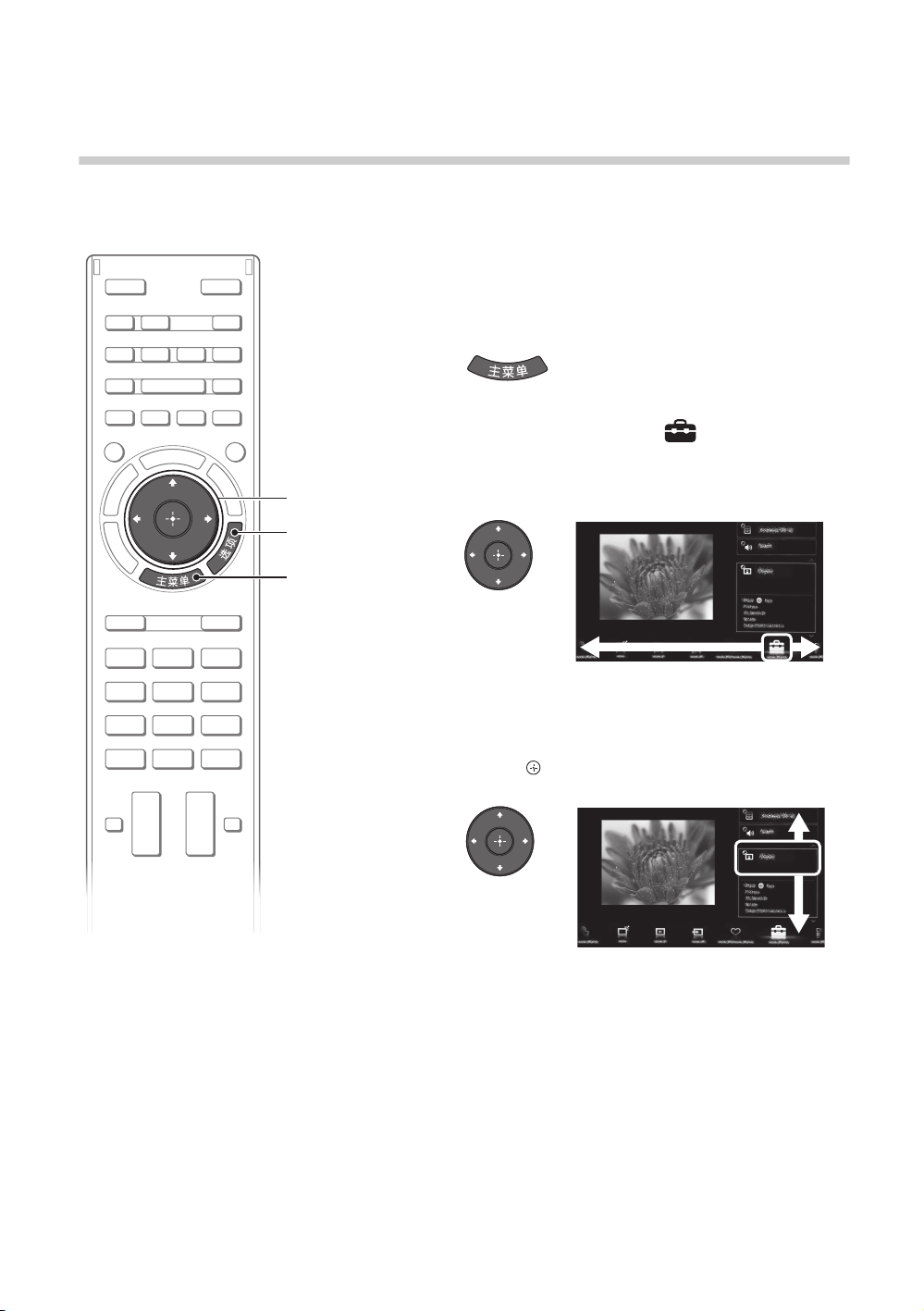
1 Press 主菜单 .
2 Press G/g to select (Settings)
category.
The contents of “Settings” are displayed on the right.
See page 17 (Category list) for all categories.
3 Press F/f to select “Display”, then
press .
4 Modify the settings.
x To exit the 主菜单 menu
Press 主菜单 .
x To select using the 选项 button
Press 选项 .
A list of convenient functions and menu shortcuts are
displayed. The menu items vary based on the current
input and/or content.
2, 3
1
D:\TV's JOB\SONY TV\SY0429_A8\4411857E11_GB\GB04SAF.fm
KDL-55HX850 / 46HX850
4-411-857-E1(1)
17
GB
Using Your BRAVIA TV
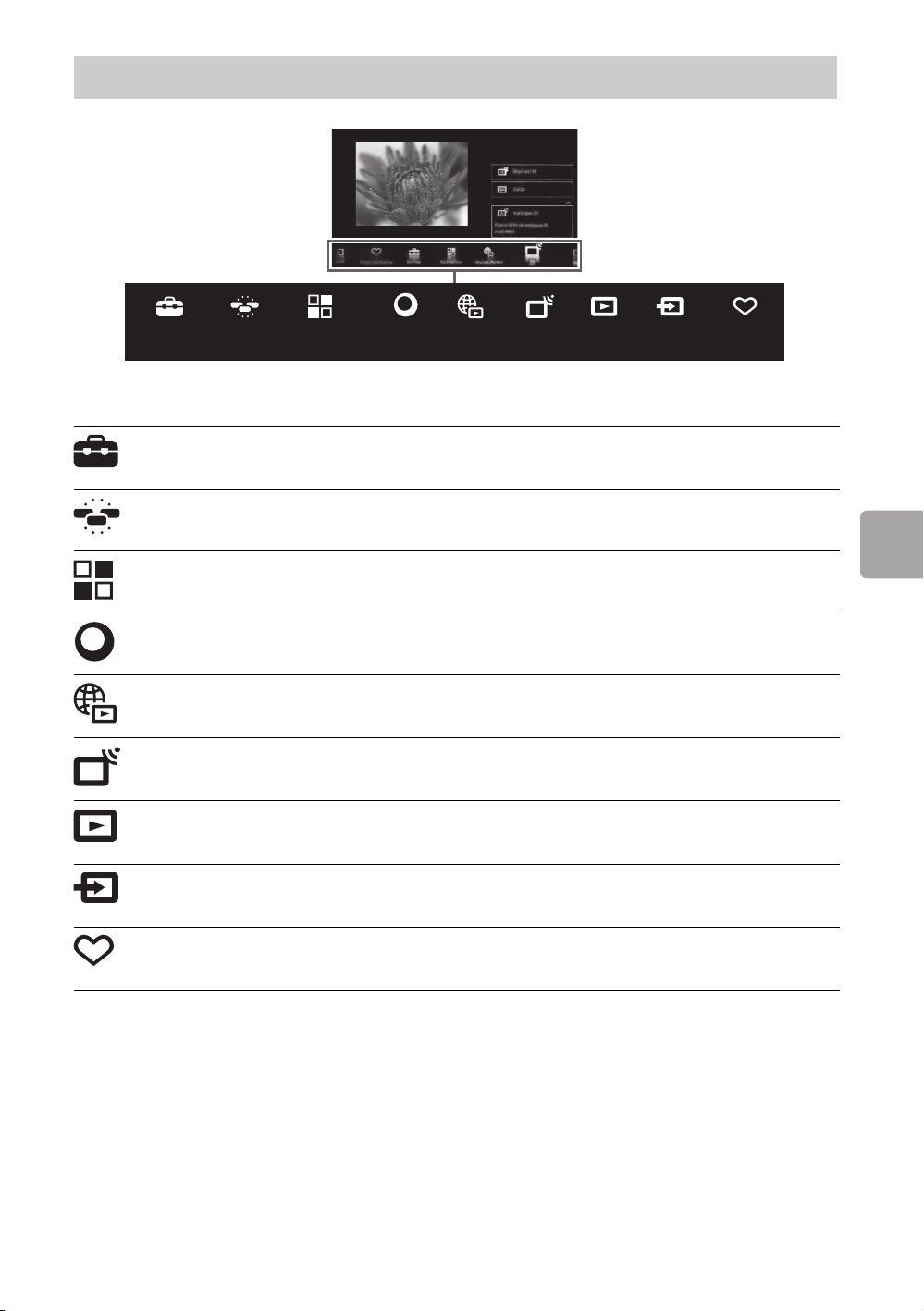
The categories are available depending on your region and country.
Category list
Settings
Provides settings (e.g. picture settings, sound settings, key tone
setting) that allow you to customise your TV.
Widgets
Enables access to Widgets.
Applications
Launches applications that require an Internet connection.
Sony Entertainment
Network
Enables selection of content from the online service “SEN” (Sony
Entertainment Network).
Internet Content
Enables access to Internet services for TV.
TV
Allows you to select a list of TV channels, or a programme guide.
Media
Enables selection of media files (photo, music, video) to play in a
connected USB storage device or your home network.
Inputs
Enables selection of devices connected to the TV.
Favourites/History
Displays items in Favourites and recently viewed items.
Settings
Widgets
Applications
Sony
Entertainment
Network
Internet
Content
TV
Media
Inputs
Favourites/
History

D:\TV's JOB\SONY TV\SY0429_A8\4411857E11_GB\GB04SAF.fm
KDL-55HX850 / 46HX850
4-411-857-E1(1)
18
GB
Watching Internet Video
This feature serves as a gateway to Internet content, delivering a variety of on-demand entertainment
straight to your TV. You can enjoy video content, including movies and cartoons.
You will need to make a broadband Internet connection. For details, see page 12 (6: Connecting the TV
to the Internet).
~
• If you experience difficulties with this feature, check that the Internet connection is set up properly.
• The interface to Internet content depends on the Internet content providers.
• Services block video content based on the “Parental Lock” setting of the TV. Some service providers do not
support this function.
• To update Internet Video content services, press 主菜单 , then select “Settings” t “Network” t “Refresh
Internet Content”.
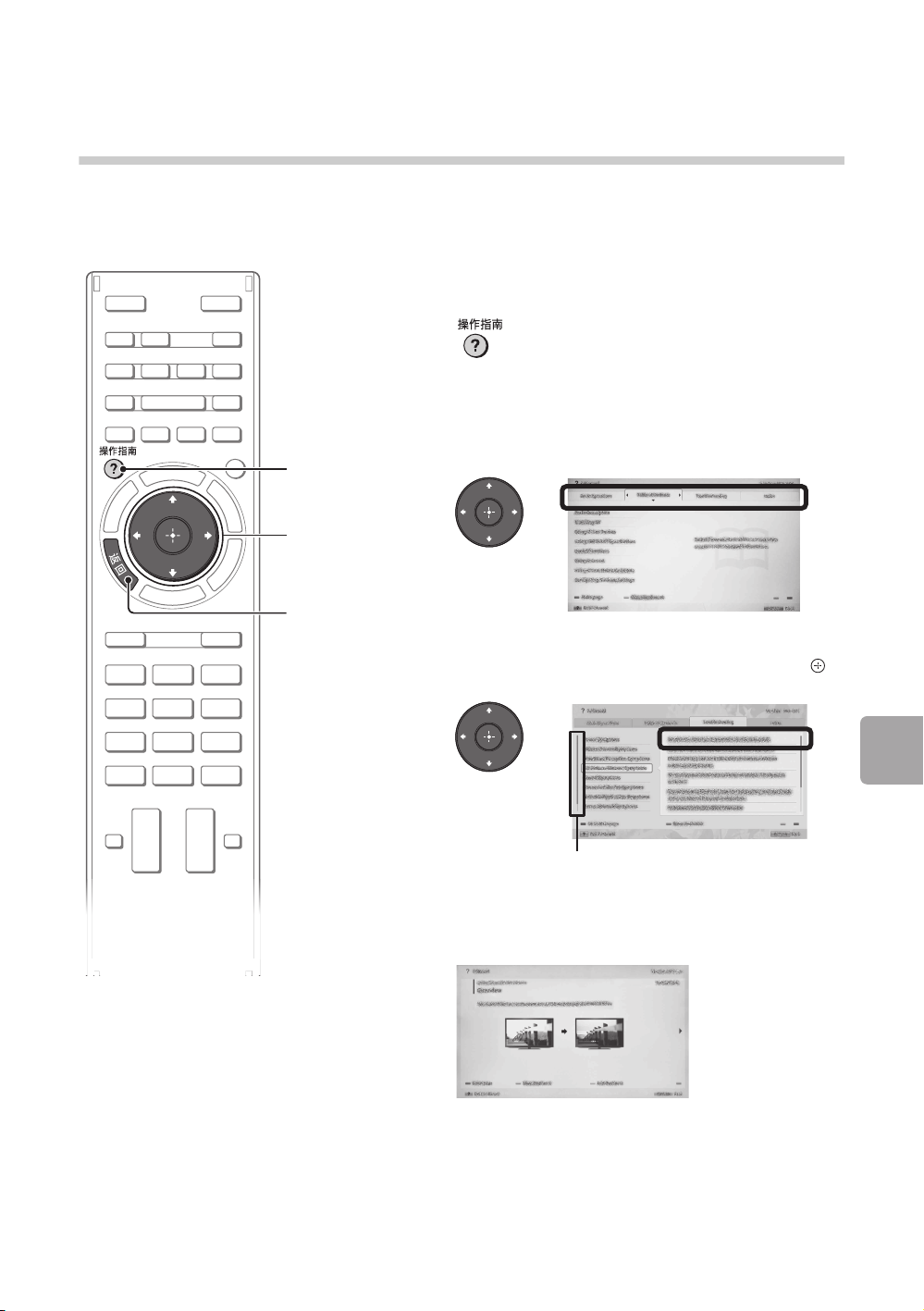
1 Press 主菜单 .
2 Press G/g to select (Internet
Content) category.
3 Press F/f to select “Internet Video”,
then press .
4 Press F/f/G/g to highlight the
desired content, then press .
2, 3, 4
1
D:\TV's JOB\SONY TV\SY0429_A8\4411857E11_GB\GB05OVR.fm
KDL-55HX850 / 46HX850
4-411-857-E1(1)
19
GB
Looking for Instructions
Looking for Instructions
Looking for instructions in the
electronic manual (i-Manual)
Operating instructions are built into your BRAVIA TV and can be displayed on the screen.
To learn more about your TV features, access your i-Manual with the touch of a button.
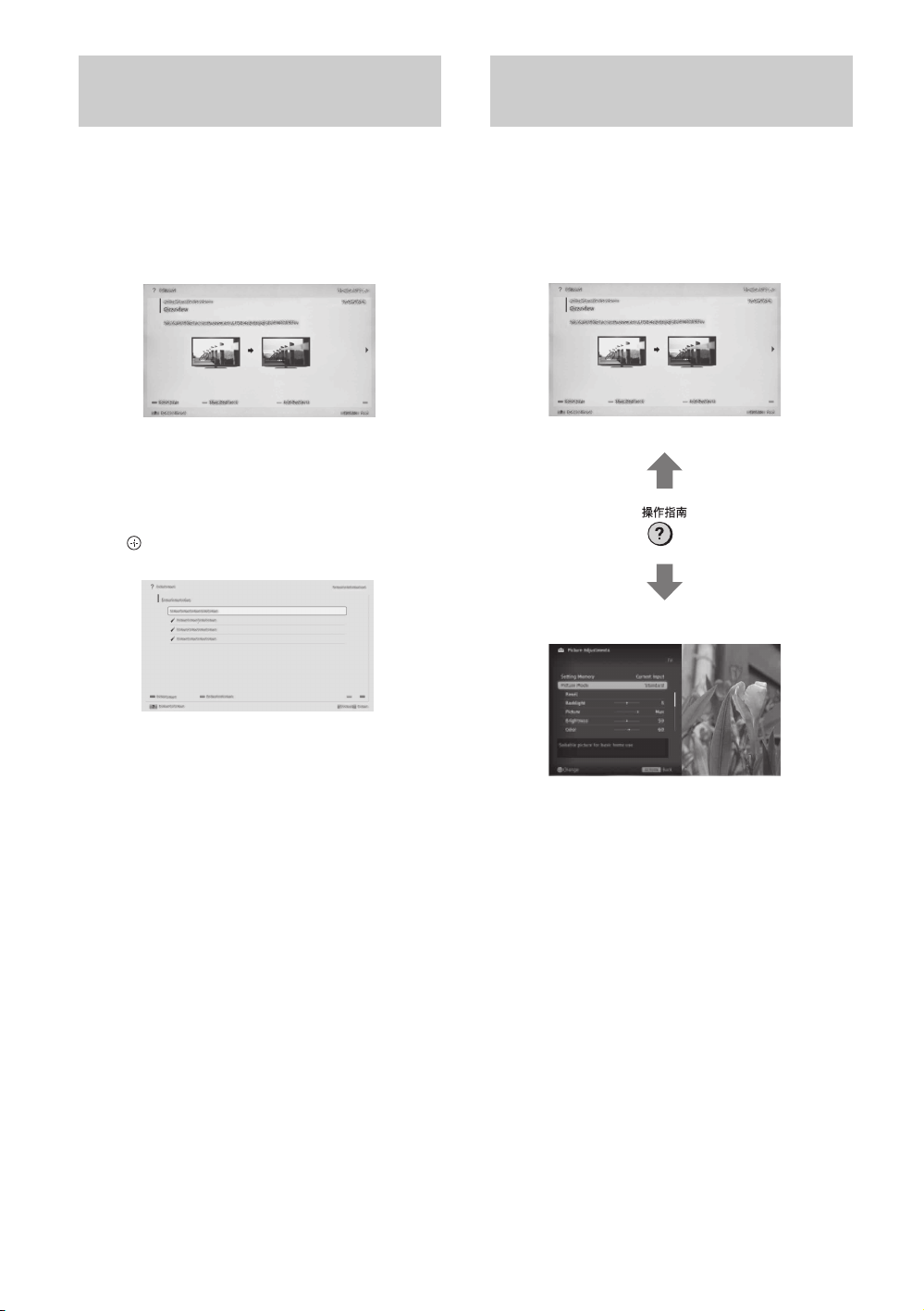
1 Press 操作指南 .
2 Select an item.
1 Press G/g to select an item.
2 Press F/f/G/g to select an item, then press .
The page of the selected item appears.
~
• You can step through pages using G/g.
Press 返回 to return to the previous page.
1
2
* If a scroll bar appears, press f repeatedly to
display more items.
scroll bar*
(Continued)
D:\TV's JOB\SONY TV\SY0429_A8\4411857E11_GB\GB05OVR.fm
KDL-55HX850 / 46HX850
4-411-857-E1(1)
20
GB
You can save frequently viewed pages for easy
access anytime.
x To save a page
In the page to bookmark, press the yellow
button on the remote.
x To access the bookmarked page
When displaying the i-Manual, press the green
button on the remote to display the bookmark
list. Press F/f to select the desired item, then
press .
~
• To return to the previous page, press G.
x To remove a bookmark
When the bookmarked page is displayed, press
the yellow button on the remote.
You can switch between the i-Manual screen
and the TV screen. This feature allows you to
refer to the instructions in the i-Manual while
using your BRAVIA TV. Press 操作指南 to switch
between the i-Manual screen previously
displayed and the TV screen.
~
• To jump to the top page of i-Manual, press the
red button on the remote. You can also press 主
菜单 , then select “Settings” t “i-Manual” to
jump to the top page of i-Manual.
• Once you turn off the TV or the TV goes to
standby mode, the i-Manual will be displayed
from the top page when you select “i-Manual”.
Saving frequently viewed
pages (Bookmark)
Displaying the page again
while operating the TV
i-Manual screen previously displayed
BRAVIA TV screen
D:\TV's JOB\SONY TV\SY0429_A8\4411857E11_GB\GB06OPT.fm
KDL-55HX850 / 46HX850
4-411-857-E1(1)
21
GB
Additional Information
Additional Information
Troubleshooting
When the 电源 (standby) indicator is flashing, count how many times it flashes (interval
time is three seconds).
Press 电源 on the TV to turn it off, disconnect the AC power cord (mains lead), and inform your dealer
or Sony service centre of how the indicator flashes (number of flashes).
When the 电源 (standby) indicator is not flashing, check the items in the tables as
follows.
Also refer to “Troubleshooting” in the i-Manual. If the problem persists, have your TV serviced by
qualified service personnel.
Condition Explanation/Solution
There is no picture (screen
is dark) and no sound.
• Check the antenna (aerial)/cable connection.
• Connect the TV to the AC power (mains), and press 电源 on
the TV.
• If the 电源 (standby) indicator lights up in red, press 电视电源
on the remote.
Tiny black points and/or
bright points appear on the
screen.
• The screen is composed of pixels. Tiny black points and/or
bright points (pixels) on the screen do not indicate a
malfunction.
Some programmes cannot
be tuned.
• Check the antenna (aerial) or dish.
The TV turns off
automatically (the TV enters
standby mode).
• Check if the “Sleep Timer” is activated, or confirm the
“Duration” setting of “On Timer”.
• Check if the “Idle TV Standby” is activated.
The remote does not
function.
• Replace the batteries.
• Your TV may be in SYNC mode.
Press 同步菜单 , select “TV Control” and then select “Home
(Menu)” or “Options” to control the TV.
The “Parental Lock”
password has been
forgotten.
• Enter 9999 for the PIN code. (PIN code 9999 is always
accepted.)
The TV surrounds become
warm.
• When the TV is used for an extended period, the TV surrounds
become warm.
You may feel hot when touching there by the hand.
D:\TV's JOB\SONY TV\SY0429_A8\4411857E11_GB\GB06OPT.fm
KDL-55HX850 / 46HX850
4-411-857-E1(1)
22
GB
Specifications
x 产品简介
•
•
•
•
•
•
•
型号
KDL- 55HX850 KDL-46HX850
附件 数量
×
×
D:\TV's JOB\SONY TV\SY0429_A8\4411857E11_GB\GB06OPT.fm
KDL-55HX850 / 46HX850
4-411-857-E1(1)
23
GB
Additional Information
* This function may not work due to different cities, please contact Sony China hotline 400 810 9000 for details.
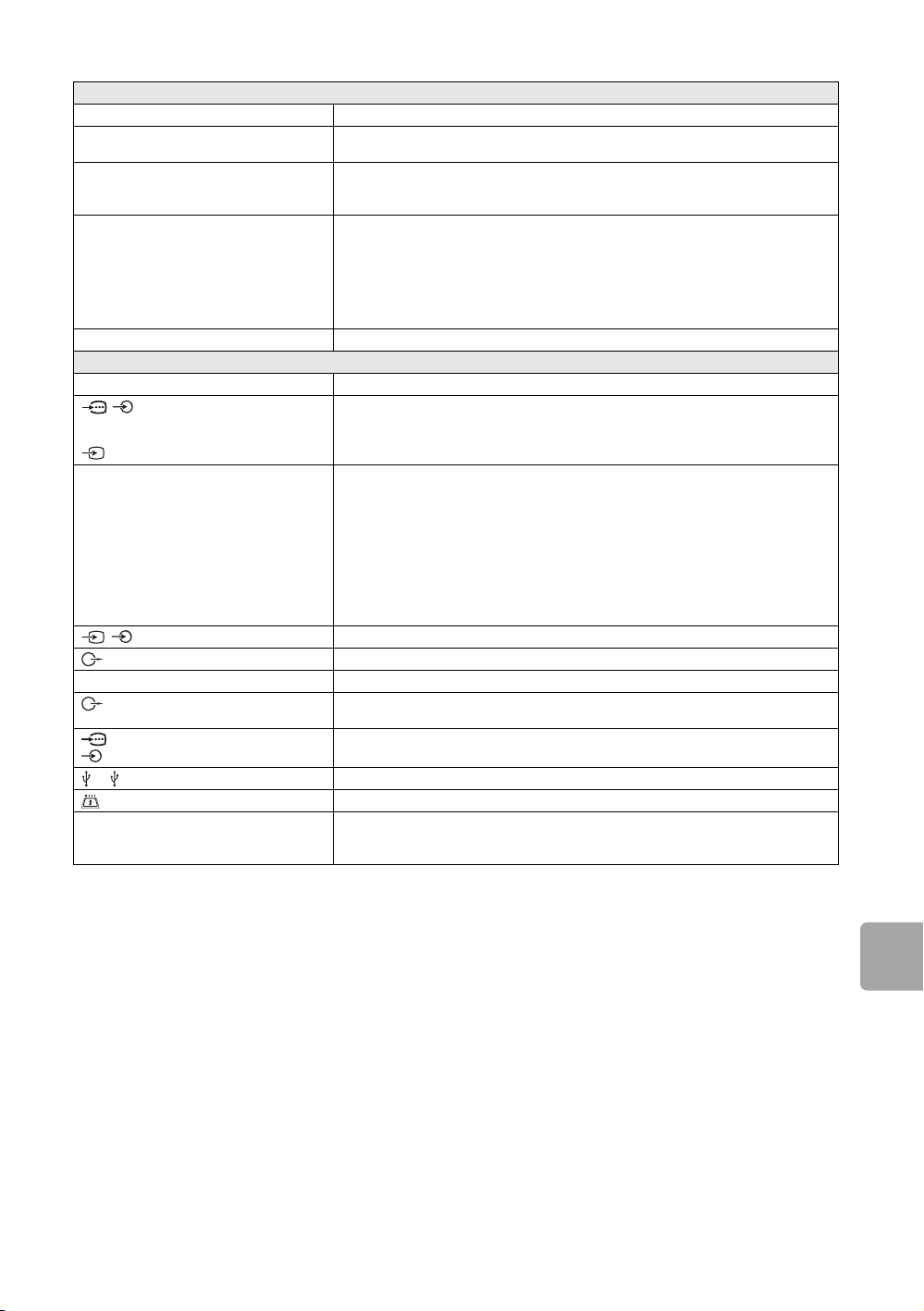
System
Panel System
LCD (Liquid Crystal Display) Panel (Dynamic Edge LED)
TV System
Analogue: D/K, I, B/G, M, L
Digital: GB20600-2006/DVB-C*
Colour System/Video System
Analogue: PAL, SECAM, NTSC4.43, NTSC3.58
Digital: MPEG-2 MP@HL/H14L/ML, AVC BP@L3/MP@L4/HP@L4 (30 Mbps max,
limited tool), MPEG-4 Visual SP@L6/ASP@L5/ACEP@L4
Channel Coverage
Analogue: D/K: VHF: C1 to C12, R1 to R12/UHF: C13 to C57, R21 to R60/
CATV: S01 to S03, S1 to S41, DS1 to DS57, Z1 to Z42
I: UHF: B21 to B69/CATV: S01 to S03, S1 to S41
B/G: VHF: E2 to E12/UHF: E21 to E69/CATV: S01 to S03, S1 to S41
M: VHF: A2 to A13/UHF: A14 to A79
L: VHF: F2 to F10/UHF: F21 to F69/CATV: B to Q
Digital: GB20600-2006/DVB-C*
Sound Output
8W + 8W + 8W (at 7% distortion)
Input/Output jacks
Antenna (aerial)/Cable
75 ohm external terminal for VHF/UHF
/ COMPONENT IN
2
YPBPR (Component Video):1080p (50, 60Hz), 1080i (50, 60Hz), 720p (50, 60Hz),
576p, 576i, 480p, 480i
Audio Input (phono jacks)
Video input (common phono pin with Y input)
HDMI IN1, 2, 3, 4
Video (2D): 1080p (30, 50, 60Hz), 1080/24p, 1080i (50, 60Hz),
720p (30, 50, 60Hz), 720/24p, 576p, 576i, 480p, 480i PC Formats
Video (3D):
Frame Packing 1080p (30Hz), 1080/24p, 1080i (50, 60Hz), 720p ( 30, 50, 60Hz),
720/24p
Side-by-Side 1080p (50, 60Hz), 1080/24p, 1080i (50,60Hz), 720p (50, 60Hz)
Over-Under 1080p (30, 50, 60Hz), 1080/24p, 1080i (50, 60Hz), 720p (50, 60Hz)
Audio: Two channel linear PCM 32, 44.1 and 48 kHz, 16, 20 and 24 bits, Dolby Digital
Analogue audio input (Stereo minijack) (HDMI IN 2 only, Common with PC IN)
ARC (Audio Return Channel) (HDMI IN 1 only)
/1
Video / Audio input (phono jacks)
DIGITAL AUDIO OUT (OPTICAL)
Digital optical jack (Two channel linear PCM, Dolby Digital)
Speaker Integrated Stand
Sound output for TV stand
AUDIO OUT/Headphone
Audio output (Stereo minijack)
Headphones jack
PC IN
PC/HDMI 2 AUDIO IN
Analogue RGB (Mini D-sub 15-pin)
Audio input (Stereo minijack) (Common with HDMI IN 2)
1, 2
USB port
CAM (Conditional Access Module) slot
LAN
10BASE-T/100BASE-TX connector (Depending on the operating environment of the
network, connection speed may differ. 10BASE-T/100BASE-TX communication rate
and communication quality are not guaranteed for this TV.)
(Continued)
D:\TV's JOB\SONY TV\SY0429_A8\4411857E11_GB\GB06OPT.fm
KDL-55HX850 / 46HX850
4-411-857-E1(1)
24
GB
* Dimensions and mass are approximate values.
**
Optional accessories availability depends on countries/region/TV model/stock.
Design and specifications are subject to change without notice.
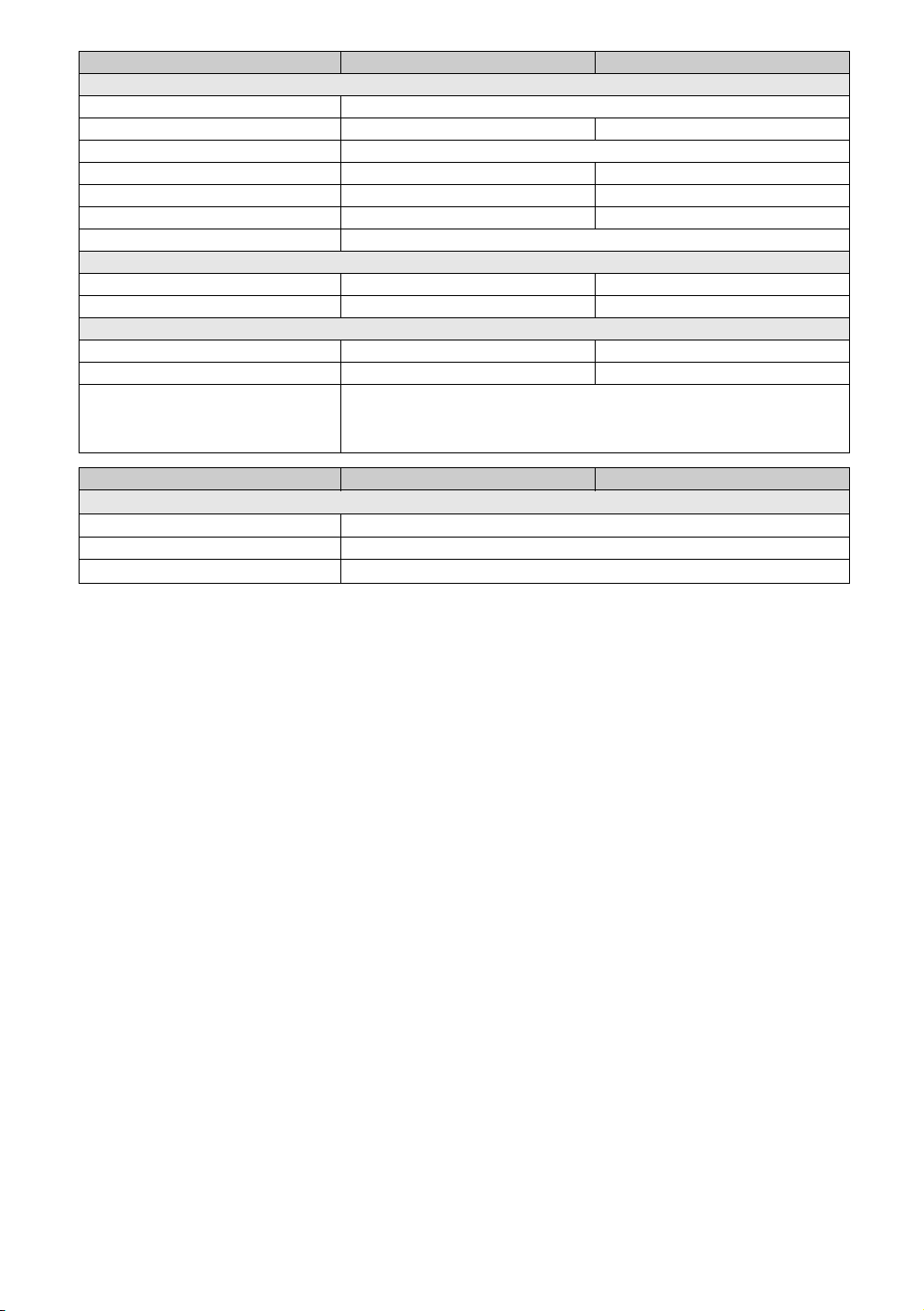
Model name KDL- 55HX850 46HX850
Power and others
Power Requirements
220 V AC, 50 Hz
Viewing Screen Size (diagonal)*
138.8cm (55 inch) 116.8cm (46 inch)
Display Resolution
1,920 dots (horizontal) × 1,080 lines (vertical)
Power Consumption
158 W 127 W
**
**
Standby Power Consumption**
Below than 0.45 W
Dimensions* (w × h × d)
with Table-Top Stand (mm)
1274 × 808 × 341 1077 × 697 × 268
without Table-Top Stand (mm)
1274 × 750 × 35 1077 × 640 × 35
Mass*
with Table-Top Stand (kg)
26.2 20.3
without Table-Top Stand (kg)
21.7 16.6
Optional accessories
USB Wireless LAN Adaptor: UWA-BR100
3D Glasses: TDG-BR750/TDG-BR250/TDG-BR200/TDG-BR100/TDG-BR50
TV stand: SU-B553S (KDL-55HX850)
SU-B463S (KDL-46HX850)
Model name KDL- 55HX850 46HX850
Product usage condition
Environment Temperature
5°C – 35°C
Humidity
20% – 80%
Air Pressure
86 kPa – 106 kPa
D:\TV's JOB\SONY TV\SY0429_A8\4411857E11_GB\GB07PRE.fm
KDL-55HX850 / 46HX850
4-411-857-E1(1)
25
GB
Additional Information
Additional Information
Safety
Information
WARNING
Batteries must not be exposed
to excessive heat such as
sunshine, fire or the like.
Installation/Set-up
Install and use the TV set in
accordance with the
instructions below in order to
avoid any risk of fire, electrical
shock or damage and/or
injuries.
Installation
• The TV set should be
installed near an easily
accessible AC power outlet.
• Place the TV set on a stable,
level surface to avoid it from
falling down and cause
personal injury or damage to
the TV.
• Only qualified service
personnel should carry out
wall installations.
• For safety reasons, it is
strongly recommended that
you use Sony Wall-mount
bracket. For details, consult
Sony service centre.
• Be sure to use the screws
supplied with the Wall-mount
bracket when attaching the
mounting hooks to the TV set.
The supplied screws are
designed so that they are
8 mm to 12 mm in length
when measured from the
attaching surface of the
mounting hook.
The diameter and length of
the screws differ depending
on the Wall-mount bracket
model.
Use of screws other than
those supplied may result in
internal damage to the TV set
or cause it to fall, etc.
Transporting
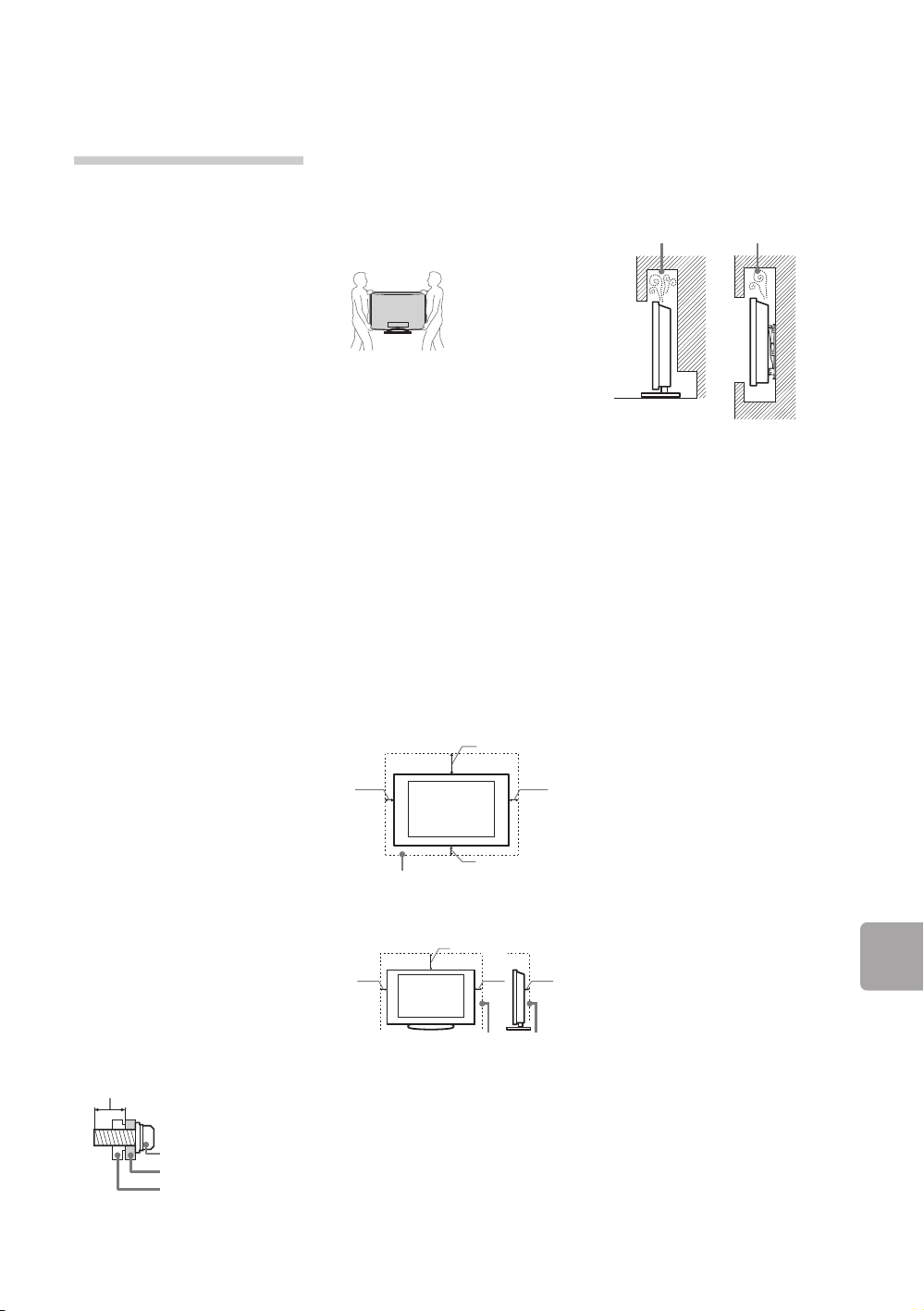
• Before transporting the TV
set, disconnect all cables.
• Two or three people are
needed to transport a large
TV set.
• When transporting the TV set
by hand, hold it as shown
below. Do not put stress on
the LCD panel and the frame
around the screen.
• When transporting the TV set,
do not subject it to jolts or
excessive vibration.
• When transporting the TV set
for repairs or when moving,
pack it using the original
carton and packing material.
Ventilation
• Never cover the ventilation
holes or insert anything in the
cabinet.
• Leave space around the TV
set as shown below.
• It is strongly recommended
that you use a Sony wall-
mount bracket in order to
provide adequate air-
circulation.
Installed on the wall
Installed with stand
• To ensure proper ventilation
and prevent the collection of
dirt or dust:
– Do not lay the TV set flat,
install upside down,
backwards, or sideways.
– Do not place the TV set on
a shelf, rug, bed or in a
closet.
– Do not cover the TV set
with a cloth, such as
curtains, or items such as
newspapers, etc.
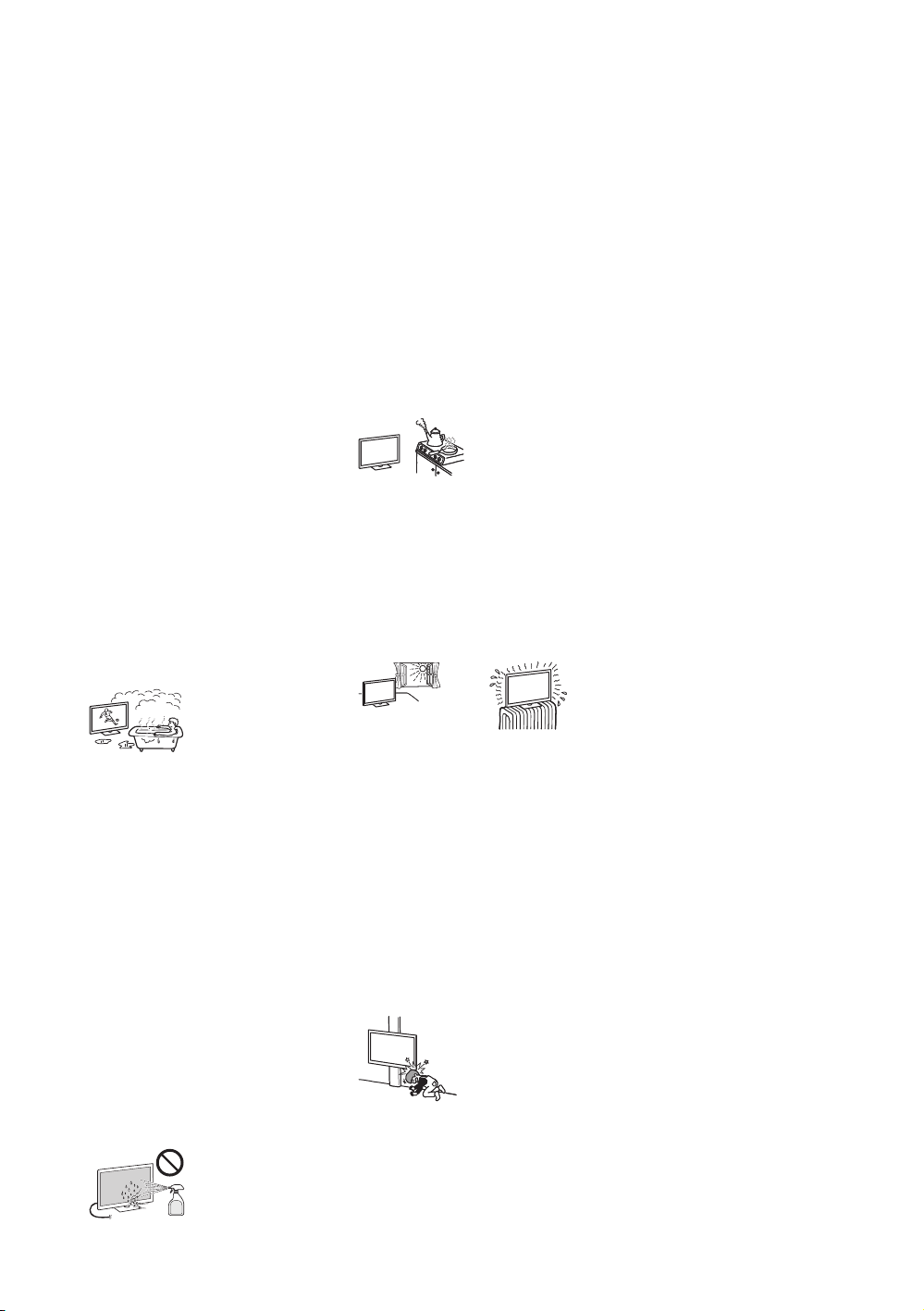
– Do not install the TV set as
shown below.
AC power cord
Handle the AC power cord and
outlet as follows in order to
avoid any risk of fire, electrical
shock or damage and/or
injuries:
– Use only Sony supplied AC
power cords, not those of
other brands.
– Insert the plug fully into the
AC power outlet.
– Operate the TV set on a
220 V AC supply only.
– When wiring cables, be
sure to unplug the AC
power cord for your safety
and take care not to catch
your feet on the cables.
– Disconnect the AC power
cord from the AC power
outlet before working on or
moving the TV set.
– Keep the AC power cord
away from heat sources.
– Unplug the AC power plug
and clean it regularly. If the
plug is covered with dust
and it picks up moisture, its
insulation may deteriorate,
which could result in a fire.
Notes
• Do not use the supplied AC
power cord on any other
equipment.
• Do not pinch, bend, or twist
the AC power cord
excessively. The core
conductors may be exposed
or broken.
• Do not modify the AC power
cord.
Mounting Hook
Hook attachment
on rear of TV set
Screw (supplied
with the Wall-
mount bracket)
8 mm - 12 mm
30 cm
10 cm
10 cm
10 cm
Leave at least this space
around the set.
30 cm
10 cm
10 cm
6 cm
Leave at least this space
around the set.
Air circulation is blocked.
Wall Wall
(Continued)
D:\TV's JOB\SONY TV\SY0429_A8\4411857E11_GB\GB07PRE.fm
KDL-55HX850 / 46HX850
4-411-857-E1(1)
26
GB
• Do not put anything heavy on
the AC power cord.
• Do not pull on the AC power
cord itself when
disconnecting the AC power
cord.
• Do not connect too many
appliances to the same AC
power outlet.
• Do not use a poor fitting AC
power outlet.
Prohibited Usage
Do not install/use the TV set in
locations, environments or
situations such as those listed
below, or the TV set may
malfunction and cause a fire,
electrical shock, damage and/
or injuries.
Location:
• Outdoors (in direct sunlight),
at the seashore, on a ship or
other vessel, inside a vehicle,
in medical institutions,
unstable locations, near
water, rain, moisture or
smoke.
• If the TV is placed in the
changing room of a public
bath or hot spring, the TV may
be damaged by airborne
sulfur, etc.
• For best picture quality, do
not expose the screen to
direct illumination or sunlight.
• Avoid moving the TV from a
cold area to a warm area.
Sudden room temperature
changes may cause moisture
condensation. This may
cause the TV to show poor
picture and/or poor colour.
Should this occur, allow
moisture to evaporate
completely before powering
the TV on.
• Never spray water or
detergent directly on the TV
set. It may drip to the bottom
of the screen or exterior parts
and enter the TV set, and may
cause damage to the TV set.
Environment:
• Places that are hot, humid, or
excessively dusty; where
insects may enter; where it
might be exposed to
mechanical vibration, near
flammable objects (candles,
etc). The TV set shall not be
exposed to dripping or
splashing and no objects
filled with liquids, such as
vases, shall be placed on the
TV.
• Do not place the TV in a
humid or dusty space, or in a
room with oily smoke or
steam (near cooking tables or
humidifiers). Fire, electric
shock, or warping may result.
• Do not install the TV in places
subject to extreme
temperature such as in direct
sunlight, near a radiator or a
heating vent. The TV may
overheat in such condition
which can cause deformation
of the enclosure and/or TV
malfunction.
Situation:
• Do not use when your hands
are wet, with the cabinet
removed, or with attachments
not recommended by the
manufacturer. Disconnect the
TV set from AC power outlet
and antenna during lightning
storms.
• Do not install the TV so that it
sticks out into an open space.
Injury or damage from a
person or object bumping
into the TV may result.
Broken pieces:
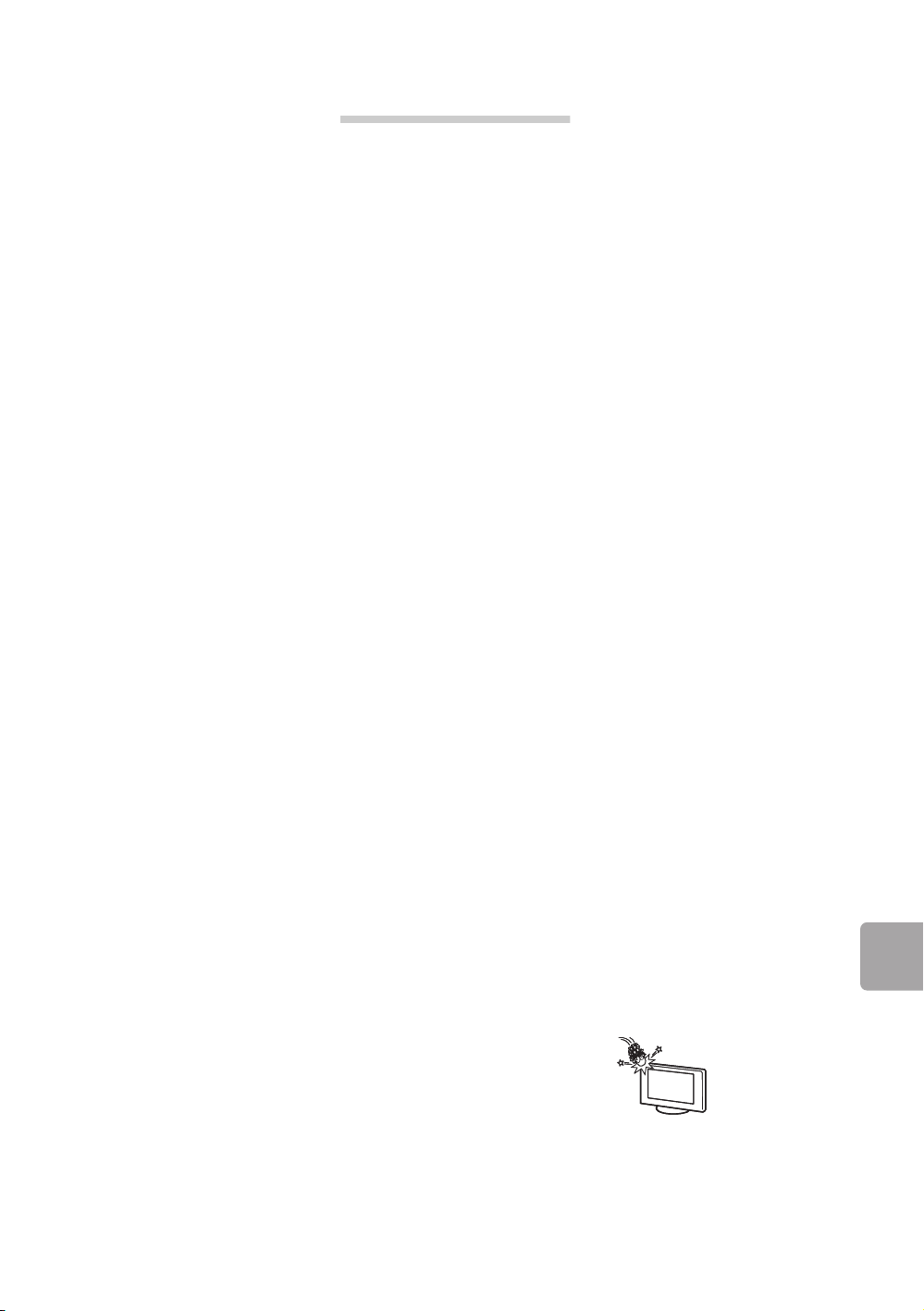
• Do not throw anything at the
TV set. The screen glass may
break by the impact and
cause serious injury.
• If the surface of the TV set
cracks, do not touch it until
you have unplugged the AC
power cord. Otherwise
electric shock may result.
When not in use
• If you will not be using the TV
set for several days, the TV
set should be disconnected
from the AC power for
environmental and safety
reasons.
• As the TV set is not
disconnected from the AC
power when the TV set is just
turned off, pull the plug from
the AC power outlet to
disconnect the TV set
completely.
• However, some TV sets may
have features that require the
TV set to be left in standby to
work correctly.
For children
• Do not allow children to climb
on the TV set.
• Keep small accessories out of
the reach of children, so that
they are not mistakenly
swallowed.
Handling of the batteries
The batteries should keep
away from children. If child
swallowed the batteries,
consult to doctor immediately.
If the following problems
occur...
Turn off the TV set and unplug
the AC power cord
immediately if any of the
following problems occur.
Ask your dealer or Sony
service centre to have it
checked by qualified service
personnel.
When:
– AC power cord is damaged.
– Poor fitting of AC power
outlet.
– TV set is damaged by being
dropped, hit or having
something thrown at it.
– Any liquid or solid object
falls through openings in the
cabinet.
D:\TV's JOB\SONY TV\SY0429_A8\4411857E11_GB\GB07PRE.fm
KDL-55HX850 / 46HX850
4-411-857-E1(1)
27
GB
Additional Information
About LCD Monitor
Temperature
When the LCD Monitor is used
for an extended period, the
panel surrounds become
warm. You may feel hot when
touching there by the hand.
Precautions
Viewing the TV
• Some people may
experience discomfort (such
as eye strain, fatigue, or
nausea) while watching 3D
video images or playing
stereoscopic 3D games.
Sony recommends that all
viewers take regular breaks
while watching 3D video
images or playing
stereoscopic 3D games. The
length and frequency of
necessary breaks will vary
from person to person. You
must decide what works
best. If you experience any
discomfort, you should stop
watching the 3D video
images or playing
stereoscopic 3D games until
the discomfort ends; consult
a doctor if you believe
necessary. You should also
review (i) the instruction
manual of any other device or
media used with this
television and (ii) our website
(http://www.sony.com.cn) for
the latest information. The
vision of young children
(especially those under six
years old) is still under
development. Consult your
doctor (such as a
pediatrician or eye doctor)
before allowing young
children to watch 3D video
images or play stereoscopic
3D games. Adults should
supervise young children to
ensure they follow the
recommendations listed
above.
• Do not use, store, or leave
the 3D Glasses or battery
near a fire, or in places with a
high temperature, e.g., in
direct sunlight, or in
sun-heated cars.
• When using the simulated 3D
function, please note that the
displayed image is modified
from the original due to the
conversion done by this
television.
• View the TV in moderate light,
as viewing the TV in poor
light or during long period of
time, strains your eyes.
• When using headphones,
adjust the volume so as to
avoid excessive levels, as
hearing damage may result.
LCD Screen
• Although the LCD screen is
made with high-precision
technology and 99.99% or
more of the pixels are
effective, black dots may
appear or bright points of
light (red, blue, or green)
may appear constantly on the
LCD screen. This is a
structural property of the LCD
screen and is not a
malfunction.
• Do not push or scratch the
front filter, or place objects
on top of this TV set. The
image may be uneven or the
LCD screen may be
damaged.
• If this TV set is used in a cold
place, a smear may occur in
the picture or the picture may
become dark. This does not
indicate a failure. These
phenomena disappear as the
temperature rises.
• Ghosting may occur when
still pictures are displayed
continuously. It may
disappear after a few
moments.
• The screen and cabinet get
warm when this TV set is in
use. This is not a malfunction.
• The LCD screen contains a
small amount of liquid crystal.
Follow your local ordinances
and regulations for disposal.
• Do not subject the LCD
screen to any strong impact
or shock. The screen glass
may crack or shatter and
cause injury.
(Continued)
D:\TV's JOB\SONY TV\SY0429_A8\4411857E11_GB\GB07PRE.fm
KDL-55HX850 / 46HX850
4-411-857-E1(1)
28
GB
Handling and cleaning the
screen surface/cabinet of
the TV set
Be sure to unplug the AC
power cord connected to the
TV set from AC power outlet
before cleaning.
To avoid material degradation
or screen coating degradation,
observe the following
precautions.
• To remove dust from the
screen surface/cabinet, wipe
gently with a soft cloth. If dust
is persistent, wipe with a soft
cloth slightly moistened with a
diluted mild detergent
solution.
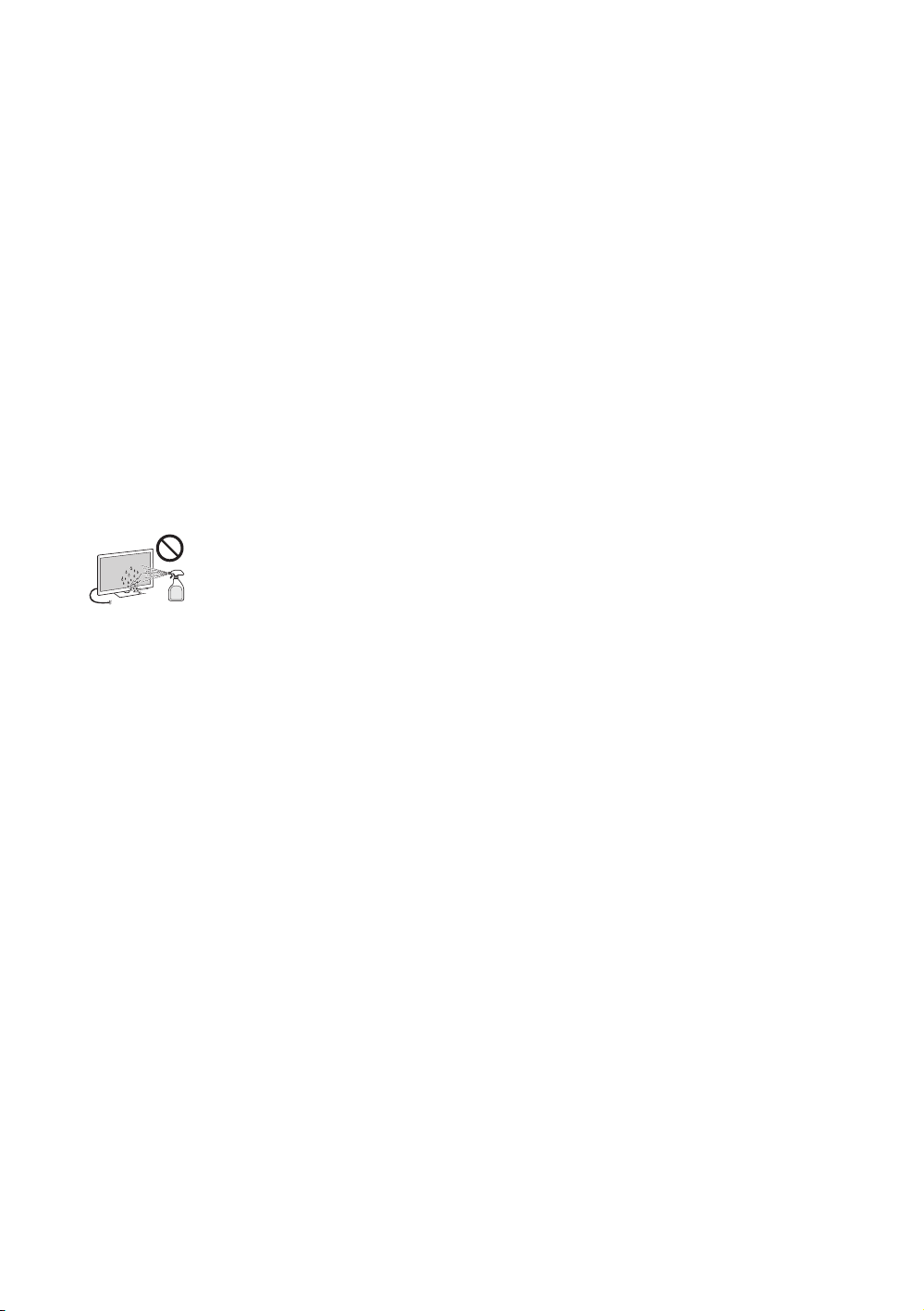
• Never spray water or
detergent directly on the TV
set. It may drip to the bottom
of the screen or exterior parts
and enter the TV set, and may
cause damage to the TV set.
• Never use any type of
abrasive pad, alkaline/acid
cleaner, scouring powder, or
volatile solvent, such as
alcohol, benzene, thinner or
insecticide. Using such
materials or maintaining
prolonged contact with
rubber or vinyl materials may
result in damage to the
screen surface and cabinet
material.
• Periodic vacuuming of the
ventilation openings is
recommended to ensure to
proper ventilation.
• When adjusting the angle of
the TV set, move it slowly so
as to prevent the TV set from
moving or slipping off from its
table stand.
Optional Equipment
• Keep optional components or
any equipment emitting
electromagnetic radiation
away from the TV set.
Otherwise picture distortion
and/or noisy sound may
occur.
(Caution about handling
the remote)
Notes
• Observe the correct polarity
when inserting batteries.
• Do not use different types of
batteries together or mix old
and new batteries.
• Dispose of batteries in an
environmentally friendly way.
Certain regions may regulate
the disposal of batteries.
Please consult your local
authority.
• Handle the remote with care.
Do not drop or step on it, or
spill liquid of any kind onto it.
• Do not place the remote in a
location near a heat source, a
place subject to direct
sunlight, or a damp room.
Wireless Function of the
unit
• Do not operate this unit near
medical equipment
(pacemaker, etc.), as
malfunction of the medical
equipment may result.
• Although this unit transmits/
receives scrambled signals,
be careful of unauthorised
interception. We cannot be
responsible for any trouble as
a result.



KDL-55HX850 / 46HX850
4-411-857-E1(1)
© 2012 Sony Corporation Printed in China
4-411-857-E1(1)
出版日期:2012 年 2 月
制造商 :
索尼 (中国)有限公司
北京市朝阳区太阳宫中路 12 号楼
冠城大厦 701
产地:山东省烟台市
产品标准号:
• KDL-55/46HX850: Q/CYSNC0082
