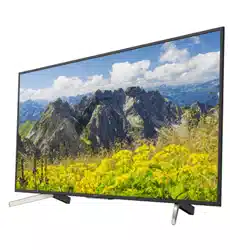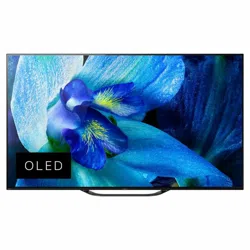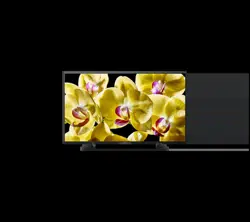
KD-75X9400D / 65X9300D / 65X8500D / 55X9300D / 55X8500D
Television
Reference Guide
GB
CT
2
GB
Table of Contents
Safety information . . . . . . . . . . . . . . . . . . . . . 2
Precautions . . . . . . . . . . . . . . . . . . . . . . . . . . . 6
Parts and Controls . . . . . . . . . . . . . . . . . . . 8
Controls and Indicators . . . . . . . . . . . . . . . . . 8
Using Remote Control . . . . . . . . . . . . . . . . 9
Remote Control Parts Description. . . . . . . . .9
Connection Diagram . . . . . . . . . . . . . . . . .11
Installing the TV to the Wall . . . . . . . . . . 14
Using the supplied Wall-Mount Bracket
(KD-75X9400D, KD-65/55X9300D only) . . . 14
Using the optional Wall-Mount Bracket . . . 15
SU-WL500 (KD-75X9400D only). . . . . . . . . . 17
SU-WL450 (KD-65/55X9300D,
KD-65/55X8500D only) . . . . . . . . . . . . . . . .20
Troubleshooting. . . . . . . . . . . . . . . . . . . . 24
Troubles and Solutions . . . . . . . . . . . . . . . .24
Specifications . . . . . . . . . . . . . . . . . . . . . . 25
Introduction
Thank you for choosing this Sony product.
Before operating the TV, please read this manual thoroughly and
retain it for future reference.
Note
• Before operating the TV, please read the “Safety information”
(page 2).
• Instructions about “Installing the TV to the Wall” are included
within this TV’s instruction manual.
• Images and illustrations used in the Setup Guide and this
manual are for reference only and may differ from the actual
product.
Location of the Setup Guide
Setup Guide is placed on top of the cushion inside the TV carton.
Help Guide
Help Guide explains the information on how to use the TV's
features. To display Help Guide on the TV, press HELP on the
remote control and select [Help Guide].
Location of the identification label
Labels for the TV Model No. and Power Supply rating are located
on the rear of the TV.
For models with supplied AC adapter:
Labels for the AC adapter Model No. and Serial No. are located
on the bottom of the AC adapter.
WARNING
Batteries must not be exposed to excessive heat such as
sunshine, fire or the like.
Never place a television set in an unstable location. A television
set may fall, causing serious personal injury or death. Many
injuries, particularly to children, can be avoided by taking simple
precautions such as:
Using cabinets or stands recommended by the manufacturer of
the television set.
Only using furniture that can safely support the television set.
Ensuring the television set is not overhanging the edge of the
supporting furniture.
Not placing the television set on tall furniture (for example,
cupboards or bookcases) without anchoring both the furniture
and the television set to a suitable support.
Not placing the television set on cloth or other materials that
may be located between the television set and supporting
furniture.
Educating children about the dangers of climbing on furniture
to reach the television set or its controls.
If your existing television set is being retained and relocated, the
same considerations as above should be applied.
Installation/Set-up
Install and use the TV set in accordance with the instructions
below in order to avoid any risk of fire, electric shock or damage
and/or injuries.
Installation
• The TV set should be installed near an easily accessible AC
power outlet (mains socket).
• Place the TV on a stable, level surface to prevent it from falling
over and causing personal injury or property damage.
• Install the TV where it cannot be pulled, pushed, or knocked
over.
• Only qualified service personnel should carry out wall-mount
installations.
This television is designed for use in Hong Kong and ensured
the usage in Hong Kong only.
Safety information
3
GB
GB
• For safety reasons, it is strongly recommended that you use
Sony accessories, including:
Supplied Wall-Mount Bracket (KD-75X9400D,
KD-65/55X9300D only)
Wall-Mount Bracket SU-WL500 (KD-75X9400D only)
Wall-Mount Bracket SU-WL450 (Except KD-75X9400D)
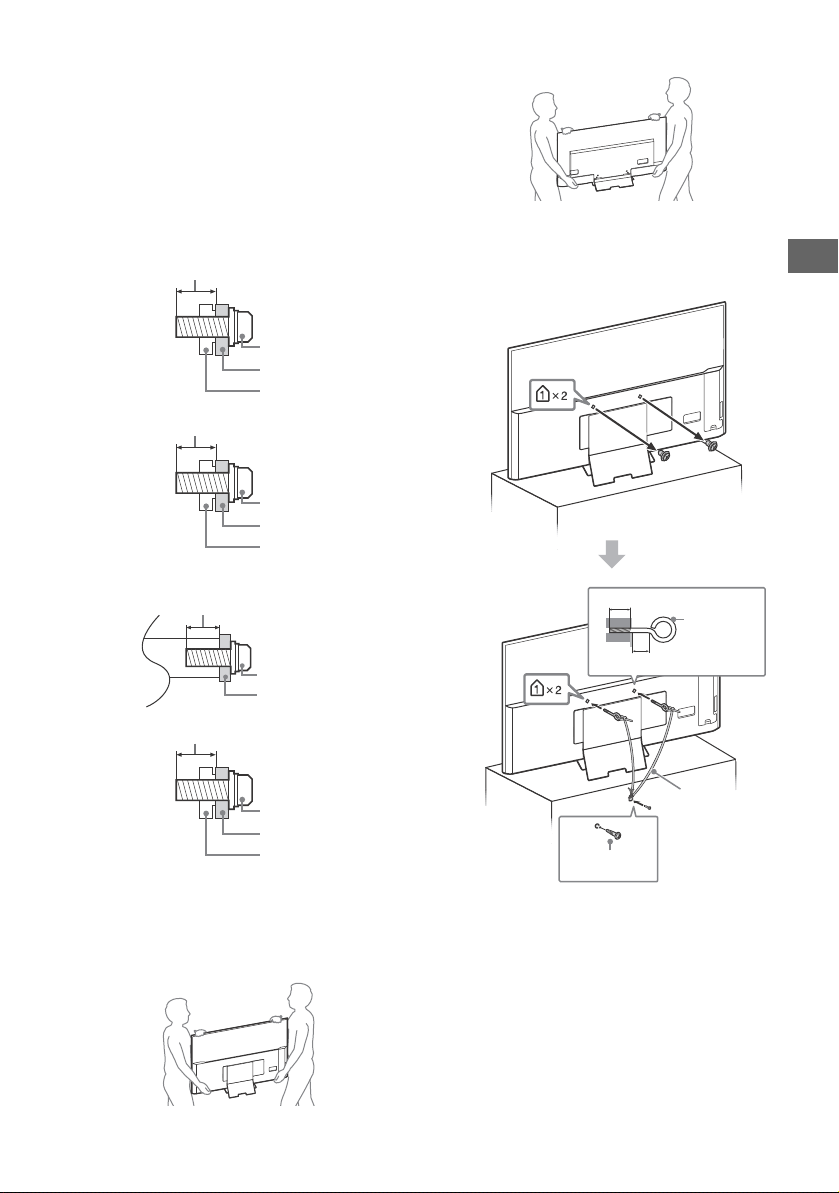
• Be sure to use the screws supplied with the Wall-Mount Bracket
when attaching the Wall-Mount Bracket to the TV set. The
supplied screws are designed as indicated by illustration when
measured from the attaching surface of the Wall-Mount Bracket.
The diameter and length of the screws differ depending on the
Wall-Mount Bracket model.
Use of screws other than those supplied may result in internal
damage to the TV set or cause it to fall, etc.
Supplied Wall-Mount Bracket
KD-75X9400D only
KD-65/55X9300D only
Optional Wall-Mount Bracket
KD-75X9400D, KD-65/55X9300D only
Except KD-75X9400D, KD-65/55X9300D
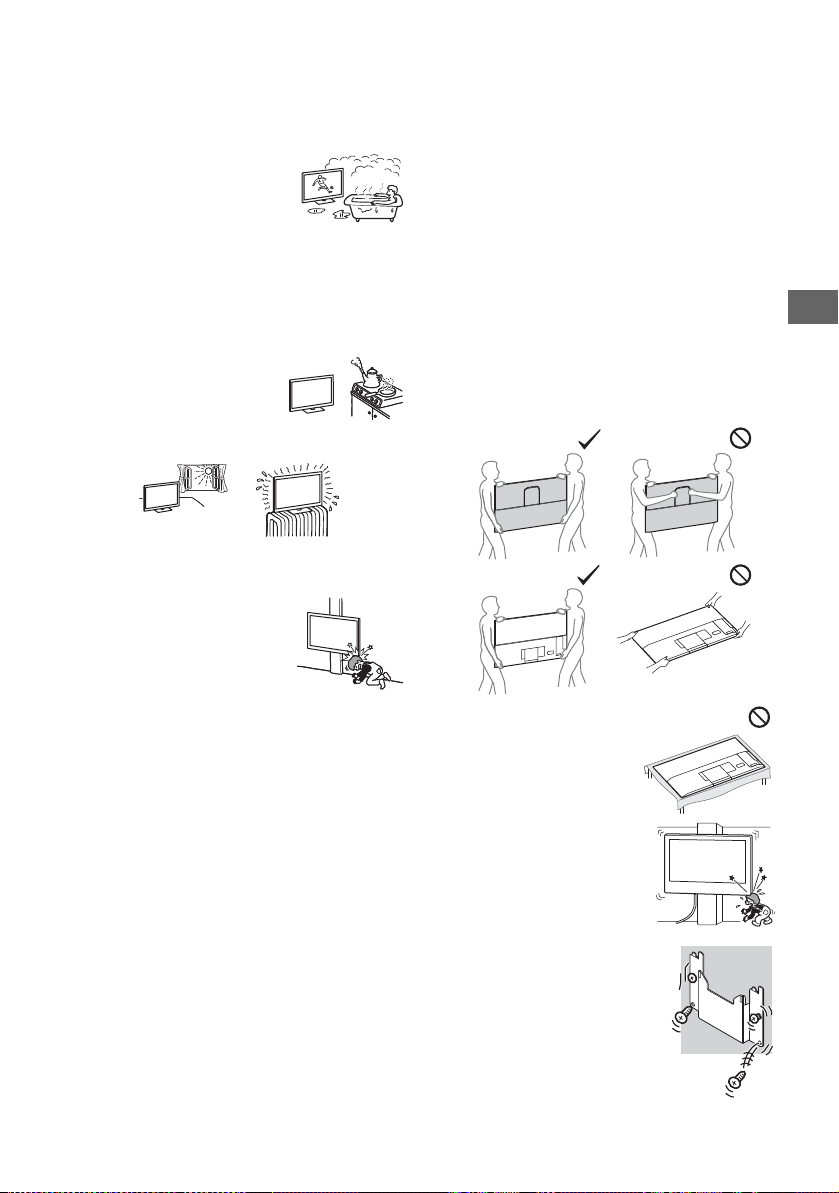
Transporting
• Before transporting the TV set, disconnect all cables.
• Two or three people are needed to transport a large TV set.
• When transporting the TV set by hand, hold it as shown below.
Do not put stress on the LCD panel and the frame around the
screen.
KD-75X9400D, KD-65/55X9300D only
Except KD-75X9400D, KD-65/55X9300D
• When transporting the TV set, do not subject it to jolts or
excessive vibration.
• When transporting the TV set for repairs or when moving, pack
it using the original carton and packing material.
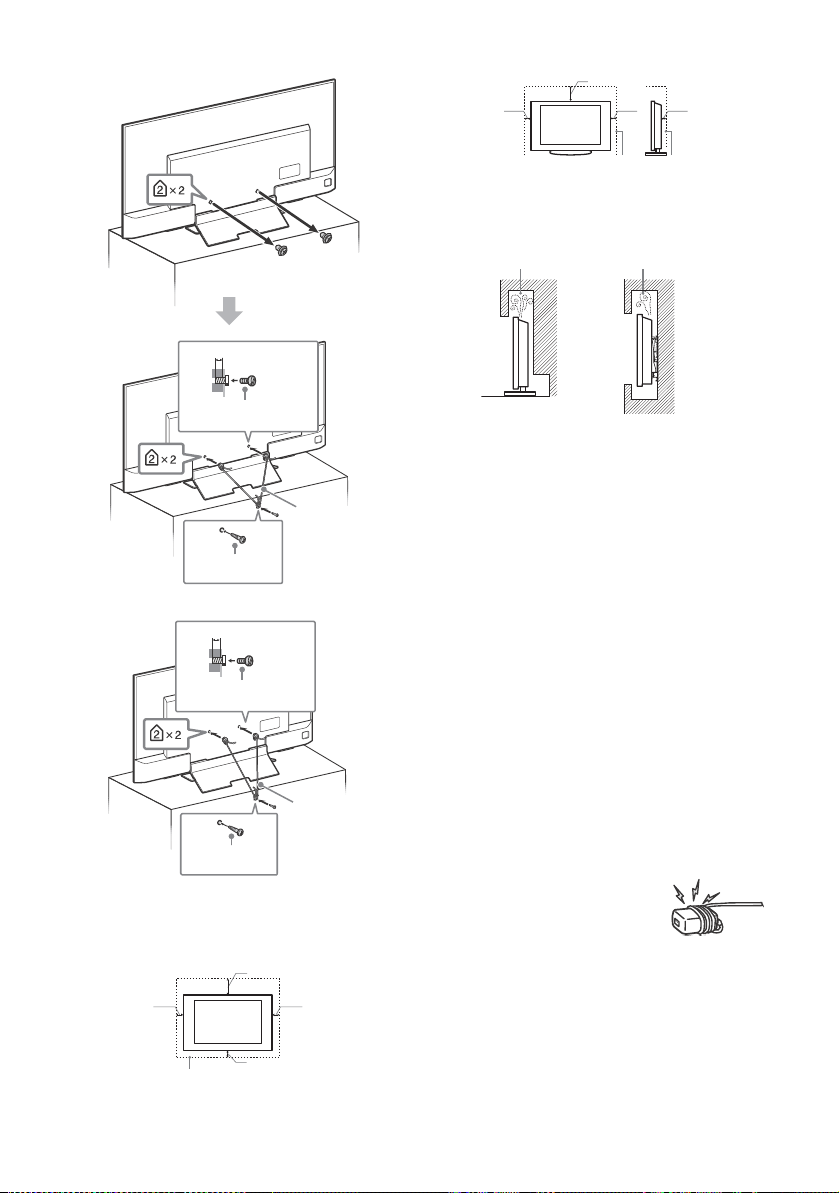
Topple prevention
KD-75X9400D, KD-65/55X9300D
Screw
Wall-Mount Bracket
13 mm
TV’s rear cover
Screw
Wall-Mount Bracket
7 mm
TV’s rear cover
Screw
Wall-Mount Bracket
8 mm - 12 mm
Screw
Wall-Mount Bracket
8 mm - 12 mm
TV’s rear cover
8 mm - 12 mm
M6 eye bolt
(not supplied)
Screw (not
supplied)
Cord (not
supplied)
18 mm or more
4
GB
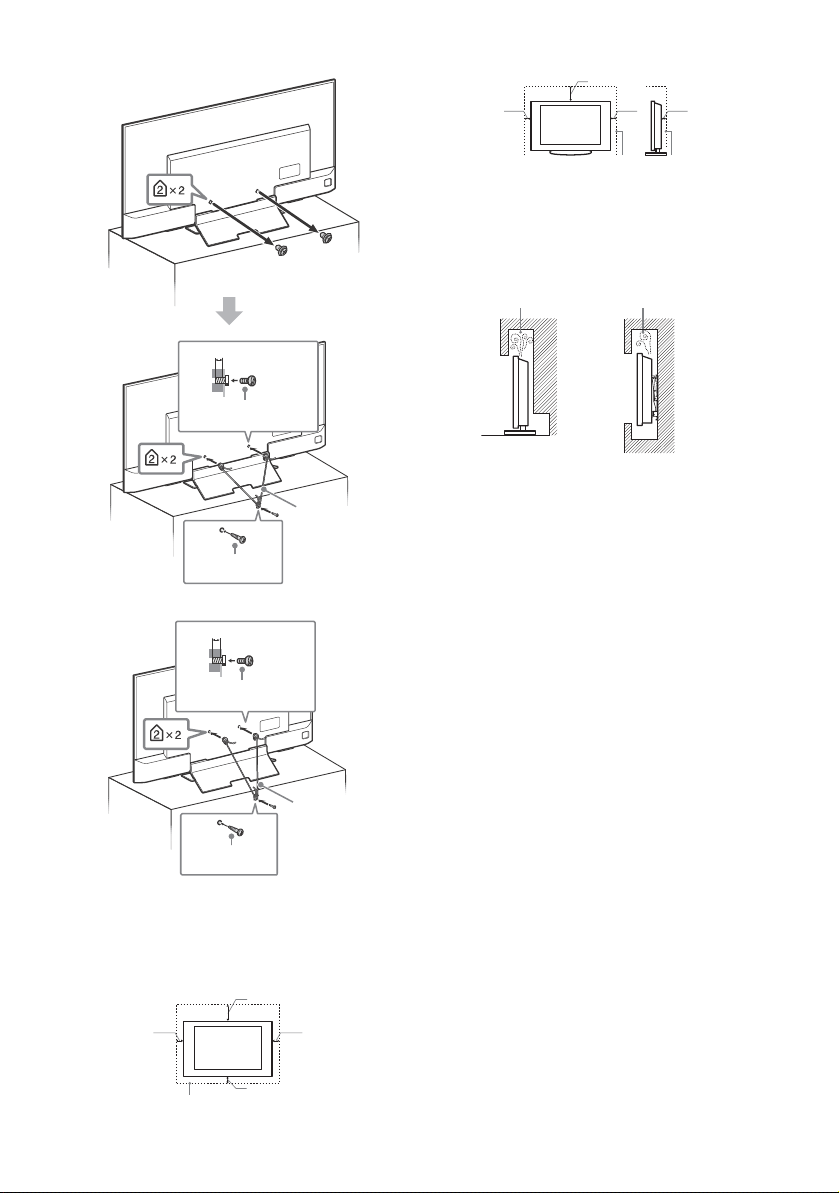
KD-65X8500D
KD-55X8500D
Ventilation
• Never cover the ventilation holes or insert anything in the
cabinet.
• Leave space around the TV set as shown below.
• It is strongly recommended that you use a Sony Wall-Mount
Bracket in order to provide adequate air circulation.
Installed on the wall
Installed with stand
• To ensure proper ventilation and prevent the collection of dirt or
dust:
Do not lay the TV set flat, install upside down, backwards, or
sideways.
Do not place the TV set on a shelf, rug, bed or in a closet.
Do not cover the TV set with a cloth, such as curtains, or items
such as newspapers, etc.
Do not install the TV set as shown below.
AC power cord (mains lead)
Handle the AC power cord (mains lead) and outlet (mains socket)
as follows in order to avoid any risk of fire, electric shock or
damage and/or injuries:
Use only Sony supplied AC power cords (mains lead), not those
of other brands.
Insert the plug fully into the AC power outlet (mains socket).
Operate the TV set on a 220 V – 240 V AC supply only.
When wiring cables, be sure to unplug the AC power cord
(mains lead) for your safety and take care not to catch your feet
on the cables.
Disconnect the AC power cord (mains lead) from the AC power
outlet (mains socket) before working on or moving the TV set.
Keep the AC power cord (mains lead) away from heat sources.
Unplug the AC power plug (mains plug) and clean it regularly. If
the plug is covered with dust and it picks up moisture, its
insulation may deteriorate, which could result in a fire.
Note
• Do not use the supplied AC power cord (mains lead) on any
other equipment.
• Do not pinch, bend, or twist the AC power cord (mains lead)
excessively. The core conductors may be exposed or broken.
• Do not modify the AC power cord (mains lead).
• Do not put anything heavy on the AC power cord (mains lead).
• Do not pull on the AC power cord (mains lead) itself when
disconnecting the AC power cord (mains lead).
• Do not connect too many appliances to the same AC power
outlet (mains socket).
• Do not use a poor fitting AC power outlet (mains socket).
8 mm - 12 mm
Screw (previously
removed)
Screw (not
supplied)
Cord (not
supplied)
8 mm - 12 mm
M6 screw (not
supplied)
Screw (not
supplied)
Cord (not
supplied)
30 cm
10 cm 10 cm
10 cm
Leave at least this space around the set.
30 cm
10 cm
10 cm
Leave at least this space around the set.
6 cm
Air circulation is blocked.
Wall Wall
5
GB
GB
NOTE ON AC ADAPTER (models with supplied
AC adapter only)
Warning
To reduce the risk of fire or electric shock, do not expose this
apparatus to rain or moisture.
To prevent fire or shock hazard, do not place objects filled with
liquids, such as vases, on the apparatus. Do not install this
equipment in a confined space, such as a bookshelf or similar
unit.
• Please ensure that the AC power outlet (mains socket) is
installed near the equipment and shall be easily accessible.
• Be sure to use the supplied AC adapter and AC power cord
(mains lead). Otherwise it may cause a malfunction.
• Connect the AC adapter to an easily accessible AC power outlet
(mains socket).
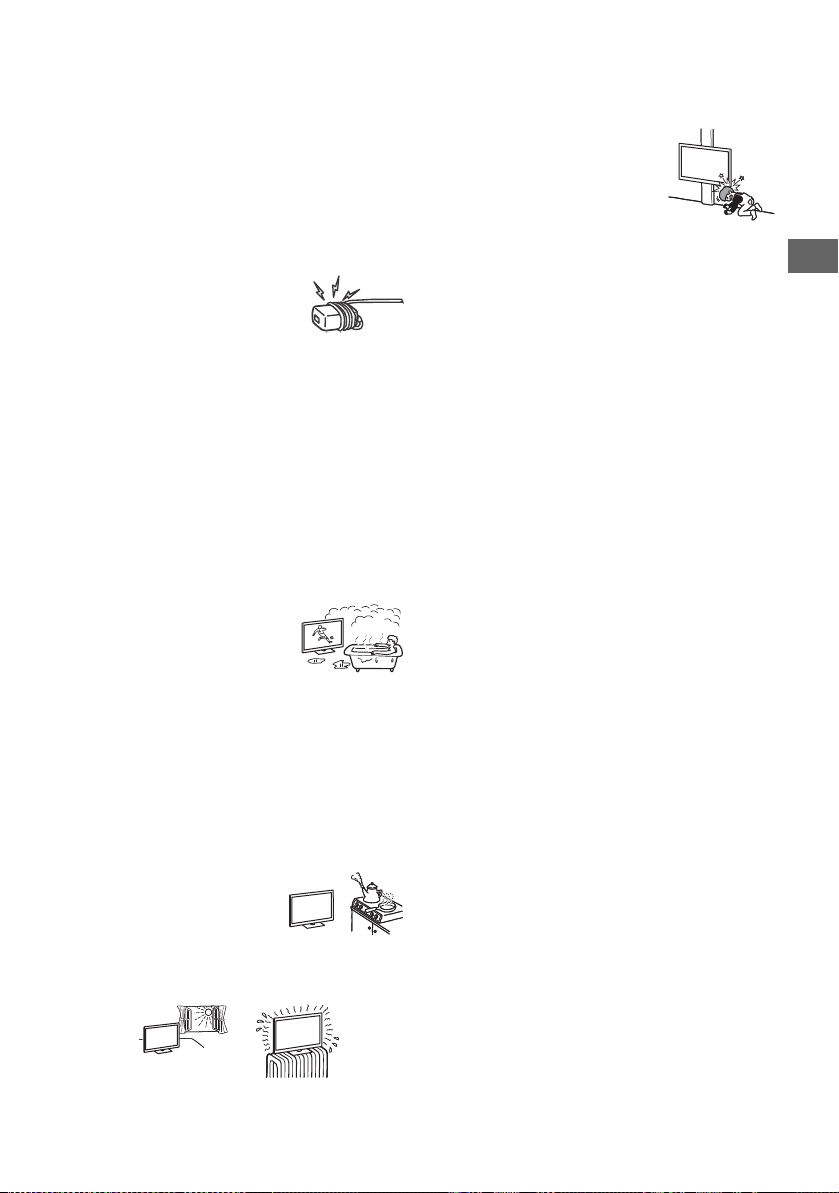
• Do not coil the AC power cord (mains lead)
around the AC adapter. The core wire may
be cut and/or it may cause a malfunction
of the TV.
• Do not touch the AC adapter with wet hands.
• If you notice an abnormality in the AC adapter, disconnect it
from the AC power outlet (mains socket) immediately.
• The set is not disconnected from the AC source as long as it is
connected to the AC power outlet (mains socket), even if the set
itself has been turned off.
• As the AC adapter will become warm when it is used for a long
time, you may feel hot when touching it by hand.
Prohibited Usage
Do not install/use the TV set in locations, environments or
situations such as those listed below, or the TV set may
malfunction and cause a fire, electric shock, damage and/or
injuries.
Location:
• Outdoors (in direct sunlight), at the seashore, on a ship or other
vessel, inside a vehicle, in medical institutions, unstable
locations, near water, rain, moisture or smoke.
• If the TV is placed in the changing room of
a public bath or hot spring, the TV may be
damaged by airborne sulfur, etc.
• For best picture quality, do not expose the screen to direct
illumination or sunlight.
• Avoid moving the TV from a cold area to a warm area. Sudden
room temperature changes may cause moisture condensation.
This may cause the TV to show poor picture and/or poor colour.
Should this occur, allow moisture to evaporate completely
before powering the TV on.
Environment:
• Do not install the TV in places that are hot, humid, or excessively
dusty; where insects may enter; where it might be exposed to
mechanical vibration, near flammable objects (candles, etc.).
The TV set shall not be exposed to dripping or splashing and no
objects filled with liquids, such as vases, shall be placed on the
TV.
• Do not place the TV in a humid or dusty
space, or in a room with oily smoke or
steam (near cooking tables or
humidifiers). Fire, electric shock, or
warping may result.
• Do not install the TV in places subject to extreme temperature,
such as in direct sunlight, near a radiator or a heating vent. The
TV may overheat in such conditions which can cause
deformation of the enclosure and/or TV malfunction.
Situation:
• Do not use when your hands are wet, with the cabinet removed,
or with attachments not recommended by the manufacturer.
Disconnect the TV set from AC power outlet (mains socket) and
antenna (aerial) during lightning storms.
• Do not install the TV so that it sticks out
into an open space. This may result in
injury or damage from a person or object
bumping into the TV.
Broken pieces:
• Do not throw anything at the TV set. The screen glass may break
by the impact and cause serious injury.
• If the surface of the TV set cracks, do not touch it until you have
unplugged the AC power cord (mains lead). Otherwise this may
cause an electric shock.
When not in use
• If you will not be using the TV set for several days, the TV set
should be disconnected from the AC power (mains) for
environmental and safety reasons.
• As the TV set is not disconnected from the AC power (mains)
when the TV set is just turned off, pull the plug from the AC
power outlet (mains socket) to disconnect the TV set
completely.
• Some TV sets may have features that require the TV set to be
left in standby to work correctly.
For children
• Do not allow children to climb on the TV set.
• Keep small accessories out of the reach of children, so that they
are not mistakenly swallowed.
If the following problems occur...
Turn off the TV set and unplug the AC power cord (mains lead)
immediately if any of the following problems occur.
Ask your dealer or Sony service centre to have it checked by
qualified service personnel.
When:
AC power cord (mains lead) is damaged.
Poor fitting of AC power outlet (mains socket).
TV set is damaged by being dropped, hit or having something
thrown at it.
Any liquid or solid object falls through openings in the cabinet.
About LCD TV Temperature
When the LCD TV is used for an extended period, the panel
surrounds become warm. You may feel hot when touching there
by the hand.
WALL-MOUNT BRACKET (models with supplied
Wall-Mount Bracket only)
Below information shows the correct handling of the Wall-Mount
Bracket. Be sure to read this information thoroughly and use the
Wall-Mount Bracket correctly.
To Cus tomer s:
Be sure to observe the following precautions for safety to prevent
a serious injury through fire, electric shock, the product toppling
over, or the product dropping.
• Be sure to subcontract the installation to licensed contractors
and keep small children away during installation.
• Be sure to subcontract moving or dismounting of the TV to
licensed contractors.
• Do not remove screws, etc., after mounting the TV.
• Do not make alterations to the parts of the Wall-Mount Bracket.
• Do not mount any equipment other than the specified product.
• Do not apply any load other than the TV on the Wall-Mount
Bracket.
• Do not lean on or hang from the TV.
• Do not handle the TV with excessive force during cleaning or
maintenance.
6
GB
To Sony Dealers and Contractors:
The following instructions are for Sony dealers and contractors
only. Be sure to read safety precautions described below and pay
special attention to safety during the installation, maintenance
and checking of this product.
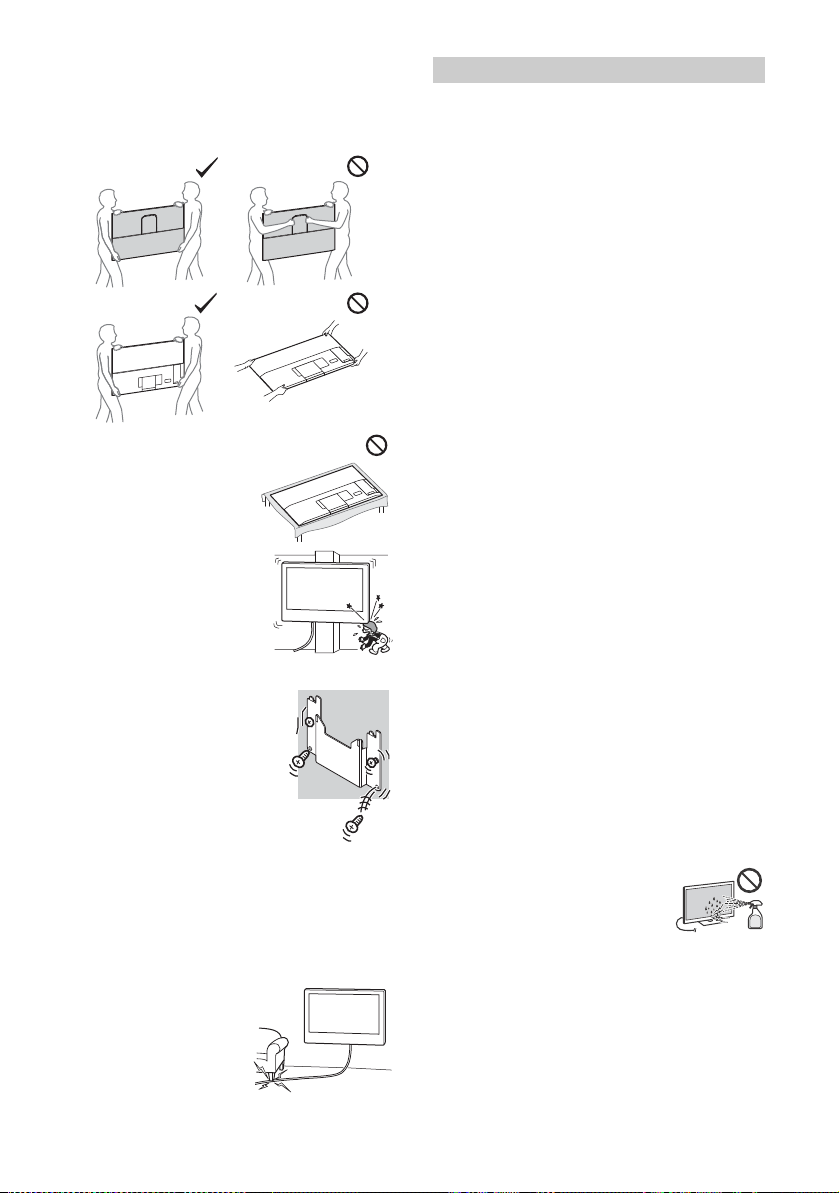
• When handling or mounting the TV set, hold it on the sides. Do
not lift the TV by the U-shaped Bar.
• When handling or mounting the
TV set, do not lay down the TV.
• Do not install the Wall-Mount
Bracket on wall surfaces where the
corners or the sides of the TV are
protruding away from the wall
surface.
• Do not install the TV over or under an air conditioner.
• Be sure to install the Wall-Mount Bracket
securely to the wall following the
instructions in the supplied Wall-Mount
Bracket Installation Guide. If any of the
screws are loose or fall out, the Wall-
Mount Bracket may fall and cause injury
or property damage.
• Be sure to use the supplied screws and
attachment parts properly following the
instructions given in the supplied
Wall-Mount Bracket Installation Guide. If
you use substitute items, the TV may fall
and cause bodily injury to someone or
damage to the TV.
• Be sure to assemble the bracket properly following the
instructed procedure explained in the supplied Wall-Mount
Bracket Installation Guide.
• Be sure to tighten the screws securely in the designated
position.
• Be careful not to subject the TV to shock during installation.
• Be sure to install the TV on a wall that is both perpendicular and
flat.
• After proper installation of the TV, secure the cables properly.
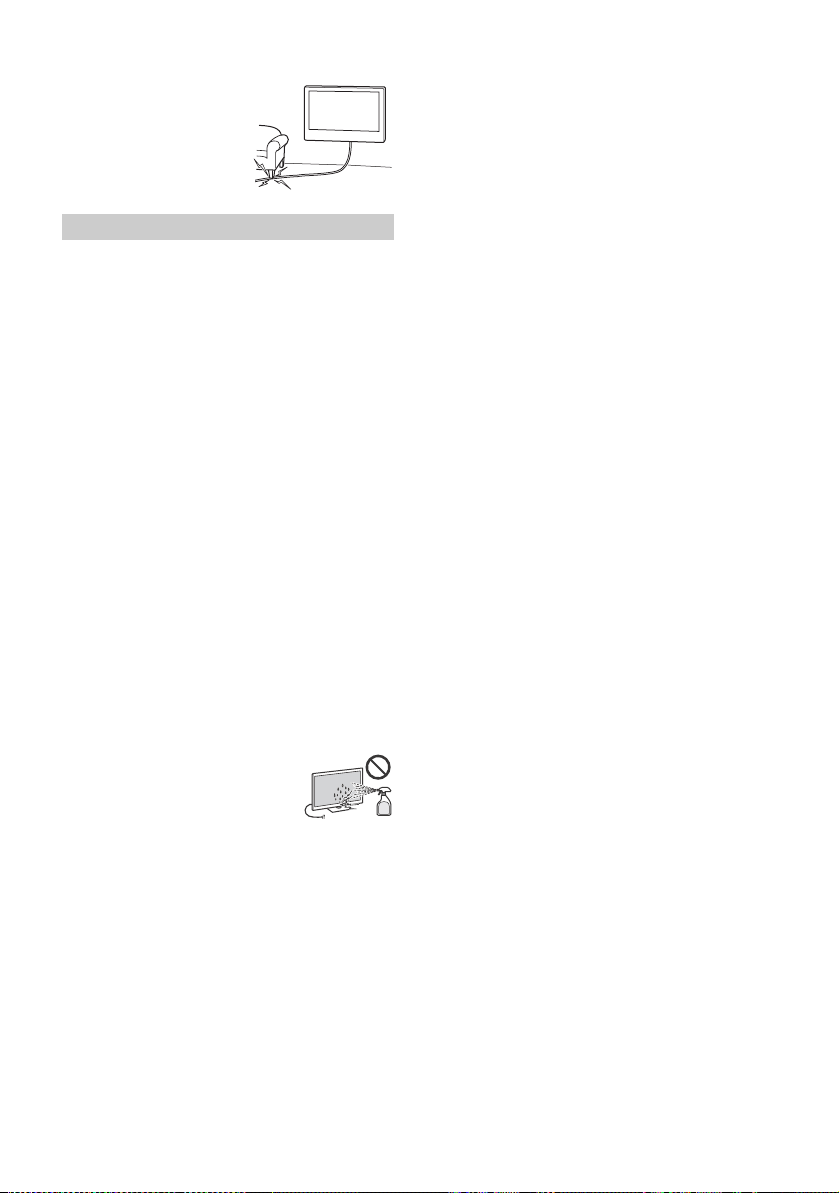
• Do not allow the AC power cord
(mains lead) or the connecting
cables to be pinched as the
internal conductors may become
exposed and cause a short circuit
or an electrical break.
Viewing the TV
• View the TV in moderate light, as viewing the TV in poor light or
during long period of time, strains your eyes.
• When using headphones, adjust the volume so as to avoid
excessive levels, as hearing damage may result.
(3D compatible models only)
• Some people may experience discomfort (such as eye strain,
fatigue, or nausea) while watching 3D video images or playing
stereoscopic 3D games. Sony recommends that all viewers take
regular breaks while watching 3D video images or playing
stereoscopic 3D games. The length and frequency of necessary
breaks will vary from person to person. You must decide what
works best. If you experience any discomfort, you should stop
watching the 3D video images or playing stereoscopic 3D
games until the discomfort ends; consult a doctor if you believe
necessary. You should also review (i) the instruction manual of
any other device or media used with this television and (ii) our
website (http://www.sony-asia.com/support) for the latest
information. The vision of young children (especially those
under six years old) is still under development. Consult your
doctor (such as a pediatrician or eye doctor) before allowing
young children to watch 3D video images or play stereoscopic
3D games. Adults should supervise young children to ensure
they follow the recommendations listed above.
• Do not use, store, or leave the 3D Glasses or battery near a fire,
or in places with a high temperature, e.g., in direct sunlight, or
in sun-heated cars.
LCD Screen
• Although the LCD screen is made with high-precision
technology and 99.99 % or more of the pixels are effective,
black dots may appear or bright points of light (red, blue, or
green) may appear constantly on the LCD screen. This is a
structural property of the LCD screen and is not a malfunction.
• Do not push or scratch the front filter, or place objects on top of
this TV set. The image may be uneven or the LCD screen may be
damaged.
• If this TV set is used in a cold place, a smear may occur in the
picture or the picture may become dark. This does not indicate a
failure. These phenomena disappear as the temperature rises.
• Ghosting may occur when still pictures are displayed
continuously. It may disappear after a few moments.
• The screen and cabinet get warm when this TV set is in use. This
is not a malfunction.
• The LCD screen contains a small amount of liquid crystal. Follow
your local ordinances and regulations for disposal.
Handling and cleaning the screen surface/
cabinet of the TV set
Be sure to unplug the AC power cord (mains lead) connected to
the TV set from AC power outlet (mains socket) before cleaning.
To avoid material degradation or screen coating degradation,
observe the following precautions.
• To remove dust from the screen surface/cabinet, wipe gently
with a soft cloth. If dust is persistent, wipe with a soft cloth
slightly moistened with a diluted mild detergent solution.
• Never spray water or detergent directly on
the TV set. It may drip to the bottom of the
screen or exterior parts and enter the TV set,
and may cause damage to the TV set.
• Never use any type of abrasive pad, alkaline/acid cleaner,
scouring powder, or volatile solvent, such as alcohol, benzene,
thinner or insecticide. Using such materials or maintaining
prolonged contact with rubber or vinyl materials may result in
damage to the screen surface and cabinet material.
• Do not touch the TV if your hand is covered in any chemical
substance such as hand cream or sunblock.
• Periodic vacuuming of the ventilation openings is
recommended to ensure proper ventilation.
• When adjusting the angle of the TV set, move it slowly so as to
prevent the TV set from moving or slipping off from its table
stand.
Precautions

7
GB
GB
Optional Equipment
Keep optional components or any equipment emitting
electromagnetic radiation away from the TV set. Otherwise
picture distortion and/or noisy sound may occur.
Wireless Function of the unit
• Do not operate this unit near medical equipment (pacemaker,
etc.), as this may result in the malfunction of the medical
equipment.
• Although this unit transmits/receives scrambled signals, be
careful of unauthorised interception. We cannot be responsible
for any trouble as a result.
Caution about handling the remote control
• Observe the correct polarity when inserting batteries.
• Do not use different types of batteries together or mix old and
new batteries.
• Dispose of batteries in an environmentally friendly way. Certain
regions may regulate the disposal of batteries. Please consult
your local authority.
• Handle the remote control with care. Do not drop or step on it,
or spill liquid of any kind onto it.
• Do not place the remote control in a location near a heat source,
a place subject to direct sunlight, or a damp room.
WALL-MOUNT BRACKET (models with supplied
Wall-Mount Bracket only)
• If you use the TV installed on the Wall-Mount Bracket for a long
time, the wall behind or above the TV may become discoloured
or the wallpaper may come unglued, depending on the material
of the wall.
• If the Wall-Mount Bracket is removed after installing it on the
wall, the screw holes remain.
• Do not use the Wall-Mount Bracket in a place where it is
subjected to mechanical vibration.
8
GB
Parts and Controls
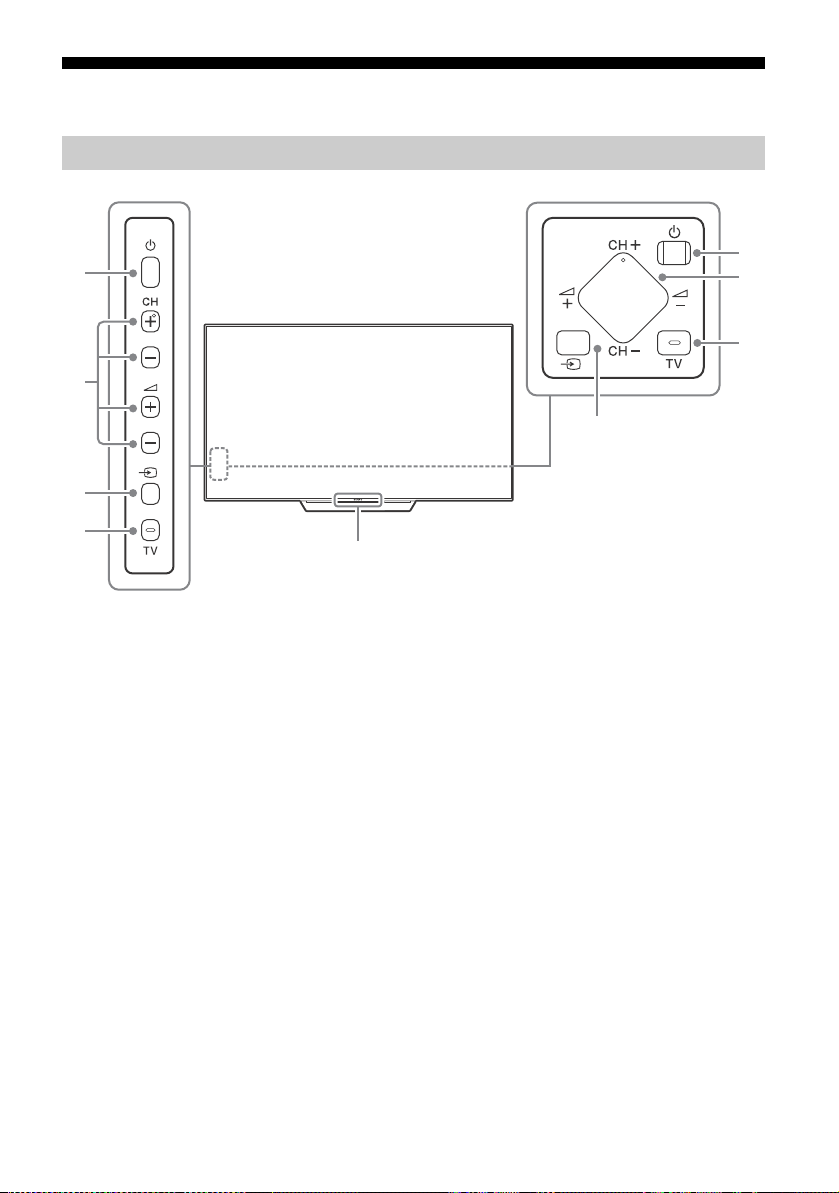
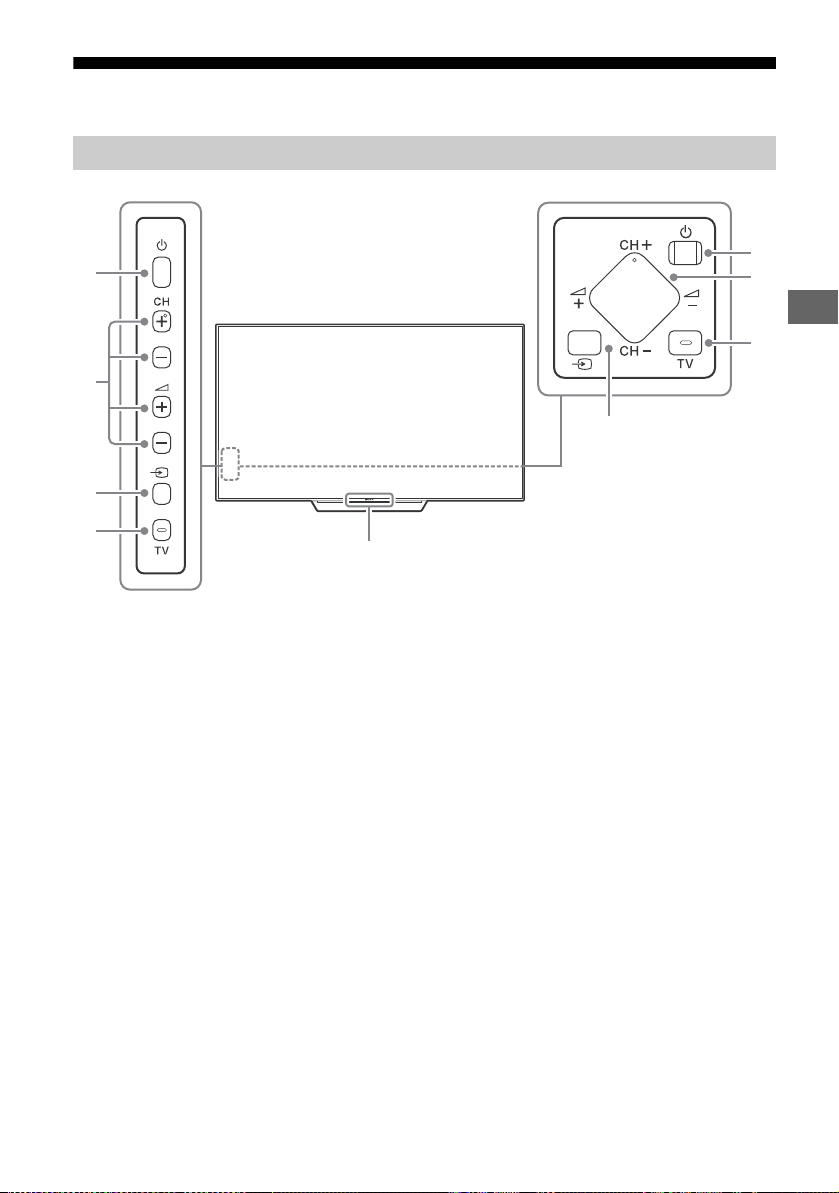
KD-75X9400D, KD-65/55X9300D only
Remote Control sensor*
1
/ Light
sensor*
1
/ Illumination LED / 3D Sync
Transmitter*
1
*
2
The illumination LED lights up or blinks
according to the status of the TV.
•White
When turning on the TV/picture off
mode/software update, etc.
•Cyan
When connecting with a mobile device
wirelessly.
•Amber
Timer is set.
(Power)
CH +/- (Channel)
+/- (Volume)
(Input select)
Display and select the input source.
TV
Switch to a TV channel or input from other
applications.
*1 Do not place anything near the sensor.
*2 Only on limited region/country/TV model.
Controls and Indicators
Ȫ
ȫ
Ȭ
ȭ
Ȫ
ȫ
ȭ
Ȭ
Except KD-75X9400D, KD-65/55X9300D
9
GB
GB
Using Remote Control
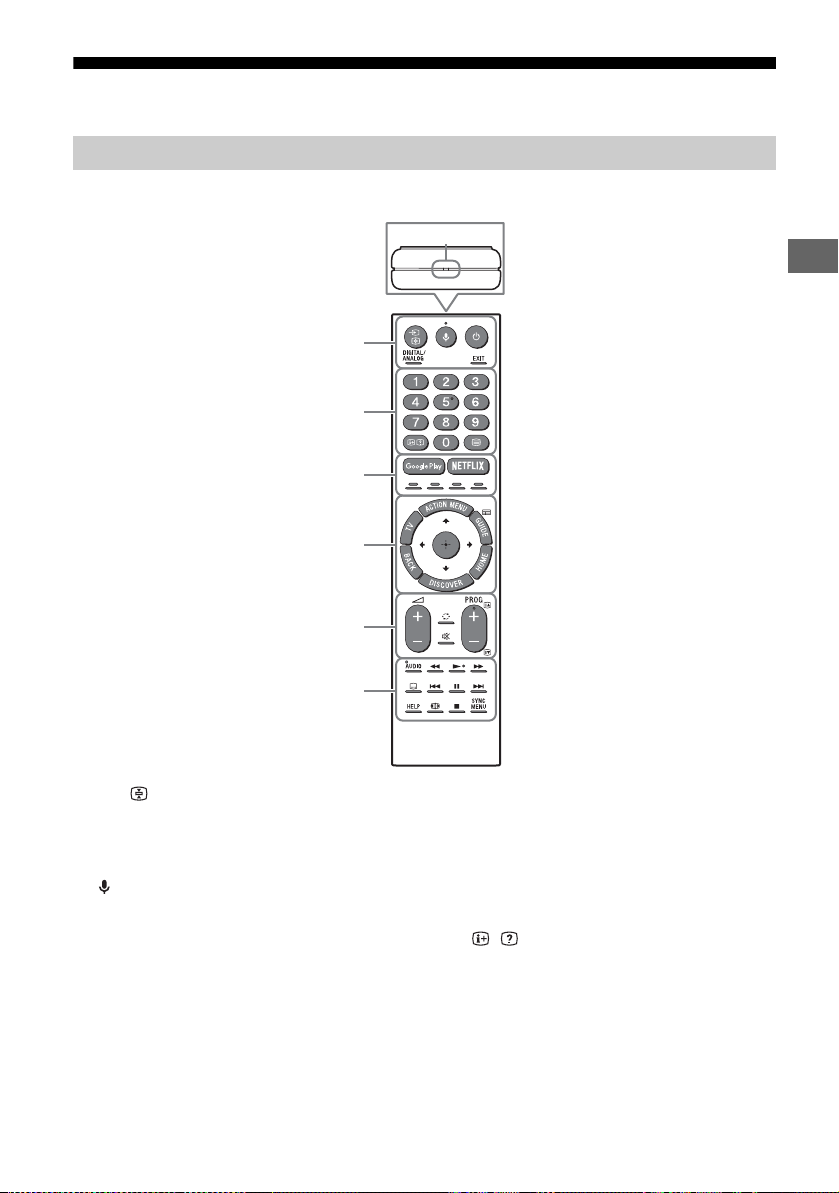
The remote control shape, location, availability and function of remote control button may vary
depending on your region/country/TV model.
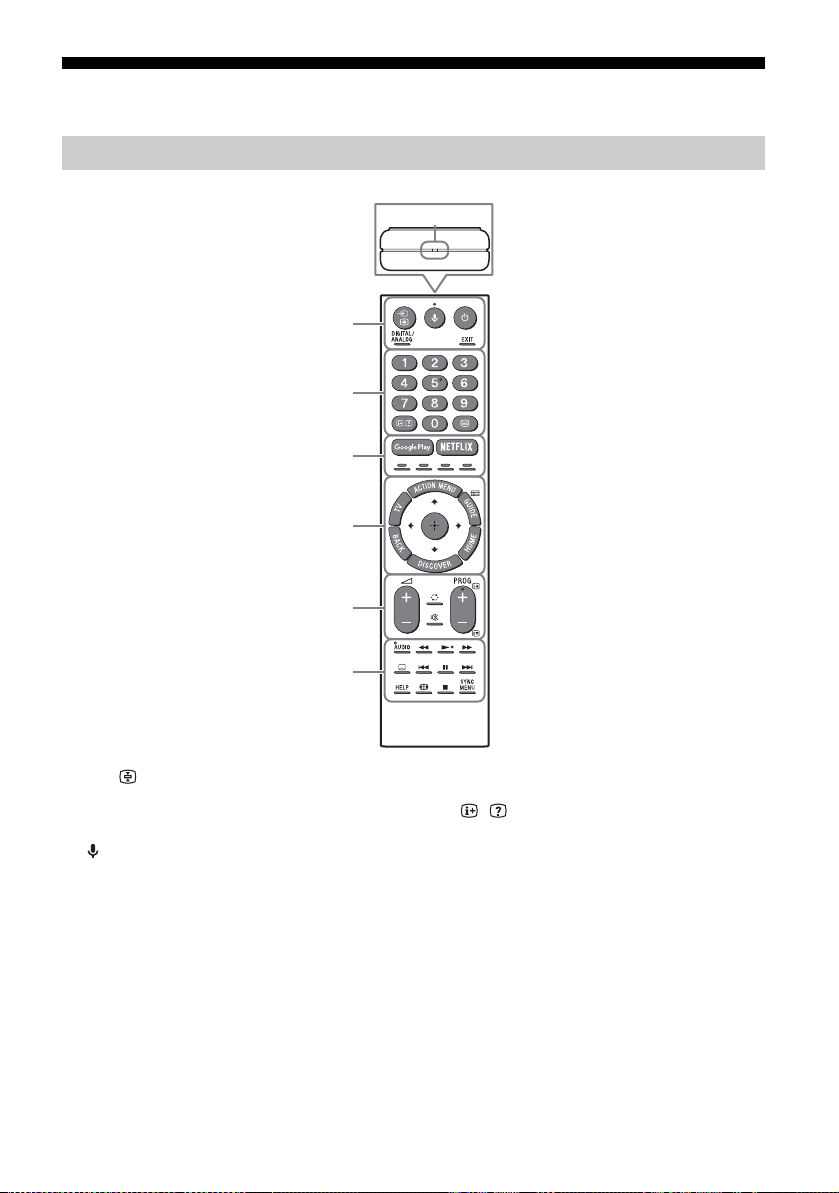
/ (Input select/Text hold)
In TV mode: Display and select the input
source.
In Text mode: Hold the current page.
(Microphone)
Use Voice Function. (e.g., Search various
content by voice.)
(TV standby)
Turn on or turn off the TV (standby mode).
DIGITAL/ANALOG
Switch between digital and analogue mode.
EXIT
Return to the previous screen or exit from
the menu. When an Interactive Application
service is available, press to exit from the
service.
Number buttons
/ (Info/Text reveal)
Display information.
(Text)
Display text information.
Remote Control Parts Description
Ȫ
ȩ
ȫ
Ȭ
ȭ
Ȯ
MIC
10
GB
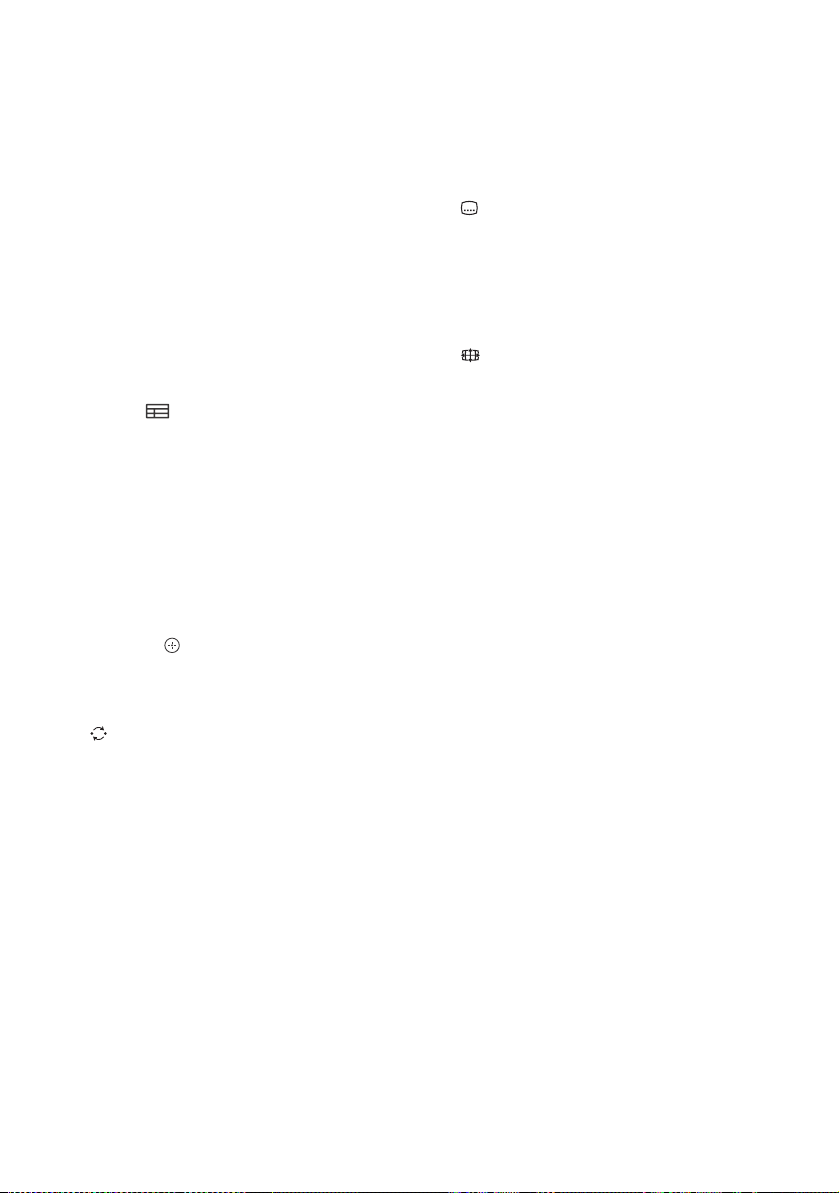
Google Play
Access the “Google Play” online service.
NETFLIX (Only on limited region/
country/TV model)
Access the “NETFLIX” online service.
Colour buttons
Execute corresponding function at that time.
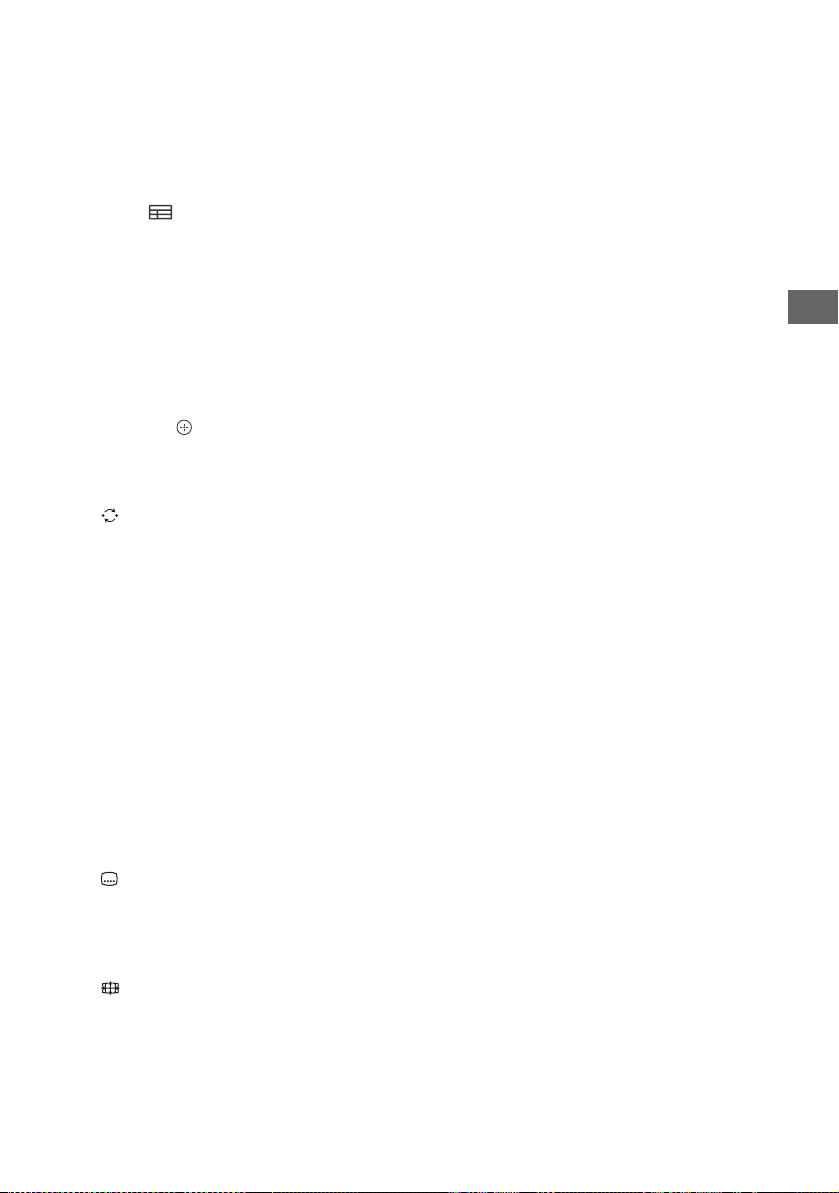
ACTION MENU
Display a list of contextual functions.
TV
• Switch to a TV channel or input from other
applications.
• Turn on the TV to display TV channel or
input.
GUIDE/
Display the digital programme guide.
BACK
Return to previous screen.
HOME
Display the TV Home Menu.
DISCOVER
Bring up the Content Bar to search for
content.
//// (Item select/Enter)
+/– (Volume)
Adjust the volume.
(Jump)
Jump back and forth between two channels
or inputs. The TV alternates between the
current channel or input and the last
channel or input that was selected.
(Muting)
Mute the sound. Press again to restore the
sound.
PROG +/–//
In TV mode: Select the channel.
In Text mode: Select the next () or
previous () page.
AUDIO
Change the language for the programme
currently being viewed.
///.//>/
Operate media contents on TV and
connected BRAVIA Sync-compatible device.
(Subtitle setting)
Turn subtitles on or off (when the feature is
available).
HELP
Display Help Menu. Help Guide can be
accessed from here.
(Wide mode)
Change the screen format.
SYNC MENU
Display the BRAVIA Sync Menu.

11
GB
GB
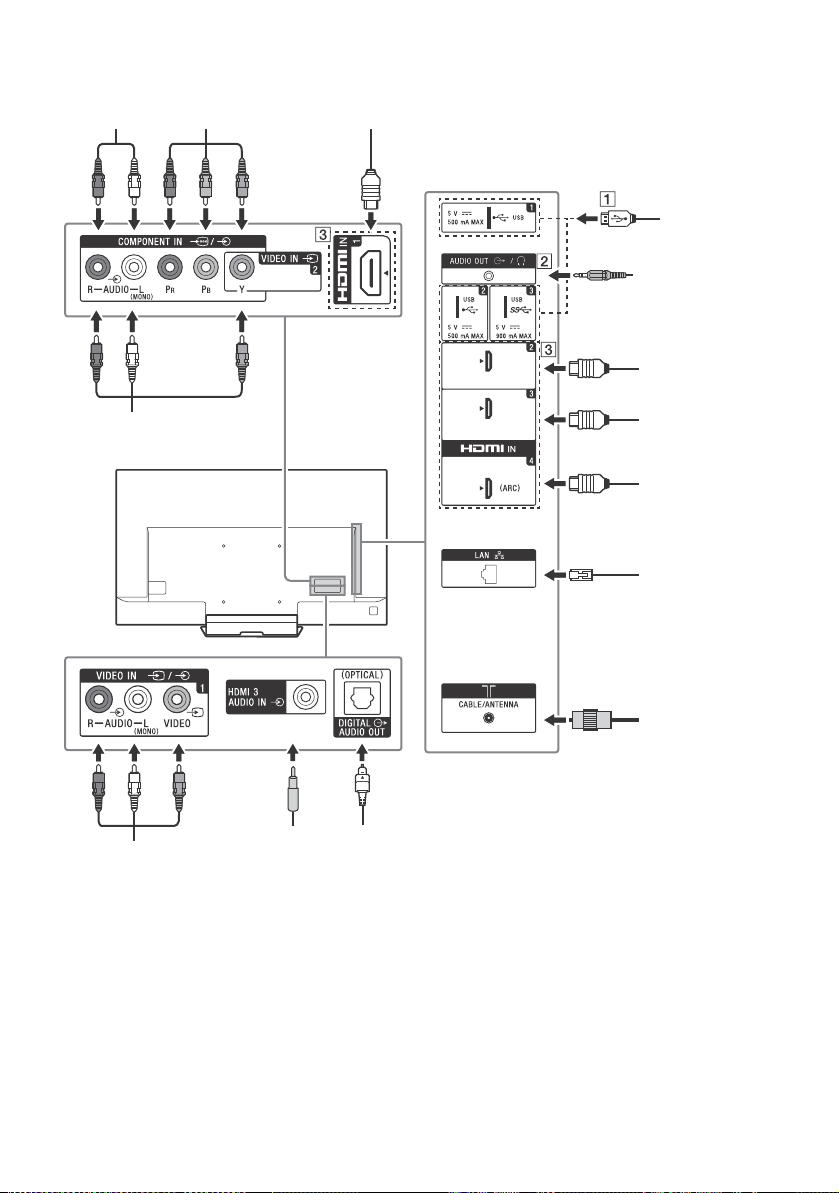
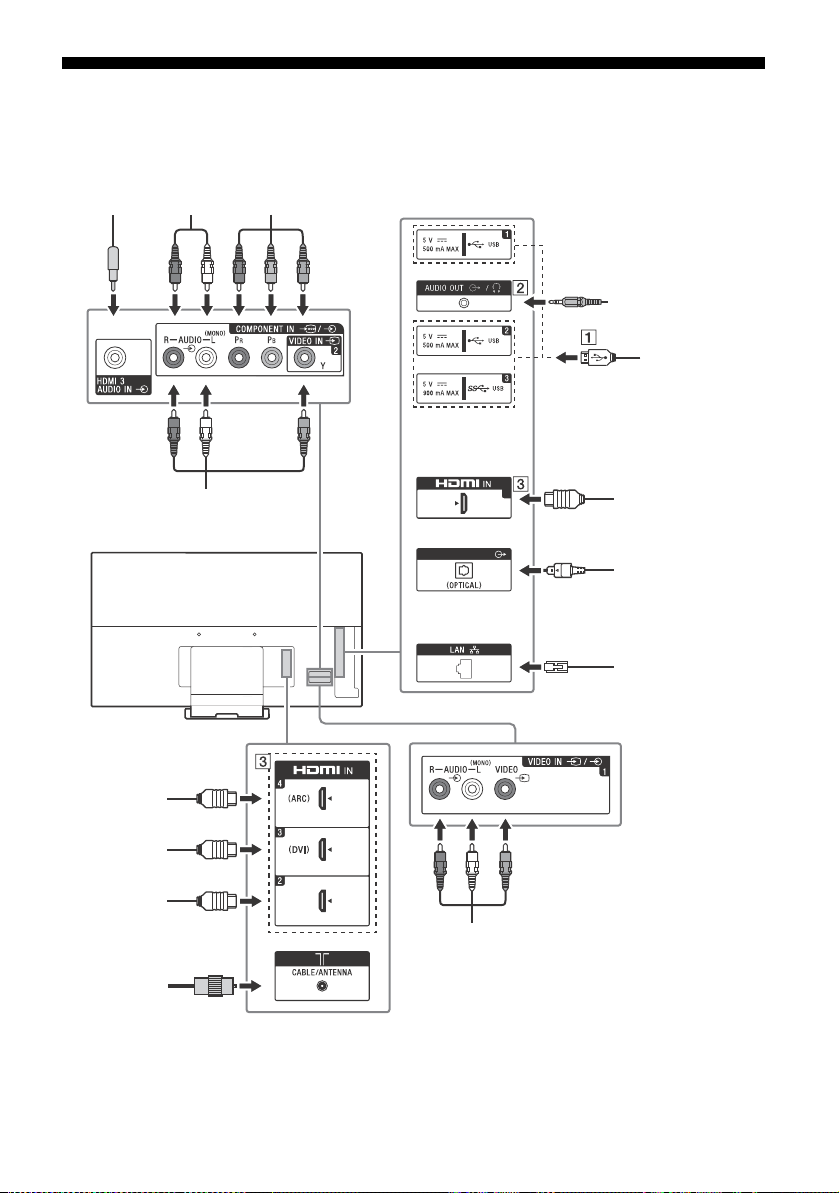
Connection Diagram
For more information on connections, refer to the Help Guide (page 2).
KD-75X9400D, KD-65/55X9300D only
DIGITAL AUDIO OUT
1
*1
*1
*1
*1
*2
*2
Headphone/Home
Audio System/
Subwoofer
Digital still
camera/
Camcorder/USB
storage media
DVI-HDMI
Adapter/HDMI
Device
Home Audio
System with ARC/
HDMI Device
Cable/Antenna
Home Audio System
with Optical Audio
Input
VCR/Video game equipment/
DVD player/Camcorder
DVD player with
component output
Router
HDMI Device
DVI-Audio Out
HDMI Device
VCR/Video game equipment/
DVD player/Camcorder
12
GB
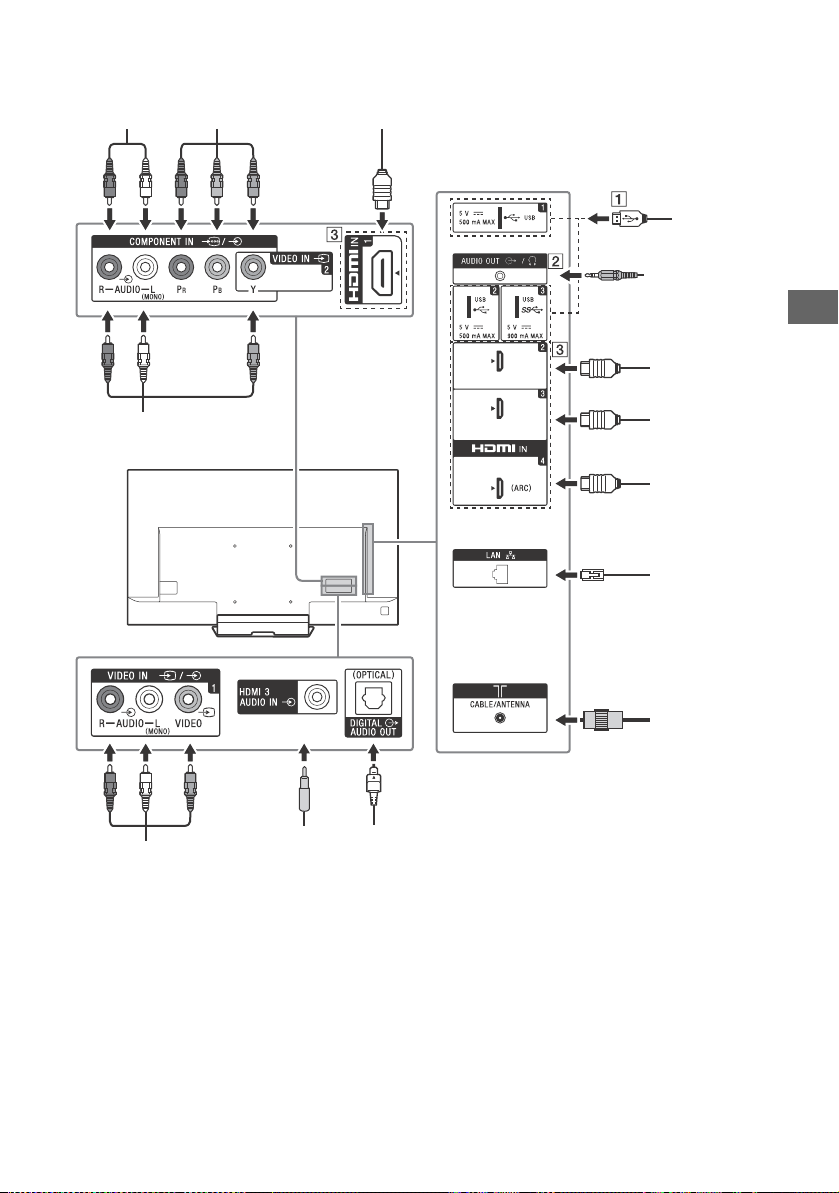
Except KD-75X9400D, KD-65/55X9300D
*1
*2
*1
*1
*1
*2
(DVI)
Headphone/
Home Audio
System/
Subwoofer
Digital still
camera/
Camcorder/
USB storage
media
DVI-HDMI
Adapter /
HDMI Device
Home Audio
System with ARC
/HDMI Device
Cable/Antenna
Home Audio System with
Optical Audio Input
DVI-Audio
Out
VCR/Video game equipment/
DVD player/Camcorder
Router
HDMI Device
HDMI
Device
DVD player with
component output
VCR/Video game
equipment/DVD
player/Camcorder
13
GB
GB
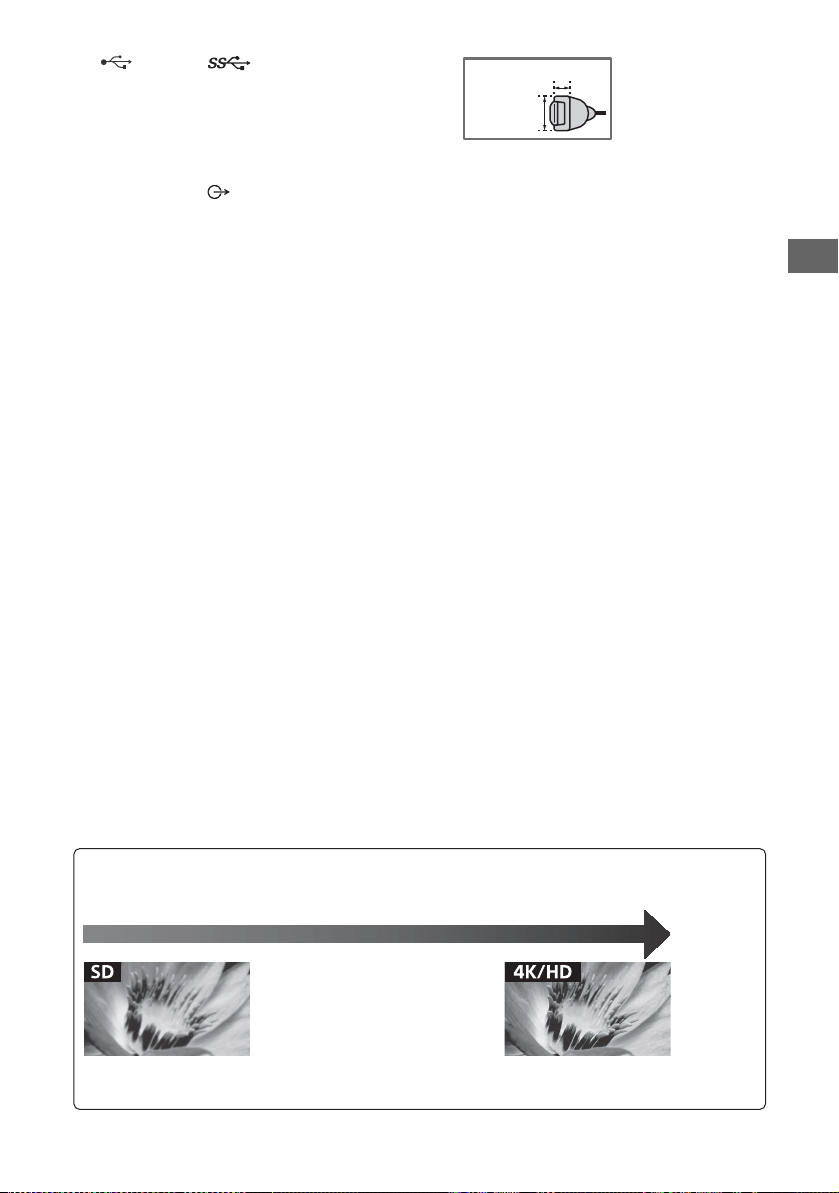
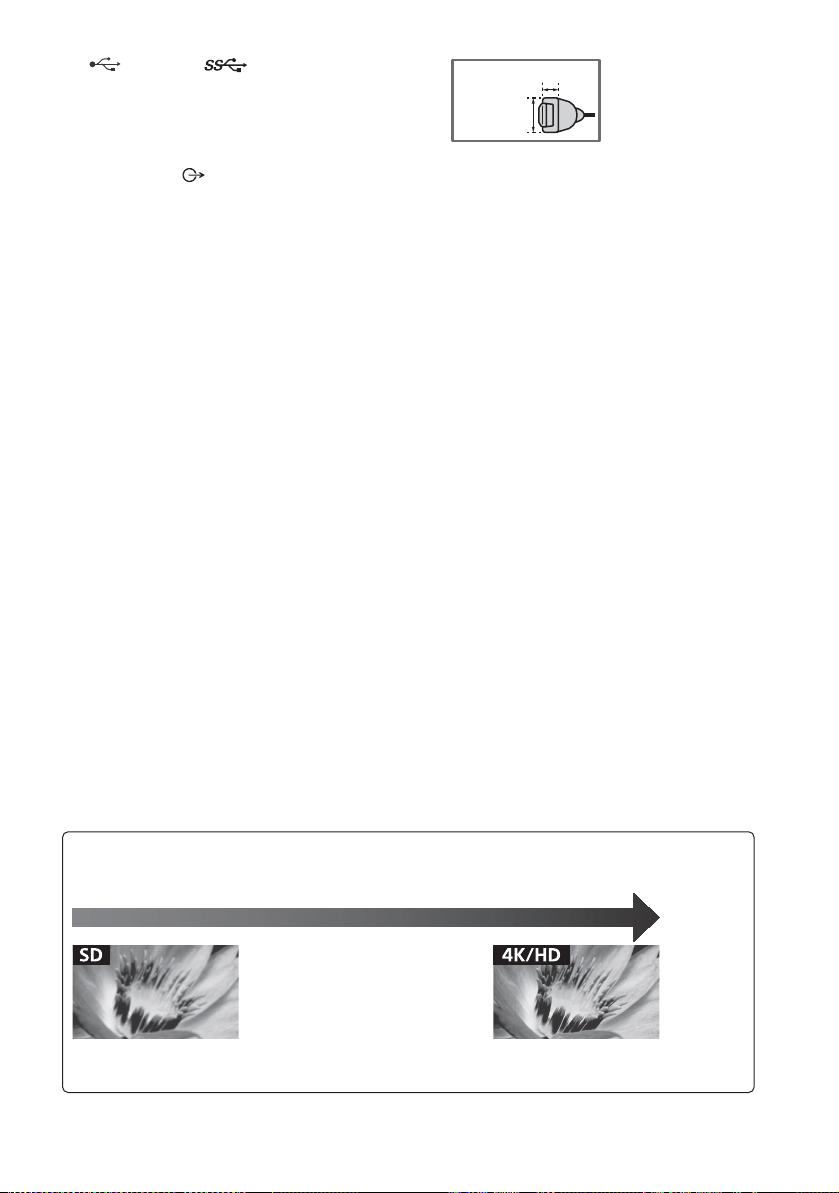
USB 1/2, USB 3
• Connecting a large USB device may
interfere with other connected devices
beside it.
• When connecting a large USB device,
connect to the USB 1 port.
AUDIO OUT*
3
/
• To listen to the TV's sound through the
connected equipment, press HOME.
Select [Settings] t [Sound] t
[Headphone/Audio out] and then select
the desired item.
HDMI IN 1/2/3/4
• If the device has a DVI jack, connect it to
HDMI IN 3 through a DVI - HDMI adaptor
interface (not supplied), and connect the
device's audio out jack to HDMI 3 AUDIO
IN.
• If connecting a digital audio system that is
compatible with Audio Return Channel
(ARC) technology, use HDMI IN 4. If not, an
additional connection with DIGITAL AUDIO
OUT (OPTICAL) is necessary.
*1
*2 When connecting mono equipment, connect to the
L (MONO) audio jack (socket).
*3 Supports 3-pole stereo mini jack only.
< 21 mm
< 12 mm
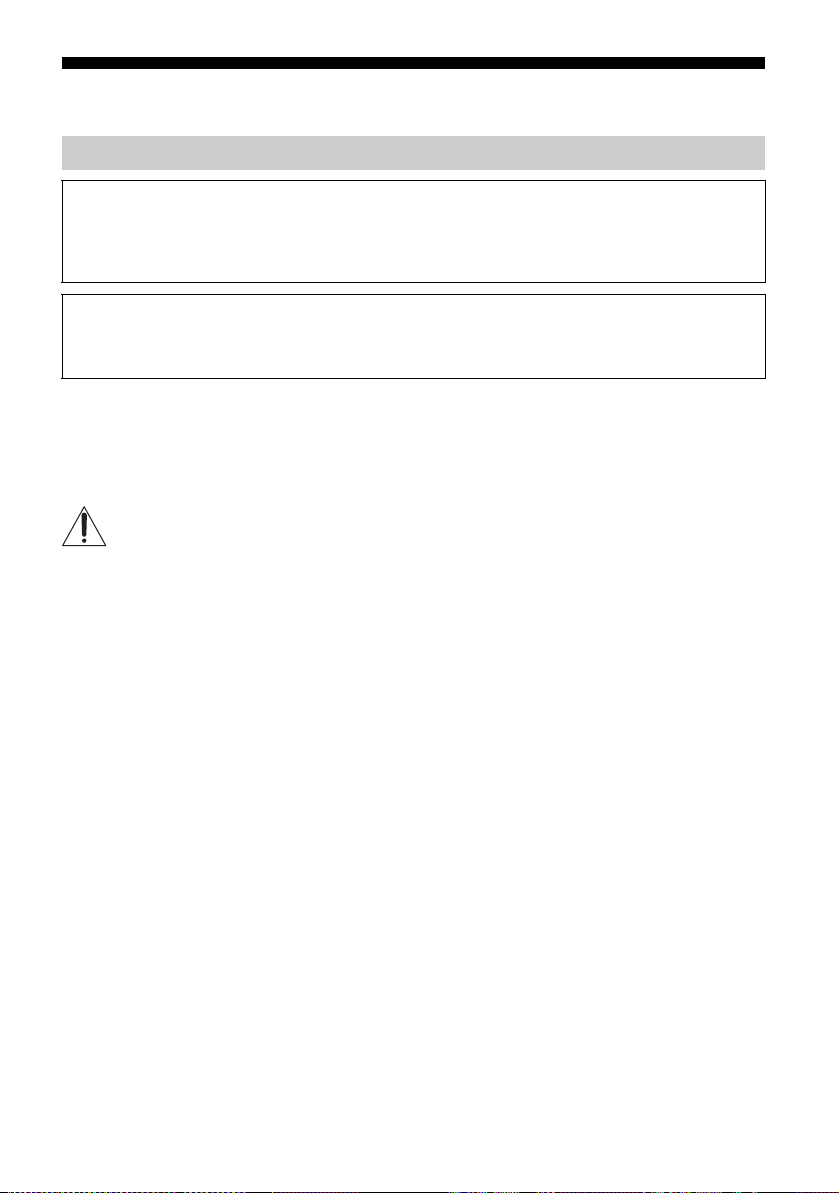
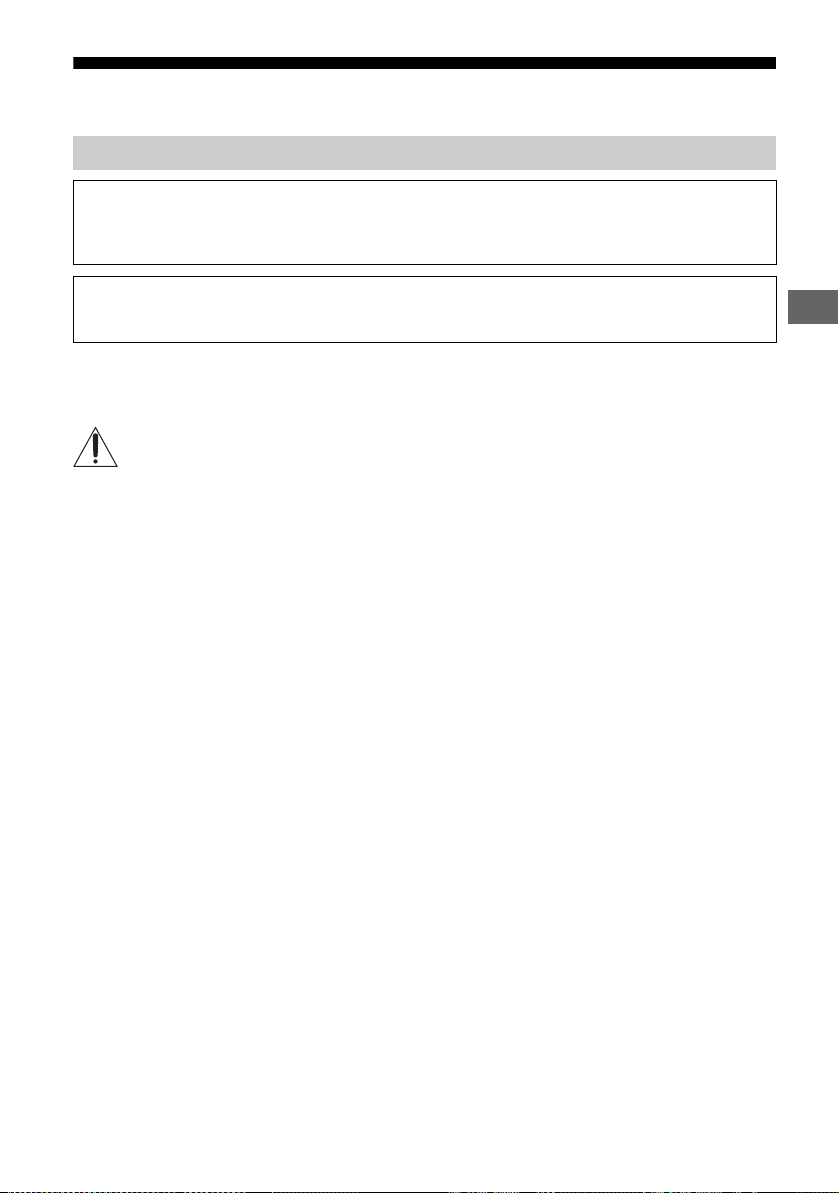
Picture Quality
• AV composite cable
• Antenna (aerial) cable
Standard definition (SD) videos have picture signals with a
vertical resolution of 480 (NTSC) or 576 (PAL/SECAM) lines.
•Component cable •HDMI cable
High definition (HD) videos have picture signals
with a vertical resolution of 720 or 1,080 lines.
(For 4K vertical resolution: 2,160 lines)
14
GB
Installing the TV to the Wall
Note
• See page 2 (Safety information) and page 6 (Precautions) on WALL-MOUNT BRACKET before carrying out Wall-Mount
Bracket installation.
• When attaching the Table-Top Stand again, be sure to fasten the screws (previously removed) to the original holes
on the rear of the TV.
• Make sure that the wall has enough space for the TV and is capable of supporting a weight of at least four times that
of the TV. See page 25-26 (Specifications) for the TV’s weight.
For instructions on Wall-Mount Bracket installation of your TV model, refer to the supplied Wall-Mount Bracket
Installation Guide.
Using the supplied Wall-Mount Bracket (KD-75X9400D, KD-65/55X9300D only)
To Customers
Sufficient expertise is required for installing this product. Be sure to subcontract the installation to Sony
dealers or licensed contractors and pay special attention to safety during the installation. Sony is not liable
for any damages or injury caused by mishandling or improper installation, or installing any other than the
specified product. Your Statutory Rights (if any) are not affected.
To Sony Dealers and Contractors
Sufficient expertise is required for installing this product. Be sure to read this instruction manual thoroughly
to do the installation work safely. Sony is not liable for any damages or injury caused by mishandling or
improper installation.
15
GB
GB
This TV’s instruction manual only shows the steps on preparing the installation of the TV before
installing to the wall.
To Customers:
For product protection and safety reasons, Sony strongly recommends that installation of your
TV be performed by Sony dealers or licensed contractors. Do not attempt to install it yourself.
To Sony Dealers and Contractors:
Provide full attention to safety during the installation, periodic maintenance and examination of
this product.
Use the Wall-Mount Bracket SU-WL500 (not supplied) (KD-75X9400D) or SU-WL450 (not
supplied) (KD-65/55X9300D, KD-65/55X8500D) to install the TV to the wall.
When installing the Wall-Mount Bracket, also refer to the Operating Instructions and Installation Guide
supplied with the Wall-Mount Bracket.
Note
• Be sure to store the removed screws in a safe place, keeping them away from children.
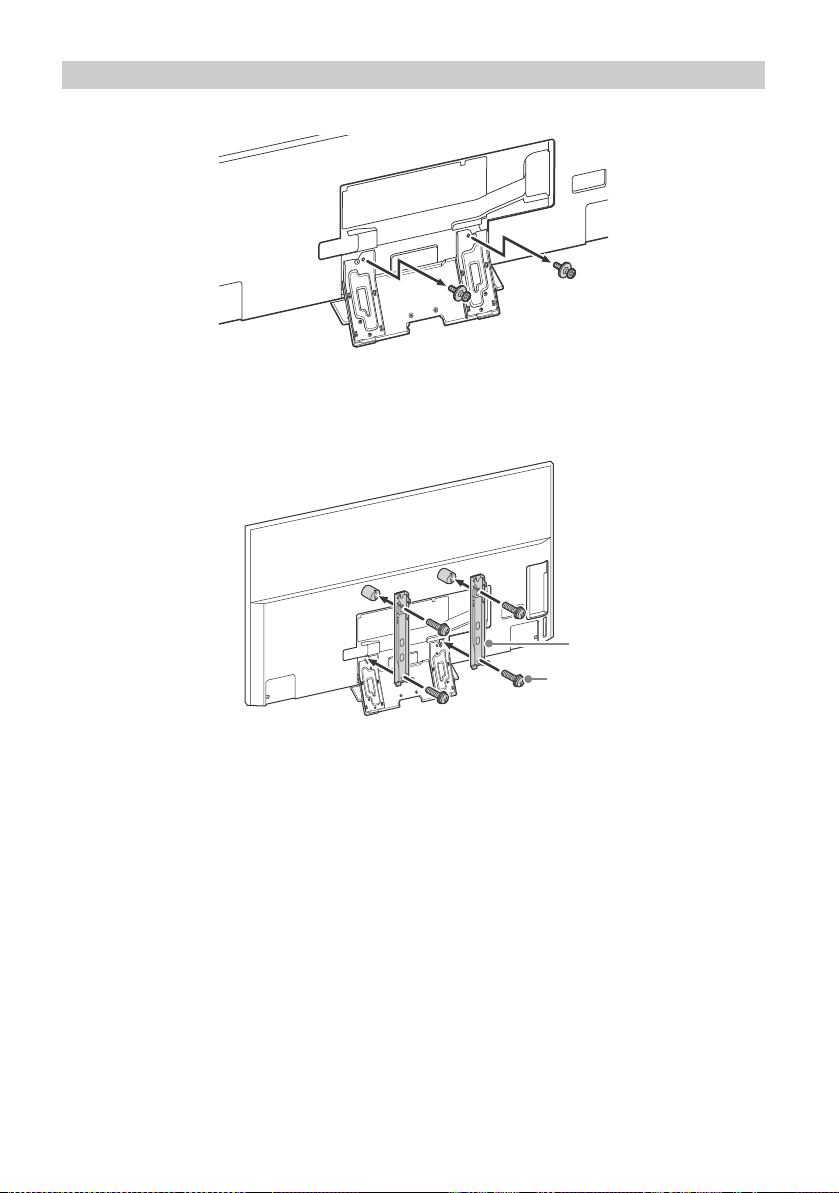
KD-75X9400D, KD-65/55X9300D only
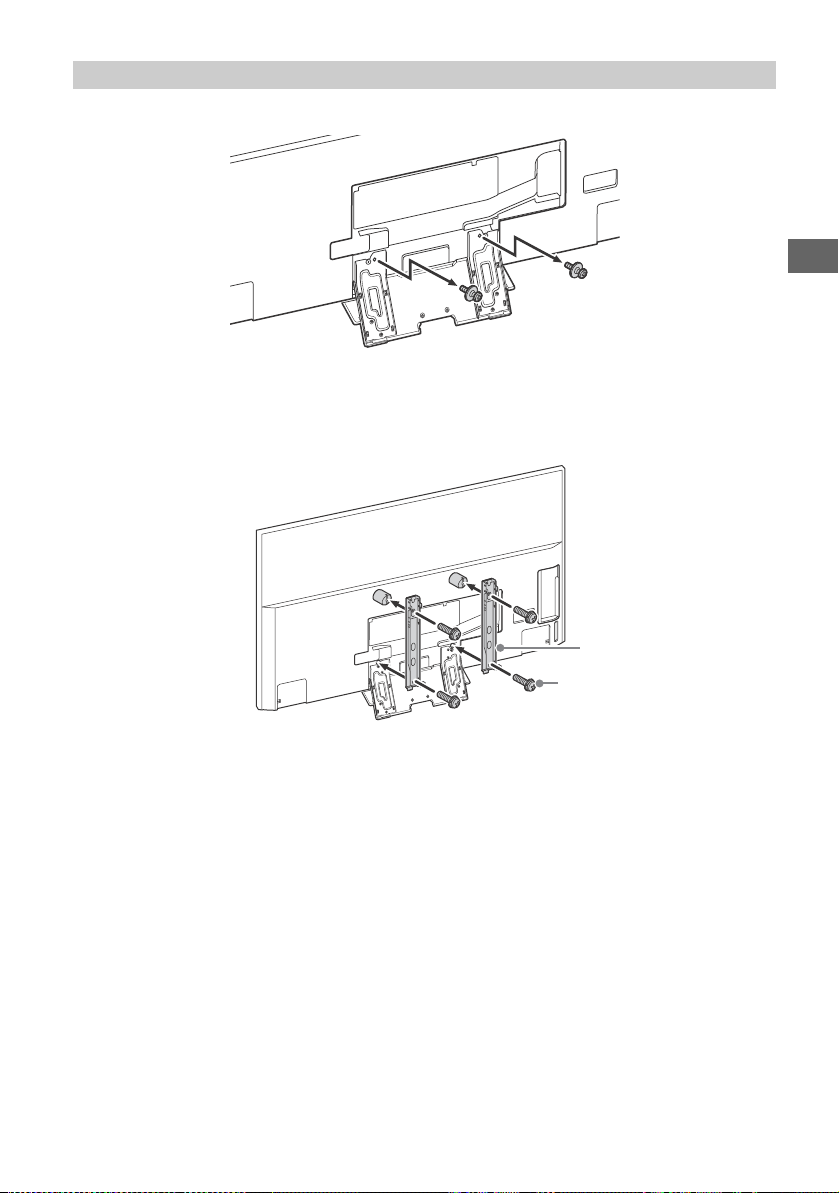
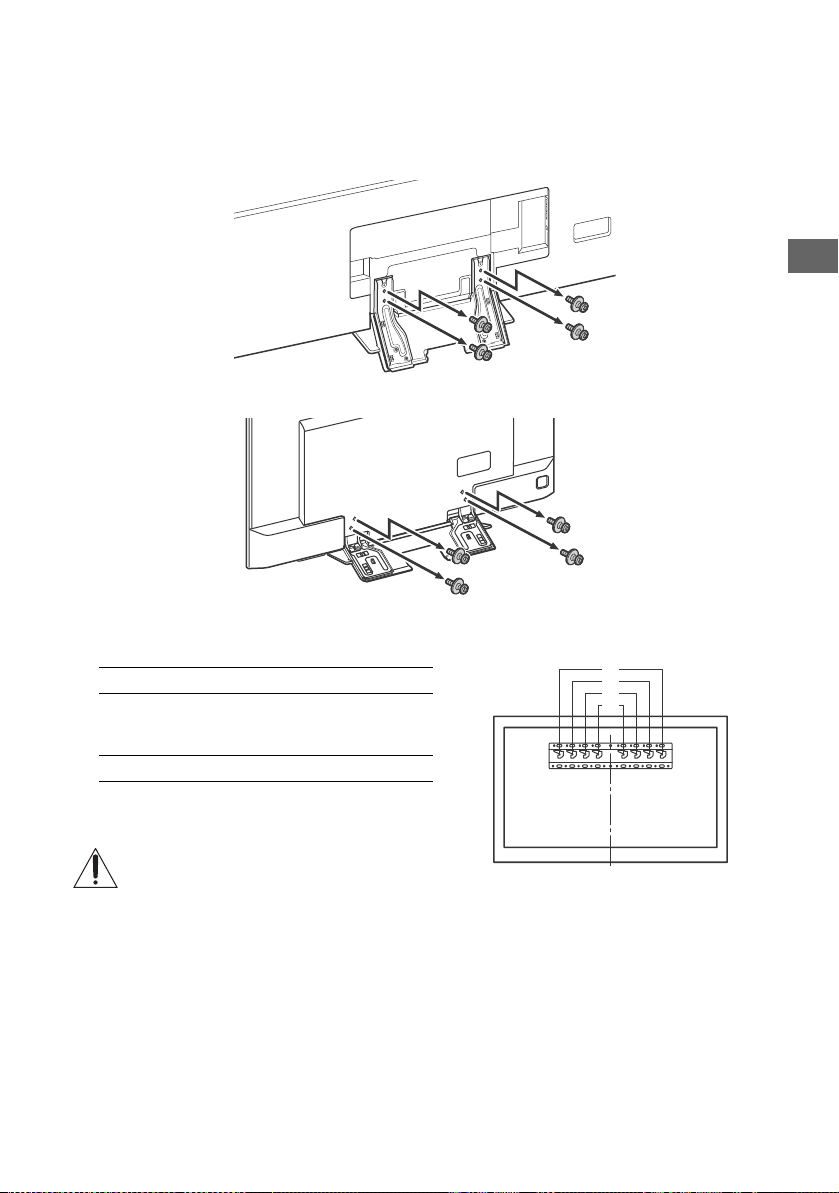
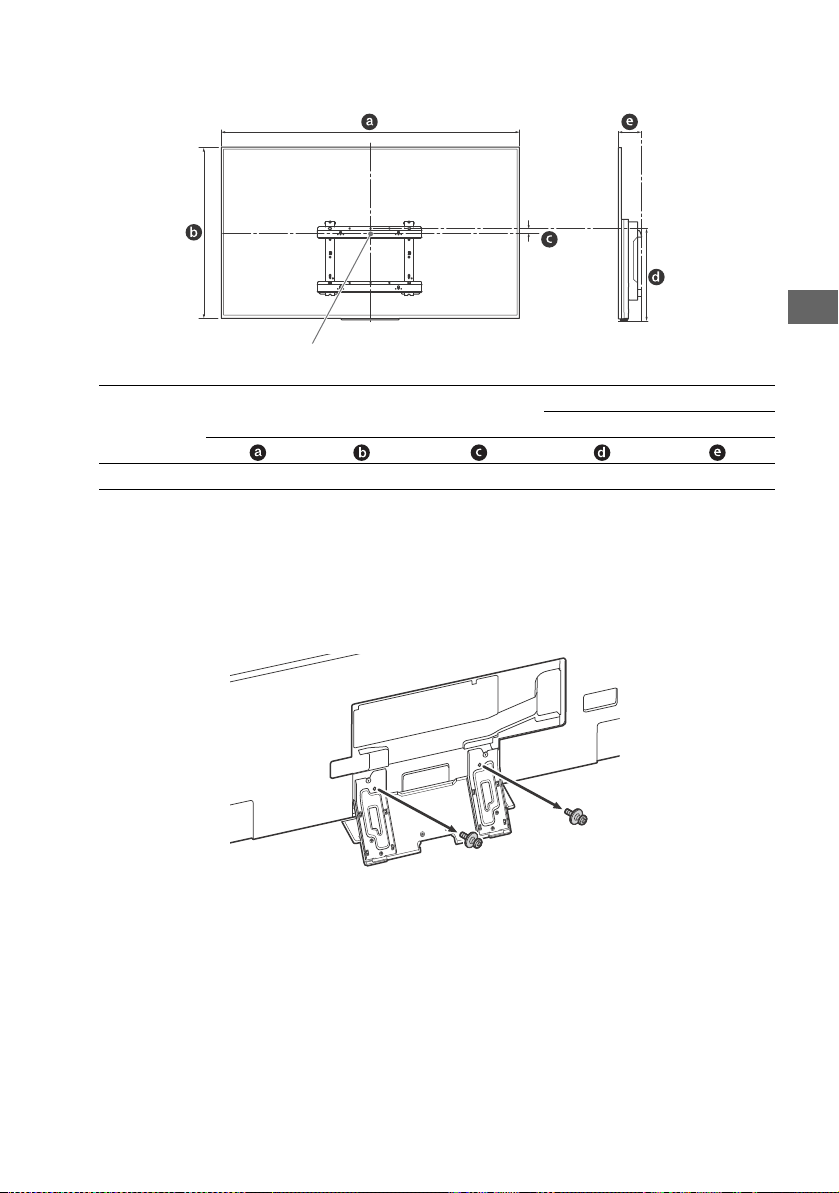
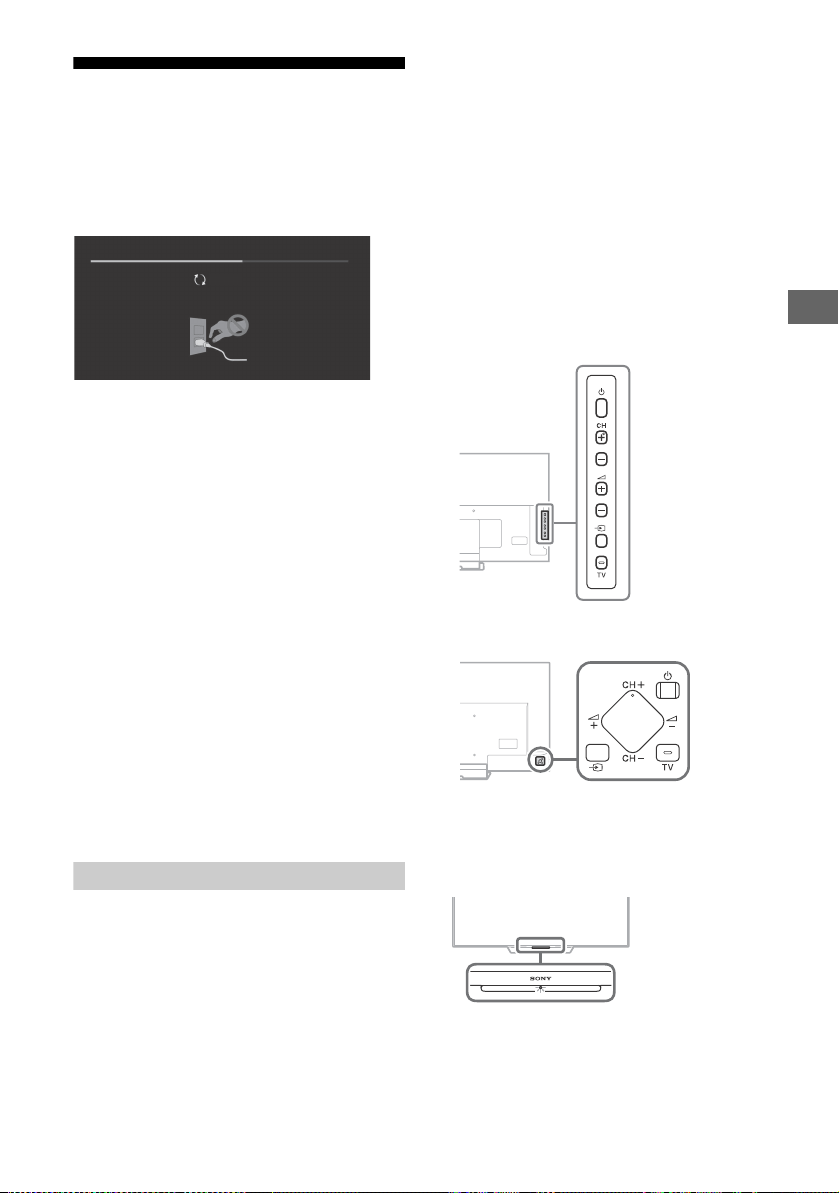
1 Remove the stand cover and terminal covers.
2 Remove the screws from the rear of the TV.
Using the optional Wall-Mount Bracket
Sufficient expertise is required for installing this product, especially to determine the strength of the wall for
withstanding the TV’s weight. Be sure to entrust the attachment of this product to the wall to Sony dealers
or licensed contractors and pay adequate attention to safety during the installation. Sony is not liable for
any damage or injury caused by mishandling or improper installation.
2
3
4
1
KD-75X9400D
2
1
3
KD-65/55X9300D

16
GB
3 Attach the Wall-Mount Attachment (supplied with the TV) to the rear of the TV (to make it
parallel with the wall).
Note
• If using an electric screwdriver, set the torque at approximately 1.5 N·m {15 kgf·cm}.
• Be sure to fasten the Wall-Mount Attachment when attaching them to the TV.
Use only a flat head screwdriver to install the Wall-Mount Attachment. Use of another tool might result in over
torqueing the Wall-Mount Attachment and damaging the TV.
Except KD-75X9400D, KD-65/55X9300D
Remove the screws from the rear of the TV.
VS
1.5 N∙m {15 kgf∙cm}
KD-75X9400D
VS(L)
VS(S)
1.5 N∙m {15 kgf∙cm}
KD-65/55X9300D
2
1
2
1
2
2
KD-65X8500D KD-55X8500D
17
GB
GB
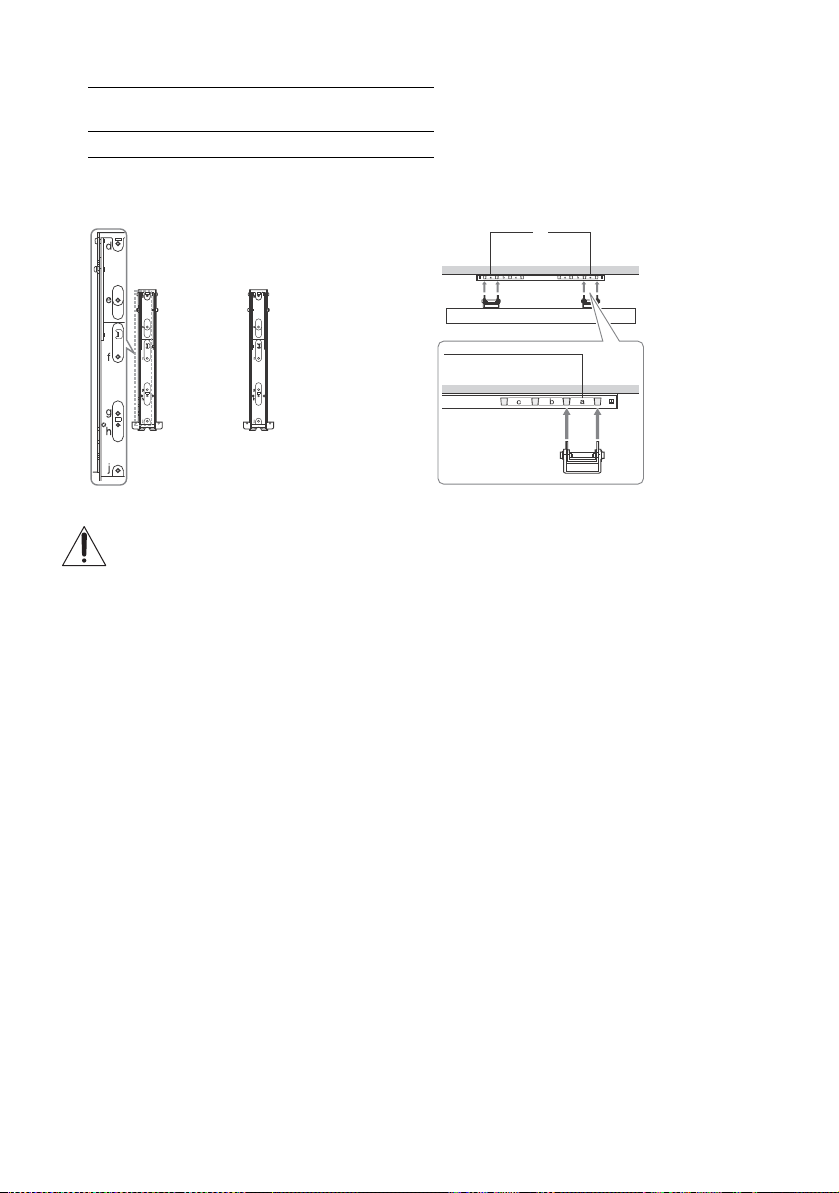
1 Remove the screws.
2 Attach the Mounting Hook using the four screws supplied with the Wall-Mount Bracket.
Note
• If using an electric screwdriver, set the torque at approximately 1.5 N·m {15 kgf·cm}.
• Be sure to store the unused parts in a safe place for future use. Retain this manual for future reference.
SU-WL500 (KD-75X9400D only)
Mounting Hook
Screw (+PSW 6 × 16)
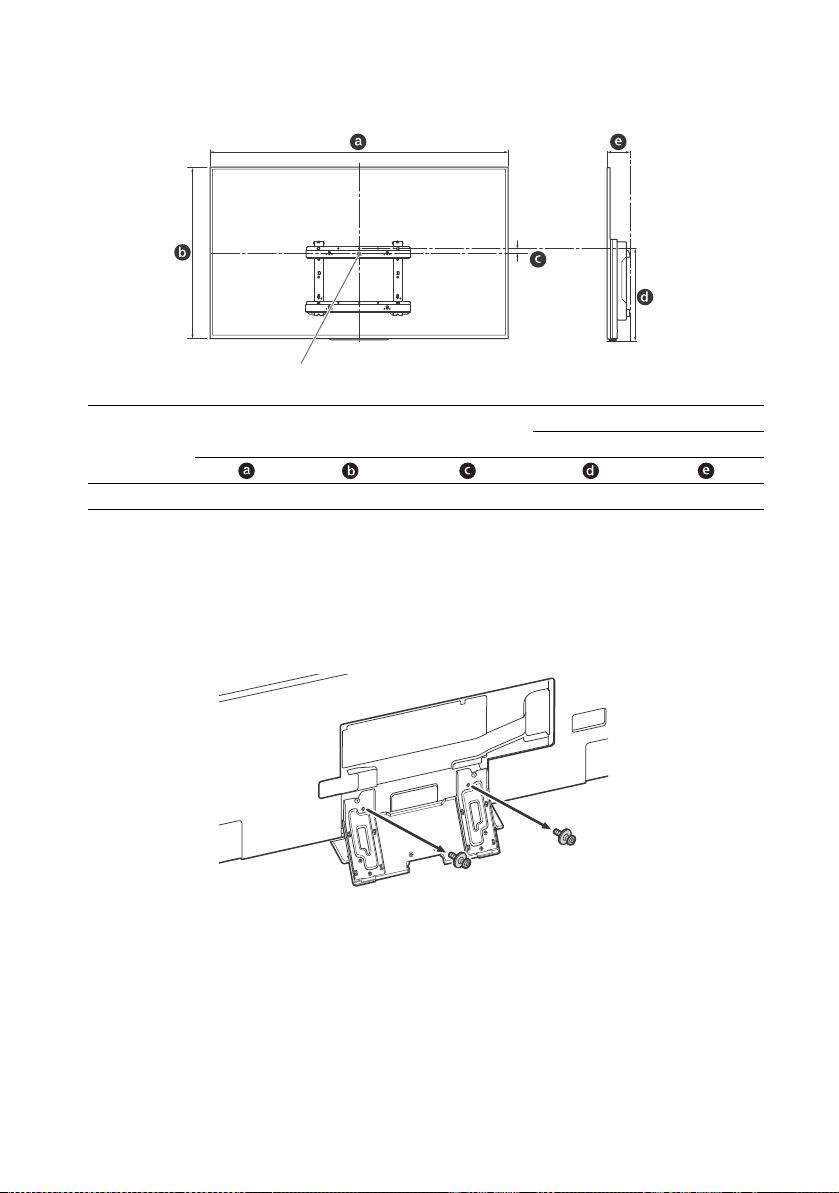
18
GB
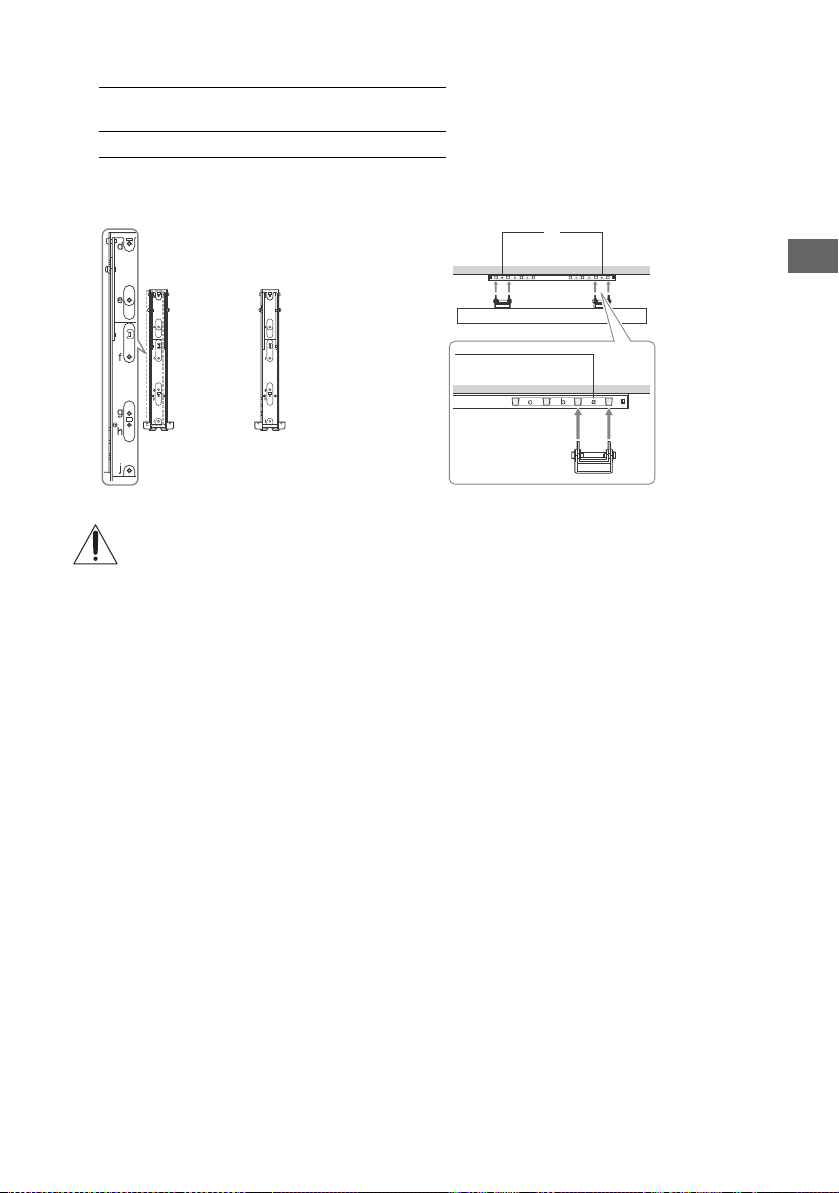
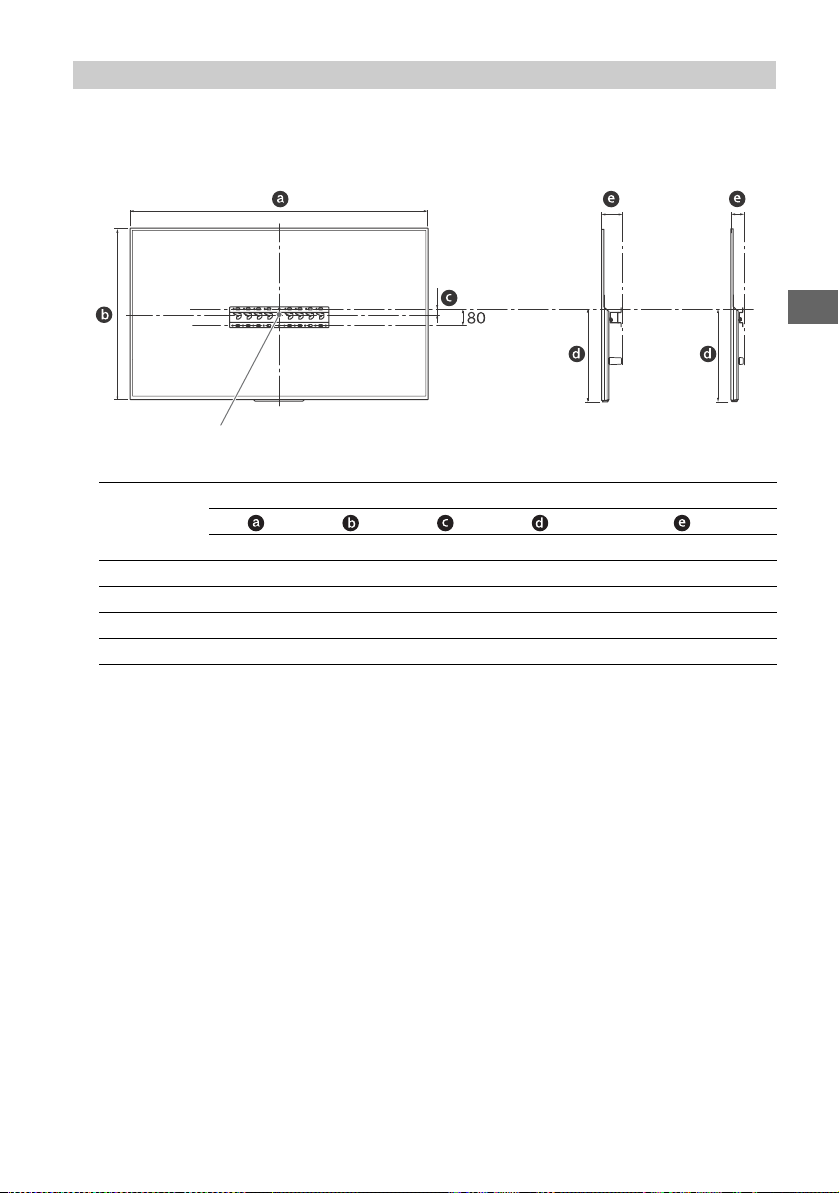
3 Make sure that the wall has enough space for the TV and is capable of supporting a
weight of at least four times that of the TV. Refer to the following table on installing the TV
to the wall. See page 25-26 (Specifications) for the TV’s weight.
Unit: mm
Note
• Only applicable for 0° for this TV model.
• Figures in the table may differ slightly depending on the installation.
4 Connect necessary cables to the TV.
Note
• You cannot access to any terminal after installing the TV to the wall.
5 Detach the Table-Top Stand from the TV.
Model Name
KD-
Display dimensions
Screen centre
dimension
Length for mounting
Angle (0°)
75X9400D 1,672 960 29 514 113
Screen centre point
19
GB
GB
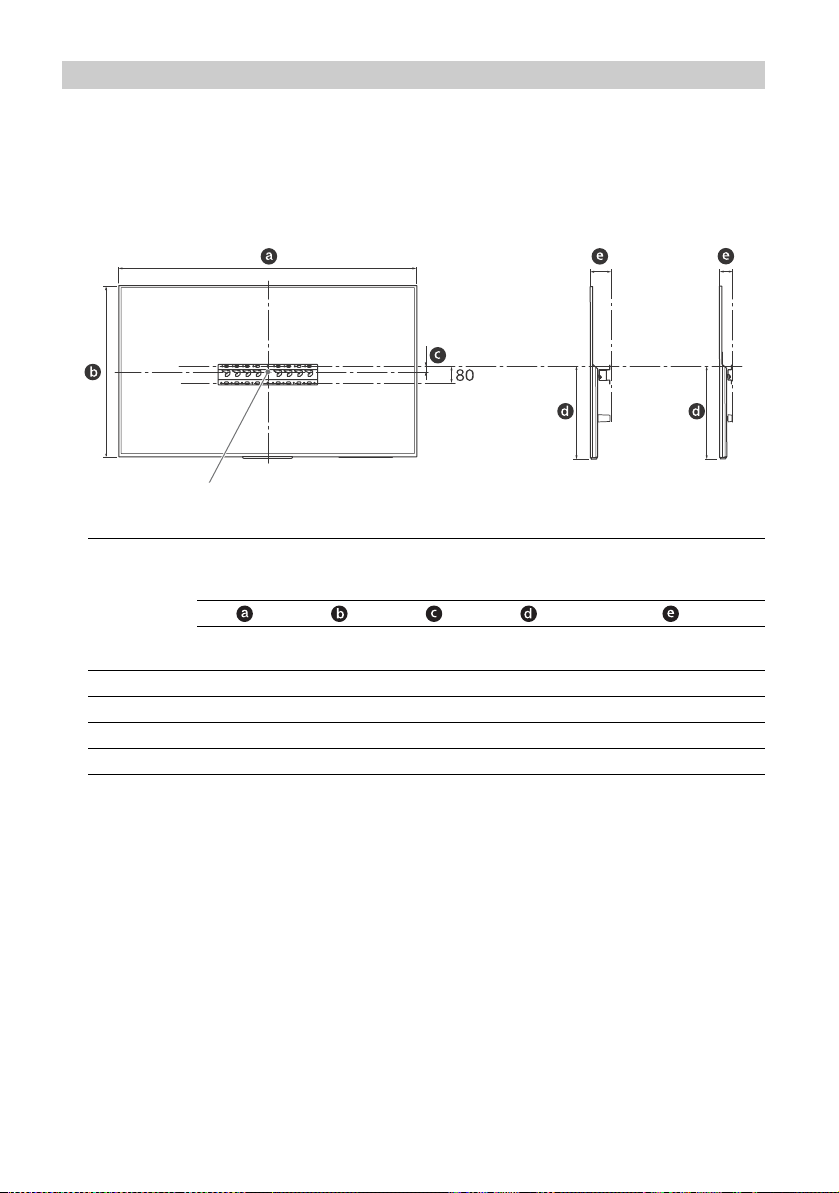
6 Install the TV on the wall.
Refer to the instructions supplied with the Wall-Mount Bracket for your model to install the TV on the wall.
Model Name
KD-
Screw location Hook location
75X9400D e, j a
Hook location
When installing the TV onto the Base Bracket.
Screw location
When installing the Mounting Hook on the TV.
a
20
GB
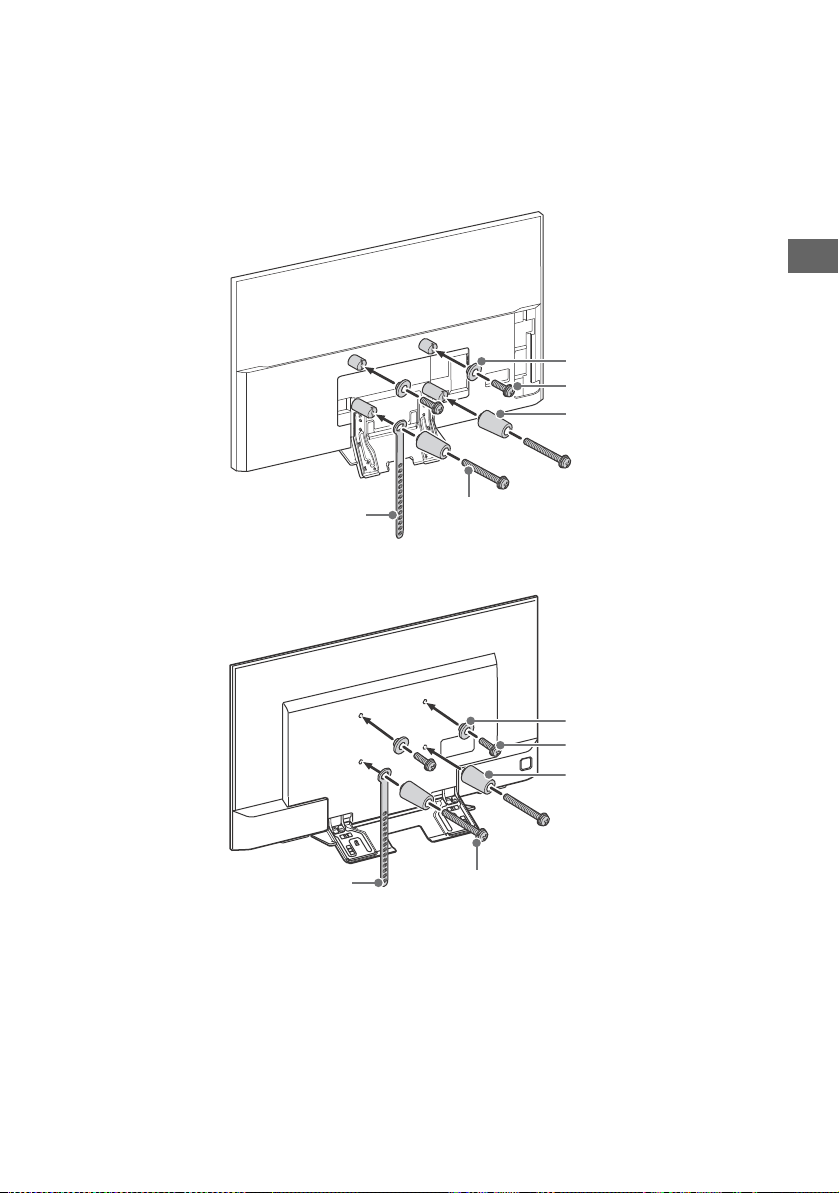
1 Make sure that the wall has enough space for the TV and is capable of supporting a
weight of at least four times that of the TV.
Refer to the following table on installing the TV to the wall. See page 25-26 (Specifications)
for the TV’s weight.
Unit: mm
Note
• Figures in the table may differ slightly depending on the installation.
• When your TV is installed on the wall, the upper side of the TV slightly leans forward.
SU-WL450 (KD-65/55X9300D, KD-65/55X8500D only)
Model Name
KD-
Display dimensions
Screen
centre
dimension
Length for mounting
Standard
mounting
Slim
mounting
65X9300D 1,458 839 25 449 102 61
65X8500D 1,454 842 56 483 102 60
55X9300D 1,239 717 87 450 102 61
55X8500D 1,231 717 129 494 102 60
Screen centre point
Standard
mounting
Slim
mounting
21
GB
GB
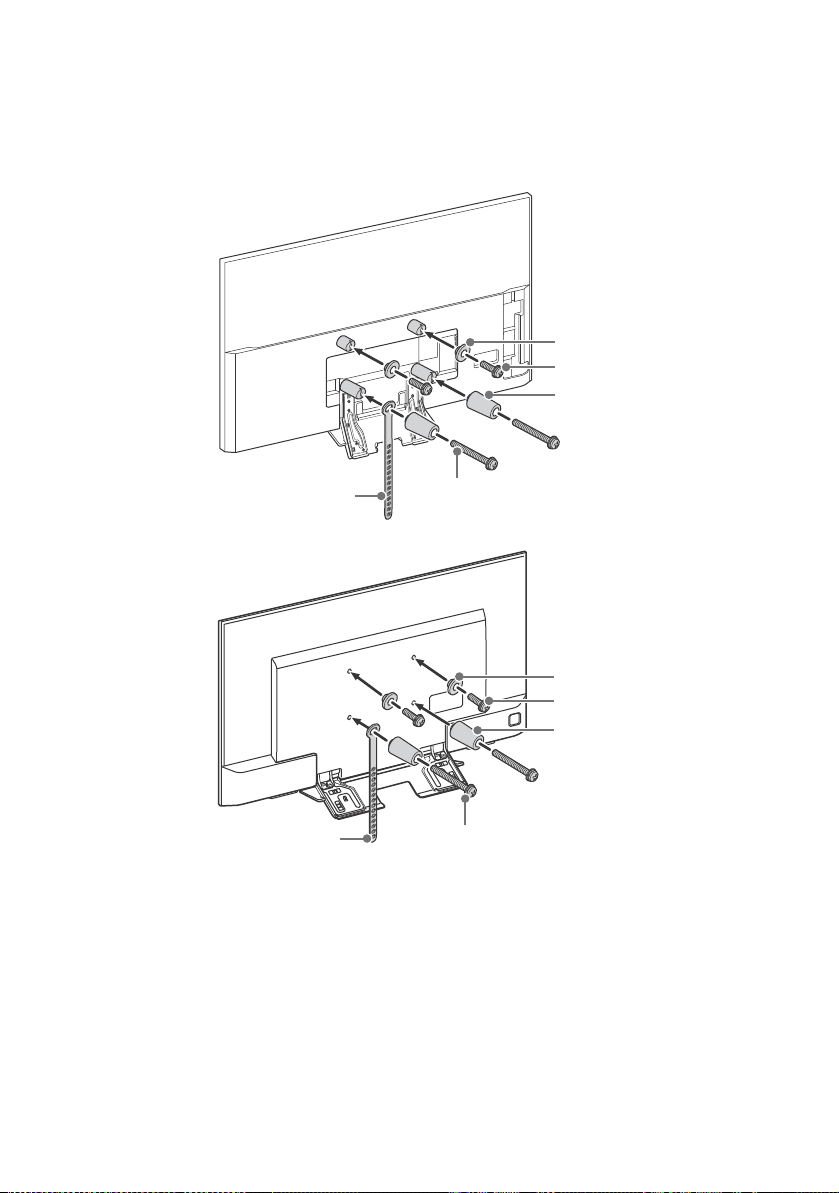
2 Attach the Attachment parts for Wall-Mount Bracket. Check the Attachment parts by
referring to “1” of the Wall-Mount Bracket Installation Guide.
Note
• If using an electric screwdriver, set the torque at approximately 1.5 N·m {15 kgf·cm}.
• Be sure to store the unused parts in a safe place for future use. Retain this manual for future reference.
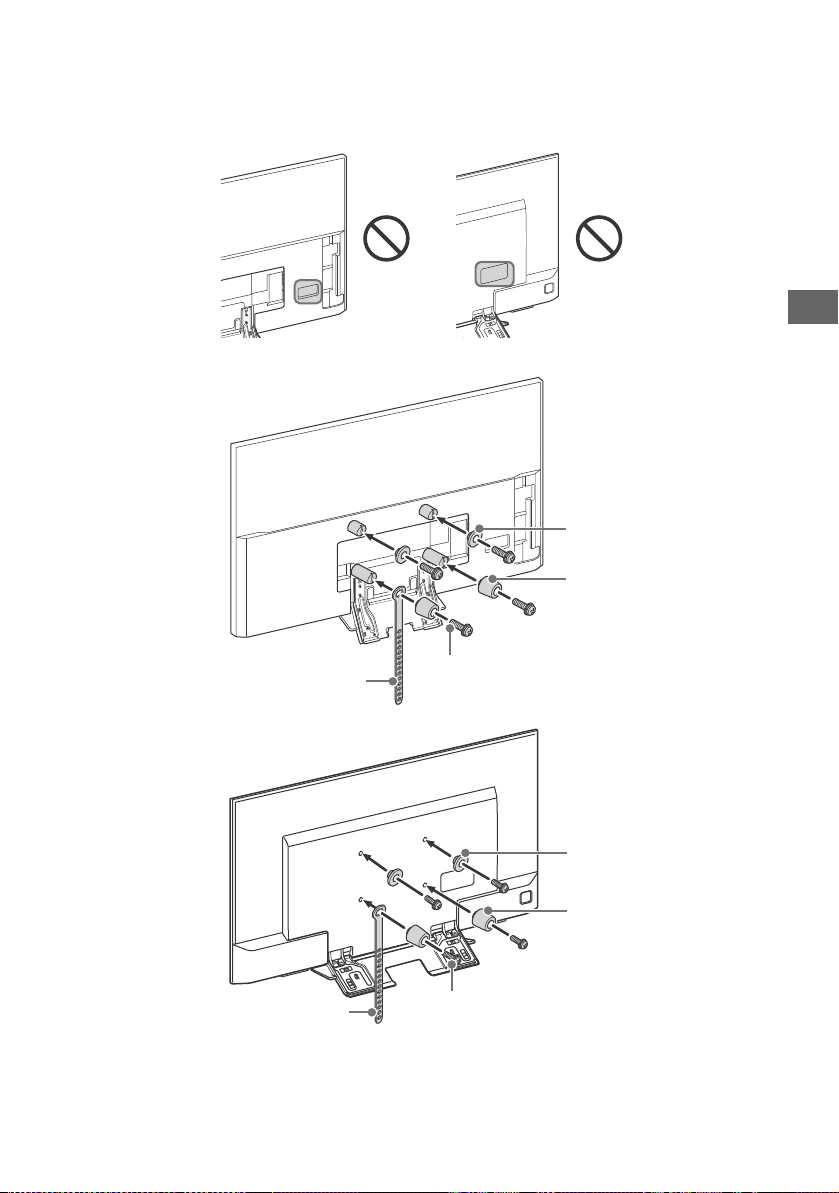
Standard mounting
KD-65/55X9300D
KD-65/55X8500D
Screw (+PSW 6 x 20)
Pulley
Screw (+PSW 6 x 50)
Belt
Spacer (60 mm)
Screw (+PSW 6 x 50)
Belt
Screw (+PSW 6 x 20)
Pulley
Spacer (60 mm)

22
GB
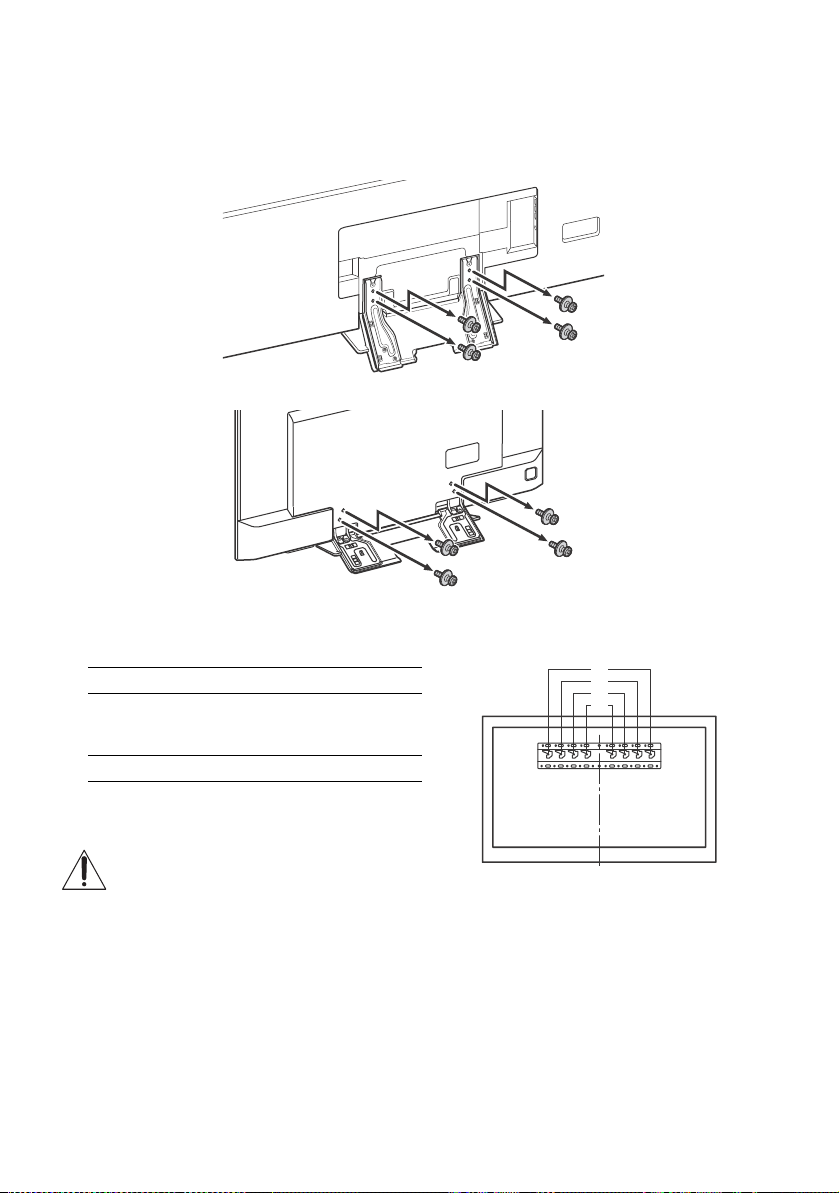
Slim mounting
Note
• You cannot use some of the terminals on the rear of the TV when using this mounting style.
KD-65/55X9300D
KD-65/55X8500D
KD-65/55X8500DKD-65/55X9300D
Screw (+PSW 6 x 20)
Pulley
Belt
Spacer (20 mm)
Screw (+PSW 6 x 20)
Pulley
Belt
Spacer (20 mm)
23
GB
GB
3 Connect necessary cables to the TV.
Note
• You cannot access to any terminal after installing the TV to the wall.
4 Detach the Table-Top Stand from the TV.
KD-65/55X9300D
KD-65/55X8500D
5 Install the TV to the Base. Refer to “5” of Installation Guide and “Installing the TV to the
Wall” of Operating Instructions supplied with the Wall-Mount Bracket.
Refer to the instructions supplied with the Wall-Mount Bracket for your model to install the TV on the wall.
Model Name KD- Hook location
65X9300D
65X8500D
55X9300D
b
55X8500D c
a
b
c
d
24
GB
Troubleshooting
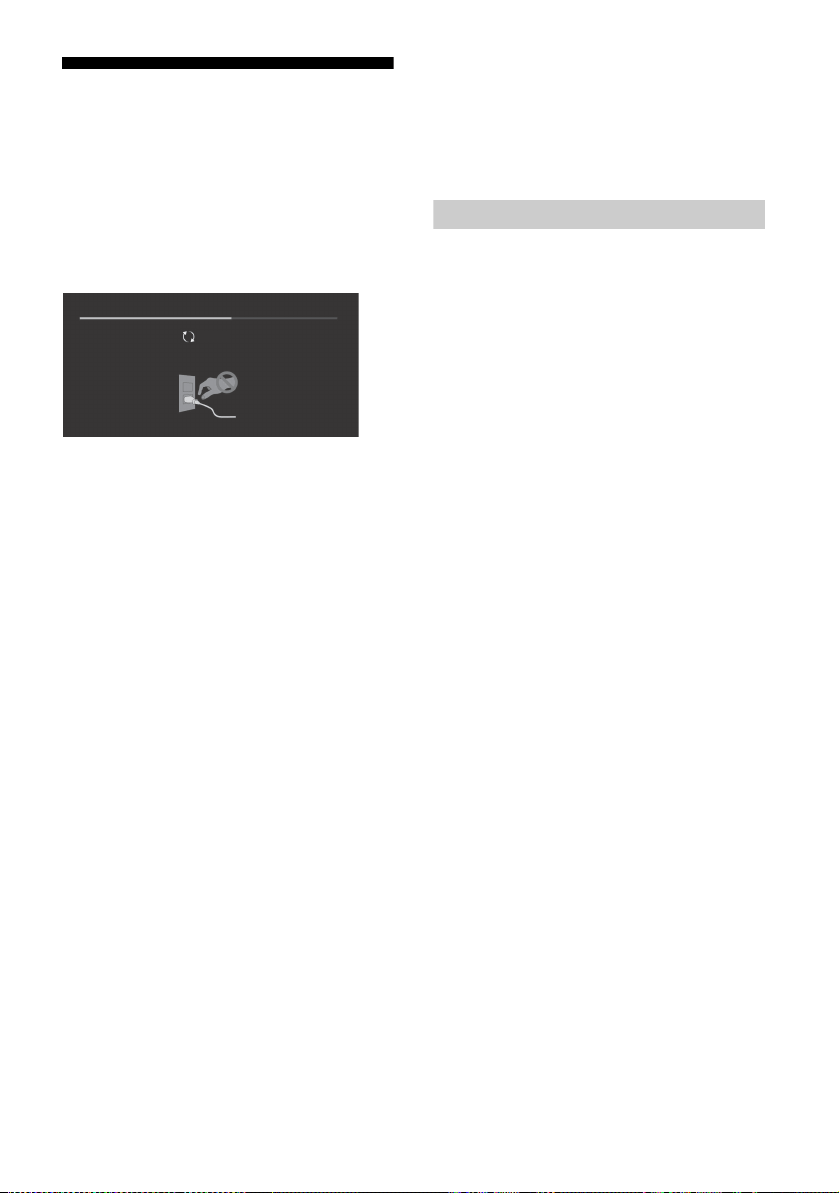
In order to keep your TV software up-to-date, it
is necessary to download the latest software
information via the digital broadcasting system
or internet and to update the software. Select
[Update Now] to start a software update. The
illumination LED flashes white while the
software is updating.
The following screen with [Updating…] will
appear while software is updating.
Do not unplug the AC power cord (mains lead)
during the software update. If you do, the
software update may not finish completely, and
it may cause a software malfunction. Software
updates can take up to 30 minutes. If you do not
wish to update the software automatically,
press HOME and select [Help] [System
software update] [Automatic software
download] [Off].
When you plug in TV, the TV may not be able to
turn on for a while even if you press the power
button on the remote control or the TV, because
it takes time to initialize the system. Wait for
about one minute, then operate it again. When
you turn on by pressing the power button on
the remote control or the TV, it takes some time
to turn on the illumination LED and for the
remote control to be functional.
When the illumination LED is flashing in red,
count how many times it flashes (interval
time is three seconds).
If the illumination LED flashes red, reset the TV
by disconnecting the AC power cord (mains
lead) for two minutes, then turn on the TV.
If the problem persists, contact your dealer or
Sony service centre with the number of times
the illumination LED flashes red (interval time is
three seconds). Disconnect the AC power cord
(mains lead), and inform your dealer or Sony
service centre.
When the illumination LED is not flashing,
check the items as follows.
You can also refer to troubleshooting in the Help
Guide or perform self-diagnosis by selecting
[Help] [Self diagnostics]. If the problem
persists, have your TV serviced by qualified
service personnel.
Troubles and Solutions
There is no picture (screen is dark) and no
sound.
Check the antenna (aerial)/cable connection.
Connect the TV to the AC power (mains), and
press on the TV or remote control.
Some programmes cannot be tuned.
Check the antenna (aerial)/cable connection.
The remote control does not function.
Replace the batteries.
The [Parental lock] password has been
forgotten.
Enter 9999 for the PIN code. Update PIN code by
selecting [Settings] t [Parental lock] t [Change
PIN code].
The TV surrounds become warm.
When the TV is used for an extended period, the
TV surrounds become warm.
You may feel hot when touching there by the
hand.
Frozen audio or video, a blank screen, or the
TV does not respond to TV or remote control
buttons.
Perform a simple reset of the TV by unplugging
the AC power cord (mains lead) for two minutes,
then plug it in again.
Updating...
25
GB
GB
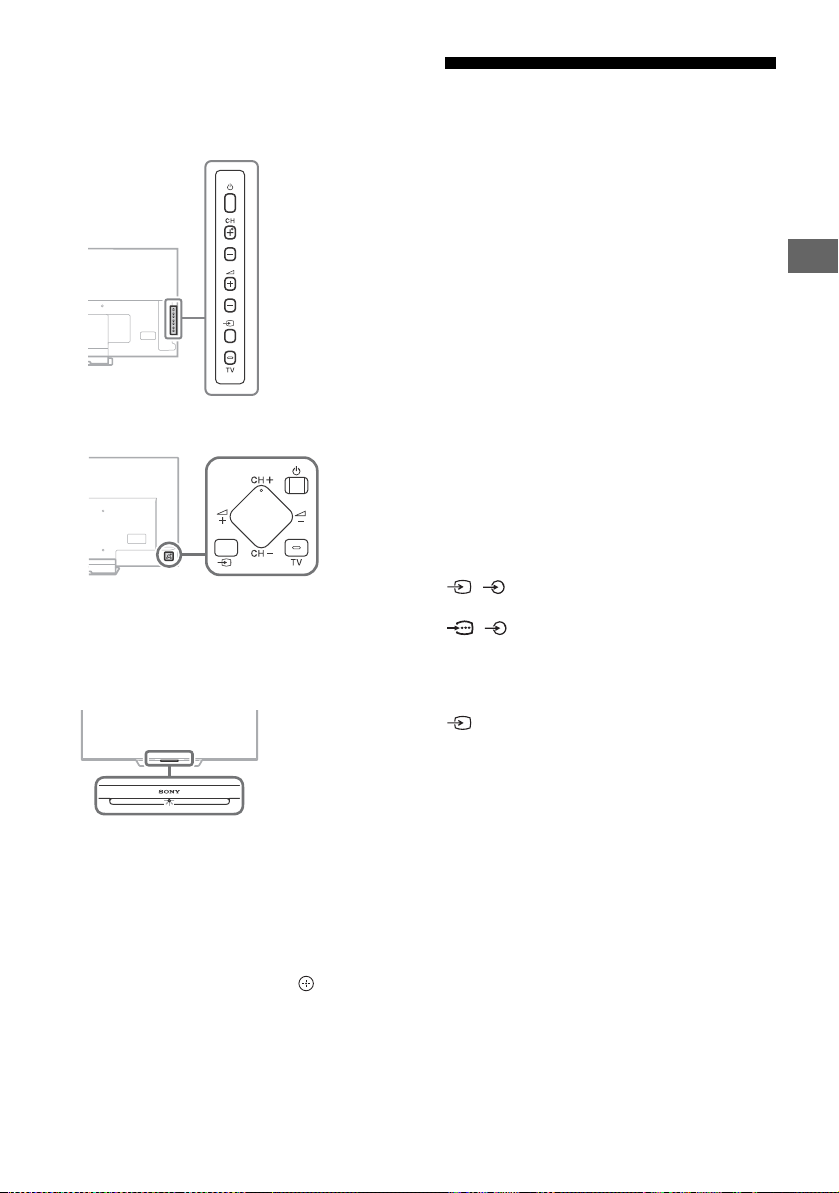
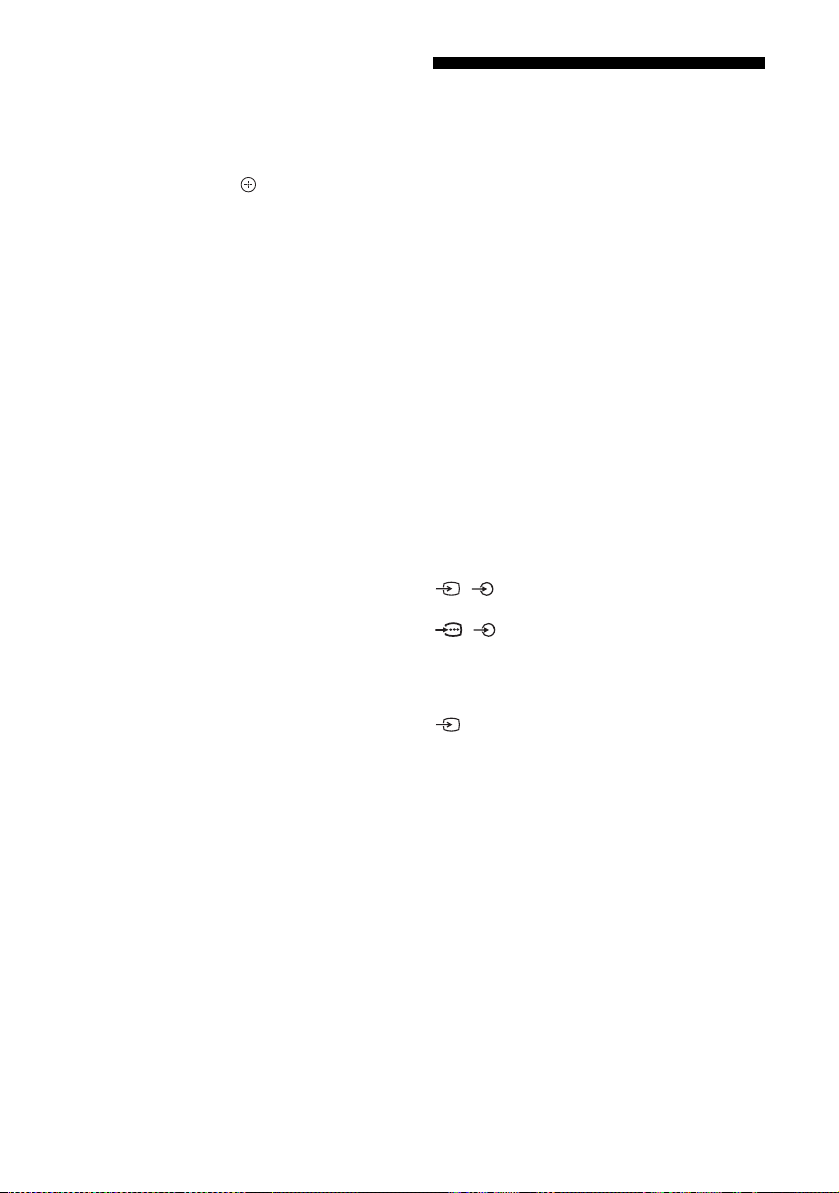
The , CH+/–, +/–, and TV buttons
cannot be located on the TV.
See below illustration for location of the buttons
on the TV.
KD-75X9400D, KD-65/55X9300D only
Except KD-75X9400D, KD-65/55X9300D
The illumination LED is turned on.
If you do not wish to light up the illumination LED,
you can turn it off.
Press HOME, then select [Settings] t
[Illumination LED] t [Off].
Cannot connect to a wireless router by WPS
(Wi-Fi Protected Setup).
• If you use WEP security, select [Easy] t [Wi-Fi] t
[Connect by scan list]. Then, select the network
name (SSID) you want to connect.
Cannot find the required network name in
network setup.
• Select [[Manual entry]] and press to enter
network name.
Specifications
System
Panel system
LCD (Liquid Crystal Display) Panel, LED Backlight
TV system
Analogue: I, D/K, B/G, M
Digital: DTMB
Colour/video system
Analogue: PAL, SECAM, NTSC3.58, NTSC4.43
Digital: Refer to the Help Guide
Channel coverage
Analogue: UHF/VHF/Cable
Digital: UHF
Sound output
KD-75X9400D, KD-65/55X9300D:
7.5 W + 7.5 W + 7.5 W + 7.5 W
KD-65/55X8500D: 10 W + 10 W
Wireless technology
Protocol IEEE802.11ac/a/b/g/n
Bluetooth Version 4.1
Input/Output jacks
Antenna (aerial)/cable
75 ohm external terminal for VHF/UHF
/ VIDEO IN 1
Video/Audio input (phono jacks)
/ COMPONENT IN
YPBPR (Component Video): 1080p (50, 60 Hz),
1080i (50, 60 Hz), 720p (50, 60 Hz), 576p, 576i,
480p, 480i
Audio input (phono pin jack)
VIDEO IN 2
Video input (common phono pin with Y input)
HDMI IN 1, 2, 3, 4 (support 4K resolution,
HDCP 2.2-compatible)
Video (2D):
4096 × 2160p (50, 60 Hz)*, 4096 × 2160p
(24 Hz)*, 3840 × 2160p (50, 60 Hz), 3840 × 2160p
(24, 25, 30 Hz), 1080p (30, 50, 60 Hz), 1080/24p,
1080i (50, 60 Hz), 720p (30, 50, 60 Hz), 720/24p,
576p, 576i, 480p, 480i, PC Formats
*3840 × 2160p is displayed when 4096 × 2160p is
input
Rear of TV
Rear of TV
26
GB
Video (3D) (3D compatible models only):
Frame Packing: 1080p (30 Hz), 1080/24p, 1080i
(50, 60 Hz), 720p (30, 50, 60 Hz), 720/24p
Side-by-Side: 1080p (50, 60 Hz), 1080/24p,
1080i (50, 60 Hz), 720p (50, 60 Hz)
Over-Under: 1080p (30, 50, 60 Hz), 1080/24p,
1080i (50, 60 Hz), 720p (50, 60 Hz)
Audio: 5.1 channel linear PCM: 32, 44.1, 48, 88.2,
96, 176.4 and 192 kHz, 16, 20 and 24 bits, Dolby
Digital and DTS
ARC (Audio Return Channel) (HDMI IN 4 only)
DIGITAL AUDIO OUT (OPTICAL)
Digital optical jack (Two channel linear PCM,
Dolby Digital, DTS)
HDMI 3 AUDIO IN
Analogue audio input (Stereo mini jack)
AUDIO OUT / (Stereo mini jack)
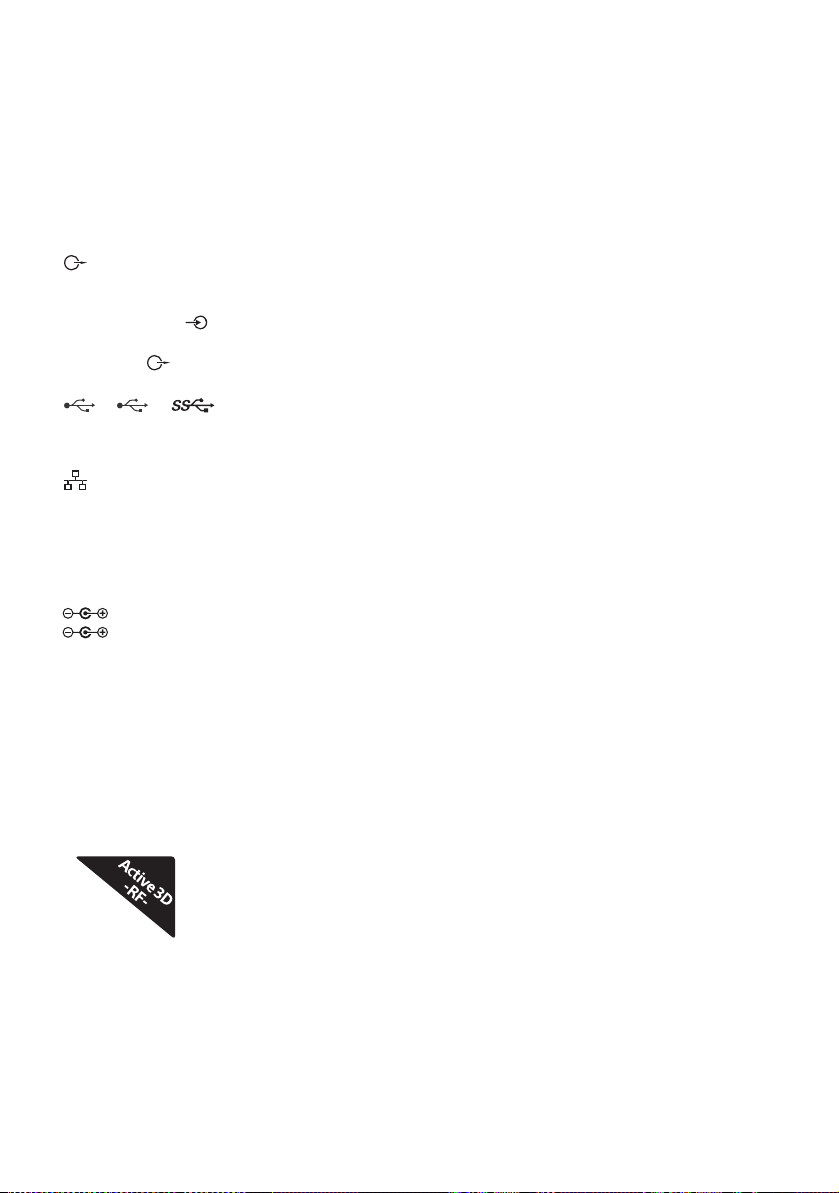
Headphone, Audio output, Subwoofer
1, 2, 3
USB port 1 and 2 support High Speed USB
(USB2.0).
USB port 3 supports Super Speed USB (USB3.0)
LAN
10BASE-T/100BASE-TX connector (Depending on
the operating environment of the network,
connection speed may differ. 10BASE-T/
100BASE-TX communication rate and
communication quality are not guaranteed for
this TV.)
DC IN 24 V (KD-65/55X9300D only),
DC IN 19.5 V (KD-55X8500D only)
AC adapter input
Others
Optional accessories
Wall-Mount Bracket: SU-WL500
(KD-75X9400D only)
Wall-Mount Bracket: SU-WL450
(Except KD-75X9400D)
Wireless subwoofer: SWF-BR100
Active 3D Glasses: TDG-BT500A
(KD-75X9400D, KD-65/55X9300D only)
Operating temperature
0 ºC – 40 ºC
Operating humidity
10 % – 80 % RH (non-condensing)
Power and others
Power requirements
except models with supplied AC adapter
220 V - 240 V AC, 50 Hz
models with supplied AC adapter only
24 V DC with AC adapter (KD-65/55X9300D)
19.5 V DC with AC adapter (KD-55X8500D)
Rating: Input 220 V - 240 V AC, 50 Hz
Screen size (measured diagonally) (Approx.)
KD-75X9400D: 75 inches / 189.3 cm
KD-65X9300D: 65 inches / 163.9 cm
KD-65X8500D: 65 inches / 163.9 cm
KD-55X9300D: 55 inches / 138.8 cm
KD-55X8500D: 55 inches / 138.8 cm
Display resolution
3,840 pixels (horizontal) × 2,160 lines (vertical)
Power consumption
Indicated on the rear of the TV
Output Rating
USB 1/2: 5 V, 500 mA MAX
USB 3: 5 V, 900 mA MAX
Dimensions (Approx.) (w × h × d)
with Table-Top Stand
KD-75X9400D: 1,672 × 1,017 × 327 mm
KD-65X9300D: 1,458 × 891 × 275 mm
KD-65X8500D: 1,454 × 894 × 279 mm
KD-55X9300D: 1,239 × 769 × 261 mm
KD-55X8500D: 1,231 × 770 × 263 mm
without Table-Top Stand
KD-75X9400D: 1,672 × 960 × 52 mm
KD-65X9300D: 1,458 × 839 × 36 mm
KD-65X8500D: 1,454 × 842 × 44 mm
KD-55X9300D: 1,239 × 717 × 36 mm
KD-55X8500D: 1,231 × 717 × 44 mm
Mass (Approx.)
with Table-Top Stand
KD-75X9400D: 43.2 kg
KD-65X9300D: 32.1 kg
KD-65X8500D: 23.9 kg
KD-55X9300D: 24.9 kg
KD-55X8500D: 18.6 kg
without Table-Top Stand
KD-75X9400D: 38.7 kg
KD-65X9300D: 28.9 kg
KD-65X8500D: 20.3 kg
KD-55X9300D: 22.0 kg
KD-55X8500D: 15.1 kg
Note
• Optional accessories availability depends on
countries/region/TV model/stock.
• Design and specifications are subject to change
without notice.
27
GB
GB
Trademark information
• The terms HDMI and HDMI High-Definition
Multimedia Interface, and the HDMI Logo
are trademarks or registered trademarks of
HDMI Licensing LLC in the United States
and other countries.
• Manufactured under license from Dolby
Laboratories.
Dolby, Dolby Audio, and the double-D
symbol are trademarks of Dolby
Laboratories.
• “BRAVIA” and are trademarks of
Sony Corporation.
• Gracenote, Gracenote eyeQ, Gracenote
VideoID, Gracenote Video Explore, the
Gracenote logo and logotype, and the
“Powered by Gracenote” logo are either
registered trademarks or trademarks of
Gracenote in the United States and/or
other countries.
• Opera® Devices SDK from Opera Software
ASA. Copyright 1995-2015 Opera Software
ASA. All rights reserved.
• Wi-Fi, Wi-Fi Direct, Miracast, Wi-Fi
Protected Setup and Wi-Fi CERTIFIED Logo
are trademarks or registered trademarks of
Wi-Fi Alliance.
• For DTS patents, see
http://patents.dts.com. Manufactured
under license from DTS, Inc.
DTS, the Symbol, & DTS and the Symbol
together are registered trademarks, and
DTS Digital Surround is a trademark of DTS,
Inc. © DTS, Inc. All Rights Reserved.
• The Bluetooth® word mark and logos are
registered trademarks owned by Bluetooth
SIG, Inc. and any use of such marks by
Sony Corporation is under license. Other
trademarks and trade names are those of
their respective owners.
• ®2016 RealNetworks, Inc. Patents Pending.
All rights reserved. RealNetworks logo is a
trademark of RealNetworks, Inc.
• TUXERA is a registered trademark of Tuxera
Inc. in the US and other countries.
• USB-IF SuperSpeed USB Trident logo is a
registered trademark of USB Implementers
Forum, Inc.
28
GB

2
CT
11
目錄
安全資訊 . . . . . . . . . . . . . . . . 2
預先注意事項 . . . . . . . . . . . . . . 6
組件及控件 . . . . . . . . . . . . . . 7
控件及指示燈 . . . . . . . . . . . . . . 7
使用遙控器 . . . . . . . . . . . . . . 8
遙控器組件說明 . . . . . . . . . . . . . 8
連接圖 . . . . . . . . . . . . . . . 10
將電視機安裝在牆上 . . . . . . . . . 13
使用隨附的壁掛式支架 (僅限
KD-75X9400D、KD-65/55X9300D). . . . . 13
使用選購的壁掛式支架 . . . . . . . . . 14
SU-WL500 (僅限 KD-75X9400D). . . . . 16
SU-WL450 (僅限 KD-65/55X9300D、
KD-65/55X8500D) . . . . . . . . . . . 19
故障排除 . . . . . . . . . . . . . . 23
故障及解決方案 . . . . . . . . . . . . 23
規格 . . . . . . . . . . . . . . . . 24
簡介
感謝您購買這項 Sony 產品。
使用電視機之前,請詳閱本手冊,並保留下來以便將來參考。
註
• 使用電視機之前,請詳讀 “ 安全資訊 ”( 第 2 頁 )。
• 有關“將電視機安裝在牆上”的指令已包含在這台電視機的使用說
明書。
• 設定指南和本說明書中使用的影像和插圖僅作參考並可能與實際產
品不同。
設定指南的位置
設定指南位於電視機包裝箱內部膠墊的頂部。
說明指南
說明指南解釋如何使用電視機功能的資訊。要在電視機上顯示說明指
南,按下遙控器上的 HELP (說明)按鈕並選擇 [ 說明指南 ]。
識別標籤的位置
電視機型號和電源等級的標籤位於電視機背面。
隨附 AC 轉接器的型號:
AC 轉接器型號和系列號的標籤位於 AC 轉接器底部。
警告
不可將電池曝露於如陽光、火或類似的過熱源。
切勿將電視安置在不穩定的地方。電視可能跌落、造成嚴重人身傷害
或導致死亡。為避免尤其是對孩童造成傷害,可採取簡單的預先注意
事項,如:
使用電視製造商推薦的機櫃或支架。
僅使用可安全支撐電視的傢俱。
確保電視不會置於支撐傢俱的邊緣處。
未將傢俱與電視固定在合適的支架上時,勿將電視置於較高的傢俱
(如櫥櫃或書櫃)之上。
切勿在電視與支撐傢俱之間擺放布料或其他材料。
教育孩童攀爬傢俱去觸摸電視或其控制器是相當危險的。
如果您現有的電視仍在使用且已重新安放,則同樣適用上述注意事
項。
安裝 / 設定
為了避免火災、觸電或損壞及 / 或受傷等危險,請遵照下列指示來安
裝和使用電視機。
安裝
• 應將電視機安裝在易於插拔的 AC 電源插座附近。
• 將電視機放在一個穩定的平面,以防止墜落和引起個人傷害或財產
損壞。
• 應將電視機安裝在不容易被拉、推或碰倒之處。
• 僅可由合格的維修人員執行掛壁安裝。
• 為了安全起見,強烈建議您使用 Sony 配件,包括:
隨附的壁掛式支架 (僅限 KD-75X9400D、KD-65/55X9300D)
壁掛式支架 SU-WL500 (僅限 KD-75X9400D)
壁掛式支架 SU-WL450 (KD-75X9400D 除外)
本電視設計在香港使用,只保證能在香港使用。
安全資訊
3
CT
11
CT
• 將掛鉤 (底座)/ 壁掛式支架安裝於電視機上時,務必要使用隨附
於壁掛式支架的螺絲。隨附螺絲如插圖所示設計從掛鉤 (底座)/
壁掛式支架安裝表面量起。
螺絲的直徑和長度會因為壁掛式支架的型號而有所不同。
使用隨附螺絲以外的螺絲可能會造成電視機內部損壞或者掉落等
等。
隨附的壁掛式支架
僅限 KD-75X9400D
僅限 KD-65/55X9300D
選購的壁掛式支架
僅限 KD-75X9400D, KD-65/55X9300D
KD-75X9400D, KD-65/55X9300D 除外
搬動
• 搬動電視機之前,請斷開所有訊號線的連接。
• 大尺寸電視機需要兩到三人搬動。
• 用手搬動電視機時,請如下圖所示抓握。請勿對液晶面板以及螢幕
周圍的框邊施加壓力。
僅限 KD-75X9400D、KD-65/55X9300D
KD-75X9400D、KD-65/55X9300D 除外
• 搬動電視機時,請勿使其受到搖晃或過度震動。
• 搬動電視機以進行維修或移動時,請使用原有的紙箱和包裝材料進
行包裝。
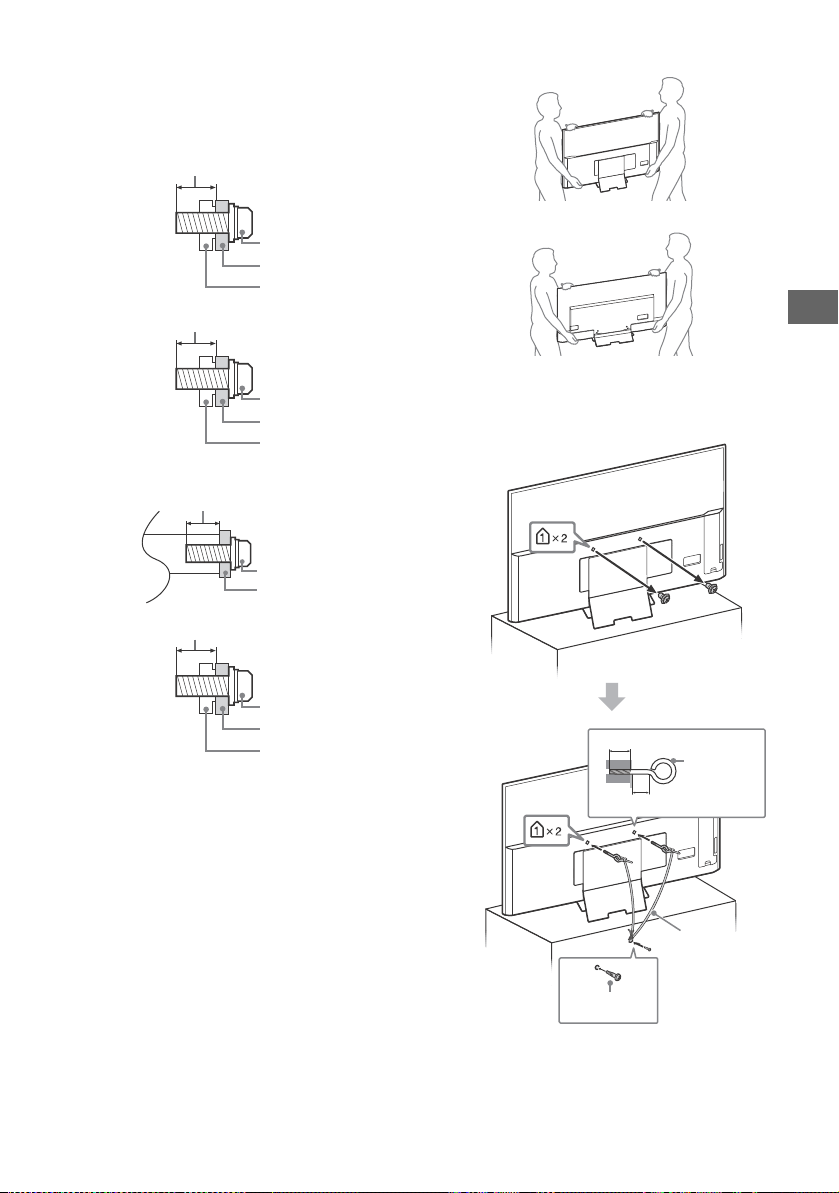
防止傾倒
KD-75X9400D、KD-65/55X9300D
螺絲
壁掛式支架
13 毫米
電視機後蓋
螺絲
壁掛式支架
7 毫米
電視機後蓋
螺絲
壁掛式支架
8 毫米 - 12 毫米
螺絲
壁掛式支架
8 毫米 - 12 毫米
電視機後蓋
8 毫米 - 12 毫米
M6 有孔螺栓
(無附帶)
螺絲
(無附帶)
導線 (無附帶)
18 毫米或更高
4
CT
11
KD-65X8500D
KD-55X8500D
通風
• 切勿遮擋通風孔或將任何物體插入機殼內。
• 如下圖所示,在電視機周圍保留通風空間。
• 強烈建議您使用 Sony 壁掛式支架以確保足夠的空氣流通。
安裝在牆壁上
安裝在底座上
• 為了確保正確通風及防止髒物或灰塵堆積:
請勿將電視機平放、上面朝下安裝、向後安裝或側面安裝。
請勿將電視機放置於架子、地毯、床或壁櫥中。
請勿用布 (如窗簾)或物件 (如報紙等)覆蓋電視機。
請勿如下圖所示安裝電視機。
AC 電源線
為了避免火災、觸電或損壞及 / 或受傷等危險,請遵照下列指示來處
理 AC 電源線和插座 :
僅使用 Sony 隨附的 AC 電源線,不能使用其他品牌的電源線。
將插頭完全插入 AC 電源插座。
僅可在 220 V - 240 V AC 電源上使用電視機。
連接訊號線時,為了安全起見請務必拔下 AC 電源線,以免被訊號
線絆到腳。
在進行作業或移動電視機之前,請從 AC 電源插座上斷開 AC 電源
線的連接。
保持 AC 電源線遠離熱源。
拔下 AC 電源插頭,定期進行清潔。如果插頭上有積灰並帶有濕
氣,則其絕緣品質可能已經劣化,並可能會造成火災。
註
• 請勿將隨附的 AC 電源線用於任何其他設備。
• 請勿過度擰捏、彎曲或扭轉 AC 電源線。否則線芯可能會曝露在外
或折斷。
• 請勿改裝 AC 電源線。
• 請勿將任何重物放在 AC 電源線上。
• 斷開 AC 電源線連接時,請勿拉扯 AC 電源線。
• 請勿在相同的 AC 電源插座上連接太多設備。
• 請勿使用不適當的 AC 電源插座。
AC 轉接器注意事項 (僅限隨附 AC 轉接
器的型號)
警告
為了避免火災或觸電造成危險,請勿將本機暴露於雨水或濕氣。
為了避免火災或觸電,請勿將裝有液體的物體 (例如花瓶)置於本
機上。請勿將本機安裝到封閉區域,例如書架或相似裝置上。
• 請確保將 AC 電源插座安裝到裝置附近並方便操作。
• 確保使用隨附的 AC 轉接器和 AC 電源線。否則會引起故障。
• 將 AC 轉接器連接到方便操作的 AC 電源插座。
• 請勿將 AC 電源線纏繞在 AC 轉接器周圍。
否則線芯會被切斷和 / 或會引起電視機故
障。
• 請勿用濕手觸摸 AC 轉接器。
• 如果您注意到 AC 轉接器內有異常,則立即從 AC 電源插座上將其
斷開。
• 即使已經關閉本機,只要連接 AC 電源插座,本機也未從交流電源
上斷開。
• 由於 AC 轉接器在長時間使用後會變熱,在用手觸摸時會感到發
燙。
8 毫米 - 12 毫米
螺絲
(先前卸下)
螺絲
(無附帶)
導線
(無附帶)
8 毫米 - 12 毫米
M6 螺絲
(無附帶)
螺絲
(無附帶)
導線
(無附帶)
30 厘米
10 厘米 10 厘米
10 厘米
在電視機周圍至少留出所示的空間。
30 厘米
10 厘米
10
厘米
在電視機周圍至少留出所示的空間。
6厘米
空氣流通被阻擋。
牆壁 牆壁
5
CT
11
CT
使用限制
請勿在下列地點、環境或情況條件下安裝 / 使用電視機,否則電視機
可能會發生故障並造成火災、觸電、損壞及 / 或受傷等危險。
地點:
• 室外 (在直射的陽光中),海邊,船上或其他船艦上,車內,醫療
機構中,不穩定的場所,靠近水、雨、濕氣或煙霧的地方。
• 如果放置電視機在公共浴室或溫泉的更衣室
內,電視機可能會被空降硫磺等損壞。
• 若要獲得最佳的畫面品質,請勿將螢幕放在
直射光源或陽光下。
• 避免將電視機從寒冷的區域移至溫熱的區域。突然的室溫變化可能
導致濕氣凝結。這可能造成電視機顯示劣質圖像及 / 或暗淡的顏
色。如果發生這種情形,讓濕氣完全蒸發之後才開啟電視機。
環境:
• 請勿將電視機安裝在炎熱、潮濕或太多灰塵的地方;昆蟲可能進入
的地方;可能受到機械式震動的地方;靠近易燃物體 (蠟燭等)的
地方。不應該讓液體滴濕或噴濕電視機,而且裝滿液體的物體 (例
如花瓶)不應該擺在電視機上。
• 不要放置電視機在潮濕或多塵的空間,或
有油煙或蒸氣的場所 (靠近灶台或加濕
器)。這可能導致火災、觸電或本機彎
曲。
• 請勿將電視機安裝在會遭受極端溫度的位
置,如陽光直射、靠近散熱器或加熱裝置通風孔的地方。電視機在
這種環境下可能會過熱而導致外殼變形及 / 或電視機故障。
情況條件:
• 手濕,機殼拆除或採用非製造商所建議的配件時切勿使用本電視
機。出現雷電時請將電視機電源線從 AC 電源插座和天線拔下。
• 不要把電視機安裝在延伸出開放的空間。
這樣會由於人員或物體撞擊電視機而引起
傷害或損壞。
打破電視機螢幕:
• 請勿將任何物品丟向電視機。否則螢幕可能會因為受到撞擊而破裂
並造成嚴重傷害。
• 如果電視機的表層破裂,在拔下 AC 電源線以前請勿觸摸它。否則
會引起觸電。
不使用時
• 如果您不使用電視機數天,為了環保和安全原因,應將電視機電源
線從 AC 電源插座上拔下。
• 關閉電視機電源時,電視機並未與 AC 電源斷開連接,請將插頭從
AC 電源插座上拔下以完全斷開電視機的電源連接。
• 某些電視機可能具有需要將電視機保持在待命模式下才能正常工作
的特點。
對於兒童
• 請勿讓兒童爬上電視機。
• 將體積小的配件放在兒童拿不到的地方,以便不會被兒童誤吞。
如果出現下列問題 …
如果出現以下任何問題,請立刻
關閉電視機並拔下 AC 電源線。
請諮詢您的經銷商或 Sony 服務中心以交由合格的服務人員進行檢
查。
當:
AC 電源線損壞。
AC 電源插座不適當。
電視機由於跌落、敲擊或撞擊而損壞。
任何液體或固體物件通過開口處掉入機殼內。
關於液晶電視機溫度
長時間使用液晶電視機時,面板周圍溫度會升高。用手觸摸這些地方
時可能會覺得很燙。
壁掛式支架 (僅限隨附壁掛式支架的型
號)
以下資訊說明壁掛式支架的正確使用方式。請務必詳盡地閱讀這些資
訊並正確使用壁掛式支架。
致客戶:
請務必遵守以下的安全預先注意事項,以預防因火災、觸電、產品翻
倒或產品掉落造成嚴重傷害。
• 請務必將安裝的工作委託授權承包商進行並在安裝進行時確保兒童
遠離安裝地點。
• 請務必將搬運或拆卸電視機的工作委託授權承包商進行。
• 安裝電視機之後,請勿拆下螺絲等。
• 請勿改造壁掛式支架的部件。
• 請勿安裝指定產品以外的任何設備。
• 請勿在壁掛式支架上施加電視機以外的任何負重。
• 請勿倚靠在電視機上或懸空緊握電視機。
• 請勿在清潔或維修電視機時過度施力於電視機。
致 Sony 經銷商和承包商:
以下指示僅適用於 Sony 經銷商和承包商。請務必閱讀以下所述的安
全預先注意事項。在安裝、維修和檢查本產品時,請格外小心。
• 搬運或安裝電視機時,請抓握其側面。請勿抓握 U 形桿以擡起電
視機。
• 在搬運或安裝電視機時,不要將其
平放。
• 請勿將壁掛式支架安裝在使電視機
角落或邊緣突出的牆面。
• 請勿將電視機安裝在空調機之上或之
下。
• 請務必按照隨附的壁掛式支架安裝指南中
的指示將壁掛式支架牢固地安裝至牆壁。
如果任何螺絲鬆開或脫落,壁掛式支架可
能掉落並導致受傷或財物損失。
• 請務必按照隨附的壁掛式支架安裝指南中
的指示正確地使用隨附的螺絲和附件。如
果您使用替代用品,則電視機會墜落和造
成人身傷害或損壞電視機。
• 請務必按照隨附的壁掛式支架安裝指南中
解釋的指導程序正確地裝配支架。
• 請務必在指定的位置鎖緊螺絲。
• 小心不要讓電視機在安裝過程中承受震
動。
6
CT
11
• 請務必將電視機安裝在垂直和平坦的牆上。
• 在正確安裝電視機之後,妥當地固定纜線。
• 不要讓 AC 電源線或連接線材受到
擠壓,內部導體可能因此裸露並導
致短路或遭電擊穿。
觀賞電視
• 請在適當光線條件下觀賞電視,因為在光線不足條件下或長時間觀
賞電視會損傷您的眼睛。
• 使用耳機時,請調整音量以免音量過高損傷聽力。
(僅限 3D 兼容型號)
• 在觀看 3D 視訊影像或打立體的 3D 電玩期間,有些人可能會感到
不適 (如眼睛疲勞、疲累或噁心)。Sony 建議所有觀賞者在觀看
3D 視訊影像或打立體的 3D 電玩期間要定期休息。休息的長度和頻
率因人而異。由您自行決定。若您感到任何不適,請停止觀看 3D
視訊影像或打立體的 3D 電玩,直到不適感消失;若有必要,請就
醫。關於最新資訊,也請您參閱 (i)用於電視機的其他設備或媒
體的使用說明書,以及 (ii)我們的網站
(http://www.sony-asia.com/support)。兒童 (尤其是低於六歲
的兒童)的視力還在發育。讓兒童觀看 3D 視訊影像或打立體的 3D
電玩前,請諮詢醫師 (如小兒科醫師或眼科醫師)。成人應監督兒
童,確保他們遵守上列建議事項。
• 不要在靠近火源或高溫地方如直射陽光或太陽曬熱的汽車內使用、
貯存或留下 3D 眼鏡或電池。
LCD 螢幕
• 雖然 LCD 螢幕採用最精密技術製造且 99.99 % 以上的畫素有效,
但還是可能會出現黑點或 LCD 螢幕上可能會經常出現亮點 (紅、
藍或綠色)。這是 LCD 螢幕的結構特性,並不是故障。
• 請勿按壓或刮傷前濾光面板或在電視機頂部放置物件。畫面可能會
不均,或者 LCD 螢幕可能會損壞。
• 如果在寒冷地點使用本電視機,畫面上可能會出現模糊或變暗。這
並不是故障。溫度上升後這些現象就會消失。
• 畫面靜止不動將會產生重影。片刻後該現象將消失。
• 電視機使用過程中,螢幕和機殼會變熱。這不是故障。
• LCD 螢幕包含少量液晶。請按照您當地的法規進行廢棄物處理。
使用和清潔電視機的螢幕表層 / 機殼
清潔前,務必將電視機的 AC 電源線從 AC 電源插座上斷開連接。
為了避免物質或螢幕塗層剝離,請遵照下列預先注意事項。
• 若要擦去螢幕表層 / 機殼上的灰塵,請用軟布輕輕擦拭。如果灰塵
較難除去,請用稍稍蘸有稀釋中性清潔溶劑的軟布進行擦拭。
• 絕對不能將水或清潔劑直接噴灑在電視上。液
體可能滴落在螢幕的底部或外部零件上並滲入
電視內,而毀壞電視。
• 切勿使用任何類型的磨砂墊、鹼性 / 酸性清潔
劑、擦洗粉或揮發溶劑,如酒精、汽油、稀釋劑或殺蟲劑。使用上
述材料或與橡膠或乙烯材料長時間接觸可能會造成螢幕表層和機殼
材料的損壞。
• 如果手上塗有任何化學品,例如手霜或防曬霜,請勿觸摸電視機。
• 建議您定期使用真空吸塵清理通風口以確保通風順暢。
• 當調整電視機的角度時,請慢慢地調動以防電視機從其桌面型底座
移動或滑落。
選購設備
將產生電磁輻射的選購元件或任何其他設備遠離電視機。否則可能會
造成畫面失真及 / 或噪聲。
本機的無線功能
• 請勿在醫療設備 (心臟起搏器等)附近操作本機,因為會引起醫療
設備故障。
• 雖然本機發送 / 接收加擾信號,請小心未經授權的截取。我們不對
此造成的任何問題負責。
注意有關處理遠程控制
• 安裝電池時請注意正確的極性位置。
• 請勿同時使用不同類型的電池或混合使用新舊電池。
• 請以符合環境保護規定的方式來丟棄電池。特定地區可能有制訂廢
棄電池的相關規定。請向您當地的主管機關查詢。
• 請小心拿取遙控器。請勿讓遙控器掉落或踩在遙控器上,或是讓任
何液體濺到遙控器。
• 請勿將遙控器放置在接近熱源的地方,放置在受日光直射地方或潮
濕的房間。
壁掛式支架 (僅限隨附壁掛式支架的型
號)
• 如果您長時間使用壁掛式支架安裝電視機,視牆壁的材料而定,
位於電視機後方或上方的牆面可能變色或壁紙失去黏性。
• 如果拆下原來安裝在牆上的壁掛式支架,牆面上將留下螺絲孔
痕跡。
• 請勿在容易受到振動的地方使用壁掛式支架。
預先注意事項
7
CT
11
CT
組件及控件
僅限 KD-75X9400D、KD-65/55X9300D
遙控器感應器
*1
/ 光感應器
*1
/
照明 LED / 3D 同步發射機
*1*2
根據電視機的狀態,光飾 LED 會亮起或閃爍。
• 白色
開啟電視機 / 關閉畫面模式 / 軟體更新等
時。
• 青色
無線連接行動裝置時。
• 琥珀色
計時器已設定。
(電源)
CH +/- (頻道)
+/- (音量)
(輸入選擇)
顯示並選擇輸入來源。
TV
切換至一個電視頻道或從其他應用程式輸入。
*1 請勿在感應器附近放置任何物品。
*2 僅限有限的區域 / 國家 / 電視機型號。
控件及指示燈
Ȫ
ȫ
Ȭ
ȭ
Ȫ
ȫ
ȭ
Ȭ
KD-75X9400D、KD-65/55X9300D 除外
8
CT
11
使用遙控器
遙控器外形、按鈕的位置、可用性與功能視您的國家 / 區域 / 電視機型號而可能略有不同。
/ (輸入選擇 / 文字保留)
電視模式︰顯示並選擇輸入來源。
文字模式︰保留當前頁面。
(麥克風)
使用語音功能。(例如,透過語音搜尋各種內
容。)
(電視待機)
開啟或關閉電視機 (待機模式)。
DIGITAL/ANALOG
在數位及類比模式之間切換。
EXIT
返回至上一個畫面,或從選單退出。如果交互
式應用服務可供使用,按下即可退出服務。
數字按鈕
/ (顯現資訊 / 文字)
顯示資訊。
(文字)
顯示文字資訊。
Google Play
訪問 “Google Play” 線上服務。
NETFLIX (僅限限制的區域 / 國家 / 電視機
型號)
訪問 “NETFLIX” 線上服務。
顏色按鈕
屆時執行相應的功能。
遙控器組件說明
Ȫ
ȩ
ȫ
Ȭ
ȭ
Ȯ
MIC
9
CT
11
CT
ACTION MENU
顯示情境功能清單。
TV
• 切換至一個電視頻道或從其他應用程式輸
入。
• 開啟電視機顯示電視通道或輸入。
GUIDE/
顯示數位節目指南。
BACK
返回上一個畫面。
HOME
顯示電視主選單。
DISCOVER
調出內容列,搜尋內容。
//// (項目選擇 / 輸入)
+/– (音量)
調節音量。
(跳轉)
在兩個頻道或兩次輸入之間前後跳轉。電視在
當前頻道 / 輸入以及選擇的上一個頻道 / 輸入
之間交替切換。
(靜音)
將聲音消除。再次按下可恢復聲音。
PROG +/–//
電視模式︰選擇頻道。
文字模式︰選擇下一個 ()或上一個
()頁面。
AUDIO
變更目前觀看之節目的語言。
///.//>/
運行電視機和相連的 BRAVIA Sync 相容裝置上
操作媒體內容。
(字幕設定)
開啟或關閉字幕 (此功能可用時)。
HELP
顯示說明選單。可以從此處訪問說明指南。
(寬螢幕模式)
變更螢幕格式。
SYNC MENU
顯示 BRAVIA 同步選單。
11
CT
11
CT
KD-75X9400D、KD-65/55X9300D 除外
*1
*2
*1
*1
*1
*2
(DVI)
耳機 / 家庭音訊
系統 / 超低音揚
聲器
數碼相機 /
攝像機 /USB
儲存媒介
DVI-HDMI 轉接器 /
HDMI 裝置
帶有 ARC 的家庭
音訊系統 /HDMI
裝置
纜線/天線
帶有光學音訊輸入的
家庭音訊系統
DVI 音訊
輸出
錄影機 / 電玩設備 /
DVD 播放機 / 攝像機
路由器
HDMI 裝置
HDMI
裝置
帶有分量輸出的 DVD
播放機
錄影機/電玩設備/
DVD 播放機 / 攝像機
12
CT
11
USB 1/2, USB 3
• 連接大型 USB 裝置可能會干擾旁邊連接的其
他裝置。
• 連接大型 USB 裝置時,請連接至 USB 1
埠。
AUDIO OUT
*3
/
• 如需透過相連設備聆聽電視聲音,請按
HOME。選擇 [ 設定 ] t [ 聲音設定 ] t
[ 耳機 / 聲音輸出 ],並選擇所需的項目。
HDMI IN 1/2/3/4
• 如果裝置擁有 DVI 插孔,請透過 DVI -
HDMI 轉接器接口 (無附帶)將其連接至
HDMI IN 3,並將裝置的音訊輸出插孔連接至
HDMI 3 AUDIO IN。
• 如果連接與音訊回傳信道 (ARC)技術相容
的數位音訊系統,請使用 HDMI IN 4。否
則,必須額外連接 DIGITAL AUDIO OUT
(OPTICAL)。
*1
*2 連接單聲道裝置時,請連接 L (MONO)音訊插孔。
*3 僅支援 3 極立體聲聲迷你插孔。
< 21 毫米
< 12 毫米
圖像品質
• AV 複合訊號線
• 天線的連接訊號線
標準清晰度 (SD)視訊圖像 視訊圖像信號的垂直解析度為
480 (NTSC)或 576 (PAL/SECAM)條線。
• 色差訊號線 • HDMI 訊號線
高清晰度 (HD)視訊圖像信號的垂直解析度為 720
或1080條線。
(對於 4K 垂直解析度:2160 行)
13
CT
11
CT
將電視機安裝在牆上
註
• 開展壁掛式支架安裝之前,請參閱壁掛式支架的第 2 頁 (安全資訊)和第 6 頁 (預先注意事項)。
• 再次連接桌面底座時,確保將螺絲 (先前卸下的)緊固到電視機背面的以前孔洞中。
• 確保牆壁有足夠空間以及能支撐至少電視機四倍的重量。請參閲第 24-25 頁 (規格)有關電視機的重量。
有關您的電視機型號的壁掛式支架安裝的說明,請參閱隨附的壁掛式支架安裝指南。
使用隨附的壁掛式支架 (僅限 KD-75X9400D、KD-65/55X9300D)
致客戶
安裝本產品要求具備充足的專業知識。務必委託 Sony 經銷商或授權的承包商安裝本產品,並在安裝期間充分注
意安全。對於因錯誤操作或安裝不當或者安裝指定產品以外的任何產品引致的任何損壞或傷害,Sony 概不負
責。您的法定權利 (如有)不受影響。
致 Sony 經銷商和承包商
安裝本產品要求具備充足的專業知識。確保仔細閱讀本使用說明書以安全開展安裝工作。對於因錯誤操作或安裝
不當引致的任何損壞或傷害,Sony 概不負責。

14
CT
11
本電視機的使用說明書僅顯示安裝至牆壁之前的電視機安裝準備工作。
致客戶 :
出於產品保護及安全原因,Sony 強烈建議由 Sony 經銷商或授權的承包商安裝電視機。請勿嘗試自
行安裝電視機。
致 Sony 經銷商和承包商 :
安裝、定期維護及檢查本產品時,請充分注意安全。
使用壁掛式支架 SU-WL500 (無附帶)(KD-75X9400D)或 SU-WL450 (無附帶)(KD-65/55X9300D、
KD-65/55X8500D)將電視機安裝到牆上。
安裝壁掛式支架時,亦請參閱壁掛式支架附帶的使用說明書及安裝指南。
註
• 務必將取下的螺絲存放在兒童接觸不到的安全位置。
僅限 KD-75X9400D、KD-65/55X9300D
1 卸下支架蓋和端子蓋。
2 從電視機背面卸下螺絲。
使用選購的壁掛式支架
安裝本產品須具備充足的專業知識,確定牆壁是否能夠承受電視重量時尤為如此。務必委託 Sony 經銷商或授權
的承包商將本產品安裝至牆壁上,並在安裝期間充分注意安全。對於因錯誤操作或安裝不當引致的任何損害,
Sony 概不負責。
2
3
4
1
KD-75X9400D
2
1
3
KD-65/55X9300D
15
CT
11
CT
3 將掛壁安裝連接件 (電視機隨附)連接到電視機後部 (使其與牆壁平行)。
註
• 使用電動螺絲刀時,請將扭力設定為約 1.5 N·m {15 kgf·cm}。
• 將其連接到電視機時,確保緊固掛壁安裝連接件。
僅使用平頭螺絲刀安裝掛壁安裝連接件。使用其他工具會造成掛壁安裝連接件扭矩過大和損壞電視機。
KD-75X9400D, KD-65/55X9300D 除外
從電視機背面卸下螺絲。
VS
1.5·N m {15kgf·cm}
KD-75X9400D
VS(L)
VS(S)
1.5·N m {15kgf·cm}
KD-65/55X9300D
2
1
2
1
2
2
KD-65X8500D KD-55X8500D
16
CT
11
1 卸下螺絲。
2 使用壁掛式支架隨附的四個螺絲連接掛鉤。
註
• 使用電動螺絲刀時,請將扭力設定為約 1.5 N·m {15 kgf·cm}。
• 務必將未使用的組件存放於安全位置,以備日後使用。保管好本說明書,以供日後參考。
SU-WL500 (僅限 KD-75X9400D)
掛鉤
螺絲 (+PSW 6 × 16)
18
CT
11
6 將電視機安裝在牆上。
請參閱您所擁有機型之壁掛式支架附帶的說明書,將電視機安裝至牆壁。
型號名稱
KD-
螺絲位置 掛鉤位置
75X9400D e, j a
掛鉤位置
將電視機安裝到底座支架上。
螺絲位置
將掛鉤安裝到電視機上。
a
19
CT
11
CT
1 確保牆壁有足夠空間以及能支撐至少電視機四倍的重量。
請參閱以下列表有關在牆上安裝電視機。請參閲第 24-25 頁 (規格)有關電視機的重量。
單元 : 毫米
註
• 製表內的數字視安裝而可能略有不同。
• 將電視機安裝至牆壁上後,電視機的上側略微前傾。
SU-WL450 (僅限 KD-65/55X9300D、KD-65/55X8500D)
型號名稱
KD-
顯示幕 螢幕中心 安裝的長度
標準安裝 簡易安裝
65X9300D 1458 839 25 449 102 61
65X8500D 1454 842 56 483 102 60
55X9300D 1239 717 87 450 102 61
55X8500D 1231 717 129 494 102 60
螢幕中心點
標準安裝 簡易安裝
20
CT
11
2 安裝壁掛式支架的附件組件。參閱壁掛式支架安裝指南之 “1”,檢查附件組件。
註
• 使用電動螺絲刀時,請將扭力設定為約 1.5 N·m {15 kgf·cm}。
• 務必將未使用的組件存放於安全位置,以備日後使用。保管好本說明書,以供日後參考。
標準安裝
KD-65/55X9300D
KD-65/55X8500D
螺絲 (+PSW 6 x 20)
滑輪
螺絲 (+PSW 6 x 50)
皮帶
墊片 (60 毫米)
螺絲 (+PSW 6 x 50)
皮帶
螺絲 (+PSW 6 x 20)
滑輪
墊片 (60 毫米)
21
CT
11
CT
簡易安裝
註
• 選用此安裝樣式,則無法使用電視機後面的某些端子。
KD-65/55X9300D
KD-65/55X8500D
KD-65/55X8500DKD-65/55X9300D
螺絲 (+PSW 6 x 20)
滑輪
皮帶
墊片 (20 毫米)
螺絲 (+PSW 6 x 20)
滑輪
皮帶
墊片 (20 毫米)
22
CT
11
3 將必要的連接線連接至電視機。
註
• 將電視機安裝至牆壁後,無法存取任何端子。
4 從電視機拆卸桌面底座。
KD-65/55X9300D
KD-65/55X8500D
5 將電視機安裝至底座。請參閱壁掛式支架附帶的安裝指南之 “5” 以及使用說明書之 “ 將電視機
安裝至牆壁 ”。
請參閱您所擁有機型之壁掛式支架附帶的說明書,將電視機安裝至牆壁。
型號名稱 KD- 掛鉤位置
65X9300D
65X8500D
55X9300D
b
55X8500D c
a
b
c
d
23
CT
CT
故障排除
為了即時更新您的電視軟體,須透過數位廣播系統
或網路下載最新軟體資訊,從而更新軟體。選擇
[ 立即更新 ] 啟動產品更新。軟體更新時,照明
LED 閃白燈。
更新軟體時,顯示帶有 [Updating…] ( 正在
更新 …) 的下列螢幕。
軟體更新期間,請勿拔出 AV 電源線。否則,軟體
更新不會徹底完成,並且可能引致軟體故障。軟體
更新可能持續長達 30 分鐘。如果您不想自動更新
軟體,請按
HOME 並選擇 [ 說明 ] [ 系統軟體
更新 ] [ 軟體自動下載 ] [ 關 ]。
在插入電視機時,即使按遙控器或電視機上的電源
按鈕,電視機也可能在一定時間不能開啟,因為系
統啟動需要時間。等待大約一分鐘,然後再次操
作。在按遙控器或電視機上的電源按鈕開啟時,需
要一定時間打開照明 LED 以及使遙控器工作。
當照明 LED 閃紅燈時,計算閃爍次數 (間隔時間
為三秒)。
若光飾 LED 閃爍紅色,斷開 AC 電源線兩分鐘,
然後再開啟電視機,以此來重設電視機。
如果問題仍然存在,請聯繫您的經銷商或 Sony 服
務中心並告知照明 LED 閃紅燈的次數 (間隔時間
為三秒)。拔掉 AC 電源線,然後告訴您的經銷商
或 Sony 服務中心。
當照明 LED 沒有閃爍,檢查以下列表中的項目。
您也可參閱說明指南中的故障排除或通過選擇 [ 說
明][ 自行診斷 ] 以進行自行診斷。如果問題仍
然存在,請將您的電視機交給合格的維修人員修
理。
故障及解決方案
沒有畫面 (螢幕是黑的)也沒有聲音。
檢查天線 / 訊號線連接。
將電視機連接至 AC 電源,然後按電視機或遙控器
上的 。
無法調諧某些節目。
檢查天線 / 訊號線連接。
遙控器無效。
更換電池。
忘記 [ 親子鎖碼 ] 密碼。
PIN 碼輸入 9999。通過選擇 [ 設定 ] t
[ 親子鎖碼 ] t [ 變更 PIN 號碼 ] 更新 PIN 碼。
電視機周圍溫度升高。
當長時間使用電視機時,電視機周圍溫度會升高。
用手觸摸這些地方時可能會覺得很燙。
停頓音訊或視訊、空白螢幕或電視機對電視或遙控
器按鈕沒有反應。
拔下 AC 電源線兩分鐘之後再次連接以進行簡單的
電視機重設。
在電視機上找不到 、CH+/–、 +/–、 和
TV 按鈕。
請參閲下圖有關電視機上按鈕的位置。
僅限 KD-75X9400D、KD-65/55X9300D
KD-75X9400D、KD-65/55X9300D 除外
照明 LED 開啓。
如果您不要發光 LED 亮起,您可將之關閉。
按 HOME,然後選擇
[設定] t [ 照明 LED] t
[關]。
Updating...
電視機背面
電視機背面
24
CT
無法以 WPS 連接無線路由器 (Wi-Fi Protected
Setup)。
• 如果您使用 WEP 安全加密,選擇 [ 簡易 ] t
[Wi-Fi] t [ 依掃描清單連接 ]。然後,選擇您要
連接的網絡名稱 (SSID)。
無法在網絡設定中找到所需的網絡名稱。
• 選擇 [[ 手動輸入 ]] 選擇 以輸入網絡名稱。
規格
系統
面板系統
LCD (液晶顯示)面板,LED 背光源
電視系統
類比:I, D/K, B/G, M
數位:DTMB
彩色 / 視訊系統
類比:PAL,SECAM,NTSC3.58,NTSC4.43
數位:參閲說明指南
頻道涵蓋範圍
類比:UHF/VHF/ 訊號線
數位:UHF
聲音輸出
KD-75X9400D, KD-65/55X9300D:
7.5 瓦 + 7.5 瓦 + 7.5 瓦 + 7.5 瓦
KD-65/55X8500D:10 瓦 + 10 瓦
無線技術
IEEE802.11ac/a/b/g/n 協議
藍牙版本 4.1
輸入 / 輸出插孔
天線 / 訊號線
VHF/UHF 的 75 歐姆外接端子
/ VIDEO IN 1
視訊 / 音訊輸入 (phono 插孔)
/ COMPONENT IN
YPBPR (色差視頻):1080p (50,60 Hz),1080i
(50,60 Hz),720p (50,60 Hz),576p,576i,
480p,480i
音訊輸入 (phono 接腳插孔)
VIDEO IN 2
視訊輸入 (備有 Y 輸入的常見 phono 針)
HDMI IN 1, 2, 3, 4(支援 4K 解析度、HDCP 2.2
相容)
視訊 (2D):
4096 × 2160p (50,60 Hz)
*
,4096 × 2160p
(24 Hz)
*
,3840 × 2160p (50,60 Hz),
3840 × 2160p (24,25,30 Hz),
1080p (30,50,60 Hz),1080/24p,1080i
(50,60 Hz),720p (30,50,60 Hz),
720/24p,576p,576i,480p,480i,PC 格式
*當輸入為 4096 × 2160p 時,顯示效果為 3840 ×
2160p
25
CT
CT
視訊 (3D)(僅限 3D 兼容型號):
幀封裝:1080p (30 Hz),1080/24p,1080i
(50,60 Hz),720p (30,50,60 Hz),720/24p
並排:1080p (50,60 Hz),1080/24p,1080i
(50, 60 Hz),720p (50,60 Hz)
上下格式:1080p (30,50,60 Hz),1080/24p,
1080i (50,60 Hz),720p (50,60 Hz)
音訊:5.1 聲道線性 PCM:32, 44.1, 48, 88.2,
96, 176.4 和 192 kHz, 16, 20 和 24 bits, Dolby
Digital 和 DTS
ARC (音頻回傳信道)(僅限 HDMI IN 4)
DIGITAL AUDIO OUT (OPTICAL)
數位光纖插孔 (兩聲道線性 PCM,Dolby Digital
和 DTS)
HDMI 3 AUDIO IN
類比音訊輸入 (立體聲迷你插孔)
AUDIO OUT / (立體聲迷你插孔)
耳機、音訊輸出、超低音揚聲器
1, 2, 3
USB 連接埠 1 和 2 支援高速 USB (USB2.0)
USB 連接埠 3 支援超快速 USB (USB3.0)
LAN
10BASE-T/100BASE-TX 接頭 (視網絡的作業環境而
定,連線速度可能不同。不保證本電視的
10BASE-T/100BASE-TX 通訊率和通訊品質。)
DC IN 24 V (僅限 KD-65/55X9300D)、
DC IN 19.5 V (僅限 KD-55X8500D)
AC 轉接器輸入
其他
選用的配件
壁掛式支架:SU-WL500 (僅限 KD-75X9400D)
壁掛式支架:SU-WL450 (KD-75X9400D 除外)
無線重低音揚聲器:SWF-BR100
主動式 3D 眼鏡:TDG-BT500A (僅限 KD-75X9400D、
KD-65/55X9300D)
作業溫度
0 ºC – 40 ºC
操作濕度
10 % – 80 % 相對濕度 (非冷凝)
電源和其他規格
電源需求
隨附 AC 轉接器的型號除外
220 V - 240 V AC, 50 Hz
僅限隨附 AC 轉接器的型號
帶有 AC 轉接器的 24 V DC (KD-65/55X9300D)
帶有 AC 轉接器的 19.5 V DC (KD-55X8500D)
額定規格:輸入 220 V – 240 V AC,50 Hz
螢幕尺寸 (對角測量)(大約)
KD-75X9400D:75 英寸 / 189.3 厘米
KD-65X9300D:65 英寸 / 163.9 厘米
KD-65X8500D:65 英寸 / 163.9 厘米
KD-55X9300D:55 英寸 / 138.8 厘米
KD-55X8500D:55 英寸 / 138.8 厘米
顯示解析度
3840 點 (水平)× 2160 條線 (垂直)
耗電量
見電視機背面
輸出率
USB 1/2:5 V,500 mA 最大值
USB 3:5 V,900 mA 最大值
尺寸 (大約)(寬 × 高 × 深)
包含桌面底座
KD-75X9400D:1672 × 1017 × 327 毫米
KD-65X9300D:1458 × 891 × 275 毫米
KD-65X8500D:1454 × 894 × 279 毫米
KD-55X9300D:1239 × 769 × 261 毫米
KD-55X8500D:1231 × 770 × 263 毫米
不含桌面底座
KD-75X9400D:1672 × 960 × 52 毫米
KD-65X9300D:1458 × 839 × 36 毫米
KD-65X8500D:1454 × 842 × 44 毫米
KD-55X9300D:1239 × 717 × 36 毫米
KD-55X8500D:1231 × 717 × 44 毫米
質量 (大約)
包含桌面底座
KD-75X9400D:43.2 千克
KD-65X9300D:32.1 千克
KD-65X8500D:23.9 千克
KD-55X9300D:24.9 千克
KD-55X8500D:18.6 千克
不含桌面底座
KD-75X9400D:38.7 千克
KD-65X9300D:28.9 千克
KD-65X8500D:20.3 千克
KD-55X9300D:22.0 千克
KD-55X8500D:15.1 千克
註
• 選購配件的供應視國家 / 區域 / 電視機型號 / 存貨而定。
• 設計與規格可能變更而不事先通知。
26
CT
商標資訊
• HDMI 和 HDMI High-Definition Multimedia
Interface 專用名詞以及 HDMI 標誌是 HDMI
Licensing LLC 在美國和其他國家的商標或
註冊商標。
• 本產品經過杜比實驗室的授權而製造。
Dolby、Dolby Audio 和雙 D 記號是杜比實驗
室的商標。
• “BRAVIA” 和 是 Sony
Corporation 的商標。
• Gracenote、Gracenote eyeQ、Gracenote
VideoID、Gracenote Video Explore、
Gracenote 標誌和標誌字型以及 “Powered
by Gracenote” 標誌是 Gracenote 在美國
和 / 或其他國家的註冊商標或商標。
• Opera® Devices SDK from Opera Software
ASA. Copyright 1995-2015 Opera Software
ASA. All rights reserved.
• Wi-Fi、Wi-Fi Direct、Miracast、Wi-Fi
Protected Setup 和 Wi-Fi CERTIFIED 標識
是 Wi-Fi Alliance 的商標或註冊商標。
• 有關 DTS 專利,請參閱
http://patents.dts.com。由 DTS, Inc. 授
權製造。
DTS、其標誌、& DTS 連同其標誌是註冊商
標,而 DTS Digital Surround 是 DTS, Inc.
的商標 © DTS, Inc.。版權所有。
• Bluetooth® 字標和標誌乃 Bluetooth SIG,
Inc. 擁有的注冊商標,Sony Corporation
在授權下使用這些標記。其他的商標和商品
名稱屬於其各自的所有者。
•
2016 RealNetworks, Inc. 專利申請中。版
權所有。RealNetworks 標誌是
RealNetworks, Inc. 的商標。
• TUXERA 是 Tuxera Inc. 在美國及其他國家 /
地區的註冊商標。
• USB-IF 超快速 USB 是 Forum, Inc 公司的註
冊商標
27
CT
CT
© 2016 Sony Corporation Printed in Japan 4-584-809-11(1)
Customer Support and Contact:
用戶支援和聯絡:
Help Guide
娎㕲㉫⊻