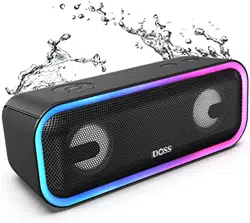
Stereo Wireless Bluetooth Speaker
EN DE FR IT ES JP CN
Model Name: SoundBox Pro+
Quick Start Guide
US:
UK:
FR:
I T :
CA:
DE:
ES:
JP:
EVATOST CONSULTING LTD
Suite 11, First Floor, Moy Road Business Centre,
Taffs Well, Cardiff, Wales, CF15 7QR
contact@evatmaster.com
eVatmaster Consulting GmbH
Bettinastr. 30
60325 Frankfurt am Main,Germany
contact@evatmaster.com
EN
1.
Packing content
DOSS SoundBox Pro+ x 1
Micro USB charging cable x 1
User manual x 1
2.
Specifications
Bluetooth version: V5.0
Range: 20 m/66ft
Output: 12W x 2
Input: 5V=2A
Battery: Li-ion 3.7V=4400mAh
Weight: 758g
Unit dimension: 8.9 x 3.3 x 3.5 inches
Play time: 15 hours ( at 50% volume )
Warranty: One-year
3.
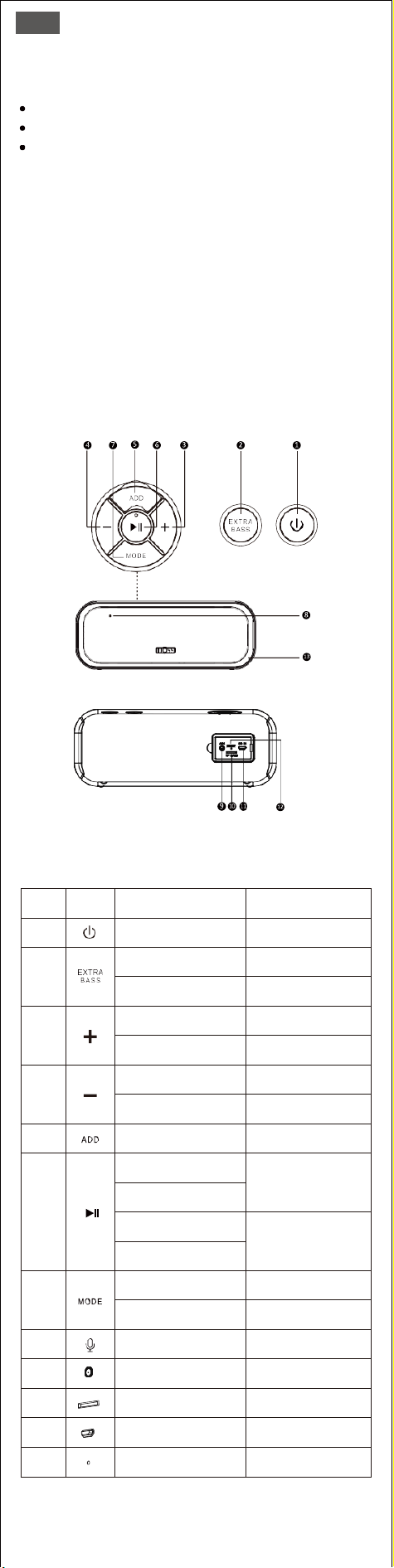
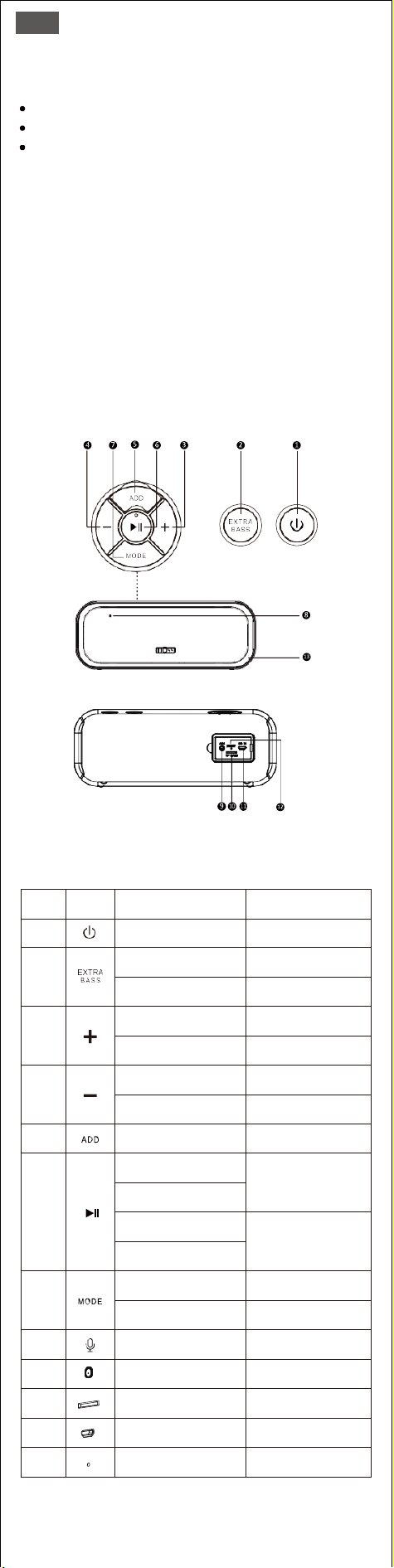
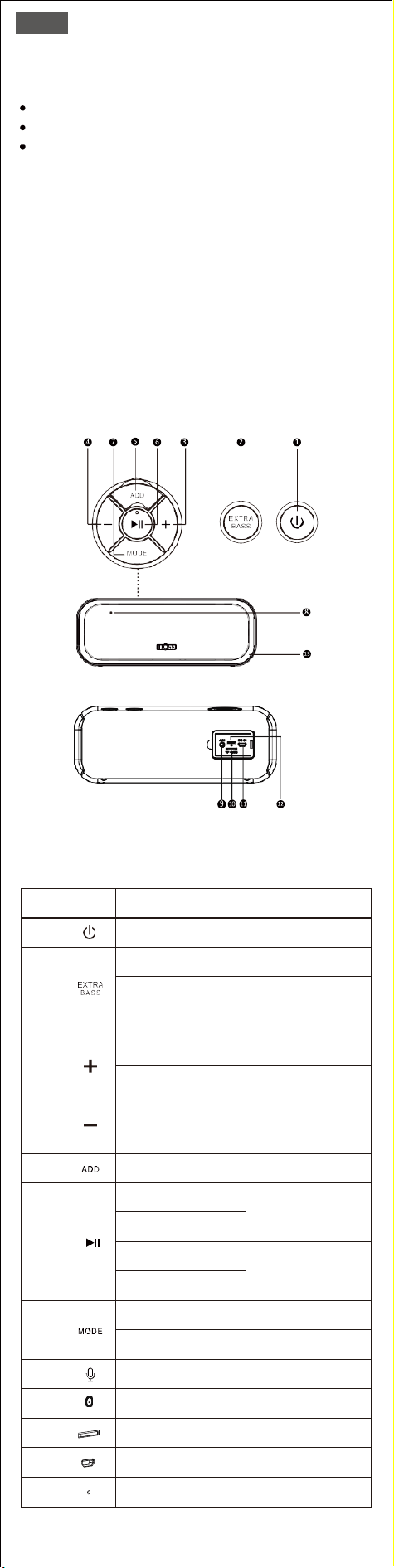
Product overview
4.
Buttons and controls
No.
Buttons
You want to
How to
1
Turn on/off
Press
2
Add/cancel extra bass
Press
Change/turn on/off
the light mode
Press and hold
3
Increase the volume
Press
Skip to the next track
Press and hold
4
Decrease the volume
Press
Skip to the previous track
Press and hold
5
Enter/quit TWS mode
Press and hold
6
Play/Pause
Press
Answer/end a call
Disconnect the device
Press and hold
Reject a call
7
Switch modes
Press
Change the light colors
Press and hold
8
Use handfree function
Speak to the Mic
9
Play via audio-in
Plug in AUX cable
10
Play via Micro SD card
Insert the Micro SD card
11
Charge the speaker
Insert the charging cable
12
Reset the speaker
Poke it with a needle
5.
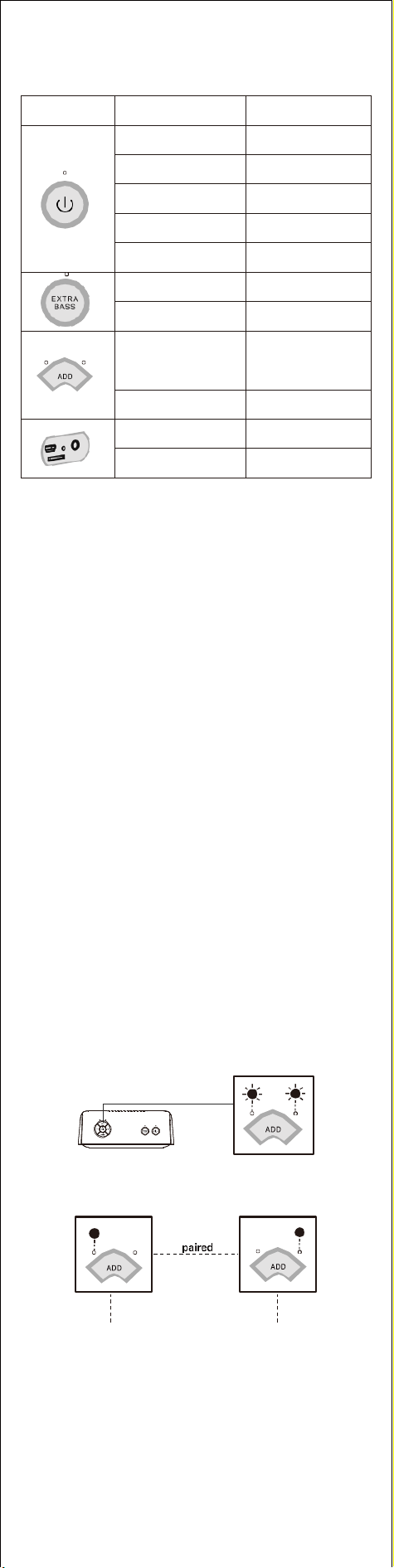
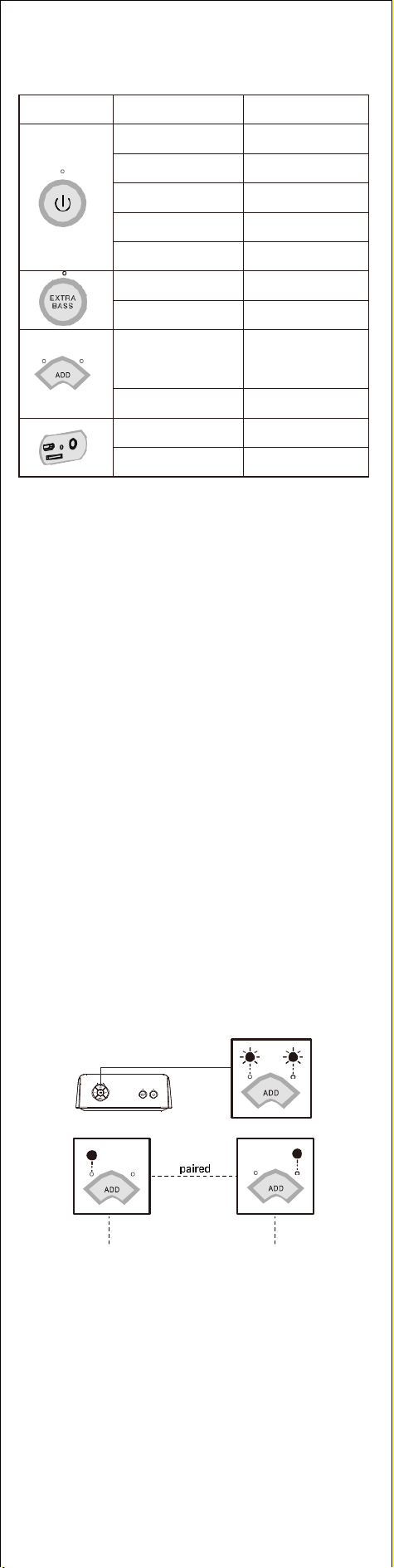
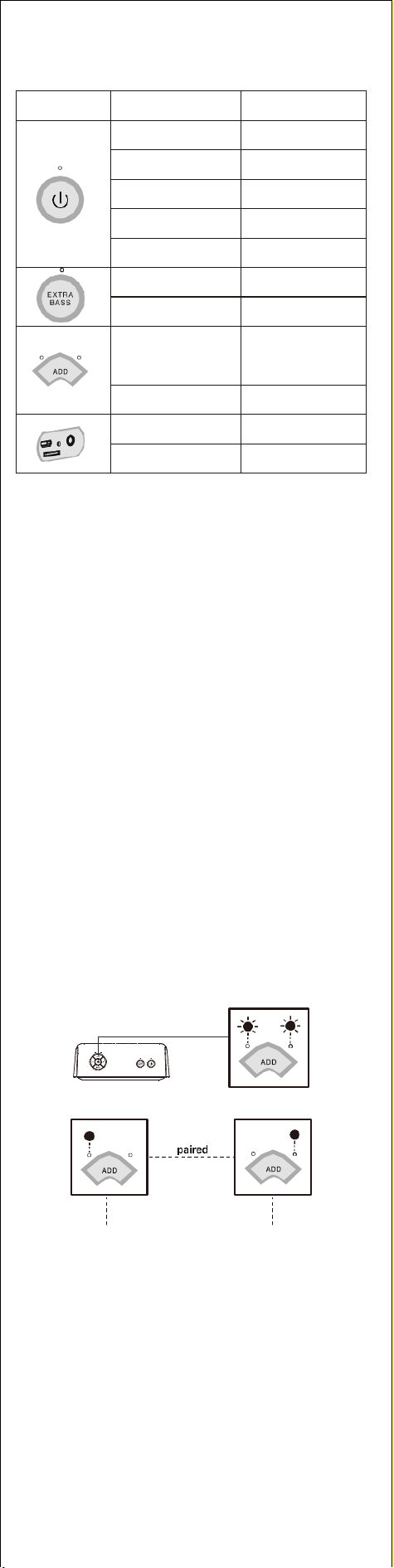
Indicators
Indicator view
Indicator state
System state
Rapidly flashing blue
Bluetooth disconnects
Solid blue
Bluetooth connected
Solid red
Audio in mode
Solid green
Micro SD card mode
OFF
Power off
Solid white
Extra bass mode
Light off
Cancel extra bass
L(left) and R(right) rapidly
flashing white alternately
TWS Pairing
L(left)/R(right) solid white
TWS Paired
Solid red
Charging
OFF
Fully charged
6.
Pairing your device via Bluetooth
1.
Enable Bluetooth on your device and search for the speaker.
2.
Select SoundBox Pro+ on the Bluetooth list.
3.
Once paired, you can see the connected status on your device.
• The speaker will auto power off after 15 minutes without any media
input. To remove the function, please contact <support@dossav.com>
for support.
• The music volume will drop down 15% automatically when the speaker
is on low battery.
Having problems connecting?
• Make sure that your device is within 1 meter from the speaker.
• Press and hold the Play/Pause button for 5 seconds.
Still have problems? Contact DOSS customer service at support
@dossav.com for assistance.
7.
Pairing your device via Auxiliary cable
Play via 3.5mm Auxiliary cable(not supplied)
8.
Play music from a Micro SD card
Play in download order
Support capacity: 32G or less
Support format: MP3, WAV, WMV
9.
How to set up true wireless stereo pairing
• Make sure both speakers didn’t connect to any device via Bluetooth, if
they did, please press and hold play/pause button for 5 seconds.
• Turn on both speakers.
• Press and hold the ADD button on one of the speakers for 3s.
• Waiting for pairing.
Primary Secondary
• Once paired successfully, the speaker with the left led on is the
Primary, the speaker with the right led on is the Secondary.
• Turn on Bluetooth on your device and select DOSS Soundbox Pro+ on
your Bluetooth list.

Warning
DO NOT drop, hit or shake the speaker.
DO NOT disassemble, repair or modify the speaker by yourself.
DO NOT use cleaning products that contain benzene, solvents or alcohol.
DO NOT expose the speaker to excessive heat or direct sunlight for a long time.
DO NOT store the speaker in a place with humidity or dust.
DO NOT place heavy objects on top of the speaker.
DO NOT use the speaker near a microwave oven or wireless LAN products.
FCC Statement
This equipment has been tested and found to comply with the limits for a Class
B digital device, pursuant to part 15 of the FCC Rules. These limits are designed
to provide reasonable protection against harmful interference in a residential
installation. This equipment generates, uses and can radiate radio frequency
energy and, if not installed and used in accordance with the instructions, may
cause harmful interference to radio communications. However, there is no
guarantee that interference will not occur in a particular installation. If this
equipment does cause harmful interference to radio or television reception,
which can be determined by turning the equipment off and on, the user is
encouraged to try to correct the interference by one or more of the following
measures:
• Reorient or relocate the receiving antenna.
• Increase the separation between the equipment and receiver.
• Connect the equipment into an outlet on a circuit different from that to which
the receiver is connected.
• Consult the dealer or an experienced radio/TV technician for help.
Caution: Any changes or modifications to this device not explicitly approved by
manufacturer could void your authority to operate this equipment.This device
complies with part 15 of the FCC Rules. Operation is subject to the following
two conditions:
(1) This device may not cause harmful interference, and (2) this device must
accept any interference received, including interference that may cause
undesired operation.
RF Exposure Information
The device has been evaluated to meet general RF exposure requirement.
The device can be used in portable exposure condition without restriction.
ISED Statement
This device contains licence-exempt transmitter(s)/receiver(s) that comply with
Innovation, Science and Economic Development Canada’s licence-exempt RSS(s).
Operation is subject to the following two conditions:
1. This device may not cause interference.
2. This device must accept any interference, including interference that may
cause undesired operation of the device.
This equipment should be installed and operated with a minumum distance of
20 cm between the radiator and your body.
Le présent appareil est conforme aux CNR d'Industrie Canada applicables
auxappareils radio exempts de licence. L'exploitation est autorisée aux deux
conditions suivantes : (1)l'appareil ne doit pas produire de brouillage, et (2)
l'utilisateur de l'appareil doit accepter toutbrouillage radioélectrique subi,
même si le brouillage est susceptible d'en compromettre lefonctionnement.
CAN ICES-3(B)/NMB-3(B)
L’appareil a été évalué pour répondre aux exigences générales d’exposition aux
RF. Le dispositif peut être utilisé sans restriction dans des conditions portatives
d’exposition.
Cet équipement doit être installé et utilisé à une distance minimale de 20 cm
entre le radiateur et votre corps.
DE
1.
Verpackungsinhalt
DOSS SoundBox Pro+ x 1
Micro-USB-Ladekabel x 1
Anleitung x 1
2.
Spezifikationen
Bluetooth-Version: V5.0
Reichweite: 20 m
Leistung: 12 W x 2
Eingang: 5V=2A
Batterie : Lithium-Ionen 3.7V=4400mAh
Gewicht: 758g
Einheitsabmessung: 22.61 x 8.38 x 19.02 cm
Spielzeit: 15 Stunden (bei 50 % Lautstärke)
Garantie: 1 Jahr
3.
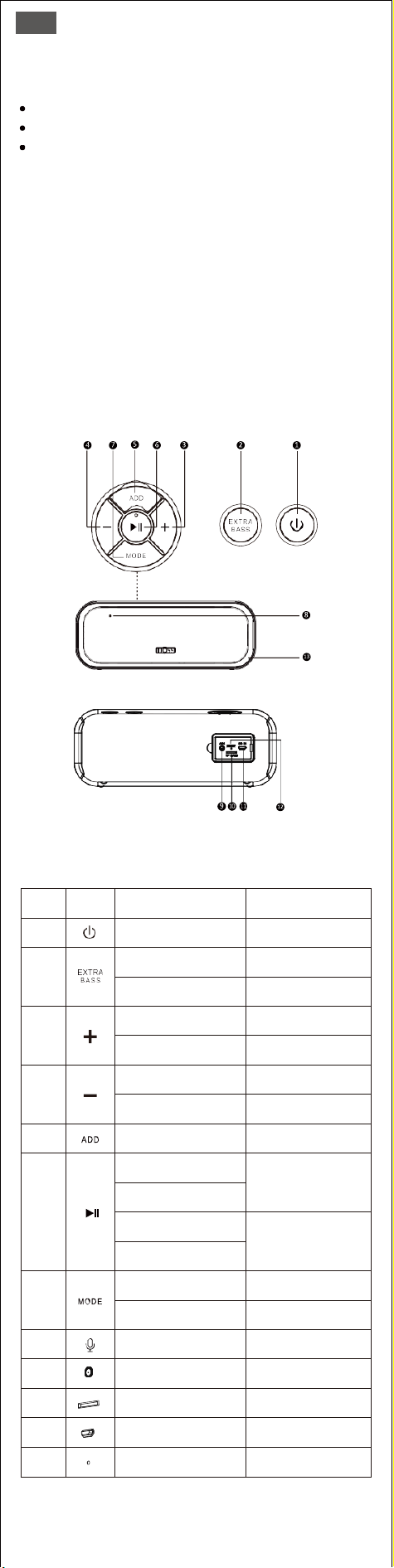
Produktübersicht
4.
Tasten und Bedienelemente
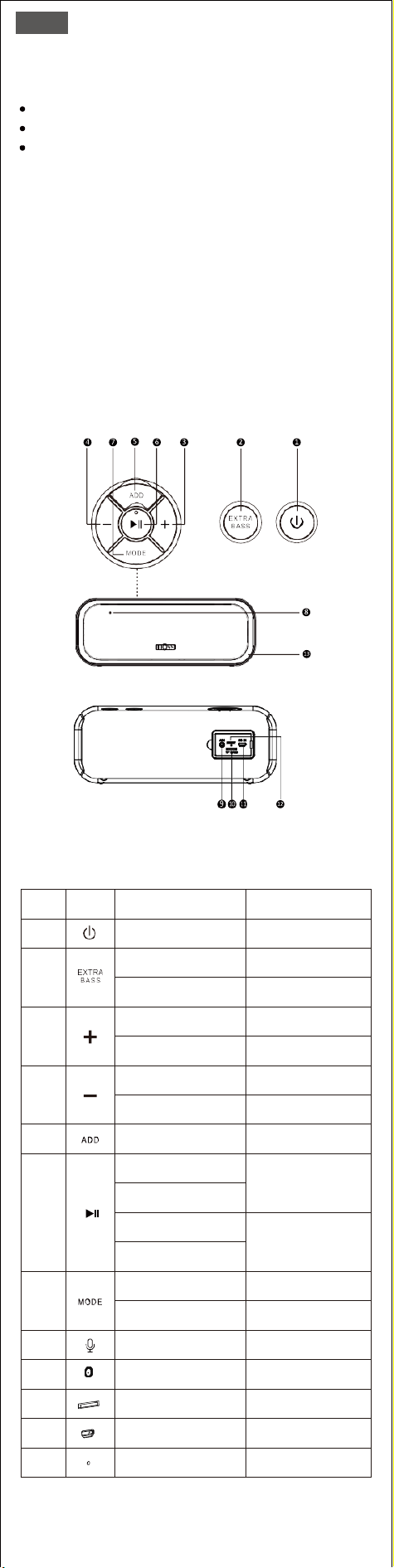
Nr.
Tasten
Du möchtest
Wie macht man
1
Ein / Ausschalten
Drücken
2
Zusätzliche Bässe
hinzufügen/abbrechen
Drücken
Lichtmodus ändern/ein-
/ausschalten
Drücken und halten
3
Die Lautstärke erhöhen
Drücken
Zum nächsten
Titel springen
Drücken und halten
4
Die Lautstärke
verringern
Drücken
Zum vorherigen
Titel springen
Drücken und halten
5
TWS-Modus aufrufen/
beenden
Drücken und halten
6
Spiel/Pause
Drücken
Anruf annehmen
/beenden
Trennen Sie das Gerät
Drücken und halten
Anruf ablehnen
7
Modi wechseln
Drücken
Ändern Sie die
Lichtfarben
Drücken und halten Sie
8
Freisprechfunktion
verwenden
Sprechen Sie mit
dem Mikrofon
9
Spielen Sie über
Audio-in
AUX-Kabel einstecken
10
Spielen Sie über
Micro-SD-Karte
Legen Sie die Micro-
SD-Karte ein
11
Laden Sie den
Lautsprecher auf
Stecken Sie das
Ladekabel ein
12
Setzen Sie den
Lautsprecher zurück
Mit einer Nadel
stechen
5.
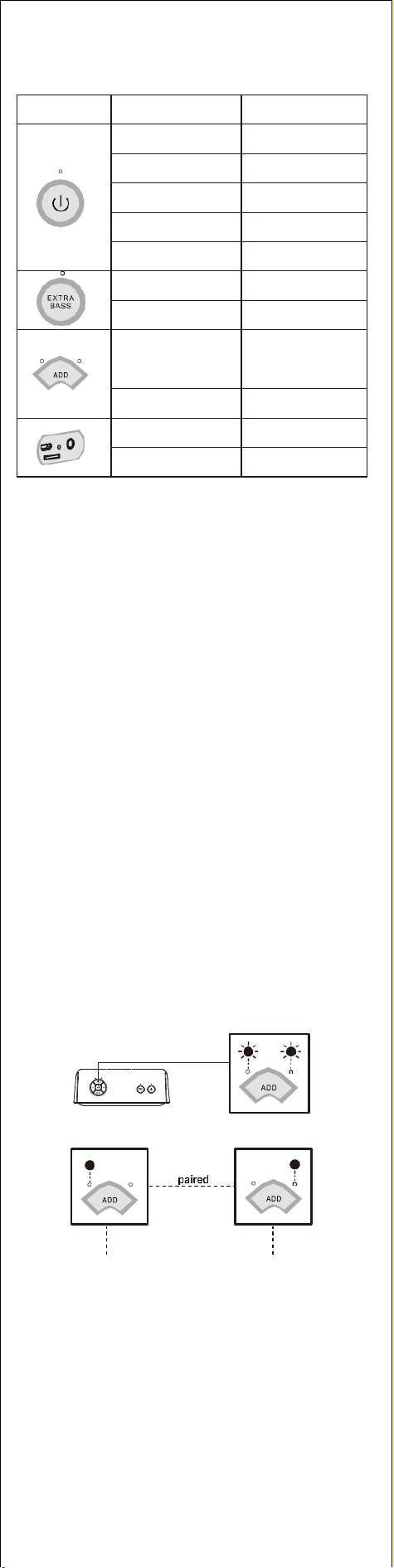
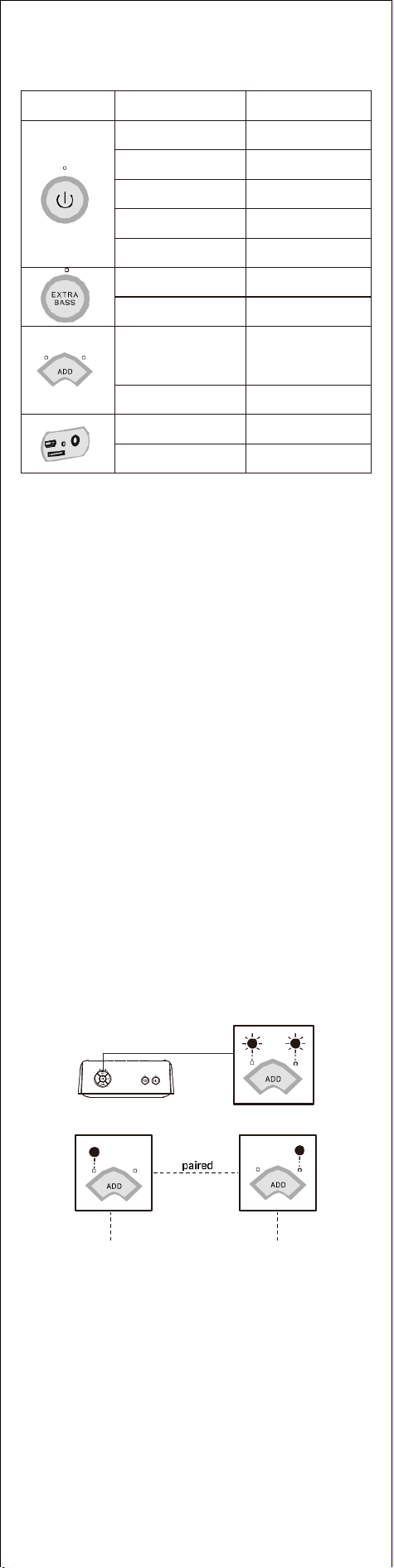
Indikatoren
Indikatoransicht
Indikatorzustand
Systemzustand
Schnell blau
blinkend
Bluetooth wird
getrennt
Einfarbig blau
Bluetooth verbunden
Einfarbig rot
Audio im Modus
Einfarbig grün
Micro-SD-Kartenmodus
AUS
Ausschalten
Solides Weiss
Extrabass an
Licht aus
Extrabass aus
L (links) und R (rechts)
blinken abwechselnd
schnell weiß
TWS-Kopplung
L (links)/R (rechts)
durchgehend weiß
TWS-gekoppelt
Einfarbig Einfarbig rot
Laden
OFF
Voll aufgeladen
6.
Koppeln Sie Ihr Gerät über Bluetooth
1. Aktivieren Sie Bluetooth auf Ihrem Gerät und suchen Sie nach dem
Lautsprecher.
2. Wählen Sie SoundBox Pro+ in der Bluetooth-Liste aus.
3. Nach der Kopplung können Sie den Verbindungsstatus auf Ihrem Gerät
sehen.
• Der Lautsprecher schaltet sich nach 15 Minuten ohne Medieneingabe
automatisch aus. Um die Funktion zu entfernen, kontaktieren Sie bitte
<[email protected]> für Support.
• Die Musiklautstärke wird automatisch um 15 % verringert, wenn die
Batterie des Lautsprechers schwach ist.
Haben Sie Verbindungsprobleme?
• Stellen Sie sicher, dass sich Ihr Gerät innerhalb von 1 Meter vom
Lautsprecher befindet.
• Halten Sie die Play/Pause-Taste 5 Sekunden lang gedrückt.
Haben Sie noch Probleme? Wenden Sie sich an den DOSS-Kundendienst
unter support_de@dossav.com, um Unterstützung zu erhalten.
7.
Koppeln Sie Ihr Gerät über ein Hilfskabel
Wiedergabe über 3,5-mm-Auxiliary-Kabel (nicht im Lieferumfang enthalten)
8.
Spielen Sie Musik von einer Micro-SD-Karte ab
Spielen Sie in Download-Reihenfolge
Unterstützungskapazität: 32G oder weniger
Unterstützte Formate: MP3, WAV, WMV
9.
So richten Sie True Wireless Stereo Pairing ein
• Stellen Sie sicher, dass beide Lautsprecher nicht über Bluetooth
mit einem Gerät verbunden sind. Wenn dies der Fall ist, halten Sie
die Wiedergabe-/Pause-Taste 5 Sekunden lang gedrückt.
• Schalten Sie beide Lautsprecher ein.
• Halten Sie die ADD-Taste an einem der Lautsprecher 3 Sekunden
lang gedrückt..
• Warten auf Paarung
Primär Sekundär
• Nach erfolgreicher Kopplung ist der Lautsprecher mit der linken LED
der Primär, der Lautsprecher mit der rechten LED der Sekundär.
• Schalten Sie Bluetooth auf Ihrem Gerät ein und wählen Sie DOSS
Soundbox Pro+ in Ihrer Bluetooth-Liste aus
Warnung
•Lassen Sie das Gerät NICHT fallen, stoßen oder schütteln Sie es nicht.
•Den Lautsprecher NICHT zerlegen, reparieren oder modifizieren.
•Verwenden Sie KEINE Reinigungsmittel, die Benzol, Lösungsmittel oder
Alkohol enthalten
•Setzen Sie den Lautsprecher NICHT über längere Zeit übermäßiger Hitze oder
direkter Sonneneinstrahlung aus.
•Lagern Sie das Gerät NICHT an einem Ort mit hoher Luftfeuchtigkeit oder
Staub.
•Stellen Sie KEINE schweren Gegenstände auf den Lautsprecher
•Verwenden Sie den Lautsprecher NICHT in der Nähe eines Mikrowellenofens
oder von WLAN-Produkten.
FR
1.
Contenu de l'emballage
DOSS SoundBox Pro+ x 1
Câble de chargement Micro USB x 1
Manuel d'utilisation x 1
2.
Specifications
Version Bluetooth : V5.0
Portée : 20 m/66ft
Sortie : 12W x 2
Entrée : 5V=2A
Batterie : Li-ion 3.7V=4400mAh
Poids : 758g
Dimensions de l'unité: 22.61 x 8.38 x 19.02 cm
Durée de lecture : 15 heures (à 50 % du volume)
Garantie : Un an
3.
Présentation du Produit
4.
Boutons et Commandes
No.
Boutons
Vous voulez
Comment
1
Allume / Éteint
Appuyez
2
Ajouter/Annuler les
basses supplémentaires
Appuyez
Modifier/Allumer/Étein
-dre le mode d'éclairage
Appuyez et maintenez
3
Augmenter le volume
Appuyez
Passer à la piste suivante
Appuyez et maintenez
4
Diminuer le volume
Appuyez
Passer à la piste
précédente
Appuyez et maintenez
5
Entrer/Quitter le
mode TWS
Appuyez et maintenez
6
Jouer/Pauser
Appuyez
Répondre/Mettre
fin à un appel
Déconnecter l'appareil
Appuyez et maintenez
Refuser un appel
7
Changer de mode
Appuyez
Changer les couleurs
de la lumière
Appuyez et maintenez
8
Utiliser la fonction
mains libres
Parlez au micro
9
Jouer via audio-in
Branchez le câble AUX
10
Jouer via une carte
Micro SD
Insérez la carte Micro SD
11
Chargez l'enceinte
bluetooth
Insérez le câble de
chargement
12
Réinitialiser l'enceinte
bluetooth
Piquez-le avec
une aiguille
5.
Indicateurs
Vue de l'indicateur
État de l'indicateur
État du système
Clignotement rapide
en bleu
Bluetooth se
déconnecte
Bleu fixe
Audio en mode
Rouge fixe
Audio en mode
Vert fixe
Mode de carte Micro SD
Éteint
Arrêt de l'alimentation
Blanc fixe
Mode extra-basse
Lumière éteinte
Annulez les basses
supplémentaires
L(gauche) et R(droite)
clignotent rapidement
en blanc en alternance.
Pairage TWS
L(gauche)/R(droite)
blanc fix
TWS pairé
Rouge fixe
Chargement
Éteint
Entièrement chargé
6.
Jumelage de votre appareil via Bluetooth
1.
Activez Bluetooth sur votre appareil et recherchez l'enceinte bluetooth.
2.
Sélectionnez SoundBox Pro+ dans la liste Bluetooth.
3.
Une fois jumelé, vous pouvez voir l'état de connexion sur votre appareil.
• Le haut-parleur s'éteint automatiquement après 15 minutes sans
aucune entrée média. Pour supprimer cette fonction, veuillez contacter
<[email protected]> pour obtenir de l'aide.
• Le volume de la musique baisse automatiquement de 15 % lorsque la
batterie de l'enceinte bluetooth est faible.
Vous avez des problèmes de connexion ?
• Assurez-vous que votre appareil se trouve à moins d'un mètre de
l'enceinte.
• Appuyez sur le bouton Lecture/Pause et maintenez-le enfoncé pendant 5
secondes.
Vous avez encore des problèmes ? Contactez le service clientèle de DOSS à
l'adresse supp[email protected] pour obtenir de l'aide.
7.
Couplage de votre appareil via un câble auxiliaire
Lecture via un câble auxiliaire de 3.5 mm (non fourni)
8.
Lire de la musique à partir d'une carte Micro SD
Lecture dans l'ordre de téléchargement
Capacité du support : 32G ou moins
Format pris en charge : MP3, WAV, WMV
9.
Comment configurer un véritable couplage stéréo sans fil ?
• Assurez-vous que les deux haut-parleurs ne se sont pas connectés à un
appareil via Bluetooth, s'ils l'ont fait, veuillez appuyer et maintenir le
bouton lecture/pause pendant 5 secondes.
• Allumez les deux haut-parleurs.
• Appuyez et maintenez enfoncé le bouton ADD sur l'un des haut-parleurs
pendant 3 secondes.
• En attente d'appairage.
Primary Secondary
• Une fois l'appairage réussi, l'enceinte avec la led gauche allumée est
Primary, l'enceinte avec la led droite allumée est Secondary.
• Activez Bluetooth sur votre appareil et sélectionnez DOSS Soundbox
Pro+ dans votre liste Bluetooth.
Avertissement
• NE PAS laisser tomber, frapper, secouer.
• NE PAS désassembler, réparer ou modifier le haut-parleur.
• NE PAS utiliser de produits de nettoyage contenant du benzène, des solvants
ou de l'alcool.
• NE PAS exposer le haut-parleur à une chaleur excessive ou à la lumière
directe du soleil pendant des périodes prolongées.
• NE PAS stocker l'appareil dans un endroit très humide ou poussiéreux.
• NE PAS placer des objets lourds sur le haut-parleur.
• NE PAS utiliser le haut-parleur à proximité d'un four à micro-ondes ou d'un
produit LAN sans fil.
IT
1.
Contenuto della confezione
DOSS SoundBox Pro+ x 1
Cavo USB C x 1
Manuale utente x 1
2.
Specifiche
Versione Bluetooth: V5.0
Gamma: 20 m/66ft
Uscita: 12W x 2
Ingresso: 5V=2A
Batteria: Li-ion 3.7V=4400mAh
Peso: 758g
Dimensione dell'unità: 22.61 x 8.38 x 19.02cm
Tempo di riproduzione: 15 ore (al 50% del volume)
Garanzia: Un anno
3.
Panoramica del prodotto
4.
Pulsanti e controlli
No.
Pulsanti
Tu vuoi
Come
1
Accendere/Spegnere
Premere
2
Aggiungere/annullare
i bassi extra
Premere
Cambiare/accendere/sp
-egnere la modalità di
illuminazione
Tenere premuto
3
Aumentare il volume
Premere
Saltare alla prossima
traccia
Tenere premuto
4
Diminuire il volume
Premere
Passare alla traccia
precedente
Tenere premuto
5
Entrare/uscire dalla
modalità TWS
Tenere premuto
6
Riprodurre/Pausa
Premere
Rispondere/finire
una chiamata
Disconnettere il
dispositivo
Tenere premuto
Rifiutare una chiamata
7
Cambiare modalità
Premere
Cambiare i colori
della luce
Tenere premuto
8
Usare la funzione
vivavoce
Parlare al microfono
9
Riproduzione via audio-in
Inserire il cavo audio
10
Riproduzione via
scheda di memoria
Inserire la scheda
di memoria
11
Caricare l'altoparlante
Inserire il cavo di ricarica
12
Resettare l'altoparlante
Punzecchiarlo
con un ago
5.
Indicatori
Aspetto dell’
Indicatore
Stato dell’Indicatore
System state
Luce blu che lampeggia
rapidamente
Bluetooth si disconnetti
Luce blu fissa
Bluetooth accoppiato
Luce rossa fissa
Modalità Audio in
Luce verde fissa
Modalità scheda
micro SD
La luce si spegne
Spegnimento
Luce bianca fissa
Modalità Bassi Extra
La luce si spegne
Annulla Bassi Extra
Luci L(sinistra)/R(destra)
bianche che lampeggiano
rapidamente e
alternativamente
Accoppiamento TWS
Luci L(sinistra)/R(destra)
bianche fisse
TWS accoppiato
Luce rossa fissa
In carica
La luce si spegn
Carica completa
6.
Accoppiamento del dispositivo via Bluetooth
1.Accendi il Bluetooth sul tuo dispositivo e cerca l'altoparlante.
2.Selezionare SoundBox Pro+ nell'elenco Bluetooth.
3.
Una volta accoppiato, vedrai lo stato di connessione sul tuo dispositivo.
• L'altoparlante si spegne automaticamente dopo 15 minuti senza alcun
input multimediale. Per rimuovere questa funzione, contattate
<[email protected]> per assistenza.
• Il volume della musica diminuisce automaticamente del 15% quando
l'altoparlante ha la batteria scaric.
Hai problemi di connessione?
• Assicurarsi che il dispositivo sia entro 1 metro dall'altoparlante.
• Tenere premuto il pulsante di riproduzione/pausa per 5 secondi.
• Hai ancora problemi? Cotattate il servizio clienti DOSS all'indirizzo
[email protected] per assistenza.
7.
Accoppiare il tuo dispositivo tramite cavo ausiliario
Riproduci via Cavo Aux 3.5mm(non fornito)
8.
Riproduci musica da una scheda Micro SD
Riproduci in ordine di scaricamento
Capacità supportata: 32G o meno
Formato supportato: MP3, WAV, WMV
9.
Come configurare un vero accoppiamento stereo senza fili
• Si assicuri che entrambi gli altoparlanti non siano collegati a un
dispositivo via Bluetooth, se lo sono, tenere premuto il pulsante
play/pause per 5 secondi.
• Accendere due altoparlanti.
• Tenga premuto il pulsante ADD su uno dei diffusori per 3 secondi.
• Aspettando l'accoppiamento.
Primary Secondary
• Una volta accoppiato correttamente, l'altoparlante con il LED sinistro
acceso è il Primo, quello con il LED destro acceso è il Secondo.
• Attivate il Bluetooth sul vostro dispositivo e selezionate la DOSS
Soundbox Pro+ nella sua lista Bluetooth.
Attenzione
• NON far cadere, colpire o scuotere il dispositivo.
• NON smontare, riparare o modificare l’altoparlante.
• NON usare prodotti detergenti che contengono benzene, solventi o alcol.
• NON esporre l’altoparlante a calore eccessivo o luce solare diretta per
periodi di tempo prolungati.
• NON conservare il dispositivo in un luogo con molta umidità o polvere.
• NON posizionare oggetti pesanti sopra l’altoparlante.
• NON usare l’altoparlante vicino a forni a microonde o a prodotti con wireless
LAN.
ES
1.
Contenido del paquete
DOSS SoundBox Pro+ x 1
Cable USB C x 1
Manual del usuario x 1
2.
Especificaciones
Versión de Bluetooth: V5.0
Alcance: 20 m/66ft
Salida: 12W x 2
Entrada: 5V=2A
Batería: Li-ion 3.7V=4400mAh
Peso: 758g
Dimensiones de la unidad: 22.61 x 8.38 x 19.02cm
Tiempo de reproducción: 15 horas ( al 50% de volumen )
Garantía: 1 año
3.
Resumen del producto
4.
Botones y controles
No.
Botones
Quieres
Cómo
1
Encendido/Apagado
Presionar
2
Añadir/cancelar
extra bass
Presionar
Cambiar/encender/apagar
el modo de iluminación
Mantener presionado
3
Aumentar el volumen
Presionar
Saltar a la siguiente pista
Mantener presionado
4
Disminuir el volumen
Presionar
Saltar a la pista anterior
Mantener presionado
5
Entrar/salir del
modo TWS
Mantener presionado
6
Reproducir/Pausar
Presionar
Responder/terminar
una llamada
Desconectar el
dispositivo
Mantener presionado
Rechazar una llamada
7
Cambiar los modos
Presionar
Cambiar los colores
de la luz
Mantener presionado
8
Usar la función de
manos libres
Hablar con el micrófono
9
Reproducir a través
de Audio-in
Insertar el cable
de Audio
10
Reproducir a través de
la Tarjeta de memoria
Insertar la Tarjeta
de memoria
11
Cargar el altavoz
Insertar el cable de carga
12
Reiniciar el altavoz
Pincharla con una aguja
5.
Indicadores
Ubicación del
indicador
Estado del indicador
Estado del sistema
Parpadeando en azul
rápidamente
Bluetooth se desconecta
Azul fijo
Bluetooth emparejado
Rojo fijo
Modo de audio-in
Verde fijo
Modo de tarjeta
Micro SD
Luz apagada
Apagado
Blanco fijo
Modo de Extra Bas
Luz apagada
Cancelar Extra Bass
L(izquierda)/R(derecha)
parpadeando rápida y
alternativamente
Pareando estéreo
L(izquierda)/R(derecha)
blanco fijo
Estéreo pareado
Rojo fijo
Cargando
Luz apagada
Completamente cargado
6.
Emparejando tu dispositivo a través de Bluetooth
1.
Encienda el Bluetooth en tu dispositivo y busca el altavoz.
2.
Selecciona SoundBox Pro+ en la lista de Bluetooth.
3.
Una vez emparejado, podrás ver el estado de conexión en tu dispositivo.
•El altavoz se apagará automáticamente después de 15 minutos sin
ninguna entrada de medios. Para eliminar esta función, póngase en
contacto con <support_es@dossav.com> para obtener ayuda.
•El volumen de la música bajará un 15% automáticamente cuando el
altavoz tenga batería baja.
Tienes problemas de conexión?
• Asegúrate de que tu dispositivo está a menos de 1 metro del altavoz.
• Mantén pulsado el botón de reproducción/pausa durante 5 segundos.
• Sigues teniendo problemas? Ponte en contacto con el servicio de atención
al cliente de DOSS en s[email protected] para obtener ayuda.
7.
Emparejando tu dispositivo a través de un cable de Audio
Reproduce a través de un 3.5mm cable de Audio (no suministrado)
8.
Reproduce música desde la tarjeta MicroSD
Reproduce en orden de descarga
Capacidad soportada: 32G o menos
Formato de soporte: MP3, WAV, WMV.
9.
Cómo configurar un verdadero emparejamiento
estéreo inalámbrico
• Asegúrate de que ambos altavoces no se han conectado a algún
dispositivo a través de Bluetooth, si lo han hecho, mantén presionado
el botón de reproduce/pausa durante 5 segundos.
• Enciende ambos altavoces.
• Mantén presionado el botón ADD en uno de los altavoces durante 3s.
• Esperando el emparejamiento.
Primary Secondary
•Una vez emparejado correctamente, el altavoz con el led izquierdo
encendido es el Primero, el altavoz con el led derecho encendido es el
Segundo.
• Enciende el Bluetooth en tu dispositivo y selecciona DOSS Soundbox
Pro+ en su lista de Bluetooth.
Advertencias
• NO dejar caer, golpear o sacudir el dispositivo.
• NO desarmar, reparar o modificar el altavoz usted mismo.
• NO usar productos de limpieza que contengan benceno, solventes o alcohol.
• NO exponer el altavoz a luz solar o calor excesivo por periodos de tiempo
largos.
• NO almacene el dispositivo en un lugar con humedad o polvo.
• NO coloque objetos pesados encima del altavoz.
• NO lo use cerca de un microondas o productos de internet inalámbrico LAN.
JP
1.
パッケージ内容
SoundBox Pro+ x 1
Micro USB 充電ケーブル x 1
取扱説明書(本書) x 1
2.
基本仕様
Bluetoothバージョン: V5.0
通信距離:20 m/66ft
最大出力:12W x 2
入力電圧:5V=2A
バッテリー種類:リチウム電池 3.7V=4400mAh
本体重量:758g
外形寸法: 22.61 x 8.38 x 19.02 cm
再生時間:約15時間(50%音量)
保証時間:一年間
3.
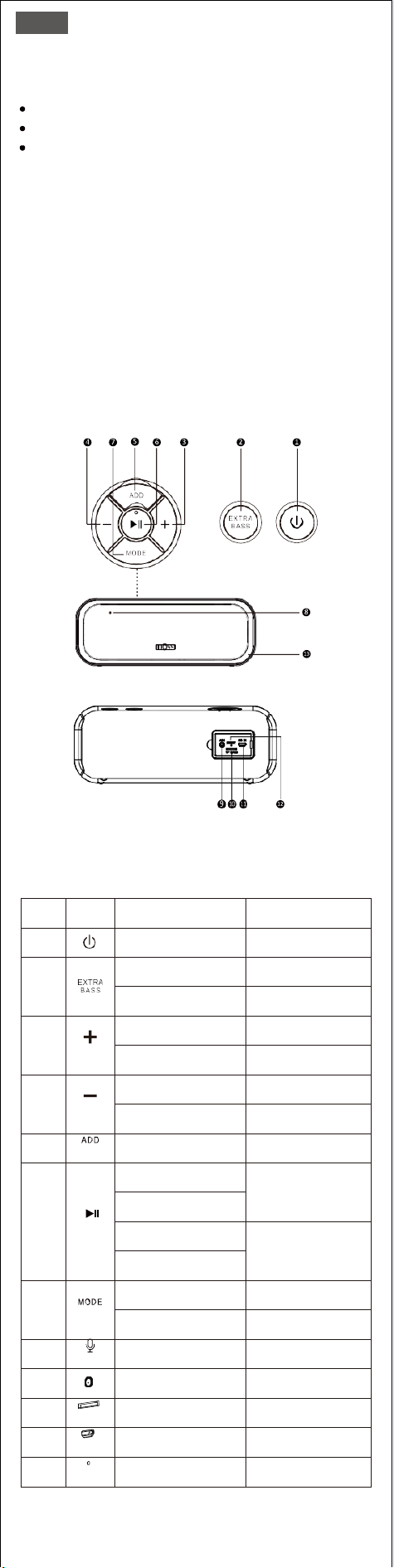
各部の名称とはたらき
4.
ボタンとコントロール
No.
ボタン
やりたい操作
操作方法
1
電源ON/OFF
押す
2
Extra bass ON/OFF
押す
ライトモードを変更
やライトをON/OFF
長押し
3
音量+
押す
曲送り
長押し
4
音量-
押す
曲戻し
長押し
5
TWS モードに入れ
/解除
長押し
6
再生/一時停止
押す
通話を応答/終了
接続中のデバイス
から接続を解除
長押し
通話を拒否
7
再生モードを切り替え
押す
ランプの色を変える
長押し
8
ハンズフリー通話
マイクで話して
ください
9
外部音声(AUDIO IN)
を再生
Aux inケーブルを挿
入してください
10
SDカードで音楽を再生
SDカードを挿入し
てください
11
スピーカーを充電
付属の充電ケーブル
を挿入してください
12
スピーカーをリ
セットする
針を「RESET」ポート
に差し込んでください
5.
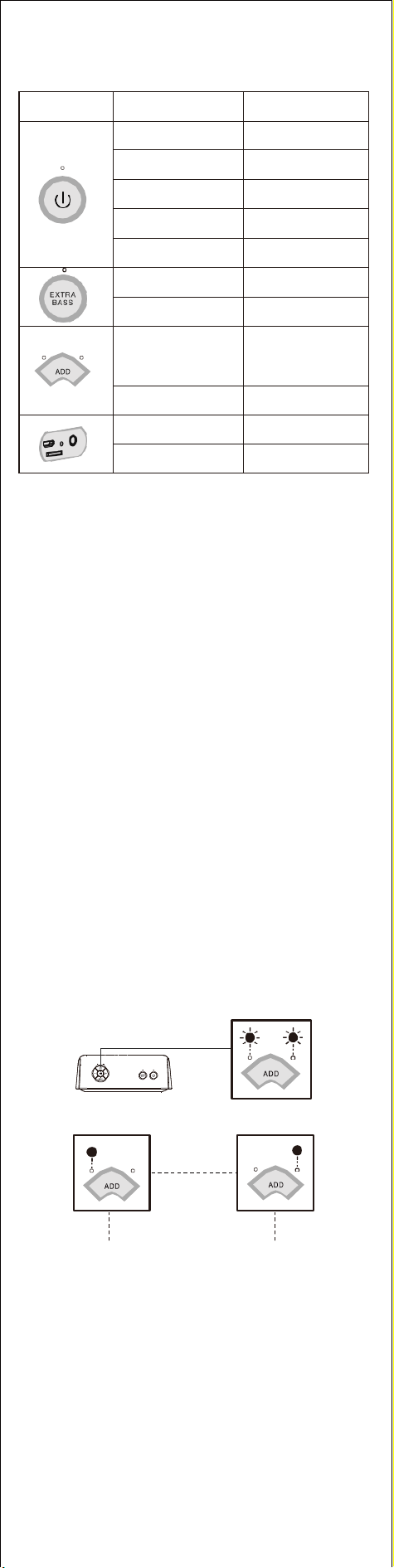
LEDインジケータ
インジケー
タの外観
インジケータ状態
システム状態
急速に青点滅
Bluetoothペアリン
グ設定中
青点灯
Bluetoothペアリング
(登録)済み
赤点灯
Audio in モード
緑点灯
Micro SD カードモード
ランプは消灯
電源を切る
白点灯
Extra bassモード
ランプは消灯
Extra bassキャンセル
L(左)とR(右)は交
互に白点滅
TWS ペアリング設定中
L(左)/R(右)は白点灯
TWS ペアリング済み
赤点灯
充電中
ランプは消灯
充電完了
6.
Bluetoothでデバイスと接続
1.
デバイスのBluetooth機能を起動し機器を検索します。
2.
デバイス画面のBluetoothリストにて「SoundBox Pro+」を選択して
ください。
3.
ペアリングは成功になるとデバイス画面から接続状態を確認でき
ます。
•音声入力はない状態で約15分後、本機は自動的に電源を切りま
す。この機能をキャンセルしたい場合、support_jp@dossav.comに
私ともに連絡ください。
•スピーカーの電池残量が不足になると、音量は自動的に15%の
程度に下がります。
接続に問題がありますか?
•デバイスと本機の距離は1m以内のことを確認してください。
•再生/一時停止ボタンを5秒間押し続けてください。
•まだ問題があるのか?DOSSのカスタマーサポート
support_jp@dossav.comまでお問い合わせください。
7.
Aux inケーブルで音楽を聞く
3.5mm Aux inケーブル(別売)をスピーカーの外部音声入力端
子に差し込んで音楽を楽しめます。
8.
Micro SDカードで音楽を聞く
ダウンロード順番によって音楽を再生します。
SDカードの容量:最大32Gまで
サポート音楽フォーマット:MP3、WAV、WMV
9.
ステレオ(TWS)モードで音楽を聞く
•
2台のスピーカーとも別のデバイスと接続していない状態を確認
ください。接続していた場合、「再生/一時停止」ボタンを5秒間長
押ししてください。
•
2台のスピーカーをオンにします。
•
いずれかスピーカーの「ADD」ボタンを3秒間長押ししてください
•
ペアリングを待っている
ペアリング完了
主のスピーカー 次のスピーカー
•
左側のLEDが点灯するのは主のスピーカー、右側のLEDが点灯す
るのは次のスピーカーです。
•
デバイスのBluetooth機能を起動しBluetoothリストにて「DOSS
Soundbox Pro+」を選択ください。
安全にお使いいただくために
•
本製品に衝撃を与えたり、投げたり、振動を与えたりしないでくださ
い。
•
本製品の分解や改造、修理をしないでください。
•
ベンゼン、溶剤やアルコールを含めるクリーニング製品を使用しない
でください。
•
過熱時にブルートゥーススピーカーの使用をひかえてください。
また、直射日光下に長時間置くことをひかえてください。
•
このデバイスを高温や高湿度、ほこりの多い環境に置かないでくださ
い。
•
ブルートゥーススピーカーの上に重い物を置かないでください。
•
電子レンジや無線製品の近くで使用しないでください。
CN
1.
包装清单
DOSS SoundBox Pro+ 便携音响 x 1
Micro USB 充电线 x 1
产品手册 x 1
2.
产品参数
蓝牙版本: V5.0
蓝牙范围: 20 m/66ft
输出功率: 12W x 2
输入功率: 5V=2A
电池: 锂电池 3.7V=4400mAh
重量: 758g
尺寸: 22.61 x 8.38 x 19.02cm
播放时长: 15 小时 ( 处于50%音量时)
保修期限:1年
3.
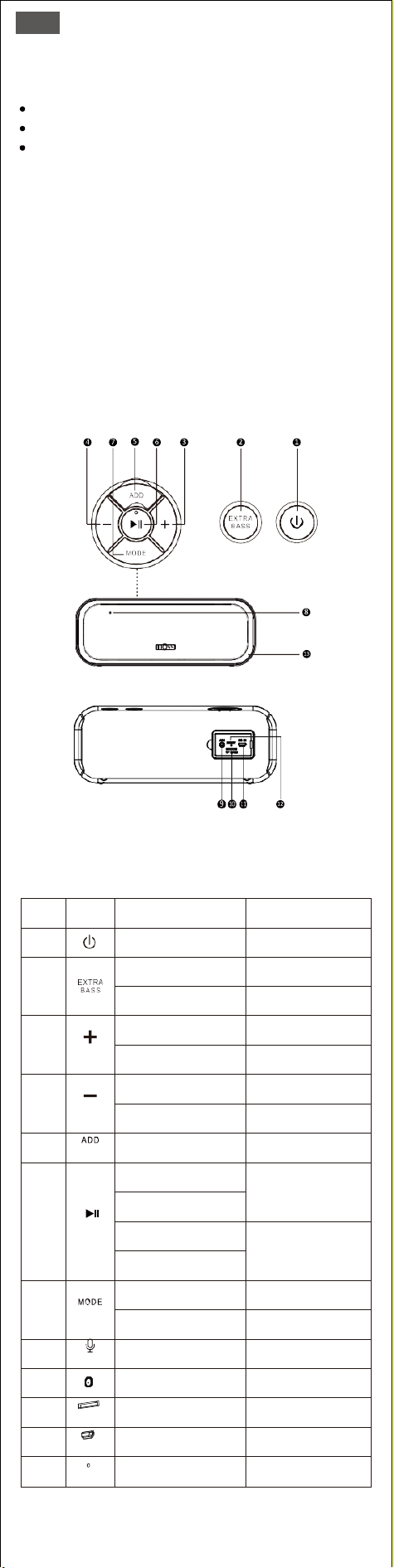
产品概述
4.
按钮和触控按钮
序号
按钮
功能
操作
1
开启/关闭
短按
2
添加/取消附加低音
短按
改变/开启/
关闭灯光模式
长按
3
增加音量增加音量
短按
跳至下一曲目
长按
4
降低音量
短按
跳至上一曲目
长按
5
进入 / 退出 两
个配对模式
长按
6
播放/暂停
短按
接听/挂断电话
断开设备
长按
拒绝接听
7
切换模式
短按
更换灯光颜色
长按
8
使用免提功能
对着麦克风说话
9
通过音频线播放
插入AUX线
10
通过Micro SD卡播放
插入Micro SD卡
11
给音响充电
插入充电线
12
音响重置
用针戳它
5.
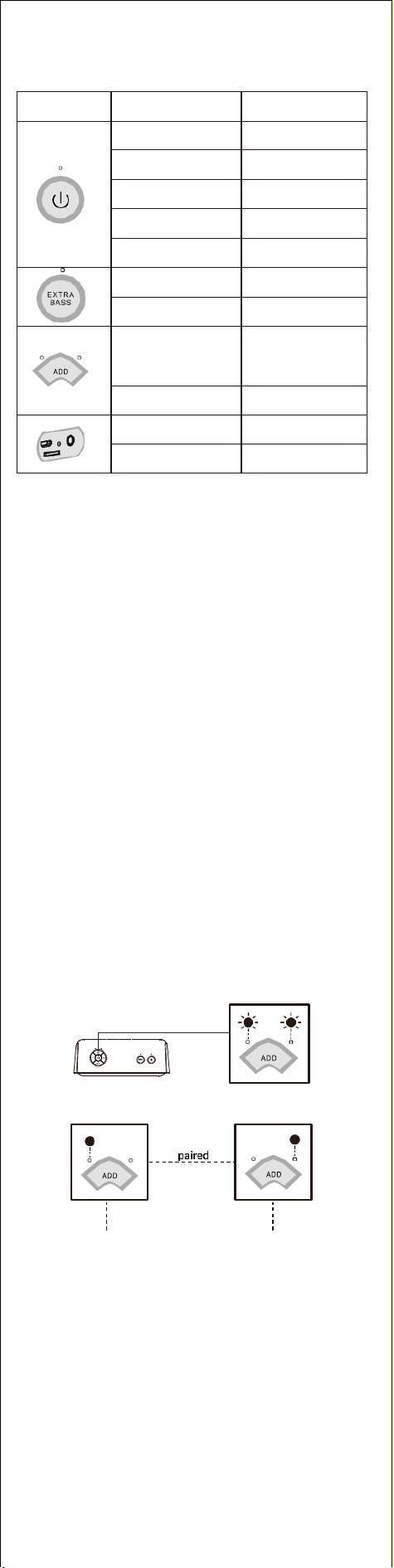
指示灯
指视图
指示灯状态
系统状态
蓝灯快闪
蓝牙断开连接
蓝灯常亮
蓝牙连接
红灯常亮
音频模式
绿灯常亮
Micro SD卡模式
关闭
关闭
白灯常亮
低音增强模式
灯灭
取消低音增强
左右交替白灯快闪
两个进行配对
左右白灯常亮
两个已配对
红灯常亮
充电
关闭
充满电
6.
通过蓝牙配对您的设备
1.
在您的设备上启用蓝牙并搜索蓝牙名.
2.在蓝牙列表中选择SoundBox
Pro+.
3.配对后,您可以在设备上看到连接状态.
•
在没有音频输入的情况下,音响15分钟后会自动关机。如需删除此
功能,请联系<support@dossav.com>寻求支持;
•
当音响电量不足时,音乐音量会自动降低为15%。.
连接时遇到问题?
•
确保您的设备距离音响1米以内。
•
按住播放/暂停按钮 5 秒。
如果还有问题? 请通过 support@dossav.com 联系DOSS客户服务
以寻求帮助
7.
通过辅助线与你的设备配对
•
通过3.5毫米辅助线播放(不提供此线)。
8.
从Micro SD卡播放音乐
按下载顺序播放
支持容量:32G以下
支持格式: MP3, WAV, WMV
9.
如何进行两个配对?
•
确保两个音响没有通过蓝牙连接到任何设备,如果有,请按住播放/
暂停按钮5秒。
•
打开两个音响的电源。
•
按住其中一个音响上的Add按钮3秒。
•
等待配对.
主机 副机
•
一旦配对成功,左边音响是主机. 右侧指示灯亮的音响为副机.
•
打开设备上的蓝牙并在蓝牙列表中选择 DOSS Soundbox Pro+.
警示
•
请勿掉落、撞击或摇晃设备。
•
请勿拆卸、修理或改装音响。
•
请勿使用含有苯、溶剂或酒精的清洁产品。
•
请勿将音响长时间暴露在过热或阳光直射下。
•
请勿将设备存放在高🗎度或多尘的地方。
•
请勿在音响顶部放置重物
•
请勿在微波炉或无线 LAN 产品附近使用音响。
