USER MANUAL
PetCare Water Fountain
Anker Innovations Limited. All rights reserved. eufy Security and eufy Security Logo are
trademarks of Anker Innovations Limited, registered in the United States and other countries. All
other trademarks are the property of their respective owners.
Model:T7220 51005002492 V01

TABLE OF
CONTENTS
01
IMPORTANT SAFETY INSTRUCTIONS
01
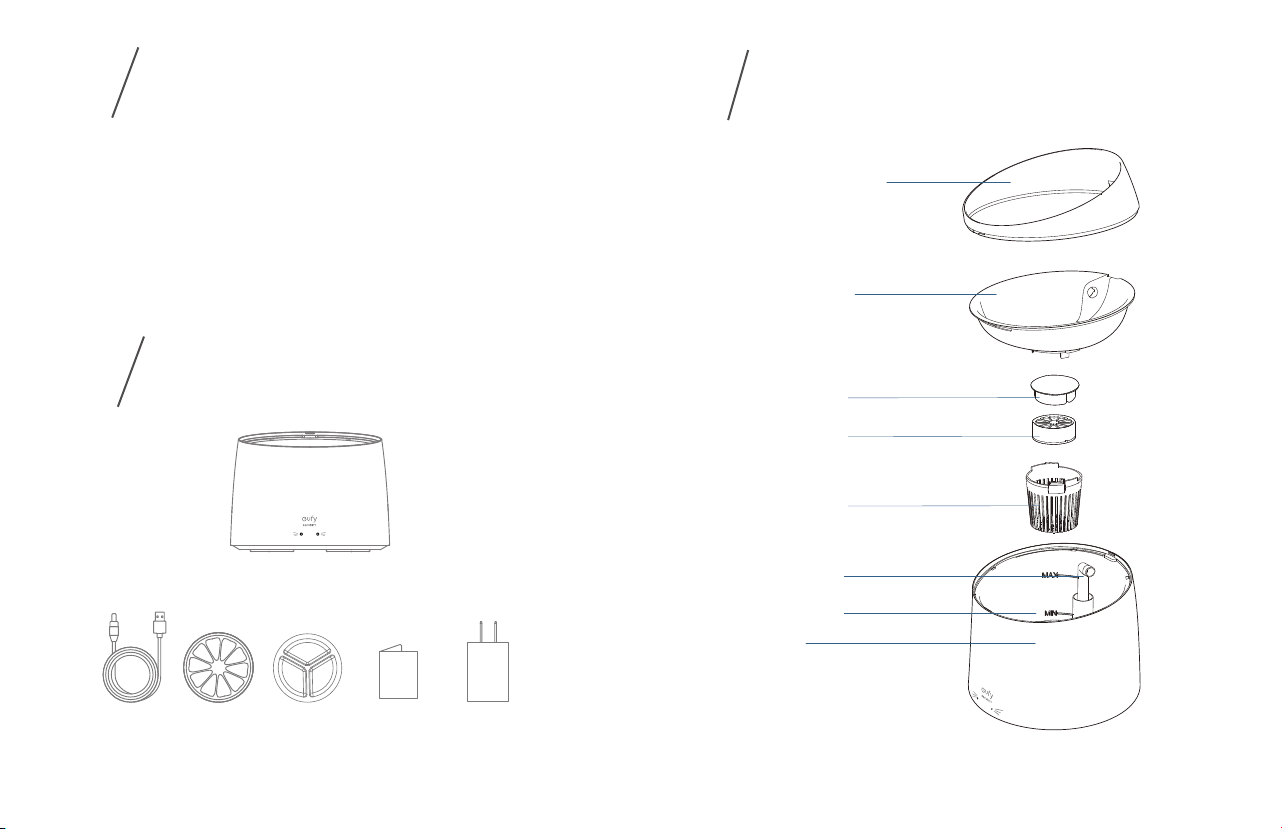
WHAT’S IN THE BOX
02
AT A GLANCE
04
GETTING STARTED
06
USING SMART PET FOUNTAIN
06
MAINTENANCE
07
SPECIFICATIONS
07
NOTICE
01 EN EN 02
AT A GLANCE
3
IMPORTANT SAFETY
INSTRUCTIONS
1
WHAT’S
IN THE BOX
2
1. When the device is not in use, the power should be turned off.
2. The power should be turned off while cleaning the base. Ensure that it is fully dry before use.
3. Make sure the water level in the tank is between the “MIN” and “MAX” water line which is
marked inside the main body.
4. The transparent cover is detachable. DO NOT lift the device by the cover when moving it.
5. Replace the Purification Filter and Sterilization Filter every 1.5 months.
6. Excess impurities on the filter will reduce water quality and lower the water penetration
speed. We recommend cleaning the filters each time you clean the device.
Water Fountain
Bite-proof
Charging
Cable
(
1.5m
)
Sterilization
Filter
Purification
Filter x 2
User Manual
Water Pipe
Water Line
Main Body
5V1A
Adapter
Transparent Cover
Drinking Tray
Purification filter
Sterilization Filter
Filter Cover
03 EN EN 04
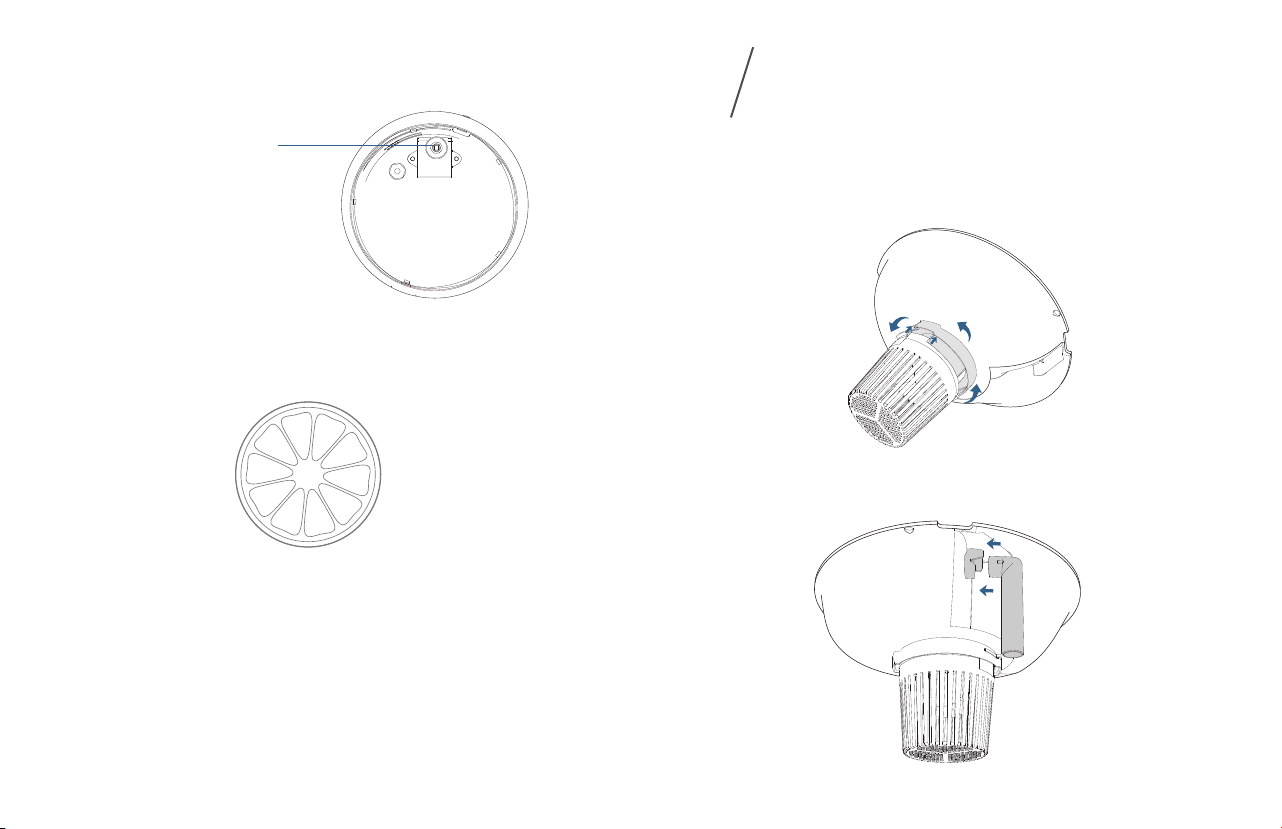
Water Pump
What it does:
Kills Escherichia coli, Salmonella, and Candida albicans to protect pets from getting acute
gastroenteritis and feline dermatophytosis.
Inside View
Sterilization Filter
GETTING STARTED
4
1. Place the sterilization filter in the filter cover and press down it until it sits at the bottom .
Place the filter in the purification filter cover.
2. Align the filter cover with the groove under the drinking tray and turn it counter-clockwise
until it locks in place.
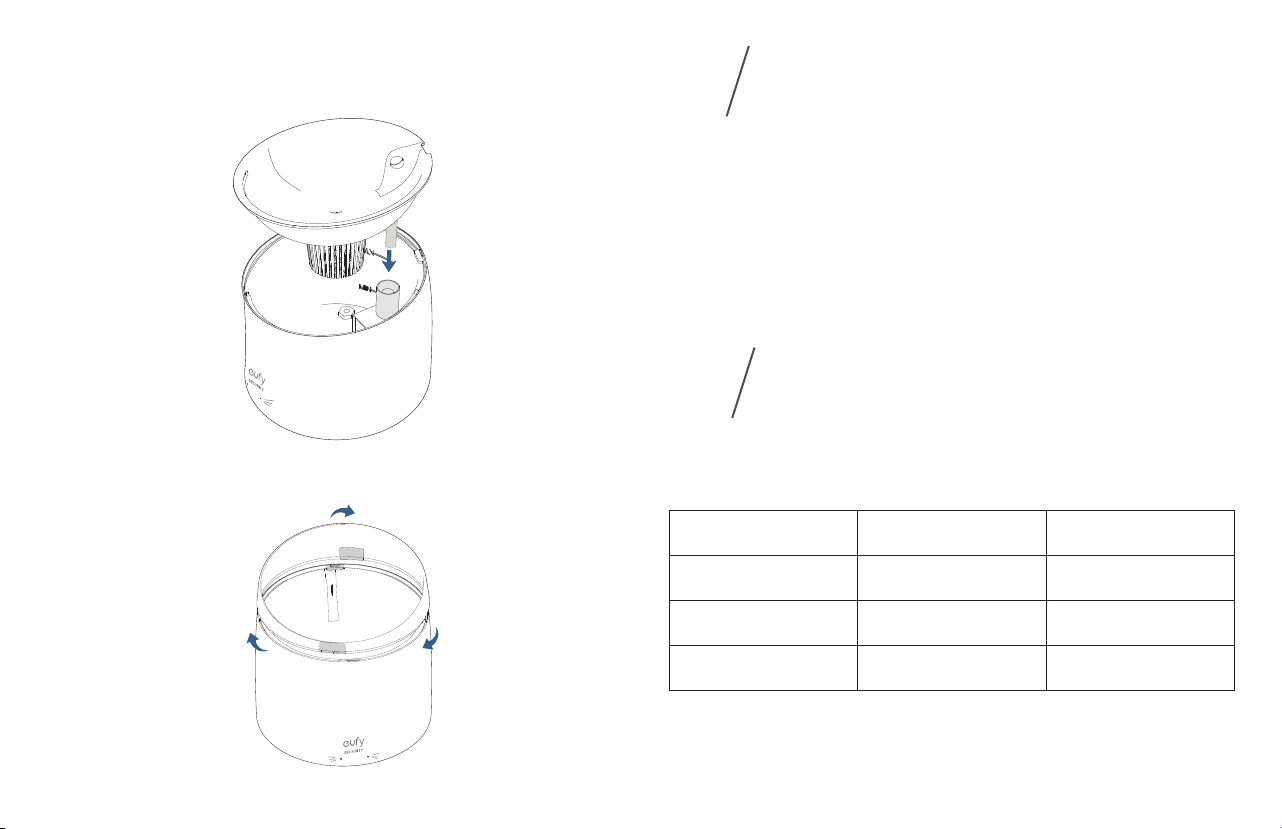
3. Insert the head of the water pipe into the side outlet of the drinking tray. Make sure the
water pipe is inserted correctly.
05 EN EN 06
4. Pour water into the main body. Make sure the water level is between the “Min” and “Max”
water lines that are marked on the inside.
5. Align the drinking tray with the main body as illustrated until it clicks into place.
6. Attach the transparent cover onto the main body by pressing it down until it is fixed into
place.
USING
PETCARE WATER FOUNTAIN
5
MAINTENANCE
6
1. Connect your PetCare Water Fountain to a power outlet using the provided USB charging
cable and adapter (5V/1A).
2. After it is powered on, the PetCare Water Fountain will continuously dispense water.
Note: When the water level is lower than the MIN water line, the pump will stop working. It will
resume normal operation after the water is filled.
For optimal performance, follow the instructions below to clean and maintain your PetCare
Water Fountain regularly.Cleaning or replacement frequency will depend on your usage habits.
PetCare Water Fountain Part Cleaning Frequency Replacement Frequency
Sterilization filter Once every week Every two months
Purification filter Once every week Every two months
Water pump Once every week Replace after it is damaged

07 EN EN 08
Dimension: 200 mm (Width) × 200 mm (Depth) × 207 mm (Height)
Net Weight: 750 g / 50 oz
Material: ABS
Capacity: 1.5L
Input: 5V
1A
FCC Statement
This device complies with Part 15 of the FCC Rules. Operation is subject to the following two
conditions: (1) this device may not cause harmful interference, and (2) this device must accept
any interference received, including interference that may cause undesired operation.
Warning: Changes or modifications not expressly approved by the party responsible for
compliance could void the user's authority to operate the equipment.
Note: This equipment has been tested and found to comply with the limits for a Class B digital
device, pursuant to Part 15 of the FCC Rules. These limits are designed to provide reasonable
protection against harmful interference in a residential installation.
This equipment generates uses and can radiate radio frequency energy and, if not installed
and used in accordance with the instructions, may cause harmful interference to radio
communications. However, there is no guarantee that interference will not occur in a particular
installation. If this equipment does cause harmful interference to radio or television reception,
which can be determined by turning the equipment off and on, the user is encouraged to try to
correct the interference by one or more of the following measures: (1) Reorient or relocate the
receiving antenna. (2) Increase the separation between the equipment and receiver. (3) Connect
the equipment into an outlet on a circuit different from that to which the receiver is connected.
(4) Consult the dealer or an experienced radio/ TV technician for help.
SPECIFICATIONS
7
NOTICE
8
FCC Radio Frequency Exposure Statement
The device has been evaluated to meet general RF exposure requirements. The device
can be used in fixed/mobile exposure conditions. The min separation distance is 20cm.
Notice: Shielded cables
All connections to other computing devices must be made using shielded cables to
maintain compliance with FCC regulations.
The following importer is the responsible party.
Company Name: POWER MOBILE LIFE LLC
Address: 400 108th Ave. NE Ste 400, Bellevue, WA 98004-5541
Telephone:1-800-988-7973
Customer Service
Anker Innovations Limited
Room 1318-19, Hollywood Plaza, 610 Nathan Road, Mongkok, Kowloon, Hong Kong
Warranty
12-month limited warranty
United States +1 (800) 988 7973 Mon-Fri 9AM-5PM (PT)
United Kingdom +44 (0) 1604 936 200 Mon-Fri 6AM-11AM (GMT)
Germany +49 (0) 69 9579 7960 Mon-Fri 6:00-11:00
Customer Support: [email protected]
@EufyOfficial @EufyOfficial @EufyOfficial