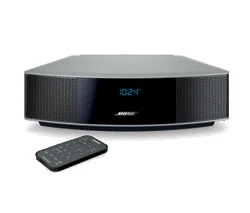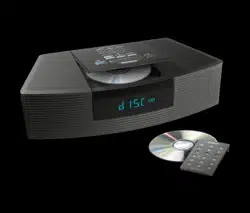

The Bose
®
Wave
®
Radio/CD
Owner’s Guide
2
English
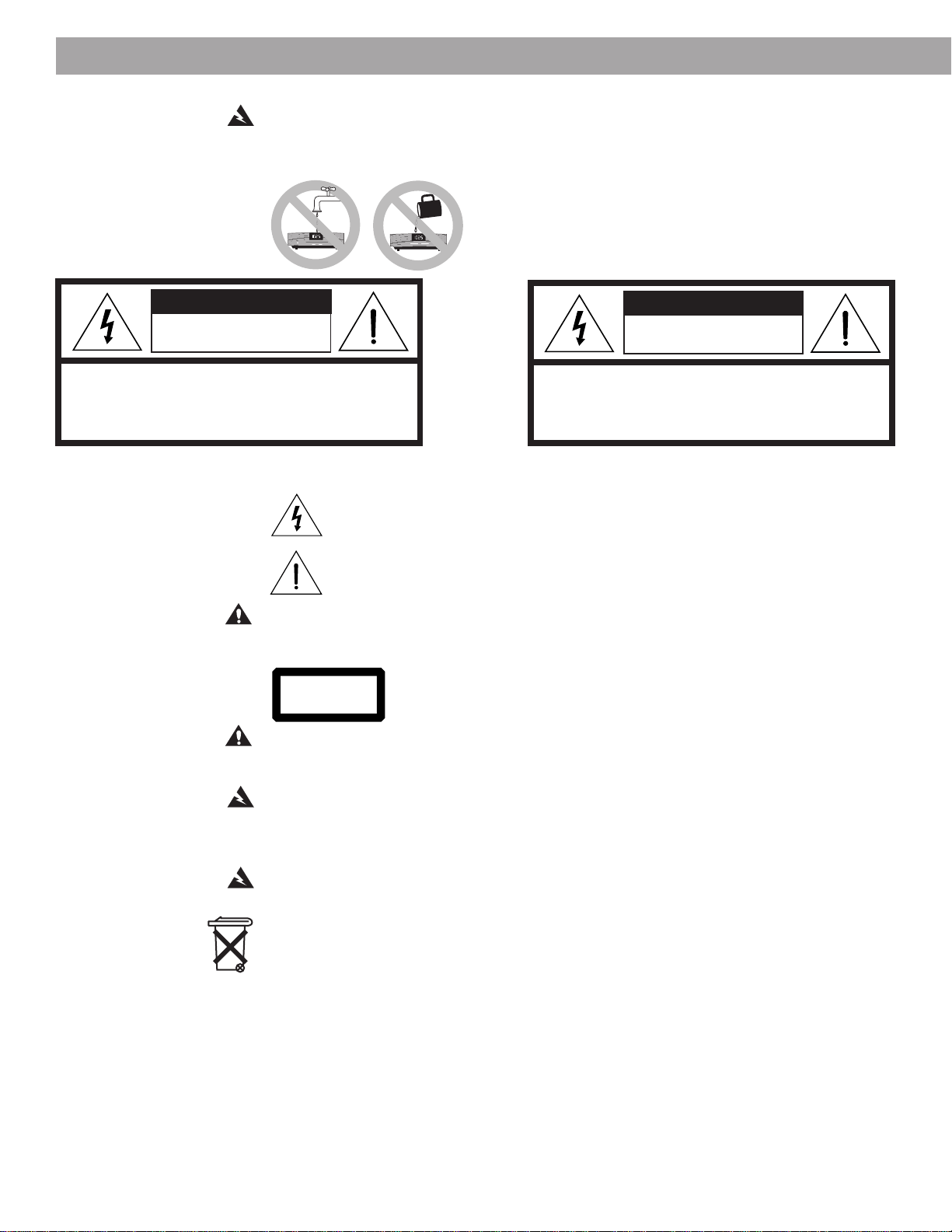
RISK OF ELECTRICAL SHOCK RISQUE DE CHOC ÉLECTRIQUE
DO NOT OPEN NE PAS OUVRIR
CAUTION: TO REDUCE THE RISK OF ELECTRIC SHOCK,
AFIN DE PRÉVENIR UN CHOC ÉLECTRIQUE NE PAS ENLEVER
DO NOT REMOVE COVER (OR BACK).
LE COUVERCLE ARRIÈRE. IL NE SE TROUVE À L’INTÉRIEUR
NO USER-SERVICEABLE PARTS INSIDE.
AUCUNE PIÈCE POUVANT ÊTRE RÉPARÉE PAR
REFER SERVICING TO QUALIFIED PERSONNEL.
L’USAGER. S’ADRESSER À UN RÉPARATEUR COMPÉTENT.
These CAUTION marks are located on the bottom and rear of your Wave
®
radio/CD :
The lightning flash with arrowhead symbol, within an equilateral triangle, is intended to alert
the user to the presence of uninsulated dangerous voltage within the system enclosure that
may be of sufficient magnitude to constitute a risk of electric shock.
The exclamation point within an equilateral triangle, as marked on the system, is intended to
alert the user to the presence of important operating and maintenance instructions in this
owner’s guide.
CAUTION:
To prevent electric shock, match wide blade of plug to wide slot, insert fully.
Class 1 laser product
This CD player is classified as a CLASS 1 LASER PRODUCT according to
EN 60825-1:1994 + A11. The CLASS 1 LASER PRODUCT label is located
on the back of the system.
CAUTION:
Use of controls or adjustments or performance of procedures other than those
specified herein may result in hazardous radiation exposure. The compact disc player
should not be adjusted or repaired by anyone except properly qualified service personnel.
WARNING:
Keep the remote control battery away from children. It may cause a fire or
chemical burn if mishandled. Do not recharge, disassemble, heat above 100˚C (212˚F), or
incinerate. Dispose of used battery promptly. Replace only with a battery of the correct type
and model number.
WARNING:
No naked flame sources, such as lighted candles, should be placed on the
apparatus.
Batteries
Please dispose of used batteries properly, following any local regulations. Do not incinerate.
Please read this owner’s guide
Please take the time to follow this owner’s guide carefully. It will help you set up and operate
your Wave
®
radio/CD properly, and enjoy all of its advanced features. Save your owner’s
guide for future reference.
Safety Information
WARNING:
To reduce the risk of fire or electric shock, do not expose the Wave
®
radio/CD to
rain or moisture. The apparatus shall not be exposed to dripping or splashing, and objects
filled with liquids, such as vases, shall not be placed on the apparatus.
As with any electronic product, use care not to spill
liquids into any part of the system. Liquids can cause
a failure and/or a fire hazard.
AVIS
CLASS 1 LASER PRODUCT
KLASSE 1 LASER PRODUKT
LUOKAN 1 LASER LAITE
KLASS 1 LASER APPARAT
©1994-2003 Bose Corporation. No part of this work may be reproduced, modified, distributed or
otherwise used without prior written permission. All trademarks referenced herein are property of
Bose Corporation. The Wave
®
radio/CD design is a registered trademark of Bose Corporation.
CAUTION
AVIS

3
English
Important Safety Instructions
1. Read these instructions – for all components
before using this product.
2. Keep these instructions – for future reference.
3. Heed all warnings – on the product and in the
owner’s guide.
4. Follow all instructions.
5. Do not use this apparatus near water or
moisture – Do not use this product near a
bathtub, washbowl, kitchen sink, laundry tub, in a
wet basement, near a swimming pool, or any-
where else that water or moisture are present.
6. Clean only with a dry cloth – and as directed
by Bose Corporation. Unplug this product from
the wall outlet before cleaning.
7. Do not block any ventilation openings.
Install in accordance with the
manufacturer’s instructions – To ensure
reliable operation of the product and to protect it
from overheating, put the product in a position
and location that will not interfere with its proper
ventilation. For example, do not place the product
on a bed, sofa, or similar surface that may block
the ventilation openings. Do not put it in a built-in
system, such as a bookcase or a cabinet that may
keep air from flowing through its ventilation
openings.
8. Do not install near any heat sources, such
as radiators, heat registers, stoves or other
apparatus (including amplifiers) that pro-
duce heat.
9. Do not defeat the safety purpose of the
polarized or grounding-type plug. A polar-
ized plug has two blades with one wider
than the other. A grounding-type plug has
two blades and a third grounding prong. The
wider blade or third prong are provided for
your safety. If the provided plug does not fit
in your outlet, consult an electrician for
replacement of the obsolete outlet.
10. Protect the power cord from being walked
on or pinched, particularly at plugs, conve-
nience receptacles, and the point where
they exit from the apparatus.
11. Only use attachments/accessories speci-
fied by the manufacturer.
12. Use only with the cart, stand, tripod,
bracket or table specified by the
manufacturer or sold with the
apparatus. When a cart is used,
use caution when moving the
cart/apparatus combination to
avoid injury from tip-over.
13. Unplug this apparatus during lightning
storms or when unused for long periods of
time – to prevent damage to this product.
14. Refer all servicing to qualified service person-
nel. Servicing is required when the apparatus
has been damaged in any way: such as power-
supply cord or plug is damaged; liquid has
been spilled or objects have fallen into the
apparatus; the apparatus has been exposed to
rain or moisture, does not operate normally, or
has been dropped – Do not attempt to service this
product yourself. Opening or removing covers may
expose you to dangerous voltages or other hazards.
Please call Bose to be referred to an authorized
service center near you.
15. To prevent risk of fire or electric shock, avoid
overloading wall outlets, extension cords, or
integral convenience receptacles.
16. Do not let objects or liquids enter the product –
as they may touch dangerous voltage points or
short-out parts that could result in a fire or electric
shock.
17. See product enclosure for safety related
markings.
Information about products that
generate electrical noise
This equipment has been tested and found to comply
with the limits for a Class B digital device, pursuant to
Part 15 of the FCC rules. These limits are designed to
provide reasonable protection against harmful interfer-
ence in a residential installation. This equipment gener-
ates, uses, and can radiate radio frequency energy and, if
not installed and used in accordance with the instruc-
tions, may cause harmful interference to radio communi-
cations. However, this is no guarantee that interference
will not occur in a particular installation. If this equipment
does cause harmful interference to radio or television
reception, which can be determined by turning the
equipment off and on, you are encouraged to try to
correct the interference by one or more of the following
measures:
• Reorient or relocate the receiving antenna.
• Increase the separation between the equipment and
receiver.
• Connect the equipment to an outlet on a different
circuit than the one to which the receiver is connected.
• Consult the dealer or an experienced radio/TV techni-
cian for help.
Note:
Unauthorized modification of the receiver or radio
remote control could void the user’s authority to operate
this equipment.
This product complies with the Canadian ICES-003 Class
B specifications.
2a
4
English
Important Safety Instructions
Antenna grounding
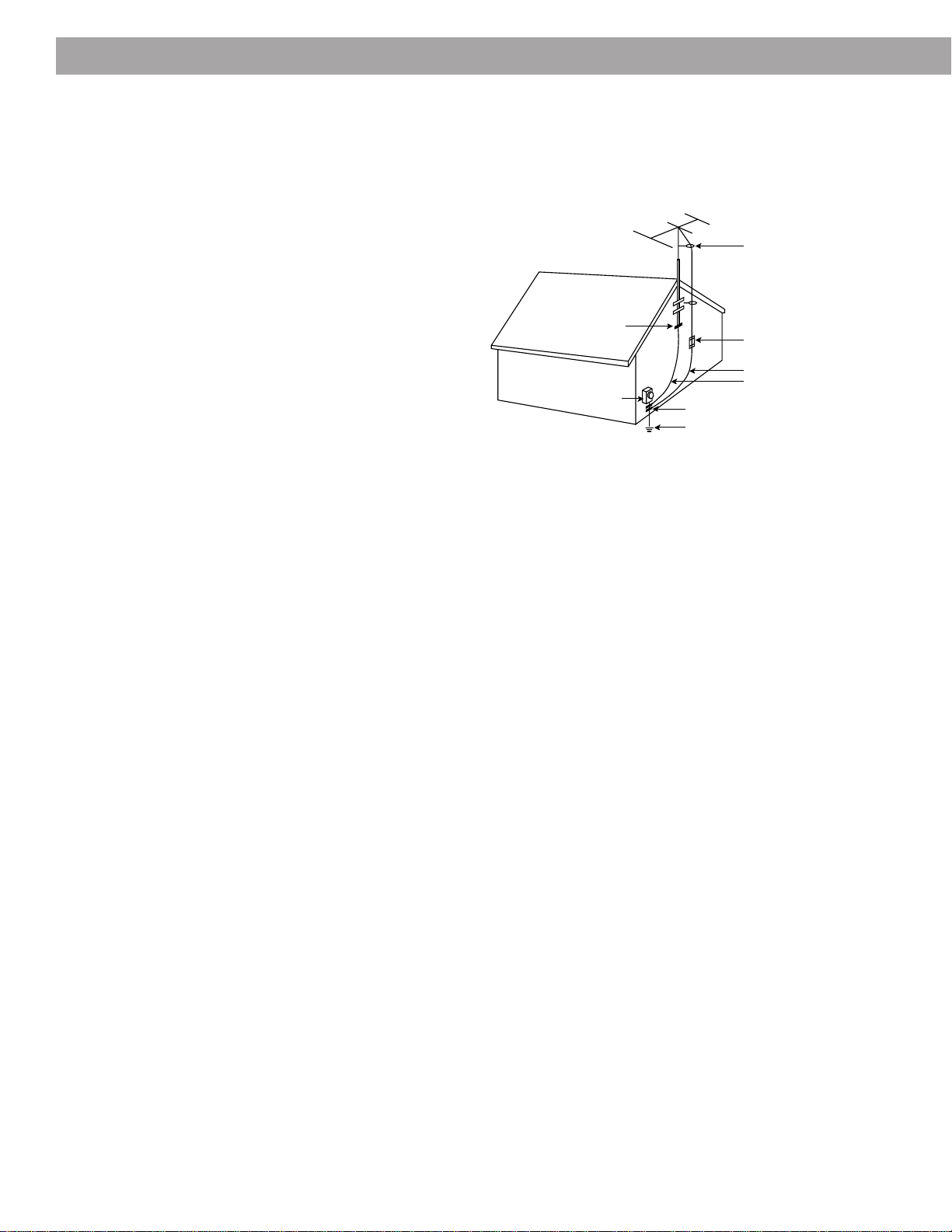
Example of antenna grounding as per National Electrical Code,
ANSI/NFPA 70.
Note to CATV system installer
This reminder is provided to call the CATV system installer’s
attention to Article 820-40 of the NEC (of USA) that provides
guidelines for proper grounding. In particular, it specifies that the
cable ground shall be connected to the grounding system of the
building, as close to the point of cable entry as is practical.
18. Use proper power sources – Plug the product
into a proper power source, as described in the
operating instructions or as marked on the
product.
19. Avoid power lines – Use extreme care when
installing an outside antenna system to keep
from touching power lines or circuits, as contact
with them may be fatal. Do not install external
antennas near overhead power lines or other
electric light or power circuits, nor where an
antenna can fall into such circuits or power lines.
20. Ground all outdoor antennas – If an external
antenna or cable system is connected to this
product, be sure the antenna or cable system is
grounded. This will provide some protection
against voltage surges and built-up static
charges.
Section 810 of the National Electrical Code ANSI/NFPA
No. 70 provides informaiton with respect to proper
grounding of the mast and supporting structure,
grounding of the lead-in wire to an antenna discharge
unit, size of grounding conductors, location of antenna-
discharge unit, connection to grounding electrodes, and
requirements for the ground electrode. Refer to the
antenna grounding illustration on this page.
Antenna lead in wire
Antenna discharge unit
(NEC Section 810-20)
Grounding conductors
(NEC Section 810-21)
Power service grounding
electrode system
(NEC ART 250, Part H)
Ground clamps
Ground clamp
Electric service
equipment
2b

3
English
Contents
Where to find…
Setting Up
Before you begin........................................................................................................... 4
Unpacking the carton ................................................................................................... 5
Selecting a location for your Wave
®
radio/CD .............................................................. 5
Installing the battery ..................................................................................................... 6
Connecting the power cord .......................................................................................... 7
Connecting the FM antenna ......................................................................................... 7
Connecting the coaxial cable ....................................................................................... 7
Installing the remote control battery ............................................................................. 8
Connecting other components as an option .............................................................. 10
Operating Your Wave
®
radio/CD
Using the remote control ............................................................................................ 12
Using the Wave
®
radio/CD control panel .................................................................... 13
Reading the Wave
®
radio/CD display.......................................................................... 14
Setting the time ........................................................................................................... 15
Customizing the display.............................................................................................. 15
Controlling the system ................................................................................................ 16
Using the radio............................................................................................................ 17
Reading the radio display ........................................................................................... 17
Using the CD player .................................................................................................... 18
Reading the CD display .............................................................................................. 19
Setting the alarms ....................................................................................................... 20
Reading the alarm setup displays............................................................................... 20
Using the alarms ......................................................................................................... 21
Maintaining Your Wave
®
radio/CD
Taking care of your Wave
®
radio/CD .......................................................................... 22
Technical information.................................................................................................. 22
Troubleshooting .......................................................................................................... 23
Customer service ........................................................................................................ 23
Limited warranty ......................................................................................................... 24
Quick Reference to Special Functions ............................................................................. 25
Index ................................................................................................................................. 26
Bose Corporation .....................................................................................inside back cover
For your records
The serial number is located on the bottom of your system.
Wave
®
radio/CD serial number: ___________________________________________________
Purchase date: _________________________________________________________________
We suggest you keep your sales receipt and warranty together with this owner’s guide.
Deutsch
Nederlands
Français
4
English
Setting Up
Before you begin
Thank you for purchasing the Bose
®
Wave
®
radio/CD.
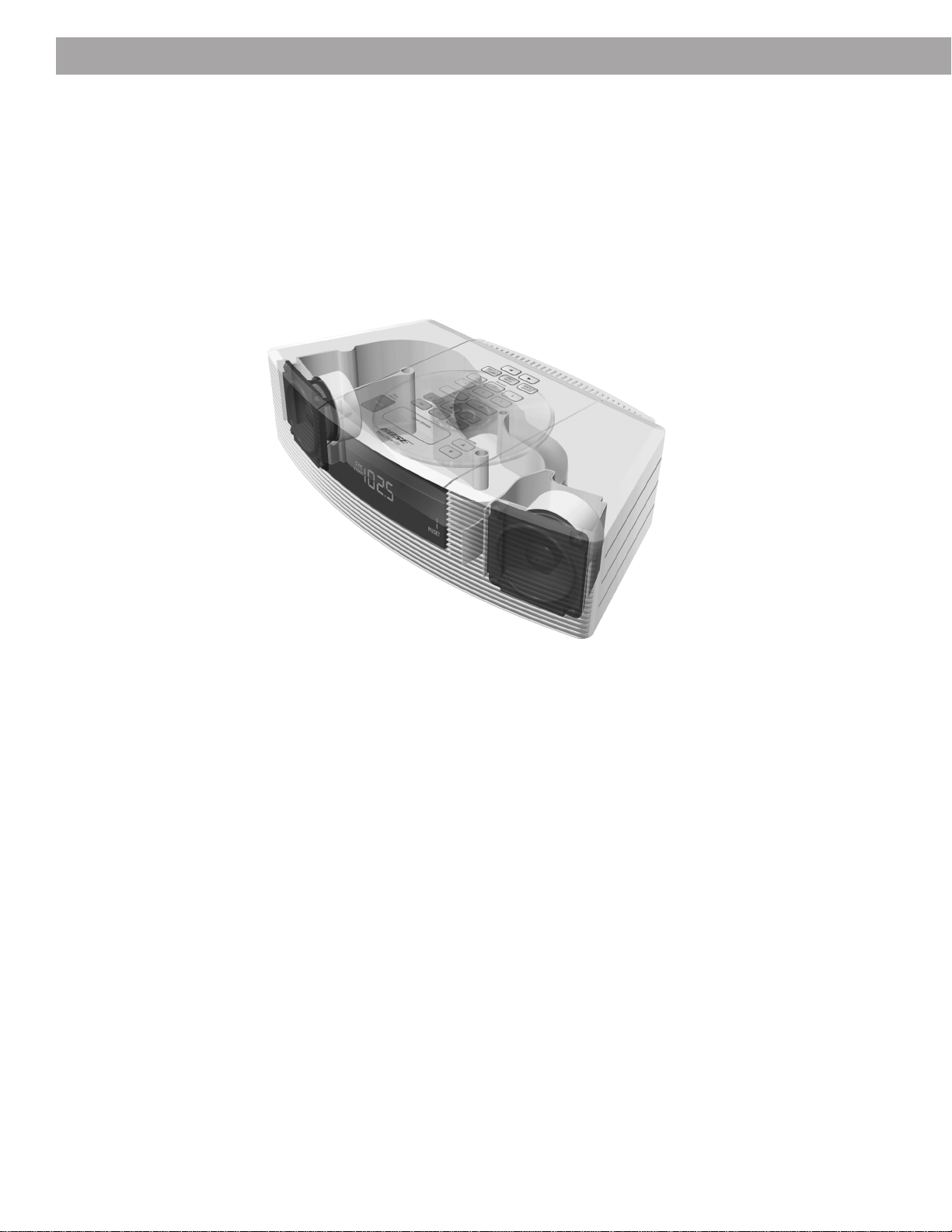
Fourteen years of research by Bose Corporation bring you the benefits of award-winning
patented acoustic waveguide speaker technology. Using this technology, a tube efficiently
transfers energy from a small loudspeaker to the outside air over a whole range of bass
notes. And, by folding long waveguides into intricate patterns, they fit into products small
enough to be placed comfortably in your home. There is a 27-inch (68-cm) long waveguide
inside the Wave
®
radio/CD’s compact enclosure, enabling this tabletop system to produce
room-filling sound with full, rich bass.
Your Wave
®
radio/CD includes:
• Integrated system design for high acoustic quality requiring no complex adjustments
• A high performance stereo tuner with 6 AM and 6 FM station presets
• A CD player including skip, scan, random, repeat, and programming features
• Two independent alarms, with battery backup power to save the settings for wakeup
during a power loss
• A credit card-sized remote control
• Inputs for an additional sound source, such as a TV, VCR, computer, or tape player
To discover how easy it is to use your new Wave
®
radio/CD, follow the steps on the Quick
Set-up Guide and play the demonstration CD. Like most functions, it can be done with the
press of a single button. Some special functions are available by pressing button combina-
tions (for details, see page 25).
To fully appreciate all of these features, please take the time to follow this owner’s guide
carefully. It helps you set up and operate your system, and enjoy its high-fidelity sound.
®
5
English
Setting Up
Unpacking the carton
Carefully unpack your system. Save all packing materials for possible future use. The original
packing materials provide the safest way to transport your Wave
®
radio/CD. If any part of the
product appears damaged, do not attempt to use it. Notify Bose
®
Product Support immedi-
ately (see phone numbers on the inside back cover).
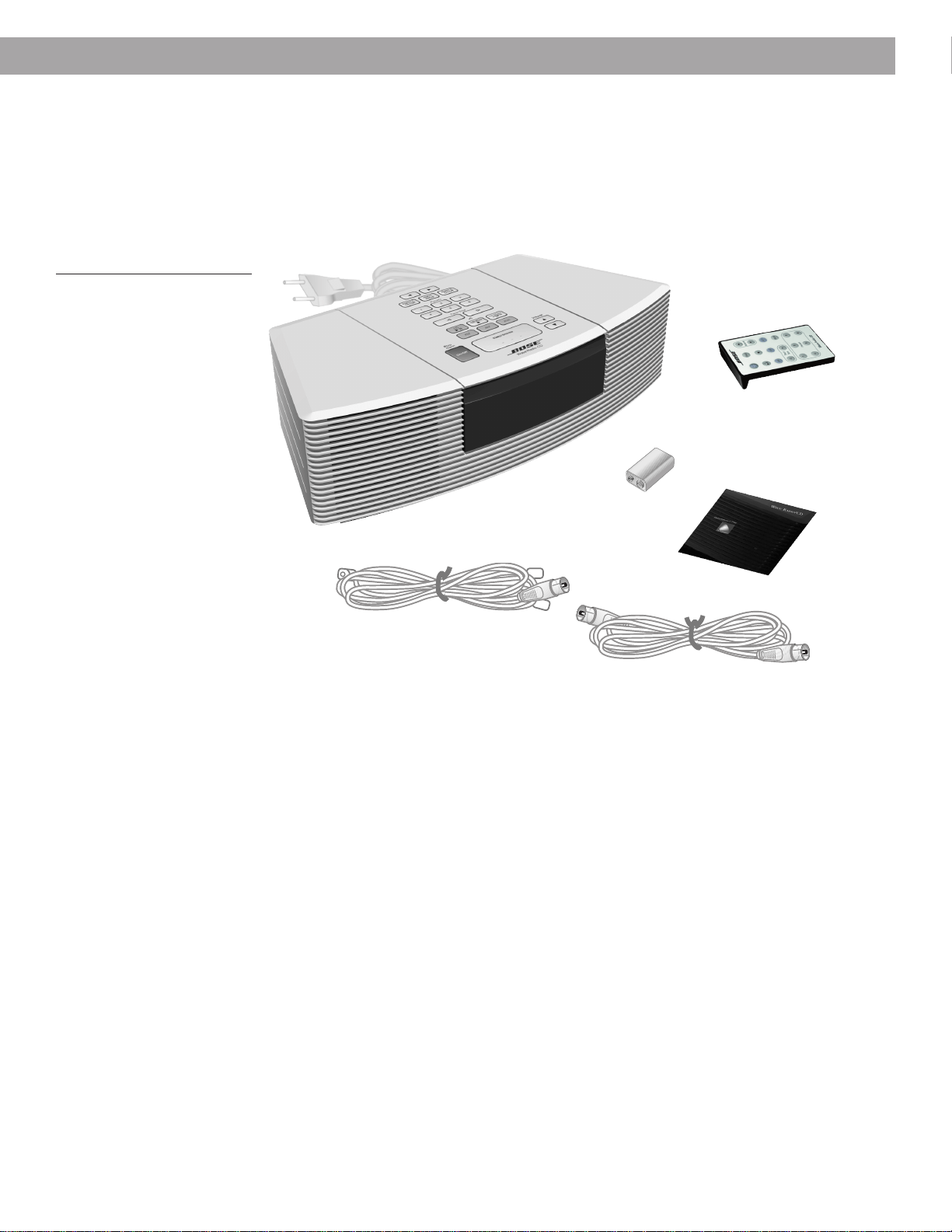
Check to be sure your Wave
®
radio/CD contains the parts identified in Figure 1.
Figure 1
What comes with your
Wave
®
radio/CD
Remote control
9V battery
Selecting a location for your Wave
®
radio/CD
Please keep these guidelines in mind when selecting a location for your system:
• Place the Wave
®
radio/CD on a table or other flat surface.
• Do not place it on a metal surface or table that could interfere with AM reception.
• Do not place it on a heat-sensitive surface. Like all electrical equipment, it generates some
heat.
• Do not use the system in a damp location. It is important to prevent moisture from getting
into the unit.
• Keep it at least 12 inches (30 cm) from a television, computer, or other monitor to prevent
picture quality interference.
• Locate it within 2 feet of a wall for the best bass performance.
• Place it across the room from where you will be listening to enjoy maximum performance
from the Wave
®
radio/CD.
Feel free to place and position it where you find the sound most pleasing.
Wave
®
radio/CD
Demonstration CD
FM Antenna
Coaxial cable
®
6
English
Setting Up
Installing the battery
The 9-volt battery maintains clock and alarm settings and operates the Wave
®
radio/CD’s
backup alarm system for up to 24 hours, during a power loss or while the system is tempo-
rarily unplugged. Operating without this battery leaves the memory unprotected, but will not
harm the product.
Use a standard 9V battery (IEC 6F22 in Europe), available at most retail stores. Use an
alkaline battery for longer backup time.
Note:
The battery does not provide power for Wave
®
radio/CD operation or for the display.
CAUTION:
Do not remove the tape from the top front of the system. It prevents the CD door
from opening accidentally when you turn the system over.
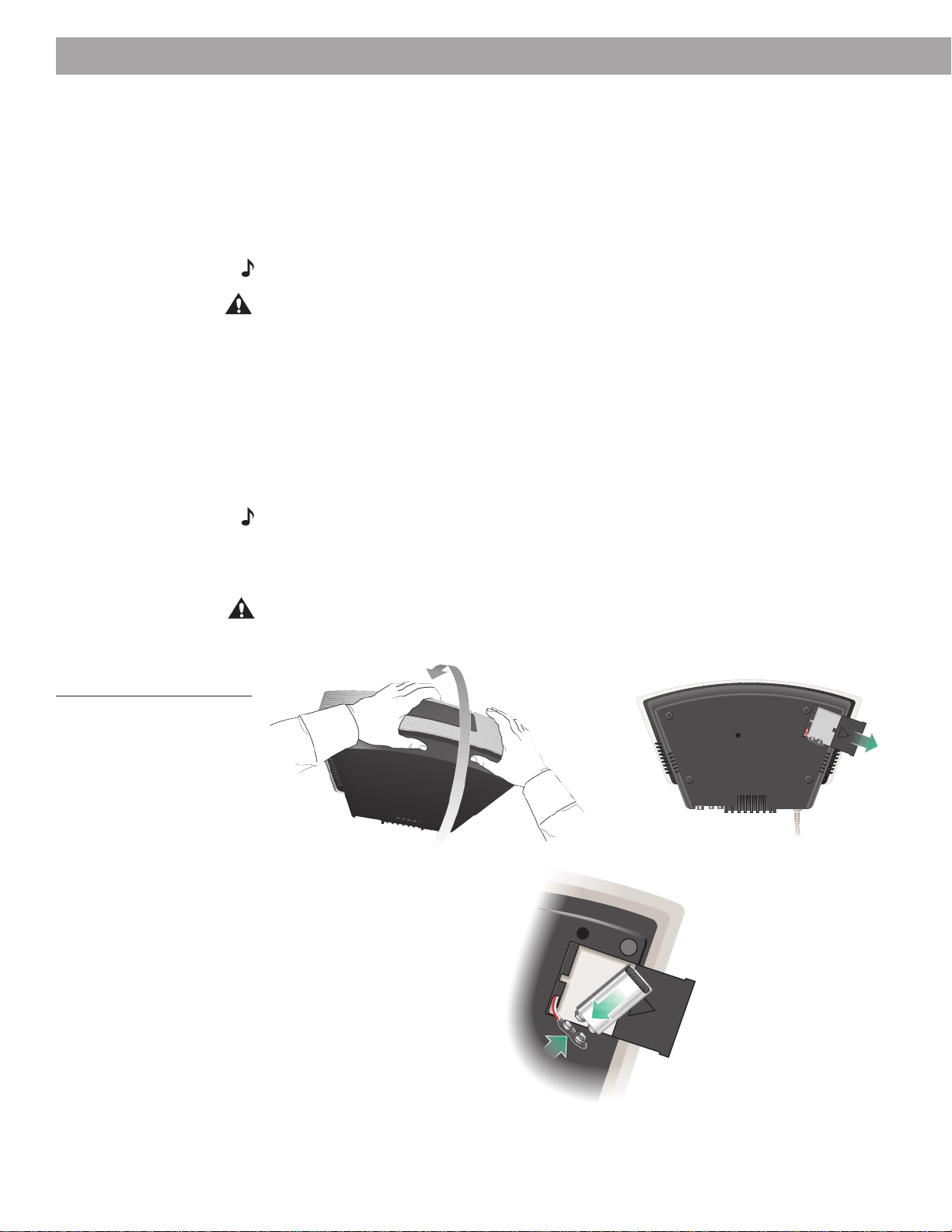
1. Carefully turn your system upside down.
2. Locate the battery compartment on the bottom (Figure 2).
3. Press the arrow on the cover to slide the compartment open.
4. Match the large (–) terminal on the battery to the small terminal on the clip (which lifts out
of the compartment for easier connection).
5. Snap the terminals together firmly.
6. Slide the cover closed.
Note:
Now is a good time to record the serial number found on the bottom of your system.
Write it on your warranty card and in the space provided on page 3.
7. Turn the system right side up.
8. Remove the tape from the top front of the system.
CAUTION:
After you remove the tape, be sure to remove any CD in the sytem
before
turning the system over again. With no tape in place, the CD cover opens freely whenever
the system is turned upside down, so a CD could fall out and be damaged.
Figure 2
Installing the battery
–+
7
English
Connecting the power cord
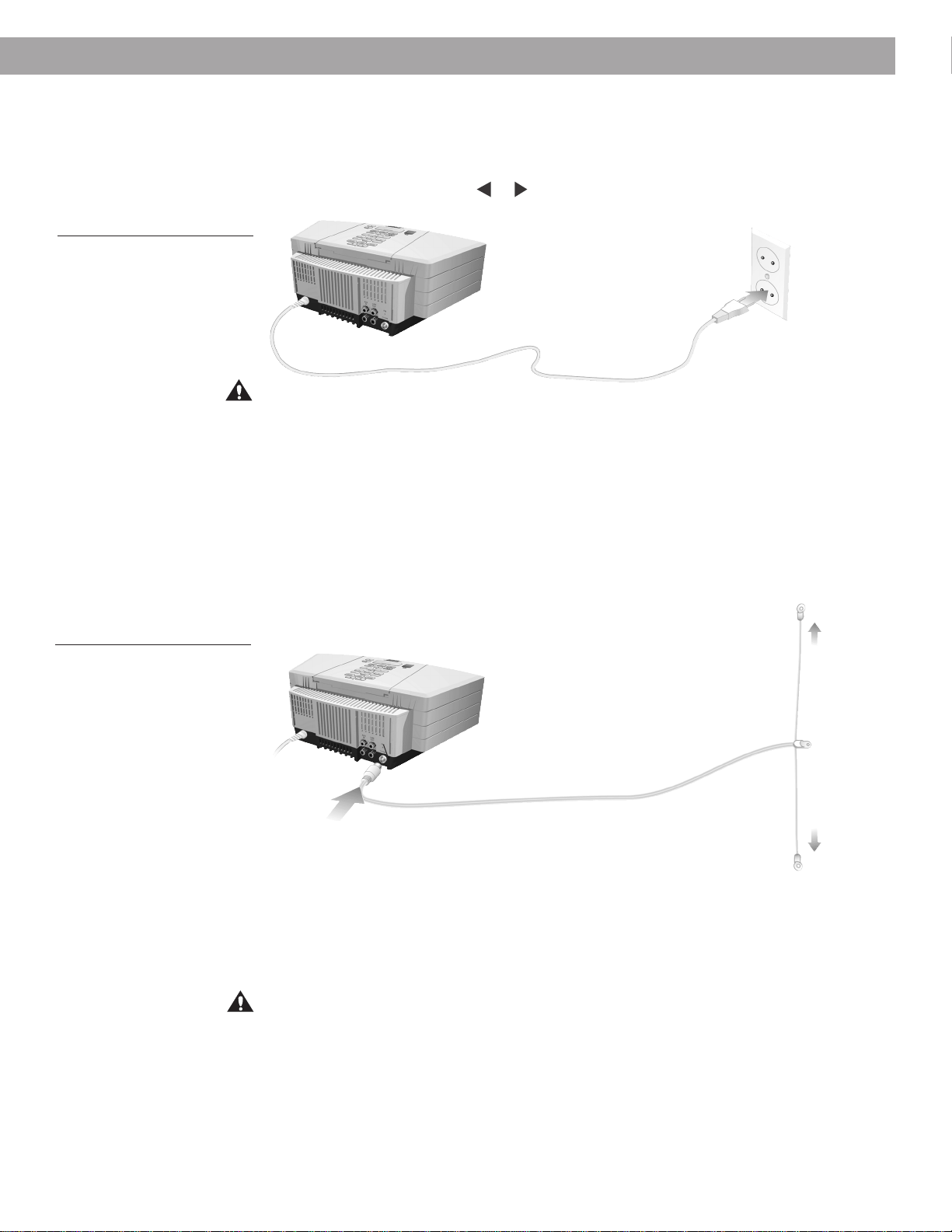
1. Plug the power cord into an electric outlet (Figure 3). The display panel lights, and the time
display begins flashing.
2. Press and hold either Time
or button to stop the flashing and set the time.
Figure 3
Connecting the power cord
Setting Up
Connecting the FM antenna
1. Plug the FM antenna into the FM 75Ω EXTERNAL connector on the back of the radio
(Figure 4).
2. For best FM tuning performance, straighten the antenna and extend the arms as far away
from the radio as possible. Avoid placing the antenna next to a metal surface. See the
recommended antenna orientation in Figure 4.
Figure 4
Connecting and setting up the
FM antenna
Connecting the coaxial cable
If you subscribe to cable radio or have a connection for an outdoor antenna, you can use the
coaxial cable to connect to the radio.
1. Plug the coaxial cable into the FM 75Ω EXTERNAL connector on the back of the radio
(Figure 4).
2. Connect the other end of the coaxial cable to the outlet in your wall.
CAUTION:
Be certain that the installation includes a signal splitter so that only the FM band,
and not the cable TV band, is transmitted to the radio. It is necessary to use a splitter that
filters the signal to prevent any re-emissions of the TV spectrum through the radio.
FM 75Ω EXTERNAL connector
CAUTION: Bose recommends using a quality surge suppressor on all electronic equipment.
Voltage variations and spikes can damage electronic components in any system. A quality
suppressor, which can eliminate the vast majority of failures attributed to surges, may be
purchased at electronic stores.
8
English
Setting Up
Installing the remote control battery
WARNING:
Mishandling the remote control battery may cause a fire or chemical burn. Keep
the battery away from children. Do not recharge, disassemble, heat above 212˚F (100˚C), or
incinerate the battery. Dispose of the used battery promptly and responsibly.
Your remote control battery may already be installed. If you need to install or replace the
battery follow the instructions below:
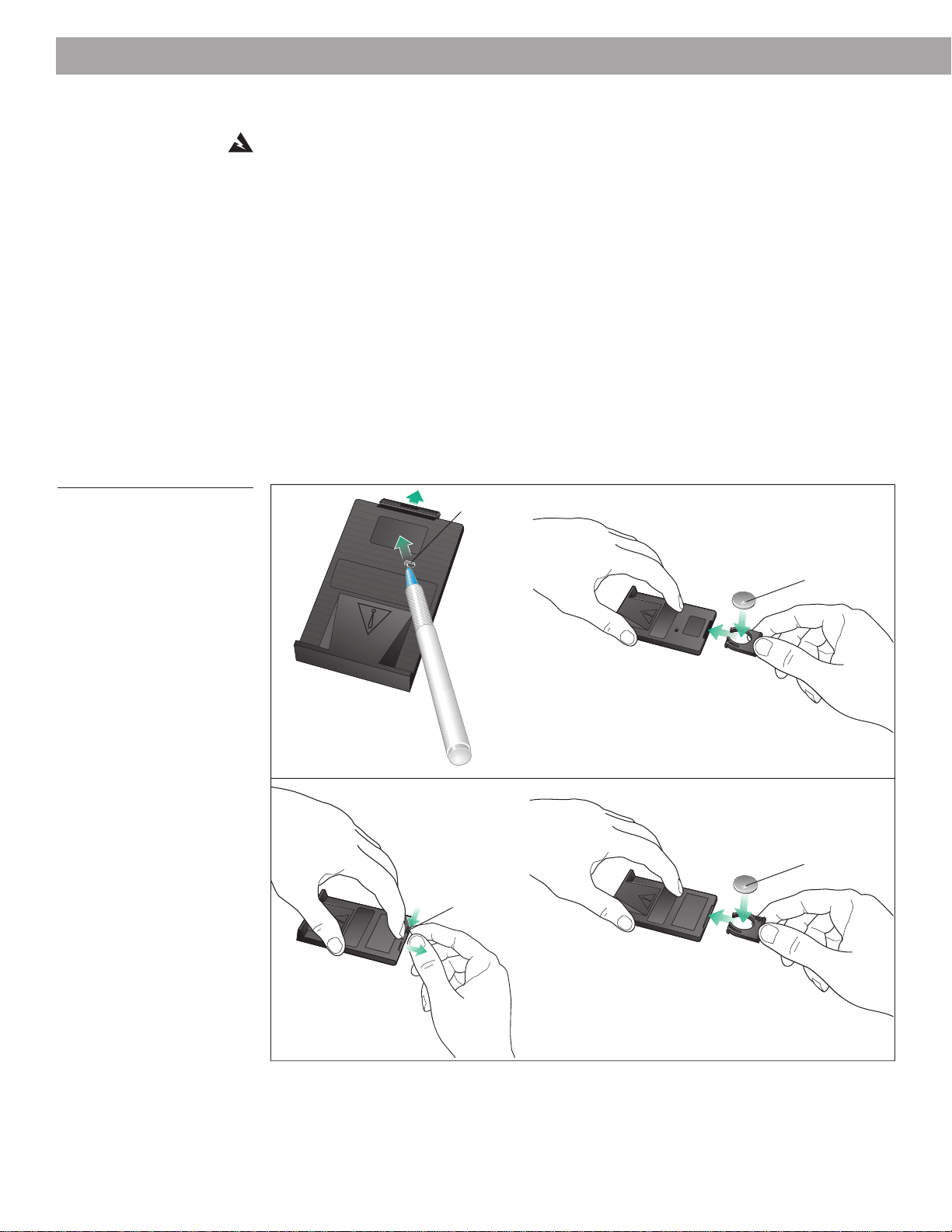
Your remote control may be one of two types (Figure 5A or 5B). Each is identified by the way
the battery compartment unlocks.
1. Place the remote control face down on a flat surface.
2. If your remote has a slot on the back (Figure 5A), follow step A. Otherwise, follow step B
and refer to Figure 5B:
A. Insert the tip of a ballpoint pen into the slot. Push to the side as shown and hold. Slide
the battery compartment open with your finger (and, if necessary, remove the battery).
B. Using your finger, push the tab lock to the side as shown and hold. Slide the battery
compartment open (and, if necessary, remove the battery).
Figure 5A or 5B
Installing the battery
See operating
instructions for types of
battery to be used
See operating
instructions for types of
battery to be used
See operating
instructions for types of
battery to be used
See operating
instructions for types of
battery to be used
A
B
Slot
+ Symbol
Tab
+ Symbol
9
English
Note:
Use only a Duracell, Eveready, Maxell, or Toshiba CR2032 or DL2032 lithium battery
(available at electronics stores). If you have difficulty finding a replacement battery, contact
Bose
®
Product Support (see phone numbers on the inside back cover).
3. Keeping the remote control face down, insert the new battery into the compartment with
the + symbol facing up.
4. Gently slide the battery compartment closed. It locks automatically.
Caution:
Danger of explosion if battery is incorrectly replaced. Replace only with the same
or equivalent type.
Setting Up
10
English
Setting Up
Connecting other components as an option
You can use your Wave
®
radio/CD to improve the sound of a TV, VCR, computer, or tape player.
Or use it as extension speakers for a Bose
®
Lifestyle
®
music system. Connect one of these
components to the R (right) and L (left) AUX IN jacks.
To play your radio or CD player through external speakers, connect powered speakers with an
independent volume control to the system’s R (right) and L (left) LINE OUT jacks. Audio cables
for these connections are available at electronics stores.
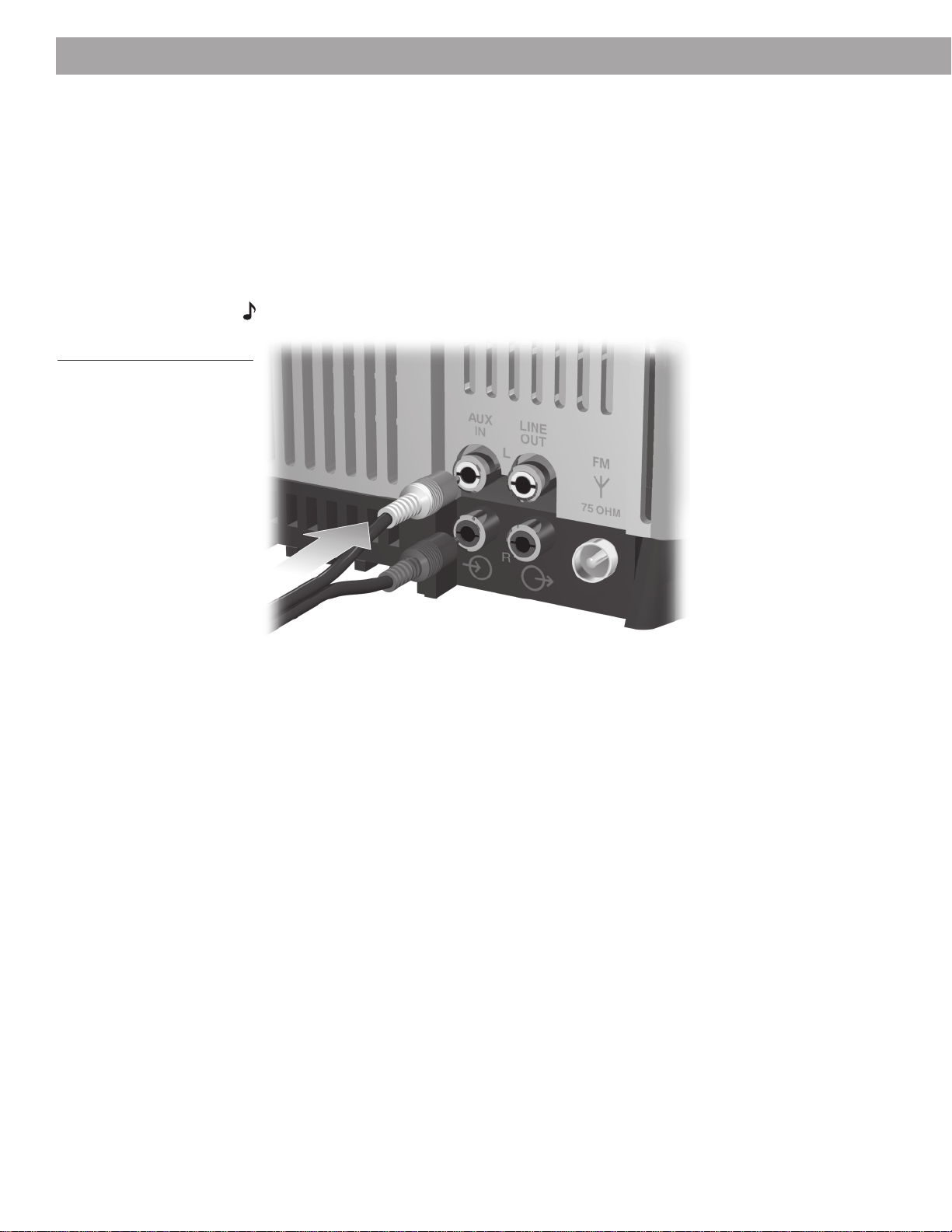
Most audio cables are color coded. Match the red plug to the R (red) jack and the black or
white plug to the L (white) jack (Figure 6).
Note:
Connecting external speakers does not shut off the Wave
®
radio/CD’s speakers.
Figure 6
Connecting another component
Using other components
Select your TV, VCR, computer, or tape player, or other auxiliary source by pressing the AUX
button. Adjust the listening volume with the Wave
®
radio/CD volume buttons. Control all other
functions, including on and off, at the source, referring to its owner’s manual, if necessary. An
auxiliary component cannot be selected as the alarm sound source.
Control your auxiliary powered speakers from the Wave
®
radio/CD. Use the volume control on
the powered speakers to adjust the volume level.
11
English
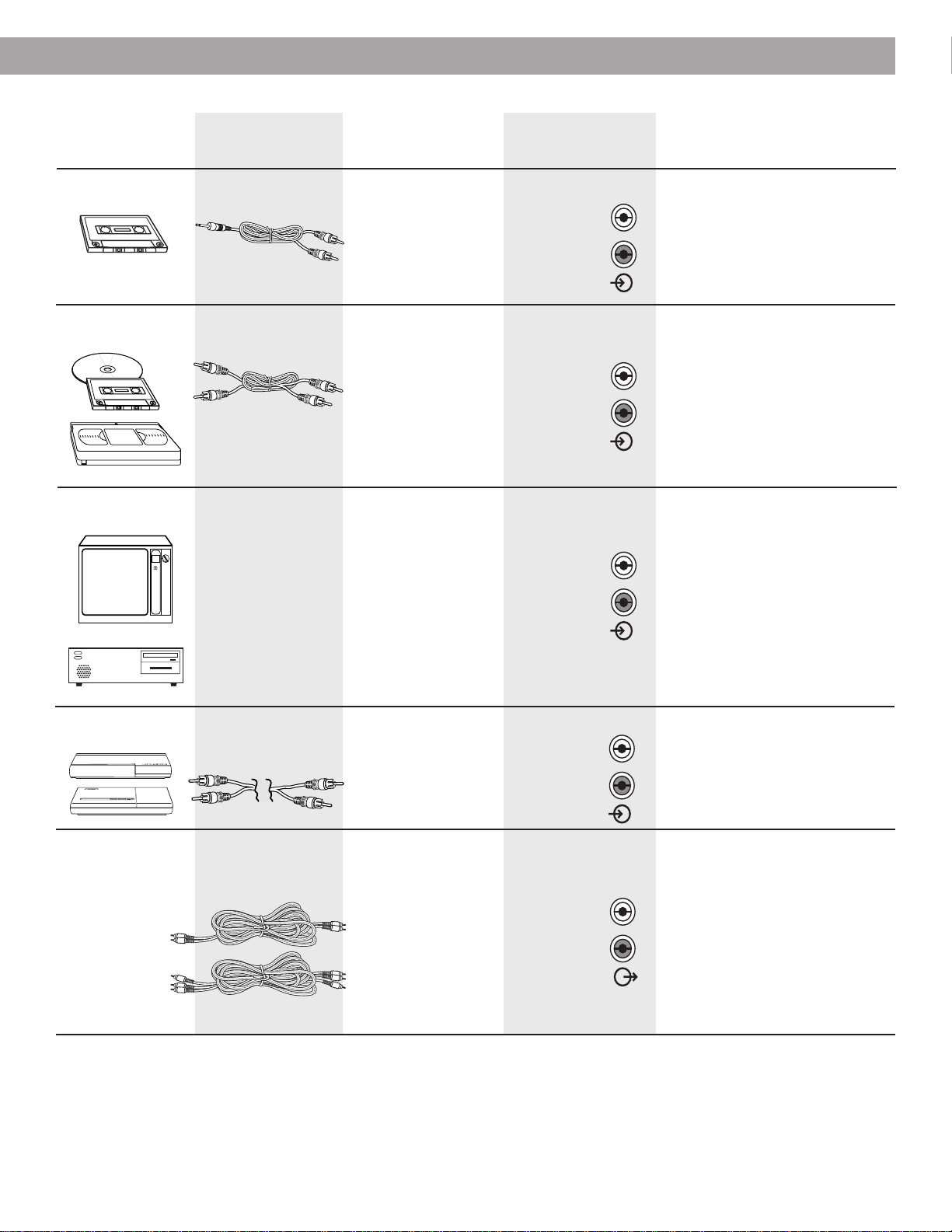
CD changer, tape
deck, or VCR
Audio output jacks
If there are two sets of
outputs (fixed and
variable), use fixed, so
that the volume can
be controlled from the
Wave
®
radio/CD.
AUX IN jacks
Television or
computer
Audio output jacks
If there are two sets of
outputs (fixed and
variable), use fixed, so
that the volume can
be controlled from the
Wave
®
radio/CD.
AUX IN jacks
Stereo cable with
male-to-male RCA
plugs
AUX IN jacksBose
®
Lifestyle
®
music system
Powered speakers
with volume
control
Speaker system input
(as described in the
speaker owner’s
manual)
LINE OUT jacks
Headphone jack
For best sound, set
the player volume
control to approxi-
mately
3
/
4
of maximum
volume.
Portable tape player
AUX IN jacks
One miniplug-to-
stereo audio cable
Use the audio input
cable that came with
your speakers.
If your powered speaker audio input
cable has three connectors on each
end, use only the two connectors that
look alike to connect to the Wave
®
radio/CD outputs. DO NOT USE THE
THIRD CONNECTOR.
Connecting speakers to the LINE OUT
jacks (fixed output) does not shut off
the Wave
®
radio/CD speakers, although
they can be muted while listening to
the external speakers.
Setting Up
®
Connection at Connection at
Component Cable component Wave
®
radio/CD Note
Use a standard RCA
cable for a TV with
stereo output jacks.
Use a standard Y
adapter for a TV with a
single (mono) audio
output jack.
You may need a special
adapter (such as a
miniplug stereo audio
cable) for a TV with a
headphone outlet.
TAPE (REC) jacks
One stereo audio
cable
You can record from your Wave
®
radio/CD using the connections from
the LINE OUT jacks.
To make sure the sound seems to
come from the screen, place the
Wave
®
radio/CD within a few feet of
the TV. If there is any interference
with the TV picture, move the Wave
®
radio/CD farther away.
CAUTION:
To prevent interference
with the screen image, keep the
Wave
®
radio/CD at least 12 inches
from the TV, a computer, or other
monitors.
AUX
IN
L
R
AUX
IN
L
R
AUX
IN
L
R
AUX
IN
L
R
L
R
LINE
OUT
®
®
®
12
English
On
Off
Sleep
CD
FM AM
AUX
Track
Tune
Volume
Mute
123
456
Wave
Radio/CD
Presets
Operating Your Wave
®
radio/CD
Using the remote control
You can use the remote control to operate the most frequently used functions of the radio,
CD player, and alarms. Aim the remote control at the display of your Wave
®
radio/CD. Use the
remote buttons in the same way you use the system control panel.
The remote normally works up to 20 feet in front of the system, and 6 feet to either side.
Replace the remote control battery when it stops operating, or its range seems reduced
(normally every year or two). Keep in mind that lighting and other room conditions, in addition
to battery age, can affect the operating range of an infrared remote control.
You cannot use the remote control to set the time, alarms, CD random and repeat, or radio
presets, nor to customize the display.
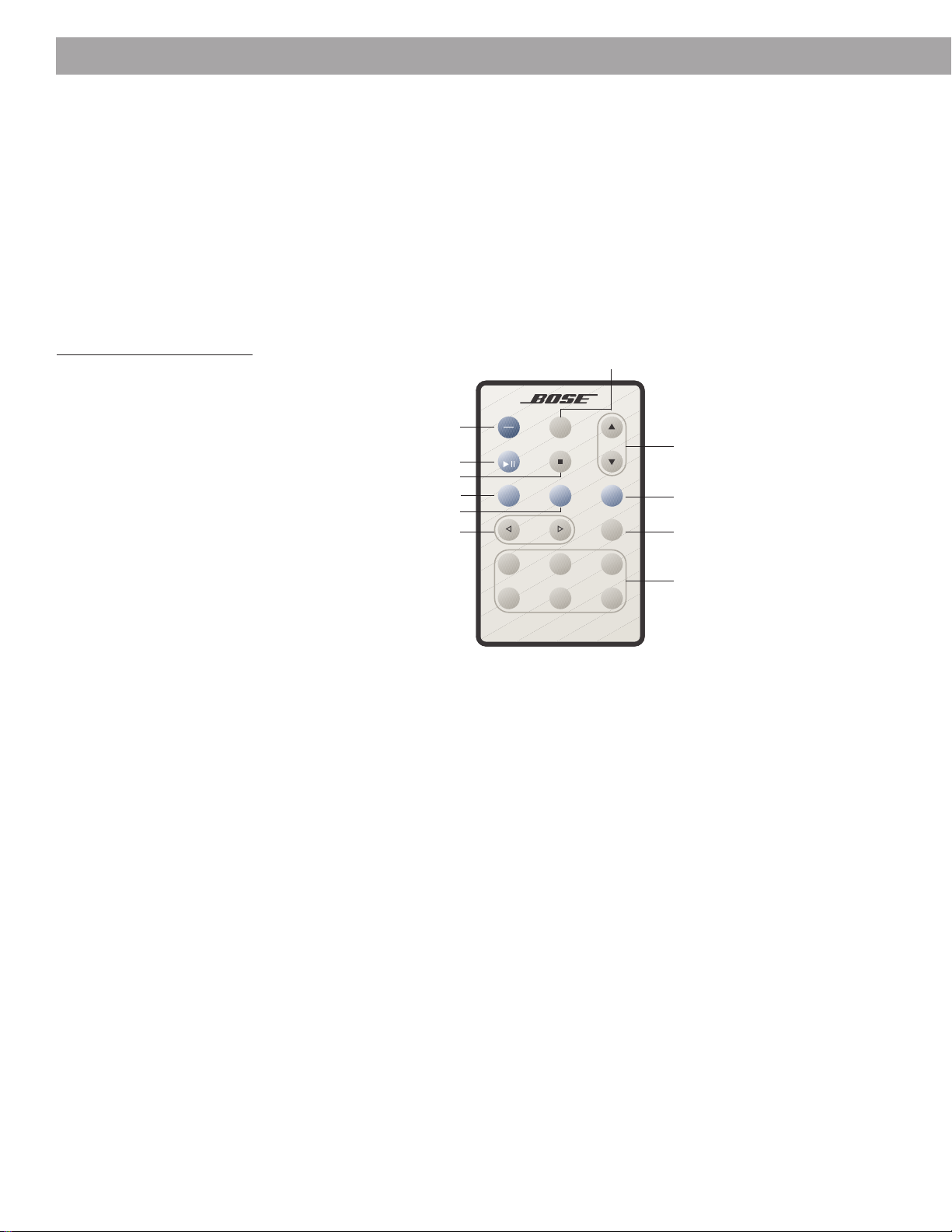
Figure 7
The Wave
®
radio/CD remote
Turns the system on/off,
deactivates the alarm
Raises or lowers volume
Turns system on and sets sleep time,
snoozes (delays) the alarm
Turns on and selects a preset station
Tunes radio, skips or scans CD Mutes/unmutes the system
Turns on CD play or pauses CD
Stops CD
Turns on AUX mode
Turns on FM
Turns on AM
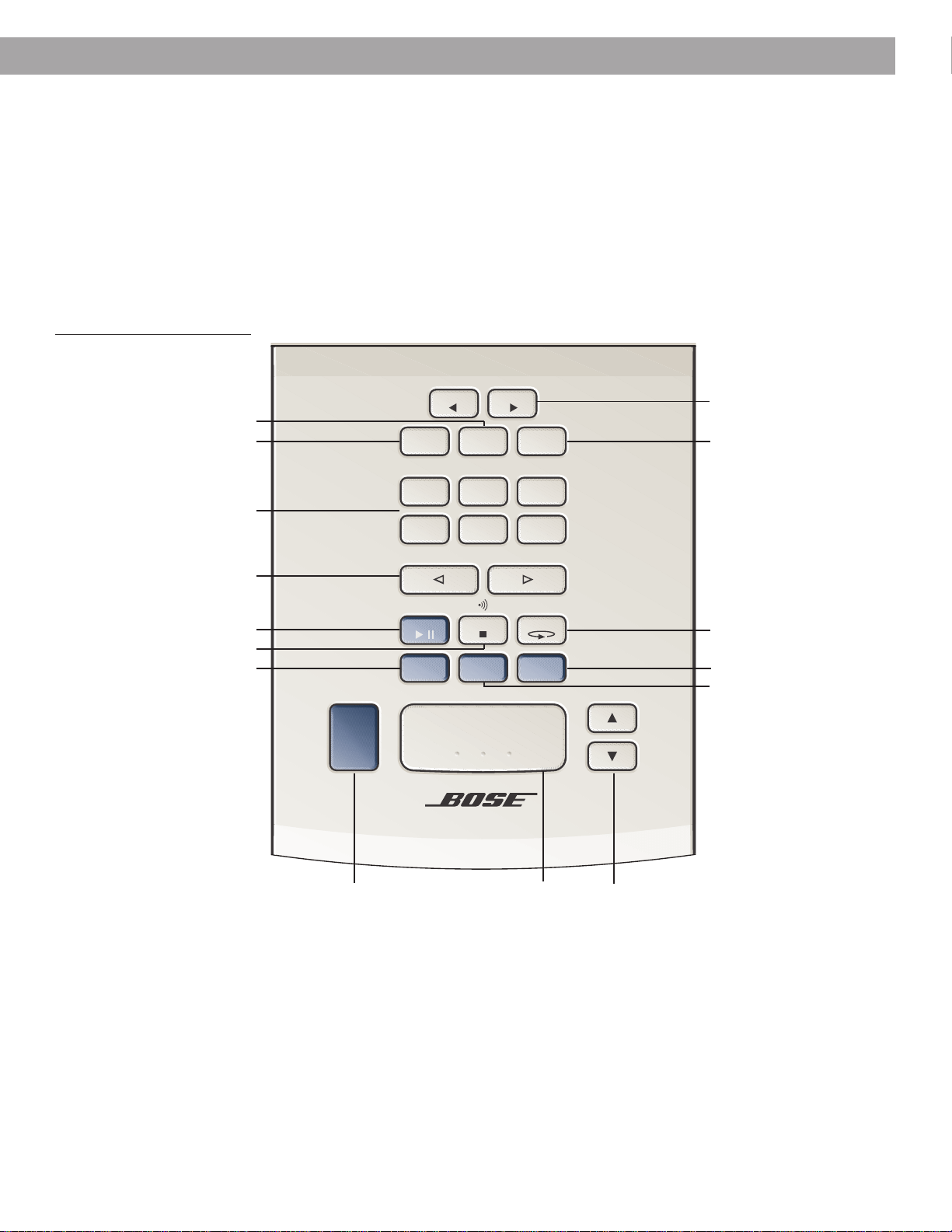
13
English
Presets
Volume
AUX
On/Off
Alarm
Setup
456
Track/Tune
Sleep/Snooze
Wave Radio/CD
Alarm 1
On/Off
Alarm 2
On/Off
123
FM AM
Stop
Alarm
CD Play CD ModeCD Stop
Time Time
Using the Wave
®
radio/CD control panel
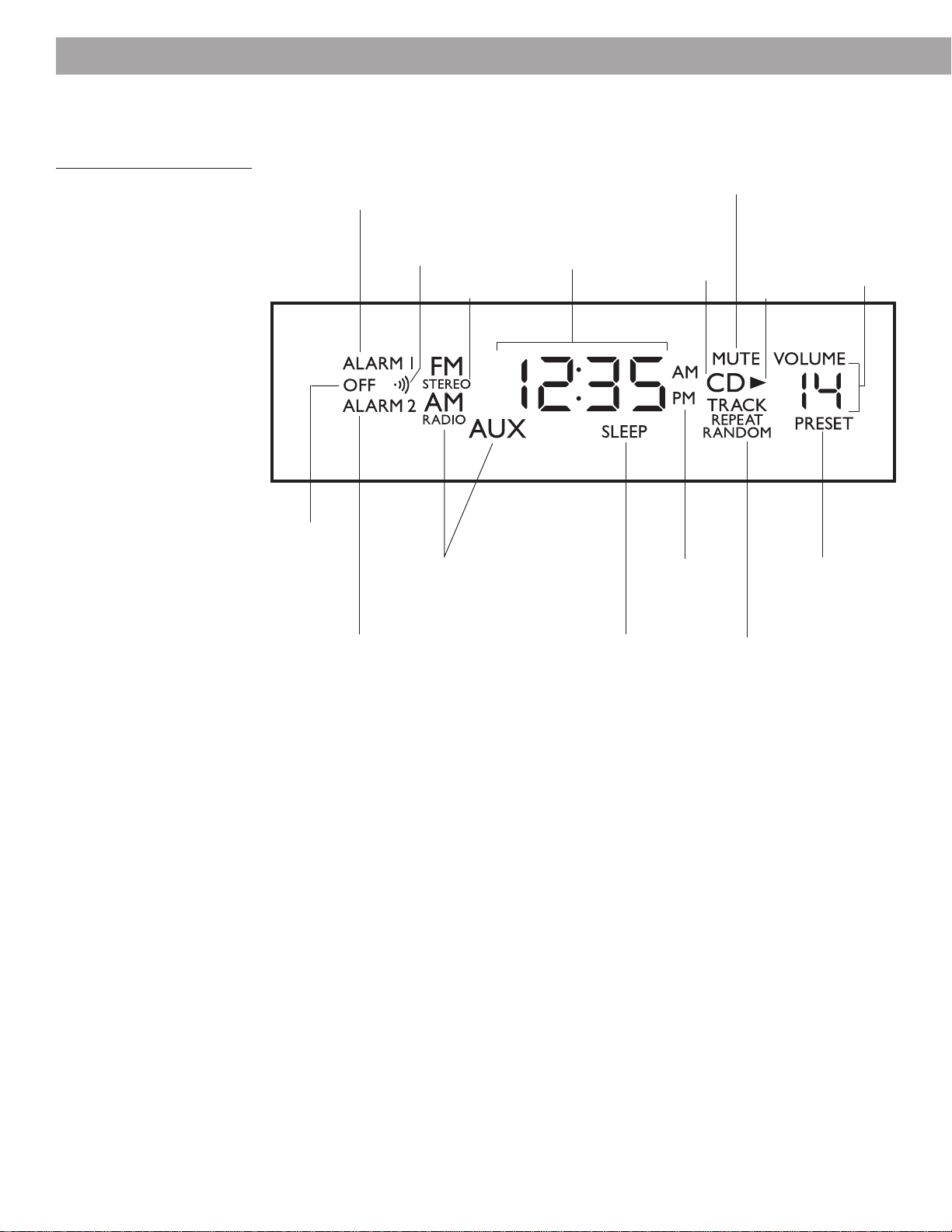
In addition to controlling the most frequently used functions of the radio, CD player, and
alarms, control panel buttons allow you to set the time, alarms, CD mode, and radio presets
(Figure 8).
Using button combinations on the control panel gives you access to additional special
features (such as customizing the display and programming the CD player). For details, refer
to “Quick Reference to Special Functions” on page 25.
Three raised dots on the Sleep/Snooze button of the control panel help you locate this
frequently used button.
Figure 8
The Wave
®
radio/CD
control panel
Sets the time
Enters Alarm 1 and 2 setup mode
Turns Alarm 1 on/off
Selects CD random/repeat
Turns system on/off,
deactivates the alarm
Raises or lowers
volume
Turns system on and
sets sleep time,
snoozes (delays) the alarm
Turns on radio and stores/selects
a preset station
Tunes radio, skips or scans CD
Turns on CD play or pauses CD
Stops CD, turns tone alarm on/off
Turns on AUX (auxiliary mode)
Turns on FM
Turns on AM
Turns Alarm 2 on/off
Operating Your Wave
®
radio/CD
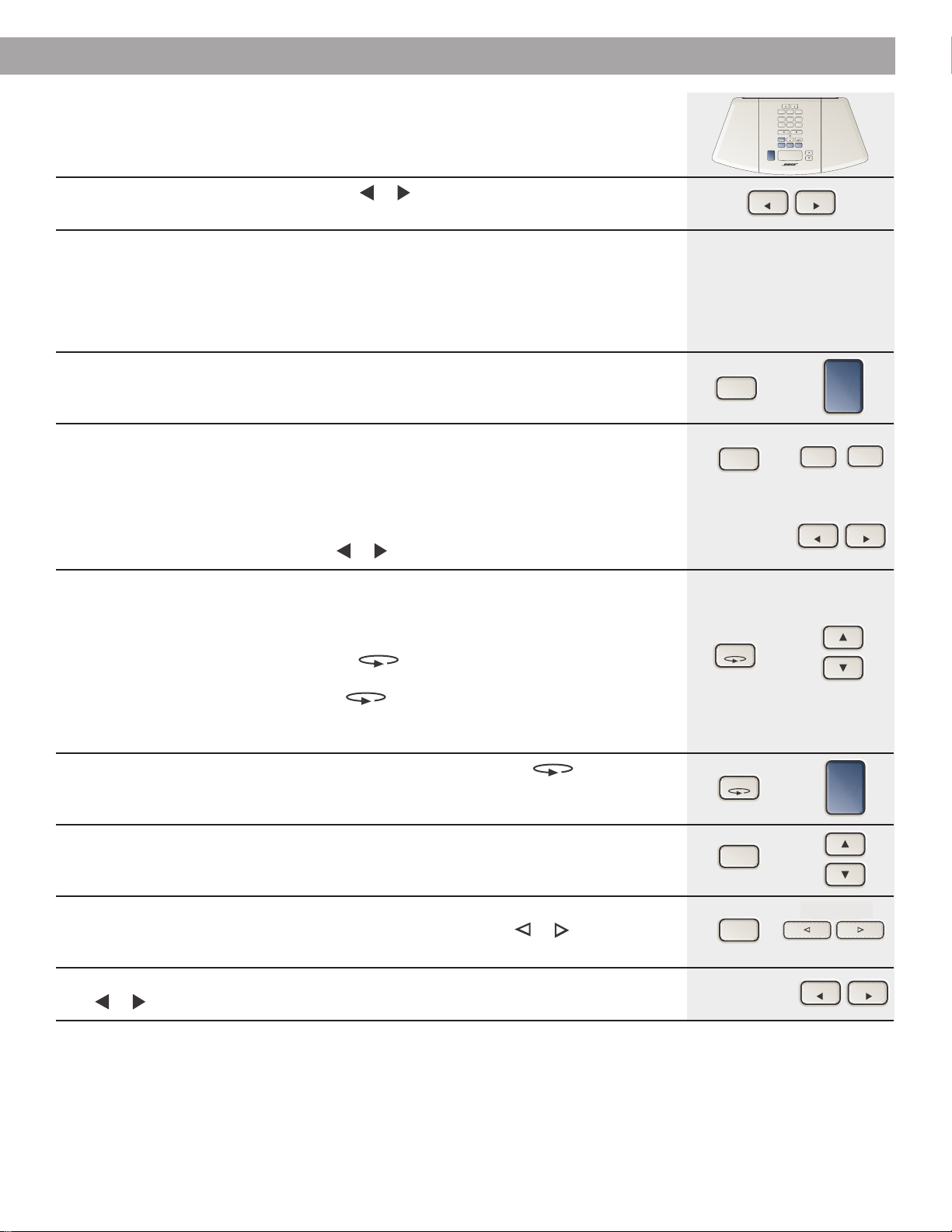
14
English
Reading the Wave
®
radio/CD display
Figure 9
The Wave
®
radio/CD display
Lights when Alarm 1 is
activated, flashes while
setting Alarm 1, and when
going off
Indicates
AM or PM
Operating Your Wave
®
radio/CD
Indicates that sleep
or nap timer is
selected
Shows current time,
alarm time, sleep
time, snooze time,
nap time, AM/FM
frequency, CD time,
CD program item,
battery level
Lights when Alarm 2 is
activated, flashes while
setting Alarm 2, and when
going off
Indicates the
selected source
Indicates the
Alarm 1 or 2
status in
setup mode,
shows nap
timer is on
Indicates
tone alarm
is set or
going off
Flashes when
MUTE is
selected
Indicates which
CD play mode is
selected
Indicates
CD is the
selected
source
Lights
when CD is
playing,
flashes for
pause or
low battery
Shows
volume,
FM or AM
preset
number,
CD track
number,
brightness
level
Lights for
presets and CD
programming
Indicates
stereo reception
15
English
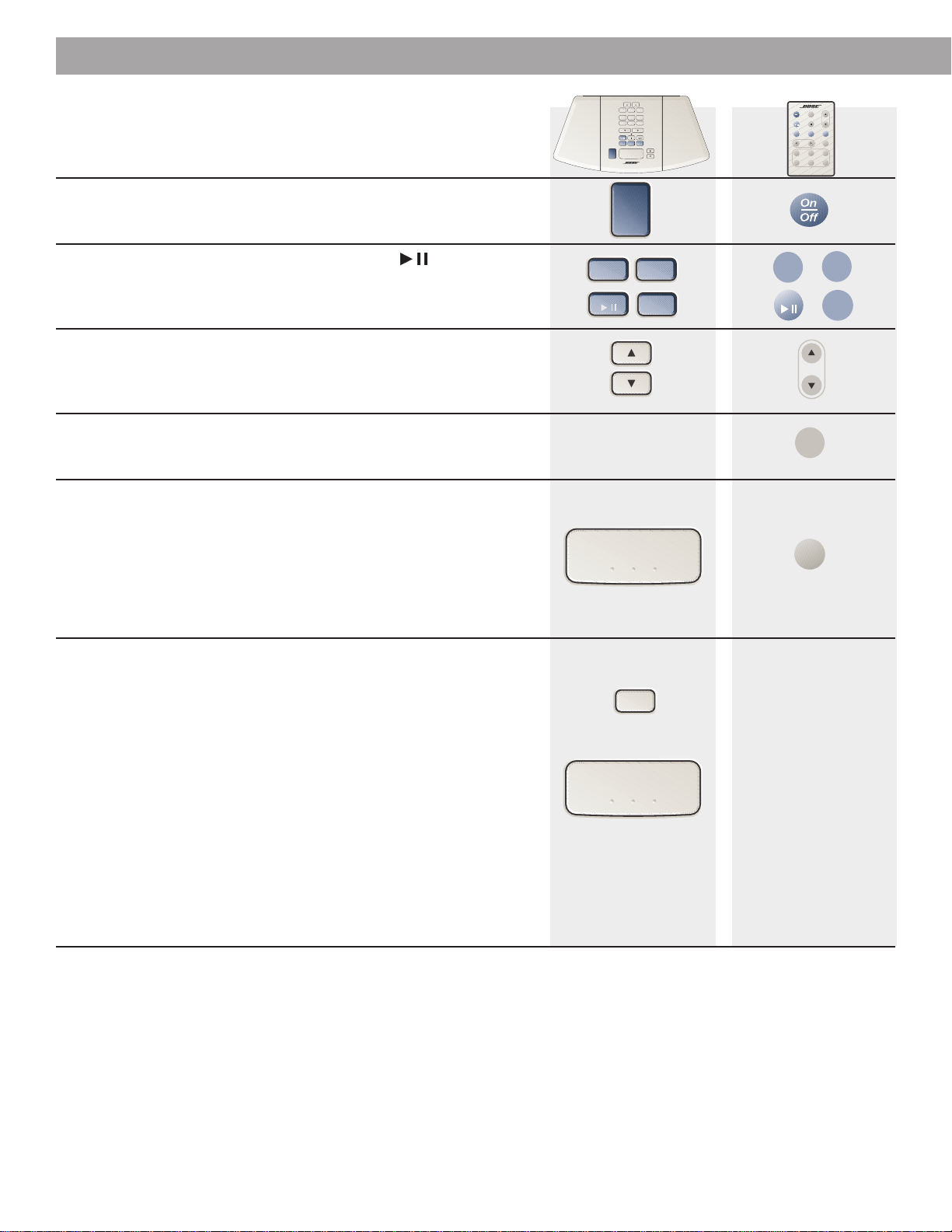
Setting the time
Function
To set the clock - Hold down either Time or button or press the same one twice.
The time display changes slowly at first, then faster. Release the clock set button to stop.
Customizing the display
Function
To set AM/PM (12 hour) or Military (24 hour) time - With the system off, hold
down Alarm Setup and press On/Off to switch between AM/PM (12 hour) and Military
(24 hour) time formats.
To select clock or source display mode -
With the system on,
hold down
Alarm
Setup and press either Preset 1 to select clock display or Preset 2 to select source display.
• In clock display mode, the display shows the time while you are listening to the radio, CD,
or AUX.
• In source display mode, the display shows information about the selected source (radio,
CD, or AUX).
• In source display mode, press the Time or to show the time momentarily.
To adjust the display brightness - The display dims automatically to medium or low
brightness, as appropriate for low-light room conditions. You can adjust the brightness
setting of the display for both strong light and lowest light environments, but not for the
medium light setting. Turn the system off before setting brightness levels.
• In a strongly lit room, hold down CD Mode and press Volume ▲ or ▼ to adjust the
setting between 5 and 9 (it is preset to 8).
• In a barely lit room, hold down CD Mode and press Volume ▲ or ▼ to adjust the
setting between 1 and 5 (it is preset to 2).
• If you do not want the system to dim automatically, set both levels to 5.
To turn off the display - With the system off, hold down CD Mode and press
On/Off to turn off the main display. The display only lights briefly when you press any
button or while the alarm is sounding. Repeat this step to turn the main display back on.
To check the volume setting when it is not displayed - With the system off or
on, hold down Alarm Setup and press Volume ▲ or ▼ to see the current volume setting.
To check the CD time or radio station frequency when it is not displayed -
With the system on, hold down Alarm Setup and press Track/Tune or to see the CD
time or station frequency.
To check the time when it is not displayed - With the system on or off, press the
Time or briefly to see the current time.
Operating Your Wave
®
radio/CD
Control panel
Time Time
Alarm
Setup
On/Off
Time Time
Alarm
Setup
Alarm
Setup
Track/Tune
On/Off
CD Mode
CD Mode
Hold
and
Press
Time Time
Presets
Volume
AUX
On/Off
Alarm
Setup
456
Track/Tune
Sleep/Snooze
Wave Radio/CD
Alarm 1
On/Off
Alarm 2
On/Off
123
FM AM
Stop
Alarm
CD Play CD ModeCD Stop
Time Time
Alarm
Setup
2
1
Track/Tune
Track/Tune
16
English
Operating Your Wave
®
radio/CD
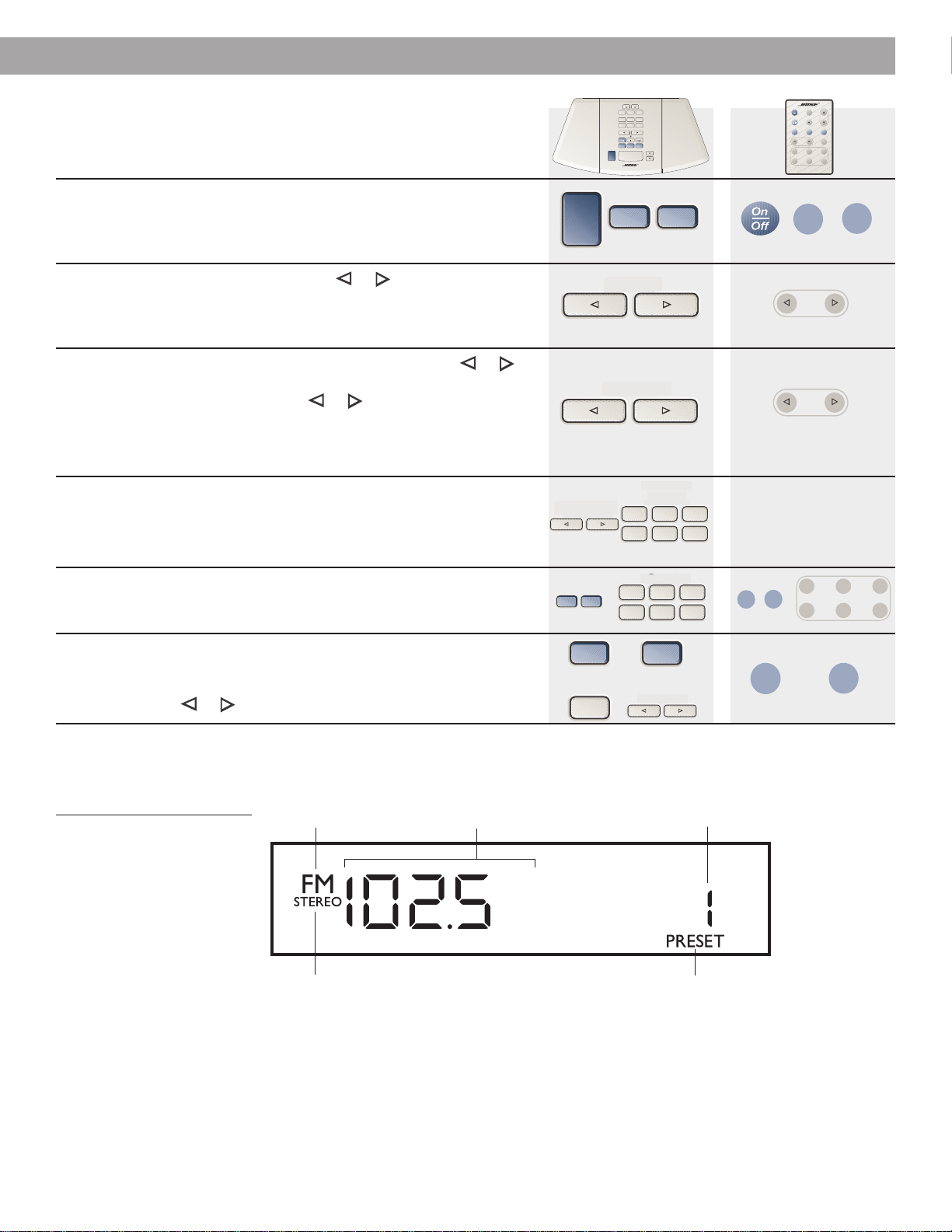
Controlling the system
Function
To turn on/off - Press On/Off once to turn on or off. The system turns
on to the last source played.
To select a source - Press FM or AM, CD Play , or AUX.
To listen to a component connected to AUX, be sure to turn on the
component. Pressing AUX does not turn on the component.
To adjust the volume - With the system on or off, press and hold
either button to reset the volume. The display shows the volume level,
from 0 (silent) to 99 (loud). With the system off, the maximum volume
you can preset is 70.
To mute the sound - Using the remote control only, press Mute to
silence the system. Press again to restore volume.
To shut off automatically - Press Sleep⁄Snooze or Sleep to set
sleep time (timed shutoff).
• When sleep time is first set, the display shows :I0 (minutes).
• Press again, or press and hold, to increase the sleep time by
10-minute increments, up to :90. After :90, the next press returns to the
sleep OFF setting, then begins again at :I0.
• Your selected sleep time is held in memory for the next use of both
sleep and nap timer.
To turn on automatically (as a nap timer) - Before setting the
nap timer, select your source and make sure that a radio station is tuned
in or a CD is in the player. Then, on the control panel only, hold down
Alarm Setup and press Sleep⁄Snooze to set the nap timer (to count
down and turn system on).
• The system is silenced and the display shows either – :I0 (minutes) or
the last used nap or sleep time.
• Each additional press (or press and hold) of Sleep⁄Snooze adds 10
minutes, up to – :90. The next press returns to the nap timer OFF
setting.
• You can check the time remaining by holding down Alarm Setup and
pressing Sleep⁄Snooze once.
• After the time counts down, the most recently selected source turns
on.
• Your selected nap time is held in memory for the next use of both
sleep and nap timer.
On/Off
Volume
FM
AM
FM AM
Sleep/Snooze
Sleep
AUX
Mute
AUX
CD Play
CD
Sleep/Snooze
Alarm
Setup
Hold
and
Press
On
Off
Sleep
CD
FM AM
AUX
Track
Tune
Volume
Mute
123
456
Wave
Radio/CD
Presets
Remote control
Presets
Volume
AUX
On/Off
Alarm
Setup
456
Track/Tune
Sleep/Snooze
Wave Radio/CD
Alarm 1
On/Off
Alarm 2
On/Off
123
FM AM
Stop
Alarm
CD Play CD ModeCD Stop
Time Time
Control panel
17
English
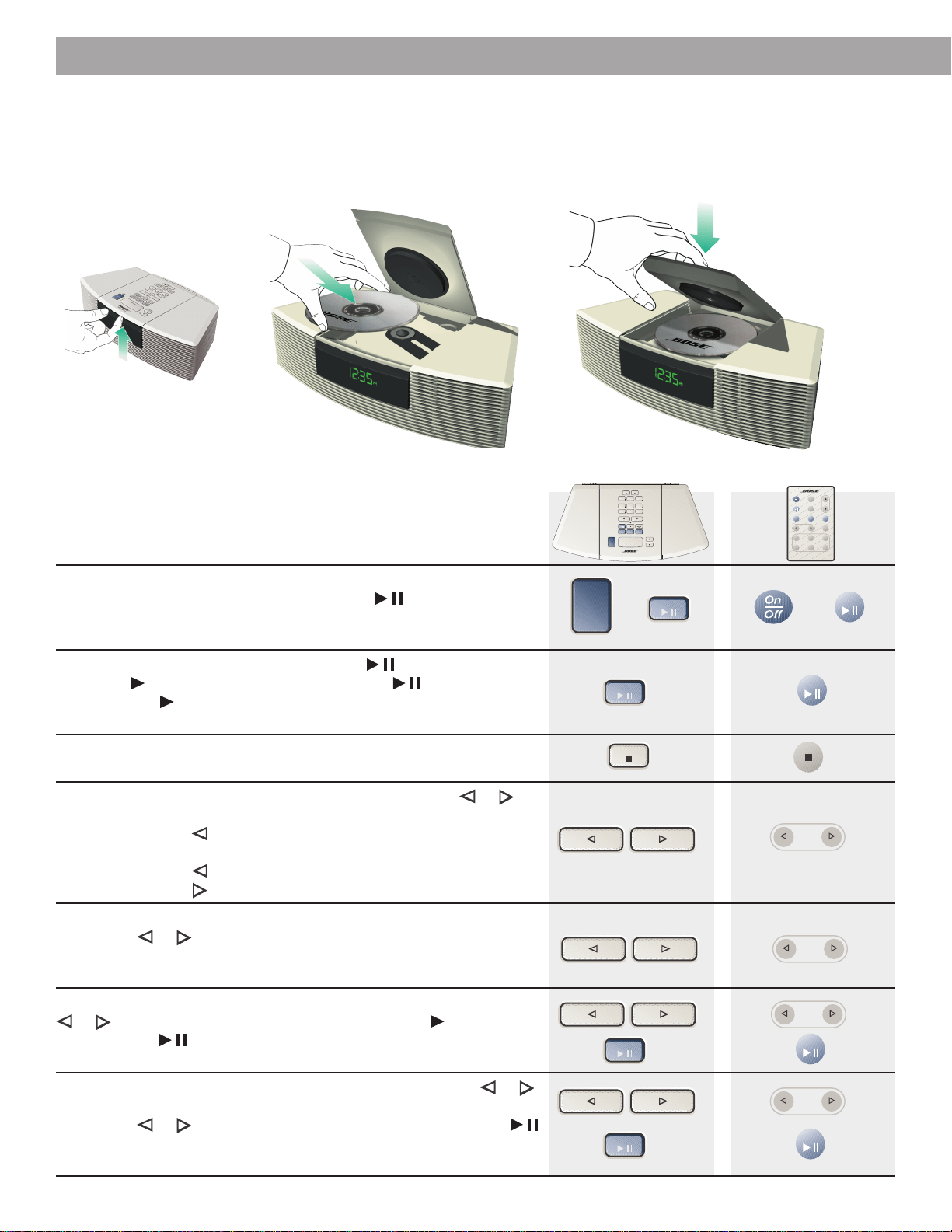
Using the radio
Function
To turn the radio on/off - Press On/Off once to turn on or off. The
system turns on to the last source played. Or, press FM or AM or any
Preset to turn the radio on.
To seek a station - Press Track/Tune or once to tune in the
next strong station. Repeat to locate a station you prefer. After manually
tuning (see below), wait 2 seconds for the system to return to seek
mode.
To manually tune in a station - Tap either Track/Tune or
button quickly two or more times to tune the frequency in small steps.
Or, press and hold either Track/Tune or button until the desired
station is reached. Then, you can press the button to adjust the fre-
quency in small steps. After manually tuning, wait 2 seconds for the
system to return to seek mode.
To preset up to 6 AM and 6 FM stations - Use the Track/Tune
buttons to find the desired station. Then, on the control panel only, hold
down any Preset button until the preset number lights. The station is
now preset to that number.
To select a preset station - Change to FM or AM, if needed. Press
the Preset button for the station you want.
To display the selected station - If the display is in clock mode
and the radio is on, press FM (to check FM station) or AM (to check AM
station). Or, if you are not sure of the band, hold down Alarm Setup and
press Track/Tune or .
Operating Your Wave
®
radio/CD
On/Off
FM
AM
FM AM
Track/Tune
Track/Tune
Track
Tune
Track
Tune
Track/Tune
Presets
456
123
Presets
456
123
FM AM
123
456
Presets
Alarm
Setup
Track/Tune
Reading the radio display
Figure 10
An FM radio display example
Shows station frequency
Shows preset number
Lights for presets
Indicates FM is the
selected source
Indicates stereo
reception
FM
AM
AM
FM
Hold
and
Press
On
Off
Sleep
CD
FM AM
AUX
Track
Tune
Volume
Mute
123
456
Wave
Radio/CD
Presets
Remote control
Presets
Volume
AUX
On/Off
Alarm
Setup
456
Track/Tune
Sleep/Snooze
Wave Radio/CD
Alarm 1
On/Off
Alarm 2
On/Off
123
FM AM
Stop
Alarm
CD Play CD ModeCD Stop
Time Time
Control panel
FM
AM
Track/Tune
Track/Tune
Presets
Presets
Track/Tune
Track/Tune
Track/Tune
Presets
Track/Tune
Track/Tune
Presets
18
English
Operating Your Wave
®
radio/CD
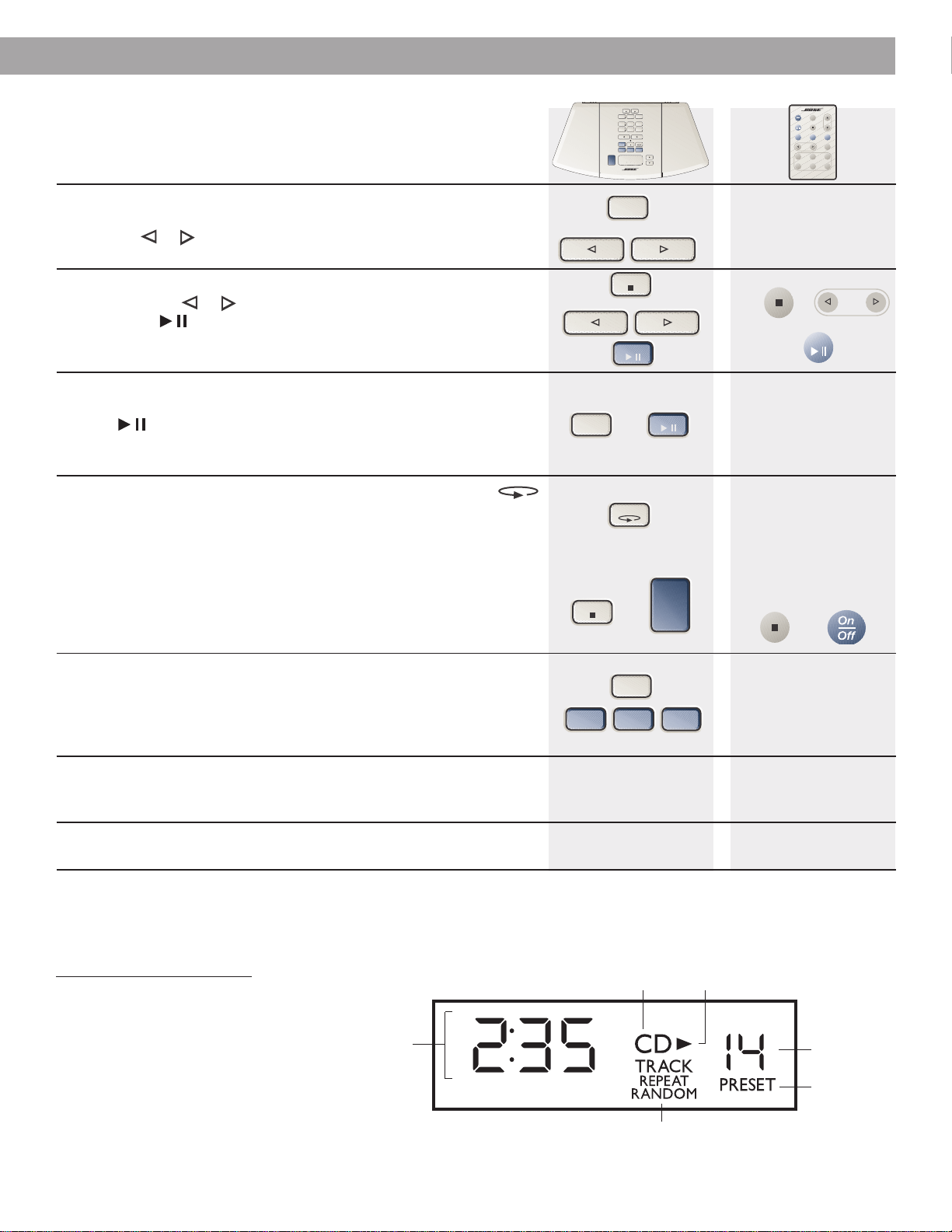
Using the CD player
Lift the CD door (as shown). Place the CD, label-side up, on the spindle in the CD well. Gently
lower the door more than halfway, until it begins to close by itself. Or continue to close it
manually if you prefer.
Figure 11
Setting up a CD
Function
To turn on/off - Press On/Off once to turn on or off. The system turns
on to the last source played. Or, press CD Play to turn on the CD
player. In CD mode, the CD begins to play as soon as you load a disc
and close the CD door.
To play or pause the CD - Press CD Play to play the CD. The
play⁄pause lights. While playing, press CD Play to pause the CD.
The play⁄pause flashes. After 10 minutes paused, the system shuts
off.
To stop the CD - Press CD Stop ■. The display briefly shows the
disc’s total playing time. The number of tracks also shows.
To select a track - In CD mode, press either Track⁄Tune or
until the desired track is selected.
Pressing Track
⁄
Tune skips back to the beginning of the current track. A
second press within 2 seconds skips to the beginning of the previous track.
Pressing Track
⁄
Tune at the beginning of the disc skips to the last track.
Pressing Track
⁄
Tune at the end of the disc skips to track 1.
To scan through a CD while playing - Press and hold
Track⁄Tune or to scan through a track. Release the button to
stop. The display shows the track and playing time. After scanning,
wait 2 seconds to return to track selection.
To scan through a CD while paused - P
ress and hold Track⁄Tune
or to scan to the desired location. The play⁄pause flashes.
Press CD Play to start at the selected position. Or, after scanning,
wait 2 seconds to return to track selection.
To scan through a CD while stopped - P
ress Track⁄Tune or
once to change from total tracks display to track 1.
P
ress and hold
Track⁄Tune or to scan to the desired location. Press CD Play
to start at the selected position. Or, after scanning, wait 2 seconds to
return to track selection.
Track/Tune
Track
Tune
CD Play
CD
On/Off
CD Stop
Track/Tune
Track
Tune
Track/Tune
Track
Tune
CD
CD Play
Track/Tune
Track
Tune
On
Off
Sleep
CD
FM AM
AUX
Track
Tune
Volume
Mute
123
456
Wave
Radio/CD
Presets
Remote control
Presets
Volume
AUX
On/Off
Alarm
Setup
456
Track/Tune
Sleep/Snooze
Wave Radio/CD
Alarm 1
On/Off
Alarm 2
On/Off
123
FM AM
Stop
Alarm
CD Play CD ModeCD Stop
Time Time
Control panel
CD Play
CD
CD Play
CD
®
®
®
19
English
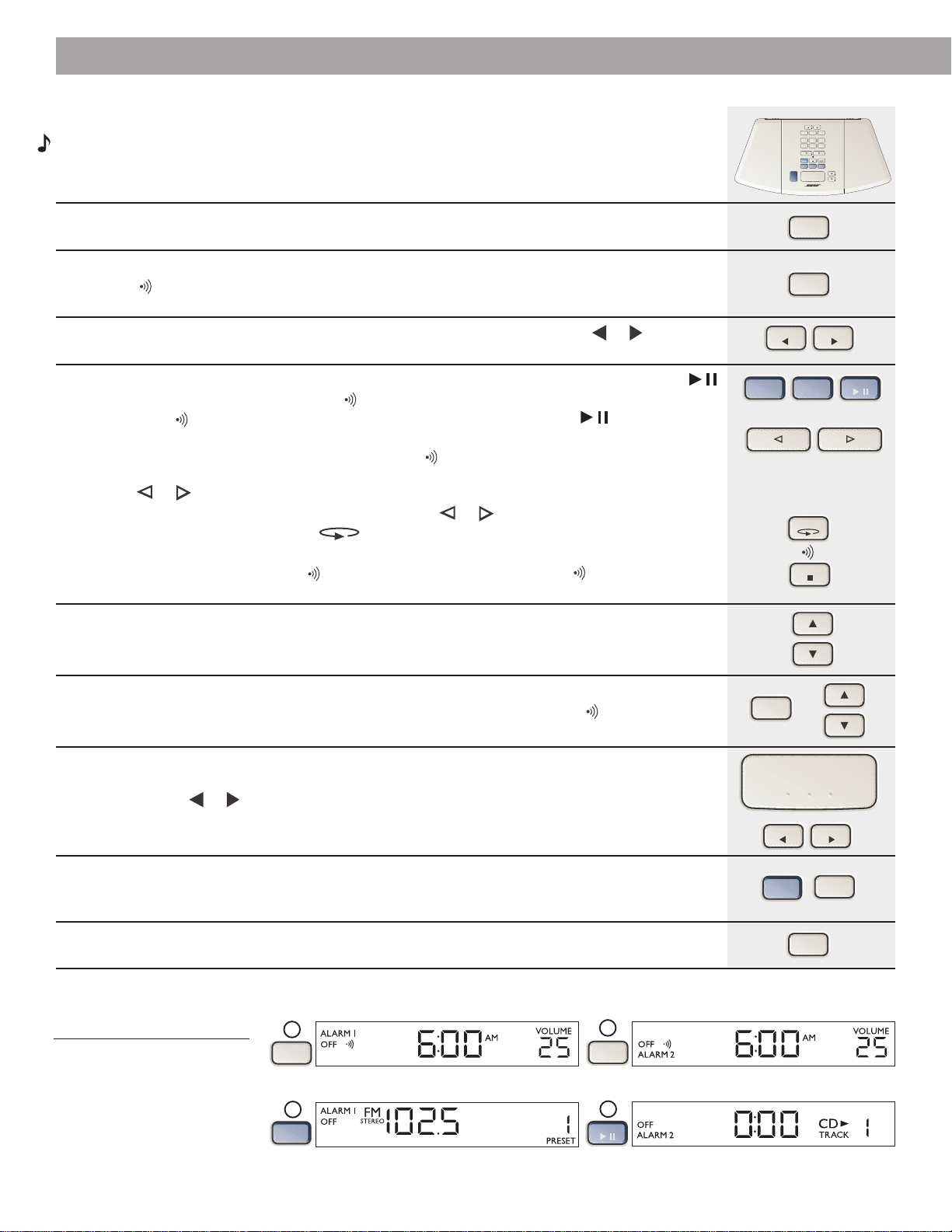
Function
To display CD information - If the display is in clock mode (see
page 15) and the CD is playing, hold down Alarm Setup and press
Track/Tune or on the control panel only.
To display playing time for one track - After pressing CD Stop ■,
press Track/Tune or to display total time for the selected track.
Press CD Play to play the selected track.
To display elapsed or remaining time for a track or disc - In
play or pause mode, hold down Alarm Setup while pressing
CD Play
on the control panel only to change the display through
this sequence; elapsed track time, elapsed disc time, remaining track
time, and remaining disc time.
To select random and/or repeat play - Pressing CD Mode
selects between four random/repeat modes and regular CD play in the
following sequence:
RANDOM (plays all tracks randomly, one time each)
REPEAT RANDOM (repeats the disc in a new random order each time)
REPEAT (repeats the disc continuously)
TRACK REPEAT (repeats the selected track continuously)
TRACK (each track is played in regular order)
Repeat modes stop automatically after 24 hours.
To set continuous music - In CD play mode, to select a source to
play automatically after the CD ends, hold down Alarm Setup and
press FM, AM, or AUX on the control panel only. T
he selected source
lights on the
display. Cancel continuous play by pressing
CD Stop ■
or
On/Off.
To use the CD hold feature - In CD play mode, if you select
another source, the CD player holds your place for 10 minutes so you
can switch back to CD where you left off.
To program a CD - See “Quick Reference to Special Functions” on
page 25.
Operating Your Wave
®
radio/CD
Reading the CD display
Figure 12
A CD display example
CD Mode
CD Stop
On/Off
Alarm
Setup
FM AM
AUX
Shows CD elapsed time,
CD remaining time,
CD total time,
CD programming
(Pr01, Pr02...)
Indicates which CD play mode is selected
Indicates CD is the
selected source
Lights when CD is playing,
flashes for pause
Shows CD
track number
Lights for CD
programming
Track/Tune
Alarm
Setup
Track
Tune
Track/Tune
CD Stop
Alarm
Setup
CD Play
On
Off
Sleep
CD
FM AM
AUX
Track
Tune
Volume
Mute
123
456
Wave
Radio/CD
Presets
Presets
Volume
AUX
On/Off
Alarm
Setup
456
Track/Tune
Sleep/Snooze
Wave Radio/CD
Alarm 1
On/Off
Alarm 2
On/Off
123
FM AM
Stop
Alarm
CD Play CD ModeCD Stop
Time Time
Control panel Remote control
CD
CD Play
20
English
Operating Your Wave
®
radio/CD
Setting the alarms
Note:
You can set alarms with the Wave
®
radio/CD on or off.
Function
To enter alarm setup mode - Press and release Alarm Setup. The system is now in alarm
setup mode. ALARM 1 flashes for 10 seconds.
To select which alarm to set - While ALARM 1 is flashing, set alarm time, volume, and alarm
sound (tone
, radio, or CD), for Alarm 1. Press Alarm Setup again until ALARM 2 is flashing.
While it flashes for 10 seconds, begin to set Alarm 2.
To set the alarm time - While the selected alarm is flashing, press the
Time
or to set the
alarm time. The selected alarm flashes for 10 seconds.
To set the alarm source - While the selected alarm is flashing, press FM, AM, or CD Play
to select and display that source. The tone
is no longer selected.
• To reset to tone , press the source currently selected (FM, AM, or CD Play ), which
deselects it.
• When no source is displayed, the alarm is set to tone
.
• Setting FM or AM alarm, the station last used for this alarm is shown. Or, use Presets or
Track⁄Tune or to select a station.
• Setting CD alarm, track 1 is shown. Or, use Track⁄Tune or to select a specific track or time
location for the alarm. Press CD Mode to select RANDOM or TRACK REPEAT. The CD
plays, repeating as needed, until the alarm shuts off.
• To set radio or CD followed by tone
, select radio or CD alarm, then press CD Stop ■.
AUX is not available as an alarm source.
To set the alarm volume - While the selected alarm is flashing, press Volume ▲ or ▼ to set
the alarm volume, from 10 to 99. The selected alarm flashes for 10 seconds.
To test the alarm volume - While the selected alarm is flashing, hold down Alarm Setup and
press Volume ▲ or ▼ to hear the volume setting, as demonstrated by the tone alarm only.
To adjust snooze time - The system is set for a standard 10-minute snooze time (the number
of minutes you can delay the alarm). While the selected alarm is flashing, hold down Sleep⁄Snooze
and press the
Time
or to adjust the snooze time (from 1 to 30 minutes) for that alarm. The
number of minutes and Sn appear on the display to confirm your selected snooze time. You can
set a different snooze time for each alarm.
To exit from alarm setup - To leave alarm setup mode, wait 10 seconds for it to disengage.
Or you can press AUX once or Alarm Setup a few times until there is no ALARM 1 or ALARM 2
flashing.
To check the alarm setting - To display the alarm setting for 10 seconds, press and release
Alarm Setup. Press again to display one alarm setup and repeat to display the other alarm setup.
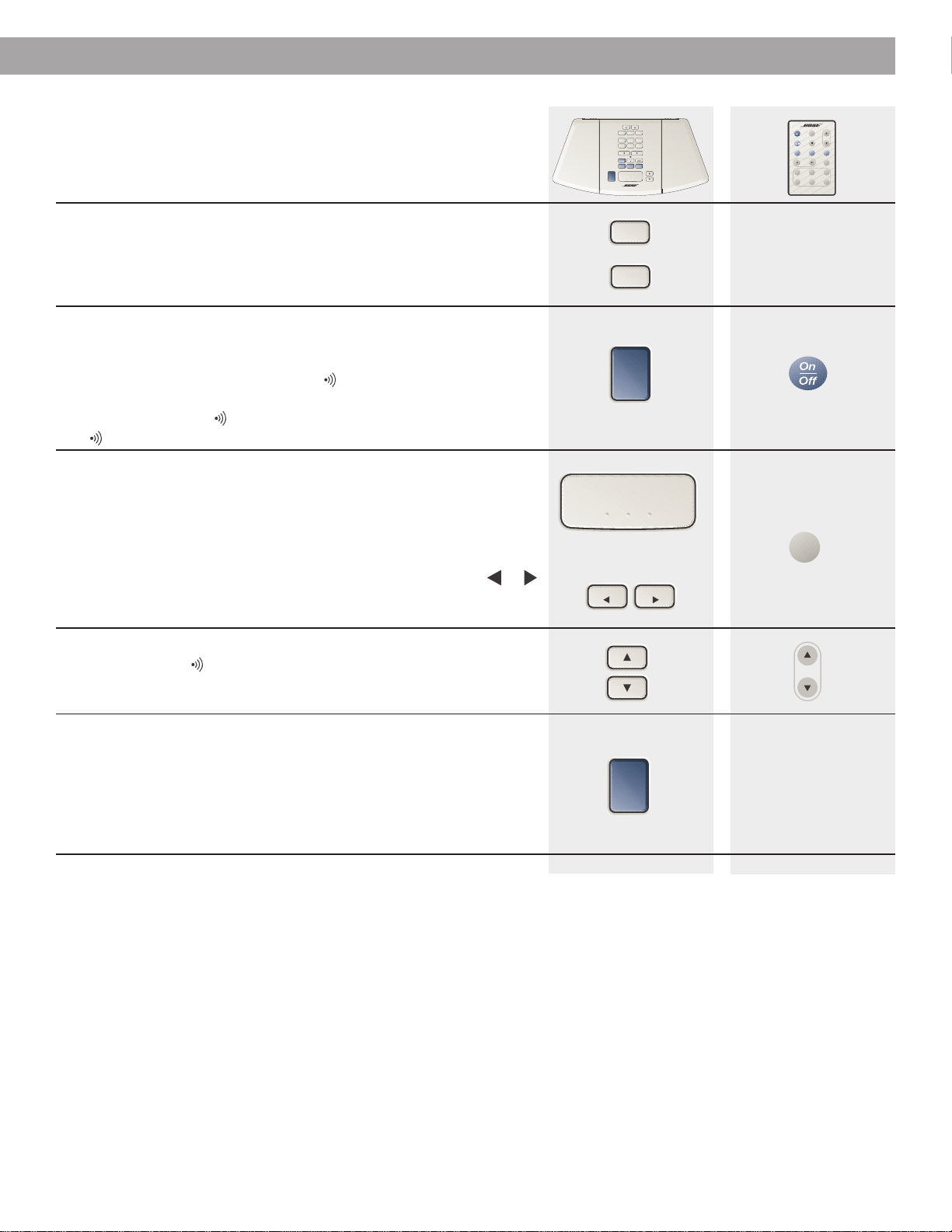
Alarm
Setup
FM AM
Track/Tune
AUX
Reading the alarm setup displays
Figure 13
Examples of alarm setup
displays
Time Time
Alarm
Setup
Alarm
Setup
Alarm
Setup
Sleep/Snooze
Time Time
CD Play
CD Stop
ALARM 1 flashes. You can begin by setting the time.
Pressing FM selects it as the source for ALARM 1.
ALARM 2 flashes. You can begin by setting the time.
Pressing CD selects it as the source for ALARM 2.
1
2
Alarm
Setup
4
Alarm
Setup
3
CD Play
FM
Presets
Volume
AUX
On/Off
Alarm
Setup
456
Track/Tune
Sleep/Snooze
Wave Radio/CD
Alarm 1
On/Off
Alarm 2
On/Off
123
FM AM
Stop
Alarm
CD Play CD ModeCD Stop
Time Time
Control panel
CD Mode
Alarm
Setup
21
English
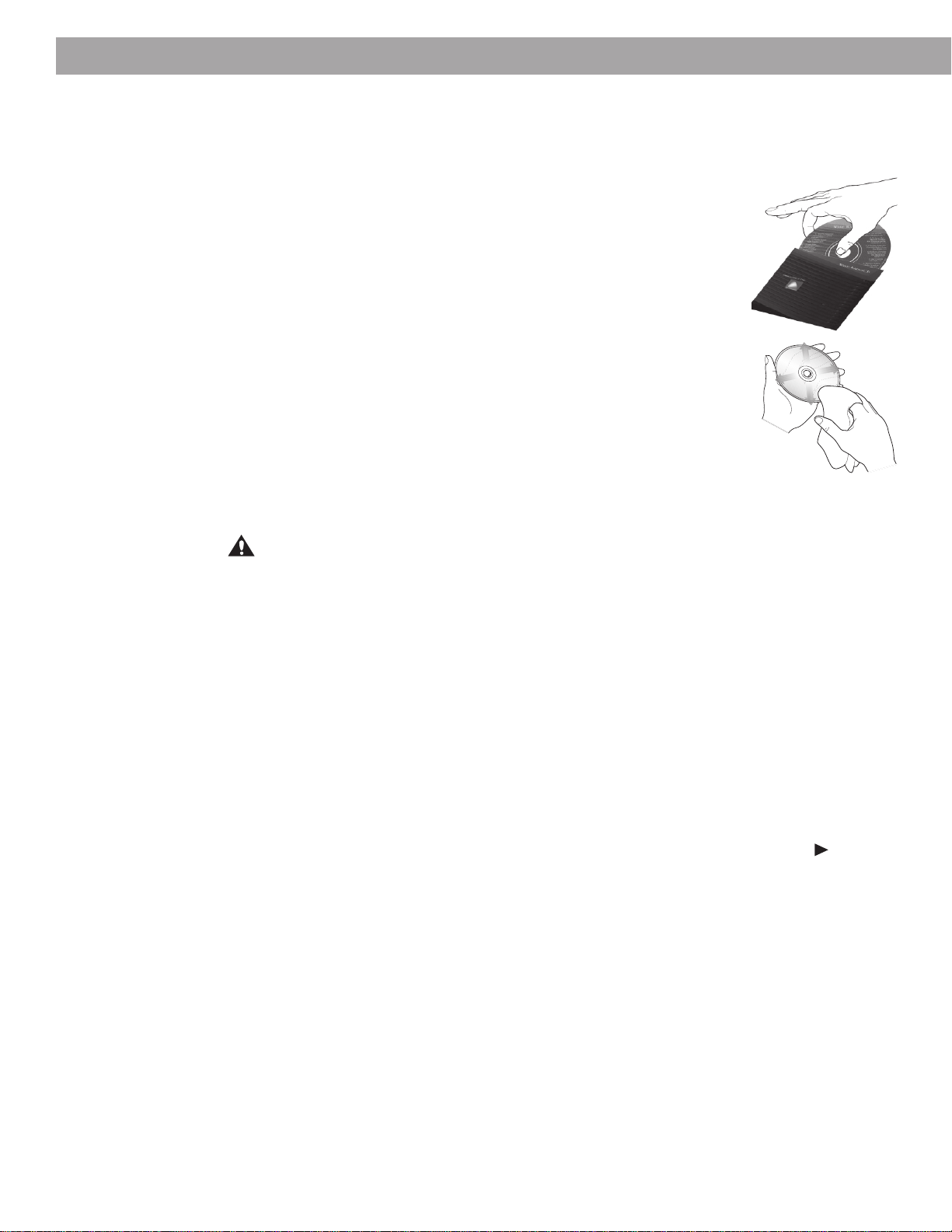
Using the alarms
Function
To turn Alarm 1 or Alarm 2 on/off - On the control panel only,
press Alarm 1 to activate; ALARM 1 lights on the display. Press again to
deactivate Alarm 1. Press Alarm 2 to activate; ALARM 2 lights on the
display. Press again to deactivate Alarm 2.
The alarms go off at the time, volume, and source you have set for each.
To stop the alarm - Press On/Off. The alarm indicator remains lit,
since the alarm automatically resets to repeat daily. Use the Alarm 1 or
Alarm 2 button to deactivate the alarm.
Or, if you do not press On/Off, the tone
alarm shuts off in 30 minutes,
the radio or CD alarm shuts off in 60 minutes. If the alarm is set for radio
or CD followed by tone
, the music plays for 10 minutes, then the
tone sounds for 30 minutes.
To use the snooze option - Press Sleep⁄Snooze or Sleep to have
the alarm snooze for either 10 minutes or your customized snooze time.
(See instructions for adjusting snooze time on page 20.) During the delay,
the ALARM icon flashes and Sn appears on the display. After the silent
snooze time, the alarm begins again as you have set it.
To change the duration of the current snooze only, press Sleep⁄Snooze or
Sleep once to display the remaining snooze time. Press the Time or
while remaining snooze time is displayed to increase or decrease the time.
Y
ou can repeat the snooze cycle as many times as you wish.
To change the volume of the alarm while it is sounding - The
radio, CD, and tone alarms turn on and gradually increase to the
selected volume setting. To change the volume for one use only, press
Volume ▲ or ▼ while the alarm is sounding.
To use the alarm during a power failure - On the control panel
only, press On/Off to silence. The backup battery maintains the alarm for
approximately 24 hours without AC power. To conserve power in backup
mode, (1) only the tone alarm sounds (even if radio or CD alarm is
selected), (2) the display is off, and (3) the remote does not operate the
system. Normal operation resumes when power is restored. Replace the
9V battery after an extended power failure.
Operating Your Wave
®
radio/CD
Sleep/Snooze
Alarm 1
On/Off
Alarm 2
On/Off
On/Off
Sleep
On/Off
Volume
Time Time
Presets
Volume
AUX
On/Off
Alarm
Setup
456
Track/Tune
Sleep/Snooze
Wave Radio/CD
Alarm 1
On/Off
Alarm 2
On/Off
123
FM AM
Stop
Alarm
CD Play CD ModeCD Stop
Time Time
On
Off
Sleep
CD
FM AM
AUX
Track
Tune
Volume
Mute
123
456
Wave
Radio/CD
Presets
Remote controlControl panel
22
English
Taking care of your Wave
®
radio/CD
The only necessary maintenance is cleaning and periodic battery replacement.
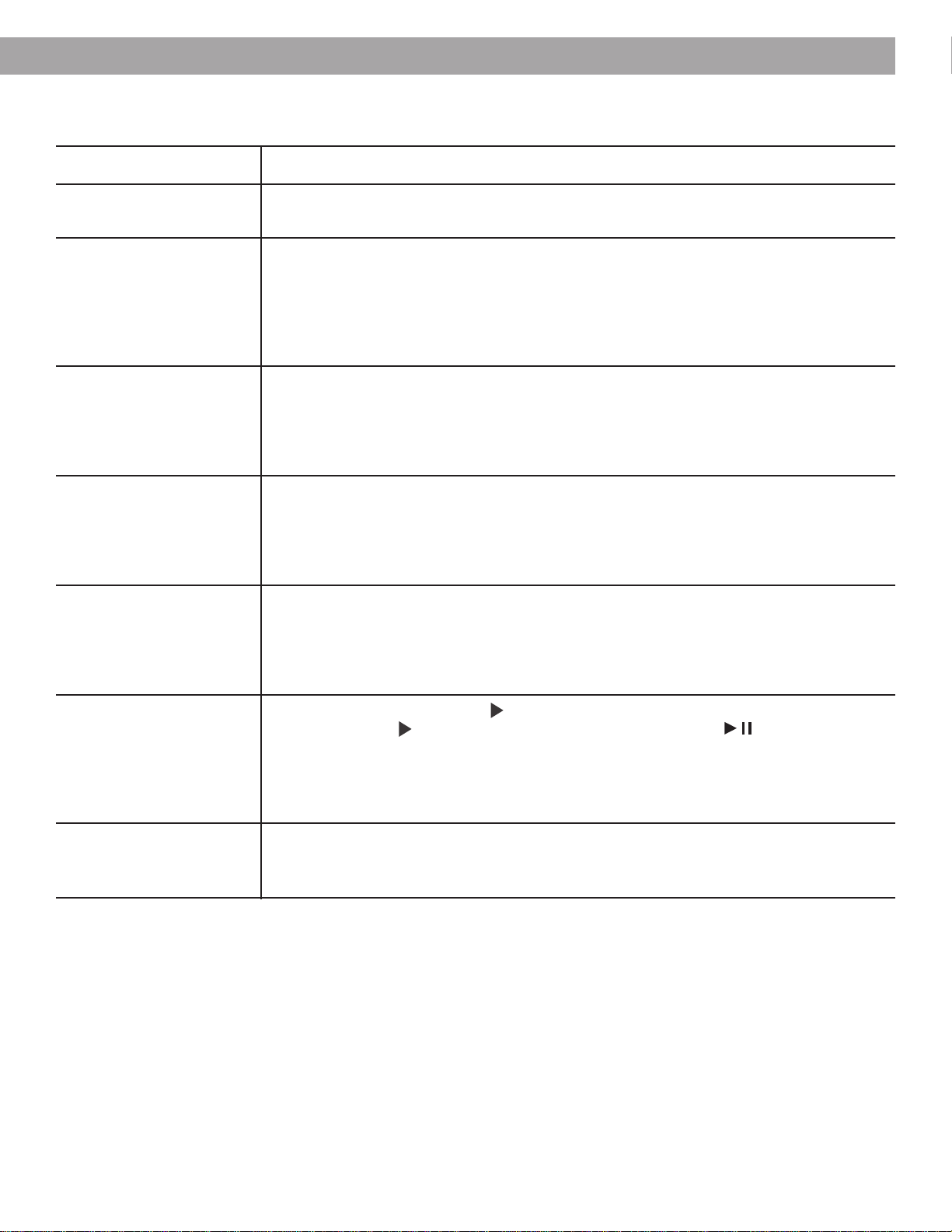
Handling CDs
Handle discs by their edges to prevent fingerprints and scratches.
To remove stains or fingerprints from the surface of a disc, use a soft,
lint-free, dry cloth. Wipe in straight movements from the center of the
disc to the outside. Do not use any chemical products; they can
damage the disc.
Do not write on, or attach labels to the surface of the disc.
To minimize exposure to dust and dirt, replace discs in their cases after
use. Store each disc in its case, out of direct sunlight, high tempera-
tures, and humidity.
Cleaning your Wave
®
radio/CD
Use only a cloth to clean the outside of the Wave
®
radio/CD. If neces-
sary, you may use a soft-bristled attachment to gently vacuum the
front of the system.
Do not use any solvents, chemicals, or cleaning solutions containing
alcohol, ammonia, or abrasives. Do not spray cleaners directly on the system. Do not allow
liquids to spill into any openings on the system.
CAUTION:
If liquids get into the product, turn the system off. Call Bose
®
Product Support as
soon as possible to arrange for service (see phone numbers on inside back cover).
Replacing the batteries
To maintain your Wave
®
radio/CD’s memory and backup alarm system, replace the 9V battery
every year or whenever you have an extended power loss. A dead battery may leak and
cause damage. Do not unplug your Wave
®
radio/CD from the power outlet while replacing the
battery. If you do unplug it, you will need to reset the clock and alarm settings.
Follow these steps to check the low-battery indicator:
1. Turn the system off.
2. Hold down Alarm Setup, and press CD Stop. The display indicates the remaining battery
power:
• Hi or number 78 or above mean adequate voltage to provide backup power.
• Number 77 or below means limited voltage.
• Lo means the voltage is too low for the battery to function. The play/pause flashes
to alert you to replace the battery soon.
For further information on replacing the backup battery, see “Installing the battery” on page 6.
For information on replacing the remote control battery, see
“Installing the remote control
battery” on page 8.
Technical information
Power rating
USA/Canada: 120V~ 50/60 Hz 50W
International: 220-240V~ 50/60 Hz 50W
Dimensions
35.6 cm x 21.6 cm x 11.1 cm
Maintaining Your Wave
®
radio/CD
Weight
3.4 kg
23
English
Troubleshooting
Problem What to do
System does not function • Make sure the power cord is fully plugged into an operating AC wall outlet.
• Press On/Off to see if the display lights. The main display may be turned off (see page 15).
No sound • Increase the volume.
• Press the Mute button on the remote control to unmute the sound.
• Be sure CD is loaded correctly.
• Check the connections for any auxiliary component.
• Select AUX to hear a source connected to the AUX IN jacks.
• Be sure that the component connected to AUX IN is turned on.
Remote control • Check remote control battery and its polarity (+ and –).
is inconsistent • Replace battery, if necessary (see page 8).
or does not work • Operate the remote control closer to the system.
• Check for interference from room lighting or sunlight, or for dust or dirt on the lens. Try the
system in a different location.
AM reception is weak • Adjust the internal AM antenna by turning the Wave
®
radio/CD slightly to one side or
the other.
• Move the radio farther from a TV, refrigerator, fluorescent lights, halogen lamps, dimmer
switches, or other electronic equipment that generates electrical noise.
• If neither suggestion works, you may be in an area of weak AM signal coverage.
FM reception is weak • If you are using the supplied antenna, check the antenna connection.
• Straighten and extend the arms of the antenna as far away from the radio as possible.
• Try moving the FM antenna near a window.
• If you are using the supplied coaxial cable, be sure it is connected securely.
• Contact your cable radio company for further assistance.
CD does not play • Check to see if the play/pause in the display is lit.
• If the play/pause is flashing, the disc is paused. Press CD Play to play.
• Check to see if there is a disc in the player, label-side up.
• There may be dust or dirt on the CD. Clean the CD. See “Handling CDs” on page 22.
• The disc may be defective. Try another disc.
• Verify that disc is not a DVD.
Display does not show the • Check “Customizing the display” on page 15 or “Quick Reference...” on page 25 to change
expected information the display settings (12 or 24 hour clock, display on or off, elapsed or remaining CD time).
• Unplug and reconnect the system to return to original settings.
Customer service
For additional help in solving problems, contact Bose
®
Product Support. See the inside back
cover for Bose Corporation offices and phone numbers.
Maintaining Your Wave
®
radio/CD

24
English
Limited warranty
What is covered:
All parts defective in material or workmanship.
For how long:
One year from the purchase date.
What we will do:
We will, at our sole option, repair or replace any defective parts free of charge. We will also
pay shipping or transportation charges from you to us, and from us to you.
What you must do:
A. Call Bose
®
Customer Service and ask for shipping instructions.
B. Properly pack the unit, if possible in the original carton for shipping.
Other conditions:
This warranty is fully transferable for the one-year period following purchase.
THE PROVISIONS OF THIS WARRANTY ARE IN LIEU OF ANY OTHER WARRANTY,
WHETHER EXPRESS OR IMPLIED, WRITTEN OR ORAL, INCLUDING ANY WARRANTY OF
MERCHANTABILITY OR FITNESS FOR A PARTICULAR PURPOSE. THE MAXIMUM LIABIL-
ITY OF BOSE SHALL NOT EXCEED THE ACTUAL PURCHASE PRICE PAID BY YOU FOR
THE PRODUCT. IN NO EVENT SHALL BOSE BE LIABLE FOR SPECIAL, INCIDENTAL,
CONSEQUENTIAL, OR INDIRECT DAMAGES.
This warranty does not cover a defect that has resulted from improper or unreasonable use or
maintenance, accident, improper packing, or unauthorized tampering, alteration, or modifica-
tion as determined solely by us. This warranty is void if the label bearing the serial number
has been removed or defaced.
Other Legal Rights:
This warranty gives you specific legal rights, and you may also have other rights which vary
from state to state or country to country. Some places do not allow limitations on implied
warranties or the exclusion or limitation of incidental or consequential damages, so the above
limitations or exclusions may not apply to you.
Maintaining Your Wave
®
radio/CD
25
English
Presets
Volume
AUX
On/Off
Alarm
Setup
456
Track/Tune
Sleep/Snooze
Wave Radio/CD
Alarm 1
On/Off
Alarm 2
On/Off
123
FM AM
Stop
Alarm
CD Play CD ModeCD Stop
Time Time
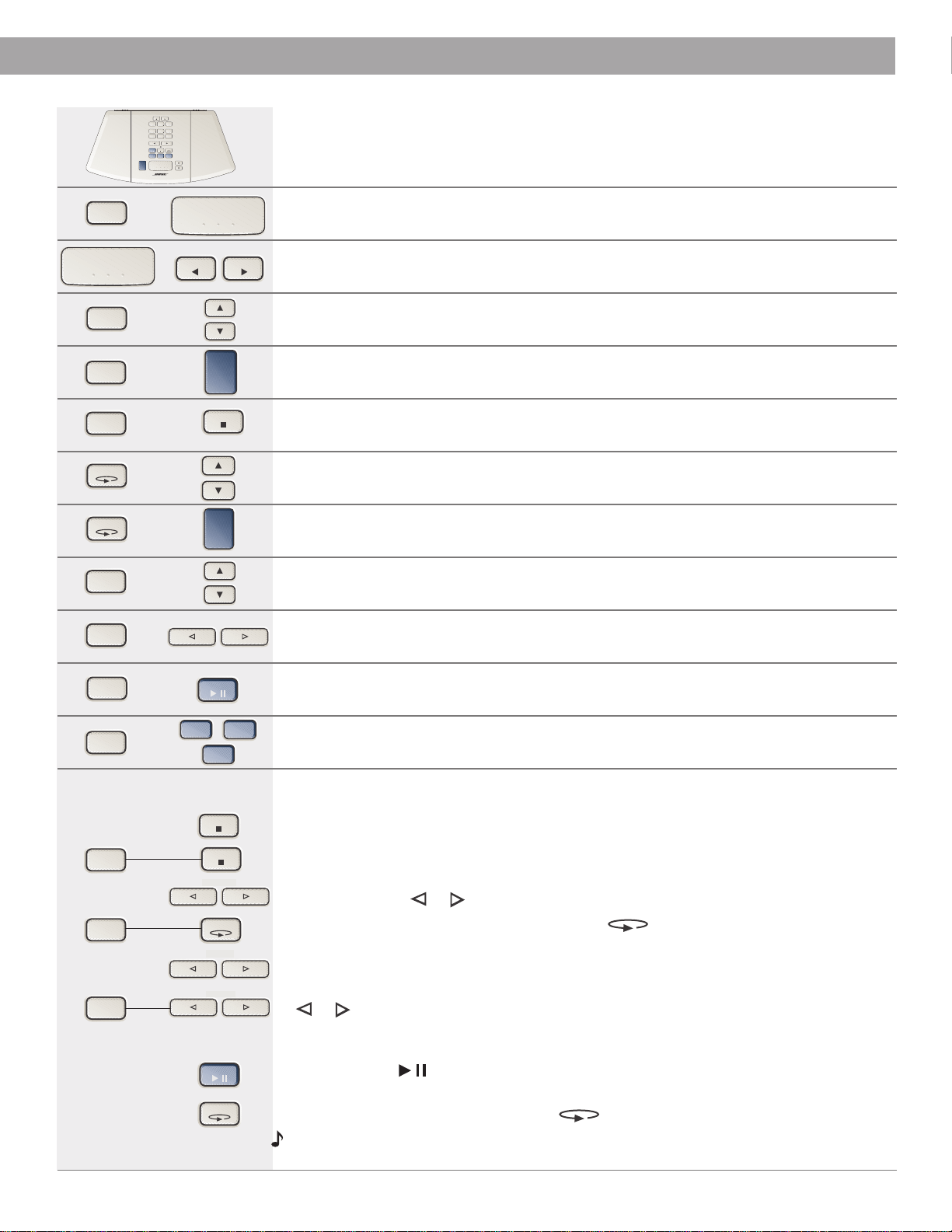
Quick Reference To Special Functions
Function
Use when...
To use the nap timer
system is on or off
see page 16
in alarm setup mode
To adjust the snooze time
see page 20
To test the alarm volume
in alarm setup mode
see page 20
To set AM/PM (12 hour) or Military (24 hour) time
system is off
see page 15
To check backup battery power level
system is off
see page 22
To adjust the display brightness
system is off
see page 15
To turn the display on/off
system is off
see page 15
To check the volume setting
volume setting is not displayed
see page 15
To check the CD time or radio station frequency
display is in clock view or off
see pages 15, 17, 19
To display elapsed or remaining time for a track or disc
in play or pause mode
see page 19
To set continuous music
in CD mode
see page 19
To program a CD - You can program up to 32 CD tracks.
1. Place the selected disc in the CD player.
2. Press
CD Stop ■
.
3. Hold down Alarm Setup and press CD Stop ■. The display shows Pr01 to indicate
programming mode is ready for your first selection.
4. Use Track/Tune or to select a track.
5. Hold down Alarm Setup and press CD Mode to program this track. The program
counter shows Pr02 for the next selection.
6. Continue to select tracks (Pr03, Pr04, etc.) until your list is complete.
7. To look through your programmed list, hold down Alarm Setup and press Track/Tune
or . You can change an item while you are viewing it by following steps 4 and 5. To
add more items at the end of your list, reprogram (step 5) the last entry to continue
adding selections.
8. Press CD Play to play the selected tracks once each. The programmed tracks are
shown with the PRESET icon lit.
9. To erase the program, press CD Mode .
Note:
Your program is saved until erased. The program plays all applicable track
selections for any disc in the CD player.
Hold
and
Press
CD Mode
Alarm
Setup
Alarm
Setup
CD Stop
CD Stop
Alarm
Setup
AUX
CD Play
CD Mode
Alarm
Setup
On/Off
Alarm
Setup
Alarm
Setup
Alarm
Setup
Track/Tune
On/Off
CD Mode
CD Mode
Track/Tune
Alarm
Setup
Sleep/Snooze
Alarm
Setup
Alarm
Setup
CD Play
Alarm
Setup
Sleep/Snooze
Time Time
AM
FM
Track/Tune
Track/Tune
or
CD Stop
Track/Tune
Track/Tune
Track/Tune

26
English
Index
A
acoustic waveguide 4
Alarm 1 13, 14, 20, 21
Alarm 2 13, 14, 20, 21
ALARM 1 or 2 indicator 20, 21
Alarm Setup 13, 15-17, 19, 20, 26
alarm time 14, 20
alarm volume 20, 26
alarms 4, 10, 12, 13, 20, 21
AM 4, 5, 12-14, 16, 17, 19, 20, 23
AM antenna 23
AM reception 5, 23
AM/FM 17
AM/PM (12 hour) time 15, 26
antenna connector 7
automatic shutoff 16
automatic turn on 16
AUX 10-13, 15, 16, 19, 20, 23
AUX IN jacks 10, 11, 23
auxiliary source 10, 23
B
backup alarm 6, 22
bass 4, 5
batteries 2, 5, 22, 23
battery (remote control) 4, 8, 12, 22, 23
battery backup 4, 6, 21
battery carrier 8, 9
battery compartment 6, 8
battery voltage 14, 22
brightness level 14, 15, 26
C
cable radio signal 7
CD 4, 5, 7, 10-14, 16, 18-23, 26
CD changer 11
CD door 6,18
CD hold 19
CD Mode 13, 15, 20, 26
CD player 4, 10, 12, 13, 18, 19, 26
CD programming 4, 13, 14, 19, 26
CD Stop 18, 20
CD time 15, 23, 26
cleaning 22
clock 15, 17, 19, 20, 22
clock display 15, 23, 26
clock mode 17, 19
clock set 15, 20
coaxial cable 7
compact disc 2
computer 4, 5, 10, 11
connections 23
continuous music 19, 26
control panel 12, 13, 15-21, 26
countdown 16
customer service 23
D
dim setting 14, 15, 26
dimensions 22
dimmer switch 23
disc 2, 18, 19, 22, 23, 26
display 6, 7, 12-23, 26
display brightness 14, 15, 26
DVD disc 23
E
elapsed disc time 19
elapsed time 19, 23, 26
elapsed track time 19
electrical noise 23
external antenna 7, 23
F
fluorescent lights 23
FM 4, 7, 12-14, 16, 17, 19, 20, 23
FM 75Ω EXTERNAL antenna connector 7
FM antenna 7, 23
FM reception 7, 23
frequency 14, 15, 17, 26
H
heat 5, 8
I
infrared 4, 12
interference 11, 23
L
Lifestyle
®
music system 10, 11
LINE OUT jacks 10, 11
lithium battery 9
location of system 5, 23
low-battery indicator 22
M
memory 6
military (24 hour) time 15, 26
moisture 2
monitor 5, 11
music center 23
Mute button 23
mute 14, 16
N
9V battery 5, 6, 21, 22
nap timer 14, 16, 26
O
ON/OFF button 13, 21
On/Off 15-19, 21, 23

27
English
Index
P
pause 14, 18, 19, 23, 26
play 12-4, 18, 19, 23, 26
playing time 18, 19
portable tape player 11
power cord 7, 23
power failure 6, 21, 22
power rating 22
powered speakers 10
Pr01 19, 26
PRESET indicator 17
preset number 14, 17
preset station 12, 13, 17
Preset buttons 20
presets 4, 14, 17
product support 5, 9, 22, 23
programming a CD 4, 13, 14, 19, 26
R
radio display 17
radio reception 7, 23
radio station 15, 16, 26
RANDOM 19
random modes 4, 13, 19, 20
RCA cable 11
remaining disc time 19
remaining time 16, 19, 21, 23, 26
remaining track time 19
remote control 4, 5, 8, 9, 12, 13, 16-19, 21-23
REPEAT 19
repeat modes 4, 13, 19, 20, 21
S
safety information 2
scan 4, 12, 13, 18
seek 17, 18
serial number 3, 6
shut off automatically 16
signal splitter 7
skip 4, 12, 13, 18
sleep mode 12-14, 16, 20, 21
Sleep/Snooze button 13
Sn 20, 21
snooze mode 12-14, 16, 20, 21, 26
source display 15, 20, 23, 26
splitter 7
station frequency 15, 17, 26
station presets 4, 12, 13, 17
stereo reception 17
stereo tuner 4
T
tape player 4, 10, 11
television 5, 11
time 2, 7, 12-15, 21, 26
timed shutoff 16
tone 21
tone alarm 13, 14, 21
total disc time 19
track 14, 18-20, 26
Track/Tune 15, 17, 18, 19, 26
transparent film 6
troubleshooting 23
turn on automatically 16
tuning 4, 12, 13, 17-19
TV 4, 7, 10, 11, 23
U
unmute 23
unpack 5
V
VCR 4, 10, 11
voltage 2
volume 10-13, 15, 16, 20, 21, 23
volume control 10, 11
volume setting 15, 21, 26
W
warranty 3, 6, 24
waveguide 4
weight 22

31
Bose
®
Corporation
USA & Canada Sales
Bose Corporation, The Mountain
Framingham, MA 01701-9168
1-800-637-8781
USA & Canada Service
Bose Corporation, The Mountain
Framingham, MA 01701-9168
1-800-637-8781 or
508-879-7330, x63055
European Office
Bose B.V., Nijverheidstraat 8
1135 GE Edam, Nederland
TEL 0299-390111 FAX 0299-390114
Australia
Bose Pty Limited
1 Sorrell Street
Parramatta NSW, 2150
TEL 02 9204-6111 FAX 02 9204-6122
Deutschland
Postfach 1468
48504 Nordhorn
TEL 0800-2673555 FAX 05921-724250
France
6, Rue Saint Vincent
78100 Saint Germain en Laye
TEL 01-3061 6363 FAX 01-3061 4105
Nederland
Nijverheidstraat 8
1135 GE Edam, Nederland
TEL 0299-390111 FAX 0299-390114
United Kingdom
Freepost (EX 151)
Exeter
EX1 1ZY
TEL 0800 614 293 FAX 0870 240 2013
World Wide Web
www.bose.com
©2004 Bose Corporation
The Mountain, Framingham, MA 01701-9168 USA
251771-ENGvo AM Rev.04