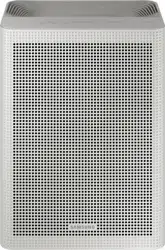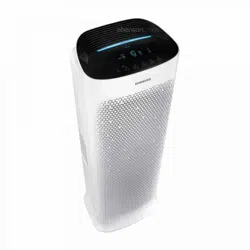
Air Purier
User manual
AX90T7080WD
ꞏ Thank you for purchasing this Samsung air purier.
ꞏ Before operating this unit, please read this user manual carefully and retain it for future reference.
DB68-09095A-00_IB_ACR AX7500R_TC_EN.indd 1 2020-05-18 오전 11:06:30
2
English
Safety Information 3
Safety Information 3
Package Content 9
Accessories / Product specications 9
At a Glance 10
General 10
Display and buttons 11
Removing the lters 12
Assembling the lters 13
Operation Features 16
Turning the power on/off / Controlling the fan speed 16
Sleep mode / Timed on/off function / Display lighting 17
Turning the Wi-Fi feature on/off / Clearing the lter replacement reminder / Lock function 18
Checking the air quality 19
Cleaning and Maintenance 21
Cleaning the air purier exterior 21
Cleaning and drying the lters 22
SmartThings app 23
SmartThings app 23
Appendix 28
Before Requesting Service 28
Contents
Correct Disposal of This Product
(Waste Electrical & Electronic Equipment)
(Applicable in countries with separate collection systems)
This marking on the product, accessories or literature indicates that the product and its electronic accessories
(e.g. charger, headset, USB cable) should not be disposed of with other household waste at the end of
their working life. To prevent possible harm to the environment or human health from uncontrolled waste
disposal, please separate these items from other types of waste and recycle them responsibly to promote the
sustainable reuse of material resources.
Household users should contact either the retailer where they purchased this product, or their local
government ofce, for details of where and how they can take these items for environmentally safe recycling.
Business users should contact their supplier and check the terms and conditions of the purchase contract. This
product and its electronic accessories should not be mixed with other commercial wastes for disposal.
DB68-09095A-00_IB_ACR AX7500R_TC_EN.indd 2 2020-05-18 오전 11:06:31
3
English
Safety Information
These safety precautions are for owner’s safety and preventions of property
damage.
Therefore, please read this manual thoroughly before using your product.
WARNING
Hazards or unsafe practices that may result in severe personal injury or death.
CAUTION
Hazards or unsafe practices that may result in minor personal injury or property
damage.
Follow directions.
Do NOT attempt.
Make sure the machine is grounded to prevent electric shock.
Unplug the power plug from the wall socket.
Do NOT disassemble.
FOR INSTALLATION
WARNING
Only connect to a socket that can provide the rated power supply. Do not use the
socket with other products. Do not extend the power cord.
• Using a multi-socket with other products or extending the power cord may cause
electric shock or fire.
• Using a voltage converter may cause electric shock or fire.
• Failing to meet the exact voltage, frequency and/or rated current may cause electric
shock or fire.
Do not install the air purier near a heat source and inammable objects, or in
areas that are highly humid or dusty. Avoid exposure to oil, gas, direct sunlight and
water.
• Follow instructions to avoid electric shock or fire.
Safety Information
Safety Information
DB68-09095A-00_IB_ACR AX7500R_TC_EN.indd 3 2020-05-18 오전 11:06:31
4
English
Safety Information
Safety Information
CAUTION
When installing the product, make sure that the power plug can be easily removed
when needed.
• Follow instructions to avoid electric shock or fire due to electrical leakage.
Install the product on a solid at ground.
• Follow instructions to avoid excessive vibration, noise and operational issues thereof.
Keep a safe distance from surrounding objects.
• Clear space from each side: at least 60 cm and the front: at least 25 cm
• The space is necessary to ensure efficient air intake and proper purification.
• Make sure that the inlet and outlet are not covered.
Make sure that the power cord is not pressed under the product.
• Follow instructions to avoid electric shock or fire.
FOR POWER SUPPLY
WARNING
Use a dry cloth to wipe the power plug and the contact area to keep them free
from dust, water and other undesirable substances.
• Follow instructions to avoid electric shock or fire.
Check the position of the power plug when you connect it to a socket.
• Having the cord hanging from above the plug may damage the wires inside, which can
lead to electric shock or fire.
Please contact your local Samsung Service Centre if the power plug or cord is
damaged.
If the supply cord is damaged, it must be replaced by the manufacturer, its service
agent or similarly qualied persons in order to avoid a hazard.
Make sure that the power plug is securely tted in the socket. Do not use it when
the plug or cord is damaged.
• Follow instructions to avoid electric shock or fire.
When you disconnect the power cord, pull it by the plug. Do not pull the cord itself.
• Follow instructions to avoid electric shock or fire.
DB68-09095A-00_IB_ACR AX7500R_TC_EN.indd 4 2020-05-18 오전 11:06:31
5
English
Safety Information
Do not fold, pull out, twist or tie the power cord. Do not hang it over a metal object
or place a heavy object on it. Do not put the cord between objects or behind the air
purier.
• Follow instructions to avoid electric shock or fire.
CAUTION
Remove the power plug of your air purier when it is not used for a period of time
and during a thunderstorm.
• Follow instructions to avoid electric shock or fire.
Product installation must be handled by ofcial Samsung service personnel or
a certied local technician to avoid power cord or plug damage, which can be
dangerous.
Disconnect the air purier from the power source before cleaning or repairing.
FOR USING
WARNING
If the product is exposed to water, immediately disconnect it from the power
source and contact your local Samsung Service Centre.
• Follow instructions to avoid electric shock or fire.
If you notice a noise, burning smell or smoke from the product, immediately stop
using it and contact your local Samsung Service Centre.
• Follow instructions to avoid electric shock or fire.
In the event of a gas leak in proximity of the air purier, do not touch it or attempt
to unplug it. Immediately ventilate the room and contact your provider or a
certied technician for advice.
• Do not turn the ventilation fan on.
• A spark can cause an explosion or fire.
DB68-09095A-00_IB_ACR AX7500R_TC_EN.indd 5 2020-05-18 오전 11:06:31
6
English
Safety Information
Safety Information
Do not pull out the power plug while operating the air purier.
• This may cause a spark when reconnecting the plug, which can lead to an explosion or
fire.
Please contact your local Samsung Service Centre when you require repair service.
• Follow instructions to avoid electric shock or fire.
Do not handle the power plug with wet hands.
• Follow instructions to avoid electric shock or fire.
Do not use force on the air purier or pull the unit away.
• Follow instructions to avoid fire, malfunction or injury.
Store the plastic package away from children or discard it according to the law.
• Follow instructions to protect children from a risk of suffocation.
Do not insert your nger or other objects into the air inlet or outlet.
• Take special care to protect children from injury.
Do not place an object near the air purier as children may use them to climb
onto the product.
• Follow instructions to avoid injury from a tip-over or fall.
If the power plug area has contacted water, completely dry it before using the air
purier again.
• Follow instructions to avoid electric shock or fire.
Do not insert a metal object and similar items inside the air purier.
• Follow instructions to avoid electric shock or injury.
Do not place a heavy object on the air purier.
• Follow instructions to avoid malfunction or noise.
DB68-09095A-00_IB_ACR AX7500R_TC_EN.indd 6 2020-05-18 오전 11:06:31
7
English
Safety Information
If any of the electric components inside the air purier has contacted liquid or
water, disconnect the product from the power source and contact your local
Samsung Service Centre.
• Follow instructions to avoid electric shock or fire.
Do NOT attempt to repair or modify the product.
• Use only the standard rated fuse.
• Follow instructions to avoid electric shock, fire, malfunction or injury.
CAUTION
Keep your air purier at least 2 meters away from a TV or other audio/visual media.
• They can be affected by video or audio noise.
Secure enough space around the air purier when operating.
• Clear space from each side: at least 60 cm and the front: at least 25 cm
• Your air purifier is designed to take in air through the front inlet for purification. Keep
the area around the inlet clear and make sure that both the inlet and outlet are not
covered by curtains and such.
Do not step on the product or place other objects on it (laundry, candles, burning
cigarettes, plates, medicine, metal items, air fresheners, etc.).
• Follow instructions to avoid electric shock, fire, malfunction or injury.
Do not tilt or ip the air purier while the power plug is connected to the socket.
• Follow instructions to avoid malfunction or fire.
Do not use bug repellent or other spray products on the air purier.
• They can be harmful and may cause electric shock, fire or malfunction.
Do not submerge the air purier.
• Follow instructions to avoid malfunction.
DB68-09095A-00_IB_ACR AX7500R_TC_EN.indd 7 2020-05-18 오전 11:06:31
8
English
Safety Information
Safety Information
Do not handle the product with wet hands.
• Follow instructions to avoid electric shock.
This appliance can be used by children aged from 8 years and above and persons
with reduced physical, sensory or mental capabilities or lack of experience and
knowledge if they have been given supervision or instruction concerning use of
the appliance in a safe way and understand the hazards involved. Children shall
not play with the appliance. Cleaning and user maintenance shall not be made by
children without supervision.
FOR CLEANING
WARNING
Do not apply water, benzene, thinner, alcohol, acetone or similar substances
directly on the product.
• Follow instructions to avoid product discolouration or deformation, electric shock or
fire.
Disconnect the product from the power source when cleaning. Wait for the fan to
completely stop before cleaning.
• Follow instructions to avoid electric shock or fire.
CAUTION
Be sure to disconnect the power plug from the socket before cleaning the product.
DB68-09095A-00_IB_ACR AX7500R_TC_EN.indd 8 2020-05-18 오전 11:06:31
9
English
Package Content
Package Content
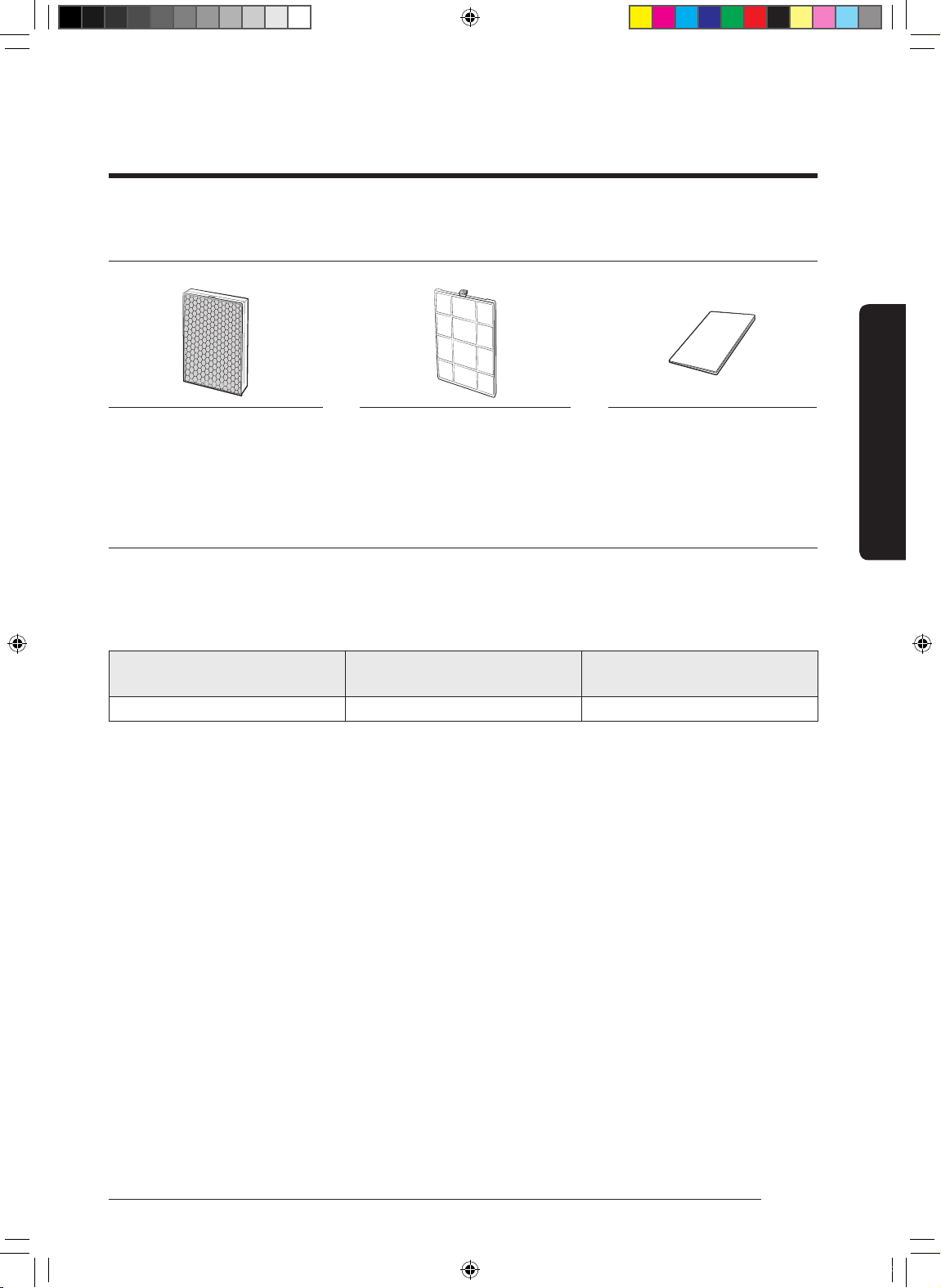
Accessories
2-in-1 lter 2 EA
(Deodorization Filter+ Dust
Collecting Filter)
Pre-lter 2 EA User manual 1 EA
Product specications
The product dimensions are based on the maximum dimensions. They may vary depending on the
measurement position.
The product design and specications are subject to change without prior notice for quality
improvement.
Model name
Dimensions
(width × height × depth)
Area coverage
AX90T7080WD 360 mm x 1054 mm x 284 mm 90 m²
Package Content
DB68-09095A-00_IB_ACR AX7500R_TC_EN.indd 9 2020-05-18 오전 11:06:32
10
English
At a Glance
General
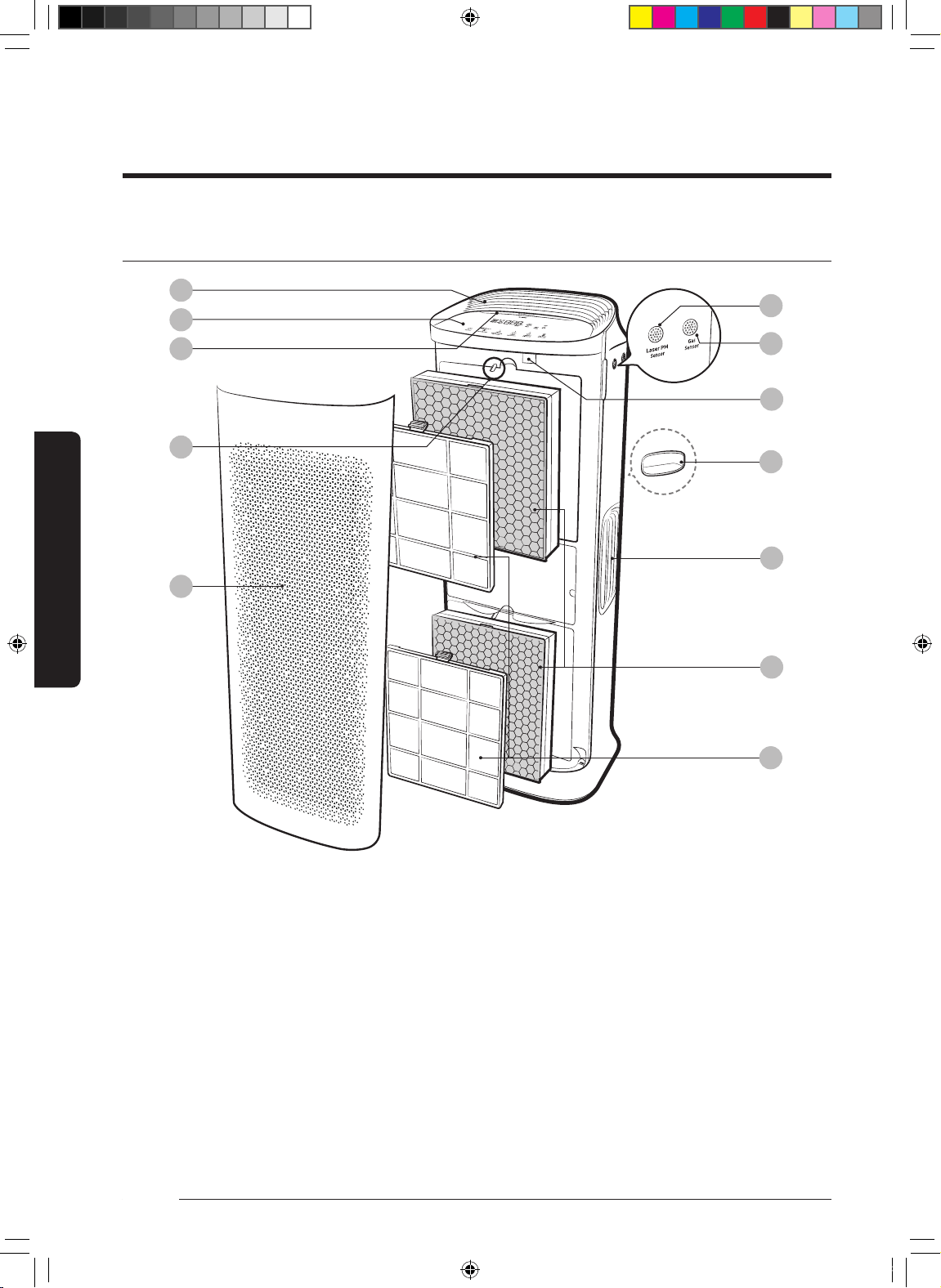
10
11
05
01
02
06
07
09
08
03
12
04
At a Glance
01 Air outlet (top)
02 Display and buttons
03 Display lighting
04 Filter holder
05 Air inlet / Front panel
06 Laser PM sensor
07 Gas sensor
08 Dongle mount
• This model is provided with integrated
Wi-Fi connectivity and does not require
an external dongle to use this function.
09 Handle (rear side)
10 Air outlet (side)
11 2-in-1 lter(Deodorization Filter+Dust
Collecting Filter)
12 Pre-lter
At a Glance
DB68-09095A-00_IB_ACR AX7500R_TC_EN.indd 10 2020-05-18 오전 11:06:32
11
English
At a Glance
Bixby is the name of a Samsung AI solution and allows you to control the product with voice. To
use the voice recognition function, you must connect the SmartThings app on your smartphone to
the product. If the product does not support voice recognition directly, you can only control some
functions using Bixby on your Samsung smartphone.
NOTE
• Bixby only supports some languages, and the supported functions may differ depending on the
geographical area.
Display and buttons
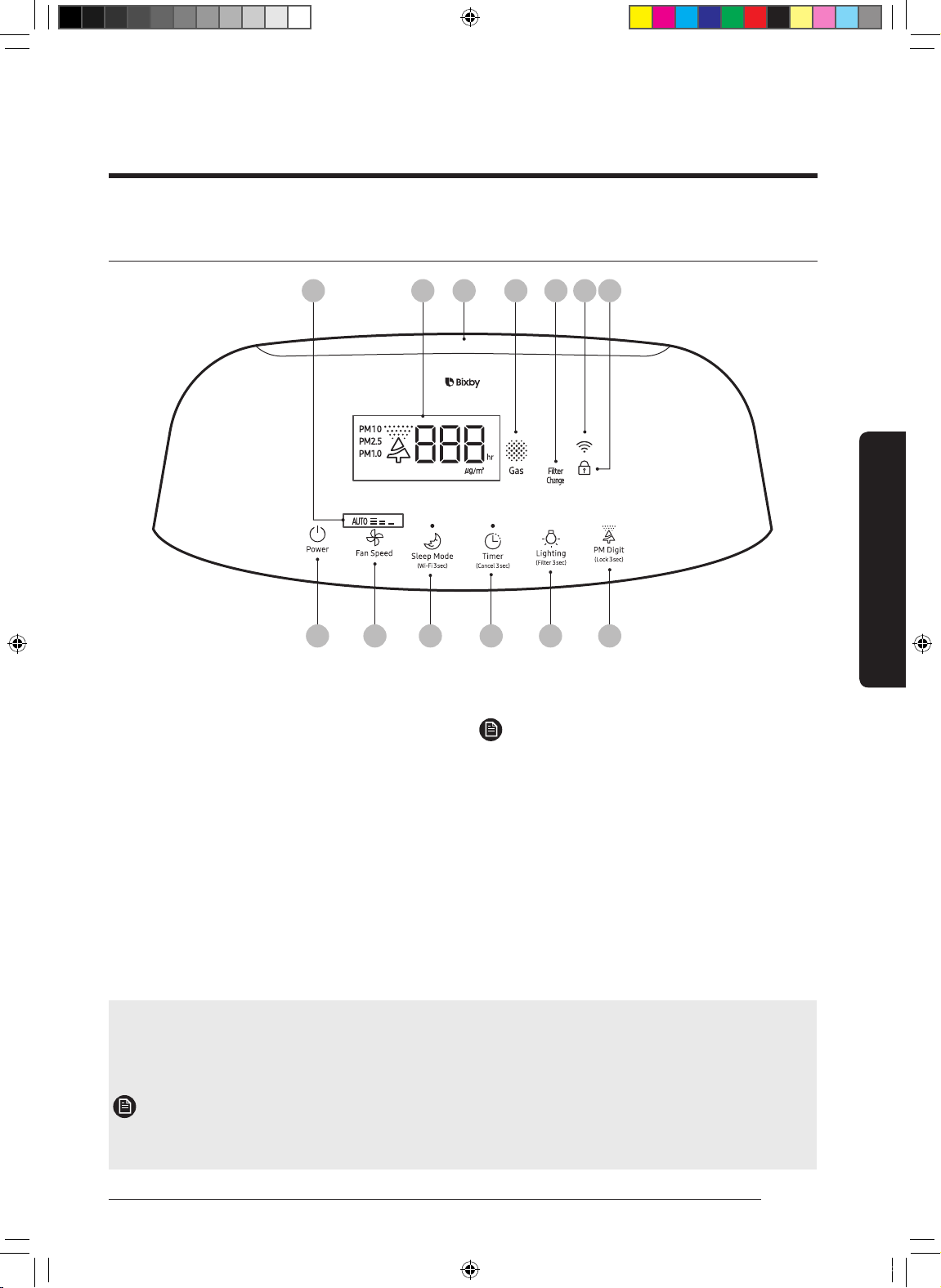
08 09 1310 1211
03 04 05 06
01 07
02
01 Current fan speed
02 PM10 / PM2.5 / PM1.0 pollution /
Concentration / Timer indicator
03 Air quality indicator
04 Gas pollution indicator
05 Filter replacement reminder
06 Wi-Fi function indicator
07 Lock indicator
08 Power button
09 Fan speed button
10 Sleep mode / Wi-Fi On or Off button
11 Timer on/off button
12 Lighting / Filter reset button
13 Air quality / Lock button
NOTE
• PM10 Dust in the air with a diameter of 10 or less
– Fine particles with about 1/5 of the
diameter of a human hair
• PM2.5 Dust in the air with a diameter of 2.5
or less
– Fine particles with about 1/20 of the
diameter of a human hair
• PM1.0 Dust in the air with a diameter of 1.0 or less
– Fine particles with about 1/50 of the
diameter of a human hair
* Diameter of a human hair: 50 to 70
DB68-09095A-00_IB_ACR AX7500R_TC_EN.indd 11 2020-05-18 오전 11:06:32
12
English
At a Glance
Removing the lters
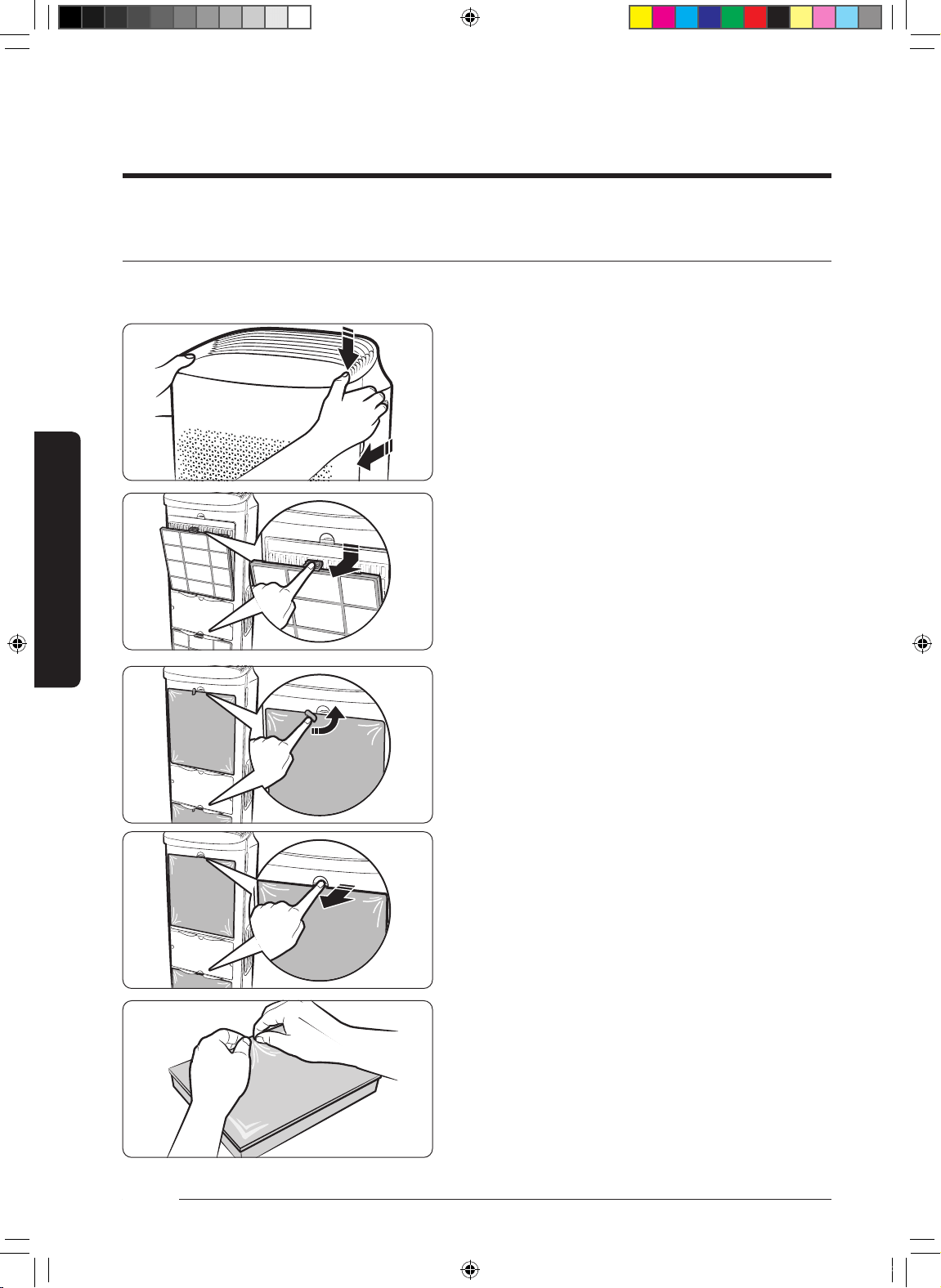
When using the 2-in-1 lters for the rst time or replacing them with a new set, remove the vinyl
packaging rst.
STEP 1
Remove the front panel.
• Use your thumbs to press on the top of the
product and pull the front panel forward with
other ngers.
STEP 2
Remove the pre-lters.
STEP 3
Release the 2-in-1 lters.
• Rotate the lter holder 90˚ anticlockwise to
release the lter.
STEP 4
Remove the 2-in-1 lters.
STEP 5
Remove the vinyl packaging from the lters.
At a Glance
DB68-09095A-00_IB_ACR AX7500R_TC_EN.indd 12 2020-05-18 오전 11:06:33
13
English
At a Glance
Assembling the lters
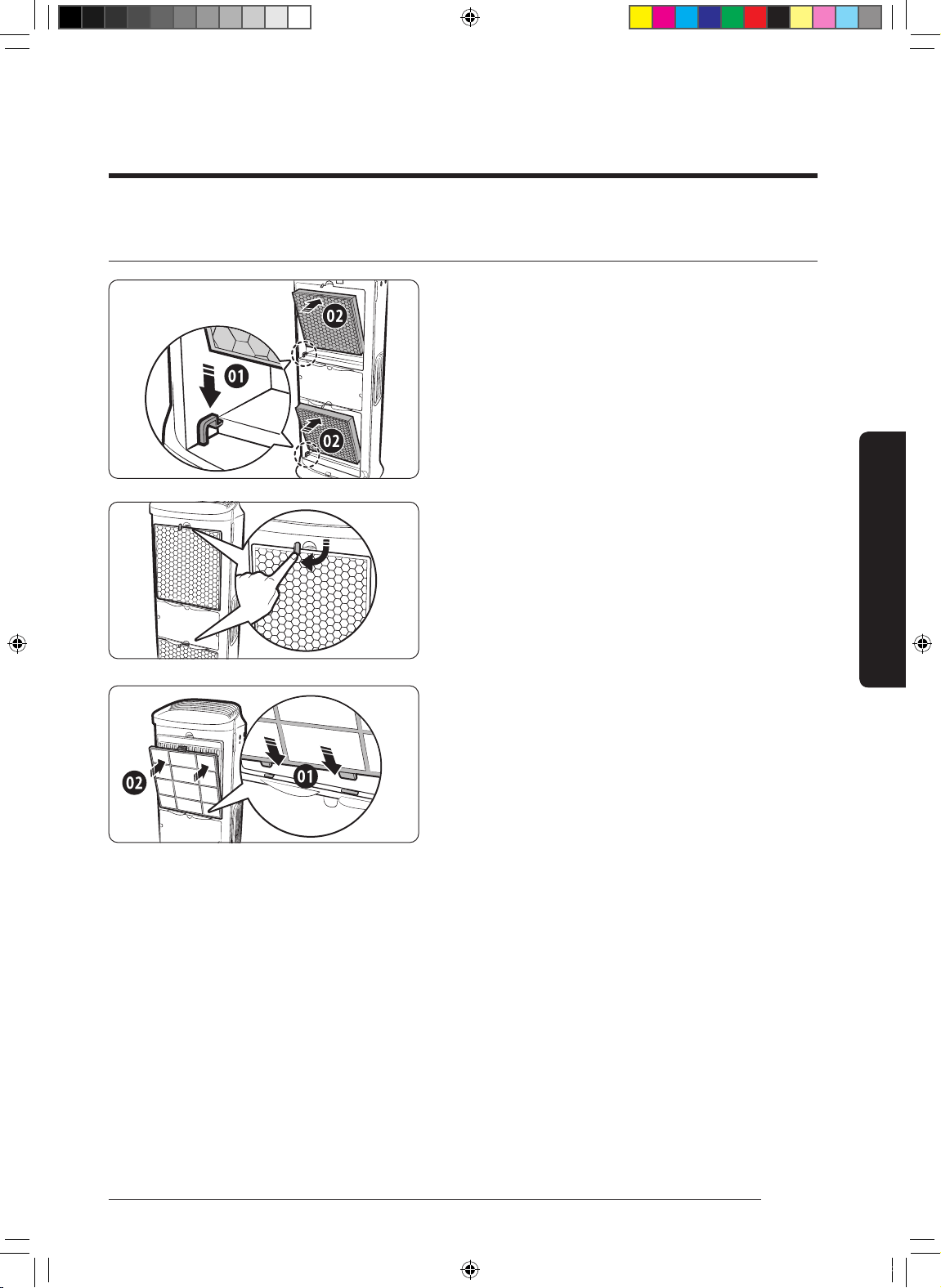
STEP 1
Place the 2-in-1 lters
• Let the lters sit inside the grooves at the bottom.
• Check the insert direction before placing the
lters.
STEP 2
Secure the 2-in-1 lters.
• Rotate the lter holder 90° clockwise to hold the
lter in place.
STEP 3
Place the pre-lters.
DB68-09095A-00_IB_ACR AX7500R_TC_EN.indd 13 2020-05-18 오전 11:06:33
14
English
At a Glance
At a Glance
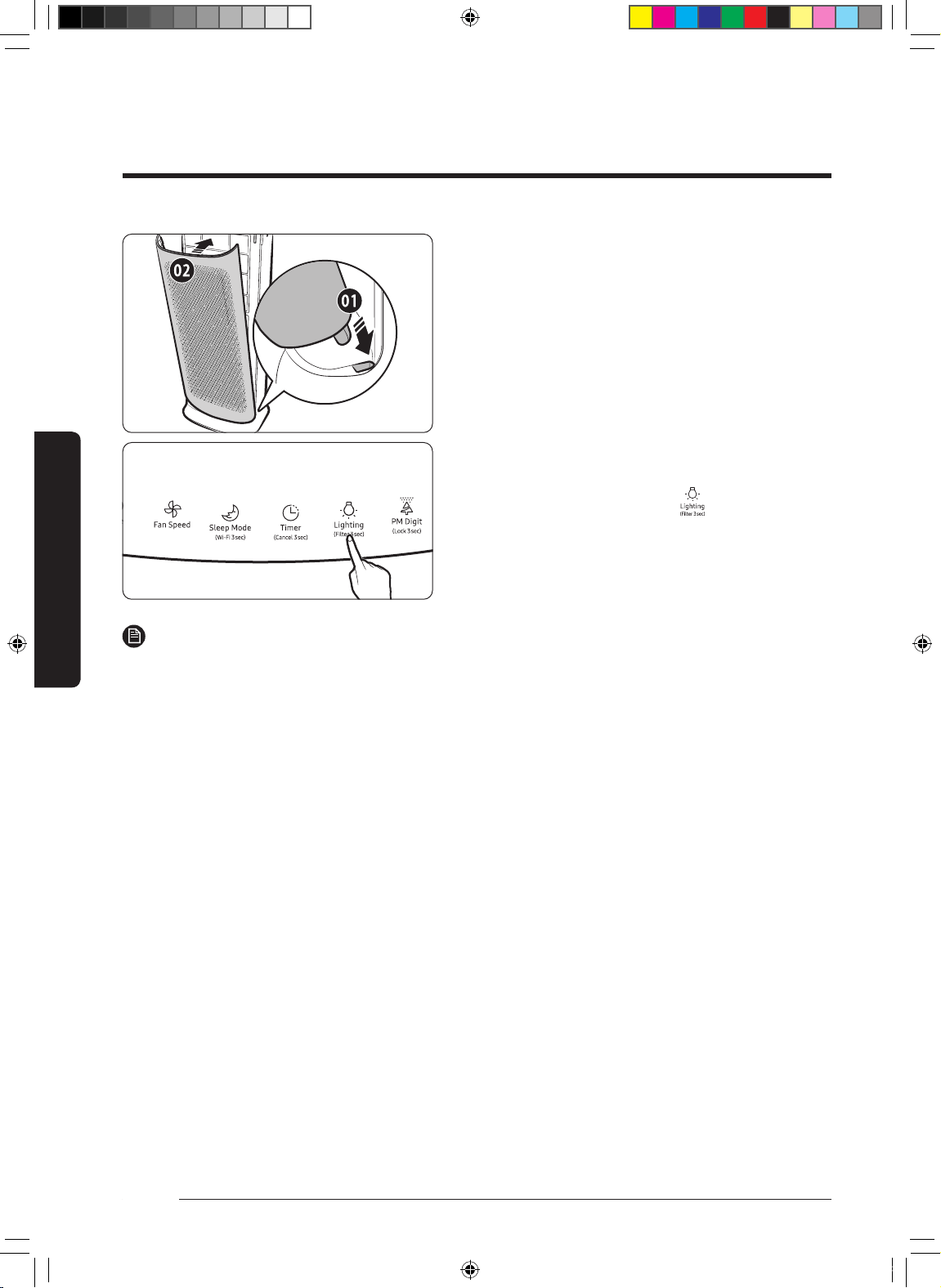
STEP 4
Place the front panel.
• First, insert the hook on the panel into the groove
at the bottom of the product.
STEP 5
Before using new lters, reset the lter
replacement reminders.
• Press and hold the Lighting [
] button for 3
seconds or longer.
NOTE
• The product is not as effective when it is operated without lters.
• You may notice a subtle odour from fresh lters when using your newly purchased air purier for
the rst time,
– which will disappear naturally in about a day.
• Keep the windows and doors closed whenever you can while the product is running. Ventilate the
air regularly to avoid high concentration of carbon dioxide when you keep the room enclosed for a
duration of time. When the lters have a weak smell, regular ventilation also reduces the smell.
• Carbon monoxide (CO) is a harmful gas that cannot be removed by the lters and usually comes
from an outdoor origin.
• The frequency of lter cleaning and replacement may vary depending on the operating
environment.
DB68-09095A-00_IB_ACR AX7500R_TC_EN.indd 14 2020-05-18 오전 11:06:33
15
English
At a Glance
Tips for using the 2-in-1 lters
• Operating the product without lters may cause abnormal air noise.
Be sure to use the product with the 2-in-1 lters.
• In a room with persisting odours, using the product after ventilating the room rst allows more
effective odour control.
– Operating the product while cooking food that has a strong odour may cause the deodorization
lter to smell, and early replacement may be necessary.
• If you operate the product after it has been unused for 2 weeks or more, or if there is a smell, run
a cleaning operation by running the product in a well-ventilated space at the High fan speed for 4
hours or more, or dry the lters in the sunlight for 4 hours or more. This can help remove odours
from the lters.
• The lter replacement reminder generates an alert when the maximum lter operation time has
been reached based on the product uptime.
The frequency of lter cleaning and replacement may vary depending on the operating
environment.
• Do not wash the 2-in-1 lters with water. When using the product, be sure to keep the lters away
from water.
• The replacement cycle of the 2-in-1 lters can be between 6 months to 1 year, provided that the
product operates 24 hours every day.
(Filters can be used longer when the duration of product operation is shorter.) Filter life depends
on the air quality.
The life span of lters may shorten depending on the usage environment, the frequency of use,
and the amount of contaminants adsorbed.
• The indicator illuminates to notify when the lters need to be replaced. However, replace them
regardless of the indicator status if they are visually dirty or smell, or if the output air ow is
noticeably slowing down.
• The dust collecting lter is a high performance lter that removes ne particles in the air such as
particulate matter (PM) and cigarette smoke particles.
• The deodorization lter is a high-performance active carbon (charcoal) lter, effectively
controlling household odours from a toilet, food, and such.
• If the lters begin to smell when you operate the product, they are no longer in usable condition
and need to be replaced.
– The 2-in-1 lter is a consumable material, and even if the warranty period is free, replacement
of lter that occurs during use will be charged.
• You can purchase new replacement lters from a Samsung Service Centre.
DB68-09095A-00_IB_ACR AX7500R_TC_EN.indd 15 2020-05-18 오전 11:06:34

16
English
Operation Features
Operation Features
Turning the power on/off
• Press the Power button. The air purier turns on with a
notication sound and automatically begins operation.
– Sensor preparation begins upon startup with a
display indication and continues for 12 seconds.
The air quality is then indicated by colour and the
concentration level.
– Coloured air quality indicator: PM10, PM2.5 and PM1.0
levels, and gas pollution display: PM10, PM2.5, PM1.0
Sensor loading display
• When you turn off the power and turn it back on, the
product operates at the last fan speed you used.
Controlling the fan speed
Use the button to select the intensity of air ow to purify
the indoor air.
• Press the Fan speed [
] button to change between
the options.
– Each time you press the button, the fan speed
changes in the order of Low → Auto → High → Medium
→ Low.
• In Auto mode, the fan speed is automatically adjusted to
the particle and odour levels around it to keep the room
clean.
– When the product detects the indoor air to be clean
while operating in Auto mode, it switches to “Auto +
Energy saving” mode, in which only the top air outlet
is active.
– This mode will be automatically released when the air
is no longer clean.
Operation Features
DB68-09095A-00_IB_ACR AX7500R_TC_EN.indd 16 2020-05-18 오전 11:06:34
17
English
Operation Features
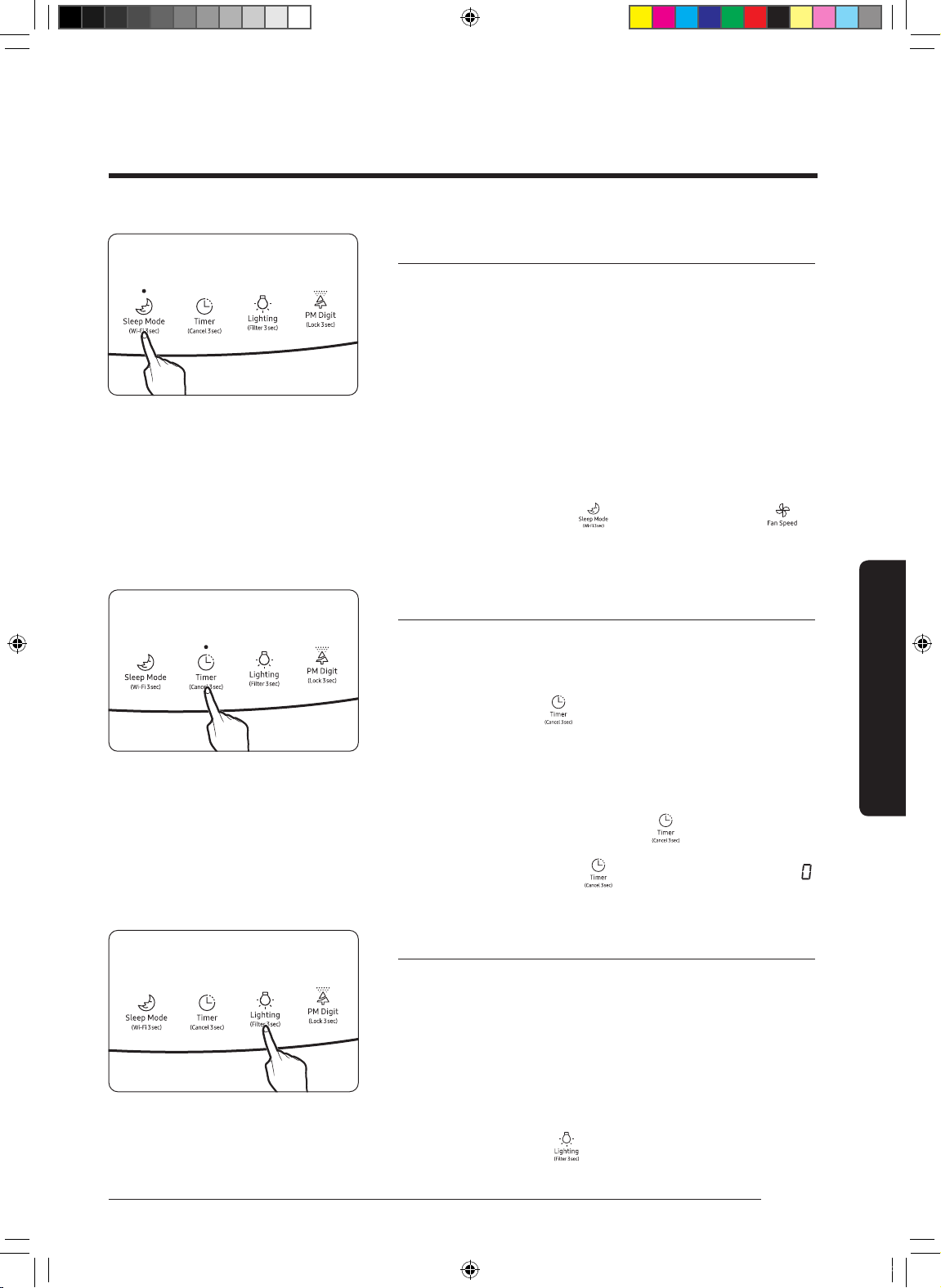
Sleep mode
Sleep mode provides a clean, quiet and comfortable room
for a good night's sleep.
• Use Sleep mode to only allow the mode indicator and
turn off all other display indicators.
• Changing the fan speed when Sleep mode has been
active for 10 seconds or more will cancel the mode and
the sensor loading display will appear.
(See ‘Sensor loading display’ on page 16.)
• Lock feature becomes unavailable while Sleep mode is on.
Cancel
• Press the Sleep mode [
] button or Fan speed [ ]
button.
Timed on/off function
The product automatically turns off after a specied
duration.
• You can select between 1hour to 12hours by pressing
the Timed on/off [
] button when the product is
powered on. Time can be adjusted by hour.
• Timed off is scheduled 3 seconds after selecting the
desired operating hours.
Cancel
• Press and hold the Timed on/off [
] button for at least
3 seconds or
press the Timed on/off [ ] button to set the timer to .
Display lighting
The air quality is displayed in pleasantly dimmed colour
lighting.
• It reects the PM10, PM2.5, PM1.0 or gas pollution level,
whichever is the worst.
• Colours do not apply when using the product in Sleep
mode.
Cancel
• Press the Lighting [
] button.
DB68-09095A-00_IB_ACR AX7500R_TC_EN.indd 17 2020-05-18 오전 11:06:34
18
English
Operation Features
Operation Features
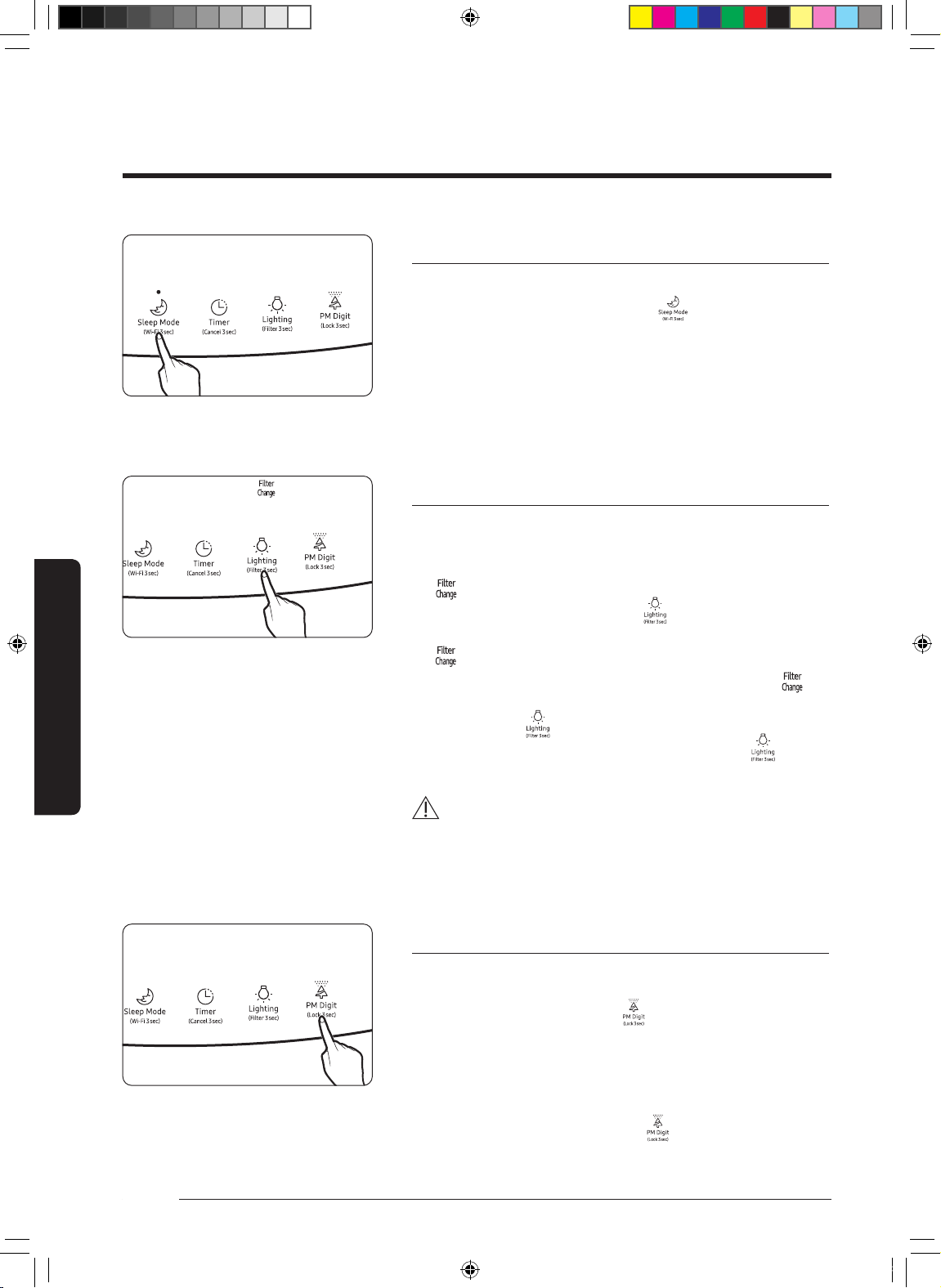
Turning the Wi-Fi feature on/off
You can turn the Wi-Fi feature on or off.
• Press and hold the Sleep mode [
] button for 3
seconds or more to turn the Wi-Fi on or off.
• To use this feature, rst register the product to Samsung
SmartThings app. Once connected, the Wi-Fi icon will
automatically light up.
– The Wi-Fi icon only lights up when the product is
connected to SmartThings app.
– About connecting to SmartThings app, see page 23.
Clearing the lter replacement reminder
This feature noties when to replace the 2-in-1 lters
(Deodorization Filter+Dust Collecting Filter).
• If you hear a beep and the lter replacement indicator
[
] lights up while the product is in use, replace the
lters and press the Lighting [ ] button for 3 seconds
or more to reset.
The replacement reminder turns off after
[
] blink twice with the notication sound.
• Likewise, if the lters have been replaced before [
]
activation for other reasons, reset the status by pressing
the Lighting [
] button for longer than 3 seconds.
• After resetting the lters, press the Lighting [
]
button to reset this feature as well.
CAUTION
• The lter change indicator may not work properly if
you continue to use old lters without replacement or
perform the reset process without lters.
Lock function
Use this feature to lock all buttons and prevent
unintended button operation, especially by children.
• Press and hold the Air quality [ ] button for 3 seconds or
more to activate this feature, which locks all buttons after a
beep.
• All buttons become inaccessible while Lock feature is on.
Cancel
• Press and hold the Air quality [ ] button for 3 seconds
or more. The feature is released after a beep.
DB68-09095A-00_IB_ACR AX7500R_TC_EN.indd 18 2020-05-18 오전 11:06:34
19
English
Operation Features
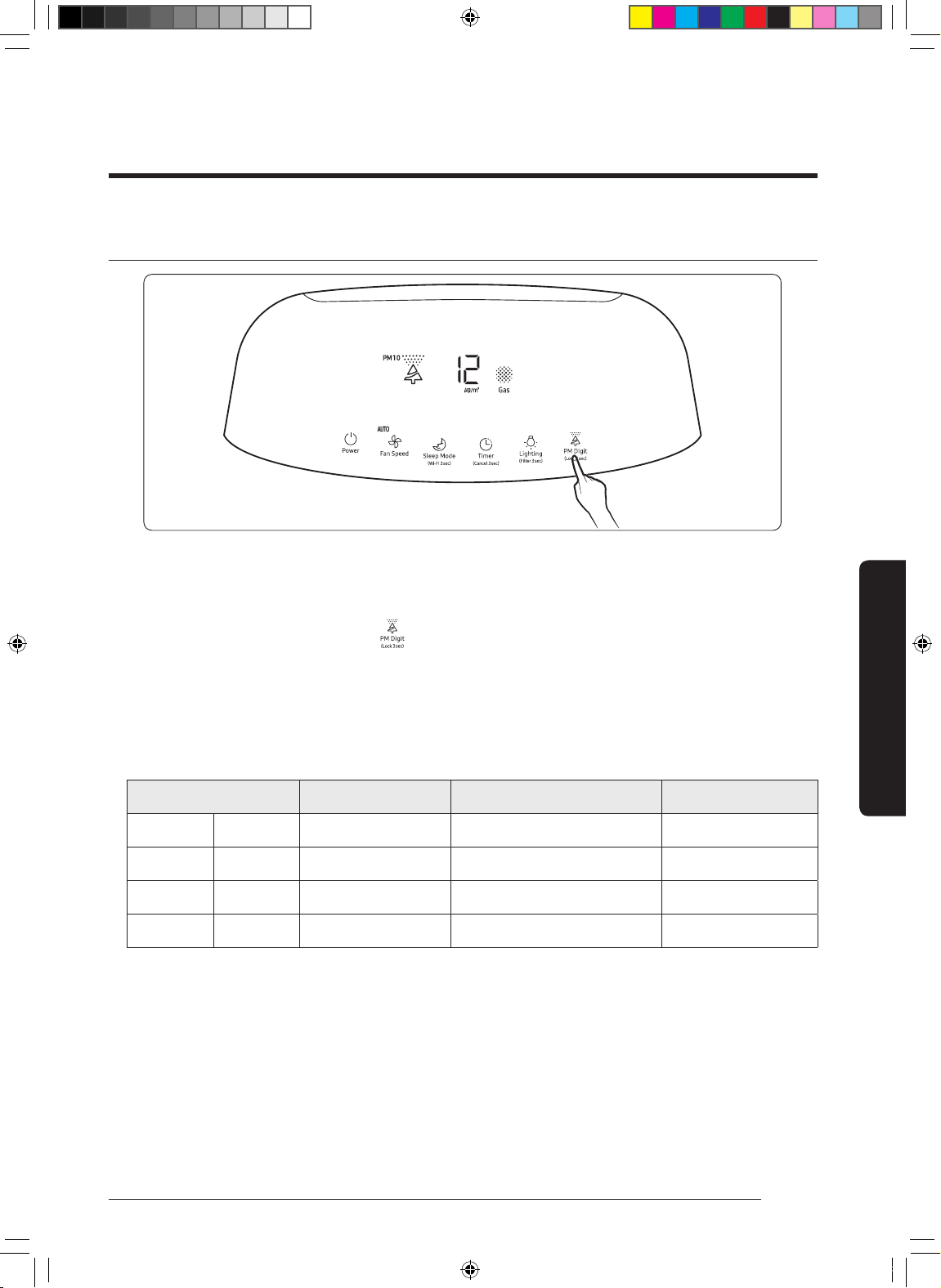
Checking the air quality
You can review the current air quality from the display panel with the colour (reecting the PM10 /
PM2.5 / PM1.0 / gas pollution) and the concentration level indicators.
• By default, the colour and PM10 / PM2.5 / PM1.0 level indicators reect the PM10 concentration.
• Each time you press the Air quality [
] button, the current state is displayed in the order
of PM10 → PM2.5 → PM1.0. The PM2.5 and PM1.0 levels are displayed for 10 seconds, before
automatically changes to the PM10 level.
– The air quality will be ‘Very Poor’ when the PM2.5 / PM1.0 levels are worse than the PM10 level.
If the concentration levels are same for all PM groups, the indicator will reect the PM10 level.
• Air quality levels
Pollution level PM10 level (㎍/m³) PM2.5 / PM1.0 level (㎍/m³) Gas pollution level
Very poor Red 151 and over 76 and over 4
Poor Yellow 81 - 150 36 - 75 3
Moderate Green 31 - 80 16 - 35 2
Good Blue 30 and below 15 and below 1
• PM10, PM2.5 and PM1.0 measurement will be displayed in numbers 05 – 999.
DB68-09095A-00_IB_ACR AX7500R_TC_EN.indd 19 2020-05-18 오전 11:06:35
20
English
Operation Features
Operation Features
NOTE
• The dust concentration may vary depending on the environmental conditions (for example, when
the product is near a construction site, road, or fabric sofa, or when a vacuum cleaner is used or
bedding and clothes are arranged near the product, etc.).
• The following conditions may cause temporarily high readings of PM level:
– When the product is used near fur rugs or used in vets, clothes stores, or other places prone to
high humidity, smoke or infestation
– When humidiers, electric pressure cookers, sprayers and such are being used in the same
room
– When the product is used where there is inow of outside air with dust or other types of air
pollution (e.g. proximity to the building’s HVAC or ventilation systems, or loose window frames)
• The gas pollution reading can be affected by odorous household items such as air fresheners,
deodorants and detergents.
• If you are using more than one air purier in the same room, the dust concentration reading on
each unit may not be same as they affect air circulation. The dust concentration reading may vary
depending on the sensor or product being used.
• If there is no change in the intensity of gas (odour), it may not be reected in the gas pollution
reading even though you can clearly smell it.
• PM levels on the display may differ from the ofcial forecasts.
• Nearby electromagnetic waves or electrical noises may cause temporarily high readings of PM
level.
DB68-09095A-00_IB_ACR AX7500R_TC_EN.indd 20 2020-05-18 오전 11:06:35
21
English
Cleaning and Maintenance
Cleaning the air purier exterior
• Dampen a soft cloth with lukewarm water and wring it out, and then wipe the product exterior
with it.
• Wipe the grooves on the front panel with a cotton swab.
• If it is too hard to clean the dust from the front panel, remove the panel and wash it with water.
CAUTION
• Do not wipe the product with an alkaline detergent.
• Do not wipe the product surface with sulphuric acid, hydrochloric acid, or organic solvents (thinner,
kerosene, acetone, etc.). Do not attach a sticker to the product. Failure to do so may result in
damage to the product surface.
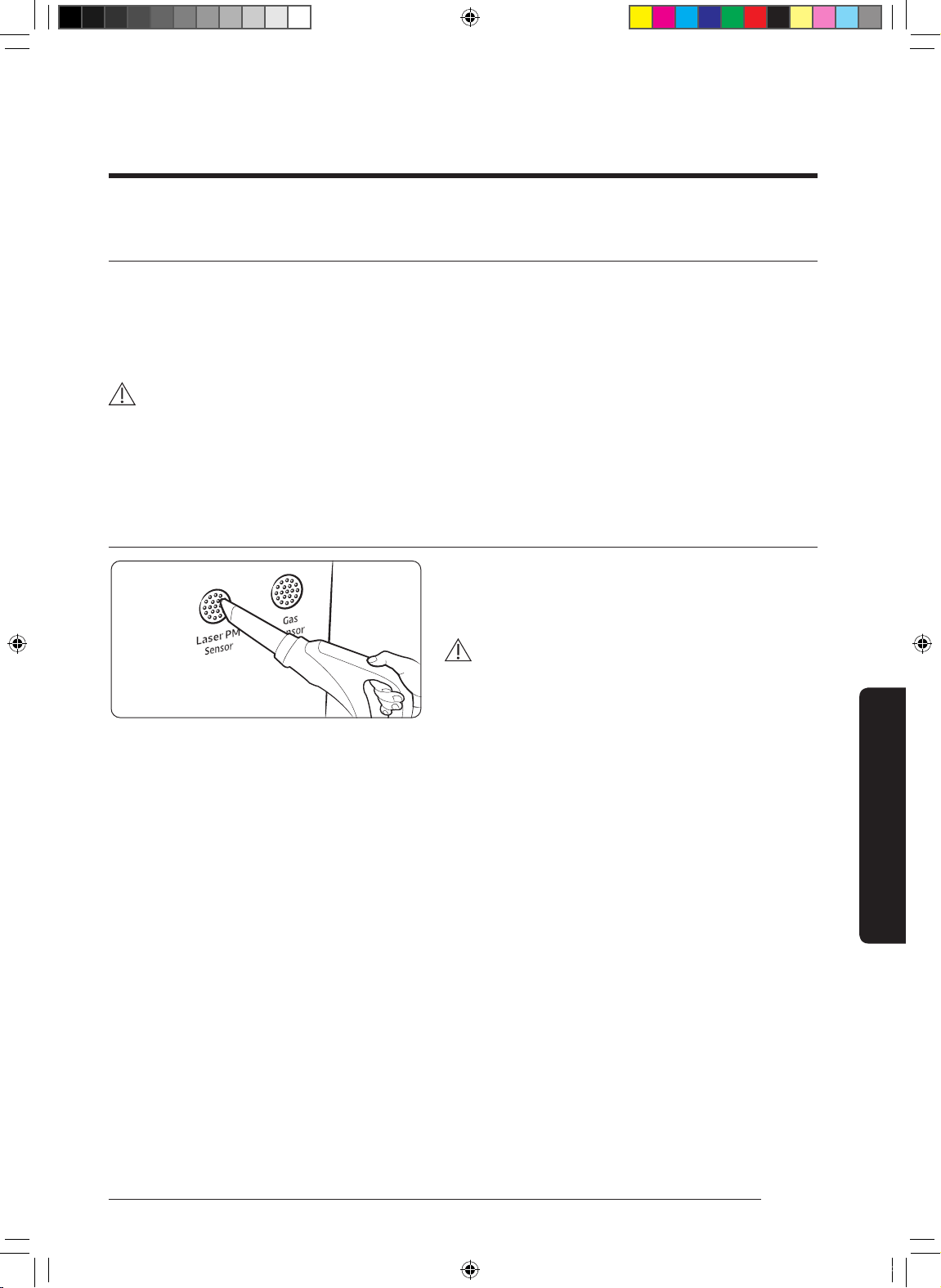
Cleaning the sensors
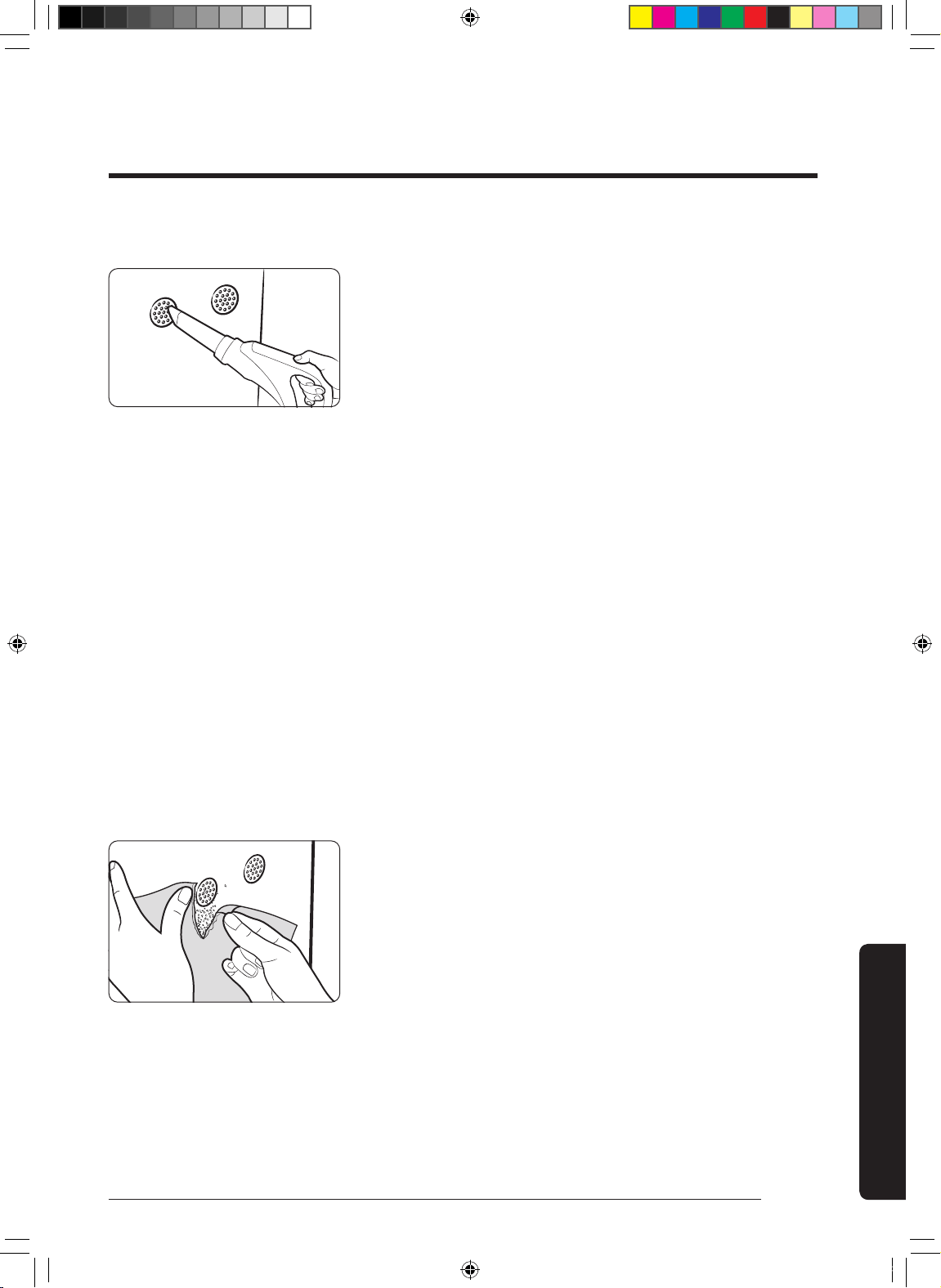
• If there is dust or foreign substance on a sensor,
use a vacuum cleaner to clean the sensor and its
surrounding.
CAUTION
• Do not put any dust into the sensor openings.
Cleaning and Maintenance
Cleaning and Maintenance
Be sure to disconnect the power plug from the socket before cleaning the product.
DB68-09095A-00_IB_ACR AX7500R_TC_EN.indd 21 2020-05-18 오전 11:06:35
22
English
Cleaning and Maintenance
Cleaning and drying the lters
NOTE
• About removing/assembling the lters, see pages 12 and 13.
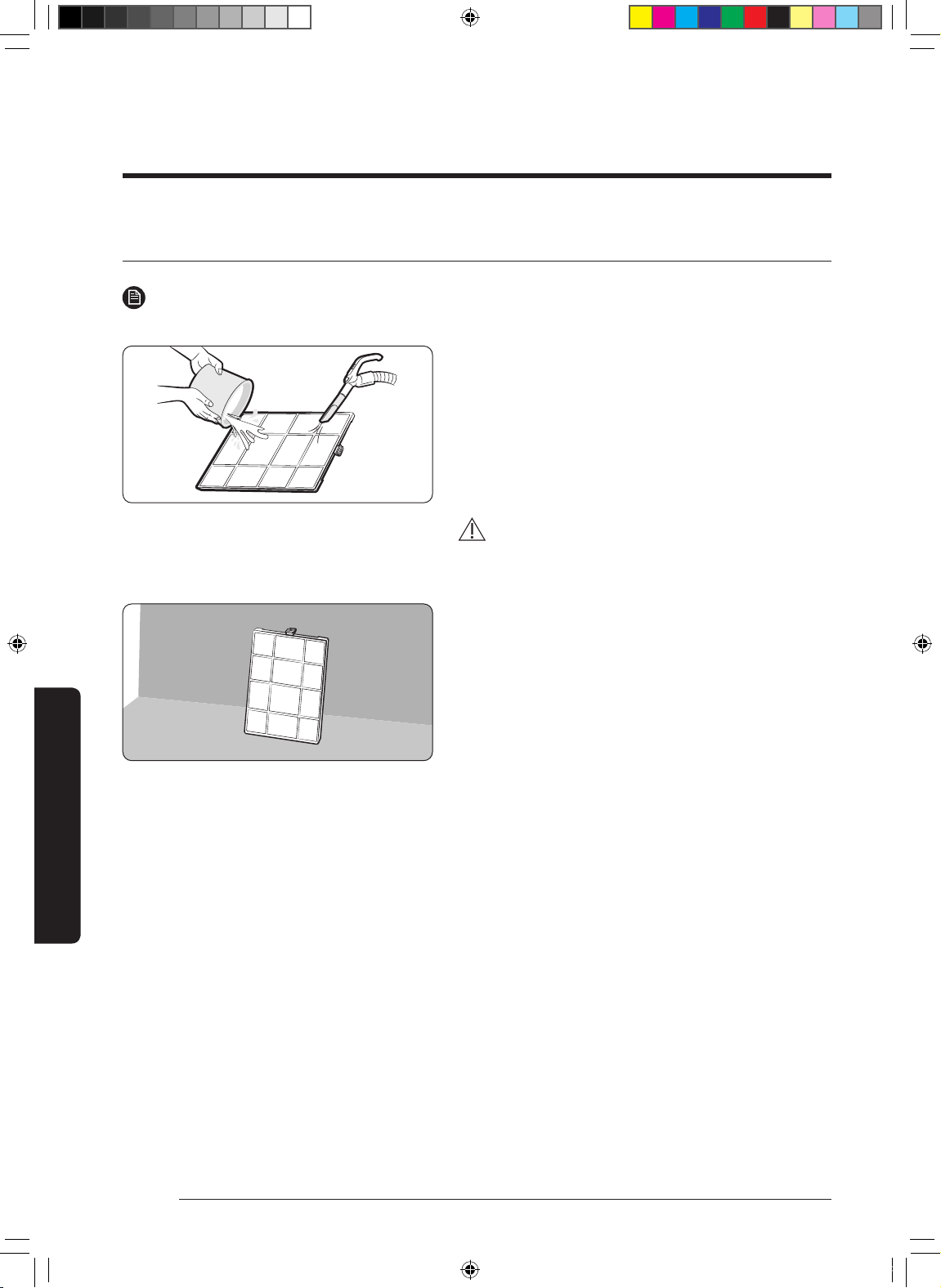
Cleaning the pre-lters
• Depending on the dust accumulation, rst remove
dust with a vacuum cleaner and gently wash
the lter with a pH-neutral detergent diluted in
lukewarm water.
– Cleaning interval: 2 weeks (when using the
product 24 hours every day)
CAUTION
• Cleaning the pre-lter by rubbing with a brush or
a similar tool may damage the superne bres.
Drying the lters
• Keep the lters in the shade until completely dry
and away from direct sunlight.
Cleaning and Maintenance
DB68-09095A-00_IB_ACR AX7500R_TC_EN.indd 22 2020-05-18 오전 11:06:35
23
English
SmartThings app
1
Checking the power connections
Check if the power is connected to the product
and the access point.
2
Setting up and connecting to a Wi-Fi
access point using your smartphone
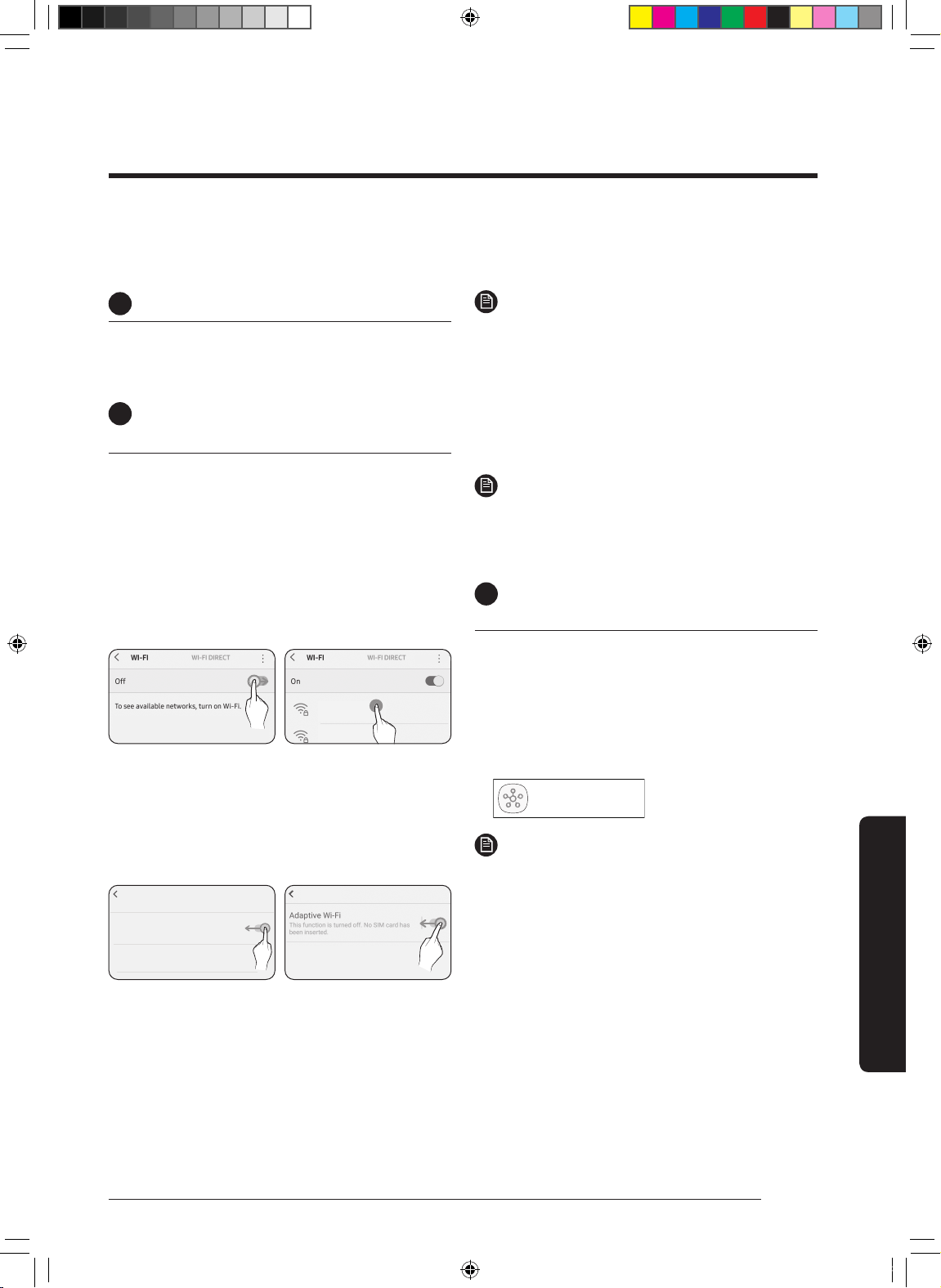
1
To connect the product to a Wi-Fi network,
turn on Wi-Fi at “Settings > Wi-Fi”, and
then select the access point to connect to
• Only alphanumeric characters are supported
for wireless access point names (SSIDs). If an
SSID has a special character, rename it before
connecting to it.
• This product supports only Wi-Fi 2.4 GHz.
SAMSUNG_2G
SAMSUNG_5G
On
Select
2 Turning off “Switch to mobile data” at
“Settings > Wi-Fi” on your Smartphone
• If “Switch to mobile data” or “Adaptive Wi-Fi” is
turned on, you cannot connect to the network.
Be sure to turn off these functions before
connecting to the network.
Advanced
Switch to mobile data
Insert SIM card to use mobile data.
Advanced
Off
Off
NOTE
• The setup may differ depending on your
smartphone model, OS version and
manufacturer.
3 Checking the Internet connectivity
• After connecting to Wi-Fi, check that your
smartphone is connected to the Internet.
NOTE
• A rewall may prevent your smartphone
from connecting to the Internet. Contact your
Internet service provider for troubleshooting.
3
Downloading the SmartThings app and
registering your Samsung account
1 Downloading the SmartThings app
• Search for “SmartThings” on Play Store or App
Store, and download the SmartThings app to
your smartphone.
• If the SmartThings app is already installed on your
smartphone, update it to the latest version.
SmartThings
Samsung Electronics Co., Ltd.
NOTE
• For tablets that are not supported by the
SmartThings app and the smart phones
that have an OS version earlier than the
recommended versions, the SmartThings app
may not be found.
– Android OS 6.0 or later (with at least 2 GB RAM) is
recommended.
– Supported screen resolutions: 1280 x 720 (HD),
1920 x 1080 (FHD), 2560 x 1440 (WQHD)
To use the SmartThings app, connect the product to the network in the sequence described below.
The images shown may differ depending on your smartphone model, OS version and manufacturer.
You need to set up the Wi-Fi access point only when connecting the product to a Wi-Fi network. Once the
product is connected, you can use the SmartThings app via Wi-Fi, 3G, LTE, 5G or more wireless networks.
SmartThings app
SmartThings app
DB68-09095A-00_IB_ACR AX7500R_TC_EN.indd 23 2020-05-18 오전 11:06:35
24
English
SmartThings app
• The SmartThings app is not compatible with
some Apple devices including iPad and some
smartphones.
– iPhone 6 or later with iOS 10.0 or later is supported.
– Supported screen resolutions: 1334x750,
1920x1080
• The SmartThings app may change without
prior notice to improve product usability and
performance.
2 Registering your Samsung account
• A Samsung account is required to use the
SmartThings app. To create your Samsung
account and log in to your account, follow the
instructions displayed on the SmartThings app.
You do not need to install an additional app.
NOTE
• If you already have a Samsung account, log in
to the account. If you have a smartphone that
is a Samsung device and you have a Samsung
account, your smartphone is automatically
logged in to your account.
• If you log in from a smartphone produced for
another country, you need to log in with its
country code when you create your Samsung
account, and the SmartThings app may not be
used on some smartphones.
4
Connecting the SmartThings app
to your product
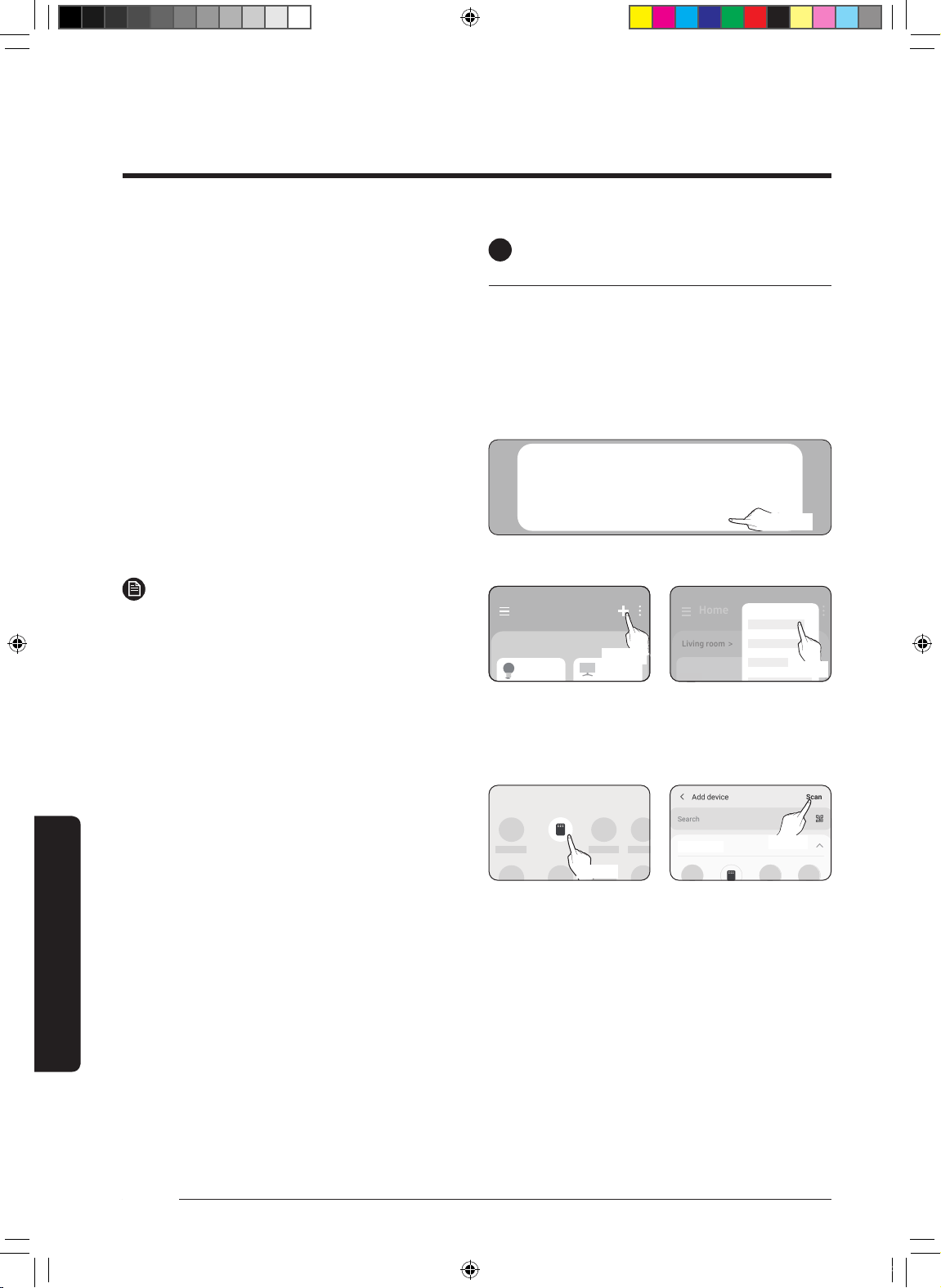
1 Selecting the product to connect to
1) Start the SmartThings app about one minute
after turning on the product to connect to.
2) After the SmartThings app is started, select
‘ADD NOW’ when a pop-up window saying
that a product to connect to is found appears.
A new device has been found.
Add this device to SmartThings?
Don’t add Later
Add now
Select
3) If the pop-up window does not appear, select
“+”, and then “Add Device.”
Home
Living room >
Add device
Home
Living room >
Select
Select
You can add a product you want to connect to
by selecting it manually or by selecting “Scan”.
•
Select manually: Air purifier > Samsung
•
Scan: [Air purifier] Samsung
Air purifier
By device type
By device type
Select
Select
SmartThings app
DB68-09095A-00_IB_ACR AX7500R_TC_EN.indd 24 2020-05-18 오전 11:06:36
25
English
SmartThings app
2
Connecting the SmartThings app to your
product
• Follow the instructions displayed on the
SmartThings app to connect to your product.
• For information on how to use the SmartThings
app, select the How To menu on the app.
NOTE
• If any pop-window appears on the top of the
smartphone while connecting to your product,
do not select it.
• If a pop-up window saying that the device is
already registered appears during connecting
to your product, get permission using
“REQUEST PERMISSION” from a user already
connected to the product, or create a new
account using “REGISTER MY ACCOUNT” to
independently connect to the product.
• If a Samsung account-related country error occurs
during connecting to your product, log out of your
current Samsung account, log in to your previous
Samsung account, and then delete all devices that
have been connected previously. Then, log in to
your current Samsung account again, and then
congure the settings.
• If a failure message appears while adding a
device, see “Setting up and connecting to a
Wi-Fi access point using your smartphone”
on page 23. The connection may fail
temporarily due to an installation location
problem of the access point or other problems.
• If a message appears on the SmartThings app,
follow its instructions.
NOTE
• For the security protocols for wireless/wired
access points, WPA-PSK and WPA2-PSK are
recommended. For the authentication methods,
AES is recommended. New Wi-Fi authentication
specications and Wi-Fi non-standard
authentication methods are not supported.
• The product supports the IEEE802.11 b/g/n
(2.4 GHz) communication protocol. (Samsung
recommends IEEE802.11n.)
• If your Internet service provider permanently have
registered the MAC address (a unique identication
number) of your PC or modem, you may not be able
to connect your product to the Internet. Contact
your Internet service provider and ask how to
connect devices other than your PC (such as an air
conditioner and an air purier) to the Internet.
Open Source Announcement
The software included in this product contains open
source software. You may obtain the complete
corresponding source code for a period of three years
after the last shipment of this product by contacting
our support team via http://opensource.samsung.com
(Please use the “Inquiry” menu.)
It is also possible to obtain the complete
corresponding source code in a physical medium such
as a CD-ROM; a minimal charge will be required.
The following URL http://opensource.samsung.com/
opensource/SMART_AT_051/seq/0 leads to the
open source license information as related to this
product. This offer is valid to anyone in receipt of this
information.
DB68-09095A-00_IB_ACR AX7500R_TC_EN.indd 25 2020-05-18 오전 11:06:36
26
English
SmartThings app
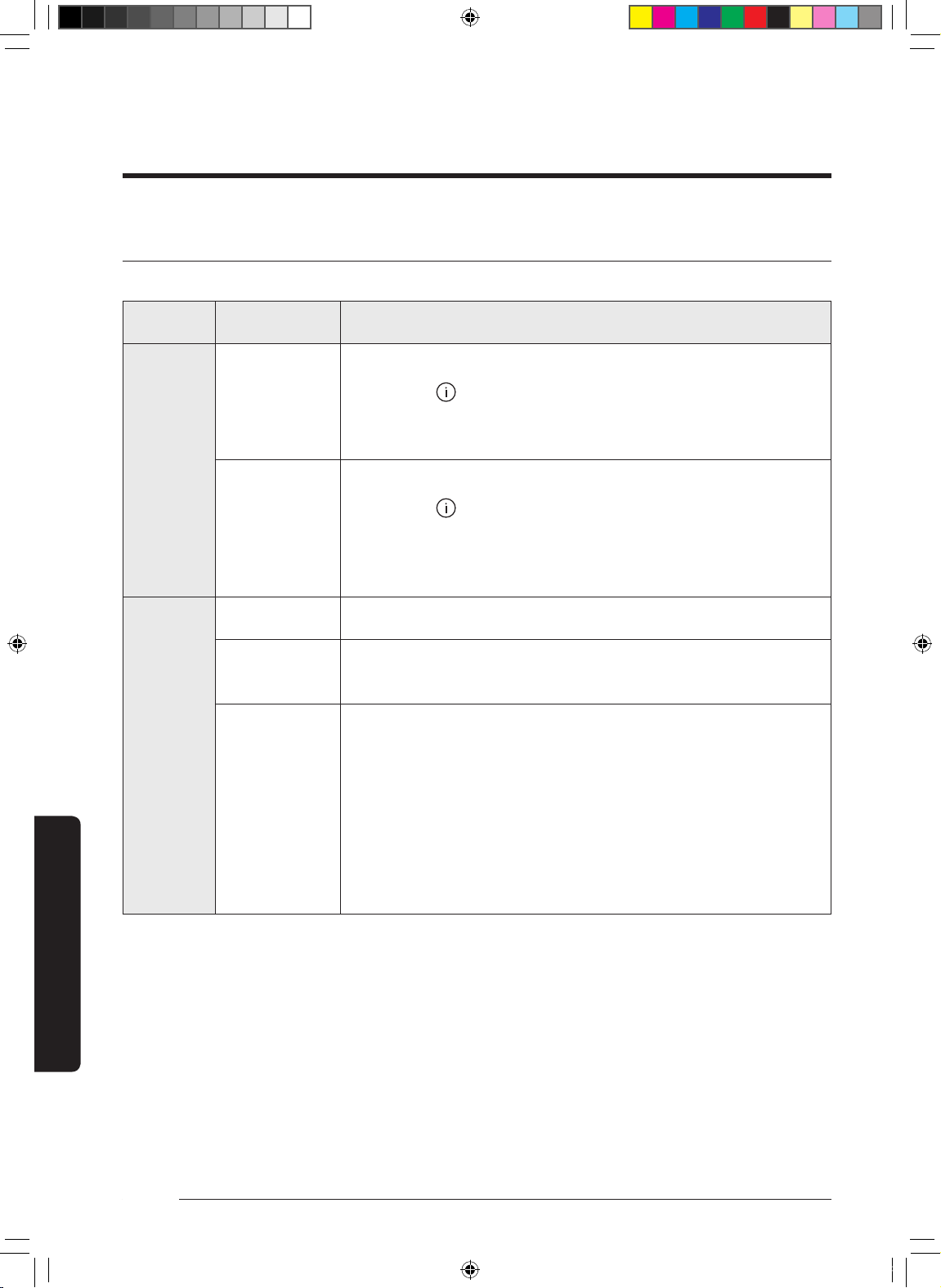
Controlling your air purier with SmartThings app
Smartly control your air purier using the SmartThings app.
Category Function Description
Monitoring
Indoor air
quality
Check the indoor air cleanliness.
•
Touch the
icon to view the PM10 / PM2.5 / PM1.0 levels and
gas cleanliness.
• Some of the options may not be available on your air purier.
Outdoor air
quality
You can access to air quality information for your area.
•
Touch the
icon to view detailed air quality information for the
region you specied in the settings.
• If you cannot view any outdoor air quality information, specify
your region in the settings.
Control
Power supply
Turn your air purier on or off.
Controlling the
fan speed
Select the fan speed you want.
Timed on/off
Set the timed on/off times.
• You can set a total of up to 10 timed on/off times.
• You cannot set the same time for both of the timed on and timed
off times.
• While you are setting a timed on/off time, no timed on/off
indications are displayed on your air purier display.
• Once you set a timed on/off time, it persists even if you unplug
and plug in the power cord of your air purier.
SmartThings app
DB68-09095A-00_IB_ACR AX7500R_TC_EN.indd 26 2020-05-18 오전 11:06:36
27
English
SmartThings app
Category Function Description
Control
Operation
functions
Touch the buttons for various additional functions you want to run.
• Deactivated buttons are the functions that your air purier does
not support.
settings
Check the settings for region, lighting, mute, or lters.
• If you change the region, your display panel will show the outdoor
air quality information for the new region.
• You can check the lter replacement time and reset the lter
replacement reminder using Filter Info.
You can also view the information about replacement lters.
• Some of the options may not be available on your air purier.
Help
Useful information to help you understand air related information
and terms.
Device
information
View or open the version, tutorial, manual, store, self diagnosis,
help desk.
• Some of the options may not be available on your air purier.
DB68-09095A-00_IB_ACR AX7500R_TC_EN.indd 27 2020-05-18 오전 11:06:36
28
English
Appendix
Operation
The air purier does not operate.
• Check the power supply and turn on the air purier again.
• Make sure that the power plug is plugged in, and then turn on
the air purier again.
If it still does not operate, try a different power outlet.
• Make sure that the front panel is closed properly.
Sound
The air purier makes strange noises.
• If you move the product during operation, it may cause noise.
Turn off the power before moving the product.
Odours
The air purier smells strange.
• Because the air purier sucks and circulates indoor air, if you
use it in a closed space for a long time, odours generated in
your home can saturate the lters.
– Remove the pre-lter, 2-in-1 lter. See if any of them smell
and clean or replace them when necessary.
You will be charged for replacing lters regardless of the
remaining warranty.
– Open the doors and windows, and then operate the product
for 3 to 4 hours.
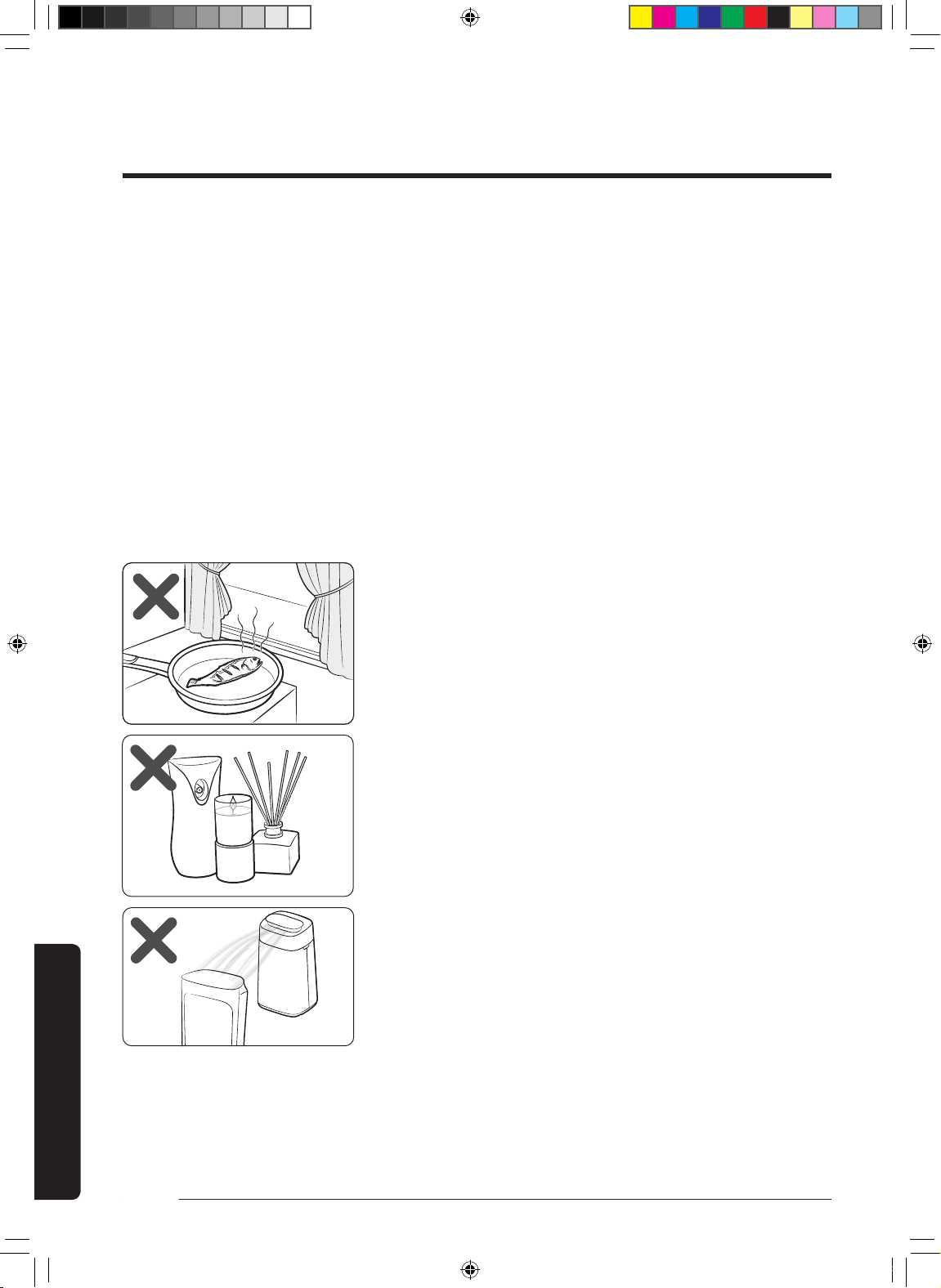
– When grilling or frying food ingredients such as sh and
meat, ventilate the room well and operate the air purier
once the odours are sufciently removed.
• Filters can become the source of odours when you use the
product along with air fresheners, diffusers, scented candles or
cleaning agents, or in a recently furnished room (e.g. new paint
or wallpaper).
– Ventilate until the odours are completely removed, and then
operate the product.
• Operating your air purier in a room that is constantly humid or
exposing it to moisture from a humidier can cause the lters
to smell after some time.
– If the lters smell due to moisture, dry them well in sunlight
before using them again.
Check the following before requesting service from the Service Centre.
Before Requesting Service
Appendix
DB68-09095A-00_IB_ACR AX7500R_TC_EN.indd 28 2020-05-18 오전 11:06:37
29
English
Appendix
Cleanliness
The cleanliness colour indicator continuously lights up in red.
(The cleanliness indications are strange.)
• Check the sensors for any foreign substances and clean them if
necessary.
• In winter season, installing and operating the product for the
rst time shortly after delivery may cause the pollution level
to reach 999/m³ with the indicator illuminated in red. This
is a temporary issue that happens if there is a signicant
temperature change from outdoor exposure causing
condensation inside the unit. In this case,
do not be alarmed and continue using the product. The status
will be cleared within 1 to 2 hours of operation.
• The gas sensor reacts to changes in the indoor odourant level
due to cooking or ventilation, causing the indicator to illuminate
in red. When this happens, ventilate the room for 1 to 2 hours.
• Disconnect the power plug, then put it back after 1 minute. (To
reset the sensor)
• If the indicator colour stays in red after you have followed all the
provided instructions and solutions, it may be a sensor issue. In
this case, please contact your local Samsung Service Centre.
• When humidiers, electric pressure cookers, sprayers and such
are being used in the same room, the pollution level may be
measured as Poor.
The fan speed does not change according to cleanliness.
• Set the fan speed to Auto. The fan speed does not change
automatically when it is set to Low, Medium or High, and when
Sleep mode is on.
The PM10, PM2.5, PM1.0 concentration values do not change
from the Good (05) level.
• This may happen when the room is properly sealed and the air is clean.
To check if the sensor is functioning, test it by tearing paper by
the sensor and/or rub them to create some dust. This will cause
the PM levels to change if the sensor is working properly.
– Dusting off or cleaning the room may not necessarily cause
sensor feedback if the dust particles are bigger than PM10,
while they are still ltered and removed from the air.
DB68-09095A-00_IB_ACR AX7500R_TC_EN.indd 29 2020-05-18 오전 11:06:37
30
English
Appendix
Display
The PM10, PM2.5, PM1.0 concentration values are the
same continuously.
• When the air is clean, you may not see a difference between
the PM10, PM2.5 and PM1.0 levels. To check if the sensor is
functioning, test it by tearing paper by the sensor and/or rub
them to create some dust. This will cause the PM levels to
change if the sensor is working properly.
The lter replacement indicator is always turned on.
• After replacing the lters, press and hold the [ ] button for
3 seconds or more to reset the lter replacement reminder.
Strange indications appear on the display.
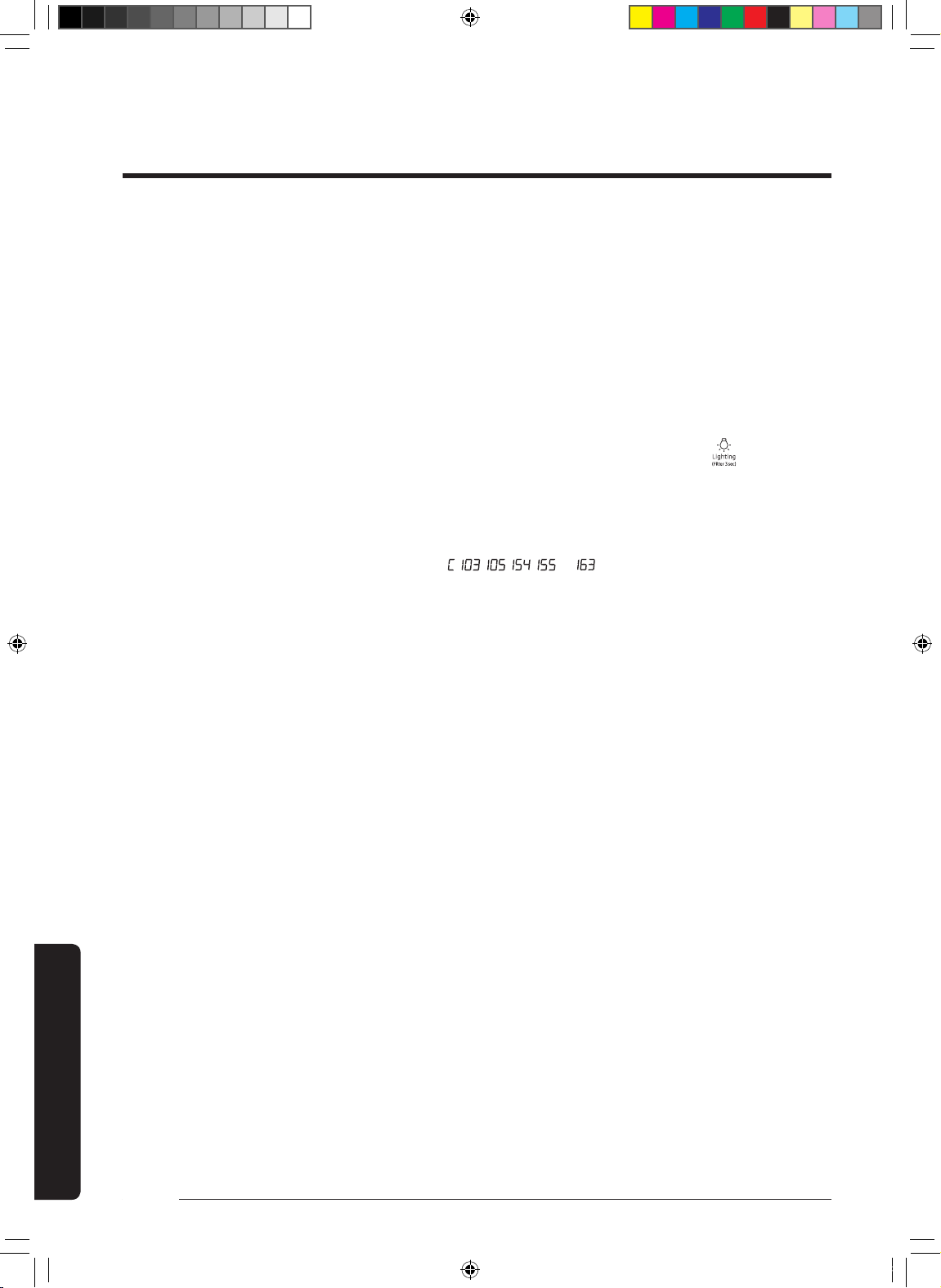
• Contact your local Samsung Service Centre if your air purier
displays , , , or
Air circulation
The fan does not seem to circulate the air evenly.
• Your air purier is designed to send the clean air upwards for
effective circulation. Since the air circulates clockwise, you may
nd the output on the right relatively stronger, and weaker on
the left.
Before Requesting Service
DB68-09095A-00_IB_ACR AX7500R_TC_EN.indd 30 2020-05-18 오전 11:06:37

31
English
Appendix
Memo
DB68-09095A-00_IB_ACR AX7500R_TC_EN.indd 31 2020-05-18 오전 11:06:37
COUNTRY CALL OR VISIT US ONLINE AT
PHILIPPINES
1-800-10-726-7864 [ PLDT Toll Free ]
1-800-8-726-7864 [ Globe Landline and Mobile ]
02-8-422-2111 [ Standard Landline ]
www.samsung.com/ph/support
QUESTIONS OR COMMENTS?
DB68-09095A-00
DB68-09095A-00_IB_ACR AX7500R_TC_EN.indd 32 2020-05-18 오전 11:06:40