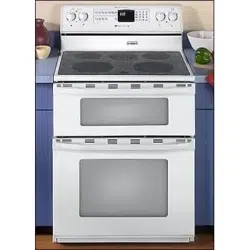
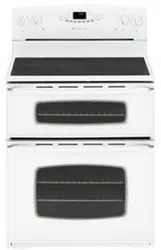
Maytag MER6765BAS Range
Product's Documents
Below are documents related to this product, you can read online or download:
- Owner's manual - (English) Read Online | Download pdf
Use to turn on the surface elements. An infinite choice of heat settings is available from Low to High. The knobs can be set on or between any of the settings.
Setting the Controls
1. Place pan on surface element.
2. Push in and turn the knob in either direction to the desired heat setting.
• The control panel is marked to identify which element the knob controls. For example, the graphic at right indicates left front element.

3. There is an element “ON” indicator light on the control panel. When any surface control knob is turned on, the light will turn on. The light will turn off when all the surface elements are turned off.
4. After cooking, turn knob to OFF. Remove pan.
Dual Elements (select models)
The cooking surface has two dual elements located in the right front and left front of the smoothtop. This allows you to change the size of these elements. Turn control knob to OFF before switching element size.
Press the switch to the left to use the large element or to the right to use the small element.
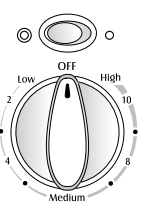
Triple Element (select models)
The cooking surface has one triple element located in the right front position. This element can be used for larger cooking utensils when the triple element is chosen, or for smaller pans when the single or dual settings are chosen. To operate the single element, push in the control knob and rotate to the left. To operate the dual or triple elements, make the selection with the rocker switch and rotate the control knob to the right.
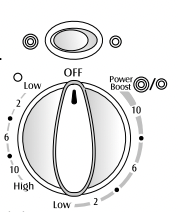
Suggested Heat Settings
The size, type of cookware and cooking operation will affect the heat setting. For information on cookware and other factors affecting heat settings, refer to Cookware Recommendations on page 7.
Warm (right or left rear element): Food maintains a temperature above 140° F without continuing to cook. Food is heated on a higher setting until it reaches this temperature. Never use a hold or warm setting to reheat cold food. Be sure knob is adjusted to produce a consistant temperature.
Simmer: Food forms bubbles that barely break the surface. Foods are between 185° F and 200° F. A simmer setting can also be used to steam or poach foods or continue cooking covered foods. (Adjust the knob between High and Low to obtain the desired simmer action.)
Slow Boil: Food forms bubbles at a moderate pace. A slow boil setting can also be used for most frying and for maintaining the cooking of large amounts of liquids. (Adjust the knob between High and Low to obtain the desired boil action.)
Boil: Liquid forms bubbles at a rapid pace. A fast boil setting can be used to bring liquid to a boil, brown meat, stir fry, saute, and heat oil for frying before turning to a lower setting. The High setting is always used to bring liquids to a boil. Once the liquid boils, always turn the control to the lowest setting that will maintain the boil action.
CAUTION
BEFORE COOKING
• Always place a pan on the surface unit before you turn it on. To prevent damage to range, never operate surface unit without a pan in place.
• NEVER use the cooktop as a storage area for food or cookware.
DURING COOKING
• Be sure you know which knob controls which surface unit. Make sure you turned on the correct surface unit.
• Begin cooking on a higher heat setting then reduce to a lower setting to complete the operation. Never use a high heat setting for extended cooking.
• NEVER allow a pan to boil dry. This could damage the pan and the appliance.
• NEVER touch cooktop until it has cooled. Expect some parts of the cooktop, especially around the surface units, to become warm or hot during cooking. Use potholders to protect hands.
AFTER COOKING
• Make sure surface unit is turned off.
• Clean up messy spills as soon as possible.
OTHER TIPS
• If cabinet storage is provided directly above cooking surface, limit it to items that are infrequently used and can be safely stored in an area subjected to heat. Temperatures may be unsafe for items such as volatile liquids, cleaners or aerosol sprays.
• NEVER leave any items, especially plastic items, on the cooktop. The hot air from the vent may ignite flammable items, melt or soften plastics, or increase pressure in closed containers causing them to burst.
• NEVER allow aluminum foil, meat probes or any other metal object, other than a pan on a surface element, to contact heating elements.
• NEVER store heavy items above the cooktop that could fall and damage it.
Flex-ChoiceTM Element (select models)
The Flex-ChoiceTM element is a fully functioning element that provides an ultra low Melt heat setting for melting chocolate and butter. It is located in the left rear position
The Melt setting is located between 2 and OFF. Heat settings outside of this area function as a normal element, with 2 (Low) to High settings.
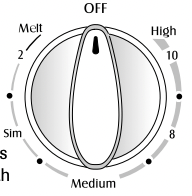
Note: When using the normal settings for preparing foods, it may take a few minutes for the cooking area to cool to the Melt heat setting.
Notes:
Cooking Areas
The cooking areas on your range are identified by permanent circles on the smoothtop surface. For most efficient cooking, fit the pan size to the element size.
Pans should not extend more than 1/2 to 1-inch beyond the cooking area.
When a control is turned on, a glow can be seen through the smoothtop surface. The element will cycle on and off to maintain the preset heat setting, even on High.
For more information on cookware, refer to Cookware Recommendations on page 7.
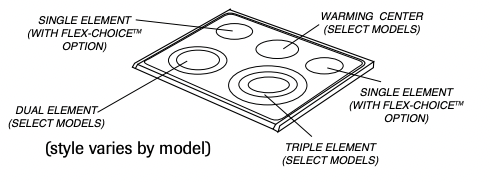
* Flex-ChoiceTM: This setting uses a very low heat setting to keep delicate foods or foods in a covered pan warm without cooking.
Hot Surface Light
The Hot Surface indicator light is located on the control panel. The light will be illuminated when any cooking area is hot. It will remain on, even after the control is turned off, until the area has cooled.

Warming Center (select models)
Use the Warming Center to keep hot cooked foods warm, such as vegetables, gravies and oven-safe dinner plates.
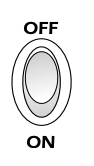
Setting the Control:
Press switch up to turn off or down to activate.
Important:
Notes:
Cleaning (see page 20 for more information)
To Prevent Marks & Scratches
To Prevent Stains
To Prevent Other Damage
Using the right cookware can prevent many problems, such as food taking longer to cook or achieving inconsistent results. Proper pans will reduce cooking times, use less energy, and cook food more evenly.
Flat Pan Tests
See if your pans are flat.
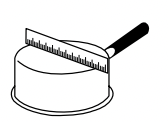
The Ruler Test:
The Bubble Test:
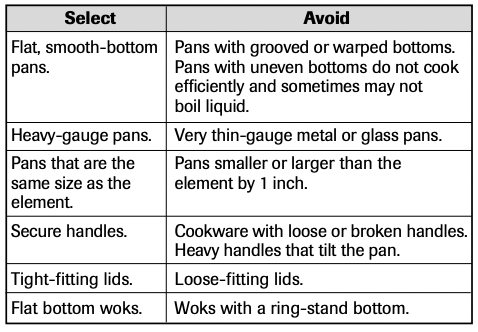
All canners and large pots must have flat bottoms and must be made from heavy-gauge materials. This is critical on smoothtop surfaces. The base must not be more than 1 inch larger than the element.
When canners and pots do not meet these standards, cooking times may be longer, and cooktops may be damaged.
Some canners are designed with smaller bases for use on smoothtop surfaces.
When canning, use the High heat setting only until the water comes to a boil or pressure is reached in the canner. Reduce to the lowest heat setting that maintains the boil or pressure. If the heat is not turned down, the cooktop may be damaged.
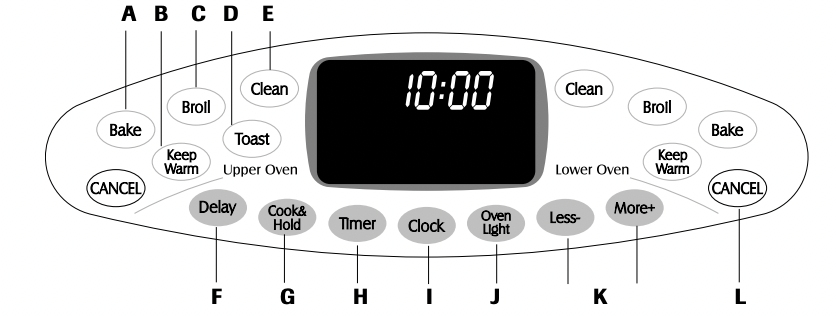
The control panel is designed for ease in programming. The display window on the control shows time of day, timer and oven functions. Control panel shown includes model specific features. (Styling may vary depending on model.)
A Bake Use for baking and roasting.
B Keep Warm Use to keep cooked food warm in oven.
C Broil Use for broiling and top browning.
D Toast Use for toasting bread and products toasted in toaster or toaster oven.
E Clean Use to set self-clean cycle.
F Delay Programs the oven to start baking or cleaning at a later time.
G Cook & Hold Bakes for a preset time, then keeps food warm for 1 hour.
H Timer Sets timer.
I Clock Use to set time-of-day clock.
J Oven Light Use to turn the oven lights on or off.
K Less-/More+ Enters or changes time, oven temperature. Sets HI or LO broil.
L CANCEL Cancels all operations except timer and clock.
Important: Four seconds after pressing the More+ or Lesspad, the time or temperature will automatically be entered. If more than 30 seconds elapse between touching a function pad and the More+ or Less- pad, the function will be canceled and the display will return to the previous display.
The clock can be set to display time in a 12-hour or 24-hour format. The clock is set at the factory for the 12-hour format.
To change the clock to 24-hour format:
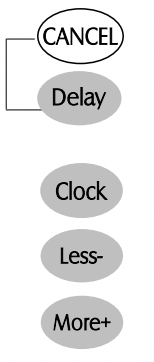
To set the Clock:
1. Press the Clock pad.
• The colon (:) flashes in the display.
2. Press More+ or Less- pad to set the time of day.
• Colon continues flashing.
3. Press the Clock pad again or wait four seconds.
• The colon stops flashing.
When electrical power is supplied or after a power interruption, the last clock time before power was interrupted will flash.
To recall the time of day when another time function is showing, press the Clock pad.
Clock time cannot be changed when the oven has been programmed for Bake, Clean, Delay or Cook & Hold.
To cancel the Clock display:
If you do not want the time of day to display:
Press and hold the upper oven CANCEL and Clock pads for several seconds. The time of day will disappear from the display.
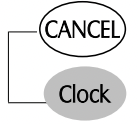
When the clock display is canceled, press the Clock pad to briefly display the time of day.
To restore the Clock display:
Press and hold the upper oven CANCEL and Clock pads for several seconds. The time of day will reappear in the display
The timer can be set from one minute (1:00) up to 11 hours and 59 minutes (11:59).
The timer can be used independently of any other oven activity. It can also be set while another oven function is operating.
The timer does not control the oven.
To set the Timer:
1. Press the Timer pad.
• “0:00” lights in the display.
• “Timer” will flash.
2. Press the More+ or Less- pad until the correct time appears in the display.
• “Timer” will continue to flash.

3. Press Timer pad again or wait four seconds.
• The time begins counting down.
• The last minute of the timer countdown will be displayed as seconds.
4. At the end of the set time, three long beeps will sound.
To cancel the Timer:
1. Press and hold the Timer pad for three seconds. OR
2. Press the Timer pad and set the time to 0:00.
The touchpads and oven doors can be locked for safety, cleaning, or to prevent unwanted use. They will not function when locked.
If the oven is currently in use, the touchpads and doors cannot be locked.
The current time of day will remain in the display when the controls are locked.
To lock both doors:
Press and hold the upper oven CANCEL and Cook & Hold pads for three seconds.
• “Lock” flashes in the display while both oven doors lock. Once complete, “Lock” stops flashing.
• “OFF” is displayed for 10 seconds whenever a pad is touched.
To unlock both doors:
Press and hold the upper oven CANCEL and Cook & Hold pads for three seconds.
• “Lock” flashes and then disappears from the display.
• “OFF” appears in the display for several seconds while doors are unlocking.
Important: The touchpads and oven doors cannot be locked if the oven temperature is 400° F or above.
“Bake” or “Lock” may flash rapidly in the display to alert you if there is an error or a problem. If “Bake” or “Lock” flash in the display, press CANCEL pad. If “Bake” or “Lock” continue to flash, disconnect power to the appliance. Wait a few minutes, and then reconnect power. If the flashing still continues, disconnect power to the appliance and call an authorized servicer.
The factory default setting for sound is medium (MEd), but it can be changed to low (Lo) or high (HI). To change the setting:
The factory default setting for temperature is Fahrenheit. To change the setting:
The control can be reset to the factory default settings. To return to the default settings:
To set bake:
1. Press the Bake pad for desired oven.
• “Bake” will flash.
• “000°” will flash in the display.
2. Select the oven temperature. The oven temperature can be set from 170° to 550°. Press or press and hold the More+ or Less- pad.
• “350°” will light when either pad is first pressed.
• Press the More+ pad to increase the temperature.
• Press the Less- pad to decrease the temperature.


3. Press Bake pad again or wait four seconds.
• “Bake” will stop flashing and light in the display.
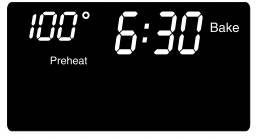
• “Preheat” will light in the display.
• 100° or the actual oven temperature will display. The temperature will rise in 5° increments until the preset temperature is reached.
4. Allow 4-10 minutes for upper oven to preheat and 7-12 minutes for lower oven to preheat.
• When the set oven temperature is reached, one long beep will sound.
• To recall the set temperature during preheat, press the Bake pad.
To change the oven temperature during preheat, press Bake once and reset temperature.
5. Place food in the oven.
6. Check cooking progress at minumum cooking time. Cook longer if needed.
7. When cooking is finished, press CANCEL pad.
8. Remove food from the oven.

It is normal to notice some baking time differences between a new oven and an old one. See Adjusting the Oven Temperature on page 15.
Notes:
Cook & Hold allows you to bake for a preset amount of time, followed by a one-hour Keep Warm cycle.
To set Cook & Hold:
1. Press the Cook & Hold pad once for upper oven or twice for lower oven.
• “Bake” and “Hold” flash.
• “000°” will flash in the display
2. Select the oven temperature. The oven temperature can be set from 170° to 550°. Press or press and hold the More+ or Less- pad.
• Press the More+ pad to increase the temperature.
• Press the Less- pad to decrease the temperature
3. Press Cook & Hold pad again OR wait four seconds to set cook time.
• “Time” flashes.
• “0:00” flashes in the display
4. Enter the amount of time you want to cook by pressing the More+ or Less- pad. Time can be set from 10 minutes (10:00) to 11 hours, 59 minutes (11:59).
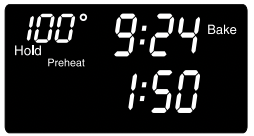
• “Bake”, “Preheat” and “Hold” light in the display.
• The cooking time will start counting down.
• “100°” or actual oven temperature will light in the display
When the cooking time has elapsed:
• Three beeps will sound.
• “Bake” will turn off.
• “Hold” will light.
After one hour in HOLD WARM:
• The oven will turn off. Three beeps will sound.
To cancel Cook & Hold at any time:
Press the CANCEL pad. Remove food from oven.
CAUTION Do not use delayed baking for highly perishable foods such as dairy products, pork, poultry, or seafood.
When using Delay, the oven begins to cook later in the day. Set the amount of time that you want to delay before the oven turns on and how long you want to cook. The oven begins to heat at the selected time and cooks for the specified length of time, then keeps food warm for one hour.
Delay time can be set from 10 minutes (10:00) to 11 hours, 59 minutes (11:59).
To set a Delayed Baking cycle:



1. Press the Delay pad once for upper oven or twice for lower oven.
• “dLY” and “0:00” flash in the display.
2. Press the More+ or Less- pad to set the amount of time you want to delay the Cook & Hold cycle.
While “dLY” is still flashing:
3. Press the Cook & Hold pad.
• “000°” flashes in the display.
• “Bake” and “Hold” flash.
4. Press More+ or Less- pad to enter the oven temperature.
• “Bake” flashes.
• After several seconds, “0:00” and “Time” flash.
• “Bake” and “Hold” remain steady.
5. Press More+ or Less- pad to set the baking time.
• “Time” flashes.
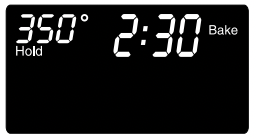
• After several seconds, the delay time will count down.
• “dLY”, “Bake” and “Hold” light in the display
When the Delay time has expired:
When the oven starts:
• The baking time will count down.
• “dLY” will turn off.
• “Bake” and “Hold” will remain lit.
To cancel:
Press the CANCEL pad.
• All timed and untimed cooking functions will be canceled.
• The time of day will reappear in the display.

Important:
For safely keeping foods warm or for warming breads and plates.
To set Keep Warm:
1. Press the Keep Warm pad for the appropriate oven.
• “Warm” flashes.
• “000°” flashes in the display.
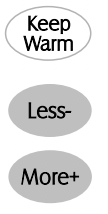
2. Select the Keep Warm temperature. The Keep Warm temperature can be set from 145° to 190°. Press or press and hold the More+ or Less- pad.
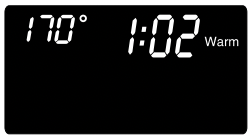
• 170° will light when either pad is first pressed.
• Press the More+ pad to increase the temperature.
• Press the Less- pad to decrease the temperature.
“Warm” and the temperature will be displayed while Keep Warm is active.
To cancel Keep Warm:
1. Press the CANCEL pad.
2. Remove food from the oven.
Notes:
• For optimal food quality, oven cooked foods should be kept warm for no longer than 1 to 2 hours.
• To keep foods from drying, cover loosely with foil or a lid.
• To warm dinner rolls:
- cover rolls loosely with foil and place in oven.
- press Keep Warm and More+ pads to set 170° F.
- warm for 12-15 minutes.
• To warm plates:
- place 2 stacks of up to four plates each in the oven.
- press Keep Warm and More+ pads to set 170° F.
- warm for five minutes, turn off the oven and leave plates in the oven for 15 minutes more.
- use only oven-safe plates, check with the manufacturer.
- do not set warm dishes on a cold surface as rapid temperature changes could cause crazing or breakage.
To set Broil:
1. Press the Broil pad for desired oven.
• “Broil” and “SEt” flash in the display.
2. Press the More+ or Less- pad once to set HI broil. Press the More+ or Less- pad twice to set LO broil.
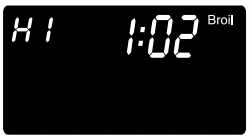
• HI or LO will be displayed.
• Select HI broil (550° F) for normal broiling. Select LO broil (450° F) for low-temperature broiling of longer cooking foods such as poultry.
3. After four seconds, the oven will start.
• “Broil” and HI or LO will remain lit
4. For optimum browning, preheat broil element for 3-4 minutes before adding food.
5. Place food in the oven. Leave oven door open about four inches (the first stop).
6. Most meat should be turned once about halfway through cooking.
7. When food is cooked, press the CANCEL pad. Remove food and broiler pan from the oven.
• The time of day will reappear in the display.
Notes:
Broiling Chart - Broil times are based on a 4 minute preheat.
 * When broiling fish, spray broil pan insert with cooking oil. Do not turn fish filets.
** Broiling times are approximate and may vary depending on the thickness of the food. Turn meat halfway through cooking times.
Oven temperatures are carefully tested for accuracy at the factory. It is normal to notice some baking or browning differences between a new oven and an old one. As ranges get older, the oven temperature can shift.
You may adjust the oven temperature if you think the oven is not baking or browning correctly. To decide how much to change the temperature, set the temperature 25° higher or lower than your recipe recommends, then bake. The results of the “test” should give you an idea of how much to adjust the temperature.
To adjust the oven temperature:
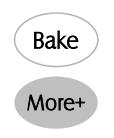
1. Press the appropriate Bake pad.
2. Enter 550° by pressing the More+ pad.
3. Press and hold the Bake pad for several seconds or until “0°” and “AdJ” (which signifies ‘adjust’) appear in the display. If the oven temperature was previously adjusted, the change will be displayed. For example, if the oven temperature was reduced by 15° the display will show “-15°”.
4. Press the More+ or Less- pad to adjust the temperature. Each time a pad is pressed, the temperature changes by 5°. The oven temperature can be increased or decreased by 5° to 35°.
5. The time of day will automatically reappear in the display You do not need to readjust the oven temperature if there is a power failure or interruption. Broiling and cleaning temperatures cannot be adjusted.
CAUTION
The self-clean cycle uses above-normal cooking temperatures to automatically clean the oven interior.
The oven should be cleaned regularly by wiping up spillovers to prevent excessive smoke and flare-ups. Do not allow a heavy build-up of soil to accumulate in the oven.
During the cleaning process, the kitchen should be well ventilated to get rid of normal odors associated with cleaning.
1. Turn off the oven light before cleaning. The light may burn out during the clean cycle.
2. Remove broiler pan, all pans, and oven racks from the oven. The oven racks will discolor and may not slide easily after a self-clean cycle if they are not removed.
3. Clean oven frame, door frame, area outside of gasket, and around the opening in the door gasket with a nonabrasive cleaner such as Bon Ami* or detergent and water. The self-cleaning process does not clean these areas. They should be cleaned to prevent soil from baking on during the clean cycle. (The gasket is the seal around the oven door and window.)
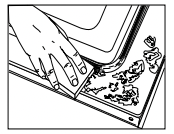
4. To prevent damage, do not clean or rub the gasket around the oven door. The gasket is designed to seal in heat during the clean cycle.
5. Wipe up excess grease or spillovers from the oven bottom. This prevents excessive smoking, flare-ups or flaming during the clean cycle.
6. Wipe up sugary and acidic spillovers such as sweet potatoes, tomato, or milk-based sauces. Porcelain enamel is acid-resistant, not acid-proof. The porcelain finish may discolor if acidic spills are not wiped up before a self-clean cycle.
Important:
• Oven temperature must be below 400° F to program a clean cycle.
• Only one oven can be cleaned at a time.
• Both oven doors lock when either oven is being cleaned.
To set Self-Clean:
1. Close the oven door.
2. Press the Clean pad.
• “Clean” and “SEt” flash in the display. If the door is not closed within 25 seconds, the self-cleaning operation will be canceled and the display will return to the time of day.

3. Press the More+ or Less- pad.
• “MEd” for medium amount of soil (3 hours) appears in the display. If the door is not closed, “door” will appear in the display. After 45 seconds, three beeps will sound, the self-cleaning operation will be canceled and the display will return to the time of day.
4. Press the More+ pad twice for heavy soil (4 hours).
• “HVy” will be displayed. Press Less- pad twice for light soil (2 hours).
• “LITE” will be displayed. Choosing the soil level of the oven automatically programs the self-cleaning time. “Lock” flashes in the display.
5. After four seconds, the oven will start cleaning.
• The cleaning time will start counting down in the display.
• “Lock” will appear in the display and will flash until the doors are locked. “Lock” will then remain lit.
• “Clean” will remain lit in the display.
To Delay a Self-Clean Cycle:
1. Press the Delay pad once for upper oven and twice for lower oven.

• “dLY” flashes.
• “0:00” flashes in the display.
2. Press the More+ or Less- pad to set the amount of time you want to delay the cycle. Delay time can be set from ten minutes (10:00) to 11 hours, 59 minutes (11:59).
3. Press the apropriate Clean pad while “dLY” is flashing.
• “Clean” and “Set” will flash.
If the door is not closed within 25 seconds, the selfcleaning operation will be canceled and the display will return to the time of day.
4. Press the More+ or Less- pad.
• “MEd” for medium amount of soil (3 hours) is displayed.
If the door is not closed, “door” will appear in the display. After 45 seconds, three beeps will sound, the self-cleaning operation will be canceled and the display will return to the time of day.
5. Press the More+ pad twice for heavy soil (4 hours).
• “HVy” will be displayed.
Press the Less- pad twice for light soil (2 hours).
• “LITE” will be displayed.
Choosing the soil level of the oven automatically programs the self-cleaning time.
6. After four seconds, “Clean”, “dLY” and “Lock” will appear in the display to show that the oven is set for a delayed clean operation. The delay time is displayed and will begin to count down.
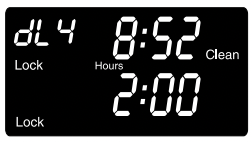
When the Self-Clean cycle starts:
• “dLY” will turn off.
• “Clean”, “Hours”, “Lock” and the clean time will appear in the display.
To cancel the Self-Clean cycle:
Press the CANCEL pad.
• All words disappear from the display.
• All functions are canceled.
• The time of day appears in the display
CAUTION
• Be sure appliance is off and all parts are cool before handling or cleaning. This is to avoid damage and possible burns.
• To prevent staining or discoloration, clean appliance after each use.
• If a part is removed, be sure it is correctly replaced.
| PART | PROCEDURE |
| Backguard and Cooktop – Porcelain Enamel |
Porcelain enamel is glass fused on metal and may crack or chip with misuse. It is acid-resistant, not acid proof. All spillovers, especially acidic or sugary spillovers, should be wiped up immediately with a dry cloth. • When cool, wash with soapy water, rinse and dry. • Never wipe off a warm or hot surface with a damp cloth. This may cause cracking or chipping. • Never use oven cleaners, abrasive or caustic cleaning agents on exterior finish of range. |
| Broiler Pan and Insert |
Never cover insert with aluminum foil as this prevents the fat from draining to the pan below • Place soapy cloth over insert and pan; let soak to loosen soil. • Wash in warm soapy water. Use scouring pad to remove stubborn soil. • Broiler pan and insert can be cleaned in dishwasher. |
| Clock and Control Pad Area |
• To activate “Control Lock” for cleaning, see page 9. • Wipe with a damp cloth and dry. Do not use abrasive cleaning agents as they may scratch the surface. • Glass cleaners may be used if sprayed on a cloth first. DO NOT spray directly on control pad and display area. |
| Control Knobs |
• Remove knobs in the OFF position by pulling forward. • Wash, rinse and dry. Do not use abrasive cleaning agents as they may scratch the finish. • Turn on each element to be sure the knobs have been correctly replaced. |
| Cooktop – Glass-Ceramic |
Never use oven cleaners, chlorine bleach, ammonia or glass cleaners with ammonia. Important: Call an authorized servicer if the glass-ceramic top should crack, break or if metal or aluminum foil should melt on the cooktop. • Allow the cooktop to cool before cleaning. • General – Clean cooktop after each use, or when needed, with a damp paper towel and Cooktop Cleaning Creme* (Part No. 20000001)**. Then, buff with a clean dry cloth. Important: Permanent stains will develop if soil is allowed to cook on by repeatedly using the cooktop when soiled. • Heavy Soils or Metal Marks – Dampen a “scratchless” or “never scratch” scrubber sponge. Apply Cooktop Cleaning Creme* (Part No. 20000001)** and scrub to remove as much soil as possible. Apply a thin layer of the creme over the soil, cover with a damp paper towel and let stand 30 to 45 minutes (2-3 hours for very heavy soil). Keep moist by covering the paper towel with plastic wrap. Scrub again, then buff with a clean dry cloth. Important: Only use a CLEAN, DAMP “scratchless” pad that is safe for non-stick cookware. The pattern and glass will be damaged if the pad is not damp, if the pad is soiled, or if another type of pad is used. • Burned-on or Crusty Soils – Scrub with a “scratchless” or “never scratch” scouring pad and Cooktop Cleaning Creme*. Important:Hold a razor blade scraper at 30° angle and scrape any remaining soil. Then, clean as described above. Do not use the razor blade for daily cleaning as it may wear the pattern on the glass. • Melted Sugar or Plastic – Immediately turn element to LOW and scrape sugar or plastic from hot surface to a cool area. Then turn element OFF and allow to cool. Clean residue with razor blade scraper and Cooktop Cleaning Creme*. |
| Oven Windows and Doors – Glass |
• Avoid using excessive amounts of water which may seep under or behind glass causing staining. • Wash with soap and water. Rinse with clear water and dry. Glass cleaner can be used if sprayed on a Glass cloth first. • Do not use abrasive materials such as scouring pads, steel wool or powdered cleaners as they will scratch glass. |
| Oven Interior | • Follow instructions on pages 18-19 to set a self-clean cycle |
| Oven Racks |
• Clean with soapy water. • Remove stubborn soil with cleansing powder or soap-filled scouring pad. Rinse and dry • Racks will permanently discolor and may not slide smoothly if left in the oven during a self-clean operation. If this occurs, wipe the rack edge and rack support with a small amount of vegetable oil to restore ease of movement, then wipe off excess oil. |
| Stainless Steel (select models) |
• DO NOT USE ANY CLEANING PRODUCT CONTAINING CHLORINE BLEACH. • DO NOT USE ABRASIVE OR ORANGE CLEANERS. • ALWAYS WIPE WITH THE GRAIN WHEN CLEANING. • Daily Cleaning/Light Soil –– Wipe with one of the following - soapy water, white vinegar/water solution, Formula 409 Glass and Surface Cleaner* or a similar glass cleaner - using a sponge or soft cloth. Rinse and dry. To polish and help prevent fingerprints, follow with Stainless Steel Magic Spray (Part No. 20000008)**. • Moderate/Heavy Soil –– Wipe with one of the following - Bon Ami, Smart Cleanser, or Soft Scrub* - using a damp sponge or soft cloth. Rinse and dry. Stubborn soils may be removed with a damp multipurpose Scotch-Brite* pad; rub evenly with the grain. Rinse and dry. To restore luster and remove streaks, follow with Stainless Steel Magic Spray*. • Discoloration –– Using a damp sponge or soft cloth, wipe with Cameo Stainless Steel Cleaner*. Rinse immediately and dry. To remove streaks and restore luster, follow with Stainless Steel Magic Spray* |
| Door Handles, Side Panels – Painted Enamel |
• When cool, wash with warm soapy water, rinse and dry. Never wipe a warm or hot surface with a damp Side Panels – cloth as this may damage the surface and may cause a steam burn. • For stubborn soil, use mildly abrasive cleaning agents such as baking soda paste or Bon Ami. * Do not use abrasive, caustic or harsh cleaning agents such as steel wool pads or oven cleaners. These products will scratch or permanently damage the surface. Important: Use a dry towel or cloth to wipe up spills, especially acidic or sugary spills. Surface may discolor or dull if soil is not immediately removed. This is especially important for white surfaces. |
CAUTION
• Do not place excessive weight on or stand on open oven doors. This could cause the range to tip over, break the door, or injure the user.
• Do not attempt to open or close doors or operate oven until doors are properly replaced.
• Never place fingers between hinge and front oven frame. Hinge arms are spring mounted. If accidentally hit, the hinge will slam shut against oven frame and could injure your fingers.
Both the upper and lower oven doors are removable.
To remove:
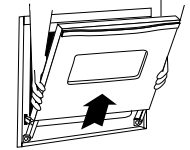
To replace:
Important: The oven door on a new range may feel “spongy” when it is closed. This is normal and will decrease with use.
Protect oven bottom against spillovers, especially acidic or sugary spills, as they may discolor the porcelain enamel. Use the correct pan size to avoid spillovers and boilovers. Do not place aluminum foil directly on the oven bottom.
To protect the oven door window:
Scratching, hitting, jarring or stressing the glass may weaken its structure causing an increased risk of breakage at a later date.
CAUTION
To assure the proper replacement bulb is used, order bulb from Maytag. Call 1-877-232-6771 USA and 1-800-688-8408 Canada, ask for part number 74009925 - halogen bulb.
To replace upper oven light bulbs:
| PROBLEM | SOLUTION |
| For most concerns, try these first |
• Check if oven controls have been properly set. • Check to be sure plug is securely inserted into receptacle. • Check or re-set circuit breaker. Check or replace fuse. • Check power supply. |
| Part or all of appliance does not work. |
• Check if surface and/or oven controls have been properly set. See pages 4 & 10 • Check if oven door is unlocked after self-clean cycle. See page 19. • Check if oven is set for a delayed cook or clean program. See pages 11 & 18. • Check if Control Lock is activated. See page 9. • Check if control is in Sabbath Mode. See page 14. |
| Oven light and/or clock does not function. |
• The light bulb is loose or defective. • The oven light does not work during self-cleaning process. • Oven may be in Sabbath Mode. See page 14. |
| Clock, indicator words, and/or lights operate but oven does not heat. |
• Oven may be set for a Cook & Hold or Delay function • The Control Lock may have been set. See page 9. |
| Baking results are not as expected or differ from previous oven |
• Make sure the oven vent has not been blocked. See page 16 for location • Check to make sure range is level. • Temperatures often vary between a new oven and an old one. As ovens age, the oven temperature often “drifts” and may become hotter or cooler. See page 15 for instructions on adjusting the oven temperature. Important: It is not recommended to adjust the temperature if only one or two recipes are in question. |
| Food is not broiling properly or smokes excessively. |
• Check oven rack positions. Food may be too close to element. • Broil element was not preheated. • Aluminum foil was incorrectly used. Never line the broiler insert with foil. • Oven door was closed during broiling. Leave the door open to the first stop position (about 4 inches). • Trim excess fat from meat before broiling. • A soiled broiler pan was used. • Voltage in house may be low.
|
| Oven will not self-clean. |
• Check to make sure the cycle is not set for a delayed start. See page 18. • Check if door is closed. • Check if control is in Sabbath Mode. See page 14. • Oven may be over 400° F. Oven temperature must be below 400° F to program a clean cycle. |
| Oven did not clean properly. |
• Longer cleaning time may be needed. • Excessive spillovers, especially sugary and/or acidic foods, were not removed prior to the self-clean cycle. |
| Oven door will not unlock after self-clean cycle. |
• Oven interior is still hot. Allow about one hour for the oven to cool after the completion of a self-clean cycle. The door can be opened when “Lock” is not displayed. • The control and door may be locked. See page 9. |
| Smoothtop surface shows wear. |
1. Tiny scratches or abrasions. • Make sure cooktop and pan bottom are clean. Do not slide glass or metal pans across top. Make sure pan bottom is not rough. Use the recommended cleaning agents. See page 20. 2. Metal marks. • Do not slide metal pans across top. When cool, clean with Cooktop Cleaning Creme. See page 20. 3. Brown streaks and specks. • Remove spills promptly. Never wipe with a soiled cloth or sponge. Make sure cooktop and pan bottom are clean. 4. Areas with a metallic sheen. • Mineral deposits from water and food. Use recommended cleaning agents. See page 20. 5. Pitting or flaking. • Remove sugary boilovers promptly. See page 20. |
| Moisture collects on oven window or steam comes from oven vent. |
• This is normal when cooking foods high in moisture. • Excessive moisture was used when cleaning the window. |
| There is a strong odor or light smoke when oven is turned on. |
• This is normal for a new range and will disappear after a few uses. Initiating a clean cycle will “burn off” the odors more quickly. • Turning on a ventilation fan will help remove the smoke and/or odor. • Excessive food soils on the oven bottom. Use a self-clean cycle. |
| Fault Codes |
• “Bake” or “Lock” may flash rapidly in the display to alert you if there is an error or a problem. If “Bake” or “Lock” appear in the display, press CANCEL pad. If “Bake” or “Lock” continue to flash, disconnect power to the appliance. Wait a few minutes, and then reconnect power. If the flashing still continues, disconnect power to the appliance and call an authorized servicer. • If the oven is heavily soiled, excessive flareups may result in a fault code during cleaning. Press the CANCEL pad and allow the oven to cool completely, wipe out excess soil, then reset the clean cycle. If the fault code reappears, contact an authorized servicer. |
| Noises may be heard. |
• The oven makes several low level noises. You may hear the oven relays as they go on and off. This is normal. • As the oven heats and cools, you may hear sounds of metal parts expanding and contracting. This is normal and will not damage your appliance. |
| There are no beeps and no display. | • Oven may be in Sabbath Mode. See page 14. |
Reference file: Maytag MER6765BAS Range
Additionally, the document applies to other Maytag models: MER6757BAB, MER6757BAQ, MER6757BAS, MER6757BAW, MER6765BAB, MER6765BAQ, MER6765BAS, MER6765BAW, MER6775BAB, MER6775BAF, MER6775BAN, MER6775BAS, MER6775BCB, MER6775BCS, MER6775BCW