B6. Selection dial: turn to select the required quantity of coffee or use pre-ground coffee
B7. button: to deliver steam to make hot drinks with milk.
B8. button: to make 1 long coffee
B9. button: to make 2 long coffees
Description of the accessories
C1. Measure
C2. Descaler bottle
C3. Water softener filter
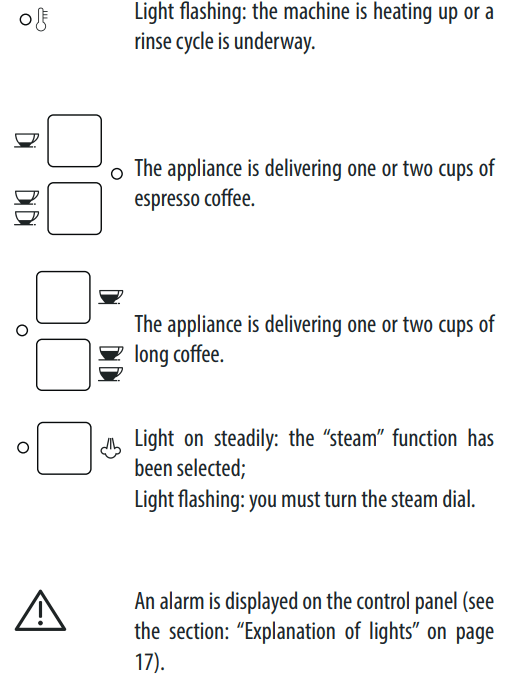
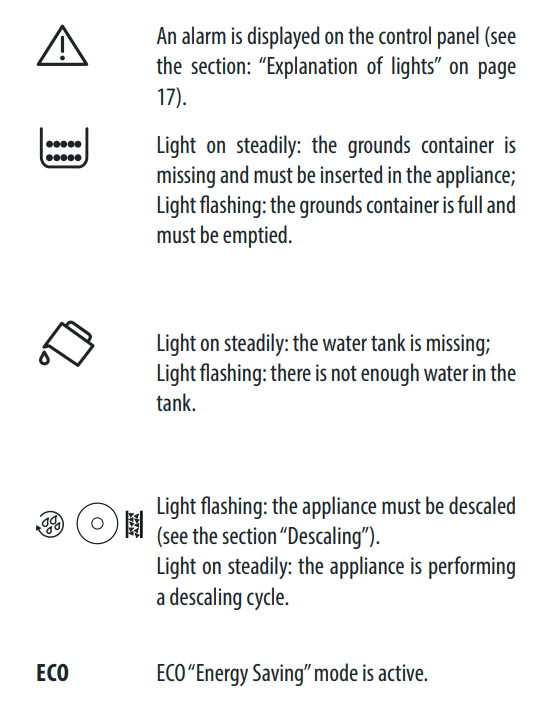
Description of lights
PRELIMINARY CHECKS
Checking the appliance
After removing the packaging, make sure the product is complete and undamaged and that all accessories are present.
Do not use the appliance if it is visibly damaged.
Contact De’Longhi Customer Services.
Installing the appliance
Important! When installing the appliance, respect the following safety warnings:
The appliance could be damaged if the water it contains freezes. Do not install the appliance in a room where the temperature could drop below freezing point.
The appliance gives off heat. After positioning the appliance on the worktop, leave a space of at least 3 cm between the surfaces of the appliance and the side and rear walls and at least 15 cm above the coffee maker.
Water penetrating the coffee maker could cause damage. Do not place the appliance near water faucets or sinks.
Arrange the power cable in such a way that it cannot be damaged by sharp edges or contact with hot surfaces (e.g. electric hot plates).
Connecting the appliance
Important! Check that the mains power supply voltage corresponds to the value indicated on the rating plate on the bottom of the appliance.
Connect the appliance to an efficiently earthed and correctly installed socket with a minimum current rating of 10A only. If the power socket does not match the plug on the appliance, have the socket replaced with a suitable type by a qualified professional.
Using the appliance for the first time
Please note :
Coffee has been used to factory test the appliance and it is, therefore, completely normal for there to be traces of coffee in the mill. The machine is, however, guaranteed to be new.
You should customize water hardness as soon as possible following the instructions in the section “Setting water hardness” on page 16.
Follow the instructions:
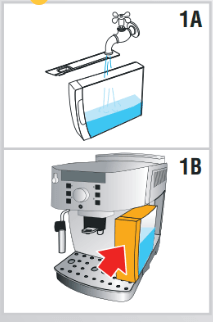
Remove the water tank, fill to the MAX line with fresh water (fig. 1A) then put back in the appliance (fig. 1B).
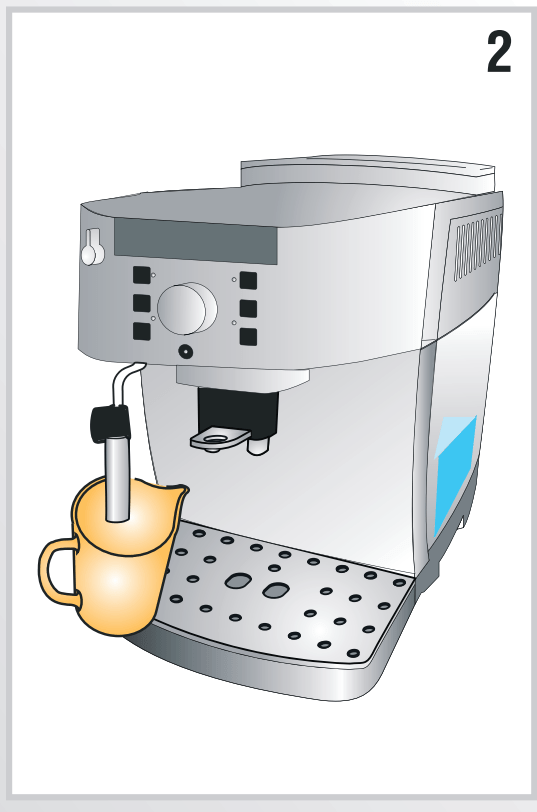
2. Place a container with a minimum capacity of 100 ml under the cappuccino maker (fig. 2).
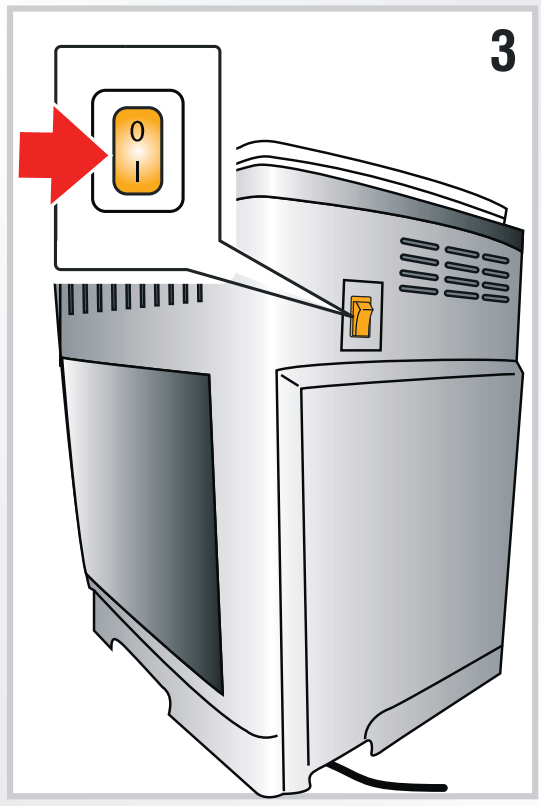
3. Plug the appliance into the mains socket and place the main switch on the back of the appliance in the I position (fig. 3).
4. The light flashes on the control panel (fig. 4).
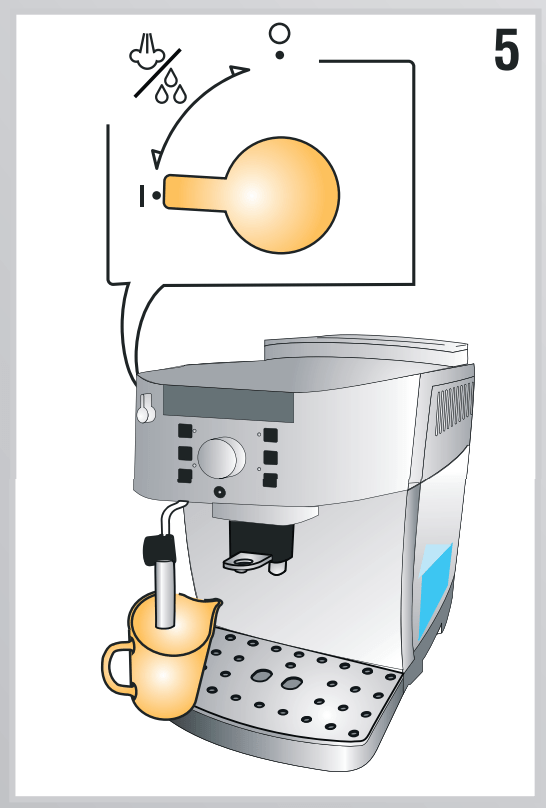
5. Turn the steam dial to the “I” position (fig. 5). The appliance delivers water from the cappuccino maker then goes off.
6. Turn the steam dial to the “0” position. The coffee maker is now ready for normal use.
Please note : When using the appliance for the first time, you need to make 4-5 cups of coffee or 4-5 cappuccinos before the appliance starts to give satisfactory results.
TURNING THE APPLIANCE ON
Please note :
Before turning the appliance on, make sure the main switch on the back of the appliance is in the I position (fig. 3).
Each time the appliance is turned on, it performs an automatic preheat and rinse cycle which cannot be interrupted. The appliance is ready for use only after completion of these cycles.
Danger Of burns! During rinsing, a little hot water comes out of the coffee spouts and is collected in the drip tray underneath. Avoid contact with splashes of water.
To turn the appliance on, press the (fig. 6): The corresponding light flashes while the appliance is heating up and performing an automatic rinse cycle (by circulating hot water, the appliance heats both the boiler and the internal circuits).
The appliance is at temperature when the light goes off and the lights corresponding to the coffee buttons come on.
TURNING THE APPLIANCE OFF
Each time the appliance is turned off, it performs an automatic rinse cycle which cannot be interrupted.
Danger Of burns! During rinsing, a little hot water flows from the coffee spouts.
Please note : If the appliance is not used for an extended period, also place the main switch in the 0 position (fig. 3).
Important! To avoid damaging the appliance, do not place the main switch (fig. 3) in the 0 position until the appliance has been turned off using the button.
AUTO-OFF
The appliance is set to turn off automatically if not used for 2 hours.
The time can be changed so that the appliance switches off after 15 or 30 minutes, or after 1, 2 or 3 hours.
The set the auto-off, proceed as follows:
With the machine off and the main switch in I position (fig. 3), press the button and keep it pressed until the lights on the control panel come on.
Press the button (on the left side of the dial) until the lights corresponding to the number of hours before the appliance goes off automatically come on:
15 minutes ECO
30 minutes ECO
1 hour ECO
2 hours ECO
3 hours ECO
Press the button (on the right side of the dial) to confirm; the lights switch off.
ENERGY SAVING
Use this function to enable or disable energy saving mode.
When enabled, the function reduces energy consumption in compliance with European regulations.
Energy saving mode is active when the green ECO light is on (fig. 7).
With the appliance off and the main switch in the I position (fig. 3), press the button and hold it down until the ECO light comes on (fig. 7).
To disable the mode, press the button (on the left of the dial). The ECO light flashes.
To re-enable the mode, press the ECO button (on the left of the dial) again. The ECO light comes on steadily.
Press the button (on the right of the dial) to confirm the selection. The ECO light goes off.
Please note : A few seconds may elapse between energy saving mode and delivery of the first coffee as the appliance must heat up again.
WATER SOFTENER FILTER
Certain models are fitted with a water softener filter. If this is not the case with your model, you are recommended to purchase one from De’Longhi Customer Services.
Important:
Keep in a cool dry place out of direct sunlight.
After opening the package, use the filter at once.
Remove the filter before descaling the machine.
To use the filter correctly, follow the instructions below.
Installing the filter
Remove the filter from packaging and rinse the filter with about half a liter of tap water (fig. 8).
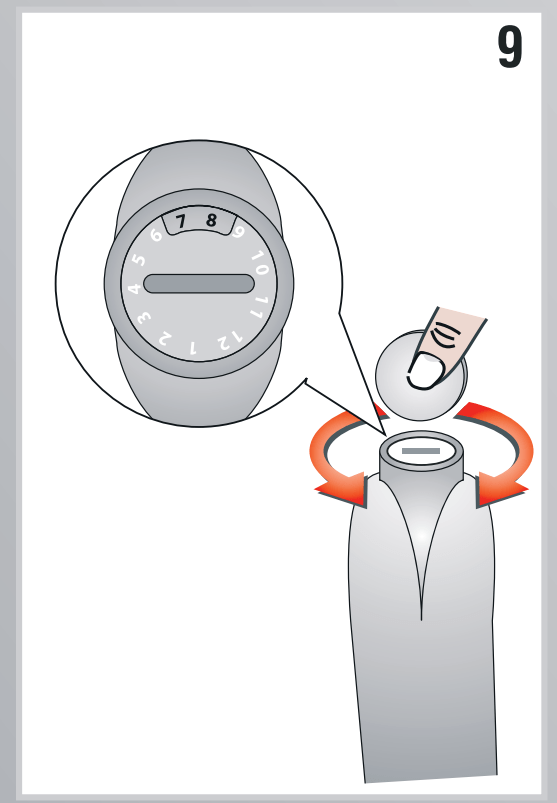
2. Rotate the calendar disk so that the next two months are displayed (fig. 9). Please note: The filter lasts about two months if the appliance is used normally. If the coffee maker is left unused with the filter installed, it will last a maximum of three weeks.
3. Remove the tank from the appliance and fill with water (fig. 1A).
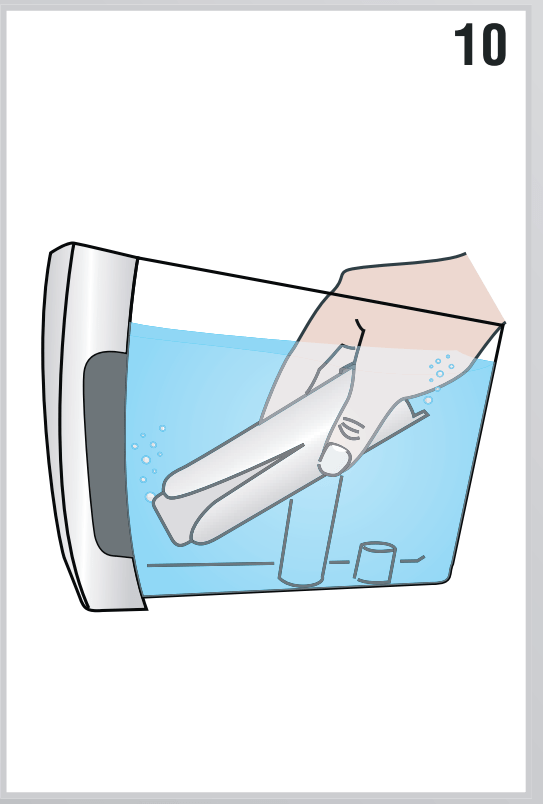
4. Insert the filter in the water tank and immerse it completely, sloping it to enable the air bubbles to escape (fig. 10).
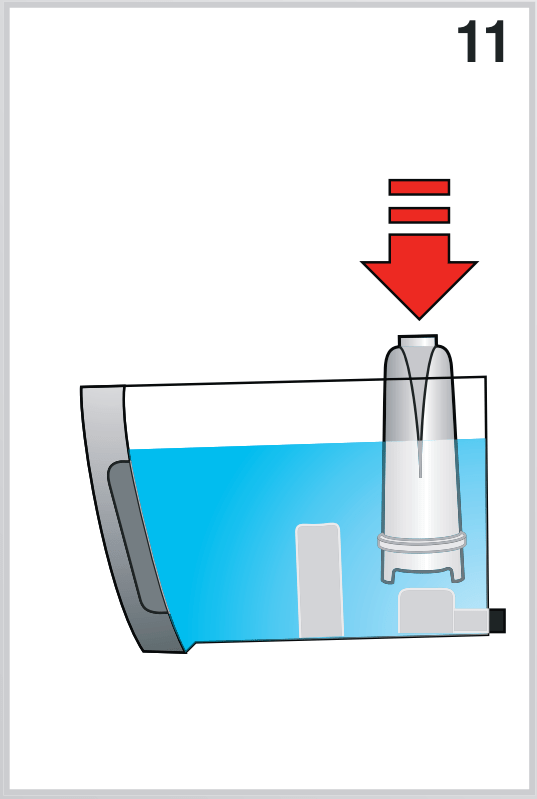
5. Insert the filter in the filter housing and press as far as it will go (fig. 11).
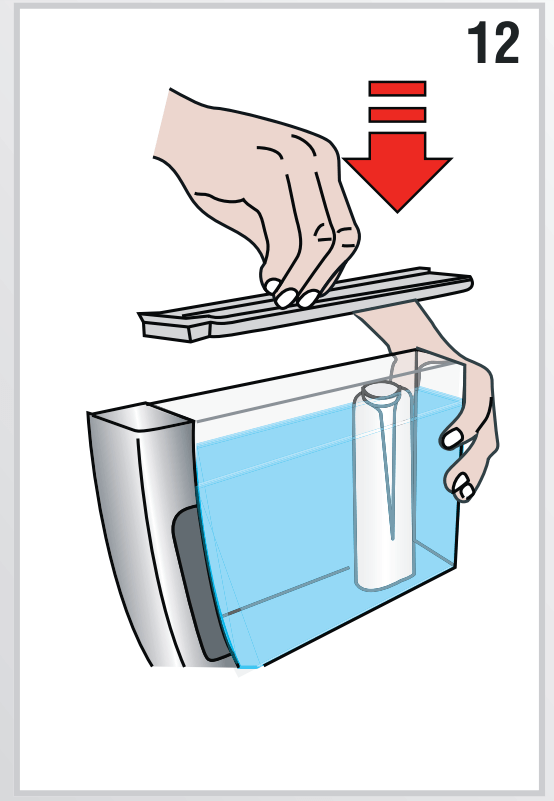
6. Close the tank with the lid (fig. 12), then replace the tank in the machine.
7. Place a container (min. capacity: 100 ml) under the cappuccino maker.
8. Turn the steam dial in position I to deliver hot water.
9. Let the appliance deliver hot water for a few seconds, til the delivery flows regulary, then turn the dial in position 0
Please note: It may happen that a single hot water is not sufficient to install the filter: the lights come on. In this case, repeat the installing operation from step 8. The new filter is active and you can now use the coffee maker.
Removing and replacing the filter
After rwo months (see date indicator) or when the appliance has not been used for 3 weeks, you should remove the filter and replace with a new one, proceeding as described at the previous paragraph.
MAKING COFFEE
Selecting the coffee taste
Turn the coffee taste selection dial (B6) to set the required taste.
Turning it clockwise increases the quantity of coffee beans the appliance will grind and, therefore, the strength of the coffee obtained.
Turn the dial to MIN for an extra mild coffee and to MAX for an extra strong coffee.
Please note :
The first time you use the appliance, you will need to make a number of coffees to identify the correct dial position through trial and error.
Do not turn the dial too far towards MAX, otherwise the coffee may be delivered too slowly (a drop at a time), particularly when making two cups of coffee at the same time.
Selecting the quantity of coffee in the cup
The appliance is set by default to automatically make the following quantities of coffee:
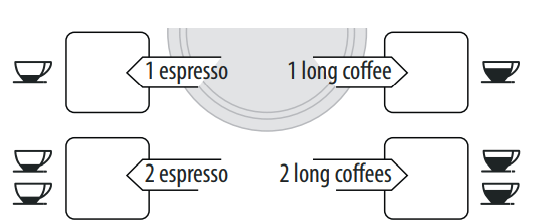
espresso coffee, when the button is pressed (≃1.35 fl. oz.);
long coffee when the button (≃4 fl.oz.) is pressed;
two espresso coffees, when the button is pressed;
two long coffees, when the button is pressed.
To change the quantity of coffee the appliance delivers automatically into the cup, proceed as described below:
press the button corresponding to the quantity to be modified and hold it down until the light flashes and the appliance starts delivering coffee. Release the button;
when the coffee in the cup reaches the required level, press the same button again to memorize the new amount
The quantity of coffee in the cup has now been programmed.
Adjusting the coffee mill
The coffee mill is preset in the factory to make coffee correctly and should not require adjusting initially.
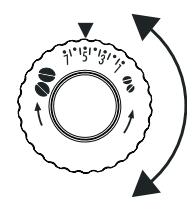
However, if after making the first few coffees you find that the coffee is too thin and not creamy enough or that delivery is too slow (a drop at a time), this can be corrected by adjusting the grinding adjustment dial (fig. 13).
Please note : The grinding adjustment dial must only be turned when the coffee mill is in operation.
If the coffee is delivered too slowly or not at all, turn one click clockwise. For fuller bodied creamier coffee, turn one click anticlockwise (do not turn more than one click at a time otherwise the coffee could be delivered a drop at a time).
These adjustments will only be evident after at least 2 cups of coffee have been delivered.
If this adjustment does not obtain the desired result, turn the dial another click.
Setting the temperature
To modify the temperature of the water used to make the coffee, proceed as follows:
With the appliance off and the main switch in the I position (fig. 3), press the button and hold it down until the lights on the control panel come on.
Press the button to select the required temperature:
Press the button to confirm the selection. The lights go off.
Tips for a hotter coffee
For a hotter coffee, before delivery you are recommended to:
rinse the appliance through by pressing the button. Hot water flows out of the coffee spouts and heats the internal circuit of the machine so that the coffee delivered will be hotter.
warm the cups with hot water (using the hot water function);
set a hotter coffee temperature (see section “Setting the temperature”).
Making coffee using coffee beans
Important! Do not use caramelized or candied coffee beans as they could stick to the coffee mill and damage it.
Fill the container with coffee beans (fig. 14).
2. Place under the coffee spouts:
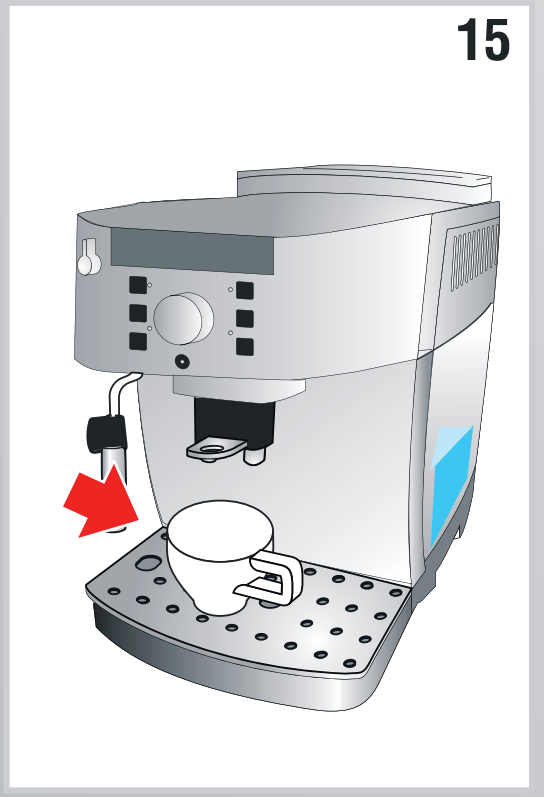
1 cup if you want one coffee (fig. 15);
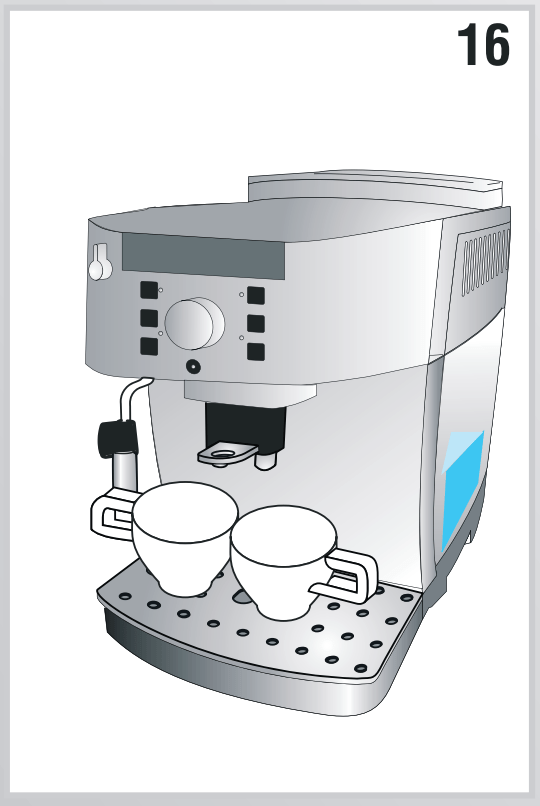
2 cups if you want 2 coffees (fig. 16).
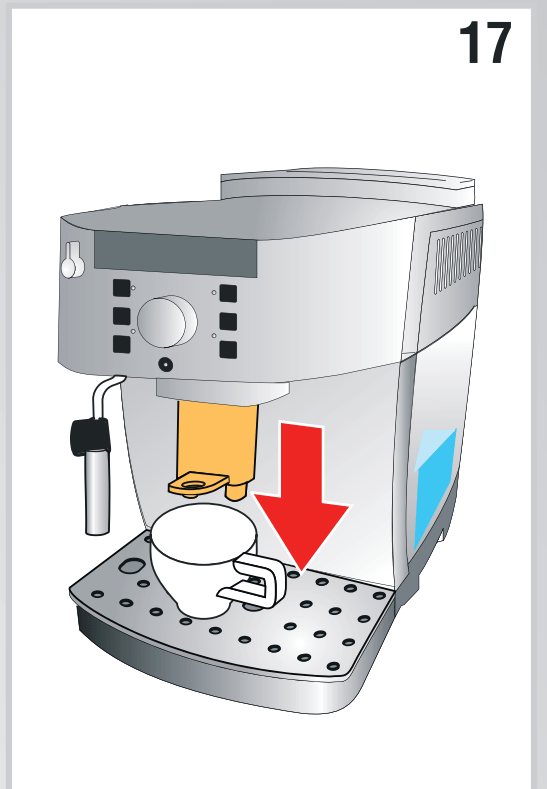
3. Lower the spouts as near as possible to the cup. This makes a creamier coffee (fig. 17).
4. Press the button corresponding to the number of coffees required
5. Preparation begins and the light corresponding to the selected button flashes on the control panel.
Once the coffee has been made, the appliance is ready for use again.
Please note :
While the coffee maker is making coffee, delivery can be interrupted at any moment by pressing one of the coffee buttons.
At the end of delivery, to increase the quantity of coffee in the cup, just press (within 3 seconds) one of the coffee buttons.
Please note : For hotter coffee, see the section “Tips for a hotter coffee”
Important!
If the coffee is delivered a drop at a time, too thin and not creamy enough or too cold, read the tips in the “Troubleshooting” section on page 18.
Lights may be displayed on the control panel during use. Their meaning is given in the section “Explanation of the lights” on page 17.
Making coffee using pre-ground coffee
Important!
Never place coffee beans in the pre-ground coffee funnel as this could damage the appliance.
Never add pre-ground coffee when the machine is off or it could spread through the inside of the machine and dirty it. This could damage the appliance.
Never use more than 1 level measure or it could dirty the inside of the coffee maker or block the funnel.
Please note : When using pre-ground coffee, you can only make one cup of coffee at a time.
Make sure the appliance is on.
2. Turn the coffee taste selection dial anticlockwise as far as it will go to the position (fig. 18).
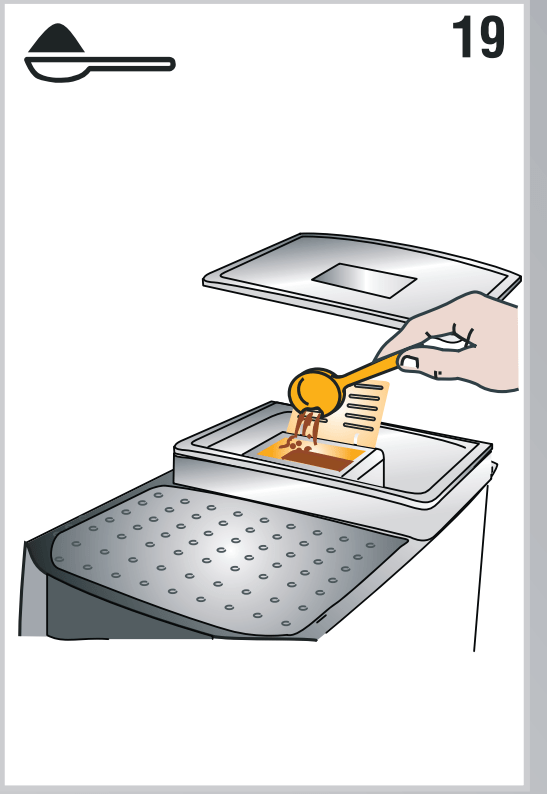
3. Make sure the funnel is not blocked, then add one level measure of pre-ground coffee (fig. 19).
4. Place a cup under the coffee spouts.
5. Press the 1 cup coffee button ( or ).
6. Preparation begins.
HEATING WATER
Danger of burns! Never leave the machine unsupervised while delivering hot water. Stop delivery of hot water as described below when the cup is full. The hot water spout becomes hot while water is being delivered and must be handled by the handle only.
Place a container under the cappuccino maker as close as possible to avoid splashes.
Turn the steam dial to the I position. Delivery begins.
Stop by turning the steam dial to the 0 position.
Please note : If “Energy Saving” mode is active, you may have to wait a few seconds before the hot water is delivered
CLEANING
Cleaning the coffee maker The following parts of the machine must be cleaned regularly:
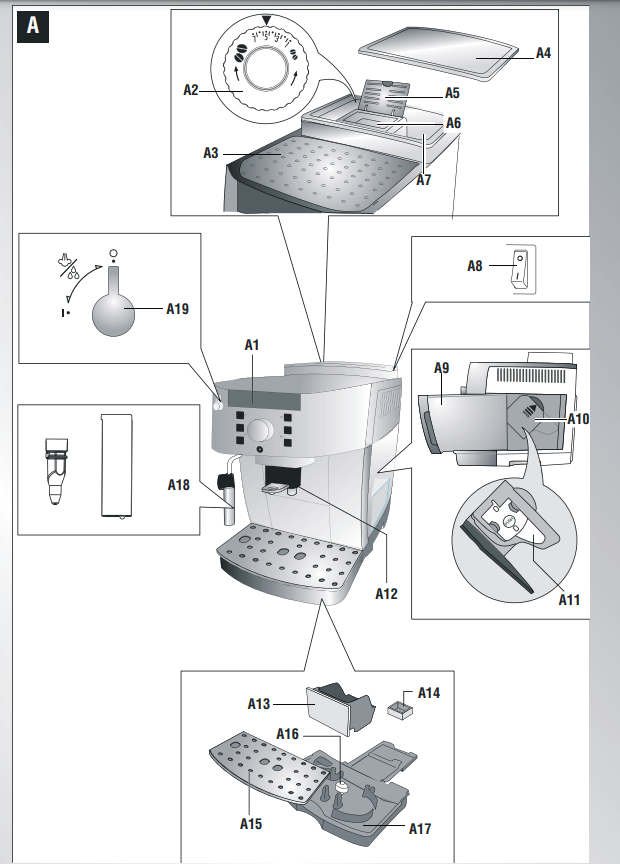
coffee grounds container (A13),
drip tray (A17) and condensate tray (A14),
water tank (A9),
coffee spouts (A12),
pre-ground coffee funnel (A6),
inside of the machine (accessible after opening the infuser door (A10))
infuser (A11)
Important!
Do not use solvents, abrasive detergents or alcohol to clean the coffee maker. With De’Longhi superautomatic coffee makers, you need not use chemical products to clean the machine. The descaler recommended by De’Longhi is made from natural and completely biodegradable substances.
None of the components can be washed in a dishwasher.
Do not use metal objects to remove encrustations or coffee deposits as they could scratch metal or plastic surfaces.
Cleaning the coffee grounds container
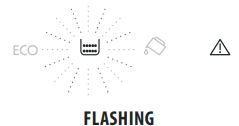
When the light flashes, the coffee grounds container must be emptied and cleaned. Unless you clean the grounds container, the light will continue to flash and the appliance cannot be used to make coffee.
To clean (with the machine on):
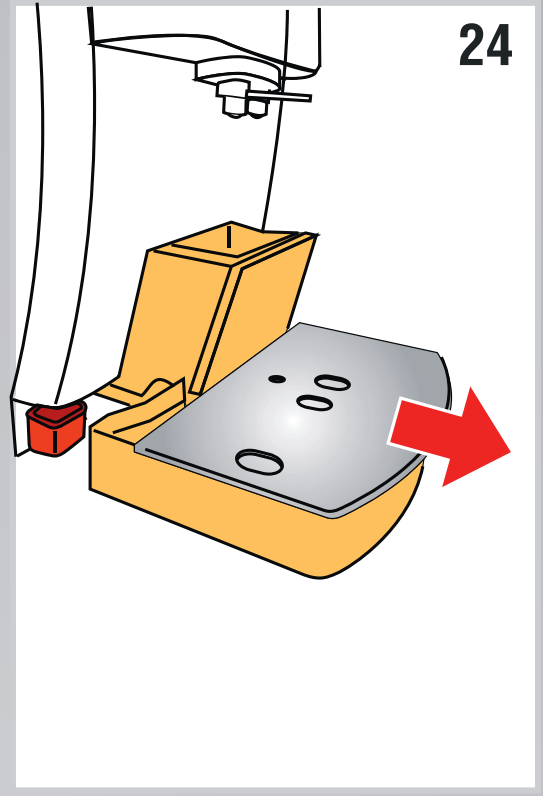
Remove the drip tray (fig. 24), empty and clean.
Empty the grounds container and clean thoroughly to remove all residues left on the bottom.
Also check the condensate tray (red) and empty if necessary.
Important! When removing the drip tray, the grounds container must be emptied, even if it contains few grounds.
If this is not done, when you make the next coffees, the grounds container may fill up more than expected and clog the machine
Cleaning the drip tray and condensate tray
Important! If the drip tray is not emptied regularly, the water could overflow from the edge and seep inside or around the coffee maker. This could damage the machine, the surface it rests on or the surrounding area.
The drip tray is fitted with a level indicator (red) showing the level of water it contains (fig. 25). Before the indicator protrudes from the cup tray, the drip tray must be emptied and cleaned.
To remove the drip tray:
Remove the drip tray and the grounds container (fig. 24);
2. Empty the drip tray and grounds container and wash them;
3. Check the condensate tray and empty if necessary.
4. Replace the drip tray and grounds container.
Cleaning the inside of the coffee maker
Danger of electric shock! Before cleaning internal parts, the machine must be turned off (see “Turning off”) and unplugged from the mains power supply. Never immerse the coffee maker in water.
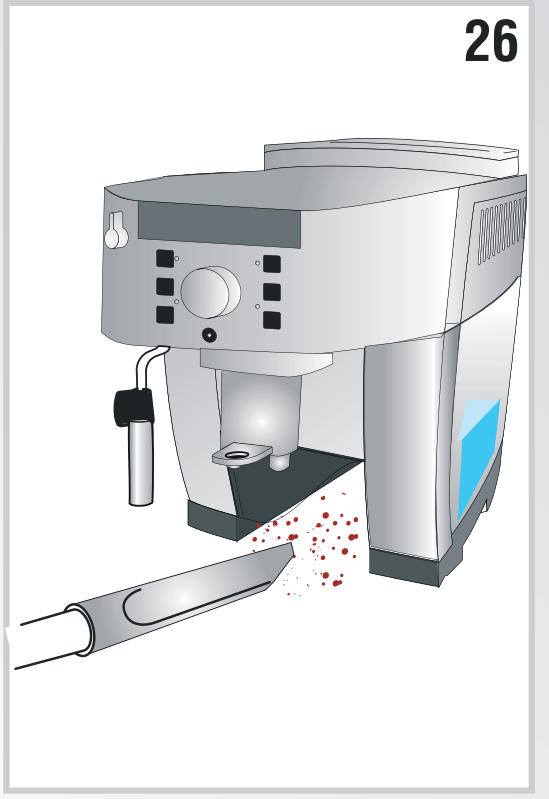
Check regularly (about once a month) that the inside of the appliance (accessible after removing the drip tray) is not dirty. If necessary, remove coffee deposits with a sponge.
Remove the residues with a vacuum cleaner (fig. 26)
Cleaning the water tank
Clean the water tank (A9) regularly (about once a month) with a damp cloth and a little mild washing up liquid.
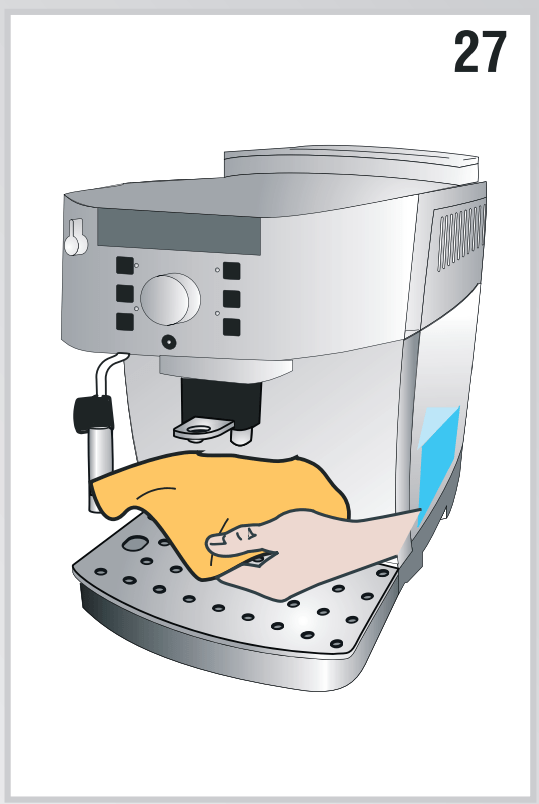
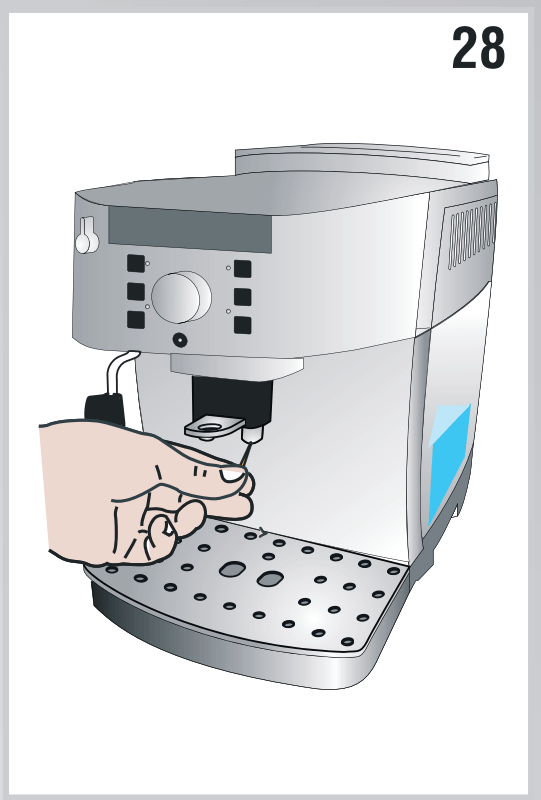
Cleaning the coffee spouts
Clean the coffee spouts with a sponge or cloth (fig. 27).
2. Check the holes in the coffee spout are not blocked. If necessary, remove coffee deposits with a toothpick (fig. 28).
Cleaning the pre-ground coffee funnel
Check regularly (about once a month) that the pre-ground coffee funnel is not blocked. If necessary, remove coffee deposits.
Cleaning the infuser
The infuser (A11) must be cleaned at least once a month.
Important! The infuser may not be extracted when the machine is on.
Make sure the machine is correctly turned off (see “Turning the appliance off” on page 10).
2. Remove the water tank.
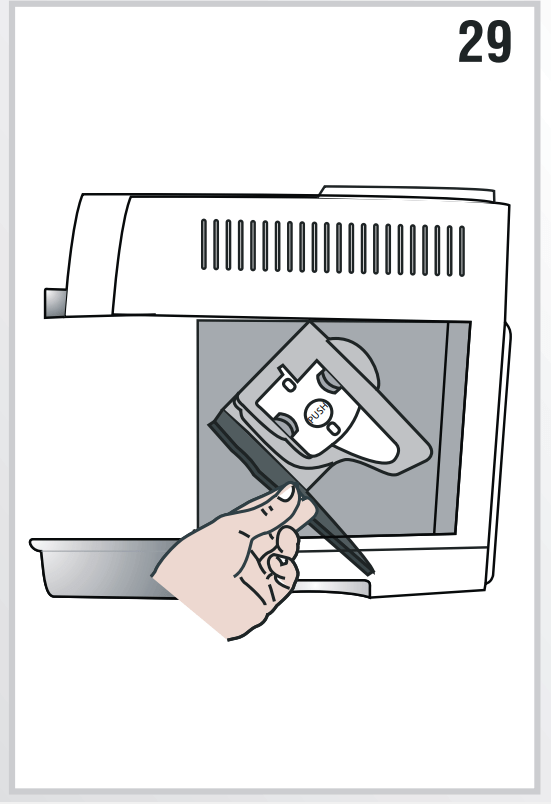
3. Open the infuser door (fig. 29) on the right side.
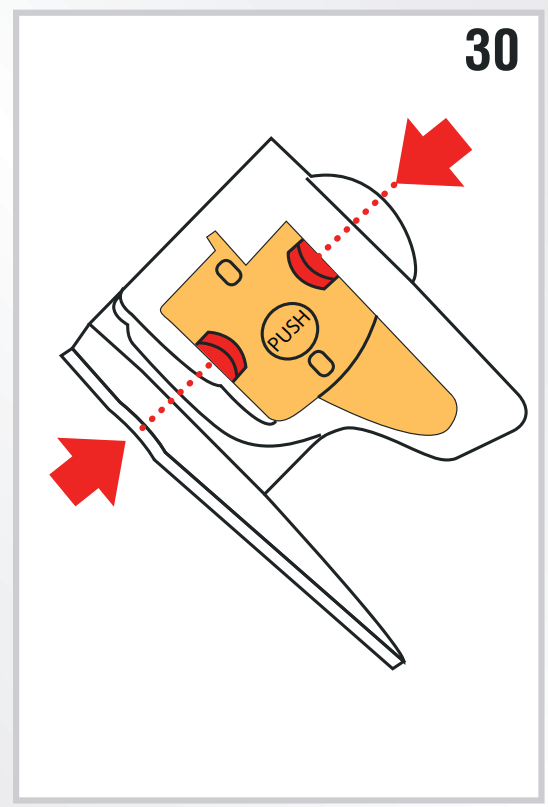
4. Press the two red release buttons inwards and at the same time pull the infuser outwards (fig. 30). Important! Clean the infuser without using dish soap as it could be damaged.
5. Soak the infuser in water for about 5 minutes, then rinse under the tap.
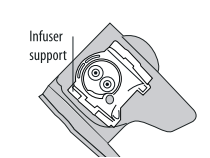
6. Clean coffee residues from the support where the infuser rests.
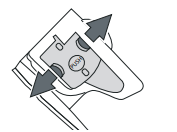
7. After cleaning, replace the infuser by sliding it onto the internal support, then push the PUSH symbol fully in until it clicks into place.
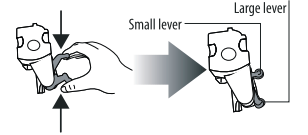
Please note : If the infuser is difficult to insert, before insertion, adapt it to the right size by pressing the two levers shown in the figure.
8. Once inserted, make sure the two red buttons have snapped out.
9. Close the infuser door.
10. Replace the water tank.
DESCALE
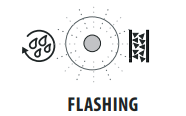
Descale the appliance when the light on the control panel flashes (fig. 31)
Important! Descaler contains acids which may irritate the skin and eyes. It is vital to respect the manufacturer’s safety warnings given on the descaler pack and the warnings relating to the procedure to follow in the event of contact with the skin and eyes.
Please note : Use De’Longhi descaler only. Under no circumstances should you use sulphamic or acetic based descalers. Their use invalidates the guarantee.
Failure to descale the appliance as described also invalidates the guarantee.
Turn the appliance on and wait until it is ready for use.
Empty the water tank (A9) and remove the softener filter, if present.
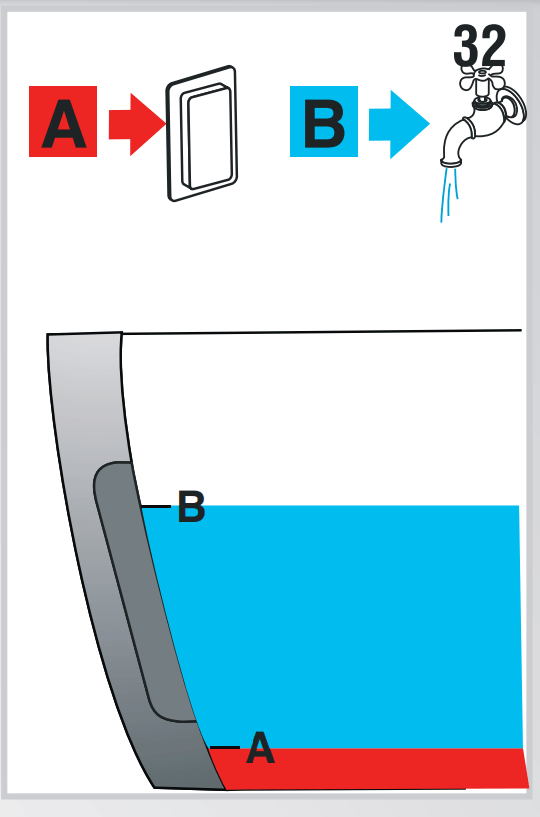
Pour the descaler into the tank up to the level A (corresponding to a 3.4oz/ 100ml pack) marked on the back of the tank (fig. 32A), then add water (1liter) up to level B (fig. 32B). Place an empty container with a minimum capacity of 50 oz./ 1.5 liters under the cappuccino maker .
4. Wait for the coffee lights to come on steadily. Important! Danger of burns Hot water containing acid flows from the cappuccino maker. Avoid contact with splashes of water.
5. Press the button and hold it down for at least 5 seconds to confirm that you have added the solution and begin the descaling procedure. The light in the button remains on steadily to indicate that the descaling program has begun. The light flashes telling you to turn the steam dial to the l position.
6. Turn the steam dial a half turn anticlockwise to the I position. The descaler solution flows out of the cappuccino maker into the underlying container. The descale program automatically performs a series of rinses and pauses to remove the limescale. It is normal for several minutes of inactivity to elapse between rinses. After about 30 minutes, the water tank is empty and the and lights flash. Turn the steam dial clockwise as far as it will go to the 0 position. The appliance is now ready for rinsing through with clean water.
7. Empty the container used to collect the descaler solution and replace it empty under the cappuccino maker.
8. Remove the water tank, empty, rinse under running water, fill with clean water and replace. The light flashes.
9. Turn the steam dial anticlockwise to the I position (fig. 5). Hot water comes out of the spout.
10. When the water tank is completely empty, the light flashes.
11. Turn the dial to the 0 position. The light goes off.
Fill the water tank again and the machine is ready for use.
SETTING WATER HARDNESS
Descaling is necessary after a period of operation established according to the water hardness set.
The machine is factory set for a hardness value of 4.
The machine can also be programmed according to the hardness of the water supply in the various regions so that the machine needs to be descaled less often.
Measuring water hardness
Remove the “TOTAL HARDNESS TEST” indicator paper attached to this manual from its pack.
Immerse the paper completely in a glass of water for one second.
Remove the paper from the water and shake lightly. After about a minute, 1, 2, 3, or 4 red squares form, depending on the hardness of the water. Each square corresponds to one level.
Set water hardness
Make sure the appliance is off (but connected to the mains electricity supply and with the main switch in the I position);
Press the button and hold it down for at least 6 seconds. The and lights come on together;
Press the button (on the left of the dial) to set the actual water hardness as measured by the indicator paper.
Press the button (on the right of the dial) to confirm the selection.
The machine is now reprogrammed with the new water hardness setting
TECHNICAL SPECIFICATION
Volage: 120V ~60 HZ
Absorbed power: 1250W
Pressure: 15 bars
Water tank capacity: 1.8 liters max.
Size LxHxD: 238x340x430 mm
Cable length: 1.15 m Weight: 9.1 kg
Coffee betans container capacity: 250 g max
EXPLANATION OF LIGHTS
LIGHTS
POSSIBLE CAUSE
REMEDY
Insufficient water in the tank
Fill the tank with water and insert it correctly, pushing it as far as it will go until it clicks into place.
The tank is not correctly in place.
Insert the tank correctly and press as far as it will go.
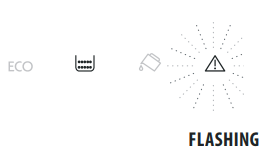
The grounds container (A13) is full.
Empty the grounds container and drip tray, clean and replace. Important: when removing the drip tray, the grounds container MUST be emptied, even if it contains few grounds. If this is not done, when you make the next coffees, the grounds container may fill up more than expected and clog the machine.
After cleaning, the grounds container has not been replaced.
Remove the drip tray and insert the grounds container.
The grinding is too fine and the coffee is delivered too slowly or not at all.
Repeat coffee delivery and turn the grinding adjustment dial (fig. 13) one click clockwise towards “7” while the coffee mill is in operation. If after making at least 2 coffees delivery is still too slow, repeat the correction procedure, turning the grinding adjustment dial another click until delivery is correct (see the section: Adjusting the coffee mill on page 12). If the problem persists, turn the steam dial to the I position and deliver water from the cappuccino maker
The "pre-ground coffee" function has been selected without placing any pre-ground coffee in the funnel.
Place pre-ground coffee in the funnel or deselect the "pre-ground" function.
The machine must be descaled.
The descaling procedure described in the section “Descaling” needs to be performed as soon as possible.
Too much coffee has been used.
Select a milder taste or reduce the quantity of pre-ground coffee then make the coffee again.
The coffee beans have run out
Fill the beans container
The pre-ground coffee funnel is clogged.
Empty the funnel with the help of a knife.
The infuser has not been replaced after cleaning.
Insert the infuser as described in the section “Cleaning the infuser”.
The inside of the appliance is very dirty.
Clean the inside of the appliance thoroughly, as described in the section ““Cleaning the inside of the coffee maker”. If the message is still displayed after cleaning, contact customer services.
TROUBLESHOOTING
Below is a list of some of the possible malfunctions.
If the problem cannot be resolved as described, contact Customer Services.
PROBLEM
POSSIBLE CAUSE
REMEDY
The coffee is not hot
The cups were not preheated
Warm the cups by rinsing them with hot water (Please note you can use the hot water or rinse function).
The infuser has cooled down because 2/3 minutes have elapsed since the last coffee was made.
Before making the coffee, warm the infuser by pressing the rinse button .
The coffee is thin or not creamy enough
The coffee is ground too coarsely.
Turn the grinding adjustment dial one click anticlockwise while the coffee mill is in operation (fig. 13). Continue one click at a time until coffee delivery is satisfactory. The effect is only visible after delivering two coffees (see the section: “Adjusting the coffee mill” on page 12).
The coffee is unsuitable
Use pre-ground coffee for espresso coffee makers.
The coffee is delivered too slowly or a drop at a time
The coffee is ground too finely.
Turn the grinding adjustment dial one click clockwise while the coffee mill is in operation (fig. 10). Continue one click at a time until coffee delivery is satisfactory. The effect is only visible after delivering 2 coffees (see the section: “Adjusting the coffee mill” on page 13).
Coffee does not come out of one of the spouts
The spouts are blocked.
Clean the spouts with a toothpick.
The frothed milk has large bubbles
The milk is not cold enough or is not is not skim or 2% milk.
You should ideally use skim or 2% milk at refrigerator temperature (about 41°F / 5°C). If the result is still disappointing, try another brand of milk.
The milk is not frothed
Cappuccino maker is dirty
Clean as described in the section "Cleaning the cappuccino maker after use" on page 13
Steam delivery stops during use
A safety device stops steam delivery after 3 minutes.
Wait a few minutes, then activate the steam function again.
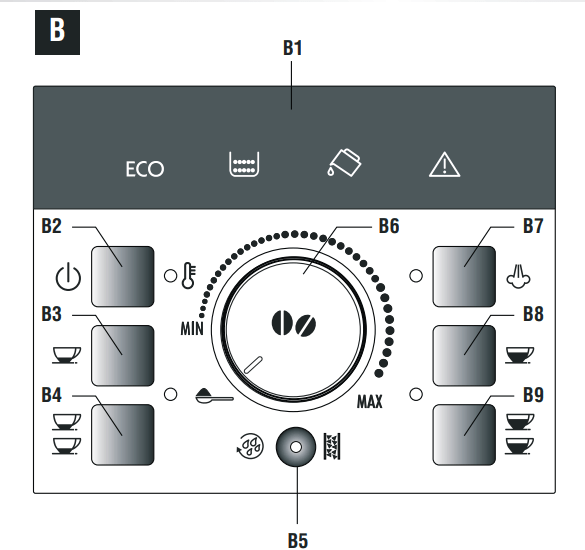
 button: turns the appliance on and off.
 button: to make 1 cup of espresso coffee
 button: to make 2 cups of espresso coffee
 button: to rinse or descale the appliance
 button: to deliver steam to make hot drinks with milk.
 button: to make 1 long coffee
 button: to make 2 long coffees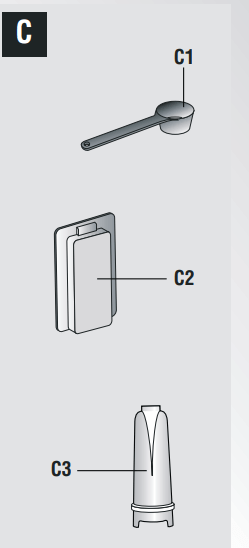
 light flashes on the control panel (fig. 4).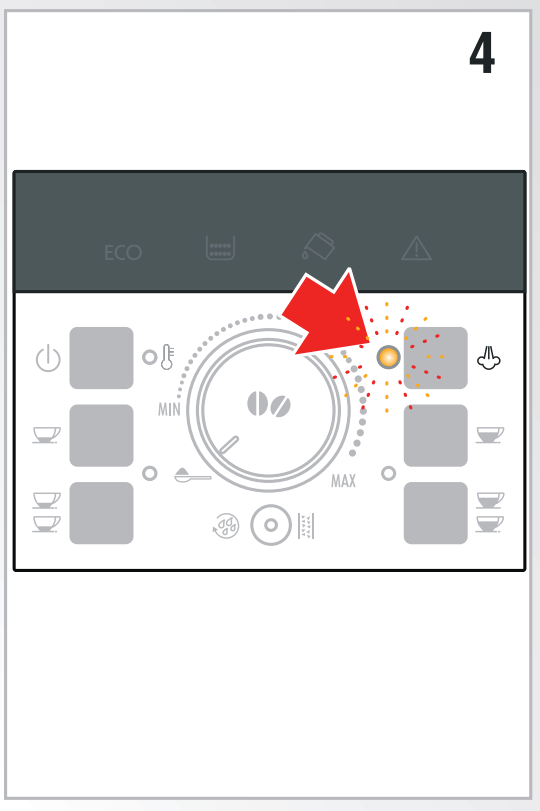
 light flashes while the appliance is heating up and performing an automatic rinse cycle (by circulating hot water, the appliance heats both the boiler and the internal circuits).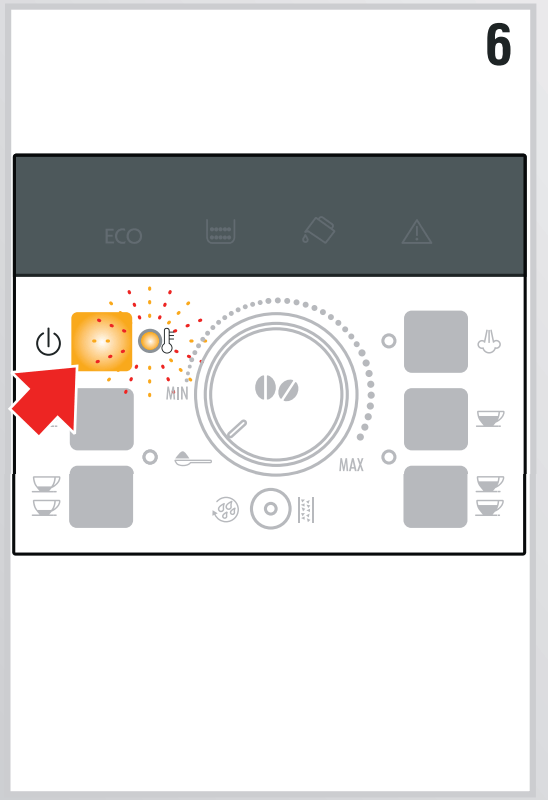




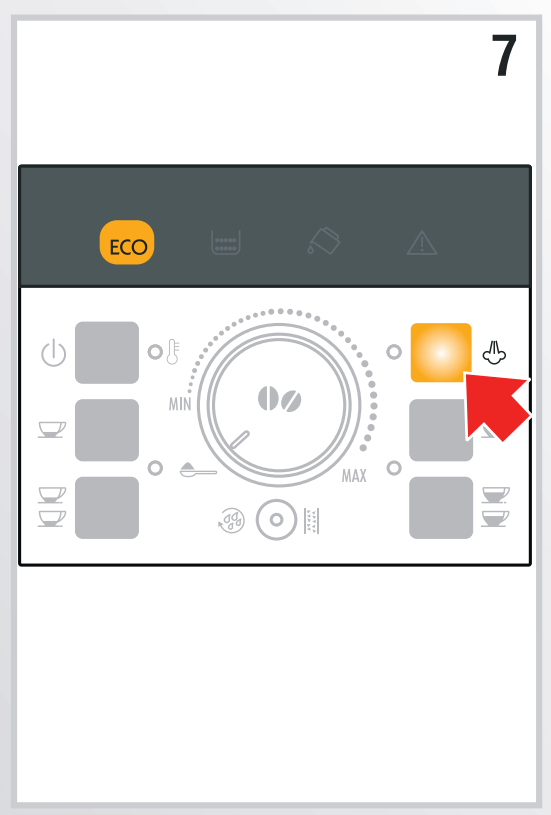
 button and hold it down until the ECO light comes on (fig. 7).
 button (on the left of the dial). The ECO light flashes.
 button (on the right of the dial) to confirm the selection. The ECO light goes off.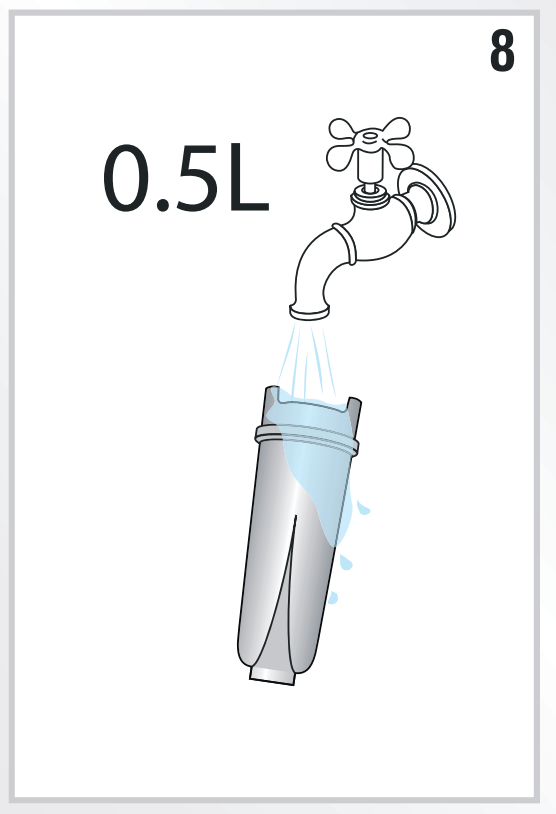
 come on. In this case, repeat the installing operation from step 8. The new filter is active and you can now use the coffee maker.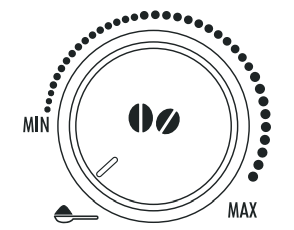
 button is pressed (≃1.35 fl. oz.);
 button (≃4 fl.oz.) is pressed;
 button is pressed;
 button is pressed.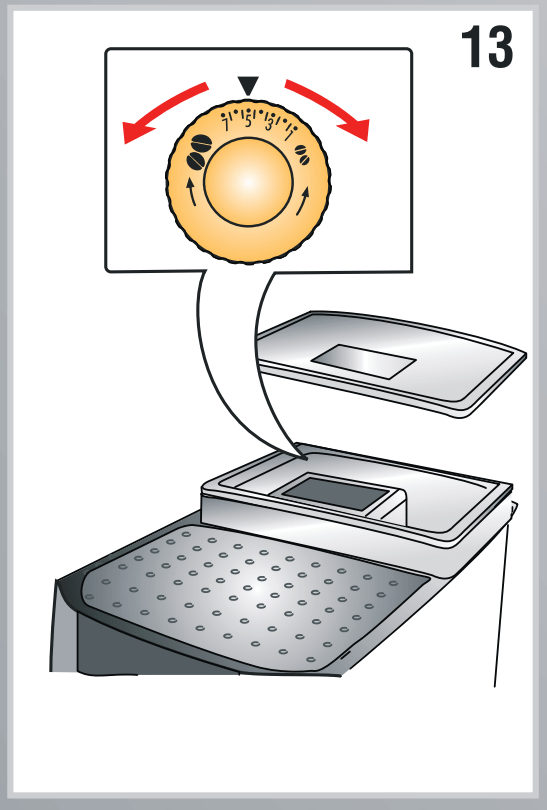
 button and hold it down until the lights on the control panel come on.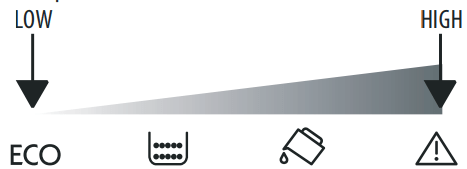
 button to confirm the selection. The lights go off.
 button. Hot water flows out of the coffee spouts and heats the internal circuit of the machine so that the coffee delivered will be hotter.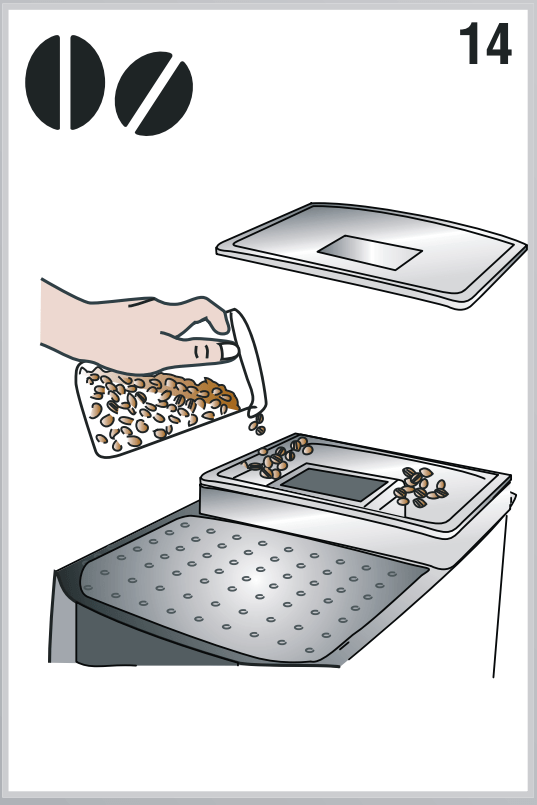

 position (fig. 18).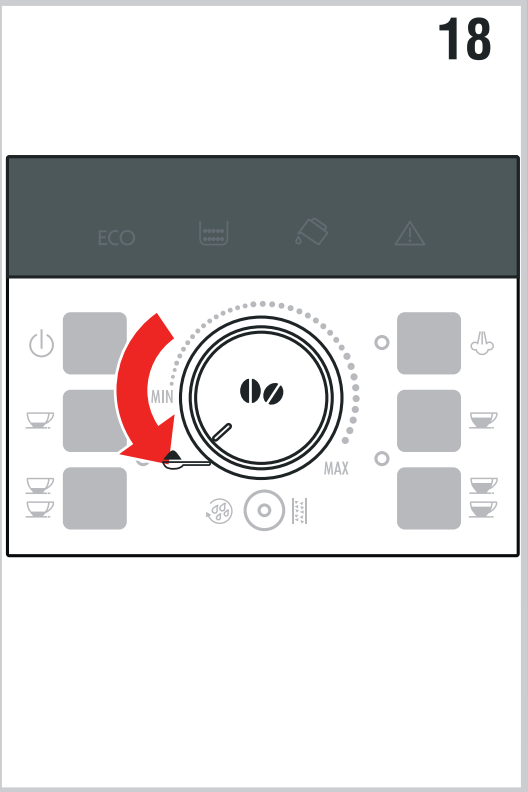
 or
or  ).
). light flashes, the coffee grounds container must be emptied and cleaned. Unless you clean the grounds container, the light will continue to flash and the appliance cannot be used to make coffee.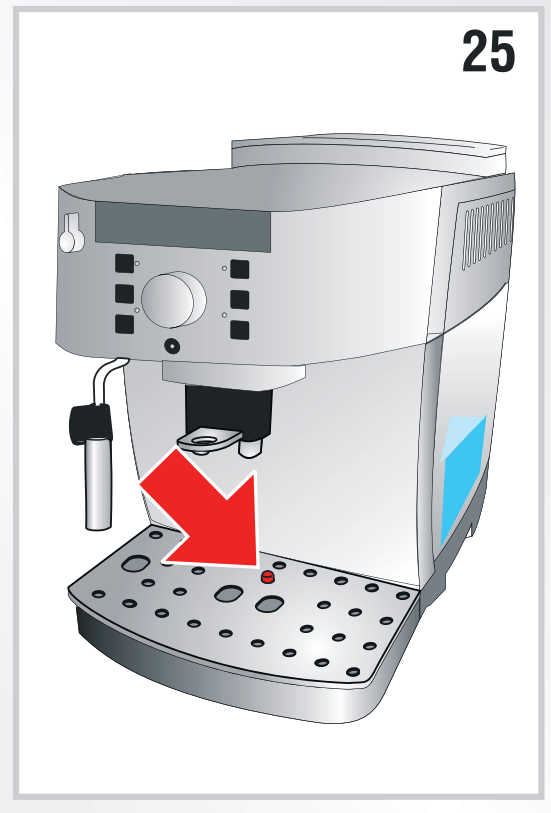
 light on the control panel flashes (fig. 31)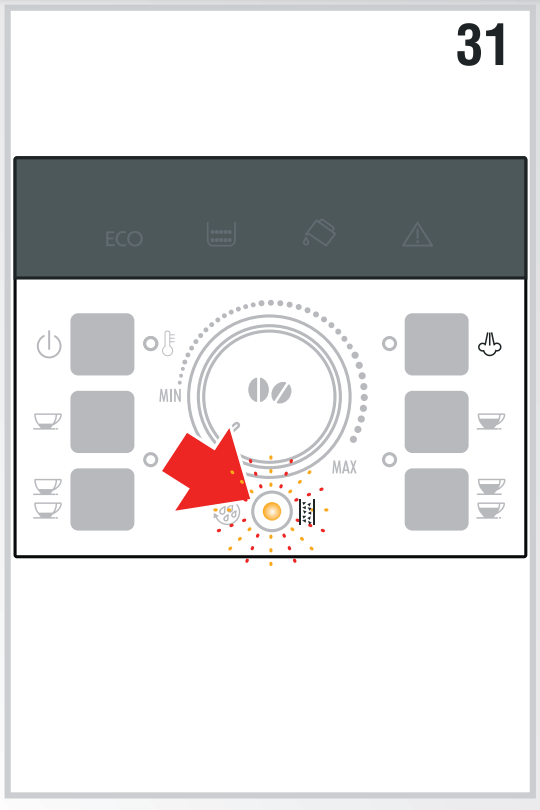
 button and hold it down for at least 5 seconds to confirm that you have added the solution and begin the descaling procedure. The light in the button remains on steadily to indicate that the descaling program has begun. The
  light flashes telling you to turn the steam dial to the l position.
 and
and  light goes off.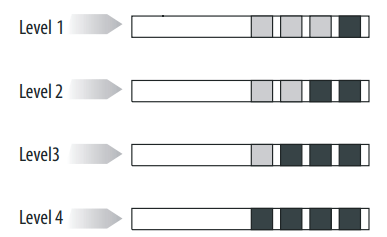
 button and hold it down for at least 6 seconds. The
  and
and  lights come on together;
 button (on the left of the dial) to set the actual water hardness as measured by the indicator paper.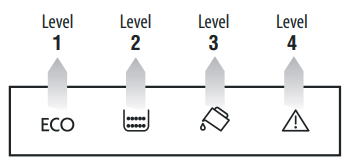
 button (on the right of the dial) to confirm the selection.







 .
.