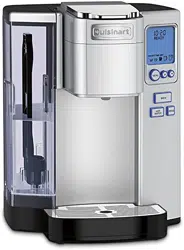
Features and Benefits
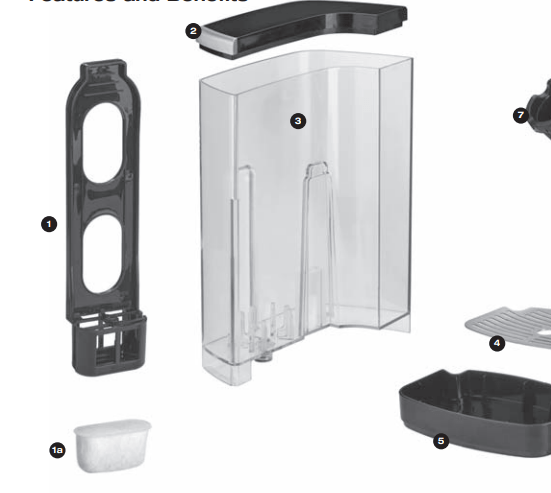
1. Charcoal Filter Holder
1a. Charcoal Water Filter
2. Water Reservoir Lid Removes for easy filling.
3. Removable 72 oz. Water Reservoir Offers large capacity, eliminating the need for frequent refills.
4. Removable Drip Tray Plate Allows extra space for travel mugs.
5. Drip Tray
6. Drip Tray Base
7. Removable Capsule Holder
8. Handle Easy grip prevents slips.
9. Brewing Head
10. Brewing Chamber Holds HomeBarista™ Reusable Filter Cup or the Capsule Holder.
11. Housing
-639761.png)
12. Control Panel
13. Menu Button
14. Up Button 
15. Down Button -617994.png)
16. Brew Button
17. Rinse Button
18. Hot Water Button
19. HomeBarista™ Reusable Filter Cup
20. Reusable Filter Cup Compartment Conveniently stores your HomeBarista™.
21. Power Cord (not shown)
22. Power Switch (located on right side of Coffeemaker)
23. BPA Free (not shown) All parts that come in contact with water or coffee are BPA free.
Setup & First Brew
IMPORTANT: Do not attempt to use your Cuisinart® Premium Single-Serve Coffeemaker until it has been set up for its first use as outlined below.
NOTE: If coffeemaker has been exposed to temperatures below freezing, wait at least two hours for it to reach room temperature before brewing. An extremely cold Coffeemaker will not operate.
Setting Up Your Coffeemaker
1. Unwrap cord and plug the coffeemaker into a grounded outlet. Make sure to remove packing tape, clear plastic sticker from control panel, and sticker from water reservoir. Also be sure to remove the polybag from the HomeBarista™ Reusable Filter Cup located in the compartment on the right side of the coffeemaker.
2. Place a large cup or mug (10 oz. minimum) on the drip tray.
3. Remove lid from reservoir, then lift reservoir straight up and away from the coffeemaker. Wash the reservoir with warm, soapy water. Rinse well.
4. Fill reservoir with water to the max fill line and return with lid to unit (see figure 1).
-523551.png)
5. Press the power switch located on the right side of the coffeemaker. The switch is spring-loaded and will return to original position automatically
6. OPEN HEAD and AUTO OFF SET will be displayed. Open and close the brew head, READY, AUTO OFF SET and brew-size icons will now be displayed with the default size shown as a solid mug (see figure 2).
-883806.png)
7. Making sure your mug is in place, press the Brew button to start a cleansing cycle (unit will dispense approximately 8 oz. of water). The control panel will display BREWING, AUTO OFF SET, as well as the factory default brew size (see figure 3). When cycle is complete, dispose of the hot water. Note: Do not use a capsule for this cycle. Also Note: The default AUTO OFF TIME is set to 30 min. You can change this in settings (See page 14).
-971120.png)
Charcoal Water Filter
Your coffeemaker comes with a charcoal water filter that eliminates chlorine, bad tastes and odors from tap water
-932998.png)
Inserting the Water Filter
- Remove the filter and filter holder from the polybags.
- Soak the filter, fully immersed in cold tap water, for 15 minutes.
- Remove lower portion of filter holder by pulling toward you to disengage latch. Rinse with fresh water.
- Insert the charcoal filter into the upper filter holder, then close (see figure 4).
- Flush filter by running fresh water through lower portion of the filter holder.
- Allow the filter to drain completely.
- Place the assembled water filter holder into the water reservoir, pushing it down to fit into place (see figure 5).
-149766.png)
Note: We recommend changing the water filter every 60 days or after 60 uses, and more often if you have hard water. Replacement filters can be purchased in stores, by calling Cuisinart Customer Service, or at www.cuisinart.com.
Brewing
- The control panel will display OPEN HEAD while in Idle mode.
- Place a cup or mug on the drip tray. The drip tray can be removed to accommodate travel mugs.
- Lift the handle. The brewing chamber will open.
- Select a coffee capsule.
- Note: Do not remove the foil lid or puncture the capsule.
- Place a capsule in the brewing chamber (see figure 6).
-969955.png)
Caution: There are two sharp needles that puncture the capsule, one above and one below. To avoid risk of injury, do not put your fingers in the capsule brewing chamber.
6. Lower the handle to close the brew head. When closed completely, the control panel will indicate READY (see figure 7). All brew-size icons will be displayed with the default size shown as a solid mug. To choose a different size, use the or buttons. Choose from 4-oz., 6-oz., 8-oz., 10-oz., and 12-oz. brew sizes.
Note: The 8-oz. serving is the factoryset default brew size. To program your favorite brew size, see Programming Your Brew Size on page 16.
-927212.png)
7. Once a size is chosen, press Brew. Only the Brew button will be lit. The control panel will now display BREWING, as well as the serving size you selected (see figure 8).
-141470.png)
Note: There may be a short pause before the brewing process begins. The entire brew process lasts approximately 1–2 minutes, depending on brew size selected, and ends with a burst of air to remove all liquid from the capsule.
Caution: There is very hot water in the capsule chamber during the brew process. To avoid risk of injury, do not lift the handle or open the capsule chamber during the brew process.
8. Lift the handle, then remove and dispose of the used capsule. Close the brewing head.
Caution: Capsule will be hot. Following the brew, your coffeemaker will immediately be ready for your next brew. Enjoy your cup of gourmet coffee, tea, or hot cocoa!
Note: If not used within 60 seconds, the unit will return to Idle mode and OPEN HEAD will be displayed on the control panel. To restart the process, open and close the handle and control panel will display READY again.
Hot Water/Rinse
Your coffeemaker is equipped to dispense hot water to make hot chocolate, tea, soup, and more. Your coffeemaker is also equipped with a Rinse cycle to flush out residual flavors. The Rinse cycle will dispense about 4 oz. of hot water.
Note: We suggest running the Rinse cycle before using hot water to flush out any residual coffee, tea or hot cocoa flavor.
To Rinse:
- Place a cup or mug on the drip tray.
- Lift the handle. Check to make sure there is no capsule inserted.
- Lower the handle to close the brewing chamber. When closed completely, the control panel will indicated READY.
- Press Rinse. During the Rinse cycle, only the Rinse button will be lit. The control panel will display the word RINSE (see figure 9).
-317683.png)
The RINSE and HOT WATER buttons will remain lit for one minute. While buttons are lit, you can perform another Rinse cycle or dispense Hot Water without opening the brew chamber. All brewsize icons will be displayed.
Note: To BREW directly after a Rinse cycle, open the brewing head, insert a capsule and brew as normal.
To make Hot Water:
- Place a cup or mug on the drip tray.
- Lift the handle. Check to make sure there is no capsule inserted.
- Lower the handle to close the brewing chamber. When closed completely, the control panel will indicated READY.
- All brew-size icons will be displayed with your default size shown as a solid mug. To choose a different size, use the or buttons.
- Press Hot Water. While the Hot Water cycle is in progress, only the Hot Water button will be lit. The control panel will display the words HOT WATER, as well as the serving size you selected (see figure 10)
-488791.png)
Following the cycle, you can perform another Rinse or another Hot Water cycle immediately for up to one minute. The RINSE, HOT WATER, MENU and and buttons will be lit. After this time the unit will return to Idle mode and OPEN HEAD will be displayed.
Note: To BREW directly after a Hot Water cycle, open the brewing head, insert a capsule and brew as normal.
Brewing with the HomeBarista™ Reusable Filter Cup (included)
The Cuisinart® Premium Single-Serve Coffeemaker can be used with a Reusable Filter Cup, which allows you to use your own ground coffee. The dishwasher-safe, capsule conveniently stores in the easy-open compartment.
1. Open the storage compartment located on the right side of the coffeemaker by pressing the finger indent. Remove the HomeBarista™ Reusable Filter Cup (see figure 11).
-191196.png)
2. Disassemble the HomeBarista™ by locating the tab on the front of capsule and pushing up. Remove the filter basket from the filter cup (see figure 11).
3. Wash the HomeBarista™, filter basket and filter cup in warm, soapy water prior to use, making sure to rinse and dry thoroughly. All HomeBarista™ parts are dishwasher safe.
4. Insert the filter basket into the filter cup.
5. Fill the filter basket with ground coffee, making sure not to fill past the top of the mesh. Adjust the amount to your personal preference. Do not tamp the grinds. Ensure there are no grinds remaining on the upper rim of the filter basket. Push lid down until top tab latches with bottom tab. Note: Use medium grind as a fine grind may cause capsule to overflow. Max fill = 2½ tbsp. (15g)
6. Open brew head. Remove the capsule holder from the brewing chamber by pulling up. (If you would like, store the capsule holder in the HomeBarista™ storage compartment.)
7. Drop the assembled HomeBarista™ into the brewing chamber. (No need to snap it into place). See figure 12.
-165291.png)
CAUTION: There are two sharp needles that puncture the capsule, one above and one below. To avoid risk of injury, do not put your fingers in the capsule brewing chamber.
8. Follow Brewing instructions on page 9.
9. Following brewing, raise the handle and remove the HomeBarista™. Use caution as it will be hot.
10. Open HomeBarista™. Remove the filter basket from the holder, discard the grounds and rinse out the filter basket and holder.
11. Replace the capsule holder, ensuring the arrow on capsule rim aligns with the arrow on the brewing chamber. Gently push the capsule holder to snap into place (see figure 13).
-77526.png)
Programming
Setting the Clock
Setting the clock is optional. When the clock is set, the time will appear on the control panel.
Note: You must set the clock if you plan on using the ON OFF TIME SET programming feature.
1. Press the Menu button. Programming options will appear on the control panel with CLOCK flashing. The word OFF will appear at the top of the control panel to indicate that the clock is not set (see figure 14).
-237939.png)
2. Press or hold the button to scroll through the hours until you have reached the appropriate hour. Be sure the PM indicator is on if a PM time is desired.
3. Press or hold the button to scroll through the minutes until you have reached the desired minutes.
4. When you have reached the correct time, press the Menu button to set the time. Continue pressing Menu to scroll through the remaining programming functions to exit the Programming mode.
5. The correct time should now be displayed on top of the control panel (see figure 15).
-821416.png)
Note: Depending upon the coffeemaker’s current mode, other icons will be displayed as well.
Note: If power is interrupted to the coffeemaker, the clock will need to be reset. Follow the procedure on page 13 to reset the clock.
Programming Brew Temperature
The coffeemaker brews at a pre-set temperature of XHOT. If you prefer a cooler cup of coffee, hot water, tea, or cocoa, you may adjust this temperature down to HOT. Simply follow the instructions below.
1. Press the Menu button until BREW TEMP flashes on the control panel (see figure 21).
-589561.png)
2. The initial set temperature of XHOT will be displayed at the top of the control panel. Use orarrows to lower to HOT or raise to XHOT.
3. Once you have reached your desired brew temperature, press the Menu button to set your default brew temperature. Continue pressing Menu to scroll through the remaining programming options to exit the Programming mode.
Note: At high altitudes (over 5,000 feet) use the temperature adjustment to lower the temperature.
Programming Your Brew Size
The coffeemaker’s default brew size preset is 8 oz. The default brew size lets you choose the brew size most often used. To change the default brew size to your desired brew size:
1. Press the Menu button until BREW SIZE flashes (see figure 22).
2. Use or buttons to select your default brew size.
3. Once the desired default brew size is selected, press the Menu button to set your default brew size and exit the Programming mode.
The control panel will display your selected default brew size.
Note: You can always select another size prior to brewing
-990744.png)
Cleaning & Maintenance
Cleaning External Parts
We recommend regular cleaning of the coffeemaker’s external components.
1. Never immerse the coffeemaker in water or other liquids. The housing and other external components may be cleaned with a soapy, damp, non-abrasive cloth.
2. To remove the drip tray, simply lift it up keeping it level at all times in order to prevent spills. The drip tray and drip tray plate are dishwasher safe.
Cleaning the Cuisinart HomeBarista™ Reusable Filter Cup
1. Open the storage compartment located on the right side of the coffeemaker by pressing the finger indent. Remove the HomeBarista™.
2. Disassemble the HomeBarista™ by locating tab on front of capsule and pushing up. Remove the filter basket from the holder (see figure 23).
3. Wash the HomeBarista™ filter basket and holder in warm, soapy water, making sure to rinse and dry thoroughly. HomeBarista™ parts are dishwasher safe.
-125936.png)
Cleaning the Piercing Needle
The piercing needle is located on the inside of the brewing chamber. Should a clog arise because of coffee grounds, it can be cleaned using a paper clip or similar tool. Insert paper clip to loosen the clog and push it out (Figure 26).
-487604.png)
Cleaning the Water Reservoir & Lid
Neither the reservoir lid nor the reservoir should be put into the dishwasher. Clean them with a damp, soapy, non-abrasive cloth and rinse thoroughly. Do not dry the inside of the water reservoir with a cloth, as lint may remain.
Caution: Rinse the water reservoir thoroughly after cleaning to ensure that no cleaners or cleaning solutions remain in this area, as they may contaminate the coffeemaker’s water supply
De-Scaling Your Coffeemaker
Mineral content in water varies from place to place. Depending on the mineral content of the water in your area, calcium deposits or scale may build up in your coffeemaker. Though scale is nontoxic, it can hinder coffeemaker performance. De-scaling your coffeemaker will help maintain the heating element and other coffeemaker parts that come in contact with water.
coffeemaker every 3 to 6 months. It is possible for calcium deposits to build up faster, making it necessary to de-scale more often.
This coffeemaker is equipped with sensors to detect when scale buildup is interfering with the performance of the coffeemaker. When this is detected, DE-SCALE will be displayed on the control panel (see figure 27), at which point you should promptly de-scale. However, even if DE-SCALE is not displayed, it is still advisable that you de-scale your coffeemaker regularly
Note: Though the coffeemaker will continue to function even when DE-SCALE is displayed, not de-scaling at that point could damage the coffeemaker.
-810916.png)
Follow these steps to de-scale your unit:
1. Empty the reservoir.
2. Disable the AUTO OFF and OFF TIME features.
3. Making sure there is no capsule in the brewing chamber, fill the reservoir with 20 oz. of white vinegar, plus 40 oz. of water.
4. Place a large mug on the drip tray. Press and hold the HOT WATER and RINSE buttons to start the de-scale process. Discard contents of mug.
5. Repeat Step 4 until ADD WATER is displayed on the control panel.
6. Rinse the water reservoir thoroughly and fill with fresh water.
7. Run another Hot Water cycle (see page 11). Discard contents of large mug.
8. Repeat hot water process until ADD WATER is displayed on the control panel.
9. You may need to perform additional Hot Water cycles if you detect any residual vinegar taste.
Note: If DE-SCALE is still displayed on the control panel after completing the procedure, repeat the de-scaling procedure above.
Maintenance: Any other servicing should be performed by an authorized service representative. Contact Cuisinart Consumer Service Center, 1-800-726-0190.
Troubleshooting
Coffeemaker does not have power.
- Plug coffeemaker into an independent outlet.
- Make sure the coffeemaker is securely plugged in.
- Plug into a different outlet.
- Reset your home’s circuit breaker.
- Confirm the power has been turned on and the LCD is illuminated.
Coffeemaker will not brew.
- After placing a capsule in the Capsule Holder, make sure the handle is pushed down securely and the LCD control panel reads READY with the and buttons and Brew, Hot Water, and Rinse buttons illuminated. Then press any of the lit buttons.
- If the LCD control panel indicates ADD WATER and NOT READY, check to make sure the water reservoir is properly filled. If not, add water. If so, make sure the water reservoir is properly seated in its base.
- If the LCD control panel indicates ADD WATER and NOT READY even after refilling and checking the base, contact Consumer Service at 1-800-726-0190.
- The piercing and/or exit needle may be clogged (refer to page 17).
Chlorine or mineral taste in coffee.
- Consider using bottled water, filtered water or the Cuisinart® Charcoal Water Filter.
Doesn’t brew a full cup.
- The piercing and/or exit needle may be clogged (refer to “Cleaning & Maintenance”, page 17).
- Clean the capsule holder brewing chamber (refer to “Cleaning & Maintenance”, page 17).
- Make sure the water reservoir is properly in place, and perform a Rinse cycle (page 11).
- De-scale the coffeemaker (refer to page 19).
- If you have repeated the de-scale procedure two times and it is still only brewing a partial cup, contact Consumer Service at 1-800-726-0190.
The time is not displayed on the LCD control panel.
- You must set the clock (refer to page 13) in order for the time to be displayed on the LCD.
- If power is interrupted to the coffeemaker, you will need to re-set the clock (refer to page 13).
Coffeemaker shuts off or turns on automatically.
- The default Auto Off time is set for 30 minutes. Make sure the AUTO OFF and the On/Off time features have not been set. To do this, press the Menu button and scroll through the programming options. OFF should be displayed for AUTO OFF timer and On/Off. If OFF is not displayed, you must reset (refer to page 14)
Coffee is too weak or watery.
- Reduce the brew size for a stronger-tasting cup of coffee (refer to “Programming Your Brew Size” on page 16) or try an extra-bold coffee capsule
ADD WATER is displayed on LCD but reservoir is full.
- Check to make sure the reservoir is properly in place on the unit.
EEO appears on screen.
- Please call Customer Service at 1-800-726-0190