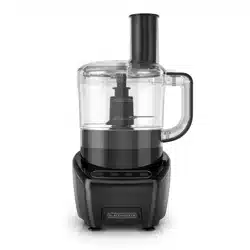
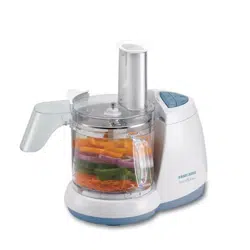
User manual Processor
HOW TO USE
This product is for household use only.
GETTING STARTED
- Remove all packing material, any stickers, and the plastic band around the power plug.
- Remove and save literature.
- Please visit www.prodprotect.com/applica to register your warranty.
- Wash all removable parts as instructed in CARE AND CLEANING section of this manual.
CAUTION: Handle blade and disc carefully. They are very sharp.
- Select a level dry countertop where the appliance is to be used allowing air space on all sides to provide proper ventilation for the motor.
ASSEMBLING THE FOOD PROCESSOR
Important: Always make sure your food processor is unplugged and placed on a flat, level surface before starting to assemble.
Important: For your protection this appliance has an interlock system. The processor will not operate unless the cover is properly locked in place.
1. Place center shaft in workbowl.
-426938.png)
2. Place either the chopping blade or the slicing/shredding disc onto center shaft.
3. Place cover on work bowl with the small latch to the right of the workbowl’s handle.
4. Place workbowl onto base
-679136.png)
5. Rotate cover clockwise until cover locks into place.
-210521.png)
6. Insert the food pusher into the feed chute.
7. Make sure OFF button is pressed. Plug in the appliance to turn it on. It is now ready to use.
CONTROL PANEL
Note: If the food processor does not run, make sure the workbowl and lid are properly locked and on the base.
-686894.png)
OFF
Press OFF to stop the food processor when it is running on LOW or HIGH.
LOW
When LOW is selected, the processor will run at a low speed until OFF is pressed.
HIGH
When HIGH is selected, the processor will run at a high speed until OFF is pressed.
PULSE
Use PULSE for short processing tasks using the chopping blade. This lets you control the size and uniformity of foods being chopped.
- The PULSE button must be pressed and held for the appliance to operate in PULSE mode. When released, the appliance will stop.
- Press the button and then release to allow the blade to stop running and the food to fall to the bottom of the workbowl.
USING THE CHOPPING BLADE
The chopping blade is used to coarsely or finely chop, mince, mix, and puree.
Caution: The chopping blade is very sharp. Use caution when handling and storing.
1. Assemble the food processor with the center shaft and chopping blade in the workbowl.
-162622.png)
2.Place food in workbowl.
3. Place cover on workbowl and lock into place by rotating clockwise.
4. Put the food pusher in place.
Important: Never use your fingers to direct food through the feed chute.
5. Select your desired speed (LOW, HIGH, or PULSE).
Note: Process foods for no more than a few seconds at a time. Pulsing produces excellent results and offers greater control.
6. When finished, press OFF.
Important: Make sure the chopping blade has completely stopped before removing the cover or workbowl from the processor.
7. Twist cover counterclockwise to remove.
8. Lift workbowl off base.
Note: Remove workbowl from appliance before removing the chopping blade to prevent food from leaking through the center opening of the workbowl.
9. Remove center shaft.
10. Unplug appliance when not in use.
HELPFUL TIPS FOR USING THE CHOPPING BLADE
- The processor works very quickly. Watch carefully to avoid over-processing foods.
- For best results, process foods that are about the same size.
- The processor will be more efficient if filled no more than 1/2 to 2/3 full.
- Do not fill the workbowl, past the “Max
- Food Level” mark.
- When chopping cooked or raw meat, the food should be very cold. Use no more than 2 cups of 3/4 inch cubes. Process using PULSE in 5 second intervals.
- Processing nuts or other hard foods may scratch the surface finish on the inside of the bowl.
- Never walk away from the processor while it is on.
- You may use hot, but never boiling liquids.
- The PULSE button offers the best control.
- Insert a funnel into the feed chute when adding ingredients such as, oil, flour and sugar.
USING THE SLICING/ SHREDDING DISC
1. Set workbowl onto base.
2. Place center shaft in workbowl.
3. Carefully place slicing and shredding disc on top of center shaft with appropriate side up (depending on work to be done).
-328586.png)
4. Place cover on workbowl and lock into place by rotating clockwise.
5. Place food in feed chute.
6. Press LOW speed button; press lightly but firmly on food pusher to guide food through processor.
Note: Heavy pressure on the pusher does not speed the work; use the pusher only as a guide. Let the processor do the work.
7. When finished, press OFF.
Important: Make sure the slicing/shredding disc has completely stopped before removing the cover or workbowl from the processor.
8. Twist cover counterclockwise to remove.
9. Carefully remove the slicing/shredding disc. Lift the workbowl off the base.
10. Unplug appliance when not in use.
HELPFUL TIPS FOR SLICING OR SHREDDING
- Before slicing round fruits and vegetables through the processor cut a thin slice from the bottom so food will be more stable.
- Place food cut side down in the feed chute.
- Always remove seeds, core and pits before processing
- Select foods that are firm and not over ripe.
- Remove the core from hard vegetables, such as cabbage.
- To prevent slender foods, such as carrots or celery, from falling over in the feed chute, cut food into several pieces and pack the feed chute with the food.
- When slicing thinner vegetables cut them just short of the length of the feed chute; stand them vertically in the feed chute so they are solidly packed and cannot turn or tilt.
- Soft and semi hard cheeses should be well chilled before shredding. For best results with soft cheeses such as mozzarella, freeze 15-20 minutes before processing. Cut to fit feed tube and process using even pressure.
- To slice cooked meat, including salami and pepperoni, food should be very cold. Cut in pieces to fit feed tube and process food using firm, even pressure.
- Do not let the food accumulate too high (over 2/3 full); stop and empty the workbowl.
- Remove the slicing/shredding disc before removing the workbowl from the processor.
GENERAL TIPS FOR USING THE PROCESSOR
- Organize processing tasks to avoid multiple cleanups of the bowl; process dry before wet.
- Do not process foods that are so frozen or hard that the tip of a knife cannot be inserted into the food.
- If a piece of hard food, such as a carrot, becomes wedged or stuck on the blade, stop the processor and unplug, then remove the blade. Gently remove food from the blade.
- Do not use the processor to:
- Grind coffee beans, bones, grains or hard spices
- Slice or chop warm meat
CARE AND CLEANING
This product contains no user serviceable parts. Refer service to qualified service professional.
Important: Always unplug your processor from the outlet before cleaning.
CLEANING
Important: Blades and discs are sharp. Handle carefully.
- Completely disassemble processor parts before washing.
- Rinse parts immediately after processing for easier cleaning.
- Wipe base and feet with a damp cloth and dry thoroughly. Stubborn spots can be removed by rubbing with a damp cloth and a mild, nonabrasive cleaner. Do not immerse base in liquid.
- All removable parts can be washed by hand in hot water with dish soap or in the dishwasher, top rack only. Hand-washing of plastic parts will help to maintain the food processor’s appearance.
- Do not use rough scouring pads or cleansers on any plastic or metal parts to clean.
- Do not allow blade or disc to soak in water for long periods of time.
- Remember to clean the internal shaft of the chopping blade. Use a brush to remove any residual food particles.
CLEANING TIPS
- For quick clean up, combine 1 cup warm water and a drop of liquid dish soap in the food processor workbowl.
- Cover and process on LOW for about 30 seconds.
- Discard liquid and rinse thoroughly.
Important: Do not place the processor parts in boiling liquids.
STORAGE
Caution: Blades and discs are sharp. Handle carefully.
1. Wrap cord under base.
2. Assemble the parts onto the base in this order: workbowl, center shaft, chopping blade, slicing/shredding disc, workbowl cover, food pusher.
-833532.png)
TROUBLESHOOTING:
Food Processor doesn’t run
- Make sure the bowl and lid are properly aligned and in place.
- Check to make sure the food processor is plugged in.
- If you have a circuit breaker box, be sure the circuit is closed.
- Unplug the food processor, and then plug it back into the outlet.
Food processor not shredding or slicing properly
- Make sure the disc or blade is installed properly.
- Make sure ingredients are suitable for slicing or shredding.
If workbowl cover won’t close
- Make sure the disc or blade is installed correctly.
If the problem is not due to one of the above items, see the “Warranty and Service” section of this Use and Care Manual. Do not return the Food processor to the retailer. Retailers no not provide service.