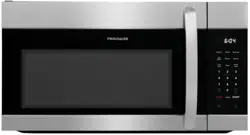
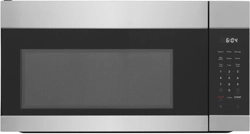
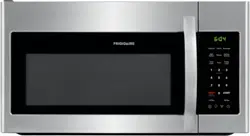
User manual Microwave
PART NAMES
Microwave features
Front View
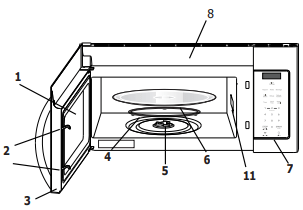
- Window
- Interlock system
- Door assembly
- Turntable ring assembly
- Turntable Shaft
- Turntable glass tray
- Control pane
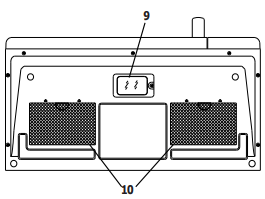
- Ventilation openings (on top)
- Surface lights
- Ventilation filters
- Waveguide cover: Do NOT REMOVE
Bottom View
CONTROL PANEL
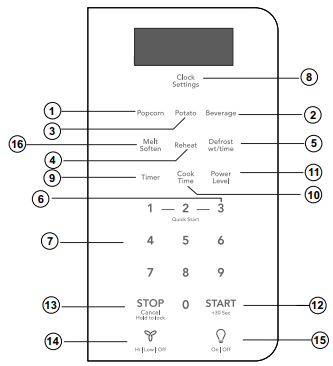
- Popcorn (P17)
- Beverage (P17)
- Potato (1-4 potatoes) (P17)
- Reheat (3 different settings) (P15)
- Defrost (by time or weight) (P13)
- Quick Start ( 3 instant key settings)(P11)
- Numeric pads (0 thru 9)
- Clock Settings (P10)
- Timer (P10)
- Cook Time (P11)
- Power Level (10 power levels available) (P16)
- START +30 sec (P12)
- Stop/Cancel (P12)
- Exhaust (High/Low/Off) ~ Use to turn the exhaust fan on, off, or to adjust fan speed. (P10)
- Surface Light ~ Press this pad to turn the surface lights on or off. (P10)
- Melt Soften (P15)
Note:For detailed information,please go to relative page listed above.
BEFORE OPERATING
Clock Settings
The microwave oven has settings that allow you to customize the operation for your convenience. Below is the table showing the various settings. Touch the Clock &Settings key multiple times to scroll to the desired setting function.
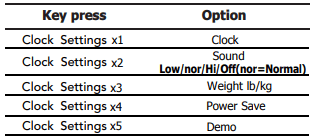
Setting the clock
Example: setting clock display for 9:00:
1. Touch Clock Settings pad once. 
2. Enter time using number pads. 
3. Touch START+30sec pad again. 
Setting the timer
Example: setting timer for 5 minutes:
1. Touch Timer pad once. 
2. Enter desired time using number pads. 
3. Touch Timer pad.
Timer count down does not stop even if the door is opened. To stop/cancel the timer, press the Timer key once .
When the timer has reached the end of set time, you will hear beep alerts indicating the timer has run out.
Exhaust High / Low / Off
The exhaust ventilation removes steam and other cooking vapors from the cooking surface of the range below the microwave oven.
To operate the exhaust vent, Touch the Exhaust High/Low/Off pad once for the highest speed setting. Touch the pad again to choose the Low speed setting and a 3rd time to turn the exhaust ventilation off.

Note: If the temperature gets too hot around the microwave oven, the fan in the exhaust vent hood will automatically turn automatically turn on at the LOW setting to cool the oven. The fan will off when the internal parts are cool. When this occurs, the vent cannot be turned off.
Surface Light / On / Off
Touch the Surface Light/On/Off pad once for a cooking surface light. Press the pad again to turn the light off.

Control Lock
You may lock the control panel to prevent the microwave from being accidentally started or used by children.
The control lock feature is very useful when cleaning the control panel. The lock will prevent accidental programming when wiping the control panel clean.
Example: to set the control lock ON:
Touch and hold the Stop/Cancel pad for more than 3 seconds. The Lock icon will appear in the display window along with 2 beeps.

Example: to change the control lock from ON to OFF:
- Touch and hold the Stop/Cancel pad for more than 3 seconds. The Lock icon will disappear in the display window.
MANUAL COOKING
Using Ready Set
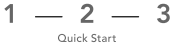
Microwave heating or cooking may be quickly set at 100% power level for 1, 2 or 3 minutes. Use the number keys 1, 2 or 3 to choose the desired minutes of cook time (this option will only work using the 1, 2 or 3 numeric pads):
Example: to quickly heat for 2 minutes at 100% power:
Touch number pads 1, 2 or 3 for desired minutes of cook time. 
Note: the Ready Set function cannot be set when using the Defrost (by weight) feature.
NOTE “Food” will be displayed if a quick start cooking cycle or +30 sec key is not selected within 5 minutes of placing food in the microwave. You must open then close the door again to clear ''Food'' from the display.
Heating with high power level
Example: to heat for 5 minutes at 100% power:
1. Press Cook Time pad. 
2. Use the number pads to enter desired heating time (cook time may be set up to 99 minutes and 99 seconds). 
3. Touch START+30sec pad. 
When heating has finished you will hear beeps and "End" will display.
Heating with lower power levels
Using the highest power level to heat foods with does not always give the best results when some types of food need slower cooking, such as roasts, baked goods or custards. Your oven has nine other power levels you may choose.
Example: to heat for 4 minutes at 70% power:
1. Press Cook Time. 
2. Use the number pads to enter desired heating time (cook time may be set up to 99 minutes and 99 seconds). 
3. Press Power Level pad once for power level 10 (100% power). 
4. Use the number key to change the power level to 7. P-70 a ppears in the display (70 % power). 
5. Press START+30sec pad. 
When heating has finished you will hear beeps and "End" will display.
Heating with multiple cooking stages
For best results, some microwave recipes call for different power levels or different lengths of time for cooking. Your microwave may be set to change from one stage to another automatically (2 stages maximum).
Example: to cook food for 3 minutes at 80% power and then 50% power for 6 minutes 30 seconds:
1. Press Cook Time 
2. Use the number pads to enter heating time for the 1st stage (cook time may be set up to 99 minutes and 99 seconds). 
3. Press Power Level pad once. 
4. Use the number keys to enter power level for the 1st stage. P-80 in the display (80 % power). 
5. Press Cook Time pad for 2nd stage.
6. Use the number pads to enter heating time for the 2nd stage (cook time may be set up to 99 minutes and 99 seconds). 
7. Press Power Level pad for 2nd stage.
8. Use the number key to enter power level for the 2nd stage. P-50 appears in the display (50 % power). 
9. Press START+30sec pad. 
When heating has finished you will hear beeps and "End" will display
Note: Power level must always be programmed for first stage.
Using the Stop/Cancel key
This feature will let you quickly stop or cancel the cooking process.
Touch the Stop/Cancel pad to :
1. Erase if you have entered wrong information.
2. Cancel timer setting process.
3. Press pad once to pause the oven temporarily during cooking. (Touch START+30sec pad again to resume cooking.) 
4. Return the time of day (clock) to the display after cooking cycle is completed.
5. Cancel a program during cooking, touch twice.
Using the Start/+ 30 sec. key
This feature will let you quickly start or add 30 seconds
Touch the START+30sec pad to :
1. Start programmed cooking.
2. Start cooking for 30 seconds at 100% power level.
3. Extend cooking time in multiples of 30 second each time this pad is touched during microwave cooking.
Example: to add 1 minute of cook time during 80% microwave cooking :
Press START+30sec pad twice.
NOTE “Food” will be displayed if a quick start cooking cycle or +30 sec key is not selected within 5 minutes of placing food in the microwave. You must open then close the door again to clear ''Food'' from the display.
Setting Defrost (by Weight)
Example: to defrost 1lb. of food with the default power level and cook time determined automatically:
1. Press Defrost pad once. 0.0 will appear in the display. 
2. Use the numeric pads to input weight of food to defrost in pounds (10 = 1.0lb.) You may enter any weight from 0.1 to 6.0lbs. 
3. Press START+30sec pad. 
When defrosting has finished you will hear beeps and "End" will display.
Note: The weight amount must be a valid entry for this feature to start. A valid weight entry is 0.1 to 6.0 pounds.
Setting Defrost (by Time)
1. Press Defrost pad twice. 0:00 will appear in the display.
2. Use the number pads to enter desired defrost time (defrost time may be set up to 99 minutes and 99 seconds). 
3. Press START+30sec pad.
When heating has finished you will hear beeps and "End" will display.
Note: Power levels cannot be changed for both defrost (by weight) or defrost (by time) because the defrost performance will be adversely affected.
Special notes for defrosting by time
- After pressing START+30sec key, the display will count down remaining defrost time. The oven will beep during the defrost cycle. At this time open the door and turn the food if needed and remove any portions that have already thawed. Touch the START+30sec key to resume the defrost cycle.
- When heating has finished you will hear beeps.
Defrosting tips
- When using the defrost weight feature, the weight entered should always be pounds (valid entries are from 0.1 to 6.0 pounds).
- Use both defrost weight and defrost time features for raw food items only. Defrosting gives best results when food to be thawed is a minimum of 0°F (taken directly from a true freezer). If the food has been stored in a refrigerator-freezer that does not maintain a temperature of 5° F or below, always program a lower food weight or lower cook time to prevent cooking the food.
- If the frozen food is stored outside the freezer for up to 20 minutes, enter a reduced cook time or weight.
- The shape of the package will alter the defrosting time. Shallow rectangular food packets defrost more quickly than a deep frozen block of food.
- Separate pieces as they begin to defrost. Separated frozen pieces of food defrost better.
- Shield warm areas of food with small pieces of foil if they start to become warm.
- You may use small pieces of aluminum foil to shield food items like chicken wings, leg tips and fish tails, but do not allow the foil to touch the oven cavity walls when defrosting.
Defrosting suggestions for meats
For best results, please read these suggestions when defrosting meats.
Roast beef or pork
- 2.5 to 6 lbs. (40 to 96 oz.)
Start with the food placed fat side down. After each stage, turn the food over and shield any warm portions with narrow strips of aluminum foil. Let stand, covered for 15-30 minutes.
Steaks, chops or fish
- 0.5 to 3 lbs. (8 to 48 oz.)
After each stage, rearrange the food. If there are any warm or thawed portions of food, shield them with narrow flat pieces of aluminum foil. Remove any pieces of food that are nearly defrosted. Let stand, covered for about 5 to 10 minutes.
Ground meat
- 0.5 to 3 lbs. (8 to 48 oz.)
After each stage, remove any pieces of food that are nearly defrosted. Let stand, covered with foil for 5 to 10 minutes.
Whole chicken
- 2.5 to 6 lbs. (40 to 96 oz.)
Remove giblets before freezing poultry. Start defrosting with the breast side down. After the 1st stage, turn the chicken over and shield any warm portions with narrow strips of aluminum foil. After the 2nd stage, again shield any warm portions with narrow strips of aluminum foil. Let stand, covered, for 30 to 60 minutes in the refrigerator.
Chicken pieces
- 0.5 to 3 lbs. (8 to 48 oz.)
After each stage, rearrange or remove any pieces of food that are nearly defrosted. Let stand for 10-20 minutes.
Reheat
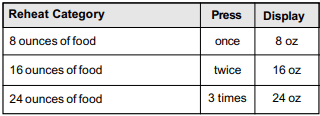
The reheat feature provides 3 quick preset settings based on serving size to reheat food for your cooking convenience.
Example: to reheat 24 ounces of food.
1. Press Reheat pad 3 times (see reheat category table) to reheat 24oz. of food. 24oz will appear in the display. 
2. Press START+30sec pad.
Melt/ Soften
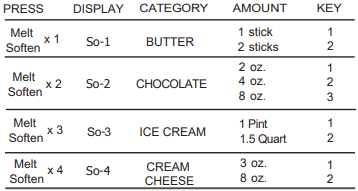
The oven uses low power to melt and soften items. See the following table.
Example: to melt 8 oz of Cream Cheese.
1. Press Melt/Soften pad 4 times to reheat 8oz. of food. So-4 will appear in the display (see Melt/Soften category table). Then press 2 number pad, cook time will appear in the display. 
2. Press START+30sec pad.
Suggested power levels for cooking
The 10 power levels available with this microwave will help you to adjust to the power output best suited for the food type you are preparing. As with any food preparation in the microwave, it is best to follow the microwave instructions that are printed on food packaging.
The table below provides suggested power levels for various types of food that you can be prepare in the microwave.
Power level: 10 High
Microwave output: 100 %
Use to prepare when:
- Boiling water.
- Cooking ground beef.
- Making candy.
- Cooking fresh fruits & vegetables
- Cooking fish & poultry.
- Preheating browning dish.
- Reheating beverages.
- Cooking bacon slices.
Power level: 9
Microwave output: 90 %
Use to prepare when:
- Reheating meat slices quickly.
- Saute onions, celery & green peppers.
Power level: 8
Microwave output: 80 %
Use to prepare when:
- All reheating.
- Cooking scrambled eggs.
Power level: 7
Microwave output: 70 %
Use to prepare when:
- Cooking breads & cereal products.
- Cooking cheese dishes & veal.
- Cakes, muffins, brownies & cupcakes.
Power level: 6
Microwave output: 60 %
Use to prepare when:
Power level: 5
Microwave output: 50 %
Use to prepare when:
- Cooking meats & whole poultry.
- Cooking custard.
- Cooking spare ribs, rib roast & sirloin roast.
Power level: 4
Microwave output: 40 %
Use to prepare when:
- Cooking less tender cuts of meat.
- Reheating frozen packaged foods.
Power level: 3
Microwave output: 30 %
Use to prepare when:
- Thawing meat, poultry & seafood.
- Cooking small quantities of food.
- Finish cooking casseroles, stew & some sauces.
Power level: 2
Microwave output: 20 %
Use to prepare when:
- Softening butter & cream cheese.
- Heating small amounts of food.
Power level: 1
Microwave output: 10 %
Use to prepare when:
- Softening ice cream.
- Raise yeast dough.
AUTO COOKING
Popcorn
The popcorn feature lets you pop 3 different commercially packaged microwave popcorn sized bags. Use the table below to determine the setting to use.
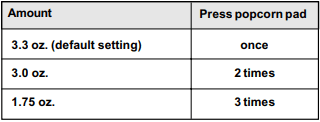
Example: to pop a 3.0 oz. bag of popcorn automatically.
1. Press Popcorn pad 2 times. 
2. Press START+30sec pad.
The microwave will beep when finished.
Potato
The potato feature cooks 1, 2 , 3 or 4 (cooking times based on 8 to 36 oz.) potatoes automatically. Use the table below to determine the setting to use.
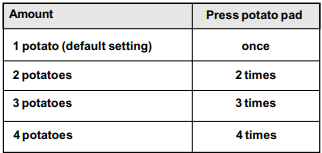
Example: to cook 1 potato automatically.
1. Press Potato pad once. 
2. Press START+30sec pad.
The microwave will beep when finished.
Notes:
- Before cooking, pierce potatoes with fork several times.
- After cooking, let potatoes stand for 5 minutes.
Beverage
The beverage feature heats 1 or 2 cups of beverage. Use the table below to determine the setting to use.
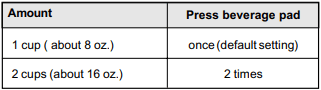
Example: to heat 1 cup of a beverage.
1. Press Beverage pad once. 
2. Press START+30sec pad.
The microwave will beep when finished.
Convenience cooking suggestions
COOKING CHARTS
Cooking meat in your microwave
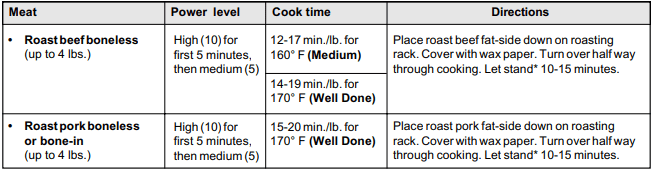
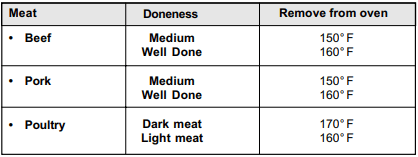
Be sure to place prepared meats on a microwave-safe roasting rack in a microwave-safe dish. Start cooking the meat fat side down and if necessary, use narrow strips of aluminum foil to shield any bone tips or thin meat areas. After cooking, check the temperature in several places before letting the meat stand the recommended time. Please note that the temperatures in the following charts are temperatures at removal time; the temperature will rise during the standing period.
Meat: Roast beef boneless (up to 4 lbs.)
- Power level: High (10) for first 5 minutes, then medium (5)
- Cook time: 12-17 min./lb. for 160° F (Medium)
- Cook time: 14-19 min./lb. for 170° F (Well Done)
- Directions: Place roast beef fat-side down on roasting rack. Cover with wax paper. Turn over half way through cooking. Let stand* 10-15 minutes.
Meat: Roast pork boneless or bone-in (up to 4 lbs.)
- Power level: High (10) for first 5 minutes, then medium (5)
- Cook time: 15-20 min./lb. for 170° F (Well Done)
- Directions: Place roast pork fat-side down on roasting rack. Cover with wax paper. Turn over half way through cooking. Let stand* 10-15 minutes.
* Expect a 10° F rise in the temperature during the standing period.
Cooking poultry in your microwave
Be sure to place poultry on a microwave-safe roasting rack in a microwave-safe dish. Cover poultry with wax paper to prevent splattering. Use narrow strips of aluminum foil to shield any bone tips or thin meat areas, or areas that start to overcook. After cooking, check the temperature in several places before letting the meat stand the recommended time.
Poultry: Whole chicken (up to 4 lbs.)
- Cook time/power level: Cook time: 7-10 min. /lb. 180° F dark meat 170° F dark meat Power level: medium high (7)
- Directions: Place chicken breast-side down on roasting rack. Cover with wax paper. Turn over half way through cooking. Cook until juices run clear and meat near bone is no longer pink. Let stand for 5-10 min.
Poultry: Chicken pieces (up to 4 lbs.)
- Cook time/power level: Cook time: 7-10 min. /lb. 180° F dark meat 170° F dark meat Power level: medium high (7)
- Directions: Place chicken bone-side down on dish, with thickest portions toward the inside of dish. Cover with wax paper. Turn over half way through cooking. Cook until juices run clear and meat near bone is no longer pink. Let stand for 5-10 min.
Cooking eggs in your microwave
- Never cook eggs in the shell and never warm hardcooked eggs in the shell; they can explode.
- Always pierce whole eggs to keep them from bursting.
- Cook eggs just until set; they will become tough if overcooked.
Cooking vegetables in your microwave
- Vegetables should be washed just before cooking. Rarely is extra water needed. If dense vegetables such as potatoes, carrots and greens are being cooked, add about ¼ cup of water.
- Small vegetables (sliced carrots, peas, lima beans, etc.) will cook faster than larger vegetables.
- Whole vegetables, such as potatoes, acorn squash or corn on the cob, should be arranged in a circle on the turntable before cooking. The will cook more evenly if turned over halfway through cooking.
- Always place vegetables like asparagus and broccoli with the stem ends pointing towards the edge of the dish and the tips toward the center.
- When cooking cut vegetables, always cover the dish with a lid or vented microwavable plastic wrap.
- Whole, unpeeled vegetables such as potatoes, squash, eggplant, etc., should have their skin pricked in several locations before cooking to prevent them from bursting.
- For more even cooking, stir or rearrange whole vegetables halfway through the cook time.
- Most of the time, the denser the food the longer the required standing time. For example, a baked potato should stand for 5 minutes before serving, while a dish of peas may be served immediately.
Cooking seafood in your microwave
Place fish on a microwave-safe roasting rack in a microwave-safe dish. Be sure to always cook fish until it flakes easily with a fork. Use a tight cover to steam fish; a lighter cover of wax paper or paper towel provides less steaming. And be sure not to overcook fish; check it for doneness at a minimum cooking time before cooking longer.
Seafood: Fish steaks Up to 1½ lbs.
- Cook time/power level: Cook time: 7-11 min./lb. Power level: med-high (7)
- Directions: Arrange fish on roasting rack with meaty portions towards the outside of rack. Cover with wax paper. Turn over and rearrange halfway through cook time. Cook until fish flakes easily with fork. Let stand 3-5 mins.
Seafood: Fish fillets Up to 1½ lbs.
- Cook time/power level: Cook time: 4-8 min./lb. Power level: med-high (7)
- Directions: Arrange fillets in a baking dish, turning any thin pieces under. Cover with wax paper. If over ½ inch thick, turn over and rearrange halfway through cook time. Cook until fish flakes easily with fork. Let stand 2-3 mins.
Seafood: Shrimp Up to 1½ lbs.
- Cook time/power level: Cook time: 4-6½ min./lb. Power level: med-high (7)
- Directions: Arrange shrimp in a baking dish without overlapping or layering. Cover with wax paper. Cook until firm and opaque, stirring 2 or 3 times. Let stand 5 mins.
CONVENIENT FEATURES
Setting the ound
Turning Sound Low/nor/Hi/Off
Audible signals are available to guide you when setting and using your oven.
- A programming tone will sound each time you touch a pad.
- Three tones signal the end of a Kitchen Timer count down.
- Three tones signal the end of a cooking cycle.
Example: setting audible signal off:
1. Touch Clock Settings pad twice. 
2. Op-2 will display and the START+30sec needs to be pressed to select. 
3. Lo/ nor/ HI /oFF auto scrolls every 2 seconds through each selection.
4. Touch START+30sec pad to confirm when the LED shows oFF.
NOTE: When the cooking cycle is completed END will be displayed and the audible signal will sound if the sound is turned on.
Setting Weight Ib/Kg
Example: setting weight between pounds & kilograms:
1. Touch Clock Settings pad 3 times.
2. Op-3 will display and the START+30sec needs to be pressed to select.
3. I b/kg auto scrolls every 2 seconds through each selection.
4. Touch START+30sec pad to confirm your selection.
NOTE
If the display shows kg, pressing the button will reset the oven controls to lbs. To return to kg, you will have to again press times and then press .
Setting Power ave Mode
Example: setting the power save mode on:
Turning On power save turns off the time of day clock display.
1. Touch Clock Settings pad 4 times.
2. Op-4 will display and the START+30sec needs to be pressed to select.
3. on / oF auto scrolls every 2 seconds through each selection.
4. Touch START+30sec pad to confirm the LED shows on.
Setting Demo Mode
Example: setting the demo mode on:
Suppose you want to enter Demo mode. When Demo mode is ON programming functions will work in a rapid countdown mode with no cooking power.
1. Touch Clock Settings pad 5 times.
2. Op-5 will display and the START+30sec needs to be pressed to select.
3. on / oF auto scrolls every 2 seconds through each selection.
4. Touch START+30sec pad to confirm when the display shows on.
CLEANING AND CARE
EXTERIOR
The outside surface is precoated steel and plastic. Clean the outside with mild soap and water; rinse and dry with a soft cloth. Do not use any type of household or abrasive cleaner.
DOOR
Wipe the window on both sides with a soft cloth to remove any spills or spatters. Metal parts will be easier to maintain if wiped frequently with a soft cloth. Avoid the use of spray and other harsh cleaners as they may stain, streak or dull the door surface.
EASY CARE™ STAINLESS STEEL / SMUDGE PROOF™ STAINLESS _ STEEL / BLACK STAINLESS STEEL (SOME MODELS)
Your microwave oven(some models) may have a Stainless Steel finish or coating. Clean the stainless with warm soapy water using a clean sponge or cloth. Rinse with clean water and dry with a soft clean cloth. DO NOT use ANY store bought cleaners like Stainless Steel cleaners or any other types of cleaners containing any abrasive, chlorides, chlorines or ammonia. It is recommended to use mild dish soap and water or a 50/50 solution of water and vinegar.
TOUCH CONTROL PANEL
Care should be taken in cleaning the touch control panel. If the control panel becomes soiled, open the microwave oven door before cleaning. Wipe the panel with a cloth dampened slightly with water only. Dry with a soft cloth. Do not scrub or use any sort of chemical cleaners. Close door and touch STOP/CLEAR.
INTERIOR
Cleaning is easy because little heat is generated to the interior surfaces. To clean the interior surfaces, wipe with a soft cloth and warm water. DO NOT USE ABRASIVE OR HARSH CLEANERS OR SCOURING PADS. For heavier soil, use baking soda or a mild soap; rinse thoroughly with hot water. The round wire rack and shelf can be cleaned with hot soapy water, rinsed and dried.
WAVEGUIDE COVER
The waveguide cover is located on the right side in the microwave oven cavity. It is made from mica so requires special care. Keep the waveguide cover clean to assure good microwave oven performance. Carefully wipe with a damp cloth any food spatters from the surface of the cover immediately after they occur. Built-up splashes may overheat and cause smoke or possibly catch fire. DO NOT REMOVE THE WAVEGUIDE COVER.
ODOR REMOVAL
Occasionally, a cooking odor may remain in the microwave oven. To remove, combine 1 cup water, grated peel and juice of 1 lemon in a 2-cup glass measuring cup. Boil for several minutes using 100% power. Allow to set in microwave oven until cool. Wipe interior with a soft cloth.
TURNTABLE/TURNTABLE SUPPORT The turntable and turntable support can be removed for easy cleaning. Wash them in mild, sudsy water; for stubborn stains use a mild cleanser and non-abrasive scouring sponge. They are also dishwasher-proof. Use upper wirerack of dishwasher. The turntable motor shaft is not sealed, so excess water or spills should be wiped up immediately.
Cleaning the exhaust filters
The oven ventilation exhaust filters should be removed and cleaned often; generally at least once every month.
Vent exhaust filter part number 5304478913
To order parts call 800-599-7569
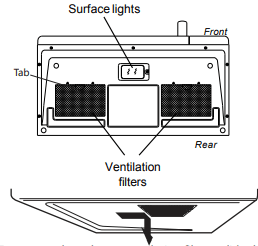
1. To remove the exhaust ventilation filters, slide the filter to the rear. Then pull filter downward and push to the other side. The filter will drop out. Repeat for the 2nd filter.
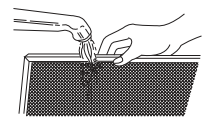
2. Soak the ventilation filters in hot water using a mild detergent. Rinse well and shake to dry or wash in Do not use ammonia. The aluminum on the filter will corrode and darken.
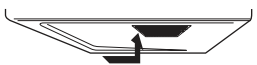
3. To reinstall the exhaust ventilation filter, slide it into the side slot, then push up and toward oven to lock. Reinstall the 2nd filter using the same procedure.
Surface light replacement
1. Unplug the microwave oven or turn off power at the main circuit breaker.
2. Remove the LED light cover moun ting screw under the microwave.
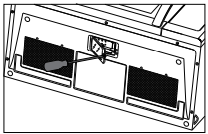
3. Remove the LED light mounting screw.
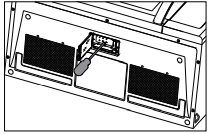
4. Unplug the LED light from the harness, replace with part 5304499540.To order parts call 800-599-7569.Then reconnect the harness.
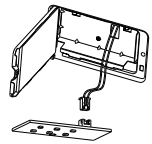
5. Re-install LED light and mounting screw. When re-installing mounting screw be careful not to damage the LED light.
6. Re-install LED light cover and mounting screw.
7. Plug the microwave back into the power supply or turn the power back on at the main circuit breaker.
Charcoal filter replacement
Charcoal filter part number 5304464577
To order parts call 800-599-7569
Charcoal Filter when installed in your microwave oven,is used for nonvented, recirculated Installation. The filter should be changed every 6 to 12 months depending on use.
1.Disconnect power to the microwave oven at the circuit breaker panel or by unplugging.
2.Remove the vent grill mounting screws.
3. Pull the vent grill away from the unit.
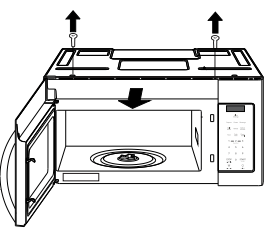
4. Remove the charcoal filter by pushing t?he top of the filter inwards, then pull it forward out from the unit.
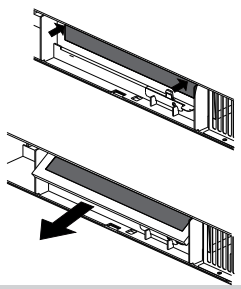
5. Slide the top of the new charcoal filter into ? the top area of the filter cavity.
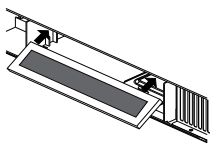
6. Press the bottom of charcoal filter to place it into the correct position.
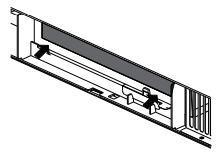
7. Put the vent grille bottom tabs into the slots then push the top of the vent grille into place.
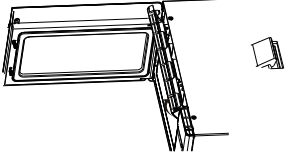
8. Reinstall the vent grille screws.
Oven light replacement
Remove the vent grill (see steps 1-4 in charcoal filter replacement section.
1. Remove the light cover by carefully pulling up on the front edge and pulling the cover forward.
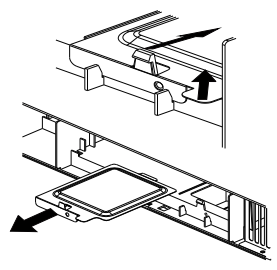
2. Remove the LED bracket and light assembly. Remove the LED light from the bracket by removing the mounting screw and replace only with part 5304499540. To order parts call 800-599-7569.
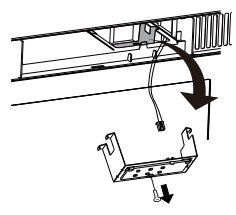
4. Reconnect LED light to the harness and place the LED light assembly back into the plastic housing.
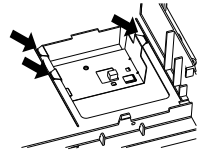
5 Replace the microwave oven light cover by carefully pushing into place (make sure the light cover rear tab is inserted into slot at rear).
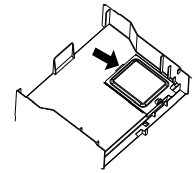
6. Replace the charcoal filter (if installed). Push the vent grill back into place (engaging both the bottom and top tabs) and replace the vent grill mounting screws.