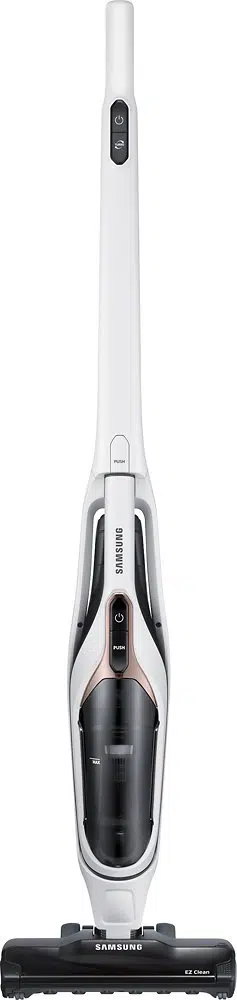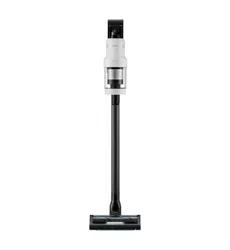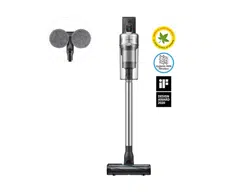

Vacuum cleaner
User manual
VS20R90**** Series / VS15R85**** Series
• Before operating this unit, please read the instructions carefully.
• For indoor use only
VS9000_EN_00821F-00_SA_NEW.indd 1 2019-07-05 오후 2:42:59

English
2
Contents
PREPARATION
Safety information 3
INSTALLATION
Name of the parts 13
Accessories 14
Installing the charging stand 15
Installation guide 15
OPERATION
Using the vacuum cleaner 16
Using the charging stand 16
Charging the battery 17
Operating the vacuum cleaner 18
Using the accessories 19
MAINTENANCE
Maintaining the vacuum cleaner 22
When to empty the dustbin 22
Emptying the dustbin easily without
causing dust clouds 22
Emptying and cleaning the dustbin 22
Cleaning the lter 24
Cleaning the accessories 25
APPENDIX
Notes and cautions 26
Battery usage 26
Operation 28
Maintenance 29
Troubleshooting 30
VS9000_EN_00821F-00_SA_NEW.indd 2 2019-07-05 오후 2:42:59
English 3
PREPARATION
• Before operating the appliance, please read this manual thoroughly and
retain it for your reference.
• Because the following operating instructions cover various models, the
characteristics of your vacuum cleaner may differ slightly from those
described in this manual.
Caution/Warning symbols used
WARNING
Indicates that a danger of death or serious injury exists.
CAUTION
Indicates that a risk of personal injury or material damage exists.
Other symbols used
NOTE
Indicates that the following text contains additional important information.
Safety information
PREPARATION
VS9000_EN_00821F-00_SA_NEW.indd 3 2019-07-05 오후 2:42:59

English
4
PREPARATION
Failure to meet these requirements could cause damage to the internal parts
of the vacuum and void your warranty.
General
• Read all instructions carefully. Before switching the vacuum on, make sure
that the voltage of your electricity supply is the same as that indicated on
the rating plate at the rear of the handy vacuum cleaner (battery contact
side).
• WARNING : Do not use the vacuum cleaner on a wet rug or oor.
• Close supervision is necessary when any appliance is used by or near
children. Do not allow the vacuum cleaner to be used as a toy. Do not allow
the vacuum cleaner to run unattended at any time. Use the vacuum cleaner
only for its intended purpose as described in these instructions.
• Do not use the vacuum cleaner without a dustbin.
• Empty the dustbin before it is full to maintain the highest efciency.
• Do not use the vacuum cleaner to pick up matches, live ashes or cigarette
butts. Keep the vacuum cleaner away from stoves and other heat sources.
Heat can deform and discolor the plastic parts of the unit.
• Avoid picking up hard, sharp objects with the vacuum cleaner as they may
damage the vacuum's parts.
• Do not block the suction or the exhaust port.
• To avoid damage, remove the plug by grasping the plug, not by pulling the
cord.
VS9000_EN_00821F-00_SA_NEW.indd 4 2019-07-05 오후 2:42:59

English 5
PREPARATION
• This appliance is not intended for use by persons (including children) with
reduced physical, sensory or mental capabilities, or lack of experience
and knowledge, unless they have been given supervision or instruction
concerning use of the appliance by a person responsible for their safety.
Children should not clean or perform maintenance on the vacuum without
adult supervision.
• Children should be supervised to ensure that they do not play with the
appliance.
• The battery must be removed from the main unit before cleaning or
performing maintenance on the vacuum.
• The use of an extension cord is not recommended.
• If your vacuum cleaner is not operating correctly, switch off the power
supply and consult an authorized Samsung service agent.
• If the supply cord is damaged, it must be replaced by the manufacturer
or its service agent or a similarly qualied person to avoid any electrical
hazards.
• Do not use to suction up water.
• Do not immerse in water for cleaning.
• Please contact Samsung or a Samsung service center for a replacement if
one is needed.
VS9000_EN_00821F-00_SA_NEW.indd 5 2019-07-05 오후 2:43:00

English
6
PREPARATION
Charging stand
• Do not modify the polarized plug to t a non-polarized outlet or extension
cord.
• Do not use outdoors or on wet surfaces.
• Unplug the charging stand from the outlet when not in use and before
servicing.
• Use only the charging stand supplied by the manufacturer to recharge.
• Do not use with a damaged cord or plug.
• Do not pull or carry by the cord, use the cord as a handle, close a door on
the cord, or pull the cord around sharp edges or corners. Keep the cord
away from heated surfaces.
• Do not use extension cords or outlets with inadequately rated current.
• Do not charge a non-rechargeable battery.
• Do not unplug by pulling on the cord. To unplug, grasp the plug, not the
cord.
• Do not mutilate or incinerate batteries as they will explode at high
temperatures.
• Do not attempt to open the charging stand. Repairs should be only carried
out by a qualied Samsung service center.
• Do not expose the charging stand to high temperatures or allow moisture
or humidity of any kind to come into contact with the charging stand.
VS9000_EN_00821F-00_SA_NEW.indd 6 2019-07-05 오후 2:43:00

English 7
PREPARATION
Vacuum cleaner
• Do not pick up hard or sharp objects such as glass, nails, screws, coins, etc.
• Do not use without a lter in place. When servicing the unit, never put
ngers or other objects into the fan chamber in case the unit accidentally
turns on.
• Do not put any objects into openings. Do not use with any openings
blocked. Keep openings free of dust, lint, hair, and anything that may
reduce air ow.
• Do not pick up toxic materials (chlorine bleach, ammonia, drain cleaner,
etc.).
• Do not pick up anything that is burning or smoking, such as cigarettes,
matches, or hot ashes.
• Do not use the vacuum cleaner in an enclosed space lled with vapours
given off by oil based paint, paint thinner, moth proong substances,
ammable dust, or other explosive or toxic vapours.
Installation
• If you have a problem with installing the charging stand, contact a
Samsung service center.
Injury or product malfunction from not installing the charging stand may
not be compensated.
VS9000_EN_00821F-00_SA_NEW.indd 7 2019-07-05 오후 2:43:00
English
8
PREPARATION
Power related
WARNING
• When installing the charging stand, do not bend the power cord with
excessive force or put heavy objects on the power cord.
– Otherwise, electric shock or re may occur.
• If there is dust, water, etc. on a pin or contact point of the power plug,
wipe them carefully.
– Otherwise, abnormal operation or electric shock may occur.
• Do not pull the cord and do not touch the plug with wet hands.
• Do not plug the charging stand into a power source with the incorrect
voltage. Do not plug the charging stand into a multi-plug outlet or power
strip. Do not leave the power cord lying on the oor. Attach the cord close
to a wall.
– Otherwise, electric shock or re may occur.
• Do not use a damaged power plug, power cord, or loose power outlet.
– Otherwise, electric shock or re may occur.
• If the power cord is damaged, have a Samsung authorized service center
replace the power cord with a new power cord.
– Otherwise, electric shock or re may occur.
Operation
WARNING
• Do not touch the charging terminal of a vacuum or charging stand with
chop sticks, metal screw drivers, forks, knives, etc.
– Otherwise, product malfunction or electric shock may occur.
• Make sure that the battery terminals of the charging stand do not come
into contact with a conductor such as a bracelet, watch, metal rod, nail, etc.
VS9000_EN_00821F-00_SA_NEW.indd 8 2019-07-05 오후 2:43:00

English 9
PREPARATION
• Make sure that any liquid such as water or juice is not allowed to enter the
vacuum cleaner or the charging stand.
– Otherwise, electric shock or re may occur.
• Do not use the charging stand for other purposes.
– Otherwise, severe damage to the charging stand or re may occur.
• Do not vacuum liquid, blades, pins, embers, etc. during cleaning.
– Otherwise, abnormal operation or product damage may occur.
• Do not step on the product body or strike the product.
– Otherwise, an injury or product damage may occur.
• The brush and air outlet should not be blocked during cleaning.
– Otherwise, product malfunction or re may occur due to overheating of
the product.
• This product is intended for household use only. Do not use this product
for heavy duty cleaning, commercial cleaning, industrial cleaning, or
cleaning outdoors, especially on stone or cement. Do not use to pick up
chalk powder in and around billiard tables or in hospital aseptic rooms.
– Otherwise, abnormal operation or product damage may occur.
• Do not use the product near heating appliances such as heaters, or in areas
containing combustible sprays, or ammable materials.
– Otherwise, re or product deformation may occur.
• Before using the product, make sure that the lters are correctly inserted.
– Otherwise, dust can enter the motor inside the main body and cause
product damage. Suction force can decrease.
• If there is a gas leak or combustible spray is used, do not touch the power
outlet and open the window for ventilation.
– Otherwise, an explosion or re may occur.
• If the vacuum makes a strange sound or emits a smell or smoke, turn off
the vacuum immediately, and then contact a Samsung service center.
– Otherwise, electric shock or re may occur.
VS9000_EN_00821F-00_SA_NEW.indd 9 2019-07-05 오후 2:43:00

English
10
PREPARATION
CAUTION
• Do not use the product near combustible material. Also do not use:
– In a place where a burning candle or desk lamp is placed on the oor.
– In an area where an unattended place heater is turned on or an area in
which there are unextinguished embers in a replace, in an ashtray, etc.
– In a place where there are combustible materials such as gasoline,
alcohol, thinner, ashtrays with unextinguished cigarettes, etc.
• Do not allow children to cling to or push the charging stand.
– Personal injury, product and oor damage may occur.
• When you need to store the vacuum cleaner for a short time during
cleaning, lay the vacuum on the oor.
– Otherwise, the vacuum cleaner may fall and could cause an injury or
severe product damage.
• Do not charge the product near a window, heater, toilet, bathroom, etc.
• After using the vacuum cleaner, you should store it in the charging stand
or lay it safely on the oor.
– Otherwise, the product may fall and could cause an injury or severe
product damage.
• Do not store the vacuum cleaner by leaning it against a wall or table.
• Do not use the vacuum cleaner for other than its intended purpose. (Do not
allow children to ride on or play with the product.)
– An injury or product damage may occur.
• Before plugging in or unplugging the charging stand, turn off the vacuum
and make sure that the pins of the power plug do not come into contact
with your hands.
– Otherwise, re or electric shock may occur.
VS9000_EN_00821F-00_SA_NEW.indd 10 2019-07-05 오후 2:43:00

English 11
PREPARATION
• Do not step heavily on the upper part of the wet brush while using it.
– Otherwise, product damage or oor damage may occur.
• When using the vacuum cleaner, be careful not to hurt yourself on the
moving or spinning parts.
– Be careful not to suction body parts into a brush of the vacuum cleaner
(Hair, etc.).
• When cleaning the wall or ceiling, use both hands.
• Use both hands to clean with the vacuum. If you clean with one hand, you
can damage your wrist or drop the vacuum and cause an injury or damage
the vacuum.
• When assembling the vacuum, be careful not to catch your ngers or
hands in the movement fold of the handle.
• Do not use the vacuum cleaner on objects that can be easily scratched
(monitors, stainless steel appliances, etc.).
• Do not store the vacuum cleaner inside a car.
• Do not use water to clean the vacuum cleaner when in use.
• Use the vacuum cleaner in dry places only.
• Do not use the vacuum cleaner in wet places or on water.
• Do not use the vacuum cleaner to pick up spilled beverages or pet waste.
• Do not use the vacuum cleaner in direct sunlight or high heat.
VS9000_EN_00821F-00_SA_NEW.indd 11 2019-07-05 오후 2:43:00
English
12
PREPARATION
Maintenance
WARNING
• Before removing foreign matter inside the vacuum, turn off the vacuum
cleaner rst.
– If the vacuum is on while you are removing the foreign matter, you can
hurt yourself or damage the vacuum.
• When cleaning the exterior of the product, turn off the product rst and
then wipe it with a dry towel. Do not spray water directly onto the product
or wipe it with volatile materials such as benzene, thinner, or alcohol.
– If water gets into the product and an error occurs, turn off the product
and contact a Samsung service center.
• After unplugging the product, clean the charging stand.
• When cleaning the washable parts, do not use alkaline detergent, acid,
industrial detergent, air freshener, acetic acid, etc.
– Otherwise, product damage such as plastic breakage, deformation,
discoloration, printing deterioration, etc. may occur.
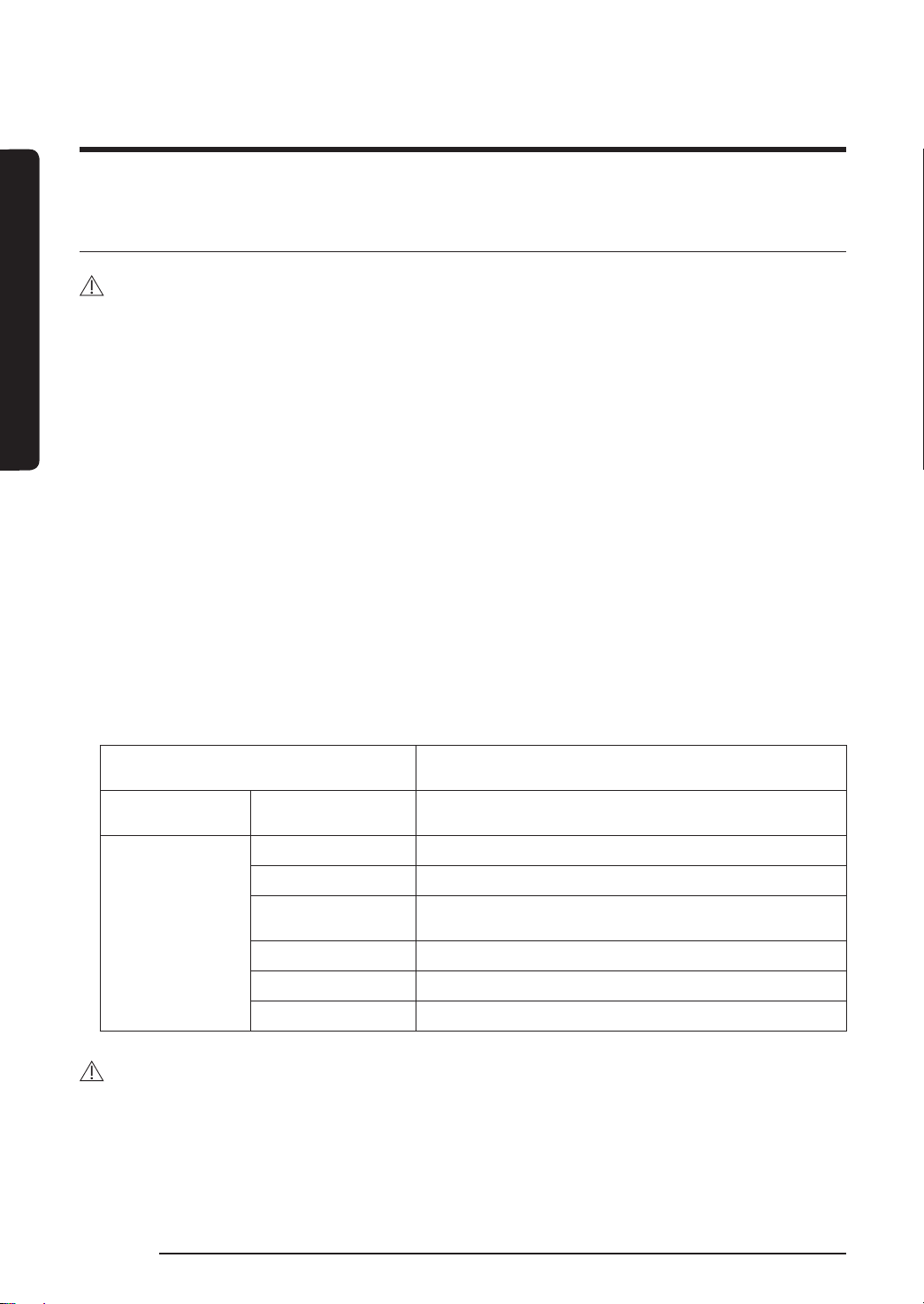
Washable Parts
Dustbin, washable micro lter, ultra ne dust lter,
metal mesh grille lter, dry cloth
Acceptable
detergent
Neutral Dish washing detergent
Prohibited
detergent
Alkaline Lox, mold cleaner, etc.
Acid Parafn oil, an emulsier, etc.
Industrial cleaners
NV-I, PB-I, Opti, alcohol, acetone, benzene, thinner,
etc.
Air freshener Jet spray air fresheners (coffee avor, herb, etc.)
Oils Animal oils, vegetable oils
Etc. Edible acetic acid, vinegar, glacial acetic acid, etc.
CAUTION
• Do not push the vacuum cleaner while it is stored in the charging stand.
– Personal injury, oor and product damage may occur.
VS9000_EN_00821F-00_SA_NEW.indd 12 2019-07-05 오후 2:43:01
English 13
INSTALLATION
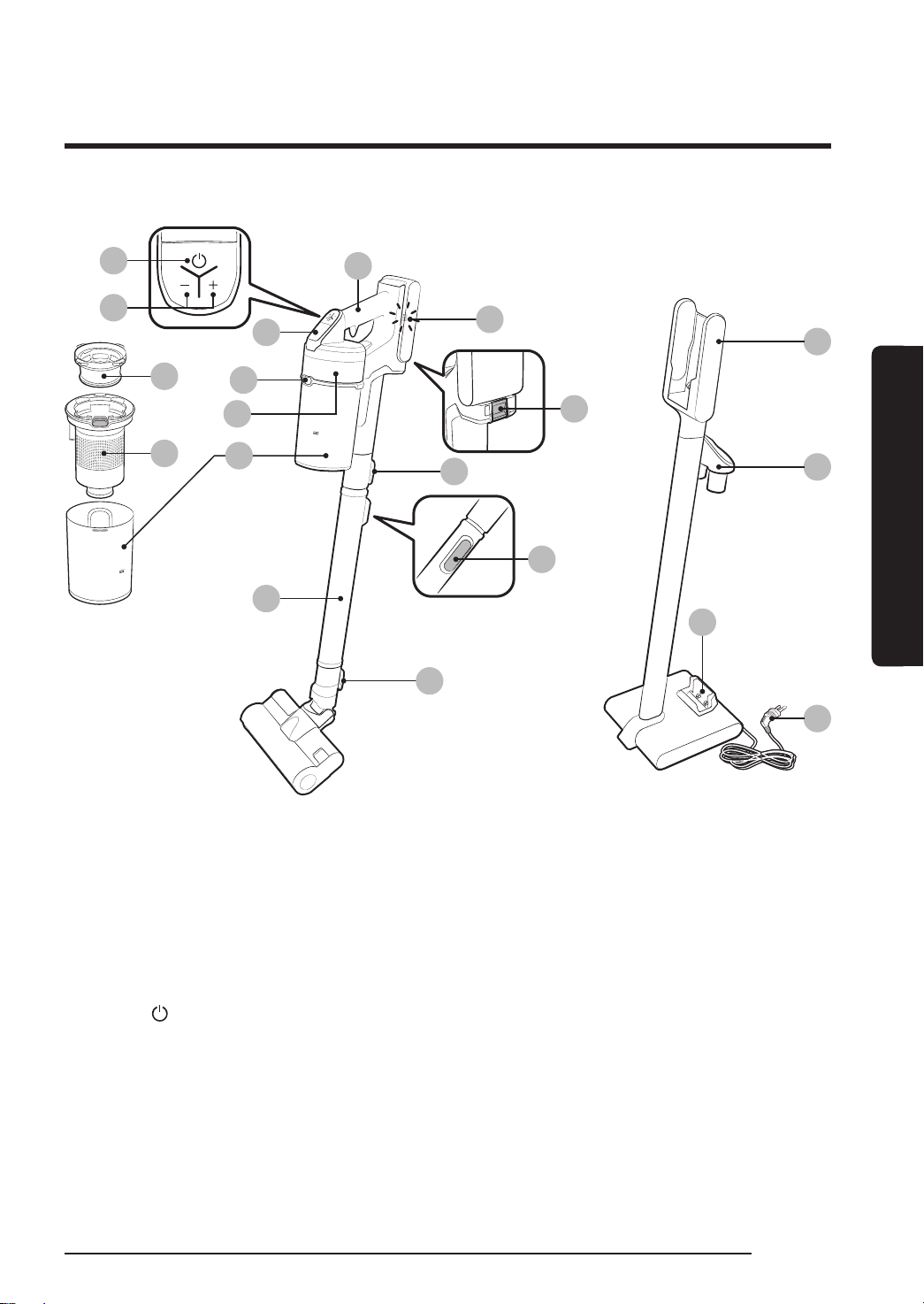
Name of the parts
INSTALLATION
01
Pipe (Adjustable)
02
Dustbin
03
Metal mesh grille lter
04
Washable micro lter
05
Ultra ne dust lter
06
Dustbin release button
07
Display
08
Power( ) button
09
Suction power control button
10
Handle
11
Battery level indicator
12
Battery release button
13
Pipe release button
14
Pipe length adjustment button
15
Brush release button
16
Vacuum charging part
17
Accessory holder
18
Additional battery charging slot
19
Power cord
16
17
19
18
10
12
14
15
01
02
05
06
07
08
09
13
11
04
03
Battery Spec
VS20R90**** Series : Lithium-ion 21.9 V, 2850 mAh, 6 cell
VS15R85**** Series : Lithium-ion 21.6 V, 1800 mAh, 6 cell
Those two batteries are not compatible with each other.
VS9000_EN_00821F-00_SA_NEW.indd 13 2019-07-05 오후 2:43:01
English
14
INSTALLATION
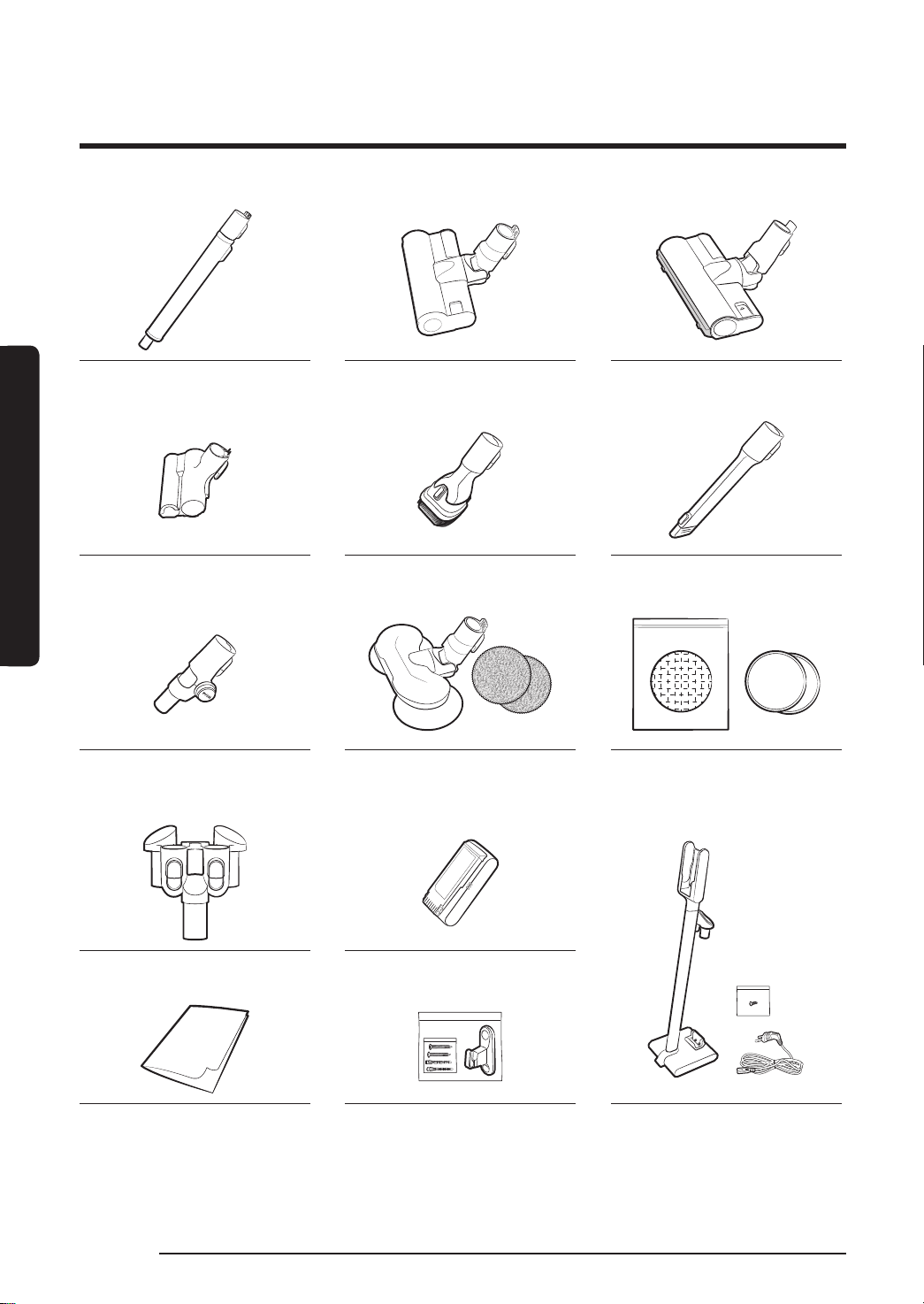
Accessories
Accessories may differ depending on the models.
Pipe (Adjustable) Soft Action Brush Turbo Action Brush
Mini Motorized Tool Combination Tool Extension Crevice Tool
Flexible Tool Wet Brush /
Multi-use wet pad
Single-use wet pad /
Attachable pad
Brush holder Battery
User manual Screws: 2EA /
Screw anchors: 2EA/
Fixing hook: 1EA
Charging stand /
Screw: 1EA / Power cord
VS9000_EN_00821F-00_SA_NEW.indd 14 2019-07-05 오후 2:43:06
English 15
INSTALLATION
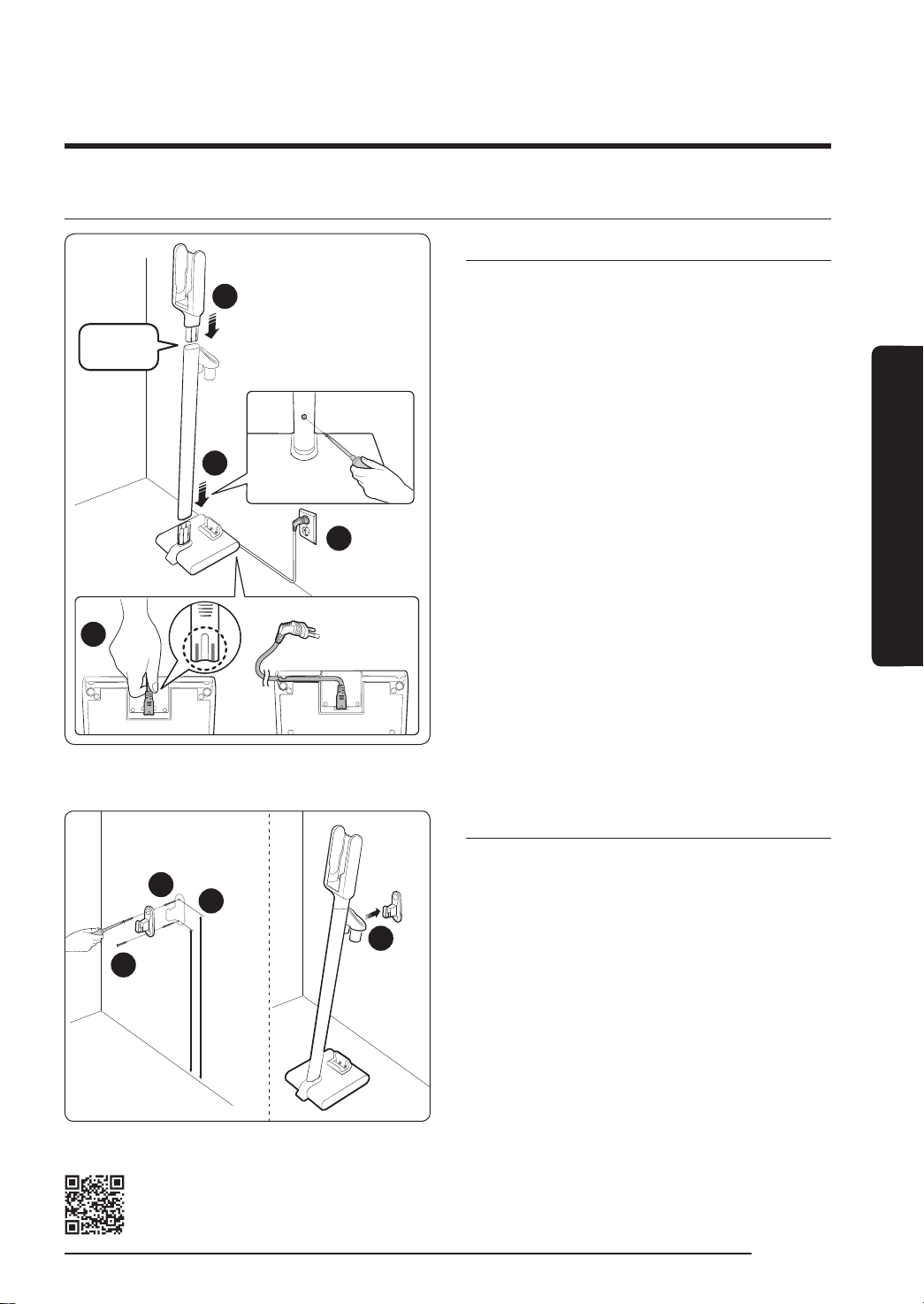
Installing the charging stand
Installation guide
2
3
4
1
'Click'
Assembling the charging stand
1 Assemble the stand pipe to the bottom
support, and x it with a screw (small).
– Make sure the direction for the
assembly is correct and push it in rmly
so that the screw hole is made correctly.
2 Assemble the vacuum charging part to
the top of the stand pipe.
– Do not disassemble it after the
assembly.
3 Connect the power cord to the rear of the
charging stand.
– Hold the connection part of the cord
and push it onto the connection pins
rmly until the gray lines on the tip of
the cord are not visible.
– When inserting the cord into the
groove on the bottom of the bottom
support, charging stand can be installed
close against the wall.
4 Plug in the charging stand.
2
3
4
1
66cm60cm
Fixing by the hook
1 Using the xing hook as a template, mark
where the top and bottom screw holes
will be placed on the wall.
– Top: 66 cm from the oor
– Bottom: 60 cm from the oor
2 Drill the holes using a 6 mm drill bit, and
put the provided screw anchors into the
hole.
3 Fix the xing hook to the wall with the
provided screws (large).
4 Hook the groove of the charging stand
into the xing hook.
Please refer to the QR code for detailed information on the installation and
charging method of the charging stand.
VS9000_EN_00821F-00_SA_NEW.indd 15 2019-07-05 오후 2:43:07
English
16
OPERATION
OPERATION
Using the vacuum cleaner
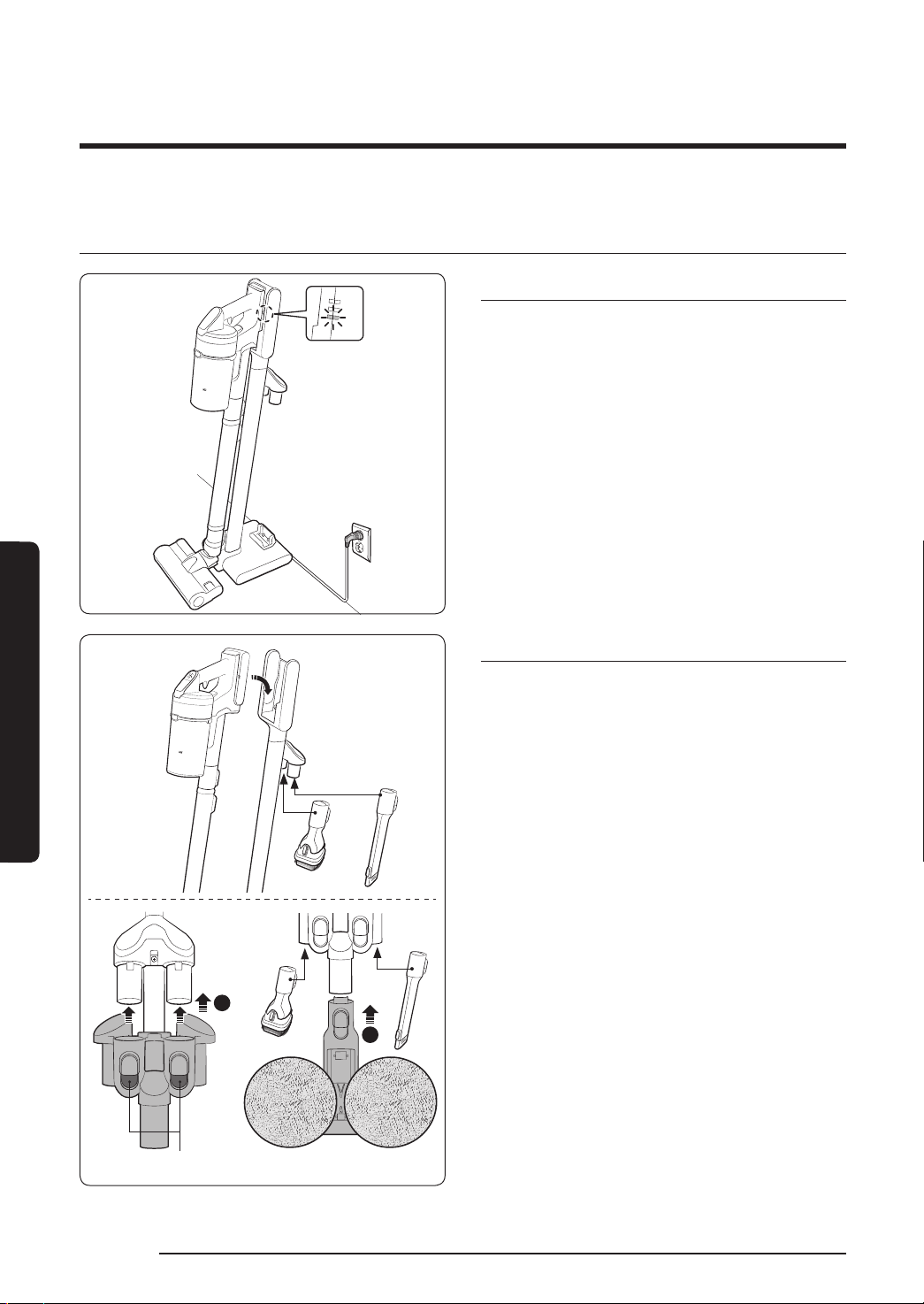
Using the charging stand
Charging
Make sure the back of the battery
is correctly placed onto the vacuum
charging part.
Check if the battery level indicator is
displayed while charging.
The battery level indicator blinks while
charging. When charging is complete, the
blinking stops and the light level dims.
1
2
Release button
Storing the accessories
When accessories are disassembled to
be stored, dust may fall from the suction
part of the vacuum cleaner.
After cleaning, shorten the pipe length
and operate in MAX mode for 10 seconds.
Storing the wet brush
When the brush holder is assembled to
the charging stand, wet brush can also be
stored at the charging stand.
Do not assemble the mini motorized
tool to the brush holder. Otherwise, the
product can be damaged.
It the pad is wet and stored at the wet
brush, the wall near the wet pad can be
contaminated. After cleaning the pad, dry
the pad completely.
When disassembling the brush holder,
press the 2 release buttons on the holder.
VS9000_EN_00821F-00_SA_NEW.indd 16 2019-07-05 오후 2:43:10
English 17
OPERATION
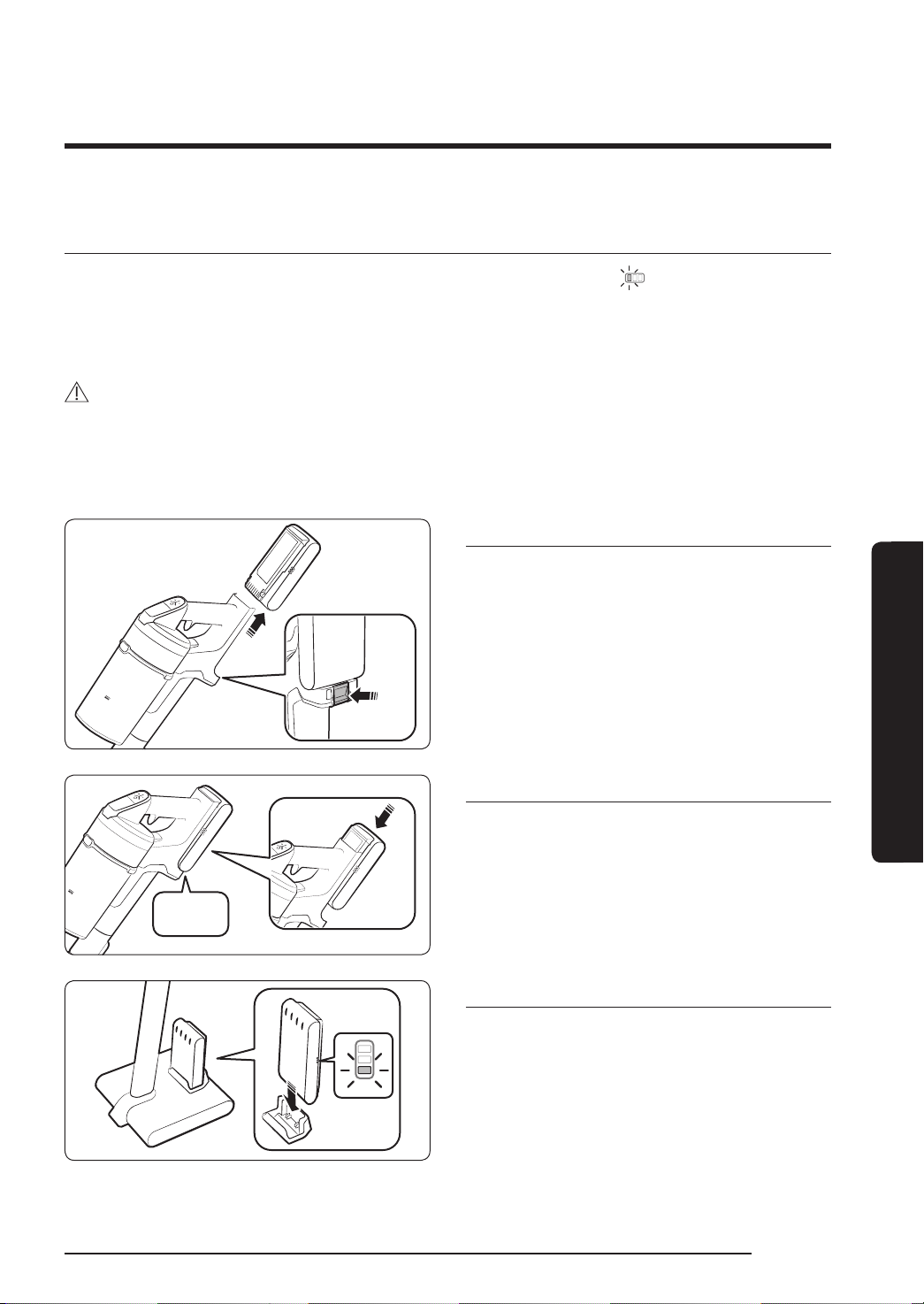
Charging the battery
When the battery level indicator is at its lowest level and blinks( ) charge the battery.
When charging the vacuum, make sure the connection part of the charging stand is
correctly connected.
The vacuum cleaner cannot be used while it is charging.
CAUTION
• Before ejecting the battery, the product must be turned off. (If the battery is forcibly
ejected while the vacuum is operating, the vacuum can malfunction.)
• Be careful not to drop the battery. If you do, you can injure yourself or damage the
battery.
Ejecting the battery
Press the battery release button at the rear
of the handle to eject the battery.
‘Click’
Re-inserting the battery
Push the battery to the end until you hear
it click.
Charging the additional battery
• Charge the additional battery at the
additional battery charging slot at the
bottom of the charging stand.
• Push the battery in rmly.
• Check if the battery level indicator is
displayed while charging.
VS9000_EN_00821F-00_SA_NEW.indd 17 2019-07-05 오후 2:43:11
English
18
OPERATION
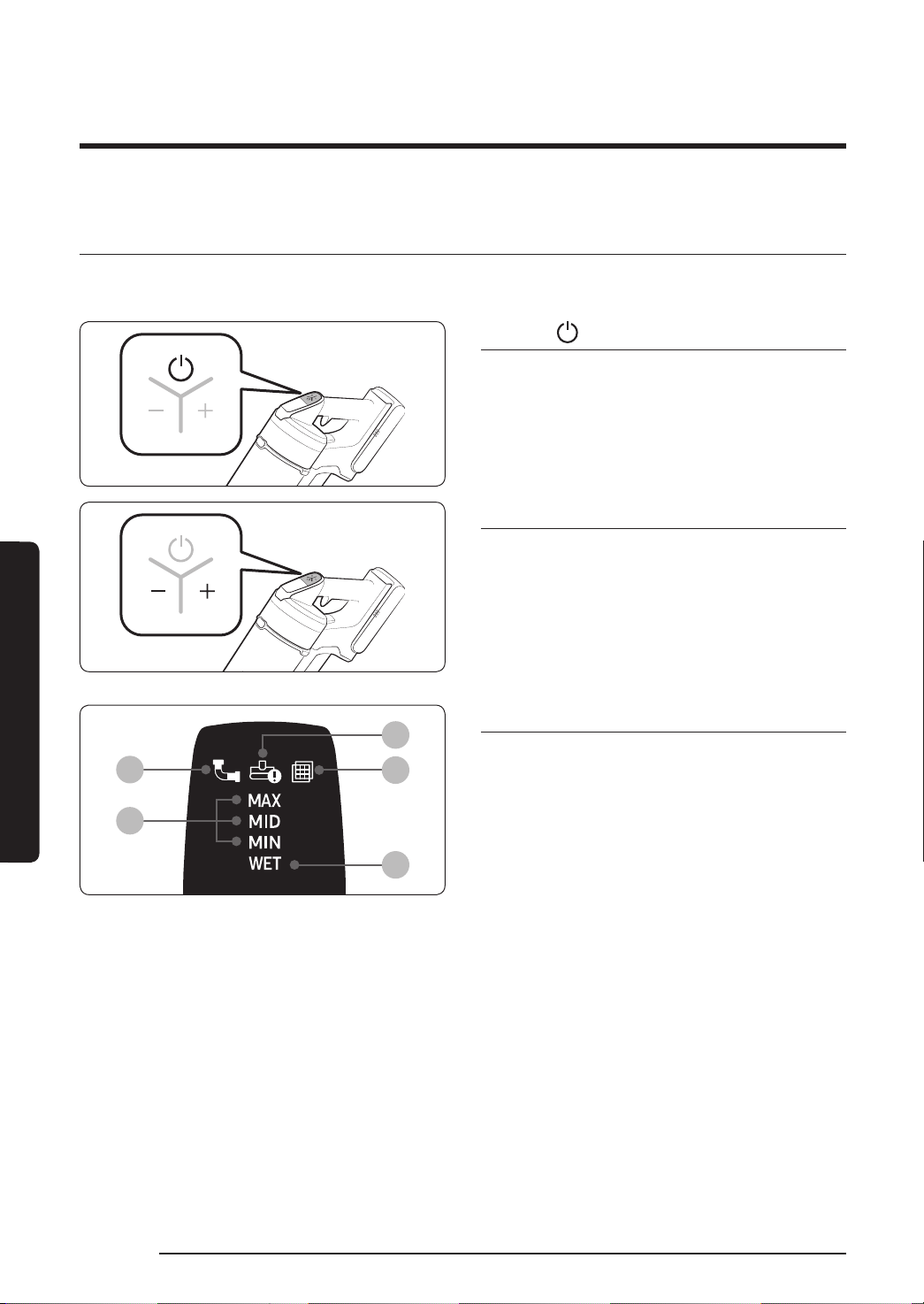
Operating the vacuum cleaner
When the brush clings to the oors such as a carpet, a mat, bedding, etc. or does not spin
properly, change the suction power to 'MIN' or 'MID' mode.
Power ( ) on / off
When pressing the power button, the
vacuum cleaner starts operation in ‘MID’
mode.
• When the wet brush is assembled,
operation starts in ‘WET’ mode.
Controlling suction power
You can control the suction power of the
vacuum cleaner.
• + button: Increases suction power.
• - button: Decreases suction power.
The suction power control button does
not work in WET mode.
01
04
02
03
05
Checking the display
01
Clogged: When the dustbin, pipe, or
suction part is clogged
02
Spinning brush stuck: When a foreign
matter is clogged at the spinning brush
If the overheating prevention device
of the motor works, the spinning brush
stuck display will not turn on.
03
No Filter: When the washable micro
lter is not assembled correctly
04
Suction power: Displays current suction
power.
05
Wet brush cleaning mode: When the wet
brush is assembled
If the display above 01, 02, or 03 blinks a
few times and the vacuum cleaner stops
operation, please take action by referring
to the maintenance part of this manual.
VS9000_EN_00821F-00_SA_NEW.indd 18 2019-07-05 오후 2:43:12
English 19
OPERATION
Using the accessories
If the vacuum operates with the spinning brush not working, check whether the brush gets
excessive force or clogged with a foreign matter. (Please refer to the troubleshooting part of
this manual.)
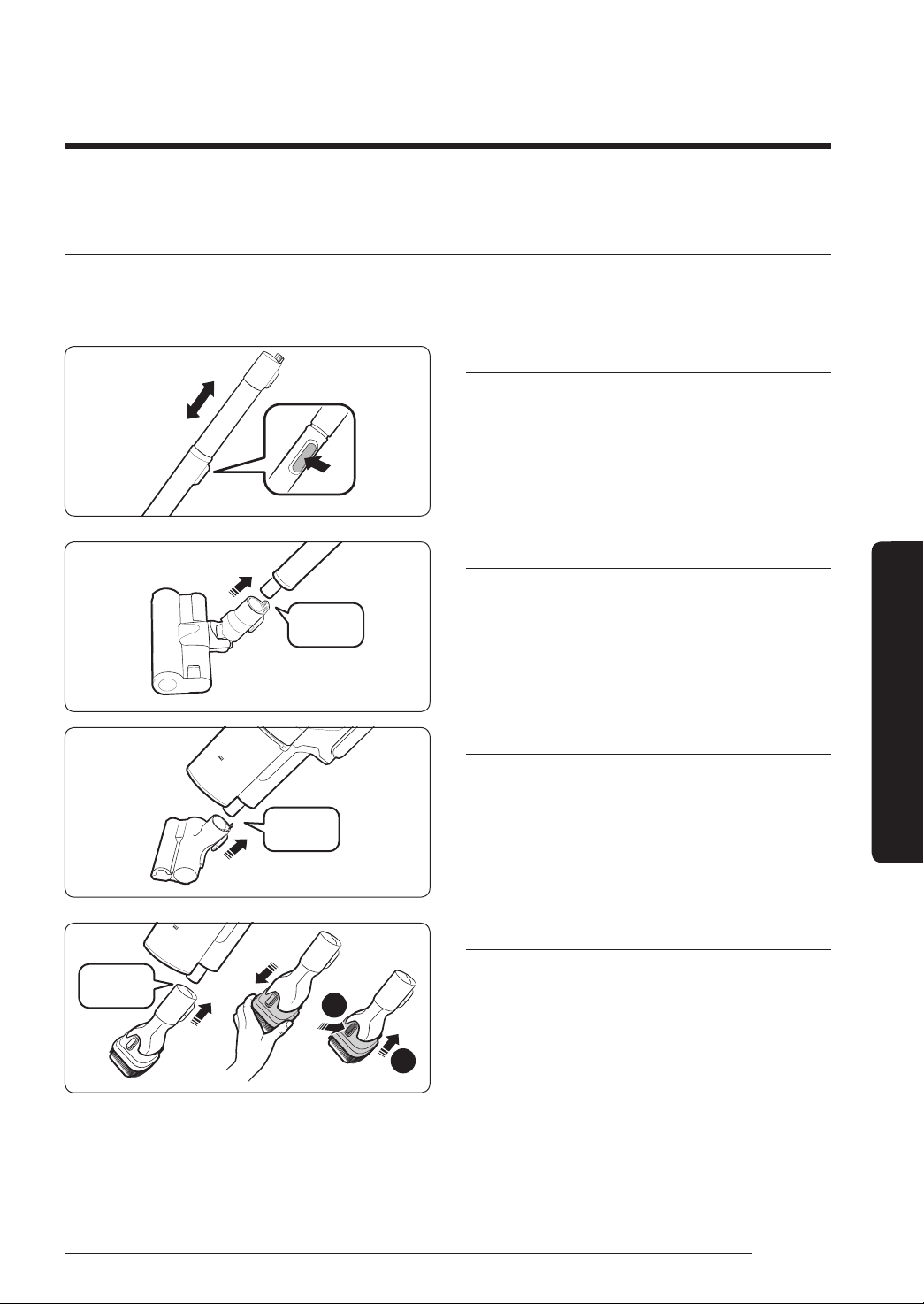
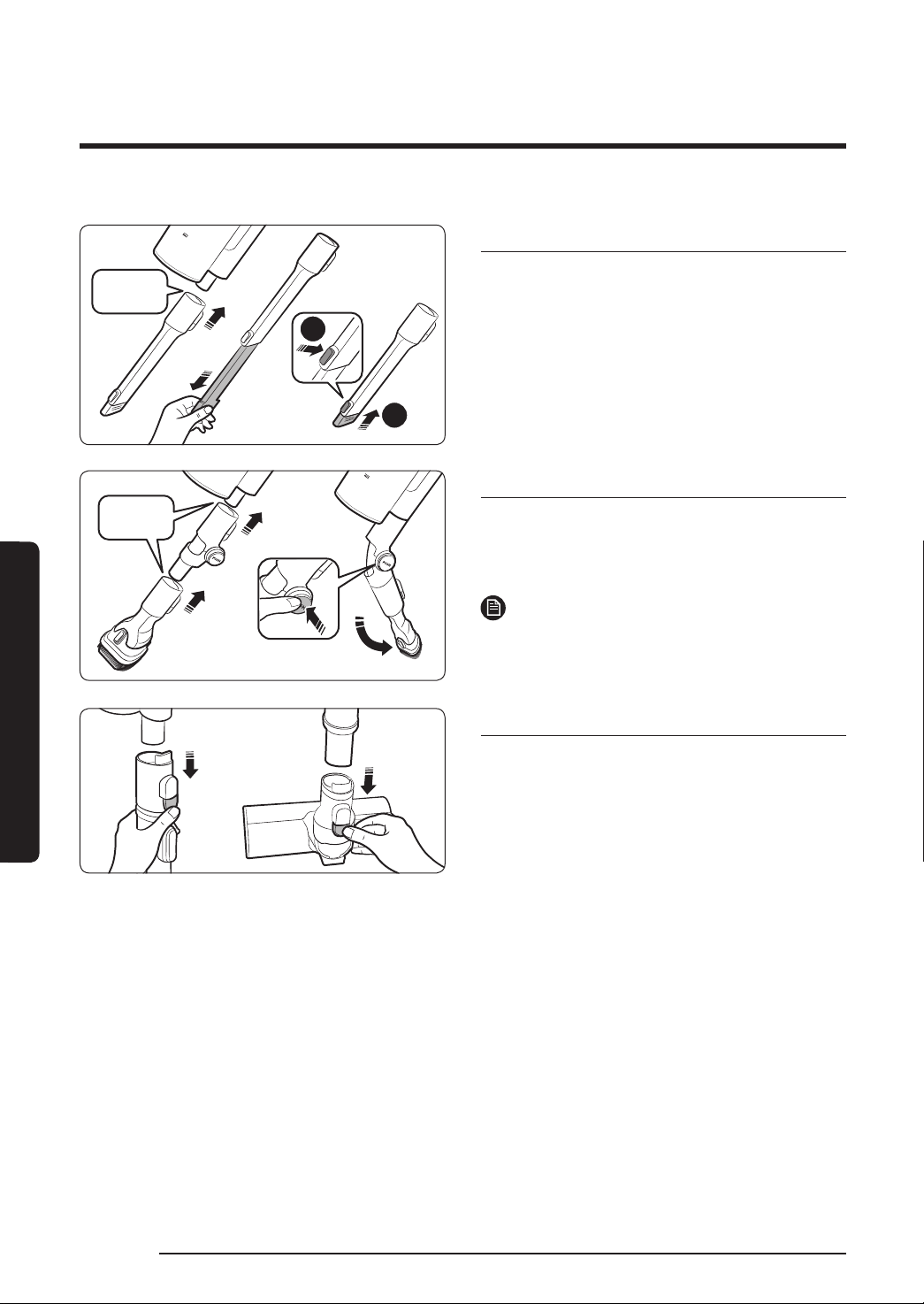
Adjusting the pipe length
Press the button at the rear of the pipe to
adjust the length of the pipe in 4 steps.
‘Click’
Soft Action Brush
Use to clean a oor (wood and linoleum).
‘Click’
Mini Motorized Tool
Use to clean bedding.
2
1
‘Click’
Combination Tool
Use to remove dust from curtains, furniture,
sofas, etc.
VS9000_EN_00821F-00_SA_NEW.indd 19 2019-07-05 오후 2:43:14
English
20
OPERATION
2
1
‘Click’
Extension Crevice Tool
Use to remove dust in grooves of window
frames, chinks, corners, etc.
‘Click’
Flexible Tool
Use to clean the places hard to reach
such as upper or rear parts of furniture or
ceilings.
NOTE
• The Flexible Tool can be connected to the
Combination Tool and Extension Crevice
Tool.
Disassembling the accessories
• When disassembling the pipe, press the
release button at the rear of the pipe.
• Before disassembling the accessories,
operate in MAX mode for more than
10seconds to remove foreign matter
remained in the accessories.
• When disassembling the brush, press the
release button at the rear of the brush.
VS9000_EN_00821F-00_SA_NEW.indd 20 2019-07-05 오후 2:43:15

English 21
OPERATION
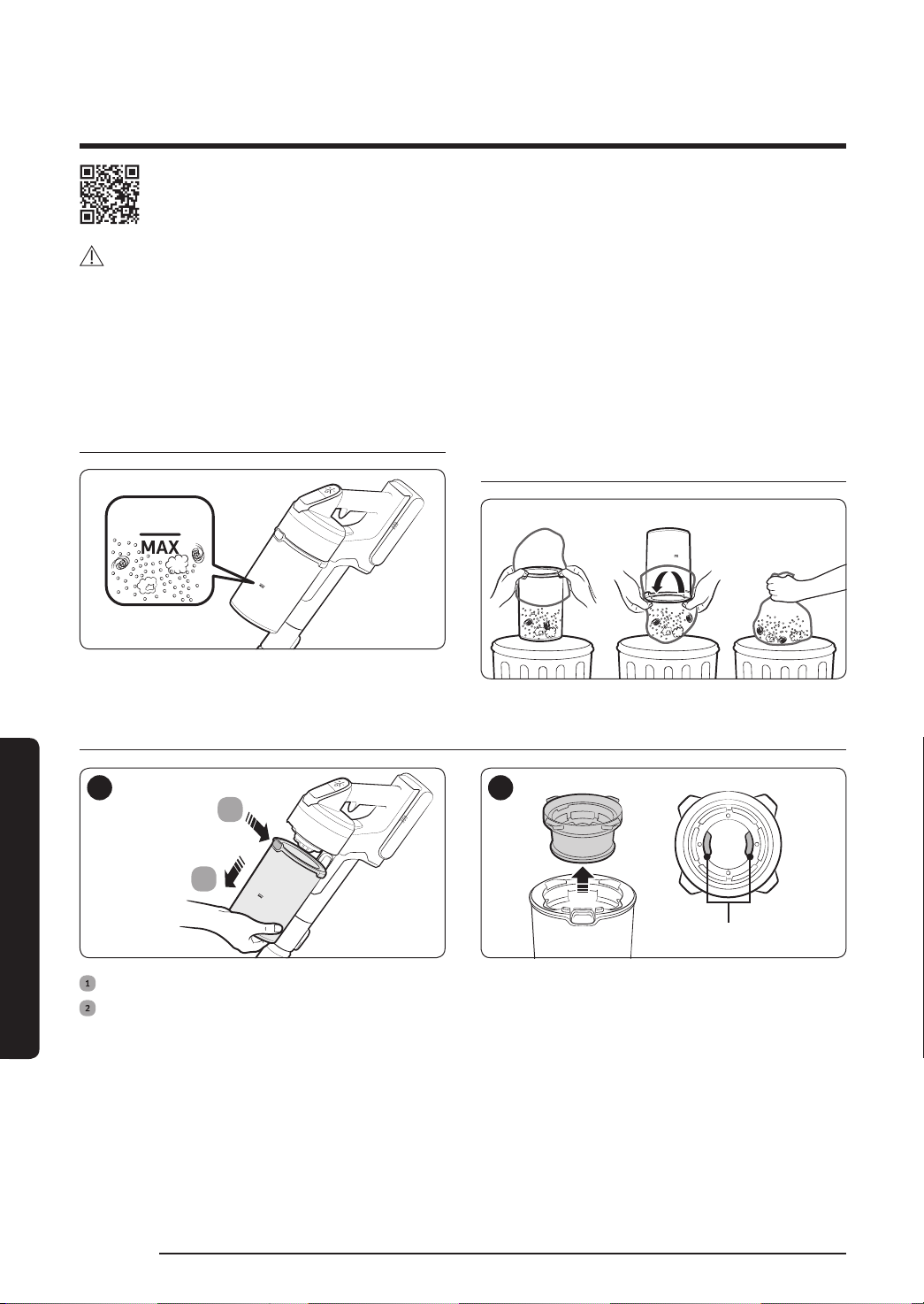
Velcro side
Single-use
wet pad
Multi-use
wet pad
<Back><Front>
Using the single-use wet pad
Using the multi-use wet pad
1
2
3
‘Click’
‘Click’
Attachable pad
Velcro Spin disk
Wet Brush
Use to clean a oor with a wet pad (wood
and linoleum).
The Wet Brush does not have a dust
suction function.
When attaching the wet pad, make sure
the pad is in the center of the spin disk.
After using the wet brush, store it at the
brush holder.
Using the multi-use wet pad
Attach the multi-use wet pad to the spin
disk.
Using the single-use wet pad
Attach the attachable pad to the spin disk
and attach the single-use wet pad on top
of it .
When using the single-use wet pad, make
sure the direction of the attachable pad is
correct. Velcro side is the front side.
After using the single-use wet pad,
discard the pad.
If you use the single-use wet pad without
the attachable pad, cleaning performance
can be degraded.
VS9000_EN_00821F-00_SA_NEW.indd 21 2019-07-05 오후 2:43:17
English
22
MAINTENANCE
Maintaining the vacuum cleaner
MAINTENANCE
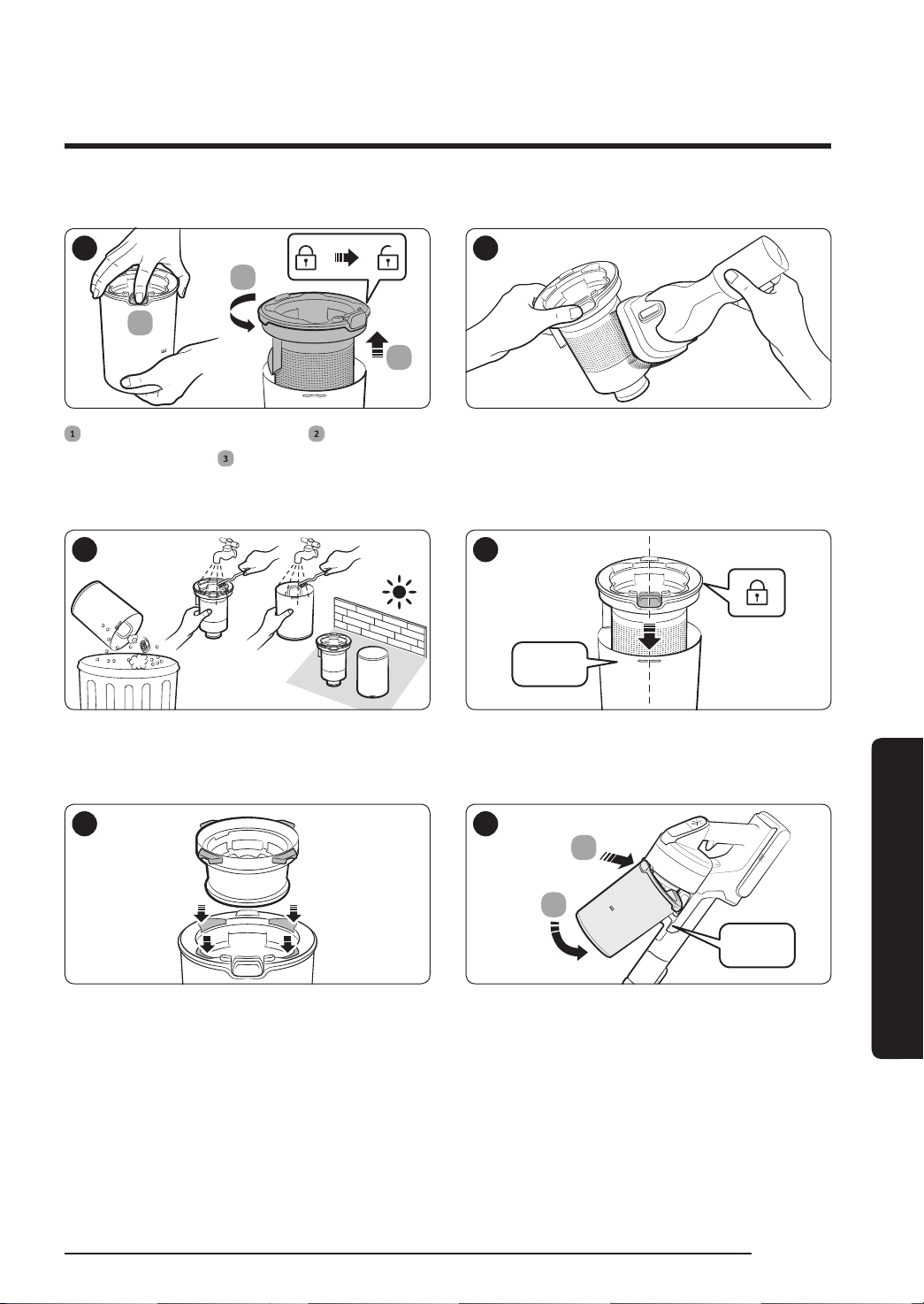
When to empty the dustbin Emptying the dustbin easily
without causing dust clouds
Emptying and cleaning the dustbin
1
2
1
2
Filter handle
After pressing the dustbin release button,
pull the dustbin in the direction of the
arrow.
Pull the washable micro lter out by
holding the lter handles inside the
washable micro lter.
For detailed information, please refer to the QR code.
CAUTION
• Before cleaning the vacuum cleaner, turn it off.
• When the dustbin or lter is lled with dust, the vacuum cleaner may stop due to the
overheating prevention device of the motor.
• You should clean the dustbin or lter before it becomes completely full (Max sign).
VS9000_EN_00821F-00_SA_NEW.indd 22 2019-07-05 오후 2:43:18
English 23
MAINTENANCE
3
2
3
1
4
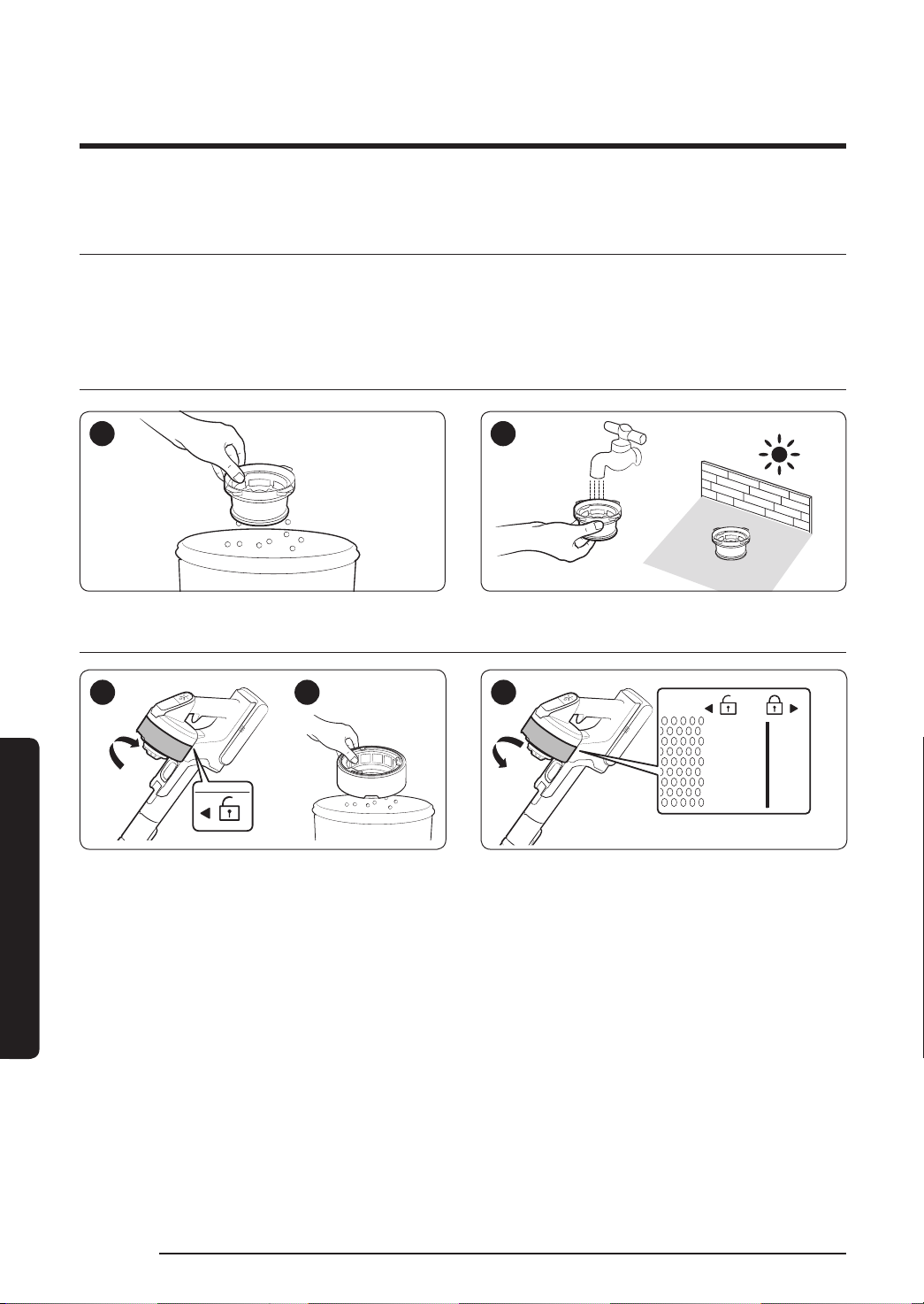
While pressing the button, turn the
dustbin cover and
remove it from the
dustbin.
Remove the dust on the metal mesh grille
lter with the combination tool.
Do not pull the rubber attached to the
metal mesh grille lter.
5 6
‘Click’
After emptying the dustbin, clean it and dry
in the shade.
Reassemble the dustbin cover aligning the
dustbin release button with the groove of
dustbin.
7 8
2
1
‘Click’
Put the washable micro lter in the dustbin
cover by tting in grooves of the dustbin
cover.
Assemble the dustbin to the vacuum in the
order shown in the image by pushing it
until you hear it click.
VS9000_EN_00821F-00_SA_NEW.indd 23 2019-07-05 오후 2:43:20
English
24
MAINTENANCE
Cleaning the lter
• To maintain the best performance of the lter, remove the dust on the lter frequently
and clean the lter with water once a month.
– After cleaning, dry completely for more than 24 hours in the shade before use.
Washable micro lter
1 2
Ultra ne dust lter
1 2 3
When assembling, turn the lter until the line below the lock image is not visible.
VS9000_EN_00821F-00_SA_NEW.indd 24 2019-07-05 오후 2:43:21
English 25
MAINTENANCE
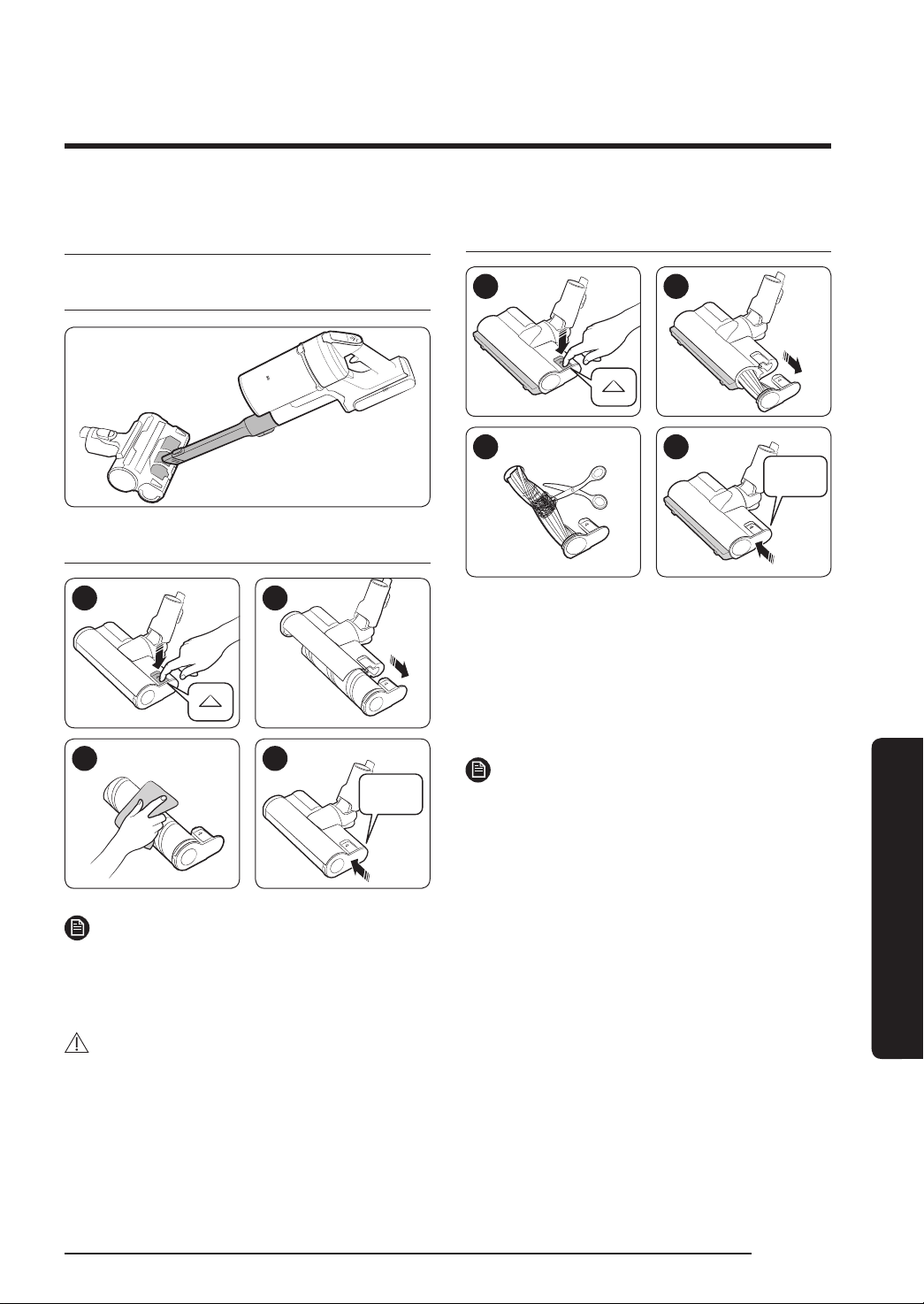
Cleaning the accessories
Mini Motorized Tool
Soft Action Brush
1 2
3 4
‘Click’
NOTE
• When foreign matter remains on the
brush, remove it with a wet tissue or a
dry cloth.
CAUTION
• Do not clean the spinning brush and
suction part with water.
• Do not use the Soft Action Brush to
remove moisture such as split liquid and
pet's waste.
Turbo Action Brush
1 2
3
4
Click
• When the spinning brush is disassembled,
the Turbo Action Brush's EzClean function
automatically removes tangled foreign
matter or hair.
• If the foreign matter is not removed, use
a scissors to remove it.
NOTE
• If a cloth or other foreign matter is
vacuumed up and tangled with the
spinning brush (drum), the spinning brush
will stop working to protect the brush
motor. After cleaning the brush, turn the
power off and then on again.
• If a brush does not work after cleaning,
turn the power off and then on again.
• When cleaning the brush, be careful not
to catch your ngers in the fold of the
brush.
VS9000_EN_00821F-00_SA_NEW.indd 25 2019-07-05 오후 2:43:23
English
26
APPENDIX
Notes and cautions
APPENDIX
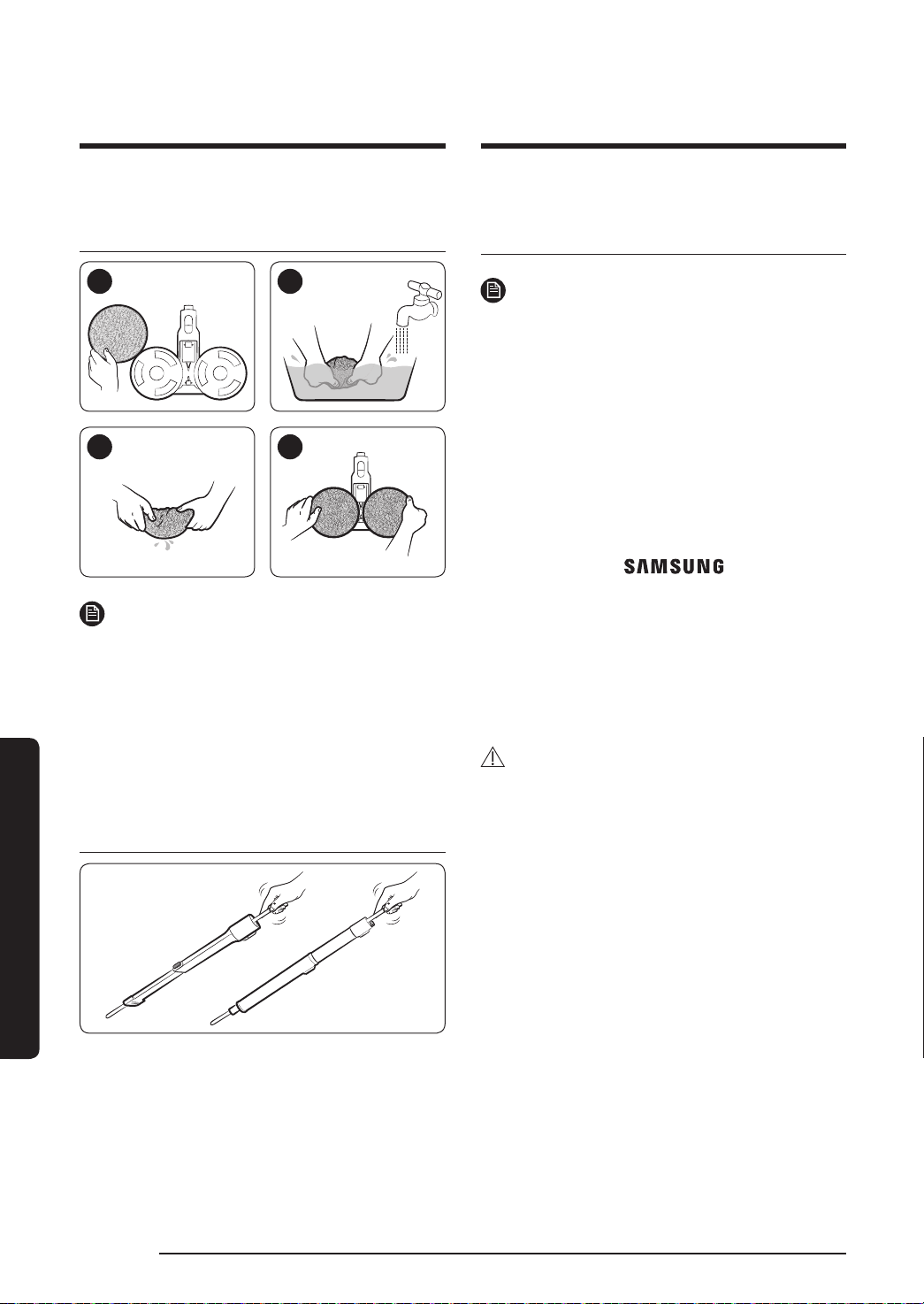
Wet Brush
1 2
3 4
NOTE
• If the spinning brush does not work even
after cleaning the Soft Action Brush and
Wet Brush, the overheating prevention
device of the brush motor might be in
operation. Wait 30 minutes or more to
cool the motor and operate again.
Extension Crevice Tool / Adjustable
pipe
Battery usage
NOTE
• If your vacuum cleaner does not
work after you charge the battery,
change the battery. If it still does
not work with the new battery,
contact a Samsung service center.
• When you purchase a battery in
a Samsung service center, check
for the genuine Samsung logo on
the battery (
) and the
battery name (VS20R90**** Series:
VCA-SBT90 / VS15R85**** Series:
VCA-SBT90E).
• The battery warranty period is 6
months from the date of purchase.
CAUTION
• Do not disassemble the battery or
the charging stand.
• Do not apply heat to the battery
and do not put the battery in a
re.
• As the battery is manufactured
only for this product, do not use
the battery for other electronic
appliances or other purposes.
• Removing the battery during
operation may cause product
malfunction.
VS9000_EN_00821F-00_SA_NEW.indd 26 2019-07-05 오후 2:43:49

English 27
APPENDIX
• If the battery is removed while
the vacuum cleaner motor is
operating, the battery may not
work for 30seconds after being
re-attached for safety reasons.
• Battery charging time and usage
time may shorten with increased
battery use. When the battery
no longer charges or runs down
quickly, replace the exhausted
battery with a new one.
• Use only the charging stand
and batteries provided by the
manufacturer.
• Before inserting the battery,
conrm that the battery is being
inserted in the correct direction
and orientation.
• When discarding a dead battery,
put it into a battery collection box
for recycling.
• If you are not going to use your
vacuum cleaner for a long time,
detach the battery from the
vacuum.
• When attaching the battery to the
vacuum, insert it until you hear a
click. This assures that the battery
is rmly attached.
– Otherwise, the battery may fall
and could cause product damage
or injury.
• Do not drop or strike the battery
or subject it to a sudden shock.
• Do not disassemble the battery
and make sure that you do not
create a short circuit across the
plus (+) and minus (-) terminals.
• Leaks from battery cells can
occur under extreme usage or
temperature conditions. If the
liquid gets on your skin, wash
the affected area quickly with
water. If the liquid gets into your
eyes, ush them immediately
with clean water for a minimum
of 10minutes. Seek medical
attention.
• To protect the motor and battery,
the vacuum cleaner may not
operate when the temperature
is lower than 5°C or higher than
45°C.
VS9000_EN_00821F-00_SA_NEW.indd 27 2019-07-05 오후 2:43:51

English
28
APPENDIX
Operation
NOTE
• If excessive force is applied to a
brush or foreign matter is caught
in the spinning brush (drum), the
brush may stop working to protect
the motor or vacuum. Turn the
vacuum off, remove the foreign
matter, and then turn the vacuum
on. If the vacuum does not start,
turn it off and then on again.
• Static electricity may occur
depending on the humidity,
temperature, or oor material,
etc. in your home. If it happens
repeatedly, contact a Samsung
service center.
• Please charge the battery fully:
– Before using a newly purchased
battery for the rst time or if
you haven't used the battery for
a long time.
– When the battery level indicator
is on the lowest indication and
blinks.
• If you are not going to use the
vacuum for a long period of
time or you're going to be away
from home for a long period of
time, unplug the charging stand,
and then detach the charging
stand from the battery. When
the battery is not being charged
and not being used, it will slowly
discharge.
• When the battery level is low,
recharge it. If the level of the
battery remains low for a long
period of time, it can cause the
performance of the battery to
degrade.
• Clean the multi-use wet pad of the
wet brush gently with hands by
using a washing soap.
• If the wet pad is exposed to heat
or softener, it may be modied
and product performance can be
degraded.
• The multi-use wet pad can be
cleaned using a washing machine.
However, if it is boiled, the pad
may be modied or discolored
and product performance can be
degraded.
• Use a genuine wet pad of Samsung
Electronics for wet brush.
VS9000_EN_00821F-00_SA_NEW.indd 28 2019-07-05 오후 2:43:51

English 29
APPENDIX
• If the wet brush is used without a
wet pad, any product malfunction
will not be covered by warranty
and a service fee will be charged.
• When you purchase an additional
multi-use wet pad for the wet
brush, contact a Samsung service
center.
• When you purchase an additional
single-use wet pad, check the
model name VCA-SPA90.
CAUTION
• When the spinning brush (drum)
inside a brush is working, do not
touch the brush.
– Otherwise, your hand can be
caught and it may cause an
injury.
• Before using the wet brush, detach
the wet pad and put some water
on it, then reattach it to the spin
disk.
• When assembling the handle, be
careful not to catch your ngers or
hands in the movement fold of the
handle.
• Do not use the vacuum cleaner on
items that can be scratched (TV
and monitor screens, etc.)
Maintenance
NOTE
• Sometimes the wheel of a brush
can scratch the oor. Before using
the vacuum cleaner, check the
status of the wheels of the brush.
– If there is foreign matter on the
wheel of the brush which cannot
be removed easily, contact a
Samsung service center.
• If the inner part of the wet brush
is clogged with a large foreign
matter, spinning speed decreases
or stops.
CAUTION
• Storing the vacuum cleaner in
sunlight for long hours may cause
parts of the vacuum to deform or
discolor. Therefore, after cleaning
the parts of the vacuum cleaner,
dry them in the shade.
• Do not clean the brush of the
vacuum cleaner with water.
Cleaning it with water can cause
the brush to deform or discolor.
• Before cleaning the charging
stand, you must unplug the
charging stand.
• If you notice a continuous
reduction in suction or the vacuum
cleaner overheats abnormally,
replace the ultra ne dust lter.
VS9000_EN_00821F-00_SA_NEW.indd 29 2019-07-05 오후 2:43:52

English
30
APPENDIX
Troubleshooting
Before calling for service, review the problems and solutions below. If none of the suggested
solutions resolve your problem, please visit our website at www.samsung.com or call
Samsung Customer Care. Note that you will be charged for any service calls in which no
defects were found.
Problems Solutions
The vacuum cleaner
does not work.
• Check the battery level and charge the battery.
• Check whether the product is turned off, and then press the
power button to turn it on.
• Check whether the pipe, dustbin or brush is blocked.
• Check whether the washable micro lter is inserted correctly.
• If the vacuum has not been used for a long time, charge the
battery.
• If the battery dies, replace the battery.
Suction force decreases
suddenly and the
vacuum makes a
vibrating sound.
• Check whether a brush, dustbin or pipe is clogged with
foreign matter and remove it.
• Check whether the pipe, dustbin is fully lled with dust. If it
is, empty the bin.
• Check whether the lter is dirty. If it is, clean the lter.
The vacuum cleaner
cannot be charged.
• Conrm that the voltage provided to the charging stand
matches the requirements of the charging stand.
• Check if the vacuum cleaner is turned on, and then check if
the LED of the battery level indicator is turned on.
• Check if foreign matter (dust) is on the charging terminal.
Remove any foreign matter with a cotton swab or soft cloth.
The spinning brush
(drum) inside a brush
does not work.
• When the spinning brush stuck display is turned on, turn off
the vacuum and check whether the brush is clogged with
foreign matter. If so, remove the foreign matter and restart
the vacuum.
• Check if the vacuum cleaner is turned on and then turn it off
and on again.
– For the Soft Action Brush and wet brush, if the overheating
prevention device of the brush motor operates, it may take
about 30 minutes to cool the motor.
VS9000_EN_00821F-00_SA_NEW.indd 30 2019-07-05 오후 2:43:52

English 31
APPENDIX
Problems Solutions
An odor is coming from
the air outlet or lter
of the vacuum cleaner.
• Empty the dustbin and clean the lters frequently.
– As your vacuum cleaner is a new product, it may have a
slight odor for the rst 3 months after purchase.
– If you use the vacuum cleaner frequently, accumulated dirt
in the dustbin or dust on the lter may generate an odor.
• Replacement lters are available at your local Samsung
service agent.
Cleaning is nished
but small dust particles
come out of the brush.
• After cleaning, operate the vacuum for 10 seconds or more to
suction up the small dust particles.
Vacuum cleaner stops
operation during
cleaning.
• As this product has the overheating prevention device of the
brush motor, product will stop operation temporarily for the
following conditions.
– When the vacuum operates with a full dustbin.
– When the vacuum operates with suction part or brush
clogged.
– When the Extension Crevice Tool is used for long hours.
• Check these problems then turn the vacuum on after a while.
(This case may differ depending on the ambient temperature.)
Static electricity occurs
when cleaning a thick
and soft mat.
• Materials of a mat (childcare center mat, noise prevention
mat for between oors, etc.) may cause the static electricity.
– Move the brush on a normal oor for a while and clean
again, then the static electricity should disappear.
VS9000_EN_00821F-00_SA_NEW.indd 31 2019-07-05 오후 2:43:52
DJ68-00821F-00
If you have any questions or comments relating to Samsung products,
please contact the SAMSUNG customer care center.
Country Customer Care Center Web Site
AUSTRALIA
1300 362 603 (Other)
1300 425 299 (HHP)
www.samsung.com/au/support
HONG KONG 3698 4698
www.samsung.com/hk/support (Chinese)
www.samsung.com/hk_en/support (English)
MALAYSIA
1800-22-8899 (HHP)
1800-88-9999 (OTH)
+603-7713 7420 (Overseas
contact)
www.samsung.com/my/support
SINGAPORE
1800 7267864 /
1800-SAMSUNG (Other)
1800 4252997 / 1800-GALAXYS
(HHP)
www.samsung.com/sg/support
SOUTH AFRICA 0860 SAMSUNG (726 7864) www.samsung.com/za/support
INDIA
1800 40 SAMSUNG (1800 40
7267864) (Toll-Free)
1800 5 SAMSUNG (1800 5
726864) (Toll-Free)
www.samsung.com/in/support
This product is RoHS compliant
VS9000_EN_00821F-00_SA_NEW.indd 32 2019-07-05 오후 2:43:53