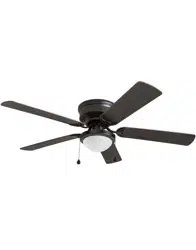
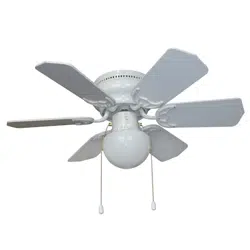
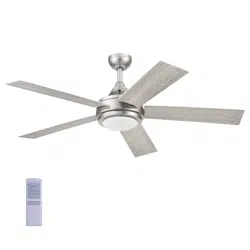
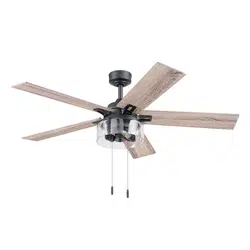
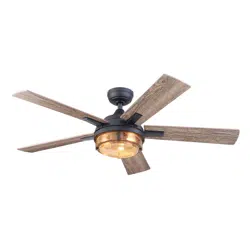
User manual Ceiling Fan
PACKAGE CONTENTS
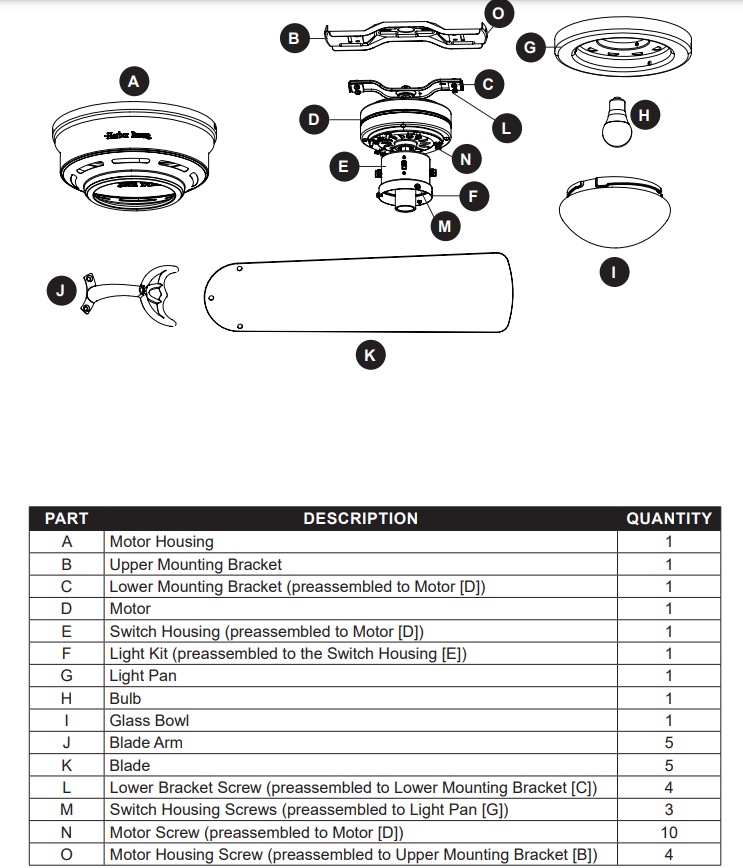
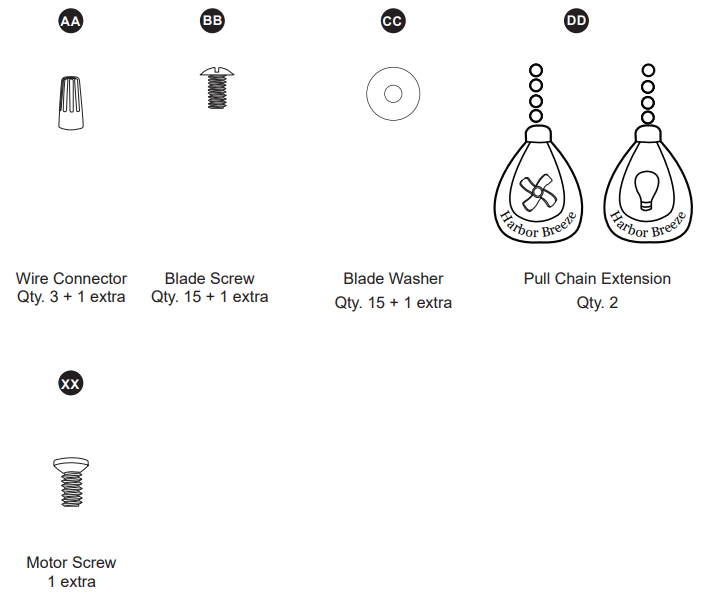
HARDWARE CONTENTS (shown actual size)
PREPARATION
- Before beginning the assembly of this product, ensure that all parts are present. Compare all parts with the package contents list and hardware contents list. If any part is missing or damaged, do not attempt to assemble the product.
- Estimated Assembly Time: 120 minutes
- Tools Required for Assembly (not included): Electrical Tape, Phillips Screwdriver, Pliers, Safety Glasses, Step Ladder, Wire Cutters and Wire Strippers
- Helpful Tools (not included): AC Tester Light, Tape Measure and Wiring Handbook
INITIAL INSTALLATION
1. Turn off the circuit breakers and the wall switch to the fan supply line leads.
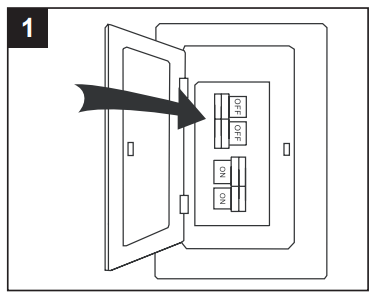
DANGER: Failure to disconnect the power supply prior to installation may result in serious injury or death.
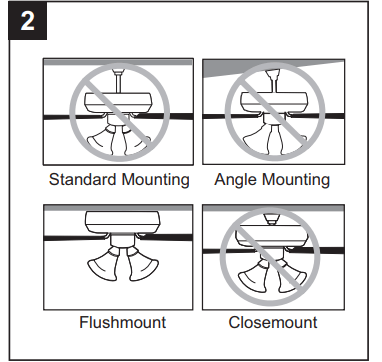
2. This fan is intended for Flushmount installation. Standard Mounting, Angle Mounting, and Closemount installations are not available
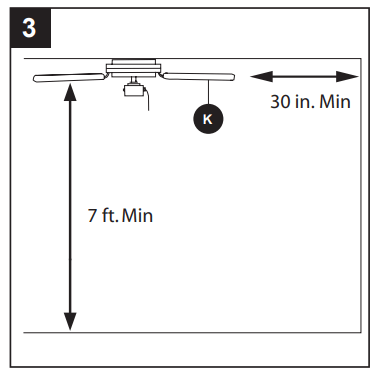
3. Ensure the blades (K) will be at least 30 in. from any obstructions and will be at least 7 ft. above the floor.
4. Secure the upper mounting bracket (B) to the outlet box (not included) using screws and washers provided with the outlet box.
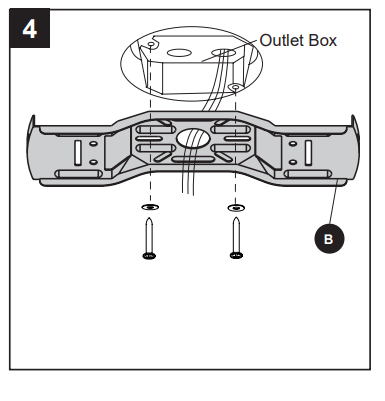
CAUTION: It is very important that you use the proper hardware when installing the upper mounting bracket (B) as it will support the fan.
5. Remove the lower bracket screws (L) from underneath the lower mounting bracket (C).
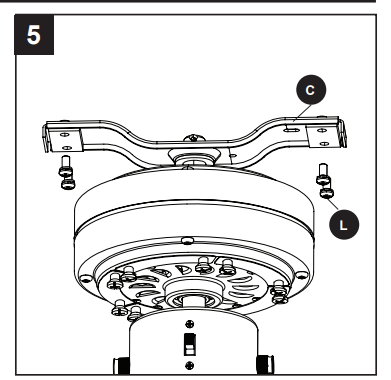
6. Place one tab of the lower mounting bracket (C) into a slot in the upper mounting bracket (B), then slide the second tab of the lower mounting bracket (C) into the second slot on the upper mounting bracket (B) until all four holes are in alignment.
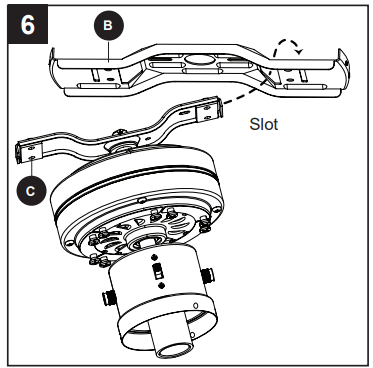
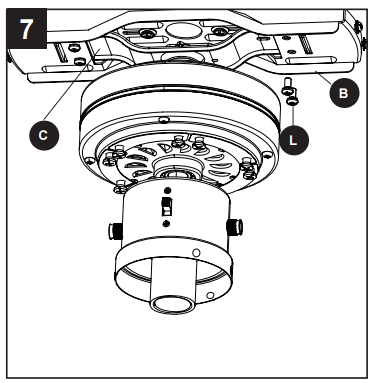
7. Re-install the previously removed lower bracket screws (L) to secure the lower mounting bracket (C) to the upper mounting bracket (B).
WIRING
WARNING: To reduce the risk of fire, electrical shock or personal injury, wire connectors provided with this fan are designed to accept only one 12-gauge house wire and two lead wires from the fan. If your house wire is larger than 12 gauges and/or there is more than one house wire to connect to the two fan lead wires, consult an electrician for the proper size wire connectors to use.
CAUTION: Be sure the outlet box is properly grounded or that a Ground (Green or Bare) wire is present.
1. Connect household supply and fan wires according to the diagram and these steps:
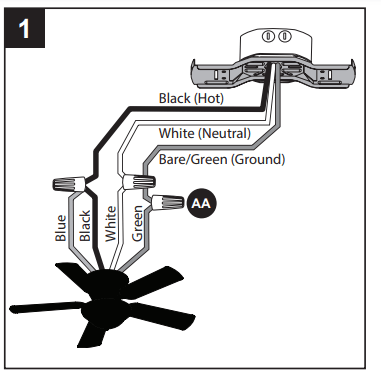
- Connect the Green wire from the fan to the Bare/ Green (ground) supply wire.
- Connect the White wire from the fan to the White (neutral) supply wire.
- Connect the Black and Blue wires from the fan to the Black (hot) supply wire.
- Secure all wiring connections together with wire connectors (AA)
Note: If there is a second hot/power wire coming from the outlet box, connect it to the blue (light power) fan wire for separate light and fan control.
Note: The Black wire is hot power for the fan. The White wire is common for the fan and light kit. The Blue wire is hot power for light. The Green wire is the ground wire. If household supply wires are different colors than referred to above, it is recommended a professional electrician determines the proper wiring
Hardware Used

2. Wrap electrical tape (not included) around each individual wire connector (AA) down to the wire.
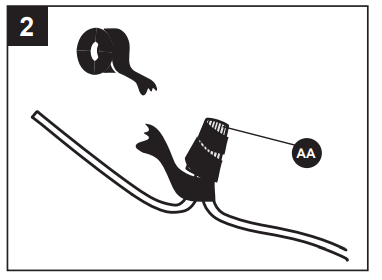
3. Turn the spliced/taped wires upward and gently push the wires and wire connectors (AA) into the outlet box.
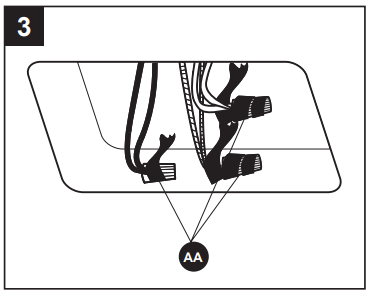
WARNING: Ensure no bare wire or wire strands are visible after making connections. Place the Green and White wire connections on the opposite side of the outlet box from the Black and Blue wire connections.
FINAL INSTALLATION
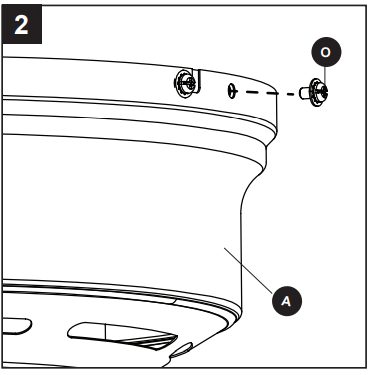
1. Temporarily lift the motor housing (A) to the upper mounting bracket (B) to determine which two motor housing screws (O) preassembled in the sides of the upper mounting bracket (B) align with the slotted holes in the top edge of the motor housing (A). Partially loosen the two motor housing screws (O) that align with the slotted holes. Remove the other two motor housing screws (O) from the upper mounting bracket (B).
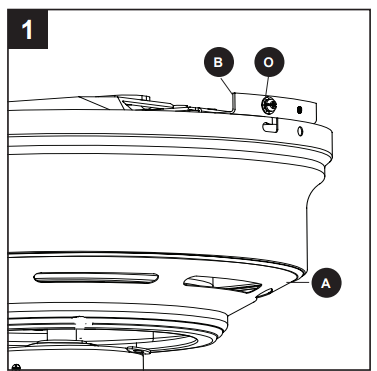
2. Slide the motor housing (A) over the motor (D), aligning the slotted holes in the motor housing (A) with the loosened motor housing screws (O) in the upper mounting bracket (B). Twist the motor housing (A) to lock, then re-insert the two previously removed motor housing screws (O) and securely tighten all screws.
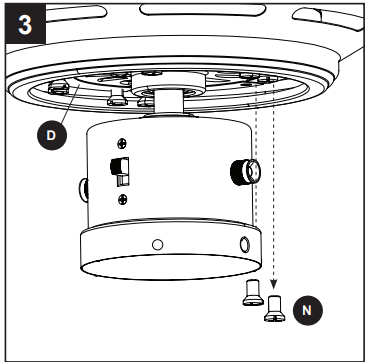
3. Remove the 10 motor screws (N) from the motor (D) and save for later use.
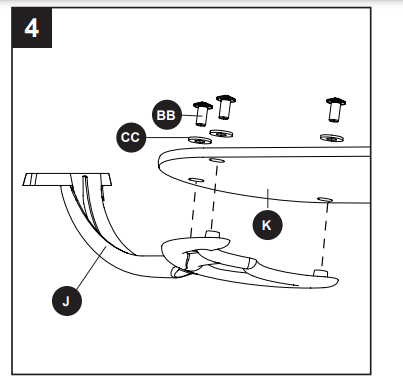
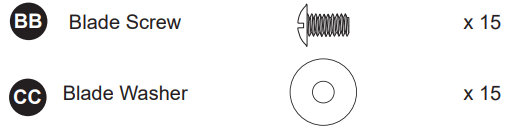
4. Partially insert the blade screws (BB) along with the blade washers (CC) through the blade (K) and into the blade arm (J). Tighten each blade screw (BB) with a Phillips screwdriver, starting with the one in the middle. Repeat this step for the remaining blades (K) and blade arms (J).
Hardware Used
5. Install the blade arm (J) to the underside of the motor (D) with motor screws (N) previously removed (Step 3, page 10). Tighten with Phillips screwdriver. Repeat for each blade arm (J).
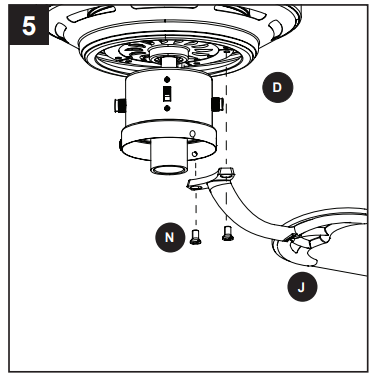
6. Remove the three preassembled switch housing screws (M) from the light pan (G). Lift the light pan (G) onto the light kit (F) and secure the light pan (G) with the previously removed switch housing screws (M).
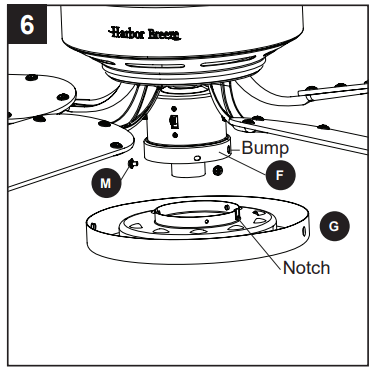
Note: Align the notch in the light kit with the bump on the lower edge of the light kit.
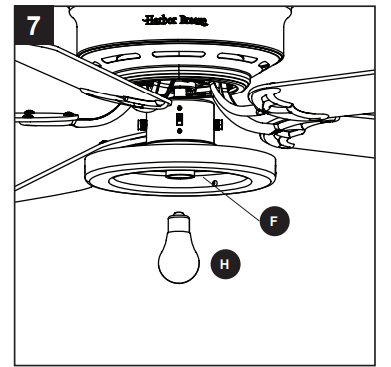
7. Install the bulb (H) into the socket of the light kit (F)
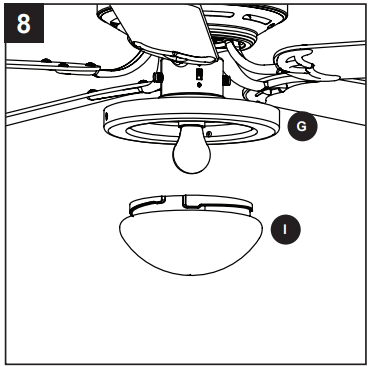
8. Lift the glass bowl (I) into the light pan (G) and twist in a clockwise direction until the glass bowl (I) is secure.
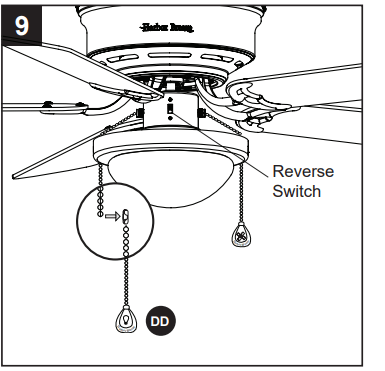
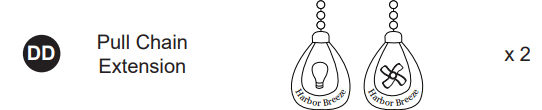
9. Attach the pull chain extensions (DD) or custom pull chain extensions (not included) to the fan and light pull chains.
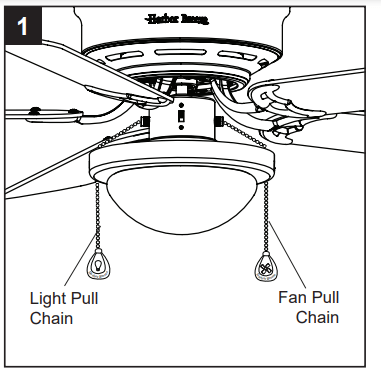
Note When facing the reverse switch, the pull chain for the fan is on the right and the pull chain for the light is on the left.
Hardware Used
Assembly is complete. Turn on power supply to fan.
OPERATING INSTRUCTIONS
1. The fan pull chain has four positions to control fan speed. One pull is HIGH, two is MEDIUM, three is LOW and four turns the fan OFF. The light pull chain has two positions to control the light, ON and OFF.
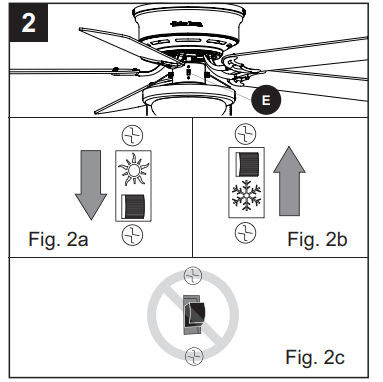
2. Use the fan reverse switch, located on the switch housing (E), to optimize your fan for seasonal performance.
- Using a ceiling fan will allow you to raise your thermostat setting in summer and lower your thermostat setting in winter without feeling a difference in your comfort.
- Note Wait for the fan to stop before moving the reverse switch.
- 2a. In warmer weather, push the reverse switch down to display a sun icon, which will result in downward airflow creating a wind chill effect.
- 2b. In cooler weather, push the reverse switch up to display a snowflake icon, which will result in upward airflow that can help move stagnant, hot air off the ceiling area.
- Important The reverse switch must be set either completely up or down in order for the fan to function correctly. If the reverse switch is set in the middle position, the fan will not operate (Fig. 2c).
CARE AND MAINTENANCE
- At least twice each year, lower the motorhousing and tighten all screws on the fan. Clean the motor housing with only a soft brush or lint-free cloth to avoid scratching the finish. Clean the blades with a lint-free cloth. You may occasionally apply a light coat of furniture polish to wood blades for added protection.
- Bulb Replacement: Use 60-watt max. E26-base LED, CFL or incandescent bulbs. Halogen bulbs are not recommended for this item.
- Important: Shut off the main power supply before you begin any maintenance task. Do not use water or a damp cloth to clean the fan.
TROUBLESHOOTING
1. The fan does not move.
- The reverse switch is not engaged.
- Firmly push the reverse switch completely up or down.
- The wall switch is turned off.
- Make sure the wall switch is turned on.
- The power is off or the fuse (breaker) is blown.
- Turn the power on or check the fuse (breaker).
- There is a faulty wire connection.
- Turn the power off and check all connections at the ceiling outlet box.
2. The fan is noisy.
- The blades are loose.
- Check and tighten all screws that hold the fan blades to the blade arms and the motor.
- There is a cracked blade.
- Replace the cracked blade.
- The wall control is not compatible with the fan.
- Do not use a full range dimmer switch to control the fan speed.
- The outlet box is not secure.
- Ensure the outlet box is secured to the building structure.
- The mounting bracket is not secure.
- Ensure the mounting bracket is secured to the outlet box and that the screws are tight.
3. There is excessive wobbling.
- The blades and/or blade arms are loose.
- Check and tighten all screws that hold the fan blades to the blade arms and the blade arms to the motor.
- The blades are unbalanced.
- Switch one blade with a blade from the opposite side. Or balance the fan using a blade balancing kit (sold separately).
- The fan mounting is not secure.
- Turn off the power. Loosen the motor housing and verify that the mounting bracket is secure to the electrical outlet box. The bracket must be flush without movement against the outlet box. Verify the outlet box is secure
4. The fan operates correctly, but the lights are not working.
- The bulbs are not installed correctly.
- The light kit wire plugs are not connected properly.
- Ensure the single-pin connectors in the light kit are connected properly.
- There is a faulty wire connection.
- Turn the power off and check all connections at the ceiling outlet box.