S8860
4222_002_5921_1_DFU-Luxury_A6_v9.indd 1 02/05/17 09:03

IMPORTANT SAFETY
INSTRUCTIONS
When using an electrical product, basic
precautions should always be followed, including
the following:
Read all instructions before using this product.
DANGER
To reduce the risk of electric shock:
- Do not reach for a corded product or charging
pad that has fallen into water. Unplug
immediately.
- The power plug, charging pad and the
accessories connected to it are not for
immersion or for use in shower.
- Do not use an extension cord with this product.
- Do not place or store the charging pad where it
can fall or be pulled into a tub or sink. Do not place
or drop a charging pad into water or other liquid.
- Always unplug the charging pad from the
electrical outlet immediately after use, except
when the product is (re)charging.
- Unplug and remove power cord before
cleaning.
WARNING
To reduce the risk of burns, re, electric shock,
or injury to persons:
- The batteries used in this product may present
a re or chemical burn hazard if mistreated.
Do not disassemble, heat above 100°C (212°F)
or incinerate.
2
4222_002_5921_1_DFU-Luxury_A6_v9.indd 2 02/05/17 09:03

- Close supervision is required when this product
or charging pad is used by, on, or near children,
or persons with limited physical, sensory,
or mental capabilities or invalids.
- Use this product and charging pad for its
intended household use as described in
this manual. Do not use attachments not
recommended by Philips North America LLC.
- Never operate this product and charging pad if
it has a damaged cord or charging plug, if it is
not working properly, if it has been dropped or
damaged, or dropped into water while plugged
in. For assistance call 1-800-243-3050.
- Keep the product, charging pad, cord, charging
plug and any attachments away from heated
surfaces.
- Never drop or insert any object into any opening.
- Do not use the power plug in or near an
electrical outlet that contains an electric air
freshener to prevent damage to the power plug.
- Do not charge, clean or plug in product and
charging pad outdoors or operate where
aerosol (spray) products are being used or
where oxygen is being administered.
- Always check cutters and combs before using
the product. Do not use the product if cutters or
combs are damaged, as injury may occur.
- Do not use the product with a damaged
or broken cleansing brush head. Replace
cleansing brush head immediately.
- Always attach power plug to cord with USB
plug rst, then connect power plug directly to
outlet. To disconnect, turn product o. Then
remove power plug from outlet and USB plug
from power plug.
3
4222_002_5921_1_DFU-Luxury_A6_v9.indd 3 02/05/17 09:03

- Never put the product, charging pad or
attachments in direct sunlight or store at a
temperature above 140°F (60°C).
- Keep the cord, charging pad and power plug
dry at all times. Do not handle with wet hands.
- To prevent possible damage to the cord, do not
wrap cord around the product or charging pad.
- Do not attempt to open the product to remove
or replace the built-in rechargeable battery.
- Only use the power plug, USB plug and other
accessories supplied with the product.
- The charging pad is not intended for use in
a car. It may interfere with the automotive
electronic systems.
- For safety reasons, do not use the product
while driving.
SAVE THESE
INSTRUCTIONS
Introduction
Congratulations on your purchase and welcome
to Philips.
To fully benet from the support that Philips
oers, register your product at www.philips.com/
welcome.
4
4222_002_5921_1_DFU-Luxury_A6_v9.indd 4 02/05/17 09:03

Contents
IMPORTANT SAFETY INSTRUCTIONS_____________________ 2
Introduction__________________________________________ 4
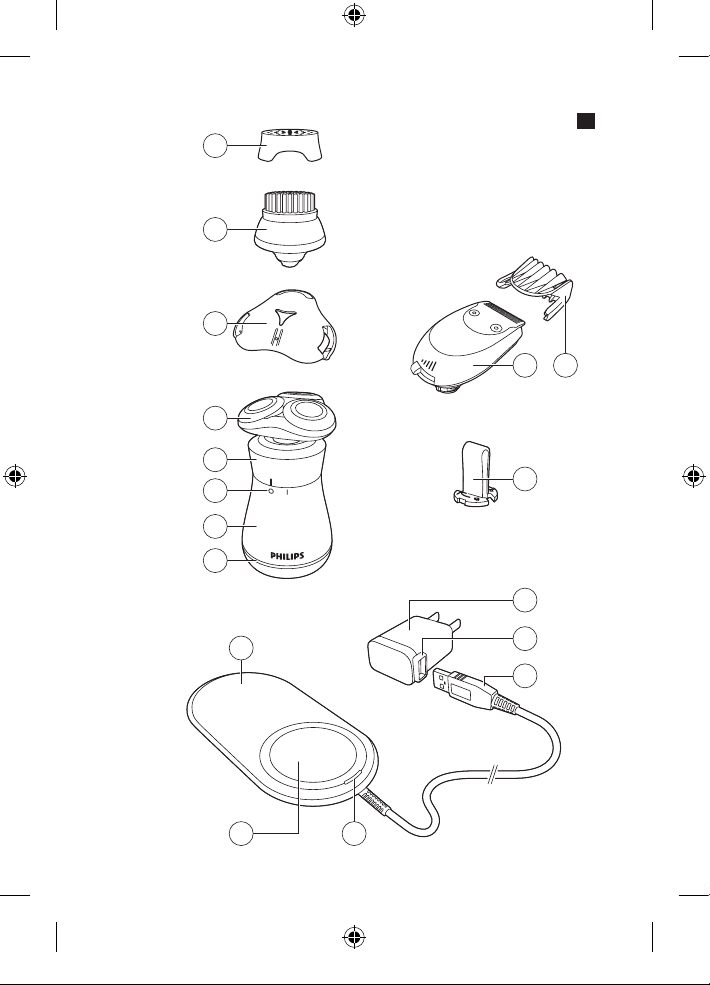
General description (Fig. 1)______________________________ 7
Charging_____________________________________________ 7
Using the product_____________________________________ 9
Cleaning and maintenance_____________________________ 15
Replacement_________________________________________ 18
Storage______________________________________________ 20
Accessories__________________________________________ 20
Assistance___________________________________________ 20
Disposal_____________________________________________ 21
Full Two-Year Warranty________________________________ 21
45-DAY MONEY-BACK GUARANTEE_____________________ 23
5
4222_002_5921_1_DFU-Luxury_A6_v9.indd 5 02/05/17 09:03
1
2
3
4
7
6
5
8
9
12
14
15
16 17
10 11
13
6
1
4222_002_5921_1_DFU-Luxury_A6_v9.indd 6 02/05/17 09:03

General description (Fig. 1)
1 SmartClick cleansing brush protection cap
2 SmartClick cleansing brush
3 SmartClick shaving unit protection cap
4 SmartClick shaving unit
5 On/o ring
6 On/o indications
7 Handle
8 Battery low indicator
9 Charging pad
10 Charging platform
11 Charging indicator
12 USB plug
13 Socket for USB plug
14 Power plug
15 Retaining ring holder
16 SmartClick beard styler
17 SmartClick beard styler comb
Not shown: cleaning brush, pouch
Charging
Charge the product before you use it for the rst
time and when the battery low indicator indicates
the battery is almost empty.
Charging takes approx. 2 hours. A fully charged
product has an operating time of up to 30 minutes.
- Charging, recharging or using the product at
temperatures below 40°F (4,5°C) or higher than
95°F (35°C) adversely aects the lifespan of the
battery.
- If the product is subjected to a major change
in temperature, pressure or humidity, let the
product acclimatize for 30 minutes before use.
7
4222_002_5921_1_DFU-Luxury_A6_v9.indd 7 02/05/17 09:03
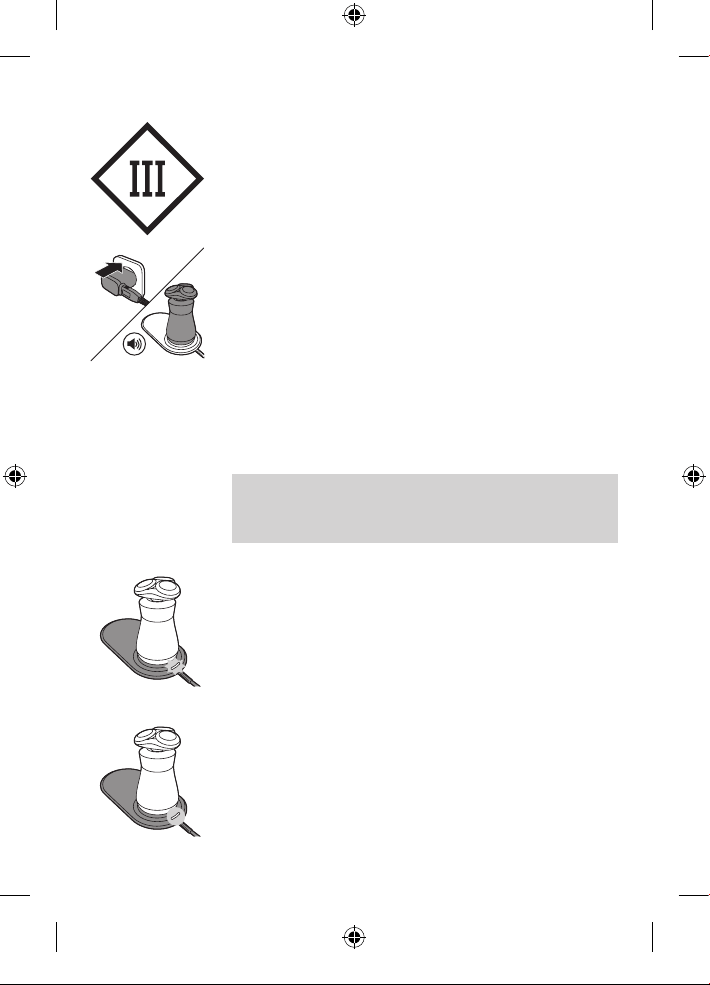
- The charging pad is a Class III construction.
1 Attach USB plug to power plug.
2 Put the power plug into any 100V to 240C AC
outlet and place the product onto the circular
section of the charging platform of the charging
pad. Use only the power plug, cord and USB
plug provided.
- The charging pad beeps when the product is
correctly placed onto the charging platform.
3 After charging, remove the power plug from the
wall outlet.
Note: An adapter plug may be necessary for
cord usage in some foreign countries. Use
an attachment plug adapter of the proper
conguration for power outlet.
Battery charging
When the product is charging, the charging
indicator ashes white.
Battery fully charged
When the battery is fully charged, the charging
indicator lights up white continuously.
8
4222_002_5921_1_DFU-Luxury_A6_v9.indd 8 02/05/17 09:03
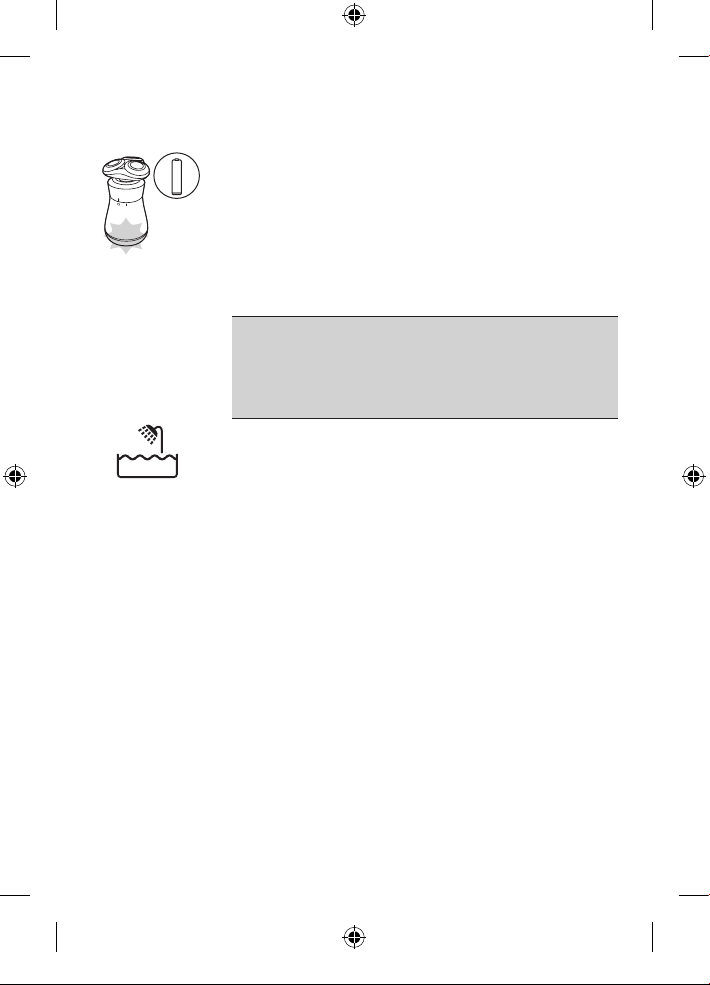
Battery low
When the battery is almost empty, the battery low
indicator ashes orange.
Using the product
Always check the product and all
accessories before using. Do not use the
product or any accessory if it is damaged,
as this may cause injury. Always replace a
damaged part with one of the original type.
This symbol indicates that the product can be used
in the bath or shower.
- Use this product for its intended household use
as described in this manual.
- For hygienic reasons, the product should only
be used by one person.
Put it to the test
- 21 Day Trial and Conversion Process. It is a fact
that your skin and beard need time to adjust to
a new grooming system.
- Use your new shaver exclusively for 3 weeks to
fully enjoy the closeness of a Philips shave.
- At rst you may not get as close a shave as you
expect, or your face may even become slightly
irritated. This is normal since your beard and skin
will need time to adjust. Invest 3 weeks and you'll
soon experience the full joy of your new shaver.
- Stick with it! If you alternate shaving methods
during the adjustment period, it may make it more
dicult to adapt to the Philips shaving system.
9
4222_002_5921_1_DFU-Luxury_A6_v9.indd 9 02/05/17 09:03
- If you are still not convinced after 21 days,
Philips will refund you the full purchase price as
long as the request is received within 45 days of
purchase.
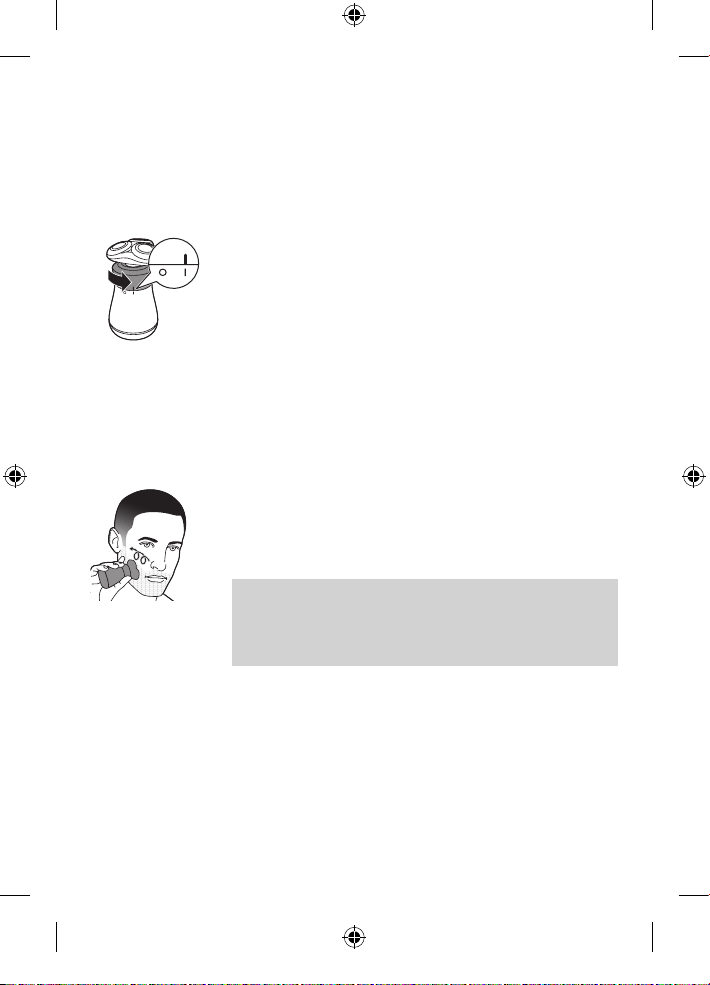
Switching the product on and o
1 To switch on the product, turn the on/o ring
counterclockwise to the 'on' indication (I).
2 To switch o the product, turn the on/o ring
clockwise to the 'o' indication (0).
Shaving
For best results on skin comfort, pre-trim your
beard if you have not shaved for 3 days or longer.
Dry shaving
1 Switch on the product.
2 Move the shaving heads over your skin in
circular movements to catch all hairs growing in
dierent directions. Exert gentle pressure for a
close, comfortable shave.
Note: Stretch your skin with your free hand so
blades can lift and cut whiskers. Gently press
shaver to skin so the oating heads can follow
the contours of your face. Do not press too
hard, this can cause skin irritation.
3 Switch o and clean the product after each use.
Wet shaving
You can also use this product on a wet face with
shaving foam or shaving gel.
10
4222_002_5921_1_DFU-Luxury_A6_v9.indd 10 02/05/17 09:03
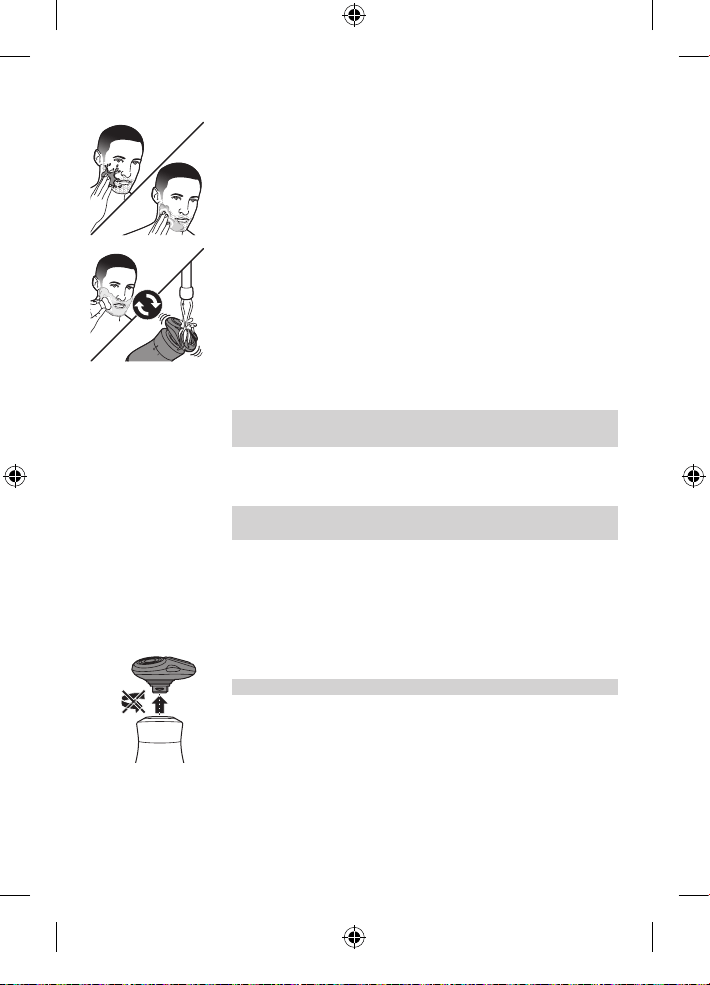
1 Apply some water to your skin.
2 Apply shaving foam or shaving gel to your skin.
3 Rinse the shaving unit under the tap to ensure that
the shaving unit glides smoothly over your skin.
4 Switch on the product.
5 Move the shaving heads over your skin in
circular movements to catch all hairs growing in
dierent directions. Exert gentle pressure for a
close, comfortable shave.
Note: Rinse the shaving unit regularly to ensure
that it continues to glide smoothly over your skin.
6 Rinse and dry your face gently.
7 Switch o and clean the product after each use.
Note: Make sure you rinse all foam or shaving gel
o the product.
Using the Smartclick attachments
Removing or attaching a SmartClick
attachment
1 Make sure the product is switched o.
2 Pull the attachment straight o the product.
Note: Do not twist the attachment while pulling.
11
4222_002_5921_1_DFU-Luxury_A6_v9.indd 11 02/05/17 09:03
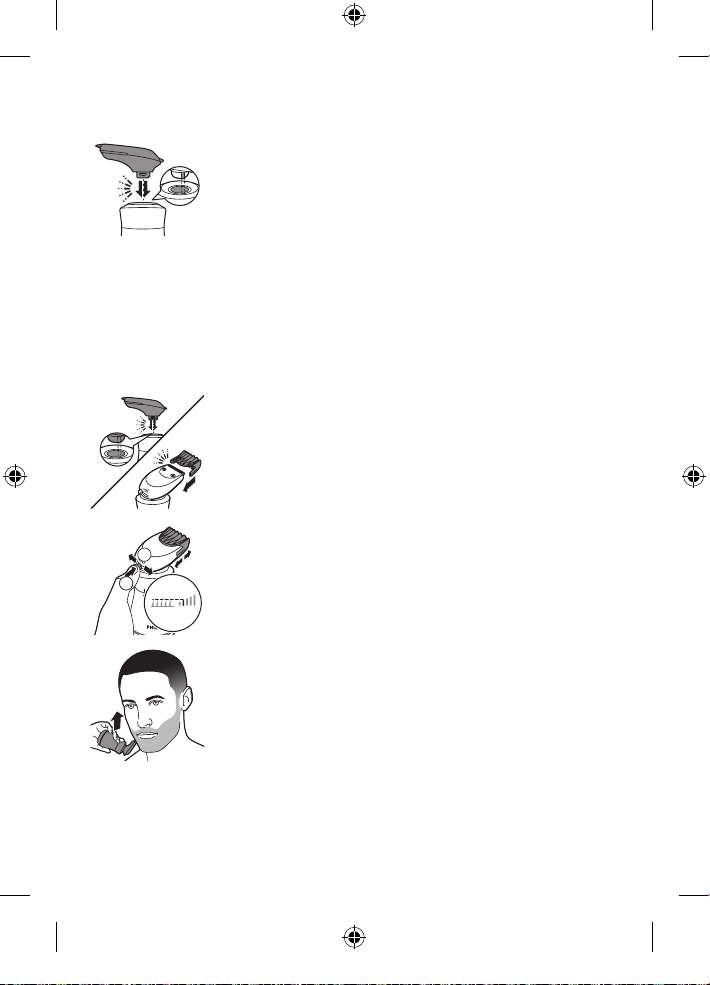
3 Insert the lug of the desired attachment into the
slot in the top of the product. Then press down the
attachment to attach it to the product ('click').
Using the beard styler attachment with comb
You can use the beard styler with the comb
attached to style your beard at one xed setting,
but also at dierent length settings. You can also
use it to pre-trim any long hairs before shaving for
a more comfortable shave.
The length settings on the beard styler correspond
to the remaining hair length after cutting and range
from 3/64 in.–3/16 in. (1-5mm).
1 Attach the beard styler to the product ('click').
Slide the comb straight into the guiding grooves
on both sides of the beard styler (‘click’).
2 Press the length selector and then push it to
the left or right to select the desired hair length
setting.
3 Switch on the product.
4 Move the product upwards while exerting
gentle pressure. Make sure the front of the
comb is in full contact with the skin.
5 Clean the beard styler after use.
Using the beard styler attachment
without comb
You can use the beard styler without the comb
to contour your beard, moustache, sideburns or
neckline to a length of 1/32in./0.5mm.
1
2
12
4222_002_5921_1_DFU-Luxury_A6_v9.indd 12 02/05/17 09:03
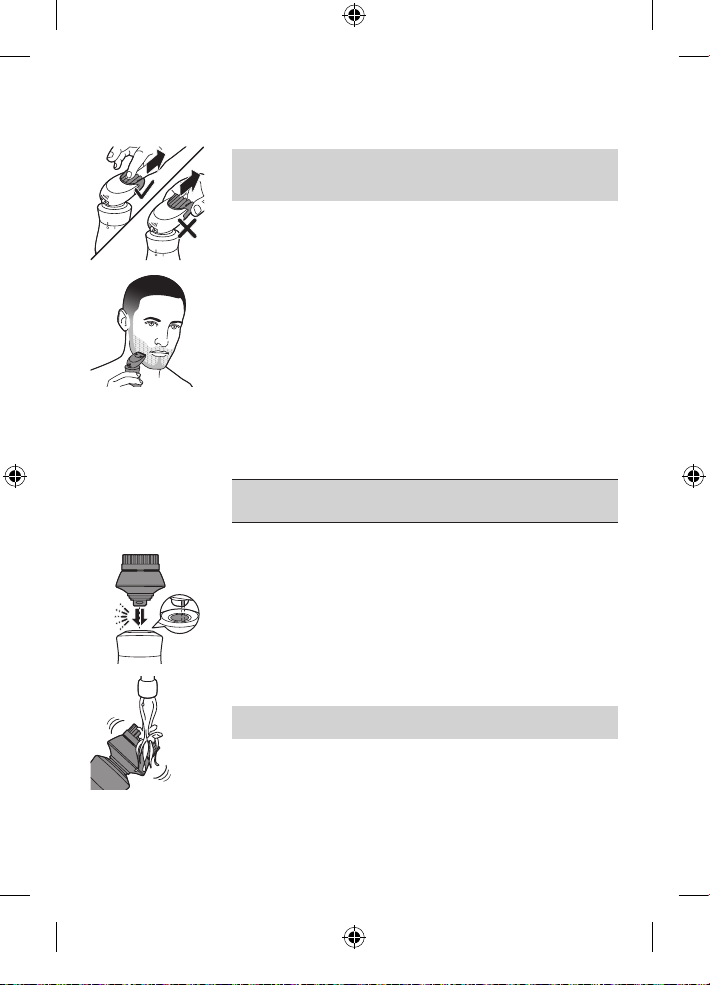
1 Pull the comb o the beard styler.
Note: Grab the comb in the center to pull it o
the beard styler. Do not pull at the sides of the
comb.
2 Switch on the product.
3 Hold the beard styler perpendicular to the skin
and move the product downwards while you
exert gentle pressure.
4 Clean the beard styler after use.
Using the cleansing brush attachment
Use the rotating cleansing brush with your daily
cleansing cream. The cleansing brush removes oil
and dirt, contributing to a healthy and oil-free skin.
Use it no more than twice a day.
Do not use the cleansing brush on damaged or
irritated skin or on wounds.
1 Make sure the product is switched o.
2 Remove the shaving unit from the product and
attach the cleansing brush.
3 Moisten the cleansing brush with water.
Do not use the product with a dry brush,
as this can irritate the skin.
13
4222_002_5921_1_DFU-Luxury_A6_v9.indd 13 02/05/17 09:03
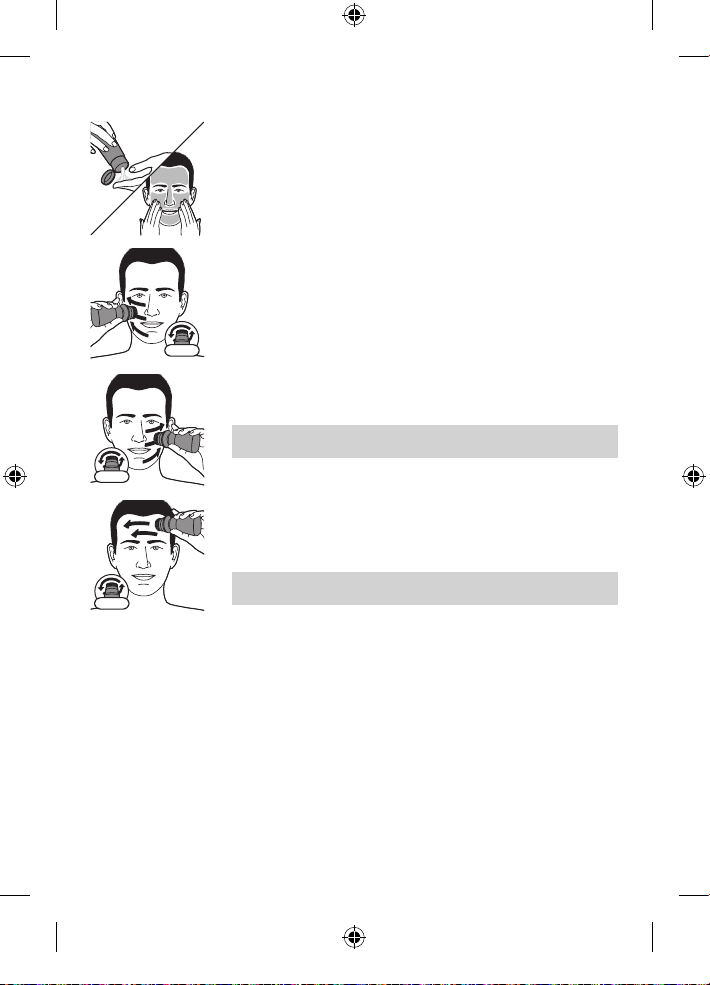
4 Moisten your face with water and apply a
cleanser to your face.
5 Switch on the product.
6 Gently move the brush across your skin from
the nose towards the ear. Do not push the
cleansing brush too hard onto the skin.
7 After approx. 20 seconds, move the product to
your other cheek.
Do not cleanse the sensitive area around
your eyes.
8 After approx. 20 seconds move the product to
your forehead. Gently move the brush from left
to right.
Note: Do not cleanse any zone longer than
20 seconds.
9 After the treatment, rinse and dry your face.
Your face is now ready for the next step of your
daily skincare routine.
10 Clean the cleansing brush after use.
20 sec.
20 sec.
20 sec.
14
4222_002_5921_1_DFU-Luxury_A6_v9.indd 14 02/05/17 09:03
Cleaning and maintenance
- Regular cleaning guarantees better shaving results.
- Never clean, remove or replace shaving unit
while motor is on.
- Do not apply pressure to shaving head combs.
- Do not touch shaving heads with hard objects
as this may dent or damage precision-made
slotted combs.
- Do not use abrasives, scourers or aggressive
liquids such as gasoline or acetone to clean
the shaver, charging pad or any attachments.
Cleaning the product
Clean the shaver after every shave for optimal
performance.
Be careful with hot water. Always check if the
water is too hot, to prevent burning your hands.
Never dry the shaving unit with a towel or tissue,
as this may damage the shaving heads.
While rinsing shaving heads, water may drip out
of the base of shaver. This is a normal occurrence.
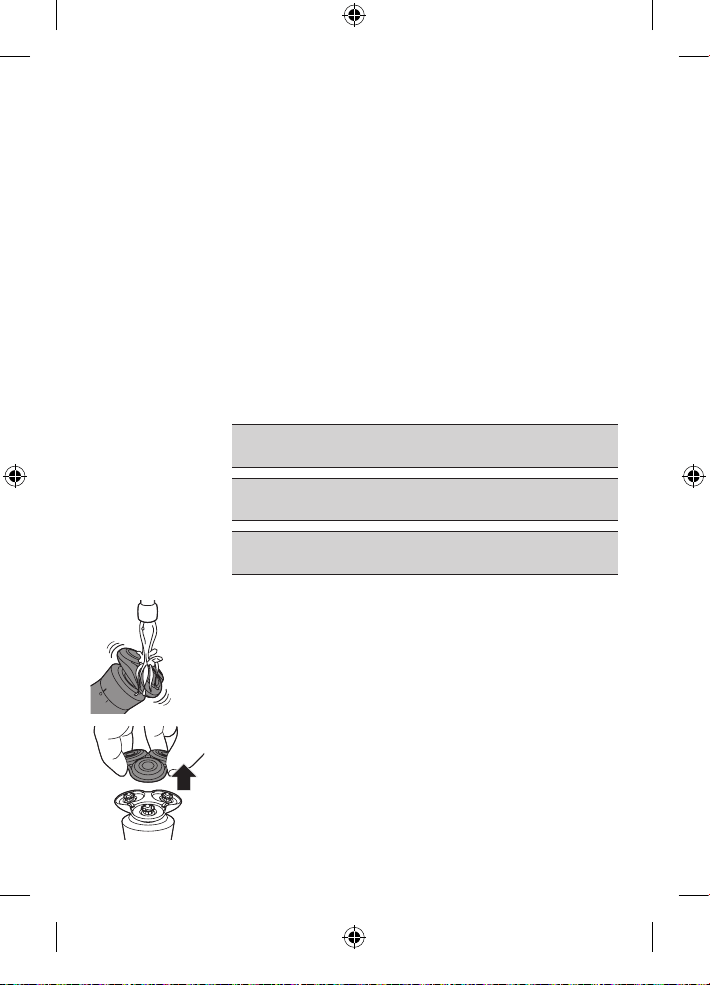
1 Switch o the product.
2 Rinse the shaving unit under a warm tap.
3 Pull the shaving head holder o the bottom
part of the shaving unit.
15
4222_002_5921_1_DFU-Luxury_A6_v9.indd 15 02/05/17 09:03
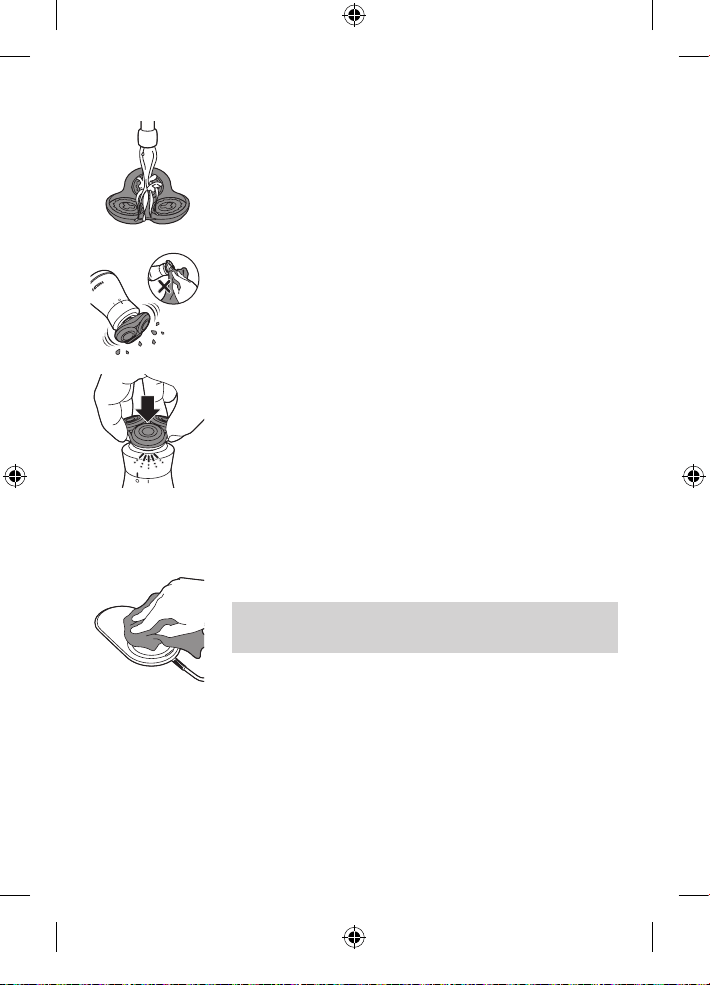
4 Rinse the shaving head holder under
a warm tap.
5 Carefully shake o excess water and let the
shaving head holder air dry.
6 Reattach the shaving head holder to the
bottom part of the shaving unit ('click').
Cleaning the charging pad
1 Wipe the surface of the charging pad with a
slightly damp cloth to remove any dirt.
2 Dry the surface with a dry cloth after cleaning.
Caution: Always make sure the charging pad
is completely dry before connecting to a
power outlet.
16
4222_002_5921_1_DFU-Luxury_A6_v9.indd 16 02/05/17 09:03
Cleaning the Smartclick attachments
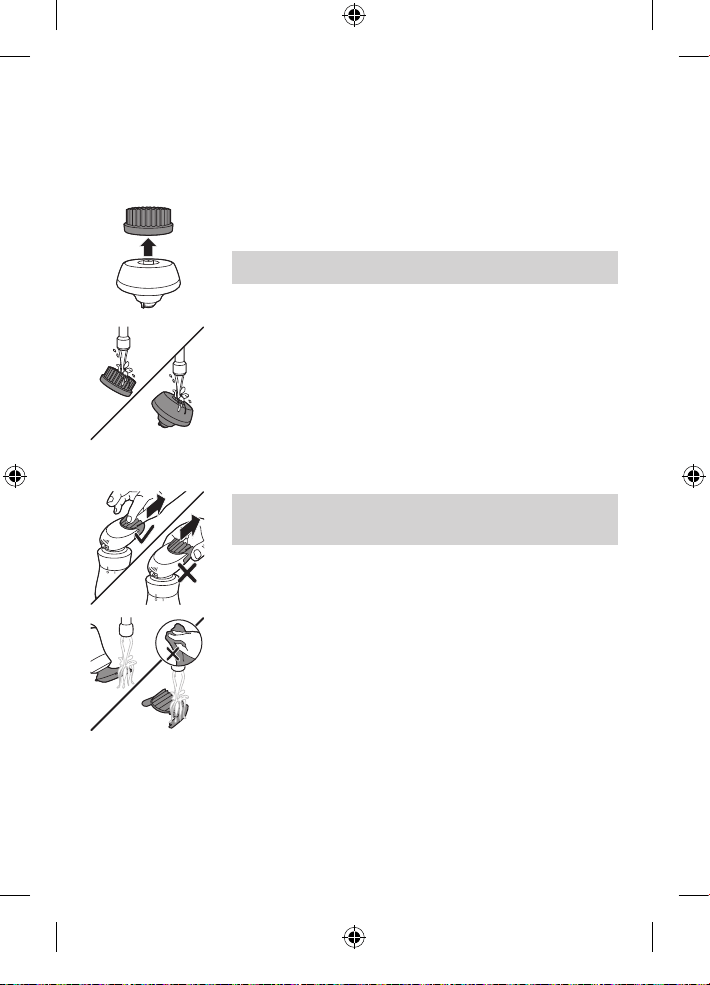
Cleaning the cleansing brush
1 Switch o the product.
2 Detach the brush head from the attachment
base.
Note: Do not twist the brush head while you
pull it o the brush base.
3 Clean both parts thoroughly with warm water
and mild soap.
4 Dry the cleansing brush with a towel being
careful not to bend the bristles.
Cleaning the beard styler
Clean the beard styler after each use.
1 Pull the comb o the beard styler.
Note: Grab the comb in the center to pull it o
the beard styler. Do not pull at the sides of the
comb.
2 Switch on the product.
3 Rinse the beard styler and the comb separately
under a warm tap.
4 After cleaning, switch o the product.
5 Carefully shake o excess water and let the
beard styler and comb air dry.
6 For optimal performance, lubricate the teeth of
the attachment with a drop of sewing machine
oil every 3 months.
17
4222_002_5921_1_DFU-Luxury_A6_v9.indd 17 02/05/17 09:03
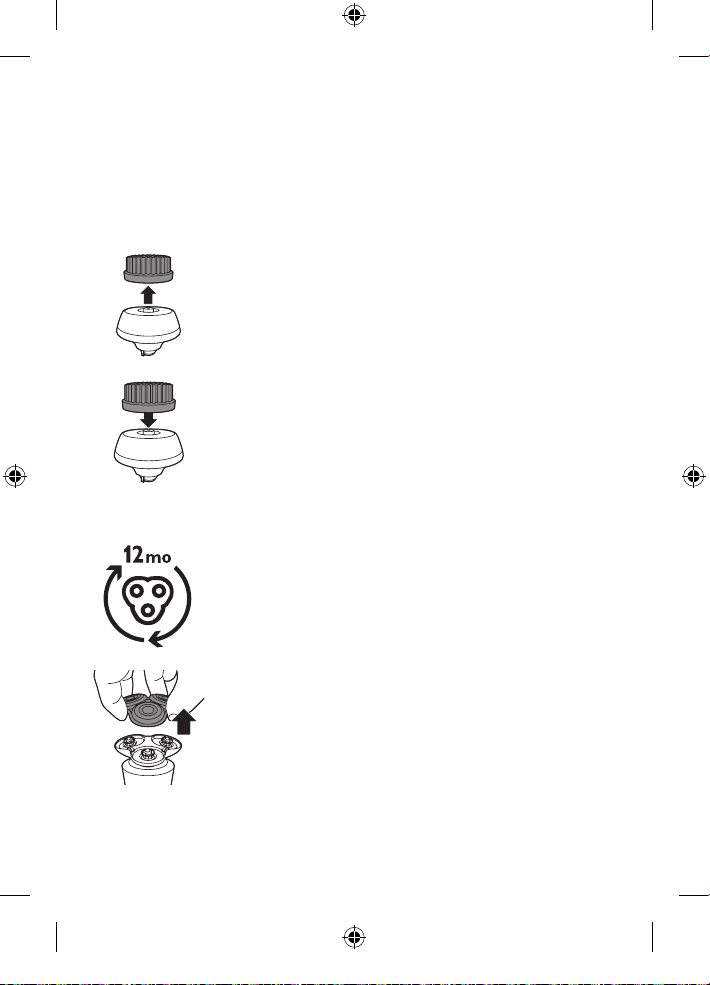
Replacement
Replacing the cleansing brush head
The brush head should be replaced every 3 months
or earlier if the brush hairs are bent or damaged.
1 Switch o the product.
2 Detach the brush head from the attachment
base.
3 Discard the used brush head.
4 Attach the new cleansing brush head to the
brush base.
Replacing the shaving heads
For maximum shaving performance, we advise you
to replace the shaving heads once a year. Replace
damaged shaving heads immediately. Always
replace the shaving heads with original Philips
shaving heads (see 'Accessories').
1 Switch o the shaver.
2 Pull the shaving head holder o the bottom
part of the shaving unit.
18
4222_002_5921_1_DFU-Luxury_A6_v9.indd 18 02/05/17 09:03
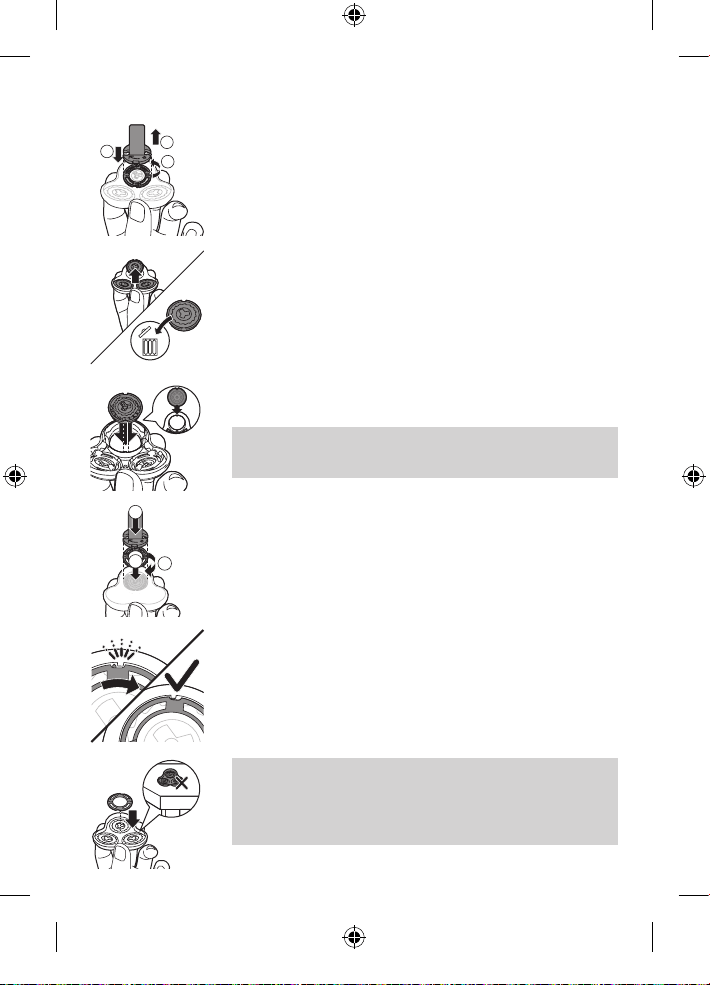
3 Place the retaining ring holder on the retaining
ring, turn it counterclockwise and lift it o
the shaving head. Remove the retaining ring
from the retaining ring holder and repeat this
process for the other retaining rings. Place them
aside in a safe place.
4 Remove the shaving heads from the shaving
head holder. Discard the used shaving heads
immediately to avoid mixing them with the new
shaving heads.
5 Place the new shaving heads in the shaving
head holder.
Note: Make sure the notches on both sides
of the shaving heads t exactly onto the
projections in the shaving head holder.
6 Place the retaining ring holder on the retaining
ring, place it on the shaving head and turn it
clockwise to reattach the retaining ring. Repeat
this process for the other retaining rings.
- Each retaining ring has two recesses that t
exactly into the projections of the shaving head
holder. Turn the ring clockwise until you hear a
click to indicate that the ring is xed.
Note: Hold the shaving head holder in your
hand when you reinsert the shaving heads and
reattach the retaining rings. Do not place the
shaving head holder on a surface, as this may
cause damage to the shaving heads.
2
3
1
1
3
2
1
19
4222_002_5921_1_DFU-Luxury_A6_v9.indd 19 02/05/17 09:03
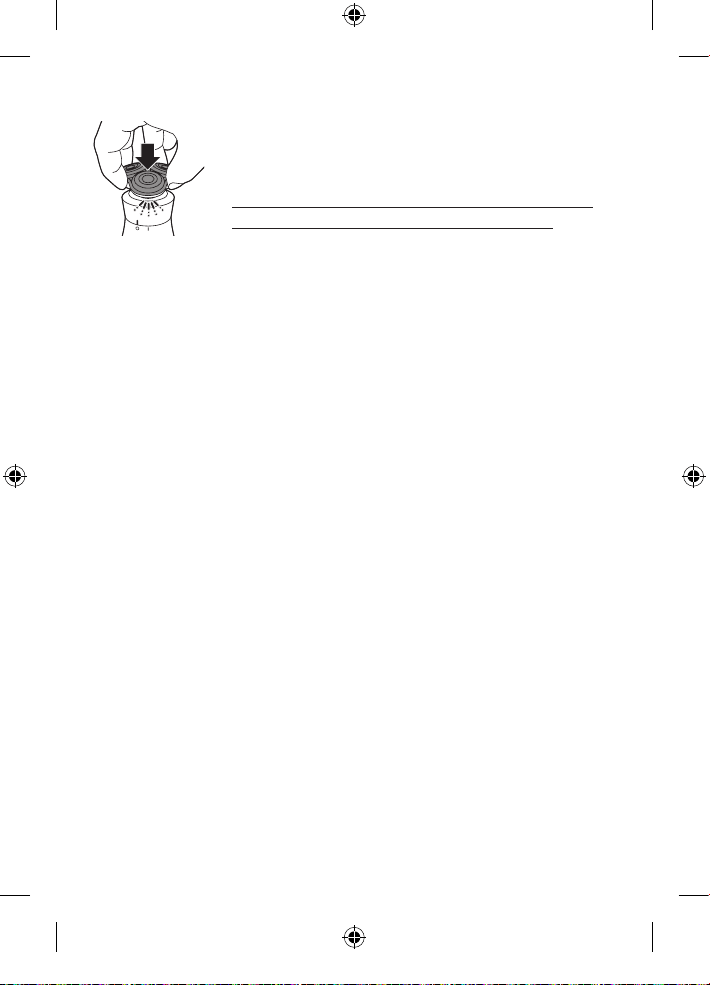
7 Reattach the shaving head holder to the
bottom part of the shaving unit ('click').
These products have no other user-serviceable
parts. For assistance call 1-800-243-3050.
Storage
- Be sure the product is turned o. Remove
cord from outlet before storing it in a safe,
dry location where it will not be crushed,
banged, or subject to damage.
- Do not wrap cord around the product or
charging pad when storing.
- Store cord in a safe location where it will not be
cut or damaged.
- Do not place or store the product or charging
pad where it can fall or be pulled into a tub or
sink, water or other liquid while plugged in.
Accessories
Replacement parts and accessories may be
purchased at a store near you or on our website
www.philips.com/store.
The following accessories are available:
- SH90 Philips shaving heads
- RQ560 Philips cleansing brush head
- RQ111 Philips beard styler
Assistance
For assistance, visit our website: www.philips.com/
support or call toll free 1-800-243-3050.
Online information is available 24 hours a day,
7 days a week.
20
4222_002_5921_1_DFU-Luxury_A6_v9.indd 20 02/05/17 09:03

Disposal
- This product contains a rechargeable lithium-
ion battery which must be disposed of properly.
- Contact your local town or city ocials for
battery disposal information. You can also call
1-800-822-8837 or visit www.call2recycle.org
for battery drop-o locations.
- For assistance, visit our website www.philips.com/
support or call 1-800-243-3050 toll free.
- Your product is designed and manufactured with
high quality materials and components, which can
be recycled and reused. For recycling information,
please contact your local waste management
facilities or visit www.recycle.philips.com
Full Two-Year Warranty
Philips North America LLC warrants this
new product against defects in materials or
workmanship for a period of two years from the
date of purchase, and agrees to repair or replace
any defective product without charge.
IMPORTANT: This warranty does not cover
damage resulting from accident, misuse or
abuse, lack of reasonable care, the axing of any
attachment not provided with the product or loss
of parts or subjecting the product to any but the
specied voltage or batteries.*
21
4222_002_5921_1_DFU-Luxury_A6_v9.indd 21 02/05/17 09:03

NO RESPONSIBILITY IS ASSUMED FOR ANY
SPECIAL, INCIDENTAL OR CONSEQUENTIAL
DAMAGES.
In order to obtain warranty service, simply go to
www.philips.com/support for assistance.
It is suggested that for your protection you return
shipments of product by insured mail, insurance
prepaid. Damage occurring during shipment is not
covered by this warranty.
NOTE: No other warranty, written or oral,
is authorized by Philips North America LLC.
This warranty gives you specic legal rights, and you
may also have other rights which vary from state
to state. Some states do not allow the exclusion or
limitation of incidental or consequential damages, so the
above exclusion and limitations may not apply to you.
*Read enclosed instructions carefully.
22
4222_002_5921_1_DFU-Luxury_A6_v9.indd 22 02/05/17 09:03

45-DAY MONEY-BACK GUARANTEE
If you are not fully satised with your product send
the product back and we’ll refund you the full
purchase price.
The product must be shipped prepaid by insured
mail, insurance prepaid, have the original sales
receipt, indicating purchase price and date of
purchase, and the money-back guarantee return
authorization form enclosed.
We cannot be responsible for lost mail.
The product must be postmarked no later than
45 days after the date of purchase. Philips reserves
the right to verify the purchase price of the product
and limit refunds not to exceed suggested retail price.
To obtain money-back guarantee return
authorization form, call 1-800-243-3050 for
assistance.
Delivery of refund check will occur 6–8 weeks
after receipt of returned product.
23
4222_002_5921_1_DFU-Luxury_A6_v9.indd 23 02/05/17 09:03

Manufactured for:
Philips Personal Health
a division of Philips North America LLC
P.O. Box 10313, Stamford, CT 06904
This symbol on the product’s nameplate means
it is listed by Underwriters’ Laboratories, Inc.
PHILIPS and Philips shield are a registered trademarks of
Koninklijke Philips N.V.
©2017 Philips North America LLC.
All rights reserved.
4222.002.5921.1www.philips.com
4222_002_5921_1_DFU-Luxury_A6_v9.indd 24 02/05/17 09:03