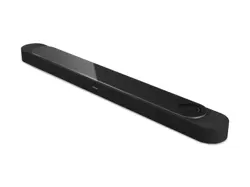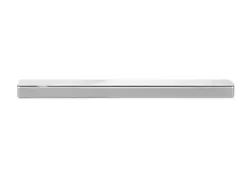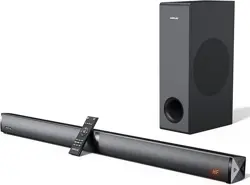
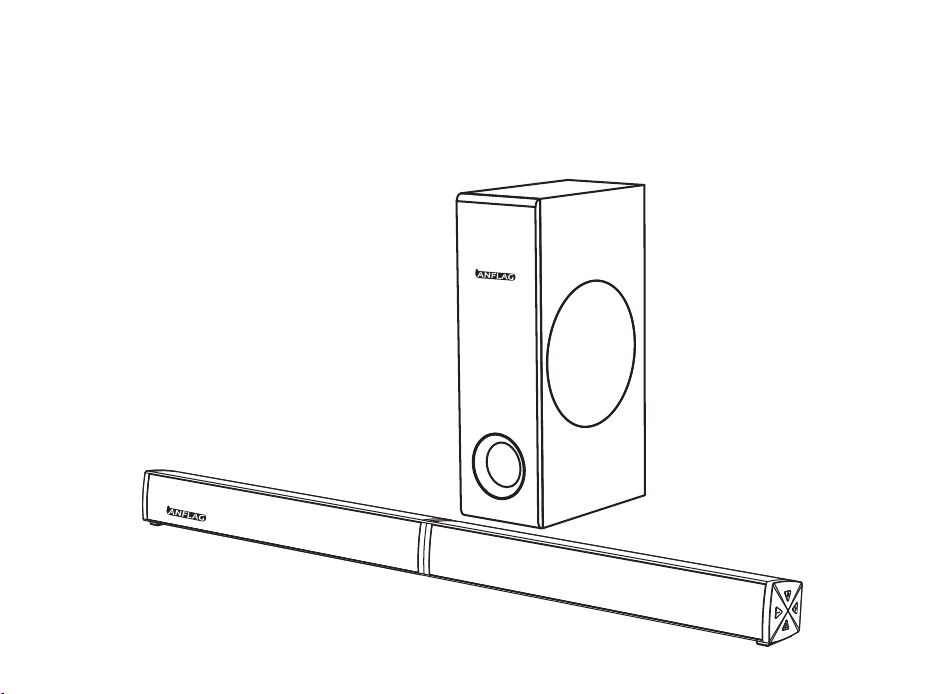
HW-T150
2.1 Soundbar System
User Manual

English ------------------------------------------------------------- 01-15
日本語------------------------------------------------------------- 16-28
LANGUAGE

Register within 7 days after receiving your new product.
ACTIVE YOUR 2-YEAR WARRANTY & EXCLUSIVE SUPPRISE
REGISTER ONLINE NOW!
warranty.anflag.hk
Make sure you do this Now to ensure your purchase is 100% covered.
All we need is your name, email and purchase details... that’s it!
It literally takes only 2 minutes
FCC Statement
SAFETY INSTRUCTIONS
1.Avoid dropping.
2.Do not disassemble.
3.Avoid extreme temperatures.
4.Don' t use the device outdoors during thunderstorms.
5.Use original or certified cables.
6.Don' t use any corrosive cleaner/oil to clean.
7.The products should not be exposed to dripping or splashing water.
NOTE: This equipment has been tested and found to comply with the limits for a Class B digital device,
pursuant to part 15 of the FCC Rules. These limits are designed to provide reasonable protection against
harmful interference in a residential installation. This equipment generates uses and can radiate radio
frequency energy and, if not installed and used in accordance with the instructions, may cause harmful
interference to radio communications. However, there is no guarantee that interference will not occur in a
particular installation. If this equipment does cause harmful interference to radio or television reception,
which can be determined by turning the equipment off and on, the user is encouraged to try to correct the
interference by one or more of the following measures:
- Reorient or relocate the receiving antenna.
Thanks for purchasing ANFLAG HW-T150.This guideline aims to offer you details on setting up this sound
bar so that you can enjoy the ultimate sound experience.
EN 01

- Increase the separation between the equipment and receiver.
-Connect the equipment into an outlet on a circuit different from that to which the receiver is connected.
-Consult the dealer or an experienced radio/TV technician for help.
Changes or modifications not expressly approved by the party responsible for compliance could void the
user's authority to operate the equipment.
This device complies with Part 15 of the FCC Rules. Operation is subject to the following two conditions:
(1) this device may not cause harmful interference, and
(2) this device must accept any interference received, including interference that may cause undesired
operation.
EN 02
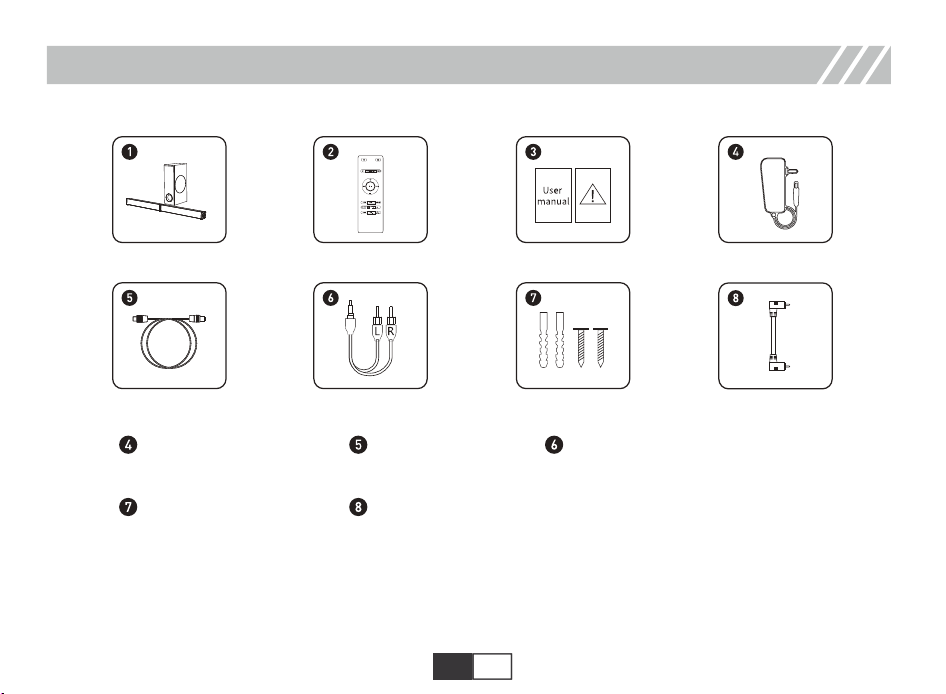
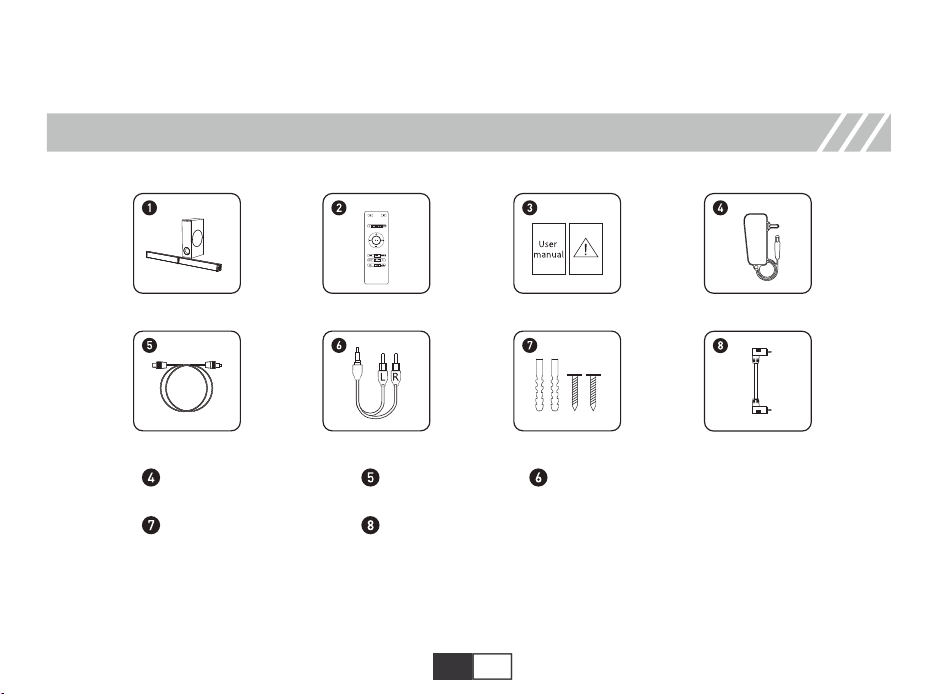
Power adapter
Optical cable
AUX audio cable
Wall mounting bolts
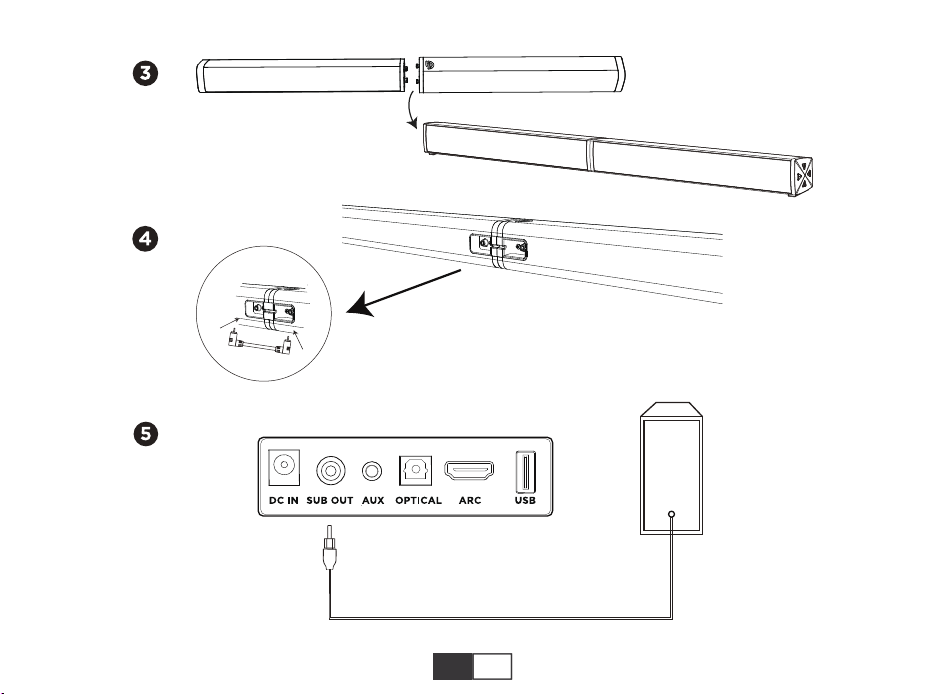
Bar-link
ACCESSORIES
EN 03
EN 04
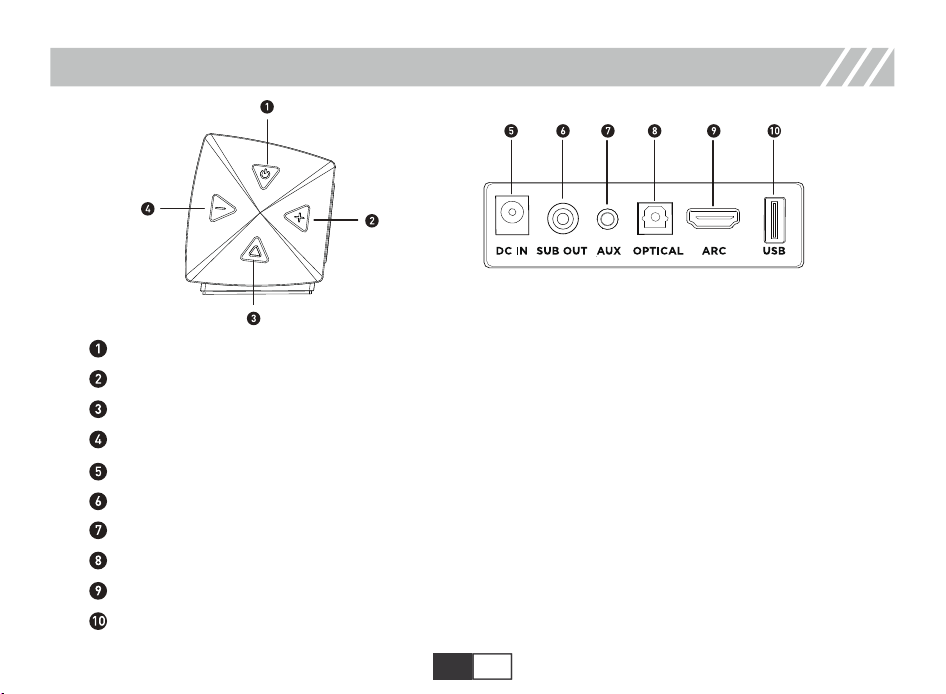
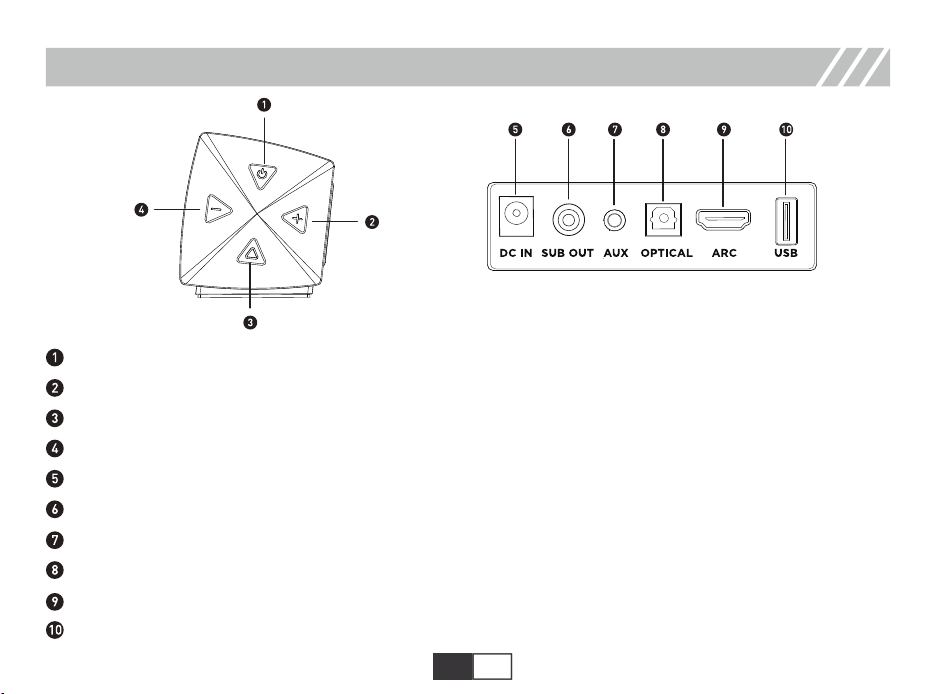
DIAGRAM (BUTTONS, PORTS & INDICATOR)
Short press to turn on, long press to turn off; short press to switch modes when it is turned on.
Short press volume -1, long press to decrease quickly.
In Bluetooth and USB mode, short press to play or pause.
Short press volume +1, long press to increase quickly.
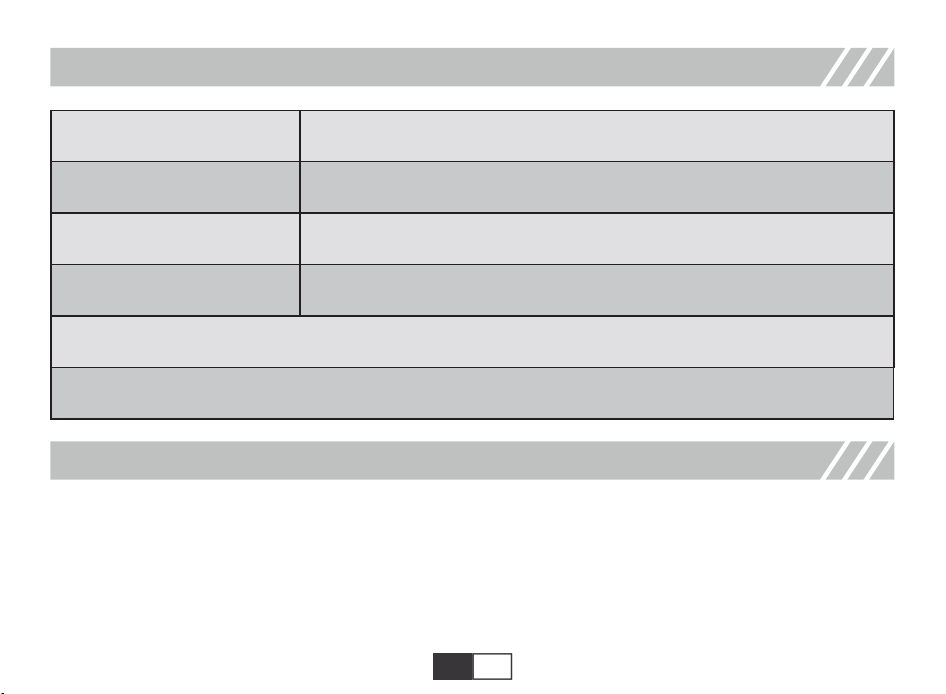
SUB OUT: Subwoofer Output Jack.
AUX IN: Connect to the compatible devices via the 3.5mm-RCA stereo jack cable (provided).
OPTICAL IN: Connect to the compatible devices via an optical cable(provided).
ARC: Connect to the compatible devices via a HDMI cable(not provided).
USB IN: Connect to the flash drive for playing MP3/WAV files (32GB max).
DC 18V IN Jack.
EN 05
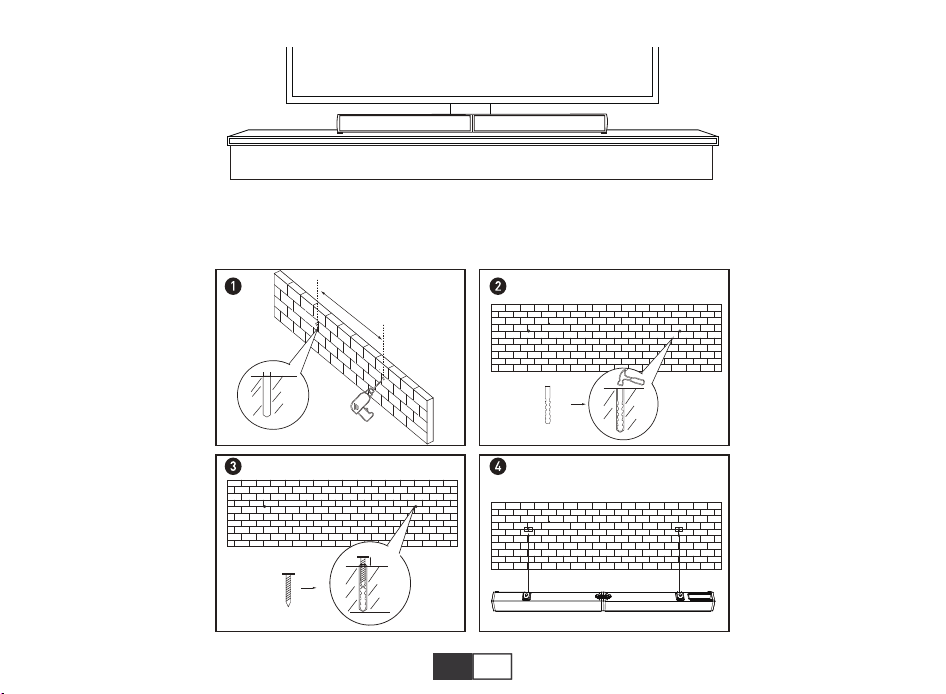
PLACEMENT
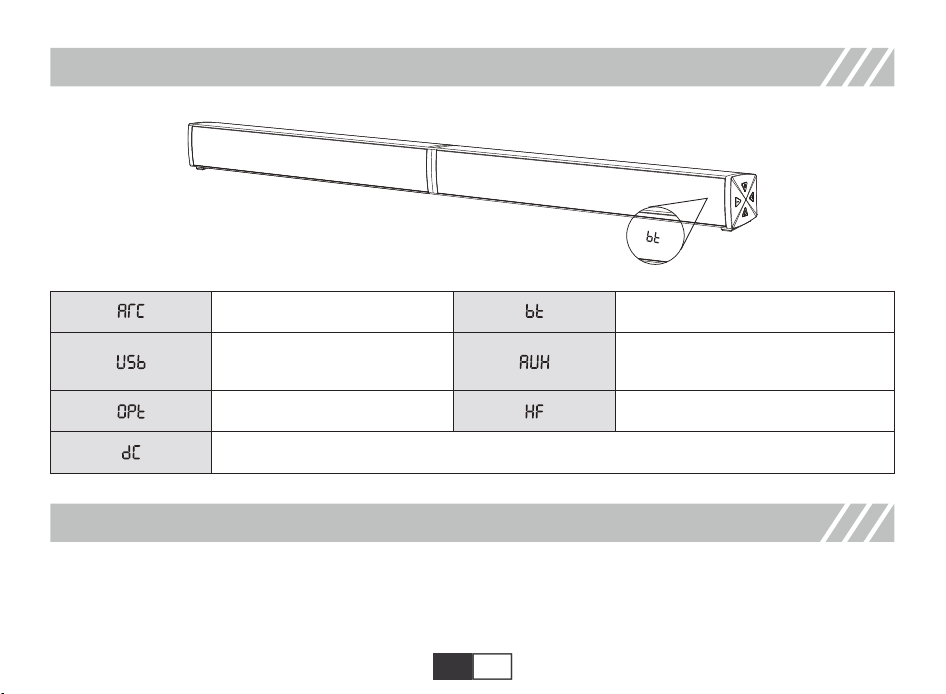
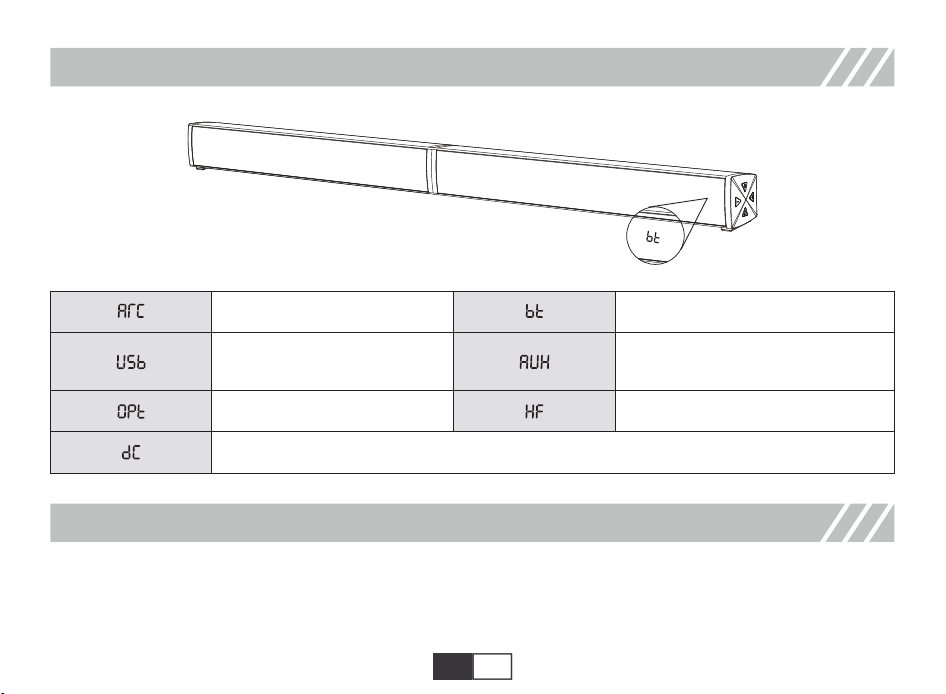
MODE
A. Table Placement
HDMI(ARC) mode
USB media mode
Optical mode
DYNAMIC mode
Bluetooth mode
Hi-Fi mode
Auxiliary input mode
EN 06
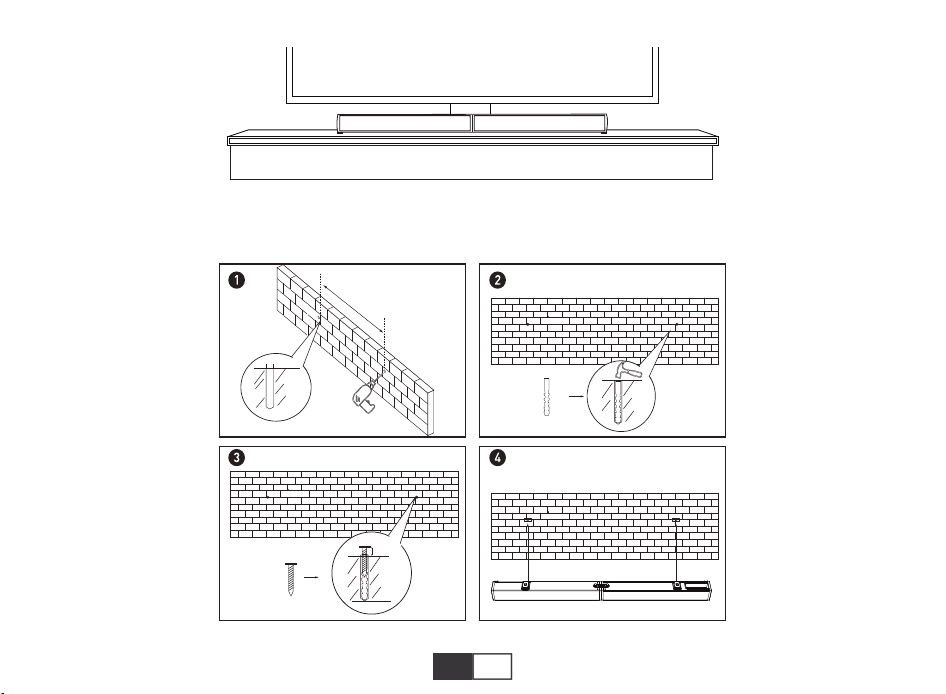
Placement: Place the soundbar on a solid surface.
B.Wall Mounted
25.4 inches
EN 07
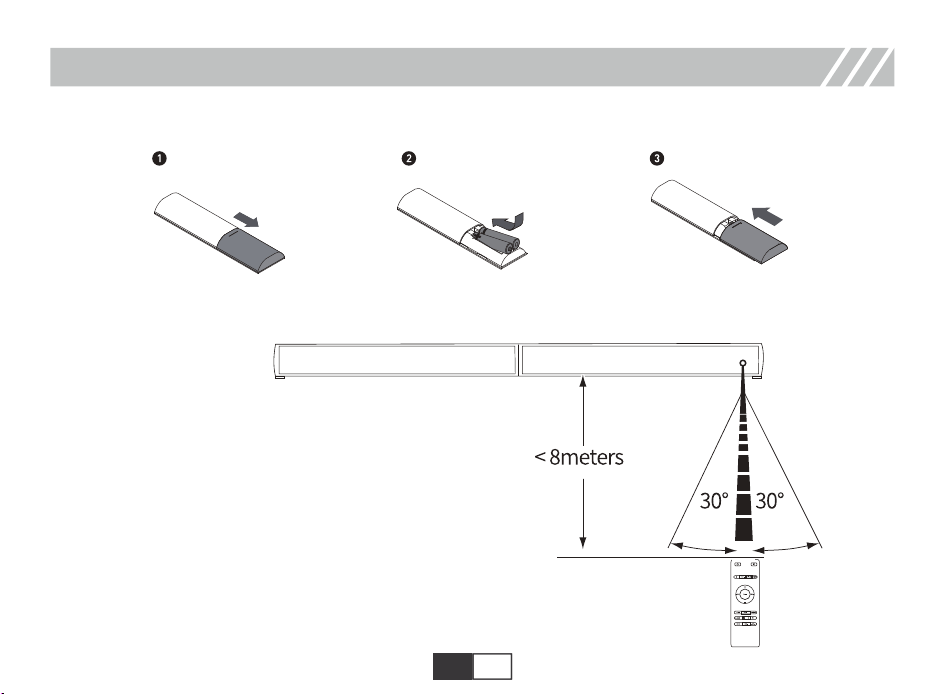
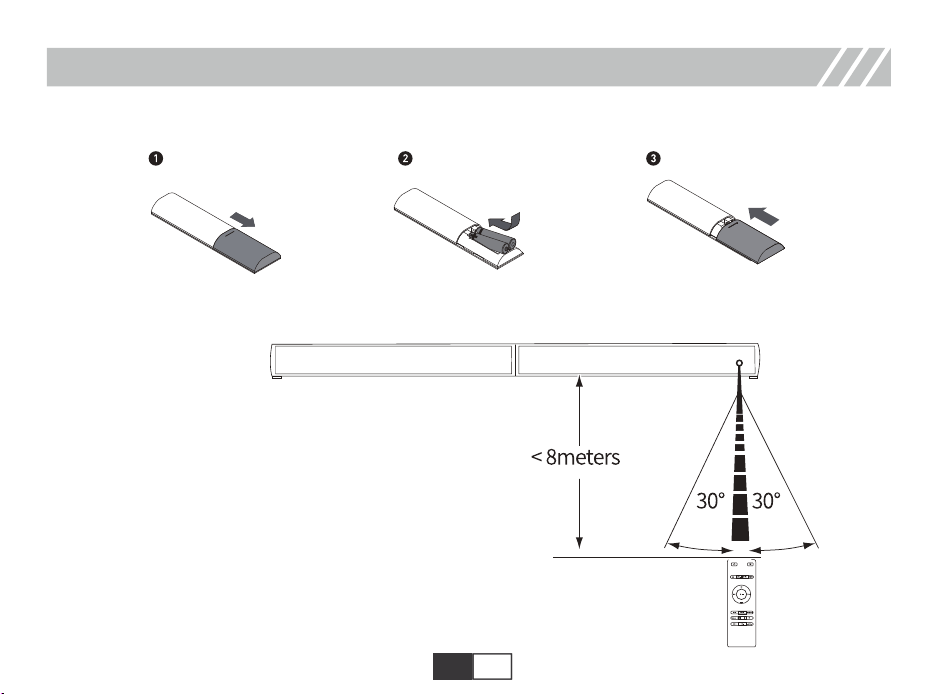
The working range of the remote is +/-30° in both vertical and horizontal directions.
B. Use remote control
A. Battery installation
REMOTE CONTROL
EN 08
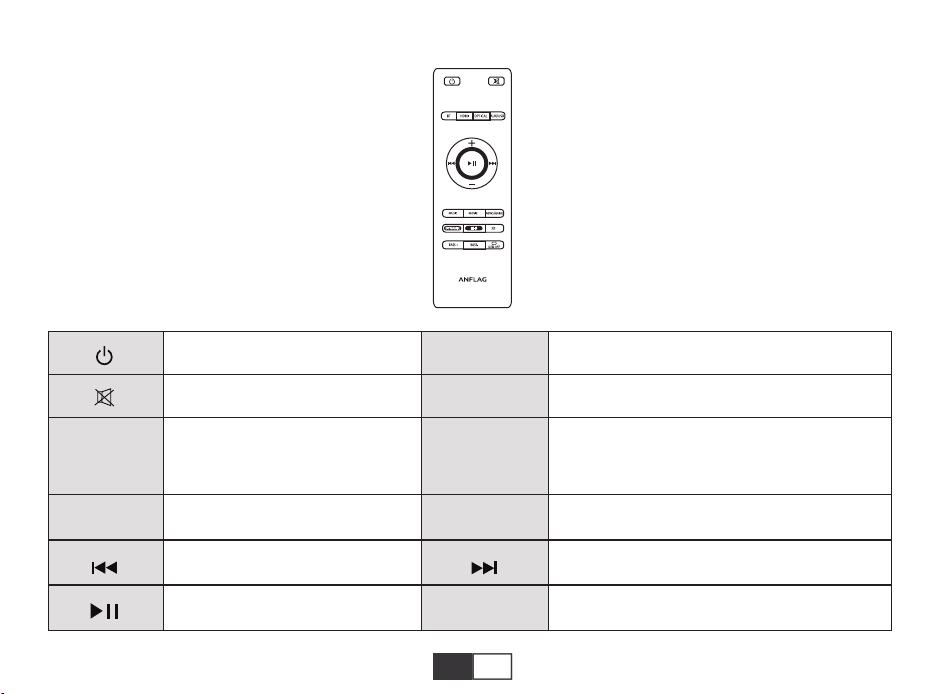
BT
OPTICAL
HDMI
AUX/USB
-+
Mute/cancel
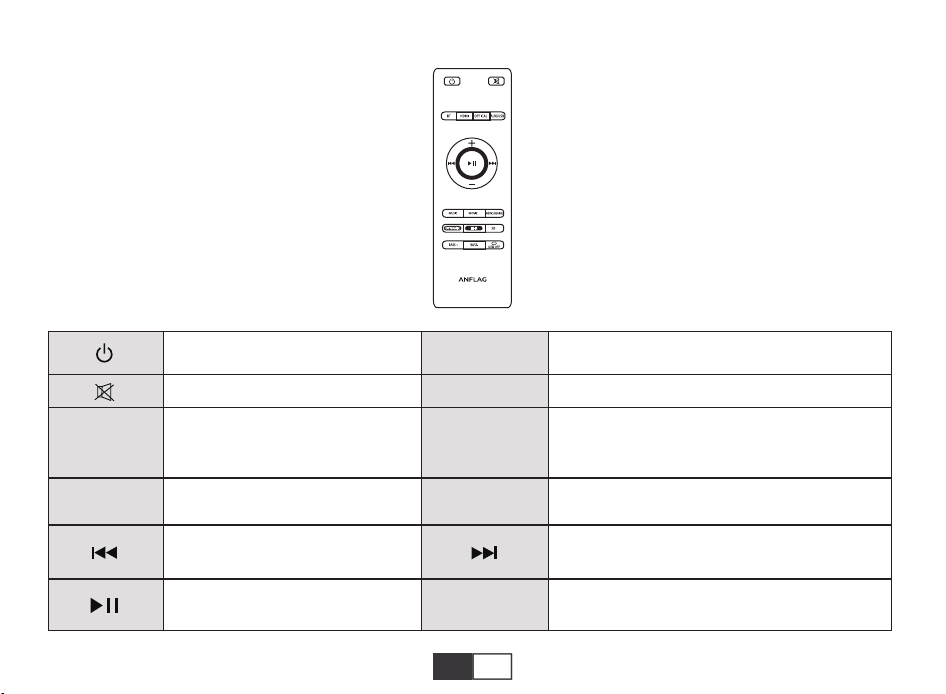
Enter Bluetooth mode; long press
to disconnect after connection
Short press volume +1, long press
to increase quickly
Switch to the previous song in
Bluetooth mode and USB mode
Short press to turn on, long press
to turn off
Enter Optical mode
Enter HDMI mode
Short press volume -1, long press to decrease
quickly
Switch to the next song in Bluetooth mode and
USB mode
Short press to switch between AUX mode and
USB mode. Please note that the USB mode
can only be switched when the USB flash disk
is inserted.
C. How to use the remote control
NEWS/Game
Play or pause in Bluetooth mode
and USB mode
Short press will shows EQ 3 in news mode,
long press will shows EQ 4 in game mode
EN 09
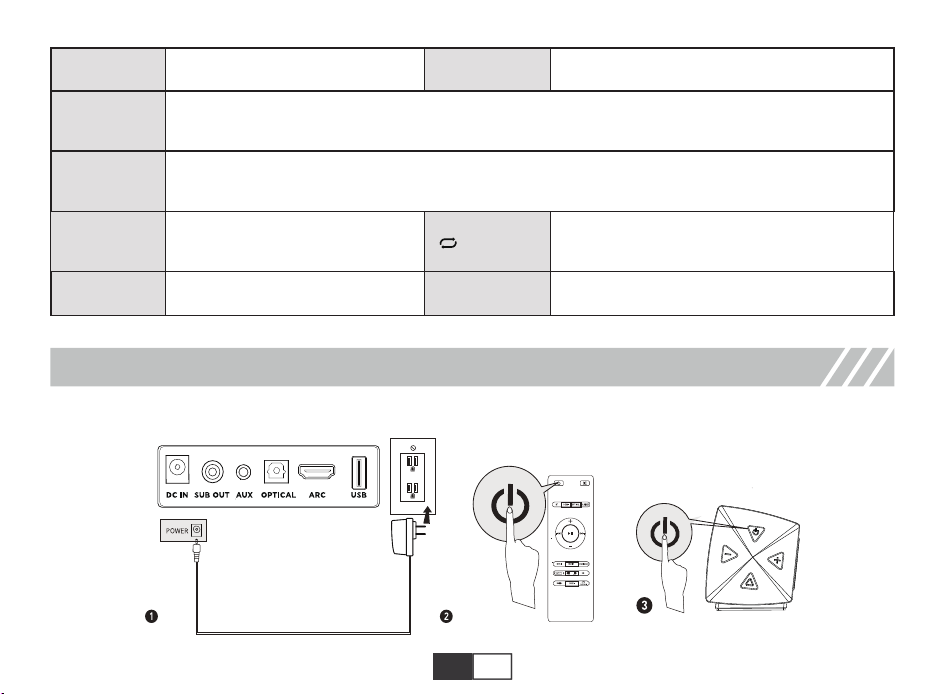
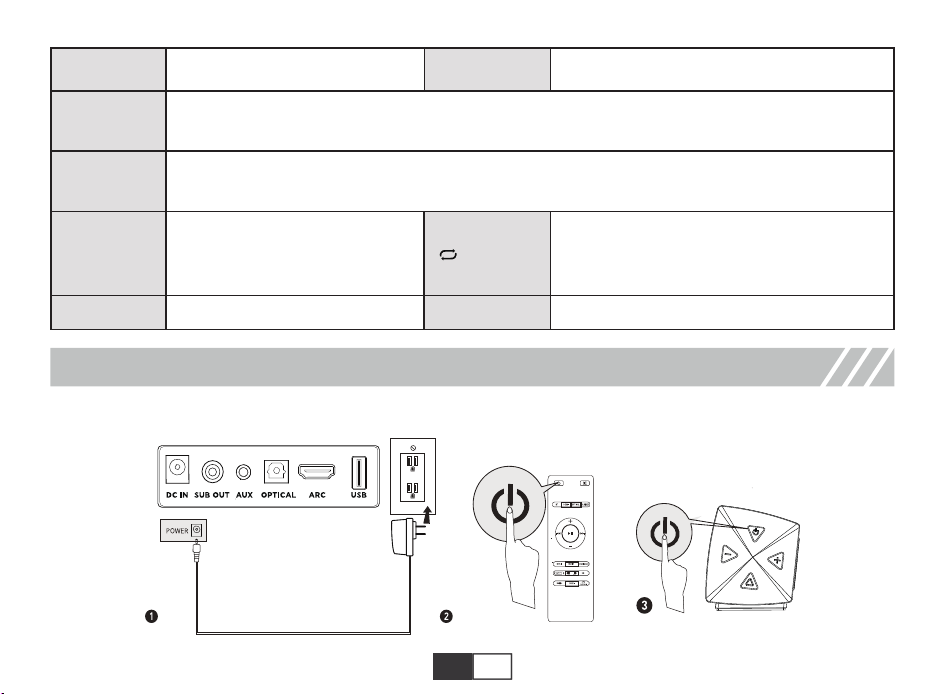
A. Power Connection
USING YOUR SOUNDBAR
MOVIEMUSIC
DYNAMIC
Hi-Fi
3D
BASS -
BASS +
To enhance the dynamic effects of different EQ modes such as Music/ Movie/News/Games/3D,
suitable for scenes ofneeding more powerful sound effects.
To adjust the sound effects on different EQ Modes such as Music/Movie/News/Games/3D to get
clearer sound, suitable forsome quiet scenes such as dialogue.
3D Surround sound on/off, can
only be turned on in movie mode
Music Mode/EQ 1
Movie Mode/EQ 2
Short press button for single loop orfull loop in
USB mode/Short press to turn on/off the LED
indicator in standy mode
Decrease the Bass Increase the Bass
/LEDOFF
EN 10
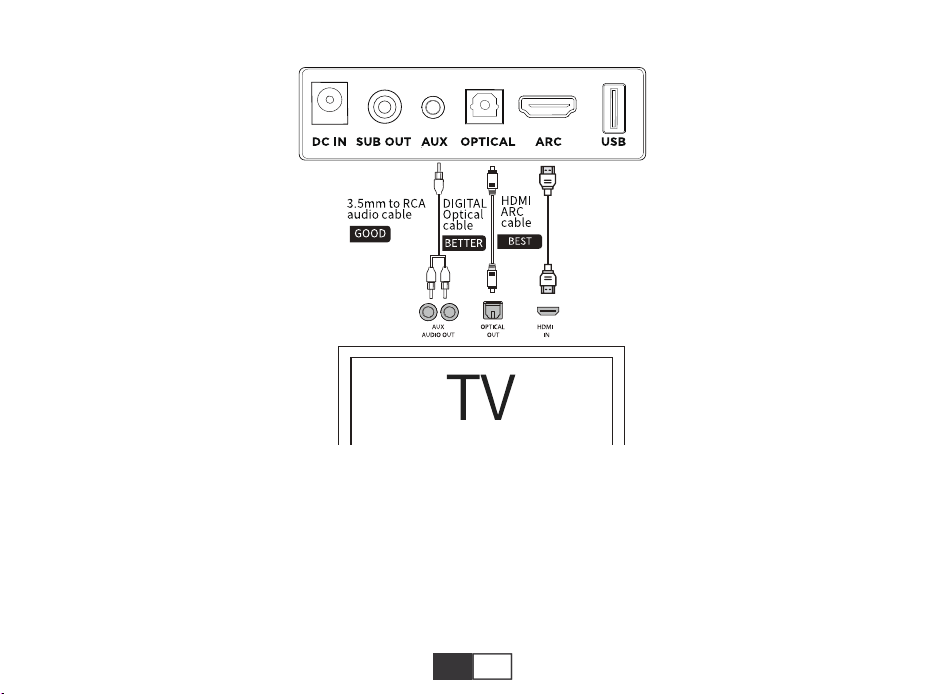
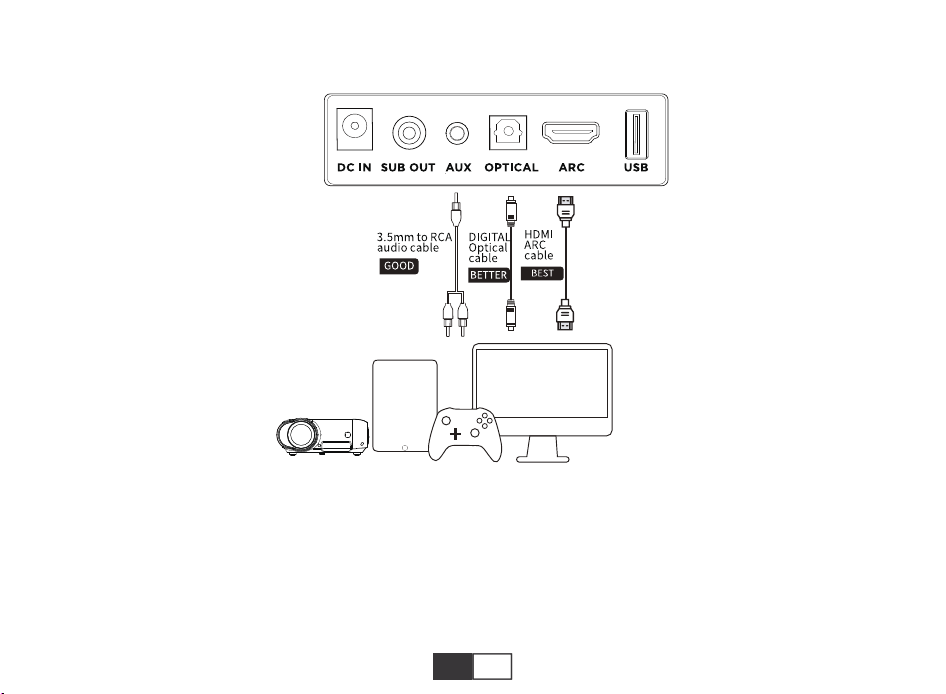
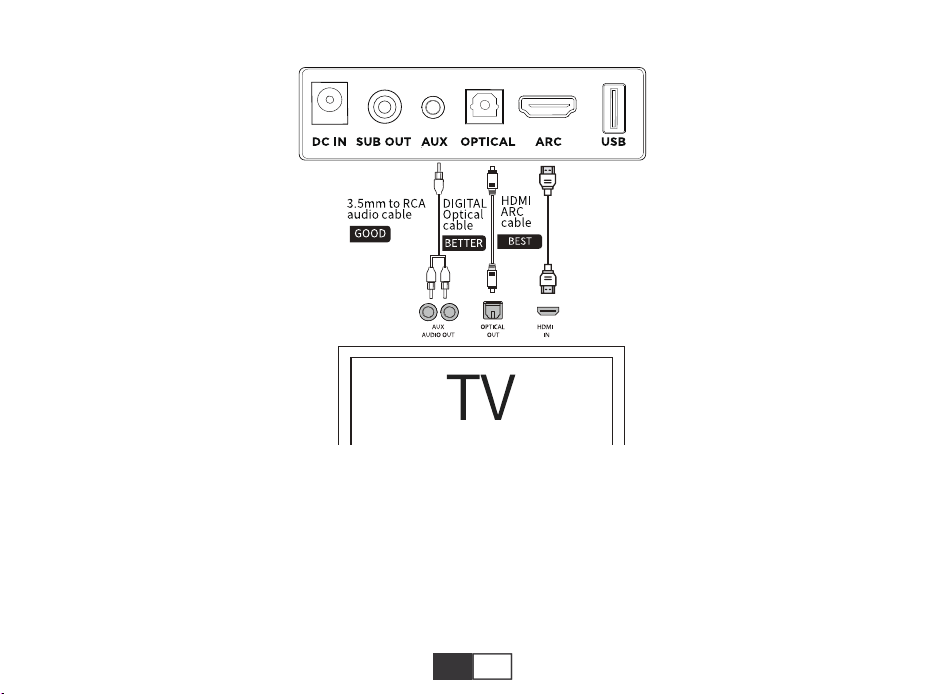
After connecting the line, use the buttons on the remote control or on the sound bar to change the input mode.
Note :
1.Prior to usage, check whether your TV has HDMI ARC, Optical, and Aux Output.
2.Prior to using HDMI or ARC connection, please ensure your TV supports HDMI ARCand HDMI The cable is not lower
than HDMI 1.4.
3.Turn on PCM settings of your TV When connected in Optical Mode in case there is no sound.
4.32 is the maximum volume of the soundbar.
B. Connect to TV
EN 11
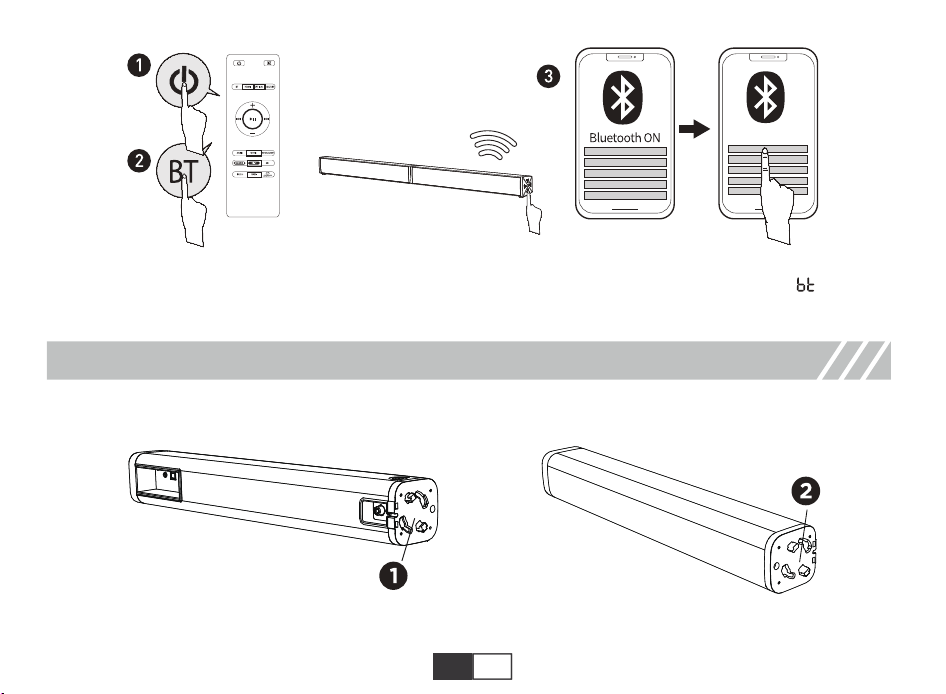
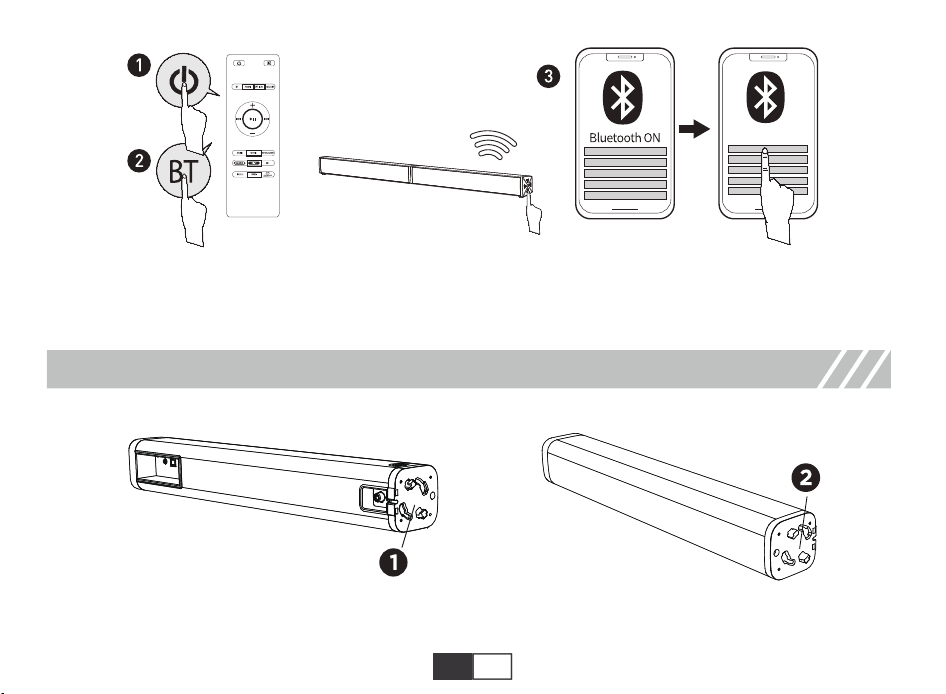
D. Connect to Bluetooth Device
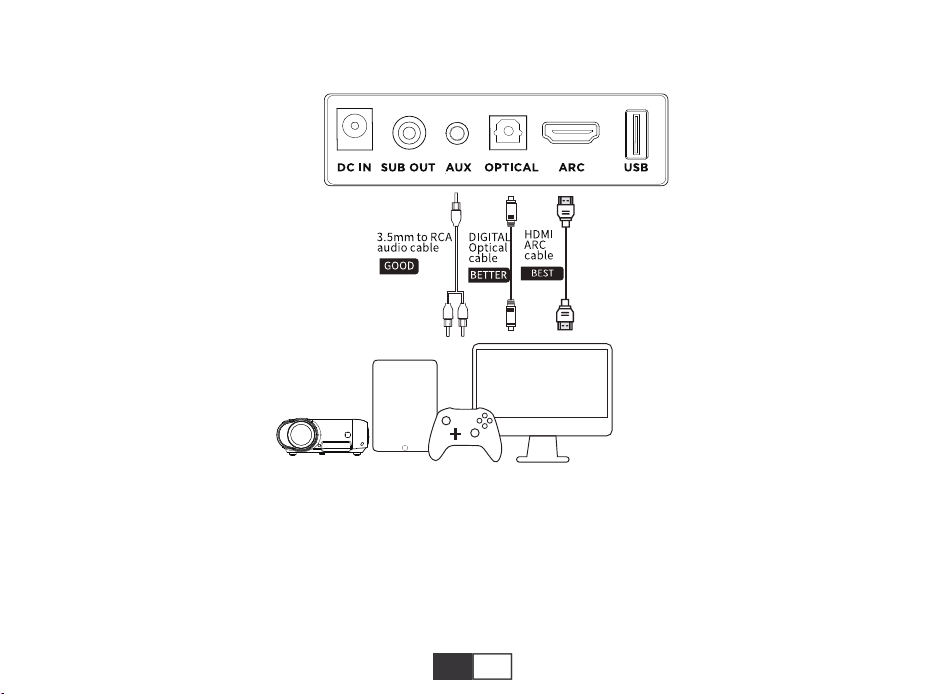
Need to purchase one 3.5mm-3.5mm audio cable if there is only 3.5mm female output on your Devices.
C. Connect to Other Devices
EN 12
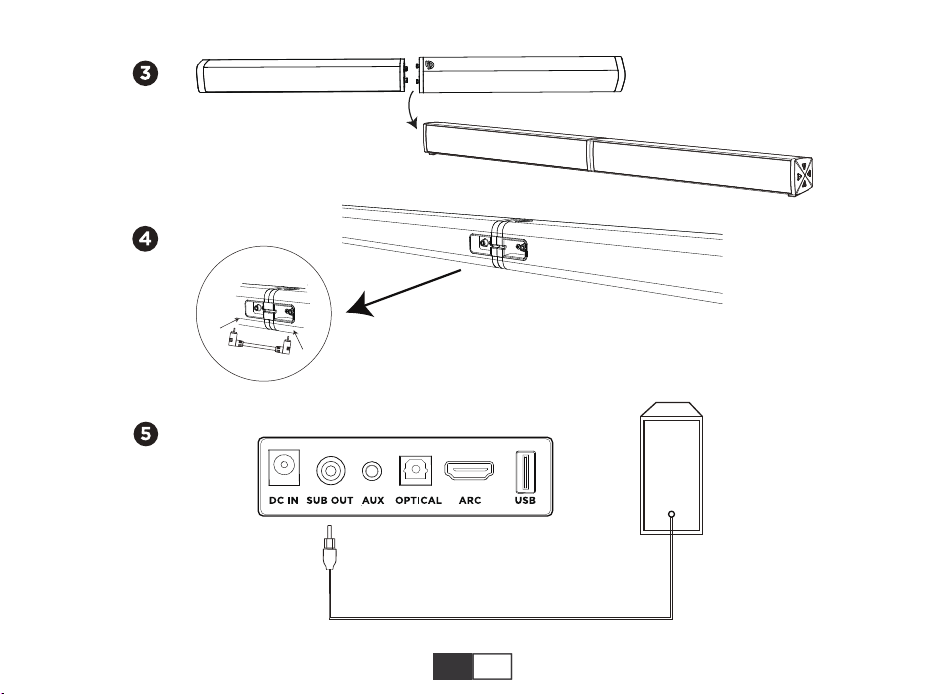
USING YOUR SOUNDBAR SYSTEM
Short press the "BT" button on the remote control to enter Bluetooth mode. When entering the pairing mode, starts to
flash, and the voice prompts "Paring", and pairing is successful, the voice prompt "Connected'
HW-T150
EN 13
EN 14
Non-Warranty Regulation
1.Within 90 days from the day after you sign for the product, if the product has performance failure,you can
enjoy free replacement or maintenance service;
2. Within 1 year from the day after you sign for the product, if the product has performance failure, you can
enjoy free maintenance service.
Distortion: <05%
Model: HW-T510
Sound Channel: 2.1
Peak Power 160W
Product Weight 4.7kg
Power Supply: DC 18V/4A
Functional Jacks: Optical xi, HDMI(ARC) X1,USBX1, AUXX1
Product Dimension: Soundbar 37*2.4*2.3 inches
Subwoofer 15.6*8.7*4.7 inches
BT Version: 5.0
Driven (52 X58mm) X4 Driven- Subwoofer 5.25" X1
WARRANTY POLICY
SPECIFICATION
EN 15
MANUFACTURER INFORMATION
CUSTOMER SERVICE
We will try our best to help you solve any problems you may experience with our product.
For FAQs and more information, please contact our after-sales Email below.
Email: [email protected]
Manufacturer:Ekoo Electronic Co., Ltd.
Address:B09, Block B, F2, Bldg.B, Runfeng Pioneer Park,
No.973, Minzhi Avenue, Minzhi St.,
Longhua, Shenzhen, CHINA 518000
Contact Information:0755-8374-8050(Not Customer Service Phone)
1.Unauthorized maintenance, misuse, collision, negligence, abuse, liquid injection, accident, alteration,
incorrect use of non-product accessories, or tear, alter labels, anti-counterfeiting marks;
2.Exceeded the validity period of Warranty;
3.Damage caused by force majeure;
4.Not conforming to performance failure;
5.The performance failure of the product is caused by personal reasons.

新製品を受け取ってから7日以内に登録してください
2年間の保証を有効に!!!
今 すぐオンラインで 登 録してください!
ご希望のお客様は【お名前、Eメールとご注文番号】を記入し下記ア
ドレスに送信して下さい
warranty.anflag.hk
JP 16
ANFLAG サウンドバーをお買い上げいただきありがとうございます。このマニュアルは、よい高音質なサウンド
体験を楽しむことができるように、このサウンドバーの設定の詳細を記載しております。
電源アダプター 光ケーブル AUXオーディオケーブル
壁取り付けボルト
バーリンク
付属品
JP 17
ボタン、ポート、インジケーター
電源ボタンを短く押すとオンになり、長く押すとオフになり、電源オン状態で短く押すと、モードが切り替わります。
短く押すと音量-1、長押して音量が急速に下がります。
ブルートゥース及びUSBモードでは、短く押すと再生または停止します。
短く押すと音量+1、長押して音量が急速に上がります。
SUBOUT:サブウーファー出力ポート。
AUXIN:3.5mm-RCAステレオボートケーブル(付属)を介して互換性のあるデバイスに接続します。
光ケーブルIN:光ケーブル(付属)を介して互換性のあるデバイスに接続します。
ARC:HDMIケーブル(付属していません)を介して互換性のあるデバイスに接続します。
USBIN:フラッシュドライブに接続して、MP3/WAVファイル(最大32㎇)を再生します。
DC18VINポート。
JP 18
HDMI(ARC)モード
USBモード
光モード
ダイナミックモ ード
ブルートゥースモード
HI-FIモード
補助入力
配置
モード
A.テーブルの配置
JP 19
配置: サウンドバーを頑丈な場所に置いてください。
B.壁掛け式
646.00mm
JP 20
リモコンの作動範囲は、垂直方向と水平方向の両方で+/-30°です。
B. リモコンを 使 用 する
A. 電 池 の 取り付け
リモコン
JP 21
BT
OPTICAL
HDMI
AUX/USB
-+
短押しでオン、長押しでオフ 光ファイバーモードに入ります
ミュート/ キャン セ ル HDMIモードに入ります
BluetoothモードとUSBモード
で再生または停止。
短押してニュースモードでEQ3が表示され、長
押してゲームモードでEQ4が表示されます。
BluetoothモードとUSBモード
で前の曲に切り替えます
BluetoothモードとUSBモードで次の曲に切り
替えます
短く押すと音量+1、長押して音
量が急速に上がります
短く押すと音量-1、長押して音量が急速に下が
ります
Bluetoothモードに入ります。
接続に成功したら、長く押して
切断します
短押してAUXモードとUSBモードを切り替えま
す。ご注意:USBモードはUディスクが挿入され
ている場合にのみ切り替えることができます
C. リモコンの使い方
NEWS/Game
JP 22
A. 電源接続
サウンドバーの使い方
MOVIEMUSIC
DYNAMIC
Hi-Fi
3D
BASS - BASS +
異なるイコライザーモードのダイナミック効果を強化します。より強力な機能を必要とするシーンに適した
音楽/映画/ニュース/ゲーム/3D音楽効果を得ることができます
異なるEQモードで音量の効果を調整します。音楽/映画/ニュース/ゲーム/3Dは、静かな会話などのシーン
に適した、より高音質なサウンドを得ることができます
3Dサラウンドサウンドのオン/オフ、
映画モードのみオンにできます
音楽モード/EQ1
映画モード/EQ2
ボタンを短く押すと、USBモードでシングルルー
プまたはオールループします。スタンドモードで
LEDインジケータをオン/オフするには、短く押し
ます
低音を下げる 低音を上げる
/LEDOFF
JP 23
ケーブルを接続したら、リモコンまたはサウンドバーのボタンを使用して入力を変更します。
ご注意:
1.使用する前に、テレビにHDMI、ARC、光及び補助出力があることを確認してください。
2.HDMI、ARC接続を使用する前に、テレビがHDMI、ARCをサポートしていることを確認してください。また、ケ
ーブルはHDMI1.4以上です。
3.テレビのPCM設定で【光モード】で接続して音が出ない場合、テレビのPCM設定をオンにします。
4.32はサウンドバーの最大音量です。
B. テレビに接続する
JP 24
D. ブルートゥースモードに接 続 する
デバイスに3.5㎜のメス出力しかない場合は、3.5mm~3.5mmのオーディオケーブルを1本購入する必要があり
ます。
C. 他のデバイスに接続する
JP 25
サウンドバ ーシステムの 使 用
リ モ コ ン の「 BT」ボタンを短く押して、Bluetoothモードに入ります。 ペアリングモードに 入ると、btが点滅し始め、音
声プロンプト「Paring」がお知らせし、ペアリングが成功すると、音声プロンプト「Connected」とお知らせします。
HW-T150
JP 26
JP 27
歪み<05%
モデル:HW-T510
サウンドチャネル:2.1
最大電力:160w
製品の重量:4.7㎏
電源:DC18v/4A
入力ポート:オプティカルX1、HDMI(ARC)X1,USBX1,AUXX1
製品の寸法:サウンドバー940(L)x62(D)x58(H)mm
サブウーファー120(L)x221(D)x398(H)mm
BTバージョン:5.0
ドライバー:(52X58mm)X4ドライバー+5.25"X1サブウーファー
仕様
1.落ちないように気をつけてください。
2.自分で分解しないでください。
3.温度が高すぎる、または低すぎる場所は避けてください。
4.雷雨の間は屋外で本製品を使用しないでください。
5.原装または認証ケーブルを使用してください。
6.本製品を掃除する時には腐蚀性洗剤を使用しないでください。
7.水がかかる場所に置かないでください。
安全上のご注意
JP 28
商品保証について
こちらの商品には、アマゾン直営店でお買い上げのお客様に対してのみ、1年間保証サービスが適用となりま
す。そのお客様が商品を転売するなど第三者に譲り渡した場合、その第三者には適用されません。
弊社のサウンドバーをご使用中、不具合が発生したと思われた場合、必ず事前にご連絡をお願い致します。
事前に弊社へご連絡がなく、商品の返送及びメーカーでの修理をされた場合は保証できかねます。
よくある質問と詳細については、下記のアフターメールにお問い合わせください。
Eメール:soundbar@anflag.hk