
EN
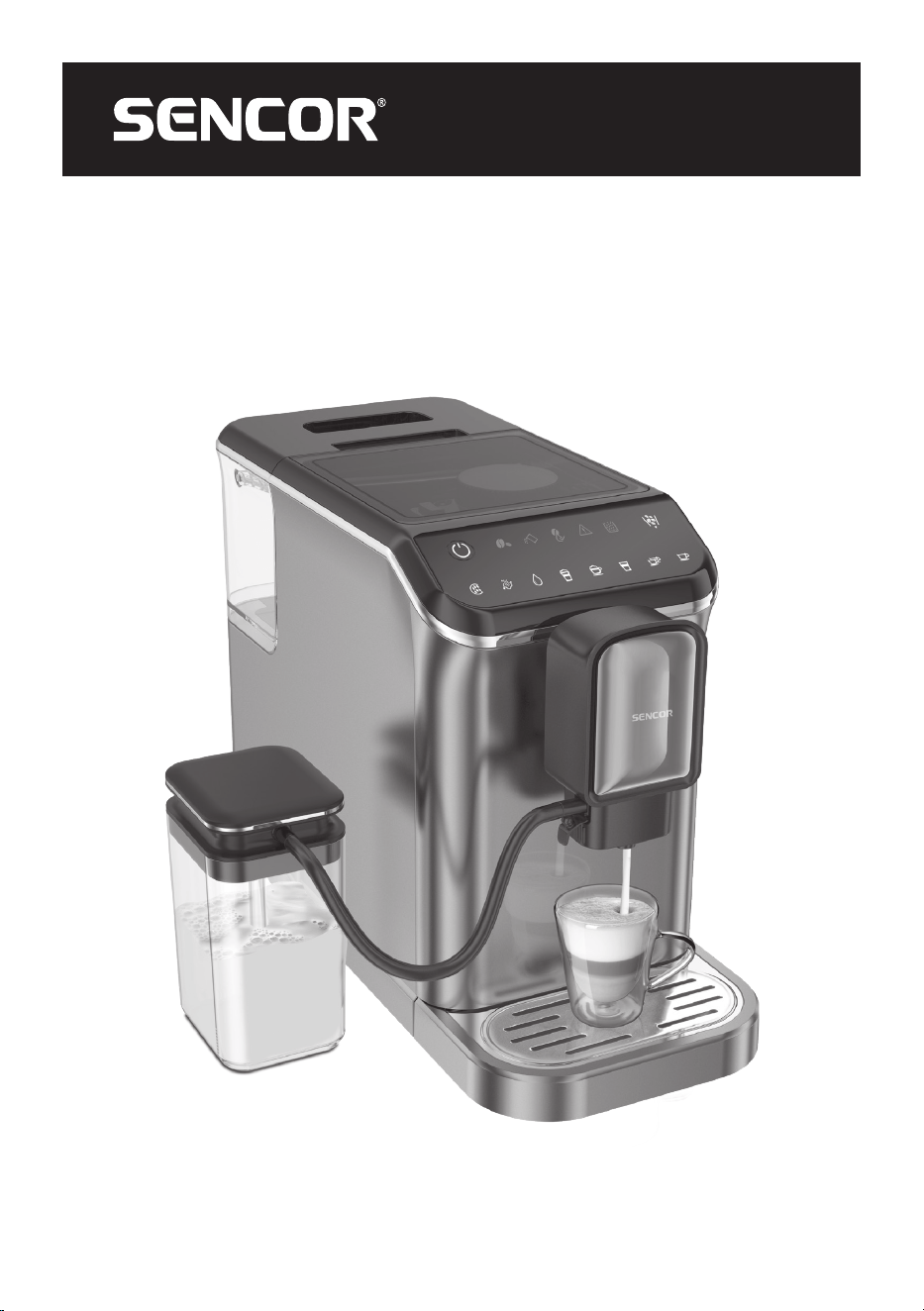
FULLY AUTOMATIC ESPRESSO/
CAPPUCCINO MACHINE
Translation of the original manual
SES 8000BK
SES 8000BK
A
PUSH
9
1
3
5
7
11
13
15
1
3
5
7
9
11
13
15
1
2
3
4
5
6
7
8
9
10
11
12
13
16
17
18
19
14
15
A
20
21
22
23
24
25
26
B
1
2 3 4 5 6 7
15
14 13 12 11 10 9
8
C1
C2
D1 D2 D3
E
PUSH
F1
F2
G1 G2
9
1
3
5
7
11
13
15
1
3
5
7
9
11
13
15

- 1 -
06/2023
2023, .
EN
Fully Automatic Espresso/Cappuccino
Machine
Important Safety Instructions
READ CAREFULLY AND STORE FOR FUTURE USE.
• This appliance is not to be used by children. Keep this
appliance and its power cord out of the reach of children.
• The appliance may be used by persons with reduced
physical, sensory or mental abilities or lack of experience
and knowledge, provided they are supervised or have
been instructed in the safe use of the appliance and
understand the potential hazards.
• Children must not play with the appliance.
• Cleaning and maintenance performed by the user must
not be performed by children.
• If the power cord is damaged, have it replaced in
aprofessional service centre in order to prevent
adangerous situation. It is forbidden to use the appliance
with the power cord damaged.
• Always clean the parts of the appliance that come into
contact with food with clean warm water and alittle neutral
dishwashing liquid, rinse them with clean water and wipe
dry.
WARNING:
Incorrect use may lead to injury.
Always disconnect the appliance from the power supply
when leaving it unattended and before assembly,
disassembly or cleaning.
- 2 -
06/2023
2023, .
This appliance is intended for use in the home.
It is not intended for use in areas such as:
• kitchenettes in shops, offices and other workplaces;
• agriculture;
• by guests in hotels, motels and other residential areas;
• bed and breakfast establishments.
WARNING:
Avoid spilling on the plug.
WARNING:
The outer surface of the appliance heats up during
use and may be hot for some time after use. Be very
careful.
The appliance must not be placed in acabinet when in use.
WARNING:
The filling hole must not be opened during use.
Do not do submerge the power cord, plug or
appliance in water or any other liquid.
Electrical Safety
• Before connecting the appliance to apower outlet, make sure that its nominal voltage indicated on the rating plate matches the electrical voltage of
the socket.
• Connect the appliance only to aproperly grounded socket. For safety reasons, we don’t recommend using adaptor plugs or extension cords.
• Do not place the appliance on windowsills, sink drain trays or unstable surfaces. Always place the appliance on astable, flat and dry surface.
• Do not place the appliance on an electric or gas stove or near an open flame.
• Never use the appliance in the immediate vicinity of abath, shower or swimming pool.
• Use the appliance only for the purpose for which it has been designed.
• Use the appliance according to the instructions in this user manual. Otherwise injury, damage to the appliance or dangerous situation might occur.
• Only use the appliance with the original accessories supplied with it.
• During operation, aclear space of at least 15 cm must be left around and above the appliance to ensure sufficient air circulation.
• Do not place any items on the top surface of the appliance.
• Fill the water tank with clean, cold water. Do not pour hot water or other liquids into it or place any objects inside it.
• Before turning on the appliance, make sure that:
– the drip tray with grid is installed in its place;
– the water tank is filled with asufficient amount of water and is properly installed in its position;
– the bean hopper is filled with fresh coffee beans.

- 3 -
06/2023
2023, .
Safety in Use
• The water level must not exceed the maximum mark.
• Take extra care when operating the appliance to avoid scalding with hot water or steam.
• The hot water function may only be used continuously for amaximum of one emptying of the entire water tank.
• When using the appliance, check the water level in the water tank regularly. If the water level falls below the minimum mark, refill the water tank.
Before adding water, first turn off the appliance and disconnect it from the power socket.
• Use the built-in coffee grinder only for grinding coffee beans. Do not use it for any other purposes.
• Ensure that no hair or other items enter the grinder area during the grinding process. The coffee bean hopper lid should always be properly closed
unless you are refilling coffee beans or adjusting the grinding coarseness.
• The appliance is equipped with abuilt-in thermal fuse that shuts it off when the pump is idling to prevent damage. If such asituation occurs, unplug
the power cord and allow the appliance to cool down for at least 30 minutes. Then you can use it again.
• Do not move the appliance with acoffee cup located on the grid of the drip tray.
• Ensure that the power cord does not come into contact with ahot surface.
• Unplug the appliance from the power socket by pulling the plug, not the power cord. Otherwise, damage to the power cord or the socket may occur.
• Do not submerge the appliance, power cord or plug in water or any other liquid.
• Make sure that the power cord and plug does not come into contact with water or other fluid.
• To avoid the danger of injury by electrical shock, do not repair or modify the appliance yourself. Have all repairs or adjustments performed at an
authorised service centre. By tampering with the appliance, you expose yourself to the risk of losing your legal rights regarding faulty performance
or warranty for quality.
- 4 -
06/2023
2023, .
• Thank you for purchasing our SENCOR product; we hope you will be
satisfied with it.
• Before using this appliance, please familiarise yourself with the user
manual, even if you are already familiar with using similar types of
appliances. Use the appliance only as described in this user manual.
Keep the manual for future reference.
• For the duration of the legal rights regarding faulty performance or
warranty for quality, we recommend keeping the original packaging,
packaging materials, receipt, and proof of the seller'sliability or
warranty certificate. When transporting the appliance, we recommend
packaging it again in the original box provided by the manufacturer.
. . . . . . . . . . . . . . . . . . . . . . . . . . . . . . . . . . . . . . . . . . . . . . . . . . . . . . . . . . . . . . . . . . . .
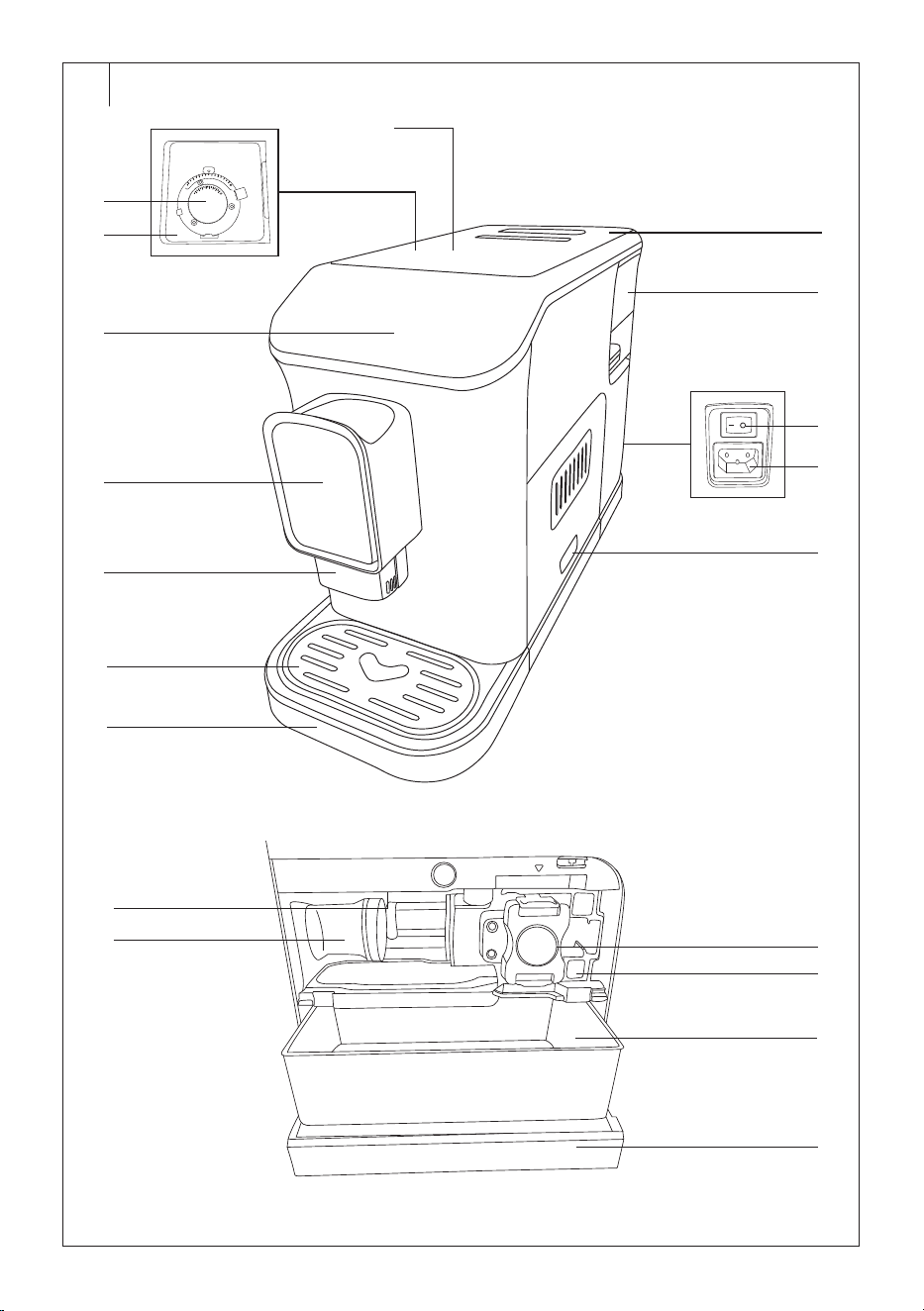
DESCRIPTION OF THE COFFEE MACHINE
A1 Bean hopper lid
A2 Grinding coarseness regulator
A3 Bean hopper, capacity 200 g
A4 Control panel
A5 Coffee dispensing brewing
head (height is adjustable)
A6 Coffee outlet cover
A7 Drip tray grid
A8 Drip tray
A9 Water tank lid
A10 Water tank, capacity 1.5 l
A11 Main power switch
A12 Power cord socket
A13 Service door
A14 Ground coffee dispensing
channel cover
A15 Tamper
A16 Brewing unit
A17 Brewing unit holder
A18 Coffee grounds container
A19 Inner tray
A20 Inlet opening
A21 Stopper
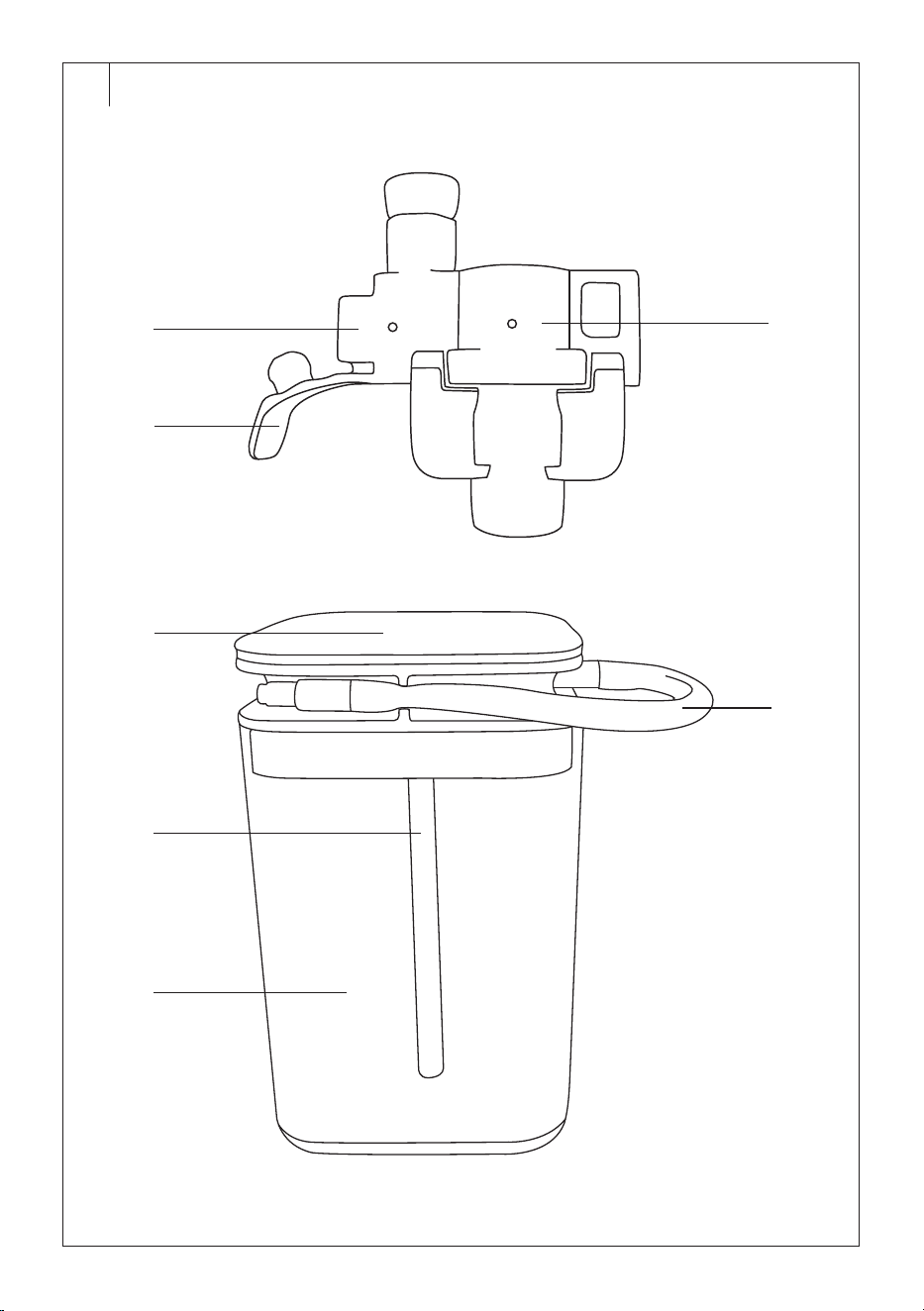
A22 Milk frothing system
A23 Milk container lid
A24 Milk frothing tube
A25 Mild container, volume 750 ml
A26 Connecting hose
Not shown: Cleaning brush, power cord
. . . . . . . . . . . . . . . . . . . . . . . . . . . . . . . . . . . . . . . . . . . . . . . . . . . . . . . . . . . . . . . . . . . .
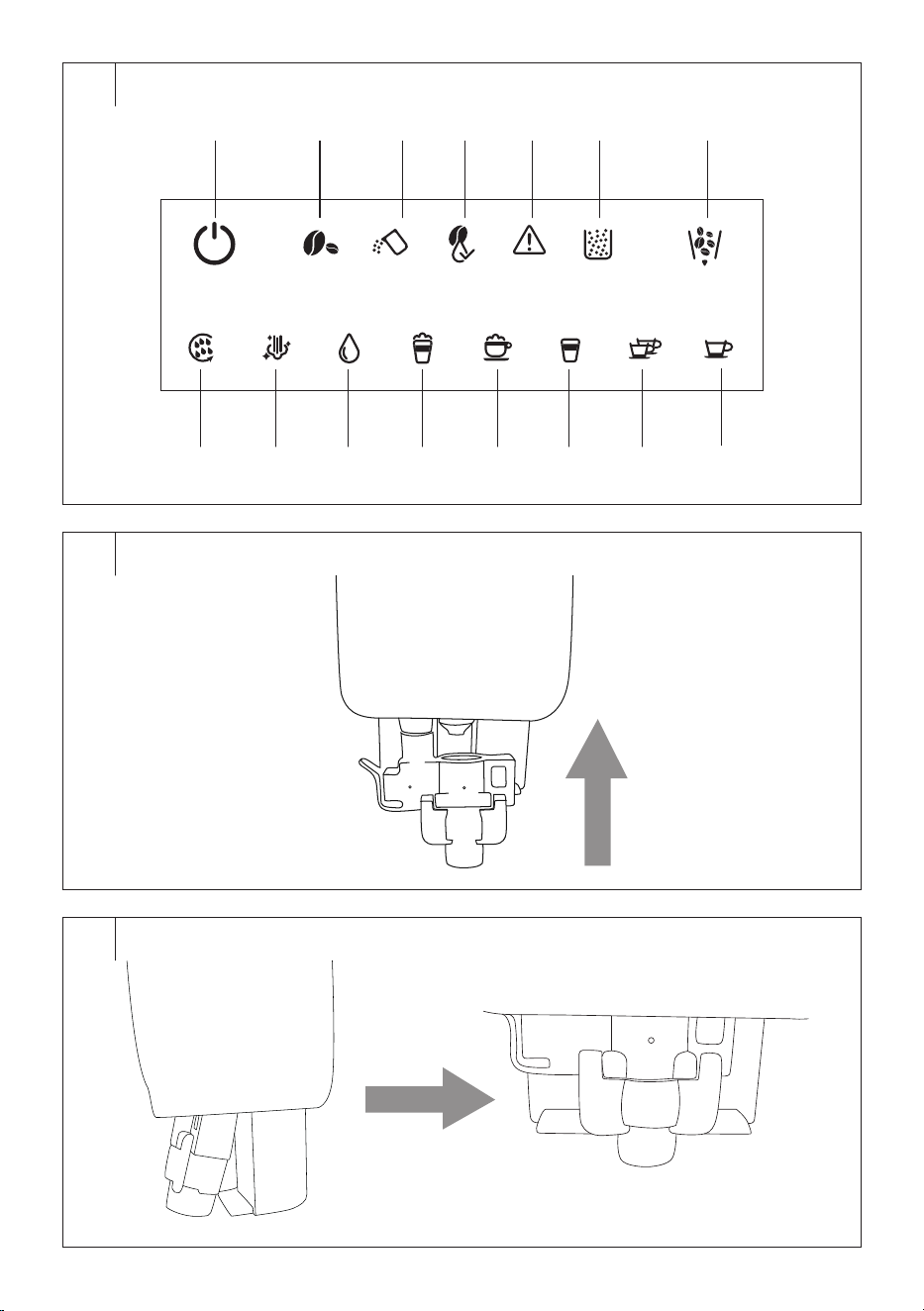
DESCRIPTION OF THE CONTROL PANEL
B1 Button
: coffee machine
power on/off
B2 Indicator light
: warning for
empty bean hopper
B3 Indicator light
: warning for
empty water tank
B4 Indicator light
: warning for
cleaning the brewing unit
B5 Warning indicator light
B6 Indicator light
: warning for
full coffee grounds container
B7 Button
: grinder emptying
B8 Button
: start brewing
espresso (1 cup)
B9 Button
: start brewing
espresso (2 cups)
B10 Button
: start brewing
Americano
B11 Button : start brewing
cappuccino
B12 Button
: start brewing latte
B13 Button
: hot water
dispensing
B14 Button
: milk frothing
B15 Button
: manual cleaning
. . . . . . . . . . . . . . . . . . . . . . . . . . . . . . . . . . . . . . . . . . . . . . . . . . . . . . . . . . . . . . . . . . . .
BEFORE FIRST USE
• Before first use, remove the appliance and its accessories form the
packaging and remove all promotional labels and tags. Check that
neither the appliance nor any of its components is damaged.
• Install the appliance on an even, dry and clean surface.
• Remove the water tank, the brewing unit, the milk frothing system and
the milk container. Wash them with clean water and asmall amount of
neutral kitchen detergent. Then rinse them properly with clean water,
dry them and put them back in place.
• Secure the drip tray properly to the appliance.
• Wipe the outer surface of the appliance with aslightly damp cloth and
then wipe dry properly.
• Fully unwind the detachable power cord and connect it to the socket
at the back of the appliance.
. . . . . . . . . . . . . . . . . . . . . . . . . . . . . . . . . . . . . . . . . . . . . . . . . . . . . . . . . . . . . . . . . . . .
PREPARING THE COFFEE MACHINE BEFORE USE
Filling the Water Tank
1. Carefully open the lid of the tank. The lid serves as ahandle.
2. Remove the water tank from the rear of the appliance.
3. Fill the water tank with clean water up to the maximum mark and
insert it back into the appliance. Make sure that the water tank is
properly installed in its place.
Note:
The water that you pour into the water tank should
ideally be at room temperature (approximately 25°C).
Water that is too cold can adversely affect the final
taste of the coffee drink.
Warning:
The maximum capacity of the water tank is 1.5 l of
water. Do not overfill it.
Never fill the water tank with warm or hot water,
sparkling water or other liquids such as milk. This
could damage the appliance.
Never fill the water tank by pouring water into in while
it is inserted inside the appliance. There is arisk of
spilling the appliance or overfilling the water tank.
Note:
Do not leave water in the water tank for more than
one day. For brewing quality fresh coffee, it is
necessary to always use fresh water. Otherwise, the
taste of the resulting beverage may be adversely
affected.
Filling the Bean Hopper
1. Remove the bean hopper lid.
2. Pour roasted coffee beans into the bean hopper and close the lid.
Do not leave the lid of the bean hopper open, otherwise the coffee
beans will lose their aroma more quickly.
Warning:
Themaximum capacity of the hopper is 200 g of
coffee beans. Do not overfill it.
Never fill the bean hopper with ground or instant
coffee, caramelised or otherwise specially treated
coffee beans, cocoa beans or other items that may
cause damage to the appliance.
Grinding Coarseness Regulator
Use the grinding coarseness regulator to adjust the appropriate
coarseness of the ground coffee. Only adjust the grinding coarseness
when the grinder is running. The new coarseness will be reflected on
the second or third coffee preparation since the grinding coarseness was
changed.
1. You can adjust the coarseness of the grinding in 15 levels by using
the grinding coarseness regulator, which is located inside the bean
hopper. For first use, we recommend setting the grinding coarseness
to 8 and then adjusting as needed.
2. Turn the regulator clockwise to set acoarser grind, turn
counterclockwise to set afiner grind. Always adjust by one level.
Try it out and then readjust as needed.
3. Only adjust the grinding coarseness when the grinder is running.
Otherwise, damage to the appliance could occur.
EN
Fully automatic espresso/cappuccino machine
User Manual
- 5 -
06/2023
2023, .
4. If the brewed coffee flows out very slowly, it means that the beans
are ground too finely and acoarser grind should be set. On the other
hand, if the brewed coffee flows out too fast, it means that the grains
are ground too coarsely and afiner grind should be set.
Milk Frothing System
If you are planning to prepare latte, cappuccino, or need to froth milk, it is
necessary to attach the milk frothing system. Follow these steps:
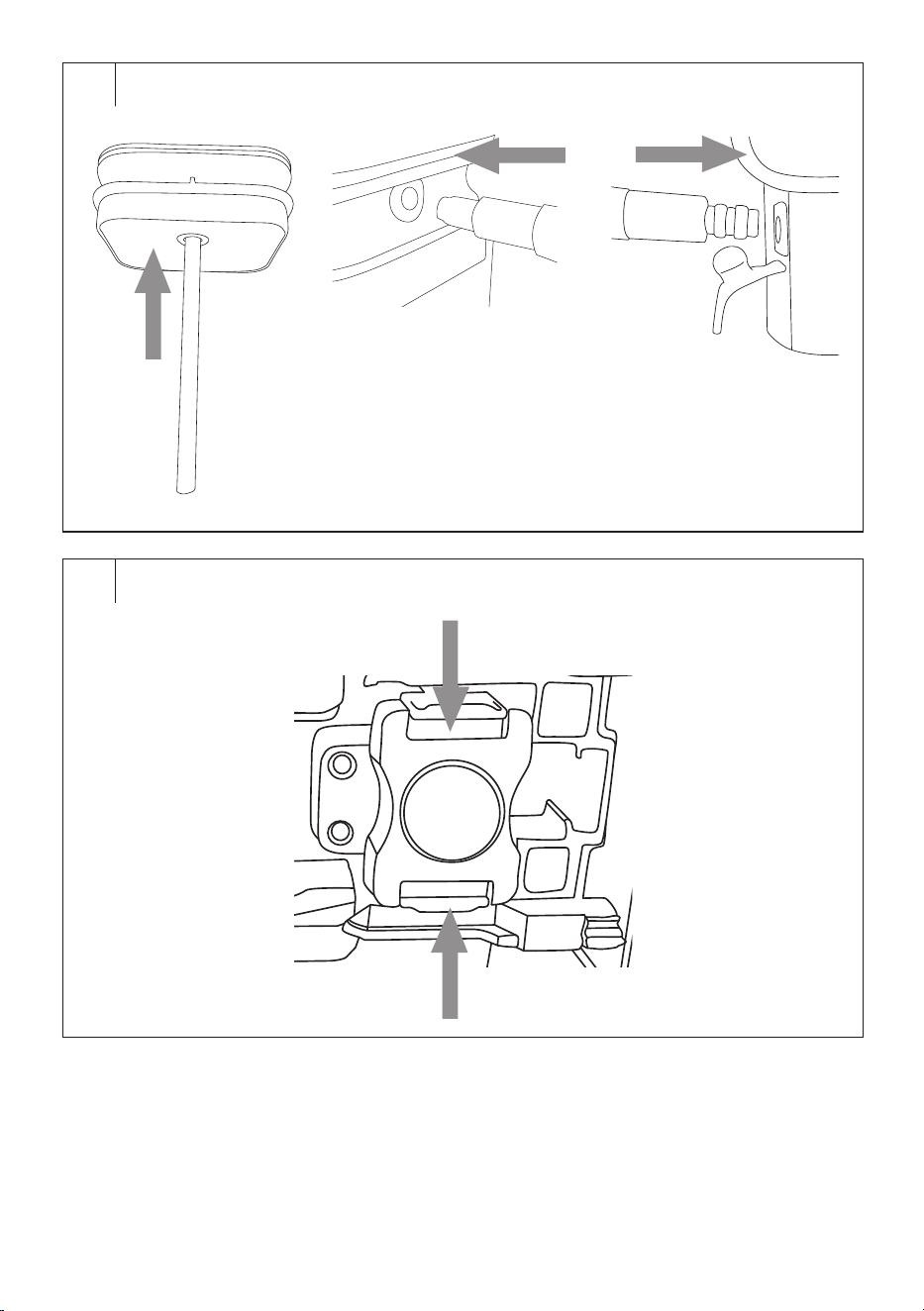
1. Carefully remove the coffee outlet cover by pressing its sides and
pulling it away from the outlet.
2. Attach the milk frothing system to the coffee outlet from below
(Figure C1). Push gently upwards and then secure it onto the
pins so that the round shape of the outlet fits into the round
cutout (Figure C2).
3. Reattach the coffee outlet cover.
Milk Container
If you are planning to make latte, cappuccino, or need to froth milk,
assemble the milk container as follows:
1. Pour fresh, cold milk into the container. Always fill below the
maximum level. The maximum capacity of the milk container is
750ml.
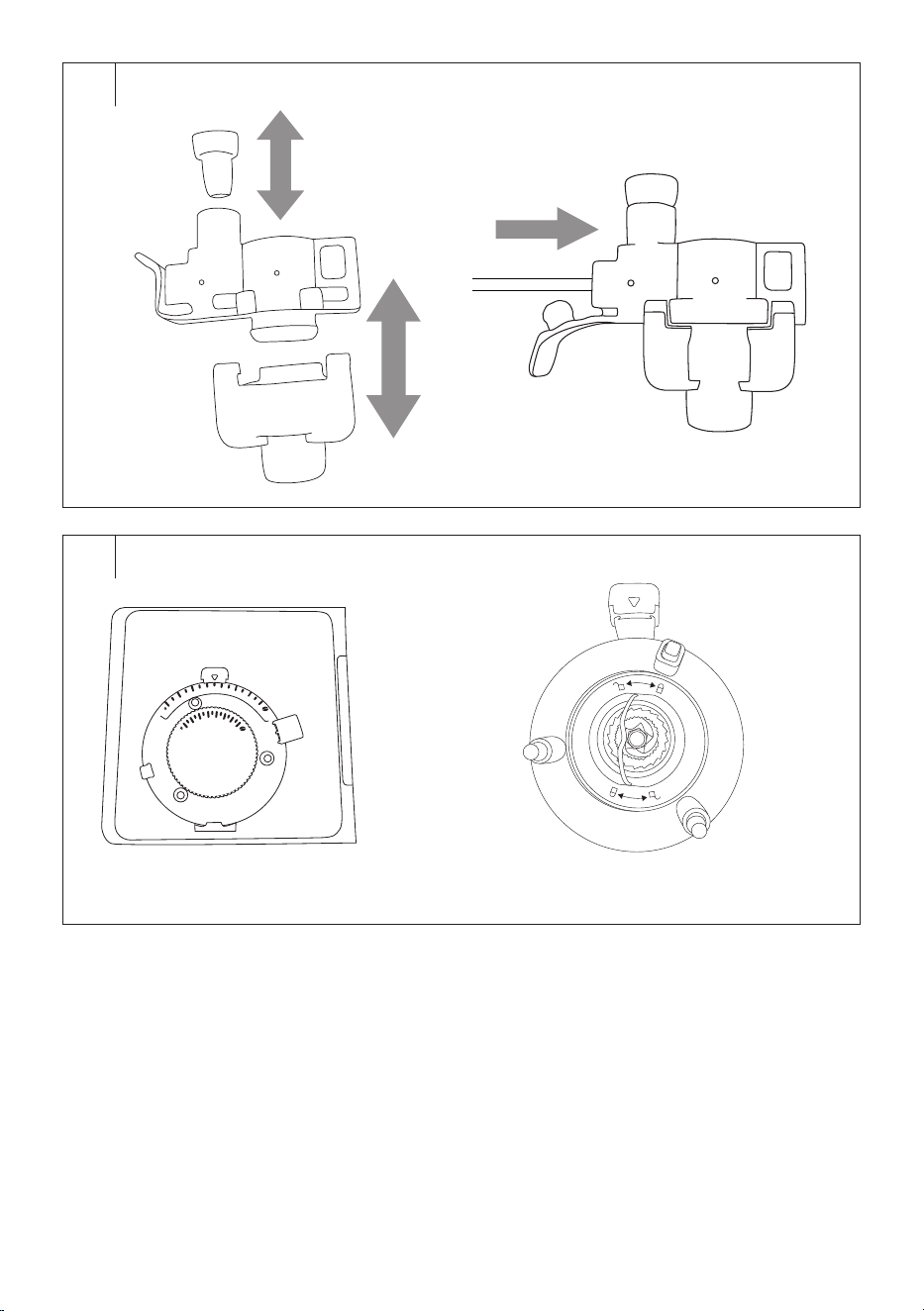
2. Insert the milk tube into the hole on the inner side of the lid (Figure
D1).
3. Place the milk container on astable and flat surface at asufficient
distance from the coffee machine.
4. Put the lid on the container.
5. Insert one end of the connecting hose into the hole in the lid of the
milk container (Figure D2).
6. Open the plug of the inlet opening in the milk frothing system and
insert the other end of the connecting hose into the opening (Figure
D3).
Brewing Head Height Adjustment
• The brewing head can be moved up/down according to the height of
the cup in which you will be preparing the coffee. First, place the cup
under the brewing head and then adjust the height.
Brewing Unit
• Gently press on the bottom part of the service door where the
indentation is located. The service door will swing open. Remove it
and check it the brewing unit is properly installed in its place. When
inserting the brewing unit into the coffee machine, align the arrow on
the brewing unit with the arrow above the brewing unit compartment.
After checking, reattach the service door.
• If you remove and reinsert the brewing unit and hear aclick, it
indicates that the brewing unit is properly installed.
• If the warning indicator light is continuously on, the brewing unit is
not installed correctly.
• If the warning indicator light blinks when you press the beverage
preparation button, the service door is not closed properly.
Coffee Grounds Container and Inner Tray
• Gently press on the bottom part of the service door where the
indentation is located. The service door will swing open. Remove it and
check if the coffee grounds container and the inner tray are properly
installed in their place.
• If the warning indicator light is continuously on, the inner tray or
coffee grounds container is not installed correctly.
Drip Tray
• Attach the grid to the drip tray.
• Place the folded drip tray against the lower front wall of the coffee
machine and press it slightly into the machine.
• The tray must be securely in place to prevent the cup with hot
beverage from tipping over during preparation.
• Water from the outlet flows into the drip tray during each rinsing, self-
cleaning, and also coffee brewing, which may cause spills. Therefore,
clean and empty the drip tray daily.
. . . . . . . . . . . . . . . . . . . . . . . . . . . . . . . . . . . . . . . . . . . . . . . . . . . . . . . . . . . . . . . . . . . .
USING THE COFFEE MACHINE
• Place the coffee machine on aflat, dry and clean surface at
asufficient distance from the from the power socket. Ensure there is
enough space around it for manipulation, at least 15 cm around the
entire coffee machine.
• Make sure that the water tank is refilled with fresh water, the bean
hopper has an adequate amount of coffee beans, and that the
appliance is properly assembled.
• Plug the power cord connector into the socket in the coffee machine
and connect the power cord plug to the power socket.
Note:
When refilling water and coffee beans, always follow the
instructions provided in chapter “Filling the Water Tank”
and “Filling the Bean Hopper”.
Turning on the Coffee Machine, Rinsing and Preheating
• Switch the main power switch at the back of the machine to the “I”
position (on). You will hear asound alert and the control panel will
briefly light up. Once it goes off, the coffee machine automatically
switches to the standby mode.
• Place acup or bowl under the coffee outlet.
• Press the button to turn the appliance on. The button will start
blinking and the button will light up. The coffee machine starts
heating up, and the preparation process begins, during which water
is pumped into the internal circuit, the grinder is checked, and the
coffee outlet is rinsed, with asmall amount of water flowing into the
cup. During this time, the grinder and pump will briefly operate. This is
anormal occurrence.
• At the same time, the steam delivery system will warm up and, during
this time, the buttons , , , and will slowly blink. The
coffee machine cannot be operated during this time.
• Once the control buttons light up, the coffee machine is ready to use.
Note:
The coffee machine will automatically rinse if it has been
in standby mode for more than 4 hours and always after
turning it on with the main power switch.
Turning off the Coffee Machine
• When you have finished using the coffee machine, press the button
to turn it off. The coffee machine will switch to the standby mode.
• To completely turn it off, switch the main power switch to the “0”
position (off) and unplug the power cord from the power socket.
Note:
The coffee machine is equipped with an automatic standby
mode feature. This occurs after 28 minutes of inactivity.
This is anormal occurrence.
Preparing Espresso (1 and 2 cups) and Americano
1. Place acup, mug or glass under the brewing head. Adjust the height
of the brewing head by moving it up or down depending on the size
of your cup, mug or glass. If the cup or glass is too tall, you may
remove the drip tray. After removing the cup or glass, return the drip
tray to its place.
2. Press the button (for preparing 1 cup of espresso), (for
preparing 2 cups of espresso) or the button
(for preparing
Americano). The selected button will light up, the other buttons will
turn off except for the button
.
3. The coffee machine will automatically start the grinding, dosing,
tamping and dispensing process.
4. Once the coffee dispensing process is complete, you will hear
asound alert, the button will briefly blink, indicating that the
coffee machine is heating up to operating temperature. Once the
control panel lights up, the coffee machine is ready to make another
coffee.
• Preparing 2 cups of espresso involves two consecutive preparations of
1 cup of espresso. Do not remove the cup from under the brewing head
until the preparation of the second cup is complete.
- 6 -
06/2023
2023, .
• Preparing Americano coffee consists of preparing 1 cup of espresso
and adding hot water. Do not remove the cup from under the brewing
head until the hot water dispensing is finished.
• You can cancel the preparation of espresso or Americano coffee by
pressing the corresponding button.
Note:
During the coffee preparation process, you may hear the
sound of the grinder and pump, and after preparation, the
sound of used ground coffee being expelled into the coffee
grounds container. These are normal sounds.
Note:
At the beginning of the coffee dispensing process, coffee
may drip slowly (2 to 3 seconds after brewing), and then
the full coffee dispensing will start. After the dispensing is
complete, the coffee may drip from the outlet for about 6 to
8 seconds. This is anormal occurrence.
Preparing Latte/Cappuccino
1. Install the milk frothing system to the coffee outlet following the
instructions in the “Milk Frothing System” section and assemble the
milk container according to the instruction in the “Milk Container”
section.
2. Make sure that the connecting tube is correctly inserted in the
container lid and in the milk frothing system.
Note:
To achieve rich and creamy froth, we recommend using
properly chilled milk (around 5°C) with aminimum fat
content of 3%.
3. Place acup, mug or glass under the brewing head. Adjust the height
of the brewing head by moving it up or down depending on the size
of your cup, mug or glass. If the cup or glass is too tall, you may
remove the drip tray. After removing the cup or glass, return the drip
tray to its place.
4. Press the button (to make acappuccino) or (to make alatte).
The pressed button will light up.
5. The coffee machine will automatically start the preparation process
for latte or cappuccino.
6. Once the preparation is complete, you will hear asound alert, the
button will briefly blink, indicating that the machine is heating up
to operating temperature. Once the control panel lights up, the coffee
machine is ready to make another coffee.
7. Disconnect the connecting tube and store any remaining milk in the
container in the refrigerator.
• You can cancel the preparation of cappuccino or latte by pressing the
corresponding button.
• When the preparation is complete, it is necessary to clean the milk
frothing system, the connecting tube, and the milk container if it is
empty. Follow the instructions in the “Cleaning and Maintenance”
section.
Note:
After the preparation of cappuccino or latte, the overheating
protection mechanism is activated. During this time,
the indicator light
will slowly blink. This is anormal
occurrence. If you need to dispense hot water, allow the
machine to cool down for 3 to 5 minutes.
Milk Frothing
1. Install the milk frothing system to the coffee outlet following the
instructions in the “Milk Frothing System” section and assemble the
milk container according to the instruction in the “Milk Container”
section.
2. Make sure that the connecting tube is correctly inserted in the
container lid and in the milk frothing system.
Note:
To achieve rich and creamy froth, we recommend using
properly chilled milk (around 5°C) with aminimum fat
content of 3%.
3. Place acup, mug or glass under the brewing head. Adjust the height
of the brewing head by moving it up or down depending on the size
of your cup, mug or glass. If the cup or glass is too tall, you may
remove the drip tray. After removing the cup or glass, return the drip
tray to its place.
4. Press the button
. The pressed button will light up.
5. The dispensing of hot milk and milk froth will start. Approximately
160 ml of hot milk and milk froth will flow into the cup.
6. Once the preparation is complete, you will hear asound alert, and
the button will blink briefly, indicating that the coffee machine is
heating up to operating temperature. Once the control panel lights
up, the coffee machine is ready to make another coffee.
7. Disconnect the connecting tube and store any remaining milk in the
container in the refrigerator.
• You can cancel milk frothing by pressing the button .
• When the preparation is complete, it is necessary to clean the milk
frothing system, the connecting tube, and the milk container if it is
empty. Follow the instructions in the “Cleaning and Maintenance”
section.
Note:
After the preparation of cappuccino or latte, the overheating
protection mechanism is activated. During this time,
the indicator light
will slowly blink. This is anormal
occurrence. If you need to dispense hot water, allow the
machine to cool down for 3 to 5 minutes.
Dispensing Hot Water
1. Place acup, mug or glass under the brewing head. Adjust the height
of the brewing head by moving it up or down depending on the size
of your cup, mug or glass. If the cup or glass is too tall, you may
remove the drip tray. After removing the cup or glass, return the drip
tray to its place.
2. Press the button and the coffee machine will start dispensing hot
water. Approximately 120 ml of hot water will flow into the cup.
3. Hot water dispensing will stop automatically, you will hear asound
alert, the button will briefly blink, indicating that the machine is
heating up to operating temperature. Once the control panel lights
up, the coffee machine is ready to make another coffee.
You can cancel hot water dispensing by pressing the button .
Warning:
The water is very hot and improper handling can
cause serious burns. Be careful when handling hot
contents.
. . . . . . . . . . . . . . . . . . . . . . . . . . . . . . . . . . . . . . . . . . . . . . . . . . . . . . . . . . . . . . . . . . . .
USER SETTINGS
Setting the Coffee Volume
The coffee machine allows you to adjust the volume of dispensed coffee
according to your preferences. The settings you make will be saved to the
memory of the coffee machine.
1. Place acup, mug or glass under the brewing head.
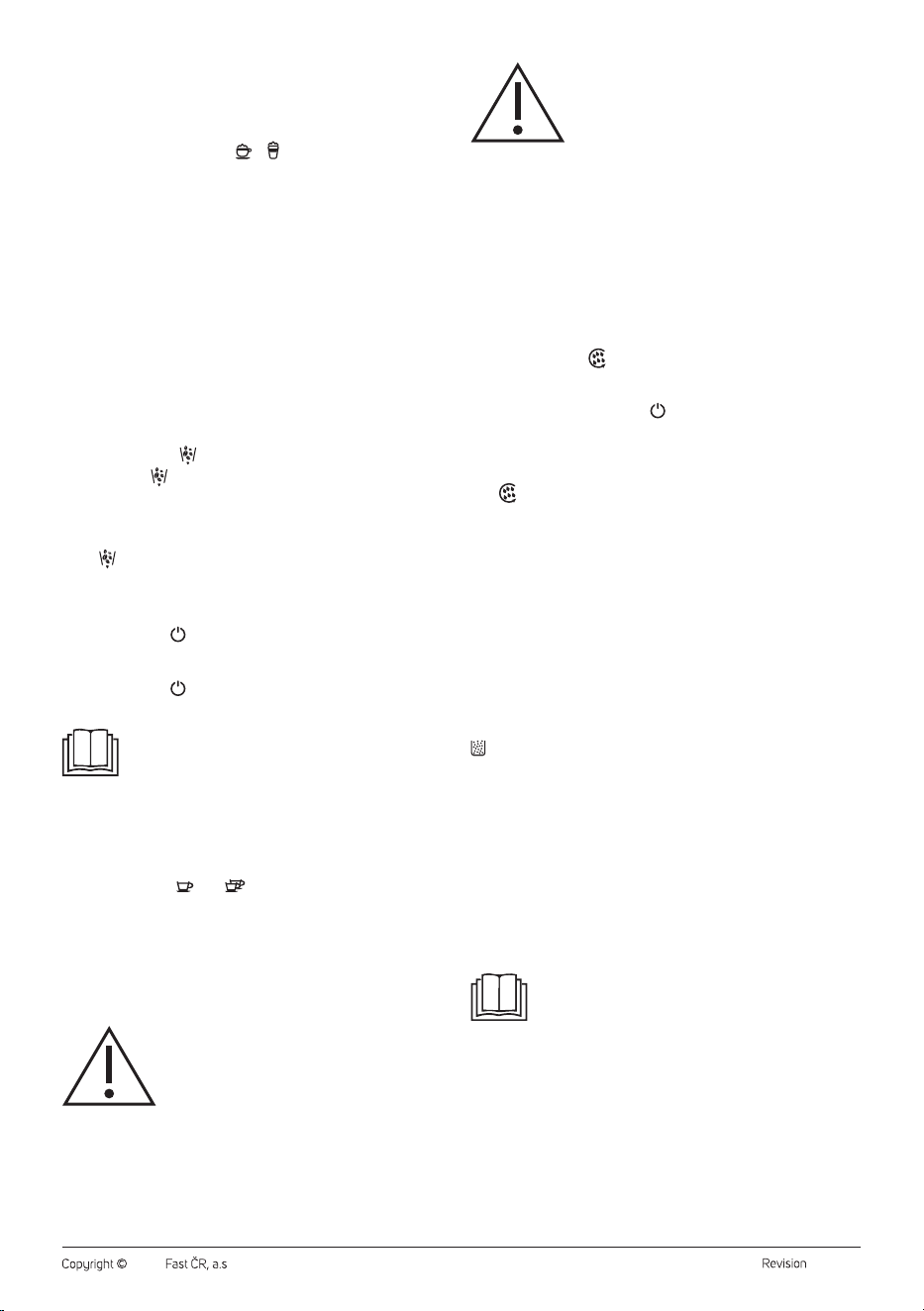
2. Press the beverage button (
,
or ) for the drink you want to
prepare. The pressed button will light up.
3. Once the machine starts dispensing coffee, press and hold the
selected beverage button until the beep sounds and the selected
beverage button blinks.
4. Keep the button pressed until the desired volume of coffee is
dispensed into the cup. Release the button and the volume of
dispensed coffee will be saved to the appliance memory.
The range of coffee volume is as follows:
• 1 cup of espresso: 30–100 ml
• 2 cups of espresso: 2x (30–100 ml)
• Americano: 110–180 ml
- 7 -
06/2023
2023, .
Setting the Milk Dispensing Time
The coffee machine allows you to adjust the volume of dispensed milk
according to your preferences. The settings you make will be saved to the
memory of the coffee machine.
1. Place acup, mug or glass under the brewing head.
2. Press the beverage button ( or ) for the drink you want to
prepare. The pressed button will light up.
3. Once the machine starts dispensing milk, press and hold the
selected beverage button until the beep sounds and the selected
beverage button blinks.
4. Keep the button of the selected beverage pressed until the desired
amount of milk is dispensed into the cup. Release the button and the
volume of dispensed milk will be saved to the appliance memory.
The range of milk volume is as follows:
• Cappuccino: 30–100 ml (coffee) + 10–40 seconds (milk)
• Latte: 30–100 ml (coffee) + 10–40 seconds (milk)
. . . . . . . . . . . . . . . . . . . . . . . . . . . . . . . . . . . . . . . . . . . . . . . . . . . . . . . . . . . . . . . . . . . .
GRINDER EMPTYING
This function is used to empty the grinder and remove any coffee beans
inside it if you won't be using the coffee machine for an extended period to
prevent them from deteriorating.
1. Empty the bean hopper.
2. Press the button
to start the grinder emptying function.
The button
will light up.
3. The grinder will stop after about 15 seconds. If the grinder is still full,
run the function again.
4. Empty the coffee grounds container.
You can cancel the emptying function of the grinder by pressing the
button .
. . . . . . . . . . . . . . . . . . . . . . . . . . . . . . . . . . . . . . . . . . . . . . . . . . . . . . . . . . . . . . . . . . . .
STANDBY MODE
• Press the button and the coffee machine will switch to standby
mode. In this mode, the control panel will be off and no buttons will
function.
• Press the button to cancel the standby mode and turn on the
coffee machine.
Note:
The coffee machine is equipped with an automatic standby
mode feature. This occurs after 28 minutes of inactivity.
This is anormal occurrence.
. . . . . . . . . . . . . . . . . . . . . . . . . . . . . . . . . . . . . . . . . . . . . . . . . . . . . . . . . . . . . . . . . . . .
FACTORY RESET
• If you need to restore the factory settings and erase all your
customized settings, perform afactory reset.
• Press the buttons and
simultaneously for 2 seconds. You will
hear asound alert indicating the factory reset has been competed.
. . . . . . . . . . . . . . . . . . . . . . . . . . . . . . . . . . . . . . . . . . . . . . . . . . . . . . . . . . . . . . . . . . . .
CLEANING AND MAINTENANCE
Before cleaning, turn off the coffee machine and switch the main power
switch to the “0” position. Unplug the power cord from the power socket
and let the appliance cool down.
Warning:
Do not use abrasive cleaning agents, solvents, or any
substances to clean any parts of the appliance that
could damage the surface of the appliance. None
of the components of this appliance are dishwasher
safe.
Warning:
To prevent the risk of electric shock, do not submerge
the appliance, plug or power cord in water or any
other liquid.
. . . . . . . . . . . . . . . . . . . . . . . . . . . . . . . . . . . . . . . . . . . . . . . . . . . . . . . . . . . . . . . . . . . .
DAILY CLEANING AND MAINTENANCE
• Regular cleaning and maintenance are crucial for the proper
functioning and longevity of the appliance.
• Before cleaning, turn off the appliance, unplug it and allow it to cool
down.
Manual Rinsing
We recommend cleaning the coffee outlet after each use. This is also
recommended when the appliance has not been used for an extended
period of time.
1. Press the button to initiate the manual rinsing process. Several
rinses and hot water dispensing will occur. Pour out the water.
2. The manual rinsing processwill automatically stop, you will hear
asound alert and the button will briefly blink, indicating that
the machine is heating up to operating temperature. Once the
control panel lights up, the coffee machine is readyfor the coffee
preparation.
3. You can cancel the manual rinsing process by pressing the button
.
Drip Tray
The drip tray should be emptied daily.
• Carefully pull out the drip tray from the coffee machine. Remove the
grid. Empty its contents over the sink.
• Clean the drip tray and grid with warm water and alittle dishwashing
detergent. Rinse and wipe dry.
• Be careful when handling the A11 tray to avoid scalding. It may contain
hot water.
• Place the grid back onto the drip tray and insert into the coffee
machine.
Coffee Grounds Container and Inner Tray
Empty the coffee grounds container whenever the warning indicator light
comes on. The coffee grounds container has acapacity of 8 coffee
servings. When emptying the container, ensure the coffee machine is
turned on to reset the counter.
• Gently press on the bottom part of the service door where the
indentation is located. The service door will swing open. Remove it and
carefully slide out the inner tray with the coffee grounds container.
• Empty the coffee grounds container into the municipal waste or
compost.
• Empty the contents of the drip tray over the sink.
• Clean the inner tray and coffee grounds container with warm water
and alittle dishwashing detergent. Rinse and wipe dry.
• Insert the coffee grounds container into the inner tray and slide the
inner tray back into the coffee machine. Reattach the service door.
Note:
Empty the coffee grounds container and clean the brewing
unit whenever the coffee machine is turned on. If you
empty the container or clean the brewing unit while the
coffee machine is turned off, the counter will not reset.
Brewing Unit
We recommend cleaning the brewing unit at the same time as emptying
the coffee grounds container.
• Gently press on the bottom part of the service door where the
indentation is located. The service door will swing open. Remove it.
• Press both latches on the brewing unit and remove it from the coffee
machine (Figure E).
• Wash it under running water and then dry it properly.
- 8 -
06/2023
2023, .
• Insert the brewing unit back into the coffee machine, aligning the
arrow on the brewing unit with the arrow above the brewing unit
compartment. Aclick indicates that the brewing unit is correctly
installed.
• Reattach the service door.
Note:
If the warning indicator light is continuously on, the
brewing unit is not installed correctly.
If the warning indicator light blinks when you press the
beverage preparation button, the service door is not closed
properly.
Water Tank
Remove the water tank, rinse it with clean water, dry it and put it back in
its place.
Milk Frothing System
To prevent milk from settling in the system and creating unwanted odours,
it is important to clean it after each use.
1. Place acup or glass under the brewing head.
2. Fill the milk container with clean water.
3. Install the milk frothing system to the coffee outlet according to the
instructions in the “Milk Frothing System” section.
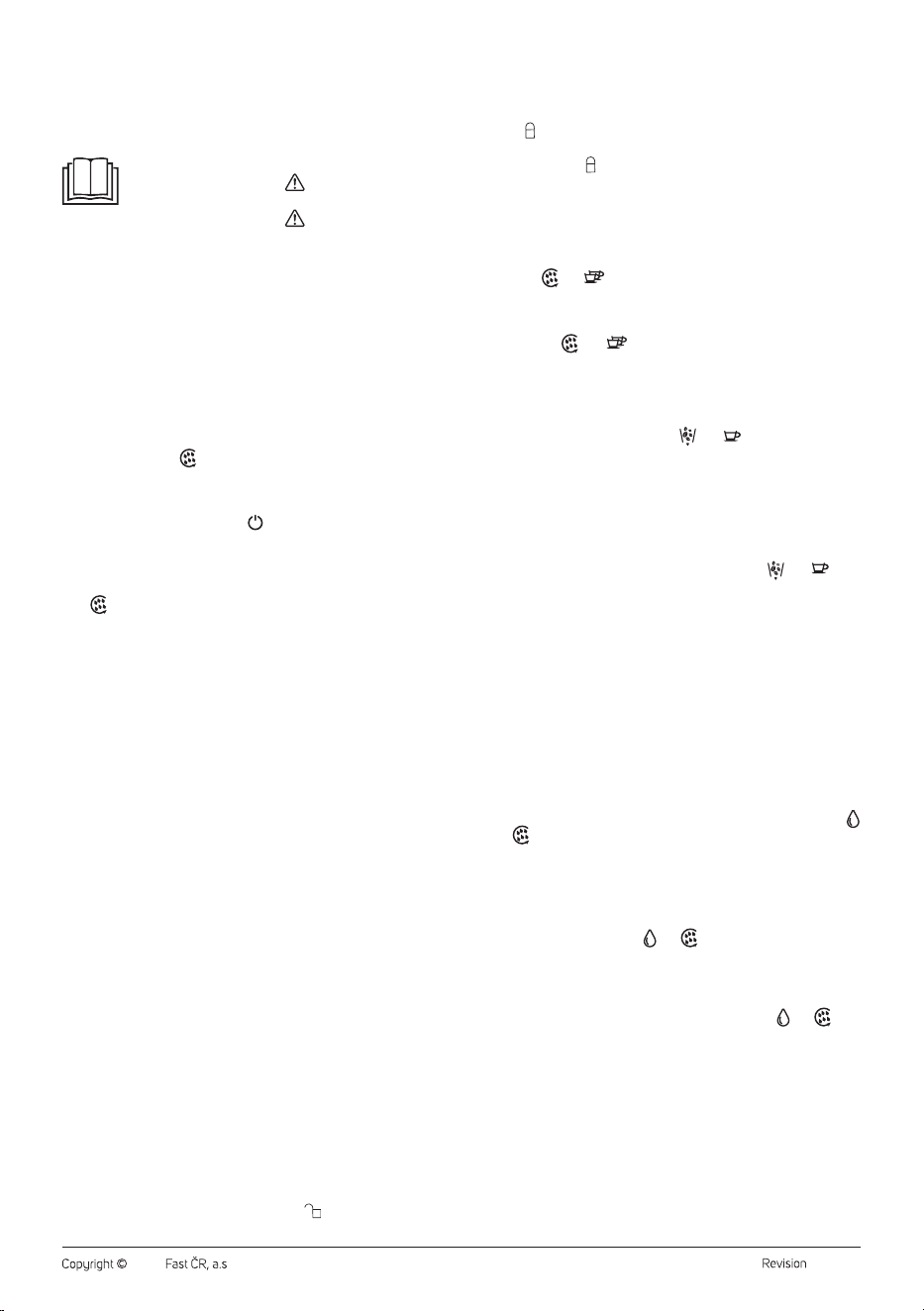
4. Press the button
to start the manual rinsing process of the coffee
machine. Several rinses and hot water dispensing will occur. Pour
out the water.
5. The manual rinsing process will automatically stop, and you will
hear asound alert, the button will briefly blink, indicating that the
coffee machine is heating up to operating temperature. Once the
control panel lights up, the coffee machine is ready to make another
coffee.
6. You can cancel the manual rinsing process by pressing the button
.
7. Allow the coffee machine cool down for awhile so that you can
remove the milk frothing system and clean it manually.
8. Carefully remove the coffee outlet cover by pressing its sides and
pulling it away from the outlet.
9. Remove the milk frothing system, disassemble it (Figure F1), rinsing
all parts under running water.
10. It is important to clean the milk inlet opening with athin object
(e.g. aneedle) (Figure F2).
11. Thoroughly dry all parts and then reassemble them.
Milk Container, Milk Tube and Connecting Hose
1. Disconnect the connecting hose from the container lid.
2. Remove the lid from the milk container and pour out the remaining
contents of the milk container.
3. Remove the milk tube from the underside of the lid.
4. Wash the milk container, lid, milk tube and connecting hose in warm
water with asmall amount of neutral dishwashing detergent. Rinse
under clean water and dry properly.
5. If necessary, you can use aneedle to remove debris from the
holes at the ends of the connecting hose and in the cap where the
connecting hose is inserted.
6. Before assembling, make sure that both ends of the connecting hose
are clean and dry.
. . . . . . . . . . . . . . . . . . . . . . . . . . . . . . . . . . . . . . . . . . . . . . . . . . . . . . . . . . . . . . . . . . . .
REGULAR MAINTENANCE
Perform regular maintenance on the coffee machine at least once aweek.
Coffee Bean Hopper and Grinder
1. Empty the coffee beans from the hopper and store them in an
airtight container.
2. Start the emptying function of the grinder
3. Turn the grinding coarseness regulator counterclockwise until the
tabs on the regulator are aligned with the notches on the grinder
(Figure G1).
4. Lift the regulator upward and remove it from the grinder.
5. Lift the handle of the upper grinding stone and turn it
counterclockwise in the direction of the “ ” symbol.
6. Remove the upper grinding stone and clean it using acleaning
brush.
7. Clean the lower grinding stone and chamber using acleaning brush.
8. Insert the upper grinding stone into the grinding chamber, aligning
the “ ” symbol with the arrow on the grinder outlet (Figure G2).
9. Rotate the handle of the upper grinding stone clockwise in the
direction of the “ ” symbol. Lower the handle.
10. Attach the grinding coarseness regulator, ensuring that the tabs
on the regulator fit onto the notches on the grinder (Figure G1), and
rotate the regulator clockwise.
Brewing Unit Holder
1. While the coffee machine is powered on, simultaneously press the
buttons and until they start blinking.
2. The brewing unit holder will enter the brewing coffee position.
3. Open the service door and wipe the holder and the area underneath it.
4. After cleaning, close the service door and simultaneously press
the buttons
and . The holder will retract back to its original
position.
Ground Coffee Dispensing Channel
The ground coffee dispensing channel can be cleaned using the following
steps.
1. Simultaneously press the buttons
and
until they start
blinking.
2. The cover of the ground coffee dispensing channel, located above
the tamper, will open.
3. Open the service door and use acleaning brush to remove any dirt
from the channel. The dirt will fall into the coffee grounds container.
Clean the container as well.
4. When the ground coffee dispensing channel is clean, close the
service door and simultaneously press the buttons
and
.
The cover of the ground coffee channel will close.
Outer Surface of the Coffee Machine
To clean the outer surface of the appliance, use aclean, slightly damp
cloth. Afterwards, wipe it dry thoroughly.
. . . . . . . . . . . . . . . . . . . . . . . . . . . . . . . . . . . . . . . . . . . . . . . . . . . . . . . . . . . . . . . . . . . .
DESCALING
• Mineral deposits from water can accumulate in the internal circuitry of
the coffee machine with regular use. It is anatural process. Therefore,
regular descaling is necessary. Mineral deposits can adversely affect
the taste of the coffee being brewed.
• The coffee machine is equipped with abuilt-in counter that keeps
track of the number of prepared coffees, and once it reaches 500, the
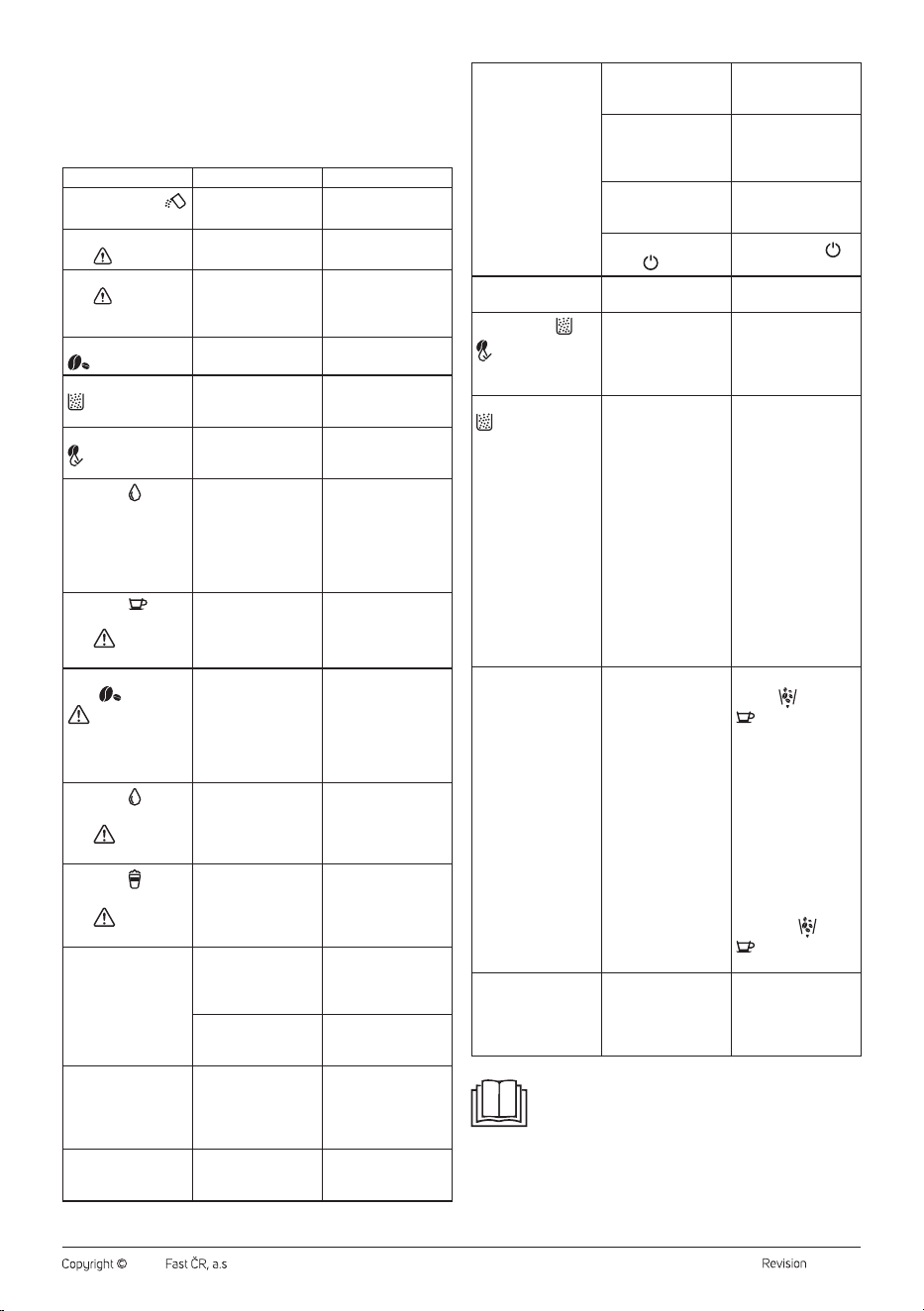
descaling process should be performed. In such acase, the buttons
and will start blinking.
1. Fill the water tank with asolution of water and descaling agent.
Use adescaling agent suitable for espresso-type machines and
follow the instructions given in the descaling agent'saccompanying
documentation.
2. Place abowl under the brewing head.
3. Press andhold the buttons
and
simultaneously. The coffee
machine will enter the descaling mode.
4. The descaling process takes about 10 minutes. The control buttons
will slowly blink from left to right. Allow the coffee machine to
complete the descaling process.
5. Once the descaling process is complete, the buttons
and will
turn off.
6. Remove the water tank and refill it with clean, cold water. Place
it back into the coffee machine and activate the manualrinsing
process.
Storage
• If the appliance will not be used for an extended period, unplug it
from the power socket, let it cool down, and clean it following the
instructions provided above.
• Before storing, ensure that the appliance and all accessories are
thoroughly clean and dry.
- 9 -
06/2023
2023, .
• Store the appliance in adry, clean, and well-ventilated place away
from extreme temperatures and out of the reach of children or pets.
. . . . . . . . . . . . . . . . . . . . . . . . . . . . . . . . . . . . . . . . . . . . . . . . . . . . . . . . . . . . . . . . . . . .
TROUBLESHOOTING
Problem Cause Solution
The indicator light
is blinking.
Insufficient water in
the tank.
Refill the water tank.
The warning indicator
light is blinking.
Incorrectly inserted
service door.
Properly insert the
service door.
The warning indicator
light is on.
Improperly inserted
brewing unit, coffee
grounds container, or
inner tray.
Insert the brewing
unit, coffee grounds
container and inner
tray correctly.
The indicator light
is on.
Insufficient coffee
beans in the hopper.
Add coffee beans to
the hopper.
The indicator light
is on.
Coffee grounds
container is full.
Empty the coffee
grounds container and
inner tray.
The indicator light
is on.
Brewing unit needs to
be cleaned.
Remove the brewing
unit and clean it. Then,
reinsert it.
The button is
blinking.
Water heater
overheating protection
mechanism is
activated.
Turn off the coffee
machine and
disconnect it from the
power source. Let it
cool down for 3 to 5
minutes and then you
can use it again.
The button and
warning indicator
light are blinking
simultaneously.
Grinder motor
malfunction.
Turn off the coffee
machine, wait for
awhile, then turn it
on again.
The indicator
lights and
are blinking
simultaneously.
The coffee machine
has ground coffee for
16 cycles with each
grinding time being
less than 5 minutes.
Turn off the coffee
machine and
disconnect it from
the power source.
Let it cool down for 5
minutes and then you
can use it again.
The button and
warning indicator
light are blinking
simultaneously.
The flow meter has
no signal and the
water dispensing is
abnormal.
Add water to the water
tank.
The button
and
warning indicator
light are blinking
simultaneously.
Hall sensor has no
signal and brewing
unit is not functioning
properly.
Turn off the coffee
machine, wait for
awhile, then turn it
on again.
Weak milk froth. The ground coffee is
too coarse.
Turn the coarseness
regulator clockwise
to adjust the grinder
setting.
You are using
unsuitable roasted
coffee beans.
Use roasted coffee
beans specially for
espresso machines.
Slow or dripping
coffee flow.
The ground coffee is
too fine.
Turn the coarseness
regulator
counterclockwise
and adjust the grinder
setting.
Coffee machine does
not dispense coffee.
Coffee outlet is
clogged.
Clean the coffee
outlet, for example,
using athin object.
Coffee machine
cannot be turned on.
The plug is not
inserted correctly into
the power socket.
Check the plug
connection in the
power socket.
The power cord is not
inserted correctly in
the socket at the back
of the coffee machine.
Check the power cord
connection.
Main power switch is
in the “0” position.
Switch the main
power switch to the “I”
position.
You didn't press the
button .
Press the button to
turn the appliance on.
The brewing unit
cannot be removed.
The brewing unit is
blocked.
Contact an authorised
service centre.
Indicator lights
and
are on.
Coffee grounds
container needs to be
emptied and brewing
unit needs to be
cleaned.
Empty the coffee
grounds container and
clean the brewing unit.
Wait about 3 seconds
before reinstalling.
The indicator light
is on, but the coffee
grounds container is
empty.
The internal counter
has not been reset
after emptying the
tank or cleaning the
brewing unit.
Always wait for about
3 seconds for the
counter to reset after
emptying the coffee
grounds container or
cleaning the brewing
unit. Empty the coffee
grounds container
and clean the brewing
unit whenever the
machine is turned
on. If you empty the
container or clean the
brewing unit when
the machine is turned
off, the counter will
not reset.
The grinder grinds
but does not dispense
ground coffee.
Deeply roasted beans
may have oil on their
surface. If the coffee
beans are wet or have
too much oil on their
surface, the ground
coffee dispensing
channel will be
blocked.
Press and hold the
buttons
and
simultaneously for
2 seconds, and they
will start blinking.
Open the service
door and remove the
ground coffee from
the ground coffee
dispensing channel
using abrush. Close
the service door once
the ground coffee
starts to falls freely.
Press and briefly hold
the buttons
and
, and they will
turn off.
The coffee machine is
too noisy.
It is normal for the
coffee machine to
make noise during
operation.
If the coffee machine
starts to make
adifferent kind of
noise, lubricate the
brewing unit.
Note:
If the problem is not listed in the table or if the problem
persists, turn off the coffee machine, disconnect it from the
power source, and contact an authorised service centre.
. . . . . . . . . . . . . . . . . . . . . . . . . . . . . . . . . . . . . . . . . . . . . . . . . . . . . . . . . . . . . . . . . . . .
- 10 -
06/2023
2023, .
TECHNICAL SPECIFICATIONS
Rated voltage range ..............................................................................220−240 V~
Rated frequency ...................................................................................................50 Hz
Rated power input .............................................................................................1350 W
Noise level .........................................................................................................70 dB(A)
The declared noise emission level of the appliance is 70 dB(A), which
represents alevel Aof acoustic power with respect to areference acoustic
power of 1 pW.
We reserve the right to change the text and technical specifications.
. . . . . . . . . . . . . . . . . . . . . . . . . . . . . . . . . . . . . . . . . . . . . . . . . . . . . . . . . . . . . . . . . . . .
INSTRUCTIONS AND INFORMATION ON DISPOSAL OF USED
PACKAGING MATERIAL
Dispose of the packaging material at the designated waste disposal area
determined by your local municipality.
DISPOSAL OF USED ELECTRICAL AND ELECTRONIC EQUIPMENT
This symbol on the products or accompanying documents
indicates that used electrical and electronic products
should not be disposed of with regular municipal waste.
For proper disposal, recovery and recycling, take these
products to designated collection points. Alternatively, in
some European Union states or other European countries,
you can return your products to the local retailer when
purchasing an equivalent new product. By correctly
disposing of this product, you help conserve valuable natural resources
and contribute to the prevention of potential negative impacts on the
environment and human health that could result from improper waste
disposal. For more details, contact your local authority or nearest
collection facility. Failure to properly dispose of this type of waste may
result in fines in accordance with national regulations.
For Businesses in European Union Countries
To dispose of electrical and electronic equipment, obtain the necessary
information from your retailer or supplier.
Disposal in Countries outside the European Union
This symbol is valid within the European Union. To dispose of this product,
obtain the necessary information on the correct disposal method from
local authorities or your retailer.
This product complies with all the essential requirements of
the EU directives that apply to it.

FAST ČR, a.s.
U Sanitasu 1621
CZ-251 01 Říčany
www.sencor.eu