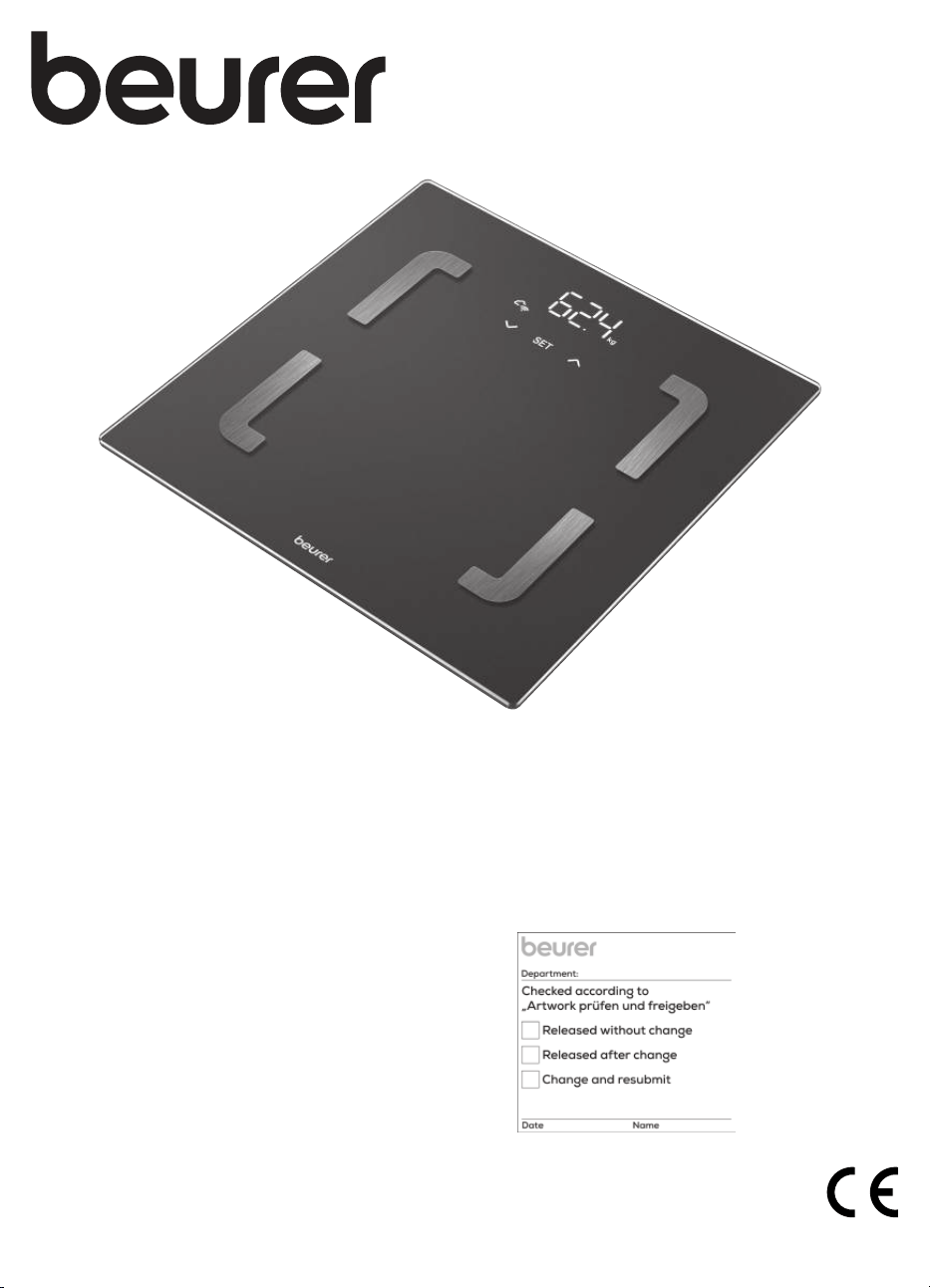
EN Diagnostic bathroom scale
Instructions for use ................................ 3
BF 880
Grafik
jaan
X
08.11.24
SET
A
B
2
5
4
3 6
1
10 11 12 13 9
8
7
3
Read these instructions for use carefully. Observe the warnings and safety notes. Keep these instructions for use for
future reference. Make the instructions for use accessible to other users. If the device is passed on, provide the ins-
tructions for use to the next user as well.
ENGLISH
1. INCLUDED IN DELIVERY
Check that the device packaging has not been tampered with and
make sure that all contents are present. Before use, ensure that the-
re is no visible damage to the device or accessories and that all pa-
ckaging material has been removed. If you have any doubts, do not
use the device and contact your retailer or the specified Customer
Services address.
• 1 diagnostic bathroom scale
• 3 AA 1.5 V batteries
• 1 set of instructions for use
• 1 quick guide
2. IMPORTANT SAFETY NOTES
WARNING
• Intended use: the device is only intended for weighing humans
and for recording your personal fitness data. The device is only
intended for private use and not for medical or commercial pur-
poses. The device must only be used for the purpose for which
it was designed and in the manner specified in these instructions
for use.
• The device may not be used by people with
medical implants (e.g. pacemakers), as this
may aect their functionality.
• Do not use the device during pregnancy.
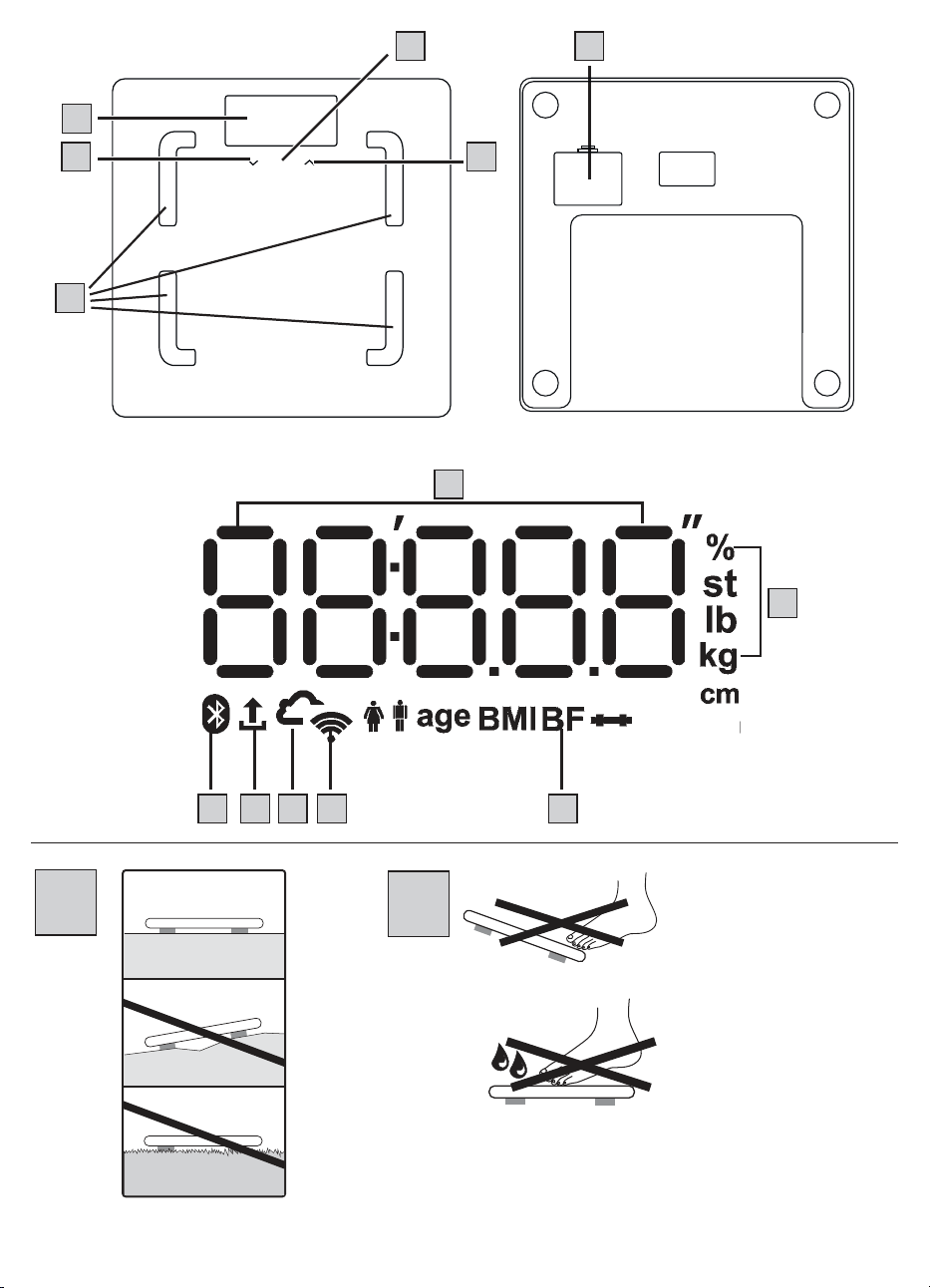
• Danger of tipping! Never place the scale on an
uneven surface (see Figure
A
). Never step onto the outer edge
of the scale on just one side (see Figure
B
).
• Danger of slipping! Do not step onto the scale with wet feet (see
Figure
B
). Do not step onto the scale when the surface is wet.
Do not step onto the scale wearing socks.
• Please note that measuring tolerances are possible for technical
reasons as this scale is not calibrated for use in a professional
medical context.
• This scale works on the principle of B.I.A. (bioelectrical impe-
dance analysis). When this measurement of the electrical resis-
tance (impedance) is considered alongside constants and/or
individual values (age, height, gender, activity level), the body
fat percentage and other variables in the body can be calcu-
lated. Please note that the values calculated by the diagnostic
bathroom scale only represent an approximation of the actual
medical analytical values for the body. Only a specialist doctor
can precisely establish the body fat, body water, muscle percen-
tage and bone structure using medical methods (e.g. computer
tomography).
• Obtain professional advice from appropriately qualified per-
sonnel (e.g. a doctor) when undertaking any treatment or diet
to address being overweight or underweight. The health values
determined using the scale can assist the qualified personnel in
their diagnoses.
• Inaccurate or implausible results may occur when determining
body fat in children, performance athletes or people with medi-
cal/physical limitations (e.g. oedema symptoms, osteoporosis,
people who are taking cardiovascular medication or medication
which changes the vascular system, people with major anatomi-
cal abnormalities on the legs).
• Repairs may only be carried out by Beurer Customer Services or
authorised retailers. Never open the scale yourself.
Safety notes on handling batteries
WARNING
• Risk of explosion! Risk of fire! Failure to comply with the fol-
lowing points can result in personal injury or cause overheating,
leakage, venting, breakage, explosion, or fire on the battery.
• This device contains non-rechargeable batteries which must not
be charged.
• Do not throw batteries into a fire.
• Never charge, forcibly discharge, heat, disassemble, open,
crush, deform, encapsulate, or modify batteries.
• Never short-circuit batteries or battery compartment contacts.
• Protect the batteries from direct sunlight, rain, heat, and water.
• Exposure of batteries to an environment with extremely high
temperatures or an extremely low air pressure may result in ex-
plosion or leakage of flammable liquids and gases.
• Dispose of defective and discharged batteries immediately and
properly (see chapter on disposal).
• Do not use modified or damaged batteries.
• Always select the correct battery type.
• Always insert the batteries correctly, taking into account the po-
larity (+ / -).
• Never mix batteries of dierent manufacturers, capacities (new
and used), size, or type within a device.
• If a battery has leaked, put on protective gloves and clean the
battery compartment with a dry cloth.
• If fluid from a battery comes into contact with your skin or eyes,
wash the aected areas with water and seek medical assistance.
• Choking hazard! Keep batteries out of the reach of children.
Seek medical attention immediately if swallowed. Swallowing
them may cause burns, severe internal injuries, and death.
• Never allow children to replace batteries without adult supervi-
sion.
CAUTION
• Store batteries in a well-ventilated, dry, and cool place in a
non-conductive container in which the batteries cannot be
short-circuited to each other or by other metal objects.
• Keep batteries clean and dry.
• Keep batteries away from water.
1. Included in delivery ......................................................... 3
2. Important safety notes .................................................... 3
3. Signs and symbols .......................................................... 4
4. Device description ........................................................... 4
5. Usage .............................................................................. 4
6. What if there are problems? ............................................ 5
7. Cleaning and maintenance .............................................. 7
8. Disposal ........................................................................... 7
9. Technical data ................................................................. 7
10. Warranty ........................................................................ 8
TABLE OF CONTENTS
4
• If the device is not going to be used for a long period of time,
remove the batteries from the battery compartment.
NOTICE
• Do not use rechargeable batteries.
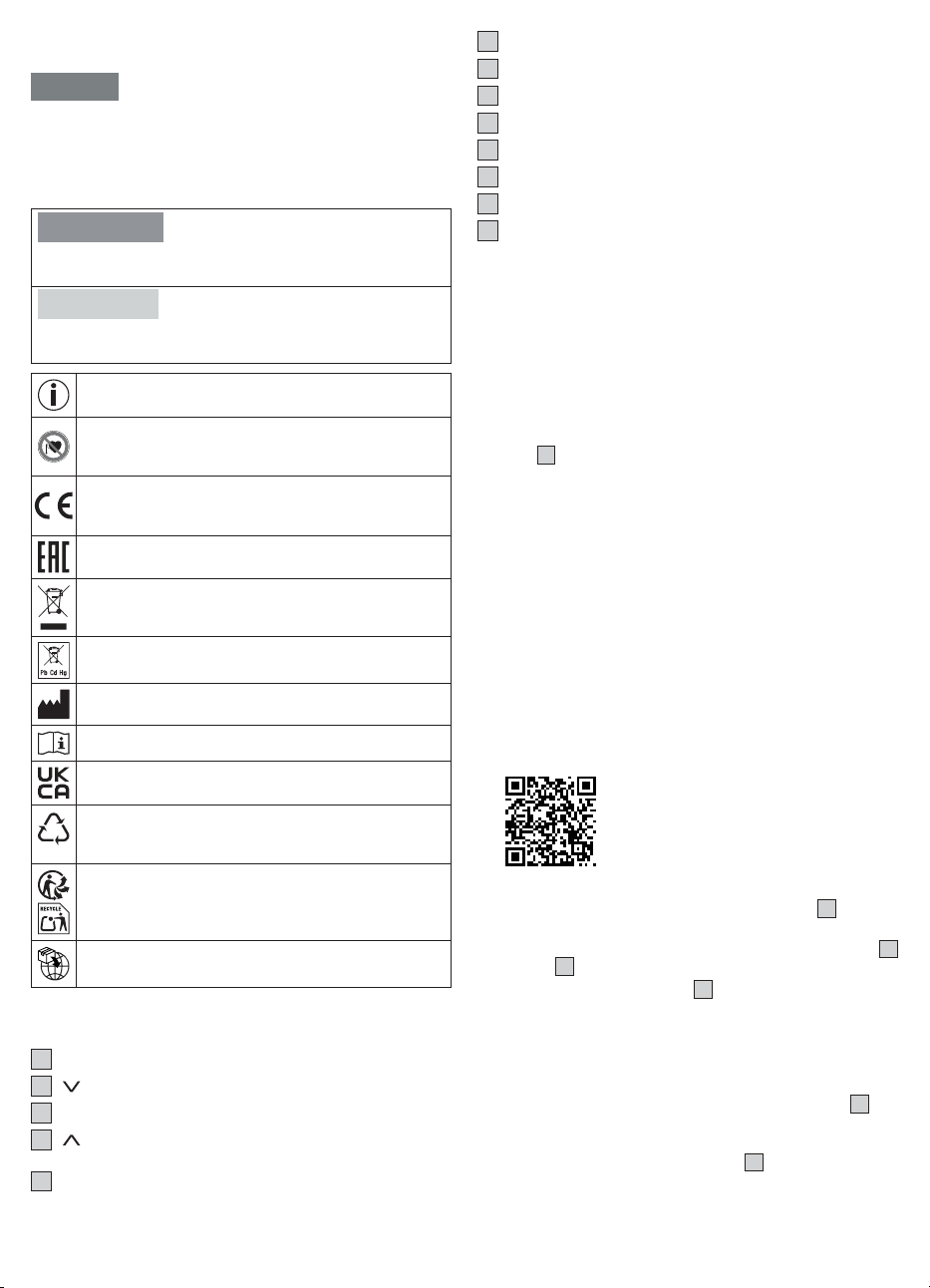
3. SIGNS AND SYMBOLS
The following symbols are used on the device, in these instructions
for use, on the packaging and on the type plate for the device:
WARNING
Indicates a potentially impending danger. If it is not avoided, there
is a risk of death or serious injury.
CAUTION
Indicates a potentially imminent hazard. If it is not avoided, slight
or minor injuries may result.
Product information
Note on important information
The device may not be used by people with medical
implants (e.g. pacemakers), as this may aect their
functionality.
CE labelling
This product satisfies the requirements of the applicable
European and national directives.
The products demonstrably meet the requirements of the
Technical Regulations of the EAEU
The electronic device must not be disposed of with
household waste
Do not dispose of batteries containing hazardous subs-
tances with household waste
Manufacturer
Consult instructions for use
United Kingdom Conformity Assessed Mark
B
A
Marking to identify the packaging material.
A = Material code, B = Material number:
1-7 = Plastics, 20-22 = Paper and cardboard
Separate the product and packaging elements and dispo-
se of them in accordance with local regulations.
Importer
4. DEVICE DESCRIPTION
The associated drawings are shown on page 2.
1
Display
2
button (for selecting a user measurement)
3
SET button
4
button (for calling up stored values after the user is se-
lected)
5
Electrodes
6
Battery compartment
7
Measured value
8
Measurement unit
9
Body data
10
Scale connected to Bluetooth
®
11
Measurement data transfer
12
Scale connected to cloud/server
13
Scale connected to WIFI
5. USAGE
5.1 Prerequisites for taking measurements
correctly
• Place the scale on a flat and stable surface.
• Wherever possible, weigh yourself at the same time every day
(ideally in the morning), after having been to the toilet, on an em-
pty stomach and without clothing.
• To determine your body fat, always stand barefoot on the elect-
rodes
5
on the scale.
• Stand up straight and still during measurement. Ensure that your
weight is evenly distributed.
5.2 Creating scale users in the “beurer Health-
Manager Pro” app
The “beurer HealthManager Pro” app makes it easier for you to crea-
te user data, is required to transfer measured values and to display
additional values (body water content, bone mineral mass, BMR/
AMR, metabolic age).
The scale has 8 memory spaces for dierent scale users, enabling
you to save the various members of your family, for example. You
can use the “beurer HealthManager Pro” app to conveniently set up
the individual app users and their corresponding scale user via your
smartphone. To do so, proceed as follows:
1.
Download the free “beurer HealthManager Pro” app from the Apple
App Store (iOS) or from Google Play (Android™).
This way to the
“beurer HealthManager Pro” app
2. Start the app and follow the instructions.
3. Select BF 880 in the app and press the SET button
3
.
4. Select WIFI network (SSID) and enter password (network key) to
enable data transfer to scale via WIFI. If successful, the cloud
12
and WIFI
13
icons will appear on the display.
5. Set up scale user: if the display
1
shows the scale user (e.g. “U:
1”) and “0.0”, carry out the initial measurement (for subsequent
automatic personal recognition if within +/- 3kg of the last mea-
surement of this scale user).
5.3 Weighing yourself
1.
Step onto the scale barefoot. Stand still on the electrodes
5
with
both legs, making sure to distribute your weight evenly. The scale
switches on automatically.
2.
Your body weight appears on the display
1
. The scale user detec
-
ted (e.g. “U: 1” for scale user 1) should then appear automatically.
If the scale has detected several possible scale users or the last
5
weight is more than 3kg apart, use the
button
4
to select the
correct scale user and wait 3 seconds.
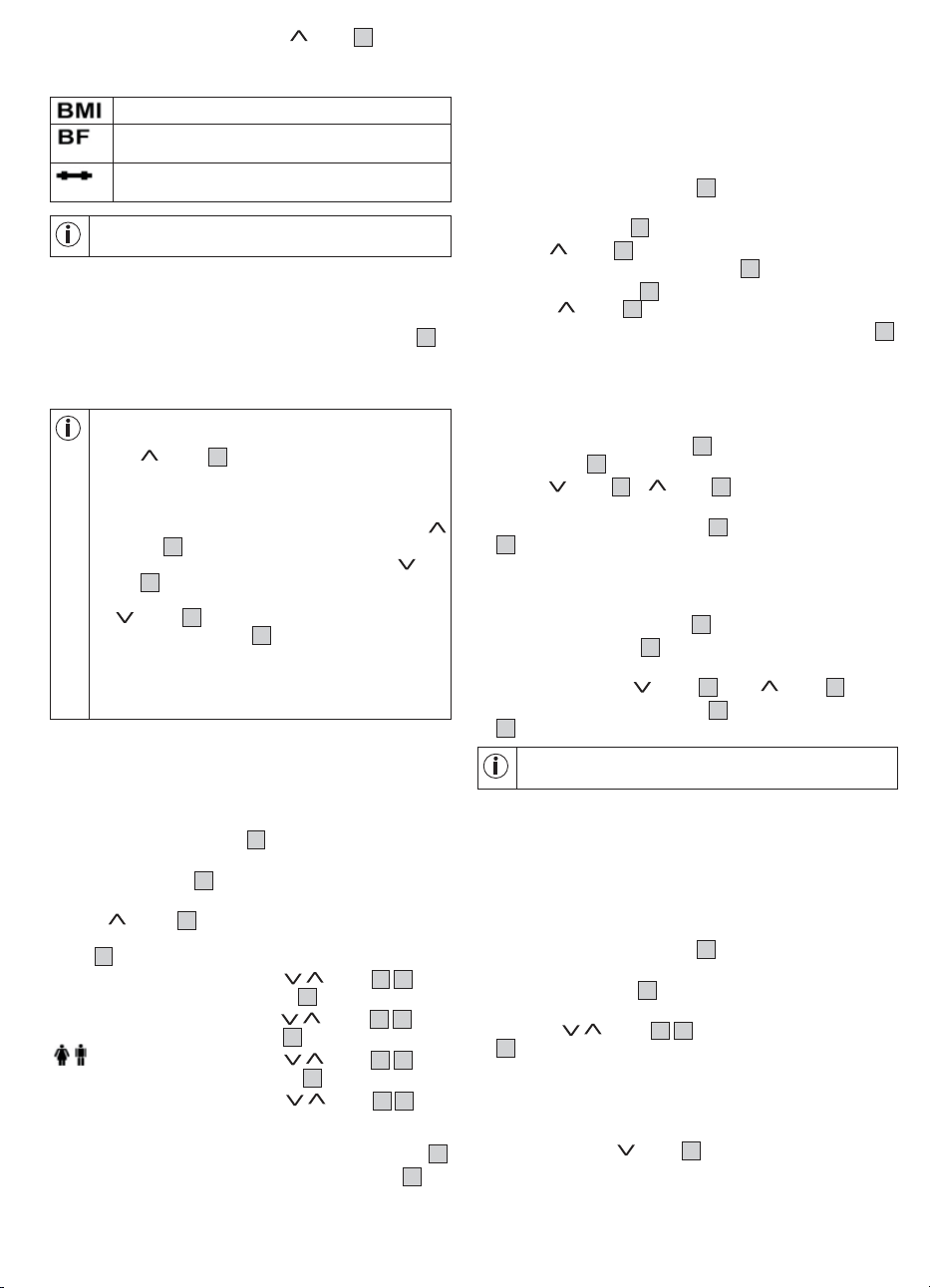
3. The following values will then appear one after the other.
Body mass index (a healthy value is 18.5 – 25)
Body fat percentage (a healthy value is 16 – 28% for
women and 11 – 23% for men)
Muscle percentage (a healthy value is 27 – 43% for
women and 37 – 57% for men)
For more details of the values, please see the app or the
FAQs at: www.beurer.com
4. If a Bluetooth
®
or WIFI connection has been established and the
user measurements have been successfully taken (e.g. for U: 1), the
values will be transferred to the “beurer HealthManager Pro” app.
This is indicated by the measurement data transfer symbol
11
. If
the data cannot be transferred, up to 30 values will be stored per
user. As soon as a connection is established, they are transferred
with the next measurements.
• If the automatic scale user detection function is not
working, briefly press the scale with your foot, press
the button
4
repeatedly until your scale user is
displayed, and wait 3 seconds. Then take the diag-
nostic measurement.
• To display your most recent diagnostic measurement,
briefly press the scale with your foot, press the
button
4
repeatedly until your scale user is dis-
played, and wait 3 seconds. Then press the but-
ton
2
to display the most recent diagnostic measu-
rement. To display further measurements, press the
button
2
again. Up to 30 measurements can be
shown on the display
1
.
• If the measurement is carried out with shoes or socks
on, then only the weight is displayed (when the scale
user is recognised, the weight and BMI are displayed
and saved).
5.4 ALTERNATIVE METHOD: creating scale
users without the app
Alternatively, you can also create a scale user directly on the scale
without using the app. This process is not required if the scale has
already been connected to the app.
1. Press and hold the SET button
3
for 4 seconds. “unit” appears
on the display.
2.
Press the SET button
3
repeatedly until “on” appears on the
display 1.
3.
Use the button
4
to select the scale user you need (you
can select from U: 1 to 8). Confirm your selection with the SET
button
3
.
4. “170” flashes on the display. Use the
/ button
2
4
to set
the height. Confirm with the SET button
3
.
5. “30” flashes on the display. Use the / button
2
4
to set
the age. Confirm with the SET button
3
.
6.
flashes on the display. Use the / button
2
4
to set
the gender. Confirm with the SET button
3
.
7. “Act3” flashes on the display. Use the / button
2
4
to set
your activity level based on how much you exercise (considered
over the long term). (Act1 = none, Act2 = low, Act3 = medium, Act4
= high, Act5 = very high/athletic). Confirm with the SET button
3
.
8.
“End” appears in the display. Confirm with the SET button
3
. The
scale user has been created successfully.
9. “0.0” and the user symbol appear on the display. Take the initial
measurement.
5.5 Deleting scale users
You can delete individual scale users in the “beurer HealthManager
Pro” app.
Alternatively, you can also delete scale users directly on the scale.
To do so, proceed as follows:
1. Press and hold the SET button
3
for 4 seconds. “unit” flashes
on the display.
2.
Press the SET button
3
twice until “USEr” flashes on the display.
3.
Use the button
4
to select the scale user to be deleted. Con-
firm your selection with the SET button
3
.
4.
Press the SET button
3
repeatedly until “End” appears. Then
press the button
4
within 5 seconds.
5.
“dEL” appears on the display. Confirm with the SET button
3
.
The scale user has now been deleted.
5.6 Changing the weight unit
You can change the weight unit either using the “beurer HealthMa-
nager Pro” app or directly on the scale:
1. Press and hold the SET button
3
for 4 seconds. “unit” appears
on the display
1
.
2.
Use the button
2
or button
4
to select the desired weight
unit (kg, lb or stlb). kg = kilograms, lb = pounds, stlb = stones
3. To confirm, press the SET button
3
repeatedly until the display
1
switches o.
5.7 Deactivating Bluetooth
®
and WIFI
To deactivate Bluetooth
®
and WIFI, proceed as follows:
1. Press and hold the SET button
3
for 4 seconds.
2.
Press the SET button
3
repeatedly until “on” appears on the
display 1.
3. Select “oFF” with the
button
2
or the button
4
.
4. To confirm, press the SET button
3
repeatedly until the display
1
switches o.
Please note that the Bluetooth
®
and WIFI function is then
NO longer possible. To reactivate it, set it from “oFF” to “on”.
6. WHAT IF THERE ARE PROBLEMS?
6.1 Restarting scale
If it is necessary to restart the scale (e.g. scale software freezes).
Remove the batteries briefly.
6.2 Resetting the scale to factory settings
1. Press and hold the SET button
3
for 4 seconds. “unit” flashes
on the display.
2.
Press the SET button
3
three times until “SET” flashes on the
display.
3. Press the
/ button
2
4
and confirm “rSt” using the SET
3
button.
6.3 Updating scale software
The app will inform you when a new software update is available.
1. Briefly press on the scale to switch it on.
2. Press and hold the
button
2
for 15 seconds. The scale auto-
matically checks for an update and downloads it. This may take a
few minutes. If the update is successful, “PASS” will be displayed.
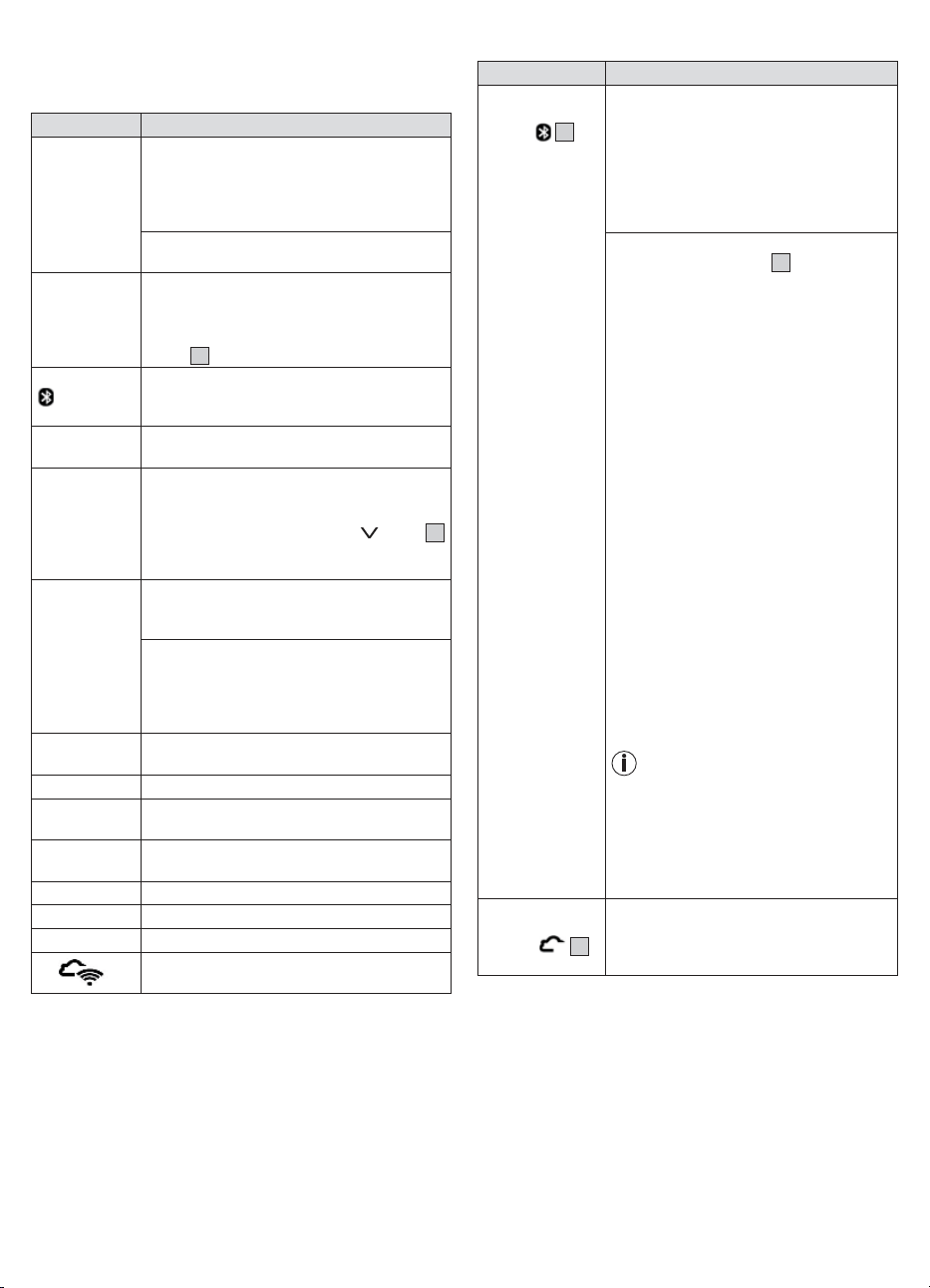
6
If the scale is already up to date with the latest software version
“utd” appears.
6.4 Messages and errors
Display Cause/remedy
Discrepancy
in weight
Incorrect zero point (e.g. in the event of a
change of location or temperature fluctuation):
briefly press on the scale until the current weight
is displayed, then remove your foot so that “0.0”
flashes.
Scale is placed on carpet or uneven ground: the
surface must be hard and level.
PAir Bluetooth
®
needs to be paired: start/allow pai-
ring/bonding on your smartphone (note any
messages in the status bar/notification bar), and
confirm the 6-digit pairing code using the SET
button
3
on the device and on the smartphone.
“USE APP” or
flashing
The scale can be connected to the app via Blu-
etooth
®
: do not connect it via the Bluetooth
®
settings on your smartphone, only via the app.
UnSt This weight measurement was unstable: stand
still during the measurement.
U: -- The scale was unable to assign the measure-
ment to a scale user: if the automatic scale user
detection function is not working, briefly press
the scale with your foot, press the
button
2
repeatedly until your scale user is displayed, and
wait 3seconds. Weigh yourself again.
BF-- The body fat percentage is outside the measu-
rable range (less than 5% or greater than 70%):
check the user data or change the activity level.
Diagnostic measurement cannot be taken (e.g.
measurement attempted while wearing shoes):
Repeat the measurement barefoot. Otherwise,
only weight values will be displayed and trans-
ferred.
oLd The maximum weight capacity of 180 kg has
been exceeded: loads must not exceed 180 kg.
Lo Batteries are flat. Replace the batteries.
Err1 Incorrect password for your selected WIFI net-
work/SSID/router.
Err2 Your router does not have Internet access. The
server cannot be reached.
Er3... Software update failed: please try again.
Err4 Booting problems: Remove the batteries briefly.
utd The software is up to date.
no
There is no WIFI connection to the server for the
software update.
6.5 WIFI/Bluetooth
®
connection problems
Problem Cause/remedy
No Bluetooth
®
connection
Symbol
10
is
not displayed
Device is outside the Bluetooth
®
range.
The minimum range in the open is approx. 10
m. Walls and ceilings reduce the range. Other
radio waves may interfere with the transmis-
sion. Therefore, do not position the scale
near devices such as microwaves or induc-
tion hobs. Ideally, switch o other Bluetooth
®
devices that are within range.
No Bluetooth
®
connection to the app.
1.
Press the SET button
3
on the scale so
that “USE APP” flashes in the scale dis-
play. Then use the “beurer HealthManager
Pro” app.
2.
Switch Bluetooth
®
on your smartphone o
and on again. Ensure that the scale is not
being connected via the Bluetooth
®
settings
of the operating system. If necessary, remo
-
ve it from the device list in the Bluetooth
®
settings and then use the “beurer Health-
Manager Pro” app.
3. Completely close the app (including in the
background). Switch your smartphone o
and on again.
4. Briefly remove the batteries from the scale
and reinsert them. Launch the app.
5.
When connecting the scale, check the sta-
tus bar on the smartphone to start pairing/
bonding.
Note: A Bluetooth
®
connection is only requi-
red for initial use and changing the scale’s
settings. The measurements can also be
transferred via Bluetooth
®
, but in the normal
standard application the measurement data
will be transferred via WIFI (without Blue-
tooth
®
).
Eine Bluetooth
®
-Verbindung ist nur
zur Inbetriebnahme und Einstellung
der Waage erforderlich. Die Messun-
gen können zwar auch per Bluetooth
®
übertragen werden, jedoch wird die
Messdatenübertragung in der nor-
malen Standardanwendung per WIFI
(ohne Bluetooth
®
) stattfinden.
No connection to
server/cloud
Symbol
12
is not displayed
Check whether your router has an Internet
connection. Check the device settings in the
app.
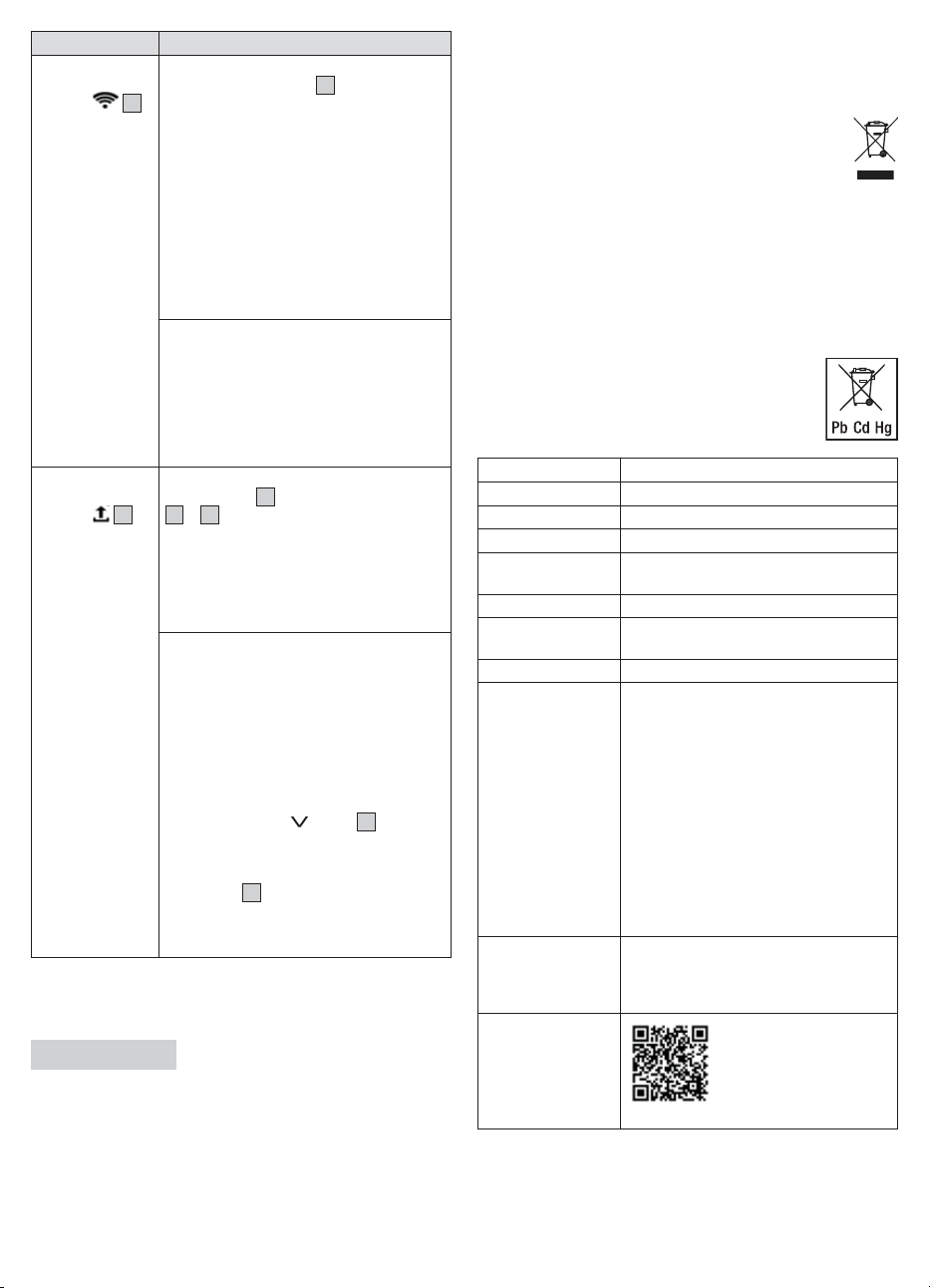
7
Problem Cause/remedy
No connection to
the router
Symbol
13
is not displayed
Incorrect password
1.
Press the SET button
3
on the scale. Sca-
le displays “USE-APP”.
2.
Open the app. Open the scale setting in
the app.
3.
WIFI radio network/network name (SSID)
of your Internet router and password (WIFI
network key) must match. Re-enter pass-
word/network key. Ensure that the pass-
word/network key matches the one set on
your selected router/WIFI name. Please
remember that this is case sensitive. For
further information, see technical data un-
der “Connectivity”.
Incorrect router settings
The device connects to 2.4 GHz. The device
cannot connect to 5 GHz or 6 GHz. Check
the router settings to see if 2.4 GHz is sup-
ported (mixed 2.4 GHz / 5 GHz operation is
possible in principle). Do not use a mobile
WIFI hotspot as it may not be permanently
available. Avoid guest networks.
Measurements
are not sent
Symbol
11
is
not displayed
No WIFI/Bluetooth
®
connection: Blue-
tooth
®
symbol
10
or WIFI and cloud symbols
13
+
12
must be displayed after a measure-
ment. If necessary, reduce the distance bet-
ween the scale and the WIFI router. Check
and test the device settings of the WIFI net-
work in the “beurer HealthManager Pro” app.
Check whether Bluetooth
®
and WIFI have
been deactivated on the scale.
No measurement for the scale user: The
user memory (e.g. U: 1) which appears on the
scale display during a measurement must be
assigned to the scale in your app settings.
Only these measurements can be transfer-
red. Therefore, when taking a measurement,
check your user on the scale and in your app
settings.
If the automatic scale user detection function
is not working, briefly press the scale with
your foot, press the
button
2
repeatedly
until your scale user is displayed, and wait
3 seconds. Then take the diagnostic mea-
surement. At the end of the measurement,
the symbol
11
should appear on the scale
display. The measurement is then transferred
via Bluetooth
®
or WIFI. If this is not the case,
check the device settings in the app.
7. CLEANING AND MAINTENANCE
Clean the surface of the scale from time to time using a slightly damp
cloth. Do not use the scale again until the surface is completely dry.
IMPORTANT
• Do not use any abrasive cleaning products.
• Never submerge the scale in water. Never rinse the scale under
running water.
• Do not place any objects on the scale when it is not in use.
• Protect the scale from knocks, moisture, dust, chemicals, dras-
tic changes in temperature and nearby sources of heat (ovens,
heaters).
8. DISPOSAL
For environmental reasons, do not dispose of the device in
household waste at the end of its service life. Dispose of the device
at a suitable local collection or recycling point in your country. Ob-
serve the local regulations for material disposal. Dispose of
the device in accordance with EC Directive – WEEE (Waste
Electrical and Electronic Equipment).
If you have any questions, please contact the local authori-
ties responsible for waste disposal.
You can obtain the location of collection points for old de-
vices from the local or municipal authorities, local waste disposal
companies or your retailer, for example.
The empty, completely flat batteries must be disposed of through
specially designated collection boxes, recycling points or electro-
nics retailers. You are legally required to dispose of the batteries.
The codes below are printed on batteries containing harmful sub-
stances:
Pb = Battery contains lead,
Cd = Battery contains cadmium,
Hg = Battery contains mercury.
9. TECHNICAL DATA
Model: BF 880
Dimensions: 300 x 300 x 27 mm
Weight: 1700 g
Measurement range: 180 kg / 396 lb / 28 st
Scale interval d: kg: 0.1 kg / lb: 0.2 lb / st: between 0-19 st
= 0.2 lb; between 20-28 st = 1 lb / 0.1%
Repetition accuracy: max. +/- 0.4 kg
Absolute precision: max. +/- (0.5% + 0.1 kg). e.g. for 80 kg:
max. +/- 0.5 kg
Battery: 3 x 1,5 V AA
Connectivity: Setup can be performed and settings
can be made via Bluetooth
®
low energy
technology.
Data transfer preferably via WIFI or
alternatively via Bluetooth
®
low energy
technology.
WIFI system requirement: IEEE 802.11
b/g/n (2.4 GHz)
Encryption system requirement:
WPA-PSK, WPA2-PSK, WPA3-PSK
WIFI frequency band: 2412 – 2472 MHz,
transmission power max. 12.99 dBm.
Bluetooth
®
frequency band: 2402 – 2480
MHz, transmission power max. 7.15 dBm.
List of compatible
devices:
A list of compatible smartphones, infor-
mation on software and details on the
devices can be found at the following link:
connect.beurer.com
System
requirements
for “beurer
HealthManager Pro”
app *
Supported devices
Subject to technical changes.
*This product satisfies the requirements of the applicable European
directives.

8
The CE mark has been applied in accordance with the following
European directives:
Directive 2014/53/EU (Radio Equipment Directive – RED)
The Declaration of Conformity for this product can be found at the
following address: https://www.beurer.com/conformity
10. WARRANTY
Further information on the warranty and warranty conditions can be
found in the warranty leaflet supplied.
Subject to errors and changes

9
10
The Bluetooth® word mark and logos are registered trademarks owned by Bluetooth SIG, Inc. and any use of such marks by Beurer
GmbH is under license. Other trademarks and trade names are those of their respective owners.
Apple and the Apple logo are trademarks of Apple Inc., registered in the U.S. and other countries. App Store is a service mark of Apple
Inc., registered in the U.S. and other countries.
Google Play and the Google Play logo are trademarks of Google LLC.
Android is a trademark of Google LLC.
760.08_BF880_2024-10-24_05_IM2_BEU_EN
UK Importer: Beurer UK Ltd., Suite 16, Stonecross Place, Stonecross Lane North, WA3 2SH Lowton,
United Kingdom
Beurer GmbH • Söflinger Str. 218 • 89077 Ulm, Germany • www.beurer.com
www.beurer-healthguide.com • www.beurer-gesundheitsratgeber.com