
01
02
03
04
05
06
07
08
09
10
01 02
Contents
Wainings
Safety Precautions
Parts Description
Product Troubleshooting
Power Cord Precautions
Prepare For Use
Operation Mode And Function Description
Maintenance
Replacing The Filter
01
02
03
04
05
06
07
08
09
10
01 02
Contents
Wainings
Safety Precautions
Parts Description
Product Troubleshooting
Power Cord Precautions
Prepare For Use
Operation Mode And Function Description
Maintenance
Replacing The Filter
Parts DescriptionSafety Precautions
Dear user:
STOP
Must be
obeyed
03 04
Hello! Thank you for using the air purifier. In order for you to better read this manual and use the
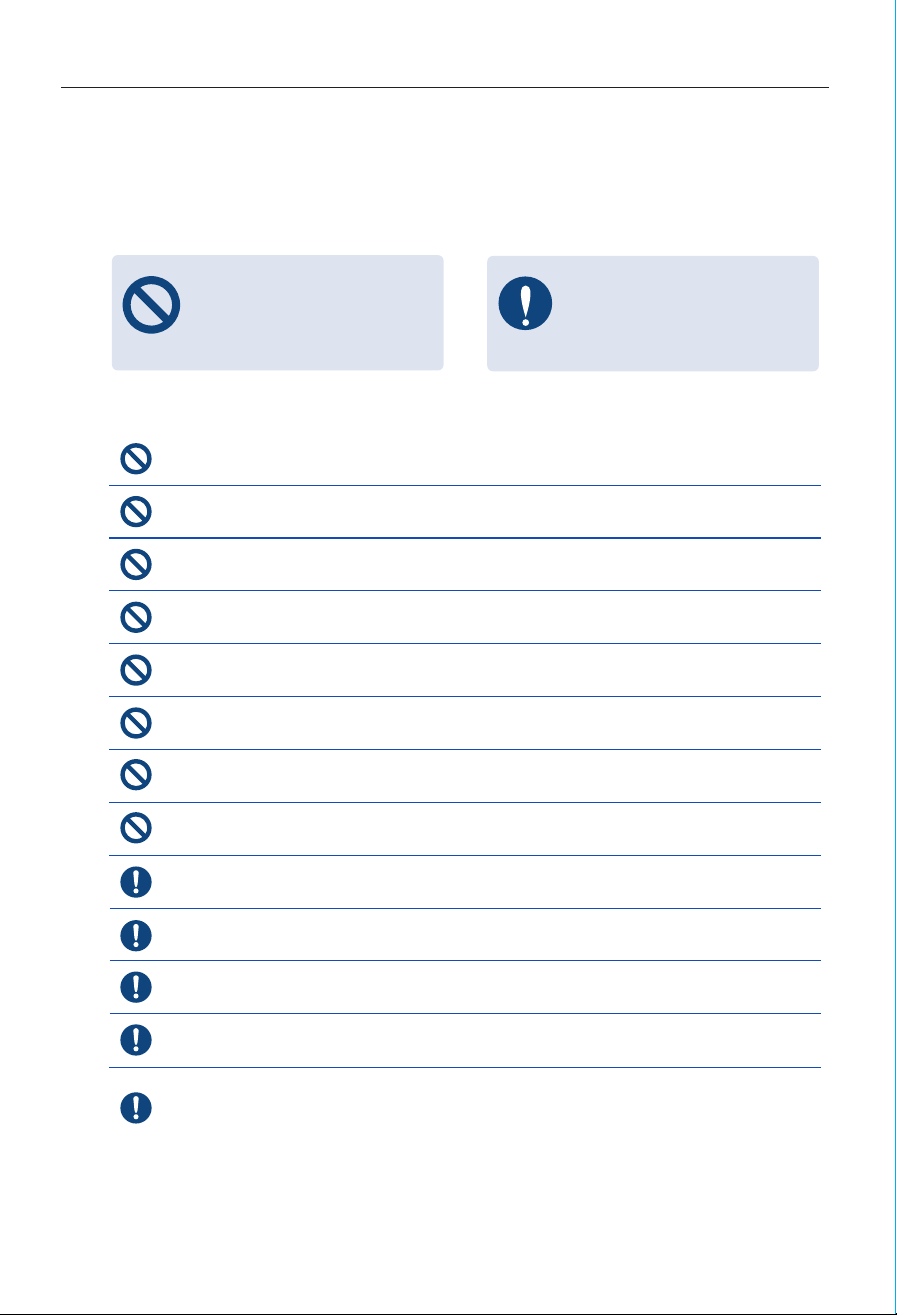
air purifier, the following is our explanation of the signs and symbols appearing in the manual:
Any content with this mark must be
absolutely prohibited, otherwise it
may cause damage to the machine
or endanger the personal safety of
the user.
For the content with this mark,
the safety of the product and the
personal safety of the user must
be strictly operated in accordance
with the warning content.
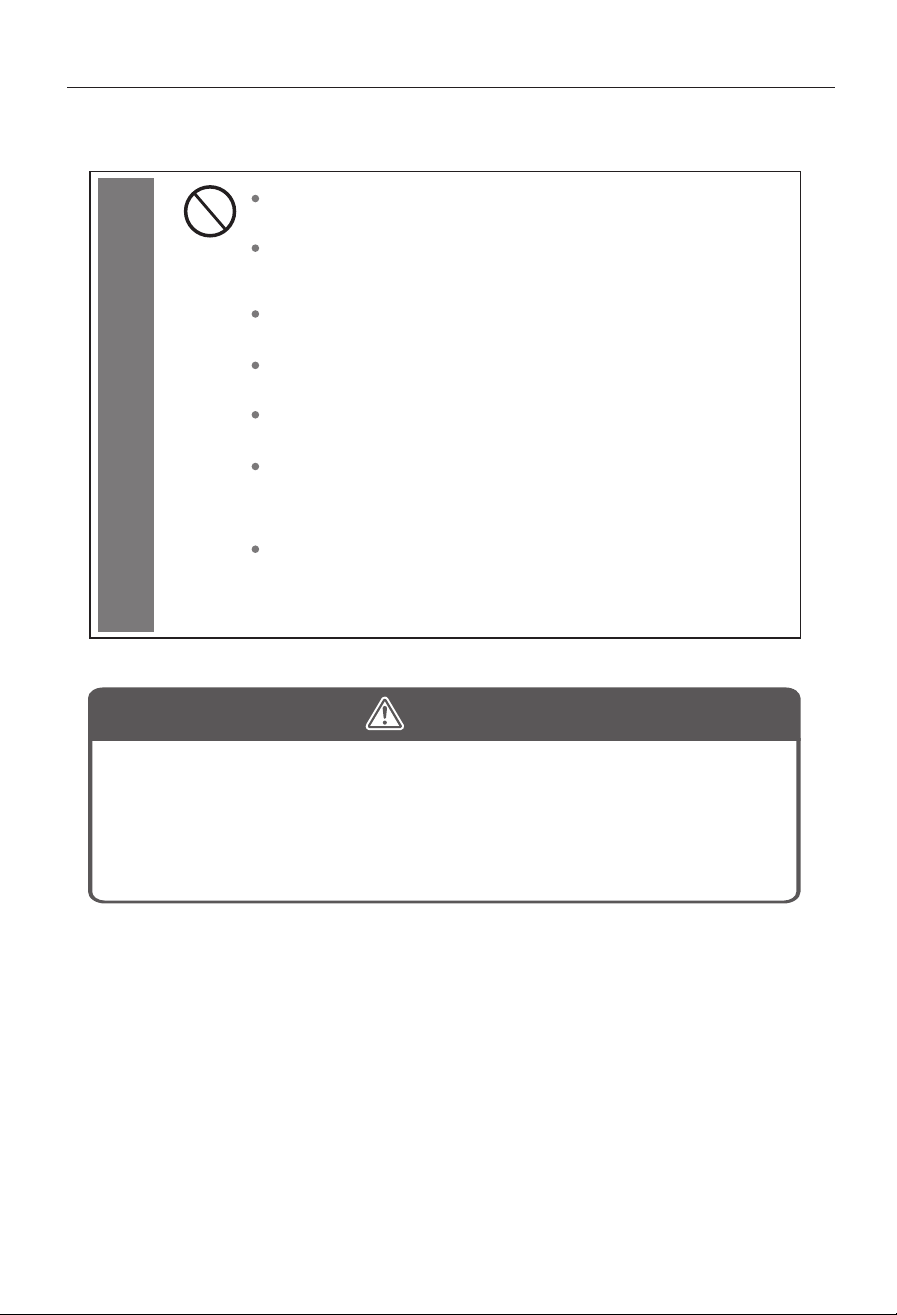
Do not use solvents such as alcohol or thinner to clean the air purifier.
Please do not run the air purifier while using insecticide etc.
Do not place the air purifier in a place where flammable gas is easy to leak, so as not to
cause a fire due to gas leakage.
Do not use in flammable, explosive and corrosive gas environments.
Do not pull on the power cord when moving or storing.
Do not touch the power cord plug with wet hands.
Please supervise and guide young children to avoid direct operation or contact with the
air purifier.
Do not put your fingers or metal objects into the air inlet, air outlet and other gaps.
Do not let volatile substances or combustible items, such as cigarettes, float into the machine.
There is an electric control board on the base, please pay attention to waterproof.
Do not use the power cord or plug if they are damaged.
Do not handle the power cord with wet hands.
Regularly check and replace the filter screen, if the filter screen is blocked, it will lead to
poor air effect, increased power consumption, and cause failure.
When not in use for a long time, please cut off the power supply and avoid sun exposure.
When moving or performing maintenance on the air purifier, be sure to stop the operation
and unplug the power plug.
If the machine breaks down, stop using it and cut off the power. First, follow the instructions
in the manual to troubleshoot.Please contact the after-sales personnel to check.
Email:Service-US@humsure.com
The air enters from the front of the machine, and the air exits from the top. Please do not
block or block the air inlet and outlet.
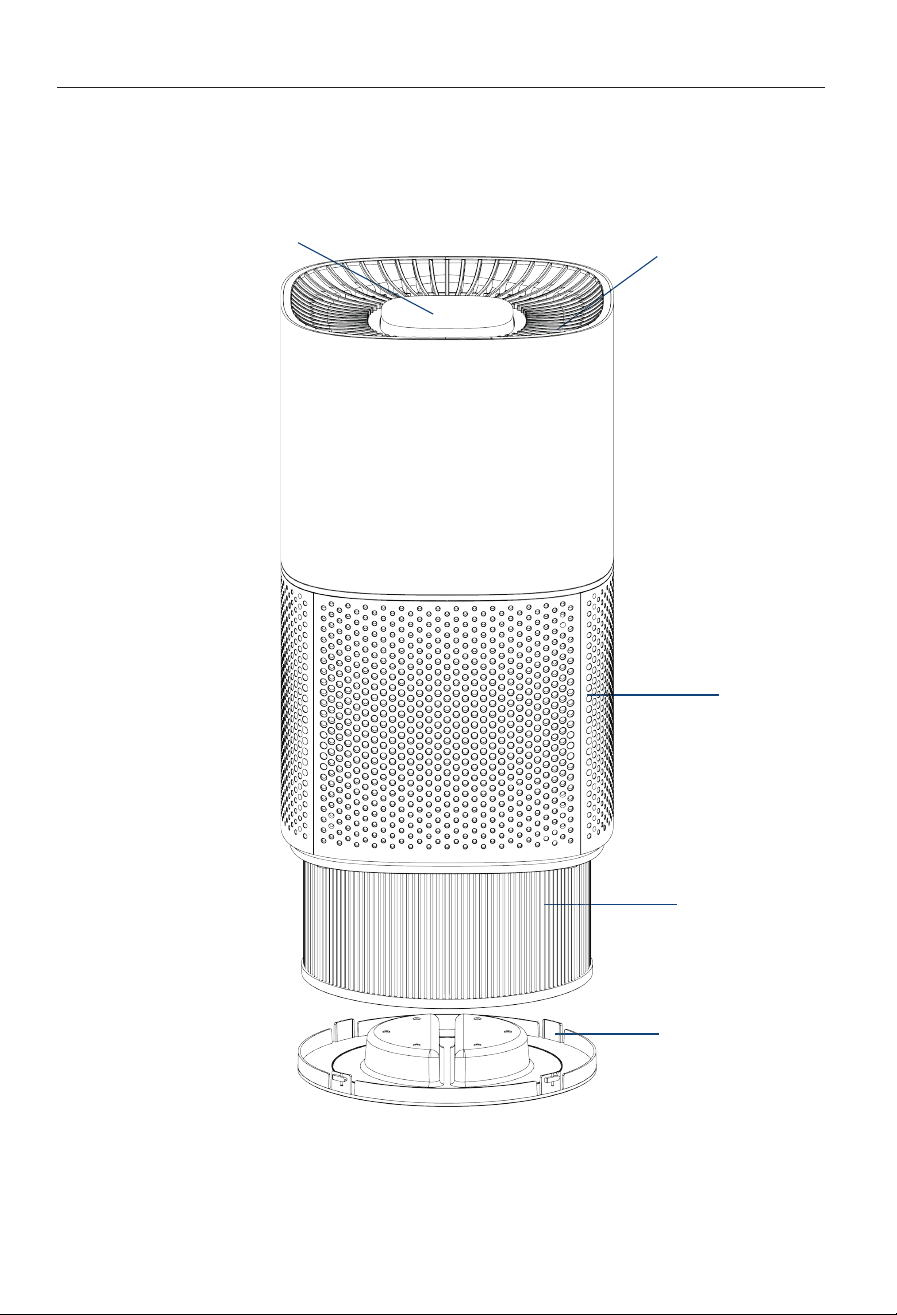
Touch Button
Air Inlet
Filter
Filter Cover
Air Outlet
Parts DescriptionSafety Precautions
Dear user:
STOP
Must be
obeyed
03 04
Hello! Thank you for using the air purifier. In order for you to better read this manual and use the
air purifier, the following is our explanation of the signs and symbols appearing in the manual:
Any content with this mark must be
absolutely prohibited, otherwise it
may cause damage to the machine
or endanger the personal safety of
the user.
For the content with this mark,
the safety of the product and the
personal safety of the user must
be strictly operated in accordance
with the warning content.
Do not use solvents such as alcohol or thinner to clean the air purifier.
Please do not run the air purifier while using insecticide etc.
Do not place the air purifier in a place where flammable gas is easy to leak, so as not to
cause a fire due to gas leakage.
Do not use in flammable, explosive and corrosive gas environments.
Do not pull on the power cord when moving or storing.
Do not touch the power cord plug with wet hands.
Please supervise and guide young children to avoid direct operation or contact with the
air purifier.
Do not put your fingers or metal objects into the air inlet, air outlet and other gaps.
Do not let volatile substances or combustible items, such as cigarettes, float into the machine.
There is an electric control board on the base, please pay attention to waterproof.
Do not use the power cord or plug if they are damaged.
Do not handle the power cord with wet hands.
Regularly check and replace the filter screen, if the filter screen is blocked, it will lead to
poor air effect, increased power consumption, and cause failure.
When not in use for a long time, please cut off the power supply and avoid sun exposure.
When moving or performing maintenance on the air purifier, be sure to stop the operation
and unplug the power plug.
If the machine breaks down, stop using it and cut off the power. First, follow the instructions
in the manual to troubleshoot.Please contact the after-sales personnel to check.
Email:Service-US@humsure.com
The air enters from the front of the machine, and the air exits from the top. Please do not
block or block the air inlet and outlet.
Touch Button
Air Inlet
Filter
Filter Cover
Air Outlet

Power cord precautionsProduct Troubleshooting
05 06
Symptoms Check items Method of exclusion
Is the power on? Turn on the power
Is the power plug loose? Install the power plug in place
CThe filter is picking up
too much odor or smoke
Replace the filter
Is the indoor air too dry? Appropriately increase indoor humidity
The machine is placed in an unventilated place
or There are obstacles nearby the machine
Change placement,emove obstacles
There is a foreign object blocking
the air outlet or air inlet
Remove foreign matter
Filter plastic bag not removed Remove the filter plastic bag
Machine Not Working
The Air Outlet Has
A Peculiar Smell
The Purification
Effect Is Not Good
No Air Blows Out
Do not use a power supply other than the rated voltage (120V60Hz). (Otherwise it
may cause fire, electric shock, etc.)
Do not process, forcibly bend, pull, twist, bundle, or place the power cord close to
high-temperature objects. (Damage of the power cord may cause fire, electric
shock, etc.)
Do not place heavy objects on it or pinch it. (Carrying heavy objects may cause fire,
electric shock hazard, etc.)
Do not use if the power cord or power plug is damaged, or if it is loosely inserted
into the power outlet. (Otherwise it may cause fire, electric shock, short circuit, etc.)
Do not plug or unplug the power cord with wet hands.(Otherwise it may cause
electric shock, etc.)
When moving, please avoid damage to the power cord caused by your feet.
(Otherwise it may cause electric shock, overheating, fire, etc.)
Do not replace the power cord by yourself. If it is damaged and needs to be
replaced, please contact Haier Service Center for repair.
The dust accumulated on the power plug or socket should be cleaned regularly.
(Too much dust, moisture, etc. will cause poor insulation, which may cause fire,
electric shock, etc.)
Power cord precautions
WARNING
Non-professionals do not disassemble the machine without authorization to avoid
the risk of electric shock. When replacing or cleaning the filter, please unplug the
power plug first. If a fault occurs, please follow the troubleshooting method in the
manual. If it still cannot be rectified, please contact the after-sales personnel at
Service-us@Humsure.com.
Power cord precautionsProduct Troubleshooting
05 06
Symptoms Check items Method of exclusion
Is the power on? Turn on the power
Is the power plug loose? Install the power plug in place
CThe filter is picking up
too much odor or smoke
Replace the filter
Is the indoor air too dry? Appropriately increase indoor humidity
The machine is placed in an unventilated place
or There are obstacles nearby the machine
Change placement,emove obstacles
There is a foreign object blocking
the air outlet or air inlet
Remove foreign matter
Filter plastic bag not removed Remove the filter plastic bag
Machine Not Working
The Air Outlet Has
A Peculiar Smell
The Purification
Effect Is Not Good
No Air Blows Out
Do not use a power supply other than the rated voltage (120V60Hz). (Otherwise it
may cause fire, electric shock, etc.)
Do not process, forcibly bend, pull, twist, bundle, or place the power cord close to
high-temperature objects. (Damage of the power cord may cause fire, electric
shock, etc.)
Do not place heavy objects on it or pinch it. (Carrying heavy objects may cause fire,
electric shock hazard, etc.)
Do not use if the power cord or power plug is damaged, or if it is loosely inserted
into the power outlet. (Otherwise it may cause fire, electric shock, short circuit, etc.)
Do not plug or unplug the power cord with wet hands.(Otherwise it may cause
electric shock, etc.)
When moving, please avoid damage to the power cord caused by your feet.
(Otherwise it may cause electric shock, overheating, fire, etc.)
Do not replace the power cord by yourself. If it is damaged and needs to be
replaced, please contact Haier Service Center for repair.
The dust accumulated on the power plug or socket should be cleaned regularly.
(Too much dust, moisture, etc. will cause poor insulation, which may cause fire,
electric shock, etc.)
Power cord precautions
WARNING
Non-professionals do not disassemble the machine without authorization to avoid
the risk of electric shock. When replacing or cleaning the filter, please unplug the
power plug first. If a fault occurs, please follow the troubleshooting method in the
manual. If it still cannot be rectified, please contact the after-sales personnel at
Service-us@Humsure.com.
07 08
Operation mode and function descriptionPreparation before use
Filter installation
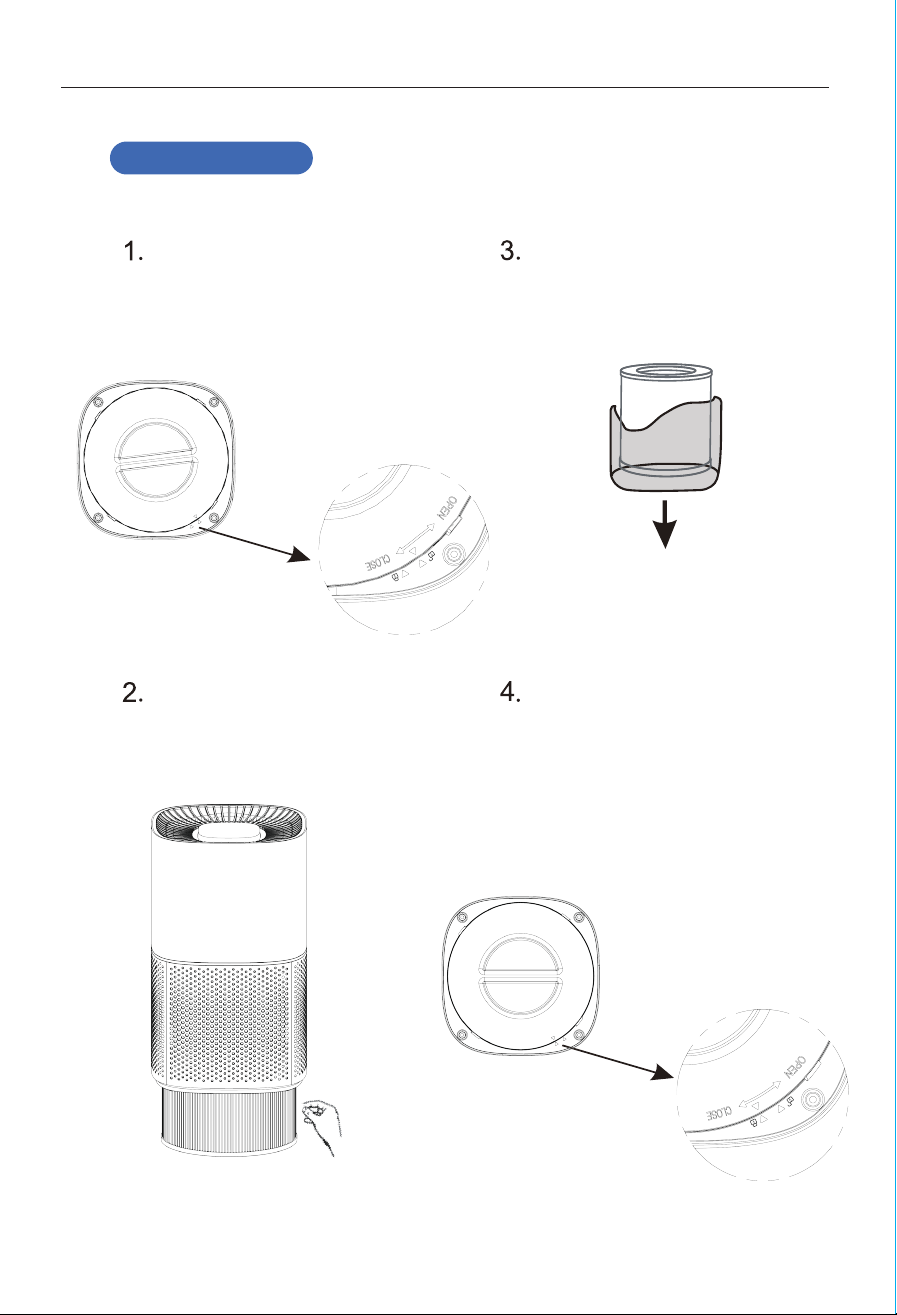
Remove the filter cover at the bottom of
the air inlet. Put your hands on the
bottom of the filter cover and press it
down slightly, turn left in the direction
indicated by the arrow, and take out the
bottom cover.
Take out the filter with PE bag. The filter
has been placed in the purifier
machine. Grab the bag of the filter with
your hands and remove the filter.
Take the filter out of the plastic bag.
(1) Install the filter with the plastic bag
removed into the machine.
(2) After changing the filter screen
cover, turn it to the right to lock it.
Install the filter.
(be sure to do this before the power plug is inserted into the socket)
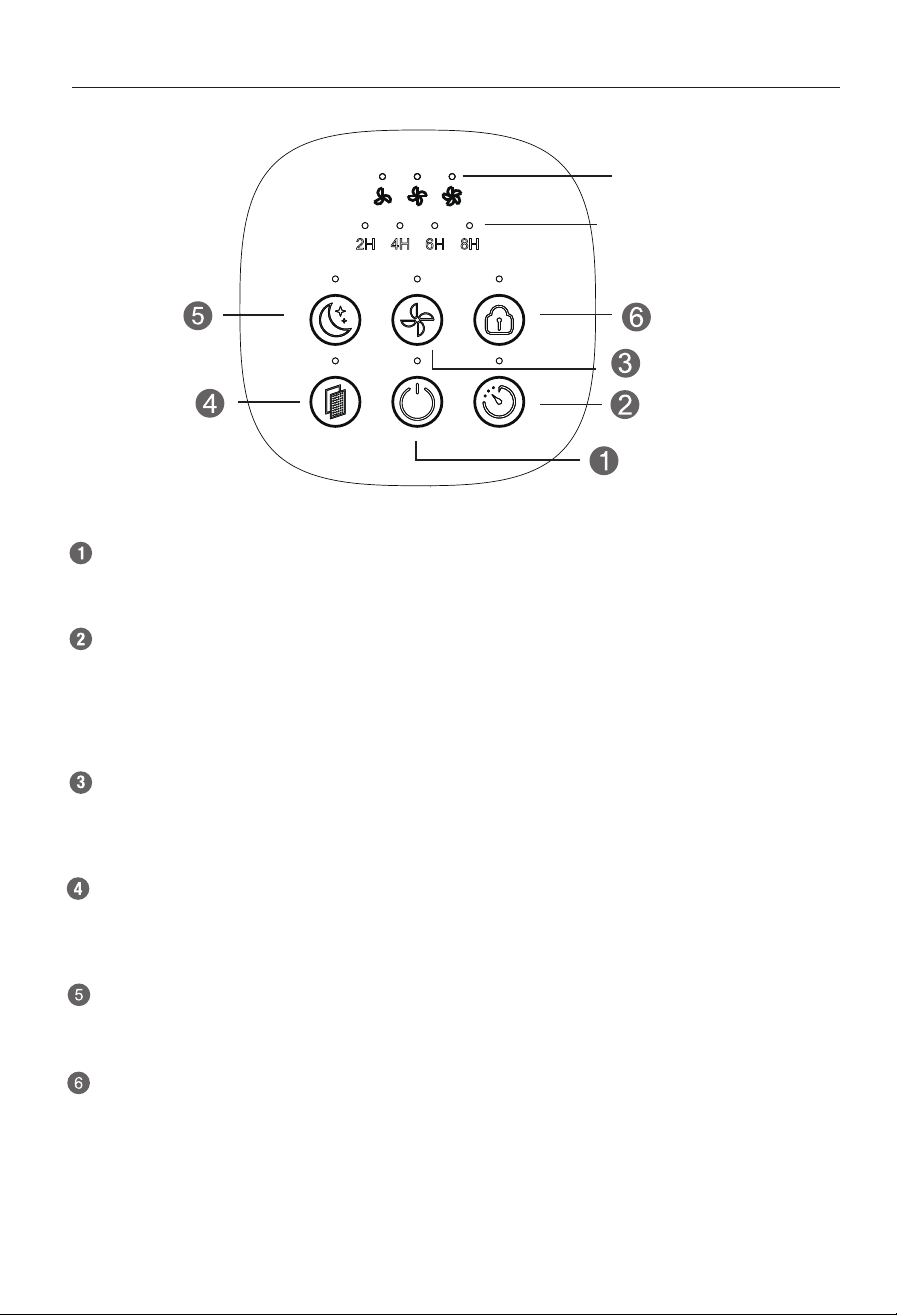
Power on and enter standby mode, press this key to start the machine, repeat this key, stop and
enter standby mode.
Main body
Press the timing button, the indicator light of the timing button is always on; the prompt sounds,
the timing time of the machine can be set to 2 hours, 4 hours, 6 hours, 8 hours, cancel the timing,
cycle selection, and at the same time, the corresponding indicator light is on. Set the timing
machine to work according to the set timing time. When the set time is up, the machine will
automatically shut down and enter the standby state.
Timing button
Press the wind speed button. The indicator light of the wind speed button is always on. The
prompt sounds. The wind speed is in low gear, middle gear, high gear, and the three gears are
cyclically adjusted. running all the time.
Speed button
When the accumulative working hours of the machine reach 1500 hours, the filter alarm indicator
is always on. After the replacement is completed, press and hold the function selection button for
3 seconds, the filter alarm indicator goes out, and the filter reset is successful.
Filter reset
Press the sleep button, all the indicator lights go out and the machine enters the sleep mode, the
sleep indicator light stays on for 10 seconds and goes off, press any key to exit the sleep mode.
Sleep button
Press and hold the child lock button for 3 seconds, the indicator light of the child lock button is
always on, and the machine enters the child lock mode. When the machine is in the child lock
mode, press any key (except for pressing the child lock button for 3 seconds), the child lock
indicator light flashes three times, and the other The button function is invalid, long press the
child lock button for three seconds, the child lock indicator light goes out, and the machine exits
the child lock state.
Child lock button
Wind speed gear
indicator light
Timing
indicator light
07 08
Operation mode and function descriptionPreparation before use
Filter installation
Remove the filter cover at the bottom of
the air inlet. Put your hands on the
bottom of the filter cover and press it
down slightly, turn left in the direction
indicated by the arrow, and take out the
bottom cover.
Take out the filter with PE bag. The filter
has been placed in the purifier
machine. Grab the bag of the filter with
your hands and remove the filter.
Take the filter out of the plastic bag.
(1) Install the filter with the plastic bag
removed into the machine.
(2) After changing the filter screen
cover, turn it to the right to lock it.
Install the filter.
(be sure to do this before the power plug is inserted into the socket)
Power on and enter standby mode, press this key to start the machine, repeat this key, stop and
enter standby mode.
Main body
Press the timing button, the indicator light of the timing button is always on; the prompt sounds,
the timing time of the machine can be set to 2 hours, 4 hours, 6 hours, 8 hours, cancel the timing,
cycle selection, and at the same time, the corresponding indicator light is on. Set the timing
machine to work according to the set timing time. When the set time is up, the machine will
automatically shut down and enter the standby state.
Timing button
Press the wind speed button. The indicator light of the wind speed button is always on. The
prompt sounds. The wind speed is in low gear, middle gear, high gear, and the three gears are
cyclically adjusted. running all the time.
Speed button
When the accumulative working hours of the machine reach 1500 hours, the filter alarm indicator
is always on. After the replacement is completed, press and hold the function selection button for
3 seconds, the filter alarm indicator goes out, and the filter reset is successful.
Filter reset
Press the sleep button, all the indicator lights go out and the machine enters the sleep mode, the
sleep indicator light stays on for 10 seconds and goes off, press any key to exit the sleep mode.
Sleep button
Press and hold the child lock button for 3 seconds, the indicator light of the child lock button is
always on, and the machine enters the child lock mode. When the machine is in the child lock
mode, press any key (except for pressing the child lock button for 3 seconds), the child lock
indicator light flashes three times, and the other The button function is invalid, long press the
child lock button for three seconds, the child lock indicator light goes out, and the machine exits
the child lock state.
Child lock button
Wind speed gear
indicator light
Timing
indicator light
Replace the filterMaintenance
09 10
Before performing maintenance on the air purifier, be sure to turn off the machine and cut off the
power switch; Do not insert or remove the power plug with wet hands
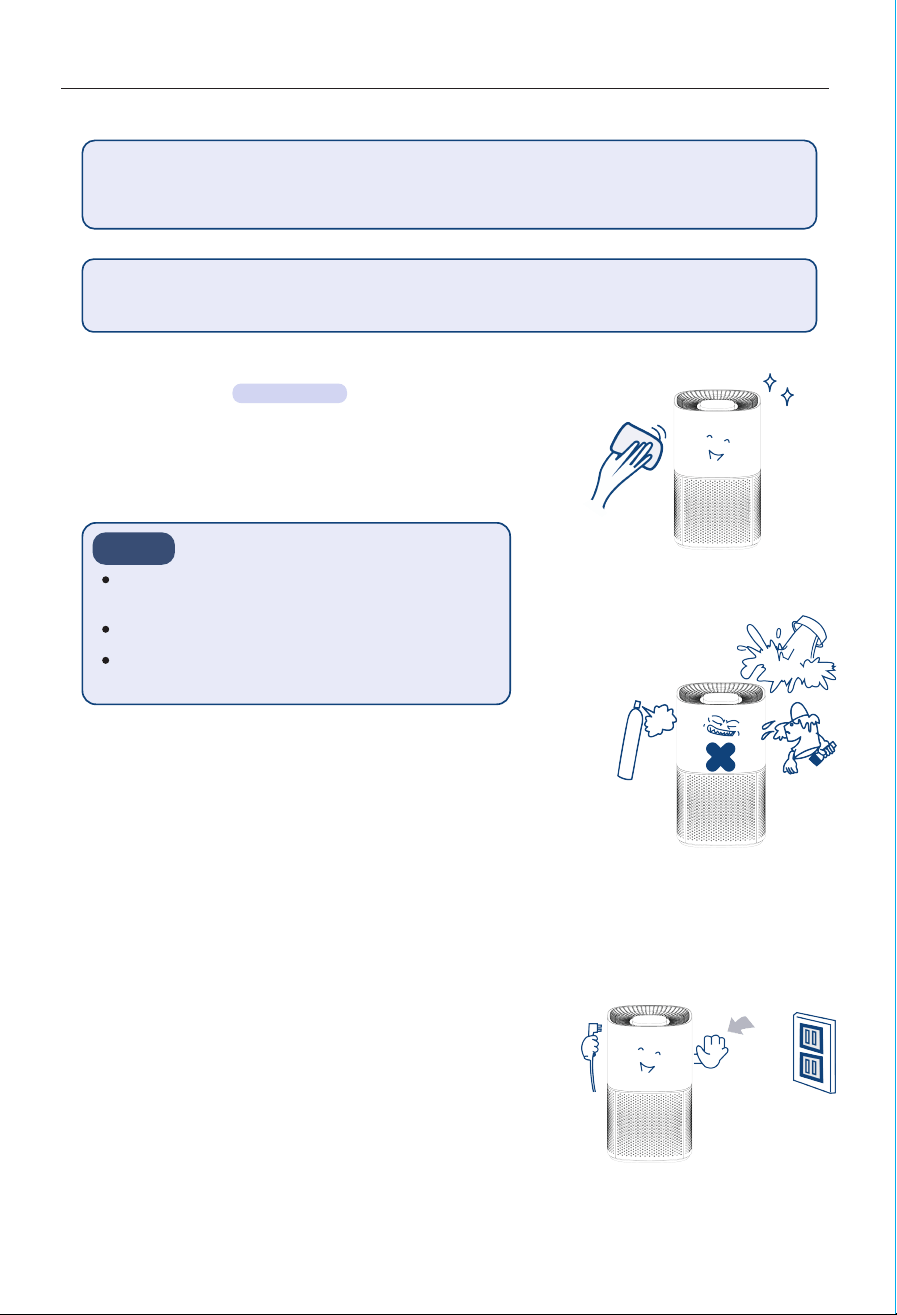
Please wipe the surface of the air purifier body with a
soft cloth. When it is seriously dirty, it can be cleaned
with a hot damp cloth or neutral detergent, and then
wiped with a dry cloth.
In order to use the air purifier cleanly for a long time, please perform regular maintenance.
Main body
Carbon cloth filter
When idle for a long time
Notice
once a month
Do not use overheated water (greater than 40°C),
which may cause discoloration and deformation.
Do not use insecticides or other chemical detergents.
Never wash the body directly with water.
A filter is included with the machine, which cannot be
washed.
It is recommended to replace it once every three months
in the normal indoor environment. New filters can be
purchased from our company or our authorized agents.
1. Unplug the power plug.
2. Cover with a plastic bag and store in a place with low
humidity.
3. Do not store the product upside down, it may cause the
product to malfunction.
insecticide
paint
Any of the following maintenance steps will cut off the power.
Remove PE bag
Before using the air purifier for the first time, please open the back
cover of the air purifier and take out the filter, and be sure to remove
the filter packaging plastic bag, otherwise the product will not be
able to purify the air normally.
※Please keep plastic bags away from infants and young children to
avoid accidents when infants and young children come into contact
with plastic bags.
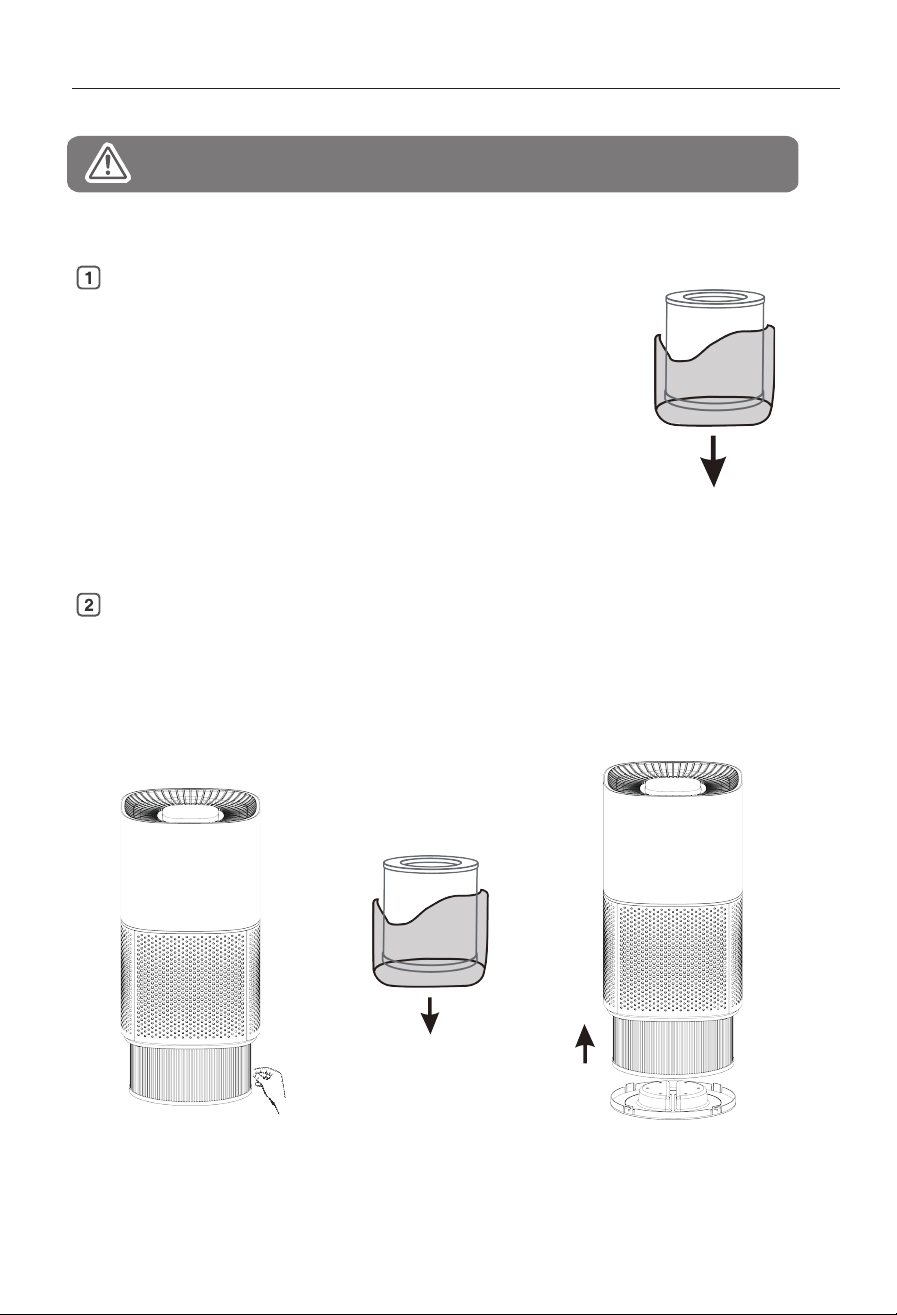
Clean or replace the filter
1) As shown in Figure A: Remove the filter screen inside the purifier.
2) As shown in Figure B: remove the new filter bag.
3) As shown in Figure C: Put the new filter into the machine and reinstall the cover.
Figure A Figure B Figure C
Replace the filterMaintenance
09 10
Before performing maintenance on the air purifier, be sure to turn off the machine and cut off the
power switch; Do not insert or remove the power plug with wet hands
Please wipe the surface of the air purifier body with a
soft cloth. When it is seriously dirty, it can be cleaned
with a hot damp cloth or neutral detergent, and then
wiped with a dry cloth.
In order to use the air purifier cleanly for a long time, please perform regular maintenance.
Main body
Carbon cloth filter
When idle for a long time
Notice
once a month
Do not use overheated water (greater than 40°C),
which may cause discoloration and deformation.
Do not use insecticides or other chemical detergents.
Never wash the body directly with water.
A filter is included with the machine, which cannot be
washed.
It is recommended to replace it once every three months
in the normal indoor environment. New filters can be
purchased from our company or our authorized agents.
1. Unplug the power plug.
2. Cover with a plastic bag and store in a place with low
humidity.
3. Do not store the product upside down, it may cause the
product to malfunction.
insecticide
paint
Any of the following maintenance steps will cut off the power.
Remove PE bag
Before using the air purifier for the first time, please open the back
cover of the air purifier and take out the filter, and be sure to remove
the filter packaging plastic bag, otherwise the product will not be
able to purify the air normally.
※Please keep plastic bags away from infants and young children to
avoid accidents when infants and young children come into contact
with plastic bags.
Clean or replace the filter
1) As shown in Figure A: Remove the filter screen inside the purifier.
2) As shown in Figure B: remove the new filter bag.
3) As shown in Figure C: Put the new filter into the machine and reinstall the cover.
Figure A Figure B Figure C

FOR CUSTOMERS
REQUESTING CUSTOMER SERVICE
Thank you for purchasing our Air purifier.
Humsure has been committed to developing powerful and easy-to-use prod-
ucts to bring more convenience to your life. We highly recommend you to keep
this user manual for future reference in case of unexpected problems.
Please read this user manual carefully to ensure proper use of the air purifier.
This air purifier is perfect for improving the air quality in family bedrooms,
offices, living room and more.
Humsure air purifier effectively purify the air, creating a more healthy and
comfortable environment for you and your family.
If there are any problems of the product, please contact Humsure Customer
Service at [email protected]om with your Purchase Order ID. We'll help
you solve the problems as soon as possible
WARRANTY
& SUPPORT
WARRANTY
Extend 1-Year Warranty for Free
Customer Support
Humsure offers a 12-month warranty to all of our products together with the original
proof of purchase when a defect occured, including those newly purchased and
unused, from Humsure or through an authorized reseller, wholly or substantially, or
as a result of faulty manufacturing parts, or workmanship during the Warranty Period.
The warranty does not apply if damage is caused by other factors, including but
without limitation of:
( a ) Normal wear and tear;
( b ) Abuse, mishandling, accident or failure to follow operating instructions;
( c ) Exposure to liquid or infiltration of foreign particles;
( d ) Servicing or modification of the product other than by Humsure.
There is a professionla team for the warranty service , but we always encourage our
customers to contact us if any issues, regardless of warranty terms. If you are experi-
encing an issue with Humsurez product, you can reach out to us at
Service-us@humsure.com, we will dedicate our e?orts to resolve it for you
If you have any questions or concerns about our product, please feel free to contact
our expert support team. Humsure customer service is ready to help
HUMSURE LLC
V RYAN SOLE MBR
1321 W MAIN ST PMB 515
STERLING, CO 80751
Support Hours
24Hours available
Register your product at www.humsure.com to get 1-year extended warranty for free.

FOR CUSTOMERS
REQUESTING CUSTOMER SERVICE
Thank you for purchasing our Air purifier.
Humsure has been committed to developing powerful and easy-to-use prod-
ucts to bring more convenience to your life. We highly recommend you to keep
this user manual for future reference in case of unexpected problems.
Please read this user manual carefully to ensure proper use of the air purifier.
This air purifier is perfect for improving the air quality in family bedrooms,
offices, living room and more.
Humsure air purifier effectively purify the air, creating a more healthy and
comfortable environment for you and your family.
If there are any problems of the product, please contact Humsure Customer
Service at Service-us@humsure.com with your Purchase Order ID. We'll help
you solve the problems as soon as possible
WARRANTY
& SUPPORT
WARRANTY
Extend 1-Year Warranty for Free
Customer Support
Humsure offers a 12-month warranty to all of our products together with the original
proof of purchase when a defect occured, including those newly purchased and
unused, from Humsure or through an authorized reseller, wholly or substantially, or
as a result of faulty manufacturing parts, or workmanship during the Warranty Period.
The warranty does not apply if damage is caused by other factors, including but
without limitation of:
( a ) Normal wear and tear;
( b ) Abuse, mishandling, accident or failure to follow operating instructions;
( c ) Exposure to liquid or infiltration of foreign particles;
( d ) Servicing or modification of the product other than by Humsure.
There is a professionla team for the warranty service , but we always encourage our
customers to contact us if any issues, regardless of warranty terms. If you are experi-
encing an issue with Humsurez product, you can reach out to us at
[email protected]om, we will dedicate our e?orts to resolve it for you
If you have any questions or concerns about our product, please feel free to contact
our expert support team. Humsure customer service is ready to help
HUMSURE LLC
V RYAN SOLE MBR
1321 W MAIN ST PMB 515
STERLING, CO 80751
Support Hours
24Hours available
Register your product at www.humsure.com to get 1-year extended warranty for free.