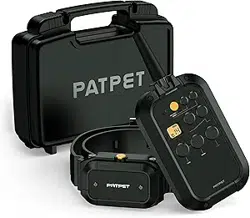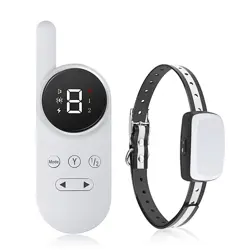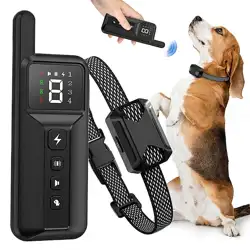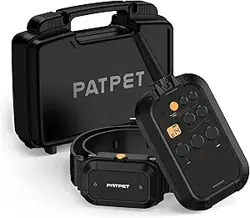

P-COLLAR 920
User Guide
For cooperation:[email protected]
For help:[email protected]
Follow us for more training tricks , Facebook @PatpetTech
0.3.0.02.920XXX-PT-00
Please read the User Guide manual before
using this product
02
Thanks
for purchasing!
The dog training collar is designed to let dogs enjoy safer and happier lives as
well as improve their ability to live in harmony with people.
WARNING
Aggressive dogs may cause serious injury or even death for owners or
bystanders. Please consult a verterinarian or cerfified trainer if you are uncertain
whether this training collar is appropriate for your dog’s temperament.
Do NOT use with aggressive dogs
CAUTION
Your dog’s safety during on-leash training is of the utost importance.Be certain
that your leash is strong enough to prevent your dog from breaking or chewing
through it. The leash should be kept at a length where your dog has some
freedom to move around and play while preventing your dog from running into the
road or hazardous areas. When attempting to train your dog, you should also be
sure that you are capable of physically restraining your dog should the need arise.
Leash Training Safety
CAUTION
The training collar must fit properly and be checked periodically during use to
avoid irritation or injury to your dog’s skin. If the collar is too tight, is wore for too
long, or is not repositioned occasionally, skin damage may occur on your dog’s
neck. This damage can range from redness and irritation to pressure ulcers similar
to ned sores.Follow these guidelines to prevent skin injury.
Risk of Damage to Dog’s Skin
03
Never leave the collar on for more than 12 hours per day.
Reposition the collar on your dog’s neck every 1 to 2 hours.
Never connect a leash to the electronic collar as this will cause excessive
pressure on the contacts.
If a rash or sore is found, discontinue use of the collar until the skin has
healed.
If the condition persists beyond 48 hours, see your veterinarian.
This product is not a toy, please keep it away from children.
This product is only for use with healthy dogs.
CAUTION
Risk of Damage to Dog’s Skin
04

05
Table of Contents
Overview
.......................................................................................................06
Product Setup
..........................................................................................07
Charge the Remote and the Receiver Collar ..........................................07
Prepare the Remote
.......................................................................................08
Prepare the Receiver
......................................................................................08
Turn on the Receiver Collar
..........................................................................09
Turn off the Receiver Collar
..........................................................................09
Function Test
.....................................................................................................09
How to Use the Test Lamp
............................................................................10
Pair the Remote and the Receiver Collar
.................................................11
Pair the Second Collar with the Remote
..................................................11
Collar Fitting
.......................................................................................................11
Find the Best Shock Level for Your Pet
.....................................................12
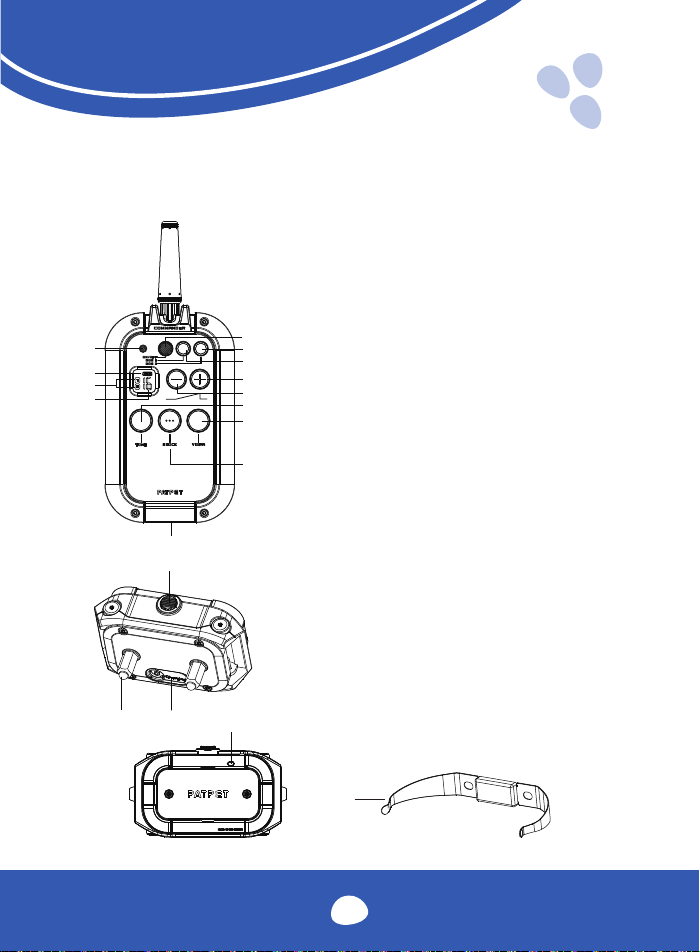
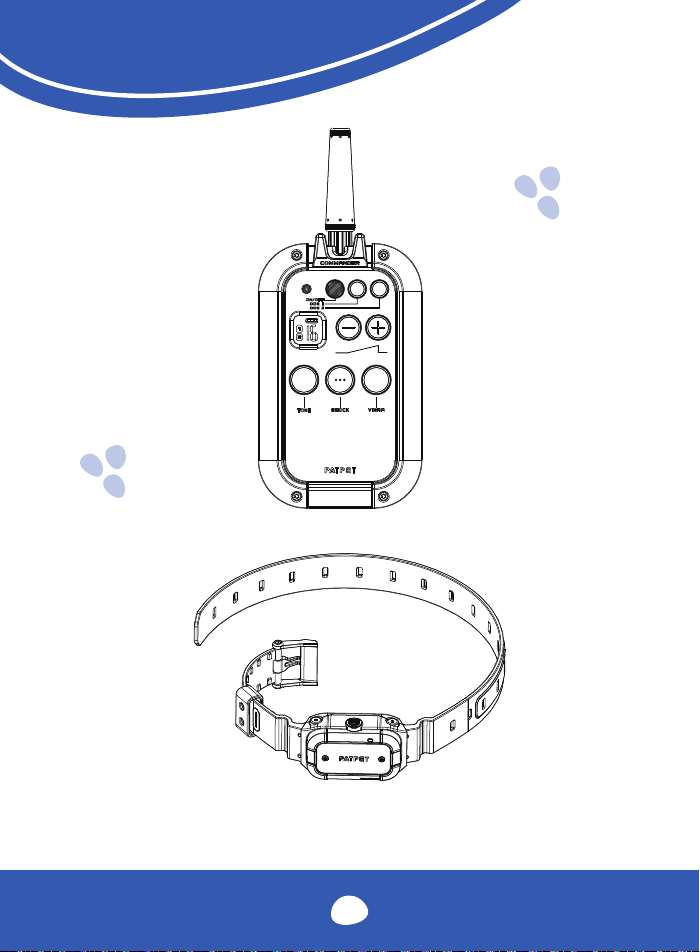
Overview
Remote
A. ON/OFF
B. Dog 2
C. Dog 1
D. Increase shock level
E. Decrease shock level
F. Tone button
G. Vibration button
H. Shock button
I. Charge port
J. Shock Level Display
K. Channel Display
L. Battery Display
M. Indicator light
Receiver Collar
A. Contact Points
B. Charging Port (with cover)
C. On/Off Button
D. LED Indicator
E. Contact spring sheet
06
I
A
B
C
D
J
H
G
E
F
K
L
M
A
B
C
E
D
Product Setup
Before you use the dog training collar, you must set up the product as
outlined by the below steps:
1. Charge the remote and the receiver collar.
2. Prepare the remote and turn it on.
3. Prepare the receiver collar and turn it on.
4. Test the function of the buttons before putting it on a dog.
5. Familiarize yourself with how to use the test lamp, the shock
function, and screwdrivers
6. Pair the remote and the receiver collar, You may need to pair twice if
you lose the product code or have a second collar.
Charge the Remote and the Receiver Collar
1. Plug in and charge the remote and the receiver collar fully.
The initial charge will take up to 4 hours.
Subsequent charges will take 2-3 hours.
2. When fully charged, the red LED on the receiver collar will become
green. The battery display on the remote will stop cycling and
display full.
3. Please press back the rubber cover when the receiver collar is fully
charged.
Tips:
1. Excessive charging will shorten the life of your battery. Only charge the
device when the batteries are low.
2. When you're not using the collar, please turn it off to maintain battery
life.
Note:
Please use an Output: DC 5V 500-800mA charger to charge the product.
Do not use chargers that do not match the necessary specifications.
07
Prepare the Remote
Turning the Remote OFF and ON
1. Press and Hold ON/OFF button to turn the remote ON.
2. The LCD will light up and show the information about the current
channel and battery level. If not, please charge the remote.
3. Press and Hold ON/OFF button to turn the remote OFF.
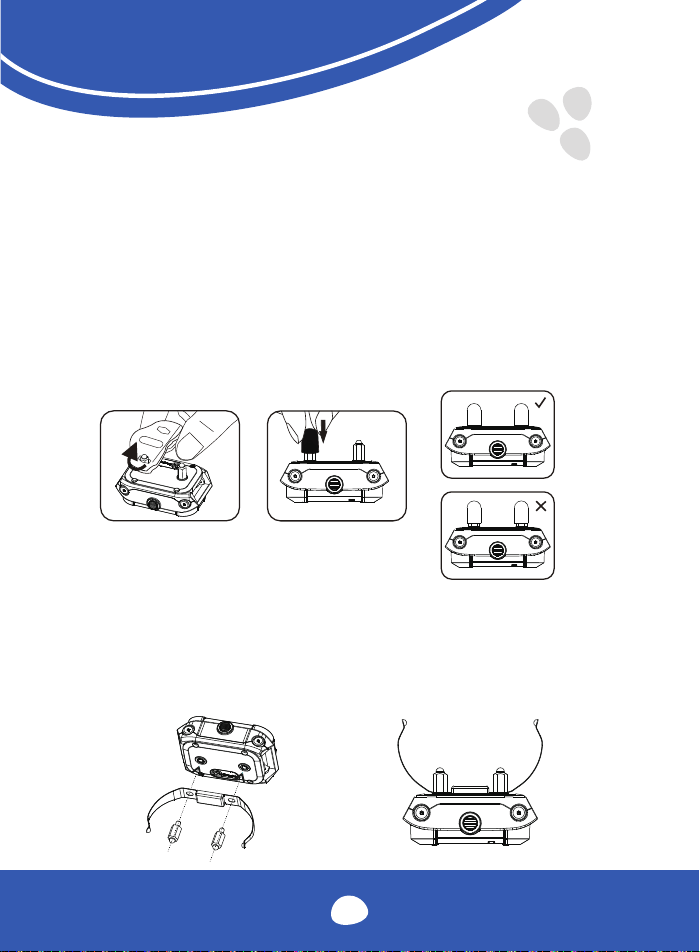
Prepare the Receiver
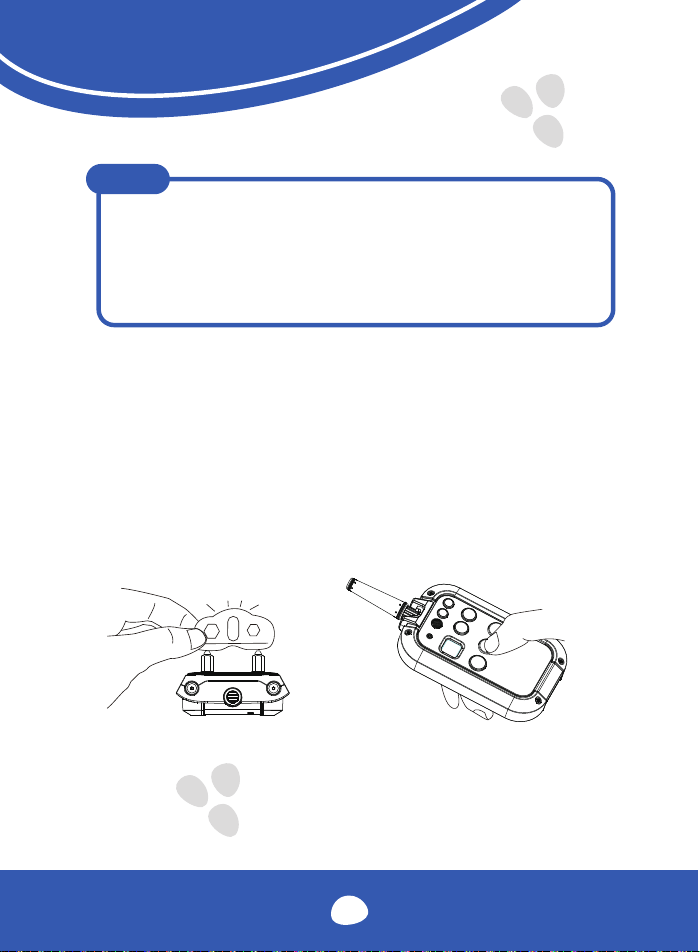
Please use the test tool to install the contact points
Selecting The Contact Points and The Contact spring sheet. For the best
results, select the correct contact points based on your dog's coat. You can
use the contact points on their own, or use the contact points and springs at
the same time, which make the contact more effective and more comfort-
able.
08
3
Turn on the Receiver Collar
- Press the ON/OFF button until the green LED light comes on.
- In normal mode, the green LED will flash every 4 seconds, indicating
that the receiver collar is on and ready to receive a signal from the
remote.
Turn off the Receiver Collar
- Press and hold the ON/OFF button until the red LED light shuts off.
- This takes approximately 3 seconds. Release the On/Off Button.
NOTE
To extend battery life, please turn the receiver collar
off when it is not in use.
Function Test
We recommend you experience how the different shock levels feel on yourself
before using this with a pet. Always begin at the lowest level and increase the
level up to that with which you are comfortable.
1. Place one finger over both contact points on the training collar.
2. Hold your remote approximately 2 ft. from the training collar.
Press and hold the vibration button for 1 to 2 seconds.
You should feel continuous vibration.
3. Press the "-" button to decrease levels. Starting at level 1, press the
shock button.
4. Increase the level until the sensation begins to feel uncomfortable.
09
NOTE
1. Vibration/Shock will not transmit for more than 10 continuous
seconds. To reactivate, release and re-press the button.
2. lt is not recommended to press and hold the vibration/shock
button too long, as this could cause physical or psychological
pain to the dog.
How to Use the Test Lamp
Shock Function Test
1. Turn on the receiver collar.
2. Hold the test lamp's contacts against the contact points .
3. Press the shock button and the test lamp will light up. The brightness
corresponds to the shock level increasing.
10

Pair the Remote and the Receiver Collar
1. Press the Dog 1 button of the remote .
2. Make sure the receiver collar is turned off, Press and hold the ON/OFF
button on the collar for 4-5 seconds.
3. The receiver red & green LEDs will blink for about 15 seconds, which
indicates that it is ready for adding and then release the button.
4. Press the remote tone and vibration buttons at the same time and hold
for 2-3 seconds. The LED on the receiver collar will blink for 5 times,
which indicates successful pairing.
Pair the Second Collar with the Remote
If the remote only is dog 1 mode, you need to unlock the dog 2 mode:
Press "DOG 2" and "-" key at same time and hold 5 second.(Repeat this
operation to lock DOG 2 again)
Press the Dog 2 button of the Remote to select Dog 2. Then follow the above
pairing steps from 2-4.
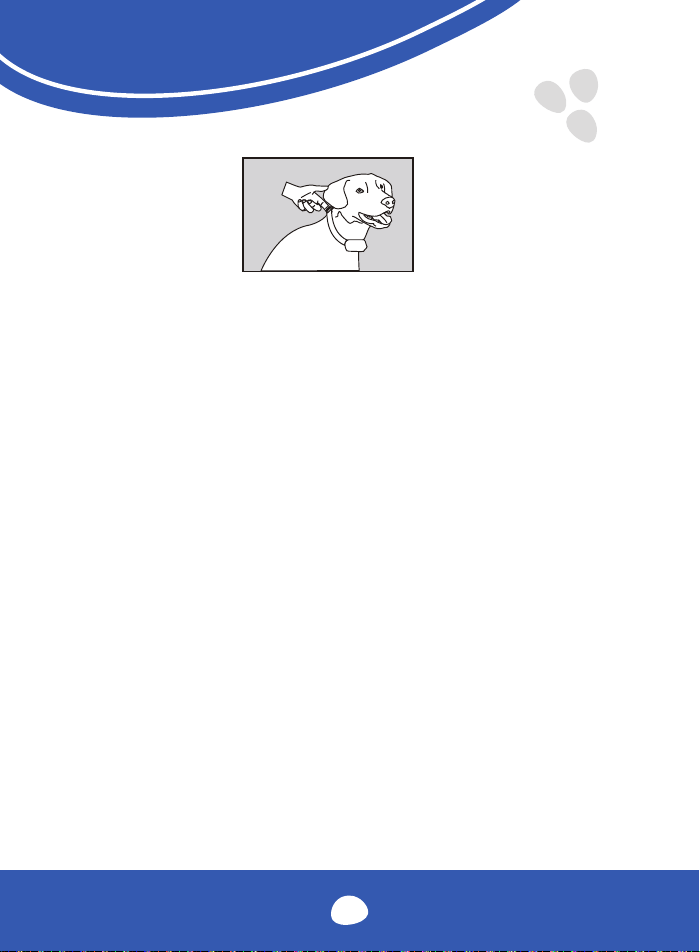
Collar Fitting
Please fit the collar properly, ensuring that the contact points press firmly against
the dog's skin. When properly fitted, you should be able to put a finger in between
the receiver collar and dog’s neck.
11
Too Loose:
The receiver collar will move around the dog's neck and the contact points
maybe can't contact the dog's skin.
Too Tight:
It may cause shortness of breath for the dog and may hurt the dog's skin.
Caution:
1. Do not shave the hair on pet's neck as this may increase the risk of
skin irritation.
2. The collar should not be worn for more than 12hours per day.
as it may cause skin irritation when worn too long.
Find the Best Shock Level for Your Pet
The unit comes with Up and Down buttons to control the level of shock, with Level
1 being the lowest and Level 16 being the highest. The level of shock best suited
for your dog depends on your dog's temperament and threshold for being
shocked. Always start at the lowest level and work your way up. You have reached
the appropriate level when the dog responds to the shock with a mild reaction,
such as a flick of the ear, a lick of the lips, a tensing of the neck muscles, etc. The
shock level may vary depending on the training situation. When highly distracted,
dog's will require a higher level of shock.
12
Device Information
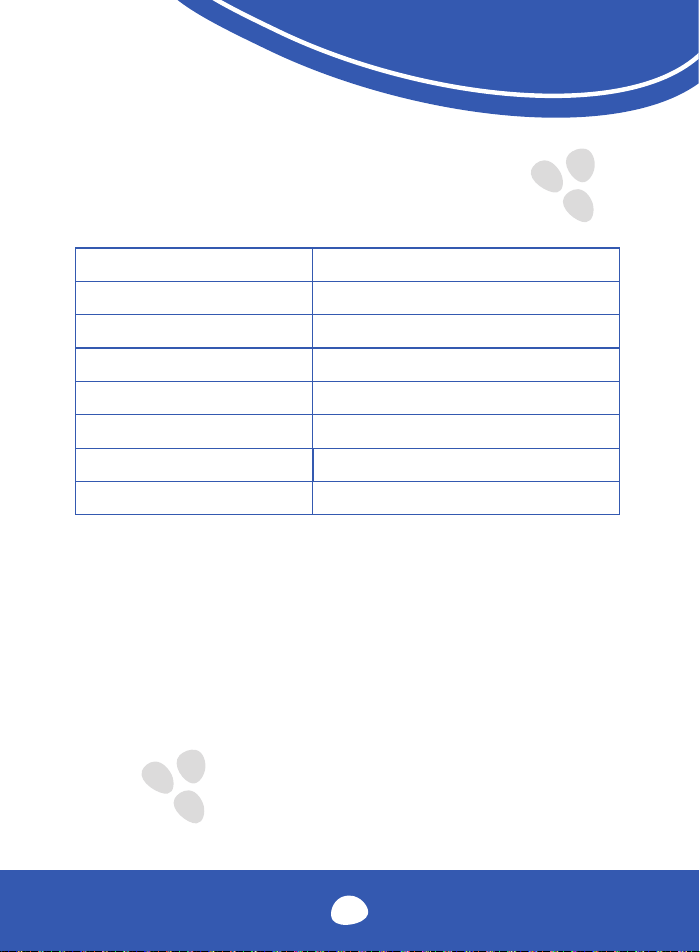
Product Specification
Battery Type
Rechargeable, lithium polymer battery
Battery Life(typical use)
Remote: 27 days /Receiver: 11 days
Remote Waterproof Rating
IEC 60529 IPX5, waterproof
Receiver Waterproof Rating
IEC 60529 IPX7, waterproof
Operating temperature range
0~40
0
C (32~104
0
F)
Remote wireless power
20dBm(100mW)
Wireless Range
900m (2950 feet)
The unit needs to be charged in any of the
following situations:
1. The indicator light on the receiver collar is emitting a red color every
4 seconds or is flashing rapidly.
2. The 3 bar battery indicator on the remote's LCD shows just 1 bar.
3. The transmitting indicator light on the remote and receiver collar
does not turn on.
4. The indicator light on the remote or receiver collar comes on
momentarily when any of the mode buttons are pressed.
13
Charging temperature range
-20~40
0
C (-4~104
0
F)
Others
Frequently Asked Questions
Is the vibration/shock safe for my pet?
While the vibration/shock is unpleasant, it is harmless to your pet. Electronic
training devices require interaction and training from the owner to achieve the
desired results.
How old does my pet have to be before using the remote
training collar?
Your pet should be able to recognize basic obedience commands such as "Sit"
or "Stay".Pets should be at least 6 months old before using the training collar.
Once my pet is trained and has been obeying my commands, will he
have to continue to wear the receiver collar?
Probably not. You may need to reinforce your training with the receiver collar
from time to time.
Are the remote and the receiver collar waterproof?
YES.
Will I get exactly 2950 feet of range with the remote training
collar?
The range of the remote training collar will vary according to terrain, weather,
and vegetation in your area, as well as possible interference from other radio
devices. Refer to your maximize the distance" for tips on maximizing your range.
14
How long can I continuously deliver Vibration/Shock to my
pet?
The maximum amount of time you can press the Vibration/Shock Button and
deliver Vibration/Shock to your pet continuously is 10 seconds. After this, there's
a time-out an Vibration/Shock cannot be delivered for 5 seconds. After the 5
second time-out period, the button can be pressed and vibration/shock can be
delivered again.
Troubleshooting Guide
My pet does not respond when I press a button.
- Make sure the receiver collar has been turned on.
- Make sure the remote channel(1 or 2) is correct with the receiver collar.
If not, please pair the Remote and the Receiver Collar again.
- Check the battery may be low in either the remote or the receiver
collar.
- Make sure the receiver collar's contact points are placed snugly against
your pet's skin. Refer to "Collar Fitting" for more information
- Terrain, weather, vegetation, transmission from other radio devices, and
many other factors can impact the amount of range you have with the
unit.
The receiver collar unworkable.
- Make sure the receiver collar has been charged. For the initial charge,
be sure to charge it for 4 hours. Subsequent charges only take 2-3
hours.
15
Warranty and repair information
1-Year Warranty
The original purchaser for this unit is provided with a 1-YEAR WARRANTY.
The warranty begins on the date of purchase, For the first year, coverage is
provided for both parts and labor on warranty repair services. After the first year,
the Limited Lifetime Warranty covers parts only, and does not cover labor fees and
Accessories,
Accessories such as straps and batteries are covered for the first year only. All
shipping fees incurred, the cost of accessories after the first year, and labor fees
associated with out of warranty repair work are the customers responsibility.
Not Covered Under Warranty
We DO NOT offer warranty for products that have been bought second- hand or
were resold. Issues of replacement and refunds on units purchased less than 30
days from an authorized dealer must be addressed to the dealer directly. If the
products purchased from an authorized dealer are after 30 days from the date of
purchase, please send the units to us for service and repair.
We DO NOT cover the cost of repairs and replacements due to misuse by the
owner or dog, improper maintenance, and/or lost units.
The warranty is void if the unit has been altered or an unauthorized person has
damaged the unit while attempting repair work.
16

Procedure for Repair Work
If the unit is malfunctioning, please refer to the 'Troubleshooting Guide" in the
manual before sending it back for service.
A copy of the sales receipt showing the purchase date may be required before
warranty work is initiated. Please include a brief explanation outlining the problem,
and include your name, address,city/state/zip code, daytime phone number,
evening phone number, and email address.
17

Compliance FCC - USA
This device complies with part 15 of the FCC Rules. Operation is subject to the
following two conditions:
(1) This device may not cause harmful interference.
(2) This device must accept any interference received, including interference that
may cause undesired operation.
CAUTION: Modification or changes to this equipment not expressly approved by the
manufacturer may void the user’s authority to operate the equipment.
Note: This equipment has been tested and found to comply with the limits for a
Class B digital device, pursuant to part 15 of the FCC Rules. These limits are
designed to provide reasonable protection against harmful interference in a
residential installation. This equipment generates uses and can radiate radio
frequency energy and, if not installed and used in accordance with the instructions,
may cause harmful interference to radio communications. However, there is no
guarantee that interference will not occur in a particular installation. If this equipment
does cause harmful interference to radio or television reception, which can be
determined by turning the equipment off and on, the user is encouraged to try to
correct the interference by one or more of the following measures:
18

- Reorient or relocate the receiving antenna.
- Increase the separation between the equipment and receiver.
- Connect the equipment into an outlet on a circuit different from that
to which the receiver is connected.
- Consult the dealer or an experienced radio/TV technician for help
19
0 4
RoH S
Shenzhen Patpet Technology Co., Ltd
Add: No. 1 Qinhui Road, Gushu Community,
Xixiang Street, Baoan District, Shenzhen,China
MADE IN CHINA
Shenzhen Patpet Technology Co.,Ltd
Become a dealer: [email protected]
After-service: [email protected]
Youtube Video Guide
@PatpetDogCollar
https://patpet.com/