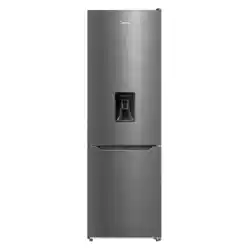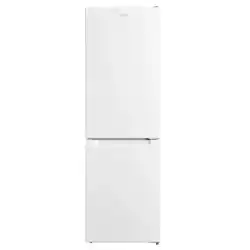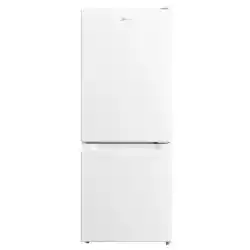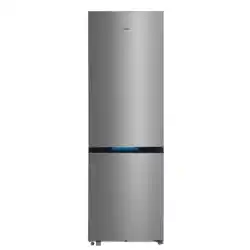
Product Overview
Product Introduction
1
2
3
6
4
5
7
8
9
10
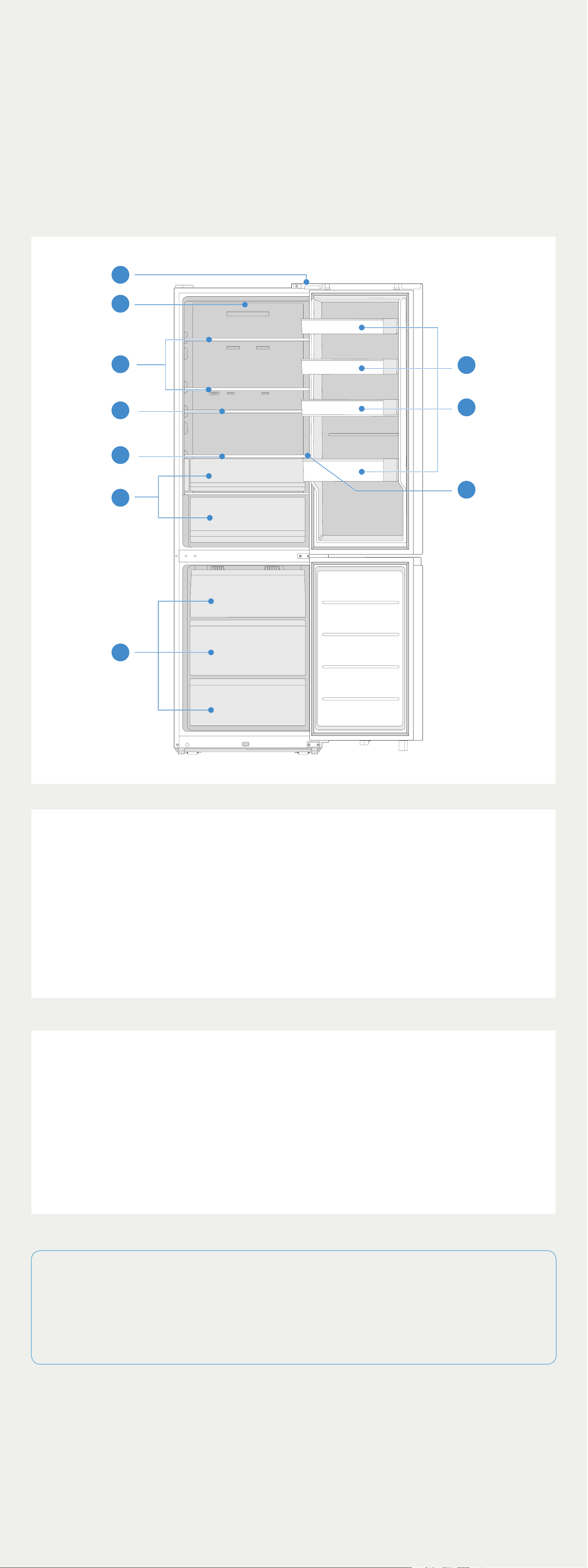
1 Door switch 2 LED light
3 Shelf 4 Infinite shelf
5 Humidifying shelf 6 Fruits & vegetables box
7 Drawer 8 Door tray
9 Infinite door tray 10 Control panel
• For the most ecient use of energy, please keep the all internal
items such as trays, drawers, shelves and ice cube box on the
position supplied by manufacturer.
• This refrigerating appliance needs to be installed independently
and cannot be used as a built-in. Otherwise, it will cause problems
such the performance and life of the appliance are reduced. And
the manufacturer does not provide basic appliance warrant.
• | Attention
Dierences: Due to technical changes and dierent models, some
of the illustrations in this manual may dier from your model.
Product Installation
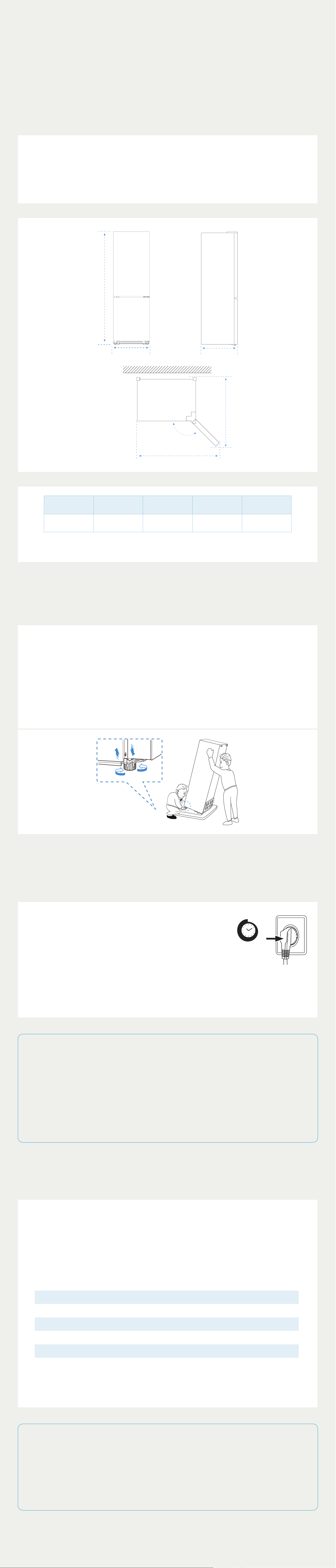
Space requirement diagram
Too small of a distance from adjacent items may result in the
degradation of freezing capability and increased electricity costs.
Allow over 100 mm of clearance at both sides and the top, and 50-
75 mm at the back when installing the appliance.
E
D
C
A
B
145 °
A B C D E
595 2010 688 1270 1415
Notice: All dimensions in mm
Leveling feet
To avoid vibration, the appliance must be leveled.
If required, adjust the leveling feet (located at the bottom front on
both sides of the unit) to compensate for the uneven floor.
The front should be slightly higher than the rear to aid in door
closing.
Leveling feet can be turned easily by tipping the cabinet slightly.
Connecting the appliance
After installing the product, please let it stay
for more than 2 hours before turning on the
power, otherwise it will lead to a decrease
in cooling capacity or a damage to the
product.
Allow the appliance to run empty for 24
hours so the compartment can cool to the
appropriate temperature.
2 h
• | CAUTION
The refrigerator should always be plugged into its own individual
electrical outlet which has a voltage rating that matches the rating
plate.
WARNING: When positioning the appliance, ensure the supply cord
is not trapped or damaged.
Ambient Temperature
Depending on the climate class, this refrigerator is intended to
be used at an ambient temperature range as specified in the
following table.
The product may not operate properly at temperatures outside
of the specific range.
You can find the climate class on the product label.
Climate Class Ambient Temperature
SN +10 °C to +32 °C
N +16 °C to +32 °C
ST +16 °C to +38 °C
T +16 °C to +43 °C
If you have any doubts regarding installation, please turn
to the vendor, to our customer service or to the nearest
Authorised Service Centre.
• | Tips
The cooling performance and power consumption of the
refrigerator may be aected by the ambient temperature, the
door-opening frequency, and the location of the refrigerator. We
recommend adjusting the temperature settings as appropriate.

Product Operation
Control panel
The control panel is located on the right-hand inside wall of the
refrigerating chamber.
1
2
3
A
C
D
E
4
5
B
Button
A Refrigerator temperature adjustment button
B Freezer temperature adjustment button
C Vacation button
D Super cool button
E Super freeze button
Display screen
1 Refrigerator icon
2 Wireless network icon
3 Freezer icon
4 Super cool icon
5 Super freeze icon
• | Attention
Differences: Due to technical changes and different models, some of the
illustrations in this manual may differ from your model.
Operation Instruction
a |
Display
• When the refrigerator is powered on for the first time, the whole
display is on for 3s and then shows normal operation after the
start-up bell rings. (The set temperatures of the refrigerator and
freezer chambers are 5°C/-20°C respectively when powered on
for the first time). When there is no fault, the fridge/freezer set
temperature will be displayed.
• Under normal circumstances, the screen lights up when the door
is opened and goes out after the door is closed, Under normal
circumstances, pressing any key will automatically unlock when
the door is open,Display will show failure code when there is
malfunction.
• | NOTE
If a fault occurs, the display will show the fault code by flashing the
temperature level icons (see “Fault Indication”).
b |
Temperature adjustment of refrigerator chamber
Press the “Refrigeration” key to select the refrigeration temperature
zone, and then press it to adjust the temperature. Each time the
key is pressed, the temperature drops by 1°C; after the temperature
reaches 2°C, press it again to set the refrigerator chamber at 8°C.
The setting temperature range of refrigerator chamber is 2~8°C; the
setting takes effect after being locked.
c |
Refrigerator chamber closed/open
The refrigerator chamber is closed when the vacation mode is set.
d |
Temperature adjustment of freezer chamber
Press the “Freezer” key to select the freezer temperature zone, and
then press it to adjust the temperature. Each time the key is pressed,
the temperature drops by 1°C; after the temperature reaches -24°C,
press it again to set the freezer chamber at -16°C, with a setting
range of -24 ~ -16°C. The settings take effect after locking.
e |
Mode setting
Vacation mode
When the vacation mode is set by pressing the vacation key, the
fridge function will be turned off, the fridge temperature display area
will go out, and the freezer temperature will be automatically set to
-18°C;
Press the Freeze/Super cool and Super Freezing keys to exit the
vacation mode.
When the Freeze key is adjusted to exit the vacation mode, the
refrigeration/freezing function will automatically return to the
set temperature before the vacation mode; when the Super cool
and Super Freezing key is adjusted to exit the vacation mode, the
refrigeration/freezing function will automatically return to the set
temperature.
Super cool mode
Press the Super cool key to set/cancel the Super cool mode, and the
corresponding Super cool icon lights up/goes out; when the Super
cool mode is set, the refrigeration temperature will be automatically
set at 2°C; when exiting the Super cool mode, the refrigerator
chamber will automatically return to the set temperature before the
Super cool mode.Automatically exit for up to 6 hours.
Super Freezing mode
Press the Super Freezing key to set/cancel the Super Freezing mode,
and the corresponding Super Freezing icon will light up/go out;
when the Super Freezing mode is set, the freezing temperature will
be automatically set at -24°C; when exiting the Super Freezing mode,
the setting temperature of the freezer chamber will automatically
return to the setting temperature before the Super Freezing mode.
Automatically exit for up to 40 hours.
Door open timeout alarm
After the door has been open for more than 2 minutes, three alarms
beeps will sound, thereafter the alarm beeps will increase by one
every one minute to a maximum of 30 times. Close the door or press
any button to cancel this alarm beep.
f |
Description of human sensing
• When the person is close to the front of the refrigerator door, the
blue light will be on after being sensed; After the person leaves,
the blue light will go out with a delay of 30 seconds.
• When the refrigerating door is open, the blue light is on; when
the refrigerating door is closed and the freezing door is open, the
white light is on.
• There is a sensing blind area on the door opening side.
• It is not sensitive to some dark-colored clothes, such as wool and
stripes items.
g |
Humidity adjusting shelf-fruit and vegetable box
cover
The pick can be adjusted left and right to adjust the humidity
h |
The Precautions of infinite door tray
Hold the base upwards, and the infinite door tray will rise. Unlock
by pulling the handle outwards,the infinite door tray will drop with
gravity.
i |
The Precautions of infinite glass shelf
To avoid collision with the items on the lower shelf during the process
of adjusting the sliding shelf backwards, please do not any items
tightly under the rear of sliding shelf.
j |
Fault indication
The following warnings appearing on the display indicate
corresponding faults of the refrigerator. Though the refrigerator may
still have cold storage function with the following faults, the user shall
contact a maintenance specialist for maintenance, so as to ensure
optimized operation of the appliance.
Fault Code Fault Description
E1 Refrigerating temperature sensor fault
E2 Freezer temperature sensor fault
E5 Freezer frost sensor fault
E6 Main control PCB and Display PCB Communication fault
E7 Ambient temperature sensor fault
EH Fault of the humidity sensor
L3 Freezer fan fault
L4 Freezer fan speed is abnormal
L5 Condenser fan fault
L6 Condenser fan speed is abnormal
c8 Main PCB and human sensor communication failure
k |
Changing the light
Any replacement or maintenance of the LED lamps is intended to
be made by the manufacturer, its service agent or similar qualified
person.
• | Attention
This product contains a light source of energy efficiency class (G).

Maintenance Tips
Overall cleaning
•
Disconnect the appliance from the electrical supply before
undertaking any routine maintenance. Allow at least 5 minutes
before restarting the appliance, as frequent starting may
damage the compressor.
•
Do not use mechanical devices or other means to accelerate
the defrosting process, other than those recommended by the
manufacturer.
•
Do not try to repair, disassemble or modify the appliance by
yourself. In case of repair please contact our customer service.
•
Eliminate the dust on the back of the unit at least once in
the year to avoid hazard by fire, as well as increased energy
consumption.
•
Check the door gasket regularly to make sure there are no
debris. Clean the door gasket with a soft cloth dampened with
soapy water or diluted detergent.
•
The interior of the product should be cleaned regularly to
avoid odor.
•
Use a soft cloth or sponge to clean the inside of the product,
with two tablespoons of baking soda and a quart of warm
water. Then rinse with water and wipe clean. After cleaning,
open the door and let it dry naturally before turning on the
power.
•
For areas that are dicult to clean in the product (such as
narrow sandwiches, gaps or corners), it is recommended to
wipe them regularly with a soft rag, soft brush, etc. and when
necessary, combined with some auxiliary tools (such as thin
sticks) to ensure no contaminants or bacterials accumulation
in these areas.
•
Wipe the outer surface of the product with a soft cloth
dampened with soapy water, detergent, etc., and then wipe
dry.
•
Do not use hard brushes, clean steel balls, wire brushes,
abrasives (such as toothpastes), organic solvents (such as
alcohol, acetone, Isoamyl acetate, etc.), boiling water, acid
or alkaline items, which may damage the fridge surface and
interior. Boiling water and organic solvents such as benzene
may deform or damage plastic parts.
•
Do not rinse directly with water or
other liquids during cleaning to avoid
short circuits or aect electrical
insulation after immersion.
• | Notes:
The appliance shall run continuously once it is started. Generally, the
operation of the appliance shall not be interrupted;otherwise the service
life may be impaired
Defrosting
Although this appliance automatically defrosts, a layer of frost may
occur on the freezer compartment’s interior walls if the freezer door
is opened frequently or kept open too long. If the frost is too thick,
choose a time when the supply of food stocks are low and proceed
as follows:
1.
Remove existing food and accessories baskets, unplug the
appliance from the mains power and leave the doors open.
Ventilate the room thoroughly to accelerate the thawing
process.
2.
When defrosting is completed, clean your freezer as described
above.
• | CAUTION!
Don’t use sharp objects to remove frost from the freezer. Only after the
interior completely dry should the appliance be switched back on and
plugged back into the mains socket
Cleaning of door tray
According to the direction arrow in
the figure below, use both hands to
squeeze the tray, and push it upward,
then you can take it out.
After washing the tray having been
taken out, you can adjust its installing
height in accordance with your
requirement.
Cleaning of glass shelf
As the innermost part of the
refrigerator liner where contacting the
shelves has a backstop, you shall raise
the shelves upward, then you can be
able to take it out.
Adjust or clean the shelves according
to your requirement.
Cleaning the vegetable drawer
Remove the contents of the drawer.
Hold the handle of the vegetable
drawer and pull it out completely until
it stops.
Lift the vegetable drawer up and
remove it by pulling it out.
• | Notes:
Differences: Due to technical changes and different models, some of the
illustrations in this manual may differ from your model.
Troubleshooting
You may try to solve the following simple problems by yourself.
If them cannot be solved, please contact the after-sales
department.
Failed
operation
• Check whether the appliance is connected to power
or whether the plug is in well contact
• Check whether the voltage is too low
• Check whether there is a power failure or partial
circuits have tripped
Odor
• Odorous foods shall be tightly wrapped
• Check whether there is any rotten food
• Clean the inside of the refrigerator
Long-time
operation of
the compressor
• Long operation of the refrigerator is normal in
summer
• when the ambient temperature is high It is not
suggestible having too much food in the appliance at
the same time
• Food shall get cool before being put into the
appliance
• The doors are opened too frequently
Light fails to
get lit
• Check whether the refrigerator is connected to power
supply and whether the illuminating light is damaged
• Have the light replaced by a specialist
Door can not
be properly
closed
• The door is stuck by food packages Too much food is
placed
• The refrigerator is tiltedr.
Loud noises
• Check whether the floor is level and whether the
refrigerator is placed stably
• Check whether accessories are placed at proper
locations
Door seal fails
to be tight
• Remove foreign matters on the door seal
• Heat the door seal and then cool it for restoration
• (or blow it with an electrical drier or use a hot towel
for heating)
Water pan
overflows
• There is too much food in the chamber or food stored
contains too much water,resulting in heavy defrosting
• The doors are not closed properly, resulting in
frosting due to entry of air and increased water due
to defrosting
Hot housing
• Heat dissipation of the built-in condenser via the
housing, which is normal When housing becomes
hot due to high ambient temperature, storage of too
much food or shutdown of the compressor is shut
down, provide sound ventilation to facilitate heat
dissipation
Surface
condensation
• Condensation on the exterior surface and door
seals of the refrigerator is normal when the ambient
humidity is too high. Just wipe the condensate with a
clean towel.
Abnormal noise
• Buzz: The compressor may produce buzzes during
operation, and the buzzes are loud particularly upon
start or stop. This is normal.
• Creak: Refrigerant flowing inside of the appliance
may produce creak, which is normal.
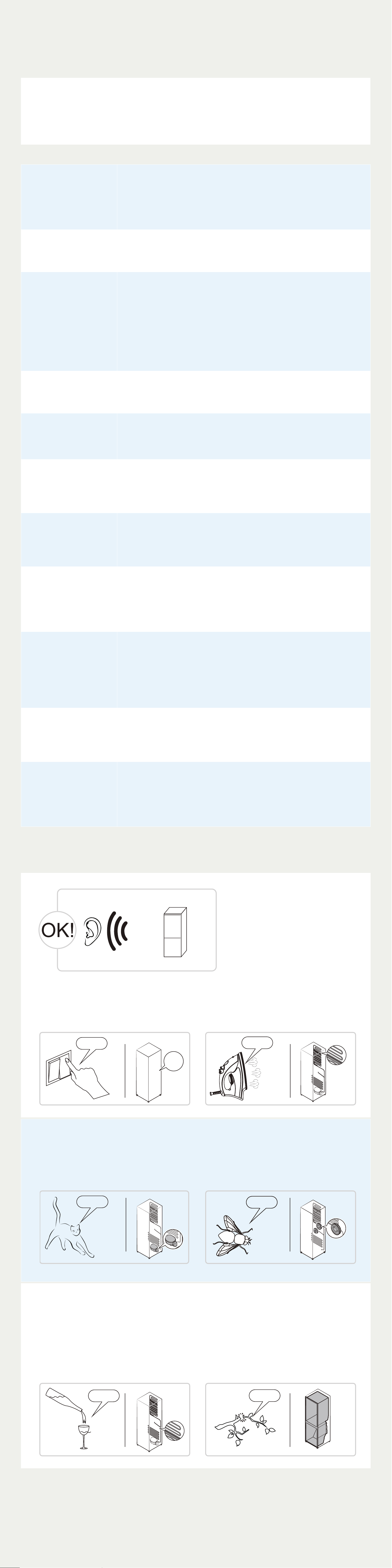
Do you hear these abnormal sounds as below? Usually these sounds
are normal.
S
S
SRR
R
!
HISSS!
BLUBB!
C
L
IC
K
!
BRRR!
CRA
CK!
CLICK: Some electrical parts in
the refrigerator, such as electric
valve will make this noise when
working. This is normal.
HISSS: When the refrigerant
flows into the evaporator, it will
make this noise. This is normal.
CLICK!
CLICK!
HISSS!
HISSS!
BRRR: The compressor will make
this noise when working, and the
buzzes are loud particularly upon
start or stop. This is normal.
SSSRRR: The fan motor in the No
frost refrigerator will make this
noise when working. This is normal.
BRRR!
BRRR!
SSSRRR!
SSSRRR!
SSSRRR!
SSSRRR!
BLUBB: Refrigerant flowing
through the pipes in the
refrigerator will make this noise.
This is normal.
CRACK: Cracking sound or broken
ice sound: the overall structure of
the refrigerator, air duct frost will
be with the thermal expansion
and contraction of the expansion
sound, these are also normal
physical phenomenon.
BLUBB!
BLUBB!
CRACK!
CRACK!

Tips & Tricks
Storing food
Freezer compartment
The freezer compartment is designated for the low-temperature
freezing of food, long-term storage of frozen food, and for the
production of ice cubes.
Do not put fresh and frozen food next to each other. The frozen food
may thaw.
When freezing large amounts of fresh food (such as meat, fish or
chopped meat), please divide them into several small pieces before
putting in, so that they can be quickly frozen and pick up easily.
Abide by the storage times recommended by food manufacturers on
the packages, there is no information on the packaging, food should
not be stored frozen for longer than three months from the date of
purchase.
When purchasing frozen food, make sure that it was frozen at a
suitable temperature and that the packaging is not damaged.
Frozen food should be kept in suitable individual packages to ensure
that adjacent food cannot be contaminated. Consume thawed and
defrosted foods immediately, do not refreeze them.
In case of prolonged power failure or malfunction of the appliance,
remove the stored frozen food and check whether they are still edible,
then store them in a suciently cool place or in another appliance.
To defrost food, remove it from the freezer and let it defrost at room
temperature or in the refrigerator. To defrost food quickly, you can use
the defrost function on your microwave, for example.
If you only want to defrost part of a pack, remove the portion you
need and immediately close the rest of the pack. In this way, you will
avoid “freezer burn” and will reduce ice formation on the remaining
foods.
Refrigerator compartment
The Refrigerator compartment is the ideal storage location for ready
meals, cakes and pastries, preserved food, condensed milk, milk,
cheese, spreads, sauces, dips and eggs.
The freshness at point of purchase is important for the shelf-life of your
food. In principle, the fresher the produce when placed in the crisper
drawers, the longer it stays fresh. Therefore, when buying food, always
pay attention to the degree of freshness.
Never put warm foods in the fridge compartment. These should first
cool down at room temperature and then be placed so as to ensure
adequate air circulation in the fridge compartment.
Meat and clean fish (packed in a package or plastic foil) can be placed
in the fridge compartment, which can be used in 1–2 days.
Fruit and vegetables without packaging can be placed in the part
designated for fresh fruit and vegetables
.
• | Notes:
Storage of too much food during operation after the initial connection to
power may adversely affect the freezing effect of the refrigerator.
Storage times and temperature
Note: Overlong storage or storage at inappropriate freezing
temperature may cause a quality loss or spoiled foods, which causes
food waste, is inedible and may cause food poisoning. The minimum
temperature in most cases should be -18°C or colder. Follow the
maximum recommended storage times below:
•
Stew, ice cream, sausages, bread: 2-6 months.
•
Fish, shrimp, lamb, meat: 4-8 months.
•
Vegetables, fruits, poultry, beef: 6-12 months.
Tips for energy saving
Do not place the appliance near cookers, radiators or other heat sources.
If the ambient temperature is high, the compressor will run more frequently
and for longer, resulting in increased energy consumption.
Ensure that there is sucient ventilation at the base of the appliance, on
the sides of the appliance and at the back of the appliance.
Please also observe the spacing dimensions in the chapter “Installation”.
An evenly filled refrigerator/freezer compartment contributes to optimal
energy use.
Allow warm food to cool before placing it in the refrigerator/freezer
compartment. Food that has already cooled down increases energy
eciency.
Allow frozen food to defrost in the refrigeration compartment The coldness
of the frozen food reduces the energy consumption in the refrigerator
compartment and thus increases the energy eciency.
Setting the temperature no colder than necessary contributes to optimal
energy use.
The door gaskets of your appliance must be perfectly intact so that
the doors close properly and energy consumption is not increased
unnecessarily.
Coldest zone in the
refrigerator
OPTIONAL: OK-temperature indicator
The OK-temperature indicator can be used to determine temperatures
below +4°C. Gradually reduce the temperature if the sign does not
indicate “OK”.
To ensure the temperature in this area, do not change the positioning
of the shelf. Inforced air refrigerators (equipped with a fan or No Frost
models),the symbol of the coldest zone is not represented because
the temperature inside is homogeneous.
Temperature indicator setting
To help you set your refrigerator well, it is equipped with a temperature
indicator that will monitor the average temperature in the coldest
zone.
WARNING: This indicator is intended to work only with your
refrigerator, do not use it in another refrigerator (in fact, the coldest
zone is not the same), or for any other use.
Checking the temperature in the coldest zone
With the temperature indicator, you can check regularly that the
temperature of the coldest zone is correct. Indeed, the internal
temperature of the refrigerator depends on several factors such as the
ambient temperature of the room, the amount of food stored and the
frequency of door opening. Take these factors into consideration when
setting the device.
When the indicator shows « OK », this means that your thermostat is
well adjusted and the internal temperature correct.
If the indicator of temperature turns WHITE, this means that the
temperature is too high; in this case, increase the refrigerator
temperature control setting and wait for 12 hours before performing
a new visual inspection of the indicator. When fresh food has been
introduced or the door has been left open, it is possible for the
indicator of temperature to turn WHITE after a while.

Doors Reversal
Based on the location where you plan to use your refrigerator, you
may find it more convenient to reverse the position of the door.
• |
CAUTION
To avoid injury to yourself or your property, we recommend that
someone assist you during the door reversal process.
Preparing to reverse the door position
• Make sure that your refrigerator is unplugged and empty.
• Have someone available to assist you in the process.
• Keep all of the parts you remove to reuse them later.
Steps:
1. Remove the items from the door body.
2. Remove the left upper hinge decorative cover, right upper
hinge cover and right upper hinge. Disconnect the signal lines
on the right side of the fridge top. There are three lines in total:
1
signal line (switch to be reserved),
2
signal line (sensor to
be reserved) and
3
signal line (connecting line to be reserved).
The signal line
9
on the top of the door body needs to be
disconnected. The
2
signal line is used for some products and
can be ignored if there is no
2
signal sensor.
1
3
9
2
3. Remove the refrigeration door body (pay attention not to
lose small parts such as door stoppers);
Remove the middle hinge for backup use and remove the hinge
hole decorative cover, cap, and screws on the other side.
4. Remove the freezer door body (be careful not to lose small
parts such as the shaft sleeves and door stoppers);
Remove the lower hinge, remove the lower hinge shaft and
install it on the other side of the hinge, remove the lower hinge,
remove the lower hinge shaft and install it on the other side of
the hinge for backup use.
5. Refrigeration door replacement;
Remove the left trim cover, take out the right trim cover from
the accessory bag and install it on the other side of the upper
end cap; remove the fridge door self-locking and door stop,
take out the left door self-locking from the accessory bag, and
install the door stop and left door self-locking to the left side
of the lower end cap of the door in turn. Remove the bottom
screws, disconnect the
4
signal line, remove the recognized
human detect sensor module (reserved) and insert the wiring
harness into the hole.Remove the left bottom cover and install
it to the right bottom. Pull out the
5
signal line, connect it with
the recognized human detect sensor module, fix it and tighten
the screw. All wire harnesses must be fully inserted into the
slots to avoid exposure
4
5
6. Freezer door switch;
Remove the upper end cap sleeve of the freezer door, and
install the cap in the left and right interchangeable positions;
Remove the freezer door self-locking, the door stopper and
the door support, remove the left door self-locking from the
accessory package, install the door stopper and the left door
self-locking to the left side of the freezer lower end cover in
turn, and install the door support to the right side of the freezer
lower end cover.
7. Install the middle hinge and install the refrigeration door on the
middle hinge, the install then lower hinge and cover the hinge
hole decorative cover.
8. Take out the left upper hinge cover and the left upper hinge
from the accessory bag, remove the switches, sensors and
connecting lines installed on the right hinge cover, and install
them onto the left upper hinge cover; Place the fridge door
body on the middle hinge and install the left upper hinge;
Connect the
6
signal line on the left side of the refrigerator
with the switch, connect the
7
signal line with the sensor (this
step can be omitted when there is no sensor), connect the
8
signal line with the connecting line, fix the
9
door body line in
another direction on the left side of the refrigerator to connect
it with the connecting line; Then cover and fix the left hinge
cover, and finally install the hinge decorative cover on the right
side of the fridge.
6
7
8
• | NOTE
Dierences: Due to technical changes and dierent models, some
of the illustrations in this manual may dier from your model.